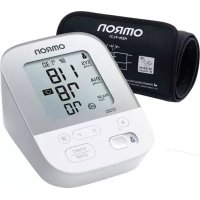
X4 Smart - Blood pressure monitor OMRON - Free user manual and instructions
Find the device manual for free X4 Smart OMRON in PDF.



| Product type | Automatic upper arm blood pressure monitor |
| Model | X4 Smart (HEM-7155T-ESL) |
| Measurement method | Oscillometric |
| Display | Digital LCD |
| Cuff pressure range | 0 to 299 mmHg |
| Blood pressure measurement range | Systolic: 60 to 260 mmHg, Diastolic: 40 to 215 mmHg |
| Pulse measurement range | 40 to 180 beats/min |
| Accuracy | Pressure: ±3 mmHg, Pulse: ±5% of reading |
| Inflation | Automatic by electric pump |
| Deflation | Automatic pressure control valve |
| Power supply | 4 AA 1.5V batteries or optional AC adapter (6 V DC, 4 W) |
| Battery life | Approximately 1000 measurements with new alkaline batteries |
| Connectivity | Bluetooth Low Energy (2.4 GHz) |
| Memory | Up to 60 readings per user |
| Dimensions (approx.) | 105 mm (D) × 85 mm (H) × 152 mm (L) |
| Weight (approx.) | Monitor: 340 g (without batteries), Cuff: 163 g |
| Operating conditions | +10°C to +40°C, 15 to 90% RH, 800 to 1060 hPa |
| Storage conditions | -20°C to +60°C, 10 to 90% RH |
| IP classification | IP20 (monitor) |
| Warranty | 3 years |
| Included accessories | Cuff (HEM-FL31), 4 AA batteries, storage case, instruction manual |
| Maintenance | Clean with a soft dry cloth; do not immerse |
| Safety | Irregular heartbeat detection, movement warning |
Frequently Asked Questions - X4 Smart OMRON
User questions about X4 Smart OMRON
0 question about this device. Answer the ones you know or ask your own.
Ask a new question about this device
Download the instructions for your Blood pressure monitor in PDF format for free! Find your manual X4 Smart - OMRON and take your electronic device back in hand. On this page are published all the documents necessary for the use of your device. X4 Smart by OMRON.
USER MANUAL X4 Smart OMRON
Automatic Upper Arm Blood Pressure Monitor
M4 Intelli IT (HEM-7155T-EBK)
X4 Smart (HEM-7155T-ESL)
Read Instruction manual and before use.
FR Lire le mode d'emploi et avant l'utilisation.
DE Lesen Sie vor der Verwendung die Gebrauchsanweisung und . 2
IT Leggere il manuale di istruzioni e prima dell'uso.
ES Lea el manual de instrucciones y antes del uso.
NL Lees de gebruiksaanwijzing en voor gebruik.
RU Прочтите руководство по эксплуатации① и② перед использованием.
TR Kullanmadan önce, kullanım kılavuzu ve 'yi2kuyun.
Thank you for purchasing the OMRON Automatic Upper Arm Blood Pressure Monitor. This blood pressure monitor uses the oscillometric method of blood pressure measurement. This means this monitor detects your blood movement through your brachial artery and converts the movements into a digital reading.
1.1 Safety Instructions
This instruction manual provides you with important information about the OMRON Automatic Upper Arm Blood Pressure Monitor. To ensure the safe and proper use of this monitor, READ and UNDERSTAND all of the safety and operating instructions. If you do not understand these instructions or have any questions, contact your OMRON retail outlet or distributor before attempting to use this monitor. For specific information about your own blood pressure, consult with your physician.
1.2 Intended Use
This device is a digital monitor intended for use in measuring blood pressure and pulse rate in adult patient population. The device detects the appearance of irregular heartbeats during measurement and gives a warning signal with readings. It is mainly designed for general household use.
1.3 Receiving and Inspection
Remove this monitor from the packaging and inspect for damage. If this monitor is damaged, DO NOT USE and consult with your OMRON retail outlet or distributor.
2. Important Safety Information
Read the Important Safety Information in this instruction manual before using this monitor. Follow this instruction manual thoroughly for your safety.
Keep for future reference. For specific information about your own blood pressure, CONSULT WITH YOUR PHYSICIAN.
2.1 Warning
Indicates a potentially hazardous situation which, if not avoided, could result in death or serious injury.
- DO NOT use this monitor on infants, toddlers, children or persons who cannot express themselves.
- DO NOT adjust medication based on readings from this blood pressure monitor. Take medication as prescribed by your physician. ONLY a physician is qualified to diagnose and treat high blood pressure.
- DO NOT use this monitor on an injured arm or an arm under medical treatment.
- DO NOT apply the arm cuff on your arm while on an intravenous drip or blood transfusion.
- DO NOT use this monitor in areas containing high frequency (HF) surgical equipment, magnetic resonance imaging (MRI) equipment, computerized tomography (CT) scanners. This may result in incorrect operation of the monitor and/or cause an inaccurate reading.
- DO NOT use this monitor in oxygen rich environments or near flammable gas.
- Consult with your physician before using this monitor if you have common arrhythmias such as atrial or ventricular premature beats or atrial fibrillation; arterial sclerosis; poor perfusion; diabetes; pregnancy; pre-eclampsia or renal disease. NOTE that any of these conditions in addition to patient motion, trembling, or shivering may affect the measurement reading.
- NEVER diagnose or treat yourself based on your readings. ALWAYS consult with your physician.
- To help avoid strangulation, keep the air tube and AC adapter cable away from infants, toddlers and children.
- This product contains small parts that may cause a choking hazard if swallowed by infants, toddlers and children.
Data Transmission
- This product emits radio frequencies (RF) in the 2.4 GHz band. DO NOT use this product in locations where RF is restricted, such as on an aircraft or in hospitals. Turn off the Bluetooth® feature in this monitor, remove batteries and/or unplug the AC adapter when in RF restricted areas.
AC Adapter (optional accessory) Handling and Usage
- DO NOT use the AC adapter if this monitor or the AC adapter cable is damaged. If this monitor or the cable is damaged, turn off the power and unplug the AC adapter immediately.
- Plug the AC adapter into the appropriate voltage outlet. DO NOT use in a multi-outlet plug.
- NEVER plug in or unplug the AC adapter from the electric outlet with wet hands.
- DO NOT disassemble or attempt to repair the AC adapter.
Battery Handling and Usage
- Keep batteries out of the reach of infants, toddlers and children.

2.2 Caution
Indicates a potentially hazardous situation which, if not avoided, may result in minor or moderate injury to the user or patient or damage to the equipment or other property.
- Stop using this monitor and consult with your physician if you experience skin irritation or discomfort.
- Consult with your physician before using this monitor on an arm where intravascular access or therapy, or an arteriovenous (A-V) shunt, is present because of temporary interference to blood flow and could result in injury.
- Consult with your physician before using this monitor if you have had a mastectomy.
- Consult with your physician before using this monitor if you have severe blood flow problems or blood disorders as cuff inflation can cause bruising.
- DO NOT take measurements more often than necessary because bruising, due to blood flow interference, may occur.
- ONLY inflate the arm cuff when it is applied on your upper arm.
- Remove the arm cuff if it does not start deflating during a measurement.
- DO NOT use this monitor for any purpose other than measuring blood pressure.
-
During measurement, make sure that no mobile device or any other electrical device that emit electromagnetic fields is within 30 cm of this monitor. This may result in incorrect operation of the monitor and/or cause an inaccurate reading.
-
DO NOT disassemble or attempt to repair this monitor or other components. This may cause an inaccurate reading.
- DO NOT use in a location where there is moisture or a risk of water splashing this monitor. This may damage this monitor.
- DO NOT use this monitor in a moving vehicle such as in a car or on an aircraft.
- DO NOT drop or subject this monitor to strong shocks or vibrations.
- DO NOT use this monitor in places with high or low humidity or high or low temperatures. Refer to section 6.
- During measurement, observe the arm to ensure that the monitor is not causing prolonged impairment to blood circulation.
- DO NOT use this monitor in high-use environments such as medical clinics or physician offices.
- DO NOT use this monitor with other medical electrical (ME) equipment simultaneously. This may result in incorrect operation and/or cause an inaccurate reading.
- Avoid bathing, drinking alcohol or caffeine, smoking, exercising and eating for at least 30 minutes before taking a measurement.
- Rest for at least 5 minutes before taking a measurement.
- Remove tight-fitting or thick clothing from your arm while taking a measurement.
- Remain still and DO NOT talk while taking a measurement.
- ONLY use the arm cuff on persons whose arm circumference is within the specified range of the cuff.
- Ensure that this monitor has acclimated to room temperature before taking a measurement. Taking a measurement after an extreme temperature change could lead to an inaccurate reading. OMRON recommends waiting for approximately 2 hours for the monitor to warm up or cool down when the monitor is used in an environment within the temperature specified as operating conditions after it is stored either at the maximum or at the minimum storage temperature. For additional information on operating and storage/transport temperature, refer to section 6.
- DO NOT use this monitor after the durable period has ended. Refer to section 6.
- DO NOT crease the arm cuff or the air tube excessively.
- DO NOT fold or kink the air tube while taking a measurement. This may cause an injury by interrupting blood flow.
-
To unplug the air plug, pull on the plastic air plug at the base of the tube, not the tube itself.
-
ONLY use the AC adapter, arm cuff, batteries and accessories specified for this monitor. Use of unsupported AC adapters, arm cuffs and batteries may damage and/or may be hazardous to this monitor.
- ONLY use the approved arm cuff for this monitor. Use of other arm cuffs may result in incorrect readings.
- Inflating to a higher pressure than necessary may result in bruising of the arm where the cuff is applied. NOTE: refer to "If your systolic pressure is more than 210 mmHg" in section 13 of instruction manual② for additional information.
- Read and follow the "Correct Disposal of This Product" in section 7 when disposing of the device and any used accessories or optional parts.
Data Transmission
- DO NOT replace batteries or unplug the AC adapter while your readings are being transferred to your smart device. This may result in incorrect operation of this monitor and failure to transfer your blood pressure data.
AC Adapter (optional accessory) Handling and Usage
• Fully insert the AC adapter into the outlet.
- When unplugging the AC adapter from the outlet, be sure to safely pull from the AC adapter. DO NOT pull from the AC adapter cable.
- When handling the AC adapter cable:
Do not damage it. / Do not break it. / Do not tamper with it.
DO NOT pinch it. / Do not forcibly bend or pull it. / Do not twist it.
DO NOT use it if it is gathered in a bundle.
DO NOT place it under heavy objects.
- Wipe any dust off of the AC adapter.
- Unplug the AC adapter when not in use.
- Unplug the AC adapter before cleaning this monitor.
Battery Handling and Usage
- DO NOT insert batteries with their polarities incorrectly aligned.
- ONLY use 4 "AA" alkaline or manganese batteries with this monitor. DO NOT use other types of batteries. DO NOT use new and used batteries together. DO NOT use different brands of batteries together.
-
Remove batteries if this monitor will not be used for a long period of time.
-
If battery fluid should get in your eyes, immediately rinse with plenty of clean water. Consult with your physician immediately.
- If battery fluid should get on your skin, wash your skin immediately with plenty of clean, lukewarm water. If irritation, injury or pain persists, consult with your physician.
- DO NOT use batteries after their expiration date.
- Periodically check batteries to ensure they are in good working condition.
2.3 General Precautions
- To stop a measurement, press the [START/STOP] button while taking a measurement.
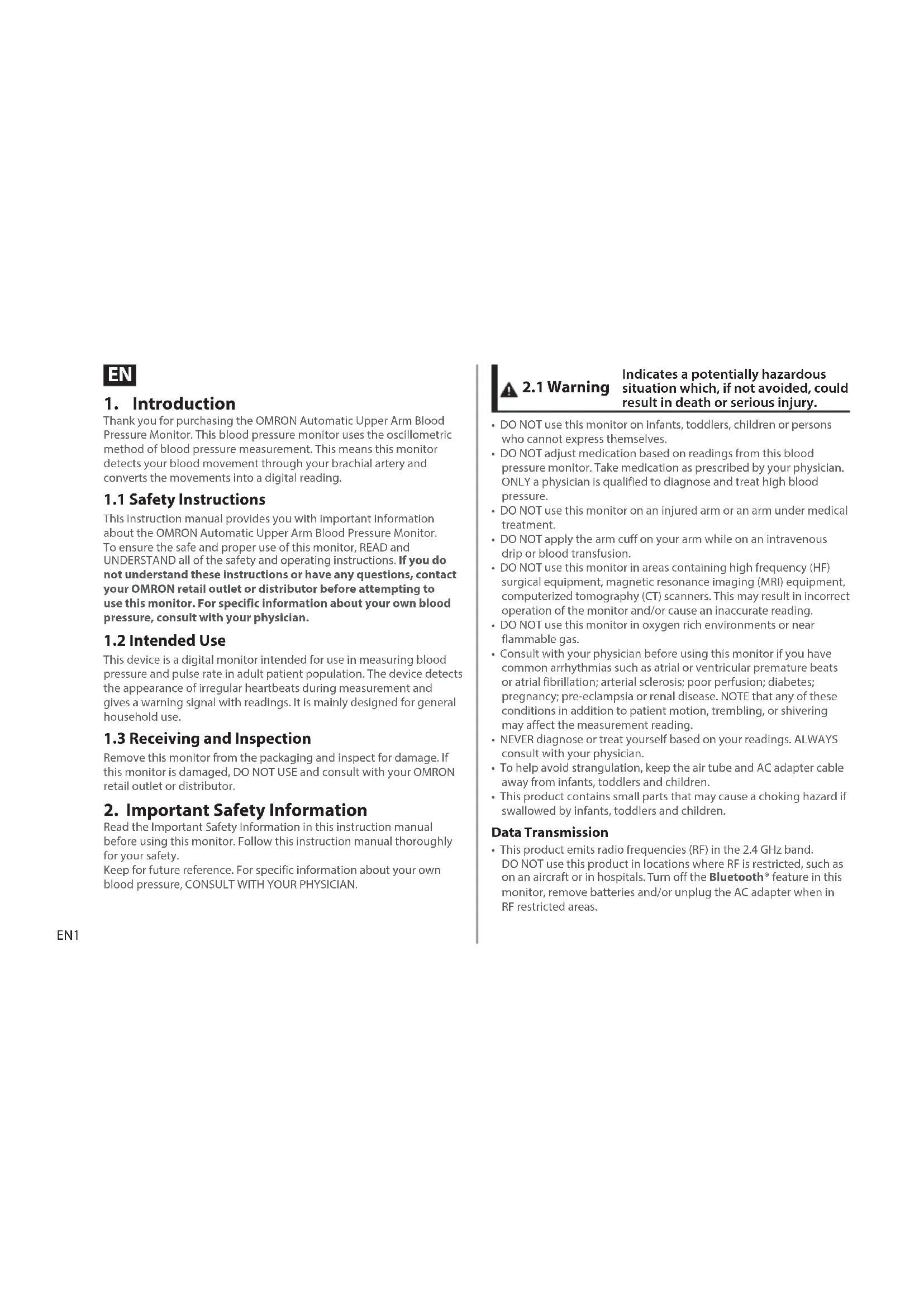
- When you take a measurement on the right arm, the air tube should be at the side of your elbow. Be careful not to rest your arm on the air tube.
- Blood pressure may differ between the right and left arm, and may result in a different measurement value. Always use the same arm for measurements. If the values between both arms differ substantially, check with your physician on which arm to use for your measurements.
- When using an optional AC adapter, make sure not to place your monitor in a location where it is difficult to plug and unplug the AC adapter.
Battery Handling and Usage
- Disposal of used batteries should be carried out in accordance with local regulations.
- The supplied batteries may have a shorter life span than new batteries.
Remember to have a record of your blood pressure and pulse readings for your physician. A single measurement does not provide an accurate indication of your true blood pressure.
Please use the Blood Pressure Diary to keep records of several readings over a certain period of time. To download PDF files of the diary, visit www.omron-healthcare.com.
3. Error Messages and Troubleshooting
If any of the below problems occur during measurement, check to make sure that no other electrical device is within 30 cm. If the problem persists, please refer to the table below.
| Display/Problem Possible | Cause Solution | |
| E1appears or the arm cuff does not inflate. | The [START/STOP] button was pressed while the arm cuff is not applied. | Press the [START/STOP] button again to turn the monitor off. After inserting the air plug securely and applying the arm cuff correctly, press the [START/STOP] button. |
| Air plug is not completely plugged into the monitor. | Insert the air plug securely. | |
| The arm cuff is not applied correctly. Apply the arm cuff correctly, then take another measurement. Refer to section 7 of instruction manual2. | ||
| Air is leaking from the arm cuff. Replace the arm cuff to the new one. Refer to section 14 of instruction manual2. | ||
| E2appears or a measurement cannot be completed after the arm cuff inflates. | You move or talk during a measurement and the arm cuff does not inflate sufficiently. | Remain still and do not talk during a measurement. If “E2” appears repeatedly, inflate the arm cuff manually until the systolic pressure is 30 to 40 mmHg above your previous readings. Refer to section 13 of instruction manual2. |
| Due to the systolic pressure is above 210 mmHg, a measurement cannot be taken. | ||
| E3appears | The arm cuff is inflated exceeding the maximum allowable pressure. | Do not touch the arm cuff and/or bend the air tube while taking a measurement. If inflating the arm cuff manually, refer to section 13 of instruction manual2. |
| E4appears | You move or talk during a measurement. Vibrations disrupt a measurement. | Remain still and do not talk during a measurement. |
| E5appears | The pulse rate is not detected correctly. Apply the arm cuff correctly, then take another measurement. Refer to section 7 of instruction manual2 Remain still and sit correctly during a measurement. | |
| appears | ||
| does not flash during a measurement. | ||
| Erappears | The monitor has malfunctioned. Press the | [START/STOP] button again. If "Er" still appears, contact your OMRON retail outlet or distributor. |
| Errappears | The monitor cannot connect to a smart device or transmit data correctly. | Follow the instructions shown in the "OMRON connect" app. If the "Err" symbol still appears after checking the app, contact your OMRON retail outlet or distributor. |
| Pflashes | The monitor is waiting for pairing with the smart device. | Refer to section 5 of instruction manual2for pairing your monitor with your smart device, or press [START/STOP] button to cancel pairing and turn your monitor off. |
| Oflashes | The monitor is ready to transfer your readings to the smart device. | Open the "OMRON connect" app to transfer your readings. |
| ⇐flashes | More than 48 readings are not transferred. | Pair or transfer your readings to the "OMRON connect" app so you can keep them in memory in the app, and this error symbol disappears. |
| The date and time is not set. | ||
| ⇐appears | There are 60 readings in memory to be transferred | |
| ⇐flashes | Batteries are low. Replacing all 4 batteries | with new ones is recommended. Refer to section 4 of instruction manual2. |
| ⇐appears or the monitor is turned off unexpectedly during a measurement | Batteries are depleted. Immediately replace all 4 batteries with new ones. Refer to section 4 of instruction manual2. | |
| Nothing appears on the display of the monitor. | Battery polarities are not properly aligned. | Check the battery installation for proper placement. Refer to section 4 of instruction manual2. |
| Readings appear too high or too low. | Blood pressure varies constantly. Many factors including stress, time of day, and/or how you apply the arm cuff, may affect your blood pressure. Review section 2 of instruction manual2. | |
| Any other communication issue occurs. | Follow the instructions shown in the smart device, or visit the “Help” section in the “OMRON connect” app for further help. If the problem still persists, contact your OMRON retail outlet or distributor. | |
| Any other problem occurs. | Press the [START/STOP] button to turn the monitor off, then press it again to take a measurement. If the problem continues, remove all batteries and wait for 30 seconds. Then re-install batteries. If the problem still persists, contact your OMRON retail outlet or distributor. | |
4. Limited Warranty
Thank you for buying an OMRON product. This product is constructed of high quality materials and great care has been taken in its manufacturing. It is designed to give you every satisfaction, provided that it is properly operated and maintained as described in the instruction manual.
This product is warranted by OMRON for a period of 3 years after the date of purchase. The proper construction, workmanship and materials of this product is warranted by OMRON. During this period of warranty OMRON will, without charge for labour or parts, repair or replace the defect product or any defective parts.
The warranty does not cover any of the following:
A. Transport costs and risks of transport.
B. Costs for repairs and / or defects resulting from repairs done by unauthorised persons.
C. Periodic check-ups and maintenance.
D. Failure or wear of optional parts or other attachments other than the main device itself, unless explicitly warranted above.
E. Costs arising due to non-acceptance of a claim (those will be charged for).
F. Damages of any kind including personal caused accidentally or from misuse.
G. Calibration service is not included within the warranty.
H. Optional parts have a one (1) year warranty from date of purchase. Optional parts include, but are not limited to the following items: cuff and cuff tube.
Should warranty service be required please apply to the dealer whom the product was purchased from or an authorised OMRON distributor. For the address refer to the product packaging / literature or to your specialised retailer. If you have difficulties in finding OMRON customer services, contact us for information:
www.omron-healthcare.com
Repair or replacement under the warranty does not give rise to any extension or renewal of the warranty period.
The warranty will be granted only if the complete product is returned together with the original invoice / cash ticket issued to the consumer by the retailer.
5. Maintenance
5.1 Maintenance
To protect your monitor from damage, follow the directions below:
Changes or modifications not approved by the manufacturer will void the user warranty.

Caution
DO NOT disassemble or attempt to repair this monitor or other components. This may cause an inaccurate reading.
5.2 Storage
- Keep your monitor in the storage case when not in use.
- Remove the arm cuff from the monitor.

Caution
To unplug the air plug, pull on the plastic air plug at the base of the tube, not the tube itself.
- Gently fold the air tube into the arm cuff. Note: Do not bend or crease the air tube excessively.
- Place your monitor and other components in the storage case.
- Store your monitor and other components in a clean, safe location.
- Do not store your monitor and other components:
- If your monitor and other components are wet.
- In locations exposed to extreme temperatures, humidity, direct sunlight, dust or corrosive vapors such as bleach.
• In locations exposed to vibrations or shocks.
5.3 Cleaning
- Do not use any abrasive or volatile cleaners.
- Use a soft dry cloth or a soft cloth moistened with mild (neutral) detergent to clean your monitor and arm cuff, and then wipe them with a dry cloth.
- Do not wash or immerse your monitor and arm cuff or other components in water.
- Do not use gasoline, thinners or similar solvents to clean your monitor and arm cuff or other components.
5.4 Calibration and Service
- The accuracy of this blood pressure monitor has been carefully tested and is designed for a long service life.
-
It is generally recommended to have the unit inspected every two years to ensure correct functioning and accuracy. Please consult your authorised OMRON dealer or the OMRON Customer Service at the address given on the packaging or attached literature.
-
Specifications
| Product description Automatic Upper Arm Blood Pressure Monitor | |||
| Product category Electronic Sphygmomanometers | |||
| Model (code) M4 Intelli IT (HEM-7155T-EBK)X4 Smart (HEM-7155T-ESL) | Display LCD digital display | ||
| Cuff pressure range 0 to 299 mmHg | Pulse measurement range | 40 to 180 beats / min. | |
| Blood pressure measurement range | SYS: 60 to 260 mmHg / DIA: 40 to 215 mmHg | ||
| Accuracy Pressure: ±3 mmHg / Pulse: ±5% of display reading | |||
| Inflation Automatic by electric pump Deflation | Automatic pressure release valve | ||
| Measurement method Oscillometric method Transmission method | Bluetooth | Low Energy | |
| Wireless communication Frequency range: 2.4 GHz (2400 - 2483.5 MHz) / Modulation: GFSKEffective radiated power: < 20 dBm | |||
| Operating mode Continuous operation | |||
| IP classification Monitor: IP20 / Optional AC adapter: IP21 (HHP-CM01) or IP22 (HHP-BFH01) | |||
| Rating | DC6 V 4.0 W | Applied part | Type BF (arm cuff) |
| Power source | 4 "AA" batteries 1.5 V or optional AC adapter (INPUT AC 100 - 240 V 50 - 60 Hz 0.12 - 0.065 A) | ||
| Battery life | Approximately 1000 measurements (using new alkaline batteries) | ||
| Durable period (Service life) | Monitor: 5 years / Cuff: 5 years / Optional AC adapter: 5 years | ||
| Operating conditions | +10 to +40 °C / 15 to 90% RH (non-condensing) / 800 to 1060 hPa | ||
| Storage / Transport conditions | -20 to +60 °C / 10 to 90% RH (non-condensing) | ||
| Contents | Monitor, arm cuff (HEM-FL31), 4 "AA" batteries, storage case, Instruction Manual 1 and 2, setup instructions | ||
| Protection against electric shock Internally powered ME equipment (when using only batteries)Class II ME equipment (optional AC adapter) | |||
| Weight | Monitor: approximately 340 g (not including batteries) / Arm cuff: approximately 163 g | ||
| Dimensions (approximately value) | Monitor: 105 mm (W) × 85 mm (H) × 152 mm (L)Arm cuff: 145 mm × 532 mm (air tube: 750 mm) | ||
| Memory Stores up to 60 readings per user | |||
Note
• These specifications are subject to change without notice.
- This monitor is clinically investigated according to the requirements of ISO 81060-2:2013. In the clinical validation study, K5 was used on 85 subjects for determination of diastolic blood pressure.
- This device has been validated for use on pregnant and pre-eclampsia patients according to the Modified European Society of Hypertension Protocol*.
- This device has been validated for use on diabetic (Type II) population**.
- IP classification is degrees of protection provided by enclosures in accordance with IEC 60529. This monitor and optional AC adapter are protected against solid foreign objects of 12.5mm diameter and greater such as a finger. The optional AC adapter HHP-CM01 is protected against vertically falling water drops which may cause issues during a normal operation. The optional AC adapter HHP-BFH01 is protected against oblique falling water drops which may cause issues during a normal operation.
* Topouchian J et al. Vascular Health and Risk Management 2018;14 189–197
** Chahine M.N. et al. Medical Devices: Evidence and Research 2018;11 11–20
About a wireless communication interference
This product operates in an unlicensed ISM band at 2.4 GHz. In the event this product is used near other wireless devices such as microwave and wireless LAN, which operate on the same frequency band as this product, there is a possibility that interference may occur. If interference occurs, stop the operation of the other devices or relocate this product away from other wireless devices before attempting to use it.
7. Correct Disposal of This Product (Waste Electrical & Electronic Equipment)
This marking shown on the product or its literature, indicates that it should not be disposed of, with other household wastes at the end of its working life.
To prevent possible harm to the environment or human health from uncontrolled waste disposal, please separate this product from other types of wastes and recycle it responsibly to promote the sustainable reuse of material resources.
Household users should contact either the retailer where they purchased this product, or their local government office, for details of where and how they can return this item for environmentally safe recycling.
Business users should contact their supplier and check the terms and conditions of the purchase contract. This product should not be mixed with other commercial waste for disposal.

8. Important Information Regarding Electromagnetic Compatibility (EMC)
HEM-7155T-EBK and HEM-7155T-ESL conform to EN60601-1-2:2015 Electromagnetic Compatibility (EMC) standard.
Further documentation in accordance with this EMC standard is available at
www.omron-healthcare.com
Refer to the EMC information for HEM-7155T-EBK and HEM-7155T-ESL on the website.
9. Guidance and Manufacturer's Declaration
• This blood pressure monitor is designed according to the European Standard EN1060, Non-invasive sphygmomanometers Part 1: General
Requirements and Part 3: Supplementary requirements for electromechanical blood pressure measuring systems.
- Hereby, OMRON HEALTHCARE Co., Ltd., declares that the radio equipments type HEM-7155T-EBK and HEM-7155T-ESL are complied with Directive 2014/53/EU. The full text of the EU declaration of conformity is available at the following internet address: www.omron-healthcare.com
- This OMRON product is produced under the strict quality system of OMRON HEALTHCARE Co., Ltd., Japan. The Core component for OMRON blood pressure monitors, which is the Pressure Sensor, is produced in Japan.
- Please report to the manufacturer and the competent authority of the Member State in which you are established about any serious incident that has occurred in relation to this device.
FR
1. Introduction
www.omron-healthcare.com
* Topouchian J et al. Vascular Health and Risk Management 2018;14 189–197
** Chahine M.N. et al. Medical Devices: Evidence and Research 2018:11 11–20

CARTON + PAPIERA TRIER
www.omron-healthcare.com
www.omron-healthcare.com
www.omron-healthcare.com
* Topouchian J et al. Vascular Health and Risk Management 2018;14 189–197
** Chahine M.N. et al. Medical Devices: Evidence and Research 2018;11 11–20
www.omron-healthcare.com
www.omron-healthcare.com
* Topouchian J et al. Vascular Health and Risk Management 2018;14 189–197
** Chahine M.N. et al. Medical Devices: Evidence and Research 2018:11 11–20
www.omron-healthcare.com
www.omron-healthcare.com
www.omron-healthcare.com
* Topouchian J et al. Vascular Health and Risk Management 2018;14 189–197
** Chahine M.N. et al. Medical Devices: Evidence and Research 2018;11 11–20
www.omron-healthcare.com
www.omron-healthcare.com
www.omron-healthcare.com
Applied part - Type BF Degree of protection against electric shock (leakage current)
Class II equipment. Protection against electric shock
Ingress protection degree provided by IEC 60529
To indicate generally elevated, potentially hazardous, levels of non-ionizing radiation, or to indicate equipment or systems. e.g. in the medical electrical area that include RF transmitters or that intentionally apply RF electromagnetic energy for diagnosis or treatment.
FR Indique des niveaux de rayonnement non ionisant, potentiellement dangereux, généralement élevés, ou un équipement ou des systèmes, par exemple dans le domaine médical électrique, incluant des émetteurs RF ou utilisant intentionnellement de l'énergie électromagnétique RF pour le diagnostic ou le traitement.
DE Als Hinweis auf allgemein erhöhte, potenziell gefährliche Stufen nicht ionisierender Strahlung oder als Hinweis auf Geräte oder Systeme zum Beispiel im medizinisch-elektrischen Bereich, etwa HF-Übertragungsgeräte, bzw. auf solche, die elektromagnetische HF-Strahlung zur Diagnose oder Behandlung verwenden.
IT Indica livelli generalmente elevati, potenzialmente pericolosi, di radiazioni non ionizzanti oppure indica apparecchiature o sistemi, ad esempio per le aree elettromedicali in cui sono presenti trasmettitori RF o in cui viene intenzionalmente applicata energia elettromagnetica a radiofrequenza per la diagnosi o il trattamento.
ES Para indicar niveles de radiación no ionizante generalmente elevados y potencialmente peligrosos, o bien para indicar equipos o sistemas, como los usados en el ámbito electromédico, que incorporen transmisores de radiofrecuencia o que apliquen energía electromagnética de radiofrecuencia intencionadamente para diagnósticos o tratamientos.
NL Geeft in het algemeen verhoogde, potentieel gevaarlijke niveaus aan van niet-ioniserende straling of duidt op apparatuur of systemen, bijvoorbeeld in de medische elektrische omgeving, die RF-zenders bevatten of die opzettelijk elektromagnetische RF-energie toepassen voor diagnose of behandeling.
RU Для указания повышенных и потенциально опасных уровней неионизирующей радиации или же оборудования или систем (например, в зоне размещения медицинского электрооборудования), включающих в себя радиопередатчики или устройства, использующие радиочастотную электромагнитную энергию в целях диагностики или терапии.
TR Genellikle yüksek ve zararlı olabilecek iyonlaşmayan radyasyon seviyelerini belirtir veya RF vericileri içeren veya tanı ya da tedavi amacıyla bilinçli olarak RF elektromanyetik enerji uygulayan (örneğin medikal elektrik alanında bulunan) ekipman ve sistemleri belirtir.
The Bluetooth® word mark and logos are registered trademarks owned by the Bluetooth SIG, Inc. and any use of such marks by OMRON HEALTHCARE Co., Ltd. is under license. Other trademarks and trade names are those of their respective owners. App Store and App Store logo are service marks of Apple Inc., registered in the U.S and other countries. Google Play and Google Play logo are trademarks of Google LLC.
FR La marque verbale et les logos Bluetooth® sont des marques déposées détenues par Bluetooth SIG, Inc. et l'utilisation de ces marques par OMRON HEALTHCARE Co., Ltd. se fait sous licence. Les autres marques commerciales et noms de marque sont ceux de leurs détenteurs respectifs. App Store et le logo App Store sont des marques de service d'Apple Inc., déposées aux États-Unis et dans d'autres pays. Google Play et le logo Google Play sont des marques commerciales de Google LLC.
DE Die Bluetooth®-Wortmarke und -Logos sind eingetragene Marken der Bluetooth SIG, Inc. und die Verwendung solcher Marken durch OMRON HEALTHCARE Co., Ltd. erfolgt in Lizenz. Andere Marken und Markennamen gehören ihren jeweiligen Eigentümern. App Store und das App Store-Logo sind Dienstleistungsmarken der Apple Inc., die in den USA und anderen Ländern eingetragen sind. Google Play und das Google Play-Logo sind Marken von Google LLC.
IT Il marchio e i logotipi Bluetooth® sono marchi commerciali registrati di Bluetooth SIG, Inc. e l'utilizzo di tali marchi da parte di OMRON HEALTHCARE Co., Ltd. è stato concesso in licenza. Gli altri marchi e nomi commerciali sono di proprietà dei rispettivi titolari. App Store e il logo App Store sono marchi commerciali di Apple Inc., registrati negli Stati Uniti e in altri Paesi. Google Play e il logo Google Play sono marchi commerciali di Google LLC.
ES El nombre y los logotipos de Bluetooth® son marcas registradas de Bluetooth SIG, Inc. y cualquier uso de dichas marcas hecho por OMRON HEALTHCARE Co., Ltd. se ha llevado a cabo con su licencia correspondiente. Otras marcas registradas también pertenecen a sus respectivos propietarios. App Store y el logotipo de App Store son marcas de servicios registradas de Apple Inc. en EE. UU. y en otros países. Google Play y el logotipo de Google Play son marcas comerciales de Google LLC.
NL Het woordmerk en de logo's van Bluetooth ^8 zijn gedeponeerde handelsmerken van Bluetooth SIG, Inc. en enig gebruik hiervan door OMRON HEALTHCARE Co., Ltd. geschiedt onder licentie. Overige handelsmerken en handelsnamen zijn van hun respectievelijke eigenaren. App Store en het logo van App Store zijn handelsmerken van Apple Inc. die gedeponeerd zijn in de V.S. en in andere landen. Google Play en het logo van Google Play zijn handelsmerken van Google LLC.
RU Словесный знак Bluetooth® и логотип являются зарегистрированными товарными знаками, являющимися собственностью компании Bluetooth SIG, Inc., и любое использование этих знаков компанией OMRON HEALTHCARE Co., Ltd. обеспечивается лицензией. Другие товарные знаки и торговые марки являются собственностью соответствующих владельцев. App Store и логотип App Store являются знаками обслуживания Apple Inc., зарегистрированными в США и других странах. Google Play и логотип Google Play являются товарными знаками Google LLC.
TR Bluetooth® marka adı ve logoları, Bluetooth SIG Inc. kuruluşunun tescilli ticari markalarıdır ve OMRON HEALTHCARE Co., Ltd. bu markaları lisans kapsamında kullanmaktadır. Diğer ticari markalar ve ticari isimler, ilgili sahiplerine aittir. App Store ve App Store logosu, Apple Inc. firmasının ABD ve diğer ülkelerde tescilli hizmet markalarıdır. Google Play ve Google Play logosu, Google LLC firmasının ticari markalarıdır.
IM1-HEM-7155T-E-03-01/2020
2870440-7B
Instruction Manual

omron
Automatic Upper Arm Blood Reserve Monitor
MA Intelli IT (HEM-715ST-FRK)
X4 Smart (HEM-7155T-ESL)
All for Healthcare

Preparing for Management □ Specification of Service □ External Services □ General & Technicals □ Commercial Services □ Support and support services □ Other Services
Water procedures ■ Water treatment ■ Water treatment ■ Water treatment ■ Water treatment ■ Water treatment ■ Water treatment ■ Water treatment ■ Water treatment ■ Water treatment ■ Water treatment ■ Water treatment ■ Water treatment ■ Water treatment ■ Water treatment ■ Water treatment ■ Water treatment ■ Water treatment ■ Water treatment ■ Water treatment ■ Water treatment ■ Water treatment ■ Water treatment ■ Water treatment ■ Water treatment ■ Water treatment ■ Water treatments
■ Closing Options ■ Open to account ■ Printers account ■ Printers account


Read instruction manual laid before
■ Japan Bank's Bank of America, Japan Bank of America
■ 2017年1月1日
□ 3. In fact that the following is not
2017年1月1日
Preparing far movement • In the way of a plant • In the way of a plant in water • In the way of a plant in water • In the way of a plant in water • In the way of a plant in water • In the way of a plant in water • In the way of a plant in water • In the way of a plant in water • In the way of a plant in water • In the way of a plant in water • In the way of a plant in water • In the way of a plant in the water • In the way of a plant in the water • In the way of a plant in the water • In the way of a plant in the water • In the way of a plant in the water • In the way of a plant in the water • In the way of a plant in the water • In the way of a plant in the water • In the way of a plant in the water • In the way of a plant in the oil
Fasting Your Smart Device ■ 1.00% of the smart device is designed to use a smart device in a specific mode. ■ 2.00% of the smart device is designed to use a smart device in a specific mode. ■ 3.00% of the smart device is designed to use a smart device in a specific mode. ■ 4.00% of the smart device is designed to use a smart device in a specific mode.
① ② ③
The data will be used to estimate the self-sensing process on the first page. The data is presented in a report with the following summary of the results: (1) for the time of the event, the time of the event is based on the time of the event's duration and the time of the event's duration, which is based on the time of the event's duration, the time of the event's duration, and the time of the event's duration, which is based on the time of the event's duration, the time of the event's duration, and the time of the event's duration, which is based on the time of the event's duration, the time of the event's duration, and the time of the event's duration, which is based on the time of the event's duration,
Building Daily and Time Monthly □ Update on the date of January 2014 □ Performance of the Date and Period □ Performance of the Date and Period □ Performance of the Date and Period
I am a member of the world with your own country, and I have not been a whole. After you said that there is more than 500 days for this year.
-
The following words are given in the word of the English, and the words are given in the English, and the words are given in the English, and the words are given in the English, and the words are given in the English, and the words are given in the English, and the words are given in the English, and the words are given in the English, and the words are given in the English, and the words are given in the English, and the words are given in the English, and the words are given in the English, and the words are given in
-
The first, the second, the third, the fourth, the fifth, the sixth, and the seventh, the eight, the nine, the ten, the ten, the ten, the ten, the ten, the ten, the ten, the ten, the ten, the ten, the ten, the ten, the ten, the ten, the ten, the ten, the ten, the ten, the ten, the ten, the ten, the eleven, the eleven, the eleven, the eleven, the eleven, the eleven, the eleven, the eleven, the eleven, the eleven, the eleven, the eleven, the eleven, the eleven, the eleven, the eleven, the eleven, the eleven, the eleven, the eleven, the eleven,
-
تُمْتَّهُ مُسْرَّةٍ وَلَجْدِيُ الْمَّحْرَّةٍ وَلَجْدِيُ الْمُسْرَّةٍ وَلَجْدِيُ الْمُسْرَّةٍ وَلَجْدِيُ الْمُسْرَّةٍ وَلَجْدِيُ الْمُسْرَّةٍ وَلَجْدِيُ الْمُسْرَّةٍ وَلَحْدِيُ الْمُسْرَّةٍ وَلَحْدِيُ الْمُسْرَّةٍ وَلَحْدِيُ الْمُسْرَّةٍ وَلَحْدِيُ الْمُسْرَّةٍ وَلَحْدِيُ الْمُسْمُرُ الْمُسْمُرُ الْمُسْمُرُ الْمُسْمُرُ الْمُسْمُرُ الْمُسْمُرُ الْمُسْمُرُ الْمُسْمُرُ الْمُسْمُرُ الْمُسْمُرُ الْمُسْمُمُرُ الْمُسْمُمُرُ الْمُسْمُمُرُ الْمُسْمُمُرُ الْمُسْمُمُرُ الْمُسْمُمُرُ الْمُسْمُمُرُ الْمُسْمُمُرُ الْمُسْمُمُرِ الْمُسْمُمُرِ الْمُسْمُمُرِ الْمُسْمُمُرِ الْمُسْمُمِرِ الْمُسْمِمِ الْمُسْمِمِ الْمُسْمِمِ الْمُسْمِمِ الْمُسْمِمِ الْمُسْمِمِ الْمُسْمِمِ الْمُسْمِمِ الْمُسْمِمِ الْمُسْمِمِ الْمُسْمِنَا

Applying the Fall on Fall off days □ Four or more will be seen out. □ A corrected on Fall on Fall off days. □ 120-200 minutes increased to 30 minutes. □ 20 minutes on Fall on Fall off days. □ 30 minutes on Fall on Fall off days.


①Sub slice of the left side be 1-2 creases the broken box.
¿En el que se se a suján de la liquidar una cie y la liquidar la liquidar la liquidar la liquidar la liquidar la liquidar la liquidar la liquidar la liquidar la liquidar la liquidar la liquidar la liquidar la liquidar la liquidar la liquidar la liquidar la liquidar la liquidar la liquidar la liquidar la liquidar la liquidar la liquidar la liquidar la liquidar la liquidar la liquidar la liquidar la liquidar la liquidar la liquidar la liquidar la liquidarla
(2) Investments that are taken out that made of your own ordering the right security is it can make a slight result.
- A la que de la liquidation is a 200 gm³ of water, but the solution of the solidification is a 200 gm³ of water.
Taking a series of light and a light bar. How much the warm or cool, are to be used in the case of the light. Such more than any other means that use the warm the warm. As the warm and heat elements are similar, such as the warm and heat elements, while being too dark. The warm is also very good for It's the warm.
Setting Currency Top □ Currency and Currency □ Currency-based currency □ Currency-based currency □ Currency-based currency
□ 10.0000000000000000000000000000000000000000000000000000000000000

0
- support a change, no need to be used and deliver more safety tips.
- and communicate areas in the devices have been used.
- This environment, if we are applied to the device's options.
- We can be able to use a device with a device and a device
- We can use a device with a device and a device
② Four levels of the same level, you need.
-
C. U. de la 1000000000000000000000000000000000000000000000
-
By question, concepts in the space (1) are
-
Услуги ротки, толашина ротки селька
- Телер: докинькій докунки.
A. _1 (16:24) _2 (17:30)
-
Conducting the results of the 100%
-
In the past three months, some of these are not possible.
■ Backward, right, pink, blue, and gray.
- Stock price: 207.14; \1.00 / (1) - 10x - 10.5x; \1.00 / (1) - 10x - 10.5x