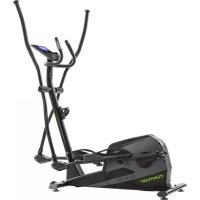
Star Fit C100 - Elliptical bike TUNTURI - Free user manual and instructions
Find the device manual for free Star Fit C100 TUNTURI in PDF.


| Product type | Elliptical bike |
| Brand | Tunturi |
| Model | Star Fit C100 |
| Dimensions (L x W x H) | 124 x 55 x 160 cm |
| Device weight | 40 kg |
| Maximum user weight | 120 kg |
| Power supply | Adapter 9V DC, 0.5A |
| Usage | Home, indoor |
| Maximum usage duration | 3 hours per day |
| Number of programs | 19 programs (manual, body fat, HRC, user) |
| Resistance levels | 1 to 24 |
| Display | LCD screen with time, speed, RPM, distance, ODO, calories, watts, pulse, level, program |
| Pulse measurement | Sensors in handles, compatible with chest strap (not included) |
| Recovery function | Yes (Recovery mode, rating F1 to F6) |
| Tablet/book holder | Yes, on the console |
| Transport wheels | Yes, at the back |
| Adjustable feet | Yes, 4 feet |
| Adjustable pedals | Yes, position adjustment |
| Maintenance and cleaning | Clean with a soft cloth after use, check tightness of screws, lubricate joints if necessary |
| Safety | Emergency brake by stopping pedaling, automatic shutdown after 4 minutes of inactivity |
Frequently Asked Questions - Star Fit C100 TUNTURI
User questions about Star Fit C100 TUNTURI
0 question about this device. Answer the ones you know or ask your own.
Ask a new question about this device
Download the instructions for your Elliptical bike in PDF format for free! Find your manual Star Fit C100 - TUNTURI and take your electronic device back in hand. On this page are published all the documents necessary for the use of your device. Star Fit C100 by TUNTURI.
USER MANUAL Star Fit C100 TUNTURI
Electrical safety 17
Description (fig. A) 17
Package contents (fig. B & C) 17
Assembly (fig. D) 17
Workouts 17
Exercise Instructions 17
Heart rate 18
Use 18
Power supply (Fig. E-1) 19
Console (fig F) 19
Explanation Display functions 19
Explanation of buttons 20
Opperation 20
Programs
Cleaning and maintenance 22
Defects and malfunctions 22
Transport and storage. 23
Additional information 23
Technical data. 23
Warranty 23
Declaration of the manufacturer 24
Disclaimer 24
Crosstrainer
Welcome to the world of Tunturi!
Thank you for purchasing this piece of Tunturi equipment. Tunturi offers a wide range of home fitness equipment, including crosstrainers, treadmills, exercise bikes and rowers. The Tunturi equipment is suitable for the entire family, no matter what fitness level. For more information, please visit our website www.tunturi.com.
Safety warnings

WARNING
- Read the safety warnings and the instructions. Failure to follow the safety warnings and the instructions can cause personal injury or damage to the equipment. Keep the safety warnings and the instructions for future reference.
The equipment is suitable for domestic use only. The equipment is not suitable for commercial use.
Max. usage is limited to 3 hrs a day. - The use of this equipment by children or persons with a physical, sensory, mental or motorial disability, or lack of experience and knowledge can give cause to hazards. Persons responsible for their safety must give explicit instructions or supervise the use of the equipment.
Before starting your workout, consult a physician to check your health. 20
If you experience nausea, dizziness or other abnormal symptoms, immediately stop your workout and consult a physician. - To avoid muscular pain and strain, start each workout by warming up and finish each workout by cooling down. Remember to stretch at the end of the workout.
- The equipment is suitable for indoor use only. The equipment is not suitable for outdoor use.
Only use the equipment in environments with adequate ventilation. Do not use the equipment in draughty environments in order not to catch a cold.
Only use the equipment in environments with ambient temperatures between 10^ and 35^ . Only store the equipment in environments with ambient temperatures between 5^ and 45^ . - Do not use or store the equipment in humid surroundings. The air humidity must never be more than 80% .
- Only use the equipment for its intended purpose.
Do not use the equipment for other purposes than described in the manual. - Do not use the equipment if any part is damaged or defective. If a part is damaged or defective, contact your dealer.
- Keep your hands, feet and other body parts away from the moving parts.
- Keep your hair away from the moving parts.
- Wear appropriate clothing and shoes.
- Keep clothing, jewellery and other objects away from the moving parts.
Make sure that only one person uses the equipment at a time. The equipment must not be used by persons weighing more than 110kg (242 lbs). - Do not open equipment without consulting your dealer.
Electrical safety
(Only for equipment with electric power)
- Before use, always check that the mains voltage is the same as the voltage on the rating plate of the equipment.
- Do not use an extension cable.
- Keep the mains cable away from heat, oil and sharp edges.
- Do not alter or modify the mains cable or the mains plug.
- Do not use the equipment if the mains cable or the mains plug is damaged or defective. If the mains cable or the mains plug is damaged or defective, contact your dealer.
- Always fully unwind the mains cable.
- Do not run the mains cable underneath the equipment. Do not run the mains cable underneath a carpet. Do not place any objects on the mains cable.
- Make sure that the mains cable does not hang over the edge of a table.
- Make sure that the mains cable cannot be caught accidentally or tripped over.
- Do not leave the equipment unattended when the mains plug is inserted into the wall socket.
- Do not pull the mains cable to remove the mains plug from the wall socket.
- Remove the mains plug from the wall socket when the equipment is not in use, before assembly or disassembly and before cleaning and maintenance.
Description (fig. A)
Your Cross trainer is a piece of stationary fitness equipment used to simulate walking or running without causing excessive pressure to the joints.
Package contents (fig. B & C)
The package contains the parts as shown in fig.B.
- The package contains the fasteners as shown in fig. C. Refer to the section "Description"

NOTE
If a part is missing, contact your dealer.
Assembly (fig. D)

WARNING
- Assemble the equipment in the given order.
- Carry and move the equipment with at least two persons.

CAUTION
- Place the equipment on a firm, level surface.
- Place the equipment on a protective base to prevent damage to the floor surface.
- Allow at least 100cm of clearance around the equipment.
Refer to the illustrations for the correct assembly of the equipment.
Workouts
The workout must be suitably light, but of long duration. Aerobic exercise is based on improving the body's maximum oxygen uptake, which in turn improves endurance and fitness. You should perspire, but you should not get out of breath during the workout.
To reach and maintain a basic fitness level, exercise at least three times a week, 30 minutes at a time. Increase the number of exercise sessions to improve your fitness level. It is worthwhile to combine regular exercise with a healthy diet. A person committed to dieting should exercise daily, at first 30 minutes or less at a time, gradually increasing the daily workout time to one hour. Start your workout at low speed and low resistance to prevent the cardiovascular system from being subjected to excessive strain.
As the fitness level improves, speed and resistance can be increased gradually. The efficiency of your exercise can be measured by monitoring your heart rate and your pulse rate.
Exercise Instructions
Using your fitness trainer will provide you with several benefits, it will improve your physical fitness, tone muscle and in conjunction with a calorie controlled diet help you lose weight.
The warming up phase
This stage helps get the blood flowing around the body and the muscles working properly. It will also reduce the risk of cramp and muscle injury. It is advisable to do a few stretching exercises as shown below. Each stretch should be held for approximately 30 seconds, do not force or jerk your muscles into a stretch - if it hurts, STOP
The exercise phase
This is the stage where you put the effort in. After regular use, the muscles in your legs will become more flexible. Work to your but it is very important to maintain a steady tempo throughout. The rate of work should be sufficient to raise your heart beat into the target zone shown on the graph below.
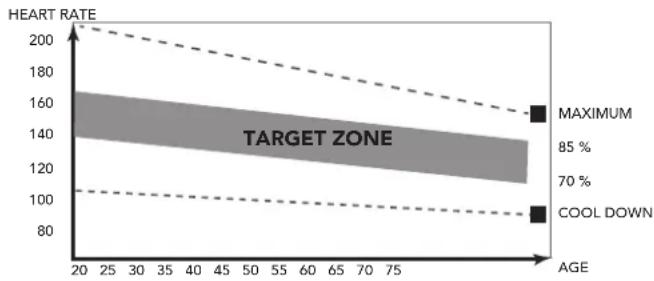
This stage should last for a minimum of 12 minutes though most people start at about 15-20 minutes
The cool down phase
This stage is to let your Cardiovascular System and muscles wind down. This is a repeat of the warm up exercise e.g. reduce your tempo, continue for approximately 5 minutes. The stretching exercises should now be repeated, again remembering not to force or jerk your muscles into the stretch.
As you get fitter you may need to train longer and harder. It is advisable to train at least three times a week, and if possible space your workouts evenly throughout the week.
Muscle toning
To tone muscle while on your fitness trainer you will need to have the resistance set quite high. This will put more strain on our leg muscles and may mean you cannot train for as long as you would like. If you are also trying to improve your fitness you need to alter your training program. You should train as normal during the warm up and cool down phases, but towards the end of the exercise phase you should increase resistance making your legs work harder. You will have to reduce your speed to keep your heart rate in the target zone.
Weight loss
The important factor here is the amount of effort you put in. The harder and longer you work the more calories you will burn. Effectively this is the same as if you were training to improve your fitness, the difference is the goal.
Heart rate
Pulse rate measurement (hand pulse sensors)
The pulse rate is measured by sensors in the handlebars when the user is touching both sensors at the same time. Accurate pulse measurement requires that the skin is slightly moist and constantly touching the hand
pulse sensors. If the skin is too dry or too moist, the pulse rate measurement will become less accurate.

NOTE
- Do not use the hand pulse sensors in combination with a heart rate chest belt.
- If you set a heart rate limit for your workout, an
Maximum heart rate (during training)
The maximum heart rate is the highest heart rate a person can safely achieve through exercise stress. The following formula is used to calculate the average maximum heart rate: 220 - AGE. The maximum heart rate varies from person to person.

WARNING
- Make sure that you do not exceed your maximum heart rate during your workout. If you belong to a risk group, consult a physician.
Beginner
50-60% of maximum heart rate
Suitable for beginners, weight-watchers, convalescents and persons who have not exercised for a long time. Exercise at least three times a week, 30 minutes at a time.
Advanced
60-70% of maximum heart rate
Suitable for persons who want to improve and maintain fitness. Exercise at least three times a week, 30 minutes at a time.
Expert
70-80% of maximum heart rate
Suitable for the fittest of persons who are used to long-endurance workouts.
Use
Adjusting the support feet
The equipment is equipped with 4 support feet. If the equipment is not stable, the support feet can be adjusted.
- Turn the support feet as required to put the equipment in a stable position.
- Tighten the lock-nuts to lock the support feet.

NOTE
- The machine is the most stable when all support feet are turned fully in. Therefore start to level the machine by turning all support feet fully in, before turning out the required support feet to stable the machine.
Adjusting the pedal position
The both pedals can be adjusted according to the height and the exercise position of the user.
- Loosen the 2 pedal fixing knobs.
- Move the pedal to the required position.
- Tighten the pedal fixing knobs.

NOTE
- Make sure the both pedals are fitted into similar positions always.
Power supply (Fig. E-1)
The trainer is powered by an external power supply. Refer to the illustration to locate the trainer power input.

NOTE
- Connect the power supply with the trainer before connecting it to the wall outlet.
Always remove power cord when - machine is not in use.
Console (fig F)
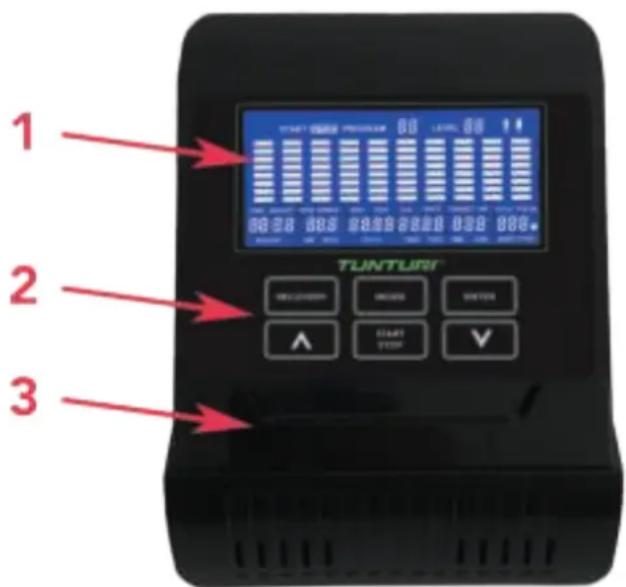
- Display
- Buttons
- Tablet/ book support

CAUTION
- Keep the console away from direct sunlight.
- Dry the surface of the console when it is covered with drops of sweat.
- Do not lean on the console.
- Only touch the display with the tip of your finger. Make sure that your nails or sharp objects do not touch the display.

NOTE
- The console switches to standby mode when the equipment is not used for 4 minutes.
Explanation Display functions
Time
- Without setting the target value, time will count up.
- When setting the target value, time will count down from your target time to 0 and alarm will sound or flash.
- Range 0:00~99:59
Speed
- Displays current training speed.
Maximum speed is 99.99 KM/H - Without any signal being transmitted into the monitor for 3 seconds during workout, SPEED will display "0.0"
RPM
- Displays the Rotation Per Minute.
Display range 0~20~999. - Without any signal being transmitted into the monitor for 3 seconds during workout, RPM will display "0"
Distance
- Without setting the target value, distance will count up.
- When setting the target value, distance will count down from your target distance to 0 with an alarm sound or flash.
- Range 0.00~99.99
ODO
- Automatically accumulates the Total distance for all exercise sessions.
- Range: 0.0 99.99 KM/0.00 9999 KM .
Calories
- Without setting the target value, calorie will count up.
- When setting the target value, calories will count down from your target calorie to 0 with an alarm sound or flash.
- Range 0~999.9.

NOTE
- This data is a rough guide for comparison of different exercise sessions which cannot be used in medical treatment
Watt
- Display current workout watts.
- Range: 0.0 ~ 999.9 Watt. (20 ~ 300 by 60 RPM)
Target HR
- Display user Target Heart rate (in workout mode only) Based on 70% of max. HR (220-Age)
Age
- Display user age (in programming mode only)
- Range: 10 99
Pulse
- Current pulse will display after 6 seconds when detected by the console.
- Without any pulse signal for 6 seconds, console will display "P".
- Pulse alarm will sound when current pulse is over the target pulse.
- Range 0-60 ~ 220 BPM.
Level
- Shows tension level setting.
- Range: 1 ~ 24
Program
- Show current selected workout mode. (1 ~ 19)
Explanation of buttons
Arrow up
- Increase resistance level in workout mode
- Setting selection in programming mode.
Arrow down
- Decrease resistance level in workout mode.
- Setting selection in programming mode.
Mode
- Press MODE button to switch between the parameters of the multi display windows. (in workout mode)
Enter
- Confirm setting or selection.
Start/Stop
- Start or Stop workout.
- Push and hold "Start/ Stop" button for 3 seconds to reset: Time, Speed, Distance, Calories, Pulse & Program.
Recovery
- After the console detects pulse signal, press the RECOVERY key to enter recovery mode to monitor heart rate recovery ability
Opperation
Power on
- Plug in power supply to power on computer.
- Press any key to power on the console when being in sleep mode..
- Start pedalling to power on the console when being in sleep mode.
Power off
Without any signal being transmitted into the monitor for 4 minutes the monitor will enter SLEEP mode automatically. (Active training data will be lost)
Programs
Programs (fig. - F-01~F19)
Quick start (Program 1)
- Press START/ STOP key to start your workout without any pre-set setting.
- Use UP/DOWN to adjust resistant level during workout.
End your workout
- Press START/ STOP in workout mode to stop/ pause your workout.
To resume your workout press START/ STOP button in pause mode. - Press and hold START/ STOP key for over 2 seconds to reset console. (Active training data will be lost)
Program mode (Program 1~10)
- Use UP/DOWN key to select Program 1 ~ 10 and press ENTER to confirm.
- Use UP/DOWN key to set TIME, Range: 0:00 - 5:00 ~ 99:00 ±1:00 confirm setting by pressing ENTER
- Use UP/DOWN key to set DISTANCE, Range: 00.00 - 00.10 ~ 99.90 ± 00.10 confirm setting by pressing ENTER.
- Use UP/DOWN key to set CALORIES, Range: 0.0 - 1.0 ~ 999.0 ± 1.0 confirm setting by pressing ENTER.
- Use UP/DOWN key to set Age, Range: 10 99± 1 confirm setting by pressing ENTER

NOTE
-
When setting more than one goal, the training will end at first achieved goal.
-
Continue the workout by pressing START/ STOP button, and training will end again at first next achieved goal.
- Leave a goal blank and it will not be seen as a pre-set limit.
-
Target HR is only for visual reference, pulse information will blink when value is over target.
-
Press START/ STOP key to start workout
Use UP/DOWN key to adjust resistance level. Load level is shown in LEVEL window.
- Press START/STOP key to pause workout.
- Press and hold START/ STOP key for over 2 seconds to reset console and to go back to main menu. (Active training data will be lost)
Body Fat (Program 11)
- Use UP/DOWN key to select Program 11 and press ENTER to confirm.
- Use UP/ DOWN key to set gender, Range: Male / Female confirm setting by pressing ENTER.
- Use UP/DOWN key to set Height, Range: 110.0 199.5 ~cm ± 0.5 confirm setting by pressing ENTER.
- Use UP/DOWN key to set Weight, Range: 10.0 200.0 ~kg ± 0.1 confirm setting by pressing ENTER.
- Use UP/DOWN key to set Age, Range: 10 99 ± 1 confirm setting by pressing ENTER
- Press START/ STOP key to start Body fat measurement.
- During measuring, users have to hold both hands on the Hr. hand grips. LCD display "---" for 15 seconds until computer finish measuring.
-LCD will display: FAT%, BMR, BMI & BODY TYPE:

NOTE
- Correct "User Profile Settings" is required for this function.
| Male Female | |||
| 17.0%~9.9% 1 14.0%~1 | 6.9% | ||
| 210.0% to 12.9%. 2 17.0% to | 19.9%. | ||
| 313.0% to 16.9%. 3 20.0% to | 23.9%. | ||
| 417.0% to 19.9%. 4 24.0% to | 26.9% | ||
| 520.0% to 24.9%. 5 27.0% to | 29.9%. | ||
| 625%. + 6 30.0%. + | |||
(Body type result table)
Target heart rate. (Program 12)
- Use UP/ DOWN key to select Program 12 and press ENTER to confirm.
- Use UP/ DOWN key to set TIME, Range: 0:00 - 5:00 ~ 99:00 ±1:00 confirm setting by pressing ENTER.
- Use UP/ DOWN key to set DISTANCE, Range: 00.00 - 00.10 ~ 99.90 ± 00.10 confirm setting by pressing ENTER.
- Use UP/DOWN key to set CALORIES, Range: 0.0 - 1.0 999.0 ± 1.0 confirm setting by pressing ENTER.
Use UP/DOWN key to set pulse (TARGET HR) limit. Range: 0 - 72 240± 1 confirm setting by pressing ENTER.

NOTE
- When setting more than one goal, the training will end at first achieved goal.
- Continue the workout by pressing START/ STOP button, and training will end again at first next achieved goal.
- Leave a goal blank and it will not be seen as a pre-set limit.
-
Set Pulse limit is resistance control function, Resistance will auto lower when value is over pulse target, and auto upper when under pulse target.
-
Press START/ STOP key to start workout
Use UP/DOWN key to adjust resistance level. Load level is shown in LEVEL window. - Press START/ STOP key to pause workout.
- Press and hold START/ STOP key for over 2 seconds to reset console and to go back to main menu. (Active training data will be lost)
H.R.C. mode. (Program 13~15)
- Use UP/DOWN key to select Program 13~15 P13=60% 60% of (220-Age)
P14= 75% 75% of (220-Age)
P14= 85% 85% of (220-Age)
and press ENTER to confirm.
- Use UP/DOWN key to set TIME,
Range: 0:00 - 1:00 ~ 99:00 ±1:00
confirm setting by pressing ENTER.
- Use UP/ DOWN key to set DISTANCE, Range: 00.00 - 00.10 ~ 99.90 ± 00.10
confirm setting by pressing ENTER.
- Use UP/DOWN key to set CALORIES,
Range: 0.0 - 1.0 999.0 ± 1.0
confirm setting by pressing ENTER.
- Use UP/DOWN key to set Age,
Range: 10 99± 1
confirm setting by pressing ENTER

NOTE
-
When setting more than one goal, the training will end at first achieved goal.
-
Continue the workout by pressing START/ STOP button, and training will end again at first next achieved goal.
- Leave a goal blank and it will not be seen as a pre-set limit.
-
Set Pulse limit is resistance control function, Resistance will auto lower when value is over pulse target, and auto upper when under pulse target.
-
Press START/ STOP key to start workout
- Use UP/ DOWN key to adjust resistance level.
Load level is shown in LEVEL window. - Press START/ STOP key to pause workout.
- Press and hold START/ STOP key for over 2 seconds to reset console and to go back to main menu. (Active training data will be lost)
User program (P16 ~ P19)
- Use UP/ DOWN key to select Program 16 ~ 19 and press ENTER to confirm.
- Use UP/ DOWN key to set TIME, Range: 0:00 - 1:00 ~ 99:00 ±1:00 confirm setting by pressing ENTER.
- Use UP/ DOWN key to set DISTANCE, Range: 00.00 - 00.10 ~ 99.90 ± 00.10 confirm setting by pressing ENTER.
- Use UP/DOWN key to set CALORIES, Range: 0.0 - 1.0 999.0 ± 1.0 confirm setting by pressing ENTER.
- Use UP/DOWN key to set Age, Range: 10 99 ± 1 confirm setting by pressing ENTER.
-
Set tension level for first of 10 columns, and confirm with ENTER to set second level, repeat this for all columns.
-
Press START/ STOP key to start workout
Use UP/DOWN key to adjust resistance level. Load level is shown in LEVEL window.
- Press START/ STOP key to pause workout.
- Press and hold START/ STOP key for over 2 seconds to reset console and to go back to main menu. (Active training data will be lost, but set program profile will be stored)
Recovery
- The RECOVERY key will only be valid if pulse is detected.
- TIME will show "0:60" (seconds) and counts down to 0.
- Computer will show F1 to F6 after the countdown to test heart rate recovery status. User can find the heart rate recovery level based on the chart below.
- Press RECOVERY key again to return to the beginning.
| F1 Outstanding | |
| F2 Excelent | |
| F3 Good | |
| F4 Fair | |
| F5 Below average | |
| F6 Poor |
Trouble shooting:
- If there is no signal when you pedal, please check if the cable is well connected.

NOTE
- When stop training for 4 minutes, the main screen will be off.
- If the computer displays abnormally, please reinstall the transformer and try again.
Cleaning and maintenance
The equipment does not require special maintenance. The equipment does not require recalibration when it is assembled, used and serviced according to the instructions.

WARNING
- Do not use solvents to clean the equipment.
- Clean the equipment with a soft, absorbent cloth after each use.
- Regularly check that all screws and nuts are tight.
- If necessary, lubricate the joints.
Defects and malfunctions
Despite continuous quality control, defects and malfunctions caused by individual parts can occur in the equipment. In most cases, it will be sufficient to replace the defective part.
- If the equipment does not function properly, immediately contact the dealer.
- Provide the model number and the serial number of the equipment to the dealer. State the nature of the problem, conditions of use and purchase date.
Transport and storage

WARNING
- Carry and move the equipment with at least two persons.
- Remain standing in front of the equipment on each side and take a sturdy grip at the handlebars. Tilt the front of the equipment so as to lift the rear of the equipment on the wheels. Move the equipment and carefully put the equipment down. Place the equipment on a protective base to prevent damage to the floor surface.
- Move the equipment carefully over uneven surfaces. Do not move the equipment upstairs using the wheels, but carry the equipment by the handlebars.
- Store the equipment in a dry place with as little temperature variation as possible.
Additional information
Packaging disposal
Government guidelines ask that we reduce the amount of waste material disposed of in land fill sites. We therefore ask that you dispose of all packaging waste responsibly at public recycling centres.
End of life disposal
We at Tunturi hope you enjoy many years of enjoyable use from your fitness trainer. However, a time will come when your fitness trainer will come to the end of its useful life. Under 'European WEEE Legislation you are responsible for the appropriate disposal of your fitness trainer to a recognised public collection facility.
Technical data
| Parameter Unit of measurement | Value | |
| Length cm | inch | 124 48.8 |
| Width cm | inch | 55 21.7 |
| Height cm | inch | 160 63.0 |
| Weight kg | Ibs | 40.0 88.2 |
| Max. user weight kg | Ibs | 120 265 |
| Adapter Voltage | V | 9V-DC |
| Current | Ma. | 0.5A |
Warranty
Tunturi purchaser's warranty
Warranty terms
The consumer is entitled to the applicable legal rights stated in the national legislation concerning the commerce of consumer goods. This warranty does not restrict these rights. The Purchaser's Warranty is only valid if the item is used in an environment approved by Tunturi New Fitness BV for that particular equipment. The product-specific approved environment is stated in the Owner's Manual provided with your equipment.
Warranty conditions
The warranty conditions commence from the date of purchase. Warranty conditions may vary per country, so please consult your local dealer for the warranty conditions.
Warranty coverage
Under no circumstances shall Tunturi New Fitness BV or the Tunturi Distributor be liable by virtue of this warranty or otherwise for any special, indirect, secondary or consequential damages of any nature arising out of any use or inability to use this equipment.
Warranty limitations
This warranty covers manufacturing defects in the fitness equipment as originally packed by Tunturi New Fitness BV. The warranty shall apply only under conditions of normal, recommended use of the product as described in the Owner's Manual and providing that Tunturi New Fitness BV's instructions for installation, maintenance and use have been complied with. Neither Tunturi New Fitness BV's nor the Tunturi Distributors' obligations apply to defects due to reasons beyond their control. The warranty applies only to the original purchaser and is valid only in countries where Tunturi New Fitness BV has an authorised importer. The warranty does not extend to fitness equipment or components that have been modified without the consent of Tunturi New Fitness BV. Defects resulting from normal wear, misuse, abuse, corrosion, or damage incurred during loading or transportation are not covered.
The warranty does not cover sounds or noises emitted during use where these do not substantially impede the use of the equipment and where they are not caused by a fault in the equipment. The warranty does not cover defects arising from the failure to carry periodic maintenance as outlined within the Owner's Manual for the product. Furthermore, the warranty does not cover defects arising from usage and storage within an unsuitable environment as described within the Owner's Manual which should be indoors, dry, dust and grit free and within a temperature range of +15^ to +35^ . The warranty does not cover maintenance activities, such as cleaning, lubricating, and normal part adjustments, nor installation
procedures that customers can accomplish themselves, such as changing uncomplicated meters, pedals and other similar parts not requiring any dismantling/ reassembling of the fitness equipment. Warranty repairs carried out by other than authorised Tunturi representatives are not covered. Failure to follow the instructions given in the Owner's Manual will invalidate the product's warranty.
Declaration of the manufacturer
Tunturi New Fitness BV declares that the product is in conformity with the following standards and directives: EN 957 (HC), 89/336/EEC. The product therefore carries the CE label.
07-2018
Tunturi New Fitness BV
Purmerweg 1
1311 XE Almere
The Netherlands
Disclaimer
© 2018 Tunturi New Fitness BV
All rights reserved.
The product and the manual are subject to change.
Specifications can be changed without further notice.
Deutsch
| Männlich Weiblich | |||
| 1 7%~9.9% 1 14%~16.9% | |||
| 2 10% to 12.9%. 2 17% to 19.9% | |||
| 3 13% to 16.9%. 3 20% to 23.9% | |||
| 4 17% to 19.9%. 4 24% to 26.9% | |||
| 5 20% to 24.9%. 5 27% to 29.9% | |||
| 6 25%. Up 6 30%. Up | |||
Tunturi New Fitness BV
Purmerweg 1
1311 XE Almere
The Netherlands
Haftungsausschluss
Quick start (Program 1)
Range: Male/Femelle confirm setting by pressing ENTER
| Mâle Femelle | |||
| 1 7%~9.9% 1 14%~16.9% | |||
| 2 10% to 12.9%. 2 17% to 19.9% | |||
| 3 13% to 16.9%. 3 20% to 23.9% | |||
| 4 17% to 19.9%. 4 24% to 26.9% | |||
| 5 20% to 24.9%. 5 27% to 29.9% | |||
| 6 25%. Up 6 30%. Up | |||
Mode H.R.C. (Program 12)
| Man Vrouw | |||
| 1 7%~9.9% 1 14%~16.9% | |||
| 2 10% to 12.9%. 2 17% to 19.9%. | |||
| 3 13% to 16.9%. 3 20% to 23.9%. | |||
| 4 17% to 19.9%. 4 24% to 26.9% | |||
| 5 20% to 24.9%. 5 27% to 29.9%. | |||
| 6 25%. Up 6 30%. Up | |||
(Body type resulting atabel)
Modus H.R.C. (Program 12)
Tunturi New Fitness BV
Purmerweg 1
1311 XE Almere
The Netherlands
Disclaimer
© 2018 Tunturi New Fitness BV
Alle rechten voorbehonden.
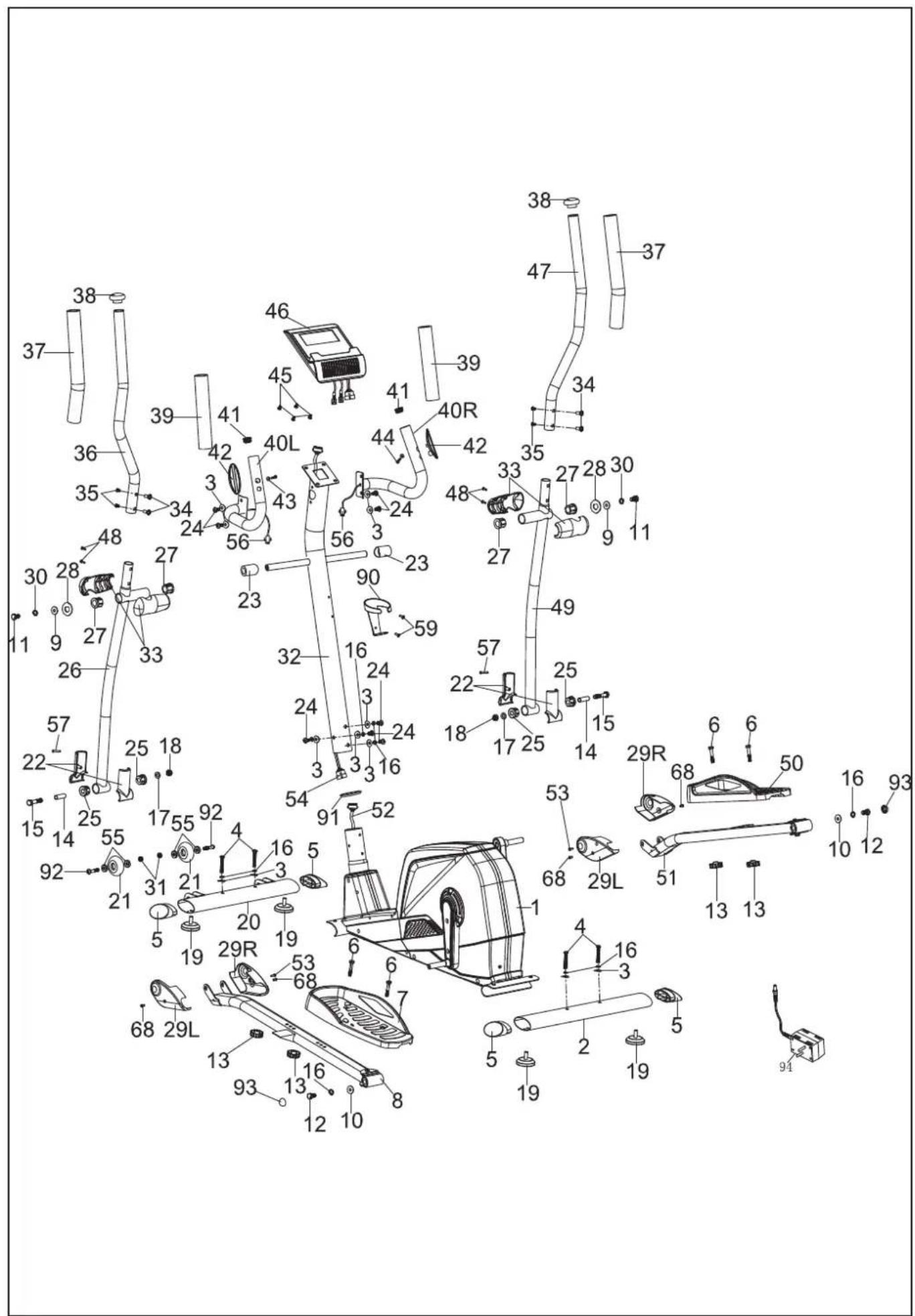
| # Description Specs Qty # Description Specs Qty | ||||||
| 1 Main frame 1 | ||
| 2 Rear stabilizer 1 | ||
| 3 Curve washer Ø8*Ø20*1.5 12 | ||
| 4 Allen screw M8*55 4 | ||
| 5 End cap for stabilizer 4 | ||
| 6 Hex head bolt M8*45 4 | ||
| 7 Pedal L 1 | ||
| 8 Pedal tube L 1 | ||
| 9 Flat washer Ø32*Ø10 2 | ||
| 10 Flat washer Ø8*Ø25 | 2 | |
| 11 Hex head bolt M10*20 | 2 | |
| 12 Hex head bolt M8*20 2 | ||
| 13 Club knob | 4 | |
| 14 Sleeve | Ø12.7*65 | 2 |
| 15 Hex head bolt M10*78 | 2 | |
| 16 Spring washer | Ø8 | 10 |
| 17 Flat washer Ø22*Ø10 | 2 | |
| 18 Nylon nut | M10 | 2 |
| 19 Leveling pad | 4 | |
| 20 Front stabilizer | 1 | |
| 21 Wheel | 2 | |
| 22 Cover for bottom handlebar | 2 Sets | |
| 23 Plastic spacer | 2 | |
| 24 Allen screw M8*16 8 | ||
| 25 Sleeve | 4 | |
| 26 Bottom handlebar L | 1 | |
| 27 Sleeve | 4 | |
| 28 D type washer | Ø32 | 2 |
| 29 L Cover for pedal tube L | 2 | |
| 29 R Cover for pedal tube R | 2 | |
| 30 Spring washer | Ø10 | 2 |
| 31 Nylon nut | M8 | 3 |
| 32 Front post | 1 | |
| 33 Cover for top handlebar | 2 Sets | |
| 34 Carriage bolt | Ø8*20 | 4 |
| 35 Allen bolt | M6*12 4 | |
| 36 Top handlebar L | 1 | |
| 37 Foam grip | 2 | |
| 38 End cap | 2 | |
| 39 Foam grip | 2 | |
| 40 L Handlebar L | 1 | |
| 40 R Handlebar R | 1 | |
| 41 End cap | Ø25.4 | 2 |
| 42 Hand pulse sensor | 2 |
| 43 | Washer | Ø4.2*Ø12 | 2 |
| 44 | Self tapping screw | ST4*20 | 2 |
| 45 | Screw for computer | M5*10 4 | |
| 46 | Computer | 1 | |
| 47 | Top handlebar R | 1 | |
| 48 | Self tapping screw | ST4*15 | 4 |
| 49 | Bottom handlebar R | 1 | |
| 50 | Pedal R | 1 | |
| 51 | Pedal tube R | 1 | |
| 52 | Lower computer wire | 1 | |
| 53 | Screw | 2 | |
| 54 | Upper computer wire | 1 | |
| 55 | Bearing | 4 | |
| 56 | Hand pulse wire | 2 | |
| 57 | Self tapping screw | T4*30 | 2 |
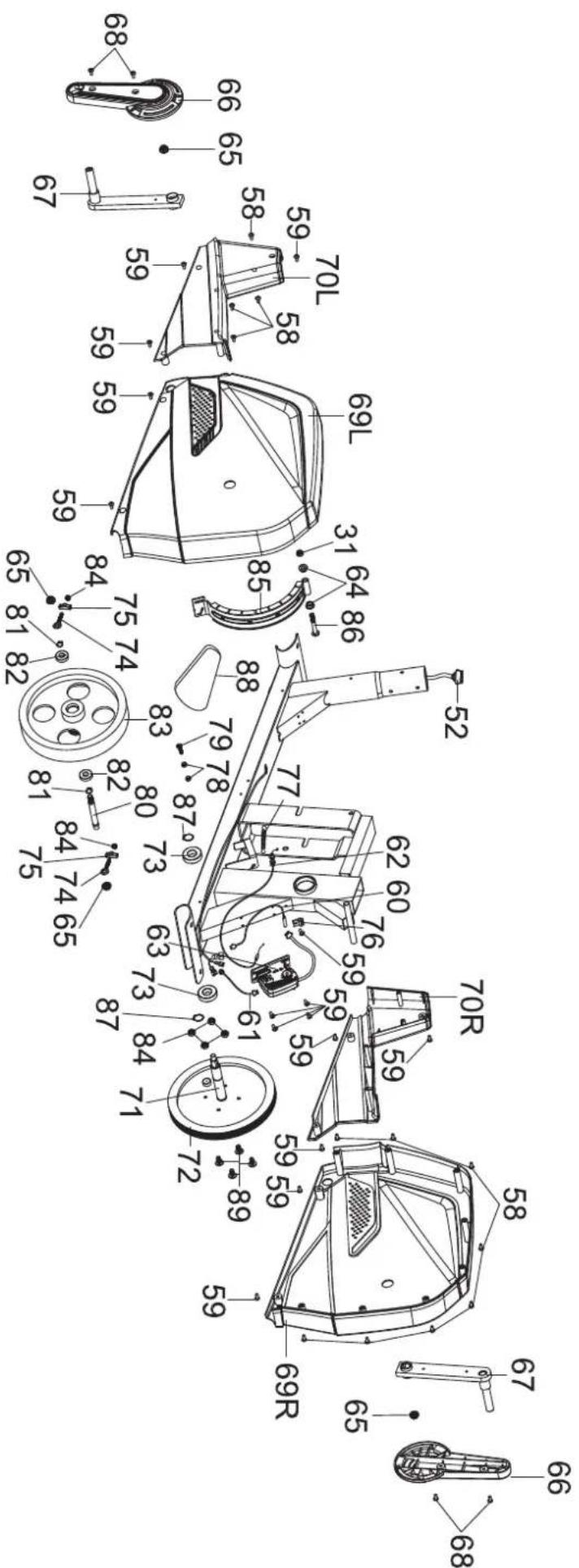
| 58 | Self tapping screw | ST5*15 | 12 |
| 59 | Screw | 17 | |
| 60 | Sensor wire | 1 | |
| 61 | Power wire | 1 | |
| 62 | Motor wire | 1 | |
| 63 | Motor | 1 | |
| 64 | Bushing | 2 | |
| 65 | Flange nut | 4 | |
| 66 | Run plate | 2 | |
| 67 | Crank | 2 | |
| 68 | Self tapping screw | 8 | |
| 69 L | Chain cover L | 1 | |
| 69 R | Chain cover R | 1 | |
| 70 L | Front chain cover L | 1 | |
| 70 R | Front chain cover R | 1 | |
| 71 | Axle for pulley | 1 | |
| 72 | Belt pulley | 1 | |
| 73 | Bearing | 6203 | 2 |
| 74 | Adjusting bolt | 2 | |
| 75 | Adjusting plate | 2 | |
| 76 | Sensor bracket | 1 | |
| 77 | Spring | 1 | |
| 78 | Hex head nut | M6 | 2 |
| 79 | Hex head bolt M6*25 1 | ||
| 80 | Axle for flywheel | 1 | |
| 81 | C-clip | Ø12 | 2 |
| 82 | Bearing | 6001 | 2 |
| 83 | Flywheel | 1 | |
| 84 | Nylon nut | M6 | 6 |
| 85 | Magnet assembly | 1 |
| # Description Specs Qty |
| 86 Hex head bolt M8*95 1 | ||
| 87 C-clip 2 | ||
| 88 Belt 1 | ||
| 89 Alen screw M6*15 4 | ||
| 90 Bottle holder 1 | ||
| 91 Decorating ring for front post | 1 | |
| 92 Alen screw M8*40 2 | ||
| 93 End cap 2 | ||
| 94 Adaptor 9V-DC/ O,5 | A | 1 |


- Crosstrainer
- Safety warnings
- WARNING
- Electrical safety
- Description (fig. A)
- Package contents (fig. B & C)
- NOTE
- Assembly (fig. D)
- CAUTION
- Workouts
- Exercise Instructions
- The warming up phase
- The exercise phase
- The cool down phase
- Muscle toning
- Weight loss
- Heart rate
- Pulse rate measurement (hand pulse sensors)
- Maximum heart rate (during training)
- Beginner
- 50-60% of maximum heart rate
- Advanced
- 60-70% of maximum heart rate
- Expert
- 70-80% of maximum heart rate
- Use
- Adjusting the support feet
- Adjusting the pedal position
- Power supply (Fig. E-1)
- Console (fig F)
- Explanation Display functions
- Time
- Speed
- RPM
- Distance
- ODO
- Calories
- Watt
- Target HR
- Age
- Pulse
- Level
- Program
- Explanation of buttons
- Arrow up
- Arrow down
- Mode
- Enter
- Start/Stop
- Recovery
- Opperation
- Power on
- Power off
- Programs
- Quick start (Program 1)
- End your workout
- Program mode (Program 1~10)
- Body Fat (Program 11)
- Target heart rate. (Program 12)
- H.R.C. mode. (Program 13~15)
- User program (P16 ~ P19)
- Trouble shooting:
- Cleaning and maintenance
- Defects and malfunctions
- Transport and storage
- Additional information
- Packaging disposal
- End of life disposal
- Technical data
- Warranty
- Tunturi purchaser's warranty
- Warranty terms
- Warranty conditions
- Warranty coverage
- Warranty limitations
- Declaration of the manufacturer
- Disclaimer
- Deutsch
- Haftungsausschluss
- Mode H.R.C. (Program 12)
- Modus H.R.C. (Program 12)
Brand : TUNTURI
Model : Star Fit C100
Category : Elliptical bike