
114 - Phone TIPTEL - Free user manual and instructions
Find the device manual for free 114 TIPTEL in PDF.


| Product Type | Standard Corded Phone |
| Brand | TIPTEL |
| Model | 114 |
| Category | Landline Phone |
| Connection | RJ11 or TAE phone jack (depending on country) |
| Power Supply | Powered by telephone line (no batteries or power adapter) |
| Dimensions (approx.) | 220 x 190 x 80 mm |
| Weight (approx.) | 300 g |
| REN Value | 1 (max. 4 on line) |
| PBX Compatibility | DTMF and TBR (timed break recall) |
| Last Number Redial | Yes (R button) |
| Mute Key | Yes, hold to mute microphone |
| Recall Function | Yes (R button), requires operator subscription |
| Ringer Volume | 3 positions: high, low, off |
| Visual Call Indicator | Red LED indicator |
| Wall Mountable | Yes (kit included, spacing 100 mm) |
| Desktop Use | Yes, with cable guide |
| Color | Black (standard) |
| Warranty | 24 months parts and labor |
| Maintenance | Clean with a soft dry cloth |
Frequently Asked Questions - 114 TIPTEL
User questions about 114 TIPTEL
0 question about this device. Answer the ones you know or ask your own.
Ask a new question about this device
Download the instructions for your Phone in PDF format for free! Find your manual 114 - TIPTEL and take your electronic device back in hand. On this page are published all the documents necessary for the use of your device. 114 by TIPTEL.
USER MANUAL 114 TIPTEL
natural_image
Black-and-white photo of a classic office telephone with a coiled cord and keypad (no visible text or symbols)tiptel
Inhoudsopgave
Inhoudsopgave 2
Installatie 3
Table of contents 20
Getting started....21
Connecting the handset and line cords 21
To use the phone on a desk 21
To wall mount your phone 21
Getting to know your phone 22
Using the phone....23
Make a call....23
End a call 23
Receive a call....23
Redial 23
Secrecy 23
Ringer volume....23
Call Waiting 24
Technical information 25
Switchboard external line access code 25
To insert a pause 25
Recall....25
Wall mounting your phone 25
Annex....26
Service 26
Guarantee 26
Maintenance / Cleaning 27
CE Sign 27
Getting started
Connecting the handset and line cords
- Plug one end of the handset cord into the handset socket and the other end into the socket at the end of the base.
- Plug the telephone line cord into the socket on the bottom of the base. Plug the other end into the telephone wall socket.
To use the phone on a desk
Thread the telephone line cord through the groove toward the back of the base.
To wall mount your phone
Refer to page 25 of this guide.
Getting to know your phone
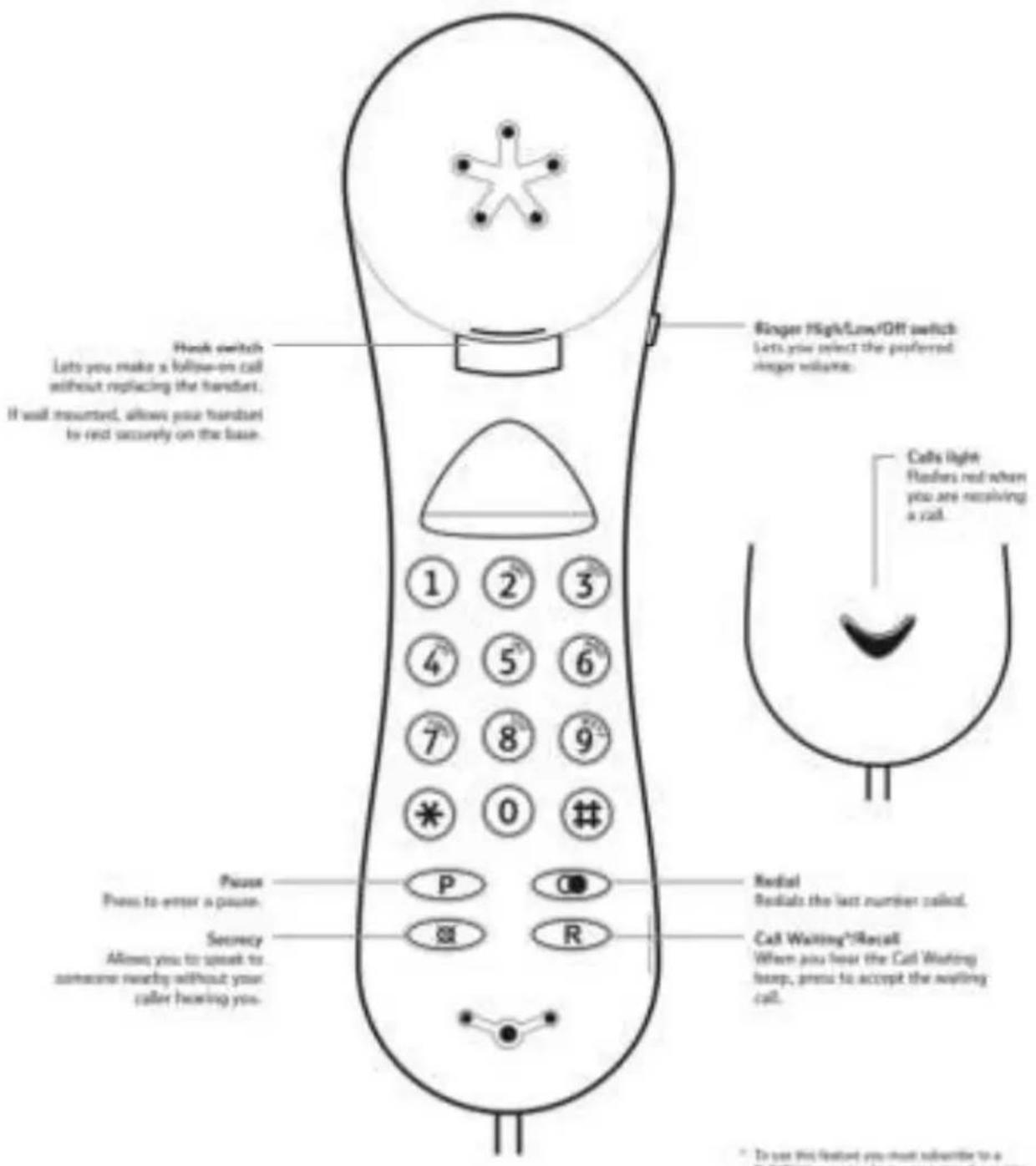
Using the phone
Make a call
- Lift the handset and wait for the dial tone.
- Enter the telephone number and it will be dialled.
End a call
- Replace the handset to end a call.
Or
Press the hook switch to make a follow on call.
Receive a call
- When you receive a call, the phone will ring and the red Calls light will flash.
- Pick up the handset to answer the call.
Redial
- Press ()The last number called is automatically redialled.
Secrecy
-
During a call, press and hold ( ☒).
Your caller cannot hear you now. -
Release ( ☑) to resume your call.
Ringer volume
- Adjust the switch to your preferred volume, High, Low or Off (if you do not want to be disturbed).
Call Waiting
Please note: To use this feature you must subscribe to a Call Waiting service from your network provider.
When you are on a call and another caller is trying to get through, the Call Waiting beep will sound to alert you.
- Press (R) to put your current call on hold and accept the waiting call.
- Press (R) again to alternate between the two calls.
Technical information
Switchboard external line access code
You may need to enter an access code (e.g. 0) in order to get an outside line.
So that the switchboard has time to pick up an outside line, you may also need to add a pause after the access code.
A Pause lasts 3.6 seconds.
To insert a pause
- Begin dialling a number and press (P) where a pause is required.
Recall
The button (R) is used when connected to certain switchboards, e.g. to transfer calls, and for some Calling Features or those services available via your network provider.
Wall mounting your phone
- Drill two holes in the wall 100mm vertically apart.
- Insert the screws using wall plugs. Leave approx. 5mm of the screw head protruding from the wall to hold the base securely in place.
- Slide out the handset hook on the base, rotate it 180^ and replace it. The handset will rest on the hook when wall mounted.
Annex
Service
You have purchased a modern product of Tiptel GmbH, which was designed and manufactured in Ratingen near Düsseldorf. Our high-tech manufacturing facilities “Made in Germany” grant a continuous level of the highest quality. This is even underlined by our certification according to DIN EN ISO 9001. If, however, problems occur or you have questions on operating the device, please contact your local dealer.
Guarantee
Please contact your local dealer or importer for details of guarantee for non EC countries. Within the European Community the following guarantee regulation applies: Your contact for services arising from guarantee obligations is the authorised dealer where you bought the device. Tiptel GmbH will grant a guarantee of 2 years from the date of handover for the material and for the manufacturing of the telecommunications terminal unit. Initially, the purchaser shall have only the right of subsequent performance. Subsequent performance entails either repair or the supply of an alternative product. Exchanged devices or parts shall become the property of the authorised dealer. If the subsequent performance fails, the purchaser can either demand a reduction in the purchase price or withdraw from the contract. The purchaser shall notify the dealer immediately of any defects found. Proof of the guarantee entitlement shall be furnished by standard proof of purchase (receipt or invoice).
The guarantee entitlement shall expire if the purchaser or an unauthorised third party interferes with the device. Damage caused by inappropriate handling, operation, storage or by force majeure or other external influences shall not be covered by the guarantee. The guarantee shall not cover any consumable material (e.g. batteries) or defects that only slightly impair the value or the usability of the device.
Claims for damage caused by transport shall be asserted to the delivery company.
Notes on settlement:
Repairs can only be conducted by the Tiptel Service. A warranty repair does not prolong the warranty period – neither for the replaced parts nor for the device. This guarantee is not transferable and shall expire if the device is sold on to another party. It shall also expire if the device is interfered with by third parties or if the serial number on the device has been removed or made illegible.
The General Terms and Conditions of Tiptel GmbH, which are part of the contract for a dealer, shall also apply. In the event of a complaint, the defective product shall be sent to the relevant Tiptel subsidiary, the importer or dealer along with a description of the defect and the proof of purchase.
Maintenance / Cleaning
The telephone is maintenance-free. Clean the housing surface only with a soft, slightly moist cloth or an antistatic cloth. Never use a dry cloth (electrostatic charge can lead to defects of the electronic). Do not use any chemicals, cleaning products or abrasives.
CE Sign
This device is approved for the connection and use within the analogue public telephone networks in all EC countries – according to the European Requirements. Due to technical deviations in individual countries, we cannot grant an unlimited guarantee for the successful operation at all types of telephone accesses.
Tiptel GmbHhereby declares that the device complies with all fundamental requirements of the European directive 1999/5/EC. This conformity is confirmed by the CE sign on the device.
Further details on the declaration of conformity can be found under the following internet address:
http://www.tiptel.com
Tiptel.com GmbH Business Solutions
Halskestraße 1
D - 40880 Ratingen
Tel.: 0900 100 - 84 78 35*
Vanity Tel.: 0900 100 - TIPTEL*