ManualGo.com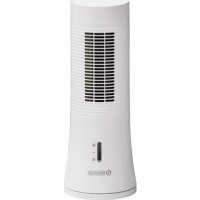
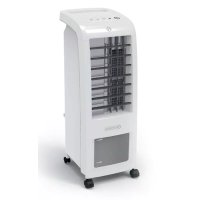
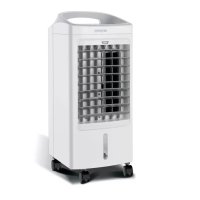
Pelèr 1 - Air Conditioning OLIMPIA SPLENDID - Free user manual and instructions
Find the device manual for free Pelèr 1 OLIMPIA SPLENDID in PDF.



Download the instructions for your Air Conditioning in PDF format for free! Find your manual Pelèr 1 - OLIMPIA SPLENDID and take your electronic device back in hand. On this page are published all the documents necessary for the use of your device. Pelèr 1 by OLIMPIA SPLENDID.
USER MANUAL Pelèr 1 OLIMPIA SPLENDID
WHEN USING ELECTRICAL APPLIANCES, BASIC
SHOCK, AND INJURY TO PERSONS, INCLUDING
THE FOLLOWING: This product should be used only in accordance with the specications outlined in this manual. Usage other than what has been specied here may result in serious injury.
1. This appliance can be used by children aged from 8 years
and above and persons with reduced physical, sensory or mental capabilities or lack of experience and knowledge if they have been given supervision or instruction concerning use of the appliance in a safe way and understand the hazards involved.
2. Children shall not play with the appliance.
3. Children should not be allowed to clean or maintain the
appliance without supervision.
4. If the supply cord is damaged, it must be replaced by the
manufacturer, its service agent or similarly qualied persons in order to avoid a hazard.
5. Unplug the appliance during lling and cleaning.
6. Ensure that the fan is switched off from the supply mains
before removing the guard.
7. When not in use, disconnect the plug from the power sup-
ply. Grasp the plug, not the main power cord, when discon- necting the plug.
8. Do not disassemble or alter the unit.
9. Do not use the unit in areas where the temperature is extre-
mely high or low where it may be exposed to direct sunlight.11 PELER 1 ENGLISH 10 Do not operate the unit near ammable liquids or in explo- sive atmospheres.
11. Do not put heavy objects on the unit; this may cause da-
mage or malfunctions onthe unit.
12. Since the unit has the humidifying function, please do
not use it for a long time in an airtight place (such as a small closed room) to avoid too much humidity.
13. Change the water frequently to keep it clean.
14. This unit must be operated in a vertical position.
15. This unit shall not be exposed to dripping or splashing
16. Do not install the unit in a conned space, such as a bo-
okcase or built-in cabinet 17.Switch OFF and unplug the unit before lling with water. Make sure the water is below the MAX water level line.
18. Switch OFF and unplug the unit before cleaning and
maintenance. 19 The unit should not be adjusted or repaired by anyone except specialized technicians. 20.To reduce the risk of re or electric shock, do not use this fan with any speed control device.12 ENGLISH
MAIN FEATURES AND OPERATING
Cooler function 1,2,4 hours timing low level water protection Three fan speeds: high, mid, low Automatic horizontal oscillation Medium speed is the default conguration when the machine is turned on Safety power off function, when air lter is removed Working status LED light is reduced automatically 1 minute after no buttons are pressed.
PRE-OPERATING INSTRUCTION Select a rm, level, at location at least 15cm from any wall or object for proper air ow. Place the air-cooler appliance on a water-resistant surface, as water can damage furniture and some ooring. Do not place the unit directly on carpets, towels, blankets or other absorbent surfaces. We will not accept responsibility for damage caused by water spillage FILLING To use the Cooling function, water must be added to the water tank. Open the tank and pour in cool, clean water. Open the water tank Pour water Check water level
Cap for water draining14 ENGLISH Please pay attention when adding water to: Unplug the appliance Before relling, remove any remaining water Use only clean water Fill the water tank slowly Pay attention to the front water level display window to not exceed the maximum level. Lock the tank with the slider pin, to prevent the tank falling OPERATING INSTRUCTIONS Before connecting the power supply, please read the safety precautions and make sure that the power socket voltage conforms to the requirements of the air-cooler unit. After turning on the power, the air-cooler will sound Bi Bi twice, then enter Standby mode. At this time other keys are invalid except the Power on/speed key (Power on sound: BiBi, Key Sound: Bi, Switch off sound: Bi)
1. On-off Key: On pressing this key, issuing a Bi sound, circuits enter normal working state,
power indicator switches on; Medium fan speed shifts to low fan speed after 3 seconds; in working state, pressing this button will make a Bi sound, then it will go to standby status.
2. Speed Key: press this key in working state, making a Bi-sound, to set up the fan speed.
The fan speed follows the order: low—mid—high—Low—mid……, the indicator lights up accordingly. The product turns on at medium speed by default, but will shift to low fan speed after 3 seconds.
3. Swing Key: under the boot-up state, press this key to switch oscillation on, the indicator
switches on; press the key again, the indicator switches off, and so on.
4. Cooling Key: under the boot-up state, to switch the cooling function on, relevant indicator
switches on, other water tank indicator switches on as well; press the button again, the cooling function and relative indicator will turn off, and so on. 4.1. When the Cooling function turns on, the water pump will work for 45 seconds before te- sting the water level; if the water level remains below the set level for 5 seconds, the cooling function will turn off automatically, and the BiBi sound will last for 5 seconds.
5. Timer Key: In the initial state, press this key to open the timer function, setting mo-
del:1-2-4-0-1-2……and so on, LED indicates a corresponding time. NOTE - At rst use, the appliance may have a slight odor - At each re-starting, the appliance may have water condensate on the grid15 PELER 1 ENGLISH DAILY MAINTENANCE Disconnect the appliance from the power supply. Check that the fan is switched off Remove the air lter, clean it with detergent (not petrol, alcohol, gas oil or similar products) and dry it. Remove the water cloth, clean it with detergent (not petrol, alcohol, gas oil or similar products) and dry it. Drain the water contained in the tank and clean it with a wet cloth or brush. Clean the body of the unit with a dry cloth. Do not use a wet cloth or any water jet because it could affect the safety of the appliance and its appropriate working. Reinstall water cloth. Reinstall the air lter.
END OF SEASON STORAGE
Follow the daily maintenance suggestions to clean lters and water cloth. Ensure the air lter and the water cloth are dry, ensure that the water tank contains no ac- cumulated water. Pack the unit in its original carton and store in a cool, dry location.16 ENGLISH DISPOSAL This symbol on the product or its packaging indicates that the appliance cannot be treated as normal domestic trash, but must be handed in at a collection point for recycling electric and electronic appliances. Your contribution to the correct disposal of this product protects the environment and the health of your fellow men. Health and the environment are endangered by incorrect disposal. Further information about the recycling of this product can be obtained from your local town hall, your refuse collection service, or in the store at which you bought the product. This regulation is valid only in EU member states SPECIFICATIONS For the technical data listed below, consult the characteristic data plate applied to the product. Voltage (V) 220-240 V~ FREQUENCY (Hz) 50 Hz