Tab 104 QC - Tablet Sunstech - Free user manual and instructions
Find the device manual for free Tab 104 QC Sunstech in PDF.



| Brand | Sunstech |
| Model | Tab 104 QC |
| Product type | Touchscreen tablet |
| Operating system | Android 4.4.2 KitKat |
| Screen | 10 inches, capacitive touch, 1024 × 600 pixels |
| Processor | A33 Quad-Core A7 1.3 GHz |
| Graphics processor | Mali-400 at 450 MHz |
| RAM | 1 GB DDR III |
| Internal memory | 8 GB |
| Memory extension | microSD card up to 32 GB (not included) |
| Wireless connectivity | Wi-Fi 802.11 b/g/n |
| Ports | Micro USB 2.0 (OTG), 3.5 mm headphone jack, DC 5 V jack |
| Front camera | 0.3 MP |
| Rear camera | 2 MP |
| Battery | Lithium-polymer 6000 mAh |
| Power supply | DC 5 V - 2 A power adapter |
| Sensors | Built-in microphone |
| Box contents | Tablet, power adapter, USB cable, OTG cable, DC cable, user manual, warranty card |
| Care and cleaning | Clean with a soft, dry cloth. Do not use chemicals. |
| Safety | Do not expose to moisture, extreme temperatures or shocks. Use only approved accessories. |
| Warranty | 2 years (according to applicable law) |
Frequently Asked Questions - Tab 104 QC Sunstech
User questions about Tab 104 QC Sunstech
0 question about this device. Answer the ones you know or ask your own.
Ask a new question about this device
Download the instructions for your Tablet in PDF format for free! Find your manual Tab 104 QC - Sunstech and take your electronic device back in hand. On this page are published all the documents necessary for the use of your device. Tab 104 QC by Sunstech.
USER MANUAL Tab 104 QC Sunstech
Specifications. 1
2
Getting started. 3
How to use TF card. 7
How to connect with computer. 8
Connection to Internet. 8
Camera. 9
Trouble Shooting. 10
Specifications
Operating System:Android 4.4.2
Display: 10.1 inch 1024X600 Capacitive multi-touch screen
CPU: A33 Quad-Core A7 1.3GHZ
RAM: 1GB DDR III
GPU Mali-400@450Mhz
Internal Storage: 8GB
Expansion Memory: Micro SD card up to 32GB (not supplied)
Built-In Wireless: 802.11b/g/n
Micro USB 2.0/OTG
Front camera 0,3 Mpixels, back camera 2 Mpixels.
Battery:6000mAh AC
Adapter: DC 5V-2A
Output headphones.
DC input jack 5V.
Builtin microphone.
Made in China
What's Inside The box
Tablet - 1pc
Power Adapter -1pc USB
Cable-1pc
OTG Cable -1pc
DC Cable-1pc Instruction
manual - 1pc Warranty
card - 1pc
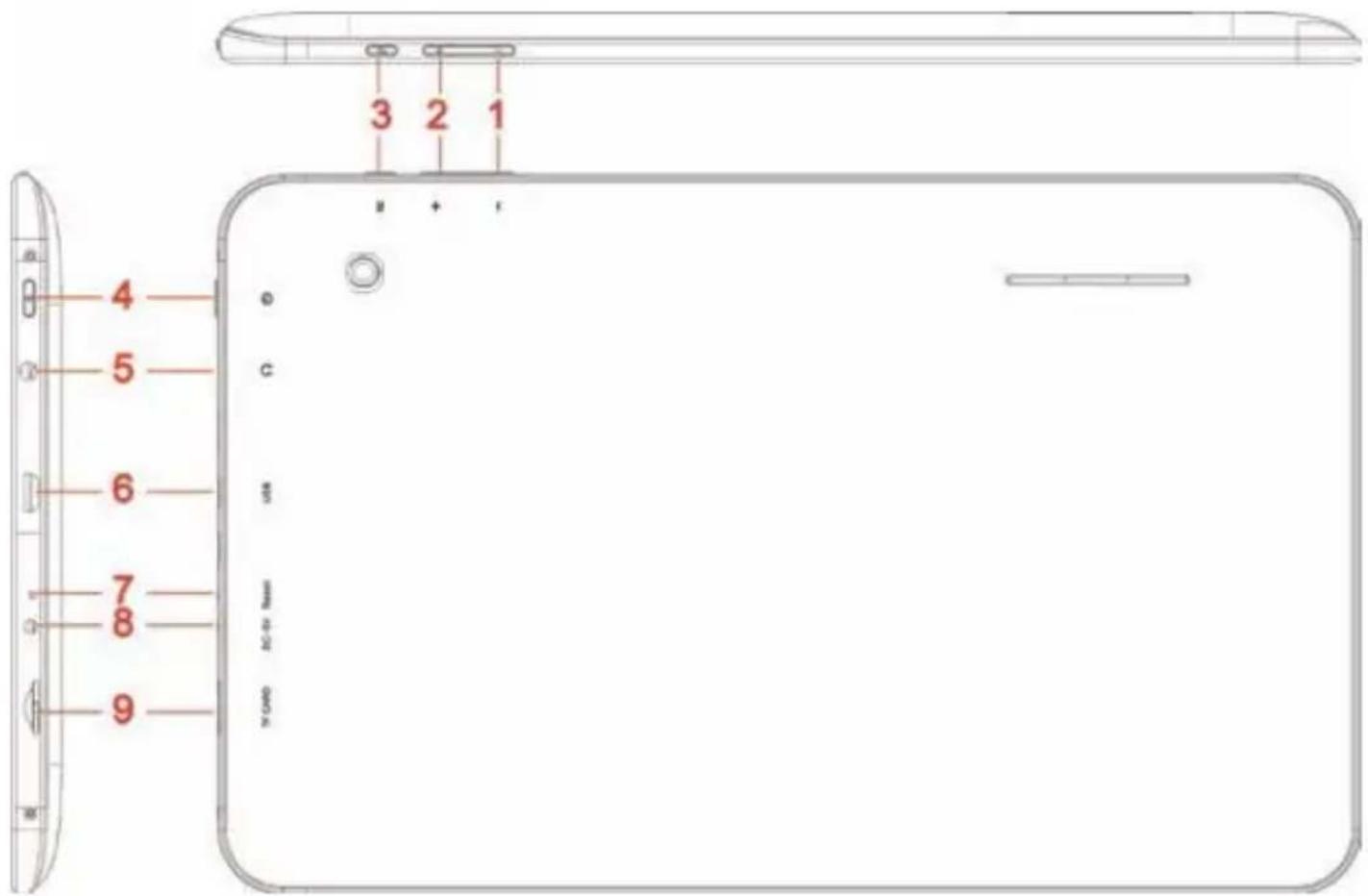
Tablet Part
| Name function | |
| Volume down | Press the button to decrease the volume |
| Volume up | Press the button to increase the volume |
| Return | Exit from the current function/return to the previous page |
| Power | Keep pressed to turn on/off the tablet; shortly press to activate standby |
| Earphone jack | Connect earphone to this standard 3.5mm jack |
| USB OTG Port PC connection | on/peripheral connection through OTG cable (for example keyboard, USB device)/battery charge through the supplied adaptor |
| Reset Tablet will force to shutdown | |
| DC jack DC 5V power | |
| Micro SD input | Insert a micro SD card (up to 32GB) |
Getting Started
Battery Charging
The tablet has a built-in rechargeable Li-polymer battery.
- To charge connect the AC power adapter to the micro power jack on the right side of the tablet.
- The battery icon shows the battery status and charging status
- The tablet can be used even if the battery is being charged. the above icons indicate the different level of power left in the battery
- Do not replace the battery without authorization, or the explosion hazard might happen.
- Recharge it for at least half hour if it has been idle for long time and fails to start itself.
- Regularly recharge it at least once a month
- 40^ - 5^ is the optimum temperature for the battery recharging or the battery performance might deteriorate slightly
Disposal
the battery might contain the polluting material, please give it to the official recycling-station before disposing the tablet pc, and don't litter.
Power ON/OFF
ON:
press the button for continuous 5 seconds until the tablet turns "ON". OFF:
-
Press the button for continuous 5 seconds and it will appear
-
Select OK to power off the tablet
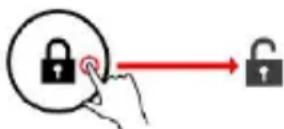
Screen Lock
This feature locks the screen, at the same time turn OFF the screen's backlight after a few seconds.
Screen locks when:
- System is idle.
- Manually activated by pressing the Power button once.
Screen unlock :
Home screen
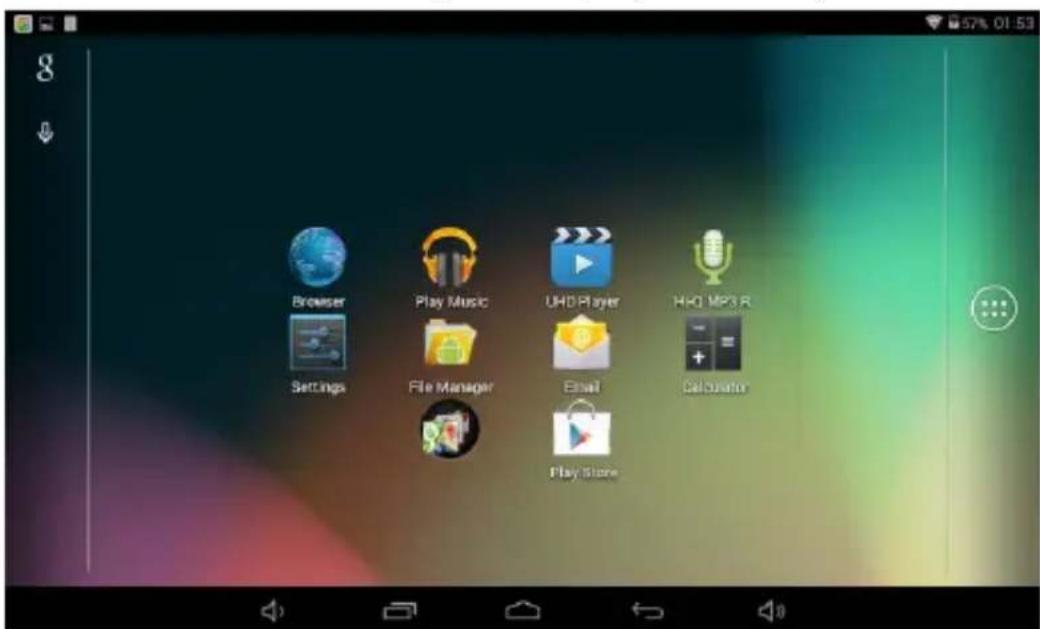
The Home screen will look similar to the picture below. It is actually five
screens, each of which can have a different layout of icons. To switch between screens, simply slide your finger left or right across the display.
The status bar and navigation buttons are always visible, no matter which Home screen you can currently viewing.
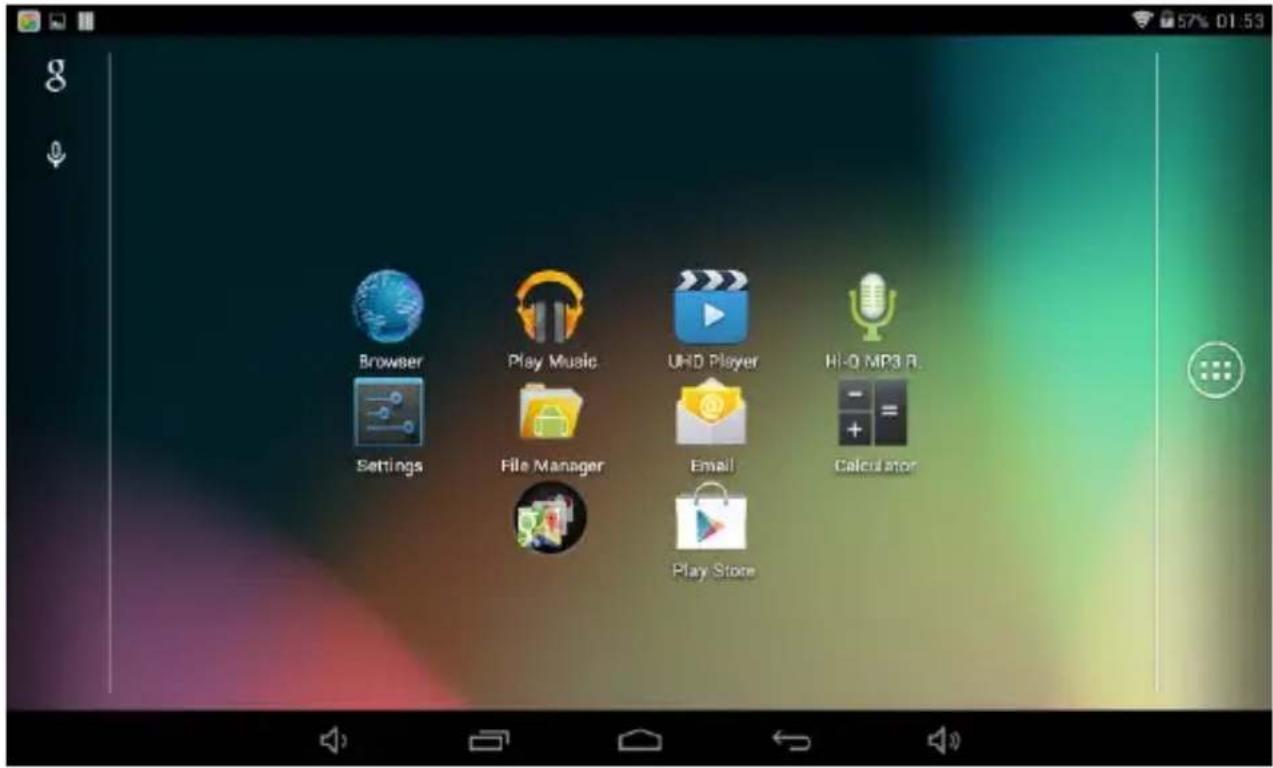
The Desktop contains shortcuts to your most-used applications and widgets. Touch the screen icon to quickly search the World Wide Web using Google.
The icon will launch the Application menu.
The status bar displays system information, such as current time, wireless connectivity and battery.
Touch to Expand the status bar for more detailed information.
The button moves back one step to the previous menu/page.
The buttons return immediately to the Android desktop.
The button display a menu of recently opened applications.
Settings Menu
The settings menu allows you to adjust Tablet system
configuration. To change settings:
- Touch the "Settings" Settings menu will open.

menu icon on the Application menu.The
- Guide your finger up or down the left side of the screen to scroll through the list of available categories.
- Touch a category title to view further options on the right side of the screen.
Wi-Fi - Connect to /disconnect from wireless networks, view connection status Data usage - Enable / disable mobile data, view current usage, set mobile data limit (note: this function is available only on devices supplied with 3G card) Sound - Change volume, touch sound, screen lock sounds etc Display - Change brightness, wallpaper, sleep settings, font size etc Storage - Manage NAND and Micro SD card, view available capacity etc Battery - See battery status and powered-on time Apps - Manage applications, running services etc Accounts - Manage accounts etc
Apps - Manage applications, running services etc USERS& PROFILES- TO create a new user and profiles.
Accounts & sync - Switch synchronization on /off, manage accounts etc Location services - Change approximate location detection, improve search results
Security - Change screen lock type, encryption, password, credential storage etc Language & input Select language, add to the dictionary, edit on-screen keyboard settings, vocal search, etc
Backup & reset - Backup & restore data, perform factory reset, etc
Date & time - Set date, time zone, time, clock format etc
Accessibility - Set up large text, auto-rotate screen, speak password etc
Developer options - Advanced functions for Android developers - debugging, HDCP check etc
About tablet - Information about your Android device
How to Use TF card
- Insert the TF card into the TF card slot. Gently push TF card into slot until it clicks into place.
- A prompt will be seen on the screen saying "Preparing SD card"
Removing TF card
- Close all applications and documents which have been opened from the TF card.
- Select "Setting" and find "Storage" then click "Unmount SD card".
- A prompt will be seen on the screen saying "SD card safe to remove"
- Gently press the TF card to remove and pull out the TF card.
Note: Insert the TF card in correct position, otherwise it will damage the card and the slot.
Software Keyboard
The tablet has a software keyboard which automatically show up when you tap the place on screen where text or number are to be entered.
Touch Screen
The touch screen responds to finger touch.
Note: don't place any object on the touch screen for it may damage or crush the screen.
Single Click: single click one icon to choose the icon or option you want.
Long Press: press and hold one icon to make appear a menu related to executed function (if available).
Drag: drag on the screen and you can move between magic cube sides or drag the application icons into the shortcut bar.
How to connect with computer
Note: Turn on your Tablet before connect the Tablet to PC by USB cable.
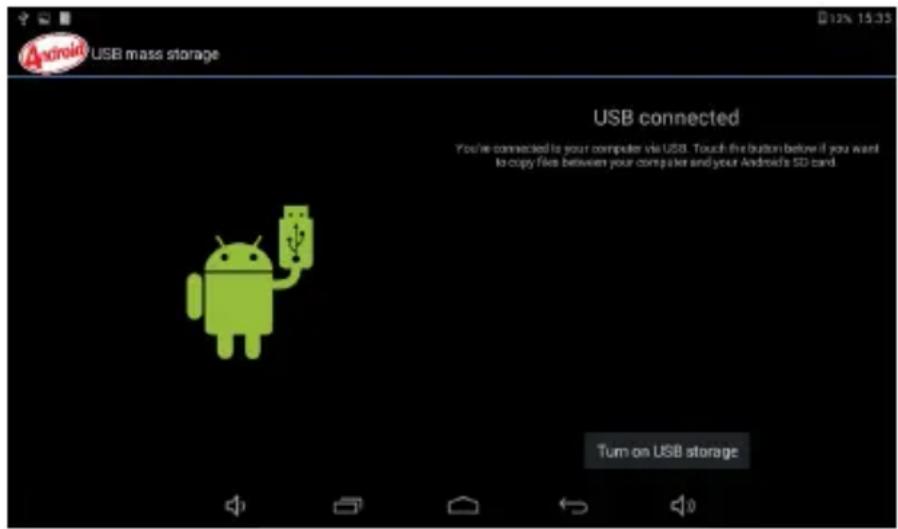
1 Use USB cable to connect with the computer. System will notice USB connected on bottom of screen.
2 Press USB connected on the top bar, then click Turn on USB storage, click OK.
3. Then the USB connection has been successfully.
Connection to Internet
Wireless:
1 Select "Settings"
2 Select "Wi-Fi" and slide OFF to ON status.

3 All detected wireless networks in the area will be listed, Click to select desired wireless connection.
4 Enter WEP key or network key if necessary.
5 Once connected to a wireless network, settings will be saved
6 Wireless icon will appear on the taskbar when connected successfully. Note: when the tablet detects the same wireless network in the future, the device will connect to the network automatically with same password record.
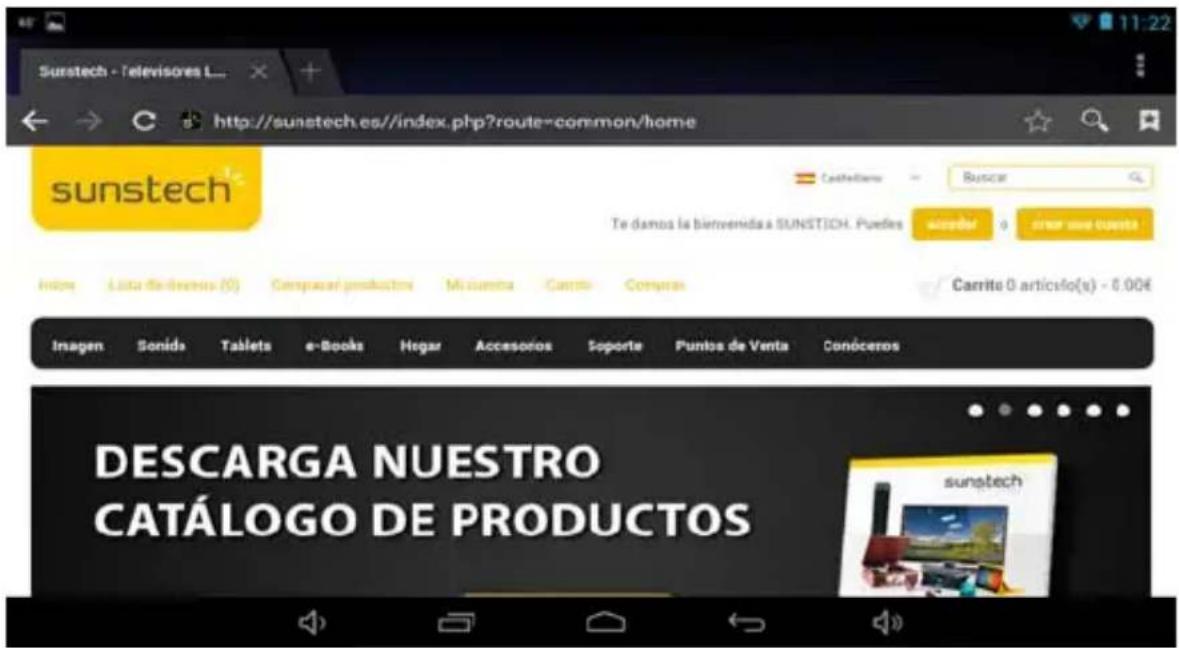
Web Browsing
Connect to the internet and launch the browser.
Camera
Touch the icon to enter camera mode and the interface is shown as follows:
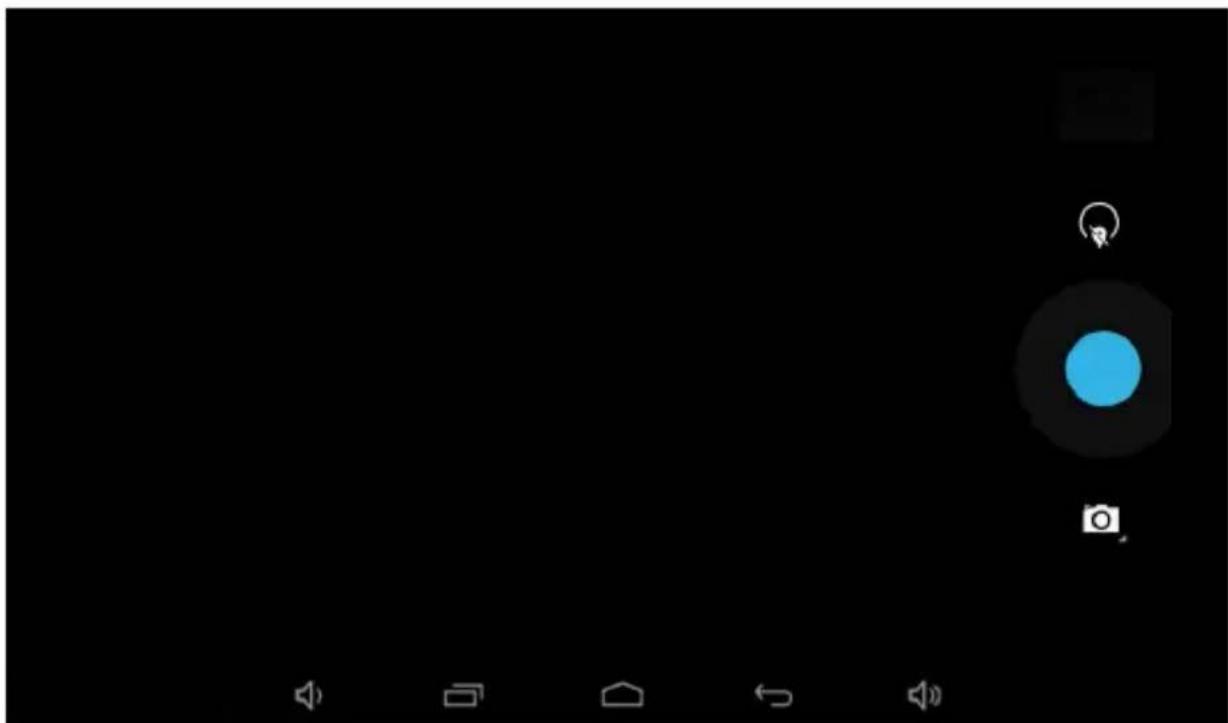
- Touch the icon in the middle to take photo
- Move the icon to bottom and you can switch camera mode to camera recording mode.
- Touch the icon on the top right to see the previous picture and you can also delete, share, set it as the wallpaper. Click return button to exit camera interface.
Trouble Shooting
Close Application
All running applications take up system memory and will slow down system response. Please shut down all idle applications to release memory and get the system speed back to normal.
To close the application, click the icon on the shortcut bar to enter the system configuration interface. Select the Application Running services and the interface is shown as follows:
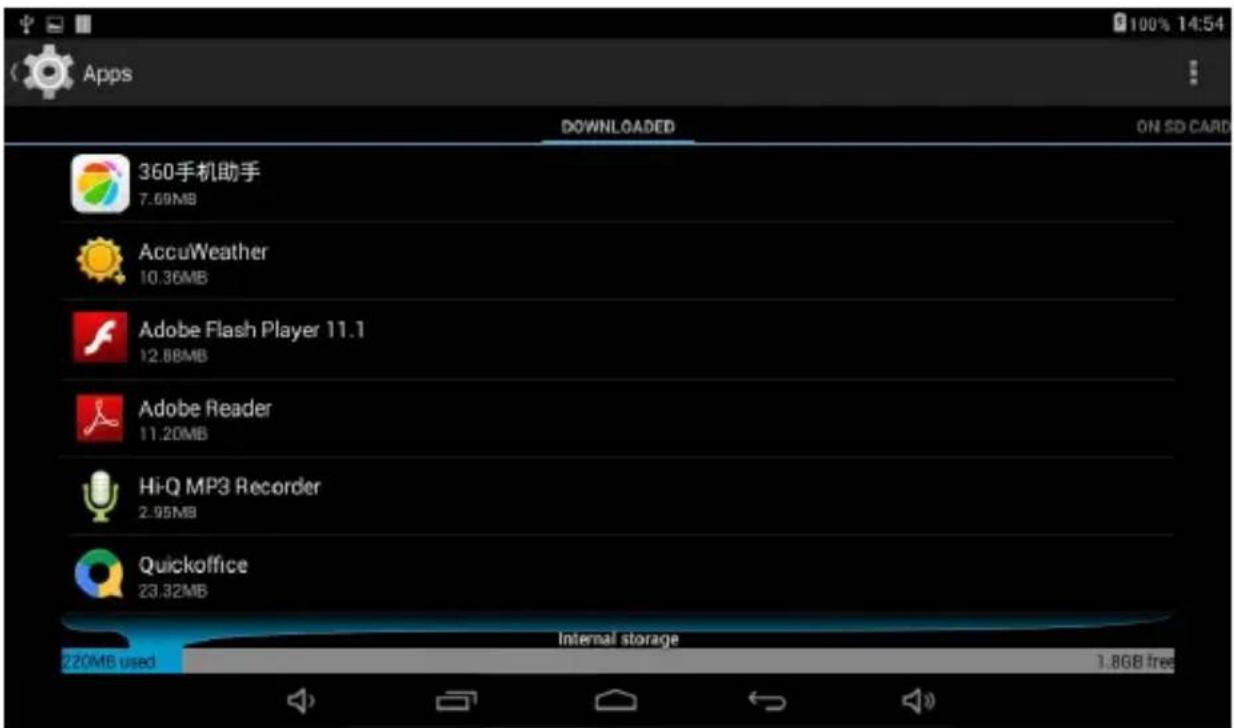
Tap the application you want to close. A pop-up window will be displayed. Tap "Stop" to close that application.
Mandatory Power off
- Press and hold the power button for 5 seconds and the device will be powered off.
- Press the reset button on the back and the device will be forced to be powered off.
If you want to reset the factory setting and erase all materials, please press Settings Backup and Reset Factory data reset.
** Warning: Factory data reset setting will delete your data and configuration of system and applications from downloading.
**Please use this function carefully.
Recovery Mode:
How to enter in recovery mode. Please follow these steps.
1-To enter in the recovery mode first you should power off the device,
2-Then long-press the "ON-OFF" key and "VOL + " Key at the same time until the Recovery mode has appeared, pls try it.
3-After a new menu will appear and then you must use the touch panel or volume keys to select "Wipe data/ factory reset" then press "Power" and then select "Yes delete all user data"
Then press "power" again. The unit will then begin the recovery mode. (this process may last for a few minutes).
4-When it finishes select "reboot system now" press the "power button" and the unit will re-start itself. (this process may last for a few minutes)
How to download the software using the unit.
IMPORTANT: When you download the software, all data will be deleted as photos, videos and Apps that you have been installed.
Do not interrupt this process please make sure the battery is fully charged.
Please, follow these steps.
1- Open browser and search and open this link: www.sunstech.es/download/
2- Select the model of the tablet that you have and download the software.(This software is installed In the INTERNAL SD).
3- When it finished the download, select the App "Update" in your unit.
4-Select "Local Update", "Download".
5-Select the software / download and wait until the process is finished.
WARRANTY CARD
EUROPEAN WARRANTY
1. General
This warranty is granted without prejudice and in addition to the recognized rights for the consumer vis-à-vis the seller provided in the Royal Legislative Decree of 16 November, approving the restated text of the General Law for the Protection of Consumers and Users and other complementary legislation. Therefore, the recognized legal rights for the consumer are not limited or excluded according to the relevant Regional, National or European legislation.
This warranty shall be valid in all the European Union Member States with the limitations that legally correspond in the country in which they are intended to be implemented in accordance with their implementing legislation.
Notwithstanding the foregoing, SUNSTECH shall respect the rights and limitations related to the product warranty that legally correspond in each of the States listed in the Attachment in accordance with their implementing legislation for any product provided that it is intended for the EU market and has been purchased or used by the consumer or user within the EEA.
2. Legal Warranty
This SUNSTECH product has a two (2) year warranty counting from the date of delivery and/or purchase. During the above timeframe, SUNSTECH shall be held responsible for any lack of conformity of the product in relation to the contract in accordance with the provisions of the Law for the Protection of Consumers and Users, that shall entitle the consumer to request the repair or replacement of the product, unless one of these options is objectively impossible or disproportionate.
Accordingly, the remedy (i.e. the repair or replacement) shall be deemed to be disproportionate if it imposes unreasonable costs on the seller. In order to determine this, the following shall be considered: (i) the value of the product if there were no lack of conformity; (ii) the relevance of the lack of conformity; and (iii) if the other form of remedy could be carried out without major inconvenience to the consumer and user.To determine
whether the costs are unreasonable, the costs incurred by one form of remedy must be significantly higher than the costs corresponding to the other form of remedy.
In addition, the consumer may choose between requesting a reduction in the price or terminating the contract, if he is not entitled to demand the repair or replacement of the product and whenever these actions would not be completed within a reasonable timeframe and would cause more inconvenience to the consumer and user. However, the termination shall not take place where the lack of conformity is minor.
Both the repair and the replacement of the product as a result of the product's lack of conformity shall be free of charge for the consumer and user, including labour and materials.
In any case, repairs under warranty shall be carried out by SUNSTECH's Official Technical Assistance Service or its authorized distributors.
3. Conditions for the warranty to be exercised
To exercise the legal and commercial warranty, it is necessary to submit documentary evidence showing the delivery and/or purchase date of the product, whether the invoice, receipt, delivery slip or sealed and dated warranty card. Documents which have been tampered with or falsified will not be accepted.
The consumer shall contact SUNSTECH's Customer Service Team using the website (under the support section) and will be informed about what action to take. At that time, the consumer shall have to provide a clear description of the malfunction or the lack of conformity of the product with the contract.
In any case, repairs under the warranty shall be carried out by SUNSTECH's Official Technical Assistance Services or its authorized distributors so that SUNSTECH can be held responsible under the legal and/or commercial warranty.
4. Exceptions
The warranty does not foresee or include periodic maintenance or product installation revisions.
In addition, the product will not be considered as lacking conformity in relation to the contract and therefore, it will not be covered by the legal or commercial warranty when:
- The lack of conformity corresponds to a discrepancy with the safety standards or the local or national techniques of a different country to the one it was originally designed and produced in;
- This product or any of its identification features (number of series, etc.) have been partially or completely opened, assembled, unassembled, handled and/or repaired by a person not part of SUNSTECH's Official Technical Assistance Services team or its authorized distributors
- The lack of conformity is a result of an incorrect installation (except if the installation has been carried out by one of SUNSTECH's authorized sellers or under its responsibility, or by the consumer following SUNSTECH's installation instructions) or an abusive or inadequate use of the product, including but not limited to, a usage that is not in accordance to the normal purpose of the product or the directions for use and maintenance, as defined by SUNSTECH;
- The lack of conformity has been caused by a computer virus, an action or a manipulation of passwords, software installation, manipulation or reinstallation, etc.;
- The lack of conformity is due to the use of accessories, chargers or consumables that are not SUNSTECH originals and therefore are not designed for that product;
- The lack of conformity is due to the use of any third party software or application that modifies, changes or adapts the software that was approved and/or included by SUNSTECH in the product;
The lack of conformity is a result of downloading or using third party multimedia services and/or contents available or accessible through the product;
- Damages in or through the battery, which are due to it being overcharged, are produced;
Any of the box seals or battery cells have been damaged, or there is clear evidence that shows these were handled; and/or
- The product damages are caused by any unforeseeable or force majeur circumstances, especially, lightning, water, fire, applying incorrect voltage or any other cause that is not due to the product manufacturing or design.
Under no circumstances will SUNSTECH be held responsible for the loss of any data stored in the product. The consumer will be held responsible for any back-up copies and the protection of any data from loss, damage or destruction.
None of the warranties included here cover the replacement of parts, due to ware or rupture of mechanisms, rubber, boxes and/or plastic, as well as any aesthetic damage resulting from the normal use of the product, for example, if the screen loses its shine with the use of the product. In the same way, the warranties do not cover any type of damage produced during the transportation of the product (including but not limited to aesthetic damage, blows, lines, scratches, stains, dents, etc.) in which case the applicable provisions under SUNSTECH's general contract conditions will apply.
For further information go to www.sunstech.com
You can also contact: AFEX SUNS, S.A.
Pallars, 189-191
08005 BARCELONA
SAFETY AND PRECAUTION WARNINGS

ThisproductcanbeadjustedtotheSARnationallimitsof2 W/Kg.ThespecificSARmaximumvaluesareinthe informationsectionofthisguide.
Whenyouholdtheproductoruseitonyourbody, maintaindistanceof1.5cmfromyourbodytoensurethe radiofrequencyexposuresstandards.
www.sar-tick.com
Thisdeviceofferscommunicationandentertainmentservicesthatfollow SUNSTECH'shighstandardsandtechnologicalexperience.
- Thecontentmaydifferfromthefinalproductofthesoftwareprovidedbythe suppliersofservicesortransmittersanditissubjecttoalterationwithoutprior notice.
- Thee elementsthatcomewiththedevicelandanyavailableaccessorymayvary accordingtotheregionorsupplieroftheservices.
- The element provides design uniquely for this device compatible with other devices.
- YoumaypurchaseadditionalaccessoriesatyourlocalSUNSTECHdistributor. Ensurethattheyarecompatiblewiththedevicebeforeyoupurchasethem.
- Otheraccessoriesmaynotbecompatiblewiththedevic.
- SUNSTECHisnotheldresponsibleforproblemsufficientreturnorany changetotheoperatingsystem'ssoftware.Anyattempttopersonalizethe operatingsystemmaycausethedevicetherapplicationstofunction incorrectly.
Instruction icons

Warning:Situationsthatcancauseinjurysto yourself or thirdparties.


Precaution:Situationsthatcancauseddamagestothe device orotherequipment.
Note: Notes,recommendationsofuseoradditional information.
Copyright
Copyright2013Afexsuns,S.A.
Thisguideisprotectedbyinternationalcopyrightlaws.
Reproduction,distribution,translationortransmissionofanypartofthisguideis notallowedunderanycircumstancesorthroughanymeans,beitelectronicormechanic.Thisincludesphotocopies,recordsorstorageinanyinformation retrievalandstoragesystems,withoutpreviouswrittenauthorizationfromAfex Suns,S.A.
Safety information
This section contains safety information for mobile devices. Some of the content may not apply to your device. In order to avoid injury to yourself or third parties or damage to the device, read the device's safety information before you use it.

Warning
If you do not comply with these safety regulations and warnings, you may suffer serious injury or even death.
Do not use damaged power cords or connectors or loose sockets.
Unsafecomnectionsmaycauseanelectricdischargeorafire.
Do not touch the power cord if your hands are wet and do not pull the cord to disconnect the charger.
If youdoso, you may beelectrocuted.
Do not bend or damage the power cord.
If you sodo, this may cause anelectric discharge.
Do not cause a short-circuit in the charger or the device.
If youdoso, this may cause anelectric discharge or the device may not function correctly.
Use batteries, chargers, accessories and supplies that have been approved by the manufacturer.
- Theuseofgenericbatteriesorchargersmayshortentheusefullifeof thedeviceorcauseincorrectfunctioning.Itmayalsocauseafireortho batterymayexplode.
- OnlyusebatteriesorchargersthathavebeenapprovedbySUNSTECH, specificallydesignedforthedevic. Anyoncompatiblebatteriesand chargersmaycauseseriousphysicalinjuriesordamagethedevice.
- SUNSTECHwillnotbeheldresponsibleforthesafetyoftheuser wheneveraccessoriesupspliesthavenotbeenapprovedbythe brandareused.
Do not cut or drop the charger or the device.
When handling or disposing of the device and charger do so with caution.
- Neverthrowthebatteryorthedevicetothefire.Neverplacethe batteryorthedevicemonanysourcesofheat,suchas,ovens,microwaves, glasshousesorradiators,etc.Ifitoverheats,thedevicemayexplode. Followallocalregulationswithregardstodisposingoftheusedbattery ordevice.
- Donotsquashthedevicereormakeholesinit.
- Avoid exposing the device to high pressure because this may cause an internal short-circuit and overheating.
Protect the device, battery and charger in order to stop them from getting damaged.
- Avoidexposing the device and battery toveryhigh or verylow temperatures.
- Extremetemperaturesmaydamagethedeviceandreducechecharging capacity andthedurationofthedevicelandbattery.
- Avoidthebatteryenteringintocontactwithmetalobjectsbecausethis maycauseaconnectionbetweenthepositiveandnegativeterminalsof thebatteryanddamageittemporarilyorpermanently.
- Neverusedamagedchargersorbatteries.
Do not store the device in or near heaters, microwaves, heated kitchen equipment or high pressure containers.
Thebatterymayhaveweakages.
Thedevicemayoverheatandcauseafire.
Do not use or store the device in places with a lot of dust or material transported by air.
Dustorforeignmaterialsmaycausethedevicetomalfunctionandmayresultina fireoranelectricdischarge.
Safetyinformation
Do not bite or suck the device or the battery.
Thismaydamagethedevicerecauseanexplosionorafire.
Childrenandanimalsmaychokeonsmallpieces.
- Whenchildrenusethedevicere,ensurethattheydosocorrectly.
Do not insert the device or the accessories provided into your eyes, ears or mouth.
If youdoso, you make chokeorsufferserious injuries.
Do not handle damaged lithium-ion batteries or batteries that show evidence of leakage.
Todisposeoflithium-ionbatteriessafely,contactyourclosestaauthorizedservice centre.
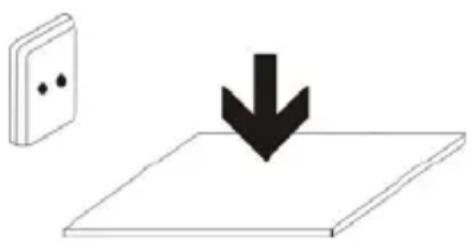
PLUGGABLE EQUIPMENT: the socket-outlet shall be installed near the equipment and shall be easily accessible.
Precaution
If you do not comply with these regulations and warnings, you may suffer injuries or cause material damage.
Do not use the device near other electronic devices.
- Mostelectronicdevicesuseradiofrequencysignals.Thedevicemay interferewithotherelectronicdevices.
If you use aLTE data connection, this may cause an interference with other devices, such as audio equipment and telephones.
Do not use the device in a hospital, plane or car that may be affected by interference caused by radiofrequency.
Ifpossible,avoidusingthedevicatanydistanelowerthan15cmfrom apacemaker,becausethedevicemaycauseinterferenceswithit.
- Tominimize anypossibleinterferencewithapacemaker,usethedevicenonlyonteoppositesideofthebodyinrelationtothepositionofthe pacemaker.
Ifyouusemedicalequipment,contactthemanufacturerof the equipmentbeforeusingthedevicenordertoascertainwhetherthe equipmentwillbeaffectedbytheradiofrequencyemittedbythedevic.
- Ifelectronicdevicesareusedonaplane,thesemayinterferewiththe electronicnavigationinstruments.Ensurethatthedevicesturnedoff duringtake-offandlanding.Aftertake-offyoumayusethedevicemon "airplanemode"aslongasthisisallowedbythecabincrew.
Theelectronicdevicessinyourcarmaymalfunctionduetotheradio interferenceofthedevicel.Contactthemanufacurerforfurther information.
Do not expose the device to smoke or strong emanations. If youdoso, you may damage the outside part of the device or cause its malfunctioning.
If you use hearing devices, contact the manufacturer for further information about radio interference.
Theradiofrequencythatthedevicememitsmayinterferewithsomehearingdevices. Beforeusingthedevicerecontactthemanufacurerinordertoascertainwhetherthe hearingdevicewillbeaffectedbytheradiofrequencyemittedbythedevic.
Do not use the device near other devices or apparatuses that emit radiofrequency, such as sound systems or radio towers.
Radiofrequencymaycausethemalfunctioningofthedevic.
Turn off the device in potentially explosive atmospheres.
- Turnoffthedeviceststeadofremovingthebatteryinpotentially explosiveatmospheres.
Alwaysrespectthestandards,instructionsand warningsignsin potentiallyexplosiveatmospheres. - Donotusethedevicepinpetrolstationsornearfuelorchemicalsorin demolitionareas.
- Donotstoreortransportflammableliquids, gasesorexplosivematerial inthesamecompartmentinwhichdevice,itspartsoraccessories are.
If you become aware of the device or the battery letting off strange odours or sounds or if you see smoke or liquid coming out of the device or battery, stop using the device immediately and take it to an authorized service Centre.
If youdonotdoso, this may cause a fireorean explosion.
Comply with all the safety regulations and warnings related to the use of mobile devices when driving a vehicle.
Whendriving, your main responsibility is to control the vehicles safely. If the law does not allow mobile phone use, don't use themobiledevice. For your and others' safety use your commonsense and remember the following advice:
- Gettoknownthedevicereanditsoperatingfunctions,likespeededdialling andrecallsystem.Thesefunctionsallowthetimenecessaryarytomakeand receivecallstoberduced.
- Put the device in a place where it is easy to reach. Make can access the wireless device without taking your eyes off the road. If
youreceiveatelephonecallataninconvenienttime,letvoice-mail answerit.
- Stopphonecallswhenthereisheavytrafficorwhenthereareadverse climateconditions.Rain,sleet,snow,iceandheavytrafficcanbevery dangerous.
- Donotjotdownorlookfortelephonenumbers.Jottingdownatakor lookingatyourcalendarmaydistractyoufromyourmainresponsibility, whichistodrivesafely.
- Dialcarefully andassessthestateofthetraffic.Makephonecallswhen youarenotmovingorbeforehittingtraffic.Trytoschedulephonecalls whenthecarisparked.
- Donothaveverystressfuloremotionalphonecallsthatmaydistract you.Tellthepersonthatyouarespeakingtothatyouaredrivingand endanyconversationsthatmaytakeawayyourattentionfromtheroad.
Correct use and maintenance of the mobile device.
Keep the device dry.
- Humidityandliquidsmaydamagethepartsortheeelectroniccircuits of thedevice.
- Donotturnonthedevicefitiswet.Ifitisalreadyturnedon,turnitoff andtakethembatteryoutimmediately(ifyoucannotturnitoffortakethe batteryout,justleaveitasitis).Afterthis,drythedevicewithatowel andtakeitttotheservicecentre.
- Liquids will change the colour of the label which caused by the water inside the device. The damage caused by the water in the device may cancel the manufacturer's warranty.
Place the device only on flat surfaces.
Ifitdrops, the devicemaygetdamaged.
Do not store the device in very hot or cold places. It is recommended that you use the device at temperatures between 5^ and 35^ .
- Donotstorethedevicelinewithveryhightemperatures, such as insideacarinthesummer. If youdoso, you maycausethescreen to malfunction, thedevicemaygetdamagedorthebatterymayexplode.
-
Donotexposethedevicetodirectsunlightforlongperiodsofttime(for example, onthedashboardofacar).
-
Storethebatteryattemperaturesbetween 0^ and 45^ .
Do not store the device with metal objects, such as coins, keys and necklaces.
Thedevicemaygetscratchesorstopworkingproperly.
- If the battery terminals come into contact with metal objects, afire may occur.
Do not store the device near magnetic fields.
Itispossibleforthedevicetostartmalfunctioningandforthebatteryto losepowerduetobeingexposedtothesesefields.
- Cardswithmagneticstripe,suchascreditcards,telephonecards,travel passesmaygetdamagedduetothemagneticfields.
If the device overheats, stop using it and its applications for a while.
Prolonged skinexposuretoahotdevicemaycausesymptomsofburningwithlow temperature,suchasredspotsandpigmentation.
Do not use the device if the back cover is not in place.
The battery may come out of the device, malfunctioning.
If the device has a lamp or a camera flash, do not use it near people's or animal's eyes.
This may cause atemporary loss of vision ordamagetheeyes.
Be careful when exposing yourself to intermittent light.
- Whenyouusethedevic,leavesomelightsturnedoninthebedroom and donothave the screens too close to you oureyes.
- Convulsionsorfaintingmayoccurduetoexposuretointermittentlight whenlookingatvideosorplayinggameswithintermittentlightsfor prolongedperiodsofttime.Ifyoufeelunwell,stopusingthedeviceme immediately.
- Ifanyoneclosetoyousufferedfromconvulsionsorfaintingwhenusing asimilardevice,visitadoctorbeforeusingthedevic.
Ifyoufeeldiscomfort,suchasmusclecrampsoryoufeeldisoriented, stopusingthedevicemmediatelyandvisitadoctor.
Toavoideyefatigue,havefrequentsbreakswhenusingthedevic.
Reduce the risk of injury caused by repetitive movements.
Whenyoucarryoutrepeatedactions,suchaspressingkeys,drawingcharacterson thetouchscreenorplayingagame,youmayfeeldiscomfortinyourhands,neck, shouldersorotherpartsofthebody.Whenyouusethedeviceduringprolonged periodsofttime,holditwithrelaxedhands,touchthekeyslightlyandrest frequently.Ifyoucontinuefeelingdiscomfortduringoraftertakingthesesteps, stopusingthedeviceandvisitadoctor.
When you use earphones, protect your hearing and your ears.
- Excessiveexposuretoloudsoundscancause damagetohearing.
- Exposuretoloudsoundswith you are walking may distract you and cause an accident.
Alwayslowerthesoundbeforeconnectingtheearphonestoanaudio sourceandusethemimumamountofvolumenecessaryarytolistento musicorhaveaconversation.
- Indryenvironments,staticelectricitymayaccumulateinthearphones. Avoidusingearphonesindryenvironmentssorttouchmetalobjectsto dischargegethestaticelectricitybeforeconnectingtheearphonestothed device.
- Donotuseanearphonewhileyouaredrivingorridingvehicle.Ifyou dosoyoumaygetdistractedandcauseanaccidentoryoumaybe subjecttolegalion,dependingonthareawhereyouaredriving.
Use the device with caution while you are walking or moving.
- Alwayspayattentiontowhatishappeningaroundyouavoidphysical injurytoyourselfandothers.
- Makesuretheearphonecorddoesn'tgetentangledroundyourarms ornearbyobjects.
Do not take devices in your front pockets or round your waist.
Youmaygetinjuredordamagethedevicefitfalls.
Do not paint your device or put any stickers on it.
- Paintandstickerscanobstructthemobilepartsandstopthedevicefromworkingproperly.
Ifyouareallergictopaintortothemetalpartsofthedevic,youmay getastingyfeeling,eczemaorswelling.lfthishappens,stopusingthe deviceandvisitadoctor.
Do not use the device if the screen is cracked or broken.
Thebrokenglasscancausehandandfaceinjuries.Takethedevicetoanauthorized servicecentretrogetitreated.
Install the mobile devices and the equipment with caution.
- Makesurethatthewholemobiledevicererelatedequipmentthatis installedinyourvehicleisassembledsafely.
- A void placing the device and the accessories where the a toit.Anywirelessequipmentinstalledincorrectlycauseserious injurieswhentheairbagsinflatequickly.
Do not allow the product to fall or to be subject to strong impacts.
Thedevicemaygetdamagedormalfunction.
- Ifyoubendordeformithedevicemaygetdamagedanditspartsmay malfunction.
Guarantee of the maximum duration of the battery and charger.
- Avoidchargingthedeviceforoveraweek,becauseoverchargingcan reduce the battery'sservicelife.
- Withtime, the device will run out of battery (even when it is not being used) and you will need to charge it to use it again.
- Disconnectthechargerfromthepowersourceswhenitisnotbeing used.
- Usethebatteryonlyforthepurposeforwhichtwasdesigned.
If youdonotusethebatteryforalongtime,youmayreduceitservice lifeandperformance.Youmayalsocausethemalfunctioningor explosionofthebatteryorafire.
- Followalltheinstructionsinthismanualtoguaranteethelongest servicelifepossibleforyourdeviceandbattery. Anydamageor operatingproblemscausedbynotcomplyingwiththewarningsand instructionsmaycancelthemanufacturer'swarranty.
- Withtime, the devicemaywearout. Some parts and repairs are recovered under the warranty during the validity period; however, the damages or deterioration caused by the use of accessories not approved by the brandarenotcovered.
Takethefollowinginformationintoaccountwhenusingthedevic.
Useitinaverticalposition,asyouwouldattraditionaltelephone.
- Speakdirectlyintothemicrophone.
- Donotcovertheantennaarewithyourhandsorotherobjects.This maycauseconnectionproblemsorcausethebatterytorundown.
Do not unassembled, change or repair the device.
- Anyalterationorchangetothedevicemaycancelthemanufacturer's warranty.Ifyouneedtorepairthedevice,takeittoanaauthorizedservice centre.
- Donotdisassembleormakeholesinthebattery, this maycause an explosionorafire.
- Turnoffthedevicebeforeeremovingthebattery.Ifyouremovethe batterywhilethedevicewisstillturnedon,thismaycausealfunctioning.
Take the following information into account when cleaning the device.
Useatowelararubberclothtocleanthedeviceandthecharger.
Cleanthebatteryterminalswithcottonorwithatowel.
- Donotusechemicalsubstancesordetergents.Ifyoudoso,youmay causediscolorationorcorrosionoftheoutsidepartofthedeviceoryou maycauseanelectricdischargeorafire.
Do not use it for any other purpose other than the one it was designed for.
The device may malfunction.
When you use the device in public, try not to disturb others.
Only allow qualified professionals to carry out the maintenance of your device.
Itispossiblefordamagestooccurandthemanufacturer'swarrantyiscancelledif youallownonqualifiedpersonneltocarryoutthemaintenanceofthedevice.
Be careful when handling SIM cards, memory cards or cables.
- When inserting acardorconnectingacabletothe device, makes sure the cardis inserted correctly or that the cable is connected on the right side.
- Donottakethecardoutwhenthedevicestransferringinformationorit hasaccesssto,becauseyoumaylosedataanddamagethecardorthe device.
- Protectthecardsfromstrongdischarges,staticelectricityandnoise generatedfromotherelectronicdevices.
- Donottouchthecontactsorthegoldterminalswithyourfingersorwith metalobjects.lfthecardisdirtycleanitwithasoftcloth.
- Ifyouinsertacardorconnectacableforcefullyorincorrectlyyoumay causedamagetothermultifunctionalsocketorotherpartsofthedevic.
Make sure you have access to emergency services.
Itispossiblethatinsomeareasorcircumstancesyoumaynotbeabletomake emergencyphonecalls.Beforetravellingtoremateasordevelopingcountries, plananalternativeformofcommunicatingwiththeemergencyservices.
Protect your personal data and avoid confidential information from being spread or used incorrectly.
- Whenyouusethedevicemakesureyoumakeback-upcopiesof importantdata.SUNSTECHwillnotbeheldresponsibleforanylossof data.
- Whenyoudisposefthedevic,makeaback-upcopyofallthedataand afterre-establishthedevicetoavoidpersonalinformationfrombeing usedinappropriately.
-
Readthelicensescreencarefullywhenyoudownloadapplications.Be especiallycarefulwithapplicationsthathaveaccessstovariousfunctions orasignificantamountofyourpersonalinformation.
-
Control your accounts frequently to avoid any suspicious or unauthorized use. If you find any indication of your personal information not being used appropriately, contact your servicesuppliertodelete or change the information in your account.
- Ifyoulosethedevicereoritisstolen,changethepasswordsofyour accountstoprotectyourpersonalinformation.
- Avoidusingapplicationsfromunknownsourcesandblockthedevicewithapattern,apasswordoraPIN.
Do not distribute material protected with copyright.
Donotdistributematerialprotectedwithcopyrightwithouttheauthorizationof thecontentowners.Ifyoudoso,youmayviolatecopyrightlaws.Themanufacturer willnotbeheldresponsibleforanylegalproblemcausedbyillegaluseofmaterial protectedbytheuser.
Malware and virus
Follow these suggestions to protect the device against malware and virus. If you do not do so, you may cause damagesorlossofdatathatmaynotbe covered under the warranty.
- Donotdownloadunknownnapplications.
- Donotuseunreliablewebsites.
- Deleteanysuspicioustextmessagesoremailsfromunknownsenders.
Createapasswordandchangeitregularly. - Deactivatethewirelessfunctions,suchasBluetooth,whenyouarenot usingthem.
- Ifthedevicebehavesstrangely,executeantivirusprogramtodetecta possibleinfection.
- Executeanantivirusprogramonthedevicebeforestartingapplications andfilesthatyoujustdownloaded.
- Installanti-virusprogramsonyourcomputerandexecutethem regularlytodetectanypossibleinfections.
- Donoteditheregistrationadjustmentsorchangethedevicess operatingsystem.
Information about the certification of the Specific Absorption Rate (SAR).
THIS DEVICE FOLLOWS INTERNATIONAL STANDARDS OF EXPOSURE TO RADIO WAVES.
Yourmobiledeviceisaradiotransmitterandreceiver.Itwasdesignetonot exceedthelimitsofexposuretoradiowaves(electromagneticfieldsof radiofrequency)recommendedbyinternationalstandards.Thestandardsweredevelopedbainindependentscientificorganization(ICNIRP)andincludea substantiallyafetymargindesigntoensurethesafetyofallpeople,regardless of theirageorstateofhealth.
Theexpositoretadiowavestandssuseameasurementunitknownaste The SpecificAbsorptionRate,SAR.TheSARlimitformobiledevicesis2W/Kg.TheSAR testsarecarriedoutusingstandardoperationpositionswiththedevic e transmittingatitsmaximumcertifiedenergylevelinalfrequencybands.The highestSARamountsundertheICNIRPstandardsforthisdevicemodelare:
| MaximumSARforthismodelandconditionsunderwhichitregistered | |
| SAR for positions near the head. | 0.285W/Kg |
| SAR for positions near the body. | 0.0399W/Kg |
Duringtheuse,therealSARvaluesforthisdeviceareusuallyalotlowerfromthe valuesindicatedpreviously.Thisisduetomaximizingthesystem'sefficiencyandto minimizetheinterferencewiththenetwork,theoperationcapacityofyourmobile devicereducesautomaticallywhenthemaximumpowerisnotneededforthecall. Thelowertheamountofenergyleavingthedevic,thelowertheSARamountwill be.
ASARtestwascarriedoutwiththedevicenthebodywithadistanceof1.5cm.To comply with the radiofrequency exposure requirements, while using the device on thebody, the deviceshallhavetobeatleast1.5cmawayfromthebody.
Someorganizations,liketheWorldHealthOrganizationortheFoodandDrug AdministrationoftheUnitedStatessuggeststhatifuserswanttoreduceexposure, theycanuseahandsfreetaccessorytomaintthewirelessdevicefarawayfromthe headandbodywheninuse,orreducetheamountoftimespentusingthedevice.
Correct disposal of this product.
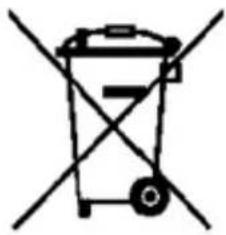
(Electronicdevicewaste)
(Thisappliesin countrieswhererecollectionsystemshappen separately).
Thepresenceofthissymbolontheproduct,accessoriesor informationmaterialindicatesthatneithertheproductnorits electronicaccessories(suchas,thecharger,helmets,USB cable)shouldbedisposedofwithotherhouseholdwaste.
Toavoidanypossibledamagetothenvvironmentalhealthcausedby uncontrolleddisposalofwaste,separatetheseproductsfromotherwasteand recyclethem.Thisway,youarepromotingthesustainablereuseofmaterial resources.
Individualuserscancontacttheestablishmentwheretheypurchasedtheproduct ortherelevantlocalauthoritiestogetinformationaboutwhereandwhentheycan takeitinordertosubmitittoecologicalandsaferecycling.
Businessuserscancontacttheirsupplierandcheckthepurchasecontract conditions.Thisproductanditselectronicaccessoriesshouldnotbedisposed of withothercommercialwaste.
Correct disposal of this product's batteries
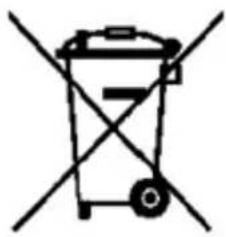
(Thisappliesin countrieswhereerecollectionsystemshappen separately).
Thepresenceofthismarkonthebatteries,manualorproduct packagingindicatesthatwhentheservice lifeofthebatteries hasendedtheyshouldnotbe disposed of withother householdwaste.ThechemicalsymbolsHg,CdandPbindicate that the battery has mercury,cadmiumorleadat levelsalot higherthanthereferencevaluesadmittedbythe2006/6 Directive of the European Union.
If the batteries are not disposed of correctly, these substances may cause personal injury or damage the environment.
Toprotectnaturalresourcesandpromoterecycling,separatethebatteriesfrom otherwasteandrecyclethemthroughthefreecollectionserviceinyourarea.
Exemption from responsibility clause
Partofthecontentandservicesostwhichyouobtainaccessthroughthisdevice belongto third parties and are protected undercopyright,patent,registered trademark and/or other intellectual property laws. This contentandservices are only for personal use and not commercial use. It is possible that the contentortheservices cannot be used if authorized by the contentowner or the服务商 without prejudice to the aforementioned information, except when expressly authorized by the contentowner or the服务商, you cannot change, copy, reedit, charge, publish, transmit, translate, sell, created derivatives, exploreordistribute in any way or by any means the contentortheservices shown through this device.
"THECONTENTANDTHESERVICESOFTHIRDPARTIESARePROVIDED"ASIS". SUNSTECHDOESNOTGUARANTEETHECONTENTORTHESESERVICESPROVIDED, EITHEREXPRESSLYORIMPLICITLY,FORNOPURPOSE.SUNSTECHEXPRESSLY RENOUNCESANYIMPLICITGUARANTEES,INCLUDINGBUTNOTLIMITEDTO, MERCHANTABILITYORSUITABILITYGUARANTEESFORAPURPOSEINPARTICULAR. SUNSTECHDOESNOTGUARANTEETHEVERACITY,VALIDITY,REPRODUCTION, LEGALITYORINTEGRITYOFANYTYPEOFCONTENTSERVICEPROVIDED THROUGHTHISDEVICEANDUNDERNOCIRCUMSTANCES,INCLUDING NEGLIGENCE,WILL SUNSTECHBEHILDRESPONSIBLE.BOTHINTERMSOF CONTRACTORPREJUDICETOANYDIRECTORINDIRECT,ACCIDENTAL,SPECIAL OR CONSEQUENTIALDAMAGES,LAWYERS'FEES,EXPENSESORANYOTHERYPEOF DAMAGEFROMORINRELATIONTOANYTYPEOFINFORMATIONINCLUDEDNOR ASARESULTOFTHEUSEOFANYTYPEOFCONTENTSERVICEBYYOURSELF FOR ATHIRDPARTY,THEPOSSIBILITYOFTHEREFERREDDAMAGESISKnown."
TheservicesofthirdpartiesmayceaseorbeinterruptdatanytimeandSUNSTECH doesnotcarryoutrepresentationsorguaranteesinrelationtotheavailabilityof contentorserviceforanyperiodoftime.Thecontentandservicesaretransmitted bythirdpartiesthroughnetworksandtransmissionlocations overwhich SUNSTECHhasnocontrol.Withoutlimitingthegeneralityofthisclause,SUNSTECH expresslyrenouncesanyresponsibilityforanyinterruptionorsuspensionof contentorserviceprovidedthroughthisdevice.
SUNSTECHisnotresponsibleforcustomerserviceregardingcontentandservices. Anyquestionorrequestforserviceregardingcontentorservicesshouldbesent directlytotheservicesandcontentsuppliers.
DECLARATIONOFCONFORMITY
CouncilDirective(s)towhichconformityisdeclared:
Directive(1999/5/EC)-R&TTE Directive(2011/65/EU)-RoHS
ApplicationoftheStandards:
EN60950-1:2006+A11:2009+A1:2010+A12:2011
EN301489-1V1.9.2 EN301489-17V2.2.1
EN62479:2010 EN300328V1.7.1
EN55022:2010 EN61000-3-3:2008
EN61000-3-2:2006+A2:2009 EN55024:2010
EN61000-4-2:2009 EN61000-4-4:2012
EN61000-4-5:2006 EN61000-4-6:2012
EN61000-4-11:2004
EN61000-4-3:2006+A1:2008+A2:2010
IEC62321:2008
Manufacturer'sname:
AFEXSUNS,S.A.
Manufacturer'saddress:
C/Pallars189,08005Barcelona
Typeofequipment:
TABLET
Trade:
SUNSTECH
Modelno.:
TAB104QC
We, the undersigned, hereby declare under our sole responsibility that the specified equipment is in conformity with the above Directive(s) and Standard(s)
Place:Barcelona
Date:1-June-2015
sunstech
TAB104QC
Tablet PC
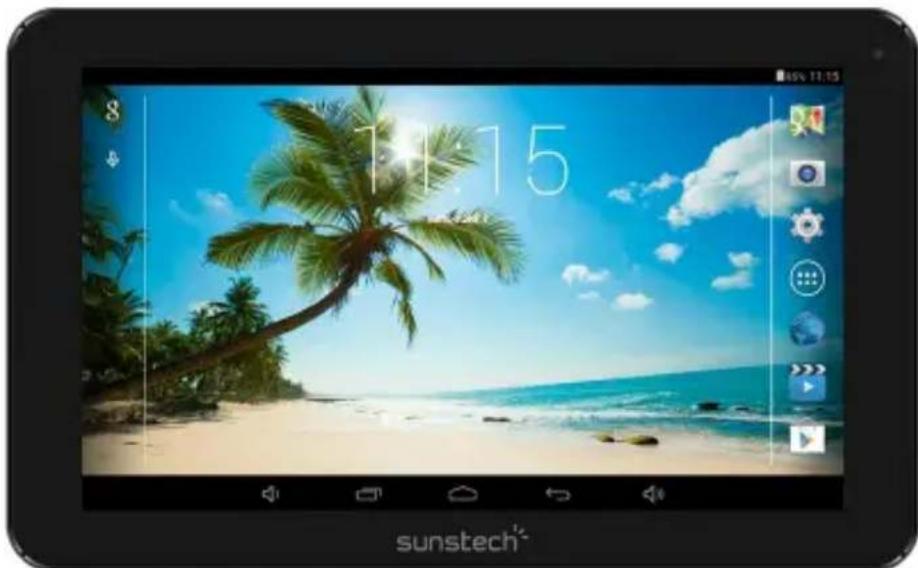
Android 4.4.2
Manual de usuario
Indices
Copyright © 2013 Afex suns, S. A.
Câmara frontal 0,3 Megapixels, âmara traseira 2 Megapixels.
Bateria: 6000mAh CA
Adaptador AC: DC 5V-2A
Auscultadores.
Tomada de entrada de corrente continua de 5V: Microfone incorporado.
Fabricado em China
Conteúdo da Caixa
Tablet - 1集装ade


- Specifications
- What's Inside The box
- Getting Started
- Battery Charging
- Disposal
- Power ON/OFF
- Home screen
- Settings Menu
- How to Use TF card
- Removing TF card
- Software Keyboard
- Touch Screen
- How to connect with computer
- Connection to Internet
- Wireless:
- Web Browsing
- Camera
- Trouble Shooting
- Close Application
- Mandatory Power off
- Recovery Mode:
- How to download the software using the unit.
- Please, follow these steps.
- WARRANTY CARD
- EUROPEAN WARRANTY
- General
- Legal Warranty
- Conditions for the warranty to be exercised
- Exceptions
- SAFETY AND PRECAUTION WARNINGS
- Instruction icons
- Copyright
- Safety information
- Warning
- Do not store the device in or near heaters, microwaves, heated kitchen equipment or high pressure containers.
- Do not use or store the device in places with a lot of dust or material transported by air.
- Do not bite or suck the device or the battery.
- Do not insert the device or the accessories provided into your eyes, ears or mouth.
- Do not handle damaged lithium-ion batteries or batteries that show evidence of leakage.
- Precaution
- Do not use the device near other devices or apparatuses that emit radiofrequency, such as sound systems or radio towers.
- Turn off the device in potentially explosive atmospheres.
- Correct use and maintenance of the mobile device.
- Place the device only on flat surfaces.
- Do not store the device in very hot or cold places. It is recommended that you use the device at temperatures between 5° and 35° .
- Reduce the risk of injury caused by repetitive movements.
- When you use earphones, protect your hearing and your ears.
- Use the device with caution while you are walking or moving.
- Do not unassembled, change or repair the device.
- Take the following information into account when cleaning the device.
- Do not use it for any other purpose other than the one it was designed for.
- Only allow qualified professionals to carry out the maintenance of your device.
- Be careful when handling SIM cards, memory cards or cables.
- Make sure you have access to emergency services.
- Protect your personal data and avoid confidential information from being spread or used incorrectly.
- Do not distribute material protected with copyright.
- Malware and virus
- THIS DEVICE FOLLOWS INTERNATIONAL STANDARDS OF EXPOSURE TO RADIO WAVES.
- Correct disposal of this product's batteries
- Exemption from responsibility clause
- DECLARATIONOFCONFORMITY
- Directive(1999/5/EC)-R&TTE Directive(2011/65/EU)-RoHS
- sunstech
- TAB104QC
- Tablet PC
- Indices
- Conteúdo da Caixa
Brand : Sunstech
Model : Tab 104 QC
Category : Tablet