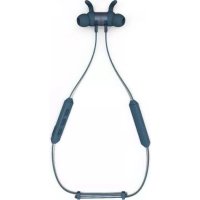
E41000 - Earphones Kygo Life - Free user manual and instructions
Find the device manual for free E41000 Kygo Life in PDF.


User questions about E41000 Kygo Life
0 question about this device. Answer the ones you know or ask your own.
Ask a new question about this device
Download the instructions for your Earphones in PDF format for free! Find your manual E41000 - Kygo Life and take your electronic device back in hand. On this page are published all the documents necessary for the use of your device. E41000 by Kygo Life.
USER MANUAL E41000 Kygo Life
Wireless Sports Earphones

Kygo Life unites my love of music with modern Scandinavian design. The aim is to develop top-quality audio equipment that sounds amazing and looks great. Future classics that capture the euphoric feeling of my music.
Like my approach to everything, Kygo Life is driven to continually athe latest technology and focuses on perfecting the details until I'm absolutely happy the end result is the best it can be.
I hope that by creating new and inspiring audio experiences you'll enjoy listening to your favourite tunes even more.

KYRRE G∅RVELL-DAHLL Creative Director, Kygo Life
ENGLISH ENGLISH
Getting Started Precautions
Congratulations on purchasing your new Kygo E4/1000 earphones! Before using this product, you should read this manual and familiarize yourself with the Bluetooth functions of your mobile phone or other devices.
Please refer to this Users Manual before using to ensure proper use. The contents stated herein may be modified from time to time for better service as the product properties and functions are subject to change without prior notice.
For the sound performances of the product, never use it in too cold, too hot, too dusty or humid places, especially:
- Moist or underwater conditions.
- Near the heater or hi-temperature services or solarization.
- In hazardous locations or in places apt to fall.
- Never disassemble the combination audio.
ENGLISH ENGLISH
Do not use any diluents or volatile liquids to clean your headset and make sure to use only a charger from the qualified manufacturer.
In order to avoid electric shocks and product damage, do not attempt to dismantle, repair or modify the product.
This product or its battery cannot be disposed with the household waste, therefore it must be returned to a collection point to be recycled. Please check with your local authorities for details.
General Function
Turn ON & OFF
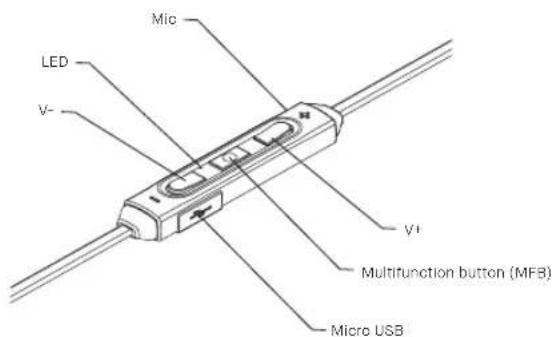
Press and hold the multifunction button until the LED starts flashing. If the earphones are left idle for 10 minutes, it will turn off automatically for saving battery life.
Calls
Make a call: Use the controls and indicator on your headset when making and receiving hands-free calls. Double-click quickly on the multifunction button to redlal the last dialed number.
Receive a call: When receive a call, the BLUE LED will flash rapidly and the music will be paused. Press the multifunction button to answer the call or hold the same button for 1 second to reject the call. During the call, the BLUE LED will flash continuously.
ENGLISH ENGLISH
Listen to Music
Playback controls on your headset can be used when listening to music from a Bluetooth-enabled music player that also provides remote control capabilities.
Volume control: Press the + button on the remote to increase volume level and the V- to decrease the volume level. You'll hear a beep tone when the maximum and minimum volumes are reached.
Change tracks: Press and hold the - button on the remote to go to the previous track. Press and hold the V- button to go to the next track. Press the multifunction button to play and pause the music.
ENGLISH ENGLISH
Waterproof
The Kygo E4/1000 are water resistant under classification IPX5. The earphones can tolerate water jets from any direction, rain and sweat. Do not submerge them in water.
ENGLISH ENGLISH
Bluetooth Pairing
Once charged, get your headset paired and connected to your Bluetooth phone and/or other Bluetooth enabled device.
- Turn off any Bluetooth devices previously paired with your headset.
- Hold the multifunction button on your Kygo E4/1000 earphones for 5 seconds until BLUE and RED LEDs are blinking.
- Turn on the Bluetooth feature on your phone or device and select Kygo E4/1000. Enter "0000" as PIN if the device prompts for the code.
If no device is paired after 150 seconds, the earphone will enter the no connection-status. Previously connected devices will connect automatically with your Kygo E4/1000 earphones if the Bluetooth feature is turned on.
If you are experiencing other problems not listed here or you need help with your device, you can send an email to info@kygolife.com and we'll support you.
ENGLISH ENGLISH
Kit Contents
1 x Stereo Bluetooth Earphone Kygo E4/1000
1 x Charging Micro USB cable
1 x Carrying bag
1 x User Manual
3 x Pairs of Freeblt sports wings
2 x Pairs of Comply Foam tips
3 x Pairs of silicone tips
Warning
- Only use the charger approved by the manufacturer to charge the earphone.
- Charge the earphone if it has not been used for more than 12 months.
- This device complies with Part 15 of the FCC Rules. Operation is subject to the following two conditions: (1) this device may not cause harmful interference, and (2) this device must accept any interference received, including interference that may cause undesired operation.
- Do not dispose of the battery in or close to an open fire as it may cause explosion.
ENGLISH
Specifications
Bluetooth version: 4.1
Talk time: Up to 6 h
Standby time: Up to 100 h
Music playback time: Up to 6 h
Wireless Area: 10 m
Bluetooth Profiles: HSP, HFP, AVRCP
impedance: 16Ω
Frequency response (-3dB): 20Hz-20kHz
Weight: 20g
Water resistance: IPX5
* Battery life and charging time may vary, depending on the usage and device type
NORSKNORSK
Bluetooth-Profile: HSP, HFP, AVRCP
Impedanz: 16 Ω
Profili Bluetooth: HSP, HFP, AVRCP
Impedenza: 16Ω