Ace Combat Joint Assault (PSP) - Game SONY - Free user manual and instructions
Find the device manual for free Ace Combat Joint Assault (PSP) SONY in PDF.


| Product Type | Video game on UMD for Sony PSP |
| UMD disc dimensions | Approximately 65 mm x 64 mm x 4.2 mm |
| Weight | Approximately 10 g |
| Power | Powered by the PSP console via its battery or AC adapter |
| Main features | Single-player and multiplayer Campaign mode (up to 4 players), Versus mode up to 8 players, Normal and Expert controls, relay cooperation, save on Memory Stick Duo |
| Storage | Save on Memory Stick Duo (sold separately) |
| Network | Ad Hoc (local) and Infrastructure (online via Wi-Fi) |
| Manual language | French |
| Number of manual pages | 14 pages |
| Safety warnings | Photosensitivity, risk of epilepsy, do not use while driving, do not swallow Memory Stick |
| Disc maintenance | Clean with a soft cloth, do not use solvents, store in its case, avoid heat and humidity |
| Warranty | Limited to 90 days by NAMCO BANDAI Games America Inc. |
| Customer support | Online (livehelp.namco.com), email (support@namcobandaigames.com), phone (408) 235-2222 |
| Compatibility | PSP console marked "FOR SALE AND USE IN CANADA AND THE UNITED STATES ONLY" |
| Online multiplayer | Yes, via Infrastructure (requires Wi-Fi connection) |
| Box contents | UMD disc, instruction manual |
| Spare parts and repairability | No spare parts available separately. Warranty repair through NAMCO BANDAI customer service |
| Parental control | Not mentioned in this manual |
Frequently Asked Questions - Ace Combat Joint Assault (PSP) SONY
User questions about Ace Combat Joint Assault (PSP) SONY
0 question about this device. Answer the ones you know or ask your own.
Ask a new question about this device
Download the instructions for your Game in PDF format for free! Find your manual Ace Combat Joint Assault (PSP) - SONY and take your electronic device back in hand. On this page are published all the documents necessary for the use of your device. Ace Combat Joint Assault (PSP) by SONY.
USER MANUAL Ace Combat Joint Assault (PSP) SONY
For safe use of this product, carefully read the following section of this manual and the Precautions section of the instruction manual supplied with the PSP. PlayStation Portable system before use. Retain both this software manual and the instruction manual for future reference.
WARNING:PHOTOSENSITIVITY/EPILEPSY/SEIZURES
A very small percentage of individuals may experience epileptic seizures or blackouts when exposed to certain light patterns or flashing lights. Exposure to certain patterns or backgrounds on a screen or when playing video games may trigger epileptic seizures or blackouts in these individuals. These conditions may trigger previously undetected epileptic symptoms or seizures in persons who have no history of prior seizures or epilepsy. If you, or anyone in your family, has an epileptic condition or has had seizures of any kind, consult your physician before playing. IMMEDIATELY DISCONTINUE use and consult your physician before resuming gameplay if you or your child experience any of the following health problems or symptoms:
sid - ssenizzid - orientation
seruzies · noisiv derella
any involuntary movement or convolution
- eye or muscle twitches
loss of awareness
RESUME GAMEPLAY ONLY ON APPROVAL OF YOUR PHYSICIAN.
Use and handling of video games to reduce the likelihood of a seizure
- Use in a well-lit area and keep a safe distance from the screen.
- Avoid prolonged use of the PS system. Take a 15-minute break during each hour of play.
- Avoid playing when you are tired or need sleep.
Stop using the system immediately if you experience any of the following symptoms: lightheadedness, nausea, or a sensation similar to motion sickness; discomfort or pain in the eyes, ears, hands, arms, or any other part of the body. If the condition persists, consult a doctor.
Do not use while driving or walking. Do not use in airplanes or medical facilities where use is prohibited or restricted. Set the PSP system's wireless network feature to off when using the PSP system on trains or in other crowded locations. If used near persons with pacemakers, the signal from the PSP system's wireless network feature could interfere with the proper operation of the pacemaker.
Use and handling of UMD
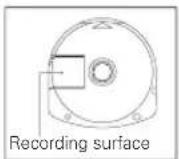
- This disc is PSP^密 (PlayStation® Portable) format software and is intended for use with the PSP^密 system only. If the disc is used with other devices, damage to the disc or to the device may result. This disc is compatible for use with the PSP^密 system marked with FOR SALE AND USE IN U.S. AND CANADA ONLY. Depending on the software, a Memory Stick Duo™ or Memory Stick PRO Duo™ (both sold separately) may be required. Refer to the software manual for full details. If paused images are displayed on the screen for an extended period of time, a faint image may be left permanently on the screen. Do not leave the disc in direct sunlight, near a heat source, in a car or other places subject to high heat and humidity. Do not touch the opening on the rear of the disc (recording surface of the disc; see drawing). Also, do not allow dust, sand, foreign objects or other types of dirt to get on the disc. Do not block the opening with paper or tape. Also, do not write on the disc. If the
opening area does get dirty, wipe gently with a soft cloth. To clean the disc, wipe the exterior surface gently with a soft cloth. Do not use solvents such as benzine, commercially-available cleaners not intended for CDs, or anti-static spray intended for vinyl LPs as these may damage the disc. Do not use cracked or deformed discs or discs that have been repaired with adhesives as these may cause console damage or malfunction. SCF will not be held liable for damage resulting from the misuse of discs.
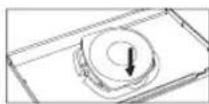
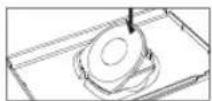
Ejecting the disc
Press the right side of the disc until it is in the position shown in the drawing and then remove it. If excess force is applied this may result in damage to the disc.
Storing the disc
Insert the bottom side of the disc and then press on the top side until it clicks into place. If the disc is not stored properly, this may result in damage to the disc. Store the disc in its case when not in use and keep in a place out of the reach of children. If the disc is left out, this may result in warning or other damage to the disc.
GETTING STARTED
Getting Started. 2
Controls. 3
Mission Screen 5
Campaign Mode.. 6
VS Mode 8
Credits 10
License 12
Warranty. 13
French Instructions. 14
NOTE: The story and events depicted in this work are fiction. Any resemblance to actual political states, geographic locations, persons, living or dead, corporations and organizations is purely coincidental. The work contains actual architectural structures, locations, governments and militaries, but is not affiliated with and does not endorse, nor is a benefactor of any associated corporations, organizations, political states or persons. All trademarks and trade names are the property of their respective owners.
GETTING STARTED
Set up your PSP (PlayStationPortable) system according to the instructions in the manual supplied with the system. Turn the system on. The power indicator lights up in green and the home menu is displayed. Press the OPEN latch to open the disc cover. INSERT ACE COMBAT JOINT ASSAULT disc with the label facing away from the system, slide until fully inserted and close the disc cover. From the PSP system's home menu, select the Game icon and then the LMD icon. A thumbnail for the software is displayed. Select the thumbnail and press the button of the PSP system to start the software. Follow the on-screen instructions and refer to this manual for information on using the software.
NOTICE: Do not eject a UMD while it is playing.
Memory Stick Duo
Warning! Keep Memory Stick Duo media out of reach of small children, as the media could be swallowed by accident.
To save game settings and progress, insert a Memory Stick Duo into the memory stick slot of your PSP system. You can load saved game data from the same memory stick or any Memory Stick Duo containing previously saved games.
CONTROLS
Menu Screen Controls
There are two control methods for piloting your aircraft-Normal and Expert. Normal will be the default control method.
The following are the controls on the menu screen:
念 button
button .Cancel
Home button . Quit Game
Directional buttons . Scroll Options
Analog Stick . Scroll Options
Normal Controls
Functions written in bold are only available in co-op mode.
button...Fire weapons
(hold down for weapon perspective)
念 button...Fire machine gun
按钮... Change target
(hold down to focus on target)
button.. Change weapons
Directional buttons....Up:Assist an attack
(hold down to request backup)
Down: Open reply window
Analog stick.. Ascend and Descend /
Turn Left or Right
START button....Open Pause Menu
SELECT button.........Switch between radar and maps
*Use the analog stick to move the camera while in autopilot.
**These explanations are assuming the player is using a Type-A default button assignment. Go to Options then Controls to change button assignments.
CONTROLS
Expert Controls
These settings are designed for experienced players, and allow for more precise control. Functions in bold are only available in co-op mode.
button..Fire weapons
(hold down for weapon perspective)
念 button.. .Fire machine gun
按钮... Change target
(hold down to focus on target)
button.......Change weapons
L button. Decelerate
R button Accelerate
L button + R button .........Autopilot
Directional buttons....Left/Right:Yaw
Up: Assist an attack
(hold down to request backup)
Down: Open reply window
Analog stick .Up/Down: Pitch
Left/Right: Roll
START button... Open Pause Menu
SELECT button.........Switch between radar and maps
*Use the analog stick to move the camera while in autopilot.
MISSION SCREEN
Mission Screen
The following guide assumes the player is playing in the default 3rd Person View.
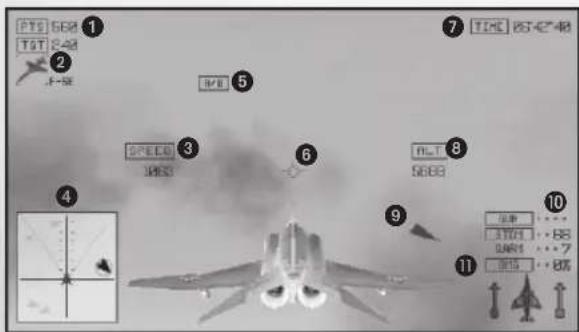
PTS (points)
Points earned by taking down enemies.
TET
Currently targeted enemy. The number displayed above indicates the number of points gained when you take it down.
SPEED
Player's current speed. Unit of measurement can be changed in Display under Options.
RADAR
Shows enemy location relative to player.
5A/B
Displayed when engine output is max.
VELOCITY VECTOR
Predicts player's future coordinates.
TIME
The remaining time left in the mission.
8 ALT
Player's current altitude. Units of measurement can be changed in Display under Options.
TARGETLOCATER
Shows direction of flanking enemy aircraft.
AMMO
Remaining weapon ammo.
DMG (Damage to aircraft)
Percentage increases as player aircraft receives damage. The plane icon will turn from green, yellow, red to blinking red. The player is shot down at 100%.
CAMPAIGN MODE
Play through a series of missions along an established storyline.
Single Player
Highlight "Select Mission" from the Campaign menu, and press the button to play solo. Select the mission of your choice from the Mission Select S
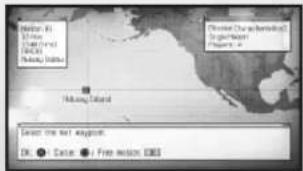
Multiplier
Campaign Mode can also be played with multiple players. Before starting, move the WLAN switch to the ON position.
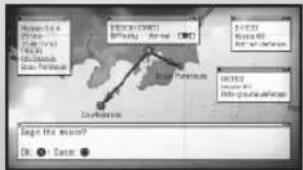
Highlight "Select Mission" from the Campaign menu and press the button to use Ad-hoc Mode and play with nearby friends. Press the button to use Infrastructure Mode and play with friends all over the world. Up to four players can connect in either mode.
Players can choose their aircraft and weaponry from the selection available in their player data.
*Please review how to set up your network before playing in Infrastructure Mode.
Types of Co-op
The progression of the story incorporates the host's player data. As the story unfolds, there are two kinds of missions available in co-op mode.
SINGLE MISSION
Up to four players can play in one mission.
RELAY MISSION
Players are split into two groups and play separate missions simultaneously.
CAMPAIGN MODE
Join a Room
When choosing to join a game, it will automatically search for available rooms. Once an available room is found, the host's name and information will be displayed. Choose the room you wish to join by pressing the button. When joining a room, you will proceed to the Briefing Screen. For locked rooms, you will be prompted to enter a password.
Limit by Rank:
Limit put in place depending on difference between the player and host rank.
TAC Name
Mission and Difficulty
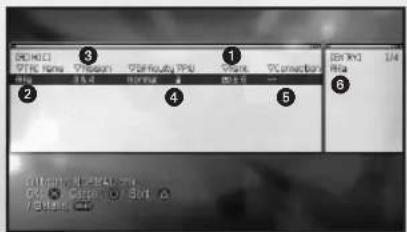
Password: A lock symbol will appear when a password is needed to enter.
Connectivity
Current Players
Create a Room
The player can create a room with the following settings and recruit other players to join. After choosing a mission to play through, the room will be created and other players can begin joining. The player will proceed to the Briefing Screen to wait for players to gather.
*Players can join until the moment before take off.
RANK
Players can be restricted by their Military ID rank.
password
Set up a password to lock the room.
SELECT AMESSAGE
Select a message to be displayed when highlighting the room.
VS MODE
Up to eight players can play together using Ad-hoc Mode or Infrastructure Mode.
*Please review how to set up your network before playing in Infrastructure Mode.
There are two styles of battle - Battle Royale, where all players fight against each other, and Team Battle, where separate teams fight for victory.
*There is no friendly fire.
BATTLE ROYALE
Opponent's information is displayed below your own.
means the aircraft has been shot down.
TEAM BATTLE
Other players' information is displayed in the team color, and team's total points are shown. Your information is at top.
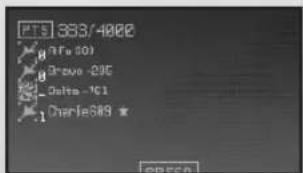
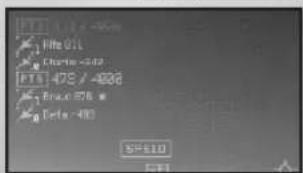
Respawning and Quitting Game
When shot down or destroyed, players automaticallyRespawn depending on the number set at Respawn Settings. Players who have run out of respawns will lose and be dropped from the game. After being dropped from the game, the player can then watch until the other players have finished the match.
VS MODE
Lobby
Select either "Ad-hoc Mode" or "Infrastructure Mode," then decide whether you'll be a host or a client.
Join a Room
When choosing to join a game, it will automatically search for available rooms. Once an available room is found, the host's name and information will be displayed. Choose the room you wish to join and proceed to the VS Mode Actions Select Screen.
Create a Room
See page 7 for details on how to create a room and recruit other players to join.
Select one of the six game types available to host, or select "random" to have the game type chosen automatically. Once the game is chosen, you will proceed to the VS Mode Actions Select Screen.
Connection Errors
Turning off the WLAN switch on the PSP while connected or interrupting the connection will result in a connection error. After an error is returned, the player is not returned to the VS Lobby, but is returned to the Connection screen where the type of connection can be selected. Other players can continue their game play. However, keep in mind that if all opponents are disconnected or the host experiences a connection error, the match ends.
CREDITS
NAMCO BANDAI America Inc.
PRESIDENT & CEO
Genichi Ito
EXECUTIVE VP & COD
Makoto Iwai
EXECUTIVE VP & CFD
Shuji Nakata
SENIOR VP OF SALES AND
MARKETING
Catherine Fowler
DIRECTOR OF JAPAN
PRODUCTION
Takahiro Sasanoi
ASSOCIATE MEDIA MANAGER
Julia Loranger
SENIOR INTERACTIVE
SERVICES MANAGER
Ryan Grissom
CREDITS
DIRECTOR OF OPERATIONS
Deborah Kirkham
SENIOR OPERATIONS MANAGER
Jennifer Tersigni
OPERATIONS ANALYST
Charmaine Morena
SENIOR QA & CUSTOMER
SUPPORT MANAGER
Tad Hirabayashi
QA MANAGER
Mike Peterson
CQC SUPERVISOR
Damon Bernal
PROJECT COORDINATOR
Jesse Mejia
DEPARTMENT COORDINATOR
Terezza Siegel
QA LEAD
David Maya
QA ASSISTANT LEAD
Andrew Samorans
QA TESTERS
Andy Cameron
Min Sung
Andrey Bolgov
Michael Singh
Arjang Taiby
Adrian Valbuena
John Watson
Spencer Yan
CDC TESTERS
David Stevens
Thomson Tan
SPECIAL THANKS
In Joan Hwang
Janna Smith
Mara Tuma
PACKAGING DESIGN
Tom Usher Designs
LICENSE
ACE COMBAT JOINT ASSAULTTM G 2D10 NAMC0 BANDAI Games Inc.
All trademarks and copyrights associated with the manufacturers, aircraft, models, trade names, brands and visual images depicted in this game are the property of their respective owners, and used with such permissions.
Produced under licence from BAE Systems.
Produced under license from Boeing Management Company.
F-4E Phantom II, F-15E Strike Eagle, F-15S/NTD, F/A-8E Super Hornet, X-45A, Boeing747, AV-88, Harrier II, B-52H Stratofortress, E-767, C-17 Globemaster III, KC-10 Extender, CH-47 Chinook. AH-64 Apache, Boeing and McDonnell Douglas are among the trademarks owned by Boeing.
The MIRAGE 2000 and RAFALE are aircraft designed and manufactured by DASSAULT AVIATION. MIRAGE and RAFALE are registered trademarks of DASSAULT AVIATION used under License to NAMCD BANDAI Games Inc.
Typhoon is an aircraft and registered trademark of Eurofighter GmbH.
Produced in cooperation with Japan Air Self-Defense Force.
LOCKHEED MARTIN, F-35 Lightning II, F-22 Raptor, F-1B Fighting Falcon, F-1GX, F-17 Nighthawk. C-5 Galaxy, SR-71, U-2 Dragonlady, FB-22 Concept, associated emblems and logos, and body designs of vehicles are either registered trademarks or trademarks of Lockheed Martin Corporation in the USA and/or other jurisdictions, used under license by NAMCD BANDAI Games Inc.
Produced under a license from Northrup Grumman Systems Corporation.
A-10A Thunderbolt II, B-2 Spirit, F-14D Super Tomcat, A-B Intruder, FBF Hellcat, F-5E Tiger II, X-29A and YF-23A Black Widow II are trademarks of Northrop Grumman Corporation.
Tornado is an aircraft and registered trademark of Panavia GmbH.
The Gripen and Viggen are aircraft designed and manufactured by Saab AB.
Gripen and Wiggen are registered trademarks of Saab AB used under License to NAMCO BANDAI Games Inc.

©GeoEye
©JAPAN SPACE IMAGING CORPORATION
Licensed by Tokyo Tower
Licensed by Getty Images
Fonts used in-game are provided by Bitstream Inc. All rights reserved.
The typefaces included herein are developed by DynaComware.
Ever get stuck and just need that extra edge to beat the level?
Having problems getting your game to work properly?
Now you can get one-on-one help from NAMCO BANDAI Games America Inc. using your web browser! Simply go to livehelp.namco.com for more details.
Live Counselors available from 9am-5pm Monday-Friday Pacific Time.
NAMCO BANDAI Games America Inc.
ATTN: Customer Service
4555 Great America Parkway, Suite 201, Santa Clara, CA 95054
Before returning any defective materials to us, please contact us for a Return Merchandise Authorization (RMA) number. You can reach us at the address above, via e-mail at support@namcobandaigames.com or contact us at (408) 235-2222. Please note that any materials sent to us without an RMA number will be refused and returned. We highly recommend that you use a traceable and / or insured method of shipping the materials to us.
NAMCO BANDAI Games America Inc. Online: www.namcobandaigames.com
Visit our Website to get information about our new titles.
LIMITED WARRANTY: NAMCO BANDAI Games America Inc. warrants to the original purchaser that this NAMCO BANDAI Games America Inc. game pack shall be free from defects in material and workmanship for a period of ninety (90) days from the date of purchase. If a defect covered by this limited warranty occurs during this 90-day limited warranty period, NAMCO BANDAI Games America Inc. will repair or replace the defective game pack or component part, at its option, free of charge. This limited warranty does not apply if the defects have been caused by negligence, accident, unreasonable use, modification, tampering, or any other cause not related to defective material or workmanship.
LIMITATIONS ON WARRANTY: Any applicable implied warranties of merchantability and fitness for a particular purpose, are hereby limited to ninety (90) days from the date of purchase and are subject to the conditions set forth herein. In no event shall NAMCO BANDAI Games America Inc. be liable for consequential or incidental damages resulting from the possession or use of this product. The provisions of the limited warranty are valid in the United States only. Some states do not allow limitations on how long an implied warranty lasts, or exclusion of consequential or incidental damages, so the above limitation or exclusion may not apply to you. This limited warranty provides you with specific legal rights. You may have other rights which vary from state to state.
Net BSD: The communications function of this product includes software developed by the NetBSD Foundation, Inc. and its contributors. For a complete list of contributors please see http://www.scei.co.jp/psp-license/pspnet.txt
"PlayStation", "PS" Family logo, "PSP", and "UMD" are registered trademarks of Sony Computer Entertainment Inc. Memory Stick Due and Memory Stick PRO Due are trademarks of Sony Corporation.
To register product online go to
WWW.NAMCOREG.COM
"PlayStation", "PS" Family logo, "PSP", and "UMD" are registered trademarks of Sony Computer Entertainment Inc. Memory Stick Duo and Memory Stick PRO Duo are trademarks of Sony Corporation.

- WARNING:PHOTOSENSITIVITY/EPILEPSY/SEIZURES
- Use and handling of video games to reduce the likelihood of a seizure
- Use and handling of UMD
- Ejecting the disc
- Storing the disc
- GETTING STARTED
- Memory Stick Duo
- CONTROLS
- Menu Screen Controls
- Normal Controls
- Expert Controls
- MISSION SCREEN
- CAMPAIGN MODE
- Single Player
- Multiplier
- Types of Co-op
- SINGLE MISSION
- RELAY MISSION
- Join a Room
- Limit by Rank:
- TAC Name
- Mission and Difficulty
- Connectivity
- Current Players
- Create a Room
- RANK
- password
- SELECT AMESSAGE
- VS MODE
- BATTLE ROYALE
- TEAM BATTLE
- Respawning and Quitting Game
- Lobby
- Connection Errors
- CREDITS
- NAMCO BANDAI America Inc.
- LICENSE
Brand : SONY
Model : Ace Combat Joint Assault (PSP)
Category : Game