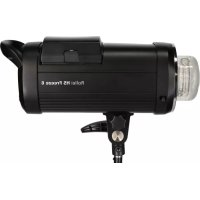
HS Freeze 6 - Flash ROLLEI - Free user manual and instructions
Find the device manual for free HS Freeze 6 ROLLEI in PDF.


| Brand | Rollei |
| Model | HS Freeze 6 |
| Product type | Studio flash |
| Power | 600 Ws |
| Power adjustment | 9 f-stops (steps of 0.1F or 1.0F) |
| Guide number | 80 (ISO 100, 2 meters, 55° reflector) |
| Modeling light | LED 20 W |
| Recycling time | Approx. 1.9 seconds |
| Flash duration (normal) | 1/800s – 1/8000s |
| Flash duration (Freeze) | 1/800s – 1/19000s |
| Number of flashes | Up to 500 (fully charged battery) |
| Color temperature | 5500 ± 150 K (normal) / 5500 ± 800 K (Freeze) |
| Protection rating | IPX3 (aluminum housing except flash tube) |
| Flash modes | TTL, M (manual), Easy Cap, Delay |
| Synchronization modes | Normal, High Speed Sync (1/8000s), Freeze |
| Channels / Groups | 0 – 15 / A, B, C, D, E, F |
| Wireless range | Up to 300 meters (built-in radio receiver) |
| Infrared sensor | Built-in (IR slave function) |
| Interfaces | 3.5 mm sync port, USB (updates) |
| Display | Multifunction LCD 2.8 inches (7.2 cm) |
| Power supply | Rechargeable and replaceable lithium-ion battery (14.8 V / 6 Ah) |
| Dimensions (W x D x H) | 32.5 x 12 x 22.5 cm |
| Weight (with battery) | 3.022 kg |
| Weight (without battery) | 2.422 kg |
| Package contents | Studio flash, flash tube, safety glass, cap, rechargeable battery, charger, sync cable, pouch, manual |
Frequently Asked Questions - HS Freeze 6 ROLLEI
User questions about HS Freeze 6 ROLLEI
0 question about this device. Answer the ones you know or ask your own.
Ask a new question about this device
Download the instructions for your Flash in PDF format for free! Find your manual HS Freeze 6 - ROLLEI and take your electronic device back in hand. On this page are published all the documents necessary for the use of your device. HS Freeze 6 by ROLLEI.
USER MANUAL HS Freeze 6 ROLLEI
Professional studio flash unit with rechargeable battery
in German | English | French |
Spanish | Italian | Portuguese
Rollei
HS Freeze 6
Inhalt
High speed sync ..... 30
Freeze mode. 30
Easy cap mode ..... 31
Delay mode 32
General notes 32
Technical Data. 33
Disposal 34
Conformity 35
Contenu
natural_image
Black rolli NS Frouze 6 digital camera with control panel and display (no visible text or symbols on device body)Übersicht
DEUTSCH
Übersicht
natural_image
Exterior view of a black rectangular electronic device with a handle and side panel (no visible text or symbols)Batterie
natural_image
Close-up of a mechanical component with no visible text or symbols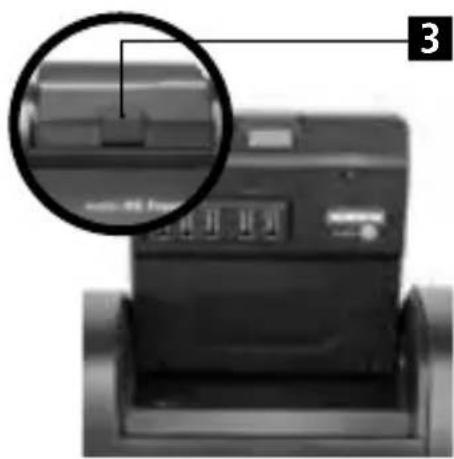
natural_image
Close-up of a printer with a magnified inset showing internal components (no visible text or symbols)2. Batterieentnahme
natural_image
Exterior view of a cylindrical electronic device with a cable inserted (no visible text or symbols)natural_image
Close-up of a black electronic device with visible ports and buttons (no readable text or symbols)2. Hinweise:
natural_image
Woman with long blonde hair wearing a patterned t-shirt, posing against a plain gray background (no text or symbols visible)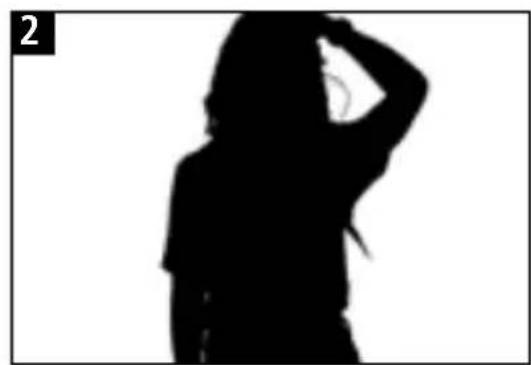
natural_image
Silhouette of a person in motion, hand near head (no text or symbols)Verzögerungsmodus
Thanks for purchasing this Rollei HS Freeze 6. Please read all the information in this user guide carefully. Keep the manual in a safe place and pass it over to other users if necessary.

Please do not put the flash in an environment where flammable liquid is likely to come into contact with this product.

Please do not put the flash in an environment where strong electromagnetic fields or dust is likely to come into contact with this product.

Please do not put the flash in moisture places where the temperature is changing rapidly to avoid formation of condensate water.

Please do not touch the flash tube or the modeling lamp with bare hands.

Please do not use any other power supply than the included one to charge the battery.

Please do not use the flash while the battery is connected to the charger.

Please plug in the charger to the socket only after you have connected it with the battery.

Please do not insert any metal parts into any lighting equipment.

Please dry your hands before handling the equipment, as touching your equipment with wet hands is dangerous to both, the equipment and to yourself.
Safety Notes

Please do not attempt repairs to your flash equipment personally. If a problem occurs, contact the store where you have bought it or the Rollei Service Center.

Make sure that you have firmly tighten the handle on the umbrella bracket to attach the flash on a light stand before using the device.

Please do not fire the strobe at a very close distance to items, people or animals as the strobe release intense heat can cause damage and serious injury.
natural_image
Black rolli NS Frouze 6 digital camera with control panel and display (no visible text or symbols on device body)Overview
ENGLISH
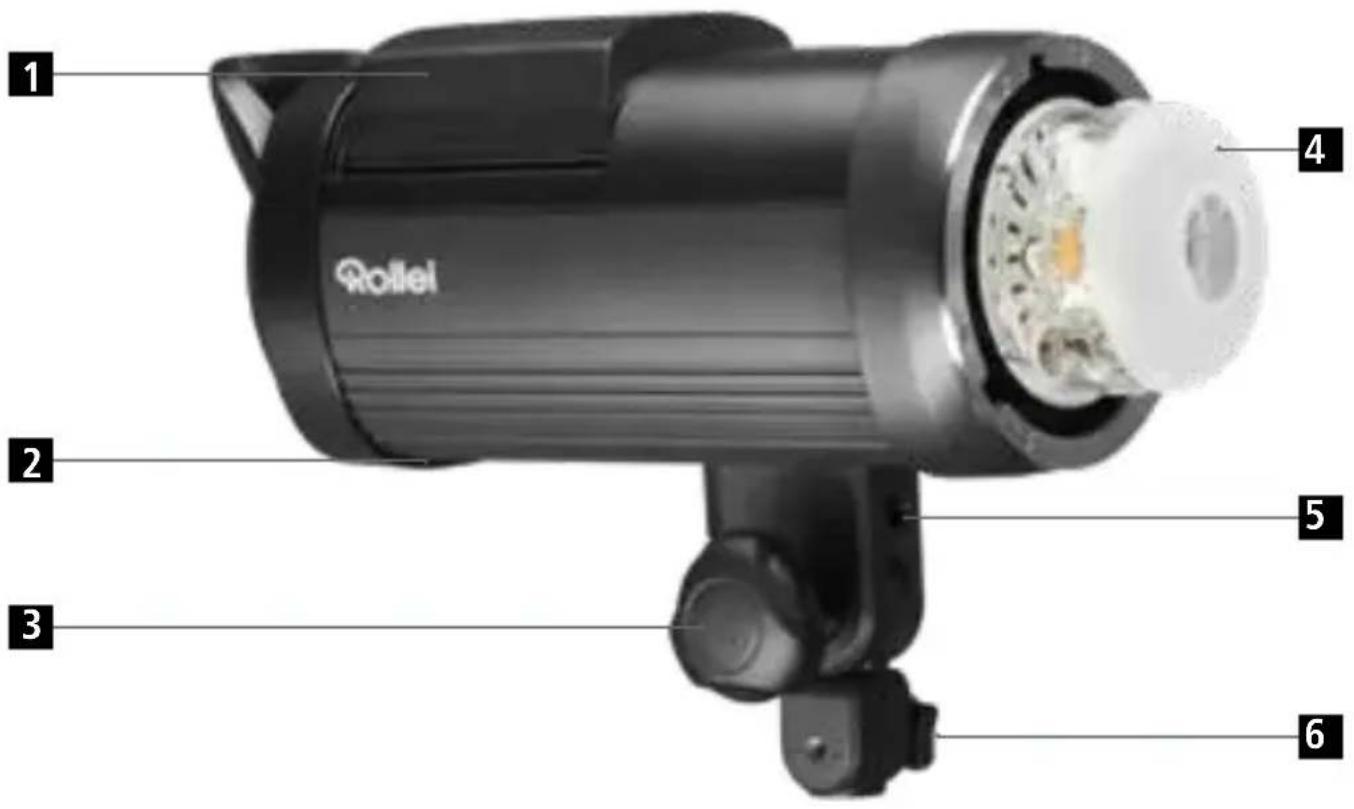
Overview
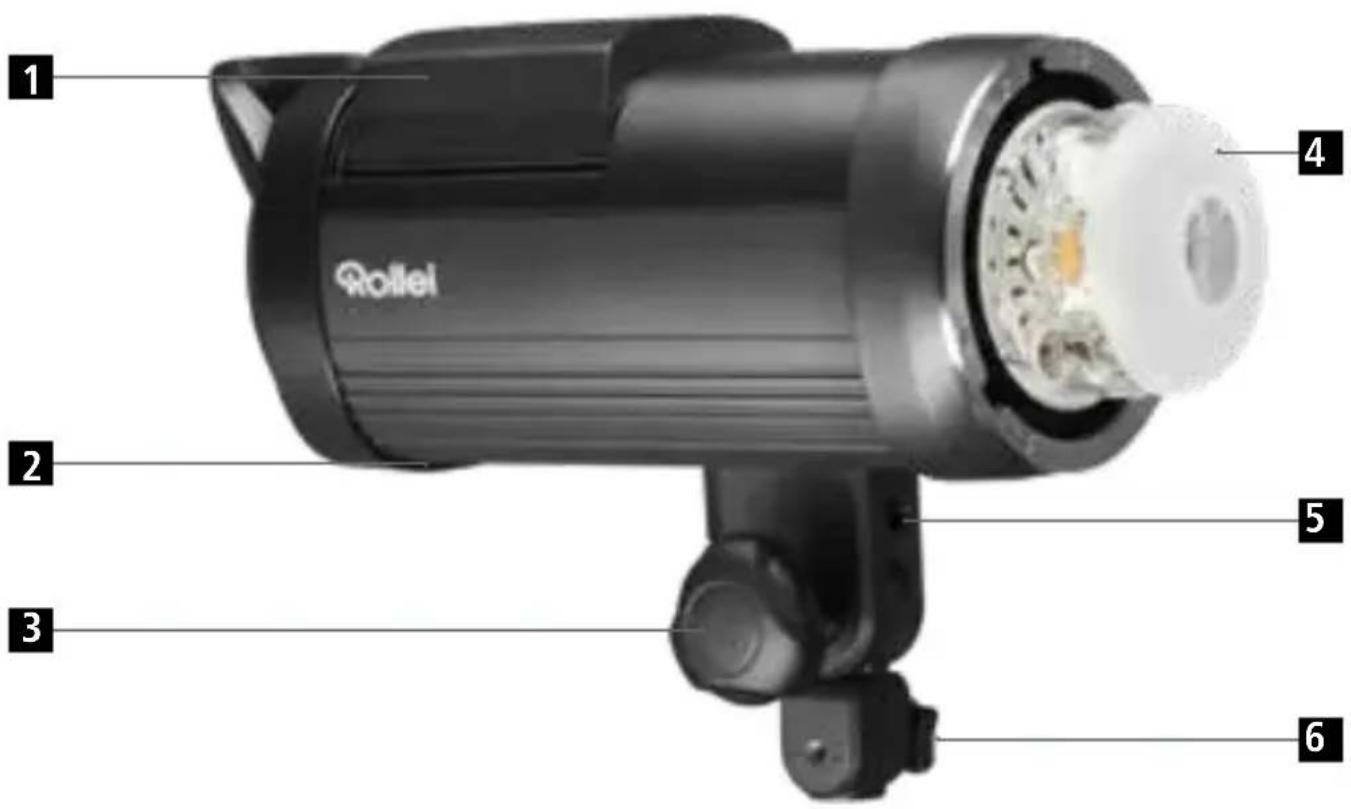
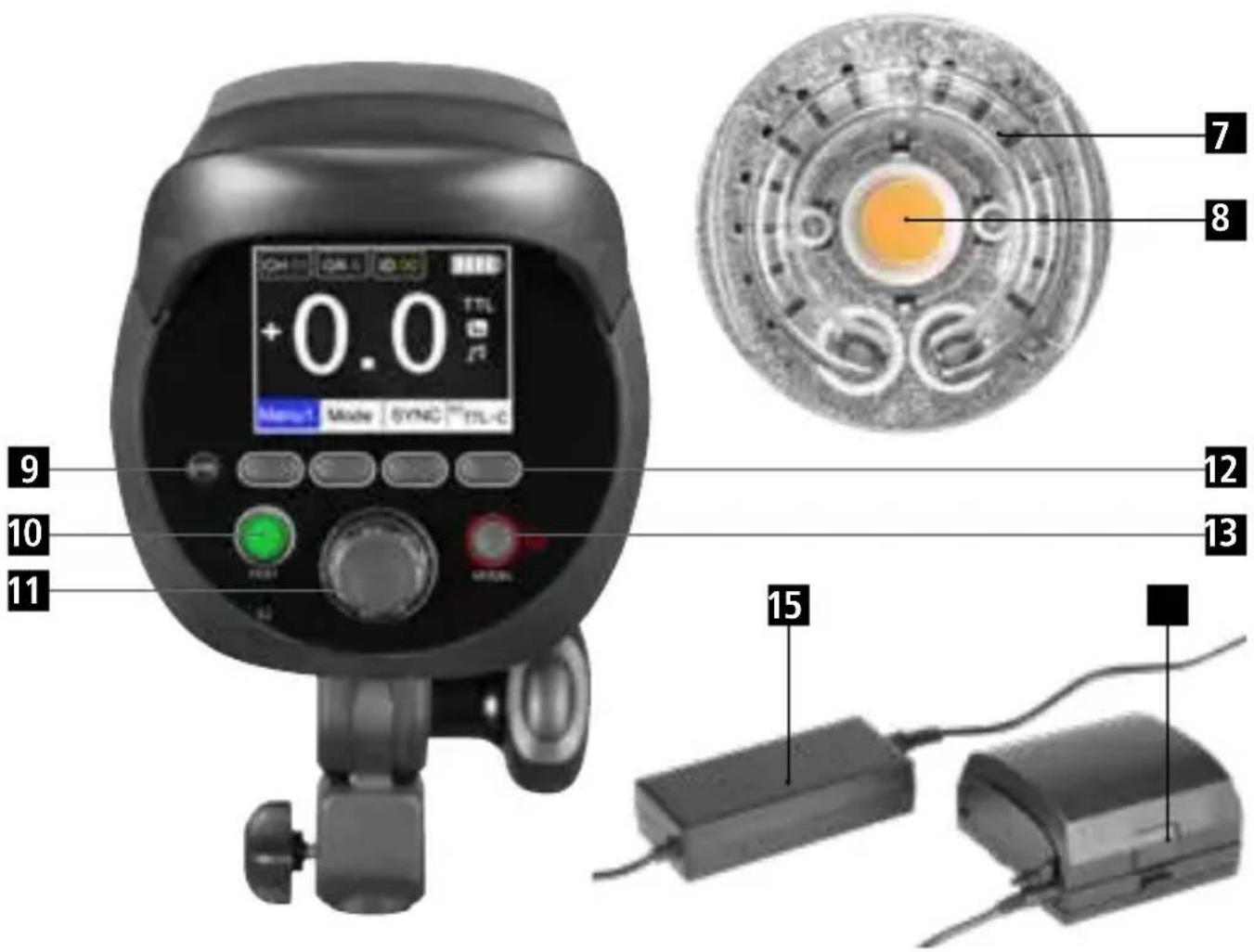
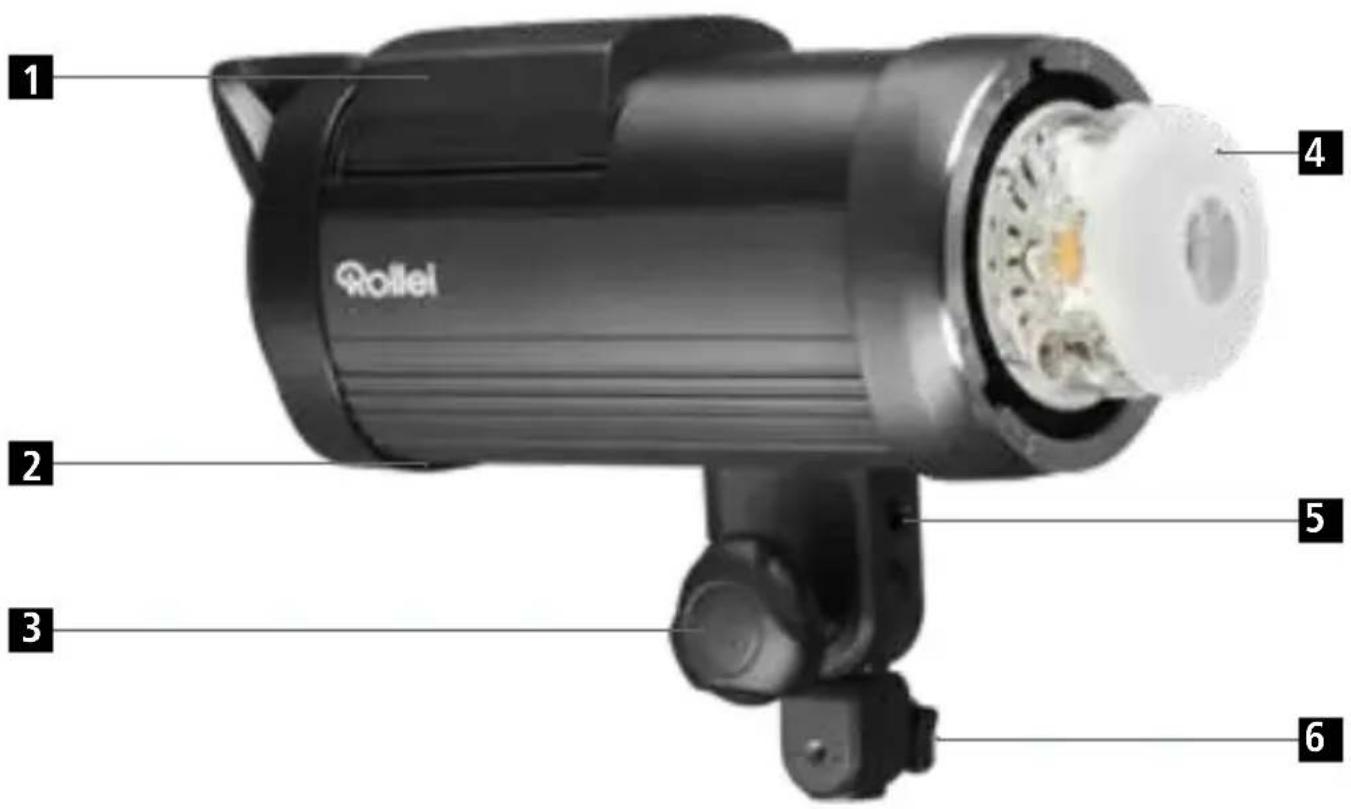
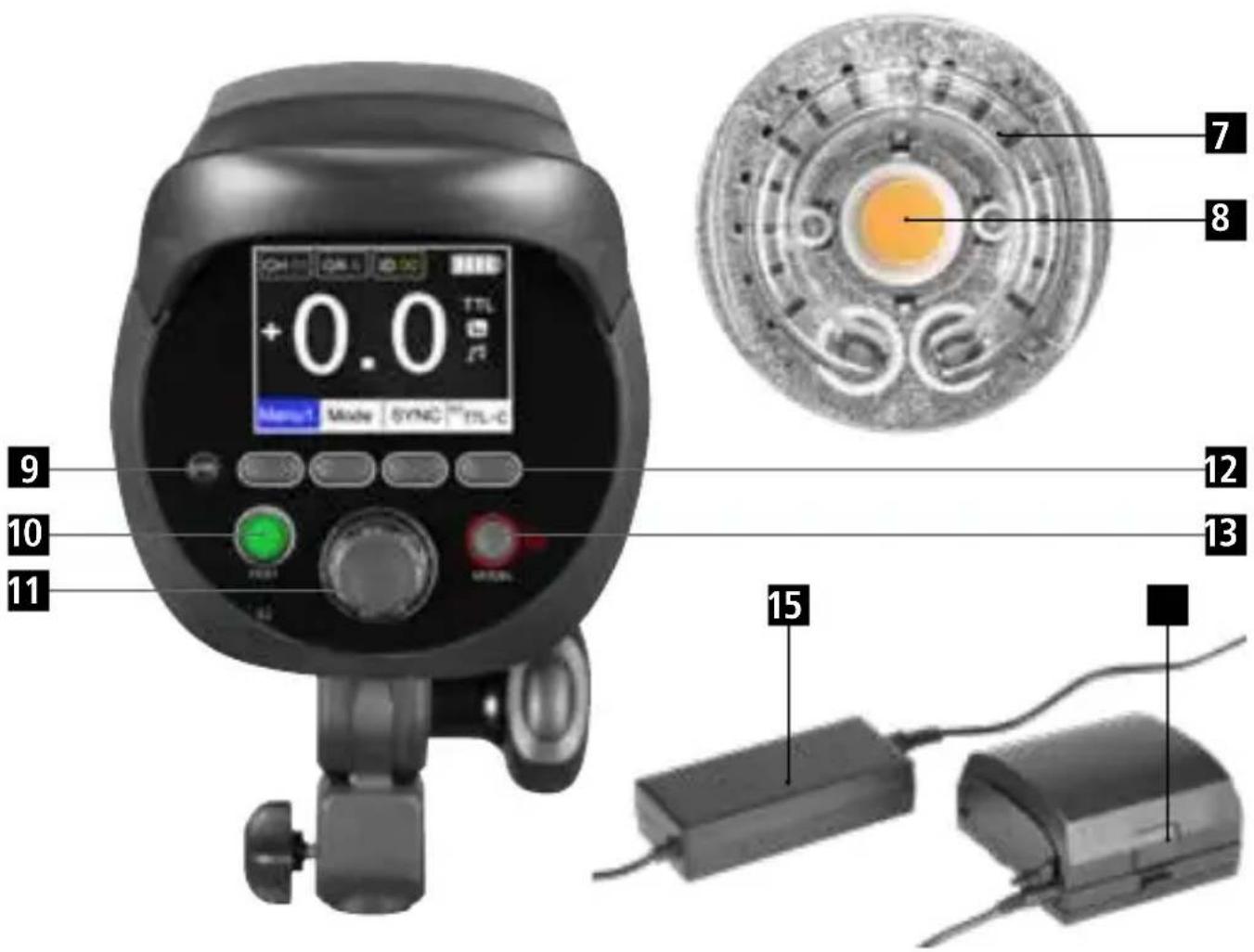
1 Battery
2 Sync socket
3 Light head locker
4 Glass protector
5 Umbrella socket
6 Ligth stand locker
7 Flash tube
8 LED modeling lamp
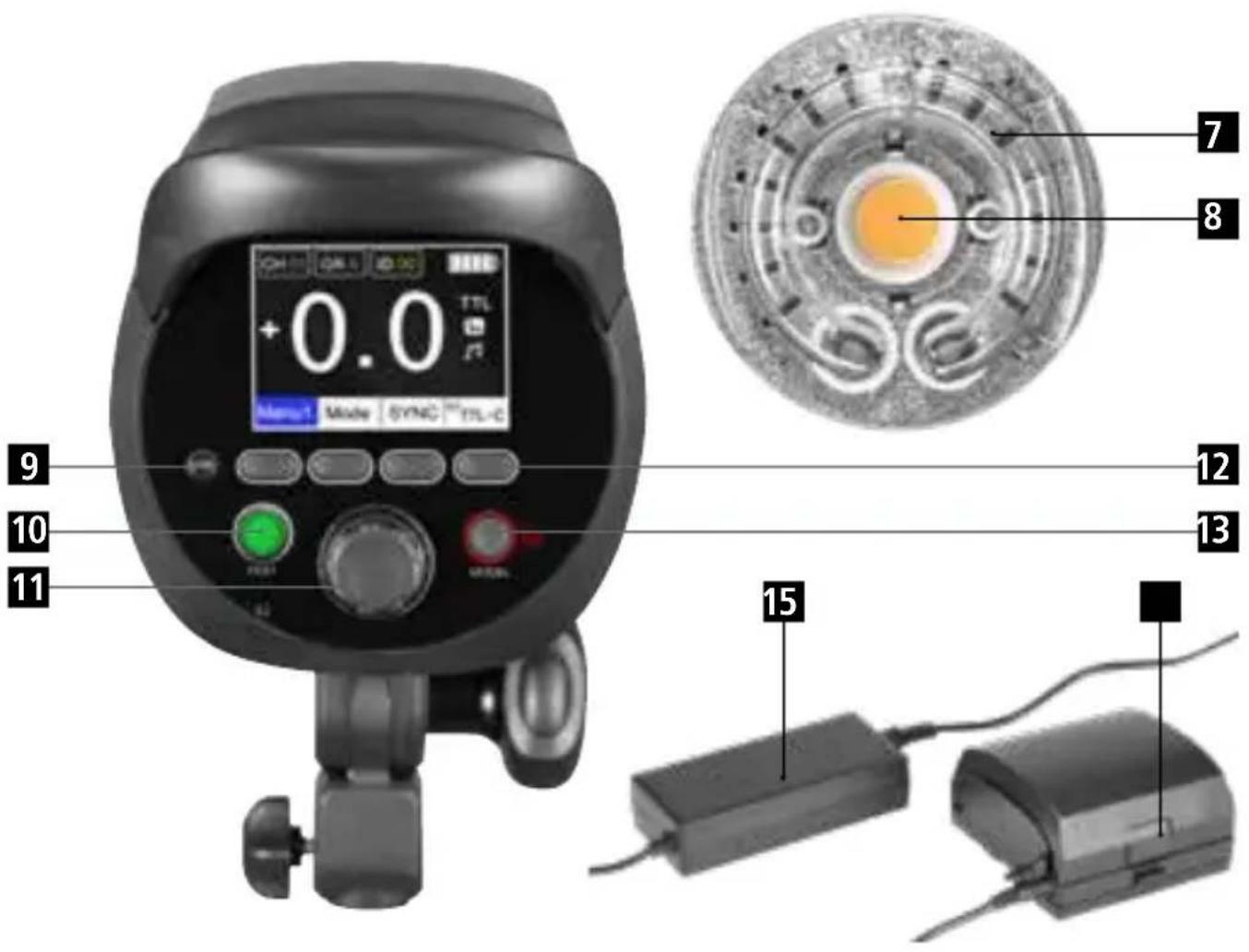
9 Infra red sensor
10 Test flash button
11 Power output button / OK button
12 Function buttons (4)
13 Power switch / modeling lamp
14 Battery release button
15 Battery charger
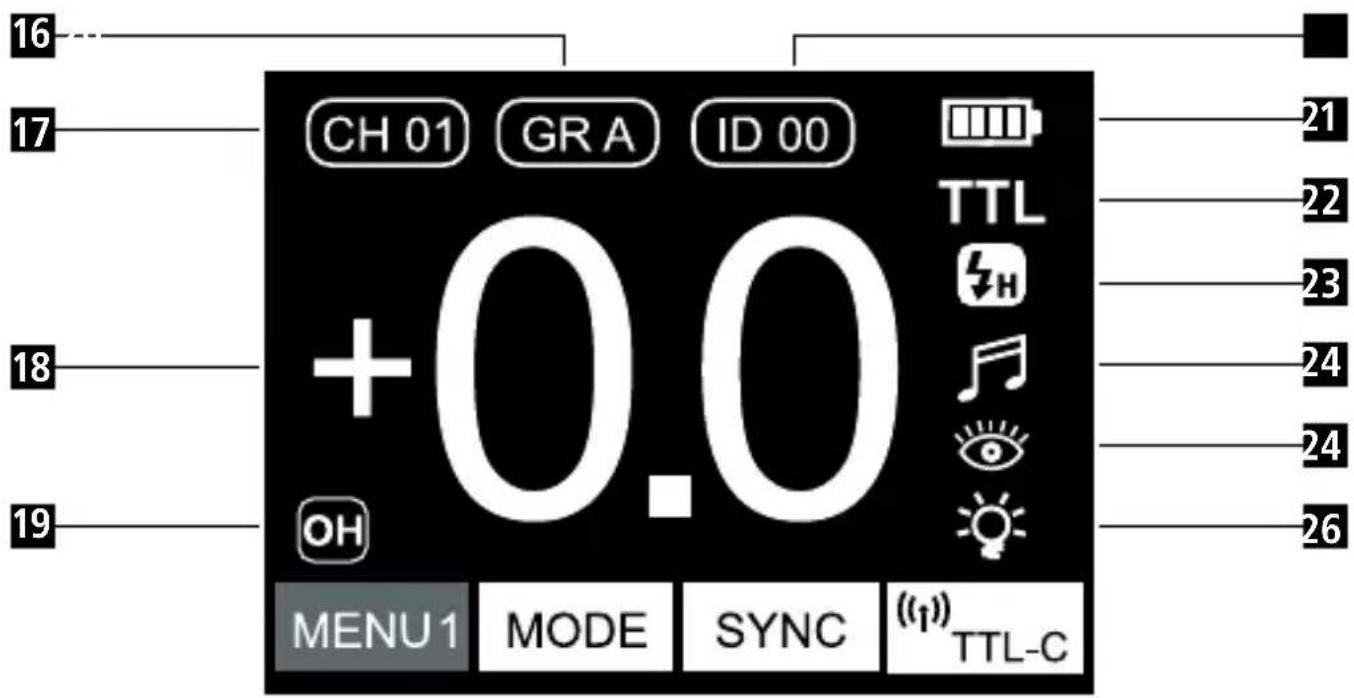
16 Group A/B/C/D/E/F
17 Channel (00–15)
18 Power output (TTL: ±3.0 | M: 1.0 – 9.0 HSS: 4.0–9.0 | Freeze 1.0–9.0)
19 OH: Overheat protection
20 Canon RT radio "ID" numbers (only display under Canon RT radio mode)
21 Battery
22 M / TTL
23 Normal NOR | HSS 🎨 | Freeze FRE
24 Beep
24 Photo cell activated
26 Modeling lamp
Press the first function button from the left side repeatedly to cycle through the different menus.
| MENU1 | MODE | SYNC | t TTL-C |
MODE
Press the second function button from the left side to switch between M (manual) and TTL mode.
SYNC
Press the third function button from the left side to switch between the different sync modes.
NOR Normal flash mode
High speed sync mode (enables the shutter speed of up to 1/8000s)
FRE Freeze sync mode (max. of 1/190000, sync with shutter speed, not available under TTL mode)
010 TTL-C
Wireless Remote Control
TTL-C: Canon* remote control (the flash can then be controlled with the Canon* trigger, optional accessory)
TTL-N: Nikon* remote control (the flash can then be controlled with the Nikon* trigger, optional accessory)
TTL-S: Sony* remote control (the flash can then be controlled with the Sony* trigger, optional accessory)
TTL-F: Fuji* remote control (the flash can then be controlled with the Fuji* trigger, optional accessory)
U7: Up to 7 camera brands will be supported (the flash can then be controlled with the U7 trigger, optional accessory)
OFF: The wireless remote control function is deactivated.
*Canon, Nikon, Sony und Fuji are registered trademarks, Canon, Nikon, Sony or Fuji products are trademarks or registered trademarks of Canon, Nikon, Sony or Fuji.
| MENU2 | CH | GR | ID |
CH Press the second function button from the left and turn the power output button to adjust the channel number. This can be set from 00 to 15.
GR Press the third function button from the left and turn the power output button to adjust the group. Here you can choose between A/B/C/D/E/F.
ID Press the fourth function button from the left to set the Canon* ID number between 00 and 99. The flash and Canon speedlites can be synchronized if the channel and the ID numbers are the same.
| MENU3 |
Press the second function button from the left side to activate the beep. Here you can turn the function on and off. If this is turned on, the flash will make indication sounds and the icon is shown on the display.
Photo cell: Press the third function button from the left side to activate or deactivate the photo cell function. If this function is activated, the icon will be shown on the display. The flash is then able to release a flash strobe as soon as another flash is fired. For this function the infra red sensor should not be hidden.
Modeling lamp: Press the fourth function button from the left to activate the modeling lamp. Press it once for the proportion mode [PRO] and the modeling lamp will be limited in its intense like the flash power has been set. Press the button again to enter the independent mode [1.0] in which you can set the power of the modeling lamp individually from 1.0 to 9.0 by turning the power output knob. To deactivate the modeling lamp press the power on/off button.
| MENU4 | All 1Easy | Cap No. 1 |
| EasyCap | Easy Cap: Activate (Dark icon)Deactivate (Light icon) |
All 1 Total groups of flashes under Easy Cap mode. This can be set from All1 to All6.
No. 1 Number of flash heads under Easy Cap mode. This can be set from No1 to No6.
Further information can be found in the chapter "Easy Cap Mode".
| MENU5 | Delay 00.00 |
| Delay | Delay: Activate (Dark icon) | 00.00 |
| Deactivate (Light icon) |
00.00 Set the delay time from 00.00 to 30.00 seconds.
Further information can be found in the chapter "Delay Mode".
*Canon, Nikon, Sony und Fuji are registered trademarks, Canon, Nikon, Sony or Fuji products are trademarks or registered trademarks of Canon, Nikon, Sony or Fuji.
Operation
natural_image
Exterior view of a black rectangular electronic device with a handle and side panel (no visible text or symbols)Battery
1. Battery Installation
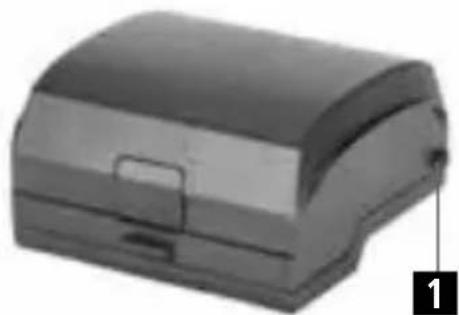
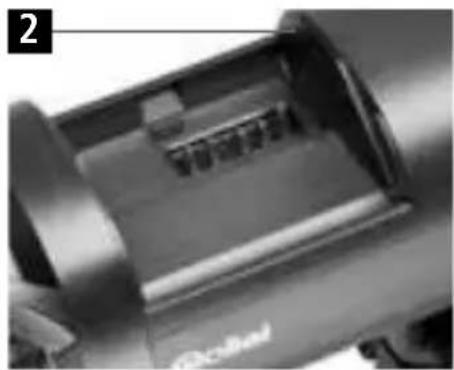
Install the battery by putting the battery guide-post (1) along the battery groove (2) to the end. Then press the battery release button to put the battery right in place.
natural_image
Close-up of a mechanical component with no visible text or symbols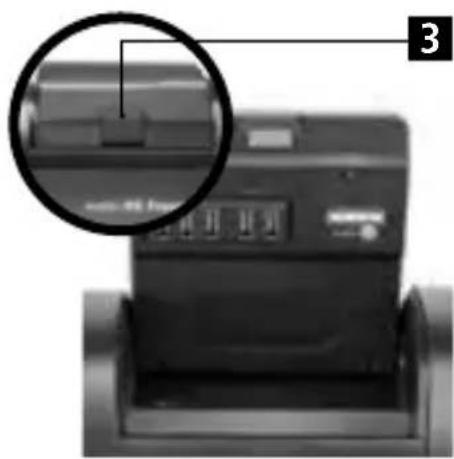
natural_image
Close-up of a printer with a magnified inset showing internal components (no visible text or symbols)2. Battery release
Press the battery release button (3) to take out the battery along the groove.
natural_image
Exterior view of a cylindrical electronic device with a cable inserted (no visible text or symbols)3. Charging the battery
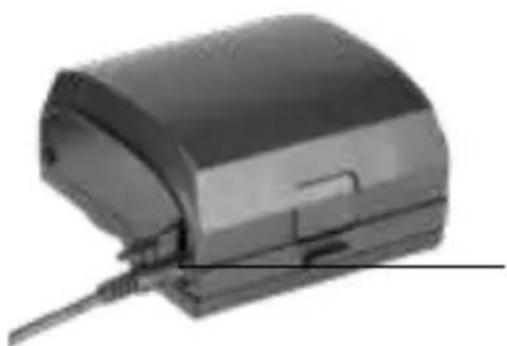
Use the battery charger to charge the battery. The charging time is about 3 hours. The charging status will be indicated by the light on the charger. It is red while charging and will change to green when the battery is fully charged.
Battery charger plug-in
Battery Maintenance
Please only use the original battery charger for charging the battery.
1. Battery capacity check
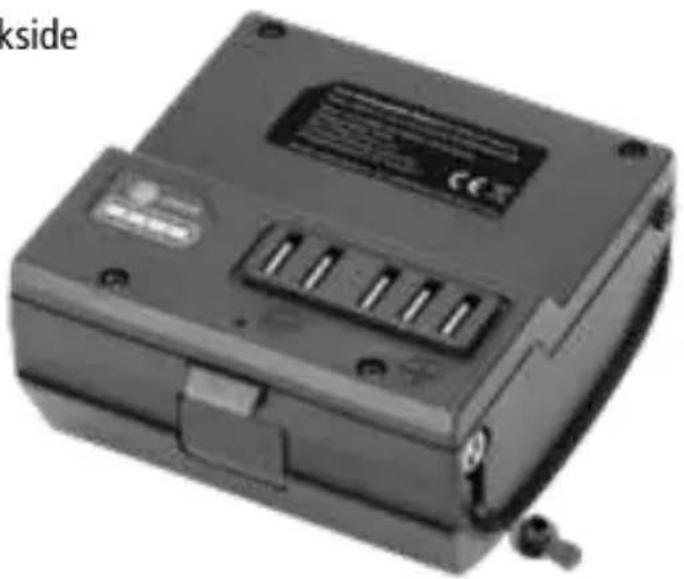
Press the battery check button on the backside of the battery to check the current battery capacity.
4 sections: 100–75%
3 sections: 75–50%
2 sections: 50–25%
1 section: 25–5%
0 section: less than 5%
natural_image
Exterior view of a black electronic device with ports and a label (no readable text or symbols)2. Notes:
- Turn off the flash before taking out the battery.
- The battery will achieve optimal performance only after two or three complete charge and discharge cycles.
- If the flash is used outdoor, the usage time might be shorter than normal.
- The proper working temperature of the battery is +15°C and +25°C. Please note that the environmental temperature might effect the battery run time. If the temperature is lower than 0°C, the battery will be limited even with full power.
- If the flash is indicated that the battery power is low, please change the battery and recharge it. If you keep working, the battery might be damaged.
- If the flash will not be used for a long time, please fully charge the battery before storing it in a cool and dry place. Please note that the battery needs to be recharged at least every 3 months.
- After long term or heavy use please let the battery cool down for about 10 minutes before storing.
Power on / off
- Switch on: Press and hold the power button for about 2 seconds until the LCD screen will light up and enters the operation interface.
- Switch off: Press and hold the power button for about 2 seconds until the LCD screen will become totally black.
TTL Mode
- Enter Menu 1 and press the second function button repeatedly until the display shows TTL on the LCD.
- Press the third function button to change the sync mode. Choose between normal mode or high speed mode.
- Enter Menu 2 to set the channel and the group of the flash.
- Choose the wireless remote control mode according to the trigger that you use.
- The exposure value can be adjusted from -3.0 up to +3.0 directly on the flash by rotating the power output knob. The value can be adjusted by 1 f-stop increment by pushing the power output knob once and then turning it around (clockwise to increase the value and counter clockwise to decrease the value). But the value can also be adjusted by 1/10 f-stop by just turning the power output knob.
Note: If you use a trigger the value of the flash will not be overwritten by the value set on the trigger. For example if your flash shows an EV of +1.0 and your trigger shows a value of +2.0, then the picture will have a real exposure value of +3.0. If the flash shows an EV of +3.0 then you are able to even get a higher exposure value by setting the trigger to also +3.0 and then the maximum exposure value of +6.0 will be reached. The same goes for the negative exposure values.
M (manual) Mode
- Enter Menu 1 and press the second function button repeatedly until the display shows M on the LCD.
- Press the third function button to change the sync mode. Choose between normal mode, high speed mode and freeze mode.
- Enter Menu 2 to set the channel and the group of the flash.
- Choose the wireless remote control mode according to the trigger that you use.
- In the manual mode the power can be set from 1.0 \~ 9.0. The minimum power output is 1.0 and the maximum one is 9.0. For a small adjustment in increments of 0.1 f stop just rotate the power output knob and the value will be adjusted accordingly. For big adjustments press the power output knob once and then rotate it and the value will be changed by 1 f stop.
High Speed Sync
If high speed sync is activated the icon will be shown on the display.
In this sync mode you can set the shutter speed up to 1/8000s, to synchronize the speed with the flash. The power output in this sync mode can only be set between 4.0 up to 9.0.
Freeze Mode
If the freeze mode is activated the icon F#E#ll be shown on the display. In this mode the maximum shutter speed is limited to the normal flash sync time (normally 1/250s), but the flash can be fired with 1/19000s. The power output in this sync mode can be set between 1.0 up to 9.0.
Operation
Easy Cap Mode
The Easy Cap Mode can be used to easily cut out the main subject from the background with the help of an image processing software (not part of the delivery). Please note that therefore there are needed at least 2 flashes.
- Activate the Easy Cap mode on your flash.
- Set the number of groups that are needed. Therefore press the corresponding function button and rotate the dial to change the value. The maximum setting of the groups is limited to 6 (All6), but within each group the quantity of flashes is unlimited.
- Then set the sequence of the groups. Therefore press the corresponding function button and change the value by rotating the knob. Here you set the sequence of when the flash will be released. After the setting the groups will flash according to this sequence.
Example (working with 4 flashes)
- There are 2 groups related with Easy Cap mode, therefore the group setting is set to "All2".
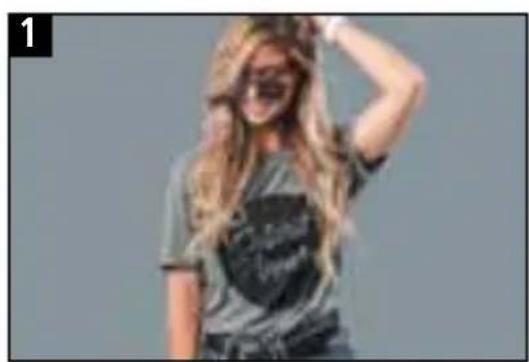
- There are two flashes which will be the main flashes and they are set to „No1“ (group 1). Then they will be triggered with the first frame (see figure 1 – correctly exposed picture).
- The two background flashes are set to „No2“ (group 2) and they will not be triggered in the first frame but in the second one (see figure 2 – no exposure on main subject, only the background).
- With the help of an image processing software, the main subject can now be quickly cut out from the background.
natural_image
Woman with long blonde hair wearing a patterned t-shirt, posing against a plain gray background (no text or symbols visible)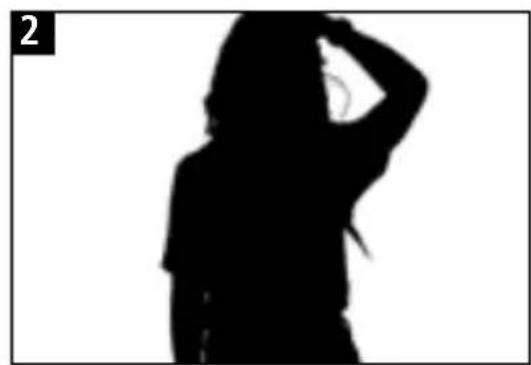
natural_image
Silhouette of a person in motion, hand near head (no text or symbols)Delay Mode
In this mode you can set a delay time. The flash will fire then after this time is over. This is used for example if you want to take a picture with some ambient light, but you don't want to set the flash on the front nor the rear curtain. This might be used if you want to have motion in your picture but one single motion in the middle of the complete time should be sharp. Then you can set your camera's shutter time and calculate the correct delay time that you can enter in the flash menu. Therefore enter the delay mode and set the time between 00.00 and 30.00 seconds. A longer delay is not possible.
General Notes
- Freeze Mode can only be used in manual (M) mode and it is specialised in the shortest flash duration.
- If the wireless remote control function is activated (TTL-C / TTL-N / TTL-S / TTL-F), the flash can only be controlled by the corresponding transmitter that is available as an optional accessory.
- If the wireless remote control function U7 is activated, the flash can only be controlled by the transmitter U7 which is available as an optional accessory. Please note that this transmitter does not support High Speed Sync or Freeze Mode.
- If the systems overheats, it will automatically go into the overheat protection mode. The display will show „OH“ which indicates that the overheat protection programm is activated. In this event the system will stop working. As soon as the temperature is back to an acceptable level, the flash will start working again.
- If you start the continuous shooting mode in your camera, the flash power output range is only available from 1.0 to 3.0. Please note that the flash itself does not have a continuous shooting mode and there will be no corresponding icon on the flash display.
| Flash Power 600 Ws | |
| Flash Power Range 9 stops (in 0.1F or 1.0F increments) | |
| Guide Number 80 (with ISO 100, 2 meters and Reflector 55 Degree) | |
| Modeling Light 20 W LED | |
| Recycle Time Approx. 1.9 seconds | |
| Flash Duration Normal: 1/800s – 1/8000s | Freeze: 1/800s – 1/19000s | |
| Lighting Time Up to 500 (if battery is fully charged) | |
| Temperature 5500 ± 150K (normal mode) | 5500 ± 800K (Freeze mode) | |
| IPX3* Splash water, sand and dust protection | |
| Operation modes TTL, M (manual), Easy Cap, Delay | |
| Flash modes Normal | High Speed Sync | Freeze | |
| Channels | Groups 0 – 15 | A, B, C, D, E, F | |
| Radio Range Up to 300 meters (built-in radio receiver) | |
| Infrared Sensor Integrated (IR slave function) | |
| Connections Sync (3,5 mm) | USB (for firmware updates) | |
| Display Multifunctional LCD (7.2 cm / 2.8") | |
| Power Supply Exchangeable and rechargeable lithium ion Battery(14.8 V / 6 Ah) | |
| Dimension 32.5 x 12 x 22.5 cm | |
| Weight 3.022 kg / 2.422 kg (with/without battery) | |
| Scope of Delivery Studio flash light incl. flash tube, protective glass and plas-tic cover, battery, charging cable, sync cable, bag, manual |
Subject to technical changes.
*This only applies for the aluminum body, the front of the flash (flash tube) is excluded.

Dispose of packaging: For disposal, separate packaging into different types. Cardboard and board must be disposed of as paper and foil must be recycled.
Disposal of Waste Electrical and Electronic Equipment and/or Battery by users in private households in the European Union.
This symbol on the product or on the packaging indicates that this cannot be disposed of as a household waste. You must dispose of your waste equipment and/or battery by handling it over to the applicable take-back scheme for the recycling of electrical and electronic equipment and/or battery. For more information about recycling of this equipment and/or battery, please contact your city office, the shop where you purchased the equipment or your household waste disposal service. The recycling of materials will help to conserve natural resources and ensure that it is recycled in a manner that protects human health and environment.
Battery Warning
- Never dismantle, crush, or pierce the battery, or allow the battery to short-circuit. Do not expose battery being placed in high temperature environment, if battery leaks or bulges, stop continue to use.
- Always charge using the charger. Risk of explosion if battery is replaced by an incorrect type.
- Keep the battery out of reach of children.
- Batteries may explode if exposed to naked fire. Never dispose of batteries in a fire.
- Disposed of used batteries observing local regulations.
- Before disposing the device, please remove the battery.
The Manufacturer hereby declares that the CE marking was applied to the Rollei HS Freeze 6 in accordance with the basic requirements and other relevant provisions of the following CE Directives:
2011/65/EC RoHs Directive 2014/30/EU EMC Directive 2006/95/EEC LVD Directive 2009/125/EG EuP Directive 2002/96/EG WEEE Directive 2014/53/EU RED Directive

The EC Declaration of Conformity can be requested from the address specified on the Warranty card.
natural_image
Black rolli NS Frouze 6 digital camera with control panel and display (no visible text or symbols on device body)Aperçu
FRENCH
Aperçu
- Rollei
- HS Freeze 6
- Inhalt
- Contenu
- Übersicht
- Batterie
- Batterieentnahme
- Hinweise:
- Verzögerungsmodus
- Safety Notes
- Overview
- MODE
- SYNC
- TTL-C
- Operation
- Battery
- Battery Installation
- Battery release
- Charging the battery
- Battery Maintenance
- Battery capacity check
- Notes:
- Power on / off
- TTL Mode
- M (manual) Mode
- High Speed Sync
- Freeze Mode
- Easy Cap Mode
- Example (working with 4 flashes)
- Delay Mode
- General Notes
- Battery Warning
- Aperçu
Brand : ROLLEI
Model : HS Freeze 6
Category : Flash