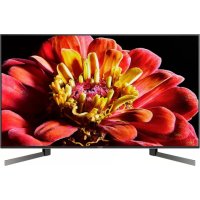
USER MANUAL KD49XG9005 SONY

For useful information about Sony products
To attach the Table-Top Stand, refer to the Setup Guide.
Table of Contents
IMPORTANT NOTICE....2
Safety Information....2
Remote Control and TV 4
Connection Diagram .... 5
Installing the TV to the Wall ..... 7
Using the optional Wall-Mount Bracket .... 7
Troubleshooting....8
Troubles and Solutions....8
Specifications 9
Internet Connection and Data Privacy
This product connects to the internet during initial setup as soon as a network is connected in order to confirm internet connection, and later to configure the Home screen. Your IP address is used in these and all other internet connections. If you do not want your IP address be used at all, do not set-up the wireless internet function and do not connect an internet cable. Please refer to the privacy information presented in the set-up screens for further details of internet connections.
Introduction
Thank you for choosing this Sony product.
Before operating the TV, please read this manual thoroughly and retain it for future reference.
Note
- Before operating the TV, please read the "Safety Information" (page 2).
- Read the supplied Safety Information for additional safety information.
- Images and illustrations used in the Setup Guide and this manual are for reference only and may differ from the actual product.
- The "xx" that appears in the model name corresponds to a numeric digit, related to design, colour or TV system.
Help
Find more troubleshooting and other useful information directly from your TV. Press HELP on the remote control to display a list of topics, or to search by keyword.
Help Guide (Manual)
For more detailed information, select [Help Guide] from the Help menu on your TV.
You can also check the Help Guide from your PC or smartphone (information provided on the back cover of this manual).
Location of the identification label
Labels for the TV Model No., Production Date (year/month) and Power Supply rating are located on the rear of the TV or package.
IMPORTANT NOTICE
Notice for Radio Equipment
Hereby, Sony Visual Products Inc. declares that the radio equipment type KD-49XG9005 is in compliance with
Directive 2014/53/EU. The full text of the EU declaration of conformity is available at the following internet address: http://www.compliance.sony.de/
Notice for customers: the following information is only applicable to equipment sold in countries applying EU directives.
For this radio equipment, the following restrictions on putting into service or of requirements for authorization of use apply in AT, BE, HR, CY, CZ, DK, EE, FI, FR, DE, EL, HU, IE, IT, LV, LT, LU, MT, NL, PL, PT, SK, SI, ES, SE, UK, IS, LI, NO, CH, BG, RO, TR, AL, BA, MK, MD, RS, ME, Kosovo :
5150 - 5350 MHz band is restricted to indoor operations only.

Installation/Set-up
Install and use the TV set in accordance with the instructions below in order to avoid any risk of fire, electric shock or damage and/or injuries.
Installation
- The TV set should be installed near an easily accessible mains socket.
- Place the TV set on a stable, level surface to prevent it from falling over and causing personal injury or property damage.
• Install the TV where it cannot be pulled, pushed, or knocked over.
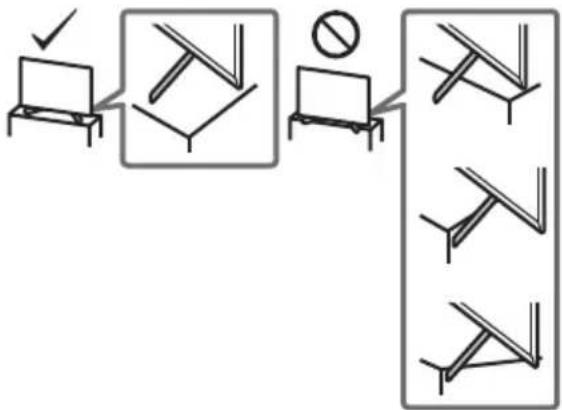
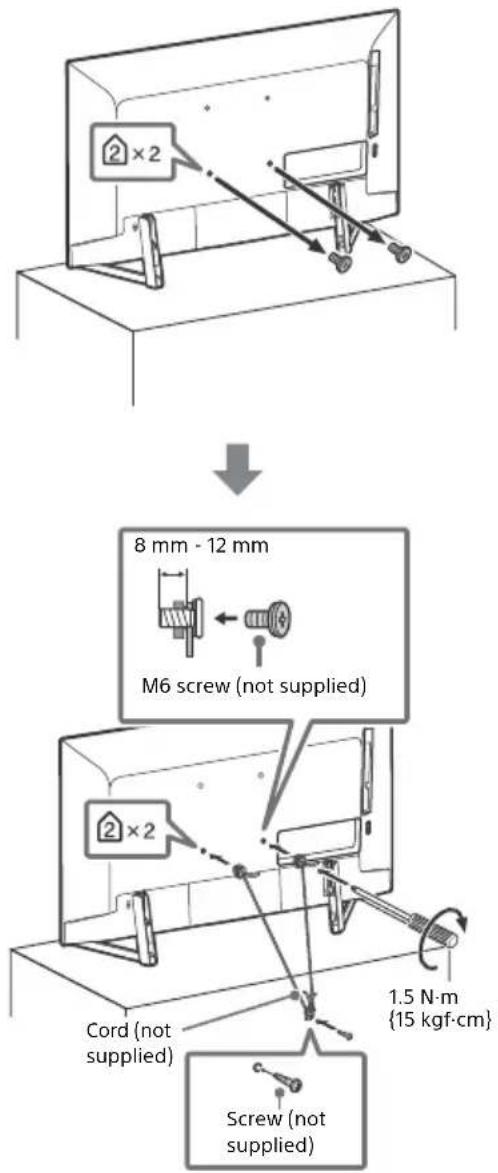
- Install the TV so that the TV's Table-Top Stand does not protrude out from the TV stand (not supplied). If the Table-Top Stand protrudes out from the TV stand, it may cause TV set to topple over, fall down, and cause personal injury or damage to the TV.
flowchart
graph TD
    A["Document Verification"] --> B{Decision}
    B -->|Yes| C["No Error"]
    B -->|No| D["Error Handling"]
    C --> E["Document Revision"]
    D --> F["Document Verification"]
    E --> G["Warning/Reject"]
    F --> H["Warning/Reject"]
- Only qualified service personnel should carry out wall-mount installations.
- For safety reasons, it is strongly recommended that you use Sony accessories, including:
— Wall-Mount Bracket SU-WL450
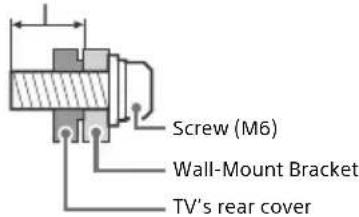
- Be sure to use the screws supplied with the Wall-Mount Bracket when attaching the Wall-Mount Bracket to the TV set.
The supplied screws are designed as indicated by illustration when measured from the attaching surface of the Wall-Mount Bracket.
The diameter and length of the screws differ depending on the Wall-Mount Bracket model.
Use of screws other than those supplied may result in internal damage to the TV set or cause it to fall, etc.
8 mm - 12 mm
Transporting
- Before transporting the TV set, disconnect all cables.
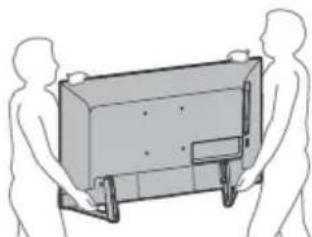
- Two or three people are needed to transport a large TV set.
- When transporting the TV set by hand, hold it as shown below.
Do not put stress on the LCD panel and the frame around the screen.
natural_image
Line drawing of two human figures carrying a rectangular device (no text or symbols)
- When transporting the TV set, do not subject it to jolts or excessive vibration.
- When transporting the TV set for repairs or when moving, pack it using the original carton and packing material.
Topple prevention
Remote Control and TV
The remote control shape, location, availability and function of remote control buttons may vary depending on your region/country/TV model.
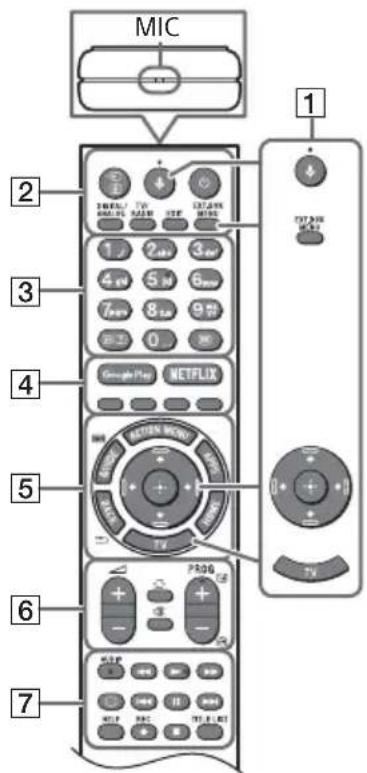
1 ↓(Microphone): Use voice search. (e.g., Search various content by voice.) The voice search requires an Internet connection.
EXT.BOX MENU: Display the connected External Box (cable/satellite box) menu.
- For models with supplied IR Blaster, connect and set up the IR Blaster (page 6).
- The External Box menu may be displayed for some HDMI CEC compatible devices when the IR Blaster is not supplied/ connected.
+/↓/←/→/ ⊕ (Navigation D-Pad): On screen menu navigation and selection.
TV: Switch to a TV channel or input and display the TV Menu Bar.
2 →/ (Input select/Text hold)
In TV mode: Display and select the input source.
In Text mode: Hold the current page.
(TV standby)
DIGITAL/ANALOG: Switch between digital and analogue input.
TV/RADIO: Switch between TV or RADIO broadcasts.
EXIT
3 Number buttons
i+/Info/Text reveal): Display information.
☐ (Text): Display text information.
4 Google Play / NETFLIX (Only on limited region/country/TV model) / Colour buttons
5 ACTION MENU: Display a list of contextual functions.
GUIDE/☐ Display the digital programme guide, or EPG of External Box (cable/satellite box) after setting [IR Blaster setup] (IR Blaster compatible models only).
APPS: Access various services and applications.
BACK/←
HOME
6 ∠+/- (Volume)
(Jump)
Mute (Mute)
PROG +/−/▲/▼
In TV mode: Select the channel.
In Text mode: Select the next (▲) or previous (▼) page.
7 AUDIO: Select the sound of multilingual source or dual sound (depend on programme source).
◀/▶/▶/◀/■/▶/■
(Subtitle setting)
HELP: Display the Help menu.
● REC: Record the currently viewed programme on the USB HDD.
TITLE LIST: Display the Title list.
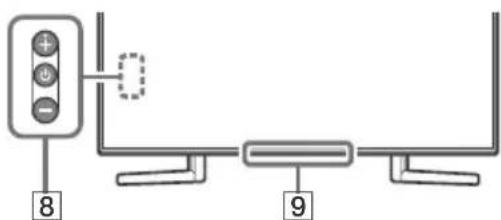
8 ⏻ (Power)
9 Remote Control sensor* / Light sensor* / Illumination LED
* Do not place anything near the sensor.
Connection Diagram
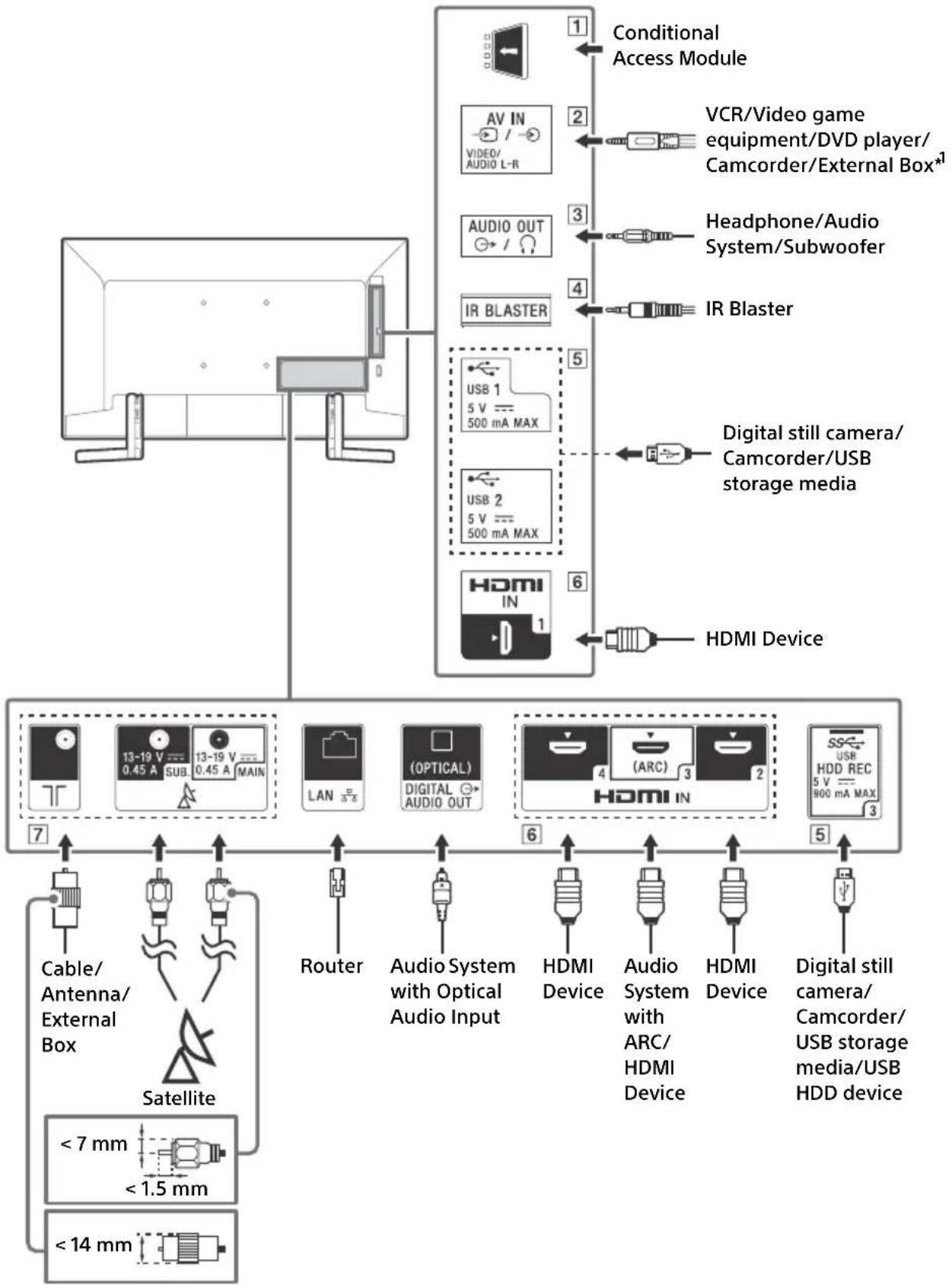
For more information on connections, refer to the Help Guide by pressing HELP on the remote control.
flowchart
graph TD
    A["Monitor"] --> B["Conditional Access Module"]
    B --> C["AV IN / VIDEO/AUDIO L-R"]
    B --> D["AUDIO OUT / /"]
    B --> E["IR BLASTER"]
    B --> F["USB 1 5 V 500 mA MAX"]
    B --> G["USB 2 5 V 500 mA MAX"]
    B --> H["HDMI IN 1"]
    B --> I["HDMI Device"]
    J["Cable/Antenna/External Box"] --> K["Satellite"]
    K --> L["<7 mm <1.5 mm"]
    K --> M["<14 mm"]
    N["VCR/Video game equipment/DVD player/Camcorder/External Box*1"] --> O["2"]
    P["Headphone/Audio System/Subwoofer"] --> Q["3"]
    R["IR Blaster"] --> S["4"]
    T["Digital still camera/Camcorder/USB storage media"] --> U["5"]
    V["HDMI Device"] --> W["6"]
    X["Router"] --> Y["(OPTICAL) DIGITAL AUDIO OUT"]
    Z["HDMI Device"] --> AA["(ARC) DIGITAL AUDIO OUT"]
    AB["Audio System with Optical Audio Input"] --> AC["7"]
    AD["HDMI Device"] --> AE["8"]
    AF["Audio System with ARC/HDMI Device"] --> AG["9"]
    AH["HDMI Device"] --> AI["10"]
    AJ["Digital still camera/Camcorder/USB storage media/USB HDD device"] --> AK["11"]
1 CAM (Conditional Access Module)
- Provides access to pay TV services. For details, refer to the instruction manual supplied with your CAM.
- Do not insert the smart card directly into the TV CAM slot. It must be fitted into the Conditional Access Module provided by your authorised dealer.
- CAM is not supported in some countries/areas. Check with your authorised dealer.
- A CAM message may appear when you switch to a digital programme after using the Internet video.
2 →/→ AV IN
- For a composite connection, use an Analogue Extension Cable (not supplied).
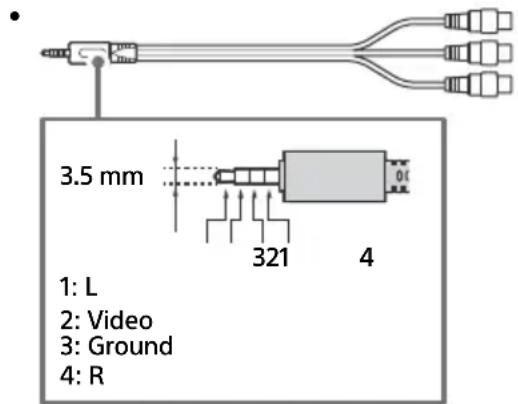
3 AUDIO OUT →/Ω
• Supports 3-pole stereo mini jack only.
- To listen to the TV's sound through the connected equipment, press HOME. Select [Settings] → [Sound] → [Headphone/Audio out] and then select the desired item.
4 IR BLASTER 2
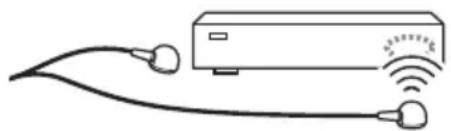
- Use your Sony remote control to control your External Box (cable/satellite box). Connect the IR Blaster Cable 2 to the IR Blaster port on your TV. Place one or both of the other two ends as shown below.
natural_image
Simple line drawing of a server connected to two earphones (no text or symbols)
- To perform IR Blaster setup, press HOME and select [Settings] → [External inputs] → [IR Blaster setup].
5 USB 1/2, SS USB 3 (HDD REC)\*2
- Connecting a large USB device may interfere with other connected devices beside it.
- When connecting a large USB device, connect to the USB 1 port.
- Connect a USB HDD device to the USB 3 port (blue).
6 HDMI IN 1/2/3/4
- HDMI interface can transfer the digital video and audio on a single cable.
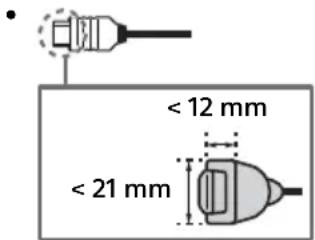
• HDMI IN 2/3
To enjoy high quality 4K 50p/60p contents, connect a Premium High Speed HDMI cable to the HDMI IN 2/3 and set the [HDMI signal format] to [Enhanced format].
For details of supported formats, refer to the "Specifications" in this manual (page 9-10).
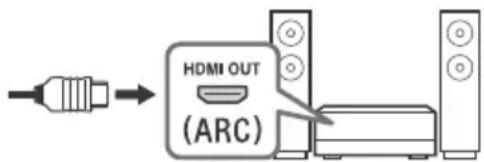
• HDMI IN 3 ARC (Audio Return Channel)
Connect your audio system to the HDMI IN 3 to route TV audio to your audio system. An audio system that supports HDMI ARC can send video to the TV, and receive audio from the TV via the same HDMI cable. If your audio system does not support HDMI ARC, an additional connection with DIGITAL AUDIO OUT (OPTICAL) is necessary.
- Connections for terrestrial/cable and satellite. Connection steps: SUB. → MAIN → Antenna
- For SUB. jack, connect only when you are using twin tuner mode except for Single Cable Distribution EN50494.
*1 For an external device which has only SCART AV OUT, use a SCART-RCA adaptor and Analogue Extension Cable.
*2 Only on limited region/country/TV model.
Installing the TV to the Wall
Using the optional Wall-Mount Bracket
This TV's instruction manual only provides the steps to prepare the TV for Wall-Mount installation before it is installed on the wall.
To Customers:
For product protection and safety reasons, Sony strongly recommends that installation of your TV be performed by Sony dealers or licensed contractors. Do not attempt to install it yourself.
To Sony Dealers and Contractors:
Provide full attention to safety during the installation, periodic maintenance and examination of this product.
Sufficient expertise is required for installing this product, especially to determine the strength of the wall for withstanding the TV's weight. Be sure to entrust the attachment of this product to the wall to Sony dealers or licensed contractors and pay adequate attention to safety during the installation. Sony is not liable for any damage or injury caused by mishandling or improper installation.
Use the Wall-Mount Bracket SU-WL450 (not supplied) to install the TV to the wall.
When installing the Wall-Mount Bracket, also refer to the Operating Instructions and Installation Guide supplied with the Wall-Mount Bracket.
Note
- Be sure to store the removed screws in a safe place, keeping them away from children.

For instructions on Wall-Mount Bracket installation, see the Installation Information (Wall-Mount Bracket) on the product page for your TV model.
www.sony.eu/support/
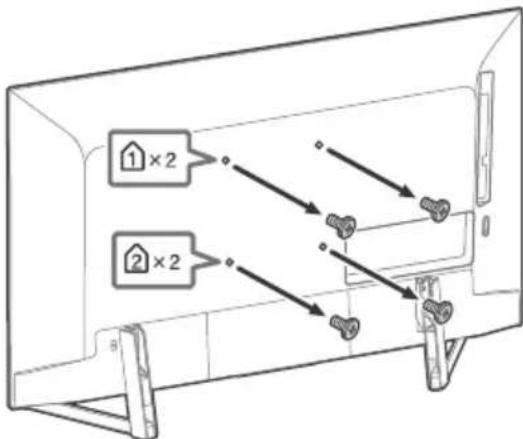
Remove the screws from the rear of the TV.
Troubleshooting
General troubleshooting for issues like: black screen, no sound, frozen picture, TV does not respond, or network is lost, do the following steps.
1 Restart your TV by pressing the power button on the remote control until a message appears. The TV will restart. If the TV does not recover, try unplugging the mains lead. Then press the power button on the TV and wait for two minutes, and plug in the mains lead.
2 Refer to the Help menu by pressing HELP on the remote control.
3 Connect your TV to the Internet and perform a software update. Sony recommends you to keep your TV software updated. Software updates provide new features and performance improvements.
4 Visit Sony support website (information provided on the front cover of this manual).
When [A new TV system software update is available...] message is displayed.
Sony strongly recommends you to update the TV software by selecting [Update Now]. These software updates improve your TV performance or add new features.
The following screen with [Updating...] will appear and the illumination LED flashes white while software is updating.
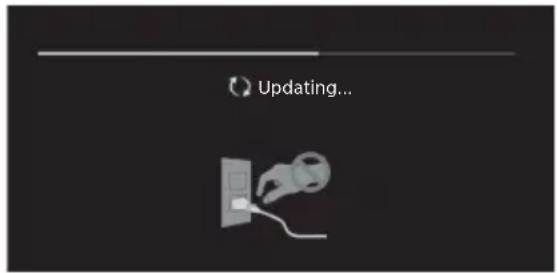
Do not unplug the mains lead during the software update. If you do, the software update may not finish completely, and it may cause a software malfunction. Software updates can take up to 15 minutes.
It takes time to initialize the system. Wait for about one minute, then operate it again.
Troubles and Solutions
When the illumination LED is flashing in red.
- Count how many times it flashes (interval time is three seconds).
Reboot the TV by disconnecting the mains lead until the illumination LED stopped flashing in red, then turn on the TV.
If the problem persists, disconnect the mains lead, and contact your dealer or Sony service centre with the number of times the illumination LED flashes.
Terrestrial/cable service cannot be received.
- Check the antenna (aerial)/cable connection and booster settings.
- Select terrestrial/cable service by pressing DIGITAL/ANALOG on the remote control. If the broadcasting service is not displayed, press TV and then press DIGITAL/ANALOG.
- Terrestrial signal might be suppressed if there is a strong signal supplied nearby. Set [LNA (CH ---)] to [Off] in digital tuning settings.
- After moving to a new house or trying to receive new services, attempt a service search by selecting [Digital tuning].
Satellite service cannot be received.
- Check the satellite cable connection.
- When [No signal. LNB overload detected...] message is displayed, unplug the mains lead. Then, ensure the satellite cable is not damaged and the satellite signal line is not short-circuited in the satellite connector.
The remote control does not function.
- Replace the batteries.
- Connect and set up the IR Blaster (models with supplied IR Blaster only) (page 6).
- Connect HDMI CEC compatible device (except models with supplied IR Blaster) and change to that input.
The parental lock for broadcast password has been forgotten.
- Enter 9999 for the PIN code and select [Change PIN code].
The TV surrounds become warm.
- When the TV is used for an extended period, the TV surrounds become warm. You may feel hot when touching there by the hand.
Specifications
System
Panel system
LCD (Liquid Crystal Display) Panel, LED Backlight
TV system
Depending on your country/area selection/TV model
Analogue: B/G, D/K, I
Digital: DVB-T/DVB-C
DVB-T2*1
PAL/SECAM/NTSC3.58 (Video only)/NTSC4.43 (Video only)
Channel coverage
Depending on your country/area selection/TV model
Analogue: UHF/VHF/Cable
Digital: UHF/VHF/Cable
Satellite *1 : IF Frequency 950-2,150 MHz
Sound output
10 W + 10 W
Wireless technology
Protocol IEEE802.11ac/a/b/g/n
(IEEE802.11ac may not be available depending on countries/
regions.)
Bluetooth Version 4.1
Frequency band(s)
| Wireless LAN (IEEE 802.11ac/a/b/g/n) |
| Frequency range Output | Power |
| 2400 - 2483.5 MHz < 20.0 dBm |
| 5150 - 5250 MHz < 23.0 dBm |
| 5250 - 5350 MHz < 20.0 dBm |
| 5470 - 5725 MHz < 20.0 dBm |
| 5725 - 5850 MHz < 13.9 dBm |
|
| Bluetooth |
| Frequency range Output | Power |
| 2400 - 2483.5 MHz < 10.0 dBm |
RMF-TX310E
| Bluetooth |
| Frequency range Output | Power |
| 2400 - 2483.5 MHz < 10.0 | dBm |
Software version
This radio equipment is intended to be used with the approved version(s) of software that are indicated in the EU Declaration of Conformity.
Press HELP on the remote control to know the software version.
Remote control: ____.
Press HOME, then select [Settings] → [Voice Remote Control]
→ [Software version].
The software loaded on this radio equipment is verified to comply with the essential requirements of the Directive 2014/53/EU.
Antenna (aerial)/cable
75 ohm external terminal for VHF/UHF
Satellite antenna *1
Female F Type Connector, 75 ohm.
DiSEqC 1.0, LNB 13 V/18 V & 22 kHz tone, Single Cable
Distribution EN50494.
→ / → AV IN
Video/Audio input (mini jack)
HDMI IN 1/2/3/4 (support 4K resolution, HDCP 2.3-
compatible)
Video:
4096 × 2160p (50, 60 Hz) x2,x3 , 4096 × 2160p (24 Hz) 2 , 3840 × 2160p (50, 60 Hz) 3 , 3840 × 2160p (24, 25, 30 Hz), 1080p (30, 50, 60 Hz), 1080/24p, 1080i (50, 60 Hz), 720p (30, 50, 60 Hz), 720/24p, 576p, 576i, 480p, 480i, PC Formats *4
Audio:
5.1 channel linear PCM: 32/44.1/48/88.2/96/176.4/192 kHz 16/20/24 bits, Dolby Digital, Dolby Digital Plus and DTS
ARC (Audio Return Channel) (HDMI IN 3 only)
(Two channel linear PCM: 48 kHz 16 bits, Dolby Digital, Dolby Digital Plus, DTS)
→ DIGITAL AUDIO OUT (OPTICAL)
Digital optical jack (Two channel linear PCM: 48 kHz 16 bits, Dolby Digital, DTS)
Headphone, Audio output, Subwoofer
1, 2, 3 (HDD REC)*
USB device port (S3-USB HDD device for REC feature)
USB port 1 and 2 support High Speed USB (USB 2.0).
USB port 3 supports Super Speed USB (USB 3.1 Gen 1).
CAM (Conditional Access Module) slot
LAN
10BASE-T/100BASE-TX connector (Depending on the operating environment of the network, connection speed may differ. The communication rate and quality are not guaranteed.)
IR BLASTER*5
IR Blaster Cable input (mini jack)
Others
Optional accessories
Wall-Mount Bracket: SU-WL450
Operating temperature
0ircC - 40ircC
Operating humidity
10% - 80% RH (non-condensing)
Power, Product Fiche and others
Power requirements
220 V - 240 V AC, 50 Hz
Energy Efficiency Class
B
Screen size (measured diagonally) (Approx.)
123.2 cm / 49 inches
Power consumption
In [Standard] mode
114 W
In [Vivid] mode
199 W
Annual energy consumption 6
158 kWh per year
Standby power consumption*7*8
0.50 W (27 W in software/EPG update mode)
Display resolution
3,840 dots (horizontal) × 2,160 lines (vertical)
Output Rating
USB 1/2
5 V, 500 mA MAX
USB 3
5 V,900 mA MAX
Dimensions (Approx.) (w × h × d)
with Table-Top Stand
109.3 × 69.9 × 27.4 cm
without Table-Top Stand
109.3 × 62.9 × 6.9 cm
Mass (Approx.)
with Table-Top Stand 14.6 kg
without Table-Top Stand
13.5 kg
*1 Not all the TV sets have DVB-T2 or DVB-S/S2 technology or satellite antenna terminal.
*2 When 4096 × 2160p is input and [Wide mode] is set to [Normal], the resolution is displayed as 3840 × 2160p. To display 4096 × 2160p, set [Wide mode] setting to [Full 1] or [Full 2].
*3 HDMI IN 2/3 only. To support 18 Gbps, set [HDMI signal format] to [Enhanced format].
*4 Refer to the Help Guide for details.
*5 Only on limited region/country/TV model.
*6 Energy consumption in kWh per year, based on the power consumption of the television operating 4 hours per day for 365 days. The actual energy consumption will depend on how the television is used.
*7 Specified standby power is reached after the TV finishes necessary internal processes.
*8 Standby power consumption will increase when your TV is connected to the network.
Note
- Do not remove the dummy card or cover (availability depends on TV model) from TV CAM (Conditional Access Module) slot other than to insert a smart card fitted in CAM.
- Optional accessories availability depends on countries/region/TV model/stock.
- Design and specifications are subject to change without notice.
Notes on Digital TV function
- Digital TV (DVB terrestrial, satellite and cable), interactive services and network functions may not be available in all countries or areas. Some functions might not be enabled or might not operate correctly with some providers and network environments. Some TV service providers may charge a fee for their services.
- This TV supports digital broadcasting using MPEG-2, H.264/MPEG-4 AVC and H.265/HEVC codecs, but compatibility with all operator/service signals, which may change over time, cannot be guaranteed.
- The terms HDMI and HDMI High-Definition Multimedia Interface, and the HDMI Logo are trademarks or registered trademarks of HDMI Licensing Administrator, Inc. in the United States and other countries.
- Dolby, Dolby Vision, Dolby Audio, and the double-D symbol are trademarks of Dolby Laboratories. Manufactured under license from Dolby Laboratories. Confidential unpublished works. Copyright © 1992-2015 Dolby Laboratories. All rights reserved.
- "BRAVIA", and BRAVIA Sync are trademarks or registered marks of Sony Corporation.
- Gracenote, the Gracenote logo and logotype, "Powered by Gracenote" logo are either registered trademarks or trademarks of Gracenote, Inc. in the United States and/or other countries.
- Vewd® Core. Copyright 1995-2019 Vewd Software AS. All rights reserved.
- Google, Google Play, Chromecast, YouTube, Android TV and other related marks and logos are trademarks of Google LLC.
- Wi-Fi , Wi-Fi Alliance , Wi-Fi Direct and Miracast are registered trademarks of Wi-Fi Alliance.
- The Wi-Fi CERTIFIED™ Logo is a certification mark of Wi-Fi Alliance.
- For DTS patents, see http://patents.dts.com. Manufactured under license from DTS, Inc.
DTS, the Symbol, & DTS and the Symbol together are registered trademarks, and DTS Digital Surround is a trademark of DTS, Inc. © DTS, Inc. All Rights Reserved.
- The Bluetooth® word mark and logos are registered trademarks owned by the Bluetooth SIG, Inc. and any use of such marks by Sony Corporation is under license. Other trademarks and trade names are those of their respective owners.
- Netflix is a registered trademark of Netflix, Inc.
-
DiSEqC™ is a trademark of EUTELSAT. This TV supports DiSEqC 1.0. This TV is not intended for controlling motorized antennas.
-
TUXERA is a registered trademark of Tuxera Inc. in the US and other countries.
- USB-IF SuperSpeed USB Trident logo is a registered trademark of USB Implementers Forum, Inc. SS
- All other trademarks are the property of their respective owners.
natural_image
Line drawing of two silhouetted figures carrying a rectangular device (no text or symbols)
natural_image
Simple line drawing of a connected air conditioner unit with two earphones and signal waves (no text or symbols)
• HDMI IN 2/3
→ DIGITAL AUDIO OUT (OPTICAL)
10% – 80% HR (sans condensation)
natural_image
Illustration of two human figures carrying a rectangular device (no text or symbols visible)
natural_image
Simple line drawing of a connected air conditioner unit with two earphones and signal waves (no text or symbols)
• HDMI IN 2/3
Digital: UHF/VHF/Cable
3840 × 2160p (50, 60 Hz)*3, 3840 × 2160p (24, 25, 30 Hz),
1080p (30, 50, 60 Hz), 1080/24p, 1080i (50, 60 Hz), 720p (30,
50, 60 Hz), 720/24p, 576p, 576i, 480p, 480i, Formatos de PC*4
Audio:
PCM lineal de 5,1 canales: 32/44,1/48/88,2/96/176,4/192 kHz
16/20/24 bits, Dolby Digital, Dolby Digital Plus y DTS
→ DIGITAL AUDIO OUT (OPTICAL)
Toma digital óptica (PCM lineal de dos canales: 48 kHz 16 bits,
olby Digital, DTS)
AUDIO OUT Ⓧ (minitoma estéreo)
Auriculares, salida de audio, subwoofer
1, 2, 3 (HDD REC)*
- Vewd® Core. Copyright 1995-2019 Vewd Software AS. All rights reserved.
flowchart
graph TD
    A["TV"] --> B["Directional Arrow"]
    B --> C["Prohibited Symbol"]
    C --> D["Directional Arrow"]
    D --> E["Directional Arrow"]
    E --> F["Directional Arrow"]
natural_image
Illustration of two human figures carrying a rectangular device (no text or symbols visible)
natural_image
Simple line drawing of a washing machine connected to two earphones (no text or symbols)
• HDMI IN 2/3
→ DIGITAL AUDIO OUT (OPTICAL)
- Vewd® Core. Copyright 1995-2019 Vewd Software AS. All rights reserved.
flowchart
graph TD
    A["TV"] --> B["Directional Arrow"]
    B --> C["No Symbol"]
    C --> D["Directional Change"]
    D --> E["Directional Change"]
    E --> F["Directional Change"]
natural_image
Illustration of two silhouetted figures carrying a rectangular device (no text or symbols visible)
natural_image
Simple line drawing of a device with two earphones connected to a wall-mounted sensor (no text or symbols)
• HDMI IN 2/3
→ DIGITAL AUDIO OUT (OPTICAL)
natural_image
Illustration of two human figures carrying a rectangular device (no text or symbols visible)
natural_image
Simple line drawing of an air conditioner unit connected to two earphones (no text or symbols)
- HDMI IN 2/3
3840 × 2160p (50, 60 Hz)*3, 3840 × 2160p (24, 25, 30 Hz),
1080p (30, 50, 60 Hz), 1080/24p, 1080i (50, 60 Hz), 720p
(30, 50, 60 Hz), 720/24p, 576p, 576i, 480p, 480i, Formatos
PC *4
Áudio:
PCM linear do canal 5,1: 32/44,1/48/88,2/96/176,4/192 kHz
16/20/24 bits, Dolby Digital, Dolby Digital Plus e DTS
ARC (Audio Return Channel) (apenas HDMI IN 3)
(PCM linear de dois canais: 48 kHz 16 bits, Dolby Digital, Dolby
Digital Plus, DTS)
→ DIGITAL AUDIO OUT (OPTICAL)
Tomada digital ótica (PCM linear de dois canais: 48 kHz 16 bits, Dolby Digital, DTS)
AUDIO OUT (Mini-tomada estéreo)
- Vewd® Core. Copyright 1995-2019 Vewd Software AS. All rights reserved.
natural_image
Line drawing of two people carrying a rectangular device (no text or symbols)
natural_image
Line drawing of a server connected to two earphones (no text or symbols)
- HDMI IN 2/3
→ DIGITAL AUDIO OUT (OPTICAL)
- Vewd® Core. Copyright 1995-2019 Vewd Software AS. All rights reserved.
natural_image
Illustration of two silhouetted figures carrying a rectangular device (no text or symbols visible)
natural_image
Simple line drawing of a server connected to two earphones (no text or symbols)
• HDMI IN 2/3
3840 × 2160p (50, 60 Hz)*3, 3840 × 2160p (24, 25, 30 Hz),
1080p (30, 50, 60 Hz), 1080/24p, 1080i (50, 60 Hz), 720p
(30, 50, 60 Hz), 720/24p, 576p, 576i, 480p, 480i, PC-format* 4
Ljud:
5,1-kanals linjär PCM: 32/44,1/48/88,2/96/176,4/192 kHz
→ DIGITAL AUDIO OUT (OPTICAL)
Dimension (Cirka) (b × h × d)
med bordsstativ
109,3 × 69,9 × 27,4 cm
utan bordsstativ
- Vewd® Core. Copyright 1995-2019 Vewd Software AS. All rights reserved.
natural_image
Illustration of two human figures carrying a rectangular device (no text or symbols visible)
natural_image
Simple line drawing of a device with earphones and signal waves (no text or symbols)
• HDMI IN 2/3
3840 × 2160p (50, 60 Hz)×3, 3840 × 2160p (24, 25, 30 Hz),
1080p (30, 50, 60 Hz), 1080/24p, 1080i (50, 60 Hz), 720p
(30, 50, 60 Hz), 720/24p, 576p, 576i, 480p, 480i,
Pc-formater* 4
Lyd:
5,1-kanals lineær PCM: 32/44,1/48/88,2/96/176,4/192 kHz
16/20/24 bit, Dolby Digital, Dolby Digital Plus og DTS
ARC (Audio Return Channel) (kun HDMI IN 3)
(to-kanals lineær PCM: 48 kHz 16 bit, Dolby Digital, Dolby Digital Plus, DTS)

DIGITAL AUDIO OUT (OPTICAL)
Digitalt optisk stik (to-kanals lineær PCM: 48 kHz 16 bit, Dolby Digital, DTS)
AUDIO OUT (Mini-stereostik)
Hovedtelefon, lydudgang, subwoofer

1, 2, 3 (HDD REC)* 5
I [Standard] tilstand
114 W
I [Kraftig] tilstand
199 W
natural_image
Line drawing of two human figures carrying a rectangular device (no text or symbols)
natural_image
Line drawing of a server connected to two earphones (no text or symbols)
• HDMI IN 2/3
→ DIGITAL AUDIO OUT (OPTICAL)
natural_image
Line drawing of two human figures carrying a rectangular device (no text or symbols)
(Teksting-innstilling)
HELP: Vis Hjelp-menyen.
natural_image
Simple line drawing of a connected air conditioner unit with two earphones and signal waves (no text or symbols)
• HDMI IN 2/3
→ DIGITAL AUDIO OUT (OPTICAL)
Digital optisk kontakt (tokanals lineær PCM: 48 kHz 16 biter, Dolby Digital, DTS)
AUDIO OUT (stereomini-kontakt)
Hodetelefon, lydutgang, subwoofer
1, 2, 3 (HDD REC)*
- Vewd® Core. Copyright 1995-2019 Vewd Software AS. All rights reserved.
flowchart
graph TD
    A["Monitor Setup"] --> B["Directional Arrow"]
    B --> C["No Cross"]
    C --> D["Directional Arrow"]
    D --> E["Directional Arrow"]
    E --> F["Directional Arrow"]
natural_image
Illustration of two silhouetted figures carrying a rectangular device (no text or symbols visible)
natural_image
Simple line drawing of a server connected to two earphones (no text or symbols)
- HDMI IN 2/3
→ DIGITAL AUDIO OUT (OPTICAL)
natural_image
Illustration of two silhouetted figures carrying a rectangular device (no text or symbols visible)
natural_image
Simple line drawing of a server connected to two earphones (no text or symbols)
• HDMI IN 2/3
→ DIGITAL AUDIO OUT (OPTICAL)
- Vewd® Core. Copyright 1995-2019 Vewd Software AS. All rights reserved.
natural_image
Illustration of two silhouetted figures carrying a rectangular device (no text or symbols visible)
natural_image
Simple line drawing of a connected air conditioner unit with two earphones and signal waves (no text or symbols)
- Ak chcete IR Blaster nastavit, stlačte HOME a vyberte [Nastavenia] → [Externé vstupy] → [Nastavenie zariadenia IR Blaster].
USB 1/2, USB 3 (HDD REC)\*
2
• HDMI IN 2/3
3840 × 2160p (50, 60 Hz)*3, 3840 × 2160p (24, 25, 30 Hz),
1080p (30, 50, 60 Hz), 1080/24p, 1080i (50, 60 Hz), 720p (30,
50, 60 Hz), 720/24p, 576p, 576i, 480p, 480i, Formáty PC*4
Zvuk
5,1 lineárny kanál PCM: 32/44,1/48/88,2/96/176,4/192 kHz
16/20/24 bitov, Dolby Digital, Dolby Digital Plus a DTS
ARC (Audio Return Channel) (iba HDMI IN 3)
→ DIGITAL AUDIO OUT (OPTICAL)
- Vewd® Core. Copyright 1995-2019 Vewd Software AS. All rights reserved.
natural_image
Line drawing of two silhouetted figures carrying a rectangular device (no text or symbols)
natural_image
Line drawing of a connected air conditioner unit with two earphones and signal waves (no text or symbols)
• HDMI IN 2/3
3840 × 2160p (50, 60 Hz)*3, 3840 × 2160p (24, 25, 30 Hz),
1080p (30, 50, 60 Hz), 1080/24p, 1080i (50, 60 Hz), 720p (30, 50, 60 Hz), 720/24p, 576p, 576i, 480p, 480i, PC formátumok 4
Audio:
→ DIGITAL AUDIO OUT (OPTICAL)
- Vewd® Core. Copyright 1995-2019 Vewd Software AS. All rights reserved.
natural_image
Illustration of two silhouetted figures carrying a rectangular device (no text or symbols visible)
natural_image
Simple line drawing of an air conditioner unit connected to two earphones (no text or symbols)
- HDMI IN 2/3
DIGITAL AUDIO OUT (OPTICAL)
- Vewd® Core. Copyright 1995-2019 Vewd Software AS. All rights reserved.
flowchart
graph TD
    A["Checkmark"] --> B["Fixed-line crossed-out shapes"]
    B --> C["No Cross"]
    C --> D["Final Step with multiple lines and brackets"]
natural_image
Illustration of two human figures carrying a rectangular device (no text or symbols visible)
3 AUDIO OUT
natural_image
Simple line drawing of a connected air conditioner unit with earphones and signal waves (no text or symbols)
• HDMI IN 2/3
ARC (Audio Return Channel) (camo HDMI IN 3)
(Двуканален линеен PCM: 48 kHz 16 бита, Dolby Digital, Dolby
igital Plus, DTS

DIGITAL AUDIO OUT (OPTICAL)
1, 2, 3 (HDD REC)* 5
- Vewd® Core. Copyright 1995-2019 Vewd Software AS. All rights reserved.
natural_image
Illustration of two silhouetted figures carrying a rectangular device (no text or symbols visible)
natural_image
Simple line drawing of a connected air conditioner unit with two earphones and a sensor icon (no text or symbols)
• HDMI IN 2/3
→ DIGITAL AUDIO OUT (OPTICAL)
flowchart
graph TD
    A["Window Setup"] --> B{Direction}
    B -->|✓| C["Window Setup"]
    B -->|No| D["No Intersection"]
    D --> E["Window Setup"]
    E --> F{Adjustment}
    F -->|Yes| G["Adjustment"]
    F -->|No| H["Adjustment"]
natural_image
Illustration of two human figures carrying a rectangular device (no text or symbols visible)
natural_image
Simple line drawing of a connected air conditioner unit with two earphones and a signal icon (no text or symbols)
• HDMI IN 2/3
Dijital: DVB-T/DVB-C
DVB-T2*1
Uydu *1 : DVB-S/DVB-S2
Renk Sistemi
PAL/SECAM/NTSC3.58 (Sadece video)/NTSC4.43 (Sadece video)
Kanal kapsamı
Dijital: UHF/VHF/Kablolu
→ DIGITAL AUDIO OUT (OPTICAL)
Kulaklık, Ses Çıkışı, Subwoofer

1, 2, 3 (HDD REC)* 5
- Vewd® Core. Copyright 1995-2019 Vewd Software AS. All rights reserved.