
SBCSC465 - Headphones PHILIPS - Free user manual and instructions
Find the device manual for free SBCSC465 PHILIPS in PDF.


| Product type | Baby monitor |
| Brand | Philips |
| Model | SBCSC465 |
| Parent unit power supply | Rechargeable NiMH battery pack (included) or 9V DC 200mA mains adapter |
| Baby unit power supply | 4 x 1.5V LR6 (AA) alkaline batteries (not included) or 9V DC 200mA mains adapter |
| Maximum outdoor range | Up to 250 meters |
| Transmission frequencies (model /00) | 40.695 to 40.675 MHz and 49.830 to 40.890 MHz |
| Operating temperature | 10°C to 40°C |
| Digital Pilot Tone | Continuous communication link to reduce interference |
| Battery life (parent unit) | Approximately 12 hours after 14 hours of charging |
| Battery life (baby unit) | Up to 30 hours |
| Main features | Nightlight, microphone sensitivity control, channel selector, system check alarm, sound indicators |
| Maintenance and cleaning | Clean with a damp cloth; do not use near a water source |
| Recycling | Dispose of used batteries according to environmental guidelines |
| Safety | Keep baby unit out of reach (minimum 1 m), do not place in the crib, do not cover |
Frequently Asked Questions - SBCSC465 PHILIPS
User questions about SBCSC465 PHILIPS
0 question about this device. Answer the ones you know or ask your own.
Ask a new question about this device
Download the instructions for your Headphones in PDF format for free! Find your manual SBCSC465 - PHILIPS and take your electronic device back in hand. On this page are published all the documents necessary for the use of your device. SBCSC465 by PHILIPS.
USER MANUAL SBCSC465 PHILIPS
Philips is dedicated to producing caring, reliable products that new moms and dads really need. Products whose reliability and operating quality bring reassurance. You can trust this Philips baby monitor to provide round-the-clock support by ensuring you can always hear your baby clearly, no matter where you are in the house.
Product illustration on inside flap:
A Baby unit
1 night light
2 DC power supply socket
3 power button
4 power light
5 channel selection switch
6 microphone
7 AC power adapter
8 microphone sensitivity control
9 battery compartment cover
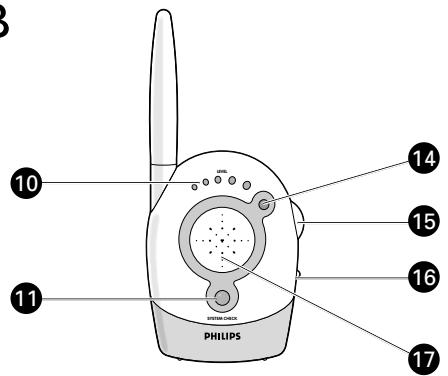
B Parent unit
10 sound-level lights
11 system check light
12 charging base
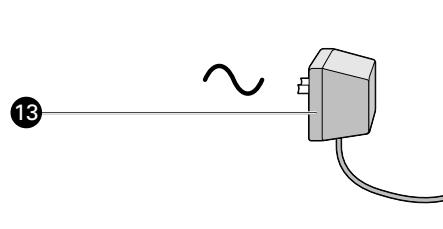
13 AC power adapter
14 power light
15 volume control - on/off switch
16 channel selection switch
17 loudspeaker
18 charging light
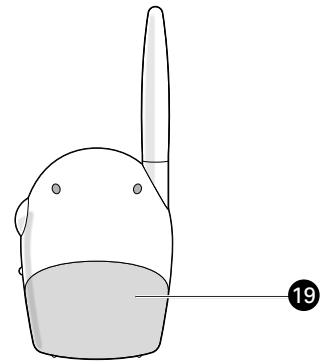
19 battery compartment cover
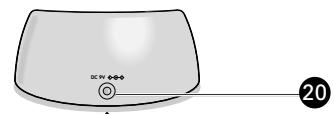
20 DC power supply socket
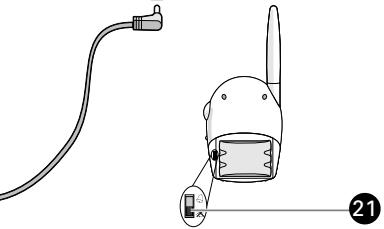
21 system check alarm switch
B

Important information
Please read this guide carefully before using the baby monitor, and keep it for future reference. This baby monitor is intended as an aid. It is not a substitute for responsible and proper adult supervision and should not be used as such.
- Make sure the Baby unit and adapter cable are always out of reach of the baby, at least one metre away.
- Never place the Baby unit inside the baby's bed or playpen!
- Never cover the baby monitor (with a towel, blanket, etc.).
- Clean the baby monitor with a damp cloth.
- Never use the baby monitor near water.
Your baby monitor
SBC SC465
Philips is dedicated to producing caring, reliable products that new moms and dads really need. Products whose reliability and operating quality bring reassurance. You can trust this Philips baby monitor to provide round-the-clock support by ensuring you can always hear your baby clearly, no matter where you are in the house.
Product illustration on inside flap:
A Baby unit
1 night light
2 DC power supply socket
3 power button
4 power light
5 channel selection switch
6 microphone
7 AC power adapter
8 microphone sensitivity control
9 battery compartment cover
B Parent unit
10 sound-level lights
11 system check light
12 charging base
13 AC power adapter
14 power light
15 volume control - on/off switch
16 channel selection switch
17 loudspeaker
18 charging light
19 battery compartment cover
20 DC power supply socket
21 system check alarm switch
Important information
Please read this guide carefully before using the baby monitor, and keep it for future reference. This baby monitor is intended as an aid. It is not a substitute for responsible and proper adult supervision and should not be used as such.
- Make sure the Baby unit and adapter cable are always out of reach of the baby, at least one metre away.
- Never place the Baby unit inside the baby's bed or playpen!
- Never cover the baby monitor (with a towel, blanket, etc.).
- Clean the baby monitor with a damp cloth.
- Never use the baby monitor near water.
Getting your baby monitor ready
1 Position the Baby unit at least one metre away from your baby. Never place the baby unit inside the baby's bed or playpen.
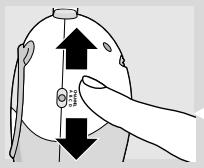
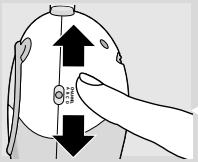
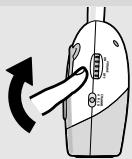
2 Set channel selection switches to the same channel on both units.
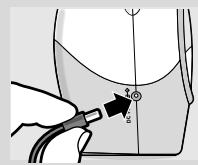
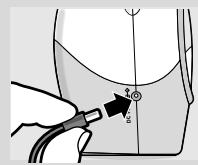
3 Connect the power adapter to Baby unit socket.
4 Plug the power adapter into mains supply.
5 Move away from the Baby unit with the Parent unit. If units are positioned too close to each other then a high-pitched noise can be heard.
6 Connect the second power adapter to the Parent unit's charging base socket.
7 Plug the second power adapter into a mains supply.
8 Place the Parent unit inside its charging base. >The red charging light lights.
9 Leave the Parent unit in charging base for at least 14 hours to fully charge the batteries. When batteries are fully charged, the Parent unit can be used cordlessly for up to 12 hours.
10 Place the Parent unit inside the charging base when power light on the Parent unit flashes red (an indication that batteries are low).
Using your baby monitor
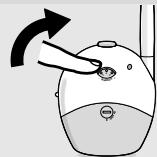
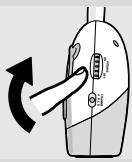
Listening to your baby
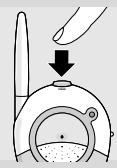
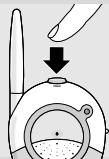
1 Push the power button on the Baby unit to turn it on.
The power light lights (green).
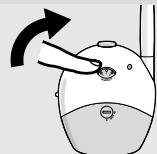
2 Adjust the microphone sensitivity of the Baby unit to a level you prefer (using your own voice as a sound reference).
The power light lights (yellow) when a sound is picked up.
3 Switch the Parent unit on and adjust the volume to level you prefer using the VOLUME ON/OFF control.
The digital SYSTEM CHECK light lights continuously (green) when the Parent unit and Baby unit are in touch with each other.
Features explanation
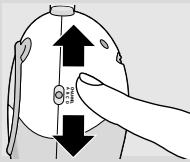
Avoiding interference
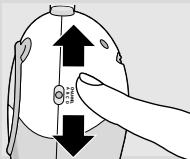
If there is interference or if sound reception is poor, switch both units to another channel.
Always make sure that the channel selection switches on both units are set to the same position.
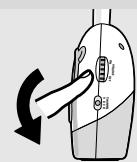
Monitoring baby silently
Adjust the volume on the Parent unit to the lowest level using the VOLUME ON/OFF control (do not switch off).
the sound-level lights visually alert you to baby's sounds.
The more sound your baby makes, the more lights light.
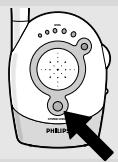
Checking that the units are in touch
Check that the digital SYSTEM CHECK light on the Parent unit lights continuously (green) to confirm that the connection between both units is reliable.
If the light flashes (red), move the Parent unit closer to the Baby unit.
The light flashes if the units are out of range for more than 30 seconds or if there is interference.
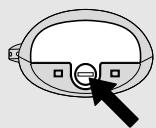
Switching on the system check alarm
You can switch on the system check alarm on the Parent unit that beeps when the units are not in touch. The Parent unit is delivered with the system check alarm switched off.
1 Open the Parent unit's battery compartment cover.
2 Set the switch inside compartment to the ON position (
3 Close battery compartment cover.
The SYSTEM CHECK light can still flash even if the system check alarm is switched off.
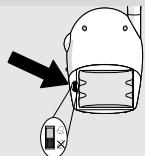
Switching on the night light
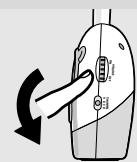
Push the Baby unit night light to switch it on and off.
Switch off the night light when operating the Baby unit on batteries to conserve power.

Range 250m in open air
The baby monitor has an operating range of up to 250 metres in ideal open-air conditions. This means that the units can see each other with no obstacles in between. Walls, ceilings, large objects and even glass affect the operating range. The more obstacles there are in between, the shorter the operating range.
Using batteries
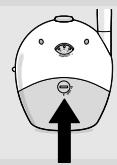
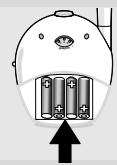
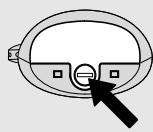
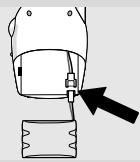

Operating the Baby unit cordlessly
1 Remove the battery compartment cover using a coin.
2 Insert four I.5V, LR6 (AA) batteries noting the + and - configuration inside the battery compartment.
Batteries not included; we recommend non-chargeable Philips Alkaline batteries.
3 Put the cover back in place and secure using a coin.
If the power light flashes (red) install new batteries.
The unit operates for up to 30 hours on batteries.
Replacing the Parent unit's battery pack
1 Open the Parent unit's battery compartment cover.
2 Disconnect the old battery pack from the power plug and remove.
3 Carefully connect the new battery pack to the power plug and place inside the battery compartment.
4 Close battery compartment cover.
Batteries
Dispose of used batteries in an environmentally friendly manner.
Do not mix old and new batteries, or different types of batteries.
Remove Baby unit batteries if the baby monitor is not to be used for long periods.
Technical specifications
Power supply:
- Battery pack; rechargeable NiMH for Parent unit (included);
- Optional batteries 4 × 1.5V ; AA alkaline for Baby unit (not included);
- AC power adapter 230V AC, 50 Hz (two included): - Output voltage 9V DC, 200mA.
- Only use the AC power adapter included or a type that complies with safety standard EN60950 and that has the following specification: input 230V AC, 50 Hz; output 9 Volt DC / 200mA.
up to 250 metres in ideal conditions (walls, floors, etc. can limit this distance.)
10^ to 40^ - Continuous communication link (hidden signal helps reduce interference and ensures a continuous link between both units so you only hear your baby's sounds).
SBC SC465/00:
from 40.695 to 40.675 MHz
SBC SC465/05 (IRE, UK):
from 49.830 to 40.890 MHz
SBC SC465/16 (ES):
from 31.000 to 31.350 MHz
Operating range:
Operating temperature:
Digital Pilot tone:
Transmission frequencies:
Problem solving
| Problem | Possible cause | Solution |
| Power light does not light. | Parent unit: unit is not turned on. | Turn VOLUME ON/OFF control downwards. |
| Batteries are low. | Recharge batteries. | |
| Baby unit: unit is not turned on. | Push power button. | |
| Power adapter is not plugged in or batteries are exhausted. | Plug in power adapter or replace batteries. | |
| High pitched noise. | Units are too close together. | Move parent unit away from baby unit. Turn VOLUME ON/OFF control on parent unit upwards. |
| Parent unit batteries do not charge. | Battery life is at an end. | Connect charging base to mains power. Replace battery pack. |
| No sound. | Volume on parent unit is set too low. | Turn VOLUME ON/OFF control downwards. |
| Power light flashing. | Batteries are low or empty. | Parent unit:- recharge battery pack. Baby unit:- replace batteries or connect to mains power. |
| Interference or poor reception. | Mobile or cordless phones too close to the baby monitor. | Move phones away from the units. |
| Pick-up from another baby monitor. | Both systems are operating on the same frequency. | Switch channels. |
| System check light flashing (red) / System check alarm. | Units are out of range or there is interference from another FM source. | Move units closer together to restore the link. Remove the other FM source. |
Votre babyphone
SBC SC465
SBC SC465/05 (IR, RU):
SBC SC465/05 (IRE, UK):
SBC SC465/05 (IRE, UK):
SBC SC465/05 (IRE, UK):
da 49.830 a 40.890 MHz
SBC SC465/16 (ES):
NOS V A ETOIaOeTe To baby monitor OaC
1 Toothehtote Tn Movad a toulaixotov evaetpoakpi to saC. Mn baTe Tne Tn Movad a meo stkpeatauou mawpov n to npko tou.
2 P i e Touc diakóπες επλογης kavavaloiu στο idio kavála και στις dóu μováδες.
3 Suvoedoge tov npoosapnoyeia oioicog stny npica ng Movadac mwpoi.
4 Suvoedoge tov npooapoyea oiofoe stnv npoxn peuato.
5 Anopakpvthe ano Tm Movad8a mwpov exovtac maoc Tm Movad8a yovio Av o1 movadcs eivai noo kovta n ma stnvy aokovotei evac oxc yoxc.
6 Suovdeote to deutepo nposapuoyea 1oxboc stnv pica tnc faons opotions n Movadac yovioi.
7 Suovdeste to deutepo pnoosapmuoya ioxbos e mu npoxn peuato
8 TootheTne Tn Movadayovuo mea stn bao npoptionc. To kokkivo oocpoptionc avabci.
9 ApnoTe Tn Movada yovioo stn Baon foprtionc e1 14 toulaixotov ope s yia va optiote n npwoc ts mpatiec. Otav oI mpatiec evai n npwo c poptouve, n Movada yoviou uopei va xnpoiopointheta wpiic opmu expi 12 ope.
10Toothetaiote Tm Movadogoviovmuo aon fooprtionsotavto woc tsos movadogoviovavaoosnve kokkivo (evdeiOn otoiatapiec eivai qanla).
Vx xpnoiuotoiie to baby monitor oac
1Πaŋσe to kouπi toxbos stn Movadα μωρογia va tvn avayese.
To 10xvoCvaβεI (πρaσvO).
2 PovtioTe Tnv evuaiooia tou mukpoovou Tc Movadac mwpou stn 0rato n ovo pntmuTe (xnpouonowvtac tn qwn oac wavopapvov).
To 公 10xboa vuaBεi (ktpivo) otav avvXevθεi evac nxc.
3 Avayte Tn Movada yoviou kai pvtheta tny evtaon stn staohn nov npotmuate xnpoiomoiowtac to pvthetaVOLUME ON/OFF.
To SYSTEM CHECK KAIEI OvEvXoC (papivo) otav n Movada yoviov kai n Movada o EIKoivovovuv MTeafo Touc.
Eşynon Téxviéków òuvatotn'tawv
NWCva aTNOPEUYETaPeuBoLc
Av npaxov npaeufoe n av n loynxou evai kaik, yopiote kai ta dvoovadoe o aallo kavala.
Na eioe npvta oiyoupoc oti ot iakontc eiloync kavaiouk aotic doo movadecivatnvi thv idia theon.
SBC SC465/05 (IRE, UK):
SBC SC465/16 (ES):
απó 40.695 ωζ 40.675 MHz
SBC SC465/05 (IRE, UK):
fran 49,830 till 40,890 MHz
SBC SC465/16 (ES):
fran 31,000 till 31,350 MHz
Användningsområde:
Product illustration on inside flap:
A Baby-unit
1 natlys
2 DC stikdase til strormforsyningsaaet
3 power (tænd/sluk) knap
4 power (strom) lys
5kanalvaelger
6 mikrofon
7 vekselstrømsadapter
8 regulering af mikrofonfoIsomhed
9 daeksel batterirum
B Foraeldre-unit
10 lydstyrkelys
11 system kontrollys
12 oplader
13 vekselstrømsadapter
14 power(strøm)lys
15 lydstyrke regulering - taend/ sluk-knap
16 kanalvælger
17 hogeittaler
18 oplader lys
19 daksel batterirum
20 DC stikdase til strømforsyningsaaet
21 knap til systemkontrol alarm
Vegtig information
SBC SC465/05 (IRE, UK):
Product illustration on inside flap:
A Lapsen yksikkö
SBC SC465/05 (IRE, UK):
49,830 ... 40,890 MHz
SBC SC465/16 (ES):
31,000 ... 31,350 MHz
Käytöetäisyyss
Käytölämpötila
- Important information
- Your baby monitor
- SBC SC465
- A Baby unit
- B Parent unit
- Getting your baby monitor ready
- Using your baby monitor
- Listening to your baby
- Features explanation
- Avoiding interference
- Monitoring baby silently
- Checking that the units are in touch
- Switching on the system check alarm
- Switching on the night light
- Range 250m in open air
- Using batteries
- Operating the Baby unit cordlessly
- Replacing the Parent unit's battery pack
- Batteries
- Technical specifications
- Problem solving
- Votre babyphone
- NOS V A ETOIaOeTe To baby monitor OaC
- Vx xpnoiuotoiie to baby monitor oac
- Eşynon Téxviéków òuvatotn'tawv
- NWCva aTNOPEUYETaPeuBoLc
- A Baby-unit
- B Foraeldre-unit
- Vegtig information
- A Lapsen yksikkö
Brand : PHILIPS
Model : SBCSC465
Category : Headphones