
SHE3575BG - Headphones PHILIPS - Free user manual and instructions
Find the device manual for free SHE3575BG PHILIPS in PDF.


| Product Type | In-Ear Headphones |
| Model Number | SHE3575BG |
| Brand | Philips |
| Driver Size | 8.6 mm |
| Frequency Response | 20 Hz – 20 kHz |
| Impedance | 16 Ω |
| Sensitivity | 102 dB |
| Maximum Power Input | 40 mW |
| Driver Type | Neodymium magnet |
| Cable Length | 1.2 m |
| Connector | 3.5 mm straight plug, gold-plated |
| Weight | 12 g |
| Compatibility | All devices with 3.5 mm jack |
| Color | Black/Gold |
| Ear Tip Sizes | Small, Medium, Large |
| Cleaning | Wipe with soft dry cloth, do not use liquids |
| Safety Warnings | Do not listen at high volume for long periods; keep away from children |
| Storage | Store in a cool dry place, avoid direct sunlight |
| Warranty | 1 year |
Frequently Asked Questions - SHE3575BG PHILIPS
User questions about SHE3575BG PHILIPS
0 question about this device. Answer the ones you know or ask your own.
Ask a new question about this device
Download the instructions for your Headphones in PDF format for free! Find your manual SHE3575BG - PHILIPS and take your electronic device back in hand. On this page are published all the documents necessary for the use of your device. SHE3575BG by PHILIPS.
USER MANUAL SHE3575BG PHILIPS
Always there to help you
Register your product and get support at
www.philips.com/welcome

HTL2160

natural_image
Black Philips audio streaming device with a side-mounted speaker tower (no visible text or symbols on the device body)User manual
PHILIPS
Contents
1 Important 3
Help and support 3
Safety 3
Care for your product 4
Care of the environment 4
2 Your SoundBar 5
Assemble your Soundbar 5
Main unit 5
Remote control 5
Connectors 6
3 Connect 7
Placement 7
Connect audio from TV and other devices 7
4 Use your SoundBar 9
Adjust the volume 9
Choose your sound 9
MP3 player 9
USB storage devices 9
Auto standby 10
Play audio through Bluetooth 10
Apply factory settings 10
5 Wall mount 11
6 Product specifications 12
7 Troubleshooting 13
8 Notice 14
Compliance 14
Trademarks 14
1 Important
Read and understand all instructions before you use your product. If damage is caused by failure to follow instructions, the warranty does not apply.
Help and support
Philips provides extensive online support. Visit our website at www.philips.com/support to:
- download the user manual and the quick start guide
- watch video tutorials (available only for selected models)
• find answers to frequently answered questions (FAQs) - email us a question
• chat with our support representative.
Follow the instructions on the website to select your language, and then enter your product model number.
Alternatively, you can contact Philips Consumer Care in your country. Before you contact Philips, note down the model number and serial number of your product. You can find this information on the back or bottom of your product.
Safety
Risk of electric shock or fire!
- Never expose the product and accessories to rain or water. Never place liquid containers, such as vases, near the product. If liquids are spilt on or into the product, disconnect it from the power outlet immediately. Contact Philips Consumer Care to have the product checked before use.
- Never place the product and accessories near naked flames or other heat sources, including direct sunlight.
- Never insert objects into the ventilation slots or other openings on the product.
- Where the mains plug or an appliance coupler is used as the disconnect device, the disconnect device shall remain readily operable.
- Disconnect the product from the power outlet before lightning storms.
- When you disconnect the power cord, always pull the plug, never the cable.
Risk of short circuit or fire!
- Before you connect the product to the power outlet, ensure that the power voltage matches the value printed on the back or bottom of the product. Never connect the product to the power outlet if the voltage is different.
Risk of injury or damage to the SoundBar!
- Never place the product or any objects on power cords or on other electrical equipment.
- If the product is transported in temperatures below 5°C, unpack the product and wait until its temperature matches room temperature before connecting it to the power outlet.
- Parts of this product can be made of glass. Handle with care to avoid injury and damage.
Risk of overheating!
- Never install this product in a confined space. Always leave a space of at least four inches around the product for ventilation. Ensure curtains or other objects never cover the ventilation slots on the product.
Risk of contamination!
- Do not mix batteries (old and new or carbon and alkaine, etc.).
- Danger of explosion if batteries are incorrectly replaced. Replace only with the same or equivalent type.
- Remove batteries if they are exhausted or if the remote control is not to be used for a long time.
- Batteries contain chemical substances, they should be disposed of properly.
Risk of swallowing batteries!
- The product/remote control may contain a coin/button type battery, which can be swallowed. Keep the battery out of reach of children at all times! If swallowed, the battery can cause serious injury or death. Severe internal burns can occur within two hours of ingestion.
- If you suspect that a battery has been swallowed or placed inside any part of the body, seek immediate medical attention.
- When you change the batteries, always keep all new and used batteries out of reach of children. Ensure that the battery compartment is completely secure after you replace the battery.
- If the battery compartment cannot be completely secured, discontinue use of the product. Keep out of reach of children and contact the manufacturer.

This is CLASS II apparatus with double insulation, and no protective earth provided.
Help and support
Philips provides extensive online support. Visit our website at www.philips.com/support to:
- download the user manual and the quick start guide
- watch video tutorials (available only for selected models)
• find answers to frequently answered questions (FAQs) - email us a question
• chat with our support representative.
Follow the instructions on the website to select your language, and then enter your product model number.
Alternatively, you can contact Philips Consumer Care in your country. Before you contact Philips, note down the model number and serial number of your product. You can find this information on the back or bottom of your product.
Care for your product
Use only microfiber cloth to clean the product.
Care of the environment

Your product is designed and manufactured with high quality materials and components, which can be recycled and reused.

When this crossed-out wheeled bin symbol is attached to a product it means that the product is covered by the European Directive 2002/96/EC. Please inform yourself about the local separate collection system for electrical and electronic products.
Please act according to your local rules and do not dispose of your old products with your normal household waste.
Correct disposal of your old product helps to prevent potential negative consequences for the environment and human health.

Your product contains batteries covered by the European Directive 2006/66/EC, which cannot be disposed with normal household waste. Please inform yourself about the local rules on separate collection of batteries because correct disposal helps to prevent negative consequences for the environmental and human health.
2 Your SoundBar
Congratulations on your purchase, and welcome to Philips! To fully benefit from the support that Philips offers, register your SoundBar at www.philips.com/welcome.
Assemble your Soundbar
Assemble your SoundBar as described in the quick start guide (Step 1).
Main unit
This section includes an overview of the main unit.

① Switch the SoundBar on or to standby.
② VOLUME +-
Increase or decrease volume.
③ SOURCE Select an audio source for the SoundBar.
④ Power
Lights up when you switch on the SoundBar.
⑤ Source indicators
• COAX/OPT/AUX: Lights up when you switch to coaxial, optical or analog audio input source.
• USB: Lights up when you switch to the USB source.
• AUDIO-IN: Lights up when you switch to the audio input source.
⑥ SURR
Lights up when you select Virtual Surround sound.
⑦ Bluetooth
Lights up when you switch to the Bluetooth mode.
Remote control
This section includes an overview of the remote control.
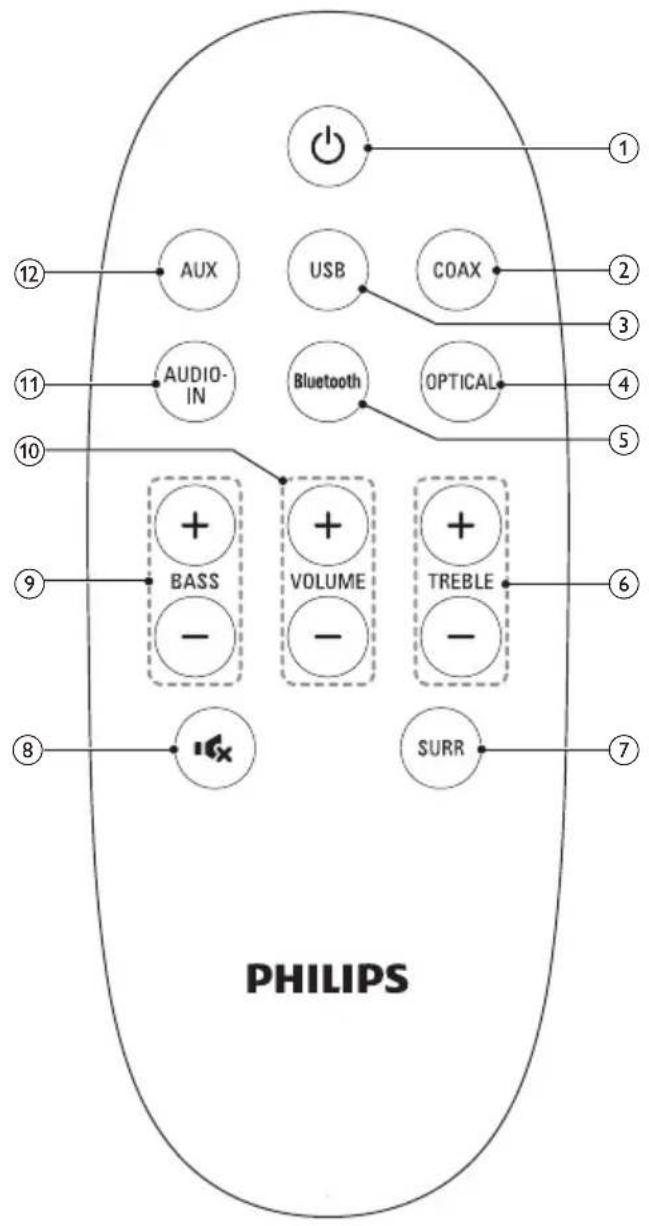
① ⏻(Standby-On)
Switch the SoundBar on or to standby.
② COAX
Switch your audio source to the coaxial connection.
③ USB
Switch your audio source to the USB connection.
④ OPTICAL
Switch your audio source to the optical connection.
⑤ Bluetooth
Switch to Bluetooth mode.
⑥ TREBLE +/- Increase or decrease treble.
⑦ SURR
Toggle between stereo and virtual surround sound.
⑧ Mute or restore volume.
⑨ BASS +/- Increase or decrease bass.
⑩ VOLUME +/- Increase or decrease volume.
⑪ AUDIO-IN
Switch your audio source to audio in connection.
⑫ AUX
Switch your audio source to the AUX connection.
Connectors
This section includes an overview of the connectors available on your SoundBar.
Top connectors

① (USB)
Audio input from a USB storage device.
② AUDIO-IN
Audio input from an MP3 player (3.5mm jack).
Rear connectors

① AUDIO IN
Connect to an analog audio output on the TV or an analog device.
② DIGITAL IN-COAXIAL
Connect to a coaxial audio output on the TV or a digital device.
③ DIGITAL IN-OPTICAL
Connect to an optical audio output on the TV or a digital device.
④ SUBWOOFER
Connect to the supplied subwoofer.
⑤ AC MAINS\~
Connect to the power supply.
3 Connect
This section helps you connect your SoundBar to a TV and other devices.
For information about the basic connections of your SoundBar and accessories, see the quick start guide.

Note
- For identification and supply ratings, refer to the type plate at the back or bottom of the product.
• Before you make or change any connections, make sure that all devices are disconnected from the power outlet.
Placement
Place the subwoofer at least 1 meter (3 feet) away from your SoundBar, and ten centimeters away from the wall.
For best results, place your subwoofer as shown below.

Connect audio from TV and other devices
Play audio from TV or other devices through your Soundbar speakers.
Use the best quality connection available on your TV, Soundbar, and other devices.
Option 1: Connect audio through a digital optical cable
Best quality audio

1 Using an optical cable, connect the OPTICAL connector on your SoundBar to the OPTICAL OUT connector on the TV or other device.
- The digital optical connector might be labeled SPDIF or SPDIF OUT.
Option 2: Connect audio through a digital coaxial cable
Best quality audio

1 Using a coaxial cable, connect the COAXIAL connector on your SoundBar to the COAXIAL/DIGITAL OUT connector on the TV or other device.
• The digital coaxial connector might be labeled DIGITAL AUDIO OUT.
Option 3: Connect audio through analog audio cables
Basic quality audio
1 Using an analog cable, connect the AUX connectors on your SoundBar to the AUDIO OUT connectors on the TV or other device.

4 Use your SoundBar
This section helps you use the SoundBar to play audio from connected devices.
Before you start
- Make the necessary connections described in the quick start guide or download the user manual from www.philips.com/support.
- Switch the SoundBar to the correct source for other devices.
Adjust the volume
1 Press VOLUME +/- to increase or decrease a volume level.
• To mute sound, press (MUTE).
• To restore the sound, press ×(MUTE) again or press VOLUME +/-
All Source indicators on the main unit blink twice when a volume is set to the maximum or minimum value.
Choose your sound
This section helps you choose the ideal sound for your video or music.
Surround sound mode
Experience an immersive audio experience with surround sound modes.
1 Press SURR to select a surround mode.
• [Virtual Surround]: Creates a highly surround listening experience. The SURR indicator on the main unit lights up.
• [Stereo]: Two-channel stereo sound. Ideal for listening to music.
Equalizer
Change the high frequency (treble) and low frequency (bass) settings of the SoundBar.
1 Press TREBLE +/- or BASS +/- to change the frequency.
All Source indicators on the main unit blink twice when treble or bass is set to the maximum or minimum value.
MP3 player
Connect your MP3 player to play your audio files or music.
What you need
• An MP3 player.
• A 3.5mm stereo audio cable.
1 Using the 3.5mm stereo audio cable, connect the MP3 player to the AUDIO-IN connector on your SoundBar.
2 Press AUDIO-IN.
3 Press the buttons on the MP3 player to select and play audio files or music.
USB storage devices
Enjoy audio on a USB storage device, such as an MP3 player and USB flash memory, etc.
What you need
- A USB storage device that is formatted for FAT file systems, and complies with the Mass Storage Class.
• An MP3 or WMA file on a USB storage device
1 Connect a USB storage device to the SoundBar.
2 Press USB on the remote control. → The play starts after a few seconds.

Note
- This product may not be compatible with certain types of USB storage device.
- If you use a USB extension cable, USB HUB, or USB multi-reader, the USB storage device may not be recognized.
• Digital camera PTP protocols are not supported. - Do not remove the USB storage device while it is being read.
- DRM-protected music files (MP3, WMA) are not supported.
• Support a USB port: 5V, 500mA.
Auto standby
When playing media from a connected device, the SoundBar automatically switches to standby if:
• no button is pressed for 15 minutes, and
• no audio play from a connected device.
Play audio through Bluetooth
Through Bluetooth, connect the SoundBar with your Bluetooth device (such as an iPad, iPhone, iPod touch, Android phone, or laptop), and then you can listen to the audio files stored on the device through your SoundBar speakers.
What you need
- A Bluetooth device which supports Bluetooth profile A2DP, and with Bluetooth version as 2.1 + EDR.
• The operational range between the SoundBar and a Bluetooth device is approximately 10 meters (30 feet).
1 Press Bluetooth on the remote control to switch the SoundBar to Bluetooth mode.
→ The Bluetooth indicator blinks at a fast rate.
2 On the Bluetooth device, switch on
Bluetooth, search for and select Philips HTL2160 to start connection (see the
user manual of the Bluetooth device on how to enable Bluetooth).
- When prompted for a password, enter "0000".
→ During connection, the indicator blinks at a lower rate.
3 Wait until you hear a beep sound from the SoundBar.
When the Bluetooth connection succeeds, and the Bluetooth indicator lights up.
If the connection fails, the Bluetooth indicator blinks continually at a lower rate.
4 Select and play audio files or music on your Bluetooth device.
- During play, if a call is coming, music play is paused. Play resumes when the call ends.
5 To exit Bluetooth, select other source.
- When your switch back to Bluetooth mode, Bluetooth connection remains active.

Note
- The music streaming may be interrupted by obstacles between the device and SoundBar, such as wall, metallic casing that covers the device, or other devices nearby that operate in the same frequency.
- If you want to connect your SoundBar with another Bluetooth device, disable the currently connected Bluetooth device.
• Philips does not guarantee 100% compatibility with all Bluetooth devices.
Apply factory settings
You can reset your SoundBar to the default settings programmed at the factory.
1 In mute mode, quickly press AUX twice.
→ The factory settings is restored.
5 Wall mount

Note
- Koninklijke Philips Electronics N.V. bears no responsibility for improper wall mounting that results in accident, injury or damage. If you have any query, contact Philips Consumer Care in your country.
- Before wall mounting, make sure the wall can support the weight of your SoundBar.
Screw length/diameter
Depending on the type of wall mounting your SoundBar, make sure that you use screws of a suitable length and diameter.

For information about how to wall mount your SoundBar, see the quick start guide.
6 Product specifications

Note
- Specifications and design are subject to change without notice.
Amplifier
• Total output power: 60W RMS (+/- 0.5 dB, 10% THD)
• Frequency response: 20 Hz-20 kHz / ±3 dB
• Signal-to-noise ratio: > 65 dB (CCIR) / (A-weighted)
- Input sensitivity:
- AUX: 2V
• AUDIO-IN: 1V
Audio
• S/PDIF Digital audio input:
• Coaxial: IEC 60958-3
• Optical: TOSLINK
USB
• Compatibility: Hi-Speed USB (2.0)
• Class support: USB Mass Storage Class (MSC)
• File system: FAT16 and FAT32
• Supports MP3 and WMA file formats
• Sampling frequency:
• MP3: 8 kHz, 11 kHz, 12 kHz, 16 kHz, 22 kHz, 24 kHz, 32 kHz, 44.1 kHz, 48 kHz
• WMA: 44.1 kHz, 48 kHz
• Constant bit rate:
• MP3: 8 kbps-320 kbps
• WMA: 64 kbps-192 kbps
- Version:
• WMA: V7, V8, V9
Bluetooth
- Bluetooth profiles: A2DP
- Bluetooth version: 2.1 + EDR
Main unit
• Power supply: 220-240 V\~, 50 Hz - 60 Hz
• Power consumption: 30 W
• Standby power consumption: ≤ 0.5 W
• Speaker impedance: 8 ohm (Tweeter), 4 ohm (Woofer)
• Frequency response: 160 Hz-20 kHz
• Dimensions (WxHxD):
- 800 × 75.6 × 52.4 ~mm
• Weight: 1.2 kg
- Operating temperature and humidity: 0°C to 40°C, 5% to 90% Humidity for all climates
• Storage temperature and humidity: -40 °C to 70 °C, 5% to 95%
Subwoofer
- Impedance: 8 ohm
• Speaker drivers: 130 mm (5.25") woofer
• Frequency response: 45 Hz-200 Hz
• Dimensions (WxHxD): 165 × 240 × 295 mm
• Weight: 2.6 kg - Cable length: 3 m
Remote control batteries
- 1 × CR2025
7 Troubleshooting

Warning
- Risk of electric shock. Never remove the casing of the product.
To keep the warranty valid, never try to repair the product yourself.
If you have problems using this product, check the following points before you request service. If you still have a problem, get support at www.philips.com/support.
Main unit
The buttons on the SoundBar do not work.
- Disconnect the SoundBar from the power supply for a few minutes, then reconnect.
Sound
No sound from SoundBar speakers.
- Connect the audio cable from your SoundBar to your TV or other devices.
- Reset your SoundBar to its factory settings.
- On the remote control, select the correct audio input.
• Make sure that the SoundBar is not muted.
Distorted sound or echo.
• If you play audio from the TV through the SoundBar, make sure that the TV is muted.
Bluetooth
A device cannot connect with the SoundBar.
- The device does not support the compatible profiles required for the SoundBar.
• You have not enabled the Bluetooth function of the device. See the user manual
of the device on how to enable the function.
- The device is not correctly connected. Connect the device correctly. (see 'Play audio through Bluetooth' on page 10)
- The SoundBar is already connected with another Bluetooth device. Disconnect the connected device, then try again.
Quality of audio play from a connected Bluetooth device is poor.
- The Bluetooth reception is poor. Move the device closer to the SoundBar, or remove any obstacle between the device and the SoundBar.
The connected Bluetooth device connects and disconnects constantly.
- The Bluetooth reception is poor. Move the device closer to the SoundBar, or remove any obstacle between the device and the SoundBar.
- Turn off Wi-Fi function on the Bluetooth device to avoid interference.
- For some Bluetooth, the Bluetooth connection can be deactivated automatically to save power. This does not indicate any malfunction of the SoundBar.
8 Notice
This section contains the legal and trademark notices.
Compliance
C€0560
This product complies with the radio interference requirements of the European Community. Hereby, Philips Consumer Lifestyle, declares that this product is in compliance with the essential requirements and other relevant provisions of Directive 1999/5/EC. A copy of the EC declaration of Conformity is available in the Portable Document Format (PDF) version of the user manual at www.philips.com/support.
Trademarks
DOLBY. DIGITAL
Manufactured under license from Dolby Laboratories. Dolby and the double-D symbol are trademarks of Dolby Laboratories.
Bluetooth
The Bluetooth® word mark and logos are registered trademarks owned by Bluetooth SIG, Inc. and any use of such marks by Philips is under license.

Specifications are subject to change without notice
All rights reserved.
HTL2160_12_UM_V1.1

- Always there to help you
- Contents
- Important 3
- Your SoundBar 5
- Connect 7
- Use your SoundBar 9
- Wall mount 11
- Product specifications 12
- Troubleshooting 13
- Notice 14
- Important
- Help and support
- Safety
- Risk of electric shock or fire!
- Risk of short circuit or fire!
- Risk of injury or damage to the SoundBar!
- Risk of overheating!
- Risk of contamination!
- Risk of swallowing batteries!
- Care for your product
- Care of the environment
- Your SoundBar
- Assemble your Soundbar
- Main unit
- Remote control
- Connectors
- Connect
- Note
- Placement
- Connect audio from TV and other devices
- Option 1: Connect audio through a digital optical cable
- Option 2: Connect audio through a digital coaxial cable
- Option 3: Connect audio through analog audio cables
- Basic quality audio
- Use your SoundBar
- Before you start
- Adjust the volume
- Choose your sound
- Surround sound mode
- Equalizer
- MP3 player
- What you need
- USB storage devices
- Auto standby
- Play audio through Bluetooth
- Apply factory settings
- Wall mount
- Screw length/diameter
- Product specifications
- Amplifier
- Audio
- USB
- Bluetooth
- Subwoofer
- Remote control batteries
- Troubleshooting
- Warning
- The buttons on the SoundBar do not work.
- Sound
- No sound from SoundBar speakers.
- Distorted sound or echo.
- A device cannot connect with the SoundBar.
- Quality of audio play from a connected Bluetooth device is poor.
- The connected Bluetooth device connects and disconnects constantly.
- Notice
- Compliance
- C€0560
- Trademarks
- DOLBY. DIGITAL
Brand : PHILIPS
Model : SHE3575BG
Category : Headphones