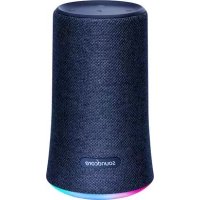
Anker Flare - Speaker soundcore - Free user manual and instructions
Find the device manual for free Anker Flare soundcore in PDF.



| Product type | Portable Bluetooth speaker |
| Brand | Soundcore (Anker) |
| Model | Anker Flare |
| Dimensions | 89 x 89 x 151 mm |
| Weight | 530 g |
| Battery capacity | 4400 mAh |
| Charging time | 3.5 hours |
| Playback time | Up to 12 hours (depending on volume and content) |
| Power input | 5 V ⎓ 2 A (micro USB) |
| Audio output | 6 W × 2 (stereo) |
| Bluetooth version | V4.2 + EDR |
| Bluetooth range | Up to 20 m |
| Main functions | Play/pause, volume control, Bass Up, light effects, True Wireless Stereo (pairing two speakers), hands-free kit, Siri activation |
| Auxiliary input | 3.5 mm jack socket |
| Water resistance | Immersion up to 1 m for 30 minutes |
| Maintenance and cleaning | Do not use corrosive cleaners or oil. Wipe with a soft, dry cloth. |
| Safety | Do not drop, do not disassemble, avoid extreme temperatures, do not use outdoors during thunderstorms, use original or certified cables |
| Spare parts and repairability | Not user-repairable. Contact Soundcore customer service for any issues. |
| Associated app | Soundcore App (light effects, firmware update, wave visualizer, stereo and Boost mode, rename) |
Frequently Asked Questions - Anker Flare soundcore
User questions about Anker Flare soundcore
0 question about this device. Answer the ones you know or ask your own.
Ask a new question about this device
Download the instructions for your Speaker in PDF format for free! Find your manual Anker Flare - soundcore and take your electronic device back in hand. On this page are published all the documents necessary for the use of your device. Anker Flare by soundcore.
USER MANUAL Anker Flare soundcore
EN Safety Instructions
- Avoid dropping.
- Do not disassemble.
- Soundcore Flare can be immersed in water up to 1m for up to 30 minutes.
- Avoid extreme temperatures.
- Do not use the device outdoors during thunderstorms.
- Use original or certified cables.
- Do not use any corrosive cleaner/oil to clean.
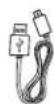
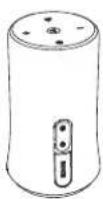
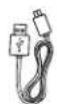
What's Included
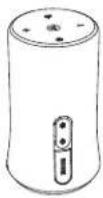
At a Glance
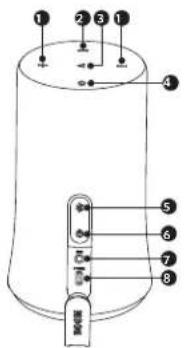
① Volume Buttons for Volume Control
2 Bass Up Button
3 Multi-function Button
4 Light Effects Button
5 Bluetooth Button
6 Power Button
7 3.5mm Audio Input Port
8 micro USB Port
EN Using Your Soundcore Flare
- Turn on / off
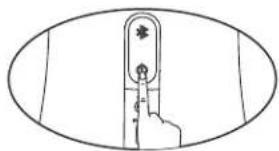
natural_image
Line drawing of a hand pressing a button on a vertical screen (no text or symbols)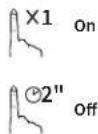
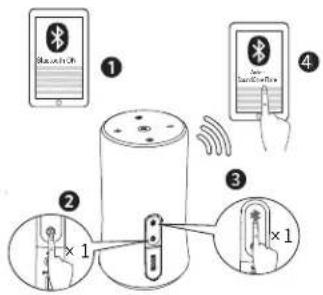
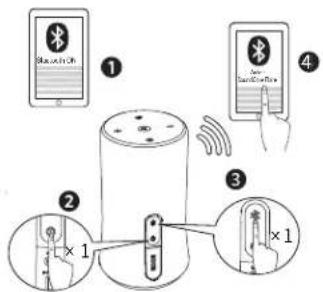
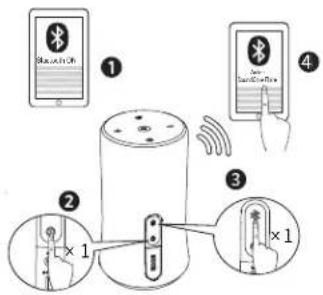
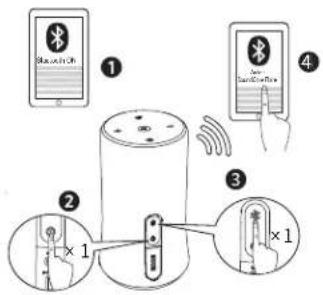
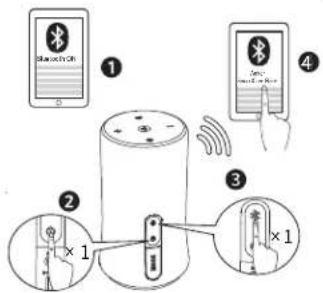
a. Bluetooth mode
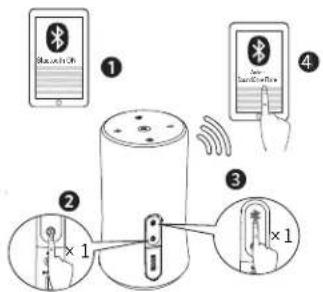
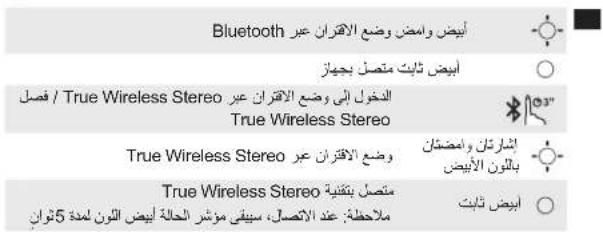
| Flashing White Bluetooth Pairing Mode | |
| Solid White Connected to a device | |
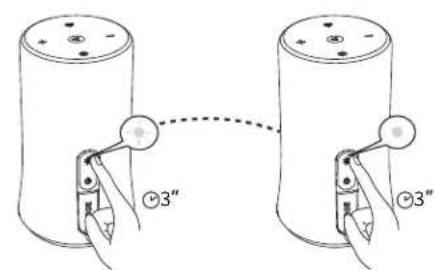
| Enter True Wireless Stereo Pairing Mode / Disconnect True Wireless Stereo | |
| Double Flashing White True Wireless Stereo Pairing Mode | |
| Solid White | Connected to True Wireless Stereo Note: Once connected, the status Indicator will stay white for 5 seconds. |
EN

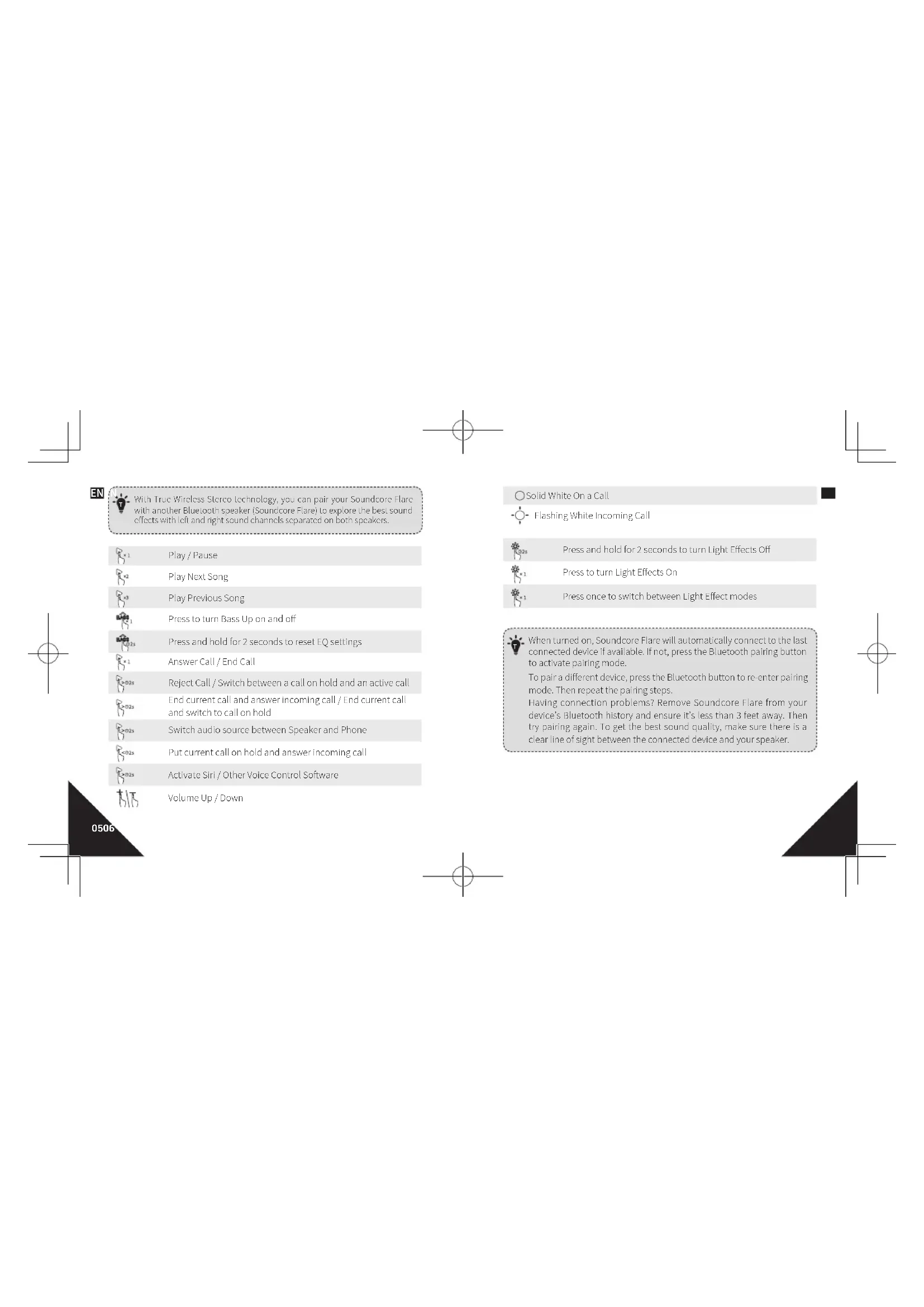
With True Wireless Stereo technology, you can pair your Soundcore Flare with another Bluetooth speaker (Soundcore Flare) to explore the best sound effects with left and right sound channels separated on both speakers.

Play / Pause

Play Next Song

Play Previous Song

Press to turn Bass Up on and off

Press and hold for 2 seconds to reset EQ settings

Answer Call / End Call

Reject Call / Switch between a call on hold and an active call

End current call and answer incoming call / End current call and switch to call on hold

Switch audio source between Speaker and Phone

Put current call on hold and answer incoming call

Activate Siri / Other Voice Control Software

Volume Up / Down
Solid White On a Call

Flashing White Incoming Call

Press and hold for 2 seconds to turn Light Effects Off

Press to turn Light Effects On

Press once to switch between Light Effect modes

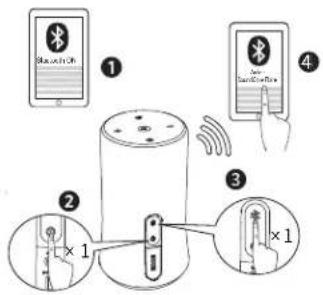
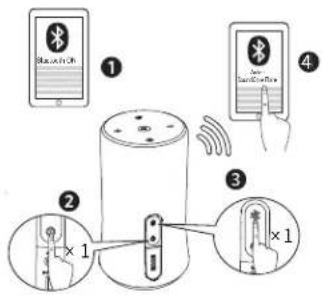
When turned on, Soundcore Flare will automatically connect to the last connected device if available. If not, press the Bluetooth pairing button to activate pairing mode.
To pair a different device, press the Bluetooth button to re-enter pairing mode. Then repeat the pairing steps.
Having connection problems? Remove Soundcore Flare from your device's Bluetooth history and ensure it's less than 3 feet away. Then try pairing again. To get the best sound quality, make sure there is a clear line of sight between the connected device and your speaker.
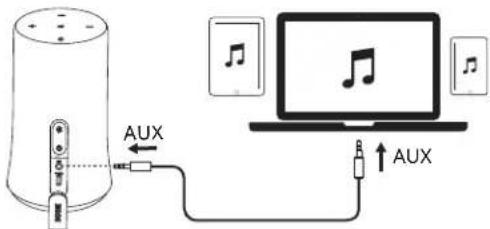
EN b. AUX-In mode
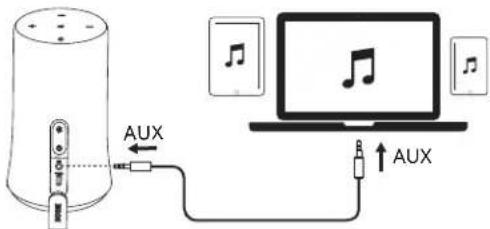
* SoundLine AUX cable sold separately.

Plugging in an audio cable will automatically switch to AUX mode. When using AUX mode, control audio playback via the connected device.
Charging your Soundcore Flare
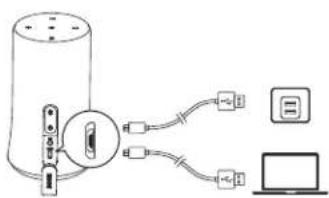

Slow Flashing Red Low Battery

olid Red Charging

Fully Charged

Use the Included USB cable to charge your Soundcore Flare and make sure it is fully charged before its first use.
Disconnect your speaker from the charger when fully charged. Do not charge your speaker for extended periods.
When not in use, store your speaker in a cool place.
EN Specifications

Specifications are subject to change without notice.
Input: 5V=2A
Audio output: 6 W x 2
Battery capacity: 4400 mAh
Charging time: 3.5 hours
Play time (varies by volume level and music content): 12 hours
Size: 89 x 89 x 151 mm / 3.5 x 3.5 x 5.95 in
Weight (without packaging): 530 g / 18.7 oz
Bluetooth version: V4.2 - EDR
Range: 20 m / 66 ft
Soundcore App
- Light effect
- Update firmware
- Wave Equalizer
- Stereo or Boost mode
- Rename
- More


Download on the App Store

GETITON Google Play
0910
natural_image
Line drawing of a hand pressing a button on a vertical screen (no text or symbols)
a. Bluetooth-Modus
Download on the App Store

GETITON Google Play
natural_image
Line drawing of a hand pressing a button on a vertical screen (no text or symbols)
a. Mode Bluetooth

natural_image
Abstract geometric diagram with a black triangle and intersecting lines (no text or symbols)
b. Mode AUX-In

Download on the App Store

GETITON Google Play
natural_image
Line drawing of a hand pressing a finger on a vertical button (no text or symbols)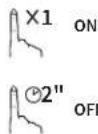

Download on the App Store

GETITON Google Play
3940
natural_image
Line drawing of a hand pressing a button on a vertical screen (no text or symbols)
ENCENDIDO

APAGADO
a. Modo Bluetooth

Download on the App Store

GETITON Google Play

Download on the App Store

GETITON Google Play
5960
JP 安全にご使用いただくために
パッケージ内容

Download on the App Store

GETITON Google Play
CN 安全须知
natural_image
Line drawing of a hand pressing a button on a vertical screen (no text or symbols)

a. 蓝牙模式

白色闪烁 蓝牙配对模式
○ 白色常亮 连接到设备

True Wireless Stereo


红色慢速闪烁 低电量

红色常亮 正在充电
熄灭
已充满

Download on the App Store

GETITON Google Play
7980
KO 안전 가이드
natural_image
Line drawing of a hand pressing a button on a vertical object, enclosed in an oval frame (no text or symbols)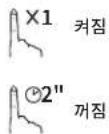
a. Bluetooth 모드
- Light effect
- Update firmware
- Wave Equalizer
- Stereo or Boost mode
- Rename
- More


Download on the App Store

GETITON Google Play
8990
natural_image
Line drawing of a hand pressing down on a vertical finger (no text or symbols)
ВКЛ.

ВЫКЛ.
a. Режим Bluetooth


Download on the App Store

GETITON Google Play
AR
إرشادات السلامة
natural_image
Geometric diagram showing a black triangle with intersecting lines and a small rectangle, no text or symbols present.AR
natural_image
Line drawing of a hand pressing a button on a finger, enclosed in an oval frame (no text or symbols)×1 شغيل
2" إيقاف تشفيل
Bluetooth ∫ ∪ ∪ ∪ ∪
Download on the App Store

GETITON Google Play
109110
Declaration of Conformity
Hereby, Anker Innovations Limited declares that the radio equipment type A3161 is in compliance with Directive 2014/53/EU. The full text of the EU declaration of conformity is available at the following internet address: https://www.anker.com/products
Maximum output power: 4.0dBm
Frequency band: 2.4G band (2.4000GHz-2.4835GHz)
Anker Innovations Limited
Room 1318-19, Hollywood Plaza, 610 Nathan Road, Mongkok, Kowloon, Hongkong
Customer Service
Kundenservice | Service Client | Servizio ai Clienti | Atención al Cliente Serviço de Apoio ao Cliente | カスタマーサポート | 客服支持 고객 서비스 | Обслуживание клиентов | خنسبة العenders

18-month limited warranty
18 Monate beschränkte Herstellergarantie | Garantie limitée de 18 mois Garantia limitata 18 mes! | Garantia limitada de 18 meses 18 meses de garantia limitada | 18ヶ月保証 | 18个月质保期 18개별의 제한 보송이 적용됩니다 Ограниченная гарантия на 18 месяцев | ض管委会 18储蓄ة محودة

Lifetime technical support
Lebenslanger technischer Support | Support technique à vie Supporto técnico a vita | Asistencia técnica de por vida Suporte técnico ao longo da vida útil do produto. テクニカルサポート | 终身客服支持 | 기술 지원이 평생 제공됩니다 Техническая поддержка на весь срок эксплуатации ال refugees المي TRI الجهاة

support@anker.com

-1 (600) 988.79/2 (US) Mon-Fri 9:00 - 17:00 (PT) -44 (0) 1604 936200 (UK) Mon-Fri 6:00 - 11:00 (GMT) -49 (0) 69 9579 7960 (DE) Mon-Fri 6:00 - 11:00 -81 03 4455 7823 (日本) 月 金 9:00 - 17:00 -88 400 0550 036 (中国) 周一至周(0)-17:30 (82-2-6-6-7088) 阿国: 安·국 9:00-17:30
For FAQs and more information, please visit:

anker.com/support

f @Anker Official @Anker Japan @Anker Deutschland
@AnkerOfficial @Anker_JP
G+ @Anker

- EN Safety Instructions
- What's Included
- At a Glance
- EN Using Your Soundcore Flare
- EN
- Solid White On a Call
- EN Specifications
- Soundcore App
- JP 安全にご使用いただくために
- パッケージ内容
- CN 安全须知
- 熄灭
- KO 안전 가이드
- a. Bluetooth 모드
- إرشادات السلامة
- Declaration of Conformity
- Customer Service
- 18-month limited warranty
- Lifetime technical support
- support@anker.com
Brand : soundcore
Model : Anker Flare
Category : Speaker