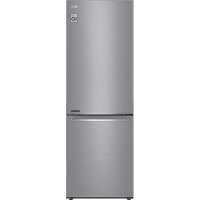
GBB71PZEFN - Fridge LG - Free user manual and instructions
Find the device manual for free GBB71PZEFN LG in PDF.


User questions about GBB71PZEFN LG
0 question about this device. Answer the ones you know or ask your own.
Ask a new question about this device
Download the instructions for your Fridge in PDF format for free! Find your manual GBB71PZEFN - LG and take your electronic device back in hand. On this page are published all the documents necessary for the use of your device. GBB71PZEFN by LG.
USER MANUAL GBB71PZEFN LG
Read this owner's manual thoroughly before operating the appliance and keep it handy for reference at all times.
EN ENGLISH ES ESPAÑOL IT ITALIANO PL POLSKI SR SRPSKI
| BG | БЪЛГАРСКИ | ET | EESTI | LT | LIETUVIŲ | PT | PORTUGUĖS | SV | SVENSKA |
| CZ | ČEŠTINA | FI | SUOMI | LV | LATVIEŠU | RO | ROMĂNĂ | ||
| DA | DANSK | FR | FRANÇAIS | MK | MAKEDОНСКИ | SK | SLOVENČINA | ||
| DE | DEUTSCH | HR | HRVATSKI | NL | NEDERLANDS | SL | SLOVENŠČINA | ||
| EL | ЕЛАННИКА | HU | MAGYAR | NO | NORSK | SQ | SHQIP |
text_image
Black and white barcode image with vertical lines and a small number '1' at the bottom right.MFL70584303
Rev.06_201210
www.lg.com
TABLE OF CONTENTS
This manual may contain images or content different from the model you purchased.
This manual is subject to revision by the manufacturer.
SAFETY INSTRUCTIONS ....3
IMPORTANT SAFETY INSTRUCTIONS ....3
Disposal of Your Old Appliance ....10
INSTALLATION ....11
Dimensions and Clearances 11
Ambient Temperature 11
Accessories....12
Reversing Doors 12
Leveling the Appliance 12
Connecting the Appliance ....12
Moving the Appliance 12
OPERATION ....13
Parts and Functions ......13
Notes for Operation ....15
Control Panel....17
Water Dispenser (*) 19
Water Dispenser Tank ....19
Ice Tray 20
Fresh Converter (*) 20
Fresh Vegetable Drawer (*) 21
Folding Shelf....21
Other Functions ......22
SMART FUNCTIONS ......23
LG ThinQ Application 23
Using Smart Diagnosis ^TM 25
MAINTENANCE ....26
Notes for Cleaning 26
Cleaning the Door Basket 26
Cleaning the Shelf 27
Cleaning the Vegetable Drawer 27
Cleaning the Crisper Cover ....27
Cleaning the Freezer Drawer 28
Cleaning the Water Dispenser 28
TROUBLESHOOTING....29
The following safety guidelines are intended to prevent unforeseen risks or damage from unsafe or incorrect operation of the appliance.
The guidelines are separated into ‘WARNING’ and ‘CAUTION’ as described below.

This symbol is displayed to indicate matters and operations that can cause risk. Read the part with this symbol carefully and follow the instructions in order to avoid risk.

WARNING
This indicates that the failure to follow the instructions can cause serious injury or death.

CAUTION
This indicates that the failure to follow the instructions can cause the minor injury or damage to the product.
IMPORTANT SAFETY INSTRUCTIONS

WARNING
To reduce the risk of explosion, fire, death, electric shock, injury or scalding to persons when using this product, follow basic precautions, including the following:
Children in the Household
- This appliance is not intended for use by persons (including children) with reduced physical, sensory or mental capabilities, or lack of experience and knowledge, unless they have been given supervision or instruction concerning use of the appliance by a person responsible for their safety. Children should be supervised to ensure that they do not play with the appliance.
- If the appliance is equipped with a lock (some models only), keep the key out of reach of children.
For use in Europe:
This appliance can be used by children aged from 8 years and above and persons with reduced physical, sensory or mental capabilities or lack of experience and knowledge if they have been given supervision or instruction concerning use of the appliance in a safe way and understand the hazards involved. Children shall not play with the appliance. Cleaning and user maintenance shall not be made by children without supervision.
Installation
- This appliance should only be transported by two or more people holding the appliance securely.
- Ensure that the socket outlet is properly grounded, and that the earth pin on the power cord is not damaged or removed from the power plug. For more details on grounding, inquire at an LG Electronics customer information centre.
- This appliance is equipped with a power cord having an equipment-grounding conductor and a grounding power plug. The power plug must be plugged into an appropriate socket outlet that is installed and grounded in accordance with all local codes and ordinances.
- If the power cord is damaged or the hole of the socket outlet is loose, do not use the power cord and contact an authorized service centre.
- Do not plug the appliance into a multi socket adapter which does not have a power cable (mounted).
- Do not modify or extend the power cable.
-
The appliance should be connected to a dedicated power line which is separately fused.
-
Do not use a multi socket outlet which is not properly grounded (portable). In case of using a properly-grounded multi socket outlet (portable), use the multi socket outlet with the current capacity of the power code rating or higher and use the multi socket outlet only for the appliance.
- Install the appliance in a place where is easy to unplug the power plug of the appliance.
- Be careful not to point the power plug up or let the appliance lean against the power plug.
•Install the appliance on a firm and level floor. - Do not install the appliance in a damp and dusty place. Do not install or store the appliance in any outdoor area, or any area that is subject to weathering conditions such as direct sunlight, wind, rain, or temperatures below freezing.
- Do not place the appliance in direct sunlight or expose it to the heat from heating appliances such as stoves or heaters.
- Be careful not to expose the rear of the appliance when installing.
- Be careful not to let the appliance door fall during assembly or disassembly.
- Be careful not to pinch, crush, or damage the power cable during assembly or disassembly of the appliance door.
- Do not connect a plug adapter or other accessories to the power plug.
Operation
- Do not use the appliance for any purpose (storage of medical or experimental materials or shipping) other than any domestic household food storage use.
- Unplug the power plug during a severe thunderstorm or lightening or when not in use for a long period of time.
- Do not touch the power plug or the appliance controls with wet hands.
-
Do not bend the power cable excessively or place a heavy object on it.
-
If water penetrates electrical parts of the appliance, disconnect power plug and contact an LG Electronics customer information centre.
- Do not place hands or metallic objects inside the area emitting the cold air, cover or heat releasing grille on the back.
- Do not apply excessive force or impact to the back cover of the appliance.
- Do not put animals, such as pets into the appliance.
- Be careful of nearby children when you open or close the appliance door. The door may bump the child and cause injury.
- Avoid the danger of children getting trapped inside the appliance. A child trapped inside the appliance can cause suffocation.
- Do not place heavy or fragile objects, containers filled with liquid, combustible substances, flammable objects (such candles, lamps, etc.), or heating devices (such as stoves, heaters, etc.) on the appliance.
-
If there is a gas leakage (isobutane, propane, natural gas, etc.), do not touch the appliance or power plug and ventilate the area immediately. This appliance uses a refrigerant gas (isobutane,R600a). Although it uses a small amount of the gas, it is still combustible gas. Gas leakage during appliance transport, installation or operation can cause fire, explosion or injury if sparks are caused.
-
Do not use or store flammable or combustible substances (ether, benzene, alcohol, chemical, LPG, combustible spray, insecticide, air freshener, cosmetics, etc.) near the appliance.
- Immediately unplug the power plug and contact an LG Electronics customer information centre if you detect a strange sound, odour, or smoke coming from the appliance.
- Fill with potable water only into icemaker or dispenser water tank.
- Do not damage the refrigerant circuit.
- Do not place any electronic appliance (such as heater and mobile phone) inside the appliance.
Maintenance
- Disconnect the power cord before cleaning the appliance or replacing the inside lamp (where fitted).
- Securely plug the power plug in the socket outlet after completely removing any moisture and dust.
- Never unplug the appliance by pulling on the power cable. Always grip the power plug firmly and pull straight out from the socket outlet.
- Do not spray water or inflammable substances (toothpaste, alcohol, thinner, benzene, flammable liquid, abrasive, etc.) over the interior or exterior of the appliance to clean it.
- Do not clean the appliance with brushes, cloths or sponges with rough surfaces or which are made of metallic material.
- Only qualified service personnel from LG Electronics service centre should disassemble, repair, or modify the appliance. Contact an LG Electronics customer information centre if you move and install the appliance in a different location.
- Do not use a hair drier to dry the inside of the appliance or place a candle inside to remove the odours.
- Do not use mechanical devices or other means to accelerate the defrosting process.
Disposal
- When discarding the appliance, remove the door gasket while leaving the shelves and baskets in place and keep children away from the appliance.
- Dispose of all packaging materials (such as plastic bags and styrofoam) away from children. The packaging materials can cause suffocation.
Technical Safety
- Keep ventilation openings, in the appliance enclosure or in the built-in structure, clear of obstruction.
- Do not use electrical appliances inside the refrigerator.
- The refrigerant and insulation blowing gas used in the appliance require special disposal procedures. Consult with service agent or a similarly qualified person before disposing of them.
- Refrigerant leaking out of the pipes could ignite or cause an explosion.
- The amount of refrigerant in your particular appliance is shown on the identification plate inside the appliance.
- Never start up an appliance showing any signs of damage. If in doubt, consult your dealer.
- This appliance is intended to be used in household and similar applications only. It should not be used for commercial, or catering purposes, or in any mobile application such as a caravan or boat.
- Do not store explosive substances such as aerosol cans with a flammable propellant in this appliance.
- Children aged from 3 to 8 years are allowed to load and unload refrigerating appliances.
- This refrigerating appliance is not intended to be used as a built-in appliance.
Risk of Fire and Flammable Materials
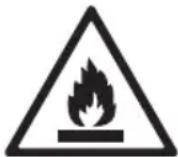
This symbol alerts you to flammable materials that can ignite and cause a fire if you do not take care.
- This appliance contains a small amount of isobutane refrigerant (R600a), but it is also combustible. When transporting and installing the appliance, care should be taken to ensure that no parts of the refrigerating circuit are damaged.
- If a leak is detected, avoid any naked flames or potential sources of ignition and air the room in which the appliance is standing for several minutes. In order to avoid the creation of a flammable gas air mixture if a leak in the refrigerating circuit occurs, the size of the room in which the appliance is used should correspond to the amount of refrigerant used. The room must be 1 m² in size for every 8 g of R600a refrigerant inside the appliance.
- When positioning the appliance, ensure the supply cord is not trapped or damaged.
- Do not locate multiple portable socket-outlets or portable power supplies at the rear of the appliance.

CAUTION
To reduce the risk of minor injury to persons, malfunction, or damage to the product or property when using this product, follow basic precautions, including the following:
Installation
- Do not tilt the appliance to pull or push it when transporting.
- Make sure not to get a body part such as a hand or foot stuck while moving the appliance.
Operation
- Do not touch frozen food or the metal parts in the freezer compartment with wet or damp hands. It may cause frostbite.
- Do not place glass containers, bottles or cans (especially those containing carbonated drinks) in the freezer compartment, shelves or ice bin that will be exposed to temperatures below freezing.
- The tempered glass on the front side of the appliance door or the shelves can be damaged by an impact. If it is broken, do not touch it with hands.
-
Do not hang from the appliance doors, storage room, shelf or climb up into it.
-
Do not store an excessive amount of water bottles or containers for side dishes on the door baskets.
- Prevent animals from nibbling on the power cable or water hose.
- Do not open or close the appliance door with excessive force.
- If the hinge of the appliance door is damaged or operates improperly, stop using the appliance and contact an authorized service centre.
- Do not clean glass shelves or covers with warm water when they are cold.
- Never eat frozen foods immediately after they have been taken out in the freezer compartment.
- Make sure not to get a hand or foot stuck upon opening or closing the appliance door.
Maintenance
- Do not insert the shelves upside down. The shelves may fall.
- To remove frost from the appliance, contact an LG Electronics customer information centre.
Disposal of Your Old Appliance
- This crossed-out wheeled bin symbol indicates that waste electrical and electronic products (WEEE) should be disposed of separately from the municipal waste stream.
- Old electrical products can contain hazardous substances so correct disposal of your old appliance will help prevent potential negative consequences for the environment and human health. Your old appliance may contain reusable parts that could be used to repair other products, and other valuable materials that can be recycled to conserve limited resources.
- You can take your appliance either to the shop where you purchased the product, or contact your local government waste office for details of your nearest authorised WEEE collection point. For the most up to date information for your country please see www.lg.com/global/recycling.
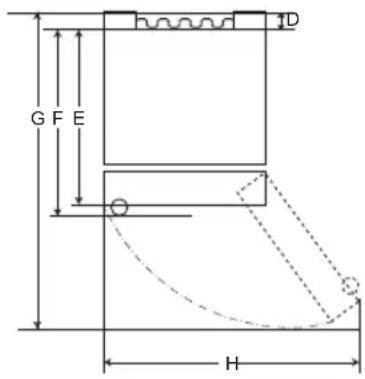
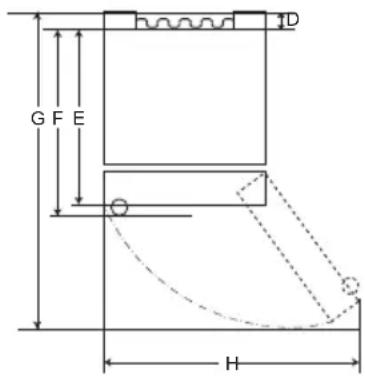
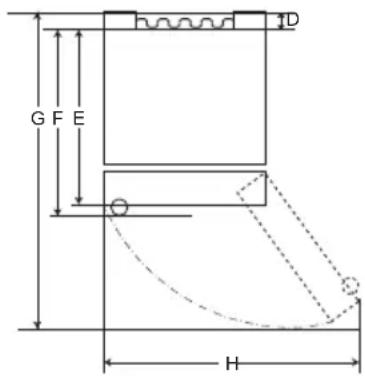
Dimensions and Clearances
Too small of a distance from adjacent items may result in the degradation of freezing capability and increased electricity costs. Allow over 50 mm of clearance from each adjacent wall when installing the appliance.
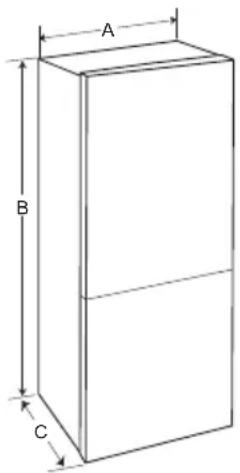
text_image
A B C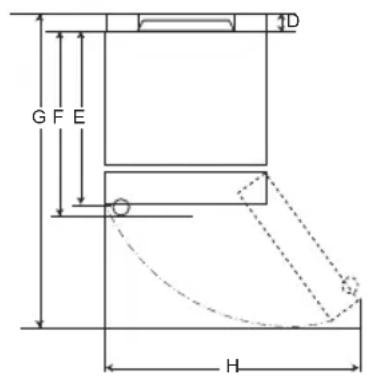
text_image
G F E D HType A
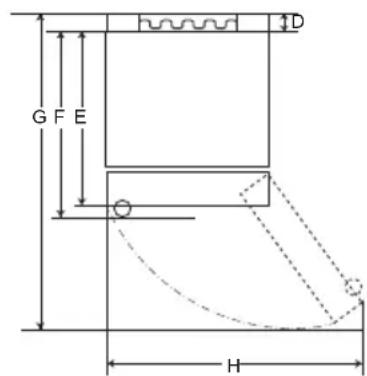
text_image
G F E D HType B
| Type A Type B | ||||||||
| Pocket Handle Bar | Handle Pocket Handle | Bar Handle | ||||||
| Size [mm] | ||||||||
| A | 595 595 5 | 95 595 595 | 595 595 595 | |||||
| B | 1860 | 2030 | 1860 | 2030 | 1860 | 2030 | 1860 | 2030 |
| C | 675 675 7 | 12 712 682 | 682 718 718 | |||||
| D | 9 | 9 | 9 | 9 | 15 | 15 | 15 | 15 |
| E | 667 667 6 | 67 667 667 | 667 667 667 | |||||
| F | - | - | 703 | 703 | - | - | 703 | 703 |
| G | 1124 | 1124 | 1124 | 1124 | 1130 | 1130 | 1130 | 1130 |
| H | 995 995 9 | 95 995 995 | 995 995 995 | |||||
Ambient Temperature
- The appliance is designed to operate within a limited range of ambient temperatures, depending on the climate zone.
- The internal temperature could be affected by the location of the appliance, the ambient temperature, the frequency of door opening and so on.
- The climate class can be found on the rating label.
| Climate Class | Ambient Temperature Range °C |
| SN (Extended Temperate) | +10 - +32 |
| N (Temperate) | +16 - +32 |
| ST (Subtropical) | +16 - +38 |
| T (Tropical) | +16 - +43 / +10 - +43* |
*Australia, India, Kenya
NOTE
The appliances rated from SN to T are intended to be used at an ambient temperature between 10 °C and 43 °C.
Accessories
1
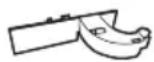
2

3

1 Hinge cover
② Lower hinge
3 Sticker
Reversing Doors
Your appliance is designed with reversible doors, do that they may open from either the left of right hand side to suit your kitchen design.
NOTE
- Reversing the doors must be performed by the qualified personnel of LG Electronics. If not, the doors will not be covered by the warranty.
Leveling the Appliance
To avoid vibration, the unit must be leveled.
If required, adjust the leveling screws to compensate for the uneven floor.
The front should be slightly higher than the rear to aid in door closing.
Leveling screws can be turned easily by tipping the cabinet slightly.
Turn the leveling screws counterclockwise to raise the unit, clockwise to lower it.

Connecting the Appliance
After installing the appliance, connect the power plug into a socket outlet.
NOTE
- After connecting the power supply cord (or plug) to the outlet, wait 2 or 3 hours before you put food into the appliance. If you add food before the appliance has cooled completely, your food may spoil.
Moving the Appliance
1 Remove all food from inside the appliance.
2 Pull the power plug out, insert and fix it into the power plug hook at the rear or on top of the appliance.
3 Tape parts such as shelves and the door handle to prevent from falling off while moving the appliance.
4 Move the appliance with more than two people carefully. When transporting the appliance over a long distance, keep the appliance upright.
5 After installing the appliance, connect the power plug into a socket out to switch on the appliance.
Parts and Functions
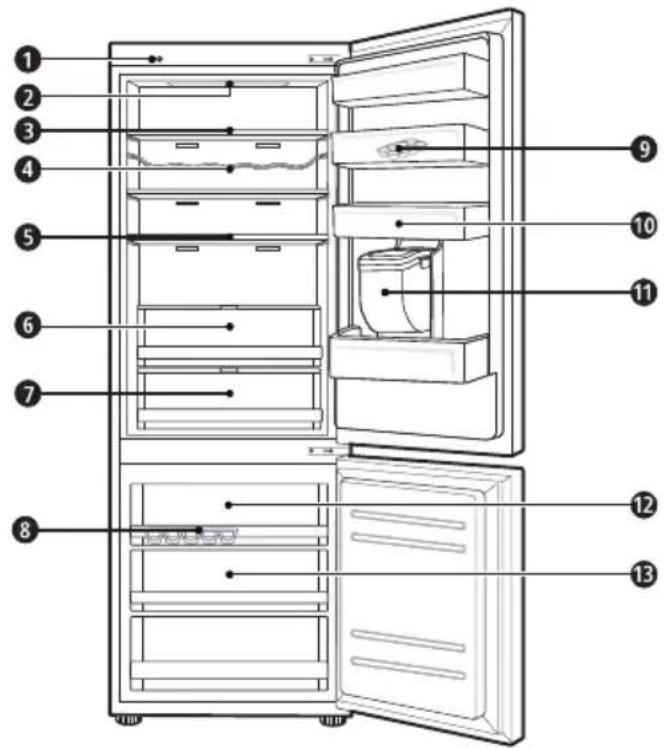
text_image
Labeled diagram of a refrigerator interior showing numbered compartments and doors① Smart Diagnosis Unit (\*)
This function is used when contacting LG Electronics customer information centre to help make an accurate diagnosis when the appliance operates abnormally or a failure occurs.
② LED Lamp
The LED lamps inside the appliance light up when you open the door.
③ Fridge Shelf
This is where refrigerated foods and other items are stored.
- The shelf height can be adjusted by inserting the shelf in another groove of different height.
- Store the foods with higher moisture content at the front of the shelf.
- The actual number of shelves will differ from model to model.
④ Bottle Rack (\*)
This is where drinks tall bottles or containers are stored.
⑤ Folding Shelf (\*)
This is where refrigerated foods and high items are stored.
⑥ Fresh Vegetable Drawer (\*)
This is where fruits and vegetables are stored to help maintain freshness by adjusting the humidity controller.
- The appearance or components of the appliance may differ from model to model.
⑦ Fresh Converter (\*)
As a chill compartment, this is where meat, fish and vegetables are stored. Help maintain freshness by adjusting the humidity controller located in the back of the fridge compartment.
- For more space, you can use chill area without chill compartment drawer.
8 Ice Tray
This is where ice is produced and stored.
- For more space, you can remove the ice tray or ice cubes bucket.
9 Movable Egg Tray
This is where eggs are stored.
- You can move it to and use it at a desired position as needed. However, do not use it as the ice bin or place it on the shelf on top of the fridge or the vegetables drawer.
10 Fridge Door Basket
This is where small packages of refrigerated foods, drinks and sauce containers are stored.
⑪ Water Dispenser Tank (\*)
This is where water to supply the dispenser or the automatic icemaker is stored. It requires manual filling. (Non plumbed models only)
⑫ Top drawer
To freeze food items quickly, store the food in the top drawer. Food items will freeze most quickly in the drawer.
13 Freezer Drawer
This is for long-term storage of frozen items.
CAUTION
- Do not store short bottles or containers on the bottle rack. The items may fall and cause an injury or appliance damage.
NOTE
• (*): This feature varies depending on the model purchased.
Notes for Operation
- Users should keep in mind that frost can form. If the door is not closed completely, if the humidity is high during the summer, or if the freezer door is opened frequently.
- Ensure there is sufficient space between food stored on the shelf or door basket to allow the door to close completely.
- Opening the door for long periods can cause a significant increase of the temperature in the compartments of the appliance.
- If the refrigerating appliance is left empty for long periods, switch off, defrost, clean, dry, and leave the door open to prevent mould developing within the appliance.
Suggestion for Energy Saving
- Ensure there is sufficient space between stored foods. This allows cold air to be circulated evenly and lowers electricity bills.
- Store hot food only after it has cooled in order to prevent dew or frost.
- When storing food in the freezer compartment, set the freezer temperature lower than the temperature indicated on the food.
- Do not put food near the temperature sensor of the fridge compartment. Keep a distance of at least 3 cm from the sensor.
- Note that a temperature rise after defrosting has a permissible range in the appliance specifications. If you wish to minimise the impact this may have on the food storage due to a temperature rise, seal or wrap the stored food in several layers.
- The automatic defrosting system in the appliance ensures that the compartment remains free of ice buildup under normal operating conditions.
- For the most efficient use of energy, make sure that door bins, drawers and shelves are assembled properly.
Storing Foods Effectively
- Store frozen food or refrigerated food inside sealed containers.
- Check the expiration date and label (storage instructions) before storing food in the appliance.
- Do not store food for a long period of time (more than four weeks) if it spoils easily at a low temperature.
- Place the refrigerated food or frozen food in each fridge or freezer compartment immediately after purchasing.
- Place the refrigerated food or frozen food in each fridge or freezer compartment immediately after purchasing.
- Avoid refreezing any food which has been completely thawed. Freezing any food which has been completely thawed again will lower its taste and nutrition.
- Do not wrap and store vegetables with newspaper. Printing material of newspaper or other foreign substances may smear and contaminate food.
- Do not overfill the appliance. Cold air can not circulate properly if the appliance is overfilled.
- If you set an excessively low temperature for food, it may become frozen. Do not set a temperature lower than the required temperature for the food to be stored correctly.
- For more space, you can remove bottle rack, egg tray, ice tray and fresh converter drawer.
- Store raw meat and and fish in suitable containers in the refrigerator, so that it is not in contact with or drip onto other food.
Max Freezing Capacity
- The Express Freeze function will set the freezer to its maximum freezing capacity. This generally takes up to 24 hours and automatically switches off.
- Express freeze must be switched on for 7 hours before fresh products are placed in the freezer compartment.
Maximum Storage
- To get better air circulation, insert all drawers.
- If large quantities of food are to be stored, all the freezer drawers shall be taken out of the appliance and the food shall be stacked directly on the freezer shelves in the freezer compartment.
NOTE
- To remove the drawers, first pick the food out of drawers. Then use the handle of drawers, pull out the drawers carefully. It may cause injury.
- The shape of each drawer may be different, insert in the right position.
Control Panel
Units and Functions
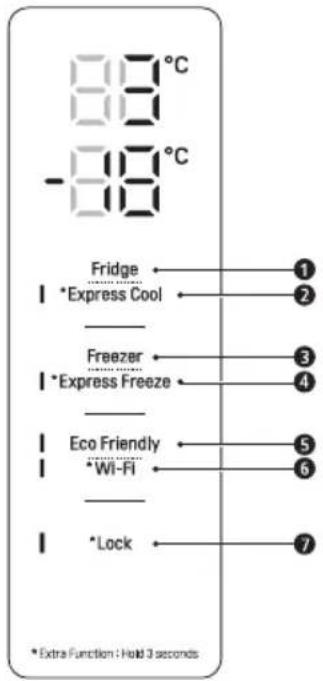
text_image
88°C -88°C Fridge I *Express Cool Freezer I *Express Freeze Eco Friendly I *Wi-Fi Lock ① ② ③ ④ ⑤ ⑥ ⑦ * Extra Function 1 Hold 3 seconds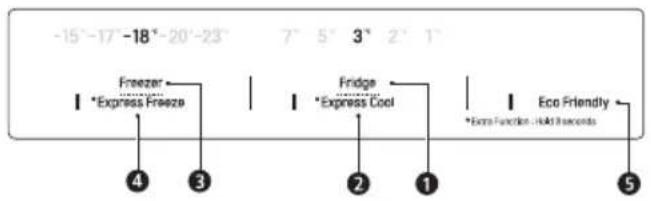
text_image
-15°-17' -18°-20'-23" Freezer Express Freeze 4 3 Fridge Express Cool 2 1 Eco Friendly *Extra Function - Hold Incarons 5① Fridge Temperature
• This sets the fridge target temperature.
② \* Express Cool
• This sets the Express Cool Functions.
3 Freezer Temperature
• This sets the freezer target temperature.
4 \* Express Freeze
• This sets the Express Freeze Functions.
5 Eco Friendly
- This controls the Power Save mode for lowering energy consumption.
6 \* Wi-Fi
- This sets the refrigerator to connect to your home's Wi-Fi network.
⑦ \*Lock
- This locks the buttons on the control panel.
NOTE
- The actual control panel may differ from model to model.
- The control panel will turn off automatically for energy saving.
- If there is any finger or skin contacts to the control panel while cleaning it, the button function may operate.
Setting the Temperature
This sets the fridge temperature or freezer temperature.
- Press the Fridge button or Freezer button to adjust the temperature.
• The temperature can be adjusted.
- Fridge : from 1 °C to 7 °C
– Freezer : from -15 °C to -23 °C
• The initial temperature is set.
- Fridge : 3 °C
- Freezer : -18 °C
The actual inner temperature varies depending on the food status, as the indicated setting temperature is a target temperature, not actual temperature within the appliance.
NOTE
- The default temperature setting may vary depending on the appliance.
- Wait until 2 or 3 hours have passed after connecting the appliance to the outlet before storing food in the appliance.
- For ice making in normal climates, the freezer temperatures should be set to -18^ or colder.
Setting Express Freeze
The function can quickly freeze a large amount of ice or frozen foods.
- When you press and hold the Express Freeze button for three seconds, the Express Freeze icon lights on the control panel.
- The function is enabled and disabled in turn each time you press the button.
- The Express Freeze function automatically terminates after a specific period has passed.
NOTE
- When Express Freeze is switched on, noise may occur and energy consumption may increase.
Setting Express Cool
The function can quickly cool a large amount of foods such as vegetable, fruit and so on.
- When you press and hold the Express Cool button for three seconds, the Express Cool icon lights on the control panel.
- The function is enabled and disabled in turn each time you press the button.
- The Express Cool function automatically terminates after a specific period has passed.
NOTE
- When Express Cool is switched on, noise may occur and energy consumption may increase.
Setting Eco Friendly
- The function makes the fridge-freezer work in the power saving mode which is useful when you are away on a holiday as it reduces energy consumption.
- Pressing the Eco Friendly button starts the operation with the lamp on, and pressing it again stops the operation.
- When the Eco Friendly mode is on, the other buttons will not operate. When you finish using the Eco Friendly mode, turn it off so that other buttons work and the refrigerator returns to its previous temperature setting.
Setting and Resetting Lock
This locks the buttons on the control panel.
- Press and hold the Lock button for three seconds. When the Lock function is set, all buttons are locked.
NOTE
- You must deactivate Lock function before you can access any other functions.
High Temperature Alarm
When the freezer temperature goes too high due to power failure, the freezer temperature LED lamp blinks and an alarm sounds.
- Press the Freezer button to stop.
-
If the temperature is sufficiently cold, the blinking and alarm will automatically stop.
• This function operates: -
When the refrigerator is turned on.
- When the freezer compartment gets too warm.
- When there is a power outage that lasts for a long period of time.
- When large amounts of warm food are placed in the freezer compartment.
- When the freezer door is left open for too long or too frequently.
Water Dispenser (\*)
Press the lever 1 of the water dispenser to get cold water.
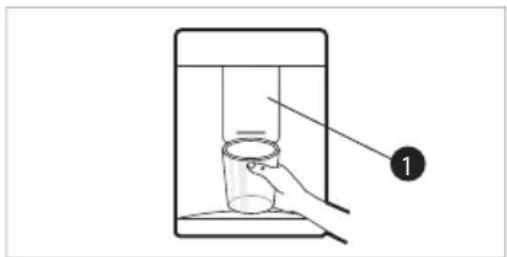
text_image
Diagram showing a hand holding a cup inside a container with liquid, labeled with number 1CAUTION
- Keep children away from the dispenser to prevent children playing with or damaging the controls.
- To clean the water dispensing system, flush the water through the dispenser about 5 minutes and throw away the first few batches of ice.
- Clean regularly surfaces that can come in contact with food and accessible drainage systems.
NOTE
• (*): This feature varies depending on the model purchased.
- If you open the freezer door while water is being dispensed, the water supply will stop.
- If you open the fridge door while water is being dispensed, dispensing will paused.
- If the cup rim is small, water may splash out of the glass or miss it completely.
- Use a cup with a rim of over 68 mm in diameter when dispensing water.
Water Dispenser Tank
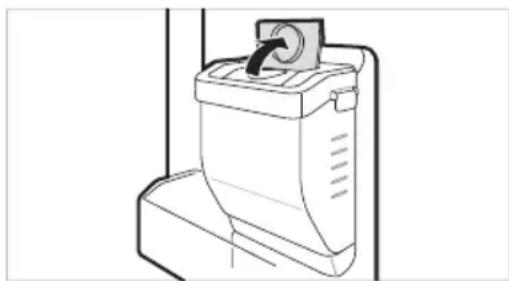
1 Open the cap (small cover) on the top of the water tank.
natural_image
Line drawing of a toilet with a handle and ventilation slots (no text or symbols)2 Fill the water tank with potable water and close the cap (small cover).
• The water tank can hold up to 2.3 L.
CAUTION
- Children should not be allowed near the dispenser tank. If the child drops the water dispenser tank while it is completely filled with water, injury may occur. Do not fill the water tank with drinks other than water or fill with hot water.
- Do not apply excessive force or impact when removing or assembling the water dispenser tank. Doing so can cause appliance damage or injury.
NOTE
- Before using the water dispenser tank after installing the appliance, it should be washed before filling it with water.
- Check if the water dispenser tank has been placed on the appliance correctly. If it is not assembled correctly, water may leak from the tank into the appliance.
- If there is no water in the water dispenser tank, the cold water function of the dispenser cannot be used. Check if there is water in the water dispenser tank and then fill it with water if there is not.
- Wait at least 15 seconds before removing the water tank after having dispensed water.
• Sound from the water tank will be normal when supplying water to the dispenser. It is not a sign of malfunction.
Ice Tray
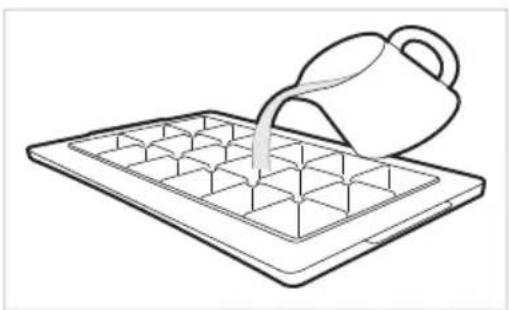
Fill the ice tray with water.
natural_image
Line drawing of a container being poured into a tray with a handle (no text or symbols)WARNING
• Fill with potable water only.
CAUTION
- Check whether there is any ice remaining in the ice tray before putting water into it.
- Do not slam the freezer door after filling the ice tray with water.
- If you open and close the freezer door frequently, it may take longer for the water to freeze.
- The time it takes for the water to freeze may vary according to the season.
- The temperature inside the appliance can take up to 24 hours to stabilize after initial installation. Water may take longer to freeze because of this.
- Be careful when handling the ice as the edges of the ice may be sharp.
NOTE
- If the ice tray is overfilled, the ice may stick together and be difficult to remove.
- Press the Express Freeze button on the control panel to make ice quickly.
- Do not store ice that has not frozen completely. Unfrozen water could cause the ice to clump together.
- Be careful not to use excessive force when twisting the ice tray. Doing so could break the ice tray.
• To easily remove ice, fill water up the tray in advance.
Fresh Converter ( \* )
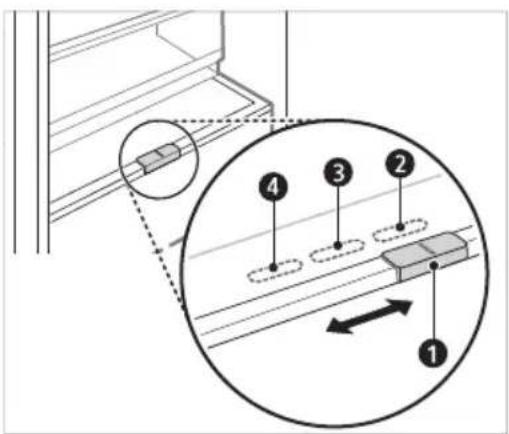
As a chill compartment, the temperature in the fresh converter can be controlled by sliding the lever ①, where located in front of compartment, in either direction.
When keeping vegetables after setting up Meat or Fish, the cold injury may occur.
text_image
Technical diagram showing a mechanical assembly with numbered components and directional arrows indicating motion or movement.② For storing vegetables.(Recommended)
③ For storing fish.
4 For storing meat.
NOTE
• (*): This feature varies depending on the model purchased.
Fresh Vegetable Drawer ( \* )
Vegetable compartment can adjust the humidity by moving the knob 1.
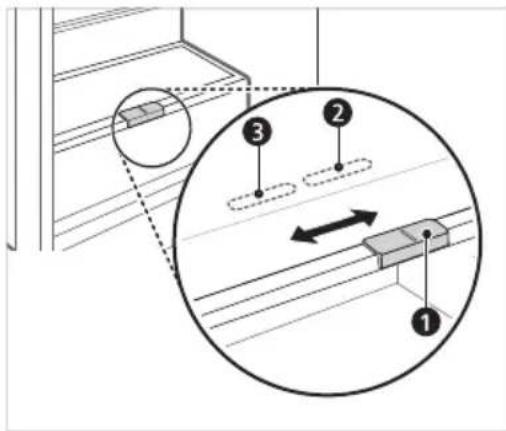
text_image
Technical diagram showing a mechanical assembly with numbered components and directional arrows indicating motion or movement.② For storing vegetables.(Recommended)
③ For storing fruit.
NOTE
• (*): This feature varies depending on the model purchased.
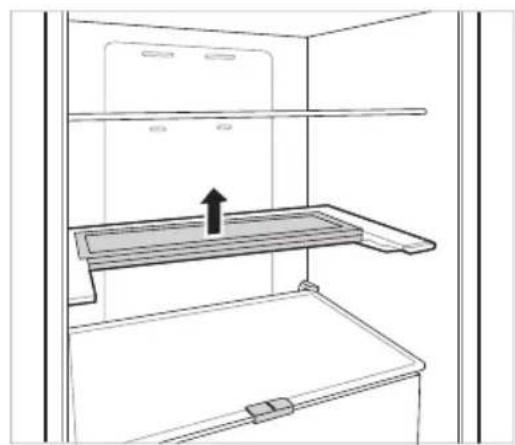
Folding Shelf
Store taller items, such as a gallon container or bottles, by pushing the front half of the shelf underneath the back half the shelf. Pull the front of the shelf forward to return to a full shelf.
1 Lift the front side of the shelf and shift it on its back side.
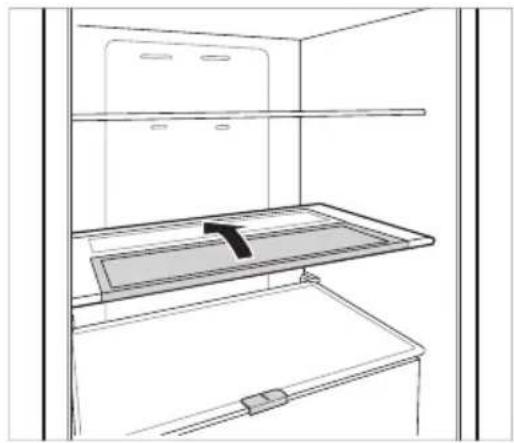
natural_image
Line drawing of a refrigerator interior showing storage tray and shelf (no text or symbols)2 Lift the front side of the shelf and shift it under its back side. From this position, both sides of the shelf can be lifted up to free more space.
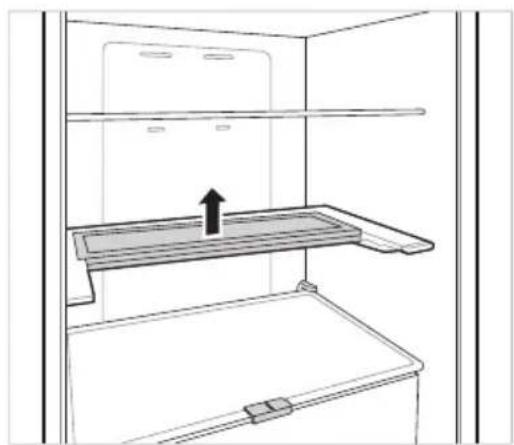
natural_image
Line drawing of a refrigerator interior showing a tray with an upward arrow (no text or symbols)Other Functions
Door Open Alarm
The alarm sounds 3 times in a 30 seconds interval if the door (fridge compartment) is left open or not completely closed for one minute.
- Contact an LG Electronics customer information centre if the alarm sound continues even after closing the door.
Failure Detection
The appliance can automatically detect problems during the operation.
- If a problem is detected, the appliance does not operate and an error code is displayed even when any button is pressed.
- When this occurs, do not turn off the power and immediately contact an LG Electronics customer information centre. If you turn off the power, the repair technician from an LG Electronics customer information center may have difficulty finding the problem.
LG ThinQ Application
This feature is only available on models with Wi-Fi
The LG ThinQ application allows you to communicate with the appliance using a smartphone.
LG ThinQ Application Features
Communicate with the appliance from a smartphone using the convenient smart features.
Smart Diagnosis
- If you experience a problem while using the appliance, this smart diagnosis feature will help you diagnose the problem.
Settings
- Allows you to set various options on the appliance and in the application.
NOTE
- If you change your wireless router, internet service provider, or password, delete the registered appliance from the LG ThinQ application and register it again.
- The application is subject to change for appliance improvement purposes without notice to users.
• Functions may vary by model.
Before Using LG ThinQ Application
1 Check the distance between the appliance and the wireless router (Wi-Fi network).
- If the distance between the appliance and the wireless router is too far, the signal strength becomes weak. It may take a long time to register or installation may fail.
2 Turn off the Mobile data or Cellular Data on your smartphone.
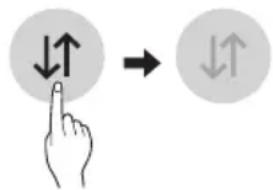
text_image
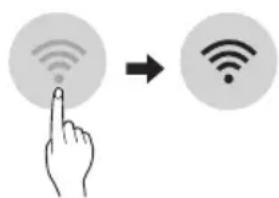
Diagram showing hand finger pressing a circle with directional arrows, next to a circular arrow indicating rotation.3 Connect your smartphone to the wireless router.
text_image
Diagram showing a hand pointing at a Wi-Fi icon to indicate wireless signal transformationNOTE
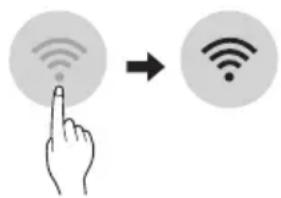
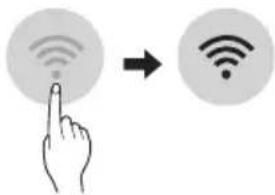
- To verify the Wi-Fi connection, check that the icon on the control panel is lit.
- The appliance supports 2.4 GHz Wi-Fi networks only. To check your network frequency, contact your Internet service provider or refer to your wireless router manual.
- LG ThinQ is not responsible for any network connection problems or any faults, malfunctions, or errors caused by network connection.
- If the appliance is having trouble connecting to the Wi-Fi network, it may be too far from the router. Purchase a Wi-Fi repeater (range extender) to improve the Wi-Fi signal strength.
- The Wi-Fi connection may not connect or may be interrupted because of the home network environment.
- The network connection may not work properly depending on the Internet service provider.
- The surrounding wireless environment can make the wireless network service run slowly.
- The appliance cannot be registered due to problems with the wireless signal transmission. Unplug the appliance and wait about a minute before trying again.
- If the firewall on your wireless router is enabled, disable the firewall or add an exception to it.
-
The wireless network name (SSID) should be a combination of English letters and numbers. (Do not use special characters.)
-
Smartphone user interface (UI) may vary depending on the mobile operating system (OS) and the manufacturer.
- If the security protocol of the router is set to WEP, you may fail to set up the network. Please change it to other security protocols (WPA2 is recommended) and register the product again.
Installing the LG ThinQ Application
Search for the LG ThinQ application from the Google Play Store or Apple App Store on a smart phone.
- Follow instructions to download and install the application.
Connecting to Wi-Fi
The Wi-Fi button, when used with the LG ThinQ application, allows the appliance to connect to a home Wi-Fi network. The icon shows the status of the appliance's network connection. The icon illuminates when the appliance is connected to the Wi-Fi network.
Initial Appliance Registration
- Run the LG ThinQ application and follow the instructions in the application to register the appliance.
Re-registering the Appliance or Registering Another User
- Press and hold the Wi-Fi button for 3 seconds to temporarily turn it off. Run the LG ThinQ application and follow the instructions in the application to register the appliance.
NOTE
- To disable the Wi-Fi function, press and hold the Wi-Fi button for 3 seconds. Icon will be turned off.
Open Source Software Notice Information
To obtain the source code under GPL, LGPL, MPL, and other open source licenses, that is contained in this product, please visit http://opensource.lge.com.
In addition to the source code, all referred license terms, warranty disclaimers and copyright notices are available for download.
LG Electronics will also provide open source code to you on CD-ROM for a charge covering the cost of performing such distribution (such as the cost of media, shipping, and handling) upon email request to opensource@lge.com. This offer is valid for a period of three years after our last shipment of this product. This offer is valid to anyone in receipt of this information.
Smart Diagnosis
This feature is only available on models with the 🎨 or 📞 logo.
Use this feature to help you diagnose and solve problems with your appliance.
NOTE
- For reasons not attributable to LGE's negligence, the service may not operate due to external factors such as, but not limited to, Wi-Fi unavailability, Wi-Fi disconnection, local app store policy, or app unavailability.
- The feature may be subject to change without prior notice and may have a different form depending on where you are located.
Using LG ThinQ to Diagnose Issues
If you experience a problem with your Wi-Fi equipped appliance, it can transmit troubleshooting data to a smartphone using the LG ThinQ application.
- Launch the LG ThinQ application and select the Smart Diagnosis feature in the menu. Follow the instructions provided in the LG ThinQ application.
Using Audible Diagnosis to Diagnose Issues
Follow the instructions below to use the audible diagnosis method.
- Launch the LG ThinQ application and select the Smart Diagnosis feature in the menu. Follow the instructions for audible diagnosis provided in the LG ThinQ application.
Display panel is on the Fridge door.
1 Close the freezer and fridge doors, then press and hold the Lock button to activate the lock function.
- If the display has been locked for over 5 minutes, you must deactivate the lock and then reactivate it.
2 Press and hold the Freezer button for 3 seconds or longer.
- The control panel will be turned off, and then '3' will be displayed on the fridge temperature display part.
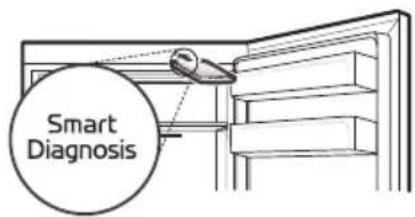
3 Open the fridge door and then hold the phone near the speaker hole.
text_image
Smart Diagnosis4 After the data transfer is complete, the diagnosis will be displayed in the application.
Display panel is inside the Fridge door
1 Open the fridge door.
2 Press the Eco Friendly button.
- If the door has been open for longer than 60 seconds, close the door and repeat steps 1 and 2.
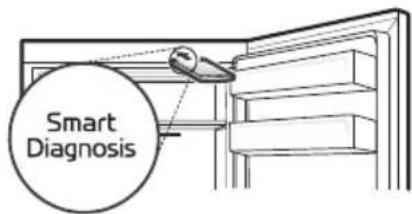
3 Hold the phone near the speaker hole.
text_image
Smart Diagnosis4 Press and hold the Freezer button for 3 seconds while holding your phone in front of the speaker.
5 After the data transfer is complete, the diagnosis will be displayed in the application.
NOTE
- For best results, do not move the phone while the tones are being transmitted.
Notes for Cleaning
- When removing a shelf or drawer from inside the appliance, remove all stored foods from the shelf or drawer to prevent injury or damage to the appliance.
- Otherwise, injury may occur due to the weight of stored foods.
- If cleaning the outside air vents of the appliance by means of vacuuming, then the power cord should be unplugged from the outlet to avoid any static discharge that can damage the electronics or cause an electric shock.
- Detach the shelves and drawers and clean them with water, and then dry them sufficiently, before replacing them.
- Regularly wipe the door gaskets with a wet soft towel.
- Door basket spills and stains should be cleaned as they can compromise storage ability of the basket and could even be damaged.
- After cleaning, check if the power cable is damaged, warm or improperly plugged.
- Keep the air vents on the exterior of the appliance clean.
- Blocked air vents can cause fire or appliance damage.
- When cleaning the inside or outside of the appliance, do not wipe it with a rough brush, toothpaste, or flammable materials. Do not use cleaning agents containing flammable substances.
- This may cause discoloration or damage to the appliance.
- Flammable substances: alcohol (ethanol, methanol, isopropyl alcohol, isobutyl alcohol, etc.), thinner, bleach, benzene, flammable liquid, abrasive, etc.
- For the appliance exterior, use a clean sponge or soft cloth and a mild detergent in warm water. Do not use abrasive or harsh cleaners. Dry thoroughly with a soft cloth.
- Never clean the shelves or containers in the dishwasher.
- The parts may become deformed due to the heat.
- If the appliance is equipped with an LED lamp, do not remove lamp cover and LED lamp in any attempt to repair or service it. Please, contact an LG Electronics customer information centre.
- Clean regularly surfaces that can come in contact with food and accessible drainage systems.
Cleaning the Door Basket
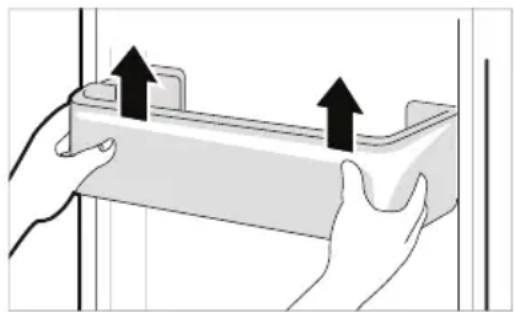
Removing the Fridge Door Basket
Hold both edges of the basket and remove it by lifting it upward.
natural_image
Illustration of two hands holding a rectangular object with upward arrows indicating movement or force (no text or symbols present)Refitting the Fridge Door Basket
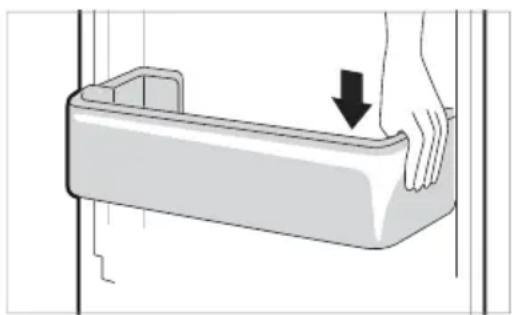
1 Hold both edges of the door basket, gently push one edge to assemble, and then in the same manner assemble the other edge.
natural_image
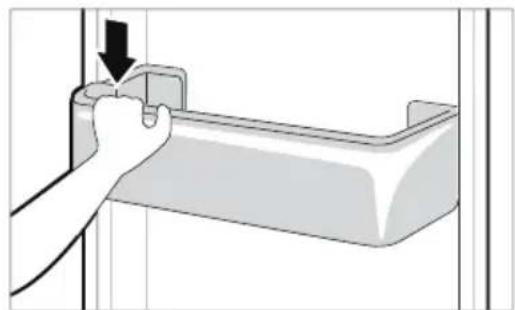
Illustration of a hand pressing down on a plastic container with a downward arrow indicating force or movement (no text or symbols)2 After assembling, tap the door basket gently to fix it horizontally.
natural_image
Hand inserting a component into a plastic housing (no text or symbols visible)Cleaning the Shelf Removing the Fridge Shelf
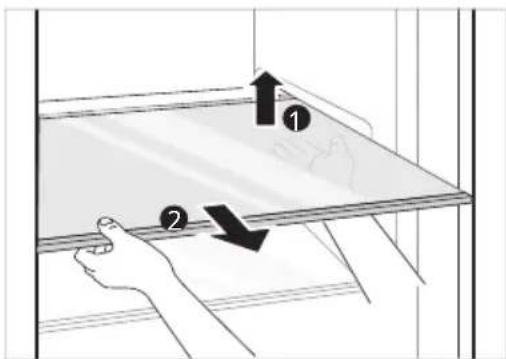
Lift the rear edge of the fridge shelf and then pull it out.
text_image
Diagram showing two hands holding a tray with arrows indicating movement or force, labeled ① and ②.Refitting the Fridge Shelf
Refit the shelf in the reverse order of the removal process.
Cleaning the Vegetable Drawer
Removing the Vegetable Drawer
1 Remove the contents of the drawer. Hold the handle of the vegetable drawer and pull it out completely until it stops.
2 Lift the vegetable drawer up and remove it by pulling it out.
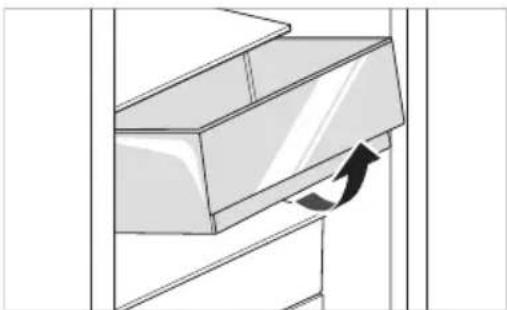
natural_image
Diagram of a mechanical component with an arrow indicating rotational motion (no text or symbols)CAUTION
- Note that injuries can be caused by the weight of stored foods when removing the vegetable drawer.
Refitting the Vegetable Drawer
Refit the vegetable drawer in the reverse order of the removal process.
Cleaning the Crisper Cover Removing the Crisper Cover
1 After removing the vegetable drawer cover, pull the top section of the crisper cover down.
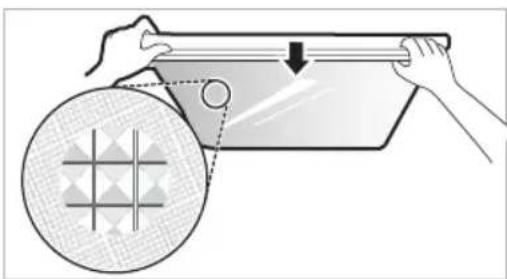
natural_image
Illustration of hands holding a rectangular object with a circular inset showing a grid pattern (no text or symbols)2 Remove the crisper cover by pulling it out.
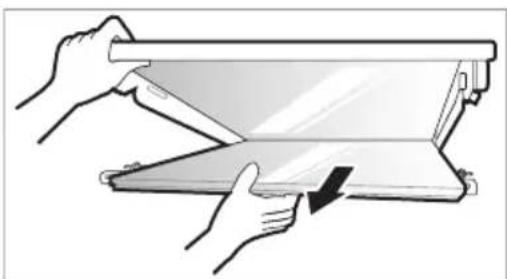
natural_image
Illustration of hands using a folding paper or folding device to lift a slide (no text or symbols visible)Refitting the Crisper Cover
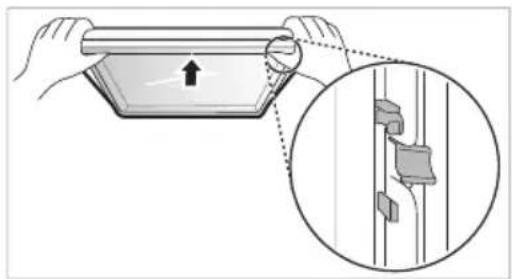
1 Place the protrusions inside the crisper cover on the grooves inside the shelf.
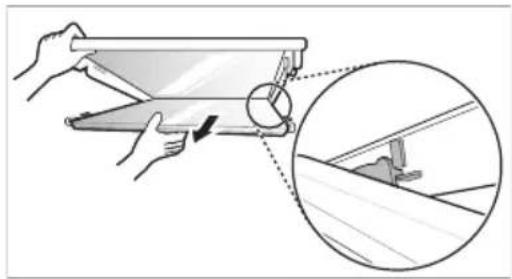
natural_image
Illustration of hands using a tablet to interact with a mechanical component, showing a magnified inset (no text or symbols)2 Insert the protrusions in front of the crisper cover into the grooves in front of the shelf and push the crisper cover up to assemble.
natural_image
Illustration of a hand holding a rectangular object with an arrow, alongside a magnified inset showing a close-up of a mechanical component (no text or symbols)Cleaning the Freezer Drawer
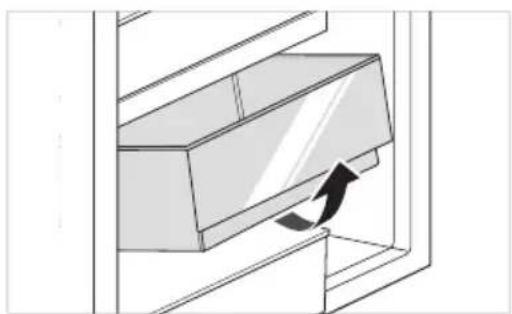
1 Remove the contents of the drawer. Hold the handle of the freezer drawer and pull it out completely until it stops.
2 Lift the freezer drawer up and remove it by pulling it out.
natural_image
Diagram of a door handle with an arrow indicating clockwise motion (no text or symbols)Refitting the Freezer Drawer
Refit the freezer drawer in the reverse order of the removal process.
Cleaning the Water Dispenser Cleaning the Dispenser Tray
natural_image
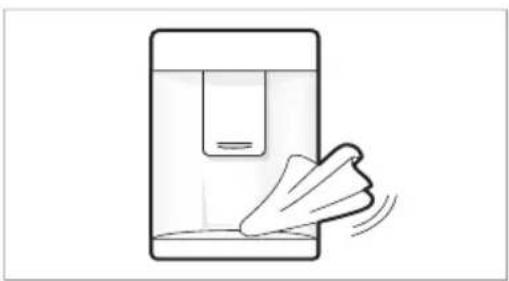
Simple line drawing of a hand cleaning a container with liquid (no text or symbols)The dispenser tray may become wet easily due to spilled ice or water. Wipe the entire area with a damp cloth.
Cleaning the Water and Ice Outlet
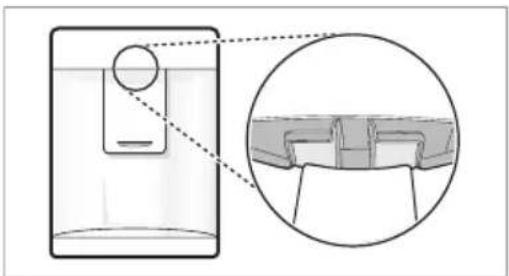
Wipe the water or ice outlet frequently with a clean cloth as it may get dirty easily. Please note that lint from a cloth may adhere to the outlet.
natural_image
Diagram showing a device with a circular component connected to a screen, and an inset close-up of a mechanical component (no text or symbols)| Symptoms Reason&Solution | |
| There is no refrigeration or freezing. | Is there a power interruption?Check the power of other appliances. |
| If the power plug unplugged from the outlet?Plug the power plug in the outlet properly. | |
| A fuse in your homeOr the appliance is connected to a GFCI (Ground Fault Circuit Interrupter) outlet, and the outlet's circuit breaker has tripped.Check the main electrical box and replace the fuse or reset the circuit breaker. Do not increase fuse capacity. If the problem is a circuit overload, have it corrected by a qualified electrician.Reset the circuit breaker on the GFCI. If the problem persists, contact an electrician. | |
| There is poor refrigeration or freezing. | Is the fridge or freezer temperature set to its warmest setting?Set the fridge or freezer temperature to 'Medium'. |
| Is the appliance in direct sunlight, or is it near a heat generating object such as cooking oven or heater?Check the installation area and reinstall it away from heat generating objects. | |
| Did you store hot food without cooling it first?Cool the hot food first before putting it in the fridge or freezer compartment. | |
| Did you put in too much food?Maintain an appropriate space between food. | |
| Are the appliance doors completely closed?Completely close the door and make sure that stored food is not obstructing in the door. | |
| Is there enough space around the appliance?Adjust the installation position to make enough space around the appliance. | |
| The appliance contains a bad smell. | Is the fridge or freezer temperature set to 'Warm'?Set the fridge or freezer temperature to 'Medium'. |
| Did you put in food with a strong smell?Store foods with strong smells in a sealed containers. | |
| Vegetables or fruit may have spoiled in the drawer?Throw away rotten vegetables and clean the vegetable drawer. Do not store vegetables too long in the vegetable drawer. | |
| The inside lamp in the appliance does not turn on. | Does the inside lamp in the appliance turn off?It is hard for customers to replace the inside lamp in the appliance as they are not serviceable. If the inside lamp does not turn on, please contact the LG Electronics customer information centre. |
| The appliance door is not closed tightly. | Is the appliance leaning forward?Adjust the front feet to raise the front side slightly. |
| Were the shelves properly assembled?Refit the shelves if needed. | |
| Did you close the door with excessive force?If you apply too much force or speed when closing the door, it may remain briefly open before closing. Make sure that you do not slam the door closed. Close without force. | |
| Вратата на уреда не е плътно затворена. | Уредът наклонен ли е напред?Коригирайте предните крачета, за да повдигнете леко предната част. |
| Рафтовете правилно ли са сглобени?Ако е нужно, поставете отново рафтовете. | |
| Вероятно сте затворили вратата с прекомерна сила?Ако затваряте вратата твърде силно или рязко, тя може да остане отворена за момент, преди да се затвори. Уверете се, че не блъскате вратата при затваряне. Затваряйте без сила. | |
| It is difficult to open the appliance door. | Did you open the door right after you closed it?If you try to open the appliance door within one minute after you closed it, you may have difficulties because of the pressure inside the appliance. Try to open the appliance door again in a few minutes so that the internal pressure stabilizes. |
| There is condensation inside the appliance or on the bottom of the vegetable drawer cover. | Did you store hot food without cooling it first?Cool the hot food first before putting it in the fridge or freezer compartment. |
| Did you leave the appliance door open?Although the condensation will disappear soon after you close the appliance door, you can wipe it with a dry cloth. | |
| Do you open and close the appliance door too frequently?Condensation can form due to the temperature difference from the outside. Wipe out the dampness with a dry cloth. | |
| Did you put warm or moist food inside without sealing it in a container?Store food in a covered or sealed container. | |
| Frosts has formed in the freezer compartment. | Doors may not be closed properly?Check if the food item inside the appliance is blocking the door and make sure that the door is tightly closed. |
| Did you store hot food without cooling it first?Cool the hot food first before putting it in the fridge or freezer compartment. | |
| Frosts has formed in the freezer compartment. | Is the air entry or exit of the freezer compartment blocked?Make sure that air entry or exit is not blocked so that the air can circulate inside. |
| Is the freezer compartment overfilled?Maintain an appropriate space between items. | |
| Frost or condensation has formed inside or outside the appliance. | Did you open and close the appliance door frequently or is the appliance door improperly closed?Frosts or condensation can form if the outside air penetrates inside the appliance. |
| Is the installation environment humid?Condensation can appear on the exterior of the appliance if the installation area is too humid or on a humid day such as a rainy day. Wipe off any moisture with a dry cloth. | |
| The appliance is noisy and generates abnormal sounds. | Is the appliance installed on a weak floor or improperly leveled?Install the appliance on a solid and flat area. |
| Does the rear of the appliance touch the wall?Adjust the installation position to allow enough clearance around the appliance. | |
| Are objects scattered behind the appliance?Remove the scattered objects from behind the appliance. | |
| Is there an object on top of the appliance?Remove the object on top of the appliance. | |
| The side or front of the appliance is warm. | There are anti condensation pipes fitted to these areas of the appliance to reduce condensation forming from around the door area.The heat releasing pipe to prevent condensation is installed on the front and side of the appliance. You may feel it particularly hot right after the appliance is installed or during the summer. You can be assured that this is not a problem and is quite normal. |
| There is water inside or outside of the appliance. | Is there water leakage around the appliance?Check if the water has leaked from a sink or another place. |
| Is there water on the bottom of the appliance?Check if the water is from the thawed frozen food or a broken or dropped container. | |
| Clicking noises | The defrost control will click when the automatic defrost cycle begins and ends. The thermostat control (or appliance control on some models) will also click when cycling on and off.Normal Operation |
| Rattling noises | Rattling noises may come from the flow of appliance, the water line on the back of the unit (for plumbed models only), or items stored on top of or around the appliance.Normal Operation |
| Appliance is not resting evenly on the floor.Floor is weak or uneven or leveling legs need to be adjusted. See the Door Alignment section. | |
| Appliance with linear compressor was moved while operating.Normal operation. If the compressor does not stop rattling after three minutes, turn the power to the appliance off and then on again. | |
| Whooshing noises | Evaporator fan motor is circulating air through the fridge and freezer compartments.· Normal Operation |
| Air is being forced over the condenser by the condenser fan.· Normal Operation | |
| Gurgling noises | Appliance flowing through the cooling system· Normal Operation |
| Popping noises | Contraction and expansion of the inside walls due to changes in temperature.· Normal Operation |
| Vibrating | If the side or back of the appliance is touching a cabinet or wall, some of the normal vibrations may make an audible sound.· To eliminate the noise, make sure that the sides and back do not make any contact with any wall or cabinet. |
| Your home appliance and smartphone is not connected to the Wi-Fi network. | The password for the Wi-Fi that you are trying to connect to is incorrect.· Find the Wi-Fi network connected to your smartphone and remove it, then register your appliance on LG ThinQ |
| Mobile data for your smartphone is turned on.· Turn off the Mobile data of your smartphone and register the appliance using the Wi-Fi network. | |
| The wireless network name (SSID) is set incorrectly.· The wireless network name (SSID) should be a combination of English letters and numbers. (Do not use special characters.) | |
| The router frequency is not 2.4 GHz.· Oal2.4 GHz router frequency is supported. Set the wireless router to 2.4 GHz and connect the appliance to the wireless router. To check the router frequency, check with your Internet service provider or the router manufacturer. | |
| The distance between the appliance and the router is too far.· If the distance between the appliance and the router is too far, the signal may be weak and the connection may not be configured correctly. Move the location of the router so that it is closer to the appliance. | |
Customer Care and Service
Contact an LG Electronics customer information centre.
- To find information on LG authorized service centre, visit our website at www.lg.com.
- Only qualified service personnel from LG authorized service centre should disassemble, repair, or modify the appliance.
- To purchase spare parts, contact an LG Electronics customer information centre or our website at www.lg.com.
- Spare parts referenced in Regulation EU 2019/2019 are available for 7 years (only door gaskets are available for 10 years).
NOTE
- For more information about the energy efficiency of the appliance, visit https://ec.europa.eu and search using the model name (valid from 1st March 2021).
- Regulation EU 2019/2019, valid from 1st March 2021, is related to the Energy Efficiency classes by Regulation EU 2019/2016.
- Scan the QR code on the energy label supplied with the appliance, which provides a web link to the information related to the performance of the appliance in the EU EPREL database. Keep the energy label for reference and all other documents supplied with the appliance (valid from 1st March 2021).
- The model name can be found on the rating label of the appliance.
Memo
РЪКОВОДСТВО ЗА
ЕКСПЛОАТАЦИЯ
ХЛАДИЛНИК И
ФРИЗЕР
text_image
G F E H DТип А
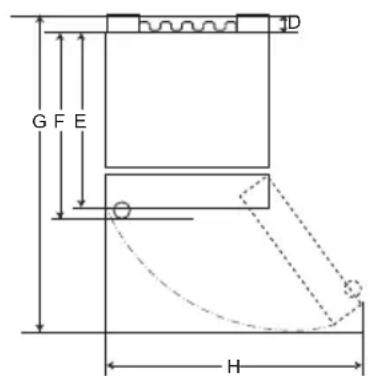
text_image
G F E H DТип В
| Тип А Тип В | ||||||||
| Джобна дръжка Лостова дръжка | Джобна дръжка | Лостова дръжка | ||||||
| Размер [mm] | ||||||||
| A | 595 595 5 | 95 595 595 | 595 595 595 | |||||
| B | 1860 2030 | 1860 2030 | 1860 | 2030 1860 2030 | ||||
| C | 675 675 7 | 12 712 682 | 682 718 718 | |||||
| D | 9 | 9 | 9 | 9 | 15 | 15 | 15 | 15 |
| E | 667 667 6 | 67 667 667 | 667 667 667 | |||||
| F | - | - | 703 | 703 | - | - | 703 | 703 |
| G | 1124 | 1124 | 1124 | 1124 | 1130 | 1130 | 1130 | 1130 |
| H | 995 995 9 | 95 995 995 | 995 995 995 | |||||
Околна температура
text_image
Labeled diagram of a refrigerator interior showing numbered compartments and doors① Модул Smart Diagnosis (\*)
text_image
Diagram showing a hand holding a container with a label pointing to it, labeled with number 1.ВНИМАНИЕ
natural_image
Line drawing of a toilet with a handle and ventilation slots (no text or symbols)natural_image
Line drawing of a container being poured into a tray with a handle (no text or symbols)ПРЕДУПРЕЖДЕНИЕ
text_image
Technical diagram showing a mechanical assembly with numbered components and directional arrows indicating motion or alignment.text_image
Diagram illustrating a mechanical assembly with labeled components and directional arrows, including numbered annotations.natural_image
Line drawing of a refrigerator interior showing the front shelf and side arm (no text or symbols)natural_image
Line drawing of a refrigerator interior showing the shelf and drawer (no text or symbols)Други функции
text_image
Diagram showing hand finger pressing up and pointing to a circular arrow symbol with upward arrowstext_image
Diagram showing a hand interacting with wireless signals to form a Wi-Fi symbolЗАБЕЛЕЖКА
natural_image
Illustration of two hands holding a rectangular object with upward arrows indicating motion or force (no text or symbols)natural_image
Illustration of a hand pressing down on a plastic tray (no text or symbols)natural_image
Illustration of a hand inserting a component into a plastic housing (no text or symbols)Почистване на рафта
text_image
Diagram showing a hand holding a device with labeled parts and directional arrows indicating movement or force.natural_image
Diagram of a mechanical component with an arrow indicating rotational motion (no text or symbols)ВНИМАНИЕ
natural_image
Illustration of hands holding a tablet with a circular grid pattern and a magnified view showing a circle (no text or symbols)natural_image
Illustration of hands using a folding paper or folding stand to lift a slide (no text or symbols present)natural_image
Illustration of hands using a tool to adjust or install a flat panel, with an inset showing the same component (no text or symbols present)natural_image
Illustration of a hand holding a rectangular object with an arrow, alongside a magnified inset showing a close-up of a mechanical component (no text or symbols)natural_image
Diagram of a door handle with an arrow indicating direction (no text or symbols)natural_image
Simple line drawing of a device with a hand holding a tray, no text or symbols presentnatural_image
Diagram showing a device with a magnified inset of its top view (no text or symbols present)text_image
Labeled diagram of a refrigerator interior showing numbered compartments and doorstext_image
88°C -88°C Fridge Express Cool Freezer Express Freeze Eco Friendly Wi-Fi Lock Extra Function - Hold 9 secondstext_image
Diagram showing a hand holding a cup inside a container with liquid, labeled with number 1⚠ UPOZORNĚNÍ
natural_image
Line drawing of a toilet with a handle and ventilation slots (no text or symbols)natural_image
Line drawing of a container being poured into a tray with a handle (no text or symbols)⚠️ VAROVÁNÍ
text_image
Technical diagram showing a mechanical assembly with numbered components and directional arrows indicating motion or movement.text_image
Diagram showing a mechanical assembly with labeled components and directional arrows, including numbered annotations 1, 2, and 3.natural_image
Line drawing of a refrigerator interior showing the tray and shelf (no text or symbols)natural_image
Line drawing of a refrigerator interior showing the door, shelf, and drawer (no text or symbols)Ostatní funkce
text_image
Diagram showing hand pointing to a circle with bidirectional arrows, followed by a rightward arrow icon.text_image
Diagram showing a hand pointing at a Wi-Fi icon to indicate wireless signal transformationPOZNÁMKA
natural_image
Illustration of two hands holding a rectangular object with upward arrows indicating motion or force (no text or symbols)natural_image
Illustration of a hand pressing down on a plastic tray with a downward arrow indicating force or pressure (no text or symbols)natural_image
Illustration of a hand holding a U-shaped object with a downward arrow, no text or symbols presentČištění police
text_image
Diagram showing two labeled arrows (1 and 2) pointing to a panel with directional arrows, likely illustrating a process or movement.natural_image
Diagram of a cabinet or rack with an arrow indicating rotation (no text or symbols present)⚠ UPOZORNĚNÍ
natural_image
Illustration of hands holding a rectangular object with a circular patterned circle nearby, no text or symbols present.natural_image
Illustration of hands using a folding paper or folding tool to lift a flat sheet (no text or symbols visible)natural_image
Illustration of hands using a tool to adjust or install a slide, with an inset showing the same object (no text or symbols present)natural_image
Illustration of a hand holding a rectangular object with an arrow pointing upward, alongside a magnified inset showing a close-up of a mechanical component (no text or symbols)natural_image
Diagram of a door handle with an arrow indicating clockwise motion (no text or symbols)natural_image
Simple line drawing of a device with a handle and motion arrow, no text or symbols presentnatural_image
Diagram showing a device with a circular component inserted into a liquid, and an inset close-up of a rectangular container (no text or symbols present)text_image
G F E H DType A
text_image
G F E 3D HType B
| Type A Type B | ||||||||
| Lommehåndtag Stanghåndtag | Lommehåndtag | Stanghåndtag | ||||||
| Størrelse [mm] | ||||||||
| A | 595 595 5 | 95 595 595 | 595 595 595 | 5 | ||||
| B | 1860 2030 | 1860 2030 | 1860 | 2030 1860 2030 | ||||
| C | 675 675 7 | 12 712 682 | 682 718 718 | |||||
| D | 9 | 9 | 9 | 9 | 15 | 15 | 15 | 15 |
| E | 667 667 6 | 667 667 667 | 667 667 667 | |||||
| F | - | - | 703 | 703 | - | - | 703 | 703 |
| G | 1124 | 1124 | 1124 | 1124 | 1130 | 1130 | 1130 | 1130 |
| H | 995 995 9 | 95 995 995 | 995 995 995 | |||||
Omgivelsestemperatur
text_image
Labeled diagram of a refrigerator interior showing numbered compartments and storage areas① Smart Diagnosis-enhed (\*)
text_image
88°C -88°C Fridge Express Cool Freezer Express Freeze Eco Friendly Wi-Fi Lock Extra Function: hold 3 seconds① Fridge Temperature (Køleskabstemperatur)
text_image
Diagram showing a container with liquid and a hand holding it, labeled with number 1▲ FORSIGTIG
natural_image
Line drawing of a toilet with a handle and ventilation slots (no text or symbols)natural_image
Line drawing of a container being poured into a tray with a handle (no text or symbols)ADVARSEL
• Brug altid kun drikkevand.
▲ FORSIGTIG
text_image
Technical diagram showing a mechanical assembly with numbered components and directional arrows indicating motion or alignment.text_image
Diagram showing a mechanical assembly with numbered components and directional arrows indicating motion or movement.natural_image
Line drawing of a refrigerator interior showing storage tray and shelf (no text or symbols)2 Løft hyldens forside, og forskyd den under dens bagside. Fra denne position kan begge hyldens sider løftes for at frigøre mere plads.
natural_image
Line drawing of a refrigerator interior showing a tray with an upward arrow (no text or symbols)Andre funktioner
Alarm for åben dør
text_image
Diagram showing hand finger pressing up and pointing to a circular arrow symbol with upward arrowstext_image
Diagram showing a hand interacting with a Wi-Fi icon and a Wi-Fi symbol, indicating wireless signal interaction.BEMAERK
natural_image
Illustration of two hands holding a rectangular object with upward arrows indicating motion or force (no text or symbols)natural_image
Illustration of a hand pressing down on a plastic container with a downward arrow indicating force (no text or symbols)natural_image
Illustration of a hand holding a mechanical component with an arrow indicating force or direction (no text or symbols present)text_image
Diagram showing a hand holding a device with labeled parts and directional arrows indicating movement or force.natural_image
Diagram of a mechanical component with an arrow indicating motion, no text or symbols present▲ FORSIGTIG
natural_image
Illustration of hands holding a rectangular object with a circular inset showing a grid pattern (no text or symbols)natural_image
Illustration of hands using a folding paper or folding device to lift a slide (no text or symbols visible)natural_image
Illustration of hands using a tool to adjust or install a mechanical component, with an inset magnified view showing detail (no text or symbols)natural_image
Illustration of hands holding a rectangular object with an arrow, alongside a magnified inset showing a close-up of a mechanical component (no text or symbols)natural_image
Diagram of a mechanical component with an arrow indicating direction, no text or symbols presentGenmontering af fryserskuffen
natural_image
Simple line drawing of a hand holding a device with a paper airplane, no text or symbols presentnatural_image
Diagram showing a device with a circular component connected to a screen, and an inset close-up of a table with a lid (no text or symbols present)text_image
G F E D HTyp A
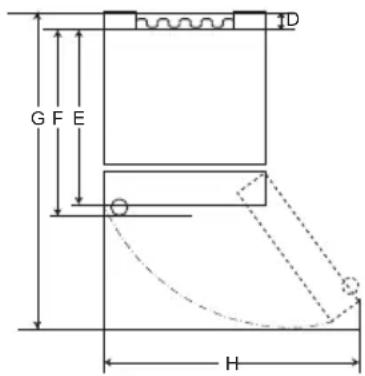
text_image
G F E H DTyp B
| Typ A Typ B | ||||||||
| Griffmulde StangenGriff | Griffmulde | StangenGriff | ||||||
| Größe [mm] | ||||||||
| A | 595 595 595 | 595 595 595 | 595 595 595 | 5 | ||||
| B | 1860 2030 | 1860 2030 | 1860 | 2030 1860 2030 | ||||
| C | 675 675 712 | 682 718 718 | 682 718 718 | |||||
| D | 9 | 9 | 9 | 9 | 15 | 15 | 15 | 15 |
| E | 667 667 667 | 667 667 667 | 667 667 667 | |||||
| F | -- | 703 703 | -- | 703 703 | ||||
| G | 1124 | 1124 | 1124 | 1124 | 1130 | 1130 | 1130 | 1130 |
| H | 995 995 995 | 995 995 995 | 995 995 995 | |||||
Umgebungstemperatur
text_image
Labeled diagram of a refrigerator interior showing numbered compartments and doors① Smart Diagnosis-Einheit (\*)
text_image
88°C -88°C Fridge I *Express Cool Freezer I *Express Freeze Eco Friendly I *Wi-Fi Lock 1 2 3 4 5 6 7 *Extra Function: Hold 3 secondstext_image
Diagram showing a hand holding a glass over a container with label '1' pointing to it⚠️ ACHTUNG
natural_image
Line drawing of a toilet with a handle and lid (no text or symbols)natural_image
Line drawing of a container being poured into a tray with a handle (no text or symbols)
WARNUNG
text_image
Technical diagram showing a mechanical assembly with numbered components and directional arrows indicating motion or movement.text_image
Technical diagram showing a mechanical assembly with labeled components and directional arrows indicating motion or movement.natural_image
Line drawing of a refrigerator shelf with a highlighted tray and an arrow indicating direction (no text or symbols)natural_image
Line drawing of a refrigerator interior showing the front shelf and side arm, with an arrow indicating upward motion (no text or symbols)Andere Funktionen
Tür-Offen-Alarm
text_image
Diagram showing hand finger pressing a circle with directional arrows, indicating press or navigation actiontext_image
Diagram showing a hand interacting with a Wi-Fi icon to interact with a target, indicating wireless signal interaction.HINWEIS
natural_image
Illustration of two hands holding a rectangular object with upward arrows indicating motion or force (no text or symbols)natural_image
Illustration of a hand pressing down on a plastic tray with a downward arrow indicating force (no text or symbols)natural_image
Illustration of a hand holding a small mechanical component with an arrow indicating force or direction (no text or symbols present)text_image
Diagram showing two labeled arrows pointing to a screen with an upward arrow and a downward arrow, possibly indicating motion or direction of movement.natural_image
Diagram of a mechanical component with an arrow indicating rotational motion (no text or symbols)ACHTUNG
natural_image
Illustration of hands holding a tray with a circular patterned inset showing a grid pattern (no text or symbols)natural_image
Illustration of hands using a folding paper or folding tool to lift a flat sheet (no text or symbols visible)natural_image
Illustration of hands using a tool to adjust or install a component, with an inset showing magnified detail (no text or symbols)natural_image
Illustration of a hand holding a rectangular object with an arrow pointing upward, alongside a magnified inset showing a close-up of a mechanical component (no text or symbols)natural_image
Diagram of a mechanical component with an arrow indicating direction, no text or symbols presentnatural_image
Simple line drawing of a device with a handle and motion arrow, no text or symbols presentnatural_image
Diagram showing a container with a sphere and an inset close-up of a tray, illustrating liquid level or measurement (no text or symbols)text_image
G F E D HΤύπος Α
text_image
G F E HΤύπος Β
text_image
Labeled diagram of a refrigerator interior showing numbered compartments and doors① Mováða Smart Diagnosis (\*)
text_image
Diagram showing a hand pouring liquid into a container with label '1' pointing to the container.⚠️ ΠΡΟΣΟΧΗ
natural_image
Line drawing of a toilet with a handle and ventilation slots (no text or symbols)natural_image
Line drawing of a container being poured into a tray with a handle (no text or symbols)⚠️ ΠΡΟΕΙΔΟΠΟΙΗΣΗ
text_image
Technical diagram showing a mechanical assembly with numbered components and directional arrows indicating motion or alignment.text_image
Diagram showing a mechanical assembly with numbered components and directional arrows indicating motion or movement.natural_image
Line drawing of a refrigerator interior showing the shelf and drawer (no text or symbols)natural_image
Line drawing of a refrigerator interior showing the door, shelf, and drawer (no text or symbols)Άλλες λειτουργίες
text_image
Diagram showing hand finger pressing a circle with directional arrows, next to a circular arrow pointing right.text_image
Diagram showing a hand pointing to a Wi-Fi icon with signal waves, followed by an arrow indicating transformation.ΣΗΜΕΙΩΣΗ
natural_image
Illustration of two hands holding a rectangular object with upward arrows indicating motion or force (no text or symbols)natural_image
Illustration of a hand pressing down on a rectangular mechanical component with a downward arrow (no text or symbols)natural_image
Illustration of a hand holding a small mechanical component with an arrow indicating force or direction (no text or symbols)text_image
Diagram showing a hand holding a panel with two labeled arrows indicating direction, likely illustrating a process or movement.natural_image
Diagram of a mechanical component with an arrow indicating rotational motion (no text or symbols)⚠️ ΠΡΟΣΟΧΗ
natural_image
Illustration of hands holding a rectangular object with a circular patterned inset, no text or symbols presentnatural_image
Illustration of hands using a folding paper or folding device to lift a flat sheet (no text or symbols visible)natural_image
Illustration of hands using a tool to adjust a panel, with an inset showing the same component (no text or symbols present)natural_image
Illustration of hands installing a panel with an arrow and magnified detail showing internal components (no text or symbols)natural_image
Diagram of a door handle with an arrow indicating direction (no text or symbols)natural_image
Simple line drawing of a device with a handle and motion arrow, no text or symbols presentnatural_image
Diagram showing a container with liquid and a magnified inset of a tray or bench (no text or symbols)text_image
G F E D HTipo A
text_image
G F E H DTipo B
| Tipo A Tipo B | ||||||||
| Asa de bolsillo | Asa de barra Asa | de bolsillo | Asa de barra | |||||
| Tamaño [mm] | ||||||||
| A | 595 595 5 | 95 595 595 | 595 595 595 | |||||
| B | 1860 2030 | 1860 2030 | 1860 | 2030 1860 | 2030 | |||
| C | 675 675 7 | 12 712 682 | 682 718 718 | |||||
| D | 9 | 9 | 9 | 9 | 15 | 15 | 15 | 15 |
| E | 667 667 6 | 67 667 667 | 667 667 667 | |||||
| F | - | - | 703 | 703 | - | - | 703 | 703 |
| G | 1124 | 1124 | 1124 | 1124 | 1130 | 1130 | 1130 | 1130 |
| H | 995 995 9 | 95 995 995 | 995 995 995 | |||||
Temperatura ambiente
text_image
Labeled diagram of a refrigerator interior showing numbered compartments and doors⑤ Eco-Friendly (Modo Eco)
text_image
Diagram showing a hand holding a glass over a container with liquid, labeled with number 1PRECAUCIÓN
natural_image
Line drawing of a toilet with a scroll wheel (no text or symbols)natural_image
Line drawing of a container being poured into a tray with a handle (no text or symbols)ADVERTENCIA
text_image
Technical diagram showing a mechanical assembly with numbered components and directional arrows indicating motion or movement.text_image
Diagram showing a mechanical assembly with numbered components and directional arrows indicating motion or movement.natural_image
Line drawing of a refrigerator shelf with a tray and door, no text or symbols presentnatural_image
Line drawing of a refrigerator interior showing the door, shelf, and drawer (no text or symbols)Otras funciones
text_image
Diagram showing hand finger pressing a circle with directional arrows, next to a circular arrow pointing right.3 Conecte el smartphone al router inalámbrico.
text_image
Diagram showing a hand interacting with wireless signals to form a Wi-Fi symbol, indicating wireless signal input or interaction.NOTA
natural_image
Illustration of two hands holding a rectangular object with upward arrows indicating movement or force (no text or symbols present)natural_image
Illustration of a hand pressing down on a rectangular object with a downward arrow (no text or symbols)natural_image
Illustration of a hand inserting a component into a plastic housing (no text or symbols)text_image
Diagram showing two labeled arrows (1 and 2) pointing to a rectangular object with an upward arrow and a downward arrow, possibly indicating motion or force directions.natural_image
Diagram of a mechanical component with an arrow indicating rotational motion (no text or symbols)PRECAUCIÓN
natural_image
Illustration of hands holding a rectangular object with a circular patterned inset, no text or symbols presentnatural_image
Illustration of hands using a folding paper or folding tool to lift a slide (no text or symbols visible)natural_image
Illustration of hands using a tool to adjust or install a slide, with an inset showing the same object (no text or symbols present)natural_image
Illustration of a hand holding a rectangular object with an arrow pointing to it, alongside a magnified inset showing a close-up of a mechanical component (no text or symbols present)natural_image
Diagram of a mechanical component with an arrow indicating direction, no text or symbols presentnatural_image
Simple line drawing of a device with a paper airplane and a hand holding it, no text or symbols present.natural_image
Diagram showing a device with a circular component connected to a screen, alongside an inset close-up of a table with a lid (no text or symbols present)OLULISED OHUTUSJUHISED 3
Teie vana seadme hävitamine ....10
PAIGALDAMINE....11
OLULISED OHUTUSJUHISED

OHT
text_image
G F E D HTüüp A
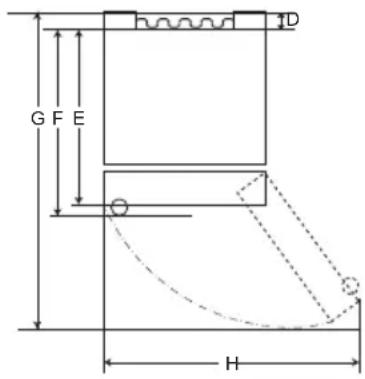
text_image
G F E H DTüüp B
| Tüüp A Tüüp B | ||||||||
| Süviskäepide Eenduv käepide | Süviskäepide | Eenduv käepide | ||||||
| Suurus [mm] | ||||||||
| A | 595 595 595 | 595 595 595 | 595 595 595 | |||||
| B | 1860 2030 | 1860 2030 | 1860 | 2030 1860 | 2030 | |||
| C | 675 675 712 | 682 718 718 | ||||||
| D | 9 | 9 | 9 | 9 | 15 | 15 | 15 | 15 |
| E | 667 667 667 | 667 667 667 | 667 667 667 | |||||
| F | - | - | 703 | 703 | - | - | 703 | 703 |
| G | 1124 | 1124 | 1124 | 1124 | 1130 | 1130 | 1130 | 1130 |
| H | 995 995 995 | 995 995 995 | 995 995 995 | |||||
Ümbritsev öhutemperatuur
1 Hingekate
② Alumine hing
③ Kleebis
Uste pööramine
text_image
Labeled diagram of a refrigerator interior showing numbered compartments and doors① Smart Diagnosis üksus (*)
text_image
Diagram showing a hand holding a container with liquid inside a transparent container, labeled with number 1.ETTEVAATUST
natural_image
Line drawing of a toilet with a scroll wheel (no text or symbols)natural_image
Line drawing of a container being filled with liquid using a bucket (no text or symbols)OHT
text_image
Technical diagram showing a mechanical assembly with numbered components and directional arrows indicating motion or movement.text_image
Diagram showing a mechanical assembly with labeled components and directional arrows, including numbered annotations 1, 2, and 3.natural_image
Line drawing of a refrigerator interior showing the tray and shelf (no text or symbols)natural_image
Line drawing of a refrigerator interior showing the door, shelf, and drawer (no text or symbols)Muud funktsioonid
Avatud ukse häire
text_image
Diagram showing hand press icon pointing to a circle with bidirectional arrows, next to a circular arrow indicating direction.text_image
Diagram showing a hand interacting with a Wi-Fi icon to interact with a Wi-Fi symbol, indicating wireless signal interaction.TÄHELEPANU
2 Vajutage nuppu Eco Friendly.
natural_image
Illustration of two hands holding a rectangular object with upward arrows indicating motion or force (no text or symbols)natural_image
Illustration of a hand pressing down on a rectangular mechanical component with a downward arrow indicating force or motion (no text or symbols)natural_image
Illustration of a hand holding a mechanical component with an arrow indicating force or direction (no text or symbols present)text_image
Diagram showing a hand holding a device with labeled parts and directional arrows indicating movement or force.natural_image
Diagram of a mechanical component with an arrow indicating rotational motion (no text or symbols)ETTEVAATUST
natural_image
Illustration of hands holding a rectangular object with a circular inset showing a grid pattern (no text or symbols)natural_image
Illustration of hands folding a flatboard into a tray with a downward arrow (no text or symbols)natural_image
Illustration of hands using a tool to adjust or install a component, with an inset showing the same component (no text or symbols present)natural_image
Illustration of a hand holding a rectangular object with an arrow pointing upward, alongside a magnified inset showing a close-up of a mechanical component (no text or symbols)natural_image
Diagram of a cabinet or shelf with an arrow indicating rotation or movement, no text or symbols presentSügavkülmiku sahtli tagasi panemine
natural_image
Simple line drawing of a hand holding a small object, no text or symbols presentnatural_image
Diagram showing a container with liquid and a magnified inset of a mechanical component (no text or symbols)text_image
G F E D HTyyppi A
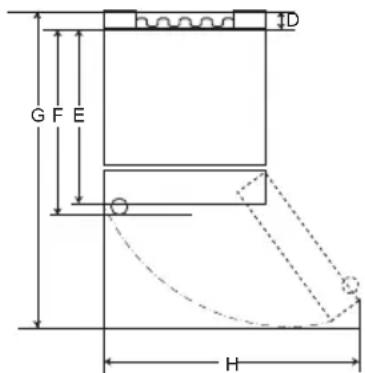
text_image
G F E H DTyyppi B
| Tyyppi A Tyyppi B | ||||||||
| Taskukahva Vedin | Taskukahva | Vedin | ||||||
| Koko [mm] | ||||||||
| A | 595 595 595 | 595 595 595 | 595 595 595 | |||||
| B | 1860 2030 | 1860 2030 | 1860 | 2030 1860 | 2030 | |||
| C | 675 675 712 | 682 718 718 | ||||||
| D | 9 | 9 | 9 | 9 | 15 | 15 | 15 | 15 |
| E | 667 667 667 | 667 667 667 | 667 667 667 | |||||
| F | - | - | 703 | 703 | - | - | 703 | 703 |
| G | 1124 | 1124 | 1124 | 1124 | 1130 | 1130 | 1130 | 1130 |
| H | 995 995 995 | 995 995 995 | 995 995 995 | |||||
text_image
Labeled diagram of a refrigerator interior showing numbered compartments and doorstext_image
Diagram showing a hand pouring liquid into a container with label '1' pointing to the container.▲ VARO
natural_image
Line drawing of a toilet with a scroll wheel (no text or symbols)natural_image
Line drawing of a container being poured into a tray (no text or symbols)⚠️ VAROITUS
text_image
Technical diagram showing a mechanical assembly with numbered components and directional arrows indicating motion or alignment.text_image
Diagram showing a mechanical assembly with numbered components and directional arrows indicating motion or movement.natural_image
Line drawing of a refrigerator interior showing the tray and shelf (no text or symbols)natural_image
Line drawing of a refrigerator interior showing the front shelf and drawer with an upward arrow indicating a component (no text or symbols present)Muut toiminnot
Ovi auki -hälytys
text_image
Diagram showing hand finger pressing up and pointing to a circular arrow symbol with upward arrowstext_image
Diagram showing a hand interacting with a Wi-Fi icon and a Wi-Fi symbol, indicating wireless signal interaction.HUOMAUTUS
natural_image
Illustration of two hands holding a rectangular object with upward arrows indicating motion or force (no text or symbols)natural_image
Illustration of a hand pressing down on a rectangular object with a downward arrow indicating force or movement (no text or symbols)natural_image
Illustration of a hand holding a mechanical component with a downward arrow indicating force or direction (no text or symbols)text_image
Diagram showing a hand holding a ruler with two labeled arrows indicating direction of movement or force, and numbered annotations ① and ②.natural_image
Diagram of a mechanical component with an arrow indicating rotational motion (no text or symbols)⚠️ VARO
natural_image
Illustration of hands holding a tray with a circular patterned inset showing a grid pattern (no text or symbols)natural_image
Illustration of hands using a tool to lift or spread a rectangular object, with a downward arrow indicating compression (no text or symbols present)natural_image
Illustration of hands using a tool to adjust or install a slide, with an inset showing the same object (no text or symbols present)natural_image
Illustration of a hand holding a tablet device with an arrow pointing to it, and a magnified inset showing a close-up of a mechanical component (no text or symbols present)natural_image
Diagram of a mechanical component with an arrow indicating direction, no text or symbols presentnatural_image
Simple line drawing of a hand holding a small object, no text or symbols presentnatural_image
Diagram showing a device with a circular component connected to a screen, and an inset close-up of a table with a lid (no text or symbols)text_image
G F E D HType A
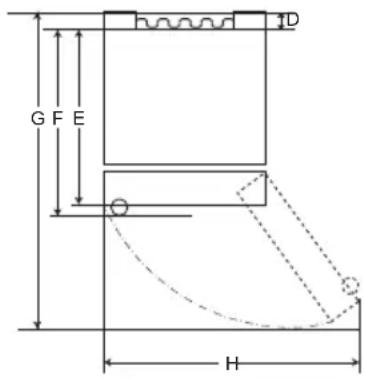
text_image
G F E H DType B
text_image
Labeled diagram of a refrigerator interior showing numbered compartments and storage areastext_image
88°C -88°C Fridge ←① I *Express Cool ←② Freezer ←③ I *Express Freeze ←④ Eco Friendly ←⑤ I *Wi-Fi ←⑥ I *Lock ←⑦ *Extra Function: Hold 3 seconds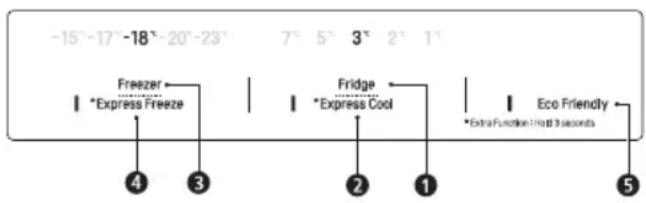
text_image
-15°-17°-18°-20°-23° 7° 5° 3° 2° 1° Freezer Express Freeze Fridge Express Cool Extra Function Hot 3 seconds 4 3 2 1 Eco Friendly 5② * Express Cool (Froid express)
4 * Express Freeze (Congélation express)
text_image
Diagram showing a hand holding a cup inside a container with liquid, labeled with number 1ATTENTION
natural_image
Line drawing of a toilet with a scroll wheel (no text or symbols)natural_image
Line drawing of a container being poured into a tray with a handle (no text or symbols)⚠ AVERTISSEMENT
text_image
Technical diagram showing a mechanical assembly with numbered components and directional arrows indicating motion or movement.text_image
Diagram showing a mechanical assembly with numbered components and directional arrows, likely illustrating a motion or assembly process.natural_image
Line drawing of a refrigerator interior showing the shelf and drawer (no text or symbols)natural_image
Line drawing of a refrigerator interior showing the shelf and drawer (no text or symbols)Autres fonctions
Application LG ThinQ
text_image
Diagram showing hand finger pressing up and pointing to a circular arrow symbol with upward arrowstext_image
Diagram showing a hand interacting with a Wi-Fi icon and a Wi-Fi symbol, indicating wireless signal interaction.REMARQUE
natural_image
Illustration of two hands holding a rectangular object with upward arrows indicating motion or force (no text or symbols)natural_image
Illustration of a hand pressing down on a rectangular object with a downward arrow (no text or symbols)natural_image
Illustration of a hand holding a U-shaped object with an arrow pointing to it, no text or symbols presenttext_image
Diagram showing a hand holding a tray with two labeled arrows indicating direction of movement or force, numbered 1 and 2.natural_image
Diagram of a mechanical component with an arrow indicating rotational motion (no text or symbols)ATTENTION
natural_image
Illustration of hands holding a tablet with a magnified view showing a grid pattern (no text or symbols)natural_image
Illustration of hands using a folding paper or folding stand to lift a flat sheet (no text or symbols present)natural_image
Illustration of hands using a tool to adjust or install a component, with an inset showing magnified detail (no text or symbols)natural_image
Illustration of hands installing a panel with an arrow and magnified detail showing internal components (no text or symbols)natural_image
Diagram of a door handle with an arrow indicating clockwise motion (no text or symbols)natural_image
Simple line drawing of a device with a hand holding a paper airplane (no text or symbols)natural_image
Diagram showing a container with a handle and a magnified inset of a side table (no text or symbols)SIGURNOSNE UPUTE ....3
VAŽNE SIGURNOSNE UPUTE 3
Zbrinjavanje starog uređaja....10
POSTAVLJANJE....11
Dimenzije i slobodan prostor 11
Temperatura okoline 11
Pribor 12
Preokretanje vrata 12
VAŽNE SIGURNOSNE UPUTE

UPOZORENJE
text_image
G F E D HVrsta A
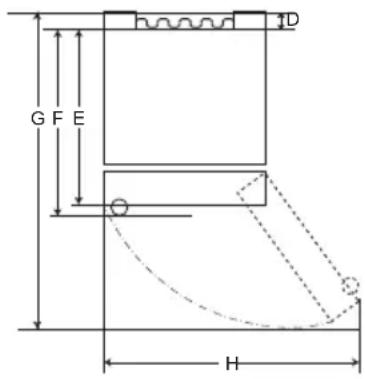
text_image
G F E HVrsta B
| Vrsta A Vrsta B | ||||||||
| Usađena ručka Metalna ručka | Usađena ručka | Metalna ručka | ||||||
| Veličina [mm] | ||||||||
| A | 595 595 5 | 95 595 595 | 595 595 595 | |||||
| B | 1860 2030 | 1860 2030 | 1860 | 2030 18 | 60 2030 | |||
| C | 675 675 7 | 12 712 682 | 682 718 718 | |||||
| D | 9 | 9 | 9 | 9 | 15 | 15 | 15 | 15 |
| E | 667 667 6 | 67 667 667 | 667 667 667 | |||||
| F | - | - | 703 | 703 | - | - | 703 | 703 |
| G | 1124 | 1124 | 1124 | 1124 | 1130 | 1130 | 1130 | 1130 |
| H | 995 | 995 | 995 | 995 | 995 | 995 | 995 | 995 |
Temperatura okoline
- Uređaj je dizajniran za rad u ograničenom rasponu temperature okoline, ovisno o klimatskoj zoni.
- Na unutarnju temperaturu uređaja može utjecati položaj uređaja, temperatura okoline, učestalost otvaranja vrata i slično.
- Klimatski razred naznačen je na tipskoj naljepnici uređaja.
| Klimatski razred | Raspon temperature okoline °C |
| SN (Produženo Umjereno) | +10 – +32 |
| N (Umjereno) | +16 – +32 |
| ST (Suptropsko) | +16 – +38 |
| T (Tropsko) | +16 - +43 / +10 - +43* |
text_image
Labeled diagram of a refrigerator interior showing numbered compartments and doors① Jedinica za pametnu dijagnozu (*)
text_image
88°C -88°C Fridge Express Cool Freezer Express Freeze Eco Friendly Wi-Fi Lock Extra Function: Hold 3 seconds① Fridge Temperature (Temperatura hladnjaka)
- Ovim se postavlja ciljna temperatura hladnjaka.
② * Express Cool (Brzo hlađenje)
- Ovim se postavljaju funkcije Brzog hlađenja.
③ Freezer Temperature (Temperatura zamrzivača)
- Ovim se postavlja ciljna temperatura zamrzivača.
4 * Express Freeze (Brzo zamrzavanje)
- Ovim se postavljaju funkcije Brzog zamrzavanja.
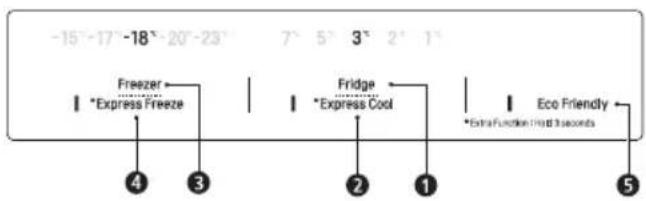
text_image
-15°-17°-18°-20°-23° Freezer Express Freeze Fridge Express Cool Extra Function Impact 3 seconds Eco Friendly 4 3 2 1 5⑤ Eco Friendly (Ekološki način)
text_image
Diagram showing a hand holding a container inside a transparent container with liquid, labeled with number 1▲ OPREZ
natural_image
Line drawing of a toilet with a scroll wheel (no text or symbols)2 Napunite spremnik vode pitkom vodom i zatvorite čep (mali poklopac).
- Spremnik vode može sadržavati do 2,3 L vode.
▲ OPREZ
- Nemojte dopuštati pristup spremniku dispenzera djeci. Ako dijete ispusti spremnik dispenzera vode dok je pun vode, može doći do ozljede. Nemojte puniti spremnik vode pićima koja nisu voda i nemojte ga puniti vrućom vodom.
- Nemojte upotrebljavati prekomjernu silu i nemojte udarati uređaj prilikom uklanjanja ili pripajanja spremnika dispenzera vode. Tako možete oštetiti uređaj ili se ozlijediti.
NAPOMENA
- Prije upotrebe spremnika dispenzera vode nakon postavljanja uređaja, spremnik treba oprati prije nego ga napunite vodom.
- Provjerite je li spremnik dispenzera vode ispravno postavljen na uređaj. Ako nije ispravno pripojen, voda može curiti iz spremnika u uređaj.
natural_image
Line drawing of a container being poured into a tray with a handle (no text or symbols)⚠ UPOZORENJE
- Napunite isključivo vodom za piće.
OPREZ
text_image
Technical diagram showing a mechanical assembly with numbered components and directional arrows indicating motion or movement.② za pohranu povrća. (Preporučeno)
3 za pohranu ribe.
4 za pohranu mesa.
NAPOMENA
text_image
Diagram showing a mechanical assembly with numbered components and directional arrows indicating motion or movement.2 za pohranu povrća. (Preporučeno)
3 za spremanje voća.
NAPOMENA
• (*): Ova se značajka razlikuje ovisno o kupljenom modelu.
Sklopiva polica
Više predmete, kao što su veliki spremnici i boce, pohranite tako da prednju polovicu police gurnete ispod stražnje polovice police. Povucite prednji dio police prema naprijed za vraćanje police u izvorno stanje.
1 Podignite prednju stranu police i pomaknite stražnju stranu police.
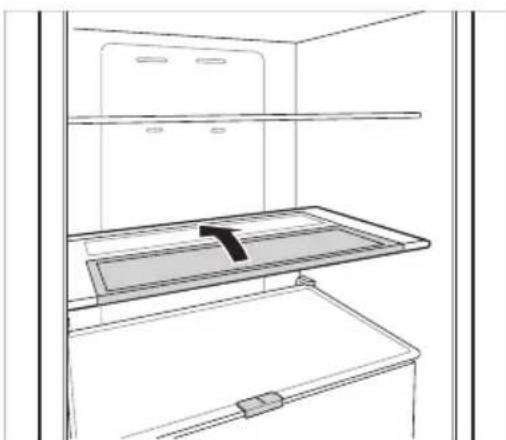
natural_image
Line drawing of a refrigerator interior showing storage tray and shelf (no text or symbols)2 Podignite prednju stranu police i pomaknite je ispod njezine stražnje strane. Iz tog položaja obje strane police mogu se podignuti za oslobadanje više prostora.
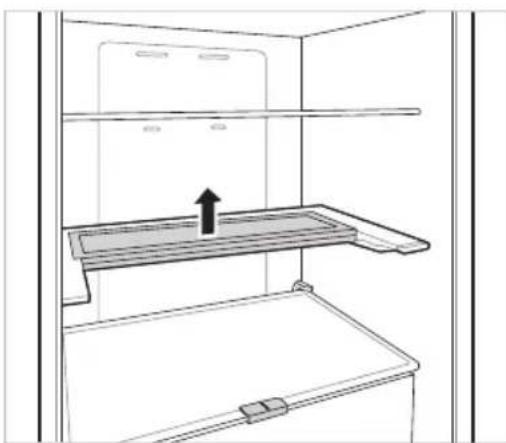
natural_image
Line drawing of a refrigerator interior showing the door, shelf, and drawer (no text or symbols)Ostale funkcije
Alarm za otvorena vrata
text_image
Diagram showing hand finger pressing a circle with directional arrows, next to a circular arrow indicating rotation.3 Povežite svoj pametni telefon s bežičnim usmjerivačem.
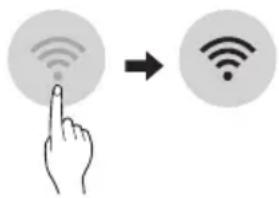
text_image
Diagram showing a hand pointing at a Wi-Fi icon to indicate wireless signal transformationNAPOMENA
- Da biste provjerili Wi-Fi vezu, provjerite svijetli ikona 📞 na upravljačkoj ploči.
- Uređaj podržava samo Wi-Fi mreže od 2,4 GHz. Da biste provjerili mrežnu frekvenciju, obratite se davatelju internetskih usluga ili vidite priručnik za bežični usmjerivač.
- LG ThinQ nije odgovoran za bilo kakve probleme mrežne veze ili bilo kakve pogreške, kvarove ili greške uzrokovane mrežnom vezom.
- Ako uređaj ima problema pri povezivanju s Wi-mrežom, možda je predaleko od usmjernika (router). Nabavite Wi-Fi repetitor (proširivač raspona) kako biste poboljšali jačinu Wi-Fi signala.
- Wi-Fi veza se možda neće uspostaviti ili može biti prekinuta zbog okoline kućne mreže.
- Mrežna veza možda neće ispravno raditi, ovisr o davatelju internetskih usluga.
- Okolno bežično okruženje može uzrokovati spori rad bežične mreže.
- Uređaj se ne može registrirati zbog problema s bežičnim prijenosom signala. Isključite uređaj i pričekajte oko minutu prije ponovnog pokušaja.
- Ako je na bežičnom usmjerivaču uključen vatrozid (firewall), onemogućite vatrozid ili dodajte izuzetak.
-
Naziv bežične mreže (SSID) trebao bi biti kombinacija latiničnih slova i brojeva. (Nemojte koristiti posebne znakove)
-
Korisničko sučelje (UI) pametnog telefona može varirati ovisno o mobilnom operativnom sustavu (OS) i proizvođaču.
- Ako je sigurnosni protokol usmjerivača podešen na WEP možda nećete moći postaviti mrežu. Promijenite ga na druge sigurnosne protokole (preporučuje se WPA2) i ponovno registrirajte proizvod.
2 Pritisnite gumb Eco Friendly.
3 Ako vrata ostanu otvorena dulje od 60 sekundi, zatvorite vrata i ponovite 1. i 2. korak.
4 Tartsa a telefont a hangszóró lyukhoz. Pritisnite i držite gumb Freezer tijekom 3 sekunde držeći telefon ispred zvučnika.
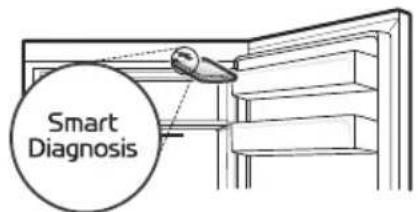
text_image
Smart Diagnosisnatural_image
Illustration of two hands holding a rectangular object with upward arrows indicating motion or force (no text or symbols)natural_image
Illustration of a hand pressing down on a rectangular mechanical component (no text or symbols)natural_image
Illustration of a hand holding a U-shaped object with an arrow pointing to it, no text or symbols presentČišćenje police Uklanjanje police hladnjaka
Podignite stražnji rub police hladnjaka i zatim ga izvucite.
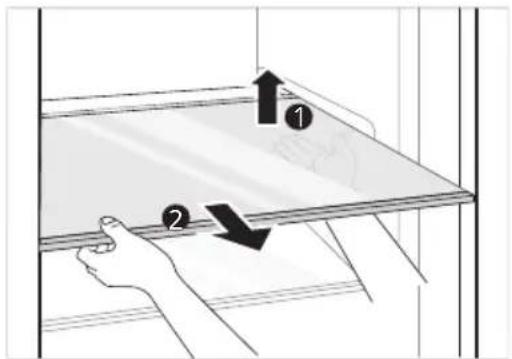
text_image
Diagram showing a hand holding a tray with two labeled arrows indicating direction, likely illustrating a physics or engineering concept.Umetanje police hladnjaka
Umetnite policu redoslijedom suprotnim od redoslijeda uklanjanja.
Čišćenje ladice za povrće Uklanjanje ladice za povrće
1 Izvadite sadržaj ladice. Držite ručku ladice za povrće i izvucite je do kraja sve dok se ne zaustavi.
natural_image
Diagram of a mechanical component with an arrow indicating rotational motion (no text or symbols)OPREZ
- Imajte na umu da težina spremljene hrane može uzrokovati ozljede prilikom uklanjanja ladice za povrće.
Ponovno postavljanje ladice za povrće
Umetnite policu za povrće redoslijedom suprotnim od redoslijeda uklanjanja.
natural_image
Illustration of hands holding a rectangular object with a circular patterned inset, no text or symbols present2 Uklonite poklopac za održavanje hrskavosti tako da ga izvučete.
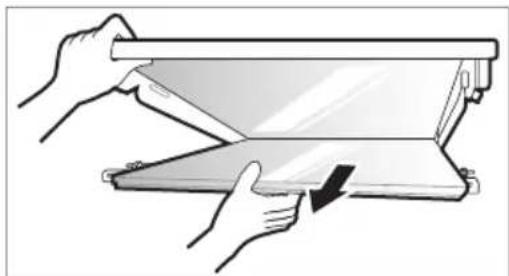
natural_image
Illustration of hands using a folding paper or folding machine to lift a slide (no text or symbols visible)natural_image
Illustration of hands using a tool to adjust or install a component, with an inset showing a close-up of the component (no text or symbols present)2 Umetnite izbočenja ispred poklopca za održavanje hrskavosti u utore ispred police i gurnite poklopac za održavanje hrskavosti prema gore za pripajanje.
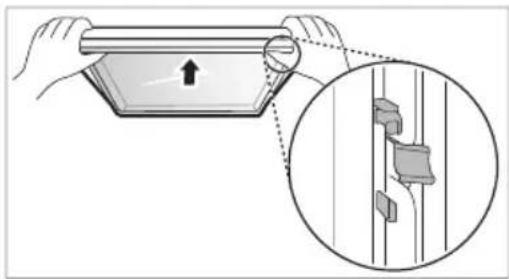
natural_image
Illustration of a hand holding a rectangular object with an arrow, alongside a magnified inset showing a close-up of a mechanical component (no text or symbols)Čišćenje ladice zamrzivača
natural_image
Diagram of a door handle with an arrow indicating clockwise motion (no text or symbols)Umetanje ladice zamrzivača
Umetnite policu zamrzivača redoslijedom suprotnim od redoslijeda uklanjanja.
Čišćenje dispenzera za vodu Čišćenje pladnja dispenzera
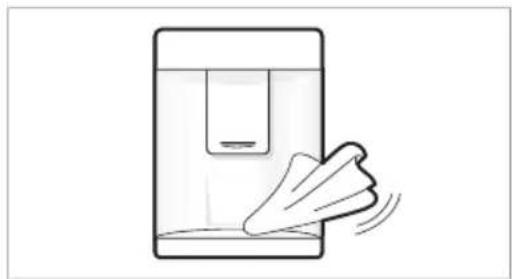
natural_image
Simple line drawing of a device with a cloth and a paper airplane, no text or symbols present.natural_image
Diagram showing a container with liquid and a magnified inset of a mechanical component (no text or symbols)| Simptomi Razlozi i rješenja | |
| Uređaj ne hladi ili ne zamrzava. | Je li došlo do prekida napajanja?Provjerite napajanje drugih uređaja. |
| Je li strujni utikač isključen iz utičnice?Išpravno priključite strujni utikač u utičnicu. | |
| Možda je pregorio osigurač u vašem domu ili se aktivirao prekidač strujnog kruga. Ili je uređaj priključen na GFCI utičnicu (eng. Ground Fault Circuit Interrupter, prekidač kruga uzemljenja), s prekidač strujnog kruga utičnice je iskočio.Provjerite glavni električni razvodni ormarić i zamijenite osigurač ili resetirajte prekidač strujnog kruga. Ne povećavajte kapacitet osigurač.Ako je problem preopterećenost strujnog kruga, popravak prepustite ovlaštenom električaru.Resetirajte prekidač strujnog kruga na GFCI. Ako se problem nastavi obratite se električaru. | |
| Uređaj slabo hladi ili zamrzava. | Je li temperatura hladnjaka ili zamrzivača postavljena na najtopliju postavku?Postavite temperaturu hladnjaka ili zamrzivača na „Srednje”. |
| Je li uređaj izložen izravnom sunčevom svjetlu ili se nalazi blizu predmeta koji proizvode toplinu, kao što su štednjak ili grijač?Provjerite prostor na kojem je uređaj postavljen te ga ponovno postavite podalje od predmeta koji proizvode toplinu. | |
| Jeste li u uređaj stavili vruću hranu koju niste prethodno ohladili?Ohladite vruću hranu prije nego što je stavite u hladnjak ili zamrzivač. | |
| Jeste li stavili previše hrane?Održavajte odgovarajuću količinu slobodnog prostora između namirnica. | |
| Jesu li vrata uređaja posve zatvorena?Zatvorite vrata do kraja i pobrinite se da spremljena hrana ne smeta vratima. | |
| Ima li dovoljno prostora oko uređaja?Prilagodite položaj na kojem je postavljen da biste osigurali dovoljno prostora oko uređaja. | |
| Uređaj ima neugodan miris. | Je li temperatura hladnjaka ili zamrzivača postavljena na „Toplo”?Postavite temperaturu hladnjaka ili zamrzivača na „Srednje”. |
| Jeste li stavili hranu jakoga mirisa?Hranu s jakim mirisom čuvajte u dobro zatvorenim posudama. | |
| Je li se povrće ili voće pokvarilo u ladici?Bacite gnjilo povrće i očistite ladicu za povrće. Nemojte predugo čuvati povrće u ladici za povrće. | |
| Unutrašnja žarulja u uređaju ne svijetli. | Je li unutrašnja žarulja u uređaju isključena?Korisnicima nije jednostavno zamijeniti unutrašnju žarulju u uređaju jer se ne servisira. Ako unutrašnja žarulja ne svijetli, obratite se informacijskom centru za korisnike tvrtke LG Electronics. |
| Vrata uređaja nisu čvrsto zatvorena. | Je li uređaj nagnut prema naprijed?Podesite prednje nožice kako biste malo podigli prednju stranu. |
| Jesu li police pravilno sastavljene?Ponovno namjestite police ako je to potrebno. | |
| Jeste li presnažno zatvorili vrata?Ako primijenite previše sile ili brzine prilikom zatvaranja vrata, ona mogu nakratko ostati otvorena prije zatvaranja. Pripazite da ne gurnete vrata presnažno. Nježno zatvorite vrata. | |
| Vrata proizvoda teško se otvaraju. | Jeste li otvorili vrata odmah nakon što ste ih zatvorili?Ako pokušate otvoriti vrata uređaja unutar 1 minute nakon zatvaranja, možda ćete imati poteškoća zbog pritiska u uređaju. Pokušajte otvoriti vrata uređaja ponovno za nekoliko minuta kada se unutrašnji pritisak ujednači. |
| Kondenzacija se javlja u uređaju ili na dnu ladice za povrće. | Jeste li u uređaj stavili vruću hranu koju niste prethodno ohladili?Ohladite vruću hranu prije nego što je stavite u hladnjak ili zamrzivač. |
| Jeste li vrata uređaja ostavili otvorena?Kondenzacija će nestati kada zatvorite vrata uređaja, a kapljice možete i obrisati suhom krpom. | |
| Otvarate li i zatvarate vrata uređaja prečesto?Kondenzacija se može pojaviti zbog razlike u temperaturi koja dolazi izvana. Vlagu obrišite suhom krpom. | |
| Jeste li staviti toplu ili vlažnu hranu koju niste zatvorili u spremnik unutra?Hranu čuvajte u pokrivenim ili dobro zatvorenim posudama. | |
| U zamrzivaču se stvorio led. | Jesu li vrata dobro zatvorena?Provjerite blokira li neka hrana vrata iznutra i pobrinite se da su vrata čvrsto zatvorena. |
| Jeste li u uređaj stavili vruću hranu koju niste prethodno ohladili?Ohladite vruću hranu prije nego što je stavite u hladnjak ili zamrzivač. | |
| U zamrzivaču se stvorio led. | Je li ulaz ili izlaz zraka zamrzivača blokiran?Pobrinite se da ulaz ili izlaz zraka nije blokiran kako bi zrak mogao slobodno kružiti u unutrašnjosti. |
| Je li zamrzivač prepun?Održavajte odgovarajuću količinu slobodnog prostora između namirnica. | |
| U unutrašnjosti ili na vanjštini uređaja stvorio se led ili kondenzacija. | Jeste li prečesto otvarali i zatvarali vrata uređaja ili su vrata uređaja neispravno zatvorena?Led ili kondenzacija mogu se pojaviti ako zrak izvana uđe u uređaj. |
| Je li okruženje uređaja vlažno?Kondenzacija se može pojaviti na vanjskoj strani uređaja ako je prostor u kojem je on postavljen previše vlažan ili pak ako je visok postotak vlage u zraku, primjerice za kišnih dana. Vlagu obrišite suhom krpom. | |
| Uređaj je bučan i proizvodi neuobičajene zvukove. | Je li uređaj postavljen na slaboj podlozi ili nije ravan?Postavite uređaj na čvrst i ravan pod. |
| Dodiruje li stražnja strana uređaja zid?Prilagodite položaj na kojem je postavljen da biste osigurali dovoljno prostora oko uređaja. | |
| Ima li razasutih predmeta iza uređaja?Uklonite razasute predmete koji se nalaze iza uređaja. | |
| Nalazi li se na uređaju neki predmet?Uklonite predmet koji se nalazi na uređaju. | |
| Zagrijana je bočna ili prednja strana uređaja. | Cijevi za zaštitu od kondenzacije nalaze se na tom području kako bi se smanjila kondenzacija oko područja vrata.Cijev za otpuštanje topline koja sprječava kondenzaciju postavljena je na prednjoj i bočnoj strani uređaja. Možete osjetiti da je posebno zagrijana nakon postavljanja uređaja ili ljeti. Ovo nije problem i sasvim je uobičajeno. |
| Ima vode u uređaju ili izvan njega. | Je li došlo do istjecanja vode oko uređaja?Provjerite istječe li voda iz umivaonika ili nekog drugog mjesta. |
| Ima li vode u donjem dijelu uređaja?Provjerite je li voda nastala zbog odmrzavanja zamrznute hrane ili lomljenja ili ispuštanja posude. | |
| Zvukovi škljocanja | Kontrola odmrzavanja škljocnut će kada započne i završi ciklus automatskog odmrzavanja. Kontrola termostata (ili kontrola uređaja u nekim modelima) također će škljocnuti kada ciklus započne i završi.Uobičajen rad |
| Zvukovi zveckanja | Zvuk zveckanja može se stvarati zbog protoka u uređaju, cijevi za vodu na stražnjoj strani uređaja (samo za modele s cijevima) ili predmeta postavljenih na uređaj ili oko njega.Uobičajen rad |
| Uređaj ne stoji ravno na tlu.Pod je nedostatne nosivosti ili je neravan, ili treba podesiti nožice za poravnanje. Vidi odjeljak za poravnanje vrata. | |
| Uređaj s linearnim kompresorom premješten je tijekom rada.Uobičajeni rad. Ako kompresor ne prestane zveckati nakon 3 minute, isključite napajanje uređaja, potom ga ponovno uključite. | |
| Simptomi Razlozi | i rješenja |
| Šumeći zvukovi | Motor ventilatora isparivača pokreće zrak koji kruži kroz odjeljak hladnjaka i zamrzivača.Uobičajen rad |
| Ventilator kondenzatora gura zrak preko kondenzatora.Uobičajen rad | |
| Zvukovi klokotanja | Rashladno sredstvo protječe kroz sustav za hlađenjeUobičajen rad |
| Zvukovi pucketanja | Stezanje i rastezanje unutrašnjih stijenki zbog promjena temperature.Uobičajen rad |
| Vibriranje | Ako bočna ili stražnja strana uređaja dodiruje ormarić ili zid, uobičajene vibracije mogu uzrokovati jasne zvukove.Da biste otklonili zvukove, pobrinite se da bočne strane i stražnja strana ne dodiruju zid ili ormarić. |
| Vaš kućanski aparat i pametni telefon nisu spojeni na Wi-Fi mrežu. | Lozinka za Wi-Fi mrežu na koju se pokušavate spojiti nije ispravna.Pronadite Wi-Fi mrežu na koju je spojen Vaš pametni telefon i uklonite je, pa zatim registrirajte svoj uređaj na LG ThinQ. |
| Mobilni podaci za Vaš pametni telefon su uključeni.Isključite značajku Mobilni podaci na pametnom telefonu i registrirajte uređaj putem Wi-Fi mreže. | |
| Naziv bežične mreže (SSID) je pogrešno postavljen.Naziv bežične mreže (SSID) trebao bi biti kombinacija latiničnih slova i brojeva. (Nemojte koristiti posebne znakove) | |
| Frekvencija usmjerivača nije 2,4 GHz.Podržani su samo usmjerivači frekvencije od 2,4 GHz. Postavite bežični usmjerivač na 2,4 GHz i spojite uređaj na bežični usmjerivač. Za provjeru frekvencije usmjerivača, kontaktirajte davatelja internetskih usluga ili proizvođača usmjerivača. | |
| Udaljenost između uređaja i bežičnog usmjerivača je prevelika.Ako je udaljenost između uređaja i bežičnog usmjerivača prevelika, signal može biti preslab i veza se možda neće uspješno konfigurirati. Premjestite usmjerivač tako da je bliže uređaju. | |
Briga o kupcima i servis
Kontaktirajte LG Electronics informacijski centar za kupce.
- Da biste pronašli informacije o autoriziranom servisnom centru tvrtke LG, posjetite naše web-mjesto na adresi www.lg.com.
- Samo bi kvalificirano servisno osoblje iz autoriziranog servisnog centra tvrtke LG trebalo rastavljati, popravljati ili mijenjati uređaj.
- Za kupnju rezervnih dijelova obratite se informacijskom centru za korisnike tvrtke LG Electronics ili nam se obratite putem web-mjesta na adresi www.lg.com.
- Rezervni dijelovi navedeni u Uredbi EU-a 2019/2019 dostupni su 7 godina (samo su brtve vrata dostupne 10 godina).
NAPOMENA
text_image
G F E D H'A' típus
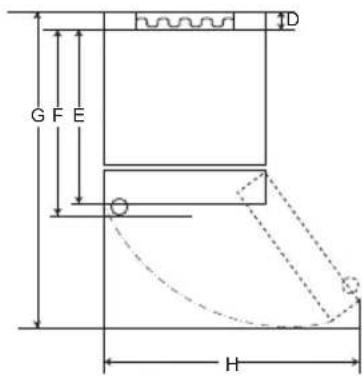
text_image
G F E D H'B' típus
| 'A' típus 'B' típus | ||||||||
| Zseb fogantyú Rúd fogantyú | Zseb fogantyú | Rúd fogantyú | ||||||
| Méret [mm] | ||||||||
| A | 595 595 5 | 95 595 595 | 595 595 595 | |||||
| B | 1860 | 2030 | 1860 | 2030 | 1860 | 2030 | 1860 | 2030 |
| C | 675 675 7 | 12 712 682 | 682 718 718 | |||||
| D | 9 | 9 | 9 | 9 | 15 | 15 | 15 | 15 |
| E | 667 667 6 | 67 667 667 | 667 667 667 | |||||
| F | - | - | 703 | 703 | - | - | 703 | 703 |
| G | 1124 | 1124 | 1124 | 1124 | 1130 | 1130 | 1130 | 1130 |
| H | 995 995 9 | 95 995 995 | 995 995 995 | |||||
text_image
Labeled diagram of a refrigerator interior showing numbered compartments and doorstext_image
88°C -88°C Fridge ←① I *Express Cool ←② Freezer ←③ I *Express Freeze ←④ Eco Friendly ←⑤ I *Wi-Fi ←⑥ I *Lock ←⑦ *Extra Function: Hold 3 seconds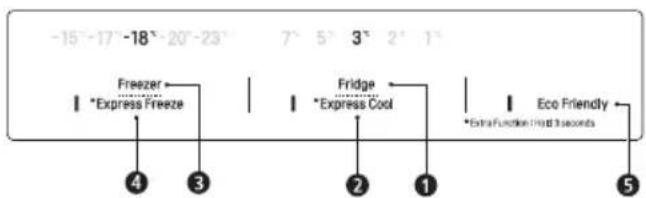
text_image
-15°-17° -18°-20°-23° 7° 5° 3° 2° 1° Freezer Express Freeze Fridge Express Cool Extra Function Held 3 seconds Eco Friendly ④ ③ ② ① ⑤text_image
Diagram showing a hand pouring liquid into a container with label '1' pointing to the container.VIGYÁZAT
natural_image
Line drawing of a toilet with a scroll wheel (no text or symbols)natural_image
Line drawing of a container being poured into a tray with a handle (no text or symbols)⚠ FIGYELMEZTETÉS
text_image
Technical diagram showing a mechanical assembly with numbered components and directional arrows indicating motion or alignment.text_image
Diagram showing a mechanical assembly with numbered components and directional arrows, likely illustrating a motion or assembly process.natural_image
Line drawing of a refrigerator interior showing shelves, drawer, and storage tray (no text or symbols)natural_image
Line drawing of a refrigerator interior showing a shelf with an upward arrow indicating storage or movement (no text or symbols)Egyéb funkciók
text_image
Diagram showing hand finger pressing a circle with directional arrows, next to a circular arrow indicating rotation.text_image
Diagram showing a hand pointing at a Wi-Fi icon with signal arrows, indicating wireless connectivity or payment process.MEGJEGYZÉS
natural_image
Illustration of two hands holding a rectangular object with upward arrows indicating motion or force (no text or symbols)natural_image
Illustration of a hand pressing down on a plastic container with a downward arrow indicating force (no text or symbols)natural_image
Illustration of a hand holding a mechanical component with a downward arrow indicating force or direction (no text or symbols)A polc tisztítása
text_image
Diagram showing two hands holding a tray with labeled arrows and numbered positions 1 and 2, indicating movement or process steps.natural_image
Diagram of a mechanical component with an arrow indicating motion, no text or symbols presentVIGYÁZAT
natural_image
Illustration of hands holding a rectangular object with a circular patterned inset, no text or symbols presentnatural_image
Illustration of hands using a folding paper or folding device to lift a flat sheet (no text or symbols visible)natural_image
Illustration of hands using a tool to adjust or install a flat panel, with an inset showing the same component (no text or symbols present)natural_image
Illustration of hands installing a panel with an arrow and magnified detail showing internal components (no text or symbols)natural_image
Diagram of a door handle with an arrow indicating clockwise motion (no text or symbols)natural_image
Simple line drawing of a hand holding a small object inside a container (no text or symbols)natural_image
Diagram showing a container with liquid and a magnified inset of a tray (no text or symbols)text_image
G F E H DTipo A
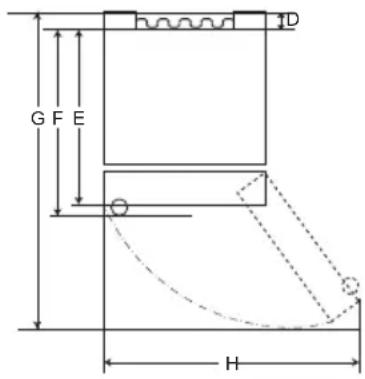
text_image
G F E H DTipo B
| Tipo A Tipo B | ||||||||
| Maniglia a tasca Ma | Maniglia a barra | Maniglia a tasca | Maniglia a barra | |||||
| Dimensioni [mm] | ||||||||
| A | 595 595 5 | 95 595 595 | 595 595 595 | |||||
| B | 1860 2030 | 1860 2030 | 1860 | 2030 1860 | 2030 | |||
| C | 675 675 7 | 12 712 682 | 682 718 718 | |||||
| D | 9 | 9 | 9 | 9 | 15 | 15 | 15 | 15 |
| E | 667 667 6 | 67 667 667 | 667 667 667 | |||||
| F | - | - | 703 | 703 | - | - | 703 | 703 |
| G | 1124 | 1124 | 1124 | 1124 | 1130 | 1130 | 1130 | 1130 |
| H | 995 995 9 | 95 995 995 | 995 995 995 | |||||
Temperatura ambiente
text_image
Labeled diagram of a refrigerator interior showing numbered compartments and doorstext_image
88°C -88°C Fridge ←① I *Express Cool ←② Freezer ←③ I *Express Freeze ←④ Eco Friendly ←⑤ I *Wi-Fi ←⑥ Lock ←⑦ *Extra Function: Hold 3 seconds① Fridge Temperature (Temperatura frigorifero)
text_image
Diagram showing a hand holding a cup inside a container with liquid, labeled with number 1ATTENZIONE
natural_image
Line drawing of a toilet with a handle and lid (no text or symbols)natural_image
Line drawing of a container being poured into a tray with a handle (no text or symbols)AVVERTENZA
text_image
Technical diagram showing a mechanical assembly with numbered components and directional arrows indicating motion or alignment.text_image
Diagram showing a mechanical assembly with numbered components and an inset view of a shaft connection mechanism.natural_image
Line drawing of a refrigerator interior showing the front shelf and side arm (no text or symbols)natural_image
Line drawing of a refrigerator interior showing the door, drawer, and shelf (no text or symbols)Altre funzioni
text_image
Diagram showing hand finger pressing up and pointing to a circular arrow symbol with upward arrows3 Collegare lo smartphone al router wireless.
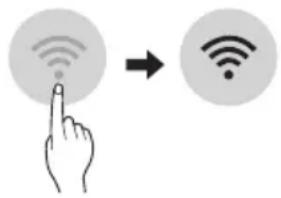
text_image
Diagram showing a hand interacting with a Wi-Fi icon to interact with a Wi-Fi symbol, indicating wireless signal interaction.NOTA
natural_image
Illustration of two hands holding a rectangular object with upward arrows indicating motion or force (no text or symbols)natural_image
Illustration of a hand pressing down on a plastic container with a downward arrow (no text or symbols)natural_image
Illustration of a hand holding a small mechanical component with an arrow indicating force or direction (no text or symbols present)Pulizia del ripiano
text_image
Diagram showing a hand holding a ruler with two labeled arrows indicating direction of movement or force, and numbered labels ① and ②.natural_image
Diagram of a mechanical component with an arrow indicating rotational motion (no text or symbols)ATTENZIONE
natural_image
Illustration of hands holding a rectangular object with a circular patterned inset, no text or symbols presentnatural_image
Illustration of hands folding a flatboard with a downward arrow indicating compression (no text or symbols)natural_image
Illustration of hands using a tool to adjust a panel, with an inset showing the same component (no text or symbols present)natural_image
Illustration of a hand holding a rectangular object with an arrow pointing upward, alongside a magnified inset showing a close-up of a mechanical component (no text or symbols)natural_image
Diagram of a mechanical component with an arrow indicating direction, no text or symbols presentnatural_image
Simple line drawing of a device with a cloth and a paper airplane, no text or symbols present.natural_image
Diagram showing a device with a circular component connected to a screen, and an inset close-up of a table with a lid (no text or symbols present)text_image
G F E D HA tipas
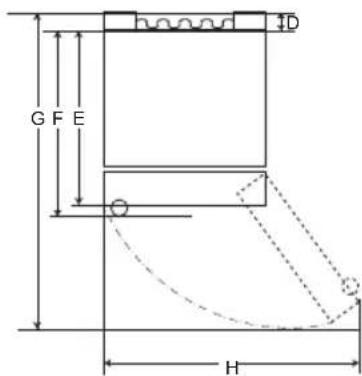
text_image
G F E H IDB tipas
| A tipas B tipas | ||||||||
| Jleista rankena lšs | ikišusi rankena | Jleista rankena | Išsikišusi rankena | |||||
| Dydis (mm) | ||||||||
| A | 595 595 5 | 95 595 595 | 595 595 595 | |||||
| B | 1860 2030 | 1860 2030 | 1860 | 2030 1860 | 2030 | |||
| C | 675 675 7 | 12 712 682 | 682 718 718 | |||||
| D | 9 | 9 | 9 | 9 | 15 | 15 | 15 | 15 |
| E | 667 667 6 | 67 667 667 | 667 667 667 | |||||
| F | - | - | 703 | 703 | - | - | 703 | 703 |
| G | 1124 | 1124 | 1124 | 1124 | 1130 | 1130 | 1130 | 1130 |
| H | 995 995 9 | 95 995 995 | 995 995 995 | |||||
text_image
Labeled diagram of a refrigerator interior showing numbered compartments and doors① Irenginys „Smart Diagnosis“ (*)
text_image
88°C -88°C Fridge ←① I *Express Cool ←② Freezer ←③ I *Express Freeze ←④ Eco Friendly ←⑤ I *Wi-Fi ←⑥ I *Lock ←⑦ *Extra Function: Hold 3 secondstext_image
Diagram showing a hand holding a container with liquid inside a container, labeled with number 1ATSARGIAI
natural_image
Line drawing of a toilet with a handle and ventilation slots (no text or symbols)natural_image
Line drawing of a container being poured into a tray with a handle (no text or symbols)⚠️ ISPÉJIMAS
text_image
Technical diagram showing a mechanical assembly with numbered components and directional arrows indicating motion or alignment.text_image
Diagram showing a mechanical assembly with labeled components and directional arrows, including numbered parts 1, 2, and 3.natural_image
Line drawing of a refrigerator interior showing the front shelf and side arm (no text or symbols)natural_image
Line drawing of a refrigerator interior showing the shelf and drawer (no text or symbols)Kitos funkcijos
text_image
Diagram showing hand finger pressing up and pointing to a circular arrow symbol with upward arrowstext_image
Diagram showing a hand pointing at a Wi-Fi icon to indicate wireless signal transformationPASTABA
natural_image
Illustration of two hands holding a rectangular object with upward arrows indicating movement or force (no text or symbols present)natural_image
Illustration of a hand pressing down on a rectangular object with a downward arrow indicating force or movement (no text or symbols)natural_image
Illustration of a hand inserting a component into a plastic housing (no text or symbols)text_image
Diagram showing two labeled arrows pointing to a screen with a hand holding the screen, likely illustrating a motion or movement process.natural_image
Diagram of a mechanical component with an arrow indicating rotational motion (no text or symbols)ATSARGIAI
natural_image
Illustration of hands holding a tablet with a grid pattern overlay and directional arrow (no text or symbols)natural_image
Illustration of hands folding a flatboard with a downward arrow indicating compression (no text or symbols)natural_image
Illustration of hands using a tool to adjust a flat panel, with an inset showing the same component (no text or symbols present)natural_image
Illustration of a hand holding a rectangular object with an arrow pointing upward, alongside a magnified inset showing a close-up of a mechanical component (no text or symbols)natural_image
Diagram of a door handle with an arrow indicating clockwise motion (no text or symbols)natural_image
Simple line drawing of a syringe with liquid and a shuttlecock, no text or symbols presentnatural_image
Diagram showing a container with a handle and an inset close-up of a mechanical component (no text or symbols)text_image
G F E D HA veids
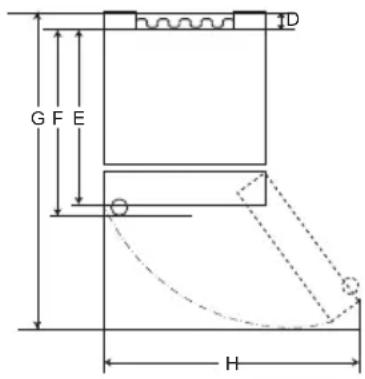
text_image
G F E H DB veids
| A tips B tips | ||||||||
| legremdēts rokturis Stienveida rokturis | legremdēts rokturis | Stienveida rokturis | ||||||
| Izmērs (mm) | ||||||||
| A | 595 595 595 595 595 595 595 | |||||||
| B | 1860 | 2030 | 1860 | 2030 | 1860 | 2030 | 1860 | 2030 |
| C6 | 76 676 712 712 682 682 718 718 | |||||||
| D | 9 | 9 | 9 | 9 | 15 | 15 | 15 | 15 |
| E6 | 67 667 667 667 667 667 667 667 | |||||||
| F | - | - | 703 | 703 | - | - | 703 | 703 |
| G | 1124 | 1124 | 1124 | 1124 | 1130 | 1130 | 1130 | 1130 |
| H9 | 95 995 995 995 995 995 995 995 | |||||||
text_image
Labeled diagram of a refrigerator interior showing numbered compartments and doorstext_image
88°C -88°C Fridge Express Cool Freezer Express Freeze Eco Friendly Wi-Fi Lock Extra Function: Hold 3 seconds① Fridge Temperature (Ledusskapja temperatūra)
natural_image
Simple line drawing of a hand pouring liquid into a container with a label pointing to the lid (no text or symbols on the diagram itself)⚠ UZMANĪBU!
natural_image
Line drawing of a toilet with a scroll wheel (no text or symbols)natural_image
Line drawing of a container being poured into a tray with a handle (no text or symbols)⚠ BRĪDINĀJUMS!
text_image
Technical diagram showing a mechanical assembly with numbered components and an inset magnified view highlighting a specific section.text_image
Diagram showing a mechanical assembly with labeled components and directional arrows indicating motion or movement.natural_image
Line drawing of a refrigerator interior showing the front shelf and side arm (no text or symbols)natural_image
Line drawing of a refrigerator interior showing the shelf and drawer (no text or symbols)Citas funkcijas
text_image
Diagram showing hand finger pressing up and pointing to a circular arrow symbol with upward arrowstext_image
Diagram showing a hand interacting with wireless signals to form a Wi-Fi symbol, indicating wireless signal transformation.PIEZIME
natural_image
Illustration of two hands holding a rectangular object with upward arrows indicating motion or force (no text or symbols)natural_image
Illustration of a hand pressing down on a plastic tray with a downward arrow indicating force or pressure (no text or symbols)natural_image
Illustration of a hand holding a U-shaped object with a downward arrow, no text or symbols presentPlauktu tīrīšana
text_image
Diagram showing two hands holding a rectangular object with labeled arrows and numbered parts, likely illustrating a mechanical or structural change.natural_image
Diagram of a mechanical component with an arrow indicating rotational motion (no text or symbols)⚠ UZMANĪBU!
natural_image
Illustration of hands holding a tablet with a grid pattern overlay and an arrow indicating compression (no text or symbols)natural_image
Illustration of hands holding a flatboard with a downward arrow indicating compression or disassembly (no text or symbols)natural_image
Illustration of hands using a tool to adjust a panel, with an inset showing the same component (no text or symbols present)natural_image
Illustration of a hand holding a rectangular object with an arrow, alongside a magnified inset showing a mechanical component (no text or symbols)natural_image
Diagram of a mechanical component with an arrow indicating direction, no text or symbols presentnatural_image
Simple line drawing of a hand holding a small object, no text or symbols presentnatural_image
Diagram showing a container with liquid and a magnified inset of a tray or shelf (no text or symbols)text_image
G F E D HТип А
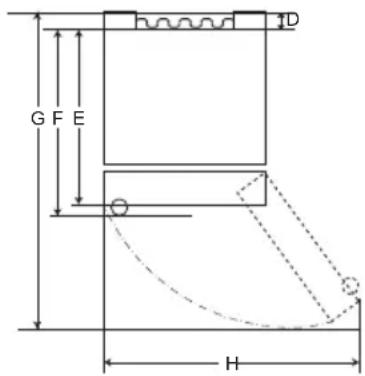
text_image
G F E HТип В
| Тип А Тип В | ||||||||
| Вградена рачка Шипка Рачка | Вградена рачка | Рачка-шипка | ||||||
| Големина [mm] | ||||||||
| A | 595 595 5 | 95 595 595 | 595 595 595 | |||||
| B | 1860 | 2030 | 1860 | 2030 | 1860 | 2030 | 1860 | 2030 |
| C6 | 76 676 71 | 2 712 682 6 | 82 718 | 718 | ||||
| D | 9 | 9 | 9 | 9 | 15 | 15 | 15 | 15 |
| E | 667 667 6 | 67 667 667 | 667 | 667 | 667 | |||
| F | - | - | 703 | 703 | - | - | 703 | 703 |
| G | 1124 | 1124 | 1124 | 1124 | 1130 | 1130 | 1130 | 1130 |
| H | 995 | 995 | 995 | 995 | 995 | 995 | 995 | 995 |
text_image
Labeled diagram of a refrigerator interior showing numbered compartments and doorstext_image
88°C -88°C Fridge ←① I *Express Cool ←② Freezer ←③ I *Express Freeze ←④ Eco Friendly ←⑤ I *Wi-Fi ←⑥ I *Lock ←⑦ *Extra Function: Hold 3 seconds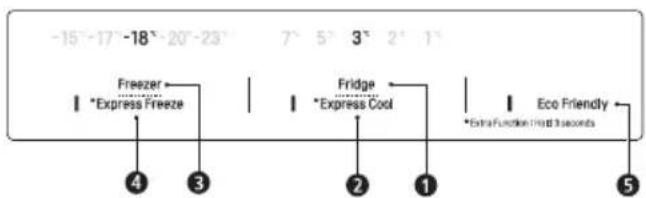
text_image
-15°-17° -18°-20°-23° 7° 5° 3° 2° 1° Freezer Express Freeze Fridge Express Cool Extra Function Held 3 seconds 4 3 2 1 Eco Friendlytext_image
Diagram showing a hand holding a container inside a transparent container, with label '1' pointing to the container.⚠️ ВНИМАНИЕ
natural_image
Line drawing of a toilet with a scroll wheel (no text or symbols)natural_image
Line drawing of a container being poured into a tray with a water-filled grid pattern (no text or symbols)⚠ПРЕДУПРЕДУВАЊЕ
text_image
Technical diagram showing a mechanical assembly with numbered components and directional arrows indicating motion or movement.text_image
Diagram illustrating a mechanical assembly with labeled components and directional arrows, including numbered annotations.natural_image
Line drawing of a refrigerator shelf with a tray and door (no text or symbols)natural_image
Line drawing of a refrigerator interior showing a shelf with an upward arrow indicating storage or ventilation (no text or symbols)Останати функции
text_image
Diagram showing hand finger pressing up and pointing to a circular arrow symbol with upward arrowstext_image
Diagram showing a hand interacting with a Wi-Fi icon and a Wi-Fi symbol, indicating wireless signal interaction.НАПОМЕНА
natural_image
Illustration of two hands holding a rectangular object with upward arrows indicating motion or force (no text or symbols)natural_image
Illustration of a hand pressing down on a rectangular plastic container with a downward arrow indicating force (no text or symbols)natural_image
Illustration of a hand holding a U-shaped object with an arrow pointing to it, no text or symbols presentЧистење на полицата
text_image
Diagram showing a hand pressing down on a surface with labeled arrows and numbered componentsnatural_image
Diagram of a mechanical component with an arrow indicating rotation or force (no text or symbols present)ВНИМАНИЕ
natural_image
Illustration of hands holding a tablet with a magnified view showing a grid pattern (no text or symbols)natural_image
Illustration of hands folding a rectangular object with a downward arrow indicating compression (no text or symbols)natural_image
Illustration of hands using a tool to adjust or install a slide, with an inset showing the same object (no text or symbols present)natural_image
Illustration of a hand holding a rectangular object with an arrow, alongside a magnified inset showing a close-up of a mechanical component (no text or symbols)natural_image
Diagram of a door handle with an arrow indicating direction (no text or symbols)natural_image
Simple line drawing of a device with a hand holding a tray, no text or symbols presentnatural_image
Diagram showing a container with liquid and a magnified inset of a tray (no text or symbols)SMART FUNCTIONS ......23
PROBLEEMOPLOSSING....30
text_image
G F E H DType A
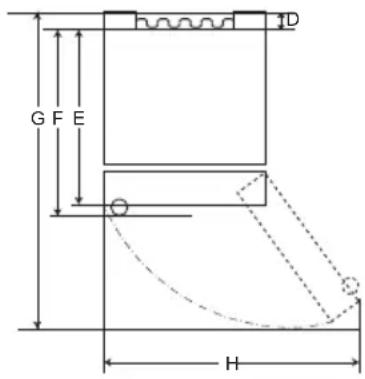
text_image
G F E H DType B
| Type A Type B | ||||||||
| Zaktype handvat Staaftype handvat | Zaktype handvat | Staaftype handvat | ||||||
| Grootte [mm] | ||||||||
| A | 595 595 595 | 595 595 595 | 595 595 595 | |||||
| B | 1860 2030 | 1860 2030 | 1860 | 2030 1860 | 2030 | |||
| C | 676 676 712 | 682 718 718 | ||||||
| D | 9 | 9 | 9 | 9 | 15 | 15 | 15 | 15 |
| E | 667 667 667 | 667 667 667 | 667 667 667 | |||||
| F | - | - | 703 | 703 | - | - | 703 | 703 |
| G | 1124 | 1124 | 1124 | 1124 | 1130 | 1130 | 1130 | 1130 |
| H | 995 995 995 | 995 995 995 | 995 995 995 | |||||
text_image
Labeled diagram of a refrigerator interior showing numbered compartments and doors① Smart Diagnosis unit (\*)
text_image
88°C -88°C Fridge ←① I *Express Cool ←② Freezer ←③ I *Express Freeze ←④ Eco Friendly ←⑤ I *Wi-Fi ←⑥ I *Lock ←⑦ *Extra Function: Hold 3 seconds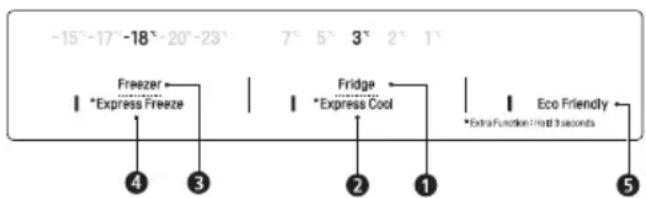
text_image
-15°-17°-18°-20°-23° 7° 5° 3° 2° 1° Freezer Express Freeze Fridge Express Cool Extra Function Hold 3 seconds 4 3 2 1 Eco Friendlytext_image
Diagram showing a hand holding a container with liquid inside a transparent container, labeled with number 1.LET OP
natural_image
Line drawing of a toilet with a handle and ventilation slots (no text or symbols)natural_image
Line drawing of a container being poured into a tray (no text or symbols)⚠ WAARSCHUWING
text_image
Technical diagram showing a mechanical assembly with numbered components and directional arrows indicating motion or alignment.text_image
Technical diagram showing a mechanical assembly with numbered components and directional arrows indicating motion or movement.natural_image
Line drawing of a refrigerator interior showing storage tray and shelf (no text or symbols)natural_image
Line drawing of a refrigerator interior showing the front shelf and side arm, with an arrow indicating direction (no text or symbols)Andere functies
text_image
Diagram showing hand finger pressing up and clicking a circle with an arrow symbol, next to a circular arrow pointing right.text_image
Diagram showing a hand pointing at a Wi-Fi icon with signal waves, followed by a right-pointing arrow to indicate wireless signal transformation.OPMERKING
natural_image
Illustration of two hands holding a rectangular object with upward arrows indicating motion or force (no text or symbols)natural_image
Illustration of a hand pressing down on a rectangular mechanical component with a downward arrow indicating force or motion (no text or symbols)natural_image
Illustration of a hand holding a small mechanical component with an arrow indicating force or direction (no text or symbols present)Het schap reinigen
text_image
Diagram showing two labeled arrows pointing to a screen with directional indicators, likely illustrating a physical or engineering concept.natural_image
Diagram of a mechanical component with an arrow indicating motion, no text or symbols presentLET OP
natural_image
Illustration of hands holding a rectangular object with a circular patterned inset, no text or symbols presentnatural_image
Illustration of hands using a folding or rolling device to lift a flat panel (no text or symbols visible)natural_image
Illustration of hands using a tool to adjust or install a component, with an inset magnified view showing detail (no text or symbols)natural_image
Illustration of hands installing a panel with an arrow and magnified detail showing internal components (no text or symbols)natural_image
Diagram of a door handle with an arrow indicating direction (no text or symbols)natural_image
Simple line drawing of a device with a hand holding a tray, no text or symbols presentnatural_image
Diagram showing a device with a magnified inset of its top view (no text or symbols present)text_image
G F E D HType A
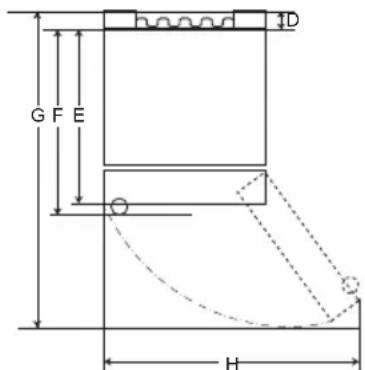
text_image
G F E H DType B
| Type A Type B | ||||||||
| Integrert håndtak Eksternt Håndtak | Integrert håndtak | Eksternt håndtak | ||||||
| Størrelse [mm] | ||||||||
| A | 595 595 5 | 95 595 595 | 595 595 595 | |||||
| B | 1860 2030 | 1860 2030 | 1860 | 2030 1860 2030 | ||||
| C | 676 676 7 | 12 712 682 | 682 718 718 | |||||
| D | 9 | 9 | 9 | 9 | 15 | 15 | 15 | 15 |
| E | 667 667 6 | 667 667 667 | 667 667 667 | |||||
| F | - | - | 703 | 703 | - | - | 703 | 703 |
| G | 1124 | 1124 | 1124 | 1124 | 1130 | 1130 | 1130 | 1130 |
| H | 995 995 9 | 995 995 995 | 995 995 995 | |||||
Omgivelsestemperatur
text_image
Labeled diagram of a refrigerator interior showing numbered compartments and doors① Smart Diagnosis-enhet (\*)
Anbefalinger for strømsparing
text_image
88°C -88°C Fridge Express Cool Freezer Express Freeze Eco Friendly Wi-Fi Lock Extra Function: Hold 3 seconds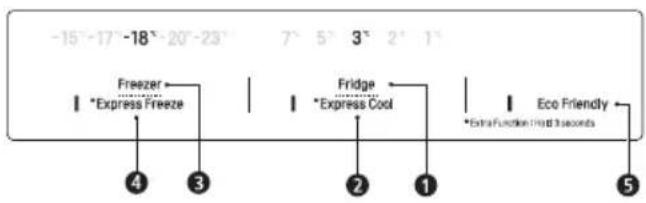
text_image
-15°-17° -18°-20°-23° 7° 5° 3° 2° 1° Freezer Express Freeze Fridge Express Cool Extra Function Help 3 seconds 4 3 2 1 Eco Friendly 5① Fridge Temperature (Kjøleskaptemperatur)
- Dette angir den ønskede temperaturen i kjøleskapet.
② * Express Cool (Ekspressnedkjøling)
text_image
Diagram showing a hand pouring liquid into a container with label '1' pointing to the container.
FARE
natural_image
Line drawing of a toilet with a scroll wheel (no text or symbols)natural_image
Line drawing of a container being poured into a tray with a handle (no text or symbols)ADVARSEL
text_image
Technical diagram showing a mechanical assembly with numbered components and directional arrows indicating motion or movement.text_image
Technical diagram showing a mechanical assembly with numbered components and directional arrows indicating motion or alignment.natural_image
Line drawing of a refrigerator interior showing the front shelf and side arm (no text or symbols)natural_image
Line drawing of a refrigerator interior showing the front shelf and side arm, with an arrow indicating upward motion (no text or symbols)Andre funksjoner
Åpen dør-alarm
text_image
Diagram showing hand finger pressing a circle with directional arrows, indicating press or navigation actiontext_image
Diagram showing a hand interacting with wireless signals to form a Wi-Fi symbolMERK
natural_image
Illustration of two hands holding a rectangular object with upward arrows indicating motion or force (no text or symbols)natural_image
Illustration of a hand pressing down on a rectangular mechanical component with a downward arrow indicating force or motion (no text or symbols)natural_image
Illustration of a hand holding a small object with an arrow pointing to it, next to a rectangular object (no text or symbols present)Rengjøring av hylle
text_image
Diagram showing a hand holding a tray with two labeled arrows indicating movement or force, and numbered regions ① and ②.natural_image
Diagram of a mechanical component with an arrow indicating rotational motion (no text or symbols)FARE
natural_image
Illustration of hands holding a tablet with a grid pattern, showing a magnified view of the screen (no text or symbols)natural_image
Illustration of hands using a folding paper or folding device to lift a slide (no text or symbols visible)natural_image
Illustration of hands using a tool to adjust a flatboard, with an inset showing the same object (no text or symbols present)natural_image
Illustration of a hand holding a rectangular object with an arrow, alongside a magnified inset showing a close-up of a mechanical component (no text or symbols)natural_image
Diagram of a mechanical component with an arrow indicating direction, no text or symbols presentMontering av fryserskuffen
natural_image
Simple line drawing of a device with a handle and a leaf, no text or symbols presentnatural_image
Diagram showing a container with liquid and a magnified inset of a tray (no text or symbols)text_image
G F E D HTyp A
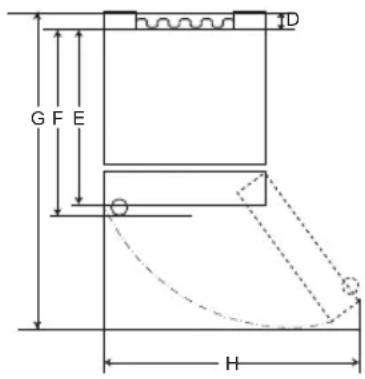
text_image
G F E H DTyp B
| Typ A Typ B | ||||||||
| Uchwyt wpuszczany | Uchwyt drązkowy | Uchwyt wpuszczany | Uchwyt drązkowy | |||||
| Wymiary [mm] | ||||||||
| A | 595 595 5 | 95 595 595 | 595 595 595 | |||||
| B | 1860 | 2030 | 1860 | 2030 | 1860 | 2030 | 1860 | 2030 |
| C | 676 676 7 | 12 712 682 | 682 718 718 | |||||
| D | 9 | 9 | 9 | 9 | 15 | 15 | 15 | 15 |
| E | 667 667 6 | 67 667 667 | 667 667 667 | |||||
| F | - | - | 703 | 703 | - | - | 703 | 703 |
| G | 1124 | 1124 | 1124 | 1124 | 1130 | 1130 | 1130 | 1130 |
| H9 | 95 995 995 | 95 995 995 | 95 995 995 | |||||
text_image
Labeled diagram of a refrigerator interior showing numbered compartments and doors① Jednostka Smart Diagnosis (*)
text_image
88°C -88°C Fridge Express Cool Freezer Express Freeze Eco Friendly Wi-Fi Lock Extra Function: Hold 3 secondstext_image
Diagram showing a hand holding a container inside a transparent container with liquid, labeled with number 1⚠ UWAGA
natural_image
Line drawing of a toilet with a scroll wheel (no text or symbols)natural_image
Line drawing of a container being poured into a tray with a handle (no text or symbols)
OSTRZEŻENIE
text_image
Technical diagram showing a mechanical assembly with numbered components and directional arrows indicating motion or movement.text_image
Technical diagram showing a mechanical assembly with numbered components and directional arrows indicating motion or alignment.natural_image
Line drawing of a refrigerator interior showing the front shelf and side arm (no text or symbols)natural_image
Line drawing of a refrigerator interior showing the front shelf and drawer (no text or symbols)Pozostałe funkcje
text_image
Diagram showing hand finger pressing a circle with directional arrows, indicating press or navigation actiontext_image
Diagram showing a hand pointing at a Wi-Fi icon with signal waves, followed by an arrow to a Wi-Fi symbol.UWAGA
natural_image
Illustration of two hands holding a rectangular object with upward arrows indicating motion or force (no text or symbols)natural_image
Illustration of a hand pressing down on a rectangular object with a downward arrow (no text or symbols)natural_image
Illustration of a hand inserting a component into a container with an arrow indicating the process (no text or symbols present)Czyszczenie półki
text_image
Diagram showing two labeled arrows pointing to a panel with numbered annotations, likely illustrating a process or measurement.natural_image
Diagram of a mechanical component with an arrow indicating rotational motion (no text or symbols)⚠ UWAGA
natural_image
Illustration of hands holding a tray with a circular patterned plate and a downward arrow, no text or symbols present.natural_image
Illustration of hands using a folding paper or folding device to lift a slide (no text or symbols visible)natural_image
Illustration of hands using a folding tool to adjust or install a slide, with an inset showing the same object (no text or symbols present)natural_image
Illustration of a hand holding a rectangular object with an arrow pointing upward, alongside a magnified inset showing a close-up of a mechanical component (no text or symbols)natural_image
Diagram of a door handle with an arrow indicating clockwise motion (no text or symbols)natural_image
Simple line drawing of a device with a handle and motion arrow, no text or symbols presentnatural_image
Diagram showing a device with a circular component connected to a screen, and an inset close-up of a table with a tray (no text or symbols)Reverter as Portas 12
text_image
G F E D HTipo A
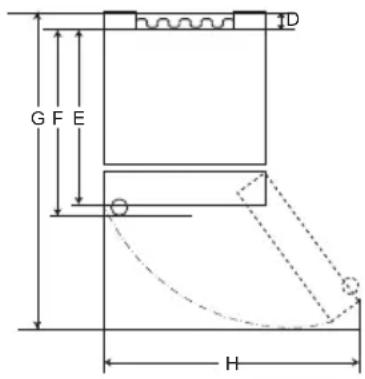
text_image
G F E H DTipo B
| Tipo A Tipo B | ||||||||
| Alça Portátil Barra | Alça | Alça Portátil | Alça da Barra | |||||
| Tamanho [mm] | ||||||||
| A | 595 595 595 595 595 595 595 | |||||||
| B | 1860 2030 | 1860 | 2030 | 1860 | 2030 1860 | 2030 | ||
| C | 676 676 712 712 682 682 718 718 | |||||||
| D | 9 | 9 | 9 | 9 | 15 | 15 | 15 | 15 |
| E | 667 667 667 667 667 667 667 667 | |||||||
| F | - | - | 703 | 703 | - | - | 703 | 703 |
| G | 1124 | 1124 | 1124 | 1124 | 1130 | 1130 | 1130 | 1130 |
| H | 995 995 995 995 995 995 995 | |||||||
Temperatura ambiente
Para Inverter as portas
text_image
Labeled diagram of a refrigerator interior showing numbered compartments and doors① Unidade de Smart Diagnosis (*)
text_image
88°C -88°C Fridge Express Cool Freezer Express Freeze Eco Friendly Wi-Fi Lock Extra Function: Hold 3 seconds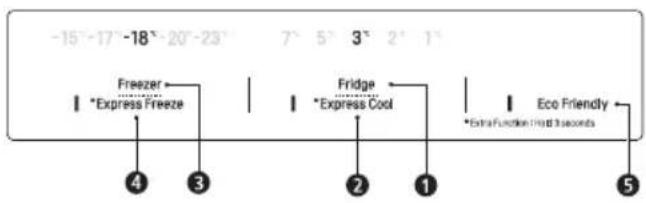
text_image
-15°-17° -18°-20°-23° 7° 5° 3° 2° 1° Freezer Express Freeze Fridge Express Cool Extra Function Help 3 seconds 4 3 2 1 Eco Friendly 5① Fridge Temperature (Temperatura do frigorífico)
- Define a temperatura-alvo do frigorífico.
② * Express Cool (Arrefecimento Rápido)
text_image
Diagram showing a hand pouring liquid into a container with label '1' pointing to the container.ADVERTÊNCIA
natural_image
Line drawing of a toilet with a handle and ventilation slots (no text or symbols)natural_image
Line drawing of a container being poured into a tray with a handle (no text or symbols)AVISO
text_image
Technical diagram showing a mechanical assembly with numbered components and directional arrows indicating motion or alignment.② Use para guardar legumes. (Recomendado)
text_image
Diagram showing a mechanical assembly with numbered components and directional arrows, likely illustrating a motion or assembly process.natural_image
Line drawing of a refrigerator interior showing the tray and shelf (no text or symbols)natural_image
Line drawing of a refrigerator interior showing the shelf and drawer (no text or symbols)Outras Funções
Alarme de Abertura de Porta
text_image
Diagram showing hand finger pressing a circle with directional arrows, next to a circular arrow pointing right.text_image
Diagram showing a hand pointing at a Wi-Fi icon with signal symbols, followed by an arrow indicating wireless transformation.OBSERVAÇÃO
natural_image
Illustration of two hands holding a rectangular object with upward arrows indicating motion or force (no text or symbols)natural_image
Illustration of a hand pressing down on a plastic tray with a downward arrow indicating force or movement (no text or symbols)natural_image
Illustration of a hand holding a small object with an arrow pointing to it, next to a rectangular device (no text or symbols present)Limpar a prateleira
Remover a prateleira do frigorífico
text_image
Diagram showing a hand holding a device with labeled parts and directional arrows indicating movement or force.Reinstalar a Prateleira do frigorífico
natural_image
Diagram of a mechanical component with an arrow indicating rotational motion (no text or symbols)ADVERTÊNCIA
natural_image
Illustration of hands holding a rectangular object with a circular inset showing a grid pattern (no text or symbols)natural_image
Illustration of hands using a folding paper or folding tool to lift a flat sheet (no text or symbols visible)Reinstalar a tampa dos vegetais
natural_image
Illustration of hands using a tool to adjust a panel, with an inset showing the same component (no text or symbols present)natural_image
Illustration of a hand holding a rectangular object with an arrow pointing upward, alongside a magnified inset showing a close-up of a mechanical component (no text or symbols)Limpar a gaveta do congelador
natural_image
Diagram of a door handle with an arrow indicating direction (no text or symbols)Reinstalar o congelador/gaveta
natural_image
Simple line drawing of a device with a hand holding a paper airplane (no text or symbols)natural_image
Diagram showing a container with liquid and a magnified inset of a tray (no text or symbols)INSTRUCTIUNI DE SIGURANTĂ....3
INSTRUCTIUNI DE SIGURANTĂ IMPORTANTE....3
text_image
G F E D HTip A
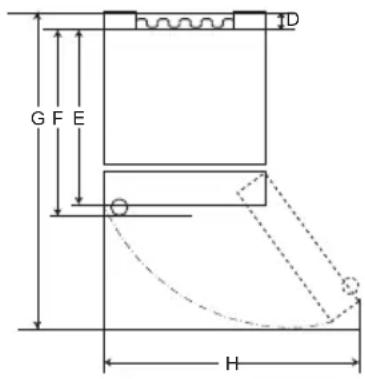
text_image
G F E H DTip B
| Tip A Tip B | ||||||||
| Mâner de buzunar M | Mâner de bară | Mâner de buzunar | Mâner de bară | |||||
| Dimensiune [mm] | ||||||||
| A | 595 595 5 | 95 595 595 | 595 595 595 | |||||
| B | 1860 | 2030 | 1860 | 2030 | 1860 | 2030 1860 | 2030 | |
| C | 676 676 7 | 12 712 682 | 682 718 718 | |||||
| D | 9 | 9 | 9 | 9 | 15 | 15 | 15 | 15 |
| E | 667 667 6 | 67 667 667 | 667 667 667 | |||||
| F | - | - | 703 | 703 | - | - | 703 | 703 |
| G | 1124 | 1124 | 1124 | 1124 | 1130 | 1130 | 1130 | 1130 |
| H | 995 995 9 | 95 995 995 | 995 995 995 | |||||
text_image
Labeled diagram of a refrigerator interior showing numbered compartments and doorways⑤ Eco Friendly (Ecologic)
text_image
Diagram showing a hand pouring liquid into a container with label '1' pointing to the container.ATENTIE
natural_image
Line drawing of a toilet with a scroll wheel (no text or symbols)natural_image
Line drawing of a container being poured into a tray (no text or symbols)AVERTISMENT
text_image
Technical diagram showing a mechanical assembly with numbered components and directional arrows indicating motion or movement.text_image
Technical diagram showing a mechanical assembly with numbered components and directional arrows indicating motion or alignment.natural_image
Line drawing of a refrigerator interior showing the tray and shelf (no text or symbols)natural_image
Line drawing of a refrigerator interior showing a tray with an upward arrow (no text or symbols)Alte funcții
text_image
Diagram showing hand finger pressing a circle with directional arrows, indicating press or navigation actiontext_image
Diagram showing a hand interacting with wireless signals to form a Wi-Fi symbol, indicating signal transmission or interaction.NOTĂ
natural_image
Illustration of two hands holding a rectangular object with upward arrows indicating movement or force (no text or symbols present)natural_image
Illustration of a hand pressing down on a plastic tray (no text or symbols)natural_image
Illustration of a hand holding a U-shaped object with an arrow pointing to it, no text or symbols presentCurațarea raftului
text_image
Diagram showing a hand holding a ruler on a table with two arrows indicating direction of movement, labeled 1 and 2.natural_image
Diagram of a mechanical component with an arrow indicating rotational motion (no text or symbols)ATENTIE
natural_image
Illustration of hands holding a tray with a circular patterned inset showing a grid pattern (no text or symbols)natural_image
Illustration of hands using a folding tool to cut or spread a rectangular object (no text or symbols visible)natural_image
Illustration of hands using a measuring instrument to measure a surface, with an inset showing the same measurement (no text or symbols present)natural_image
Illustration of a hand holding a rectangular object with an arrow, alongside a magnified inset showing a close-up of a mechanical component (no text or symbols)natural_image
Diagram of a mechanical component with an arrow indicating force or motion, no text or symbols presentnatural_image
Simple line drawing of a device with a paper airplane and motion lines indicating flight (no text or symbols)natural_image
Diagram showing a container with liquid and a magnified inset of a tray (no text or symbols)DÔLEŽITÉ BEZPEČNOSTNÉ POKYNY....3
Zneškodnenie starého spotrebiča ....10
INŠTALÁCIA 11
Rozmery a vzdialenosti 11
Teplota okolia....11
Reverzné dvere 12
Vyrovnanie spotrebiča 12
DÔLEŽITÉ BEZPEČNOSTNÉ POKYNY

VAROVANIE
- Police nevkladajte hore dnom. Mohli by spadnút'.
text_image
G F E D HTyp A
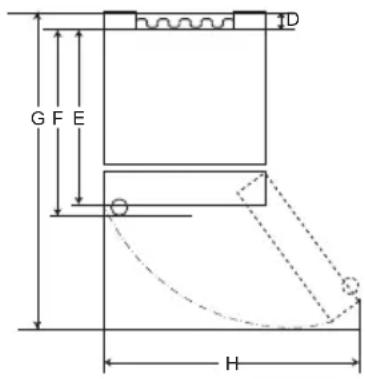
text_image
G F E H DTyp B
| Typ A Typ B | ||||||||
| Zapustená rukovät' | Tyčová rukovät' | Zapustená rukovät' | Tyčová rukovät' | |||||
| Rozmer [mm] | ||||||||
| A | 595 595 5 | 95 595 595 | 595 595 595 | |||||
| B | 1860 | 2030 | 1860 | 2030 | 1860 | 2030 | 1860 | 2030 |
| C | 676 676 7 | 12 712 682 | 682 718 718 | |||||
| D | 9 | 9 | 9 | 9 | 15 | 15 | 15 | 15 |
| E | 667 667 6 | 67 667 667 | 667 667 667 | |||||
| F | - | - | 703 | 703 | - | - | 703 | 703 |
| G | 1124 | 1124 | 1124 | 1124 | 1130 | 1130 | 1130 | 1130 |
| H | 995 995 9 | 95 995 995 | 995 995 995 | |||||
Teplota okolia
text_image
Labeled diagram of a refrigerator interior showing numbered compartments and doorstext_image
Diagram showing a hand holding a cup inside a container with liquid, labeled with number 1⚠ UPOZORNENIE
natural_image
Line drawing of a toilet with a scroll wheel (no text or symbols)natural_image
Line drawing of a container being poured into a tray with a handle (no text or symbols)VAROVANIE
• Naplňajte iba pitnou vodou.
⚠ UPOZORNENIE
text_image
Technical diagram showing a mechanical assembly with numbered components and directional arrows indicating motion or alignment.text_image
Diagram showing a mechanical assembly with labeled components and directional arrows, including numbered parts 1, 2, and 3.natural_image
Line drawing of a refrigerator interior showing the tray and shelf (no text or symbols)2 Zdvihnite prednú stranu police a posuňte ju pod zadnú stranu. Z tejto polohy je možné zdvihnút' obe strany police, aby sa vytvorilo viac priestoru.
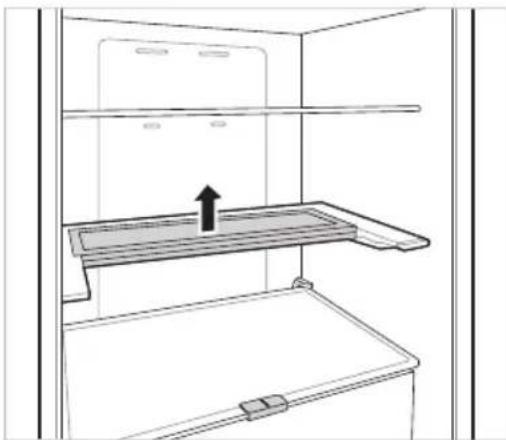
natural_image
Line drawing of a refrigerator interior showing the front shelf and side arm, with an arrow indicating upward motion (no text or symbols)Đalšie funkcie
text_image
Diagram showing hand finger pressing a circle with directional arrows, next to a circular arrow symbol indicating rotation or movement.text_image
Diagram showing a hand interacting with a Wi-Fi icon and a Wi-Fi symbol, indicating wireless signal interaction.POZNÁMKA
natural_image
Illustration of two hands holding a rectangular object with upward arrows indicating motion or force (no text or symbols)natural_image
Illustration of a hand pressing down on a plastic tray (no text or symbols)natural_image
Illustration of a hand holding a U-shaped tool or bracket, with a downward arrow indicating force or direction (no text or symbols present)Čistenie poličky
Vybratie poličky z chladničky
text_image
Diagram showing two labeled arrows pointing to a screen with numbered labels ① and ②, indicating directional movement or positioning.natural_image
Diagram of a cabinet or storage unit with an arrow indicating rotation (no text or symbols present)⚠ UPOZORNENIE
natural_image
Illustration of hands holding a rectangular object with a circular inset showing a grid pattern (no text or symbols)2 Vytiahnite kryt priehradky na ovocie a zeleninu tak, že ho potiahnete von.
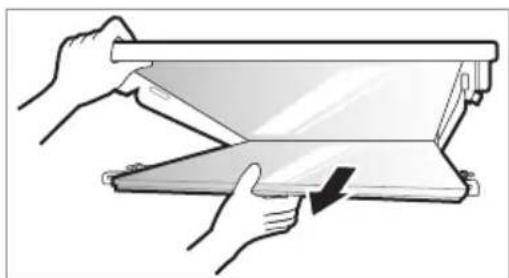
natural_image
Illustration of hands using a folding or rolling device to lift a flat panel (no text or symbols visible)Vrátenie krytu priehradky na ovocie a zeleninu
natural_image
Illustration of hands using a tool to adjust or install a component, with an inset showing magnified detail (no text or symbols)2 Vložte výstupky pred krytom na ovocie a zeleninu do drážok pred policou a zatlačte kryt na ovocie a zeleninu tak, aby ste ho mohli zostavit'.
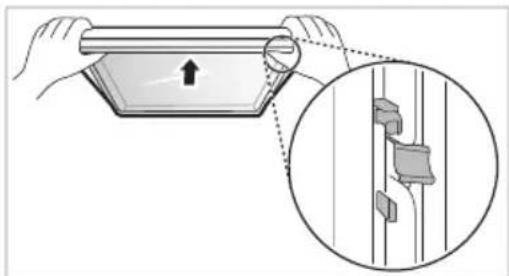
natural_image
Illustration of a hand holding a rectangular object with an arrow pointing upward, alongside a magnified inset showing a close-up of a mechanical component (no text or symbols)natural_image
Diagram of a door handle with an arrow indicating clockwise motion (no text or symbols)natural_image
Simple line drawing of a device with a hand holding a leaf, no text or symbols presentnatural_image
Diagram showing a device with a magnified inset of its top view (no text or symbols present)text_image
G F E D HVrsta A
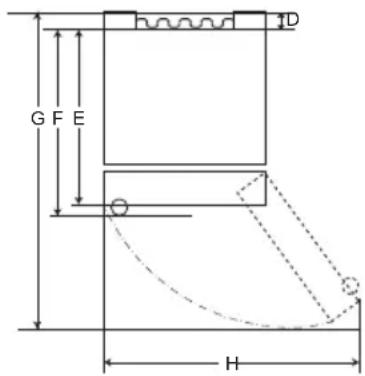
text_image
G F E HVrsta B
| Vrsta A Vrsta B | ||||||||
| Stranski ročaj Zun | anji ročaj | Stranski ročaj | Zunanji ročaj | |||||
| Velikost [mm] | ||||||||
| A | 595 595 5 | 95 595 595 | 595 595 595 | |||||
| B | 1860 | 2030 | 1860 | 2030 | 1860 | 2030 | 1860 | 2030 |
| C | 676 676 7 | 12 712 682 | 682 718 718 | |||||
| D | 9 | 9 | 9 | 9 | 15 | 15 | 15 | 15 |
| E | 667 667 6 | 67 667 667 | 667 667 667 | |||||
| F | - | - | 703 | 703 | - | - | 703 | 703 |
| G | 1124 | 1124 | 1124 | 1124 | 1130 | 1130 | 1130 | 1130 |
| H | 995 | 995 995 995 | 995 995 | 995 | 995 | |||
Temperatura v ambientu
text_image
Labeled diagram of a refrigerator interior showing numbered compartments and doorstext_image
Diagram showing a hand holding a cup inside a container with liquid, labeled with number 1POZOR
natural_image
Line drawing of a toilet with a scroll wheel (no text or symbols)2 Avtomat za vodo napolnite s pitno vodo in zaprite pokrovček (majhen pokrov).
- Avtomat za vodo zadrži do 2,3 l.
POZOR
natural_image
Line drawing of a container being poured into a tray with a handle (no text or symbols)OPOZORILO
• Napolnite ga le s pitno vodo.
POZOR
- Preverite, ali so na pladnju za led ostanki ledu, preden vanj nalijete vodo.
- Z vrati zamrzovalnika ne loputajte, zatem ko ste vanj vstavili pladenj za led z vodo.
text_image
Technical diagram showing a mechanical assembly with numbered components and directional arrows indicating motion or alignment.text_image
Technical diagram showing a mechanical assembly with numbered components and directional arrows indicating motion or alignment.natural_image
Line drawing of a refrigerator interior showing the tray and shelf (no text or symbols)natural_image
Line drawing of a refrigerator interior showing the shelf and drawer (no text or symbols)Druge funkcije
Alarm odprtih vrat
Alarm v 30-sekundnih intervalih trikrat zapiska, če ostanejo vrata (hladilnika) odprta ali eno minuto niso povsem zaprta.
- Obrnite se na informacijski center za stranke LG Electronics, će alarm ne preneha zvoniti tudi po zaprtju vrat.
Odkrivanje napake
text_image
Diagram showing hand finger pressing a circle with directional arrows, next to a circular arrow pointing right.text_image
Diagram showing a hand interacting with a Wi-Fi icon, illustrating wireless signal transformationOPOMBA
2 Pritisnite gumb Eco Friendly.
natural_image
Illustration of two hands holding a rectangular object with upward arrows indicating motion or force (no text or symbols)natural_image
Illustration of a hand pressing down on a plastic tray with a downward arrow indicating force or pressure (no text or symbols)2 Po namestitvi nežno pritisnite predal, da ga poravnate vodoravno.
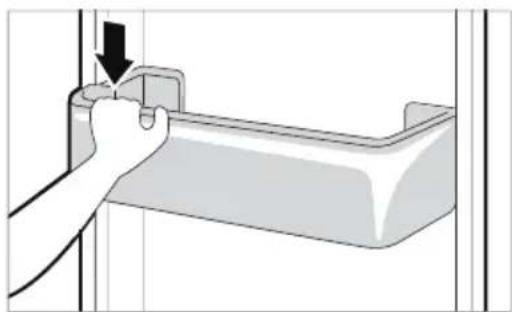
natural_image
Illustration of a hand holding a small object with an arrow pointing to it, next to a rectangular device (no text or symbols)Čiščenje polic
text_image
Diagram showing two labeled arrows pointing to a screen with numbered labels 1 and 2, indicating directional movement or process steps.natural_image
Diagram of a mechanical component with an arrow indicating rotational motion (no text or symbols)POZOR
natural_image
Illustration of hands holding a rectangular object with a circular inset showing a grid pattern (no text or symbols)natural_image
Illustration of hands using a folding paper or folding device to lift a slide (no text or symbols visible)natural_image
Illustration of hands using a folding tray to measure a surface, with an inset showing the same object (no text or symbols present)2 Izbokline na sprednjem delu steklene plošče vstavite v utore in stekleno posodo potisnite navzgor, da jo prilagodite.
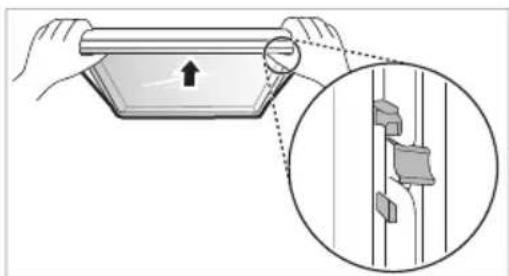
natural_image
Illustration of a hand holding a rectangular object with an arrow, alongside a magnified inset showing a close-up of a mechanical component (no text or symbols)natural_image
Diagram of a door handle with an arrow indicating direction (no text or symbols)natural_image
Simple line drawing of a device with a handle and motion arrow, no text or symbols presentnatural_image
Diagram showing a container with liquid and a magnified inset of a tray (no text or symbols)text_image
G F E D HLloji A
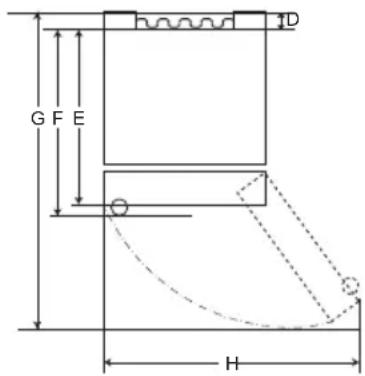
text_image
G F E HLloji B
| Lloji A Lloji B | ||||||||
| Dorezë xhepi Dorezë Shufër | Dorezë xhepi | Dorezë shufër | ||||||
| Madhësia [mm] | ||||||||
| A | 595 595 595 595 595 595 595 | |||||||
| B | 1860 | 2030 | 1860 | 2030 | 1860 | 2030 | 1860 | 2030 |
| C | 676 676 712 712 682 682 718 718 | |||||||
| D | 9 | 9 | 9 | 9 | 15 | 15 | 15 | 15 |
| E | 667 667 667 667 667 667 667 | |||||||
| F | - | - | 703 | 703 | - | - | 703 | 703 |
| G | 1124 | 1124 | 1124 | 1124 | 1130 | 1130 | 1130 | 1130 |
| H | 995 995 995 995 995 995 995 | |||||||
Temperatura e Ambientit
text_image
Labeled diagram of a refrigerator interior showing numbered compartments and storage areas① Njësia Smart Diagnosis (\*)
text_image
88°C -88°C Fridge ←① I *Express Cool ←② Freezer ←③ I *Express Freeze ←④ Eco Friendly ←⑤ I *Wi-Fi ←⑥ Lock ←⑦ *Extra Function: Hold 3 seconds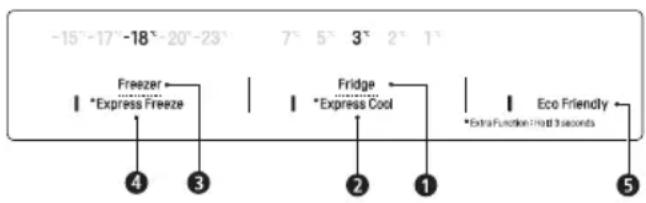
text_image
-15°-17°-18°-20°-23° 7° 5° 3° 2° 1° Freezer Express Freeze Fridge Express Cool Extra Function Hot 3 seconds 4 3 2 1 Eco Friendly 5① Fridge Temperature (Temperatura e Frigoriferit)
text_image
Diagram showing a hand pouring liquid into a container with label '1' pointing to the container.KUJDES
natural_image
Line drawing of a toilet with a scroll wheel (no text or symbols)natural_image
Line drawing of a container being poured into a tray with a handle (no text or symbols)
PARALAJMËRIM
text_image
Technical diagram showing a mechanical assembly with numbered components and directional arrows indicating motion or alignment.text_image
Diagram illustrating a mechanical assembly with labeled components and directional arrows, including numbered annotations 1, 2, and 3.natural_image
Line drawing of a refrigerator interior showing the shelf and drawer (no text or symbols)natural_image
Line drawing of a refrigerator interior showing a shelf with an upward arrow indicating storage or ventilation (no text or symbols)Funksione të tjera
text_image
Diagram showing hand finger pressing a circle with directional arrows, next to a circular arrow indicating rotation.text_image
Diagram showing a hand pointing at a Wi-Fi icon with signal waves, followed by a Wi-Fi symbol to illustrate wireless connectivity.SHËNIM
2 Shtypni butonin Eco Friendly.
natural_image
Illustration of two hands holding a rectangular object with upward arrows indicating movement or force (no text or symbols present)natural_image
Illustration of a hand pressing down on a plastic container with a downward arrow indicating force (no text or symbols)natural_image
Illustration of a hand holding a mechanical component with an arrow indicating force or direction (no text or symbols present)Pastrimi i raftit
text_image
Diagram showing two hands holding a panel with directional arrows and numbered labels ① and ② indicating positions or movement.natural_image
Diagram of a mechanical component with an arrow indicating rotational motion (no text or symbols)KUJDES
natural_image
Illustration of hands holding a rectangular object with a circular patterned inset, no text or symbols presentnatural_image
Illustration of hands using a folding paper or folding device to lift a slide (no text or symbols visible)natural_image
Illustration of hands using a tool to lift a flatboard, with an inset showing the same setup (no text or symbols present)natural_image
Illustration of a hand holding a rectangular object with an arrow, alongside a magnified inset showing a close-up of a mechanical component (no text or symbols)natural_image
Diagram of a door handle with an arrow indicating clockwise motion (no text or symbols)natural_image
Simple line drawing of a device with a handle and motion arrow, no text or symbols presentnatural_image
Diagram showing a device with a circular component connected to a screen, and an inset close-up of a tray (no text or symbols)VAŽNA BEZBEDNOSNA UPUTSTVA 3
Odlaganje starog aparata....10
MONTAŽA 11
Dimenzije i razmaci 11
Temperatura prostora 11
VAŽNA BEZBEDNOSNA UPUTSTVA

UPOZORENJE
text_image
G F E D HTip A
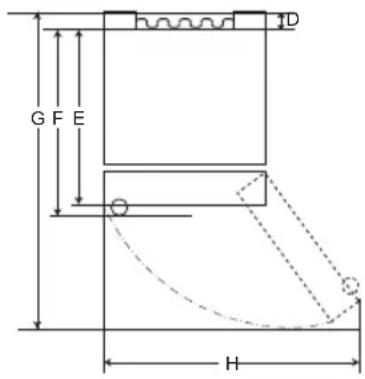
text_image
G F E H DTip B
| Tip A Tip B | ||||||||
| Uvučena drška Izdvojena drška | Uvučena drška | Izdvojena drška | ||||||
| Veličina [mm] | ||||||||
| A5 | 95 595 59 | 95 595 595 5 | 95 595 595 | |||||
| B | 1860 | 2030 1860 | 2030 | 1860 | 2030 | 1860 | 2030 | |
| C | 676 676 7 | 12 712 682 | 682 718 718 | |||||
| D | 9 | 9 | 9 | 9 | 15 | 15 | 15 | 15 |
| E | 667 667 6 | 67 667 667 | 667 667 667 | |||||
| F | - | - | 703 | 703 | - | - | 703 | 703 |
| G | 1124 | 1124 | 1124 | 1124 | 1130 | 1130 | 1130 | 1130 |
| H9 | 95 995 99 | 95 995 995 9 | 95 995 995 | |||||
Temperatura prostora
- Ovaj uređaj je osmišljen da radi na temperaturi ograničenog opsega u zavisnosti od trenutne klimatske zone.
- Na temperaturu unutrašnjosti uređaja mogu uticati mesto na kojem je uređaj postavljen, temperatura prostora, učestalost otvaranja vrata i tako dalje.
- Podaci o klimatskoj klasi ovog uređaja mogu se naći na nalepnici s tehničkim podacima.
| Klimatska klasa | Opseg temperature prostora izražen u °C |
| SN (Produženo Umereno) | +10 - +32 |
| N (Umereno) | +16 - +32 |
| ST (Suptropsko) | +16 - +38 |
| T (Tropsko) | +16 - +43 / +10 - +43* |
text_image
Labeled diagram of a refrigerator interior showing numbered compartments and doorways① Jedinica za pametnu dijagnostiku (*)
Ova funkcija se koristi kada se obraćate korisničkom centru LG Electronics kako bi doprineli postavljanju tačne dijagnoze u slučajevima kada uređaj ne radi kako treba ili ako dođe do kvara.
② LED lampa
LED lampe unutar uređaja se pale kada otvorite vrata.
③ Polica frižidera
text_image
88°C -88°C Fridge Express Cool Freezer Express Freeze Eco Friendly Wi-Fi Lock Extra Function: Hold 3 seconds① Fridge Temperature (Temperatura frižidera)
- Ovim se frižider podešava na ciljnu temperaturu.
② * Express Cool (Ekspresno hlađenje)
- Ovo podešava funkcije Ekspresno hlađenje.
③ Freezer Temperature (Temperatura zamrzivača)
text_image
Diagram showing a hand pouring liquid into a container with label '1' pointing to the container.▲ OPREZ
- Držite decu dalje od automata kako biste sprečili da se deca igraju sa komandama ili da ih oštete.
natural_image
Line drawing of a toilet with a scroll wheel (no text or symbols)2 Napunite rezervoar za vodu pijaćom vodom i zatvorite čep (mali poklopac).
- Rezervoar za vodu može da primi 2,3 l.
OPREZ
natural_image
Line drawing of a container being poured into a tray with a curved handle (no text or symbols)
UPOZORENJE
• Punite samo pitkom vodom.

OPREZ
• Proverite da li ima preostalog leda u posudi za led pre nego što sipate vodu u nju.
- Nemojte da zalupite vrata zamrzivača nakon punjenja posude za led vodom.
- Ako često otvarate i zatvarate vrata zamrzivača, zamrzavanje vode može potrajati duže.
- Vreme potrebno za zamrzavanje vode može da se razlikuje u zavisnosti od godišnjeg doba.
- Može biti potrebno do 24 časa da se temperatura unutar uređaja stabilizuje nakon početne instalacije. Vodi može biti potrebno više vremena da se zamrzne zbog ovoga.
- Budite oprezni prilikom rukovanja ledom jer ivice leda mogu da budu oštre.
NAPOMENA
- Ako se posuda za led prepuni, led može da se zalepi i njegovo vađenje može biti otežano.
- Pritisnite dugme Express Freeze na kontrolnoj tabli da brzo napravite led.
text_image
Technical diagram showing a mechanical assembly with numbered components and directional arrows indicating motion or alignment.text_image
Diagram showing a mechanical assembly with numbered components and directional arrows indicating motion or movement.natural_image
Line drawing of a refrigerator interior showing the tray and shelf (no text or symbols)2 Podignite prednju stranu police i pomerite je ispod njene zadnje strane. Iz tog položaja, obe strane police mogu da se podignu da bi se oslobodilo još prostora.
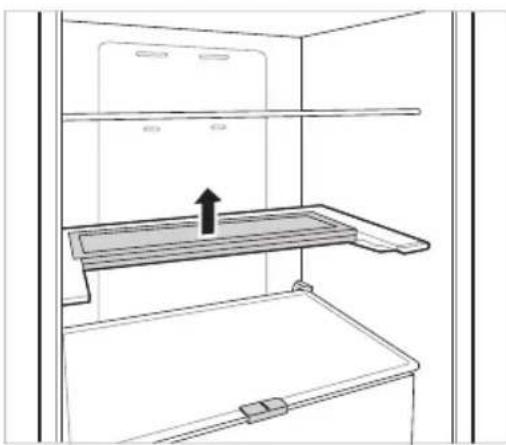
natural_image
Line drawing of a refrigerator interior showing the shelf and drawer with an upward arrow indicating storage or lifting (no text or symbols)Ostale funkcije
Alarm za otvaranje vrata
Alarm se oglasava 3 puta u intervalu od 30 sekundi ako se vrata (odeljak frižidera) ostave otvorena ili ako se u potpunosti ne zatvore tokom jednog minuta.
- Obratite se korisničkom centru za informacije kompanije LG Electronics ako zvuk alarma i dalje traje nakon što se vrata zatvore.
Detekcija kvara
Uređaj može automatski da otkrije probleme tokom rada.
- Ako se uoči problem, uređaj ne radi i kod greške se prikazuje čak i ako se pritisne neko dugme.
- Kada se to dogodi, ne isključujte napajanje i odmah pozovite korisnički centar LG Electronics. Ako isključite napajanje, serviser centra za podršku korisnika LG Electronics može imati poteškoća u pronalaženju problema.
Aplikacija LG ThinQ
Ova funkcija je dostupna samo na modelima sa Wi-Fi-jem.
Aplikacija LG ThinQ omogućava vam da komunicirate sa uređajem koristeći pametni telefon.
Funkcije aplikacije LG ThinQ
Mogućnost komunikacije sa uređajem putem pametnog telefona primenom odgovarajućih pametnih funkcija.
Smart Diagnosis
- Ako naidete na problem tokom korišćenja uređaja, ova funkcija Smart Diagnosis će vam pomoći da dijagnostikujete problem.
Postavke
- Omogućavaju vam da podesite razne opcije na uređaju i u aplikaciji.
NAPOMENA
- Ako zamenite bežični ruter, pružaoca internet usluga ili lozinku, obrišite registrovani uređaj iz aplikacije LG ThinQ i ponovo ga registrujte.
- Aplikacija je podložna promenama radi unapređenja rada uređaja i to bez prethodnog obaveštenja korisnika.
- Funkcije mogu varirati u zavisnosti od modela.
Pre korišćenja aplikacije LG ThinQ
1 Proverite udaljenost između uređaja i bežičnog rutera (Wi-Fi mreža).
- Ako je udaljenost između uređaja i bežičnog rutera suviše velika, signal će biti slabiji. Zbog toga registracija može da traje dugo ili instalacija možda neće biti moguća.
2 Isključite opciju Mobilni podaci na svom pametnom telefonu.
text_image
Diagram showing hand finger pressing up and pointing to a circular arrow symbol with directional arrowstext_image
Diagram showing a hand interacting with wireless signals to form a Wi-Fi symbolNAPOMENA
- Da biste proverili Wi-Fi vezu, proverite da li je oznaka osvetljena na kontrolnoj tabli.
- Uređaj podržava samo Wi-Fi mreže od 2,4 GH Da biste proverili mrežnu frekvenciju, obratite se internet provajderu ili pogledajte priručnik za bežični ruter.
- LG ThinQ ne snosi odgovornost za probleme sa povezivanjem na mrežu niti za bilo koje smetnje, kvarove ili greške izazvane povezivanjem na mrežu.
natural_image
Illustration of two hands holding a rectangular object with upward arrows indicating motion or force (no text or symbols)Ponovno postavljanje korpe u vratima frižidera
1 Držite obe ivice korpe u vratima, polako gurnite jednu ivicu da se uklopi, a zatim na isti način uklopite drugu ivicu.
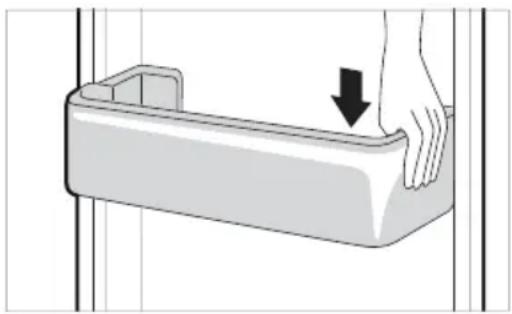
natural_image
Illustration of a hand pressing down on a plastic tray with a downward arrow indicating force or pressure (no text or symbols)2 Nakon sklapanja polako kucnite korpu u vratima da je fiksirate horizontalno.
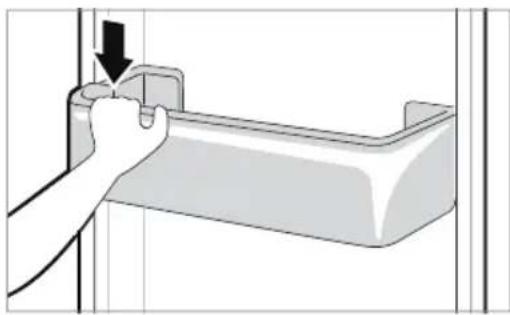
natural_image
Illustration of a hand holding a small mechanical component with an arrow indicating force or direction (no text or symbols present)Čišćenje police
Uklanjanje police frižidera
Podignite zadnju ivicu police frižidera, a zatim je izvucite.
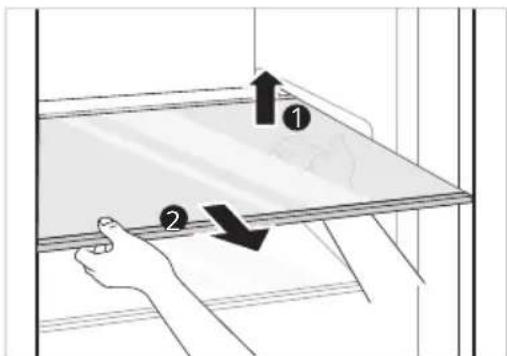
text_image
Diagram showing two hands holding a panel with arrows indicating direction, labeled ① and ②.Vraćanje police frižidera
Ponovo postavite prateći obrnuti redosled radnji u odnosu na onaj koji važi za uklanjanje.
Čišćenje fioke za povrće Uklanjanje fioke za povrće
natural_image
Diagram of a mechanical component with an arrow indicating rotational motion (no text or symbols)OPREZ
- Imajte na umu to da povrede mogu biti izazvane težinom čuvane hrane prilikom vađenja fioke za povrće.
natural_image
Illustration of hands holding a rectangular object with a circular inset showing a grid pattern (no text or symbols)2 Uklonite poklopac za sveže proizvode tako što ćete ga izvući.
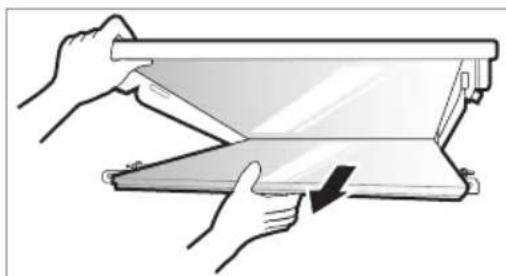
natural_image
Illustration of hands folding a flatboard with a downward arrow indicating compression (no text or symbols)Ponovno postavljanje poklopca za sveže proizvode
1 Stavite izbočine unutar poklopca za sveže proizvode na usecima unutar police.
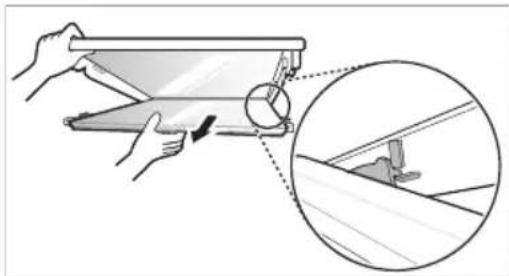
natural_image
Illustration of hands using a tool to adjust or install a slide, with an inset showing magnified detail (no text or symbols)2 Ubacite izbočine ispred poklopca za sveže proizvode u useke ispred police i gurnite poklopac za sveže proizvode nagore da ga sastavite.
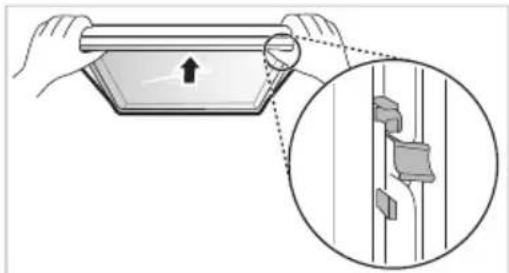
natural_image
Illustration of a hand holding a tablet device with an arrow pointing to it, and a magnified inset showing a close-up of a panel detail (no text or symbols)natural_image
Diagram of a door handle with an arrow indicating direction (no text or symbols)natural_image
Simple line drawing of a container with liquid and a hand holding a leaf, no text or symbols presentDozirni tas se može lako ukvasiti zbog prosipanja leda ili vode. Obrišite ceo taj deo vlažnom tkaninom.
natural_image
Diagram showing a container with liquid and a magnified inset of its side view (no text or symbols)| Simptomi Razlog | i rešenje |
| Nema hlađenja ili zamrzavanja. | Da li je došlo do nestanka struje?Proverite da li drugi uređaji rade. |
| Da li je utikač za napajanje iskopčan iz utičnice?Išpravno prikopčajte utikač za napajanje u utičnicu. | |
| Moguće je da je pregoreo osigurač ili je došlo do iskakanja automatskog prekidača. Ili je uređaj uključen u utičnicu koja ima GFCI (prekidač uzemljenja), a automatski prekidač utičnice je iskočio.Proverite glavnu razvodnu kutiju i zamenite osigurač ili resetujte automatski prekidač. Nemojte da povećavate kapacitet osigurača.Ako je problem u preopterećenju strujnog kola, kvalifikovani električar treba da ga popravi.Resetujte automatski prekidač na GFCI-ju. Ako se problem nastavi, pozovite električara. | |
| Hlađenje ili zamrzavanje je slabo. | Da li je temperatura frižidera ili zamrzivača postavljena na najtoplije podešavanje?Postavite temperaturu frižidera ili zamrzivača na „Srednje". |
| Da li je uređaj na direktnoj sunčevoj svetlosti ili je blizu objekta koji stvara toplotu, npr. rerna ili grejalica?Proverite oblast instalacije i ponovo ga instalirajte dalje od objekata koji stvaraju toplotu. | |
| Da li ste unutra stavili vruću hranu bez prvobitnog hlađenja hrane?Ohladite hranu pre nego što je stavite u frižider ili zamrzivač. | |
| Da li ste stavili previše hrane?Održavajte odgovarajuću razdaljinu između hrane. | |
| Da li su vrata na uređaju potpuno zatvorena?Skroz zatvorite vrata i proverite da skladištena hrana ne smeta vratima. | |
| Da li ima dovoljno prostora oko uređaja?Podesite položaj instalacije da biste obezbedili dovoljno prostora oko uređaja. | |
| U uređaju je neprijatan miris. | Da li je temperatura frižidera ili zamrzivača postavljena na „Toplo“?Postavite temperaturu frižidera ili zamrzivača na „Srednje". |
| Da li ste unutra stavili hranu koja ima jak miris?Hranu koja ima jak miris čuvajte u zatvorenim posudama. | |
| Možda se voće ili povrće pokvarilo u fioci?Bacite pokvareno povrće i očistite fioku za povrće. Nemojte previše dugo da čuvate povrće u fioci za povrće. | |
| Lampa koja je unutar uređaja se ne uključuje. | Da li se lampa koja je unutar uređaja isključuje?Korisnicima je teško da zamene unutrašnju lampu u uređaju jer nisu pogodne za popravku. Ako se unutrašnja lampa ne pali, molimo vas da se obratite centru za podršku korisnika LG Electronics. |
| Vrata uređaja nisu čvrsto zatvorena. | Da li je uređaj nagnut prema napred?Podesite prednje nožice da biste malo uzdigli prednju stranu. |
| Da li su police pravilno sastavljene?Ponovo postavite police ako je potrebno. | |
| Da li ste vrata zatvorili upotrebom prekomerne sile?Ako upotrebite preveliku silu ili brzinu tokom zatvaranja vrata, ona mogu na kratko ostati otvorena pre zatvaranja. Postarajte se da ne lupate vratima. Zatvorite ih bez upotrebe sile. | |
| Vrata uređaja se teško otvaraju. | Da li ste vrata otvorili odmah nakon zatvaranja?Ako vrata uređaja pokušate da otvorite u roku od 1 minuta nakon zatvaranja, možete imati poteškoće zbog pritiska unutar uređaja. Pokušajte da ponovo otvorite vrata uređaja nakon nekoliko minuta kako bi se stabilizovao unutrašnji pritisak. |
| Kondenzacija se javlja unutar uređaja ili na dnu poklopca fioke za povrće. | Da li ste unutra stavili vruću hranu bez prvobitnog hlađenja hrane?Ohladite hranu pre nego što je stavite u frižider ili zamrzivač. |
| Da li ste ostavili otvorena vrata uređaja?Iako će kondenzacija nestati brzo nakon što zatvorite vrata uređaja, možete da je obrišete pomoću suve tkanine. | |
| Da li često otvarate i zatvarate vrata uređaja?Kondenzacija može da nastane zbog temperaturne razlike u odnosu na spoljašnjost. Obrišite vlagu suvom tkaninom. | |
| Da li ste unutra stavili toplu ili vlažnu hranu koju niste je zatvorili u posudu?Hranu čuvajte u pokrivenoj ili zatvorenoj posudi. | |
| Led se formirao u zamrzivaču. | Možda vrata nisu zatvorena kako treba?Proverite da namirnica unutar uređaja ne blokira vrata i proverite da li su vrata čvrsto zatvorena. |
| Da li ste unutra stavili vruću hranu bez prvobitnog hlađenja hrane?Ohladite hranu pre nego što je stavite u frižider ili zamrzivač. | |
| Led se formirao u zamrzivaču. | Da li je ulaz ili izlaz za vazduh u zamrzivaču blokiran?Uverite se da ulaz ili izlaz za vazduh nije blokiran tako da vazduh može unutra da cirkuliše. |
| Da li je zamrzivač prepunjen?Održavajte odgovarajuću razdaljinu između hrane. | |
| Sa unutrašnje ili spoljašnje strane uređaja formirao se led ili kondenzacija. | Da li ste često otvarali i zatvarali vrata uređaja ili su vrata uređaja nepravilno zatvorena?Led ili kondenzacija mogu da se formiraju ako vazduh spolja uđe u uređaj. |
| Da li je okruženje instalacije vlažno?Kondenzacija može da se pojavi na spoljnoj strani uređaja ako je prostorija u kojoj je instaliran previše vlažna ili ako je vlažnost vazduha povećana, npr. kada pada kiša. Obrišite vlagu koja se pojavi suvom tkaninom. | |
| Uređaj je bučan i proizvodi čudne zvukove. | Da li je uređaj instaliran na tankom ili neravnom podu?Instalirajte uređaj na čvrstom i ravnom podu. |
| Da li zadnja strana uređaja dodiruje zid?Podesite položaj instalacije da biste napravili dovoljno prostora oko uređaja. | |
| Da li ima raštrkanih predmeta iza uređaja?Uklonite raštrkane predmete koji se nalaze iza uređaja. | |
| Da li je neki predmet na uređaju?Uklonite predmet sa uređaja. | |
| Strane ili prednja strana uređaja su vrući. | U ovim delovima uređaja su ugrađene antikondenzacijske cevi da bi se smanjila kondenzacija koja se formira u delu oko vrata.Cev za oslobađanje toplote i sprečavanje kondenzacije instalirana je sa prednje strane uređaja, i sa strane. Ona može da bude izrazito vruća odmah nakon instaliranja uređaja ili tokom leta. Budite uvereni da to nije problem već sasvim normalno. |
| Ima vode van ili unutar uređaja. | Da li negde oko uređaja curi voda?Proverite da voda ne curi iz sudopere ili drugog mesta. |
| Da li ima vode na dnu uređaja?Proverite da li voda dolazi od topljenja smrznute hrane ili polomljene ili prevrnute posude. | |
| Zvukovi škljocanja | Kontrola odmrzavanja škljocnuće kada automatski ciklus odmrzavanja počne i završi se. Kontrola termostata (ili kontrola uređaja na nekim modelima) takođe će škljocnuti tokom uključivanja i isključivanja ciklusa.Normalan rad |
| Zvukovi klepetanja | Klepetanje može da dolazi od toka rada uređaja, cevi za vodu sa zadnje strane uređaja (samo za modele za priključkom za vodu) ili predmeta koji se drže na uređaju ili oko njega.Normalan rad |
| Uređaj nije ravno postavljen na pod.Pod je slab ili neravan ili je potrebno poravnati nogice za nivelisanje. Pogledajte odeljak „Nivelisanje vrata“. | |
| Uređaj sa linearnim kompresorom je premeštan dok radi.Normalan rad. Ako kompresor ne prestane da klepeće nakon 3 minuta isključite napajanje na uređaju i zatim ga ponovo uključite. | |
| Zvukovi šištanja | Motor ventilatora za isparavanje pokreće vazduh kroz odeljke frižidera i zamrzivača.Normalan rad |
| Vazduh se usmerava preko isparivača pomoću ventilatora za isparavanje.Normalan rad | |
| Zvukovi krkljanja | Tečnost uređaja teče kroz sistem za hlađenjeNormalan rad |
| Zvukovi pucketanja | Skupljanje i širenje unutrašnjih zidova zbog temperaturnih promena.Normalan rad |
| Vibriranje | Ako strane ili zadnja strana uređaja dodiruju plakar ili zid, neke od normalnih vibracija mogu praviti zvukove.Da biste otklonili buku, obezbedite da strane i zadnja strana ne budu u dodiru sa zidom ili plakarom. |
| Vaš aparat i pametni telefon nisu priključeni na Wi-Fi mrežu. | Lozinka za Wi-Fi mrežu na koju pokušavate da se priključite nije ispravna.Pronađite Wi-Fi mrežu na koju je priključen vaš pametni telefon i uklonite je, a zatim registrujte svoj uređaj na LG ThinQ. |
| Mobilni podaci na vašem pametnom telefonu su uključeni.Isključite opciju Mobilni podaci na svom pametnom telefonu i registrujte uređaj pomoću Wi-Fi mreže. | |
| Naziv bežične mreže (SSID) nije ispravno podešen.Naziv bežične mreže (SSID) treba da se sastoji od kombinacije latiničnih slova i brojeva. (Nemojte da koristite posebne znakove) | |
| Frekvencija rutera nije 2,4 GHz.Podržani su samo ruteri čija je frekvencija 2,4 GHz. Podesite bežični ruter na 2,4 GHz i priključite uređaj na bežični ruter. Da biste proverili frekvenciju rutera, obratite se provajderu internet usluga ili proizvođaču rutera. | |
| Udaljenost između uređaja i bežičnog rutera je suviše velika.Ako je udaljenost između uređaja i bežičnog rutera suviše velika, signal može da bude suviše slab i veza možda neće biti ispravno konfigurisana. Stavite ruter bliže uređaju. |
INNEHÅLLSFÖRTECKNING
text_image
G F E D HTyp A
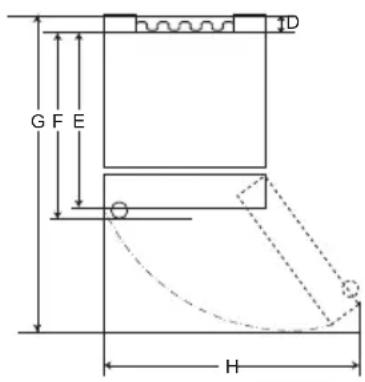
text_image
G F E H 1DTyp B
| Typ A Typ B | ||||||||
| Fickhandtag Stånghandtag | Fickhandtag | Stånghandtag | ||||||
| Storlek [mm] | ||||||||
| A | 595 595 5 | 95 595 595 | 595 595 595 | |||||
| B | 1860 2030 | 1860 2030 | 1860 | 2030 1860 | 2030 | |||
| C | 676 676 7 | 12 712 682 | 682 718 718 | |||||
| D | 9 | 9 | 9 | 9 | 15 | 15 | 15 | 15 |
| E | 667 667 6 | 67 667 667 | 667 667 667 | |||||
| F | - | - | 703 | 703 | - | - | 703 | 703 |
| G | 1124 | 1124 | 1124 | 1124 | 1130 | 1130 | 1130 | 1130 |
| H | 995 995 9 | 95 995 995 | 995 995 995 | |||||
Omgivande temperatur
text_image
Labeled diagram of a refrigerator interior showing numbered compartments and storage areas① Smart Diagnosis-enhet (*)
① Fridge Temperature (Kyltemperatur)
text_image
Diagram showing a hand holding a container inside a container with an arrow pointing to it, labeled with number 1.⚠ FÖRSIKTIGHET
natural_image
Line drawing of a toilet with a handle and ventilation slots (no text or symbols)natural_image
Line drawing of a container being poured into a tray with a curved handle (no text or symbols)WARNING
text_image
Technical diagram showing a mechanical assembly with numbered components and directional arrows indicating motion or movement.text_image
Diagram showing a mechanical assembly with numbered components and directional arrows indicating motion or movement.natural_image
Line drawing of a refrigerator interior showing the shelf and drawer (no text or symbols)natural_image
Line drawing of a refrigerator interior showing a tray and shelf with an upward arrow (no text or symbols)Andra funktioner
Dörröppningslarm
text_image
Diagram showing hand press icon pointing to two directional arrows, one with up/down arrow and one with up/down arrow3 Anslut din smartphone till den trådlösa routern.