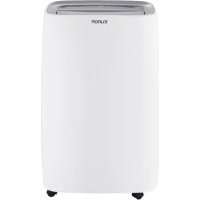
DryBest 40 WiFi - Humidifier Eurom - Free user manual and instructions
Find the device manual for free DryBest 40 WiFi Eurom in PDF.


| Product type | Dehumidifier |
| Brand | Eurom |
| Model | DryBest 40 WiFi |
| Dehumidification capacity | 40 liters per day (30 °C, 80% RH) |
| Water tank | 6 liters |
| Power consumption | 600 W |
| Power supply | 220-240 V ~ 50 Hz |
| Noise level | ≤ 56 dB(A) |
| Dimensions (W × D × H) | 371 × 251 × 595 mm |
| Weight | 17.5 kg |
| Refrigerant | R290 (flammable), 145 g |
| Operating temperature range | 5 °C to 35 °C |
| Protection class | IPX1 |
| Filter | Washable with water |
| Wi-Fi connection | Yes, via Eurom Smart app |
| Timer | Programmable (0-24 h) |
| Hygrostat | Adjustable from 30% to 90% RH |
| Fan speed | 2 speeds (Low/High) |
| Special functions | Continuous, auto, laundry drying, oscillation, lock |
| Built-in pump | Yes, max height 3 m |
| Continuous drainage | Possible (hose not included) |
| Cleaning | Damp cloth; washable filter |
| Safety | Automatic shut-off when tank full, anti-freeze protection, compressor delay |
Frequently Asked Questions - DryBest 40 WiFi Eurom
User questions about DryBest 40 WiFi Eurom
0 question about this device. Answer the ones you know or ask your own.
Ask a new question about this device
Download the instructions for your Humidifier in PDF format for free! Find your manual DryBest 40 WiFi - Eurom and take your electronic device back in hand. On this page are published all the documents necessary for the use of your device. DryBest 40 WiFi by Eurom.
USER MANUAL DryBest 40 WiFi Eurom
DryBest 30 & 40 Wi-Fi
User manual
NL 4
EN 21
DE 37
FR55
RO72
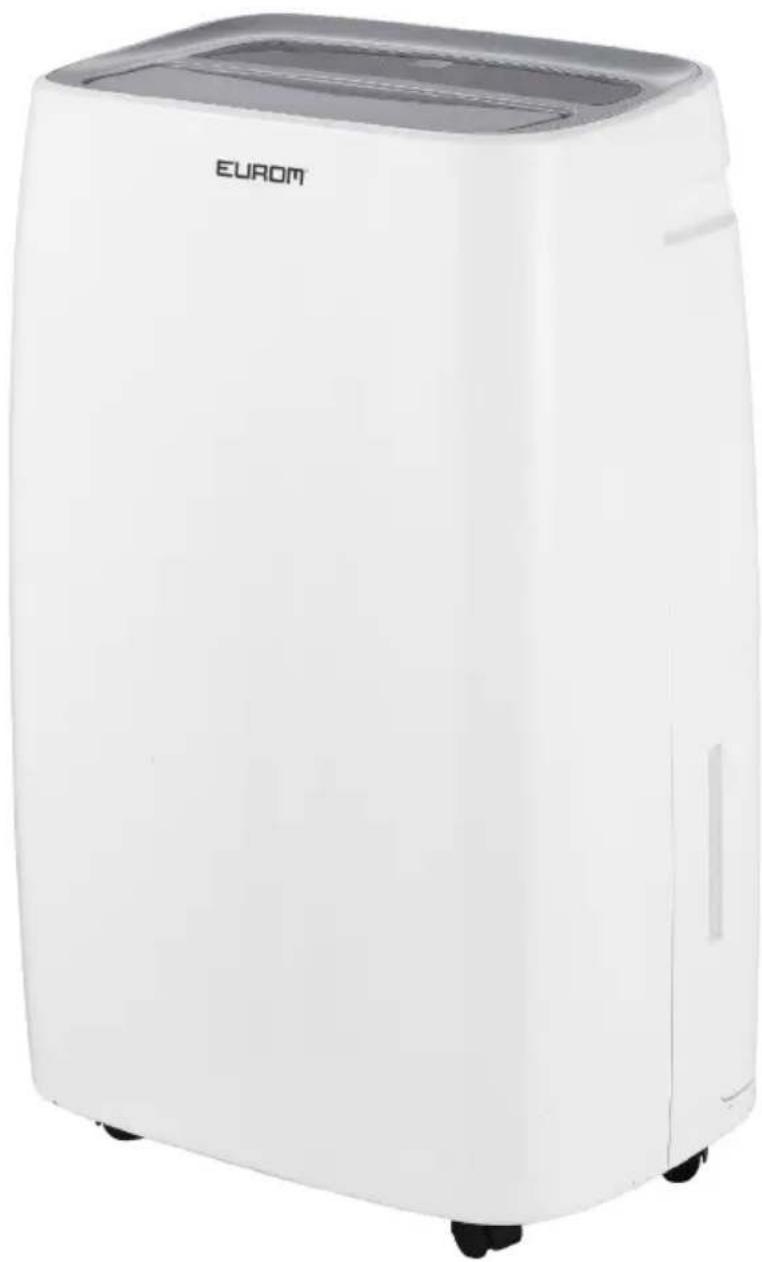
Model: Product code:
DryBest 30 Wi-Fi 371086
DryBest 40 Wi-Fi 371109
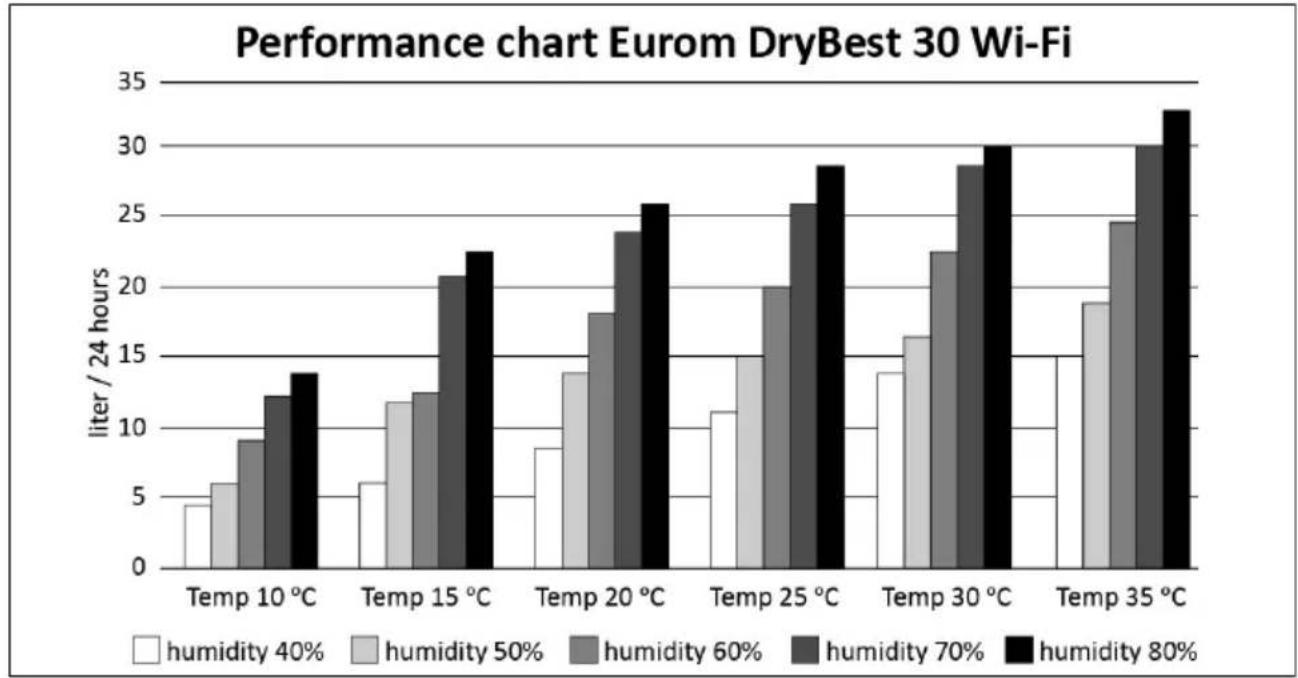
Performance charts
Figure 1.
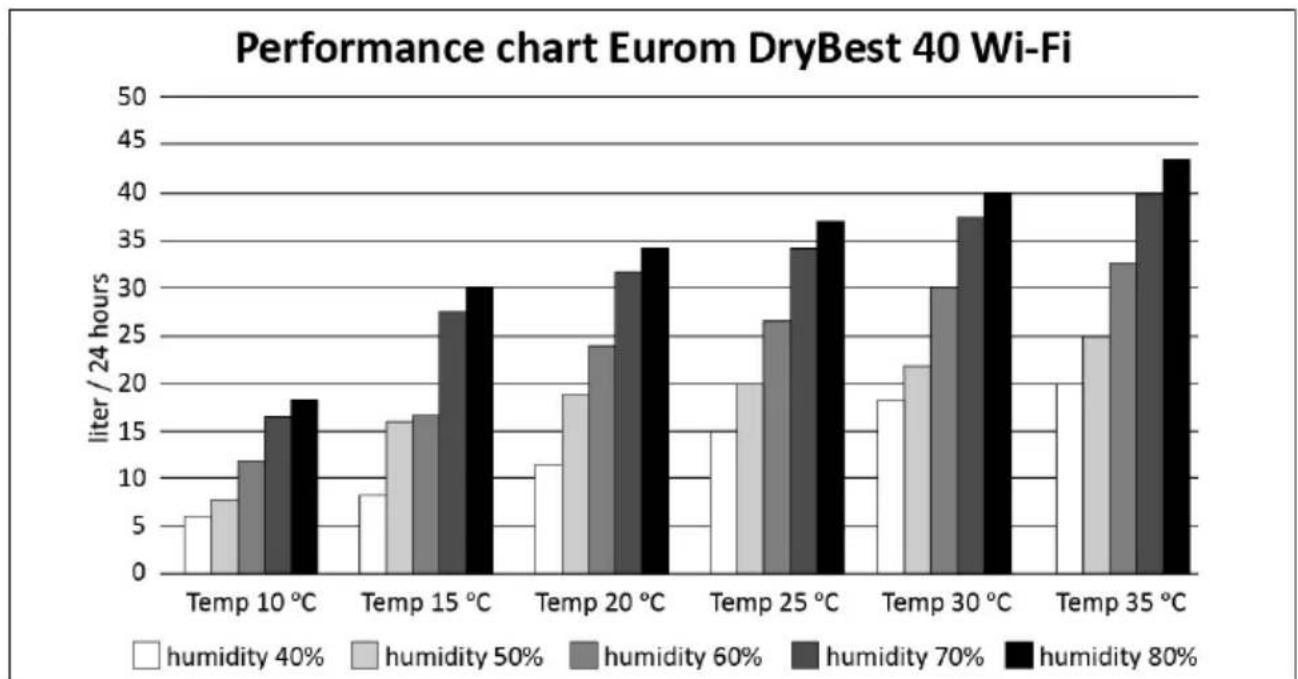
Figure 2.
- This appliance is not intended for use by persons (including children) with reduced physical, sensory or mental capabilities, or lack of experience and knowledge, unless they have been given supervision or instruction concerning use of the appliance by a person responsible for their safety.
Children should be supervised to ensure that they do not play with the appliance. - This appliance can be used by children aged from 8 years and above and persons with reduced physical, sensory or mental capabilities or lack of experience and knowledge if they have been given supervision or instruction concerning use of the appliance in a safe way and understand the hazards involved.
Children shall not play with appliance. - Cleaning and user maintenance shall not be made by children without supervision.
- Before moving, cleaning, storage or perform maintenance on the appliance, first switch off, then unplug and empty the water tank. Pull on the plug to remove from the socket, never pull on the cord.
- Never pour or spray water over the appliance. Never immerse the appliance in water or place it in the immediate vicinity of water or taps etc.
- The appliance shall be installed in accordance with national wiring regulations.
- The supply voltage and utility frequency, specified on the appliance (220-240V / 50Hz), need to match those of the socket that is used. The electrical installation needs to be protected by an earth leakage circuit breaker (max. 30mA). Only connect the equipment to an earthed socket!
- Maintain the minimum clearance around the dehumidifier when the appliance is operating as shown in drawing (Figure 17).
- If the supply cord is damaged, it must be replaced by manufacturer, its service agent or similarly qualified persons in order to avoid a hazard.
General safety warnings
- Read this manual before using or installing the appliance and keep it for future reference.
- For indoor use only, this appliance is intended to use in normal household conditions.
- Leave the appliance to stand for one hour before connecting to the mains supply after transport or when it has been tilted (max. 45^ , e.g. during cleaning).
- Always keep the appliance in vertical position. The appliance must be placed on a flat and stable surface. If the appliance is not stable and upright, water from the tank can get into the interior of the appliance and damage something or cause a dangerous situation!
- Keep air-intake or output openings clean and unobstructed. Prevent foreign objects or fingers from entering the appliance via the venting or exhaust openings as this may lead to electric shock, fire or damage.
- Do not cover the air inlet and/or air outlet.
- Do not use the appliance in small, closed spaces such as a closet etc., this can cause a fire.
- Never place the appliance in the vicinity of highly inflammable and/or hazardous substances.
- Do not stand or sit on the appliance, or put anything on it.
- Fully extend the cord before plugging in. Do not run the cord underneath carpeting; do not cover it with mats, carpet strips, or similar and make sure it is not placed in any passageways. Make sure the cord cannot be stepped on and that no furniture is placed on
top of it. Prevent that the cable gets hot. Do not lead the cord around sharp corners and do not roll it up too tightly after use!
- Don't use bug sprays or other flammable cleaners on the appliance. Do not expose the appliance to the influence of chemicals.
- Never use the plug to start and stop the appliance. Always use switch on the control panel.
- If the power supply has been interrupted, the dehumidifier will restart after 3 minutes. The automatic delay protects the compressor.
- Always remove the plug from the socket when the appliance is not in use.
- Regularly remove the water that is collected in the reservoir in the prescribed manner.
- Do not turn on the appliance if you have discovered damage to the appliance, cord or plug, if the appliance is malfunctioning, if it has been dropped or if there are signs of any other defect. Immediately disconnect the plug from the socket and return the complete appliance to the vendor or to a certified electrician for inspection and/or repair. Always ask for original parts.
- To obtain optimum performance from your dehumidifier, do not place it near a radiator or any other heat source.
- Ensure that all windows are closed in order to achieve maximum efficiency.
- The capacity of the dehumidifier depends on the temperature and the humidity in the room. At lower temperatures, less moisture will be removed.
- Ensure the filter is kept clean. This prevents unnecessary power consumption and guaranteed optimum efficiency.
- If use continuous draining: Install drain piping at a downhill grade to make sure that the condensed water can be drained continuously.
- Only switch on the pump when a draining hose is mounted on the water outlet.
R290 refrigerant gas warnings
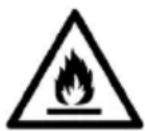
CAUTION
R290 is flammable: risk of fire.
- R290 refrigerant gas complies with European environmental directives. This appliance contains approximately 90g (DryBest 30) and 145g (DryBest 40) of R290 refrigerant gas.
- Do not use any means to accelerate the defrosting process or to clean the appliance, other than those recommended by the manufacturer.
- The appliance shall be stored in a room without activated ignition sources (for example: open flames, an activated gas appliance or an activated electric heater).
- Do not pierce or burn.
- Do not perforate any part of the refrigerant circuit and do not set the appliance on fire.
- Be aware that refrigerants do not have a discernible odour – you cannot smell a gas leak!
- The appliance shall be installed, operated and stored in a room with a floor area larger than 4m^2
- Always provide some ventilation in the room where the appliance is installed, operated and stored.
-
The appliance must be installed, operated and stored in such a way that any mechanical defects are prevented.
-
Persons working on the cooling circuit must be in possession of the correct qualifications that state the person in question is competent to use coolant in accordance with a special evaluation that is recognised by the sector association.
- Repairs must be carried out according to the recommendations of the manufacturer of the appliance. Maintenance and repairs that require the assistance of other qualified persons must be carried out under supervision of someone who is specialised in the use of flammable coolant.
- Considering this is an appliance using R290 refrigerants, a service and operation manual for this appliance is available on request. It is strictly forbidden for end-users to charge refrigerant by themselves.
Warranty
EUROM offers a 24-month warranty on this device from the date of purchase. The warranty does not cover wear and tear from normal use. The warranty expires if a defect is the result of unintentional or careless use of the device. The manufacturer, importer and supplier are not liable for incorrect connections.
Introduction
Thank you for choosing this EUROM device. You have purchased a quality device that you will enjoy for many years. Using this device with respect and care will reduce the risk of personal injury or material damage.

CAUTION
It is important to read and understand this instruction manual before assembling, installing and using the device.
This manual describes the correct and safe use of this device. Keep this manual for future reference. The manual is an essential part of the device and must be given to the new owner upon resale or exchange. This manual has been compiled with the utmost care. Nevertheless, we reserve the right to improve and adjust this manual at any time. The images used may differ.
The following symbols and terms are used in this manual to alert the reader to safety issues and important information:

WARNING
Indicates a hazardous situation which, if the safety instructions are not followed, can lead to injuries to the operator or bystanders, light and/or moderate damage to the product or to the environment.

CAUTION
Indicates a hazardous situation which, if the safety instructions are not followed, can lead to light and/or moderate damage to the product or to the environment.
Identification
| EUROM® POWEROUL PRODUCTS SINCE 1974 | DryBest 30 wifi Art. nr. Batch | 371086 BD0007 |
| Rated Voltage | 220-240V | |
| Rated frequency | 50Hz | |
| Rated input | 580W | |
| Rated current | 2.7A | |
| Rated dehumidifying capacity | 30L/ day (30°C/ RH80%) | |
| Weight | 16,5 kg | |
| Applicable temperature | 5°C - 35°C | |
| Refrigerant/ weight | R290 / 90gr | |
| Max allowable pressure | discharge 2.6MPa | |
| Suction 1.0MPa | ||
| Dimensions (mm) | 371 x 251 x 595 mm | |
| Resistance class | IPX1 | |
| EUROM - KOKOSSTRAAT 20 - 8281 JC - GENEMUIDEN - NETHERLANDS | ||
Figure 13.
| EUROM® POWERCFUL PRODUCTS SINCE 1974 | DryBest 40 wifi Art. nr. Batch | 371109 BD0007 |
| Rated Voltage | 220-240V | |
| Rated frequency | 50Hz | |
| Rated input | 600W | |
| Rated current | 2.8A | |
| Rated dehumidifying capacity | 40L/ day (30°C/ RH80%) | |
| Weight | 17,5 kg | |
| Applicable temperature | 5°C - 35°C | |
| Refrigerant/ weight | R290 / 145gr | |
| Max allowable pressure | discharge 2.6MPa | |
| Suction 1.0MPa | ||
| Dimensions (mm) | 371 x 251 x 595 mm | |
| Resistance class | IPX1 | |
| EUROM - KOKOSSTRAAT 20 - 8281 JC - GENEMUIDEN - NETHERLANDS | ||
Figure 14.
Specifications
| Type DryBest 30 Wi-Fi DryBest | 40 Wi-Fi | |
| Power supply: 220-240V~ 50Hz | 220-240V~ 50Hz | |
| Dehumidification cap max. 30 liter / 24 hours 40 liter / 24 hours | ||
| Power consumption: 580W 600W | ||
| Refrigerant: R290 90g R290 145g | ||
| Working range 5 - 35 °C 5 - 35 °C | ||
| Type DryBest 30 Wi-Fi DryBest 40 Wi-Fi | ||
| Water tank: 6 liter 6 liter | ||
| Noise level: ≤ 47 dB(A) ≤ 56 dB(A) | ||
| Hygrostat: Yes Yes | ||
| Timer: Yes Yes | ||
| Adjustable fan: Yes Yes | ||
| Size: 25 x 37 x 59.5 cm 25 x 37 x 59.5 cm | ||
| Weight 16.5 kg 17.5 kg | ||
Description
The DryBest creates a dryer and more comfortable living environment by removing unwanted moisture from the air. The air dehumidifier's hygrostat keeps your home and working environment at a pre-set humidity level. It is also fitted with a timer, which automatically turns the device on or off.
Unboxing

WARNING
Plastic bags can be dangerous. To avoid danger of suffocation, keep this bag away from babies and children.
- Air outlet
- Handle
- Water tank
- Water drain hose
- Tulle for water drain hose
6.Filter - Control panel
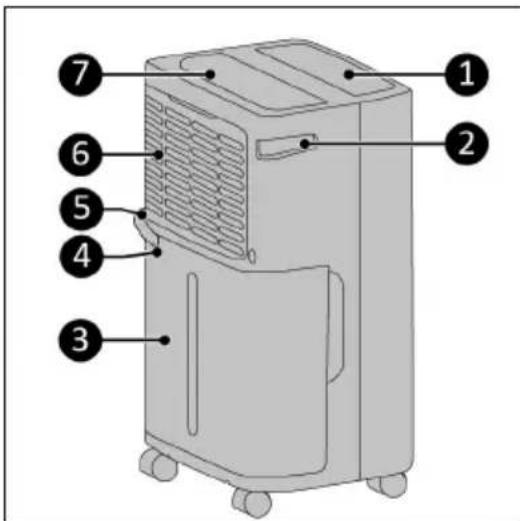
Figure 15.
Control panel and display
The display usually shows the humidity in the room. If you set a desired humidity, the set humidity is showed on the display for a few seconds. If you use the timer to set an on or off time, the display flashes the set number of hours for a few seconds. If the humidity is less than
35%, LO (low) is displayed and the device will remain inactive. If the humidity is higher than 95%, HI (high) is displayed.
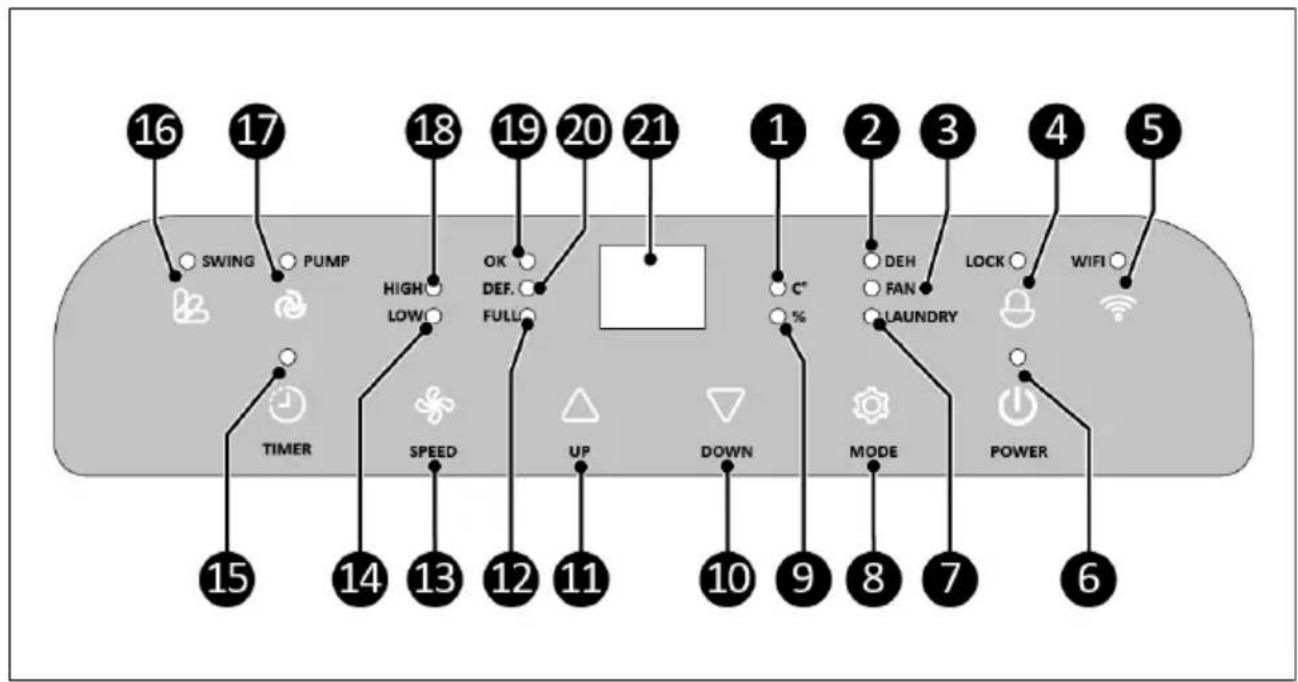
Figure 16.
| No.DescriptionNo.Description | ||
| 1 Temperature indicator light 12 Water tank full indicator light | ||
| 2 DEH indicator light 13 SPEED button | ||
| 3 FAN indicator light 14 Fan speed low indicator light | ||
| 4 LOCK button and indicator light 15 TIMER button and indicator light | ||
| 5 W FI button and indicator light 16 SWING button and indicator light | ||
| 6 POWER button and indicator light 17 PUMP button and indicator light | ||
| 7 LAUNDRY indicator light 18 Fan speed high indicator light | ||
| 8 MODE button 19 Set air humidity reached indicator light | ||
| 9 Air humidity indicator light 20 Defrost indicator light | ||
| 10 DOWN button 21 Display | ||
| 11 UP button |
Transport and storage
- Clean the device before storing it.
- Transport the device in an upright position.
- Store the device in an upright position, in its original packaging, in a cool, dry and dust-free area.
Installation

WARNING
- Do not put the power plug into the wall socket before the device is mounted or placed correctly.
- Do not use an extension cable; this can cause overheating and fire. If using an extension cable is unavoidable, make sure it is undamaged and earthed. Use an extension cable with a minimum power of 600 Watt. Always unwind the extension cable completely to prevent overheating.
- Do not place the device near a heater, stove or other heat source.
- Do not place the device in direct sunlight.

CAUTION
When the dehumidifier is in operation, doors and windows should be closed to achieve optimal efficiency.
- Place the product on a sturdy, flat, horizontal surface.
- Keep the following minimum distances to ensure proper air circulation of the unit (Figure 17*):
100cm on the topside;
^ 20 cm on the sides.
- Make sure the device is in the OFF position.
-
Insert the power plug into an earthed wall socket that is easily accessible. Use an earthed wall socket with a minimum power of 580 Watt (DryBest 30 Wi-Fi) or 600 Watt (DryBest 40 Wi-Fi).
-
Your device may look different.
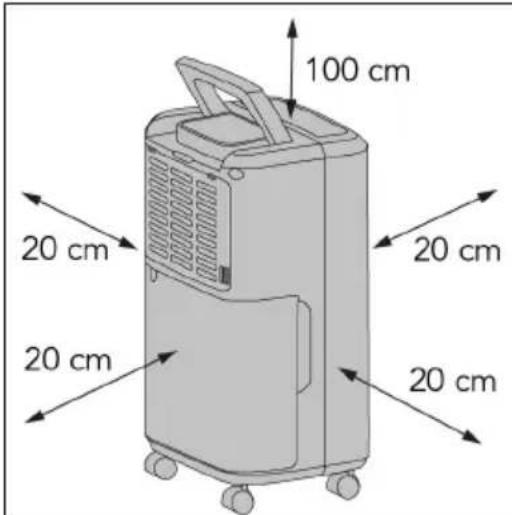
Figure 17.
Operation

WARNING
Before every use, make sure that:
- you operate the device with dry hands;
the device is clean and dry;
the device is not damaged;
the device is not covered or blocked.

CAUTION
When the device is turned on, it will emit a sound. This is caused by the compressor and fan starting up.

CAUTION
The compressor has a delay of at least 3 minutes between stopping and starting.
- Press the POWER button.
- The device is switched on.
- The power indicator will now light up continuously.
The power indicator lights up continuously only when the humidity is higher than the desired humidity. Otherwise, the power indicator flashes to indicate that the compressor is not working.
- The display will show the air humidity.
- Press the POWER button again to switch off the device.
Set the air humidity
The optimal humidity level, both for your health and your belongings, lies between 45% and 65% .
- Press the air humidity up or down button to set the desired air humidity.
- You can set the desired humidity between 30% and 90% (at 5% intervals).
- The display shows the set humidity for a few seconds.
- The display will show the current air humidity.
- The OK indicator light comes on when the set humidity has been reached.
Once the required air humidity level has been reached, the compressor will automatically be switched off. The fan continues to operate. The dehumidifier keeps the air in the room moving and is therefore able to detect humidity and switch it back on in time.
If the air humidity rises more than 3% above the set air humidity, the compressor is automatically switched on.
If you set the humidity with the DOWN button to CO, the device works continuously.
Set the timer
When the device is not in operation (connected and in the off position), you can set the time at which it should start.
When the device is in operation, you can set the time at which it should stop.
- Press the TIMER button.
- The timer indicator will light up.
- The set hours set appear on the display.
- Press the TIMER button to add an hour.
Cancel the timer setting by setting the time to 0.
The timer setting is forgotten if you switch off the device manually, but remains in memory if the device stops because the tank is full or because it is defrosting.
Change fan speed
- Press the fan speed button to set the fan speed:
oLOW indicator light: low fan speed.
High indicator light: high fan speed.
Defrosting
If the evaporator freezes, the operation of the device is automatically interrupted and it starts to defrost. The DEF (defrost) indicator lights up and starts defrosting. This process takes around 10 minutes. The compressor can be switched off for up to 45 minutes by the defrosting process.
Swing function
It is possible to automatically tilt the air outlet up and down for better air circulation.
- Press the SWING button to activate the swing function.
- Press the SWING button again to deactivate the swing function.
Change the displayed value
-
Press the UP and DOWN button simultaneously to change the displayed value.
-
Both displays will show the air humidity percentage or the temperature.
-
The corresponding indicator lights up.
Continuous mode
In continuous mode the device will continue to work regardless of the humidity in the room.
- Repeatedly press DOWN to activate continuous mode.
- CO will appear on the display.
Automatic mode
In automatic mode the device will constantly maintain the air humidity at a comfortable level.
- Repeatedly press UP to active automatic mode.
- AU will appear on the display.
| Room temperature < 5 °C: Device stops working | |
| Room temperature between 5 and 20 °C: 60% air humidity | |
| Room temperature between 20 and 27 °C: 55% air humidity | |
| Room temperature < 27 °C: 50% air humidity |
Lock function
You can lock the buttons on the control panel so that settings cannot be changed accidentally.
- Press and hold the LOCK button.
The LOCK indicator lights up. The buttons are now locked.
- Press and hold the LOCK button to unlock the buttons. The LOCK indicator light goes out.
MODE button
You can set the device to different modes by pressing the MODE button repeatedly. The corresponding indicator light will go on.
- DEH: Dehumidifier setting
- FAN: the device works like a fan. The compressor is switched off and the UP and DOWN buttons cannot be used. However, the SPEED button for setting the fan can still be used.
- LAUNDRY: laundry drying function. In this setting, the unit dehumidifies continuously at a high fan speed. The SPEED and UP & DOWN buttons cannot be used.
Drainage

WARNING
Do not remove the float from the reservoir. Without the float, the device is unable to detect a full reservoir, which could lead to water leakage.

CAUTION
The appliance will not work if the water tank is not properly inserted. In that case the 'water tank full' indicator light will remain on.

CAUTION
When the water tank is full, the compressor stops out of self-protection. A tone sounds repeatedly to indicate that the reservoir needs to be emptied.
When the water tank is full the FULL indicator light comes on and the device starts beeping. Press any button to stop the beeping.
- Place both hands on the sides of the water tank (Figure 18, pos. 1).
- Carefully pull the water tank (Figure 18, pos. 1) out of the device.
- Empty the water tank.
- Carefully replace the water tank.
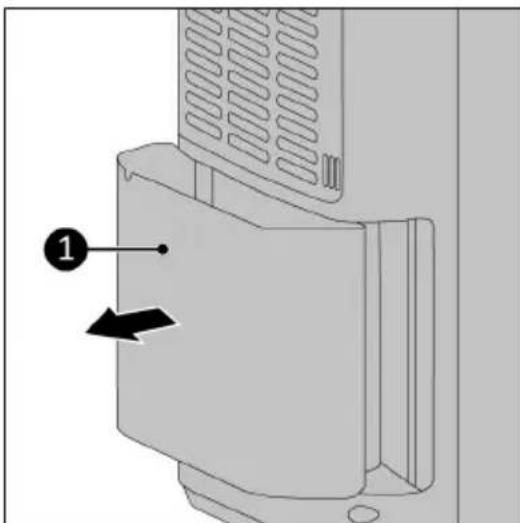
Figure 18.
Continuous drainage
If the dehumidifier is used in a high-humidity environment, the water tank will need to be emptied more frequently. In this situation, it may be more convenient to activate continuous drainage.

WARNING
Always check that the hose connection has no leaks.

WARNING
In very cold weather, precautions should be taken to prevent the water hose from freezing.

WARNING
Empty the bucket in time before it overflows and can cause water damage.

CAUTION
The water hose is not included.
- Remove the short pre-shaped hose (Figure 19, pos. 1).
- Connect a suitable water hose to the drain pipe (the top left hole) with a clamp.
- Lead the end of the hose into a drain or bucket.
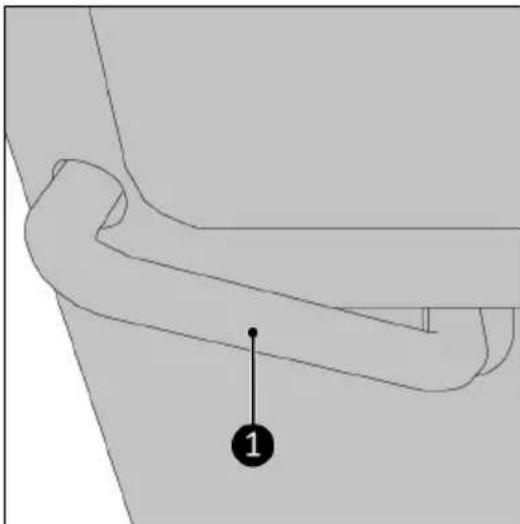
Figure 19.
Pump function

WARNING
If the pump function is used without a hose connected to the water discharge point (the top left hole). Then the pump will pump the water from the water discharge point and water damage will occur to the floor.

CAUTION
Only turn on the pump when a hose or the short, supplied hose is installed.

CAUTION
The maximum head of this pump is 3 metres.
-
Make sure a suitable water hose is connected to the drain pipe (the top left hole) with a clamp.
-
Press the PUMP button to activate the pump. If the pump function is enabled, the pump is switched on every time an internal tank is full. Please note, the internal tank is not the removable water tank!
-
Press the PUMP button again to deactivate the pump.
Tapping option

CAUTION
Remember to push the plug back into the hole properly afterwards. Otherwise, a leak may occur when you use the device again.
At the back of the device, at the bottom, is a tap point (Figure 20, pos. 1). This tap can be used to remove residual water from the device before you move or store it:
- Remove the plug from the tap point.
- Drain the residual water.
- Replace the plug.
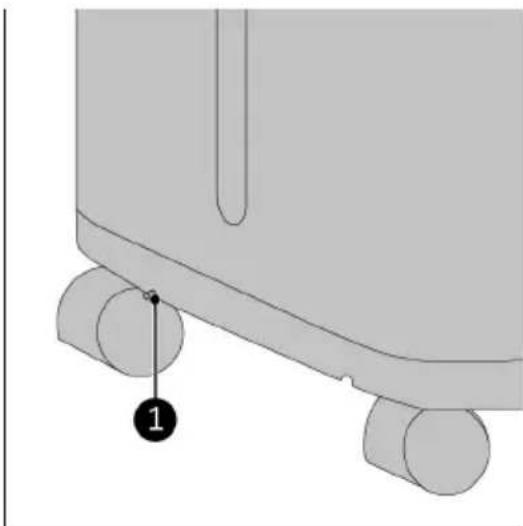
Figure 20.
Eurom Smart App

CAUTION
It is recommended to switch on Bluetooth on your smart phone when connecting your Eurom device for the first time. Doing so will make connecting quicker and easier.
The device can be operated using an app on a smartphone or tablet. The Eurom Smart App can be used:
regulate the humidity;
-regulate the fan speed;
- set the timer;
- set the swing function, pump function.
- Open the Eurom Smart App manual with the QR code (Figure 21) or go to www.eurom.nl/nl/manuals.
- Complete the Eurom Smart App manual.
°When the device is connected with Wi-Fi, the Wi-Fi symbol appears on the screen.
If the Wi-Fi symbol is blinking there is no connection.
Figure 21.
Reset Wi-Fi connection
Press and hold the Wi-Fi button for 5 seconds. Existing connections will be deleted, the Wi-Fi symbol will start blinking and a new connection can be made
EZ mode/APmode
- Press and hold the Wi-Fi button for 5 seconds.
- The Wi-Fi symbol will start blinking slowly and the Wi-Fi connection is in AP mode.
- Press and hold the Wi-Fi button for 5 seconds to change to EZ mode.
After operation

CAUTION
Do not use the power cable to unplug or carry the device. Do not wind the power cable too tightly or in sharp corners. Do not wrap the power cable around the device.
- Make sure the device is turned off.
- Disconnect the power plug from the power outlet.
- Wind the power cable.
- Empty the water tank.
Maintenance

WARNING
Do not perform any repairs or modifications to this device.
Maintenance and repairs must be carried out by a EUROM authorized professional. If the electric cable and/or electric plug is damaged, it should be replaced by the manufacturer or its service employee or persons with similar qualifications to prevent risks.
Cleaning

CAUTION
Do not use:
scouring pads;
-hard brushes;
- flammable, aggressive or chemical cleaning products.
Prevent water from entering the device. Do not immerse any part of the device in water or other liquids.
It is recommended to clean the device after each use and prior to storage.
- Make sure the device is switched off and the plug is removed from the power outlet.
- Carefully vacuum all openings to remove dust and dirt.
- Wipe the device with a damp, clean, soft, lint-free cloth or a soft brush.
- Make sure you have emptied the water tank.
- Let the device dry completely prior to use and storage.
Filter cleaning
- Make sure that:
the device is switched off;
the plug is removed from the power outlet.
- Remove the filter (Figure 22, pos. 1).
- Carefully vacuum the filter.
- Clean the filter with clean water.
- Let the filter dry completely prior to returning it to its place.

Figure 22.
Troubleshooting
The device does not work:
- Confirm that the plug is plugged in.
- Confirm that the house's electricity is on.
- Check whether the room temperature is lower than 5^ C or higher than 35^ C . If so, it is out of the device's working range.
- When the humidity is at lower than 35% the device will not work.
- Confirm that the water tank is properly placed.
- Confirm that the water tank is not full.
- Make sure the air inlet and outlet are not blocked.
The device seems to do little:
- Check whether the filter is dusty or dirty.
- Confirm that the air intake and outlet are not blocked up.
- Confirm that the room humidity is high enough.
- Confirm that all windows and doors are closed.
- Check if something in the room is producing lots of humidity.
- Check the performance chart on page 3. The performance is depending on temperature and humidity.
The device is leaking:
- Confirm that the unit and the water tank are not damaged and have no cracks or deformation.
- Make sure the device is on a flat, firm surface.
The unit is too noisy:
- Make sure the device is on a flat, firm surface.
- Check whether the filter is dusty or dirty.
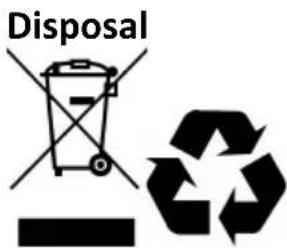
This marking indicates that this product should not be disposed of with other household waste throughout the EU. To prevent possible harm to the environment or human health from uncontrolled waste disposal, recycle it responsibly to promote the sustainable reuse of material resources. To return your used device, please use the return and collection systems or contact the retailer where the product was purchased. They can take this product for environmentally safe recycling.
- DryBest 30 & 40 Wi-Fi
- User manual
- General safety warnings
- R290 refrigerant gas warnings
- CAUTION
- Warranty
- Introduction
- WARNING
- Identification
- Figure 13.
- Figure 14.
- Specifications
- Description
- Unboxing
- Control panel and display
- Transport and storage
- Installation
- Operation
- Set the air humidity
- Set the timer
- Change fan speed
- Defrosting
- Swing function
- Change the displayed value
- Continuous mode
- Automatic mode
- Lock function
- MODE button
- Drainage
- Continuous drainage
- Pump function
- Tapping option
- Eurom Smart App
- Reset Wi-Fi connection
- EZ mode/APmode
- After operation
- Maintenance
- Cleaning
- Filter cleaning
- Troubleshooting
- The device does not work:
- The device seems to do little:
- The device is leaking:
- The unit is too noisy:
Brand : Eurom
Model : DryBest 40 WiFi
Category : Humidifier