
SRU1018 - Universal remote PHILIPS - Free user manual and instructions
Find the device manual for free SRU1018 PHILIPS in PDF.



| Product type | Universal remote control |
| Brand | Philips |
| Model | SRU1018 |
| Dimensions (approx) | 20 x 5 x 2 cm |
| Weight (approx) | 100 g |
| Power supply | 2 AAA batteries (R03, UM3) |
| Number of keys | 15 (including numeric keys, volume, channel, standby, mute, teletext, aspect ratio) |
| Main functions | TV control, standby, volume adjustment, channel selection, teletext, aspect ratio, manual and automatic code programming |
| Care and cleaning | Use a soft, dry cloth. Do not use abrasive products or solvents. |
| Safety | Keep out of reach of young children. Do not immerse in water. Use only recommended batteries. |
| Spare parts and repairability | Replacement batteries (AAA). No other detachable parts. Not user-serviceable. |
| General information | Manual available in several languages (FR, EN, DE, etc.). Compatible with most TV brands. Website for codes: www.philips.com/urc |
Frequently Asked Questions - SRU1018 PHILIPS
User questions about SRU1018 PHILIPS
0 question about this device. Answer the ones you know or ask your own.
Ask a new question about this device
Download the instructions for your Universal remote in PDF format for free! Find your manual SRU1018 - PHILIPS and take your electronic device back in hand. On this page are published all the documents necessary for the use of your device. SRU1018 by PHILIPS.
USER MANUAL SRU1018 PHILIPS
natural_image
Close-up of a white remote control with gray buttons and a small orange button (no visible text or symbols)Quick, Clean & Easy Setup
www.philips.com/urc
Contents
- Introduction 4
- Installing the remote control 4-6
Inserting the batteries 4
Testing the remote control 4
Setting the remote control 5-6 - Keys and functions 7
- Troubleshooting 8
Code list of all brands / equipment 64-68
Information to the Consumer 69
1. Introduction
Congratulations on your purchase of the Philips SRU 1018 universal remote control.
The SRU 1018 is a handy zapper with all main keys and ergonomic shape for comfortable control.
After installing the remote control it can operate the most-used functions of almost any brand of TV.
You can find information about how to prepare this remote control for use in the chapter
'Installing the remote control'.
2. Installing the remote control
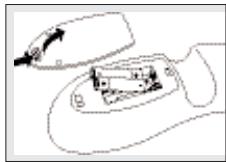
Inserting the batteries
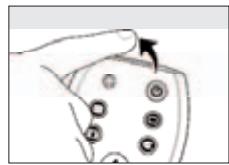
1 Press the cover inwards and lift it up.
2 Place two R03, UM4 or AAA type batteries into the battery compartment, as shown.
3 Replace the cover and click it firmly into place.
natural_image
Simple line drawing of a computer mouse with an open screen showing a small object inside (no text or symbols)Testing the remote control
Because the SRU 1018 may use different signals for each brand and even for different models of the same brand, it is advisable to test whether your TV responds to the SRU 1018.
The example below instructs you how to do this.
1 Turn your TV on manually or use the original remote control. Tune to channel 1.
2 Check whether all the keys are working.
For an overview of the keys and their functions see '3. Keys and functions'.
- If the TV responds as it should to all of the key commands the SRU 1018 is ready for use.
• If the device does not respond at all or not to all of the key
commands, follow the instructions under 'Setting the remote control' or for online setup got to: www.philips.com/urc.
Setting the remote control
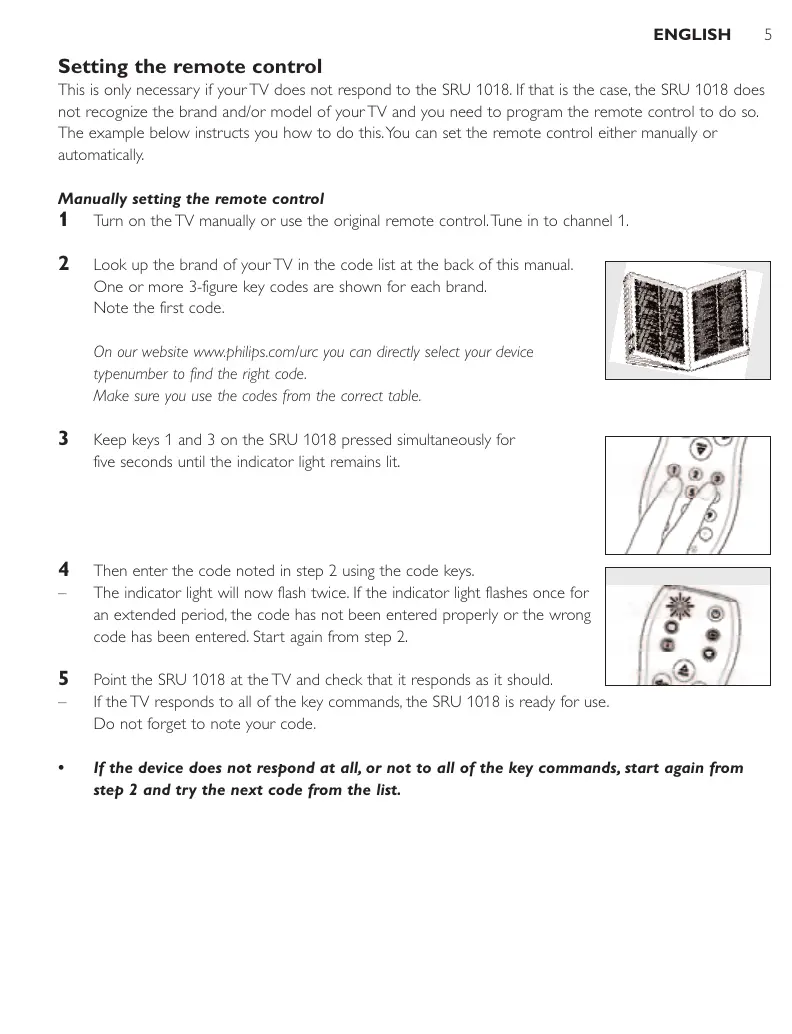
This is only necessary if your TV does not respond to the SRU 1018. If that is the case, the SRU 1018 does not recognize the brand and/or model of your TV and you need to program the remote control to do so. The example below instructs you how to do this. You can set the remote control either manually or automatically.
Manually setting the remote control
1 Turn on the TV manually or use the original remote control. Tune in to channel 1.
2 Look up the brand of your TV in the code list at the back of this manual. One or more 3-figure key codes are shown for each brand. Note the first code.
On our website www.philips.com/urc you can directly select your device typenumber to find the right code.
Make sure you use the codes from the correct table.
natural_image
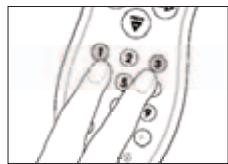
Illustration of a server rack unit with visible internal grid patterns (no text or symbols)3 Keep keys 1 and 3 on the SRU 1018 pressed simultaneously for five seconds until the indicator light remains lit.
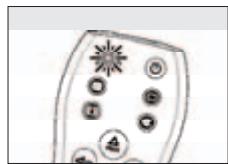
4 Then enter the code noted in step 2 using the code keys.
- The indicator light will now flash twice. If the indicator light flashes once for an extended period, the code has not been entered properly or the wrong code has been entered. Start again from step 2.
natural_image
Simple diagram of a device with circular elements and a starburst symbol (no text or labels)5 Point the SRU 1018 at the TV and check that it responds as it should.
- If the TV responds to all of the key commands, the SRU 1018 is ready for use. Do not forget to note your code.
- If the device does not respond at all, or not to all of the key commands, start again from step 2 and try the next code from the list.
Automatically setting the remote control
If you cannot find the right code for your brand device, the remote control can automatically search for the right code.
1 Make sure the TV is switched on and select a channel using the original remote control or the keys on the TV (for example channel 1).
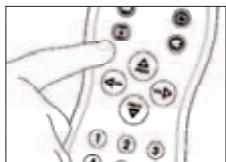
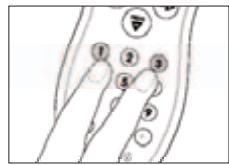
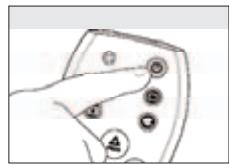
2 Keep keys 1 and 3 on the SRU 1018 pressed simultaneously for five seconds, until the indicator light remains lit.
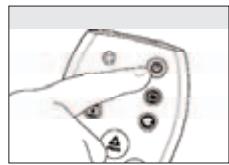
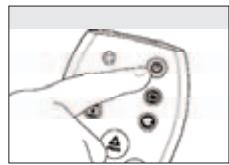
3 Press the ⏻ key of the SRU 1018 and keep it pressed.
natural_image
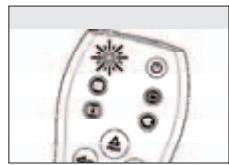
Hand holding a device with control buttons (no text or symbols visible)- The SRU 1018 now starts emitting all known 'TV off' signals, one by one. Each time a code is sent, the indicator light flashes.
natural_image
Simple diagram of a device with circular elements and a starburst symbol (no text or labels)4 When your TV switches off (stand-by), immediately release the ⏻ key of the SRU 1018 to confirm.
— The SRU 1018 has now found a code that works on your TV.
5 Check if you can operate all functions on your TV with the SRU 1018.
natural_image
Hand holding a device with circular components and an arrow pointing to it (no text or symbols visible)- If this is not the case, you can redo the automatic setting. The SRU 1018 will then search for a code that perhaps works better.
- After the SRU 1018 has run through all the known codes, the search will stop automatically and the indicator light stops flashing.
– Automatic programming of a TV takes a maximum of 6 minutes.
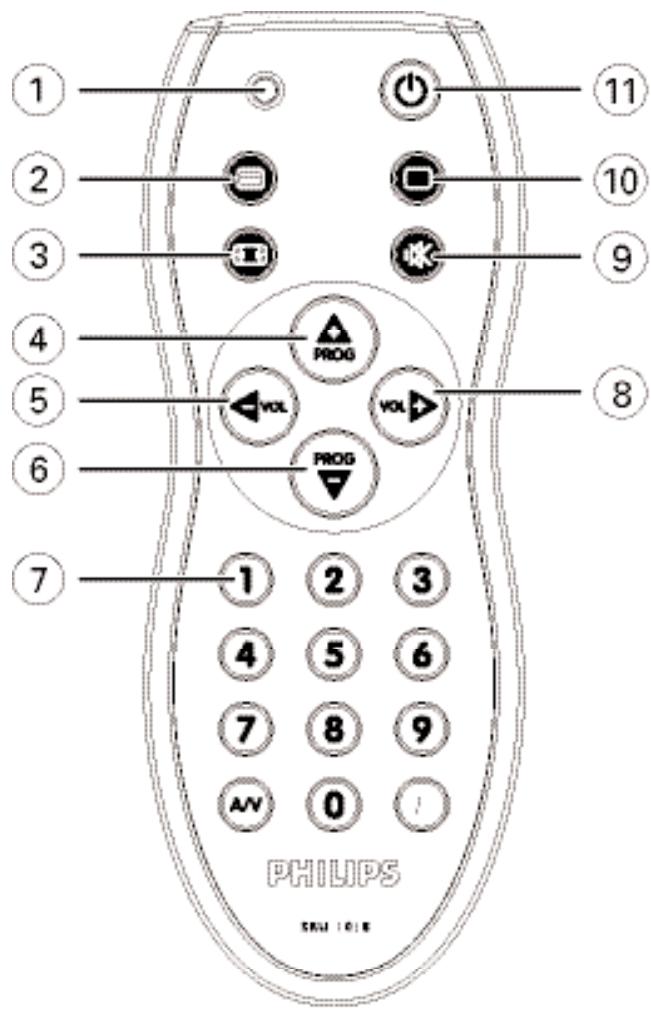
3. Keys and functions
The illustration on page 3 gives an overview of all keys and their functions.
① Indicator light .... flashes / lights up when a key / key combination is pressed.
② ...... switches Teletext on.
③ 📄 . . . . . . . . . . . . . . . . selects between regular (4:3) and wide screen (16:9) TV.
④ PROG + .... selects a following channel.
⑤ VOL - .... reduces the TV volume.
⑥ PROG –..... selects a previous channel.
⑦ Digit keys.....direct choice of channels and other functions.
⑧ VOL + .... increases the TV volume.
⑨ (Mute) ..... mutes the sound of the TV.
⑩ □ ...... switches Teletext off.
⑪ ⏻ (Standby).... switches the TV on or off.
4. Troubleshooting
- Problem
— Solution
• The device you want to operate does not respond when you press a key.
– Replace the old batteries with two new R03, UM4 or AAA type batteries. - Point the SRU 1018 at the device and make sure that there are no obstructions between the SRU 1018 and the device.
• The SRU 1018 does not respond properly to commands.
— Maybe you are using the wrong code. Try programming the SRU 1018 again using another code, which is mentioned under the brand of your device, or reset for automatic search to find the right code. - Your brand of device is not in the code list.
— Try to set the SRU 1018 automatically. See 'Automatically setting the remote control'.
• None of the codes works during manual setting of the remote control.
— If that is the case, follow the instructions under 'Automatically setting the remote control'.
Sommaire
natural_image
Simple line drawing of a computer mouse with an open screen showing a small object inside (no text or symbols)natural_image
Illustration of a server rack unit with visible internal circuitry (no text or labels)natural_image
Simple diagram of a device with circular elements and a starburst symbol (no text or labels)natural_image
Hand holding a device with control buttons (no text or symbols visible)natural_image
Simple diagram of a cell with labeled organelles (no text or symbols)natural_image
Hand holding a button with circular buttons, pointing at it (no text or symbols visible)natural_image
Simple line drawing of a computer mouse with an open screen showing a small object inside (no text or symbols)natural_image
Illustration of a server rack unit with visible internal circuitry (no text or labels)natural_image
Simple line drawing of a remote control panel with buttons and a starburst symbol (no text or labels)natural_image
Hand holding a device with control buttons (no text or symbols visible)natural_image
Simple diagram of a cell with labeled organelles (no text or symbols)natural_image
Hand holding a button with circular holes, pointing at it (no text or symbols visible)natural_image
Simple line drawing of a hand holding a device with an arrow pointing to it (no text or symbols)natural_image
Illustration of a server rack unit with multiple panels and ventilation grilles (no visible text or labels)natural_image
Simple diagram of a device with circular elements and a starburst symbol (no text or labels)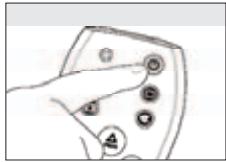
natural_image
Hand pointing at a control panel with buttons (no text or symbols visible)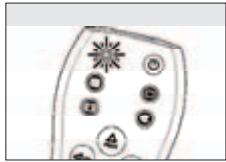
natural_image
Simple diagram of a device with circular elements and starburst symbols (no text or labels)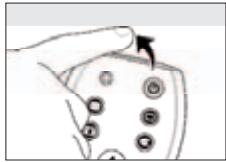
natural_image
Hand holding a button with circular holes, no text or symbols visiblenatural_image
Simple line drawing of a computer mouse with an open lid and internal components (no text or symbols)natural_image
Illustration of a server rack unit with visible internal grid patterns (no text or symbols)natural_image
Simple diagram of a remote control panel with circular buttons and starburst symbols (no text or labels)5 Peg med SRU 1018'en på tv-apparatet og kontrollér, om det reagerer
korrekt.
natural_image
Hand holding a device with control buttons (no text or symbols visible)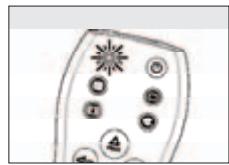
natural_image
Simple diagram of a cell with labeled organelles (no text or symbols)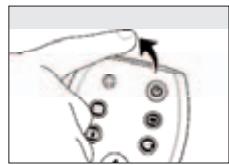
natural_image
Hand holding a button with circular holes, pointing at it (no text or symbols visible)natural_image
Diagram of a computer mouse with an open screen showing the mouse and a small inset image of a device (no text or symbols present)natural_image
Illustration of a server rack unit with multiple panels and ventilation grilles (no visible text or labels)4 Knappa sedan in koden som du noterade i steg 2 med kodknapparna.
natural_image
Simple diagram of a device with circular components and starburst symbols (no text or labels)natural_image
Hand holding a device with circular buttons and an 'A' label (no readable text or symbols beyond basic icons)natural_image
Simple diagram of a remote control panel with circular buttons and a starburst symbol (no text or labels)natural_image
Hand holding a device with circular components and an arrow pointing to it (no text or symbols visible)natural_image
Simple line drawing of a computer mouse with an open lid and internal components (no text or symbols)Teste fjernkontrollen
Stille inn fjernkontrollen
natural_image
Illustration of a server rack unit with visible internal grid patterns (no text or symbols)natural_image
Simple line drawing of a remote control panel with circular buttons and starburst symbols (no text or labels)natural_image
Hand holding a device with control buttons (no text or symbols visible)natural_image
Simple diagram of a device with circular elements and a starburst symbol (no text or labels)natural_image
Hand holding a device with circular buttons and an arrow pointing to it (no text or symbols visible)natural_image
Simple line drawing of a computer mouse with an open screen showing a small object inside (no text or symbols)natural_image
Illustration of a server rack unit with visible internal grid patterns (no text or symbols)natural_image
Simple diagram of a remote control panel with circular buttons and a starburst symbol (no text or labels)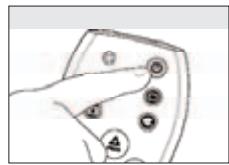
natural_image
Hand holding a device with control buttons (no text or symbols visible)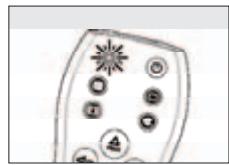
natural_image
Simple diagram of a device with circular elements and a starburst symbol (no text or labels)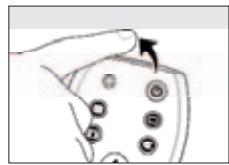
natural_image
Hand holding a device with circular components and an arrow pointing to it (no text or symbols visible)natural_image
Simple line drawing of a computer mouse with an open screen showing a small object inside (no text or symbols)natural_image
Illustration of a server rack unit with visible internal grid patterns (no text or symbols)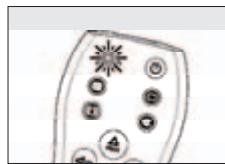
natural_image
Simple line drawing of a remote control panel with circular buttons and starburst symbols (no text or labels)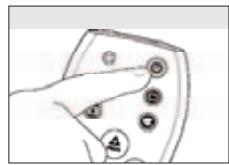
natural_image
Hand holding a device with control buttons (no text or symbols visible)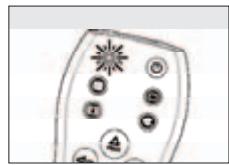
natural_image
Simple diagram of a device with circular elements and a starburst symbol (no text or labels)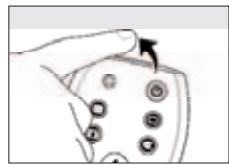
natural_image
Hand holding a device with circular components and an arrow pointing to it (no text or symbols visible)3. Tasti e funzioni
natural_image
Simple line drawing of a computer mouse with an open lid and internal components (no text or symbols)natural_image
Illustration of a server rack unit with visible internal components (no text or labels)natural_image
Simple diagram of a device with circular components and starburst pattern (no text or symbols)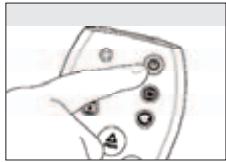
natural_image
Hand pointing at a control panel with buttons (no text or symbols visible)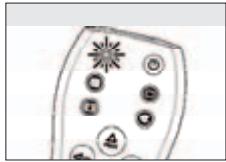
natural_image
Simple diagram of a device with circular elements and starburst symbols (no text or labels)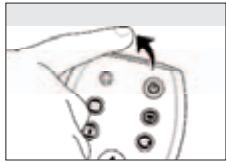
natural_image
Hand holding a small electronic component with circular holes, no visible text or symbolsnatural_image
Simple line drawing of a computer mouse with an open screen showing a small object inside (no text or symbols)Testar o telecomando
Configurar o telecomando
natural_image
Illustration of a server rack unit with visible internal grid patterns (no text or symbols)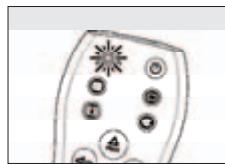
natural_image
Simple line drawing of a remote control panel with circular buttons and a starburst symbol (no text or labels)3 Prima a tecla Ⓧ do telecomando SRU 1018 e mantenha-a premida.
natural_image
Hand holding a device with control buttons (no text or symbols visible)natural_image
Simple diagram of a device with circular elements and a starburst symbol (no text or labels)natural_image
Hand holding a device with circular components and an arrow pointing to it (no text or symbols visible)natural_image
Diagram of a computer mouse with an open screen showing the mouse and its internal components (no text or symbols)natural_image
Illustration of a server rack unit with visible internal circuitry (no text or labels)natural_image
Simple diagram of a remote control with circular buttons and a starburst symbol (no text or labels)natural_image
Hand holding a device with circular buttons and an arrow pointing to it (no text or symbols visible)natural_image
Simple diagram of a remote control panel with circular buttons and a starburst symbol (no text or labels)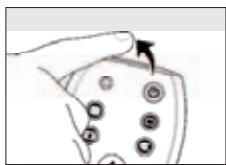
natural_image
Hand holding a device with circular buttons and an arrow pointing to it (no text or symbols visible)natural_image
Simple line drawing of a computer mouse with an open screen showing a small object (no text or symbols)natural_image
Illustration of a 3D cabinet or rack unit with internal grid patterns (no visible text or symbols)natural_image
Simple diagram of a device with circular components and a starburst symbol (no text or labels)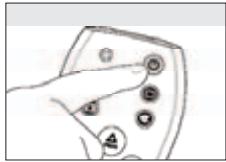
natural_image
Hand pointing at a control panel with buttons (no text or symbols visible)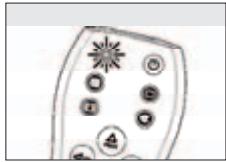
natural_image
Simple diagram of a device with circular elements and starburst symbols (no text or labels)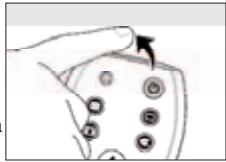
natural_image
Hand holding a small electronic component with circular holes, no visible text or symbols3. Кнопки и функции
natural_image
Simple line drawing of a computer mouse with an open screen showing a small object inside (no text or symbols)natural_image
Illustration of a server rack unit with visible internal grid patterns (no text or symbols)natural_image
Simple line drawing of a remote control panel with circular buttons and starburst symbols (no text or labels)natural_image
Hand holding a device with control buttons (no text or symbols visible)natural_image
Simple diagram of a device with circular elements and a starburst symbol (no text or labels)natural_image
Hand holding a device with circular components and an arrow pointing to it (no text or symbols visible)natural_image
Simple line drawing of a computer mouse with an open screen showing a small object inside (no text or symbols)Testowanie pilota
Ustawianie pilota
natural_image
Illustration of a server rack unit with visible internal components (no text or labels)natural_image
Simple diagram of a device with circular components and starburst pattern (no text or symbols)natural_image
Hand holding a device with control buttons (no text or symbols visible)natural_image
Simple diagram of a device with circular elements and a starburst symbol (no text or labels)natural_image
Hand holding a device with circular components and an arrow pointing to it (no text or symbols visible)Amplivision....126, 131, 187, 202, 252
Amstrad 013, 029, 031, 132, 136, 152, 178, 188, 207, 282
Anglo 136
Anitech....136, 152, 166
Ansonic.....130, 131, 136, 141, 152, 170, 194, 196, 213
Apollo....221
Arc en Ciel 203
Arcam....125, 126, 184, 187
Aristona 141, 152, 200, 201, 234
Arthur Martin....252
ASA 162,171
Asberg....152, 166, 200
Asuka 125, 126, 184, 187, 188, 198, 282
Atlantic 125, 152, 184, 196, 200, 201, 202
Atori....136
Auchan 252
Audiosonic....126, 131, 152, 187, 188, 200, 201, 205, 282
AudioTon 126, 131, 187
Ausind 166
Autovox 126, 166, 187, 194, 206
Awa 125, 126, 140
Ayomi 254
Baird....126, 164, 180, 181, 187
Bang & Olufsen....118
Basic Line ......126, 136, 152, 188, 198, 200, 282
Bastide 126, 187
Baur 084, 138, 152, 182, 201, 206, 231
Bazin....126, 187
Beko......007, 014, 042, 068, 069, 094, 131, 152, 258
Beon....152, 200, 201, 217
Best 131,205
Bestar....131, 152, 200
Binatone....126, 187
Black Star....194
Blacktron....198
Blackway....198
Cimline....012, 136, 188
City....136
Clarivox....201
Clatronic....013, 042, 126, 131, 136, 152, 166,
.170, 187, 188, 194, 200, 202, 282
CMS....125
CMS Hightec....126
Concorde....136
Condor 042, 125, 131, 136, 152, 170,
184, 194, 198, 200, 202, 213
Contec....011, 013, 125, 136, 140, 151, 175, 184
Continental Edison 018, 021, 203
Cosmel....136,205
Crosley....166, 194
Crown....042, 131, 136, 152, 166,
.200, 201, 217, 236, 255
CS Electronics....125, 184, 188, 194, 282
CTC....194
Cybertron....188, 282
Daewoo 035, 055, 065, 115, 125, 126, 136,
.152, 184, 187, 188, 200, 228, 289
Dainichi....125, 184, 188, 282
Dansai....125, 126, 146, 152, 184, 200, 201
Dantax....014, 131, 201
Datsura 255
Dawa 152
Daytron 136
De Graaf 280
Decca....013, 126, 132, 152, 164, 187, 200, 201
DeGraaf 156, 191
Desmet 152, 200, 201, 202
Diamant....152
Diamond....125
Dixi 126, 136, 152, 200, 201
DTS 136
Dual....126, 152, 187, 196, 206, 270
Dual-Tec....187, 196
Dumont....126, 162, 170, 187
Dux....201
Dynatron....152, 200, 201
Elbe 126, 130, 131, 132, 152,
.188, 196, 213, 243, 254
Elbe-Sharp....132
Elcit 132, 170, 194
Elektra....198
Elin....125, 136, 152, 171, 184, 200, 201, 206
Elite 152, 188, 200, 282
Elman....170
Elta 125, 136
Emerson....077, 084, 131, 152, 162, 178, 194
Emperor....198
Erres....141, 152, 200, 201
ESC....126
Eurofeel....126
Euroline....201
Euroman....125, 126, 131, 198
Euromann....152, 184, 187, 200
Europhon......125, 126, 132, 152, 170, 187, 194, 200
Expert 196,252
Exquisit....152
Fenner 136
Ferguson....017, 018, 023, 024, 032, 034, 039,
.077, 099, 180, 181, 201, 204, 244, 254
Fidelity 029, 125, 152, 184
Filsai 126
Finlandia 280
Finlux 026, 101, 126, 132, 152, 162, 164,
.166, 170, 171, 179, 187, 200, 201, 213
Firstline .....027, 125, 126, 136, 152, 164, 170, 184,
.187, 194, 199, 200, 206, 213, 247, 254
Fisher 011, 019, 042, 126, 131, 151,
.157, 164, 175, 187, 206, 280
Flint....152, 164, 188, 200, 253
FNR 170
Formenti 080, 125, 166, 184, 201, 202
Formenti-Phoenix....125
Fortress....261
Fraba 131, 152
Friac....131
Frontech 029, 126, 136, 194, 206
Fujitsu 126, 164, 170, 187
Fujitsu General....126
Funai....179, 199
Galaxi 152, 170
Galaxis 131, 152, 170, 217
Galaxy 042
GBC....011, 136, 188
Geant Casino....252
GEC....084, 126, 132, 152, 155,
.164, 187, 200, 201, 206
Geloso....136, 194
General 220
General Technic....136
Genexxa....152, 188, 200, 282
Giant....126
GoldHand....125
Goldline 152
GoldStar ......008, 014, 043, 054, 125, 126, 127, 131,
.136, 152, 184, 187, 194, 200, 201, 212
Goodmans 011, 012, 029, 054, 077, 088,
.126, 127, 132, 136, 146, 151, 152,
164, 179, 187, 200, 201, 228, 234
Gorenje....042, 131
GPM....188,282
Graetz 084
Granada 011, 019, 077, 080, 126, 132, 141,
151, 152, 157, 164, 166, 172, 187,
200, 201, 204, 211, 221, 252, 280
Grandin....198, 201, 282
Gronic 126
Grundig....052, 066, 067, 081, 082, 131, ....152, 161, 162, 166, 182, 234
Halifax 125, 126, 184, 187
Hampton 125, 126, 184, 187
Hanseatic....007, 011, 084, 126, 130, 131, 136, 152, ....187, 198, 199, 200, 201, 202, 206, 270
Hantarex....132, 136, 152
Hantor....152
Harwood....136, 152
Hauppauge 117
HCM 126, 136, 152, 187, 188, 198, 217
Hema....126, 136, 187
Hemmermann 206
Higashi....125
HiLine....152
Hinari....011, 136, 151, 152, 179, 188, .....200, 201, 209, 280, 282
Hisawa....188, 198, 252, 253, 282
Hitachi....011, 021, 022, 035, 044, ....053, 070, 072, 080, 083, 084, ....085, 113, 126, 132, 151, 152, ....155, 156, 164, 171, 174, 187, 189, ....191, 206, 211, 221, 223, 228, 251
Hornyphon....200
Hornyphone....152
Hoshai....188, 253, 282
Huanyu 125,184
Hygashi....125, 126, 184, 187
Hyper 125, 126, 136, 184, 187, 194
Hypson ......126, 152, 187, 198, 200, 201, 252, 253
Iberia 152
ICE....029, 125, 126, 136, 152, 184, 187, 188, 200, 282
ICeS....125, 184, 188
Imperial....042, 131, 152, 166, 194, 200, 206, 217
Indesit 010
Indiana....152, 200, 201
Ingersol 136
Inno Hit....054, 126, 127, 132, 136, 152, 164, ....166, 187, 188, 194, 200, 201, 282
Innovation....014, 026, 029, 040
Interactive....131
Interbuy....136, 194
Interfunk......084, 131, 141, 152, 197, 200, 201, 231
International 125
Intervision ....126, 131, 152, 170, 187, ....188, 194, 198, 212, 253, 270
Irradio....029, 127, 136, 152, 166, ....188, 194, 200, 201, 282
Isukai....152, 188, 198, 282
ITC 126,187
ITS....029, 125, 152, 184, 188, 198, 200, 282
ITT 026,080,084,179,206,221
ITV 014, 152, 194, 201
JEC....146
JVC....011, 029, 039, 137, 151, 158, ....159, 180, 181, 188, 200, 238, 246
Kaisui ....125, 126, 136, 152, 184, ....187, 188, 198, 253, 282
Kamp 125,184
Kapsch....196
Karcher....131, 152, 170, 198, 201, 243
Kawasho 125
Kendo 012, 131, 152, 170, 194, 213, 243
KIC 126
Kingsley....125, 184
Kneissel 130, 131, 152, 196, 213, 254
Kolster 152,200
Konka 124, 188, 282
Korpel 152, 200, 201
Korting....131, 202
Kosmos....152
KTV 126
Kuro 255
Kyoto....125, 126
Lasat 131
Lenco....136
Lenoir....136
Lesa 194
Leyco....152, 164, 199, 200, 201, 236
LG....008, 014, 043, 054, 068, 071, 122, ....123, 125, 126, 127, 131, 135, 136, ....145, 152, 184, 187, 194, 200, 201, 212
Liesenk 201
Liesenkotter....152
Life 014,026,029,040
Lifetec......014, 026, 029, 040, 136, 152, 188, 247, 270
Lloyds 136
Loewe ....015, 051, 056, 057, 130, ....131, 132, 152, 168, 231
Loewe Opta....200, 201
Logik....013, 140
Luma 084, 136, 152, 196, 201, 213
Lumatron 084, 126, 152, 187, 196, 200, 201
Lux May....200
Luxor 022, 054, 084, 126, 127, 206, 211
M Electronic....018, 029, 136, 152, 171, 184, ....187, 194, 200, 201, 213, 231
Magnadyne 132, 170, 194, 201
Magnafon....125, 132, 166, 170, 184
Magnum....014, 026, 029, 040
Manesth ....012, 126, 146, 152, 187, 199, 200, 201, 202
Marantz 152, 200, 201
Mark......125, 126, 136, 152, 184, 187, 200, 201
Masuda 126
Matsui....011, 012, 013, 027, 029, 052, 087, ....104, 105, 126, 132, 136, 140, 146, 151, ....152, 157, 164, 178, 182, 187, 199, 200, ....201, 204, 206, 207, 209, 234, 236, 253
McMichael 155
Mediator 141, 152, 200, 201, 234
Medion....014, 026, 029, 040, 106, 152, 247
Melectronic....125, 126
Melvox....252
Memorex....136
Memphis....136, 164, 205
Mercury....136, 152
Metz 081, 182, 197, 250
Micromaxx....014, 026, 029, 040
Microstar 014, 026, 029, 040
Minerva 081, 132, 162, 166, 182
Minoka....152, 200
Mitsubishi .....011, 013, 025, 057, 073, 081, 090, 102, .....151, 152, 160, 172, 200, 207, 231, 291
Mivar....054, 125, 126, 127, 129, 130, ....131, 132, 134, 166, 184, 241
Motion....166
MTc 125, 131, 206
Multi System 201
Multistandard....170
Multitech ....011, 125, 126, 131, 136, 152, ....170, 184, 187, 194, 201, 206
Murphy 080, 125, 164, 184
NAd 084
National 183
NEc 011, 109, 126, 151, 202, 248, 288
Neckermann....042, 126, 131, 138, 152, 187, ....194, 200, 201, 206, 213, 217, 234
NEi 029,152,200,201,205
Nesco....179, 194
Network....205
Neufunk 136, 152, 234
New Tech 136, 152, 187, 200, 234
New World 188,282
Newtech....126
Nicamagic....125, 184
Nikkai ....125, 126, 136, 146, 151, 152, 164, ....184, 187, 188, 200, 201, 205, 282
Nobliko 125, 162, 166, 170, 184
Panama....125, 126, 136, 152, 184, 187, 194
Panasonic....020, 028, 076, 084, 110, ....132, 152, 183, 195, 245
Panavision 152, 213
Pathe Cinema...125, 130, 131, 184, 202, 206, 252, 254
Pathe Marconi 021, 203
Pausa 136
Perdio....125, 152, 164, 202
Perfekt....152
Philco 131, 152, 166, 194, 217
Philharmonic....126, 187
Philips....000, 001, 002, 030, 047, 065, ....075, 084, 089, 097, 120, 121, 141, ....142, 150, 152, 155, 200, 201, 234, 292
Phoenix......125, 131, 152, 164, 184, 200, 201, 202
Phonola....125, 141, 152, 184, 200, 201, 234
Pioneer 018, 086, 131, 152, 200, 201
Pionier....131
Plantron 136, 152, 200
Playsonic 126, 187
Poppy....136
Prandoni-Prince....084, 132, 166, 194
Precision 126, 187
Prima 136
Prinz 022,164,206
Profex....084, 136
Profilo 014
Profi-Tronic....152, 170, 200
Proline 027, 141, 152, 164, 200, 244
Prosonic ...014, 125, 126, 131, 152, 183, 184, 201, 236
Protech 126, 200, 201
Provision....014, 152, 201, 228
Pye 029, 047, 065, 141, 152, 200, 201, 234
Pymi....136
Quandra Vision 252
Quelle....013, 014, 081, 084, 126, 127, ....138, 140, 151, 152, 162, 171, 175, ....182, 187, 194, 200, 201, 206, 231
Questa....011, 151
Radialva 152, 188
Radiola....126, 141, 152, 200, 201, 234
Radiomarelli....132, 152, 194
RadioShack....152
Radiotone....007, 131, 136, 152, 200, 217, 236
Rank 011, 162
Recor....152
Rediffusion 084
Redstar....152
Reflex 152
Revox 131, 152, 200, 201
Rex 194, 196, 213
RFt....007, 130, 131, 164
Rhapsody....125
R-Line....152, 200, 201
Roadstar 136, 188, 217, 282
Rowa 125, 126
Royal Lux 131
Saba....009, 018, 021, 048, 077, ....084, 098, 132, 204, 244, 289
Sagem 243, 253
Saisho .....012, 013, 126, 132, 136, 140, 178, 187, 207
Salora....022, 054, 084, 127, 132, 206, 211, 255
Sambers....132, 166, 170
Samsung....013, 042, 049, 054, 059, ....060, 062, 103, 116, 125, 126, ....127, 131, 136, 152, 164, 165, 184, ....187, 200, 201, 234, 237, 249, 269
Sandra 125, 126, 184, 187
Sansui 152,200
Sanyo....011, 013, 019, 045, 077, 125, ....126, 130, 131, 136, 140, 149, ....151, 157, 164, 175, 184, 187, 280
SBR 141, 152, 201, 234
Schaub Lorentz....084
Schaub Lorenz 206
Schneider....029, 069, 079, 092, 126, 128, ....141, 152, 187, 188, 194, 196, ....200, 201, 206, 234, 247, 270, 282
SEg....011, 125, 126, 136, 151, 152, ....172, 184, 187, 194, 201, 247
SEi 132, 138, 152, 170, 199, 206
SEI-Sinudyne 132, 178
Seleco....011, 196, 213
Sencora 136
Sentra....136, 146, 188
Serino....125, 243, 253
Sharp....005, 011, 111, 112, 132, 151, .....159, 175, 199, 259, 261, 290
Shorai....179, 199
Siarem 132, 152, 170, 175, 182
Siemens 081
Sierra....141, 152, 200, 234
Siesta 131
Silva 125, 184
Silver 011, 151, 179
Singer 170, 194, 252
Sinudyne ...012, 132, 138, 152, 170, 178, 199, 201, 206
Skantic....211
Sogera 202
Solavox....164
Sonitron 126, 131, 187, 280
Sonoko....126, 136, 152, 187, 198, 200, 201
Sonolor 138, 252, 280
Sontec....131, 152, 199, 200, 201
Sony ....003, 004, 011, 013, 016, 050, 061, 074, ....077, 078, 107, 138, 140, 151, 170, 190
Sound & Vision 170, 188, 282
Soundwave....152, 200, 201, 202, 217
Standard .....126, 136, 152, 187, 188, 200, 202, 282
Star Lite 136, 152
Starlight....201
Stenway 188, 198
Stern....196
Strato 136, 152
Stylandia....126
Sunkai....027,188,199,209,253
Sunstar 136, 152
Sunwood 136, 152, 200
Superla 125, 126, 132, 184
SuperTech 125, 136, 152, 184, 234
Supra 136
Susumu 204, 282
Sutron....136
Sydney....125, 126, 184, 187
Sysline 201
Sytong 125, 184
Tandberg 205, 213
Tandy 080, 126, 164, 187, 188, 194, 261, 282
Tashiko.....011, 125, 126, 151, 155, 184, 187, 248, 288
Tatung......126, 132, 140, 152, 164, 187, 200, 201
TCM 014,026,029,040
Teac 126, 152, 231, 253
Tec 080, 126, 136, 187, 194, 204, 205, 220
Technema 202
Tedelex....126
Teleavia....018, 203
Telecor....126, 152, 187, 188, 196
Telefunken....017, 018, 023, 024, 036, ....037, 077, 099, 100, 114, 119, ....152, 200, 204, 220, 235, 244
Telegazi 152, 188, 196
Teletech 136, 152, 194, 201, 205
Teleton....126, 151, 187, 196, 197, 206
Televideon....125, 184, 202
Televiso 252
Temco....199
Tensai....126, 136, 152, 171, 187, 188, ....194, 199, 200, 202, 212, 282
Tenson 202
Tesmet....200
Tevion....014, 026, 029, 040
Texet 125, 126, 136, 187
Thomson....009, 018, 021, 023, 024, 032, 034, ....058, 077, 099, 100, 109, 152, 154, ....186, 200, 203, 204, 219, 220, 244, 289
Thorn....017, 039, 077, 084, 152, 180, ....181, 201, 204, 228, 231, 254
Tokai 126, 152, 164, 187, 200, 205
Tokyo 125, 146, 184
Tomashi 198
Toshiba ....006, 011, 038, 041, 066, 126, 143, 146, 151, ....153, 161, 162, 170, 192, 256, 257, 260, 276
Towada 126, 170, 206
Trakton....126
Trans Continens 152, 187
Transcontinens 126
Transtec 125
Trident 126, 132, 187
Tristar....188
Triumph 041, 132, 152, 178, 192, 234
Uher....131, 152, 166, 196, 200, 202, 217
Ultravox....080, 125, 152, 170, 184, 194
Unic Line....152, 221
United 201
Universum ....042, 058, 126, 127, 131, 138, ....140, 151, 152, 162, 166, 171, ....175, 178, 182, 187, 194, 199, 200, ....201, 205, 206, 213, 217, 221, 231
Univox....152, 205, 254
Vestel 014, 042, 126, 152, 187, 200, 201
Vexa....136, 152, 201
Victor 011,200
Videologic 125
Videologique....125, 126, 184, 187, 188, 282
VideoSystem 152, 200
Videotechnic....125, 126, 184, 187, 202
Videoton 211
Visiola....125, 184
Vision 126, 152, 200, 202
Vistar....080
Vortec 152, 200, 201
Voxson 152, 166, 200, 217
Waltham 080, 126, 152, 187, 211, 217
Watson 152, 188, 200, 201, 202, 236, 270
Watt Radio 125, 170, 184, 206
Wega 011, 151, 152
Wegavox....136
Weltblick 126, 152, 200, 201, 202
White Westinghouse .....125, 152, 184, 201, 202, 205
Windstar 198
Xrypton....152
Yamishi....126, 152, 187, 188, 198, 253
Yokan....152
Yoko 125, 126, 131, 136, 152, 187, 188, 200, 201, 282
Yorx....188,282
Zanussi....126, 187
EN Information to the consumer
Disposal of your old product
Your product is designed and manufactured with high quality materials and components, which can be recycled and reused.
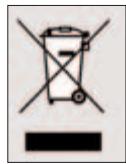
When this crossed-out wheeled bin symbol is attached to a product, it means the product is covered by the European Directive 2002/96/EC.
Please inform yourself about the local separate collection system for electrical and electronic products.
Please act according to your local rules and do not dispose of your old products with your normal household waste. The correct disposal of your old product will help prevent potential negative consequences for the environment and human health.
DE Kundeninformationen
DK Information til kunden
SV Information till konsumenten


Guarantee certificate Certificat de garantie Garantiebewijs Záruční list
- Contents
- Introduction
- Installing the remote control
- Inserting the batteries
- Testing the remote control
- Setting the remote control
- Manually setting the remote control
- Automatically setting the remote control
- Keys and functions
- Troubleshooting
- Sommaire
- Teste fjernkontrollen
- Stille inn fjernkontrollen
- Tasti e funzioni
- Testar o telecomando
- Configurar o telecomando
- Кнопки и функции
- Testowanie pilota
- Ustawianie pilota
- EN Information to the consumer
- Disposal of your old product
- DE Kundeninformationen
- DK Information til kunden
- SV Information till konsumenten
- Guarantee certificate Certificat de garantie Garantiebewijs Záruční list
Brand : PHILIPS
Model : SRU1018
Category : Universal remote