KMPM7 - Earphones Krüger&Matz - Free user manual and instructions
Find the device manual for free KMPM7 Krüger&Matz in PDF.



| Product Type | Bluetooth Wireless Earphones |
| Brand | Krüger & Matz |
| Model | KMPM7 |
| Connection Technology | Bluetooth 4.1 |
| Supported Bluetooth Profiles | HSP, HFP, A2DP, AVRCP |
| Maximum Range | Up to 10 meters |
| Frequency Band | 20 Hz - 20 kHz |
| Impedance | 16 Ohms |
| Battery Capacity | 380 mAh |
| Standby Time | Up to 30 hours |
| Built-in Microphone | Yes |
| Controls | Multifunction button (MFB), volume +/-, playback control |
| LED Indicators | Yes (charging, pairing, low battery) |
| Charging | Via micro USB cable (charging base included) |
| iOS Compatibility | Battery level display on screen |
| Care and Cleaning | Clean with a soft, slightly damp cloth; do not use chemicals |
| Safety | Do not use at high volume; do not use while driving; keep away from children |
| Repairability | Do not repair yourself; contact authorized service |
| Included Accessories | Earphones, charging base, micro USB cable |
| Manufacturer | Lechpol (made in China) |
Frequently Asked Questions - KMPM7 Krüger&Matz
User questions about KMPM7 Krüger&Matz
0 question about this device. Answer the ones you know or ask your own.
Ask a new question about this device
Download the instructions for your Earphones in PDF format for free! Find your manual KMPM7 - Krüger&Matz and take your electronic device back in hand. On this page are published all the documents necessary for the use of your device. KMPM7 by Krüger&Matz.
USER MANUAL KMPM7 Krüger&Matz
Read the instruction manual carefully before first use and keep it for future reference.
- Minimize the volume on your audio device before connecting the earphones in order to avoid hearing damage from sudden exposure to excessive volume. Keep the volume at a reasonable level throughout entire time of using the earphones. To prevent damage to your hearing, do not raise the volume too high.
- Do not use the earphones in places where the inability to hear ambient sound presents a serious risk (such as at railroad crossings, train stations, construction sites or on roads where vehicles and bicycles are traveling). Never use the earphones while driving a car, riding a motorcycle or bicycle or operating any other vehicle, as it may cause potential risk to your safety.
- Wireless devices can cause interference in aircraft. Please make sure that your earphones are powered off in flight.
- Follow any special regulations in force in any area such as hospitals and always switch off your earphones whenever it is forbidden to use it or, when it may cause interference or danger.
- Follow basic safety precautions while using the earphones.
- Stop using the earphones if you feel a tinnitus, hearing discomfort, irritation or have other adverse reactions.
- Do not subject the earphones to strong impact.
- Keep this product away from children.
- Protect this product from moisture, humidity, water and any other liquid. Avoid using/ storing it in extreme temperatures. Do not expose it to direct sunlight and sources of heat.
- Never use this device if it is damaged.
- Use only authorized accessories.
- Do not attempt to repair this device yourself. In case of damage, contact with an authorized service point for checkup/ repair.
- Turn off the earphones before cleaning.
- Clean this device with soft, slightly damp cloth. Do not use any abrasives or chemical agents to clean this product.
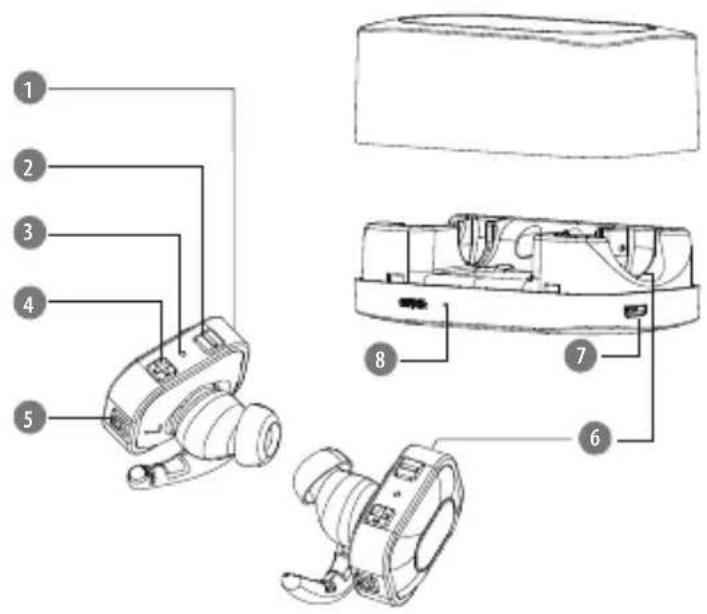
PRODUCT DESCRIPTION
- Built-in microphone
- Volume down (-)
- LED indicator
- Volume up (+)
- Multifunctional button (MFB)
- Charging contacts
- microUSB charging port
- Charging station LED indicator
OPERATION
| Function Button | |
| Power on Press and hold MFB on both earphones for about 6 seconds | |
| Power off Press and hold MFB on one of the earphones for about 4 seconds | |
| Answer/end an incoming call Press MFB | |
| Volume up Press + button | |
| Volume down Press - button | |
| Next track Press and hold + button | |
| Previous track Press and hold - button | |
PAIRING MODE
- Press and hold MFB on both earphones until you hear voice prompt announcing that the earphones are turned on and connected. The earphones will automatically enter Bluetooth mode (on the left channel earphone, LED indicator flashes blue and red alternatively).
- Enable the Bluetooth function on the external device and search for new Bluetooth devices.
- Select and connect with this device (KM M7).
- After successful pairing, the earphones will issue a voice prompt. When the earphones are paired with an external device, the blue indicators blink alternatively on both earphones.
Notes:
- If pairing is not completed within 2 minutes, the earphones will turn off. In that case, repeat pairing process to pair the earphones with external device.
- Every time the earphones are switched on, they will connect to last connected device automatically. Please note, your device must be on with Bluetooth function turned on.
CHARGING
- Place both earphones in the charging station. Make sure to align the charging contacts correctly on the earphones and the charging station.
- Connect the USB charging cord to the microUSB charging port of the charging station and insert the other end into a port in a computer or AC/DC power adapter.
- When battery is charging, red LED on the charging station is on. When battery is fully charged, red LED on the charging station is off. When the battery level is low, red LED flashes.
Notes:
- Please be sure the battery has been charged fully before first use.
- Charge the device regularly to keep its battery in good condition.
- The earphones battery indicator will be displayed when connected to iOS devices.
Krüger&Matz
Owner's manual
SPECIFICATION
Frequency response: 20Hz 20kHz
Impedance: 16 Ohm
Bluetooth: 4.1
- Bluetooth profiles: HSP, HFP, A2DP, AVRCP
- Bluetooth range: up to 10 m
- Standby time: up to 30 h
- Battery capacity: 380 mAh
- Battery level indicator (iOS only)
Built-in microphone
Voice call management
LEARN MORE
For more information on this device visit: www.krugermatz.com.
Visit www.krugermatz.com website for more products and accessories.
In case of any doubts or questions reach out to our Frequently Asked Questions section.
Producer reserves rights to change product overview and specifications without prior notice.
The Lechpol company declares that product KMPM7 is consistent with the essential requirements and other relevant provisions of directive 2014/53/UE. The proper declaration for download from www.lechpol.eu
乙

English Correct Disposal of This Product (Waste Electrical & Electronic Equipment)

(Applicable in the European Union and other European countries with separate collection systems) This marking shown on the product or its literature, indicates that It should not be disposed with other household wastes at the end of its working life. To prevent possible harm to the environment or human health from uncontrolled waste disposal, please separate this from other types of wastes and recycle it responsibly to promote the sustainable reuse of material resources. Household users should contact either the retailer where they purchased this product, or their local government office, for details of where and how they can take this item for environmentally safe recycling. Business users should contact their supplier and check the terms and conditions of the purchase contract. This product should not be mixed with other commercial wastes for disposal.
Made in China for LECHPOL, Mietne, 1 Garwolinska Street, 08-400 Garwolin.
PRINCIPES DE SECURITÉ
Krüger&Matz is a registered trademark

Brand : Krüger&Matz
Model : KMPM7
Category : Earphones