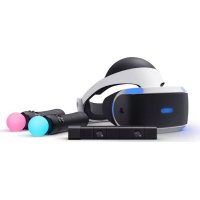
PlayStation VR - VR glasses SONY - Free user manual and instructions
Find the device manual for free PlayStation VR SONY in PDF.



| Product Type | Virtual Reality Headset |
| Brand | Sony |
| Model | PlayStation VR (CUH-ZVR2) |
| Headset Dimensions (W × H × D) | 187 × 185 × 277 mm (without projections) |
| Headset Weight | Approx. 600 g (without cables) |
| Processor Dimensions (W × H × D) | 150 × 39 × 114 mm |
| Processor Weight | Approx. 300 g |
| Display | 1920 × RGB × 1080 (960 × RGB × 1080 per eye) |
| Sensors | 6-axis motion detection (3-axis gyroscope, 3-axis accelerometer) |
| Power | AC adapter: input 100-240 V AC, 50/60 Hz; output 12 V DC, 3 A |
| Power Consumption (Processor) | Approx. 20 W |
| Connectivity | HDMI, AUX, USB, stereo headphone output |
| Main Functions | Virtual reality, motion tracking, built-in screen, microphone, stereo headphones |
| Recommended Age | 12 years and above |
| Operating Temperature | 5 °C – 35 °C |
| Care and Cleaning | Clean lenses with a soft, dry cloth; wash light shield with water; use a vacuum cleaner for ventilation grilles |
| Safety | Respect play area, avoid sudden movements, take regular breaks, do not use when tired or under influence |
| Spare Parts and Repairability | Replaceable earpieces (sizes S, M, L); Sony customer support |
| Warranty | 1 year (United States and Canada); limited warranty against hardware defects |
Frequently Asked Questions - PlayStation VR SONY
User questions about PlayStation VR SONY
0 question about this device. Answer the ones you know or ask your own.
Ask a new question about this device
Download the instructions for your VR glasses in PDF format for free! Find your manual PlayStation VR - SONY and take your electronic device back in hand. On this page are published all the documents necessary for the use of your device. PlayStation VR by SONY.
USER MANUAL PlayStation VR SONY
Includes important Health and Safety information
HEALTH AND SAFETY WARNINGS
Carefully read and follow the warnings and instructions below before using PlayStation®VR. Failure to read and follow the warnings and instructions could result in serious injury.
- PS VR is not for use by children under age 12.
- Wearing the VR headset will completely block your ability to see your surroundings. PS VR does not detect obstacles. Review surroundings and clear obstacles from an area larger than the Play Area (page 8) before use. Make sure you are not near any walls, stairs, furniture, or other obstacles that you may collide with or trip over.
- Remain in the center of the Play Area and do not walk around while wearing the VR headset. Remain seated whenever possible. If an application requires you to stand while wearing the VR headset, follow the application instructions carefully, and maintain awareness of your surroundings.
- Take steps to prevent pets, persons, or other obstacles from entering an area larger than the Play Area during use.
- Before use, check that the VR headset cable is not wrapped around your body or legs, and check frequently during use.
- Avoid extreme or excessive movements of the head, hands, or body while wearing the VR headset.
- Some people may experience motion sickness, nausea, disorientation, blurred vision, or other discomfort or other abnormalities. If experienced, stop using immediately, and remove the VR headset. If you experience symptoms during or after use, rest, and do not engage in any activities that
require unimpaired vision, balance or coordination until after symptoms have completely disappeared.
- Avoid prolonged use of PS VR. Take frequent breaks.
- Do not use PS VR if you are tired, dizzy, light-headed, nauseated, sick, under the influence of alcohol or drugs, or have an impaired sense of motion or balance. Consult a doctor before using PS VR if you are pregnant or suffer from a serious medical condition.
- Keep the product out of the reach of small children. Small children may swallow small parts, may pull on cables and cause the processor unit or VR headset to fall, or may wrap the cables around themselves, which may inflict injury or cause an accident or a malfunction.
Photosensitivity/Epilepsy/Seizures
A very small percentage of individuals may experience epileptic seizures or blackouts when exposed to certain light patterns or flashing lights. Exposure to certain patterns or backgrounds on a television screen or when playing video games may trigger epileptic seizures or blackouts in these individuals. These conditions may trigger previously undetected epileptic symptoms or seizures in persons who have no history of prior seizures or epilepsy. If you, or anyone in your family, has an epileptic condition or has had seizures of any kind, consult your doctor before playing.
IMMEDIATELY DISCONTINUE USE and consult your doctor before resuming gameplay if you or your child experience any of the following health problems or symptoms: Dizziness, altered vision, eye or muscle twitches, loss of awareness, disorientation, seizures, or any involuntary movement or convulsion. RESUME GAMEPLAY ONLY ON APPROVAL OF YOUR DOCTOR.
Use and handling of video games to reduce the likelihood of a seizure
- Avoid prolonged use of PS VR. Take a 15-minute break during each hour of play.
- Avoid playing when you are tired or need sleep.
FCC notice
This equipment has been tested and found to comply with the limits for a Class B digital device, pursuant to Part 15 of the FCC rules. These limits are designed to provide reasonable protection against harmful interference in a residential installation. This equipment generates, uses, and can radiate radio frequency energy and, if not installed and used in accordance with the instructions, may cause harmful interference to radio communications. However, there is no guarantee that interference will not occur in a particular installation. If this equipment does cause harmful interference to radio or television reception, which can be determined by turning the equipment off and on, the user is encouraged to try to correct the interference by one or more of the following measures:
- Reorient or relocate the receiving antenna.
- Increase the separation between the equipment and receiver.
- Connect the equipment into an outlet on a circuit different from that to which the receiver is connected.
- Consult the dealer or an experienced radio/TV technician for help.
You are cautioned that any changes or modifications not expressly approved by the party responsible for compliance could void the user's authority to operate the equipment.
If you have questions about this product, visit playstation.com/helpme.
Declaration of Conformity
Trade Name : SONY
Model No.: CUH-ZVR2
Responsible Party : Sony Electronics Inc.
Address : 16535 Via Esprillo San Diego, CA
92127 U.S.A.
Telephone No.: 858-942-2230
This device complies with Part 15 of the FCC Rules. Operation is subject to the following two conditions: (1) this device may not cause harmful interference, and (2) this device must accept any interference received, including interference that may cause undesired operation.
Contents
WARNING 2
Precautions....5
Using PS VR....8
Part names 10
Changing the earpieces 13
Care and cleaning 14
Specifications....15
End of life product recycling 16
LIMITED HARDWARE WARRANTY AND LIABILITY ..... 17
Copyright and trademarks 18
Precautions
Before using the product, carefully read this manual and any manuals for compatible hardware. Retain instructions for future reference. You can also view the step-by-step setup video for how to correctly set up and use PS VR.
Visit rd.playstation.com/psvr/zvr2/.
Parents and guardians of children should read this manual and make sure that the child follows all safety precautions. For more information on product safety and support, visit our website (back cover).
Use and handling
- Before connecting, check that the connectors are free of dust and small particles.
- Do not swing the VR headset or the AC adaptor around by their cables.
- Do not unplug the VR headset cable until the tracking lights (page 10) are turned off. Removing or unplugging while the lights are on may cause a malfunction.
- Do not place objects on the product, throw or drop the product, or otherwise expose it to strong physical impact.
- Do not block the processor unit's vents, and do not use the product in a closed cabinet or other locations where heat may build up.
- Do not touch the AC adaptor, AC power cord or processor unit during an electrical storm.
-
Do not allow liquid or small particles to get into the product (ports, vents, etc.). If this happens, stop use and disconnect it from the electrical outlet immediately.
-
Do not expose the product to dust, smoke or steam. Dust or other matter can cause fire or electric shock.
- Do not expose the product to high temperatures, high humidity, or direct sunlight.
- Do not place the product on an unstable surface or leave it on the floor.
- Avoid prolonged bodily contact with the processor unit, AC adaptor, or air from the vents when the product is turned on. Extended contact may cause low-temperature burns*.
* Low-temperature burns are burns that occur when the skin is in contact with objects of relatively low temperatures (40 °C or more/104°F or more) for an extended period of time. - Permanent hearing loss may occur if your stereo headset or headphones are used at high volume. Set the volume to a safe level. Over time, increasingly loud audio may start to sound normal but can actually be damaging your hearing. If you experience ringing or any discomfort in your ears or muffled speech, stop listening and have your hearing checked. The louder the volume, the sooner your hearing could be affected. To protect your hearing:
- Limit the amount of time you use the stereo headset or headphones at high volume.
- Avoid raising the volume to block out noisy surroundings.
– Lower the volume if you can't hear people speaking near you. - Do not use the VR headset, stereo headphones, or stereo headset if they cause discomfort to your skin. If the headset or headphones cause discomfort to your skin, discontinue use immediately. If symptoms do not subside even after discontinuing use, seek medical attention.
-
If you experience discomfort or pain in a part of the body, such as head, eyes, ears, hands, arms, or legs, discontinue use of the system immediately. If symptoms persist, consult your doctor.
-
When using the stereo headset or headphones in particularly dry air conditions, you may sometimes experience a small and quick (static) shock on your ears. This is a result of static electricity accumulated in the body, and is not a malfunction of your stereo headset or headphones.
- Follow the precautions below to help prevent the product exterior from deteriorating or discoloring.
- Do not use solvents or other chemicals on the product.
- Do not allow rubber or vinyl materials to be in prolonged contact with the product.
Wearing the VR headset
- It is important that you place the VR headset on your head properly during use.
- To see instructions on how to wear the headset, go to the PlayStation®4 system's function screen, and then select (Settings) [Devices] [PlayStation VR].
- Do not overtighten the adjustment dial (page 10).
- You can continue to wear your glasses while wearing the VR headset. When adjusting the scope position (page 10), move the scope slowly so that the internal lenses (page 10) and your glasses do not touch. Having your glasses touch the lenses could result in damage to your glasses, VR headset lenses, or both.
- Regularly check the VR headset's fit to ensure it is being worn properly.
VR headset screen
- Do not expose the lenses (page 10) of the VR headset to direct sunlight or intense light. Doing so may damage the VR headset screen and cause a malfunction.
- Keep the VR headset's attachment sensor (page 10) free from any obstacles. If the attachment sensor is blocked, the screen will not turn off automatically even if you remove the headset. If an image appears on the screen for an extended period of time, it might cause a screen burn and a faint image might remain permanently on the screen.
- Black (dark) pixels and continuously lit pixels may appear in certain locations on the screen. The appearance of such spots is a normal occurrence associated with screens and is not a sign of a system malfunction. Screens are made using highly precise technology. However, a very small number of dark pixels or continuously lit pixels may exist and color irregularities or brightness irregularities may be visible on each screen.
Never disassemble or modify the product or accessories
Use the product and accessories according to the instructions in this manual. No authorization for the analysis or modification of the product, or the analysis and use of its circuit configurations, is provided. Disassembling will void the product warranty. Additionally, there is a risk of fire, electrical shock or malfunction.
Moisture condensation
If PS VR is brought directly from a cold location to a warm one, moisture may condense inside the VR headset and the processor unit. Should this occur, the product may not operate properly. In this case, turn off the VR headset and unplug the AC power cord from the electrical outlet. Do not use the product until the moisture evaporates (this may take several hours). If the product still does not operate properly, visit our website (back cover).
Unusual or unresponsive behavior
Press the (power) button (page 11) on the VR headset for at least 7 seconds to force a shutdown, and then turn on the headset again. If the problem persists, restart the PS4 ^™ system.
High temperature message
If the processor unit's internal temperature becomes elevated, a message will be displayed. In this case, turn off the PS4™ system and leave it unused for a while. After the processor unit cools down, move it to a location with good ventilation, and then resume use.
AC adaptor and AC power cord use
- Use an electrical outlet that is easily accessible, so the AC power cord can be unplugged quickly if the need arises. Stop use, unplug the AC power cord from the electrical outlet and disconnect any other cables immediately if the
product functions in an abnormal manner, produces unusual sounds or smells or becomes too hot to touch.
- Unplug the AC power cord from the electrical outlet when the status indicator on the processor unit is red. Unplugging the cord while the indicator is white or flashing red may cause a malfunction.
-
Do not use an AC adaptor or AC power cord other than those supplied with the product. The supplied AC adaptor and AC power cord are designed exclusively for use with this product. They cannot be used with other products. In addition, other AC adaptors or AC power cords cannot be used with this product. Failure to follow these precautions may cause the product to overheat and may lead to fire or electric shock.
-
Do not plug the AC power cord for the product into an electrical outlet until you have connected the HDMI™ cables.
- Do not damage the AC power cord.
- Do not touch the plug of the AC power cord with wet hands.
- Do not use the AC adaptor when it is covered by a cloth, as it may overheat, causing fire or malfunction.
- Unplug the AC power cord from the electrical outlet before cleaning or when you do not intend to use the product for an extended period of time.
- Do not connect the AC power cord to a voltage transformer or inverter.
Using PS VR
- Used with your PS4™ system and PlayStation ®Camera, PS VR brings you the excitement of virtual reality. You can interact with games more directly because the camera captures the position, angle, and movement of the VR headset.
- Be sure to always update your PS4™ system software and PS VR device software to the most recent version.
- Be sure to connect your VR headset to the supplied CUH-ZVR2 processor unit. The headset will not work if connected to a CUH-ZVR1 processor unit.
Play Area
Limit your use of PS VR to within the Play Area. The height of the Play Area depends on the range captured by the camera. The width and depth of the Play Area are as follows.
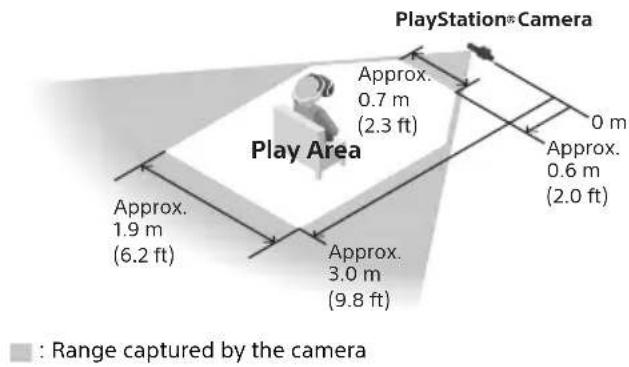
Clear an area larger than the Play Area of all obstacles before using PS VR.
Follow the instructions on the PS VR setup screen to adjust the camera position and angle, so that you are in the best position (in the center of the Play Area) to play in VR mode. If you go outside of the Play Area while using VR mode, a warning will appear on the VR headset screen.
Hint
If the VR headset is not detected correctly, press and hold the (PS) button on the controller, and then select [Adjust PlayStation VR] → [Confirm Your Position] from the quick menu that appears. Adjust the camera position and angle.
Your position while using the VR headset
Remain seated whenever possible. If an application requires you to stand while wearing the VR headset, follow the application instructions carefully, and maintain awareness of your surroundings.
PS VR settings
To configure PS VR settings, go to the PS4™ system's function screen, and then select (settings) [Devices] [PlayStation VR].
Hints
• These settings are available only when PS VR is connected to the PS4™ system.
- You can also configure some settings from the quick menu that appears when you press and hold the IPS) button on the controller.
- For more information about setting up your PS VR, refer to the user's guide for the PS4™ system. Select (Settings) (User's Guide/Helpful Info) (User's Guide) from the function screen.
Parental controls
The PS4 ^™ system contains settings that parents or guardians can configure as necessary to restrict use of the VR headset by children. To configure settings for each child, go to the PS4 ^™ system's function screen, and then select (Settings) [Parental Controls/Family Management].
Part names
VR headset
Front
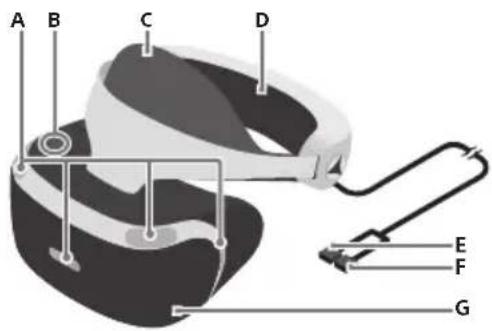
A) Tracking lights (front)
Rear lights blue: Powered on
Front and rear lights blue: VR mode
Front and rear lights off: Powered off
B) Scope adjustment button
C) Front head support
D) Rear head support
E) HDMI connector
F) AUX connector
G) Scope
Rear
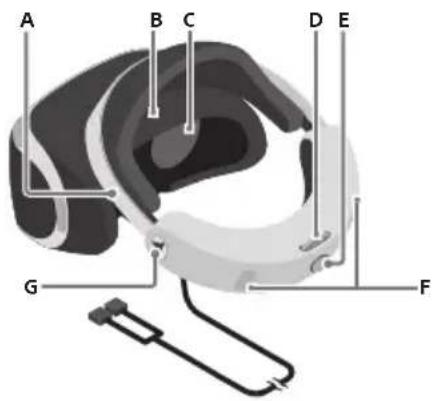
A) Headband
B) Attachment sensor
C) Lenses
D) Adjustment dial
E) Headband release button
F) Tracking lights (rear)
G) Earpiece holder
Bottom
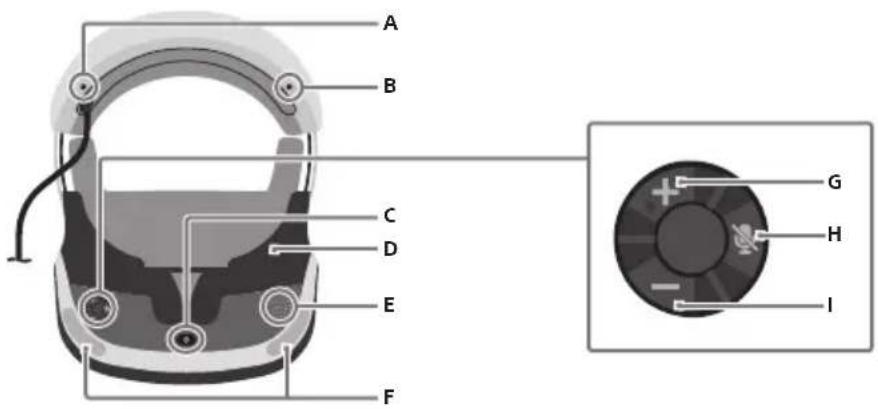
A) Stereo headphone jack
B) Headphone attachment hole
C) (power) button
D) Light shield
E) Microphone
F) Tracking lights (front)
G) Volume + button
H) (microphone mute) button
I) Volume - button
Processor unit
Front
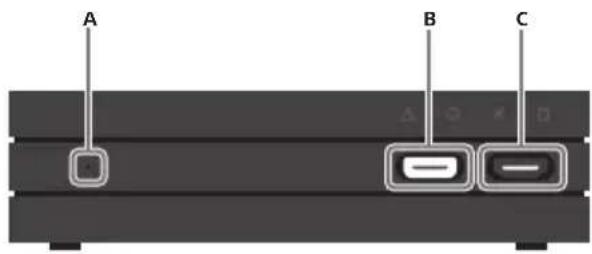
A) Status indicator
White: Powered on
Red: Rest mode
B) AUX port
C) HDMI output port
Rear
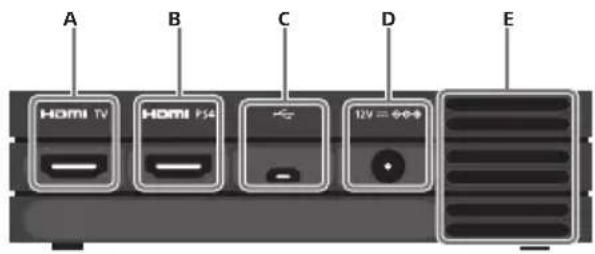
natural_image
Diagram of a U-shaped connector with labeled points A, B, and C (no text or symbols beyond labels)A) Earpiece
B) Stereo headphone plug
C) Fastener
Changing the earpieces
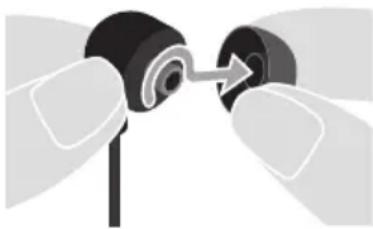
The stereo headphones are supplied with M size earpieces attached. Replace the earpieces with the S or L size earpieces for a better fit. To remove, twist then pull the earpiece off the headphones.
natural_image
Close-up of hands adjusting a black mechanical component with an arrow indicating rotation (no text or symbols)Hint
Install the earpieces firmly to help prevent them from accidentally detaching during use.
Care and cleaning
Be sure to follow the instructions below to clean and maintain your product.
- For safety reasons, unplug the AC power cord from the electrical outlet and disconnect any other cables before cleaning.
- Do not use solvents or other chemicals to clean the exterior surfaces.
- Do not use a chemically-treated cleaning cloth to wipe the product.
Processor unit exterior, VR headset exterior, head supports, connectors
If they are dirty, wipe them with a soft, dry cloth.
Hint
If the connectors on the processor unit, AC power cord, or other parts are dirty, signals may not be sent or received properly. You may also experience noise or interruptions in the sound if the connectors on the headphones or headset are dirty.
Lenses
Wipe only with a soft, dry cloth made specifically for cleaning lenses. Do not use paper products such as paper towels, or tissues not specifically intended for lenses.
Hint
Prolonged contact with water or dust may damage the lenses and shorten their life.
Light shield
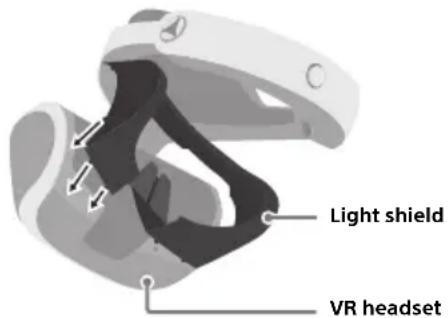
Remove the light shield from the VR headset and wash it with water. Dry it completely with a soft cloth before reattaching it to the headset.
Reattach the light shield by matching the nubs on the shield to the 13 holes on the VR headset.
Vents
Remove dust build-up from the vents using a vacuum cleaner or similar product.
Earpieces
Remove the earpieces from the stereo headphones and wash them by hand with a mild detergent. Dry them completely with a soft cloth before reattaching them to the headphones. For details on removing the earpieces, refer to "Changing the earpieces" (page 13).
Specifications
Design and specifications are subject to change without notice.
Functional descriptions and illustrations in this document may vary from your PS4 ^™ system software and/or PS VR device software, depending on the version in use.
VR headset
| Screen | 1920 × RGB × 1080(960 × RGB × 1080 per eye) |
| Sensor | 6-axis motion sensing system(3-axis gyroscope, 3-axis accelerometer) |
| Port Stereo headphone jack | |
| External dimensions | Approx. 187 × 185 × 277 mm(7.4 × 7.3 × 13.6 in)(width x height x depth /excluding projecting parts / atshortest headband length) |
| Mass | Approx. 600 g (21.2 oz)(excluding cables) |
| Operating temperature 5 °C - 35 °C (41 °F - 95 °F) | |
Processor unit
| Input/output | HDMI TV portHDMI PS4 portψ (USB) portHDMI output portAUX port |
| Maximum rated power Approx. 20 W | |
| Power DC 12 V | |
| External dimension | Approx. 150 × 39 × 114 mm(5.9 × 1.5 × 4.5 in)(width x height x depth /excluding projecting parts) |
| Mass Approx. 300 g (10.6 oz) | |
| Operating temperature 5 °C - 35 °C (41 °F - 95 °F) | |
AC adaptor
| Input AC 100 - 240 V, 50/60 Hz | |
| Output DC 12 V 3 A | |
| External dimensions | Approx. 108 × 46 × 30 mm( 4.3 × 1.8 × 1.2 in)(width x height x depth /excluding projecting parts) |
| Mass Approx. 146 g (5.1 oz) |
Supplied HDMI cable and USB cable
HDMI cable Company: Sony
Part No.: 1-849-046-**, 1-848-899-**
USB cable Company: Sony
Part No.: 1-849-103-**
* represents a number between 0 and 9.
Supported video input signals
For information about supported video input signals, visit rd.playstation.com/psvr/zvr2/.
You can also access this information by using the QR code.
Device software
PS VR device software is licensed to you under the terms of a separate end user license agreement. For details, visit doc.dl.playstation.net/doc/psvr-eula/.
End of life product recycling
The product is made of many materials that may be recycled. Follow local regulations when disposing of the product. Sony products can be recycled for free in the United States and Canada by dropping the product off at a number of nationwide locations. For details, visit www.sony.com/electronics/eco/environmental-management.
LIMITED HARDWARE WARRANTY AND LIABILITY
Sony Interactive Entertainment LLC ("SIE LLC") warrants to the original purchaser that the PS VR hardware, which includes components contained in the retail box with this hardware ("Product") will be free from material defects in material and workmanship for a period of one year from the original date of purchase (the "Warranty Period"). This warranty is valid only in the United States and Canada.
IF THIS PRODUCT IS DETERMINED TO BE MATERIALLY DEFECTIVE DURING THE WARRANTY PERIOD, YOUR SOLE REMEDY AND SIE LLC'S SOLE AND EXCLUSIVE LIABILITY IS LIMITED TO THE REPAIR OR REPLACEMENT OF THIS PRODUCT WITH A FACTORY-RECERTIFIED PRODUCT, AT SIE LLC'S OPTION.
For purposes of this Limited Hardware Warranty and Liability, "factory recertified" means a product that has been returned to its original specifications.
THIS WARRANTY DOES NOT APPLY IF THIS PRODUCT (A) IS USED WITH PRODUCTS THAT ARE NOT COMPATIBLE WITH THIS PRODUCT; (B) IS USED WITH PERIPHERALS SIE LLC DOES NOT LICENSE OR SELL, INCLUDING NON-LICENSED GAME ENHANCEMENT DEVICES, CONTROLLERS, ADAPTORS AND POWER SUPPLY DEVICES ("NON-LICENSED PERIPHERALS"); (C) IS USED FOR ANY COMMERCIAL PURPOSE, INCLUDING RENTAL OR ARCADE PURPOSES; (D) IS MODIFIED OR TAMPERED WITH; (E) IS DAMAGED BY ACTS OF GOD, MISUSE, ABUSE, NEGLIGENCE, ACCIDENT, WEAR AND TEAR, UNREASONABLE USE, OR BY CAUSES UNRELATED TO DEFECTIVE MATERIALS OR WORKMANSHIP; (F) HAS HAD THE SERIAL NUMBER ALTERED,
DEFACED OR REMOVED; OR (G) HAS HAD THE WARRANTY SEAL ON THE PRODUCT ALTERED, DEFACED, OR REMOVED.
THIS WARRANTY DOES NOT COVER CONSUMABLES (SUCH AS BATTERIES) OR PRODUCTS SOLD AND CLEARLY MARKED "AS IS" OR WITH FAULTS. SIE LLC MAY VOID THIS WARRANTY IF (1) SIE LLC REASONABLY BELIEVES THAT THE PRODUCT HAS BEEN USED IN A MANNER THAT VIOLATES THE TERMS OF A SEPARATE END USER LICENSE AGREEMENT FOR SYSTEM SOFTWARE OR GAME SOFTWARE; OR (2) THE PRODUCT IS USED WITH NON-LICENSED PERIPHERALS. YOU ASSUME ALL RISKS AND LIABILITIES ASSOCIATED WITH USE OF THIRD-PARTY PRODUCTS.
THIS WARRANTY IS PROVIDED TO YOU IN LIEU OF ALL OTHER EXPRESS OR IMPLIED WARRANTIES INCLUDING WARRANTIES OF MERCHANTABILITY AND FITNESS FOR A PARTICULAR PURPOSE FOR THIS PRODUCT, WHICH SIE LLC DISCLAIMS UNDER THESE TERMS. HOWEVER, IF APPLICABLE LAW REQUIRES ANY OF THESE WARRANTIES, THEN THEY ARE LIMITED IN DURATION TO THE WARRANTY PERIOD.
EXCEPT AS EXPRESSLY STATED ABOVE, SIE LLC EXCLUDES ALL LIABILITY FOR LOSS OF DATA, LOSS OF PROFIT, OR ANY LOSS OR DAMAGE SUFFERED BY YOU OR ANY THIRD PARTY, WHETHER THOSE DAMAGES ARE DIRECT, INDIRECT, CONSEQUENTIAL, SPECIAL, OR INCIDENTAL AND HOWEVER ARISING UNDER ANY THEORY OF LAW, AS A RESULT OF USING THIS PRODUCT. SOME STATES OR PROVINCES DO NOT ALLOW LIMITATIONS ON HOW LONG AN IMPLIED WARRANTY LASTS AND SOME STATES DO NOT ALLOW THE EXCLUSION OR LIMITATIONS OF CONSEQUENTIAL OR INCIDENTAL DAMAGES, SO THESE LIMITATIONS OR EXCLUSIONS MAY NOT APPLY TO YOU.
This warranty gives you specific legal rights. You may also have other rights which vary from state to state or province to province.
The warranty offered by SIE LLC on this product is the same whether or not you register your product.
You must visit playstation.com/helpme or call 1-800-345-7669 to receive a return authorization and shipping instructions. A VALID PROOF OF PURCHASE IN THE FORM OF A BILL OF SALE OR RECEIPT FROM AN AUTHORIZED RETAILER WITH THE DATE OF THE ORIGINAL PURCHASE MUST BE PRESENTED TO OBTAIN WARRANTY SERVICE.
Except as this Limited Hardware Warranty and Liability provides, SIE LLC is not liable for any direct and indirect, consequential, or special damages, including any damages that may arise from loss of data or functionality. The foregoing limitation applies to the extent permitted by law.
Copyright and trademarks
" "and "PlayStation" are registered trademarks or trademarks of Sony Interactive Entertainment Inc.
"SONY" and "are registered trademarks or trademarks of Sony Corporation.
The terms HDMI and HDMI High-Definition Multimedia Interface, and the HDMI Logo are trademarks or registered trademarks of HDMI Licensing Administrator, Inc. in the United States and other countries.
All other trademarks are the property of their respective owners.
EN
AVERTISSEMENTS
AVERTISSEMENTS RELATIFS À LA SANTÉ ET LA SÉCURITÉ
natural_image
Diagram of a U-shaped cable with labeled points A, B, and C (no text or symbols beyond labels)natural_image
Close-up of hands holding a black mechanical component with an arrow indicating rotation (no text or symbols)Conseil
natural_image
Close-up of hands adjusting a mechanical component with an arrow indicating rotation (no text or symbols)Sugerencia
The official site for PlayStation _B product support provides the latest questions and answers about your product. playstation.com/helpme
Step-by-step setup video
Visit rd.playstation.com/psvr/zvr2/ to view a step-by-step setup video. You can also access the video using the QR code.
Assistance technique
© 2017 Sony Interactive Entertainment Inc.
Printed in China / Imprimé en Chine / Impreso en China

- HEALTH AND SAFETY WARNINGS
- Photosensitivity/Epilepsy/Seizures
- Use and handling of video games to reduce the likelihood of a seizure
- FCC notice
- Declaration of Conformity
- Contents
- Precautions
- Use and handling
- Wearing the VR headset
- VR headset screen
- Never disassemble or modify the product or accessories
- Moisture condensation
- Unusual or unresponsive behavior
- High temperature message
- AC adaptor and AC power cord use
- Using PS VR
- Play Area
- Hint
- Your position while using the VR headset
- PS VR settings
- Hints
- Parental controls
- Part names
- VR headset
- Bottom
- Changing the earpieces
- Care and cleaning
- Processor unit exterior, VR headset exterior, head supports, connectors
- Lenses
- Light shield
- Vents
- Earpieces
- Specifications
- Supplied HDMI cable and USB cable
- Supported video input signals
- Device software
- End of life product recycling
- LIMITED HARDWARE WARRANTY AND LIABILITY
- Copyright and trademarks
- AVERTISSEMENTS
- AVERTISSEMENTS RELATIFS À LA SANTÉ ET LA SÉCURITÉ
- Conseil
- Sugerencia
- Step-by-step setup video
- Assistance technique
Brand : SONY
Model : PlayStation VR
Category : VR glasses