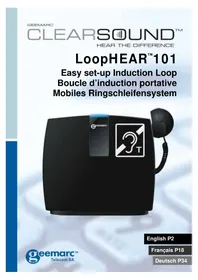
LoopHEAR 101 - Hi-fi system GEEMARC - Free user manual and instructions
Find the device manual for free LoopHEAR 101 GEEMARC in PDF.



| Product Type | Mobile induction loop for hearing aids |
| Brand | Geemarc |
| Model | LoopHEAR 101 |
| Dimensions (approx.) | 20 x 15 x 5 cm |
| Weight (approx.) | 500 g |
| Power Supply | Mains adapter 230 V 50 Hz or built-in rechargeable battery |
| Battery Life | Up to 24 hours (5 to 8 hours in continuous use) |
| Charging Time | 4 hours |
| Loop Range | 1 m² (3.3 ft²) |
| Main Functions | Induction loop, built-in and external microphone, 3.5 mm audio input, HAC earphone, volume control |
| Audio Inputs | 1 audio input 3.5 mm (blue), 1 microphone input 3.5 mm (pink), 1 earphone output 3.5 mm (green) |
| Indicator Lights | Power on/off indicator, battery (red/green), magnetic field (blue) |
| Mounting | Mobile or semi-fixed (desk mounting with screws) |
| Care and Cleaning | Clean with a soft cloth; do not use cleaning products |
| Safety | Do not open; do not expose to sunlight; install in a ventilated area |
| Spare Parts Included | Rechargeable battery, mains adapter, external microphone with stand, earphone with holder, mounting screws |
| Reparability | 1-year warranty on parts and labor; after-sales service: 03 28 58 75 99 |
| General Information | Compliant with WEEE directive; declaration of conformity at www.geemarc.com |
Frequently Asked Questions - LoopHEAR 101 GEEMARC
User questions about LoopHEAR 101 GEEMARC
0 question about this device. Answer the ones you know or ask your own.
Ask a new question about this device
Download the instructions for your Hi-fi system in PDF format for free! Find your manual LoopHEAR 101 - GEEMARC and take your electronic device back in hand. On this page are published all the documents necessary for the use of your device. LoopHEAR 101 by GEEMARC.
USER MANUAL LoopHEAR 101 GEEMARC
Locating the LoopHEARTM 10
USING THE LoopHEAR™ 11
Turn the LoopHEAR™ On 12
Turn the LoopHEAR™ Off 12
Using the Hand held HAC Receiver. 12
Using the External Microphone. 13
Using the Audio input 13
TROUBLESHOOTING 14
SAFETY INFORMATION 15
GUARANTEE 16
RECYCLING DIRECTIVES 17
INTRODUCTION
Congratulations on purchasing your Geemarc™ LoopHEAR™. This is a portable induction loop system that can be used in a variety of locations, both public and private.
This tough but light unit is easily transported and an integral battery allows it to be freestanding. This battery is both replaceable and rechargeable and long usage can be expected (up to 24 hours). The loop is contained within the unit hence there are no trailing wires. The LoopHEAR™ will cover an area of approximately 1m^2 /3.3ft^2 . There is an integral microphone that picks up speech and conversations. An external microphone may be added if required (supplied). This induction loop system is designed to assist hearing aid users by transmitting direct to their telecoil equipped hearing aid (which must be switched to the 'T' position).
Note: users of digital hearing aids must make sure their aids have been programmed for use with the 'T' setting.
The outer carton has been specially designed as a handy carrying case. It is recommended to retain this carrying case to enable safe transportation when transporting the LoopHEAR™.
It is important that you read the instructions below in order to use your Geemarc™ LoopHEAR™ to its full potential. Keep this user guide in a safe place for future reference.

INTRODUCTION
Unpacking the LoopHEAR™
When unpacking the LoopHEAR™, you should find the following in the box:
- 1 LoopHEAR
- 1 power adaptor/charging unit. There are several country specific power adaptor/charging units. The one supplied is dependant on country of purchase.
Europe version - VDE type power adaptor with right angled plug
International version - Universal type power adaptor with detachable plugs suitable for UK, Europe and USA
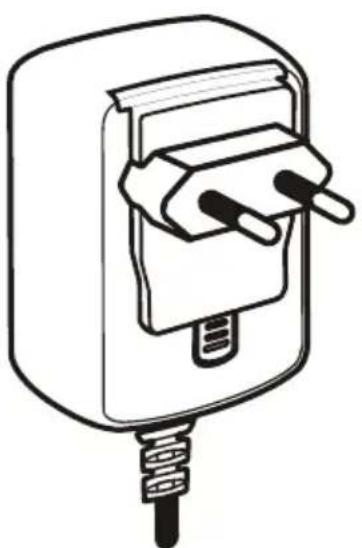
Adaptor + Europe plug
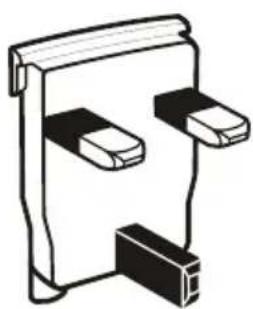
UK plug
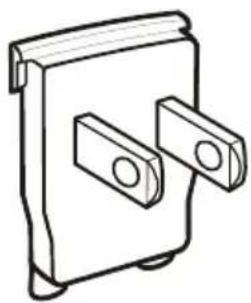
USA plug
- 2 base plate mounting screws and washer
1 hand held HAC receiver
1 external desktop microphone
1 user guide
DESCRIPTION
General Description
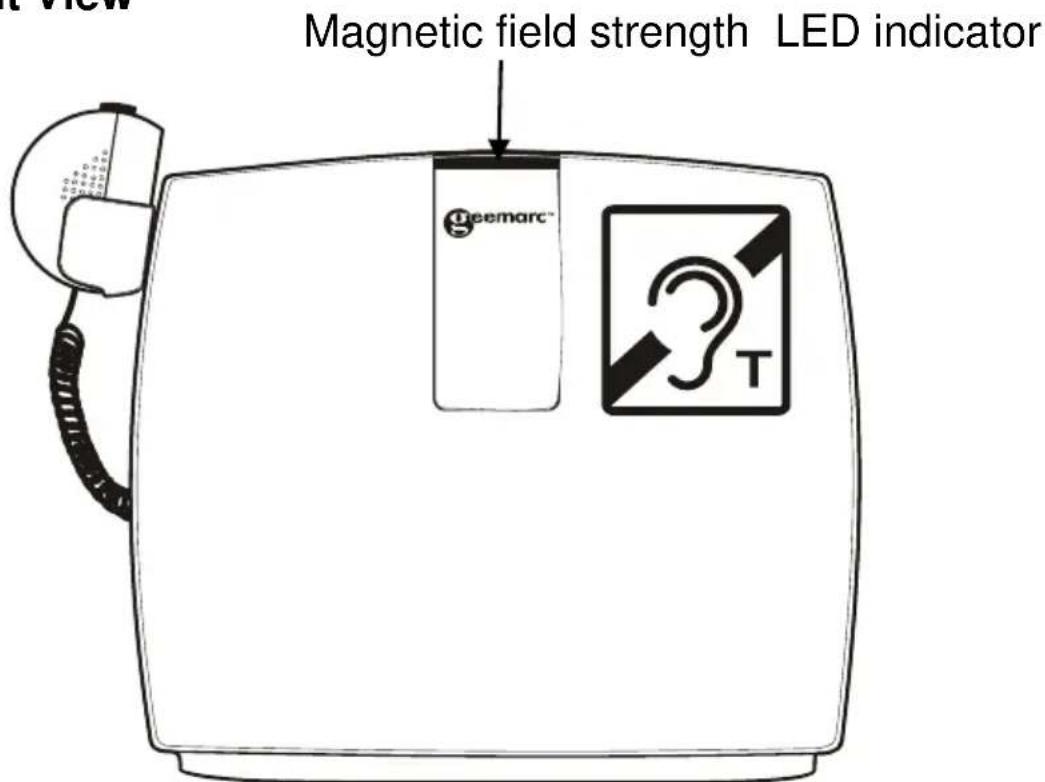
Front View
Rear View
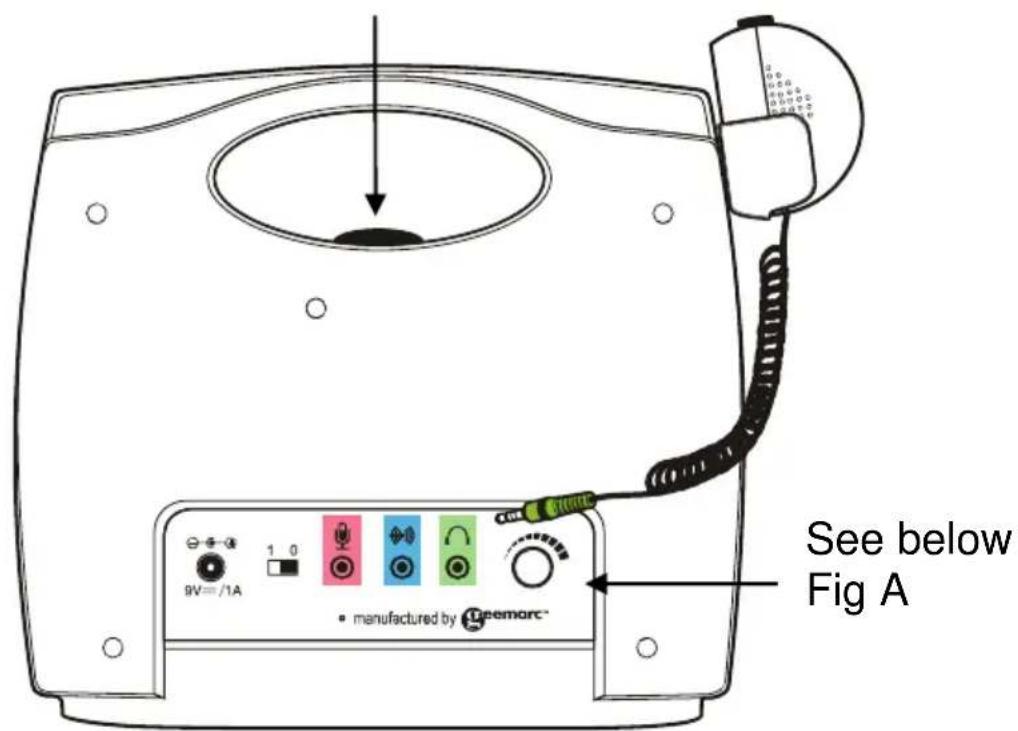
Power ON, field strength and battery status LEDs
DESCRIPTION
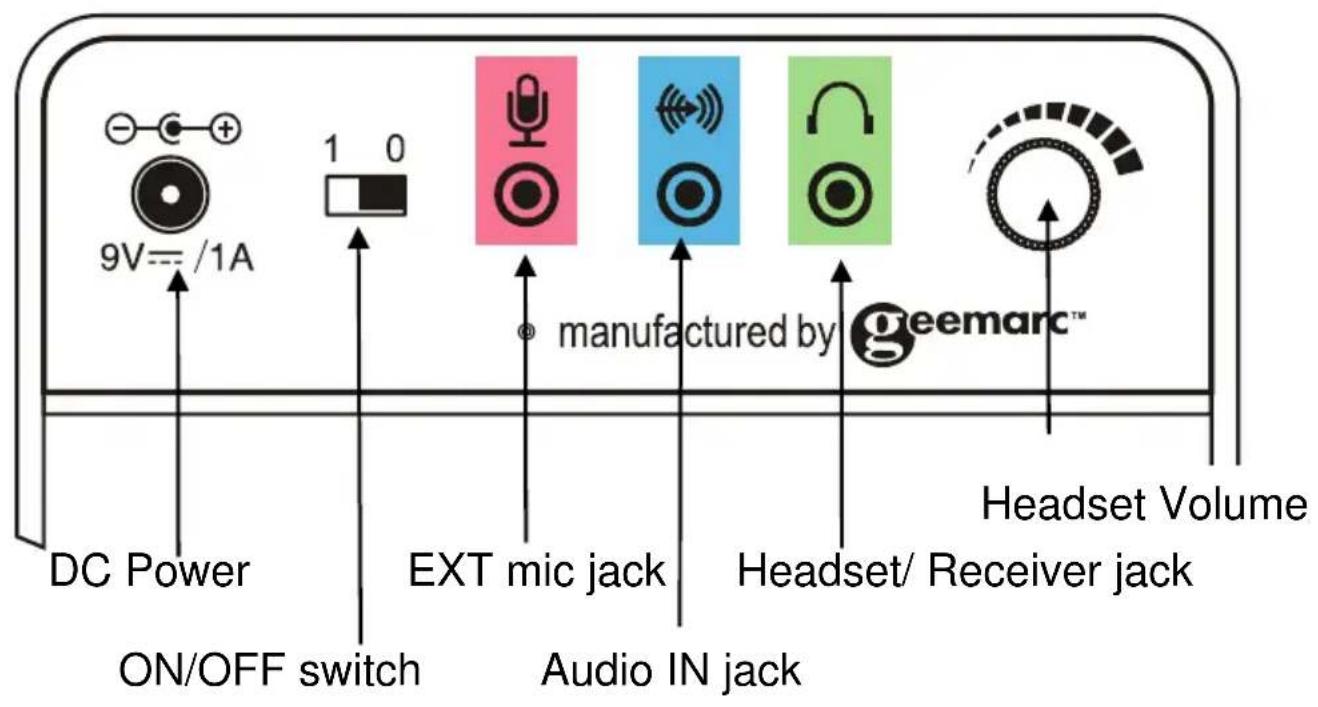
Rear View (Fig A)
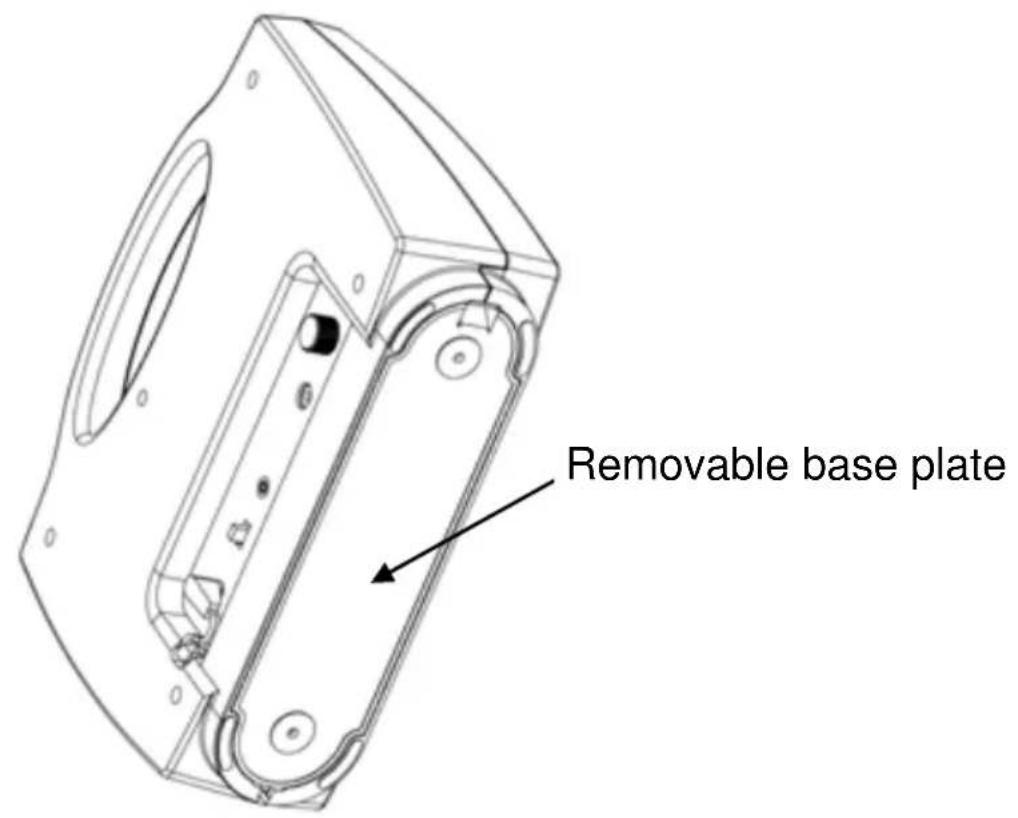
Base View
INSTALLATION
Setting Up
Battery Charging
Remove the base plate from the unit as shown below:
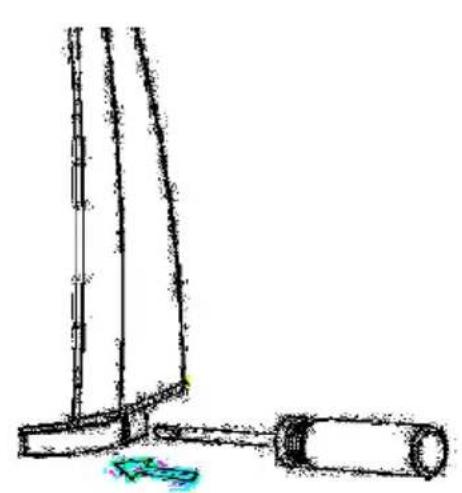
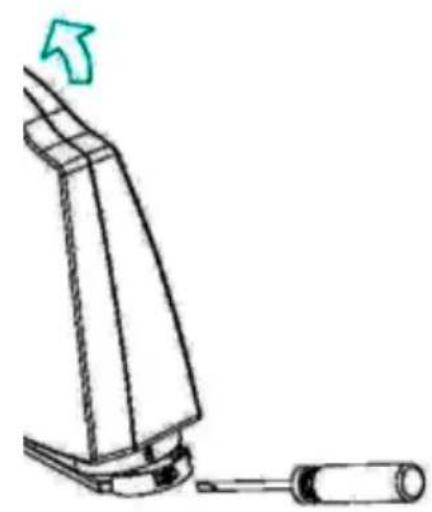
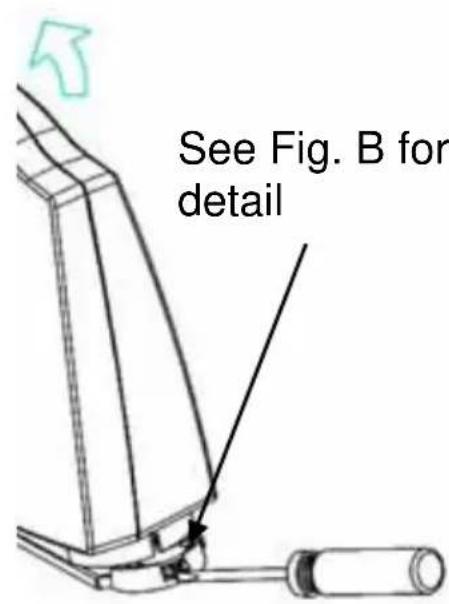
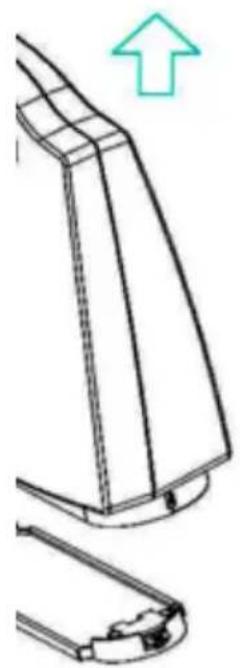
Insert a screwdriver into the opening of the catch mechanism, found on the bottom right of the base plate. Push the catch gently with the screwdriver - this will release the base plate. Lift the LoopHEAR™ unit off the base plate.
INSTALLATION
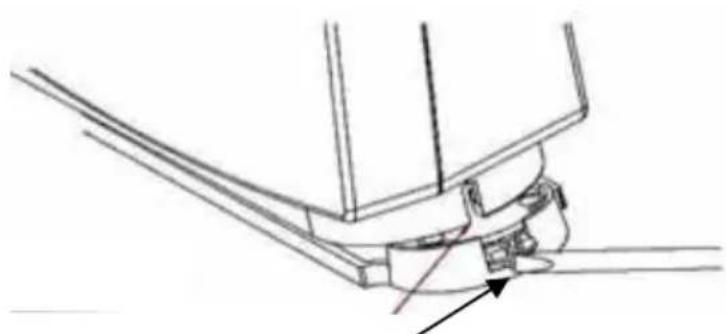
Opening of the catch mechanism
Fig B
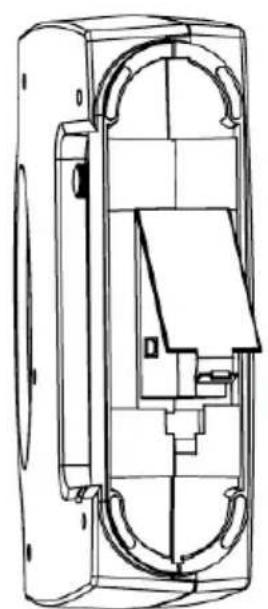
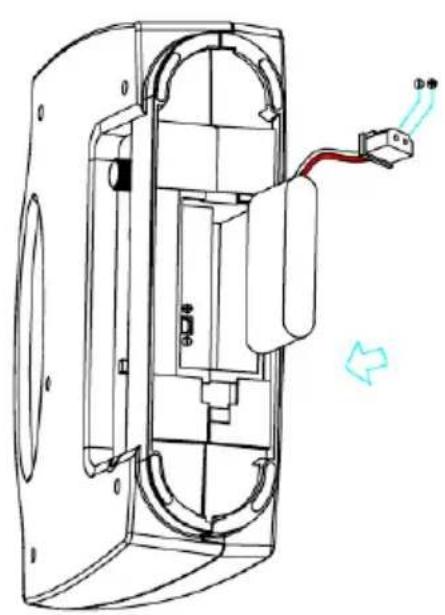
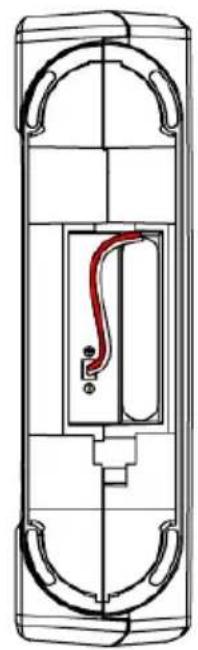
Remove the battery door. Insert the supplied rechargeable battery. Plug the connector into the socket and replace the battery door.
INSTALLATION
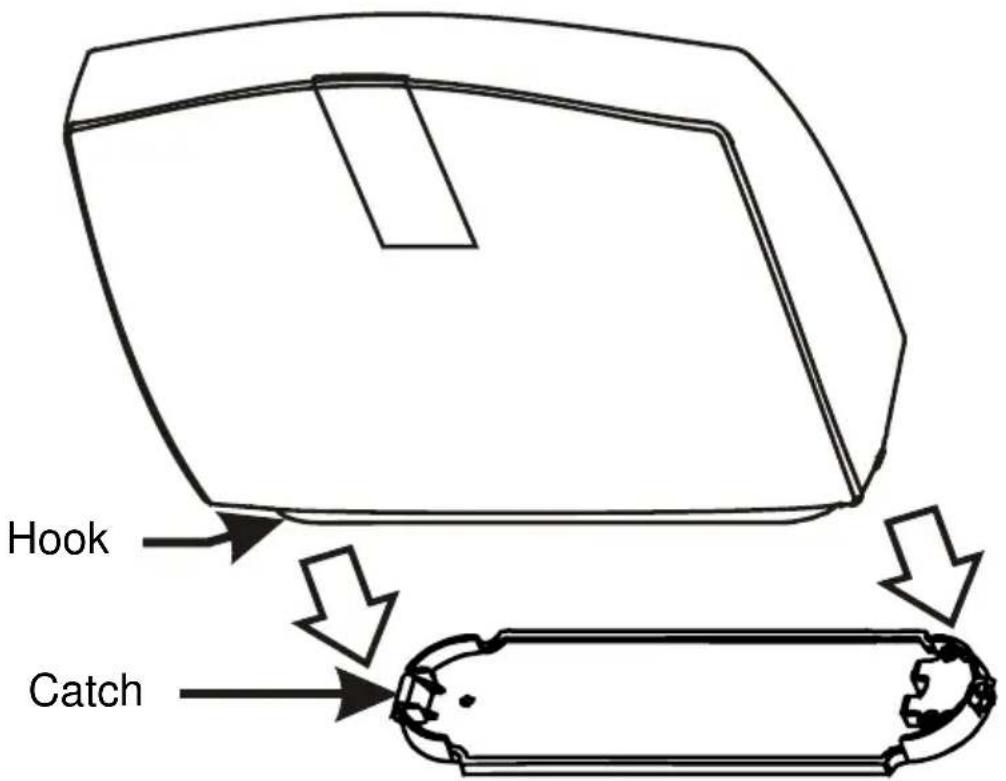
Replace the base plate by placing the hook found on the bottom left of the LoopHEAR™ into the catch on the base plate. Press the LoopHEAR™ down gently until you hear a click.
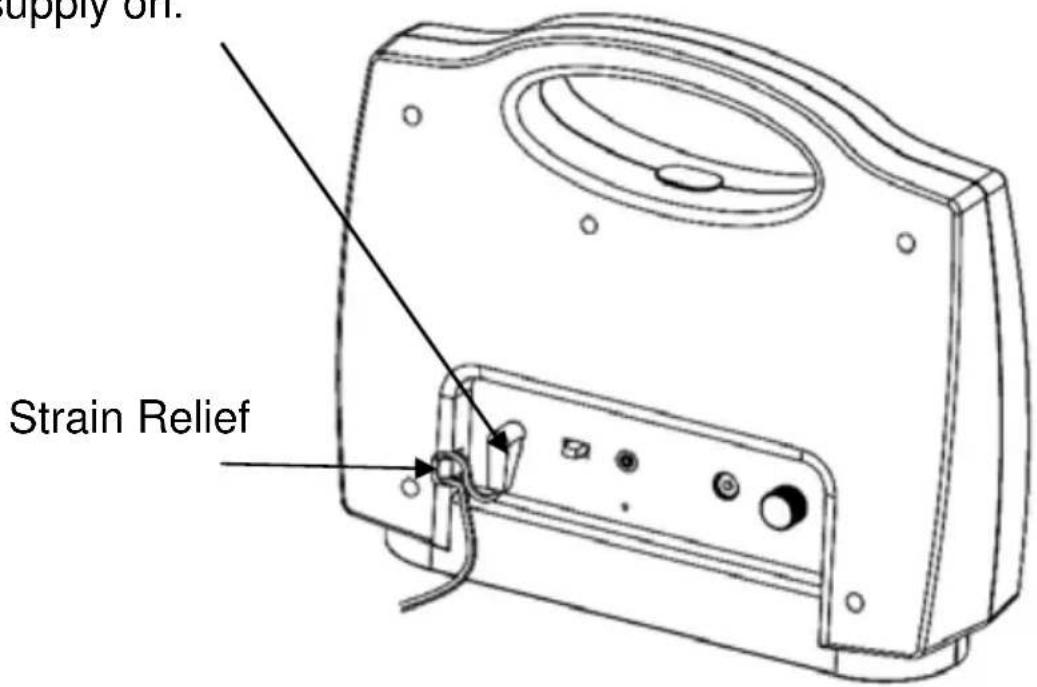
Plug the power cable into the power socket found on the rear of the unit. Plug the adaptor into the mains supply and switch the supply on.
INSTALLATION
Please use the strain relief mechanism as displayed. This provides extra protection for the cable at the connection point. It will extend the life of the power cable and reinforce the connection to the equipment.
The LoopHEAR™ will need to charge for 4 hours before it's first use. The power indicator will blink red while the battery is charging. When the power indicator is blinking green, the battery is fully charged.
Locating the LoopHEAR™
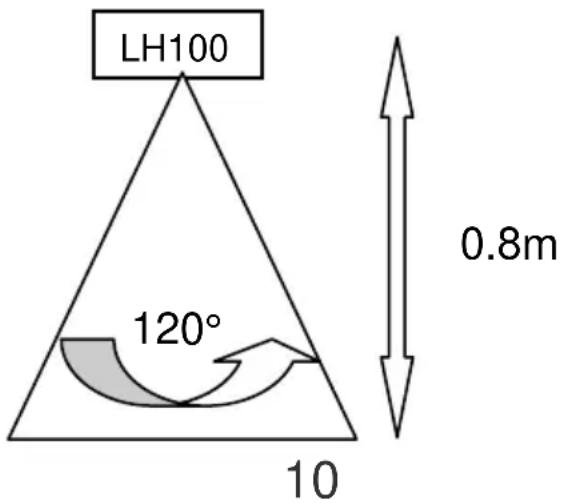
In order to receive the optimal sound from the LoopHEAR™, the ideal location is facing the user. There are two options when locating the LoopHEAR™.
Fully Portable
The LoopHEAR™ can be used as a fully portable unit with or without the base plate attached. It can be used in a variety of locations with no setup required and can be used immediately.
Semi Fixed
If you want to ensure the LoopHEAR™ stays in one place then it can be used as a semi fixed unit as follows:
1) Choose the location to fix the LoopHEAR™. Please bear in mind the range of coverage available (see below). Ensure you make full use of it.
2) Remove the base plate - as described in Battery Charging above.
3) Screw the base plate to the table or desktop with the screws provided.
4) Replace the base plate - as described in Battery Charging above.
USING THE LoopHEAR™
FIXING THE HAND HELD Listener HOLDER
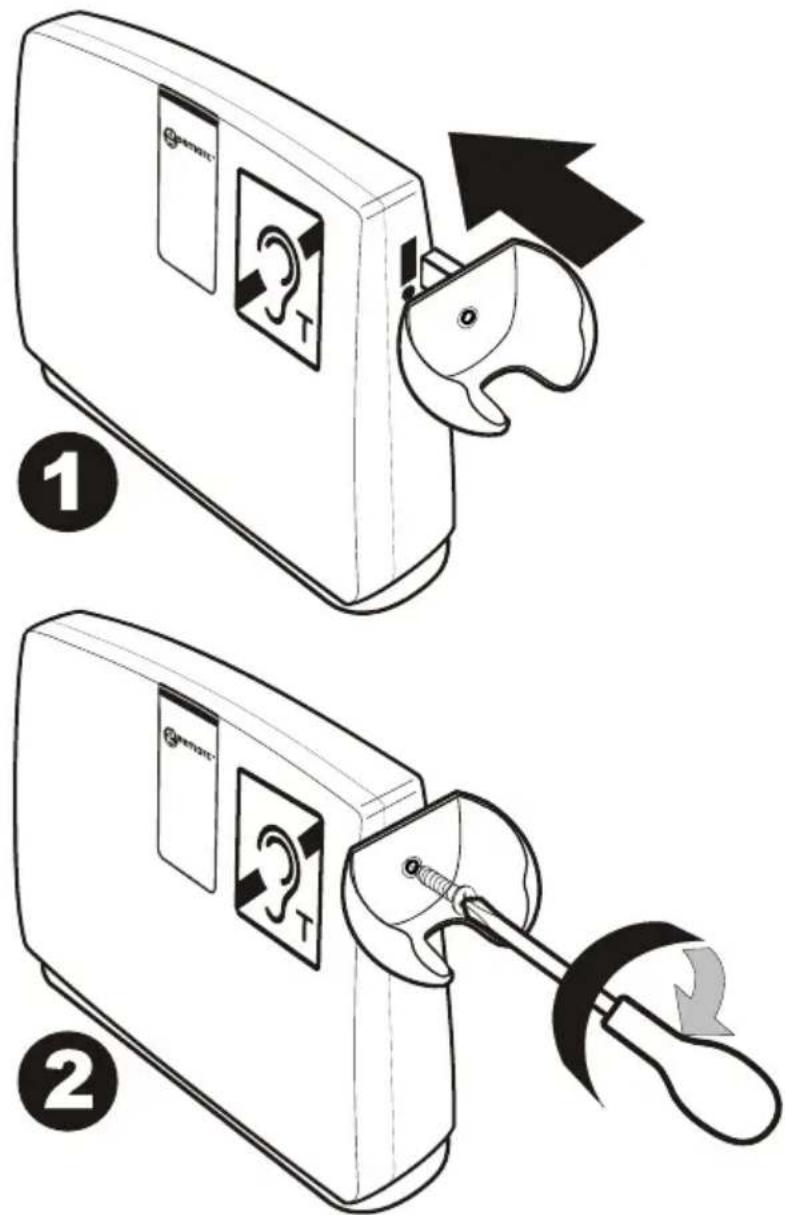
The hand held listener holder can be attached to the LoopHEAR™ on the left hand side or the right hand side, depending on where it would be convenient for use. In order to fix the attaches the receiver holder:
-
Insert the lug at the side of the holder gently into the slot in the cabinet.
-
Insert the screw provided with the holder into the hole of the holder and into the hole in the side of the cabinet, and tighten the screw fully using a screw driver.
The handheld receiver can now be placed in the holder.
USING THE LoopHEAR™
Turn the LoopHEAR™ On
Turn the power switch found at the rear of the unit to the I position. The power indicator lights up (solid green if the power adaptor is not plugged in, blinking green if it is plugged in).
When the power is low, the indicator will light up red (solid red if the power adaptor is not plugged in, blinking red if it is plugged in).
Plug in the power adaptor to recharge the battery.
Turn the LoopHEAR™ Off
After use, turn off by setting the power switch at the back of the unit to the 0 position.
Using the Hand held HAC Receiver
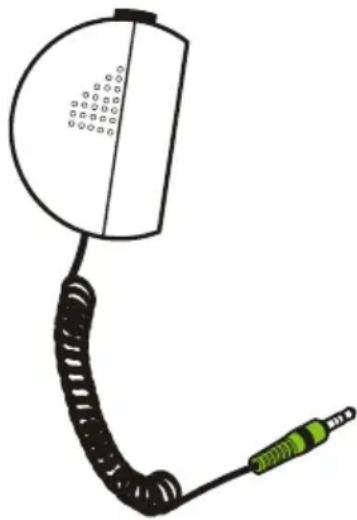
A Hand held HAC receiver is supplied for hearing impaired users who do not use a hearing aid, do not have a 'T' coil hearing aid or wish extra privacy afforded by the hand held listener.
Simply, plug the hand held listener into the jack (3.5mm), found at the rear of the LoopHEAR™ unit.
The user must press and hold the receiver button to get the audio signal.
The volume can be adjusted by using the volume knob also found at the rear of the unit (turn knob clockwise to increase volume).
USING THE LoopHEAR™
Using the External Microphone
Plug the supplied desktop microphone into the MIC JACK at the back of unit. The external microphone will now override the built-in microphone. The magnetic field LED indicator will light up blue when you speak to the built-in microphone or external microphone.
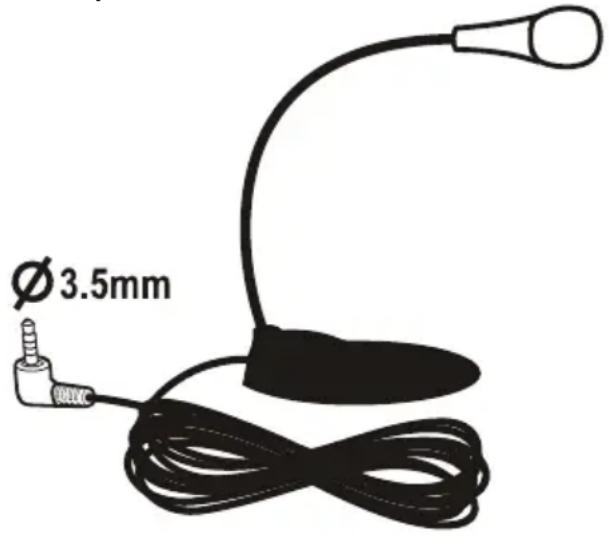
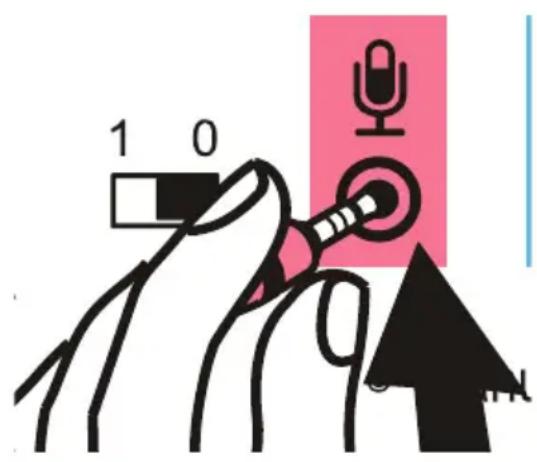
NOTE: When the external or Internal microphones are in use, the blue LED light flashes with an intensity depending on the strength of the transmitted magnetic signal through the loop.
Using the Audio Input
The LoopHEAR™ can transmit sound through the loop from an external audio source like a TV set, MP3-4, computer.

Connect your audio equipment to the 3.5mm socket (blue) on rear panel of your LoopHEAR™. You will then hear the magnetic signal when you are within 1 meter of the LoopHEAR™ with your hearing aid in the “T” position.
TROUBLESHOOTING
The RED LED is flashing
- Charge the battery
The LoopHEAR™ keeps on switching off
- Make sure that the batteries are fully charged
You cannot hear clearly due to interference or you cannot hear at all
- Make sure the LoopHEAR™ is switched on and facing you
- Move the LoopHEAR™ closer to you
BATTERY USAGE:
To ensure that your LoopHEAR™ is always ready for use please follow the recommendations below:
Always switch off when not in use
- Always recharge the batteries after continuous use for more than 6 hours or when the red LED is ON
- Recharge the batteries every four months if the unit has been switched OFF for long periods of time
As a rough guide the battery will allow the following usage depending on the volume levels and ambient noise:
- Standby when turned Off 4 MONTHS
- Standby when turned On but not in use 1.5 to 2 DAYS
- In continuous use from fully charged battery 5 to 8 HOURS
SAFETY INFORMATION
General
Do not open the unit. Contact the helpline for all repairs.
Cleaning
Clean the LoopHEAR™ with a soft cloth. Never use polish or cleaning agents - they could damage the finish or the electronics inside.
Environmental
Do not expose to direct sunlight.
Always ensure there is a free flow of air over the surfaces of the LoopHEAR™
Do not place any part of your product in water and do not use it in damp or humid conditions e.g. bathrooms.
Do not expose your product to fire or other hazardous conditions.
GUARANTEE
From the moment your Geemarc™ product is purchased, Geemarc™ guarantee it for the period of one year. During this time, all repairs or replacements (at our discretion) are free of charge. Should you experience a problem then contact our help line or visit our website at www.geemarc.com. The guarantee does not cover accidents, negligence or breakages to any parts. The product must not be tampered with or taken apart by anyone who is not an authorised Geemarc™ representative. The Geemarc™ guarantee in no way limits your legal rights.
IMPORTANT: YOUR RECEIPT IS PART OF YOUR GUARANTEE AND MUST BE RETAINED AND PRODUCED IN THE EVENT OF A WARRANTY CLAIM.
Please note: The guarantee applies to the United Kingdom only
DECLARATION: Geemarc™ Telecom SA hereby declares that this product is in compliance with the essential requirements and other relevant provisions of the Radio and Telecommunications Terminal Equipment Directive 1999/5/EEC and in particular article 3 section 1a, 1b and section 2.
The declaration of conformity may be consulted at www.geemarc.com

Electrical connection: The apparatus is designed to operate from a 230V 50Hz supply only. (Classified as 'hazardous voltage' according to EN60950 standard).
RECYCLING DIRECTIVES
The WEEE (Waste Electrical and Electronic Equipment) has been put in place for the products at the end of their useful life are recycled in the best way.
When this product is finished with, please do not put it in your domestic waste bin.
Please use one of the following disposal options:
- Remove the batteries and deposit them in an appropriate
WEEE skip. Deposit the product in an appropriate WEEE skip.
- Or, hand the old product to the retailer. If you purchase a new one, they should accept it.
Thus, if you respect these instructions you ensure human health and environmental protection.


For product support and help visit our website at
www.geemarc.com
Telephone 01707 384438
Or fax 01707 832529
SOMMAIRE
Hertfordshire, AL7 1SB
For product support:
01707384438
www.geemarc.com

eemarc
Telecom SA
FRANCE
Parc de I'Etoile
- Locating the LoopHEARTM 10
- USING THE LoopHEAR™ 11
- TROUBLESHOOTING 14
- SAFETY INFORMATION 15
- GUARANTEE 16
- RECYCLING DIRECTIVES 17
- INTRODUCTION
- Unpacking the LoopHEAR™
- DESCRIPTION
- General Description
- INSTALLATION
- Setting Up
- Battery Charging
- Locating the LoopHEAR™
- Fully Portable
- Semi Fixed
- USING THE LoopHEAR™
- FIXING THE HAND HELD Listener HOLDER
- Turn the LoopHEAR™ On
- Turn the LoopHEAR™ Off
- Using the Hand held HAC Receiver
- Using the External Microphone
- Using the Audio Input
- TROUBLESHOOTING
- The RED LED is flashing
- The LoopHEAR™ keeps on switching off
- You cannot hear clearly due to interference or you cannot hear at all
- BATTERY USAGE:
- SAFETY INFORMATION
- General
- Cleaning
- Environmental
- GUARANTEE
- RECYCLING DIRECTIVES
- SOMMAIRE
Brand : GEEMARC
Model : LoopHEAR 101
Category : Hi-fi system