304585 - Smartphone Aplic - Free user manual and instructions
Find the device manual for free 304585 Aplic in PDF.


| Product Type | Smartphone Mount for Bicycle |
| Brand | Aplic |
| Model | 304585 |
| Compatibility | Apple iPhone X, Xs, 11, 11 Pro and smartphones of similar sizes |
| Maximum Handlebar Diameter | 32 mm |
| Protection Rating | IPX4 (protection against water splashes) |
| Joint | 360° rotatable ball joint |
| Camera Opening | Yes, allows use of the camera |
| Smartphone Use | Possible without removing the case |
| Package Contents | Smartphone case, bicycle mount, instruction manual |
| Main Material | Robust plastic with rubber inserts |
| Mounting | On handlebar, with screws and non-slip inserts |
| Cleaning | Soft dry cloth, no harsh products |
| Safety | Do not open, avoid extreme temperatures, check before use |
| Warranty | Void if unauthorized modification or repair |
| Disposal | Recycling via WEEE, do not dispose of with household waste |
| Manufacturer | WD Plus GmbH, Wohlenbergstraße 16, 30179 Hanover, Germany |
| WEEE Registration Number | DE 67896761 |
Frequently Asked Questions - 304585 Aplic
User questions about 304585 Aplic
0 question about this device. Answer the ones you know or ask your own.
Ask a new question about this device
Download the instructions for your Smartphone in PDF format for free! Find your manual 304585 - Aplic and take your electronic device back in hand. On this page are published all the documents necessary for the use of your device. 304585 by Aplic.
USER MANUAL 304585 Aplic
iPhone X/Xs/11 Pro Protective Cover
Thank you for having chosen this Aplic product and for placing your trust in our company. Please read this manual carefully before use to ensure your long-term enjoyment of this product. For future reference, please keep this manual. Before using the delivered product, check that it is complete, faultless and undamaged.
1. Scope of delivery
- iPhone X/Xs/11 Pro protective cover
- Bike mount
- User manual
2. Technical specifications
| Max. diameter of handlebar 32 mm | |
| Suitable smartphone Apple iPhone X/Xs/11 Pro | |
| Features • Shock resistant/splash | wash waterproof IPX4 • 360° rotatable ball joint • Notch for the camera • Smartphone remains operable |
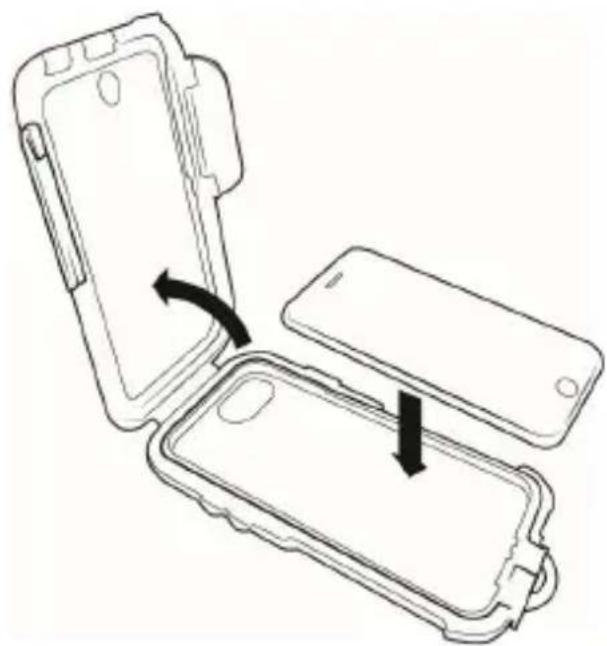
Remove the protective cover from its packing and open the two quick locks on the left and right side.
Flip the cover upwards and remove the placeholder and the printed insert on the inside of the display cover. Now insert your smartphone into the tray and close the cover.
3. Installation
Remove the two screws as are illustrated in the following figure, to disassemble the mount into its components.
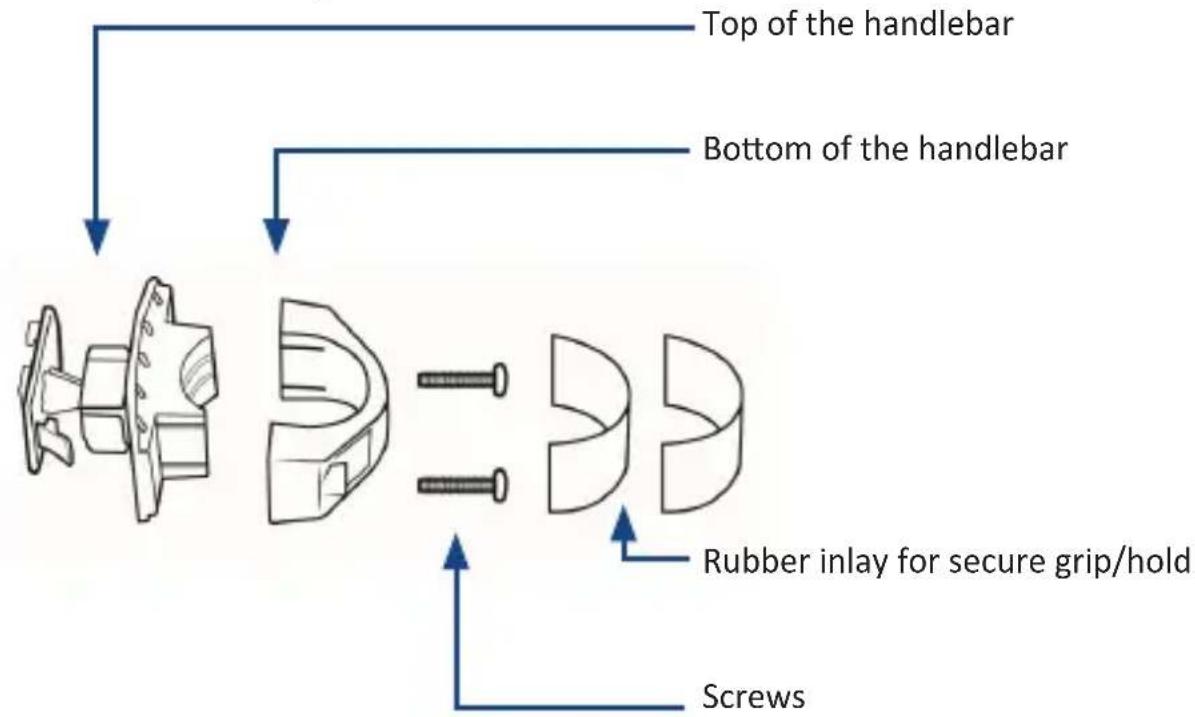
Position the two plastic pieces at the top and the bottom of the handlebar. For this purpose, please apply the attached rubber inlay to prevent the mounting from slipping after installation. Lead the screws from above through the holes provided and tighten the screws.
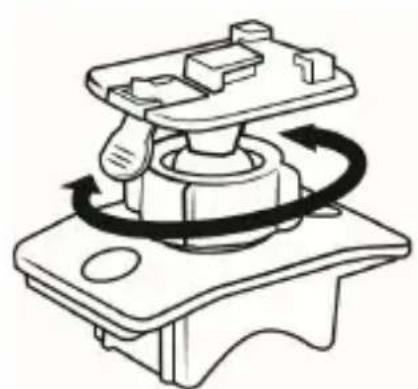
To adjust the angle and position of the smart phone, a rotatable ball joint is integrated. Rotate the fastening ring (shown in the upper picture) counterclockwise to align the ball joint in comfority with your requirements. After that turn the ring into the opposite direction and tighten it, so that the rotatable ball joint can no longer be moved.
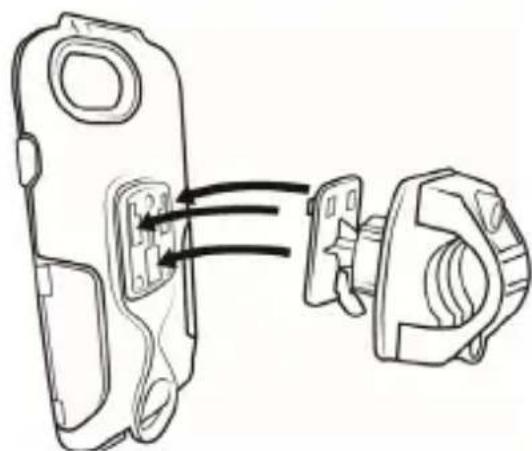
You can attach the protection cover to the bike mount now as shown. Press the lever to release the cover.
4. Safets instructions and disclaimer
Do not attempt to service this product by yourself as opening or removing covers may result in fire, electric shock or equipment damage. The product is only disconnected from the voltage system when the plug has been removed from the socket. Please avoid any contact to the electric current. Disregard of this warning could lead to contact with the operating voltage, or could generate a short circuit. Pull out the plug before a lightning storm or if you do not regularly use the product to prevent a short-circuit. This device is only licensed for indoor use and dry areas. Please protect it from water, rain, snow or high humidity and keep it away from high temperatures and direct sunlight. Do not expose this product to extreme and sudden changes of temperature or heavy vibrations; this may lead to damage to the electronic part of this unit. Check the product for signs of damage before putting it in operation.
In case the device is damaged, it should not be used. Please contact our customer support. Please observe the relevant national provisions and legal restrictions. Do not use the device for anything other than intended and as described in the manual. Any attempt of repairs or alterations by someone other than the original supplier will invalidate the guarantee and result in refusal of warranty claims. The machine may only be used by persons who are familiar with the operating manual and the applicable regulations concerning working safety and accident prevention. This device is not intended to be used by persons (including children) with limited physical, sensory or mental aptitude or lack of experience and/or knowledge unless they are supervised by a person responsible for their safety or have received instructions as to how the device is used properly. The technical specifications of this product may change without prior notice.
5. Disposal Instructions
The European Directive (WEEE) requires that old electrical and electronic appliances shall be disposed of separately from normal household garbage for optimal recycling. The component parts must be separated, collected and sent for recycling or disposal in an environment-friendly manner. Otherwise, toxic and dangerous substances could cause enduring damage to the environment by an incorrect disposal. As a consumer you are legally obligated (Electrical and Electronic Equipment Act-ElektroG) to return end-of-life electrical and electronic equipment to their manufacturer, point of sale, public collection points or importer of charge. The relevant local laws apply here. The symbol on the product, in the instructions or on its packing points out these regulations. The reuse or recycling of materials and old units makes an important contribution towards protecting the environment.

WEEE guideline 2012/19/EU WEEE register number: DE 67896761
WD Plus GmbH, herewith declares that this product 304585/20200428TW002 conforms to the principle requirements and other relevant stipulations. The complete Declaration of Conformity can be obtained from: WD Plus GmbH, Wohlenbergstraße 16, 30179 Hanover
Brand : Aplic
Model : 304585
Category : Smartphone