
Sonicare Power Flosser 7000 HX3921 - Interdental brush PHILIPS - Free user manual and instructions
Find the device manual for free Sonicare Power Flosser 7000 HX3921 PHILIPS in PDF.
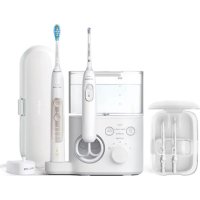



| Product type | Electric interdental brush |
| Brand | Philips |
| Model | Sonicare Power Flosser 7000 HX3921 |
| Operating modes | 4 modes: Clean, Deep Clean, Sensitive, Massage |
| Intensity settings | 10 levels |
| Pulse wave technology | Yes (Deep Clean and Sensitive modes) |
| Pacer | Yes (Clean and Massage modes) |
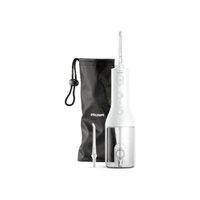
| Included nozzle types | Standard nozzle, Comfort nozzle, Quad Stream nozzle |
| Reservoir capacity | Approximately 200 ml |
| Power supply | 100-240 V mains adapter |
| Magnetic base | Yes (automatic handle shut-off) |
| Sonicare toothbrush charger | Integrated (depending on model) |
| Cleaning | Reservoir and lid dishwasher safe; nozzles to rinse |
| Nozzle replacement | Every 6 months |
| Recommended daily use | At least once a day, maximum 5 minutes per session |
| Warranty | 2 years |
| Safety | Do not immerse; use only recommended accessories |
| Spare parts and repairability | Nozzles, adapter, reservoir available at philips.com |
| Approximate dimensions | 15 × 10 × 10 cm |
| Approximate weight | 500 g |
Frequently Asked Questions - Sonicare Power Flosser 7000 HX3921 PHILIPS
User questions about Sonicare Power Flosser 7000 HX3921 PHILIPS
0 question about this device. Answer the ones you know or ask your own.
Ask a new question about this device
Download the instructions for your Interdental brush in PDF format for free! Find your manual Sonicare Power Flosser 7000 HX3921 - PHILIPS and take your electronic device back in hand. On this page are published all the documents necessary for the use of your device. Sonicare Power Flosser 7000 HX3921 by PHILIPS.
USER MANUAL Sonicare Power Flosser 7000 HX3921 PHILIPS
When using electrical products, especially when children are present, basic safety precautions should always be followed, including the following:
DANGERS
To reduce the risk of electrocution:
- Do not place or store product where it can fall or be pulled into a tub or sink.
- Do not place in or drop into water or other liquid.
- Do not use while bathing.
- Do not immerse the power adapter or base in water or any other liquid.
- After cleaning, make sure the power adapter is completely dry before you connect it to a power outlet.
- Do not reach for a product that has fallen into water. Unplug immediately.
WARNING
To reduce the risk of burns, electrocution, fire or physical injury:
- To avoid damage to the product, do not place the product or parts in the dishwasher for cleaning unless otherwise instructed.
- Do not use nozzles other than the ones recommended by the manufacturer.
- Only use the power adapter (WAC1001) provided with the Power Flosser.
- If the power adapter or power cord is damaged, stop using it.
- Always replace the power adapter with one of the original type in order to avoid a hazard.
- Do not plug into an outlet with a voltage other than specified on the bottom of the product. This product is designed to operate within a range of 100 to 240 volts. Voltage converters do not ensure voltage compatibility.
- Never force the plug into an outlet; if the plug does not easily fit into the outlet, discontinue use.
- Discontinue use if the product appears damaged in any way (power cord, handle, hose, reservoir, nozzles, etc.).
- Keep the power cord away from heated surfaces.
- Do not use the product outdoors.
- The maximum altitude of use is 14,500 feet.
- Do not use the product if dropped into water.
- This product is not intended for use by persons (including children) with reduced physical, sensory, or mental capabilities, or lack of experience and knowledge, unless they have been given supervision or instruction concerning use of the product by a person responsible for their safety.
- Children (ages 6 and above) should be supervised to ensure that they do not play with the product.
- Philips Sonicare Power Flosser or Power Flosser & Toothbrush System is a personal care device and is not intended for use by multiple users.
- This product contains no user serviceable parts. If the product is damaged, contact the Consumer Care Center in your country.


- For connection to a power supply not in the U.S.A., use a power cord of the proper configuration for the power outlet.
- If you are not going to use the product for an extended period of time, unplug it from the electrical outlet, clean it and store it in a cool and dry place away from direct sunlight.
- Do not fill the reservoir with hot water. Hot water may cause burns.
MEDICAL WARNINGS
1 Consult your dental professional before you use this product if you have had oral or gum surgery in the previous 2 months. 2 Do not use this product for more than 5 minutes in each two-hour period. 3 Contact your dental professional if excessive bleeding occurs after using this product or bleeding continues to occur after 1 week of use. 4 Discontinue use of this product and contact a physician/ dentist if discomfort or pain is experienced. 5 This appliance has only been designed for cleaning teeth and gums. Do not use it for any other purpose. (for e.g. eyes, nose and ears) 6 This product complies with the safety standards for electromagnetic devices. If you have a pacemaker or other implanted device, consult your physician or the manufacturer of the implant device. 7 Consult your physician if you have other medical concerns.
SAVE THESE INSTRUCTIONS
9English
Introduction
Welcome to Philips! Congratulations on your new Sonicare Power Flosser or Power Flosser & Toothbrush System. To fully benefit from the support that Philips offers, register your product at philips.com/welcome.
Intended Use
The Philips Sonicare Power Flosser or Power Flosser & Toothbrush System is an oral irrigator intended to remove plaque and food debris between teeth and the tooth surface in order to reduce tooth decay and improve and maintain gum health. This product is intended for consumer home use, normally used at least once a day. Use by children (ages 6+ ) should be with adult supervision.
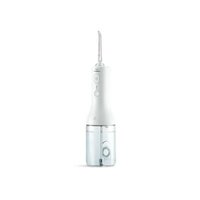
Your Philips Sonicare Power Flosser (Fig. 1)
1 Reservoir lid 2 Reservoir 3 Mode button 4 Mode indicator 5 On/off button 6 Intensity dial 7 Hose 8 Hose storage compartment 9 Sonicare power toothbrush charger 10 Base 11 Magnetic handle dock 12 Handle 13 Pause switch 14 Nozzle eject button 15 Quad Stream nozzle 16 Comfort nozzle 17 Standard nozzle 18 Power adapter 19 Nozzle storage case
*Note: The contents of the box may not include all items shown depending on the product configuration purchased.

10English
Nozzles
To see what type of nozzles you have, check the code at the base of the nozzle. Each nozzle type provides different benefits.
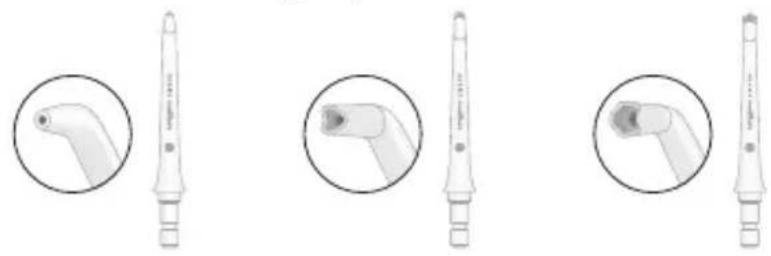
Nozzle label F1 F2 F3
| Nozzle Name Standard nozzle | Comfort nozzle | Quad Stream nozzle |
| Benefit Standard nozzle with a single stream of water for removing debris and plaque. | Soft rubber nozzle for comfort and ease of positioning for those with sensitive gums. | Soft rubber nozzle that directs water into a cross-shaped stream that gently removes plaque for an effortlessly thorough clean. |
Modes
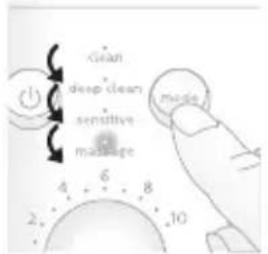
Your Power Flosser is equipped with 4 different modes:
Clean
This mode, with pacer, provides standard water pressure for a great clean.
Deep clean
This mode, with Pulse Wave technology, provides strong and gentle pulses of water for a thorough clean.
Sensitive
This mode, with Pulse Wave technology, provides gentle pulses of water for beginners or those with sensitive gums.
Massage
This mode, with pacer, offers soothing pulses of water to massage your gums.
Note: For details on "Pulse Wave technology" and "pacer" (see 'Features').
Selecting modes
1 Turn on the device by pressing the on/off button. 2 Press the mode button to select desired mode.
Intensity Settings
Your power flosser comes with 10 different intensity settings. To manually change the intensity, turn on the base and turn the intensity dial to the setting you prefer.
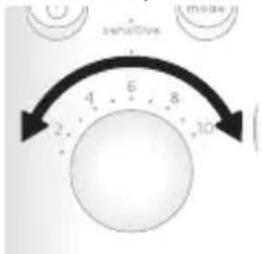
Note: For first time use, start the device from the lowest setting. It is recommended to increase the intensity you use over the course of a few weeks. This can give better cleaning benefits as you are able to tolerate higher settings.
Features
Pacer
The clean and massage modes have a pacer. This feature indicates when you are supposed to move to the next section of your mouth via a short pause in the waterfall.
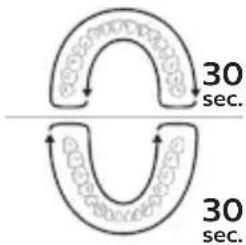
Note: This feature is on clean mode and massage modes only.
Activating or deactivating pacer
You can activate or deactivate the pacer feature by holding the on/off button and the mode button simultaneously for 5 seconds.
- When deactivated, all the lights will flash once.
- When activated, all the lights will flash twice.
Pulse Wave technology
The deep clean and sensitive modes have a "Pulse Wave technology" feature. The flow of the water increases and decreases in intensity, providing a brief pause during which you can move the nozzle to the next space between your teeth.
Magnetic Docking
If the pause switch on the handle was not turned to the off position, when the handle is docked back to the base after use, the magnetic dock will automatically set the pause switch back to off.
Sonicare power toothbrush charger (Specific models only)
The Sonicare Power Flosser & Toothbrush System has an integrated charger for your Philips Sonicare Power toothbrush.
Charging your toothbrush on your Power Flosser & Toothbrush System
1 Place the handle on the charger. 2 The lights on your toothbrush handle will turn off when its battery is fully charged.
Note: See Sonicare power toothbrush charging instructions and charging times in the separate toothbrush manual.
Getting started
1 Connect the small plug into the bottom of the base and connect the power plug in any 100-240V power outlet. 2 Remove the reservoir from the base.
Note: Make sure the product is powered off before you remove the reservoir.
3 Open the lid, fill the reservoir with lukewarm water to the MAX fill line.
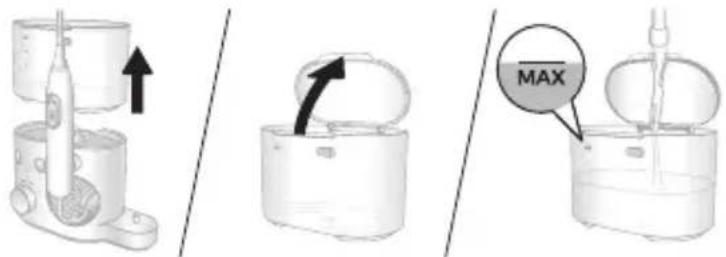
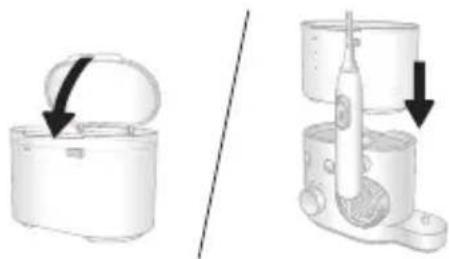
4 Close the lid. Place the reservoir back on the base.
Note: Press down firmly to ensure there is no gap between the reservoir and the base.
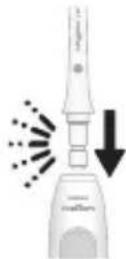
5 Insert your preferred nozzle into the handle. Press the nozzle down until you hear a "click".
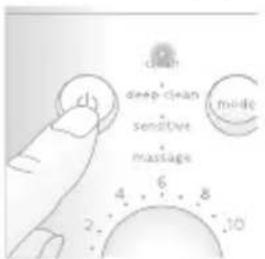
6 Press the on/off button on the base station to turn on the product. Select your desired mode (see 'Modes') and intensity (see 'Intensity Settings').
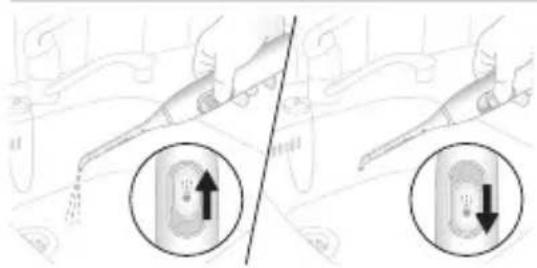
7 Remove the handle from the base and point the tip of the nozzle into the sink. Slide the pause switch on the handle to the 'on' (up) position and wait until the water stream comes out of the tip of the nozzle. Stop the flow of water by sliding the pause switch to the 'off' (down) position.
Note: This step is for first time use after purchase only.
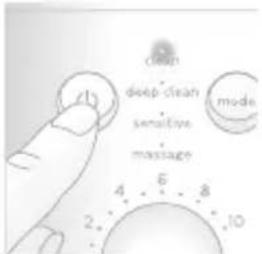
8 Press the on/off button on the base again to turn off the product.
Using your Power Flosser
1 Make sure that the pause switch on the handle is in the 'off' position. 2 Press the on/off button on the base to turn on the product.
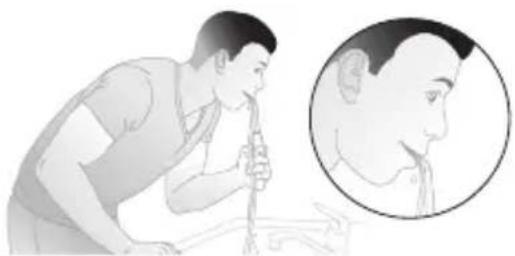
3 Place the nozzle tip in your mouth. Lean over the sink and partially close your lips over the nozzle to avoid splashing. Leave enough space to allow water to flow from your mouth into the sink.
Standard and Comfort Nozzle
With the base station turned on:
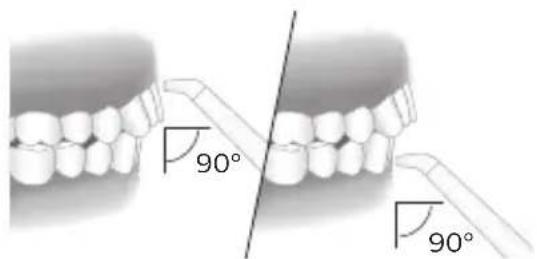
a Position the nozzle tip just above the gum line at a 90° angle.
b Slide the pause switch on the handle to the 'on' position to start the water flow.
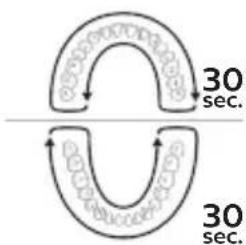
c Starting from your back teeth in your upper or lower jaw, slide the nozzle tip along the gum line and pause briefly between each tooth. Continue to clean both inside and outside of your teeth in one arch of your mouth for 30 seconds.
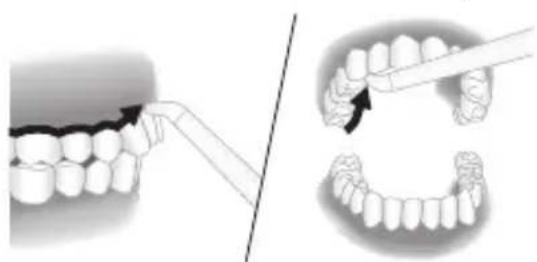
Note: Remember to clean the inside of your teeth.
d Repeat in the other arch of your mouth for another 30 seconds until all spaces around and between your teeth have been cleaned for a total of at least one minute.
Note: You can stop the water flow during use by sliding the pause switch on the handle to the 'off' position (motor will pause).
Quad Stream Nozzle
With the base station turned on:
a Position the nozzle tip just above the gum line at a 90° angle. Press gently so that the nozzle tip is in contact with the gum line and the teeth.
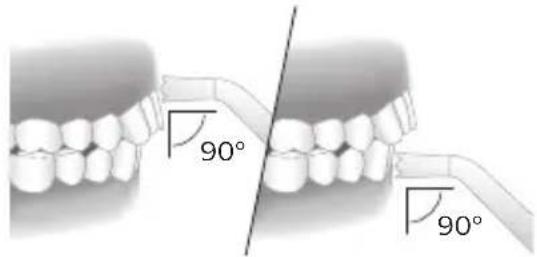
b Slide the pause switch on the handle to the 'on' position to start the water flow. c Starting from your back teeth in your upper or lower jaw, slide the nozzle tip along the gum line and pause briefly between each tooth. Continue to clean both inside and outside of your teeth in one arch of your mouth for 30 seconds.
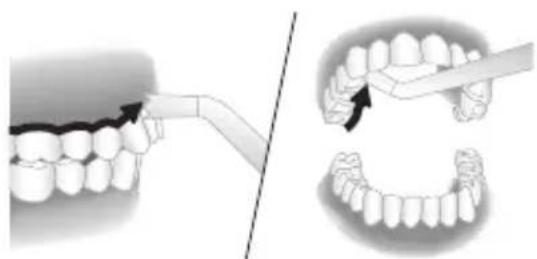
Note: Remember to clean the inside of your teeth.
d Repeat in the other arch of your mouth for another 30 seconds until all spaces around and between your teeth have been cleaned for a total of at least one minute.
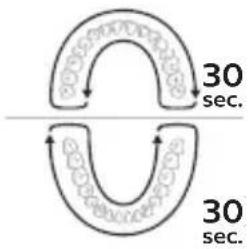
Note: You can stop the water flow during use by sliding the pause switch on the handle to the 'off' position (motor will pause).
Cleaning orthodontic brackets with the Quad Stream nozzle
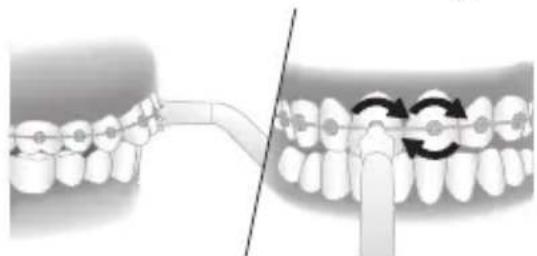
a To clean around orthodontic brackets, place the nozzle tip over each bracket.
b Gently rotate the nozzle tip around the bracket in a small circle before moving to the bracket on the next tooth.
After each use
1 When you are finished, turn off the product. 2 Pick up and empty the reservoir. 3 Remove the nozzle from the handle by pushing the eject button on the back of the handle.
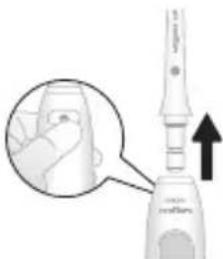
4 Rinse the nozzle under the tap. 5 Insert the nozzle back into the handle.
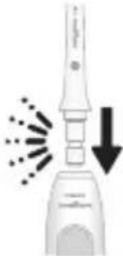
6 Dry any excess water off the tether and handle.
Cleaning
The product needs to be cleaned once a week.
Clean the device and the accessories as follows:
Reservoir and lid
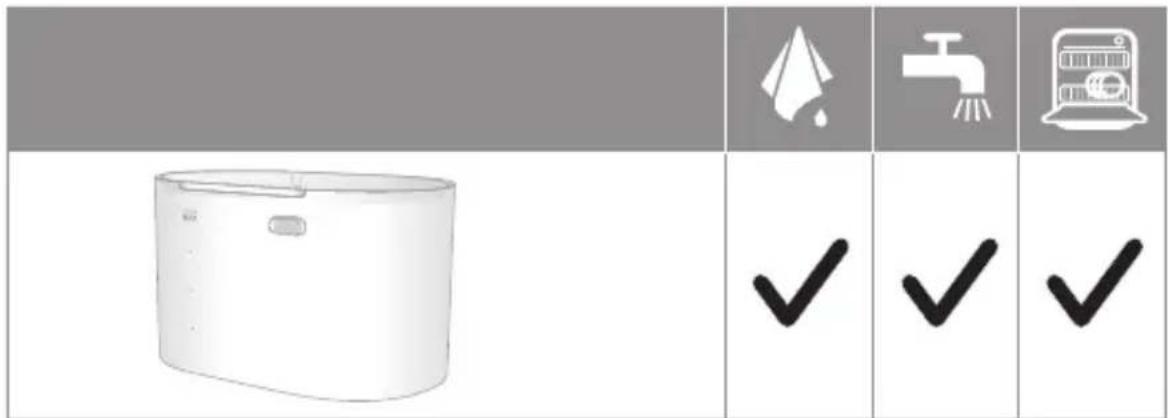
Gently remove the reservoir from the unit. The reservoir can be hand washed with warm water and mild soap or cleaned in the dishwasher.
Base and handle
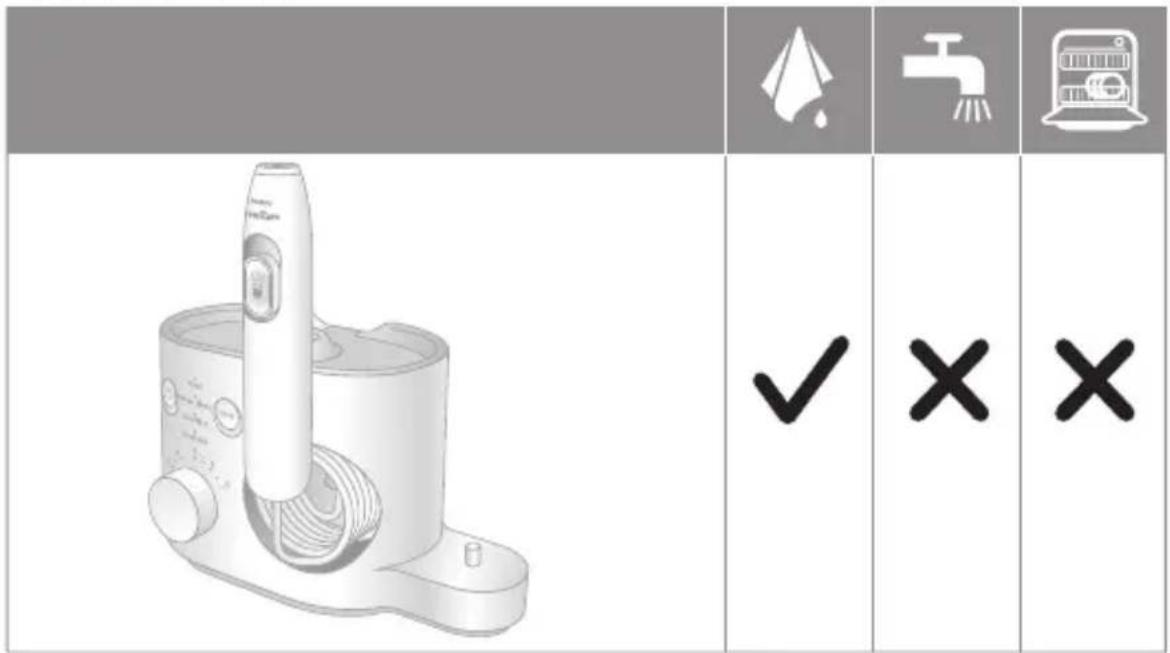
When necessary, you can clean the outside of the base and the handle with a soft cloth and mild soap.
Nozzles
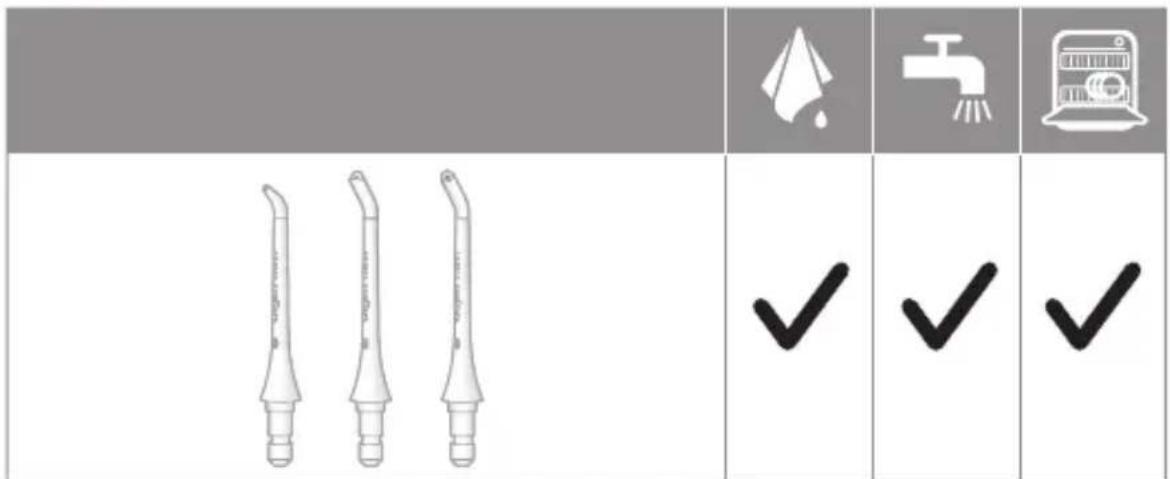
Regular Cleaning:
Remove the nozzle from the handle. Rinse the tip under warm water.
Every few months, or if your nozzle becomes clogged:
Soak the nozzle in a container of 2 parts water and 1 part white vinegar for 5 minutes. Rinse the nozzle with warm water.
Nozzle storage case
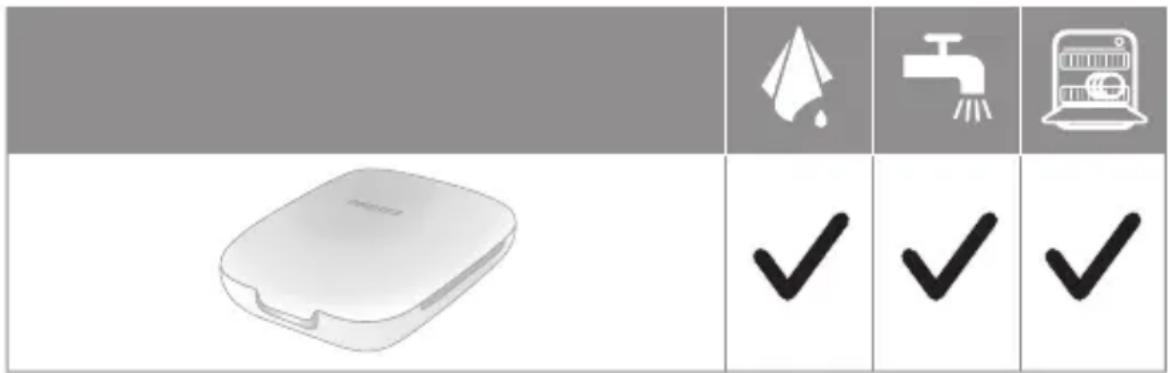
The storage case can be hand washed in warm water with mild soap or cleaned in the dishwasher.
Internal components, hose and handle
Fill the reservoir with warm water and add 1-2 tablespoons of white vinegar. Remove the handle, point the nozzle at the sink and turn on the product to run the solution through the unit until the reservoir is empty. Rinse by repeating with a full reservoir of clean warm water.
Storage
If you are not going to use the product for an extended period of time, unplug it from the electrical outlet, clean it and store it in a cool and dry place away from direct sunlight.
Replacement
Replace nozzles every 6 months or immediately when damaged. To buy accessories or spare parts, visit philips.com or go to your local Philips Sonicare dealer. You can also contact the Philips Consumer Care Center in your country (see the international warranty leaflet for contact details).
The following spare parts are available:
Standard nozzle - Comfort nozzle - Quad Stream nozzle
Note: The availability of spare parts may differ by country.
Frequently asked questions Question Answer
| Can I use mouthwash or essential oils in my reservoir? | It is not recommended to use essential oils in the reservoir. Mouthwash can be mixed with water and used in the reservoir. After using mouthwash, rinse the device to prevent clogging by partially filling reservoir with warm water and running product with tip pointed into sink until reservoir is empty. |
| Will other nozzles fit on my Philips Sonicare Power Flosser? | Only Philips Sonicare Power Flosser nozzles will work with this device. Nozzles from other brands and Philips AirFloss nozzles are not compatible with this product. |
| How often do I need to replace my nozzle? | We advise you to replace your nozzle after 6 months of use. You can find more information about buying replacement parts at philips.com |
23 English
Locating the model number
Look on the bottom of the base for the model number (HXxxx).
Warranty and support
Philips warrants its products for two years after the date of purchase. Defects due to faulty materials and workmanship will be repaired or replaced at Philips' expense provided that convincing proof of purchase in the qualifying period is provided. Philips recommends use of genuine Sonicare Nozzles for optimal performance. Use of other Nozzles may damage your Power Flosser and limit your warranty protection. Contact our Consumer Care Center at 1-800-682-7664 or www.philips.com/sonicare-warranty (North America), outside North America contact your local Philips Consumer Care Center. For product information and online user instructions, visit: https://www.usa.philips.com/c-w/support-home/sonicare (North America) or www.philips.com/support (outside North America).
WARRANTY EXCLUSIONS
What is not covered under warranty:
- Reservoir
- Nozzles
- Damage caused by use of unauthorized replacement parts or unauthorized nozzles
- Damage caused by misuse, abuse, neglect, alterations or unauthorized repair
- Normal wear and tear, including chips, scratches, abrasions, discoloration or fading
24 English
IMPLIED WARRANTY
ANY IMPLIED WARRANTY, INCLUDING IMPLIED WARRANTY OF MERCHANTABILITY AND FITNESS FOR A PARTICULAR PURPOSE, SHALL BE LIMITED TO THE DURATION OF THE EXPRESS WARRANTY SET FORTH ABOVE. IN SOME STATES LIMITATIONS ON DURATION OF IMPLIED WARRANTY DO NOT APPLY.
LIMITATION OF REMEDIES
IN NO EVENT SHALL PHILIPS OR ANY OF ITS AFFILIATED OR SUBSIDIARY COMPANIES BE LIABLE FOR ANY SPECIAL, INCIDENTAL OR CONSEQUENTIAL DAMAGES BASED UPON BREACH OF WARRANTY, BREACH OF CONTRACT, NEGLIGENCE, TORT, OR ANY OTHER LEGAL THEORY. SUCH DAMAGES INCLUDE, WITHOUT LIMITATION, LOSS OF SAVINGS OR REVENUE; LOSS OF PROFIT; LOSS OF USE; THE CLAIMS OF THIRD PARTIES INCLUDING, WITHOUT LIMITATION, DENTISTS AND DENTAL HYGIENISTS; AND COST OF ANY SUBSTITUTE EQUIPMENT OR SERVICES. SOME STATES DO NOT ALLOW THE EXCLUSION OR LIMITATION OF INCIDENTAL OR CONSEQUENTIAL DAMAGES.
Disposal
Your product is designed and manufactured with high quality materials and components, which can be recycled and reused. For recycling information, please contact your local waste management facilities.
IMPORTANT SAFEGUARDS
READ ALL INSTRUCTIONS BEFORE USING
When using electrical products, especially when using smartphones, it's important to keep the phone charged. It is important to keep the battery charged in order to be able to take a long time for the phone to charge up.
DANGERS
- Standard nozzle
- Comfort nozzle
- Quad jet nozzle
WARRANTY EXCLUSIONS
www.philips.com/Sonicare
©2020 Koninklijke Philips N.V. (KPNV). All rights reserved. Philips and the Philips shield are trademarks of KPNV. Sonicare and the Sonicare logo are trademarks of Philips Oral Healthcare, LLC and/or KPNV.
Philips Oral Healthcare, LLC. 22100 Bothell Everett Highway Bothell, WA 98021
3000.043.4474.1 (3/20/2020)

- DANGERS
- WARNING
- MEDICAL WARNINGS
- SAVE THESE INSTRUCTIONS
- INTRODUCTION
- INTENDED USE
- YOUR PHILIPS SONICARE POWER FLOSSER (FIG. 1)
- ENGLISH
- NOZZLES
- MODES
- CLEAN
- DEEP CLEAN
- SENSITIVE
- MASSAGE
- SELECTING MODES
- INTENSITY SETTINGS
- FEATURES
- PACER
- ACTIVATING OR DEACTIVATING PACER
- PULSE WAVE TECHNOLOGY
- MAGNETIC DOCKING
- SONICARE POWER TOOTHBRUSH CHARGER (SPECIFIC MODELS ONLY)
- CHARGING YOUR TOOTHBRUSH ON YOUR POWER FLOSSER & TOOTHBRUSH SYSTEM
- GETTING STARTED
- USING YOUR POWER FLOSSER
- STANDARD AND COMFORT NOZZLE
- QUAD STREAM NOZZLE
- CLEANING ORTHODONTIC BRACKETS WITH THE QUAD STREAM NOZZLE
- AFTER EACH USE
- CLEANING
- RESERVOIR AND LID
- BASE AND HANDLE
- REGULAR CLEANING
- EVERY FEW MONTHS, OR IF YOUR NOZZLE BECOMES CLOGGED
- NOZZLE STORAGE CASE
- INTERNAL COMPONENTS, HOSE AND HANDLE
- STORAGE
- REPLACEMENT
- FREQUENTLY ASKED QUESTIONS QUESTION ANSWER
- LOCATING THE MODEL NUMBER
- WARRANTY AND SUPPORT
- WARRANTY EXCLUSIONS
- IMPLIED WARRANTY
- LIMITATION OF REMEDIES
- DISPOSAL
- IMPORTANT SAFEGUARDS
- READ ALL INSTRUCTIONS BEFORE USING
Brand : PHILIPS
Model : Sonicare Power Flosser 7000 HX3921
Category : Interdental brush