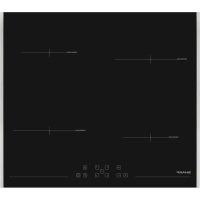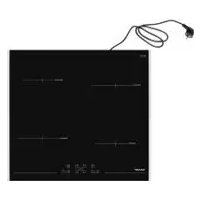
SCH3043GB - Cooker SHARP - Free user manual and instructions
Find the device manual for free SCH3043GB SHARP in PDF.


| Technical specifications | Gas stove with electric oven, 4 burners, energy class A |
|---|---|
| Dimensions | Width: 60 cm, Height: 85 cm, Depth: 60 cm |
| Oven capacity | 65 liters |
| Cooking type | Natural convection |
| Oven functions | Grill, traditional cooking |
| Usage | Easy to use with manual controls, electronic ignition |
| Maintenance | Easy cleaning with enamel surface, removable grids |
| Safety | Gas safety system, oven lock |
| General information | 2-year warranty, available in several colors |
Frequently Asked Questions - SCH3043GB SHARP
User questions about SCH3043GB SHARP
0 question about this device. Answer the ones you know or ask your own.
Ask a new question about this device
Download the instructions for your Cooker in PDF format for free! Find your manual SCH3043GB - SHARP and take your electronic device back in hand. On this page are published all the documents necessary for the use of your device. SCH3043GB by SHARP.
USER MANUAL SCH3043GB SHARP
COOKING SAFETY 6
CLEANING SAFETY 6
ENVIRONMENT OF UNIT 6
SERVICE AND REpAIR SAFETY 7
UNPACKING AND EXAMINING YOUR COOKTOp 7
pPRODUCT DISpOSAL 7
BEFORE USING THE COOKTOP 8
INDUCTION COOKTOp CHARACTERISTICS 8
COOKWARE 8
COOKTOp NOISE 9
COOKTOP FEATURES 10
MODELS 10
CONTROL pANEL. 10
COOKToP WORKSTATION SIDE ACCESSORIES
(NOT INCLUDED WITH ALL MODELS) 11
USING THE COOKTOP 12
CONTROL LOCK 12
OpERATING THE INDUCTION HEATERS 12
pPOWER CONTROL 12
AUTOMATIC pOwER LEVEL CONTROL 12
pOwER B0oST 12
AUTOMATIC SETTINGS 13
1.WARM 13
2.SIMMER 13
3.MELT 13
BRIDGE HEATER 13
pAUSE 14
AUTO TURN OFF 14
TIMER 14
OBJECT DETECTED OVER KEYpAD INDICATOR 14
HOT SURFACE INDICATOR 14
COMPATIBLE COOKWARE 15
pROPER COOKWARE 15
IMpROper COOKWARE 15
CLEANING AND CARE 16
DO NOT USE THE FOLLOWING TO CLEAN YOUR UNIT 16
METAL MARKS AND SCRATCHES 16
SUGARY SpILLS, MILK, TOMATO-BASED pPRODUCTS,
MELTED pLASTICS OR HEAVILY BURNED-ON RESIDUE 16
SPECIFICATION 17
HEAT SETTING DISpLAY 17
BEFORE YOU CALL 18
REGISTER YOUR PRODUCT
Registering your new product is easy and offers benefits that help you get the most out of your Sharp product including:
Convenience: If you ever need warranty support, your product information is already on file.
Communication: Stay up to date with important notifications and special offers from SHARP.
Support: Quickly access support content including Owner's Manuals, FAQ's, How-to Videos, and much more.
3 EASY WAYS TO REGISTER TODAY!

SCAN
Use the camera or QR code scanning application on your mobile device

ONLINE
Visit our sites to learn more about your product at sharpusa.com and sbl.sharpusa.com

CALL US
US 800-BE-SHARP 800-237-4277 Mon-Fri: 7am-7pm CST Sat-Sun: 9am-7pm CST
Scan this QR Code on your mobile device Visit http://www.sharpusa.com/register
Contact a Sharp Advisor on the phone
PRODUCT SUPPORT
If you have questions about the setup or operation of your product, please refer to the corresponding section within this manual.
Additionally, visit www.sharpusa.com/support to access exclusive content about your product including:
FAQ's and How-To Videos
Find or Request Service
Purchase an Extended Warranty
Downloads including the Installation Guide, Spec Sheet, and Owner's Manual
CONTACT US
If at any time you have questions or comments concerning your SHARP product, please contact the SHARP Customer Assistance Center. We are available to assist you through multiple contact methods for your convenience:

Available 24/7 US: sharpusa.com
See the Contact Us section on our sites

CHAT ONLINE
Mon-Fri: 7am-7pm CST
Sat-Sun: 9am-7pm CST
U.S. | www.sharpusa.com/support

CALL US
US 800-BE-SHARP 800-237-4277
Mon-Fri: 7am-7pm CST Sat-Sun: 9am-7pm CST
Contact a Sharp Advisor on the phone
CUSTOMER ASSISTANCE CANADA ONLY
To aid in answering questions if you call for service or for reporting loss or theft, please use the space below to record the model and serial number located on the back side of the unit.
Model Number:
Serial Number:
Date of Purchase:
Dealer Name:
Address:
City:
Province:
Postal Code:
Telephone:
PRODUCT SUPPORT
If you have questions about the setup or operation of your product, please refer to the corresponding section within this manual.
Additionally, visit www.sharp.ca to access exclusive content about your product including:
Find a Dealer
Find Service Locations
Downloads including the Installation Guide, Spec Sheet, and Owner's Manual
CONTACT US
If at any time you have questions or comments concerning your SHARP product, please contact the SHARP Customer Assistance Center. We are available to assist you through multiple contact methods for your convenience:

EMAIL:
Available 24/7
See the Contact Us section on our site.
https://sharp.ca/contact-sharp

SUPPORT SITE
Product Downloads, Service Locator, Where to Buy, Toner Recycling Program and more.
CA | www. sharp.ca

CALL US
CA 877-278-6709
Mon-Fri: 8am-5pm EST (except statutory holidays)
Contact a Sharp Advisor on the phone
SHARP®
US CONSUMER LIMITED WARRANTY
SHARP ELECTRONICS CORPORATION ("Sharp") warrants to the first consumer purchaser ("Purchaser") that this SHARP brand product ("Product"), when shipped in its original container and sold or distributed in the United States by Sharp or an authorized Sharp dealer or reseller, will be free from defective workmanship and materials, and agrees that it will, at its option, either repair the defect or replace the defective Product or part thereof with a new or remanufactured equivalent at no charge to the Purchaser for parts or labor for the period(s) set forth below.
This limited warranty does not apply to any appearance items of the Product nor to the additional excluded item(s) set forth below nor to any Product the exterior of which has been damaged or defaced, which has been subjected to misuse, abnormal service or handling, or which has been altered or modified in design or construction.
In order to enforce the rights under this limited warranty, the Purchaser should follow the steps set forth below and provide proof of purchase to the servicer.
The limited warranty described herein is in addition to whatever implied warranties may be granted to Purchasers by law. ALL IMPLIED WARRANTY INCLUDING THE WARRANTY OF MERCHANTABILITY AND FITNESS FOR USE ARE LIMITED TO THE PERIOD(S) FROM THE DATE OF PURCHASE SET FORTH BELOW. Some states do not allow limitations on how long an implied warranty lasts, so the above limitation may not apply to you.
Neither the sales personnel of the seller nor any other person is authorized to make any warranties other than those described herein, or to extend the duration of any warranties beyond the time period described above on behalf of Sharp.
The warranties described herein shall be the sole and exclusive warranties granted by Sharp and shall be the sole and exclusive remedy available to the Purchaser. Correction of defects, in the manner and for the period of time described herein, shall constitute complete fulfillment of all liabilities and responsibilities of Sharp to the Purchaser with respect to the Product, and shall constitute full satisfaction of all claims, whether based on contract, negligence, strict liability or otherwise. In no event shall Sharp be liable, or in any way responsible, for any damages or defects in the Product which were caused by repairs or attempted repairs performed by anyone other than an authorized servicer. Nor shall Sharp be liable or in any way responsible for any incident or consequential economic or property damage. Some states do not allow the exclusion of incidental or consequential damages, so the above exclusion may not apply to you.
THIS LIMITED WARRANTY IS VALID ONLY IN THE FIFTY (50) UNITED STATES, THE DISTRICT OF COLUMBIA AND PUERTO RICO.
Your product model number & description
Model # SCH2443GB, SCH3043GB or Induction Cooktops.
(Be sure to have this information available when you need service for your Product.)
Warranty period for this product: One (1) year parts and labor including in-home service.
Product must be accessible to provide service.
Additional item(s) excluded from warranty coverage (if any):
Non-functional accessories, service calls to your home to instruct how to use your induction cooktop appliance, replace or repair house fuses or to correct house wiring, improper commercial use, installation, or maintenance, damage to the product caused by delivery, accident, modifications, fire, floods or acts of God.
Where to obtain service:
From a Sharp Authorized Servicer located in the United States. To find the location of the nearest Sharp Authorized Servicer, call Sharp toll free at 1-800-237-4277 (1-800-BE-SHARP).
What to do to obtain service:
In-home service is provided for one year from date of purchase. In-home service can be arranged by calling 1-800-BE-SHARP. Be sure to have Proof of Purchase available.
TO OBTAIN SUPPLY, ACCESSORY OR PRODUCT INFORMATION, CALL 1-800-BE-SHARP or visit www.sharpusa.com. SAVE THE PROOF OF PURCHASE AS IT IS NEEDED SHOULD YOUR APPLIANCE EVER REQUIRE WARRANTY SERVICE.
SHARP®
CANADA CONSUMER LIMITED WARRANTY
Congratulations on your purchase!
Sharp Electronics of Canada Ltd. ("Sharp") warrants to the first purchaser for this Sharp brand product ("Product"), when shipped in its original container and sold or distributed in Canada by Sharp or by an authorized Sharp dealer, and Product was not sold "as is" or "sales final" that the Product will during the applicable warranty period, be free from defects in material and workmanship, and will within the applicable warranty period, either repair the defective Product or provide the first purchaser a replacement of the defective Product.
This warranty does not apply to any appearance items of the product nor to the additional excluded item(s) set forth below nor to any product the exterior of which has been damaged or defaced, which has been subjected to improper voltage or other misuse, abnormal service or handling, which has been altered or modified in design or construction, or if the serial number or model number affixed to Product has been removed, defaced, changed, altered or tampered with.
How to get service: Should this Sharp product fail to operate during the warranty period, warranty service is provided by an Authorized Sharp Service Centre or an Authorized Sharp Servicing Dealer. In home warranty service will be carried out to locations accessible by on-road service vehicle and within 50km of an authorized Sharp service centre. The servicer may if necessary take the unit for repair at the servicer's facility. No other person (including any Sharp dealer or service centre) is authorized to extend, enlarge or transfer this warranty on behalf of Sharp.
The express warranties in this limited warranty are, except for consumer purchasers domiciled in Quebec, in lieu of and, except to the extent prohibited by applicable law, Sharp disclaims all other warranties and conditions, express or implied, whether arising by law, statute, by course of dealing or usage of trade, including, without limitation, implied warranties or conditions of merchantability and/or quality, fitness for a particular use or purpose, and/or non-infringement. Limitations (not applicable to consumer purchasers domiciled in Quebec to the extent prohibited under Quebec law): (a) Sharp shall not be liable for any incidental, special, consequential, economic, exemplary or indirect damages of any kind or nature (including lost profits or damages for loss of time or loss of use or loss of data) arising from or in any connection with the use or performance of a Product or a failure of a Product, even if Sharp is aware of or has been advised of the possibility of such damages; (b) the remedies described in this limited warranty constitute complete fulfillment of all obligations and responsibilities of Sharp to the purchaser with respect to the Product and shall constitute full satisfaction of all claims, whether based on contract, negligence, strict liability or otherwise. Some provinces may not allow the exclusion or limitation of certain damages, or limits on the duration or voiding of implied warranties or conditions; in such provinces, the exclusions and limits herein may not apply. This limited warranty is, except for consumer purchasers domiciled in Quebec, governed by the laws of the Province in Canada in which the purchaser has purchased the Product. For consumer purchasers domiciled in Quebec this limited warranty is governed by the laws of Quebec.
Your product model number & description
Model # SCH2443GB, SCH3043GB or Induction Cooktops.
(Be sure to have this information available when you need service for your Product.)
Warranty period for this product: One (1) year parts and labor including in-home service.
Product must be accessible to provide service.
Additional item(s) excluded from warranty coverage (if any):
Non-functional accessories, service calls to your home to instruct how to use your induction cooktop appliance, replace or repair house fuses or to correct house wiring, improper commercial use, installation, or maintenance, damage to the product caused by delivery, accident, modifications, fire, floods or acts of God.
To obtain the name and address of the nearest Authorized Sharp Service Centre or Dealer, please contact:
SHARPE ELECTRONICS OF CANADA LTD 335 Britannia Road East
Mississauga, Ontario
L4Z1W9
(905) 568-7140
Website: www. sharp.ca
SAVE THE PROOF OF PURCHASE AS IT IS NEEDED SHOULD YOUR APPLIANCE EVER REQUIRE WARRANTY SERVICE.
THIS LIMITED WARRANTY IS VALID ONLY IN CANADA
Read all instructions carefully before installation and operation. Keep manuals for future reference. The appliance is manufactured in compliance with the relevant safety standard.
WARNING Failure to follow these warnings could result in a fire or explosion causing property damage, personal injury or death. To reduce the risk of fire, electric shock or injury, use only as intended and take the following precautions.
INTENDED USE
- This appliance is designed for built-in household use only.
- Do not use outdoors.
- Do not use the appliance to heat a room.
SAFETY INSTRUCTIONS
1 Proper Installation - Be sure your appliance is properly installed and grounded by a qualified technician.
2 Never Use Your Appliance for Warming or Heating the Room.
3 Do Not Leave Children Alone - Children should not be left alone or unattended in an area where the appliance is in use. They should never be allowed to sit or stand on any part of the appliance.
4 Wear Proper Apparel - Loose fitting or hanging garments should never be worn while using the appliance.
5 User Servicing - Do not repair or replace any part of the appliance unless specifically recommended in the manual. All other servicing should be referred to a qualified technician.
6 Storage in or on Appliance - Flammable materials should not be stored in an oven or near surface units.
7 Do Not Use Water on Grease Fires - Smother fire or flame or use dry chemical or foam type extinguisher.
8 Use Only Dry Potholders - Moist or damp potholders on hot surfaces may result in burns from steam. Do not let potholders touch hot heating elements. Do not use towel or other bulky cloth.
SURFACE COOKING UNITS
1 Remove all packaging labels and protective film before operating the cooktop.
2 Use Proper Pan Size - This appliance is equipped with surface units of different sizes. Select utensils having flat bottoms large enough to cover the surface unit heating element. The use of undersize utensils will expose a portion of the heating element to direct contact and may result in ignition of clothing. Proper relationship of utensil to burner will also improve efficiency.
3 Never Leave Surface Units Unattended at High Heat Settings - Boil over causes smoking and greasy spillovers that may ignite.
4 Glazed Cooking Utensils - Only certain types of glass, glass/ ceramic, ceramic earthenware, or other glazed utensils are suitable for range top service without breaking due to sudden change in temperature.
5 Utensil Handles Should Be Turned Inward and Not Extended Over Adjacent Surface Units - To minimize burns, ignition of flammable materials, and spillage due to unintentional contact with the utensil, the handle of a utensil should be positioned so that it is turned inward and does not extend over adjacent surface units.
6 CAUTION Do not store items of interest to children in cabinets above cooktop - children climbing on the range to reach items could be seriously injured.
7 DO NOT TOUCH SURFACE UNITS OR AREAS NEAR UNITS - Surface units may be hot even though they are dark in color. Areas near surface units may become hot enough to cause burns. During and after use, do not touch, or let clothing of other flammable materials contact surface units or areas near units until they have had sufficient time to cool. Among these areas are (identification of area - for example, the cooktop, surfaces facing the cooktop, etc.).
8 Do Not Cook on Broken Cooktop - If cooktop should break, cleaning solutions and spillovers may penetrate the broken cooktop and create a risk of electric shock. Contact a qualified technician immediately.
9 Clean Cooktop with Caution - If a wet sponge or cloth is used to wipe spills on a hot cooking area, be careful to avoid steam burn. Some cleaners can produce noxious fumes if applied to a hot surface.
10 Do not allow aluminum foil, paper or cloth to come in contact with an Induction Heater.
11 Do not prepare food in aluminum foil or plastic containers over hot cooking zones.
12 Do not use aluminum foil to line cooking heater, drip trays or oven bottoms, except as suggested in the manual. Improper use of liners may result in a risk of electric shock or fire.
13 Do not allow pans to boil dry or empty. Never leave the cooktop unattended when in use.
14 Always remove the covers on sealed or canned goods before heating to avoid eruption.
15 Do not touch hot surfaces. Use dry pot holders to hold the handles of pots and pans.
16 Use only dry potholders. Damp potholders on hot surfaces may cause steam that results in burns. Do not let potholders touch the hot Induction Heater. Do not use towels or bulky cloth.
17 When the unit is on, only touch the control panel, as the cooktop surface may be hot. The cooktop surface will remain hot for a short period of time after use. Do not touch hot surfaces.
INDUCTION COOKTOP SURFACE UNITS
Do not place metallic objects such as knives, forks, spoons and lids on the cooktop surface since they can get hot.
GLASS/CERAMIC COOKING SURFACES
1 Do Not Cook on Broken Cook-Top - If cook-top should break, cleaning solutions an spillovers may penetrate the broken cook-top and create a risk of electric shock. Contact a qualified technician immediately.
2 Clean Cook-Top With Caution - If a wet sponge or cloth is used to wipe spills on a hot cooking area, be careful to avoid steam burn. Some cleaners can produce noxious fumes if applied to a hot surface.
CLEANING SAFETY
CAUTION Clean cooktop with caution. If a wet sponge or cloth is used to wipe spills on a hot cooking area, be careful to avoid steam burns. Some cleaners can produce steam or noxious fumes if applied to a hot surface.
Do not use steam cleaners or high-pressure cleaners to clean the cooktop, as this may result in electric shock.
ENVIRONMENT OF UNIT
IMPORTANT
1 To reduce the risk of fire, do not let any objects obstruct the inlet and outlet of the unit.
2 To reduce the risk of electric shock, do not mount unit over a sink.
3 To reduce the risk of fire, do not store anything directly on top of the appliance surface when the appliance is in operation.
4 Always have a working smoke detector in or near the kitchen.
5 Do not leave lids other metal objects such as knives, forks or spoons on the cooktop. If the cooktop is turned on, these objects can heat up quickly and may cause burns.
6 Do not place rough or uneven objects that may damage the surface on the unit. If the cooktop is near a window, ensure curtains do not blow over or near the unit.
7 Do not use the cooktop as a work surface. Certain substances such as salt, sugar or sand can scratch the ceramic glass surface.
8 Do not store hard, pointed or heavy objects that may fall over the cooktop.
9 Do not put detergents or flammable materials in the equipment installed under the cooktop.
10 Use extreme caution when moving a utensil containing hot oil or other hot liquids.
11 Any spilled fat or oil on the cooktop may ignite when the cooktop is hot.
12 Do not use accessories not recommended by the manufacturer. Items with magnetic fields (such as radios, televisions, credit cards, cassette tapes, etc.) may affect the unit. The marked electrical rating should be at least as great as the electrical rating on the appliance.
13 To prevent accidents and achieve optimal ventilation, allow for sufficient space around the cooking area.
14 Use proper cookware size. This appliance is equipped with four cooking zones of different sizes. Choose cookware with a flat bottom large enough to cover the unit heating surface. The use of undersized cookware will expose a portion of the hot heater and may cause burning.
15 To reduce risk of burns, ignition of flammable materials and spillage due to unintentional contact with cookware, cookware handles should be turned inward and not extend over adjacent heating surface.
16 Wear proper apparel. Loose fitting or hanging garments should never be worn while using the appliance.
SERVICE AND REPAIR SAFETY
WARNING Do not repair or replace any part of the appliance unless specifically recommended in the manual. There are no user serviceable parts on this appliance. All services should be referred to a qualified technician.
Only an authorized service representative should attempt to service your cooktop.
UNPACKING AND EXAMINING YOUR COOKTOP
CONDITION OF UNIT
WARNING Do not operate any appliance with a damaged cord or after the appliance malfunctions or has been damaged in any manner. Return appliance to the nearest authorized service facility for examination, repair or adjustment.
IMPORTANT Do not cook on a broken cooktop. If the cooktop breaks, cleaning solutions and spillovers may penetrate the broken cooktop and create a risk of electric shock.
PRODUCT DISPOSAL
This product may not be disposed of as household waste. It must be delivered to the applicable collection point for the recycling of electrical and electronic equipment. Inappropriate waste handling of this product may have negative consequences for the environment and human health. For more detailed information about recycling of this product, please contact your local city office, your household waste disposal service or the shop where you purchased the product.
READ AND SAVE THESE INSTRUCTIONS
INDUCTION COOKTOP CHARACTERISTICS
Induction cooking is a safe, advanced, efficient and economical cooking technology. It works by electromagnetic field generating instant heat directly to the cookware bottom, rather than indirectly through heating the ceramic glass surface.
CAUTION The Cooking Zones may appear to be cool while turned ON and after they have been turned OFF. The ceramic glass surface may be HOT from residual heat transferred from the cookware that can cause burns.
PAN DETECTION
The induction system automatically detects each heating area in a safe condition for use and detects suitable cookware placed in each Cooking Zone to eliminate accidental operation.
COOKWARE SIZE DETECTION
The cookware recognition system automatically detects and adapts the Cooking Zones power level to the cookware sizes in use.
EFFICIENT
Induction cooking heats faster while using less energy. Water boils quickly with induction power levels.
COOKWARE
USINGCOMPATIBLECOOKWARE
The cookware recognition system used in each Cooking Zone requires the use of cookware made with magnetic material to start the heating process on any of the Cooking Zones.
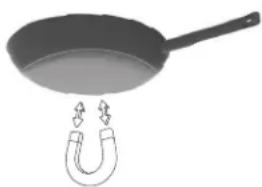
When purchasing utensils, look for cookware with the Induction Compatible Symbol on the retail box. Check that the bases of your cookware are attracted by a magnet to find out if they are suitable.

Induction
Heavy, high-quality stainless steel cookware is always recommended to use on your Induction Cooktop surface.
If the base of the cookware is only partially magnetic, only the magnetic area will heat. Heat may not be distributed evenly. The non-magnetic area may not heat up to a sufficient temperature for cooking.
SELECTING SURFACE COOKING COOKWARE
The cookware used with the Induction Cooktop should have flat bottoms that make good contact with the entire surface of the Induction Heater. Check for flatness by rotating a ruler across the bottom of the cookware. Be sure to follow all the recommendations for using cookware. Use cookware made with the correct material for Induction Cooking.
PROPER COOKWARE MATERIAL
Proper cookware for your cooktop is flat-bottomed pots or pans with or made from the following:
- Magnetic stainless steel
Cast iron - Enameded iron
Nickel
NOTE: Some cookware can produce noises when used on induction cooking zones. This is not a fault in the cooktop, and its function will not be impaired in any way as a result.
IMPROPER COOKWARE MATERIAL
Do not use cookware on your cooktop with or made from the following:
Non-magnetic stainless steel
- Bottom measuring less than 4.7'' (120 mm) on left heaters and right front heater
- Bottom measuring less than 5.7'' (145 mm) on right rear heater
- Pot with stands
- Heat resistant glass
- Ceramic
Copper
Aluminum
ATTENTION:
- Use quality cookware with heavy bottoms for better heat distribution allowing for more even cooking results.
- Use appropriate pan size for the food being cooked.
- Do not let pans boil dry. This may cause permanent damage in the form of breakage, fusion or marring that can affect the ceramic glass cooktop. (This type of damage is not covered by your warranty.)
- Do not use dirty pans with grease buildup.
Even quality cookware can scratch the cooktop surface, especially if cookware is slid over the ceramic glass cooktop surface without being lifted. Over time, sliding ANY type of cookware over the ceramic cooktop will likely alter the overall appearance of the cooktop. Eventually the buildup of scratches will make cleaning the surface difficult and degrade the overall appearance of the cooktop.
DO NOT SLIDE COOKWARE across the cooktop surface. Doing so may permanently damage the appearance of the ceramic cooktop.
CAUTION DO NOT TOUCH HOT COOKWARE directly with hands. Always use oven mitts or pot holders to protect hands from burns.
COOKWARE RECOMMENDATIONS
Follow these recommendations for using cookware:
CORRECT

Cookware centered correctly on Induction Heater surface.
- Flat pan bottom and straight sides.
- Pan size meets or exceeds the recommended minimum size for the Induction Heater.
Pan rests completely on the cooktop surface.
Pan is properly balanced.
WRONG

Cookware not centered on Induction Heater surface.
- Curved or warped pan bottoms or sides.
- Pan does not meet the minimum size required for the Cooking Zone used.
- Pan bottom rests on cooktop trim or does not rest completely on the cooktop surface.
- Heavy handle tilts pan.
NOTE: ANY one of the incorrect conditions listed may be detected by the cookware recognition system used in each cooking zone. If the cookware does not meet correct conditions, one or more of the Induction Heaters may not heat. (Failure to heat is indicated by a flashing power level in the digital display for the affected heater.)
USE THE CORRECT COOKWARE SIZE
The Induction Heaters available on the Induction Cooktop require a MINIMUM pan size to be used at each location.
COOKWARE SIZE GUIDE
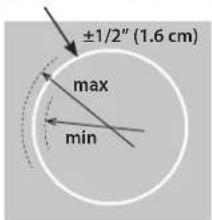
Induction Heater outer line
The thick outer line at each Induction Heater is helpful to determine the MINIMUM cookware size and the MAXIMUM cookware size. After centering the cookware on the cooktop, make sure the cookware covers 1/2 inside of the thick outer line and does not extend more than 1/2 beyond the thicker line on the Induction Heater. The pan must make FULL contact on the ceramic glass surface without the bottom of the pan touching the metal cooktop trays.
NOTE: Pan bottom should not exceed 1/2'' (13 mm) from outer Induction Heater.
If a pan made of the correct material is centered properly on any of the active Induction Heaters but is TOO SMALL, the power level will flash in the digital display and the pan will not heat.
COOKTOP NOISE
The induction fields are generated by electronic equipment, which produces heat at a high power level. A soft-sounding cooling fan runs when the unit is running multiple cooking zones.
Sounds may be produced by different types of cookware, such as:
- Clicking noise may be heard at low power settings. This is due to the magnetic fields in use and is considered normal operation.
- The operational noises may be different with various cookware used on the cooktop.
- Light-weight stainless steel pans may make noise or vibrate. Heavy-weight quality cookware is recommended.
Cookware with irregular or warped bottoms can vibrate audibly on the ceramic glass surface at high power settings. - Cracking noise may be heard if the cookware base is made of layer of different material.
- Low humming noise is normal at high power settings.
- If multiple cooking zones are used simultaneously at high power settings with cookware made with a layer of different material, whistling can occur.
- Loose-fitting handles on cookware can vibrate slightly.
- High-quality cast iron and enamel cookware is less likely to vibrate or produce noise.
MODELS
This manual covers different models. The cooktop you have purchased may have some or all of the features listed.
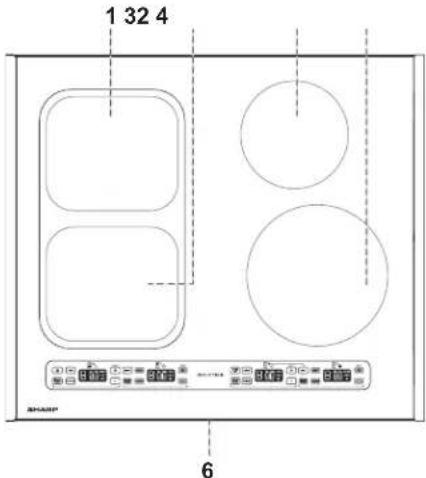
SCH2443GB
(24" Model)
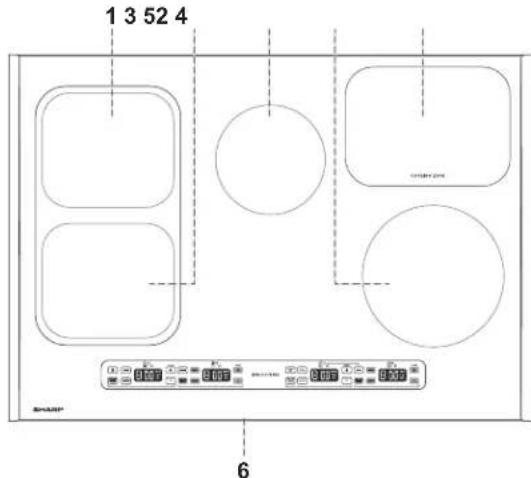
SCH3043GB
(30" Model)
1 Left Rear heater
2 Left Front heater
3 Right Rear heater
4 Right Front heater
5 Cooling Zone
6 Serial/Model number label (underneath the cooktop)
CONTROL PANEL
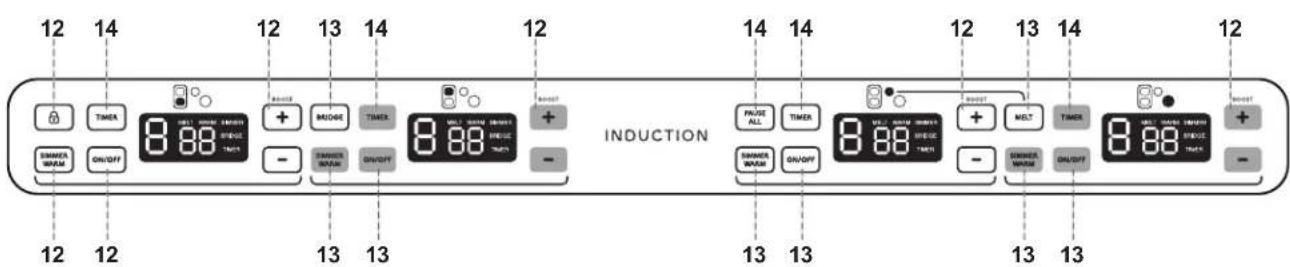
SCH2443GB & SCH3043GB
Numbers next to the Control Panel illustration indicate pages on
which there are feature descriptions and usage information.
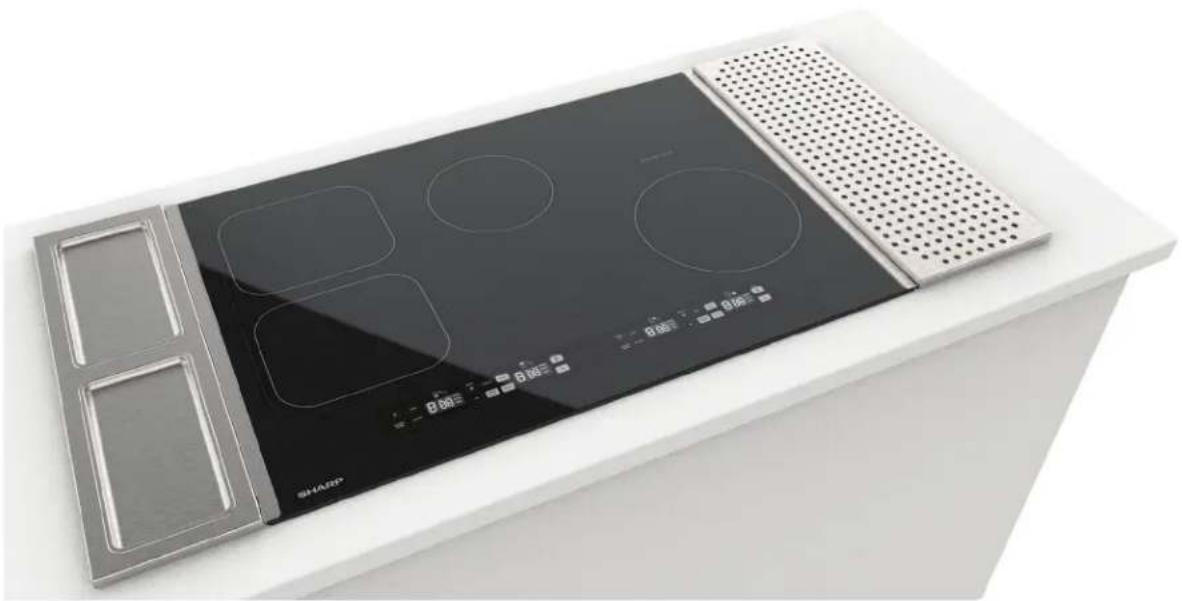
COOKTOP WORKSTATION SIDE ACCESSORIES
(MODEL SKR00A7FS)
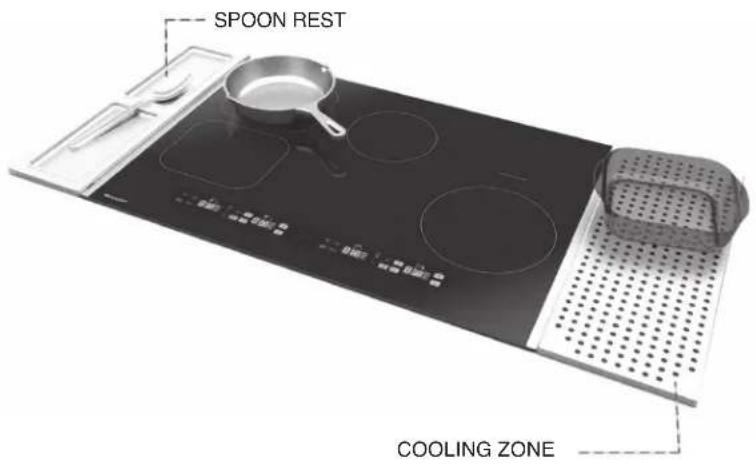
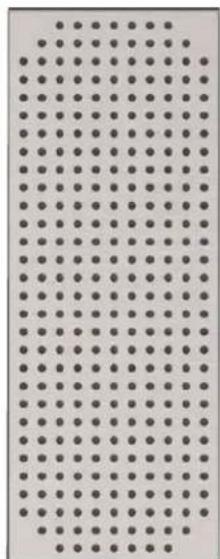
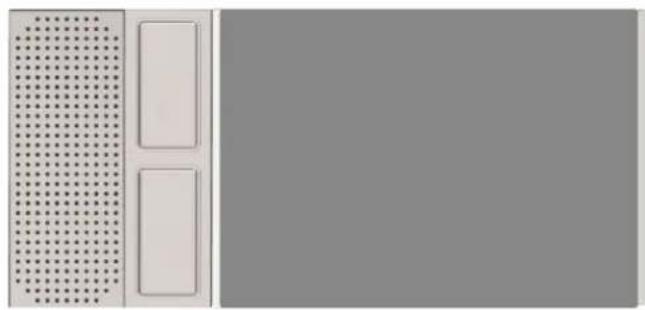
Your cooktop is also a workstation with the inclusion of our kitchen grade stainless-steel Cooling Zone (8" x 21") and Spoon Rest (6" x 21") with two drip trays. The side accessories can attach magnetically on either edge of the cooktop to secure in place, attach magnetically to each other on a single side of the cooktop or stand on the adjacent counter (rubber feet protect countertop surfaces).
The Cooling Zone provides a location to set hot cookware after removing from the Cooking Zone or the oven.
The Spoon Rest lets you rest cooking utensils while protecting your countertop from stains and drips. The Spoon Rest includes two removable drip trays for easy cleaning after food preparation. All items are dishwasher-safe (upper or lower rack).
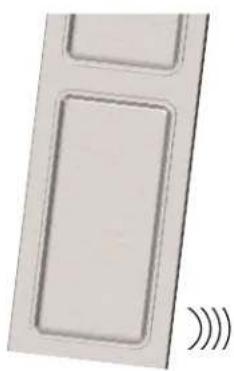
EASY ATTACHMENT

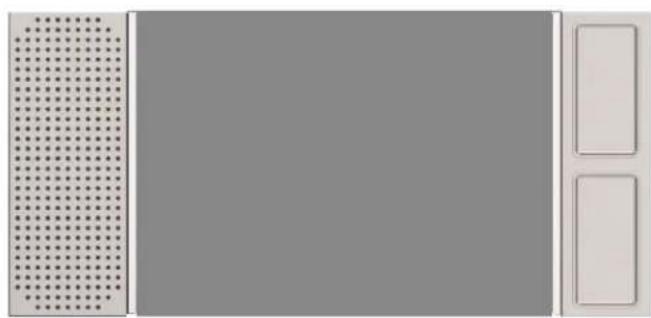
ARRANGE AS YOU LIKE
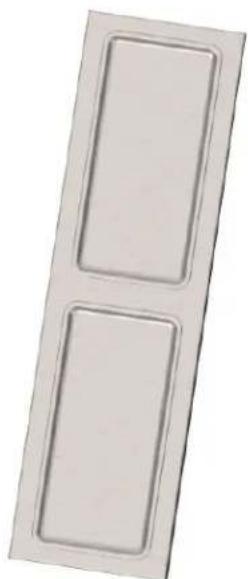
ARRANGE SOLO
CONTROL LOCK
Control Lock may be activated when the cooktop heaters are in use or when they are inactive. If Control Lock is active when a heater is in use, only the Heater ON/OFF keypad will be operational.
TO LOCK
Touch and hold the LOCK keypad until a tone sounds. The letter L will blink for 3 seconds in each Heater display, then the displays will clear. Only the Heater ON/OFF keypads will be operational. If any other keypads are touched, the display will blink and alternate between L and the power level to indicate the keypad controls are locked.
TO UNLOCK
Touch and hold LOCK keypad again until a tone sounds. The letter L will blink in each Heater display for 3 seconds then disappear.
OPERATING THE INDUCTION HEATERS
TURN ON AN INDUCTION HEATER
Select a heater and use the corresponding keypad to operate.
1 Place a compatible pot or pan on the desired Induction Heater.
2 Touch the ON/OFF keypad to turn the heater ON. A tone will sound and the number 0 will display, indicating no power level has been set.
3 Use the + and - keystads to select desired power level. Set a power level between 1-9 or Power Boost (P) within 10 seconds, or the heater will automatically turn OFF.
NOTE:
If compatible cookware is not detected on the Induction Heater when the heater is turned ON, the display will blink and the heater will automatically turn OFF after 15 seconds of inactivity.
TURN OFF AN INDUCTION HEATER
Select the desired heater to turn OFF and touch the ON/OFF keypad until a tone sounds and the displayed power level is cleared.
STANDARD SETTINGS
| SETTING | LEVELS | TYPE OF COOKING |
| High 9-P | Bring liquid | to a boil. Always reduce setting to a lower heat when liquids begin to boil or foods begin to cook. |
| Medium High | 7-8 Brown meat, heat oil for deep fat frying or continue a rapid boil. | |
| Medium | 5-6 Maintain a simmer or slow boil, thicken sauscs and gravies. | |
| Medium Low | 3-4 Continue cooking covered foods, steam foods or maintain foods at a warm temperature before serving. | |
| SETTING | LEVELS | TYPE OF COOKING |
| Low | 1-2 | Melt butter or chocolate. |
NOTE: Standard heat settings can be used to melt, warm and simmer. Each heater has presets for more temperature control for each of these cooking functions.
POWER CONTROL
Power level may be increased or decreased during cooking by using the + and - keypads.
If power level is 9, pressing + again will turn on Power Boost and the letter P will display.
If power level is 0, pressing - again will turn power level to 9. There are ten power levels: power levels 1-9 and Power Boost Power Boost uses maximum power for 10 minutes, indicated on the display as P.
A tone will sound each time a power level is increased or decreased using the + and - keyboards.
Holding the ^+ keypad will quicken the speed at which power levels increase until level 9 is reached. Touch the ^+ keypad once more to select P for Power Boost.Once is set, touching the ^+ keypad will not increase the power level further.
Holding the - keypad will quicken the speed at which power levels decrease until level 0 is reached. If the - keypad is touched again, power level 9 will display. If a power level greater than 0 is not set within 10 seconds, the heater will automatically turn OFF.
NOTE: The unit is equipped with safeguards against parching during cooking. When unit is used for high temperature cooking, such as frying, stir-frying and grilling, heating will appear intermittent.
AUTOMATIC POWER SHARING CONTROL
The power of the complete induction hob is limited to 7500W . The power of each pair of heaters is limited to 3500W . The unit will automatically limit the power of each pair of heaters. When a high power level is selected on one heater, the power level on the other heater is reduced so the total power of the pair of heaters does not exceed the limit.
| POWER LEVEL | MAXIMUM ALLOWABLE POWER LEVEL FOR OTHER HEATER |
| 5 | P |
| P | 5 |
| 9 | 8 |
| 8 | 9 |
| 8 | 8 |
POWER BOOST
Use Power Boost to cook at maximum power for a short period of time. Power Boost is only recommended for bringing water to a boil.
Touch the - keypad to reduce power level to level 9. After 10 minutes of Power Boost, the power level automatically reduces to level 9. When Power Boost expires and the level reduces to 9, a tone will sound and the digital display will switch from P to 9.
WARNING Do not leave unit unattended while Power Boost or other high power settings are in use.
AUTOMATIC SETTINGS
The Induction Cooktop has 3 preset cooking functions: Warm, Simmer and Melt.
1. WARM
Warm will maintain temperature of 150^ for up to 5 hours before automatically turning OFF.
TURN WARM ON
1 Place a compatible pot or pan on the desired heater and touch the ON/OFF keypad to turn heater ON. A tone will sound and the number 0 will display, indicating no power level has been set.
2 Touch the SIMMER/WARM keypad once. A tone will sound and the letter A and the word WARM will display.
TURN WARM OFF
- Touch the ON/OFF keypad to turn the heater OFF.
OR - Touch the + or - keypads to increase or decrease power level to deactivate the Warm function. A tone will sound and the letter A and the word WARM will clear from the display.
NOTE: If SIMMER/WARM is pressed when Warm is in use, the heater function will automatically switch to Simmer.
2. SIMMER
Simmer will maintain temperature of 195^ for up to 5 hours before automatically turning OFF.
TURN SIMMER ON
1 Place a compatible pot or pan on the desired heater and touch the ON/OFF keypad to turn heater ON. A tone will sound and the number 0 will display, indicating no power level has been set.
2 Touch the SIMMER/WARM keypad twice. A tone will sound and the letter A and the word SIMMER will display.
TURN SIMMER OFF
- Touch the ON/OFF keypad to turn the heater OFF.
OR - Touch the + or - keypads to increase or decrease power level to deactivate the SIMMER function. A tone will sound and the letter A and the word SIMMER will clear from the display.
NOTE: If SIMMER/WARM is pressed when Simmer is in use, heater function will automatically switch to Warm.
3. MELT
Melt will maintain temperature of 105^ for up to 5 hours before automatically turning OFF.
TURN MELT ON
1 Place a compatible pot or pan on the right rear (24" model) or middle rear (30" model) heater and turn the heater ON. A tone will sound and power level 0 will display, indicating no power level has been set.
2 Touch the MELT keypad. A tone will sound and the letter A and the word MELT will display.
TURN MELT OFF
- Touch the ON/OFF keypad to turn the heater OFF.
OR - Touch the + or - keypads to increase or decrease power level to deactivate the Melt function. A tone will sound and the letter A and the word MELT will clear from the display.
BRIDGE HEATER
The left front and left rear heaters can be synced to accommodate larger cookware, such as a 9'' × 18'' griddle specifically designed for use with ceramic glass cooktops.
TO TURN BRIDGE ON
1 Place compatible cookware, such as a griddle, on the left front and left rear Induction heaters.
2 Touch the ON/OFF keypad to turn either of the heaters ON. A tone will sound and 0 will display on the selected heater.
3 Touch the BRIDGE keypad to sync the two heaters. A tone will sound and the number 0 and the word BRIDGE will display for both heaters.
4 Use + and - keystads to select desired power level. Either heater's keypad may be used to control the settings. If a power level is not set within 10 seconds, the BRIDGE function will automatically turn OFF, and the heaters will no longer be synced. The heaters will remain ON however, and power levels may be set or turned OFF individually.
TO TURN BRIDGE OFF
Touch the BRIDGE keypad to deactivate the BRIDGE function. After 10 seconds a tone will sound and both heaters will show power level 0 and the word BRIDGE will clear from the displays.
NOTE: Each heater must be turned OFF separately after the BRIDGE function has been deactivated. Touch the ON/OFF keypad to turn each heater OFF.
PAUSE
Pause may be used to temporarily stop all cooking functions and timers for up to 10 minutes without erasing settings. To use the Pause function, at least one heater or timer must be in use.
When the cooktop operation is paused, all controls are locked automatically except the heaters' ON/OFF keypad.
PAUSE COOKING/TIMER
Touch the PAUSE ALL keypad for 1 second. A tone will sound and the displayed settings for each heater/timer in use will blink.
RESUME COOKING TIMER
Touch the PAUSE ALL keypad for 1 second. A tone will sound, indicating cooking or timer operations have resumed, and displayed settings for each heater/timer in use will remain on.
NOTE: If the PAUSE ALL keypad is not touched again within 10 minutes to resume cooking/timer operation, the heaters/ timers will automatically turn OFF.
AUTO TURN OFF
If a power level is not changed during operation, each heater will power down a level once the time on the chart has elapsed.
| POWER LEVEL POWER DOWN TIME | |
| 1 10 hours | |
| 2 5 hours | |
| 3 4 hours | |
| 4 4 hours | |
| 5 3 hours | |
| 6 2 hours | |
| 7 2 hours | |
| 8 2 hours | |
| 9 1 hour | |
| P 10 minutes | |
| MELT 2 hours | |
| WAR M 5 hours | |
| SIMMER 5 hours | |
OBJECT DETECTED OVER KEYPAD INDICATOR
If any objects are detected over the keystads for longer than 10 seconds, all heaters will automatically turn OFF and the displays will blink r^ . The r^ will remain blinking in the displays until objects are removed from the keystads.
TIMER
The automatic timer settings range from 1 minute to 99 minutes. The final minute will count down in seconds on the display.
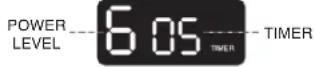
IMPORTANT: The timers DO NOT control heaters or turn them off at the end of the countdown.
TO SET THE TIMER
1 Select desired heater for timer to be set (compatible cookware must be placed and power level must already be set) and touch TIMER keypad. A tone will sound and the numbers 00 and the word TIMER will blink on the display.
2 Touch the + and - keypads to set the desired countdown time. A tone will sound each time a power level is increased or decreased.
Holding the ^+ key will increase the speed at which numbers display until 99 is reached. The maximum number of minutes that may be set is 99 minutes. If the ^+ keypad is touched after 99 is displayed, timer input will not be changed.
To decrease a time input, touch the - keypad. Holding the - keypad will increase the speed at which numbers display and decrease until 00 is reached. If the - keypad is touched again, 99 minutes will be set.
Countdown time is accepted 5 seconds after the last + and - keypad is touched. A tone will sound and the digits and word TIMER will stop blinking and remain illuminated. If a time greater than 00 is not set within 5 seconds of touching the TIMER keypad, the Timer function will automatically turn OFF.
TO ADJUST THE TIMER DURING USE
Touch the TIMER keypad and use the + and - keystads to set the new time.
TO CANCEL THE TIMER
1 Select designated timer to be canceled.
2 Touch and hold the TIMER keypad for 3 seconds. A tone will sound and the digits and word TIMER will clear from the display.
IMPORTANT: Canceling a timer DOES NOT TURN OFF the heater in use.
HOT SURFACE INDICATOR
Heaters can remain hot after cooking has completed and the cookware has been removed.
If the power level is set to 0 and the heater is still ON, the display will blink and alternate between 0 and H to indicate residual heat until the heater has cooled.
If the heater has been turned OFF, the display will blink H to indicate residual heat until the heater has cooled.
WARNING In the event of a power failure to the home or to the cooktop, be aware that SURFACES OF HEATERS WILL REMAIN HOT even though the Hot Surface Indicator is not displayed. The Hot Surface Indicator will not automatically illuminate once power is restored.
PROPER COOKWARE
Proper cookware for your cooktop is flat-bottomed pots or pans with or made from the following:
Magnetic stainless steel
Cast iron
- Enameded iron
Nickel
IMPROPER COOKWARE
Do not use pots and pans on your cooktop with or made from the following:
Non-magnetic stainless steel
- Bottom measuring less than 4.7'' (12 cm)
- Pot with stands
- Heat resistant glass
- Ceramic
Copper
Aluminum
Look for cookware with this induction compatibility symbol on the retail box.
To check if cookware is suitable for induction cooking, test if the base is attracted by a magnet.
Induction
After each use, ensure the controls are set to OFF and let your cooktop cool down completely before cleaning your cooktop. When it is cool to the touch, apply approximately 1 teaspoon (5ml) of non-abrasive cleaner with a lightly damp cloth to the ceramic glass surface. Use a second cloth to remove any remaining cleaning residue. Wipe dry with a dry cloth.
DO NOT USE THE FOLLOWING TO CLEAN YOUR UNIT
Glass cleaners containing ammonia or chlorine bleach, as these materials may stain the cooktop
- Caustic cleaners that may etch the surface
- Abrasive cleaners
Metal scouring pads and scrub sponges
Powdery cleaners containing chlorine bleach
- Flammable cleaners, such as lighter fluid or WD-40
NOTE: Sugary products can damage the ceramic glass surface. If dry sugar, sugar syrup, tomato products or milk spills on the surface during heating, clean the ceramic glass surface immediately.
METAL MARKS AND SCRATCHES
1 Do not slide pots and pans across your cooktop. Sliding cookware will leave metal markings on the cooktop surface. These marks are removable using a ceramic glass cleaner with cleaning pad for ceramic glass.
2 If pots with a thin overlay of aluminum or copper are allowed to boil dry, the overlay may leave black discoloration on the cooktop. Discoloration should be removed immediately before heating again or the discoloration may be permanent.
WARNING DO NOT USE OR CLEAN DAMAGED
COOKTOP. If the cooktop should crack or break, do not use or attempt to clean it. Turn off the appliance at the circuit breaker or fuse box and call an authorized servicer.
SUGARY SPILLS, MILK, TOMATOBASED PRODUCTS, MELTED PLASTICS OR HEAVILY BURNED-ON RESIDUE
Sugary spills (jellies, fudge, candy, syrups, etc.), milk, tomato-based products, melted plastics or heavily burned-on residue can cause pitting of the surface of your cooktop unless the spill is removed while still hot. (Damage from pitting is not covered by warranty.)
WARNING USE SPECIAL CARE WHEN REMOVING SPILLS WHILE COOKTOP SURFACE IS HOT.
Remove these spills while the cooktop is still hot.
1 Turn off all heaters and remove all pans immediately.
2 Wearing an oven mitt, use a razor blade scraper at a 30^ angle against the ceramic glass surface and scrape from hot surface to a cooler area.
3 Remove the spills with paper towels.
NOTE:
- Do not use a dull or nicked blade. Be sure to use a new, sharp razor scraper.
- Do not use the razor blade for daily cleaning, as it may wear the pattern on the glass.
If the ceramic glass surface of your cooktop is damaged by pitting, it should be replaced.
| SCH2443GB (24") SCH3043GB (30") | ||
| Product dimension (w x d x h) inch 24" x 21" x 21" x 2 | 1/2" 30" x 21" x 2 | 1/2" |
| Cut-out dimension (w x d) inch 22 | 7/16" x 195/8" 29 | 3/16" x 195/8" |
| Voltage (Volts/Amps) 208/240V/30A 208/240V/30A | ||
| Frequency 60 Hz 60 Hz | ||
| Total power 7,500W | 7,500W | |
| Cooking Zones | 4 | 4 |
| Left Front/Boost | 2,100W/3,500W 8.26" x 7.08" | 2,100W/3,500W 8.26" x 7.08" |
| Left Rear/Boost | 2,100W/3,500W 8.26" x 7.08" | 2,100W/3,500W 8.26" x 7.08" |
| Bridge Left Front + Left Rear | 3,300W Max | 3,300W Max |
| Right Front/Boost | 2,100W/3,500W 8.26" dia. | 2,100W/3,500W 8.26" dia. |
| Right Rear/Boost | 1,200W/1,800W 5.7" dia. | 1,200W/1,800W 5.7" dia. |
| Simmer Enhancer Enabled | All Heaters | All Heaters |
HEAT SETTING DISPLAY
| DISPLAY | DESCRIPTION |
| 0 | No power level for the zone |
| 1-9 | Power Level |
| P | Power Boost |
| H | Residual heat: a heater is still hot to the touch H appears on the display when a cooking zone temperature is at or above 149°F and clears from the display when the cooking zone temperature has fallen to 131°F. |
| 0 H | A heater is ON and set to power level 0. |
| F (followed by a Number or Letter) | Error Code (see Before You Call) |
| Blinking Display | Heater and timer functions are PAUSED. |
| Blinking Display | Object detected over keypad. |
| Blinking Display | No cookware detected on heater. |
| A WARM | Warm function |
| A SIMMER | Simmer function |
| A MELT | Melt function |
If you encounter errors with the cooktop, check the guide below for common problems, causes and solutions to see if you can correct the problem yourself before calling 1-800-BE-SHARP for assistance or service.
| PROBLEM POSSIBLE CAUSE | SOLUTIONS | |
| The fans keep running for one minute after the cooking zone has been switched off | The electronics are cooling down This is a normal occurrence | |
| Cooktop powers down Inactivity for 15 seconds with no compatible cookware detected | See page 8 for Pan Detection | |
| Noise like humming, crackling, clicking or buzzing | This is a normal occurrence See page 9 for Cooktop Noise | |
| Control keys not working Control lock may be activated See page 12 for Control Lock | ||
| Power Boost does not work No cookware found, improper placement of cookware on the cooking zone or improper cookware is being used | See page 8 for Proper Cookware and Improper Cookware | |
| F appears in the Power display Electronics | fault error message of particular cooking zone | See F0, F1, F2, F3, F4, F5, F6, F7, F8, F9, Fc, FC, FE, FH, FJ, Ft |
| F0 appears in the Power display | Microcontroller fault | Refer to a qualified technician for service |
| F1 appears in the Power display | Heater NTC short-circuit | Refer to a qualified technician for service |
| F2 appears in the Power display | Heater NTC open-circuit | Refer to a qualified technician for service |
| F3 appears in the Power display | Heat-sink NTC short-circuit | Refer to a qualified technician for service |
| F4 appears in the Power display | Heat-sink NTC open-circuit | Refer to a qualified technician for service |
| F5 appears in the Power display | Communication fault | Refer to a qualified technician for service |
| F6 appears in the Power display | Mains voltage zero crossing loss | Refer to a qualified technician for service |
| F7 appears in the Power display | Heater NTC unchanging | Refer to a qualified technician for service |
| F8 appears in the Power display | Heater NTC ADC fault | Refer to a qualified technician for service |
| F9 appears in the Power display Fan error | Refer to a qualified technician for service | |
| Fc appears in the Power display | User interface over-temperature 96°C | Refer to a qualified technician for service |
| FC appears in the Power display | Cap keys system fault | Refer to a qualified technician for service |
| FE appears in the Power display | User interface temperature sensor short-circuit | Refer to a qualified technician for service |
| FH appears in the Power display EEPROM | fault Refer to a qualified technician for service | |
| Ft appears in the Power display User interface temperature sensor open-circuit | Refer to a qualified technician for service | |
| FJ appears in the Power display | Mains over-voltage error | Refer to a qualified technician for service |
SURFACE DE CUISSON À INDUCTION
MODELES: SCH2443GB, SCH3043GB
ASSISTANCE A LA CLIENTÉLE 2
GARANTIE LIMITEE DU CONSOMMATEUR AU CANADA 3
CONSIGNES DE SECURITE IMPORTANTES 4
SECURITE DE CUISSON 4
SECURITE DE NETTOYAGE 4
ENVIRONNEMENT DE L'UNITE 4
SECURITE DE REPARATION ET D'ENTRETIEN 5
DEBALLAGE ET VERIFICATION DE VOTRE SURFACE DE CUISSON ....5
MISEAU REBUT DU pRODUIT 5
AVANT D'UTILISER LA SURFACE DE CUISSON 6
CARACTERISTIQUES DE LA SURFACE DE CUISSON A INDUCTION....6
USTENSILES DE CUISSON. 6
BRUIT pROVENANT DE LA SURFACE DE CUISSON 8
FONCTIONS DE LA SURFACE DE CUISSON. 9
MODELES. 9
pANNEAU DE COMMANDE 9
pLAN DE TRAVAIL LATERAL pOUR SURFACE DE CUISSON 10
UTILISATION DE LA SURFACE DE CUISSON 11
VERROUILLAGE DES COMMANDES 11
FONCTIONNEMENT DES ÉLÉMENTS CHAUFFANTS À INDUCTION . 11
COMMANDES DE pUISSANCE 11
COMMANDE DE NIVEAU DE pUISSANCE AUTOMATIQUE 12
AMpLIFICATION DE LA pUISSANCE. 12
RéGLAGES AUTOMATIQUES 12
1. RECHAUD (WARM) 12
2.MIJOTER (SIMMER) 12
3. FONDRE (MELT) 12
CHAUFFAGE EN MODE pONT 13
pAUSE 13
ARRÉT AUTOMATIQUE 13
TIMER (MINUTERIE) 13
INDICATEUR D'OBJET SUR LE PAVÉ NUMÉRIQUE 13
INDICATEUR DE SURFACE CHAUBE. 14
USTENSILES DE CUISSON COMPATIBLES 14
USTENSILES DE CUISSON AppROpRIES 14
USTENSILES DE CUISSON NON AppROpiEs 14
NETTOYAGE ET ENTRETIEN 15
NE pAS UTILISER LES pRODUITS SUIVANTS
pOUR NETTOYER L'UNITE 15
MARQUES METALLIQUES ET EGRATIGNURES 15
DEVERSEMENTS DE SUCRE, DE LAIT, DE pRODUITS A BASE DE
TOMATE, DE pLASTIQUES FONDUS OU
DE RÉSIDUS TRES BRULES 15
SPcification. 16
AFFICHAGE DU RÉGLAGE DE CHALEUR 16
AVANT D'APPELER. 17
ASSISTANCEÀLACLIENTÉLE CANADA SEULEMENT
https://sharp.ca/contact-sharp CA | www.sharp.ca

SITE DE SOUTIEN
Site Web: www.sharp.ca
CONSERVER LA PREUVE D'ACHAT, CAR ELLE DOIT ETRE PRESENTEE SI VOTRE APPAREIL DOIT ETRE RÉPARE SOUS GARANTIE.
CETTE GARANTIE LIMITÉE EST VALIDÉ UNIQUÉMENT AU CANADA