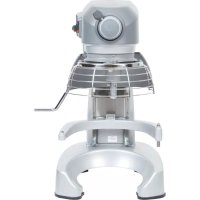
Legacy HL120 - Food Processor Hobart - Free user manual and instructions
Find the device manual for free Legacy HL120 Hobart in PDF.


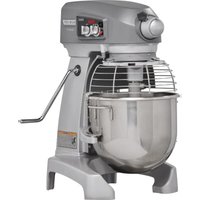
| Product type | Professional tabletop food processor (bench) |
| Brand | Hobart |
| Model | Legacy HL120 |
| Bowl capacity | 12 quarts (approx. 5.7 liters) |
| Motor power | 0.5 HP (horsepower) |
| Power supply | Single-phase, 115 V, 60 Hz (with grounding plug) |
| Controls | SmartTimer™ with count-up and countdown modes, speed selector (STIR + 3 speeds), START/STOP buttons |
| Speeds | STIR (stir), SPEED 1 (slow), SPEED 2 (medium), SPEED 3 (high) |
| Bowl lift | Manual (hand lever) |
| Included accessories | Standard #12 accessory adapter |
| Compatible agitators | Flat beater "B", standard wire whip "D", wing beater "C", dough hook "ED", pastry knife "P", bowl scraper, etc. |
| Safety | Lockable guard, guard safety switch, emergency stop (STOP button) |
| Construction | Stainless steel bowl, heavy-duty metal body, plastic guard |
| Cleaning | Daily washing of bowls and agitators with warm soapy water, wipe down body with damp cloth. Do not use a hose. |
| Maintenance | Lubricate slides twice a year with Lubriplate 630AA grease; occasional lubrication of planetary seal |
| Repairability | Repairs by a Hobart authorized technician; contact Hobart customer service (1 888 4HOBART) |
| Warranty | Manufacturer's warranty, subject to installation and repair by an authorized technician |
| Usage | Professional (restaurants, bakeries, pastry shops) |
Frequently Asked Questions - Legacy HL120 Hobart
User questions about Legacy HL120 Hobart
0 question about this device. Answer the ones you know or ask your own.
Ask a new question about this device
Download the instructions for your Food Processor in PDF format for free! Find your manual Legacy HL120 - Hobart and take your electronic device back in hand. On this page are published all the documents necessary for the use of your device. Legacy HL120 by Hobart.
USER MANUAL Legacy HL120 Hobart
Operation Guidelines 4
Dust Hazard 5
Warning Symbol 5
Warranty Disclaimer 5
General Information 5
INSTALLATION 6
Unpacking 6
Location 6
Lubrication 6
Electrical Connections 7
OPERATION 7
Initial Checks. 7
Mixer Components 8
Controls. 10
Bowl Placement 11
Agitator. 11
Bowl Lift 11
Prepare For Mixing 12
Timer Operation (SmartTimerTM) 12
Operating Notes 13
Unloading 14
Wire Cage (Fig. 11) 14
CLEANING 16
MAINTENANCE 17
Lubrication 17
Adjustments 18
TROUBLESHOOTING 19
Troubleshooting Guide. 19
Service 19
AGITATORS AND ATTACHMENTS 20
Available Agitators and Attachments 20
INSTALLATION, OPERATION AND CARE OF LEGACY+® MIXERS
12-QUART through 40-QUART
SAVE THESE INSTRUCTIONS
GENERAL
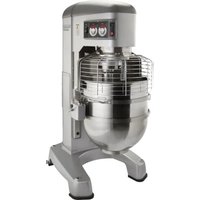
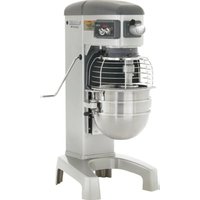
This Operation Manual is for the Hobart Legacy +^® 12-Qt through 40-Qt Bench Style and Floor Style mixers which are available in four different bowl sizes. Visit the website www.hobartcorp.com to see additional mixer sizes available from Hobart.
| Device Bowl Size (Qt) Style | Motor Horsepower | ||
| HL120 12 | Qt Bench 0.5 HP | Motor | |
| HL200 20 | Qt Both 0.5 HP Motor | ||
| HL200C 20 | -Qt Bench 0.5 HP | Motor | |
| HL300 30 | Qt Floor | 0.75 HP Motor | |
| HL300C 30 | -Qt Floor | 0.75 HP Motor | |
| HL400 40 | Qt Floor | 1.5 HP Motor | |
| HL400C 40 | -Qt Floor | 1.5 HP Motor | |
All mixers feature a SmartTimer™ equipped with STIR, plus three mixing speeds, a manual bowl lift, and a #12 attachment hub as standard equipment.
A variety of attachments, agitators and accessories are available. These are described in a separate Use and Applications Handbook available on our website at www.hobartcorp.com.
Step down bowl sizes and agitators are available for the 20-Qt, 30-Qt, and 40-Qt mixers (e.g. 12-Qt bowl for a 20-Qt mixer). Please see the website or contact your authorized Hobart Distributor for more information.
SAFETY GUIDELINES
- All operators must be properly trained in the safe operation of the mixer and attachments.
- To avoid risk of serious injury follow all precautions and instructions in this manual when installing, operating, and servicing the mixer.
- To avoid risk of serious injury, keep hands, feet, clothing, and utensils away from the bowl, bowl support, sideways, and agitator when the mixer is in operation or any of the components are moving.
- Do not operate the mixer if it is not in proper operating condition.
- Disconnect power to the mixer and follow lockout-tagout procedures before moving or servicing the mixer.
- Do not operate the mixer if parts are disassembled.
- Do not override safety switches on the mixer.
- When moving the mixer make sure it is stable to avoid tipping and keep hands and feet clear of the bottom of the mixer to avoid pinching.
- Use the STOP button to stop the mixer. Never open the wire cage or use the bowl lift to stop the mixer.
- Do not wear loose clothing around the mixer.
- Do not inhale dust particles from mixing ingredients. Exposure to dust (including flour) may be harmful to health. When mixing ingredients that develop dust use the STIR speed until the dust is eliminated and follow the instructions in the DUST HAZARD section below.
- Do not install or leave an agitator on the mixer without a bowl in place.
- Do not use excessive force when operating, which could affect the stability of the mixer.
- Use the correct sized bowl only with agitators for that sized bowl. Double check the sizes when using a reduced sized bowl, by consulting the mixer accessories chart available at www.hobartcorp.com.
- Ensure the bowl, agitator, and wire cage are correctly fitted to the mixer.
- Stop the mixer before adding more ingredients unless using a food chute.
- Have your mixer regularly serviced; at least twice a year for typical usage. Mixers may require more or less service depending on frequency of use.
- Use the mixer in a well-lit area.
- Ensure this manual is kept in an easily accessible place near the mixer for future reference.
- Do not clean the mixer with scouring powder or a scouring pad.
- Do not clean aluminum agitators in dishwashers.
- Do not hose or pressure clean the mixer. It is important to adhere to the cleaning instructions detailed in the CLEANING section of the manual.
DUST HAZARD
In order to minimize any dust hazard, follow the instructions detailed below.
When mixing ingredients care must be taken to avoid the inhalation of dust particles e.g. flour. Reference should be made to the product supplier's data sheets to ensure adequate precautions and protections are taken.
Ingredients such as flour must be added carefully to minimize air-borne dust particles.
Carefully slit the bag while holding it in the lower part of the bowl. When mixing dry ingredients use the lowest speed and a splash cover to minimize dust emission. Mix the ingredients in the bowl using the lowest speed until the risk of producing any dust is eliminated. Fit suitable dust extraction equipment.
WARNING SYMBOL
To identify the safety messages in this manual, the following symbol has been used.
WARNING The WARNING symbol is located in the manual before information corresponding to the safe use of the mixer.
WARRANTY DISCLAIMER
Installations and repairs carried out by non-authorized service technicians may affect the mixer warranty. Using other than original replacement parts may affect the mixer warranty. Technical alterations to the mixer may affect the mixer warranty.
For warranty information, please contact Hobart Customer Care.
GENERAL INFORMATION
Hobart reserves the right to alter the design of its products without prior notice. If you have questions regarding mixer details not included in this manual, contact your local Hobart Service Office.
INSTALLATION
UNPACKING
The mixer was inspected before leaving the factory. The carrier assumes full responsibility for the safe delivery of the mixer upon acceptance of the mixer for shipping. The customer must check for possible shipping damage immediately upon receipt before moving, installing, or modifying the mixer.
If damage is found, keep all original packaging materials for inspection purposes. The customer must complete the following steps to report the damage.
- Carrier's local terminal must be notified within 5 business days of shipment receipt (note time, date, and who was spoken to), and follow up and confirm with written or electronic communication.
- Notify Hobart customer care at (800) 333-7447 within 5 business days of shipment receipt.
LOCATION
Prior to installation, test the electrical service to ensure that it matches the specifications on the mixer data plate.
Place the mixer in its operating location on a sturdy, level surface. There should be adequate space around the mixer for the user to operate the controls and to install and remove bowls. The area above and to the rear of the mixer should allow the top and back covers to be removed for routine maintenance and servicing.
For 30-Qt and 40-Qt, once in position, the mixer must be leveled:
- Remove the two top cover screws and the top cover.
- Place a level on the top rim (Fig. 1). Slide shims under the base contact surface of the mixer as required to level it front-to-back and side-to-side.
- Do not replace the top cover until installation is completed.
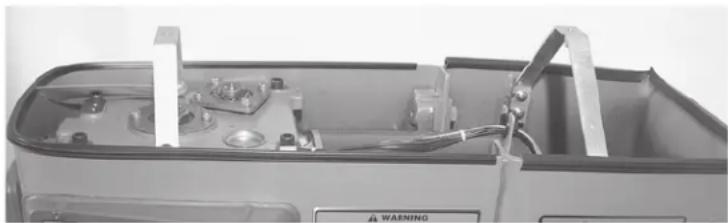
Fig. 1
LUBRICATION
This mixer is shipped with grease in the transmission. Refer to Lubrication section for applicable lubrication procedures.
ELECTRICAL CONNECTIONS
WARNING For 12-Qt, 20-Qt, and 30-Qt (single-phase only) the electrical cord is equipped with a three- pronged grounding plug which must be connected to a properly grounded receptacle. If the receptacle is not the proper grounding type, contact an electrician. DO NOT remove the grounding prong from the plug.
WARNING Electrical and grounding connections must comply with the applicable portion of the National Electrical Code and/or other local electrical codes.
WARNING For 30-Qt (three-phase only) and 40-Qt disconnect the electrical power to the mixer and follow lockout / tagout procedures.
For 12-Qt, 20-Qt, and 30-Qt (single-phase only), skip to the Operation section below.
Make electrical connections according to the wiring diagram located on the inside of the top cover. Follow the connection instructions below for the correct mixer model.
| Single-Phase Mixer 40-Qt: • Connect field supply lead wires to L1 and L2. • Connect ground wire to the ground lug on the mixer. | |
| Three-Phase Mixer 30-Qt and 40-Qt: A hole for 3/4"-trade-size conduit is located at the top of the pedestal (Fig. 3). • Connect field supply lead wires to L1, L2, and L3. • Connect ground wire to the ground lug on the mixer. |
OPERATION
INITIAL CHECKS
WARNING To avoid risk of serious injury, keep hands, feet, clothing, and utensils away from the bowl, bowl support, sideways, and agitator when the mixer is in operation or when any of the components are moving.
WARNING This food mixer is only for professional use by properly trained persons.
WARNING Ensure operators have read and understood this manual and have received proper training.
WARNING Do not use the mixer without the interlocked bowl wire cage in place.
Always follow the mixer capacity chart, available at www.hobartcorp.com, for correct capacities, speeds, and agitators to use for the mixer.
The wire cage must be closed to the front-center position or the mixer will not operate. Refer to the Wire Cage section.
The bowl must be in the locked position on the bowl support and the bowl support must be raised to the locked position or the mixer will not operate.
Check Initial Operation
- Apply power to the mixer.
- Turn the SPEED selector (Fig. 4 and Fig. 5) to STIR.
- Install the bowl and lock into the locked position (Fig. 6), raise the bowl support all the way up by pushing the lift handle (Fig. 2 and Fig. 3) until it locks. Close the wire cage (Fig. 2 and Fig. 3) by rotating it to the front-center position of the mixer. Momentarily run the mixer by pushing the START and then STOP buttons.
MIXER COMPONENTS
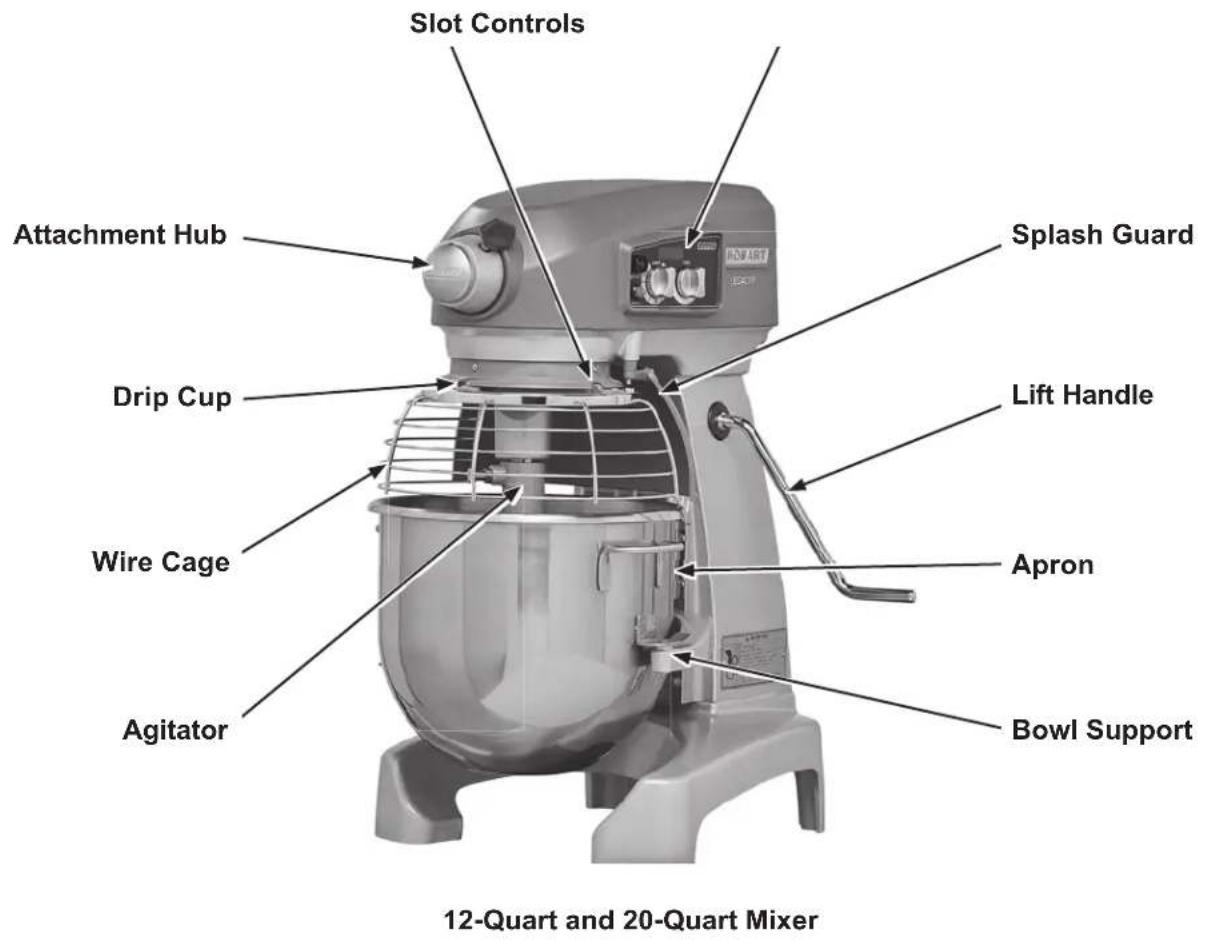
Fig. 2
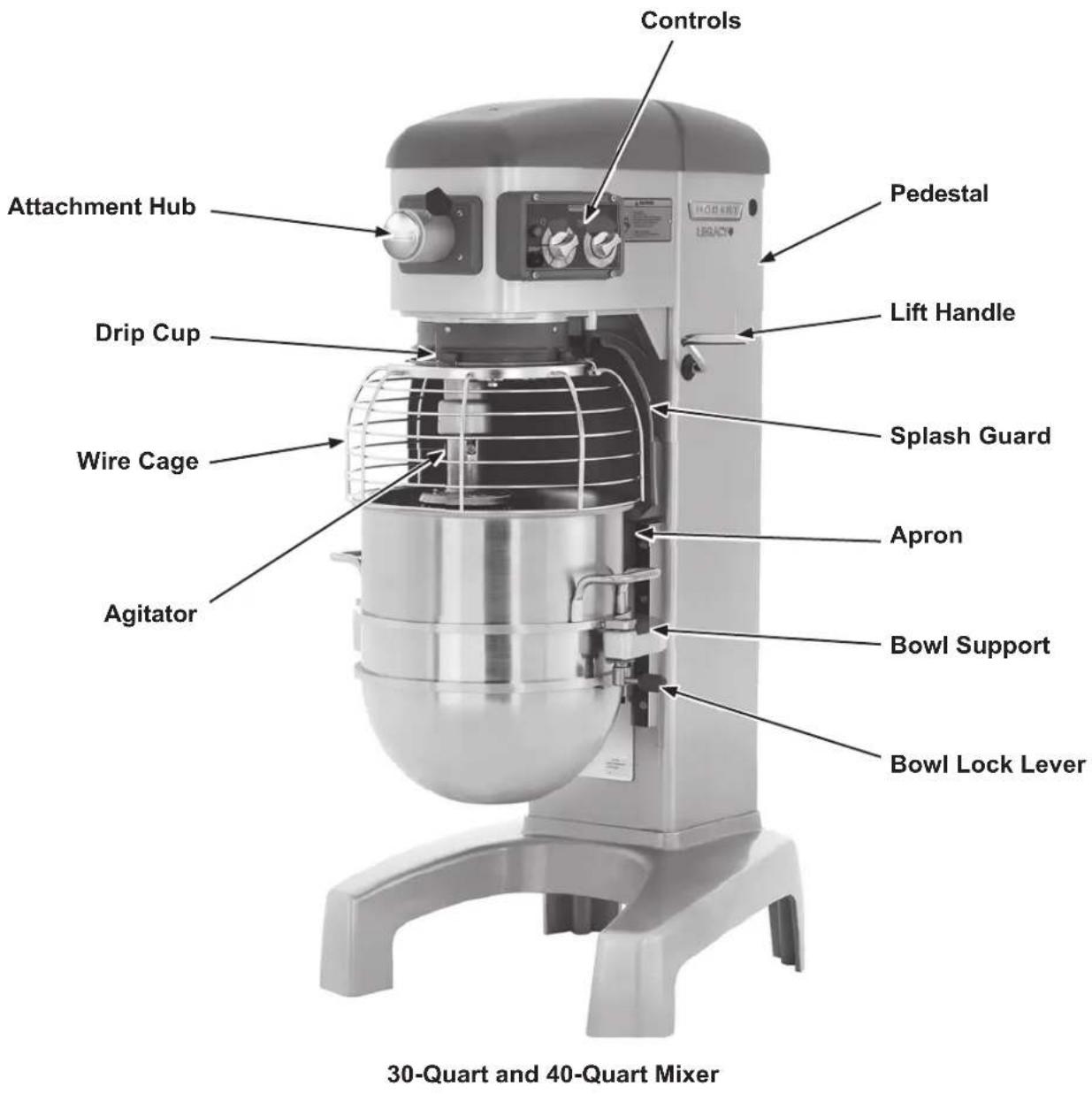
Fig. 3
CONTROLS
| Mixer Speeds and Recommended Application | |
| STIR (Slow) For incorporating ingredients | |
| SPEED 1 (Low) For heavy mixtures such as pizza dough, heavy batters, and potatoes | |
| SPEED 2 (Medium) For mixing cake batters, mashing potatoes, and developing bread dough | |
| SPEED 3 (High) For incorporating air into batches, as well as finishing whipped items |
NOTE: See Timer Operation section to operate SmartTimer™.
12-Quart, 20-Quart, and 30-Quart Controls
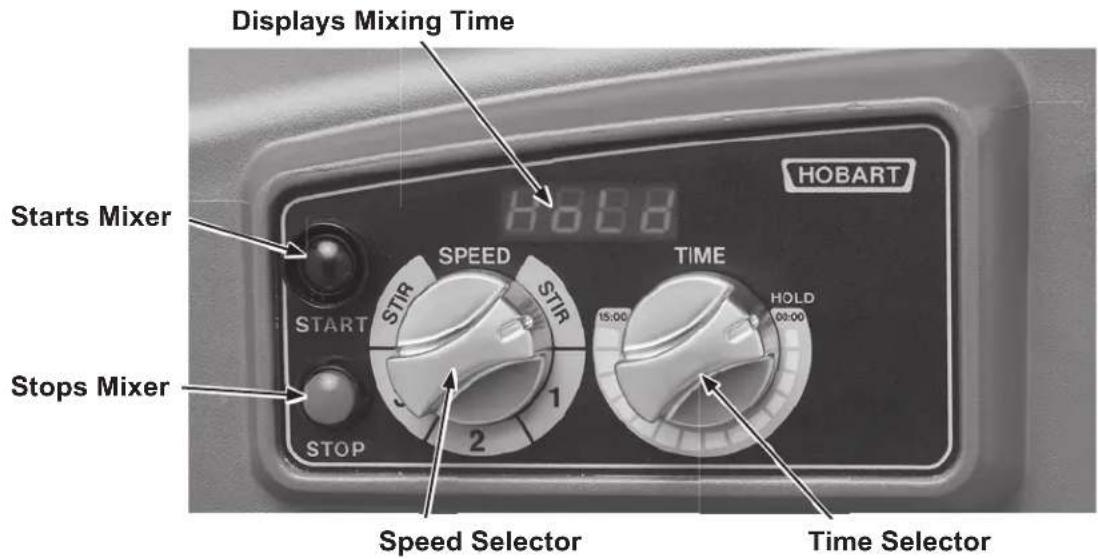
Fig. 4
40-Quart Controls
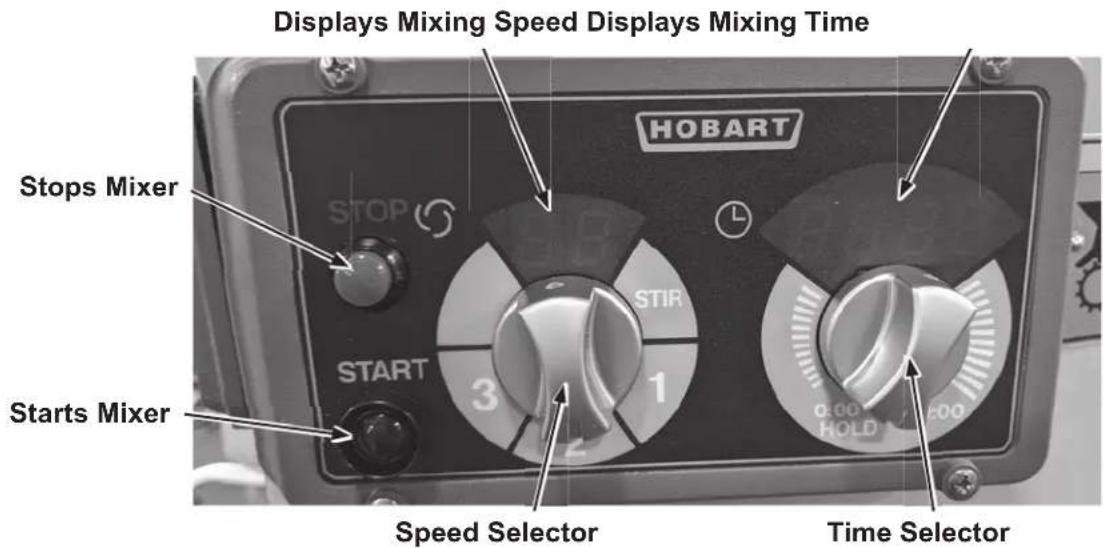
Fig. 5
BOWL PLACEMENT
The bowl must be installed before the agitator is installed.
To Install
- Fully lower the bowl support by pulling the lift handle.
- Position the bowl so the alignment pin on the left side of the bowl support fits in the hole in the bowl tab.
- Place the slotted tab on the bowl into the lower part of the pin.
- Lower the bowl onto the bowl support and swing the bowl into the locked position (Fig. 6).
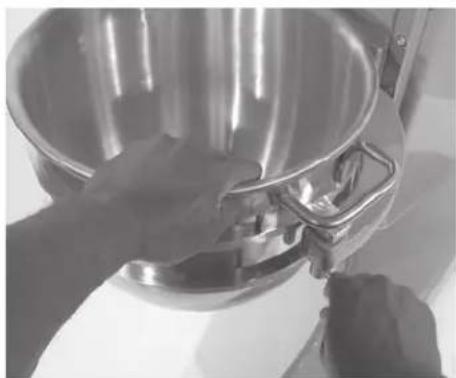
Fig. 6
AGITATOR
To install an agitator, the bowl must be on the bowl support and fully lowered.
To Install
- Open the wire cage. Refer to the Wire Cage section as needed.
- Place the agitator inside the bowl and align the horizontal slot on the agitator with the agitator shaft pin.
- Hold the agitator and pull the plunger pin of the agitator out (Fig. 7). Slide the agitator up the agitator shaft until it stops and latches. An audible click should be heard when the agitator locks into position.
To Remove
- Open the wire cage. Refer to the Wire Cage section as needed.
- Lower the bowl. Refer to the Bowl Lift section as needed.
- Hold the agitator and pull the plunger of the agitator out (Fig. 7). Slide the agitator down off the agitator shaft.
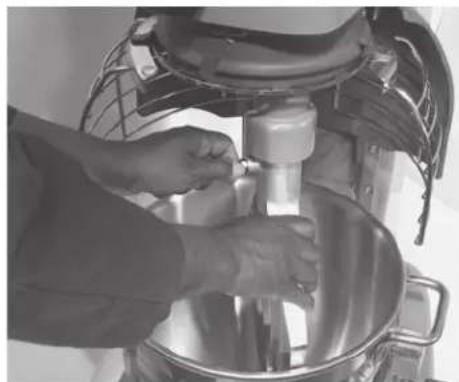
Fig. 7
BOWL LIFT
To raise the bowl, the bowl must be in the locked position. Push down the lift handle until it is locked. To lower the bowl, lift handle slowly.
NOTICE For 30-Qt and 40-Qt, before lowering the bowl onto a bowl truck, always unlock the bowl and swing bowl out slightly (Fig. 8).
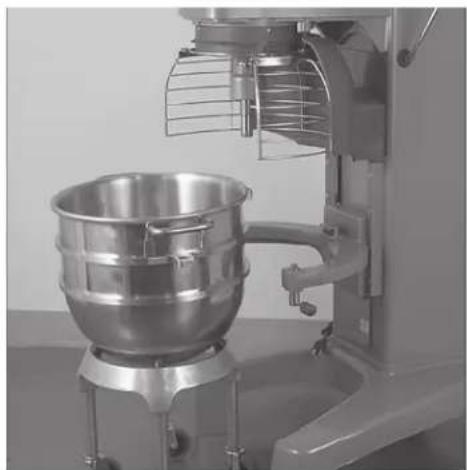
Fig. 8
PREPARE FOR MIXING
- Open the wire cage.
- Place the mixing bowl on the bowl support.
- Pour ingredients into the bowl.
- Swing the bowl to the locked position.
- Place the agitator inside the bowl, then attach it to the agitator shaft.
- Close the wire cage to the front-center position.
- Push down the lift handle until the lift handle is locked and the bowl reaches the raised (locked) position.
- The mixer is now ready for mixing (Fig. 9). (See the Timer Operation section.)
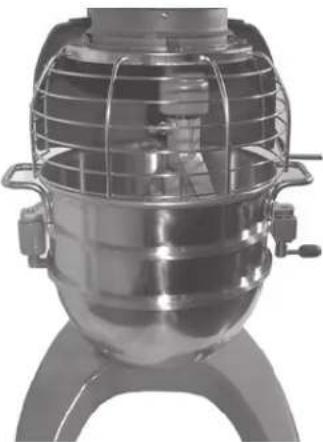
Fig. 9
TIMER OPERATION (SmartTimerTM)
Using the Count-Up Mode (Continuous Mixing)
- Turn the SPEED dial (Fig. 10) to select a mix speed (the SPEED setting can be changed at any time during mixing).
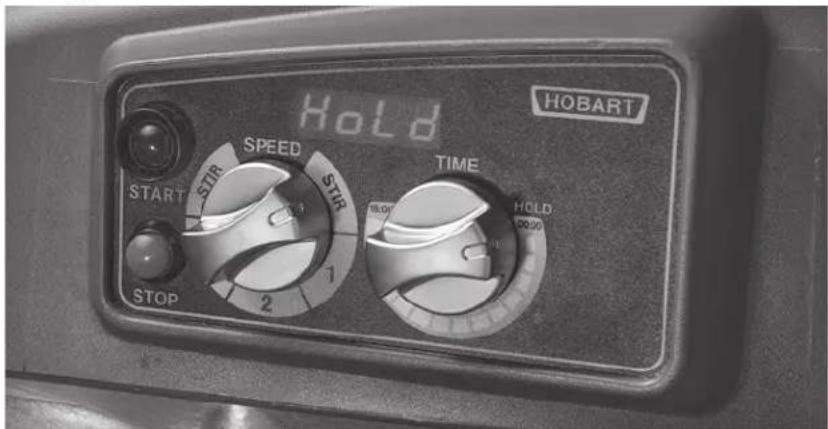
Fig. 10
NOTICE Only use STIR for incorporating ingredients. Do not use to develop dough products.
- Set the timer on hold by turning the TIME selector counterclockwise until "Hold" appears in the TIME window.
- Press the START button to begin mixing. The timer starts to count up from 00:00.
NOTICE If the wire cage is opened at any time, mixing stops. To resume mixing, close the wire cage and press the START button.
- Press the STOP button to stop the mixer; the mixing time is displayed in the TIME window.
- Press the START button to resume mixing if needed.
NOTICE When the timer reaches 15:00 minutes (12-Qt, 20-Qt, and 30-Qt) and 20:00 minutes (40-Qt), the beeper will sound momentarily and the timer rolls over to 00:01 and continues counting until the STOP button is pressed.
Using the Count-Down Mode (Timed Mixing)
- Turn the SPEED dial to select a mix speed.
a. If the count-up mode was used for the previous batch, the desired time needs to be entered.
b. If the count-down mode was used for the previous batch, the previous time is displayed. If a different time is needed, turn the TIME selector to the desired time.
- Press the START button to begin mixing; the timer starts counting down from the set time.
a. To stop the mixer at any time, press the STOP button. To resume mixing, press the START button. For example: The mixer is started at SPEED 1 for 20 seconds and is stopped after 10 seconds. Pressing the START button will resume mixing.
b. If the mixer is stopped and a new time setting is entered, pressing the START button saves the new time setting on the current speed selection. For example: The mixer is started at SPEED 1 for 20 seconds and is stopped after 10 seconds. A new time is entered by turning the TIME selector. The new time replaces the initial 20 seconds for SPEED 1 after the START button is pressed.
c. For 12-Qt and 20-Qt, if the time is changed while mixing, the mixer changes to the previous time for the selected speed and counts down.
d. For 30-Qt and 40-Qt, if the time is changed while mixing, the mixer operates until the new time expires. The adjustment to the time will not be stored. If the speed is changed while mixing, the time changes to the previous time for the selected speed and counts down.
WARNING The agitator does not stop immediately. To avoid risk of serious injury, keep hands, clothing, and utensils out of the mixing bowl and away from the agitator as the agitator winds down.
NOTICE If the wire cage is opened at any time, mixing will stop. To resume mixing, close the wire cage and press the START button.
- When the timer reaches 00:00, the mixer stops; a beeper sounds. The count-down timer displays the last-entered time.
OPERATING NOTES
- Only use STIR for incorporating ingredients. Do not use it to develop dough products.
- If the mixer is stopped during mixing, the timer also stops. The timer starts again (with the time remaining) when the START button is pressed (Fig. 10).
- For 40-Qt, the SPEED window will display the SPEED dial's current speed selection.
- Turn the TIME selector clockwise to take the mixer out of the hold mode.
UNLOADING
- Open the wire cage. Refer to the Wire Cage section as needed.
- Pull the lift handle slowly to lower the bowl support.
- Unlock the bowl and swing-out slightly.
- Remove the agitator from the agitator shaft.
- Remove the bowl from the bowl support.
WIRE CAGE (Fig. 11)
The wire cage can be rotated out of the way to add ingredients or to access the bowl and agitator. Note how the plastic carriers allow the wire cage to ride around the circumference of the drip cup.
- Open the wire cage: rotate it to your left.
- Close the wire cage: rotate it to your right until it stops, front-center position.
NOTICE The wire cage must be returned to the front-center position for the mixer to operate.
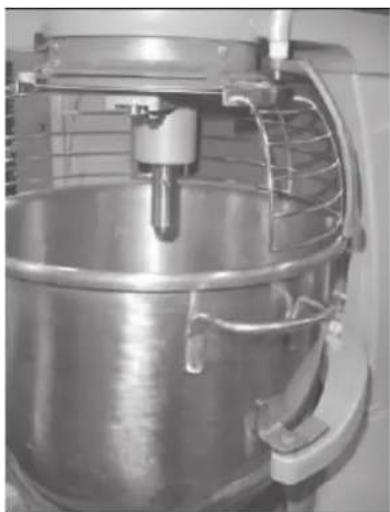
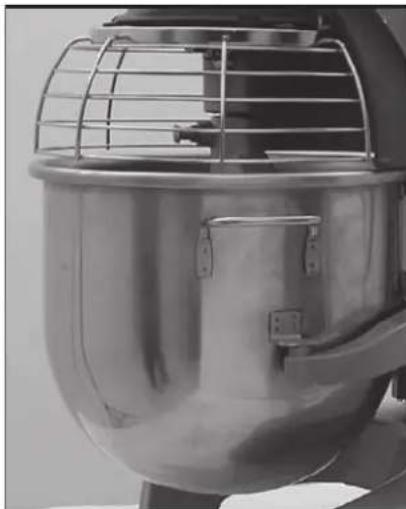
12-Quart and 20-Quart Wire Cage
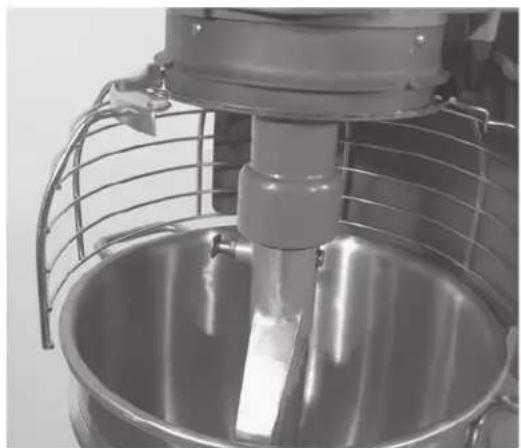
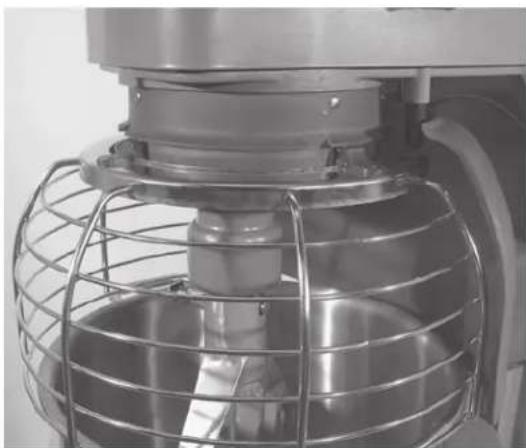
30-Quart and 40-Quart Wire Cage
Fig. 11
Remove and Clean Wire Cage (Fig. 12)
- Rotate wire cage to your left until the three carriers align with the carrier escape slots in the circular ridge of the drip cup.
- Lift the wire cage straight up so the carriers escape from the slots on the drip cup. The wire cage can now be removed by pulling toward you.
- Wash the wire cage in a sink, rinse with clear water, and dry with a clean cloth.
- The splash guard (Fig. 2 and Fig. 3) can be wiped off and/or washed with a cloth or sponge using warm, soapy water. Rinse with clear water and dry with a clean cloth.
Reinstall Wire Cage
- Position the ring of the wire cage so the carriers are positioned above the slots in the drip cup.
- Lower the wire cage so the carriers pass through the slots.
- Rotate the wire cage to your right until it contacts the stop, front-center position.
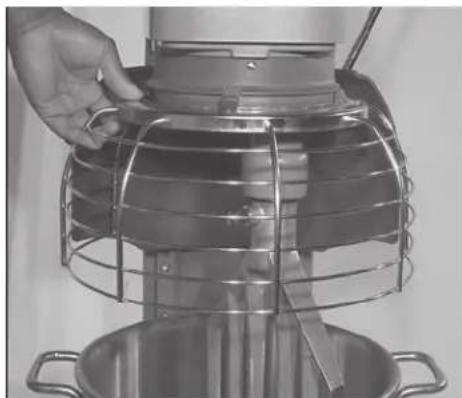
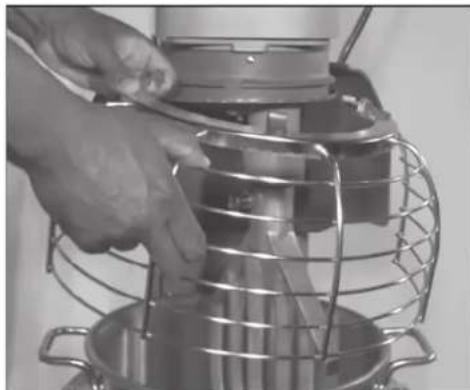
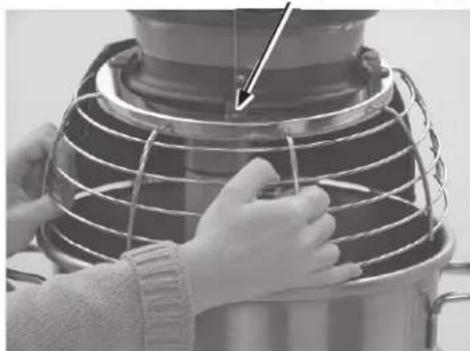
Escape Slots (3)
Fig. 12
CLEANING
WARNING Disconnect the electrical power to the mixer and follow lockout / tagout procedures.
New mixer bowls and accessories (beaters, whips, and dough arms) should be thoroughly washed with hot water and a mild soap solution, rinsed with either a mild soda or vinegar solution and thoroughly rinsed with clear water before being used. This cleaning procedure should also be followed for bowls and agitators before whipping egg whites or whole eggs.
The mixer should be thoroughly cleaned daily. DO NOT use a hose to clean the mixer; it should be washed with a clean, damp cloth. The base allows ample room for cleaning under the mixer.
The drip cup and apron (Fig. 2 and Fig. 3) are secured with screws and should be removed periodically and wiped clean.
For cleaning the wire cage refer to the Wire Cage section.
MAINTENANCE
WARNING Disconnect the electrical power to the mixer and follow lockout / tagout procedures.
LUBRICATION
Slideways
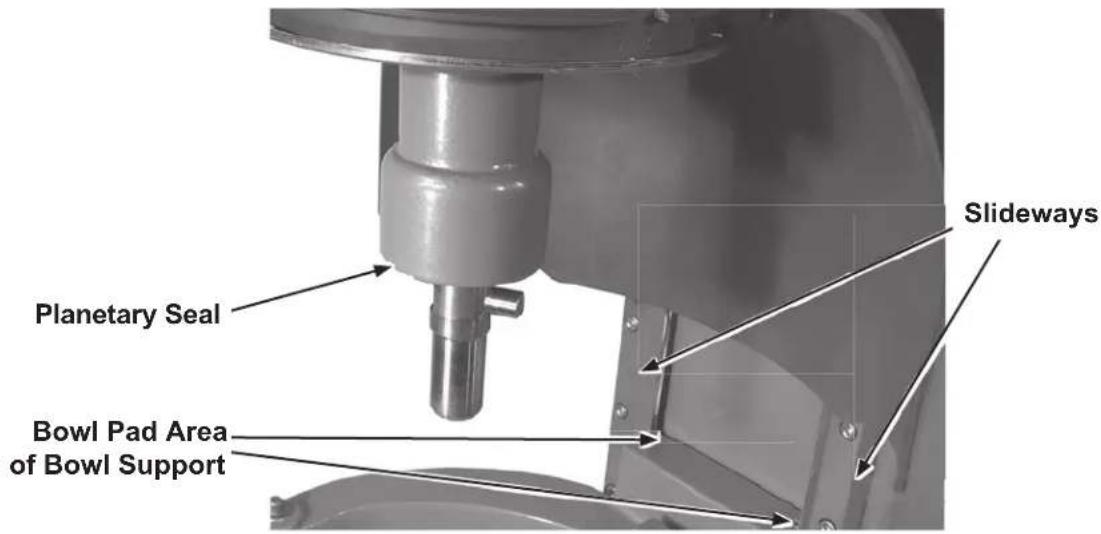
Fig. 13
The sideways (Fig. 13) should be lubricated approximately twice a year. To reach these areas, fully lower the bowl support.
For 12-Qt and 20-Qt remove the apron (Fig. 2) which is secured by screws. Wipe a thin coat of Lubriplate 630AA on the bowl pad area of the bowl support on each sidewalk (Fig. 13). Install the apron.
For 30-Qt and 40-Qt wipe a thin coat of Lubriplate 630AA on the bowl pad area of the bowl support and on each sidewalk (Fig. 13).
Planetary Seal
Occasionally, the planetary seal (Fig. 13) may become dry and begin to squeak. To correct this, work a little lubrication (mineral oil) under the lip of the seal.
ADJUSTMENTS
Agitator Clearance
The agitator clearance should be checked periodically. The agitator must not touch the bowl, and the maximum clearance between the bottom of the bowl and the B flat beater is 1/8 (3 mm); the maximum clearance between the bottom of the bowl and the ED dough arm is 5/16 (8 mm).
Install a bowl and agitator (e.g., beater). If the bowl and beater come into contact before the bowl support reaches the fully raised (locked) position, adjust the stop screw. Refer to Adjust the Bowl/Agitator Clearance section below.
Measure Clearance
Pour enough flour in the bowl to cover the bottom of the bowl where the beater travels. With the bowl fully raised (beater should not touch the bottom of the bowl), briefly run the mixer at the lowest speed.
Turn off the mixer, disconnect the electrical power supply, and measure the depth of flour where the beater has traced a path. This measurement should be taken at several points around the bowl to ensure accuracy.
Adjust the Bowl/Agitator Clearance
12-Quart and 20-Quart Mixers
- Remove the apron (Fig. 2) by unscrewing the screws.
- Adjust the clearance by moving the stop screws (Fig. 14) counterclockwise to increase the clearance or clockwise to decrease the clearance.
After the adjustments are made, replace the apron and secure it with the screws. - Carefully raise and lower the bowl support several times to check the adjustment.
- Reconnect the electrical power supply.
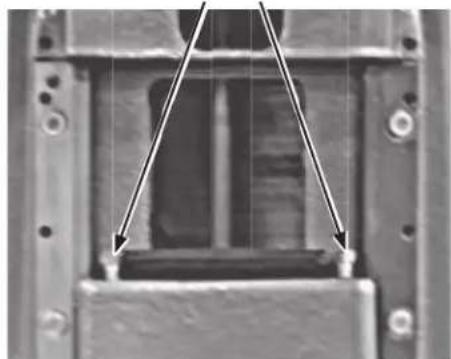
Stop Screws
Fig. 14
30-Quart and 40-Quart Mixers
- Turn the stop screws counterclockwise to decrease the clearance or clockwise to increase the clearance (Fig. 15).
- Carefully raise and lower the bowl several times to check the adjustment.
- Reconnect the electrical power supply.
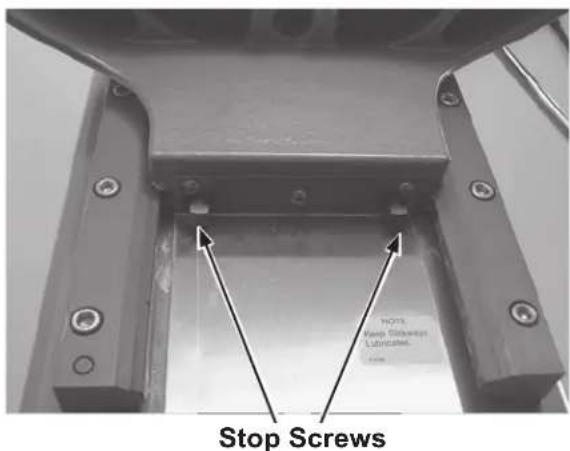
Fig. 15
TROUBLESHOOTING
TROUBLESHOOTING GUIDE
| Symptoms | Possible Causes |
| Mixer will not start • Flashing TIME display. • Branch circuit protector is in open position - check fuse or disconnect switch. • Mixer is overloaded. • Wire cage is not in the closed (front-center) position. • Bowl is not in closed (locked) position or bowl is not in up position. | |
| Agitator touches bowl • Bowl is not in closed (locked) position. • Improper agitator clearance - see Maintenance section for adjustment procedure. • Agitator is not installed properly. | |
| Planetary seal squeaks • Seal requires occasional lubrication - see Maintenance section. | |
| Timer displays flashing alarm code (Ex. "OL1" - Motor overload) | • If error code is flashing – unplug mixer until display is blank then plug back in. If symptoms still exist, contact your local Hobart Service office. |
SERVICE
If service is needed on this equipment, contact your local Hobart Service office @ 1-888-4HOBART.
AGITATORS AND ATTACHMENTS
Attachments for attachment hub and agitators are covered in a separate Use and Application Handbook available on our website at www.hobartcorp.com Follow the instructions accordingly.
AVAILABLE AGITATORS AND ATTACHMENTS
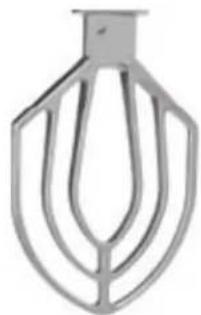
"B" Flat Beater
Multi-purpose agitator typically used for mashed potatoes, cakes, waffles, sugar cookies, pies, shortening, icings, and more.
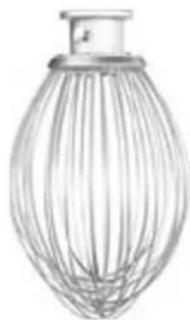
"D" Wire Whip
Maximum blending of air into light products such as egg whites, meringue, whipped cream, and more.
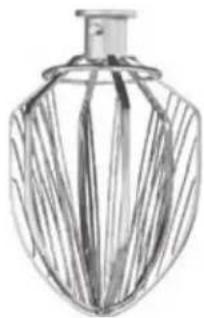
"C" Wing Whip
Heavy whipping such as potatoes, butter, mayonnaise, and light icing.
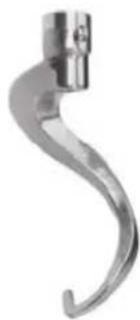
"ED" Dough Arm
Mixing, folding and stretching dough such as bread, pasta, pizza, donut, and more.
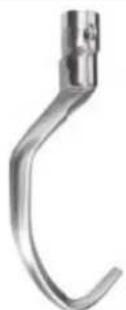
"E" Dough Arm (20-Quart)
Mixing, folding and stretching dough such as bread, pasta, pizza, donut, and more. Slightly different than "ED" for stubborn doughs.
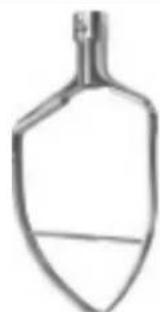
"P" Pastry Knife
Cutting action for combining ingredients such as pastry and pie dough.
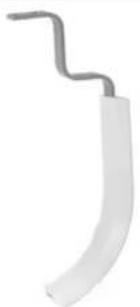
Bowl Scaper
Continuously scrapes the sides of the bowl.
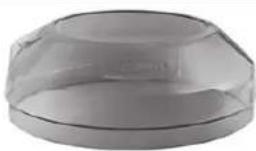
Splash Cover
Controls the splash of light ingredients during mixing.

Ingredient Chute
Add ingredients to mixing bowls during operation without interruption.
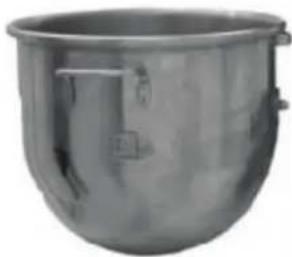
Stainless Bowl
Reliably holds ingredients. Available in stepdown sizes e.g.20-Qt bowl on 40-Qt mixer.
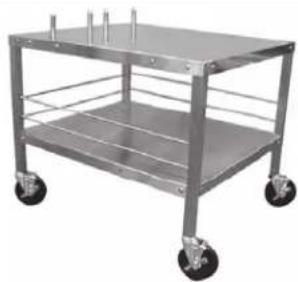
Mixer Table
(12-Quart and 20-Quart)
Stable mixer foundation with plentiful storage space.
HOBART
LEGACY
WFOOD EQUIPMENT GROUP
701 S. RIDGE AVENUE
TROY, OHIO 45374-0001
937 332-3000
www.hobartcorp.com
TABLA DE CONTENTIDO
GENERAL 22
- INSTALLATION, OPERATION AND CARE OF LEGACY+® MIXERS
- 12-QUART through 40-QUART
- SAVE THESE INSTRUCTIONS
- GENERAL
- SAFETY GUIDELINES
- DUST HAZARD
- WARNING SYMBOL
- WARRANTY DISCLAIMER
- GENERAL INFORMATION
- INSTALLATION
- UNPACKING
- LOCATION
- LUBRICATION
- ELECTRICAL CONNECTIONS
- OPERATION
- INITIAL CHECKS
- Check Initial Operation
- MIXER COMPONENTS
- CONTROLS
- 12-Quart, 20-Quart, and 30-Quart Controls
- 40-Quart Controls
- BOWL PLACEMENT
- To Install
- AGITATOR
- To Remove
- BOWL LIFT
- PREPARE FOR MIXING
- TIMER OPERATION (SmartTimerTM)
- Using the Count-Up Mode (Continuous Mixing)
- Using the Count-Down Mode (Timed Mixing)
- OPERATING NOTES
- UNLOADING
- WIRE CAGE (Fig. 11)
- Remove and Clean Wire Cage (Fig. 12)
- Reinstall Wire Cage
- CLEANING
- WARNING Disconnect the electrical power to the mixer and follow lockout / tagout procedures.
- MAINTENANCE
- Planetary Seal
- ADJUSTMENTS
- Agitator Clearance
- Measure Clearance
- Adjust the Bowl/Agitator Clearance
- 12-Quart and 20-Quart Mixers
- 30-Quart and 40-Quart Mixers
- TROUBLESHOOTING
- SERVICE
- AGITATORS AND ATTACHMENTS
- AVAILABLE AGITATORS AND ATTACHMENTS
- HOBART
- LEGACY
- TABLA DE CONTENTIDO
Brand : Hobart
Model : Legacy HL120
Category : Food Processor