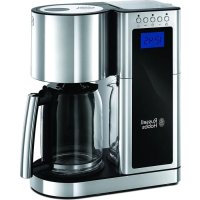
USER MANUAL 2337056 RUSSELL HOBBS
instructions 3
pokyny (Slovenčina) 42
instrukcja 45
upute 48
navodila 51
οδηγίες 54
utasítások 57
talimatlar 60
instrucțiuni 63
Read the instructions, keep them safe, pass them on if you pass the appliance on. Remove all packaging before use.
IMPORTANT SAFEGUARDS
Follow basic safety precautions, including:
This appliance can be used by children aged from 8 years and above and persons with reduced physical, sensory or mental capabilities or lack of experience and knowledge if they have been given supervision or instruction concerning use of the appliance in a safe way and understand the hazards involved. Children shall not play with the appliance. Cleaning and user maintenance shall not be made by children unless they are older than 8 and supervised.
Keep the appliance and its cord out of reach of children less than 8 years old.
Parts of the appliance are liable to get hot during use.
Don't immerse the appliance in liquid.
If the cable is damaged, return the appliance to avoid hazard.
- Place the appliance on a stable, level, heat-resistant surface.
- Keep the appliance and cable away from the edges of worktops.
- Don't use accessories or attachments other than those we supply.
- Don't use the appliance for any purpose other than those described in these instructions.
- Don't use the appliance if it's damaged or malfunctions.
HOUSEHOLD USE ONLY
PARTS
- Reservoir lid
- Filter compartment lid
- Reservoir
- Display
- Paper filter #4 (not supplied)
- Filter holder
- Lid lock
- Carafe
- Hotplate dishwasher - top rack

BEFORE USING FOR THE FIRST TIME
- Fill the reservoir to the max mark, and run the appliance without coffee.
- Let it cool, discard the water, then use it normally.
FILLING
- Lift the lid off the reservoir.
- Fill with at least 2 cups of water, but not above the max mark.
- Press the lid lock to open the lid.
- Open up a #4 paper filter, and put it into the filter holder.
- The reservoir is calibrated to give 10 large cups (at 125ml per cup) and 15 small cups (at 83ml per cup). For each large cup, add 7g of ground filter coffee and for each small cup add 4.5g.
- Close the lid, and press down to lock it.
- Put the carafe on the hotplate.
SET THE CLOCK
- Put the plug into the power socket.
- Use the hr and min buttons to set the correct time in 24-hour format.
- The clock will retain its settings until the coffee maker is unplugged.
MAKING COFFEE
If you want coffee straight away:
- Press the 🎨 button – the 📋 icon will appear on the display.
- Shortly afterwards, coffee will start to drip into the carafe.
- When it's done, the hotplate will keep the carafe warm.
- If you want to stop the coffee maker while it's brewing, press the 🤔 button.
USING THE TIMER
- Set the clock to the correct time. Use the hr and min buttons.
- Set the timer to the time you want to start brewing.
a) Press the ⏻ button.
b) Use the hr and min buttons to set the time you want brewing to start.
If you don't press either the hr or min buttons within 5 seconds, the coffee maker will revert to "normal", and the current time will show. Press the ⏻ button to start again.
- When the time is programmed, press the ⚙ button. The light above the ⏻ button will come on and the ⏻ icon will appear on the display. Your coffee maker is now set to make coffee at the selected time.
- If you want to check the program time, press the ⏻ button. The programmed time will show for 3 seconds and then return to the time of day.
- If you want to cancel the timer before brewing has started, press the 🔊 button.
- If you want to stop the coffee maker while it's brewing, press the 🤔 button.
KEEP WARM/AUTO SHUT-OFF
- The coffee maker will keep the coffee warm for about 40 minutes. ( ) and 40:00 will be displayed and will count down in 1 minute increments.
- 40 minutes after brewing, the 🎩 icon will go out and the coffee maker will shut down and the time of day will be displayed.
- To wake the appliance, press any button.
- If left for much more than an hour, chemical changes start to affect the flavour of the coffee. It's best to pour it away and make a fresh brew.
A QUICK CUP
If you want a quick cup of coffee before the brewing cycle has finished:
- You can remove the carafe at any time. The non-drip valve will prevent coffee dripping on to the hotplate.
- To prevent the filter holder overflowing, replace the carafe on the hotplate within about 20 seconds.
- When you replace the carafe on the hotplate, the non-drip valve opens to let any remaining coffee through.
SELF CLEAN
After 60 brewing cycles, the clean icon ♂ will appear on the display. This is to remind you to activate your coffee maker's self-cleaning feature.
You can use a vinegar solution or a commercial descaling product designed for coffee machines. Follow the directions on the descaling product. If you use a vinegar solution, ensure the kitchen is well ventilated, as heating vinegar causes an unpleasant smell.
This operation will take approximately 45 minutes.
- Mix 500ml of white vinegar with 500ml of water in the carafe.
- Pour the mixture into the reservoir. Don't fill above MAX.
- Close the lid.
- Replace the carafe on the hotplate.
- Put the plug into the power socket.
- Press the ⬆ button. The light above the button will come on and the 📋 icon will appear on the display.
- Your coffee maker will now start its self-clean cycle.
- At the end of the operation the appliance will switch itself off.
- Fill the reservoir to the MAX mark, and operate the appliance without coffee.
- Do this 2 or 3 times, till the vinegar smell has gone.
- Products returned under guarantee with faults due to scale will be subject to a repair charge.
CARE AND MAINTENANCE
Clean the filter holder and carafe after each use. Residue from a previous brew will spoil your coffee.
- Unplug the appliance and let it cool.
- Tip the contents of the filter holder into the bin.
- You may clean the carafe, permanent filter, and filter holder in warm soapy water. Rinse thoroughly afterwards to remove all traces of soap.
- Clean the outside surfaces of the appliance with a damp cloth.
- Replace the filter holder.
- Close the lid.

You may wash these parts in the top rack of a dishwasher.

ENVIRONMENTAL PROTECTION
To avoid environmental and health problems due to hazardous substances in electrical and electronic goods, appliances marked with this symbol mustn't be disposed of with unsorted municipal waste, but recovered, reused, or recycled.
Keep the appliance and cable out of reach of children under 8.
FOR HOUSEHOLD USE ONLY
DIAGRAMS
Keep the appliance and cable out of reach of children under 8.
HANDLING AND MAINTENANCE