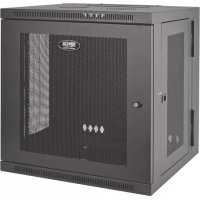
SmartRack SRW12US - Electrical cabinet Tripp Lite - Free user manual and instructions
Find the device manual for free SmartRack SRW12US Tripp Lite in PDF.


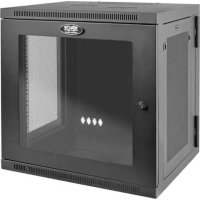
| Product Type | Wall-mount swing-out cabinet for 19-inch rack equipment |
| Brand | Tripp Lite |
| Model | SmartRack SRW12US |
| Rack Units | 12U |
| Mounting Type | Wall-mount swing-out (hinged) |
| Rack Standard | Standard 19 inches |
| Material | Heavy-duty steel |
| Color | Black (according to standard model) |
| Doors | Lockable front and rear, reversible |
| Side panels | Removable and lockable (L-handle) |
| Mounting Rails | 2 or 4 vertical mounting rails, square and threaded holes, adjustable depth in 6mm increments |
| Cable Management | Square openings at rear and top with removable covers |
| Grounding | Front/rear grounding point with M6 screw, 8 AWG cable recommended |
| Locking | Keys for front and rear doors, handle for side panels |
| Installation | Requires at least two people, tools: level, Phillips screwdriver, mounting hardware |
| Environment | Controlled indoor environment, away from moisture, extreme temperatures, dust, and direct sunlight |
| Ventilation | Leave adequate space at front and rear, do not block openings |
| Warranty | 5-year limited |
| After-sales service | Repair via return with RMA number, shipping at customer's expense |
| Optional accessories | SRCASTER caster kit |
Frequently Asked Questions - SmartRack SRW12US Tripp Lite
User questions about SmartRack SRW12US Tripp Lite
0 question about this device. Answer the ones you know or ask your own.
Ask a new question about this device
Download the instructions for your Electrical cabinet in PDF format for free! Find your manual SmartRack SRW12US - Tripp Lite and take your electronic device back in hand. On this page are published all the documents necessary for the use of your device. SmartRack SRW12US by Tripp Lite.
USER MANUAL SmartRack SRW12US Tripp Lite
Swinging Wall-Mounted SmartRack® Enclosures
Applies to Model Series: SRWxxUS
(Agency Series Number: AG-00EA)
Table of Contents
- Important Safety Instructions 2
- Overview 2
- Feature Identification 2
- Enclosure Installation 3
4.1 Preparation 3
4.2 Unpacking 3
4.3 Ground Connection 3 -
Enclosure Configuration 4
5.1 Door Locks 4
5.2 Cable Access and Management 4
5.3 Reversing the Enclosure 4
5.4 Mounting Rails 5
5.5 Adjusting Mounting Rail Depth 5 -
Wall Mounting the Enclosure 5
6.1 Mounting 5 - Equipment Installation 6
7.1 Installing or Removing Cage Nuts 6
7.2 Alternate Mounting: 7
Tapped Hole Mounting Rail
- Storage and Service 8
- Warranty and Product Registration 8
Espanol 9
Francais 17
Pycckn 25
PROTECT YOUR INVESTMENT!
Register your product for quicker service and ultimate peace of mind.
You could also win an ISOBAR6ULTRA surge protector—a $50 value!
www.triplite.com/warranty



Manufacturing Excellence.
1. Important Safety Instructions

SAVE THESE INSTRUCTIONS
This manual contains instructions and warnings that must be followed during the installation and operation of the product described in this manual. Failure to comply may invalidate the warranty and cause property damage or personal injury.
- Keep the enclosure in a controlled indoor environment, away from moisture, temperature extremes, flammable liquids and gasses, conductive contaminants, dust and direct sunlight.
- Leave adequate space at the front and rear of the enclosure for proper ventilation. Do not block, cover or insert objects into the external ventilation openings of the enclosure.
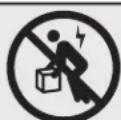
The enclosure is extremely heavy. Use caution when handling the enclosure. Do not attempt to unpack, move or install it unassisted. Use a mechanical device such as a forklift or pallet jack to move the enclosure in the shipping container. - Do not place any object on the enclosure, especially containers of liquid, and do not attempt to stack the enclosures.
- Inspect the shipping container and the enclosure for shipping damage. Do not use the enclosure if it is damaged.
- Leave the enclosure in the shipping container until it has been moved as close to the final installation location as possible.
- Install the enclosure in a structurally sound area capable of handling the load, or on a level floor that is able to bear the weight of the enclosure, all equipment that will be installed in the enclosure and any other enclosures and/or equipment that will be installed nearby.
- For permanent wall mounting, be sure to securely fasten the enclosure to the building structure before operation.
- Use caution when cutting packing materials. The enclosure could be scratched, causing damage not covered by the warranty.
- Save all packing materials for later use. Repacking and shipping the enclosure without the original packing materials may cause product damage that will void the warranty.
- Do not reship the enclosure with additional equipment unless the enclosure was shipped with a special shock pallet ("SP1" models only). The combined weight of the enclosure and installed equipment must not exceed the load capacity of the pallet. Tripp Lite is not responsible for any damage that occurs during reshipment.
- Use of this equipment in life support applications where failure of this equipment can reasonably be expected to cause the failure of the life support equipment or to significantly affect its safety or effectiveness is not recommended. Do not use this equipment in the presence of a flammable anesthetic mixture with air, oxygen or nitrous oxide.
2. Overview
Swinging wall-mounted SmartRack enclosures accommodate all standard 19-inch rackmount equipment, regardless of vendor, and ship fully assembled for quick and easy deployment. They feature adaptable, heavy-duty cabinets in various heights. All models have a hinged design that lets the cabinet swing away from the wall bracket for easy equipment access.
Swinging wall-mounted SmartRack enclosures have variable mounting depths, ideal for servers. The cabinets include quick-release doors and side panels for convenient maintenance. Front access doors are reversible for installation flexibility. Front door and side panels are lockable. An optional rolling caster kit (SRASTER) is available for easy maneuvering of enclosures.
3. Feature Identification
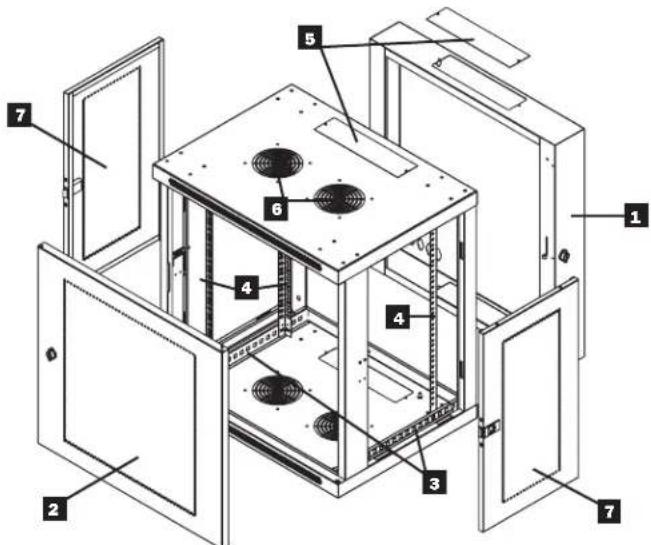
Model SRW12US is shown. The other models have similar features, with the only differences being rack height and depth.
Rear Door
2 Front Door
Horizontal Rails
Vertical Mounting Rails
5 Removable Cable Access Hole Covers
6 Vents
7 Locking/Removable Side Panels
4. Enclosure Installation

Caution! Read All Instructions andWarnings Before Installation!

Warning: Rack enclosures can be extremely heavy. Do not attempt to unpack, move or install the enclosure without assistance. Use extreme caution when handling the enclosure and be sure to follow all handling and installation instructions. Do not attempt to install equipment without first stabilizing the enclosure.
4.1 Preparation
The enclosure must be installed in a structurally sound area that is able to bear the weight of the enclosure, all the equipment that will be installed in the enclosure and any other enclosures and/or equipment that will be installed nearby. Before unpacking the enclosure, you should transport the shipping container closer to the final installation location to minimize the distance you will need to move the unit after the protective packaging has been removed. If you plan to store the enclosure for an extended period before installation, follow the instructions in the Storage and Service section.
You need several tools:
You also need the following hardware:
- Level
- Appropriate hardware for wall mounting (not included)
- Phillips-head screwdriver
- Appropriate tools for wall mounting
4.2 Unpacking

Use at least two people to unpack the enclosure.
1 Move shipping pallet to a firm, level surface.
2 Open box and remove the four foam corner protectors. Save all packing materials for later use unless you are certain they will not be required. Packing materials are recyclable.
3 With one person on each side, carefully lift the enclosure out of the box and place on a firm, level surface.
Examine the enclosure for any damage or loose parts. Confirm all parts are present. If anything is missing or damaged, contact Tripp Lite for assistance. Do not attempt to use the enclosure if it has been damaged.

Never extend more than one component from the enclosure at a time.


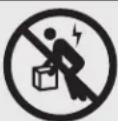
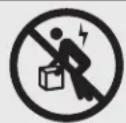
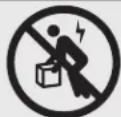
Warning: Never attempt to lift or install without adequate help. Do not try lifting the enclosure alone.
4.3 Ground Connection
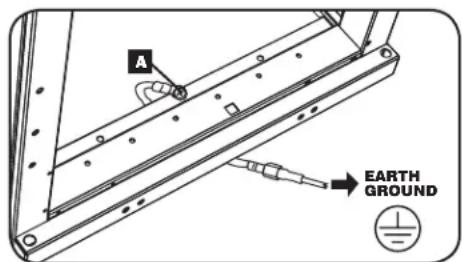
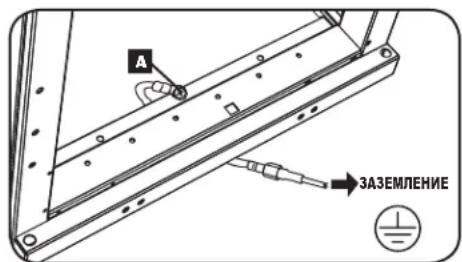
All parts of the enclosure are grounded to the frame of the enclosure. Use the enclosure's front or rear threaded grounding point A and an M6 screw (included) to connect the frame of the enclosure directly to your facility's earth ground connection with an 8 AWG (3.264 mm) wire. Route the ground wire under the enclosure's frame to ensure unhindered door operation. Warning:
Attach each enclosure to earth ground separately. Do not use the enclosure without an earth ground connection.
5. Enclosure Configuration
Before installation, be sure to plan the location and arrangement of components within the enclosure. Be sure all mounting rails are reversed or adjusted for depth, depending on your equipment configuration.
5.1 Door Locks
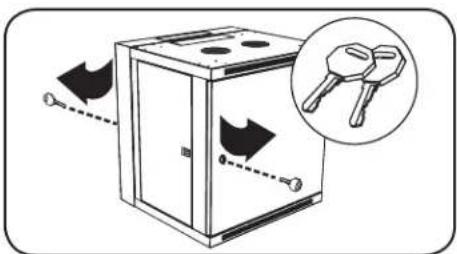
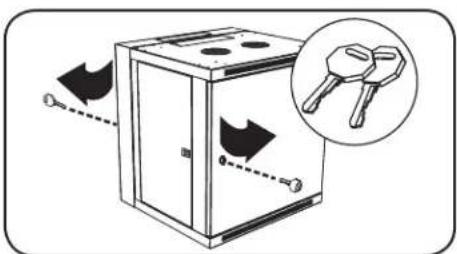
The front and back doors have locks that are accessible by the included keys.
Each side panel locks using an L-shaped lever on the inside of the enclosure.
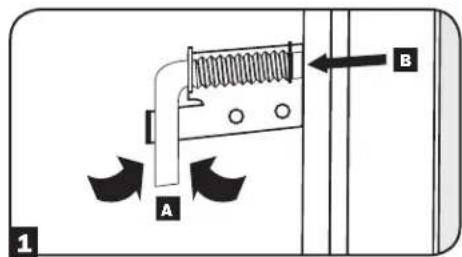
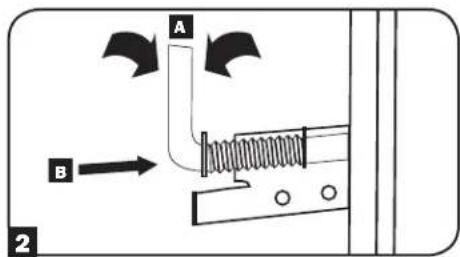
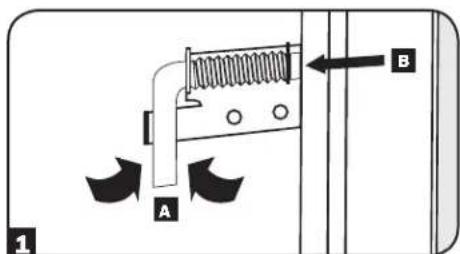
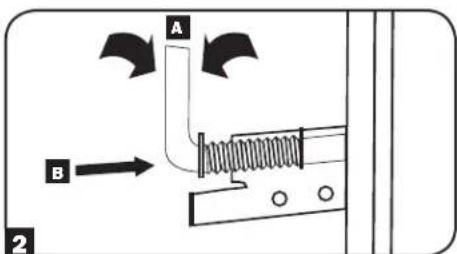
To unlock and remove the side panels, lift the shorter leg of the "L" up and pull it away from the side panel. Pull the tab on the side panel and remove it from the enclosure.
To re-lock the side panels, secure it in the proper position, lift the shorter leg of the "L" up A and push it toward the side panel, back into the hole that it was in initially B. Once it is in place, push the shorter leg of the "L" down to lock it. Note: To lock and unlock the side panels, you will need to have access to the interior of the enclosure.
5.2 Cable Access and Management
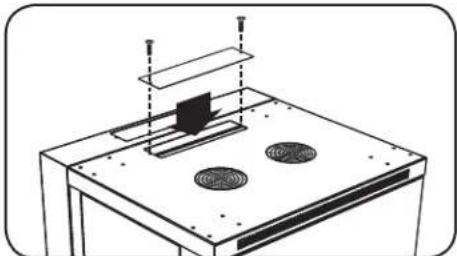
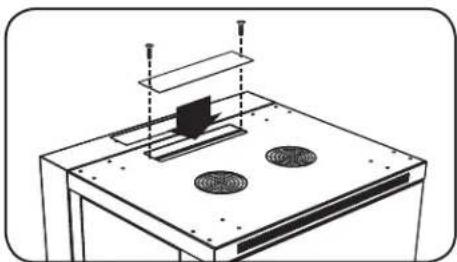
The back door of the enclosure has a square opening for cable access and management. An additional opening can be found on top of the main cabinet. Each opening can also be closed by screwing in the removable cable access panels.
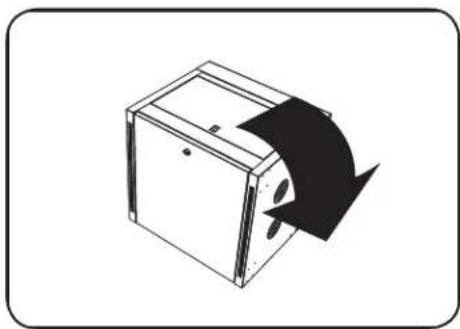
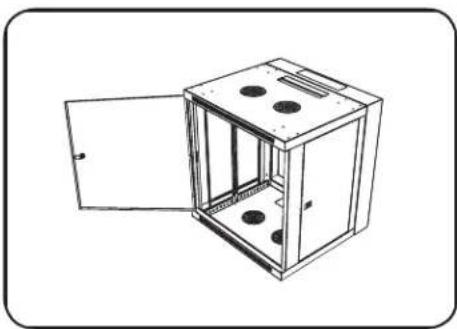
5.3 Reversing the Enclosure
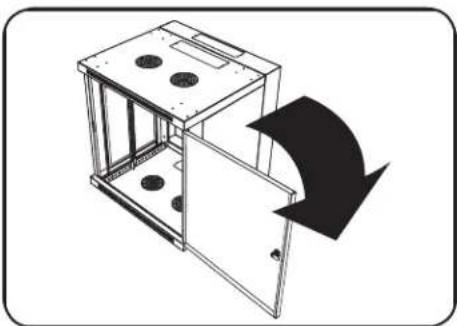
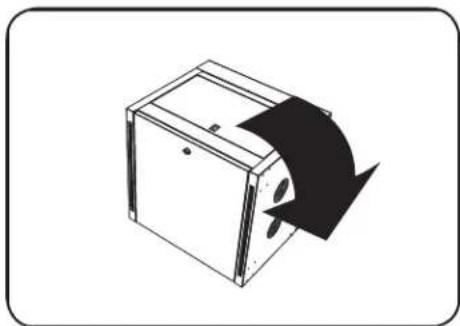
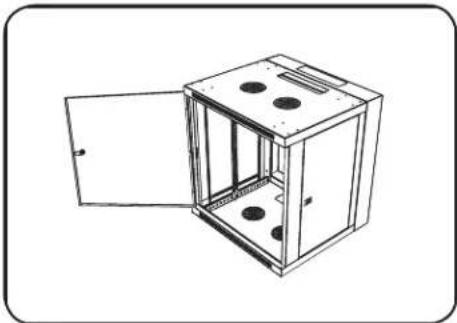
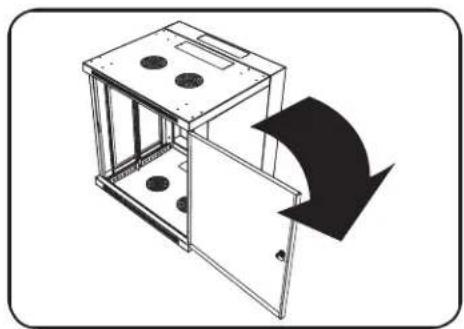
In order to accommodate various rack configurations, the enclosure can be reversed. To do so, simply turn the enclosure over so that the doors open in the opposite direction.
5. Enclosure Configuration (continued)
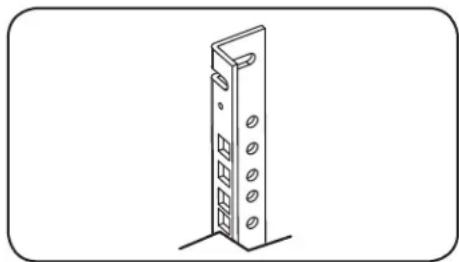
5.4 Mounting Rails
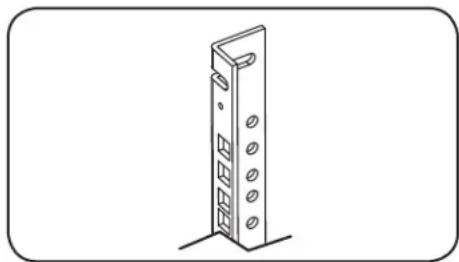
The enclosure comes with mounting rails that have both square and tapped holes for mounting rack equipment. To install equipment, use the included cage nuts and other hardware. (See section 7.1 for installation of cage nuts.) Warning: Be sure to have the enclosure securely mounted to the wall, or in its final position on the floor, before mounting any equipment inside. Also be sure to have all the right adjustments on your rails before mounting equipment. (See below for Adjusting Mounting Rail Depth.)
5.5 Adjusting Mounting Rail Depth
Warning: Do not attempt to adjust rails while equipment is installed in the enclosure. Do not attempt to use rails without screws installed. (2 per rail.)
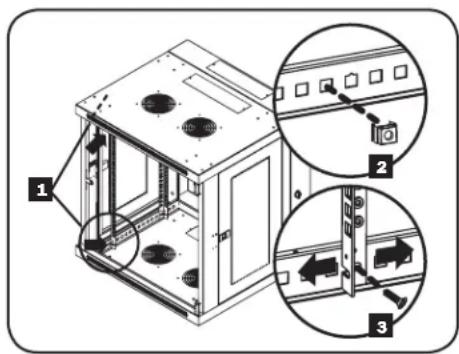
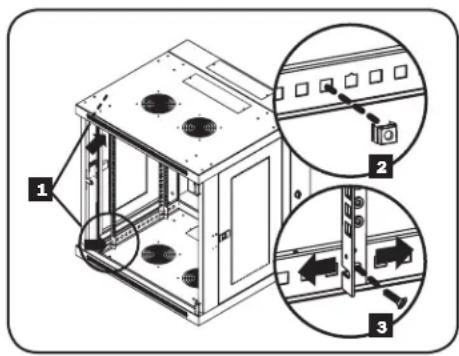
Depending on the model, either two or four mounting rails will be pre-installed in the cabinet. The preset mounting depth varies based on the model. Do not adjust the mounting rails unless your equipment requires a different mounting depth. The front and rear sets of rails can be adjusted independently in 1/4-inch (6mm) increments.
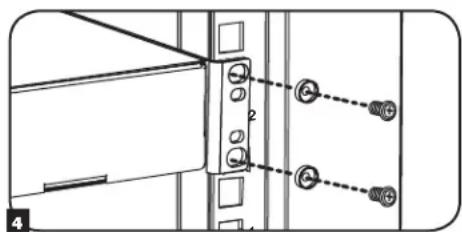
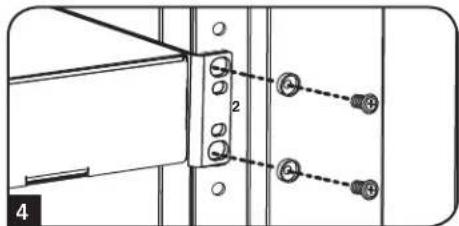
Each rail is connected to the enclosure with 2 screws and 2 cage nuts: 1 set in the upper corner and another in the lower corner. Using a Phillips-head screwdriver, remove the screws that fasten the rails to the enclosure.
2 Move cage nuts to the desired depth and reinstall.
3 Slide the mounting rails to the desired depth and reattach them using the screws you removed in Step 1.
6. Wall Mounting the Enclosure
Warning: Do not attempt to mount the enclosure to the wall with equipment in the enclosure.
6.1 Mounting
The number of keyhole cutouts on the back door of the enclosure will vary based on your model. Each keyhole can accommodate an M8, M10, 5/16" or 3/8" bolt. The holes are centered 16" apart horizontally to accommodate the standard placement of wall studs. The vertical distance between the holes will vary based on your model.
Note: Enclosure must be installed by a qualified technician. Before mounting, use a level and tape measure to position your mounting area precisely. Use appropriate fasteners (not included) to secure the enclosure to the wall. Use suitable mounting means when installing to cinder block, concrete, drywall or wood studs. Warning: The supporting surface must be able to safely support the combined load of the equipment and all attached hardware and components. For the actual weight, size and load capacity of the enclosure, view the product specifications and other support resources at www.triplite.com/support.
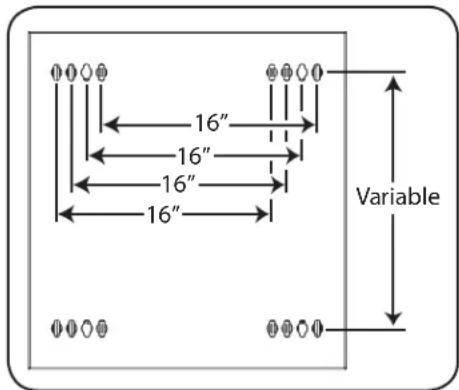
Your model's keyhole configuration may be different.
7. Equipment Installation
Warning: Do not install equipment until you have stabilized the enclosure. Install heavier equipment first and install it towards the bottom of the enclosure. Install equipment starting from the bottom of the enclosure and proceeding toward the top of the enclosure—never the reverse. If using sliding equipment rails, be careful when extending the rails. Do not extend more than one set of sliding equipment rails at one time. Avoid extending sliding equipment rails near the top of the enclosure.
Note: The unit comes with two different kinds of screws for equipment installation, black and silver. Use the black mounting screws if you are securing your equipment to the square hole side of the mounting rail. Use the silver screws if you are securing your equipment to the tapped hole side of the mounting rail.
Note: The square holes in the middle of each rack unit are numbered and also include a small notch to aid identification. A single rack unit includes the space occupied by the numbered hole and the holes directly above and below.

7.1 Installing or Removing Cage Nuts
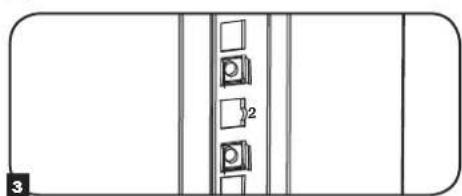
WARNING: The flanges of the cage nuts should engage the sides of the square opening in the rail, not the top and bottom. Follow the instructions in your equipment documentation to ensure proper installation of your equipment.
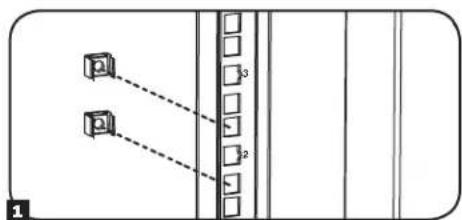
1 Locate the numbered square openings in the mounting rails where you plan to install your equipment. You will install cage nuts (included) into the square openings in order to provide an attachment point for the mounting screws (included). Note: Consult your equipment documentation to determine how many cage nuts will be required and where they will need to be installed.
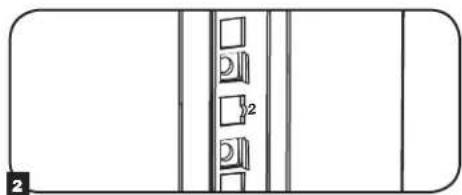
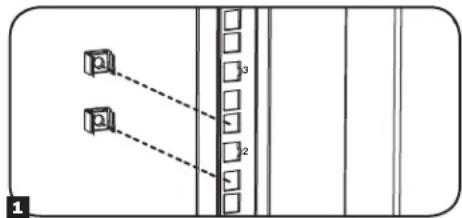
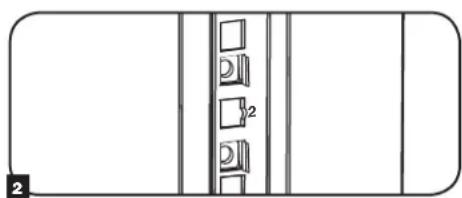
2 From the inside of the mounting rail, insert one of the flanges of the cage nut through the square opening. Press it against the side of the square opening. Each flange should engage one side of the square opening, not the top or bottom.
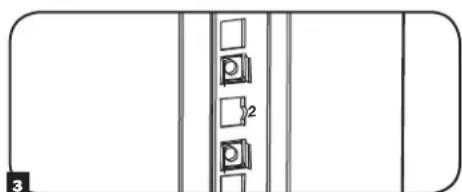
3 Compress the cage nut at the sides slightly to allow the remaining flange to fit through the square opening. When the cage nut is properly installed, both flanges will protrude through the square opening and will be visible on the outer surface of the mounting rail. Repeat steps 1-3 until all required cage nuts are installed.
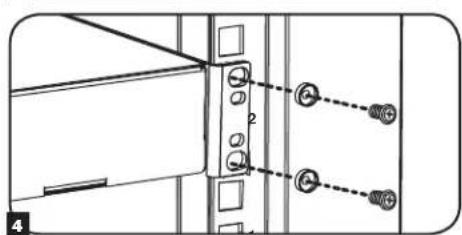
After installing the required cage nuts, use the included black mounting screws and cup washers to secure your equipment to the rack rail. Place the cup washers between the screws and the equipment mounting brackets.
Note: Your equipment may also include mounting hardware. Read the mounting instructions that came with your equipment before installing your equipment.
To Remove Cage Nuts, Reverse Steps 1-3
Note: You may wish to use a cage nut tool (user-supplied) to aid cage nut installation and removal.
7. Equipment Installation (continued)
7.2 Alternate Mounting: Tapped Hole Mounting Rail
WARNING: Do not attempt to adjust rails while equipment is installed in the enclosure. Do not attempt to use rails without screws installed. (2 per rail.)
The 2 mounting rails are pre-installed for securing equipment using the square hole side of the mounting rail. To switch to the tapped hole side of the mounting rail, follow the steps below:
Each rail is connected to the enclosure with 2 screws: 1 in the upper corner and another in the lower corner. Using a Phillips-head screwdriver, remove the screws that fasten the rails to the enclosure.
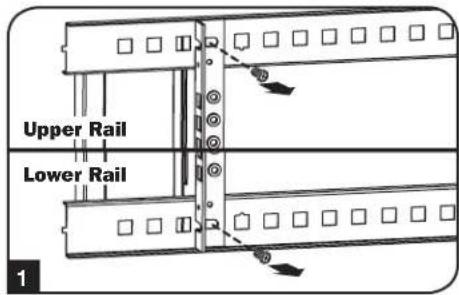
Switch the rail locations. Ensure the tapped hole side of each rail is facing the front door.
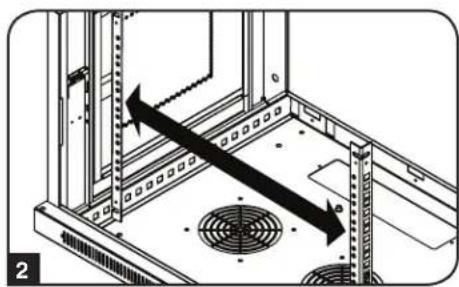
3 Reattach the mounting rails.
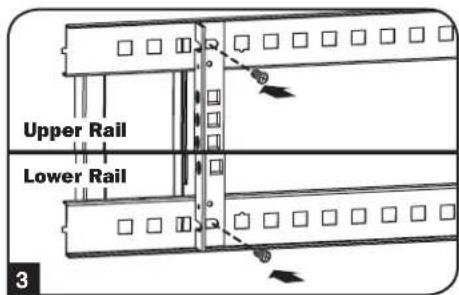
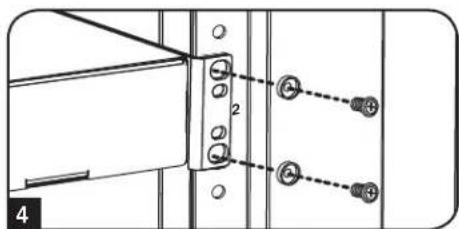
Use the included silver mounting screws to secure your equipment to the rack rail. Place the cup washers between the screws and the equipment mounting brackets.
Note: Your equipment may also include mounting hardware. Read the mounting instructions that came with your equipment before installing your equipment.
8. Storage and Service
Storage
The enclosure should be stored in a controlled indoor environment, away from moisture, temperature extremes, flammable liquids and gasses, conductive contaminants, dust and direct sunlight. Store the enclosure in its original shipping container if possible.
Service
Your Tripp Lite product is covered by the warranty described in this manual. A variety of Extended Warranty and On-Site Service Programs are also available from Tripp Lite. For more information on service, visit www.triplite.com/support. Before returning your product for service, follow these steps:
- Review the installation and operation procedures in this manual to insure that the service problem does not originate from a misreading of the instructions.
- If the problem continues, do not contact or return the product to the dealer. Instead, visit www.triplite.com/support.
- If the problem requires service, visit www.triplite.com/support and click the Product Returns link. From here you can request a Returned Material Authorization (RMA) number, which is required for service. This simple on-line form will ask for your unit's model and serial numbers, along with other general purchaser information. The RMA number, along with shipping instructions will be emailed to you. Any damages (direct, indirect, special or consequential) to the product incurred during shipment to Tripp Lite or an authorized Tripp Lite service center is not covered under warranty. Products shipped to Tripp Lite or an authorized Tripp Lite service center must have transportation charges prepaid. Mark the RMA number on the outside of the package. If the product is within its warranty period, enclose a copy of your sales receipt. Return the product for service using an insured carrier to the address given to you when you request the RMA.
9. Warranty and Product Registration
5-Year Limited Warranty
Seller warrants this product, if used in accordance with all applicable instructions, to be free from original defects in material and workmanship for a period of 5 years from the date of initial purchase. If the product should prove defective in material or workmanship within that period, Seller will repair or replace the product, at its sole discretion.
THIS WARRANTY DOES NOT APPLY TO NORMAL WEAR OR TO DAMAGE RESULTING FROM ACCIDENT, MISUSE, ABUSE OR NEGLECT. SELLER MAKES NO EXPRESS WARRANTY OTHER THAN THE WARRANTY EXPRESSLY SET FORTH HEREIN. EXCEPT TO THE EXTENT PROHIBITED BY APPLICABLE LAW, ALL IMPLIED WARRANTYES, INCLUDING ALL WARRANTYES OF MERCHANTABILITY OR FITNESS, ARE LIMITED IN DURATION TO THE WARRANTY PERIOD SET FORTH ABOVE; AND THIS WARRANTY EXPRESSLY EXCULES ALL INCIDENTAL AND CONSEQUENTIAL DAMAGES. (Some states do not allow limitations on how long an implied warranty lasts, and some states do not allow the exclusion or limitation of incidental or consequential damages, so the above limitations or exclusions may not apply to you. This warranty gives you specific legal rights, and you may have other rights which vary from jurisdiction to jurisdiction).
WARNING: The individual user should take care to determine prior to use whether this device is suitable, adequate or safe for the use intended. Since individual applications are subject to great variation, the manufacturer makes no representation or warranty as to the suitability or fitness of these devices for any specific application.
Product Registration
Visit www.triplite.com/warranty today to register your new Tripp Lite product. You'll be automatically entered into a drawing for a chance to win a FREE Tripp Lite product!*
- No purchase necessary. Void where prohibited. Some restrictions apply. See website for details.
Tripp Lite has a policy of continuous improvement. Specifications are subject to change without notice.


Manufacturing Excellence.
1111 W. 35th Street, Chicago, IL 60609 USA www.triplite.com/support
1111 W. 35th Street, Chicago, IL 60609 USA www.triplite.com/support

Manufacturing Excellence.
1111 W. 35th Street, Chicago, IL 60609 USA www.triplite.com/support
PykoBODCTBO NOJIb3OBaTeIa
Manufacturing Excellence.
1111 W. 35th Street, Chicago, IL 60609 USA · www.triplite.com/support
Copyright © 2015 Tripp Lile. Bce ToproBle MapKn ABHIOr cNkHNOHTbHO Co6CTBENHOx COOTBeTcByIOx INaIeIbueB.
1. Baxhble yka3aHnno TExHnke 6e30nacHOCTN
COXPAHNTE HACTOUIE YKA3AHNIA
B hactoIeM pykoBDCTBe coepkATc yka3aHn H npdynpckDnH, KOtOpbIe Heoo6xmoMo cObNDaT B npOceCe ycaHOBN 3KcNpyTaun ONiCAHOrO B HEM 3dEHN. HecobIOeHHe 3nx yka3aHn n npdynpckDnH MOKeT npBecn K aHHpnoBaHmIO rapaHTn N npuHnHTb MaTePnaHbMyuepe6nn BPe 3doPOBbIOIOeH
- ⅢkaФdoJHXeH HAOHTbCBA NOMeUeHm C KOHTPOINpyEmB MIKKPOINMAOM BdAINOT ICTOUYHKOB BnAIN,3KCTpeMaJIbHBIXTeMNEpaTYP, BOCIIaMeHHOUXcXc KIDKOCTeNra3OB,3JEKTPoPnPOBOHbIX 3aRp3HNTeN,NBIN INPpMOrO COJIHeHORO CBeta.
Ipeud WkafoM nno3aHrO Heo6xOIMo 0eocneHTb DocTaTOHO CBO6OnHO npocpaHCTBa dna erO HnHexaJero npoBeTpBHaHn. He 3aropaxuBaTe n He HAKpbAaTE BHeUHMe BEHTINLAIOHHbte OTBepCTN Wka, a TAKKe HE BCTABnTe B Hnx KaKNe-Imo ppeDmTb. - ⅢkaF BJIeTcR KpaHne TKeKNoBecHbM. Pn nepeMeueHm WkaFco6KnOaIte octOpoxHoCTb. He NItaTeCb pacNaKOBbBaTb, nepeMeaTa HnYcTaHaBnBaTb WkaF B OINHOyky. Dn pepeMeueHn WkaF bHyTpN TpaHCnOpTnpoBOHOro KOHTeHepa NcnoJb3yTe MExAHueCKoe yCTpOcTB0 TnA BInIOHOro Norpy3UHkA INN BNIOHOrn IINPabWNeckO TeJeKKN.
- He KlaaIte Ha IkaKΦ KaKeI-NbIo PpeMTebl, OcoBeHHO EMKoCTmC XnKIOCTaMI, a TaKke He ycTaHaBnBaIte 1kaΦbI dpyr Ha dpyra.
Ocmotnpe TpaHcnopTnpOBOHbKOHTeHep HskaHnpeMet HannuHnoBpeKdHn, noyueHHbIX npn TpaHcnopTnpOBKe. He nolbyTeCb skaFOM B cnlyae ero nobpeJdeHn.
He n3BnkeaTe ukaΦ nTpaHcnpTnpoBOuHOro KOnTeuHepa do ero nepemueeHna MaKcMaIbHo 6n3Koe paCtOHaHE K MeCTy OKOHTaHOBn yctAHOBN.
KoHCTpykUHO HPOOH MeCte CPOBbIM OCHOBaHE, CNOC6bIM BIDepKINBaT BEC CAMORO KkaPc, Bcero 0bOpyOBOAHn, KOtOpoe ByET yCTaHOBHeO BHTPN Hero, NIO6bIX DpynIX UkaFOBuN NIOOBpOyOBaHn, KOtOpBe 6yDyt YCTaHOBHeHbBn3HrEo - Npeed hauanom paobtco kkafoom o8a3atebno npnkpene er K Hecyue KOHCTpykun 3daHm.
CobnOaIe octopoknoctb npa pa3pe3aHm ynaKOBuHbIX MaTePnAIOB. 3To MOKe TnpBecTN K HaHeceHIO UapAnMH Ha NOBepxHOCTb uKaΦa, YTO npEcdTaNrTcOboy uep6, He nOKpbBaem MyeIcTByUoeI rapaHTnei.
Bce ynaKOBOHyIe MaTePnAbIcneJeT coXpaHHTI nIPOCNeIyUoIero IcNIOb3OaHn. NOBTOpHaY naKOBKa I TpaHcnpTpOboKa IkaFpa 6e IcNOJIb3OaHn OpyINHaIBx yNaKOBOHyBIX MaTePnAIOB MoKeT pINBeCTN K NOBpeKeDeHIO I3dEIN, KOToPoE NOBHeET 3a CO60I aHHyIpOBAHIne DeIcTBYIOSeI rapaHTM.
HeOnyckaetcnoJeUOaTpaHcnpOpBOKa KkaopaCdoNolHntbHbIMobopyoBaHMe3aNckIoueHMeCNyuaEBnepBOHaJIbHONoCTABKu KaKaco CneuaJIbHbIM ydap0auiuEHHbIM NOIOHOM (ToIbKO Ira MoIeNei SP1).CymMapHbI Bec kaopa N yctAHOBnHoro B hem OobpyoDaHn He doJKeHNpEBWtB rpy3oONoBemHoCTb NoIOHa. KomnaHn Tripp Lite He HecET OTBeTcBEHooCTNa Kaok-nMo6 yuepe, npunHeHHB n Ppocece nocJeyoue TpaHCnpOpBKN.
He peKomeHdyetcNcONb3OBAHnE daHHoro obopydOBaHnB Cntemax Xm3HeoBeCneeyHn, rde erO BixoN 3 cTPOr npDIOJNOKHTBHO MOKET pINBECTN K nepe6oR M pa6ote o6OpyOBaHnX3Heo6CneeyHn INB 3HaHTeNBHO Mepe CHNtB er 6e30NAChOCTb INI 3ΦΦeKTMBHOCTb. He nCNoB3yIte DaHHoe o6OpvOBOAHn B PnCYTCTBN BOCPnAmEHIOeYCAHECTuYeCKOH CMECN C BO3DyXOM, KNCLOPOOM INN 3AKCbIO A3OTA.
2. Kpatkoe onncahne
Bpaauouee HacteHbIe 10kafo BceMctBa SmrRack Bmeaot Bce8cTaHapTHe 19-IOMOoe o6pOBOAHme He3ABNCMOOTero npou3BOHTen I nocTAbNIOCTcno NnHOCTbO B cOpe dna o6ecneHn 6bICPTpoB I neKoCTN BBOda B 3KcNpyaTuHIO. B coCTAB 30n cepIN BXoJAT aAnTIpyEmle uKafo pa3nnHOB BVtC nOBuHEHNO pOCHCTbIO KOHCTpykUIM. Bce moEe IMeOT KOHCTpykUIO C wapHnPHbIM KpePnEHm, nO3BOJIOUyO OTOBIRAtb Kopnyc OT cTeHb, o6ceueHBaYdo6hN doctyn K o6pOBOAHIO.
Bpaauouee hacteHbte ukafo bceMeCTBa SmrRack moeI perynpyemyIO np6Hy moTtaxa, yto ndealho noxOHT dny yctahOBKn cepboB. Kkafo KOMJIeKTOCTBO BcIcTOCBEMHIM N DEpAMN I BOKOBIM N aHEnmN DnA yOObCTBA TEXHmckoro OBCNYMBAHnpeDnE DBePbI MOry T HabeUmbatcHa JIObOy CTOPOH, YTO oecneuHbaet yHbepcaIbHocTB yCTAHOBKn. Peepnra DBepa N 60Kobbe NaHEn 3aIIpaOTc H aAMok. Kpome TORO, Bo3MOHO npio6peTeHeNe OOnHOHLBOr KOJIeKTo polIKOB (SRCASTER), obneruauxnpoueeC yCTAHOBKn MOHTXHO UkaPb A XeJaemoe PNOJKeHne.
3.Cxema pacnoIoxeHnApyHKuOHaJIbHbIX 3JIeMeHTOB
Ha nllnctpaun npedctabheha moelb SRW12US. pyrne moen mmeot aHAnoruHbIe cyHKUHOaHbHbIe 3JIeMeHTbI N OTmuaIOTcra TOnbKO BbcOTOn I rny6HHoN.
3aDnA DBepua
2 PpeDnA DBepua
3 Topn3oHTaJIbHbIe HappaBraIOuane
4BepTNKaJIbHbIe MoHTaXHbIe WnHbI
5 CbemHbte 3aIyUKN OTBepcTn DnB BbOda Ka6ene
6 BeHTnIaHIOHHbIe OTBepCTN
7 3aHpaembIe/cbEmHbIe 60KOBblnHaHeJI

4.Порадok yctahOBkn wkaфa

BHMaHHe! Npeed hauanom yctaHOBKn BHMaTeIbHo n3yUHTe BCE yka3aHnI npedynpeJxdeHnI

BHNMaHHe! KpaKa RaBnEeTcKpaHne TKeJeOBecbIM. He NbTaIaTeCb paCnakOBbIbA Tb, nepeMeaTb Hn yCTaHaBnBaTb WkaF B OdnOchky. Bydtte npedeJIbHO ocToPOxHbI npn nepeMeueHn WkaFa n o63aTeJIbHO cNeDuYte BCem Yka3AHm NO o6paueHIO co WkaFOM n erO yctahOBke. H npOn3BOJnte YcTaHOBky 06OpdyoBaHn B WkaF do o6ceNeHn Eero yCTOuNBOCTn.
4.1 NpOaTRObKa
UkaФdoJxHbENB KOHCTpyKUHOHIOPOHMOcTe, CNOOCbHOM BIDepKINBaTb BEc Camoro UkaFpa, BCero OobpyOBAHnA, KOTOpoe 6yDet YCTAHOBNEHO BHTPNr HrE, NIObIX DpynX UkaPbONuNIOOBaHnR, KOtOpBe 6yDyT yCTaHOBNeBb6n3n HrE. Ipepe paacakOBKO ukaFpa cIeDyET DOCTaBNT TpaHCnOpTIPoBOHbIKoTHeNep KaMOKHO 6nKe K MeCTy OKOHATbHOYCTaHOBKnC CEJIbMOHNIMN3aUNI paccToHnA, HA KOTOpOE nOtpe6yETc npemeuTaMbOnyNb NOcne ChraTn3aunTHOynakOBKn. EcnBbl PAnHpye XpAHHeHne UkaFpa B TeueHne dInTeBHorO nepNoDA BpemHn Do nIn noCne UCTAHOBKn, cIeDyTe YkazAHmM3NOKeHHbIM B pa3dene XpAHHeHne INTexHueckoe ObcnyKBaHnE.
Bam notpe6byoTcHecKoJIbKO INCTpyMeHTOB:
Kpome TOrO, Bam Ntpe6yETc CJeDyUoA OChAcTa:
- YpoBHeb
-Писnococ6нгпдянсTeHnO MOntaKa
Kpeo0pa3nAOTBeTka
(B KOMNJIeKT NCTABKIN HE BXOJIT)
- INHCTPymeHTbl, INCNOB3yEmble dIa HacteHHoro MOHTaxa
4.2 PacnaKOBka

IpaacnakobbBaHna Wkaopa Tpe6yetc He MeHee DByx YenOBek.
1 IpeMeCTnTe TpaHcnpOpTnPoBOuHbKOHTeHep Ha npOuyHy oPOBHyIOBepxHOctb.
OtKpoTe Kopo6ky N3BnEKeNte YeTbpe yrnoBbIX amOptnaTopa H3 neHonnlaCTa. Bce ynaKOBoHbIe MaTePmaJIb cneJyET coXpaHnT bI IIOcNeDyoUero nCNoJIb30BaHn, ecNI bI He y6ExJeHb B TOM, UTO OHn 6Oone He notpe6yIOTc. YnaKOBoHbIe MaTePmaJIb noNDexat BTOPuHn Nepepa60Ke.
3 Pacnooxmbnbo no OHmy cKaoDcTOPObI, aKKypaTHo BbHbTe kkaF n KopoBkn n NomeCTHTe eHa npOHyIO pOBHyIO NOBepxHOCTb.
0cmotptte 1k4nHa npemT haunHna kaxx-n6o nobpejdeHnn HnHe3akpenneHbix Detanei. Y6eHtceb B hannn Bcx detanei. B cnyuae oTCyTcBnA nnnoBpeXeHnKaKHX-n6o deTanei obpaTncb 3a nomoiBIO KOMNaHIO Tripp Lite. He noIb3yIeTbc 1k4nO Bcnnyae erO nobpeXeHnA.

HnBkoemcnyae He n3Bnekaite n3 ukaΦa 6oJIee ODHOrO KOMNoHErTa ODHOBpeMeHHo.


BHMaHHe! Hn B KOem cIyue He nbItaTeCb n3BneKaTb uKaΦ u3 ynaKOBKn nn yCTaHaBJIbAtb ero 6e3 noJHOceHHo nOmoU. He nbItaTeCb nOdHMaTb uKaΦ B ODNHOuyk.
4.3 3a3eMJIeHne
Bce detaII ukaΦa 3aεmIyIOCTcpe3 erO KapKac.ДЯ nprmaO coeHHeHn KApKACA ukaΦa c WInHO 3aεMJIeHnBaWero o6bEKA T NOMUbIO npOBoDA KaINbPOM 8 AWG (3,264 MM) cJeDyET NcNOb3OBaTb nepeHIOu Hn 3aDHIO TOky 3aεMJIeHn A n BnHT M6 (NocTabIeMbY B KomIneKTe).ДЯ obecneueHn 6ecpIeNtCTBEHNO rO kpbIBaHn I 3akpbIBaHn DBePbI npOBeIte 3aεMJIouHn npOBo ND KapKacom ukaΦa. BhIMAHne! KaKdbI ukaΦ dONJKeH NOcOeHNrTBcR K WnHe 3aεMJIeHn NO OTdJIbHOCTN. POnb3OBaHne He3aεMJIeHbIM ukaΦom He DonyckaETcR.
5. KomnohoBka wkaqpa
Ipeed yctahOBKO Wkaapa obaatbno cneyet cctabntb nnae rpoaemeHn i cxemy paonoloxHn KOMnoHToB BHTpyn Hero. Heo6xOIMO y6eHtbcB TOM, YTO BCE MOHTaxKnhe Hapabnouuie nobepHytb Hndnxauim obpa3om nIN OTperynpObaHbI NO Ipy6HHe 3ABNCIMOCTN OT KOMNOHOBKn BaJero oobopyoBaHn.
5.1Дверныезамки
IpeHnra 3aDnHra DBePbIO OChAaHeBb 3aMKaMn, OTINpaEMbIMN C IOMOuBbIO BXODJUX B KOMIIeK TKNoey.
Kakda n3 6okobix naheen 3a npnnpoI-06pa3HOro pbayka C BHTpeHne CTOpohb ka.
I JnO TnpaHn H ChTnB 60KobbX naHee CneDyET NoHrTB BBePx KopoTKoe PNeyo I-6pa3HOro pbuAkkA A nOTcPaHtB erO OT 60koBn NaHen BByHyTb 60KobyIO naHeJIb N3 WkaFpa, NotraHyB ee 3a 3bHoc.
2IINOBTOHOFKCAUHN6OKOBONAHENHACBOEMMeCTCNEyETYcTAHOBnTBeeBHYKHOENOJOXHEHNOHNbTBBEXPKOPOTKOE PIIeYOI-6pa3HOpybuaKAAHADABNTbHaHrERBO60KOBOHANeHNCLeNtIO NOMeCTNBeroO6pTaHO BTOOTBepCTne,ReOHAXDUNCRNEBOHAuNbHO 1oCNeTOrKAKOPOTKOEPIeOHO-6pa3HOROpbuaKAA OKaJETCAOEMeCT,CNEyET3aPfKcPOBaTberoHaxaTHEMBNI.PumeyueHue.
5.2 OTBepCTne Inra BbOda Ka6eJeN n ONTHMn3aunna Ka6eJbHbIX CoeMHHeHH
3aHnra DBepu 1kaFa 1meeT KaBpaTHoe OTBepCTne DnB BBOda KaBeNe I ONTNMMaUN KaBeIbHbIX coeHNHeHn. B BepxHei NaHeN OCHOBHOr KOpNyCa mEeTcA DOnONHnTeNbHOe OTBepCTne. Kpome TOrO, KaKdoe OTBepCTne MOKeT 6bItb CkPbTo NpyEm BBMHuBaHn B Hero CbeMHOJ NaHeN KaBeIbHOr BBOda.
5.3 IpebopaunbaHne ukaFa
IpeaH3au pa3nHbBv BapnaHTOB pa3MeueHn 1kaFa DnycAeTcpepeBaHne erOpnyca. Iy 3TOrO cndyET npocTo nepeBepHyb Kopnyc 1kaFpa TAKM Oba3OM, UTo6bl EDBpU bKpbBANCb BnpTUBONIOXHM HnPaBHeHH.
5. KomnoHObKa WkaΦa (npoJxHne)
5.4 MoTαxHbIe HappaBnIoune
UkaqnoctabnTcMoHTaKbHbIMNHaPabBnIOoMn, KOToPbIE MHeOT KAc KBaDpaTHbIe, TaK n pe3b6obble OTBepCTnIA MOHTaKa CTOeHOrO ObopyoBaHn. IIny cTaHOBKn ObopyoBaHnCneJyET 1ncNl3b0aBt NOCTABnREMbE B KOMNJIeKTE 3aKNaDhBRe raKNi npOyU OChAChTy (NOPRkO YCTaHOBKn 3aKnAbHbXraek CM. B pa3dene 7.1). BHMAnHe! Pepe yCTaHOBKn KaKoro-Ni6o ObopyoBaHn BHyTp b WkaFa Heo6xOmoY6eDntbC B TOM, YTO OH NaEKeH2aKpeNIIe Ha CTHe NIN B DpyROM KoHeHOM NoNoXeHHN. KpMe TOR, nepe MoTAtXom ObopyoBaHn Heo6xOmoDOnKHBIM 6pa30m OTPerynpoBaTB BCE HapabNIOoHne. (CM. npeCTaBNeHHbI HNxke pa3denn "PeynpobKa rnybHbMoTAtKhbIX HApabNIOoX").
5.5 PerynnpobKa rJy6HbMoHTaXHbIX HappaBriaUx
BnmaHne: He nbTaTaeTcB peryInpoBaTb HapabJIOUne npu yCTaHOBJEHOM B shkaΦ o6OpydoBaHH. He nbTaTaeTcB nCnoIb3ObaTb HapabJIOUne 6e3 yCTaHOBJBnTOB (No 2 Ha kaxdyu HapabJIOUy).
B 3abncmocn OT KOHpeTHoM MoJeN, DBe HIn YeTbpe MOHTaXbIX HapnbIauOuXyCTaHaBnBaOTc BBytpkOpnyca WkaFa HeNoceDCTBeHNO Ha 3aBoe-ntroBtTe. 3NaueHne MONTaXHO rY6nHb, YCTaHaBnBaem O3aBOOM-H3rTOBtTeMe, 3aBNCIT OT KOHpeTHoM MoJeN. He perynpyte MOHTaXhble HanpaBIAOUIE 3a NckIOUeHNEM Tex CnyuaEB, KOrda IIN yCTaHaBnBaEMo RAMnOBpOBAHn Tpe6yETc dpyra MOHTaXHnA rIy6nHa. PpeDnHn I 3aJHnrg Pyunbl HapnbIauOuX MOrTy peYnpOBaTbc He3aBncmO npyot Dpyra c warom 6 MM.
1 KaKaJd HApPbAIOUaepnKppeIeHa K Kopnyc uKaFa npn NOMOu 2 BHTOB u 2 3aklaHbIX raek: OHa npa Tapa XeTaneepacnoIaraetC B BepxHem yIy, a Dpyra-B HNKeHem. C NOMOuB KpecToo6pa3HO OTBepTKBbBepHNTe BnHTbl, KOtOpE Kpenr HApPbAIOUme K Kopnyc uKaFa.
2 Pepemectite zaKnaDhIe raikn Ha JeknaEmy IynbHy n yctahOBITE BHTbHa MeCTO.
3 CbHbTe MOHTaXhBHe HnPaBnIOuHe Ha XeHaMyIO rHy n CHoBa 3akpeNITe IX C NOMOuBBO BnTOB, BbIePHyTbIX Ha Iare 1.
6.ПорадokнагенHoroMOHTaxaшkaфа
BHHMaHHe! He nbitaTecb KpeNTb WkaΦ K CTHe C haoDyUHMcB HByTpH Hero o6OpdyoBaHHeM.
6.1 MoThax
KoIuYeCTBO MOtaxKnbIX OTBepCTn B 3aDHeN DBePue 1kaFa 3aBcNt OT BaWe KOnHKeTHO MoeJI. KaJdoe MoTataKHe OE TBPCTne paccHTaHO Ha 6oT M8, M10, 5/16" uIN 3/8". PaCToHHe MeXy du CEHTpAMN OTBepCTn IIO rOpNZHTaIN COCTaBnIET 16 IOIMOB, YTO oBeCNEuMBAET BO3MOxHOCTb pa3MeUeHN IkaFa Ha cTeHAX Co CTaNapTHbIM KapkacOM. PaCToHHe MeXy OTBepCTnMI NO BePtnKaJIN 3aBcNt OT BaWe KOHKPeTHO MoeJI.
PpumueaHue. YcmaHOeKa ukaopa donkha npou3oobumcb moIbKO KbaUuOuipoaeAHBM mexHuueckum cneuaunucmom. Ipeod hauanom MOmaxa cnedyem moHo HAMemmb mecmo bdyuzeao pacnoonoeHua ukaopa c nOouyIO ypo8Ha u pyenmku. Ira kpenenHua ukaopa Ka Cmehe ucnOnb3yUme noDxOohue deA mou eenu kpenekhbe demaru (B KomnEkm noCMAKu he xOoM). Ipu kpennHua K bEmo, uNakobemoy, aunocapmnoHy unu cmoukam depeeyHoo kapkaca uonnb3yUme cooemeemcmyouie MOHMaxHBie npucnoc6nHeu. BHumane! Onpnah NoepExncmb doJlnka c 3anaCom bIdepkueamb cymmaphyho haay3ky, co3daeaemyo obopydoaehuem u ecmu exOohmu E komnEkm demaanMu ochacmu u dpuymu KOMNoEHMaMu. Cm. MexHueckxe xapaKmpucmuku u3denui u dpye ecnomozamEnbIe pecypbcI c yuemom fakmueeko oeca, pa3mepa u donyucmuu haay3ku ukaopa Ha cmpaune www.tripnite.com/support.
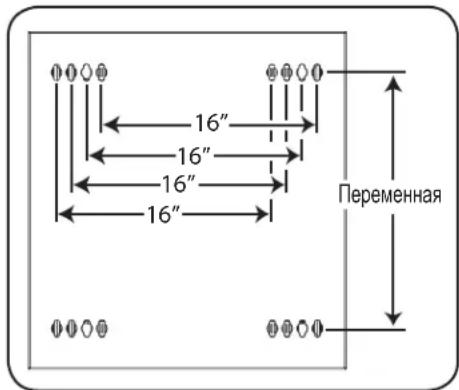
B BaaeM MoaEn CXema paacnoJooKeHHN MONTaXhBix OTBepCTn MOKeT 6bTyroI.
7. установka оборуданья
BnmaHHe He yctaHaBnBaTe o6opyoBaHne Do o6ecneeyHn yToCHNBOCTn WkaPc. Chayana cJeIyET ycTaHaBnBaTb 6Oone TjKeJe O6opyoBaHne, pa3meaer Ero B HxKHe YacTHn WkaPc. YCTaHaBnBaTe o6opyoBaHne HaHHa C Hn3a WkaPc no HappBHeHIO BBepx - Hn B KOem cnyae He Haobopot. Ppi HCNoB30BaHN HAnpaBnHOxN DnE yCTaHOBKn O6opyoBaHn CObHDAte OCtPOXHOCTb Pn IN BvDnHexHn. He BvDbHraTe 6Oone OhoN rpynnb1 HanpaBnHOxN OHOBpeMeHNO. CtapaiTeCb He BvDbHraTb HAppaBnHOuNe dner yCTaHOBKn o6opyoBaHn, pacnoJoxHHBe B cepxHe YacTHn WkaPc.
Ppumeyaue. DAnHbModynb Nocmaenmec 8 KomnneKe m EbuHMaMu dByx paunuHbx munoe nmo Hmmaxa o6pyoohua. MoHmaxhBie eHmbI cepHozo ueema cnedyem uonb3oamb 8 mom cnyae, ecnu bbl kpenume c6oe obopyoehue K moi cmopohe MOHaxHO Hapraenoue, komopar Chabxena KaadpaHbIMU omepcmmu. MoHaxhBle eHmbI cepe6puo2o eema cnedyem uonb3oamb 8 mom cnyae, ecnu bbl kpenume c6oe obopyoehue K moi cmopohe MOHaxHO Hapraenoue, komopar Chabxena pe3b6obmu omepcmmu.
PpumueaHue.Keapamhhe omepmua cepedune kaozdo zu kapa npohymepoahbu u meom heonbwyu hadceky dya yod6mba pactno3haaun. B kaxdOm omdenbHom ukafpy uemeemcme mo, 2e paonanaemc hymepoaHHoe omepcmue u omepcmua, haxoayuec herocpecmehno had u noHUM.

7.1 YctaHOBKa NJI CHrTHe 3aKJaIbIX raeK
BHIMAHHE! OTRb6kPOMOK 3aKnAdbHX raeKdoNkhBt 3aenTb63 60koBle, a He BepxHn HnxHKn Kpa KBaDpTHOrO OTBepCTN B HapabLIOe. Ira oecneueHH npabInbHocTN yctahOBKn BaWero 6opydoBaHH cNe dyTe yka3aHnM, nIoxeHHbIM B coPBOHTelhOH DOKymentauu K hemy.
1 HauHnTe HymepoBaHHbIe KBaIpaTHbIe OTBepCTN B MOHTaXhIX HAnpabJIHOxN, KOtOpbe Bbl PnAHHpyTe IcNoIb3ObaTb IJy UcTaHOBK CBOero O6OpYDoBaHN. BCTaBte 3akJaHbIe raIKN (u3 KOMIIeKTA) B KBaDpaTHbIe OTBepCTN C cJIbIO ObcpeHEnr TOck KNpeINHe rJIMoHTaXhIX BNTOB (IOCTaBnEMyB KOMIIeKTe).PumueHue. JnOnpeDeHnEr HeobXoDMoZo KOnUeCmea 3aKnadhix 2aek U Mcm ux ycmaHoeku O3HaKOMbMecb C conpoBodumbHou DokyMeHmauei K eauemy O6OpOBeaHuO.
2 IpoodeHbTe OINH 3O OTNIOB KpOMK 3aKnadHO raIKu YpeE3 KBaDpaTHOE OTBepCTne CBHYtpENHei CTOpOHb MOHTaXHOH HapPABnHOueI. BdaBITE ee NO HanpaBNeHHo K60KObMy KpaIO KBaDpaTHORO OTBepCTn. OTN6bI KpOMK 3aKnadHbIX RaEK DOnKbI 3aCenIIbTcR 3a 60KOBBe, a He BepxHn n HIXHN KpaARKBaDpaTHORO OTBepCTn.
3 CnErKa Hauabnte Ha 3aknaDHyu raKy no 6okam, YTO no3BONHT dpyromy OTR6y KpOMKn npOtn Yupe3 KBaDpaTHoe OTBepCTne. Ipn npABInbHoi ycTaHOBKe 3aknaDHO raKu oBa OTN6a ee KpOMOK BbIaOTcra C obpaTHo CTOpHO bKaDpaTHoro OTBepCTnHa BHeUHe NObEPXHOCTn MOtAXHO HapRaBnIOuei. NOBToprTe warr 1-3 do Tex nop, noka He 6ydyT yCTaHOBNeHb BCE Heo6xOumble 3aknaDhbie raKu.
4 NocIe yCTaHOBKn Heo6xOaMbX 3aKnaAdHbX rAek npKpeNte CBoE o6OpyDobAHne K CToeUHO HnpaBIAHOSe C NOMOsbIO NOCTaBIAReMbx B KOMIIKeTE MOHTaXHbIX BnHTOB UePHOrO UBeTa I YaIweo6pa3HbX WaiB. IomeCTte YauWeo6pa3HbIe Wai6bI MeKdy BnHTAMn M OHTaXHbIMN KPOHtTeHAMn DnI KpeJIeHnA o6OpyDobAHnI.
PumueaHue. Bae obopyoohue maKx me Kxem noCmaenb8 KOmnekme c MOHmaxhbuM npucno6nEHmu. Ipepe ycmaHOeKou c0e2o obopyoohua OsHaKOMbmcB c yka3AHmu NO MOHaxy, noCmaenbEmBu E KomneKeMe C HUM.
IIN3BneHnnaKnaHbIXraek nobTopte warn 1-3 B o6paTHOM npAke
PpumeyaHue. Ppu kehaHuu ycmahoeky u 3aeneeHue 3aknaedbix aaeK moxho npou3eoodmb c nomoubocneuaIbHOO uHcmpyMeHma (e KOMPNeKM nocmaeku He exoDum).
7. YctaHOBka nnn CHrTne 3aKJaadhbIX raeK (npoDoJIxHene)
7.2 AnbtephatNBbI cnoc06 MOtaxa: MoHTaxHa HnpaBIAOuaC pe3b6OBbIMN OTBepCTnAMN
BHIMAHNE: He nbitaTecb perynpoBaTb HappaBnaOuIe npy yctaHOBneHOM B ukaΦ o6opyoBaHn. He nbitaTeCb nCnoB3OBaTb HappaBnaOuIe 6e3 yctaHOBKn BuHTOB (no 2 Ha kaxdyu HappaBnaOuIyHo).
Ha 3aBoJe-3rTOBnTeJe 2 MoHTaxKbIe HAnpabNIOUne yCTaHOBNeHb IO KpeTneHne O6OpOBOAHm C NcNoIb3OBAHmE To CTOpOHb HAnpABJIOUe, KOtOpA CHa6KeHa KBaDpaTHbIMN OTBepCTnMn. IJIpePexOJa Ha NcNOB3OBAHme ToI CTOpOHb MOHTAXHOH HAnpABJIOUe, KOtOPa CHa6KeHa pe3b6oBbIMN OTBepCTnMn, HeoXoDMMO BblONHb TcNeIyOuine DeIcTBnIa:
1 KaKaJdHa HApBaBnIoua PnpKpeJIeHa K KopNcy UkaFa npn NmOuN DByX BHTOB, OINH 3 KOTOpbIX pacNoJaTaCBA BepxHem yTpy, aDpyro-B HnKHeM. C NOMoUbIO KpeCToo6pa3HOI OTBePTKn BBePHTe BnHTbl, KOtOpble KpEnT HaPabBnIOUme K KopNcy UkaFa.
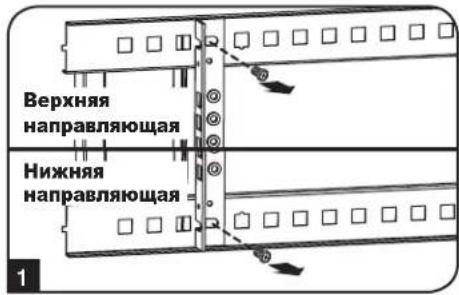
2 NomeHnIe pacnoNoXeHHe HappaBnIoox. Y6eNtEcB TOM, yTO KaKdA u3 HappaBnIOxuX pacnOraetc TaKIM oBa3OM, qTo ee cTOpHa C pe3b6oBbIMN OTBepCTnMn oBaPaeHa K nepedHe nDbepue.
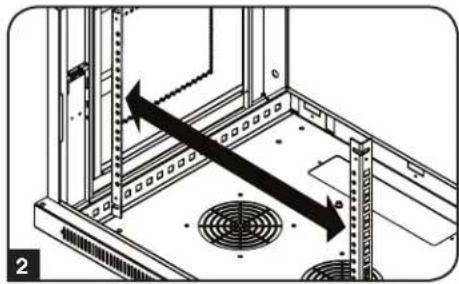
3 NOBTOHO 3AKPeHNTe MOHTaXHbIe HnPaBnIOUHe.
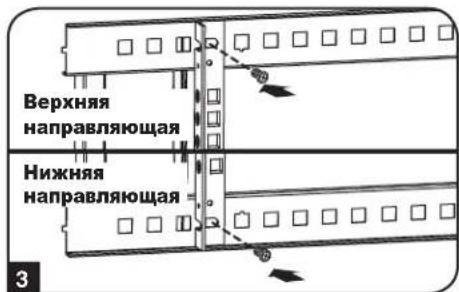
4 PnKpeNITE O6OpYOBaHHe K CToeHbIM HAnpaBIAIOUcM C NcONb3OBAHHeM BXoJUX B KOMnEKT MOHTaXbIX BVHTOB CEpe6pictoro Ubeta. IomeCTne Taueo6pa3hIe 7aIbI MeKdy BNHTAMIN MOHTaXbIM KPOHtTeHaMn DnKpeNHeHra6opyDobAHn.
PpumueaHue. B KOMnEkm NoCmaeku eaueoo obopyoehua Moay makxie exodm b MOhmaxhble npucno6bneHua. Ipeed ycmaHoekou obopyoehua 03HaKoMbmecb c yka3aHuaMu n oMhmaxy, noCmaenBmU e KomnEkm c Hum.
8. XpaHHeHne n TexHnueckoe o6cIyXnBaHne
XpaHHeHne
KaФdoJKeH XpaHnTbC B NOMeUeHmN C KOHTPOINpyEmbIM MKNPOKINMaTOM BdaI INOT NCTOHNKOB BlaIIN, 3KCTpeMaJIbHbIX TEMnepaTp, BOCnAmHeHIOxXc KInKocTe Hra3OB, 3NeKTpOpiPoBOdHbIX 3arpa3HNTeNe, PbIN IN Pnmaoro coJIneHOro CBeta. I NO Bo3MOXHOCTn XpaHnTe 5kaΦ B erO 3aBoDcKo TpaHCnOpTHoynakOBke.
CepBnchoe o6cnyKnBaHne
Ha npdykun kOMnAHm Tripp Lite daetc rpaHueHHa rapaHTn yCIOBn KOTopo n3IOKeHb B HactoIe m pyKOBOCTBe. TaKke docTyHb pa3MnHbIe nporpamm npdneBaemr rapaHTn u obcykubAHna Ha obeke T OKmAHm Tripp Lite. Ipnnoyehn 6Oee noDpoBHO INHFPOM O cepBnCHOM ocbnykubAHm nocTeTte Be6-caT KMnAHm www.triplite.com/support. Npeed Bo3BPaTOM npdykun dnoobnykubAHn, BInOnHNTe CneDyUcne DeiCTBnA:
- Pocmtpnte HnCTpykun no yctahOBke n3Kcnnyatau, n3IOKeHHbE B hactoHem pykoBodCTBe, YTO6bI y6eHTbcra, YTO npO6nmbi npOcXoJrT He n3-3a HnpabNlboHOro NoHMAMHn HnCTpykun.
- Ecnn npo6nema coxpanreTc, He obaaaiTeB n He Bo3bpaaiTe n3dene Tropobomy nopeHky. Bmcto 3toro nocetite Be6-caT www.triplite.com/support.
- Ecnn npepehenna np6bemblTre6yecpmoHT, nocetnte Be6-caT Www.triplite.com/support n nepeinnte no cbbjke Product Returns (Bo3bpat npdykun). 3decb moKHO cdenaTb 3anpoc o Homepe pa3pehenna Ha Bo3bpat (RMA), KOTOpB Heo6xOIM dnn peMOHTa. B 3toI npocToHnTEPAKTHBOH Ofme Huxho 6ydt 3anolnlb Homep Moe nn yctpoCTBa n erc cepniHb Homep, a TAKKe 67uO INFCOPMaHIO O nokynatele. Homep RMA Bmecte C nHCTpykunmno OTnpabke 6ydt BcIaNn Ho 3neKtpoHHo Noute. IIO6bIe NOBPexdEHNRA pOkykun (PnMble, KOCBEHbte, yMbIeHHbe IIN Noobchte, nOyehhBnBe B P3yblTaTe TpaHCnopTPOBKN B KomnHIO Tripp Lite nB yONHOMOeHHb CEHTP, rapaHTne He NOKpbBAOTcR. TpaHCnopTPOBKA npOyukun B KomnHIO Tripp Lite nN ABTOPN3OBaHHb CEpBCHb CEHTP, DOnJXHa 6bITb ONNaeha OTnpaBHTenEM. Ha BHeuHcSTOpOHe ynakOBKn HAHeCtne Homep pa3pehenna Ha BO3bpat. Ecnn npOyKT haoDNTca H raPANTM, BNOKTe KOJIIO Yeka IIIN DOKUMeHTa Ha npO6peTHe. DoCTABKy npOyukun nIg OcnyKBaHHa ocUeCTBnIe Tepe3 3actpaxoBAHHb XpeBO3HKnOB no aDpecy, NOyueHHOMY Bmecte C pa3pehenm Ha BO3bpat.
9. rapaHTnHbIe 6o3aTeJIbCTBa
OrpaHnueHHra rapaHTna 5 net
PpOdaeU rapaHTpyETIg daHnHO rpoyTA OTCYCTBne DepeKToB MaTePnaIax N TexHOIINX B TeueHne 5 net OT daTb nepBnHIO npOaONBM IcNOJIb3OBAHN ERO B COOTBETCBM CO BCEMnpIMHeHMblm HnCTpyKJAMM. B cnyae BbIaJIeHNE JDepeKTOB, C83aHHbIX CO CBOITBaM MATEPNAI INI KAcE TBM 13r0tOBHeHn DaHnHO nDIIENB Yka3AHNO nepoDA, PpOdaue oc83yct, NO CBOEMY yCMOTpeHIO, POBECTn 3A CBOI CHET erO pMOHT INI 3aMeHy. 3TA FAPAHNTI HE PACNPOCTPAHRETC HA HOPMALbHbI IN3HOC INI IIOBPEXJEHNE IPOyKA TBA PE3yIbTATE HECYACTHO TCIyAR, HEPABINbHO IcNoJIb3OBAHN, H6PEXKHTOO OBaEHN INI IPEHE6PEXEHN IIPABINAMN 3KCNPTALUN. IPODALEU HE 3AIBJRET HMKAKNX IPAHTNI, KPOME IBOH BO bIPAXEHHbX 3DECb. 3A NCKLIQUEHNEOM OPAHHEHNI, 3ATPEUeHHbIX DEIECTBYOUM 3AKOHODATENBOM, BCE IOJDA3YMBAEMbIE TAPAHNTNI, BKIIHOAY BCE TAPAHNI PPINOHOCTN K IPODAKE INI IONHOCTN INI KOHKPETHO TIPIMEHENIA, ORPAHUYEHBI NO CPOKY DEICTBnI TAPAHNTNIbIM PEPNOOM, YkA3AHBBIM BbiIE; IN 3TA TPAHTNIR BHO NCKIOUAET BCE CNYAHbIE INI NIO5OHBIE PNOBEXDEHNI. (PpImeHMoe 3akoHDateNBCTBO HeKOTopbIX CTpaH anPeaaet OrpAHueHne cpoKa dTeCTBNIO pdoa3ymBaemor rapaTHIN; Bdpynx ctpaHq 3anpeuEO hNckIOUeHne INI ORpAHueHne DEiCTBnRA rapaHTMN B oTHoouHm CNayauh INI INoCnoJeuX NobpexJeHN. B C83n C tTM, BIIwenepeHCNEHbIE OrpAHUEHNI INCKIOUeHNe DEiCTBnR HAOTOnaTaBnra RAPAHNTN MOYr OKa3aTbc HepIMeHNMBIM B BAWe IM KOKePHTOM Cnuae. Hactoar aRAPaHTN IIpeocTabnnrBam ONpeDeneHbI OpDInCeKne npaba, KOtbpie MOr7 bO donoiHeNb DpymIM npabAMn BzABCIMOCTN TO opncndkiun.
BHIMAHVE:peepncno3oBAMHem HactoJero Iaednna Kajdbn nonb0aTeIb dokhen camocToTbHO onpeJeNb cTeenb erO npirodHoctn dnp npEonoraeMOro npmeHeHn, a taKxe CTeneH b63oNaChOCTN TAKORo npimeHeHn. TaK kAc HactoJee u3deNe IMeET MHOKeCTBO INHDbUyAebhix pImMeHn, npOn3BODteJIb He daet rapaHTmHbIX o63aTeBCTB B OTHoWeHn PpiroDHOCTn HactoJuxx u3deN DnT ETex Nm NHBx KOHKPeTHbx npimeHeHn.
KoMaHnri Tripp Lite noctoHHo coBepueHCTByET CBOHO npOykuu. B CBA3N C 3TMM BO3MOXHO n3MeHeHne TexHmecx xapaKTePcTik 6e3 npedbapntbHoroybeDomHeHn.


Manufacturing Excellence.
1111 W. 35th Street, Chicago, IL 60609 USA www.triplite.com/support
- Swinging Wall-Mounted SmartRack® Enclosures
- Table of Contents
- PROTECT YOUR INVESTMENT!
- Important Safety Instructions
- SAVE THESE INSTRUCTIONS
- Overview
- Feature Identification
- Enclosure Installation
- Caution! Read All Instructions andWarnings Before Installation!
- Preparation
- Unpacking
- Use at least two people to unpack the enclosure.
- Never extend more than one component from the enclosure at a time.
- Warning: Never attempt to lift or install without adequate help. Do not try lifting the enclosure alone.
- Ground Connection
- Enclosure Configuration
- Door Locks
- Cable Access and Management
- Reversing the Enclosure
- Enclosure Configuration (continued)
- Mounting Rails
- Adjusting Mounting Rail Depth
- Wall Mounting the Enclosure
- Mounting
- Equipment Installation
- Installing or Removing Cage Nuts
- To Remove Cage Nuts, Reverse Steps 1-3
- Equipment Installation (continued)
- Alternate Mounting: Tapped Hole Mounting Rail
- Storage and Service
- Storage
- Service
- Warranty and Product Registration
- 5-Year Limited Warranty
- Product Registration
- PykoBODCTBO NOJIb3OBaTeIa
- Baxhble yka3aHnno TExHnke 6e30nacHOCTN
- COXPAHNTE HACTOUIE YKA3AHNIA
- Kpatkoe onncahne
- 3.Cxema pacnoIoxeHnApyHKuOHaJIbHbIX 3JIeMeHTOB
- 4.Порадok yctahOBkn wkaфa
- BHMaHHe! Npeed hauanom yctaHOBKn BHMaTeIbHo n3yUHTe BCE yka3aHnI npedynpeJxdeHnI
- NpOaTRObKa
- PacnaKOBka
- IpaacnakobbBaHna Wkaopa Tpe6yetc He MeHee DByx YenOBek.
- HnBkoemcnyae He n3Bnekaite n3 ukaΦa 6oJIee ODHOrO KOMNoHErTa ODHOBpeMeHHo.
- BHMaHHe! Hn B KOem cIyue He nbItaTeCb n3BneKaTb uKaΦ u3 ynaKOBKn nn yCTaHaBJIbAtb ero 6e3 noJHOceHHo nOmoU. He nbItaTeCb nOdHMaTb uKaΦ B ODNHOuyk.
- 3a3eMJIeHne
- KomnohoBka wkaqpa
- 5.1Дверныезамки
- OTBepCTne Inra BbOda Ka6eJeN n ONTHMn3aunna Ka6eJbHbIX CoeMHHeHH
- IpebopaunbaHne ukaFa
- KomnoHObKa WkaΦa (npoJxHne)
- MoTαxHbIe HappaBnIoune
- PerynnpobKa rJy6HbMoHTaXHbIX HappaBriaUx
- 6.ПорадokнагенHoroMOHTaxaшkaфа
- MoThax
- установka оборуданья
- YctaHOBKa NJI CHrTHe 3aKJaIbIX raeK
- IIN3BneHnnaKnaHbIXraek nobTopte warn 1-3 B o6paTHOM npAke
- YctaHOBka nnn CHrTne 3aKJaadhbIX raeK (npoDoJIxHene)
- AnbtephatNBbI cnoc06 MOtaxa: MoHTaxHa HnpaBIAOuaC pe3b6OBbIMN OTBepCTnAMN
- XpaHHeHne n TexHnueckoe o6cIyXnBaHne
- XpaHHeHne
- CepBnchoe o6cnyKnBaHne
- rapaHTnHbIe 6o3aTeJIbCTBa
- OrpaHnueHHra rapaHTna 5 net
Brand : Tripp Lite
Model : SmartRack SRW12US
Category : Electrical cabinet