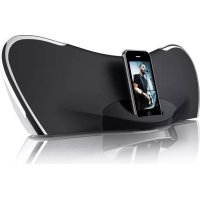
CSMP145 - Speaker COBY - Free user manual and instructions
Find the device manual for free CSMP145 COBY in PDF.


| Product Type | Speaker |
| Brand | COBY |
| Model | CSMP145 |
| Dimensions (L x W x H) | 11.2 x 40.4 x 15.7 cm |
| Power Supply | AC adapter input 100-240V~50/60Hz, output DC 20V, ~1.8A |
| Output Power (RMS) | 10 W x 2 |
| Frequency Response | 40 - 20,000 Hz |
| Impedance | 4 Ω |
| Auxiliary Input | 3.5 mm stereo jack |
| iPod/iPhone Compatibility | iPhone 3GS, 3G, iPhone; iPod classic, touch, nano (different generations), mini, etc. |
| Main Features | Butterfly™ sound system, universal dock, bass enhancement, adjustable ambient lighting, remote control |
| Package Contents | CSMP145, power adapter, remote control, 3.5 mm auxiliary cable, user manual |
| Care and Cleaning | Clean with a dry cloth. Do not use liquids or aerosols. |
| Safety | Do not open the device, do not expose to water or moisture, unplug before cleaning, use only the provided adapter. |
| Remote Control Battery | 1 CR2025 battery (included) |
Frequently Asked Questions - CSMP145 COBY
User questions about CSMP145 COBY
0 question about this device. Answer the ones you know or ask your own.
Ask a new question about this device
Download the instructions for your Speaker in PDF format for free! Find your manual CSMP145 - COBY and take your electronic device back in hand. On this page are published all the documents necessary for the use of your device. CSMP145 by COBY.
USER MANUAL CSMP145 COBY
About the Remote Control Battery 9
GETTING STARTED 10
Connections 10
Connecting Power 10
Connecting an iPod or iPhone 10
Connecting an Auxiliary Device 11
Basic Controls 11
USING IPOD/IPHONE MODE 12
Controls 12
Browsing iPod/iPhone Menus with the Remote 13
USING AUX MODE 14
Controls 14
SPECIFICATIONS 15
SUPPORT 16
SAFETY & REGULATORY STATEMENTS 17
Thank You

Thank you for purchasing a Coby® CSMP145 Vitruvian™ Sound System for iPod® and iPhone®. Please read this manual carefully before using this device and retain it for future reference.
Package Contents
CSMP145
Power adapter
Remote control
3.5mm auxiliary cable +
Instruction manual
If any of the above items are missing, please contact the dealer from whom you purchased this product.

This package may contain plastic bags or other materials that pose a hazard to children. Be sure to safely dispose of all packing materials after opening.
Features
Premium sound system designed for iPod® & iPhone®
Built-in Universal dock charges and plays your iPod/iPhone
Bass Boost circuitry for low end frequency enhancement
Supports iPod shuffle and other portable players with a 3.5mm audio connection
Adjustable ambient lighting
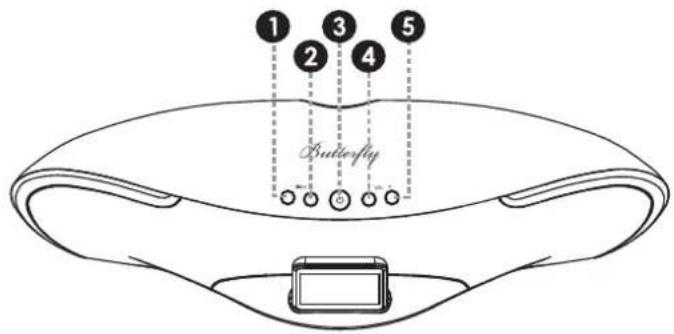
CSMP145 at a Glance

Main Unit
| 1 [Light -] Press to decrease the intensity of the background light. |
| 2 [Light +] Press to increase the intensity of the background light. |
| 3 [Power] Press to turn the unit on or off. |
| 4 [Volume -] Press to decrease the volume level. |
| 5 [Volume +] Press to increase the volume level |
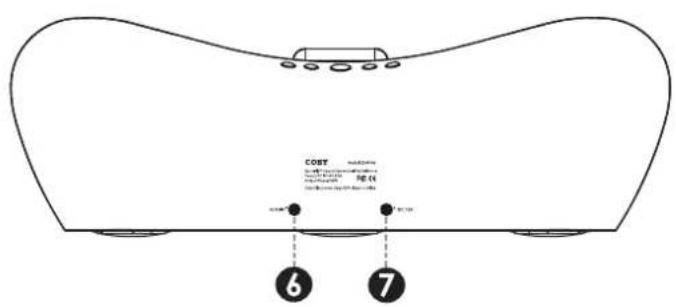
| 6 | AUX IN 3.5mm | auxiliary connector. Use a 3.5mm auxiliary cable to connect portable audio devices with a 3.5mm headphone output (e.g., iPod shuffle, Coby MP3 players). |
| 7 | DC IN Power c | connector. Use the AC adapter to connect to an AC 100-240V power outlet. |
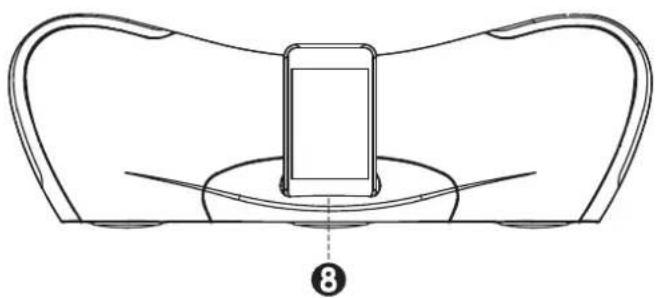
| 8 | Universal Dock | Dock for iPod® and iPhone® Connector for your compatible iPod or iPhone. |
Remote Control
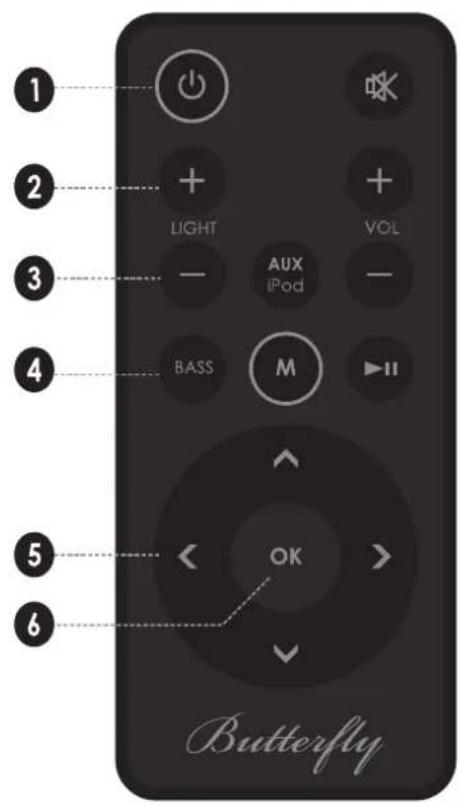
| 1 [POWER] Press to turn the unit on or off. |
| 2 [LIGHT +] Press to increase the intensity of the background light. |
| 3 [LIGHT -] Press to decrease the intensity of the background light. |
| 4 [BASS] Press to turn the Bass Boost enhancement on or off. |
| 5 [LEFT] Press to skip to the previous track.Hold to scan in reverse quickly through the current track. |
| [RIGHT] Press to skip to the next track.Hold to scan forward quickly through the current track. |
| [UP] Use to browse iPod® or iPhone® menus. |
| 6 [OK] Press to enter an iPod or iPhone menu selection. |
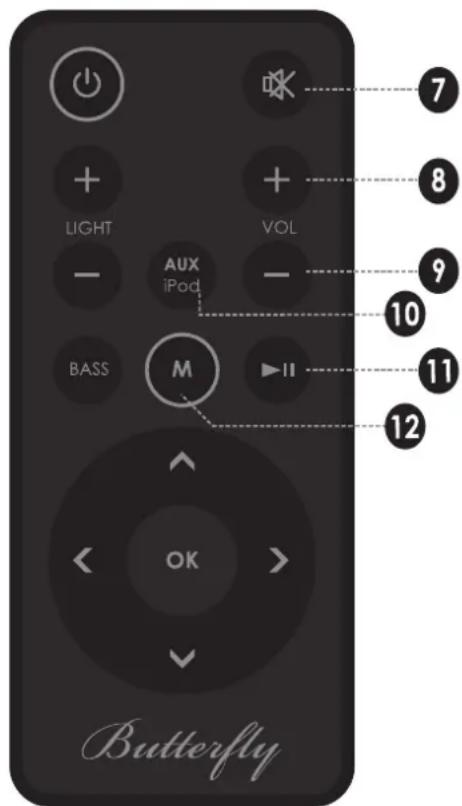
| 7 [MUTE] Press to disable or enable speaker output. |
| 8 [VOL+] Press to increase the volume level. |
| 9 [VOL-] Press to decrease the volume level. |
| 10 [AUX/iPod] Press to switch between AUX and iPod modes. |
| 11 [Play/ Pause] Press to start or pause iPod or iPhone playback. |
| 12 [M] Press to access the iPod or iPhone menu, or to return to a previous screen. |
About the Remote Control Battery
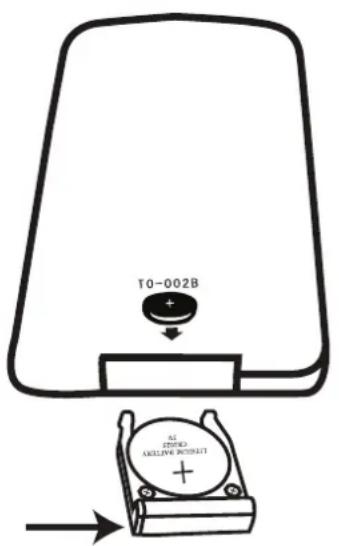
The remote control is powered by one (1) CR2025-type battery. Before using the remote, be sure to remove the plastic protective tab from the battery compartment.
To replace the battery:
Squeeze the tab of the battery compartment 1. to the right while drawing the compartment out.
Remove the battery and replace it with a 2. new "CR2025" lithium battery.
Replace the compartment.3.

Getting Started
Connections
Connecting Power
This unit is powered by an AC adapter.
Connect one end of the included AC adapter to an AC 100-240V 50 / 60Hz mains outlet. Connect the other end to the DC IN connector located on the rear of the unit.

Do not connect the power adapter to a power outlet other than that which is indicated here or on the label as this may result in the risk of fire or electric shock.
Do not handle the power plug with wet hands. Doing so may cause electric shock.
Connecting an iPod® or iPhone®
If you have a compatible iPod or iPhone, you can play it through the speakers of the CSMP145.
Compatible iPod/iPhone models are listed in the Specifications section of this manual.

For the latest product information and specifications, please visit the Coby Electronics website at www.cobyusa.com.
To connect your iPod/ iPhone:
- If you have a dock adapter cartridge, seat the adapter firmly in the Universal Dock.
- Plug your compatible iPod/iPhone into the Universal Dock.

Dock adapters are provided by Apple with their recent iPod models.
Compatible iPod or iPhone models will be charged when connected.
Connecting an Auxiliary Device
If you have an audio device with a 3.5mm headphone out or line-out jack, you can play it through the speakers of the CSMP145.
To connect your auxiliary audio device:
Connect one end of a 3.5mm auxiliary cable 1. to the headphone out/line-out jack of the audio device.
Connect the other end of the cable to AUX 2. IN connector located on the rear of the CSMP145.
Basic Controls
| To do this... ...do this. | |
| Turn the unit on or off Press [POWER] | |
| Change between iPod/iPhone and AUX playback mode | Press [AUX/iPod] |
| Adjust the volume level Press [VOL +] or [VOL -] | or |
| Start, pause, or resume iPod/ iPhone playback | Press [Play/Pause] |

When the unit is in iPod mode, you may use the controls of your iPod/ iPhone directly.
Using iPod®/iPhone® Mode
To listen to your iPod or iPhone, simply place your iPod/iPhone in the Universal Dock.
The CSMP145 will turn on automatically.
Music on the iPod/iPhone will start playing ^+ automatically.

Press [Play/Pause] to start music playback if it does not start automatically.
Controls
When an iPod/iPhone is connected to the Universal Dock and the CSMP145 is in iPod mode, the following controls are available.
| Remote Key Function |
| [Play/Pause] Start or pause/resume playback. |
| [RIGHT] Skip to the next track. |
| [LEFT] Skip to the previous track. |
| Remote Key Function | |
| Hold [RIGHT] | Scan forward quickly through the current track. |
| Hold [LEFT] | Scan in reverse quickly through the current track. |
| [VOL +] | Increase the volume level. |
| [VOL -] | Decrease the volume level. |
| [MUTE] | Disable or enable speaker output. |
| [BASS] | Turn the Bass Boost enhancement on or off. |
| [AUX/iPod] | Press to switch between AUX and iPod modes. |
Browsing iPod/iPhone Menus with the Remote
Some functions of your iPod/iPhone can be controlled with the CSMP145 remote control.
| Remote Key | Function |
| [M] Press | to access the iPod/iPhone menu, or return to a previous screen. |
| [UP] Use | to browse iPod® or iPhone® menus. |
| [DOWN] | |
| [OK] Press | to enter an iPod or iPhone menu selection. |

For iPod touch and iPhone models, you may need to start the Music/Video player application before the remote controls will work.
Using AUX Mode
To listen to an auxiliary device, use a 3.5mm auxiliary cable to connect it to the CSMP145.
Press [POWER] to turn on the CSMP145.1.
Start playback on the auxiliary device.2.
Press [AUX/iPod] to set the CSMP145 to 3. AUX mode.

The auxiliary device must have a 3.5mm headphone out or line-out connection. Examples of an auxiliary device are iPod® shuffle and Coby® MP3/MP4 players.
Controls
When the CSMP145 is in AUX mode, the following controls are available.
| Remote Key | Function |
| [VOL +] | Increase the volume level. |
| [VOL -] | Decrease the volume level. |
| [MUTE] | Disable or enable speaker output. |
| [BASS] | Turn the Bass Boost enhancement on or off. |
| [AUX/iPod] | Press to switch between AUX and iPod modes. |

Use the controls of the auxiliary device directly to control playback.
Specifications

Please visit www.cobyusa.com for the latest product information. Design, specifications, and manual are subject to change without notice.
| Speaker Output (RMS) | 10W x 2 |
| Frequency Re-sponse | 40 – 20,000Hz |
| Impedance 4Ω | |
| Aux Input 3.5mm stereo | |
| Power Input: AC 100 | -240V ~50/60Hz |
| Output: DC 20V, ~1.8A | |
| Remote: CR2025 battery x 1 | |
| Unit Dimensions (LWH) | 4.4 x 15.9 x 6.2 in. |
| Made for* iPhone | 3GS |
| iPhone 3G | |
| iPhone | |
| iPod classic | |
| iPod touch | |
| iPod touch 2G | |
| iPod nano | |
| iPod nano 2G | |
| iPod nano 3G | |
| iPod nano 4G | |
| iPod nano 5G | |
| iPod 5G | |
| iPod photo | |
| iPod 4G | |
| iPod 3G | |
| iPod mini |
- Please visit www.cobyusa.com for the latest iPod/iPhone compatibility information.
Support

If you have a problem with this device, please check our website at www.cobyusa.com for Frequently Asked Questions (FAQ) and product updates. If these resources do not resolve the problem, please contact Technical Support.
Address
Coby Electronics Technical Support
150 Knowlton Way
Savannah, Georgia 31407
techsupport@cobyusa.com
Web
www.cobyusa.com
Phone
800-727-3592
Monday to Friday, 8:30AM-9:00PM EST
Saturday, 9:00 AM-5:30PM EST
718-416-3197
Monday to Friday, 8:00AM-5:30PM EST
Safety & Regulatory Statements

CAUTION
WARNING: SHOCK HAZARD. DO NOT OPEN. AVIS: RISQUE DE CHOC ELECTRIQUE. NE PAS OUVRIR

CAUTION: TO REDUCE THE RISK OF FIRE AND ELECTRIC SHOCK, DO NOT REMOVE THE COVER (OR BACK) OF THE UNIT. REFER SERVICING ONLY TO QUALIFIED SERVICE PERSONNEL.
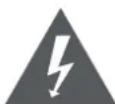
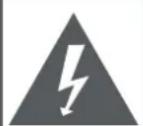
The lightning flash with arrowhead symbol within an equilateral triangle is intended to alert the user to the presence of uninsulated "dangerous voltage" within the product's enclosure that may be of sufficient magnitude to constitute a risk of electric shock.

The exclamation point within an equilateral triangle is intended to alert the user to the presence of important operation and servicing instructions in the literature accompanying the appliance.

For recycling or disposal information about this product, please contact your local authorities or the Electronics Industries Alliance: www.eiae.org.
For Customer Use:
Enter below the serial number that is located on the rear of the unit. Retain this information for future reference.
Model No.
Serial No.
WARNING: To prevent fire or shock hazard, do not expose this device to rain or moisture. Dangerous high voltage is present inside the enclosure. Do not open the cabinet.
CAUTION: To prevent electric shock, match wide blade of plug to wide slot of outlet and fully insert.
NOTE: This product contains electrical or electronic materials. The presence of these materials may, if not disposed of properly, have potential adverse effects on the environment and human health. Presence of this label on the product means it should not be disposed of as unsorted waste and must be collected separately. As a consumer, you are responsible for ensuring that this product is disposed of properly.
FCC Statement:
This device complies with Part 15 of the FCC Rules. Operation is subject to the following two conditions:
(1) This device may not cause harmful interference, and
(2) This device must accept any interference received, including interference that may cause undesired operation.
Note: This equipment has been tested and found to comply with the limits for Class B digital devices, pursuant to Part 15 of the FCC rules. These limits are designed to provide reasonable protection against harmful interference in a residential installation. This equipment generates, uses and can radiate radio frequency energy and, if not installed and used in accordance with the instructions, may cause harmful interference to radio communications. However, there is no guarantee that interference will not occur in a particular installation. If this equipment does cause harmful interference to radio or television reception, which can be determined by turning the equipment off and on, the user is encouraged to try to correct the interference by one or more of the following measures:
Reorient or relocate the receiving antenna.
Increase the separation between the equipment and receiver.
- Connect the equipment into an outlet on a circuit different from that to which the receiver is connected.
Consult the dealer or an experienced radio/TV technician for help
Use of shielded cable is required to comply with Class B limits in Subpart B of Part 15 of the FCC rules.
Do not make any changes or modifications to the equipment unless otherwise specified in the manual. If such changes or modifications should be made, you could be required to stop operation of the equipment.
Warnings and Precautions
To prevent any injuries, the following safety precautions should be observed in the installation, use, servicing and maintenance of this equipment. Before operating this equipment, please read this manual completely, and keep it nearby for future reference.
Important Safety Instructions
Read Instructions: All the safety and operating instruc-1. tions should be read before the product is operated.
Retain Instructions: The safety and operating instruc-2. tions should be retained for future reference.
HeedWarnings: All warnings on the product and in 3. the operating instructions should be adhered to.
Follow Instructions: All operating and usage instruc-4. tions should be followed.
Do not place the equipment on uneven or unstable 5. carts, stands, tables, shelves etc. The equipment may fall, causing serious injury to children or adults and serious damage to the equipment itself. Always place the equipment on the floor or on a surface that is sturdy, level, stable and strong enough to support the weight of the equipment.
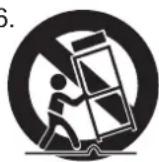
Use only a cart or stand recommended 6 by the manufacturer. This equipment and recommended cart or stand should be handled with care. Quick stops, excessive force, and uneven surfaces may cause the equipment and cart/stand to overturn.
Do not disable the 3-wire grounding type plug. The grounding pin on the 3-prong plug is an important feature. Removing the grounding pin will increase the risk of damaging the equipment.
If you can not fit the plug into the electrical outlet, con-8.
tact an electrician to install a grounding outlet.
- Always operate this equipment from the type of power source indicated on the rear of the serial/model plate.
- Never overload wall outlets and extensions.
- Use and handle the power cord with care. Do not place any heavy objects on the AC power cord.
- Do not pull the AC power cord. Do not handle the AC power cord with a wet hand.
Do not touch the power cord and antenna cable during 13. lightning.
- Remove the plug from the wall outlet, if the equipment will not be used for a long period of time.
Do not place, use or handle this equipment near wa-15.
Never expose the equipment to liquid, rain, or mois-16. ture. Seek service if any of the above is spilled into the equipment.
Do not expose the equipment to extreme temperature 17. or to direct sunlight, as the equipment may heat up and suffer damage. 25
Do not install the equipment near any heat sources 18. such as radiators, heat registers, stoves, or any other apparatus that might produce heat.
Do not attempt to service the equipment yourself.19.
Opening and removing the covers may expose you 20. to dangerous voltage or other hazards and may void your warranty. Refer service to qualified personnel.
Do not place or drop any other objects on top.21.
Do not insert anything into the ventilation holes of your 22. equipment. Inserting any metal or flammable objects may result in fire or electric shock.
Protect the power cord from being walked on or 23. pinched particularly at plugs ,convenience receptacles, and the point where they exit
Refer all servicing to qualified service personnel. Ser-24. servicing is required when the apparatus has been damaged in any way, such as power-supply cord or plug is damaged, liquid has been spilled or objects have fallen into the apparatus, the apparatus has been exposed to rain or moisture, does not operate normally, or has been dropped.
- Always remove the power cord from the outlet before cleaning the equipment.
Never use liquid or aerosol cleaners on the equipment. 26. Clean only with a soft dry cloth.
- Only use attachments/accessories specified by the manufacturer.
Where the mains plug or an appliance coupler is used 28. as the disconnected device, the disconnect device shall remain readily operable.
Listening with Earphones
Listen at moderate volumes to avoid hearing damage.
If you hear no sound during playback, do not turn the Volume up as the music may suddenly begin at a high Volume. Excessive sound pressure from earphones and headphones can cause hearing loss.
To avoid damaging your ears, adjust the Volume to the lowest level before playback, and turn up to the desired level when playback has started.
Legal and Trademark Notices
Coby is a registered trademark of Coby Electronics Corporation. All other trademarks and logos are property of their respective owners unless indicated otherwise.
"Made for iPod" and "Made for iPhone" mean that an electronic accessory has been designed to connect specifically to iPod or iPhone, respectively, and has been certified by the developer to meet Apple performance standards. Apple is not responsible for the operation of this device or its compliance with safety and regulatory standards.
iPod and iPhone are trademarks of Apple Inc., registered in the U.S. and other countries.
Please visit www.cobyusa.com for the latest product information. Design, specifications, and manual are subject to change without notice.
Coby Electronics Technical Support
150 Knowlton Way
Savannah, Georgia 31407
Correo Electrónica
techsupport@cobyusa.com
Web
www.cobyusa.com
Telfono
800-727-3592
De Lunes a Viernes, 8:30-21:00 EST
Sabado, 9:00-17:30 EST
718-416-3197
De Lunes a Viernes, 8:00-17:30 EST
Read Instructions: All the safety and operating instruc-1. tions should be read before the product is operated.
Coby Electronics Technical Support
150 Knowlton Way
Savannah, Georgia 31407
techsupport@cobyusa.com
Site Web
www.cobyusa.com
Telephone
800-727-3592
Coby Electronics Corp.
1991 Marcus Ave, Suite 301
Lake Success, NY 11042
www.cobyusa.com
www.ecoby.com
Coby is a registered trademark of Coby Electronics Corporation. Printed in China.

- Thank You
- Package Contents
- Features
- CSMP145 at a Glance
- Remote Control
- About the Remote Control Battery
- Getting Started
- Connections
- Connecting Power
- Connecting an iPod® or iPhone®
- To connect your iPod/ iPhone:
- Connecting an Auxiliary Device
- To connect your auxiliary audio device:
- Basic Controls
- Using iPod®/iPhone® Mode
- Controls
- Browsing iPod/iPhone Menus with the Remote
- Using AUX Mode
- Specifications
- Support
- Address
- Web
- Phone
- Safety & Regulatory Statements
- CAUTION
- For Customer Use:
- FCC Statement:
- Warnings and Precautions
- Important Safety Instructions
- Listening with Earphones
- Legal and Trademark Notices
- Correo Electrónica
- Telfono
- Site Web
- Telephone
- Coby Electronics Corp.
Brand : COBY
Model : CSMP145
Category : Speaker