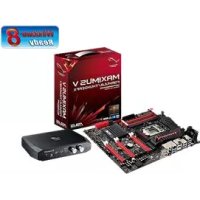
Maximus V FormulaThunderFX - Motherboard ASUS - Free user manual and instructions
Find the device manual for free Maximus V FormulaThunderFX ASUS in PDF.


| Product type | Gaming motherboard |
| Brand | ASUS |
| Model | Maximus V Formula ThunderFX |
| Form factor | Extended ATX (30.5 cm x 25.7 cm) |
| Chipset | Intel Z77 Express |
| Processor socket | LGA1155 for Intel Core i7/i5/i3/Pentium/Celeron 2nd/3rd generation |
| Memory | 4 x DDR3, max 32 GB, 2800 (O.C.) / 2600 / 2400 / 2200 / 2133 / 1866 / 1600 / 1333 / 1066 MHz |
| Expansion slots | 3 x PCIe 3.0/2.0 x16 (x16, x8/x8, x8/x4/x4), 1 x PCIe 2.0 x4, 3 x PCIe 2.0 x1, 1 x mPCIe (via combo card) |
| Storage | 2 x SATA 6 Gb/s (Intel Z77), 2 x SATA 3 Gb/s (Intel Z77), 4 x SATA 6 Gb/s (ASMedia), 1 x eSATA, 1 x mSATA (via combo card); RAID 0/1/5/10 |
| Integrated audio | ROG SupremeFX HD Audio 7.1 channels, 300 ohms headphone amplifier, ELNA capacitors, 110 dB S/N ratio |
| ThunderFX audio (external) | USB sound card, 120 dB SNR DAC, high-fidelity headphone amplifier, RCA inputs, noise reduction, gaming profiles |
| Networking | Gigabit Intel, dual-band Wi-Fi 802.11 a/b/g/n (2.4/5 GHz), Bluetooth v4.0/3.0+HS |
| USB | 4 x USB 3.0 (2 Intel, 2 ASMedia with UASP), 8 x USB 2.0 (including 1 dedicated ROG Connect) |
| Rear connectors | 1 x DisplayPort, 1 x HDMI, 1 x eSATA, 1 x RJ45, 1 x Optical S/PDIF (output + input), 5 x audio jacks, CMOS and ROG Connect buttons |
| ROG features | ROG Connect, USB BIOS Flashback, Fusion Thermo, Extreme Engine Digi+ 8+4+2 phases, iROG, Probelt, Extreme Tweaker, GPU.DIMM Post, BIOS Print |
| Power supply | 1 x EATX 24-pin, 1 x EATX 12V 8-pin, 1 x EATX 12V 4-pin, 1 x EZ Plug 4-pin |
| Cooling | 2 x CPU (4-pin), 3 x chassis (4-pin), 3 x optional (4-pin) |
| Electrical safety | Disconnect power before any manipulation; use an anti-static wrist strap; do not install LGA1156 processor |
| Maintenance and cleaning | Dust with a soft, dry cloth; avoid humidity and extreme temperatures |
| Spare parts and repairability | Contact your retailer or ASUS after-sales service; do not attempt to repair the power supply yourself |
| Weight (motherboard) | Approximately 1.2 kg (estimated) |
Frequently Asked Questions - Maximus V FormulaThunderFX ASUS
User questions about Maximus V FormulaThunderFX ASUS
0 question about this device. Answer the ones you know or ask your own.
Ask a new question about this device
Download the instructions for your Motherboard in PDF format for free! Find your manual Maximus V FormulaThunderFX - ASUS and take your electronic device back in hand. On this page are published all the documents necessary for the use of your device. Maximus V FormulaThunderFX by ASUS.
USER MANUAL Maximus V FormulaThunderFX ASUS
Séries MAXIMUS V FORMULA
ASUS
Carte mère
F7295
Première édition
Juin 2012
Offer to Provide Source Code of Certain Software
This product may contain copyrighted software that is licensed under the General Public License ("GPL") and under the Lesser General Public License Version ("LGPL"). The GPL and LGPL licensed code in this product is distributed without any warranty. Copies of these licenses are included in this product.
You may obtain the complete corresponding source code (as defined in the GPL) for the GPL Software, and/or the complete corresponding source code of the LGPL Software (with the complete machine-readable "work that uses the Library") for a period of three years after our last shipment of the product including the GPL Software and/or LGPL Software, which will be no earlier than December 1, 2011, either
(1) for free by downloading it from http://support.asus.com/download;
or
(2) for the cost of reproduction and shipment, which is dependent on the preferred carrier and the location where you want to have it shipped to, by sending a request to:
ASUSTeK Computer Inc.
Legal Compliance Dept.
15 Li Te Rd.,
Beitou, Taipei 112
Taiwan
In your request please provide the name, model number and version, as stated in the About Box of the product for which you wish to obtain the corresponding source code and your contact details so that we can coordinate the terms and cost of shipment with you.
The source code will be distributed WITHOUT ANY WARRANTY and licensed under the same license as the corresponding binary/object code.
This offer is valid to anyone in receipt of this information.
ASUSTeK is eager to duly provide complete source code as required under various Free Open Source Software licenses. If however you encounter any problems in obtaining the full corresponding source code we would be much obliged if you give us a notification to the email address gpl@asus.com, stating the product and describing the problem (please do NOT send large attachments such as source code archives etc to this email address).
Table des matieres
ROG Extreme Engine Digi+ II
Loadline Calibration
ROG O.C. Profile
Extreme Engine Digi+ II
Loadline Calibration
Configurations mémoire
VoussoupiezinstallerdesmodulesmémoireDDR3nontaponnéset nonECCde1Go,2Go, 4Go et8Go sur les interfaces de connexion DDR3.

| Code Description | |
| 00 | Not used |
| 01 | Power on. Reset type detection (soft/hard). |
| 02 | AP initialization before microcode loading |
| 03 | System Agent initialization before microcode loading |
| 04 | PCH initialization before microcode loading |
| 06 | Microcode loading |
| 07 | AP initialization after microcode loading |
| 08 | System Agent initialization after microcode loading |
| 09 | PCH initialization after microcode loading |
| 0B | Cache initialization |
| OC-OD | Reserved for future AMI SEC error codes |
| OE | Microcode not found |
| OF | Microcode not loaded |
| 10 | PEI Core is started |
| Code Description | |
| 11 - 14 | Pre-memory CPU initialization is started |
| 15 - 18 | Pre-memory System Agent initialization is started |
| 19 - 1C | Pre-memory PCH initialization is started |
| 2B - 2F | Memory initialization |
| 30 | Reserved for ASL (see ASL Status Codes section below) |
| 31 | Memory Installed |
| 32 - 36 | CPU post-memory initialization |
| 37 - 3A | Post-Memory System Agent initialization is started |
| 3B - 3E | Post-Memory PCH initialization is started |
| 4F | DXE IPL is started |
| 50 - 53 | Memory initialization error. Invalid memory type or incompatible memory speed |
| 54 | Unspecified memory initialization error |
| 55 | Memory not installed |
| 56 | Invalid CPU type or Speed |
| 57 | CPU mismatch |
| 58 | CPU self test failed or possible CPU cache error |
| 59 | CPU micro-code is not found or micro-code update is failed |
| 00 | Not used |
| 01 | Power on. Reset type detection (soft/hard). |
| 02 | AP initialization before microcode loading |
| 03 | System Agent initialization before microcode loading |
| 04 | PCH initialization before microcode loading |
| 06 | Microcode loading |
| 07 | AP initialization after microcode loading |
| 08 | System Agent initialization after microcode loading |
| 09 | PCH initialization after microcode loading |
| 0B | Cache initialization |
| OC - 0D | Reserved for future AMI SEC error codes |
| OE | Microcode not found |
| Code Description | |
| 0F | Microcode not loaded |
| 10 | PEI Core is started |
| 11 - 14 | Pre-memory CPU initialization is started |
| 15 - 18 | Pre-memory System Agent initialization is started |
| 19 - 1C | Pre-memory PCH initialization is started |
| 2B - 2F | Memory initialization |
| 30 | Reserved for ASL (see ASL Status Codes section below) |
| 31 | Memory Installed |
| 32 - 36 | CPU post-memory initialization |
| 37 - 3A | Post-Memory System Agent initialization is started |
| 3B - 3E | Post-Memory PCH initialization is started |
| 4F | DXE IPL is started |
| 50 - 53 | Memory initialization error. Invalid memory type or incompatible memory speed |
| 54 | Unspecified memory initialization error |
| 55 | Memory not installed |
| 56 | Invalid CPU type or Speed |
| 57 | CPU mismatch |
| 58 | CPU self test failed or possible CPU cache error |
| 59 | CPU micro-code is not found or micro-code update is failed |
| 5A | Internal CPU error |
| 5B | Reset PPI is not available |
| 5C - 5F | Reserved for future AMI error codes |
| E0 | S3 Resume is stared (S3 Resume PPI is called by the DXE IPL) |
| E1 | S3 Boot Script execution |
| E2 | Video repost |
| E3 | OS S3 wake vector call |
| E4 - E7 | Reserved for future AMI progress codes |
| E8 | S3 Resume Failed |
| E9 | S3 Resume PPI not Found |
| Code Description | |
| EA | S3 Resume Boot Script Error |
| EB | S3 OS Wake Error |
| EC-EF | Reserved for future AMI error codes |
| F0 | Recovery condition triggered by firmware (Auto recovery) |
| F1 | Recovery condition triggered by user (Forced recovery) |
| F2 | Recovery process started |
| F3 | Recovery firmware image is found |
| F4 | Recovery firmware image is loaded |
| F5-F7 | Reserved for future AMI progress codes |
| F8 | Recovery PPI is not available |
| F9 | Recovery capsule is not found |
| FA | Invalid recovery capsule |
| FB-FF | Reserved for future AMI error codes |
| 60 | DXE Core is started |
| 61 | NVRAM initialization |
| 62 | Installation of the PCH Runtime Services |
| 63-67 | CPU DXE initialization is started |
| 68 | PCI host bridge initialization |
| 69 | System Agent DXE initialization is started |
| 6A | System Agent DXE SMM initialization is started |
| 6B-6F | System Agent DXE initialization (System Agent module specific) |
| 70 | PCH DXE initialization is started |
| 71 | PCH DXE SMM initialization is started |
| 72 | PCH devices initialization |
| 73-77 | PCH DXE Initialization (PCH module specific) |
| 78 | ACPI module initialization |
| 79 | CSM initialization |
| 7A-7F | Reserved for future AMI DXE codes |
| 90 | Boot Device Selection (BDS) phase is started |
| 91 | Driver connecting is started |
| Code Description | |
| 92 | PCI Bus initialization is started |
| 93 | PCI Bus Hot Plug Controller Initialization |
| 94 | PCI Bus Enumeration |
| 95 | PCI Bus Request Resources |
| 96 | PCI Bus Assign Resources |
| 97 | Console Output devices connect |
| 98 | Console input devices connect |
| 99 | Super IO Initialization |
| 9A | USB initialization is started |
| 9B | USB Reset |
| 9C | USB Detect |
| 9D | USB Enable |
| 9E - 9F | Reserved for future AMI codes |
| A0 | IDE initialization is started |
| A1 | IDE Reset |
| A2 | IDE Detect |
| A3 | IDE Enable |
| A4 | SCSI initialization is started |
| A5 | SCSI Reset |
| A6 | SCSI Detect |
| A7 | SCSI Enable |
| A8 | Setup Verifying Password |
| A9 | Start of Setup |
| AA | Reserved for ASL (see ASL Status Codes section below) |
| AB | Setup Input Wait |
| AC | Reserved for ASL (see ASL Status Codes section below) |
| AD | Ready To Boot event |
| AE | Legacy Boot event |
| AF | Exit Boot Services event |
| B0 | Runtime Set Virtual Address MAP Begin |
| B1 | Runtime Set Virtual Address MAP End |
| B2 | Legacy Option ROM Initialization |
| B3 | System Reset |
| B4 | USB hot plug |
| B5 | PCI bus hot plug |
| B6 | Clean-up of NVRAM |
| B7 | Configuration Reset (reset of NVRAM settings) |
| B8-BF | Reserved for future AMI codes |
| D0 | CPU initialization error |
| D1 | System Agent initialization error |
| D2 | PCH initialization error |
| D3 | Some of the Architectural Protocols are not available |
| D4 | PCI resource allocation error. Out of Resources |
| D5 | No Space for Legacy Option ROM |
| D6 | No Console Output Devices are found |
| D7 | No Console Input Devices are found |
| D8 | Invalid password |
| D9 | Error loading Boot Option (LoadImage returned error) |
| DA | Boot Option is failed (StartImage returned error) |
| DB | Flash update is failed |
| DC | Reset protocol is not available |
Points de reference ACPI/ASL
| Code Description | |
| 0x01 | System is entering S1 sleep state |
| 0x02 | System is entering S2 sleep state |
| 0x03 | System is entering S3 sleep state |
| 0x04 | System is entering S4 sleep state |
| 0x05 | System is entering S5 sleep state |
| 0x10 | System is waking up from the S1 sleep state |
| 0x20 | System is waking up from the S2 sleep state |
| 0x30 | System is waking up from the S3 sleep state |
| 0x40 | System is waking up from the S4 sleep state |
| 0xAC | System has transitioned into ACPI mode. Interrupt controller is in PIC mode. |
| 0xAA | System has transitioned into ACPI mode. Interrupt controller is in ASIC mode. |
(4-pin CPU_FAN; 4-pin CPU_OPT; 4-pin CHA_FAN1-3; OPT_FAN1-3)
(24-pin EATXPWR; 8-pin EATX12V; 4-pin EZ PLUG)
Allows you to load a timing profile for Elpida Hyper chipset.
Options de configuration : [Yes] [No]
Load Tight 2x2GB Elpida BBSE Profile
Allows you to load a tight timing profile for 2x2GB Elpida BBSE chipset.
Options de configuration : [Yes] [No]
Load Tight 4x2GB Elpida BBSE Profile
Allows you to load a tight timing profile for 4x2GB Elpida BBSE chipset.
Options de configuration : [Yes] [No]
Load Loose Elpida BBSE Profile
Allows you to load a loose timing profile for Elpida BBSE chipset.
Options de configuration : [Yes] [No]
Load Tight 2x2GB PSC Profile
Allows you to load a tight timing profile for 2x2GB PSC chipset.
Options de configuration : [Yes] [No]
Load Tight 4x2GB PSC Profile
Allows you to load a tight timing profile for 4x2GB PSC chipset.
Options de configuration : [Yes] [No]
Load Loose PSC Profile
Allows you to load a loose PSC profile for PSC chipset.
Options de configuration : [Yes] [No]
Load Tight Hynix Profile
Allows you to load a tight timing profile for Hynix chipset.
Options de configuration : [Yes] [No]
Load Loose Hynix Profile
Allows you to load a loose timing profile for Hynix chipset.
Options de configuration : [Yes] [No]
Load Tight 2x4GB Samsung Profile
Allows you to load a tight timing profile for 2x4GB Samsung chipset.
Options de configuration : [Yes] [No]
Load Medium 2x4GB Samsung Profile
Allows you to load a medium timing profile for 2x4GB Samsung chipset.
Options de configuration : [Yes] [No]
Load Tight 4x4GB Samsung Profile
Allows you to load a tight timing profile for 4x4GB Samsung chipset.
Options de configuration : [Yes] [No]
Load RAW MHZ Profile
Allows you to load RAW MHZ profile for maximum clocks.
Options de configuration : [Yes] [No]
Maximus Tweak [Auto]
Options de configuration : [Auto] [Mode1] [Mode2]
Primary Timings
DRAM CAS# Latency [Auto]
Options de configuration : [Auto] [1 DRAM Clock] - [15 DRAM Clock]
DRAM RAS# to CAS# Delay [Auto]
Options de configuration : [Auto] [1 DRAM Clock] - [15 DRAM Clock]
DRAM RAS# PRE Time [Auto]
Options de configuration : [Auto] [1 DRAM Clock] - [15 DRAM Clock]
DRAM RAS# ACT Time [Auto]
Options de configuration : [Auto] [1 DRAM Clock] - [255 DRAM Clock]
DRAM COMMAND Mode [Auto]
Options de configuration : [Auto] [1 DRAM Clock] [2 DRAM Clock] [3 DRAM Clock]
Latency Boundary
Options de configuration : [Auto] [1] - [14]
tWW (DD) [Auto]
Options de configuration : [Auto] [1 DRAM Clock] - [8 DRAM Clock]
tWW (DR) [Auto]
Options de configuration : [Auto] [1 DRAM Clock] - [8 DRAM Clock]
tWWSR [Auto]
Options de configuration : [Auto] [4 DRAM Clock] - [7 DRAM Clock]
MISC
MRC Fast Boot [Enabled]
Options de configuration : [Enabled] [Disabled]
DRAM CLK Period [Auto]
Options de configuration : [Auto] [1] - [14]
Transmitter Slew (CHA) [Auto]
Options de configuration : [Auto] [1] - [7]
Transmitter Slew (CHB) [Auto]
Options de configuration : [Auto] [1] - [7]
Receiver Slew (CHA) [Auto]
Options de configuration : [Auto] [1] - [7]
Receiver Slew (CHB) [Auto]
Options de configuration : [Auto] [1] - [7]
MCH Duty Sense (CHA) [Auto]
Options de configuration : [Auto] [1] - [31]
MCH Duty Sense (CHB) [Auto]
Options de configuration : [Auto] [1] - [31]
Channel A DIMM Control [Enable Both DIMMS]
Options de configuration : [Enable Both DIMMS] [Disable DIMM0] [Disable DIMM1]
[Disable Both DIMMS]
Channel B DIMM Control [Enable Both DIMMS]
Options de configuration : [Enable Both DIMMS] [Disable DIMM0] [Disable DIMM1]
[Disable Both DIMMS]
DRAM Read Additional Swizzle [Auto]
Options de configuration : [Auto] [Enabled] [Disabled]
DRAM Write Additional Swizzle [Auto]
Options de configuration : [Auto] [Enabled] [Disabled]
GPU.DIMM Post (Infos POST GPU)
Enhanced Intel SpeedStep Technology
(Technologie EIST) [Enabled]
Permet d'activer ou de désactiver la technologie EIST (Enhanced Intel® SpeedStep Technology).
Long Duration Maintained [Auto]
Short Duration Power Limit [Auto]
Primary Plane Current Limit [Auto]
Secondary Plane Current Limit [Auto]
CPU Power Duty Control [T.Probe]
VCCSA Voltage (Voltage VCCSA) [Auto]
Skew Driving Voltage (Voltage Skew Driving) [Auto]
2nd VCCIO Voltage (2nd voltage VCCIO) [Auto]
PCH CLK Driving [Auto]
BCLK Recovery (Restauration BCLK)
Intel Adaptive Thermal Monitor
Intel(R) Virtualization Technology
Adjacent Cache Line Prefetcher [Enabled]
[Enabled] Active la fonction Adjacent Cache Line Prefetcher.
[Disabled] Désactive cette option.
CPU Power Management Configuration
Enhanced Intel SpeedStep Technology
(Technologie EIST) [Enabled]
Permet d'activer ou de désactiver la technologie EIST (Enhanced Intel® SpeedStep Technology).
Package C State Support [Auto]
Entry on S3 RTC Wake [Enabled]
Options de configuration : [Disable] [Enable]
Entry After [Immediately]
Options de configuration : [Immediately] [1 minute] [2 minutes] [5 minutes] [10 minutes] [15 minutes] [30 minutes] [1 hour] [2 hours]
Active Page Threshold Support [Enabled]
Active Memory Threshold [0]
Intel (R) Smart Connect Technology
(Technologie Intel Smart Connect) [Disabled]
SATA Mode Selection (Selection de mode SATA) [AHCI]
Determine le mode de configuration SATA.
External SATA (Support eSATA) [Enabled]
Legacy USB Support (Support USB hériè) [Enabled]
Asmedia USB 3.0 Battery Charging Support
Ipv4 PXE Support [Enable]
Options de configuration : [Disable Link] [Enable]
Ipv6 PXE Support [Enable]
Options de configuration : [Disable Link] [Enable]

Anti Surge Support (Support anti-surtensions) [Enabled]
CPU Voltage: 3.3V Voltage; 5V Voltage; 12V Voltage; DRAM Voltage; PCH Voltage; CPU PLL Voltage; VCCIO Voltage; VCCSA Voltage
CPU Temperature: MB Temperature [xxx°C/xxx°F]: OPT1-3 Temperature
CPU FAN Speed; CPU OPT Speed; Chassis FAN1/2/3 Speed [xxxxRPM] or [Ignored] / [N/A]; Opt1/2/3 Fan Speed [xxxxRPM] or [Ignored] / [N/A]
CPU Fan Speed Low Limit
BCLK/PCIE Frequency; CPU Voltage; DRAM Voltage; VCCSA Voltage; VCCIO Voltage; CPU PLL Voltage; PCH Voltage; 2nd VCCIO Voltage; VTTDDR Voltage; IGPU Voltage; CPU Ratio
Launch EFI Shell from filesystem device (Lancer l'application EFI Shell)
Lancer USB 3.0 Boost
Lancer Sensor Recorder
WARNING: ALL DATA ON SELECTED DISKS WILL BE LOST. Are you sure you want to create this volume? ( / ) ..
Technologies multi-GPU
6.1 Technologie AMD CrossFireXTM
* ENC (Environmental Noise Cancellation)
DECLARATION OF CONFORMITY
Per FCC Part 2 Section 2.1077(a)

Responsible Party Name: Asus Computer International
Address: 800 Corporate Way, Fremont, CA 94539.
Phone/Fax No: (510)739-3777/(510)608-4555
Product Name : Motherboard
Model Number: MAXIMUS V FORMULA
Conforms to the following specifications:
FCC Part 15, Subpart B, Unintentional Radiators
□ FCC Part 15, Subpart C, Intentional Radiators
FCC Part 15, Subpart E, Intentional Radiators
Supplementary Information:
This device complies with part 15 of the FCC Rules. Operation is subject to the following two conditions: (1) This device may not cause harmful interference, and (2) this device must accept any interference received, including interference that may cause undesired operation.
Representative Person's Name: Steve Chang / President

May 30, 2012
Signature :
Date:
Ver. 110101
Appendice

EC Declaration of Conformity
We, the undersigned,
| Manufacturer: | ASUSTek COMPUTER INC. |
| Address, City: | No. 150, LI-TE RD., PEITOU, TAIPEI 112, TAIWAN R.O.C. |
| Country: | TAIWAN |
| Authorized representative in Europe: | ASUS COMPUTER GmbH |
| Address, City: HARKORT STR. 21-23, 40880 RATINGGEN | |
| Country: | GERMANY |
| Product name : Motherboard | |
| Model name : MAXIMUS V FORMULA |
| EN 55022:2010 EN 61000-3-2:2006+A2:2009 EN 55013:2001+A1:2003+A2:2006 | EN 55024:2010 EN 61000-3-3:2008 EN 55020:2007 |
| 1999/5/EC-R &TTE Directive | |
| EN 300 328 V1.7.1(2006-10) | EN 301 489-1 V1.8.1(2008-04) |
| EN 300 440-1 V1.4.1(2008-05) | EN 301 489-3 V1.4.1(2002-08) |
| EN 300 440-2 V1.2.1(2008-03) | EN 301 489-4 V1.3.1(2002-08) |
| EN 301 441-1 V6.3 (2002-03) | EN 301 489-7 V1.3.1(2002-05) |
| EN 301 511 V9.0.2(2003-03) | EN 301 489-7 V1.3.1(2005-11) |
| EN 301 908-1 V3.2.1(2007-05) | EN 301 489-9 V1.4.1(2007-11) |
| EN 301 908-2 V3.2.1(2007-05) | EN 301 489-17 V2.1.1(2009-05) |
| EN 301 893 V1.4.1(2005-03) | EN 301 489-24 V1.4.1(2007-09) |
| EN 302 544-2 V1.1.1(2009-01) | EN 302 326-2 V1.2.2(2007-06) |
| EN 50360:2001 | EN 302 326-3 V1.3.1(2007-09) |
| EN 50371:2002 | EN 301 357-2 V1.3.1(2006-05) |
| EN 50385:2002 | EN 302 623 V1.1.1(2009-01) |
| EN 60950-1 / A11:2009 EN 60950-1 / A12:2011 | EN 60065:2002+A1:2006+A11:2008 EN 60065:2002 / A12:2011 |
| 2009/125/EC-ErP Directive | |
| Regulation (EC) No. 1275/2008EN 62301:2005Regulation (EC) No. 642/2009EN 62301:2005 | Regulation (EC) No. 278/2009EN 62301:2005Ver. 111121 |

CE marking
| Ver. 111121 |
conform with the essential requirements of the following directives:
(EC conformity marking)
Position: CEO
Position: SEO
Name: Jerry Shen
1 + u1 - 1 = ( 1 + u) u1 < 1 = u
C
Year to begin affixing CE marking:2012
Year to begin affixing CE marking:2012
Declaration Date: May 30, 2012
Year to begin affixing CE marking:2012
( x - 2x) t - xy^2 = ( x - 2x) f^ t
TAIWANROC
13/14
( x - 2x) t - xy^2 = ( x - 2x) f^ t
a1^2 + a2^2
a1^2 + a2^2
a1^2 + a2^2
a1^2 + a2^2
( x - 2x) t - xy^2 = ( x - 2x) f^ t
a1^2 + a2^2
a1^2 + a2^2
( 0 < x) x > ( x + 1) x ≤ 0.
a1^2 + a2^2
(EC conformity marking
1. Introduction
Position: CEO
Name: Jerry Shen
12x - 1 > 0
12x - 1 > 0
(1)
m : x = 1 或 3x + 4y + 1 = 0
Signature :