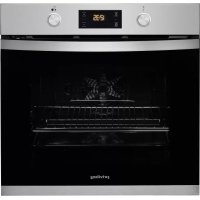
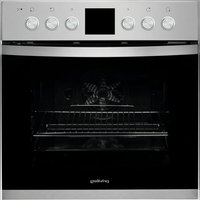
PBWK3 ON8V IN - Oven PRIVILEG - Free user manual and instructions
Find the device manual for free PBWK3 ON8V IN PRIVILEG in PDF.



| Brand | Privileg |
| Model | PBWK3 ON8V IN |
| Category | Oven |
| Product Type | Built-in electric oven |
| Dimensions (L x H x D) | 595 x 595 x 575 mm (standard estimate) |
| Weight | 35 kg (estimate) |
| Power supply | 230 V / 50 Hz, 3-4 kW (standard estimate) |
| Main functions | Conventional, Multi-level, XL Cooking, Pizza, Grill, Gratin, Keep Warm, Lower heating, Freasy Cook, Turn & Go, Eco Multi-level |
| Maximum temperature | 250 °C |
| Capacity | 70 L (standard estimate) |
| Oven levels | 5 levels |
| Interior lighting | Yes, switchable bulb |
| Control type | Mechanical (rotary knobs) and electronic (display) |
| Display | Digital screen |
| Timer | Yes, independent |
| Programming | Duration, end of cooking, delayed start |
| Turn & Go function | Automatic cooking with preset temperature and time |
| Cleaning | Click & Clean (removable glass), detachable door |
| Included accessories | Metal grid, drip tray, baking tray |
| Safety | Automatic stop at end of cooking, cooling fan |
| After-sales service | Contact Whirlpool (see warranty booklet) |
| Documentation | User manual available at docs.whirlpool.eu |
Frequently Asked Questions - PBWK3 ON8V IN PRIVILEG
User questions about PBWK3 ON8V IN PRIVILEG
0 question about this device. Answer the ones you know or ask your own.
Ask a new question about this device
Download the instructions for your Oven in PDF format for free! Find your manual PBWK3 ON8V IN - PRIVILEG and take your electronic device back in hand. On this page are published all the documents necessary for the use of your device. PBWK3 ON8V IN by PRIVILEG.
USER MANUAL PBWK3 ON8V IN PRIVILEG
DANKE, DASS SIE SICH FÜR EIN PRIVILEG-PRODUKT ENTSCHIEDEN HABEN
natural_image
Illustration of a hand holding a rectangular object with dashed lines indicating texture or alignment (no text or symbols)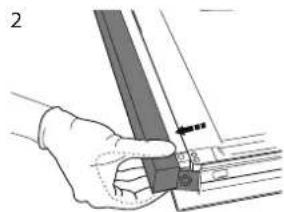
natural_image
Hand holding a metal bracket with an arrow pointing to a small component (no text or symbols visible)natural_image
Diagram showing a person using a device to interact with a laptop, with arrows indicating motion (no text or symbols present)THANK YOU FOR BUYING A PRIVILEG PRODUCT
In order to receive a more complete assistance, please register your product on www.whirlpool.eu/register

Before using the appliance carefully read the Safety Instruction.
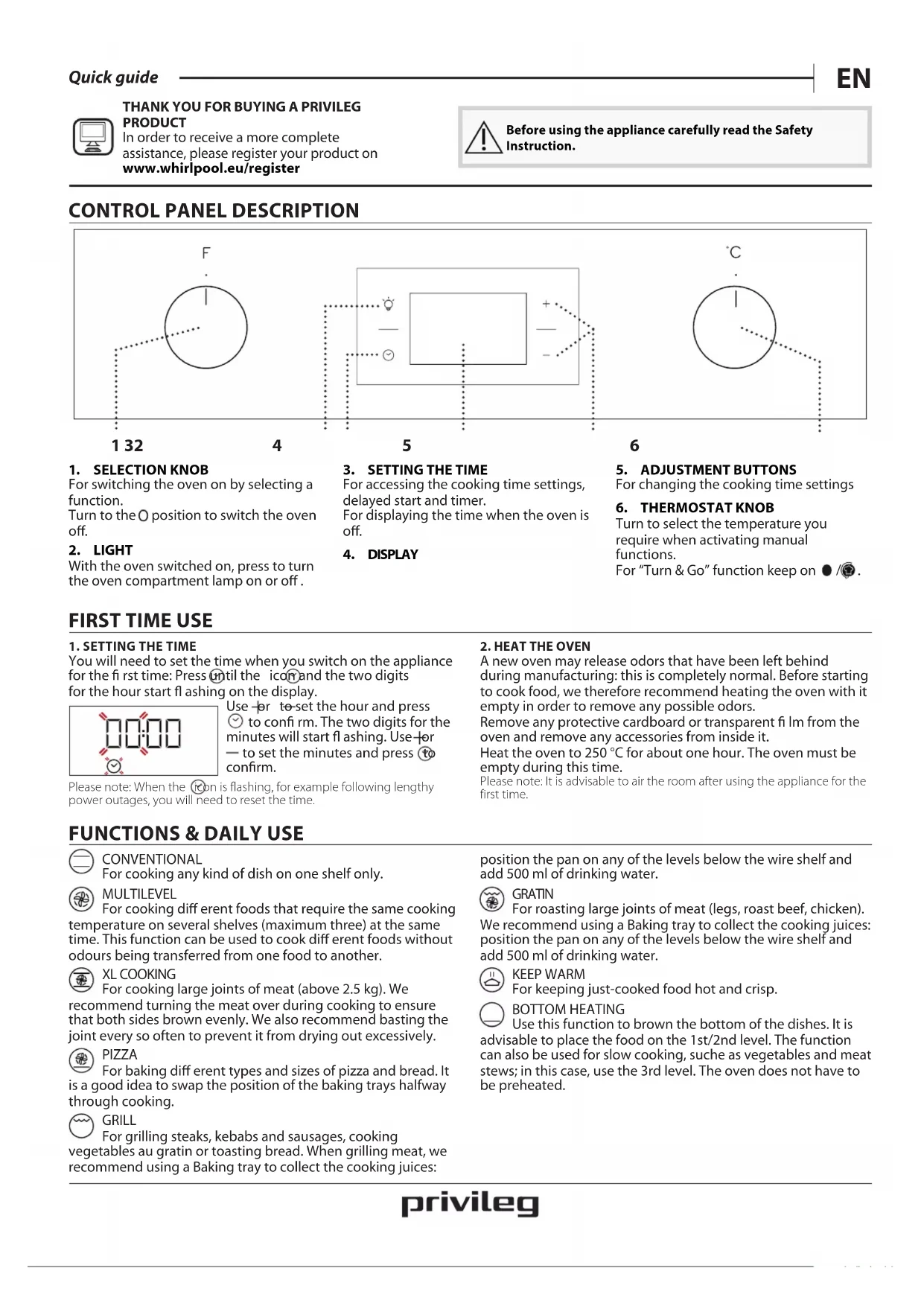
CONTROL PANEL DESCRIPTION

1. SELECTION KNOB
For switching the oven on by selecting a function.
Turn to the O position to switch the oven off.
2. LIGHT
With the oven switched on, press to turn the oven compartment lamp on or off.
3. SETTING THE TIME
For accessing the cooking time settings, delayed start and timer.
For displaying the time when the oven is off.
4. DISPLAY
5. ADJUSTMENT BUTTONS
For changing the cooking time settings
6. THERMOSTAT KNOB
Turn to select the temperature you require when activating manual functions.
For "Turn & Go" function keep on ● /
FIRST TIME USE
1. SETTING THE TIME
You will need to set the time when you switch on the appliance for the first time: Press until the icon and the two digits for the hour start flashing on the display.

Use for to set the hour and press ☺ to confirm. The two digits for the minutes will start flashing. Use for — to set the minutes and press to confirm.
Please note: When the icon is flashing, for example following lengthy power outages, you will need to reset the time.
FUNCTIONS & DAILY USE

CONVENTIONAL
For cooking any kind of dish on one shelf only.

MULTILEVEL
For cooking different foods that require the same cooking temperature on several shelves (maximum three) at the same time. This function can be used to cook different foods without odours being transferred from one food to another.

XL COOKING
For cooking large joints of meat (above 2.5 kg). We
recommend turning the meat over during cooking to ensure that both sides brown evenly. We also recommend basting the joint every so often to prevent it from drying out excessively.

PIZZA
For baking different types and sizes of pizza and bread. It is a good idea to swap the position of the baking trays halfway through cooking.

GRILL
For grilling steaks, kebabs and sausages, cooking
vegetables au gratin or toasting bread. When grilling meat, we recommend using a Baking tray to collect the cooking juices:
2. HEAT THE OVEN
A new oven may release odors that have been left behind during manufacturing: this is completely normal. Before starting to cook food, we therefore recommend heating the oven with it empty in order to remove any possible odors.
Remove any protective cardboard or transparent film from the oven and remove any accessories from inside it.
Heat the oven to 250 °C for about one hour. The oven must be empty during this time.
Please note: It is advisable to air the room after using the appliance for the first time.
position the pan on any of the levels below the wire shelf and add 500 ml of drinking water.

GRATIN
For roasting large joints of meat (legs, roast beef, chicken).
We recommend using a Baking tray to collect the cooking juices: position the pan on any of the levels below the wire shelf and add 500 ml of drinking water.

KEEP WARM
For keeping just-cooked food hot and crisp.

BOTTOM HEATING
Use this function to brown the bottom of the dishes. It is advisable to place the food on the 1st/2nd level. The function can also be used for slow cooking, suche as vegetables and meat stews; in this case, use the 3rd level. The oven does not have to be preheated.

FREASY COOK
All the heating elements and the fan come on, guaranteeing the distribution of heat consistently and uniformly throughout the oven. Pre-heating is not necessary for this cooking mode. This mode is especially recommended for cooking pre-packed food quickly (frozen or pre-cooked). The best results are obtained if you use one cooking rack only.
1. SELECT A FUNCTION
To select a function, turn the selection knob to the symbol for the function you require: the display will light up and an audible signal will sound.
2. ACTIVATE A FUNCTION
To start the function you have selected, turn the thermostat knob to set the temperature you require.

To interrupt the function at any time, switch off the oven, turn the selection knob and the thermostat knob to O and ●.
Please note: During cooking you can change the function by turning the selection knob or adjust the temperature by turning the thermostat knob. The function will not start if the thermostat knob is on 0 °C. You can set the cooking time, cooking end time (only if you set a cooking time) and a timer.

TURN & GO
To start the "Turn & Go" function, select the function turning the selection knob on the relevant icon, keeping the thermostat knob on the Moon.
To end the cooking, turn the selection knob on "O
Please note: You can set the cooking end time and timer. To obtain the best cooking results using the "Turn & Go" function, follow the suggested weights for each kind of food in the following table.
| Food Recipe Weight (kg) | ||
| Meat | Roast veal, Roast Beef rare 0.6 - 0.7 | |
| Chicken / Leg of lamb in pieces 1.0 - 1.2 | ||
| Fish | Salmon fillet / Baked fish (whole) 0.9 - 1.0 | |
| Fish en papillote 0.8 - 1.0 | ||
| Vegetables | Stuffed vegetables 1.8 - 2.5 | |
| Vegetable pie 1.5 - 2.5 | ||
| Salty cakes Quiche lorraine / Flan 1.0 - 1.5 | ||
| Pasta | Lasagne / Timbale of pasta or rice | 1.5 - 2.0 |
| Pastry | Leavened cake / Plum cake | 0.9 - 1.2 |
| Baked apples | 1.0 - 1.5 | |
| Bread | Bread loaf | 0.5 - 0.6 |
| Baguettes | 0.5 - 0.8 | |

KEEP WARM
To start the "Keep Warm" function, turn the thermostat knob to the relevant symbol; if the oven is set to a different temperature (or if the cavity temperature is above 65°C ) the function will not start.
Please note: You can set the cooking time, cooking end time (only if you set a cooking time) and a timer.

ECO MULTILEVEL
For cooking roasts and stuffed roasting joints on a single shelf. Food is prevented from drying out excessively by gentle, intermittent air circulation. When this ECO function is in use, the light will remain switched off during cooking but can be switched on again by pressing

TURN & GO
This function automatically selects an ideal temperature and time for baking a wide range of recipes including meat, fish, pasta, sweets and vegetables. Activate the function when the oven is cold.
3. PREHEATING AND RESIDUAL HEAT
Once the function starts, an audible signal and a flashing icon on the display indicate that the preheating phase has been activated. At the end of this phase, an audible signal and the fixed icon on the display will indicate that the oven has reached the set temperature: at this point, place the food inside and proceed with cooking.
Please note: Placing the food in the oven before preheating has finished may have an adverse effect on the final cooking result.
After cooking and with the function deactivated, the icon may continue to remain visible on the display even after the cooling fan has switched off to indicate that there is residual heat in the compartment.
Please note: The time after which the icon switches off varies because it depends on a series of factors such as ambient temperature and function used. In any case, the product should be considered to be off when the pointer on the selection knob is at "0".
4. PROGRAMMING COOKING
You will need to select a function before you can start programming cooking.
DURATION
Keep pressing ⏻ until the icon and "00:00" start flashing on the display.

Use + or — to set the cooking time you require, then press ⏰ to confirm.
Activate the function by turning the thermostat knob to the temperature you require: an audible signal will sound and the display will indicate that cooking is complete.
Notes: To cancel the cooking time you have set, keep pressing √ until the 🕒 icon starts flashing on the display, then use → to reset the cooking time to "00:00". This cooking time includes a preheating phase.
PROGRAMMING THE END COOKING TIME/DELAYED START
After a cooking time has been set, starting the function can be delayed by programming its end time: press √ until the ⏰ icon and the current time start flashing on the display.
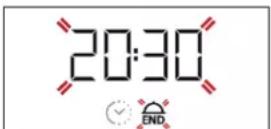
Use + or — to set the time you want cooking to end and press ⏻ to confirm.
Activate the function by turning the thermostat knob to the temperature you require: the function will remain paused until it starts automatically after the period of time that has been calculated in order for cooking to finish at the time you have set.
Notes: To cancel the setting, switch the oven off by turning the selection knob to the O position.
Notes: Delay to start functionality is not available for Grill and Turbo Grill functions.
END OF COOKING
An audible signal will sound and the display will indicate that the function has finished.

Turn the selection knob to select a different function or to position "Qo switch the oven off.
Please note: If the timer is active, the display will show "END" alternately with the remaining time.
5. SETTING THE TIMER
This option does not interrupt or program cooking but allows you to use the display as a timer, either during while a function is active or when the oven is off.
Keep pressing Ⓤ until the icon and "00:00" start flashing on the display.
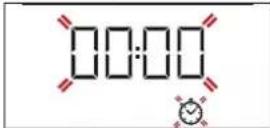
Use for to set the time you require and press to confirm. An audible signal will sound once the timer has finished counting down the selected time.
Notes: To cancel the timer, keep pressing until the icon starts flashing, then use to reset the time to "00:00".
COOKING TABLE
| RECIPE FUNCTION PREHEAT | TEMPERATURE(°C) | DURATION(MIN) | LEVEL AND ACCESSORIES | ||
| Leavened cakes |  Yes 170 30 - 50 Yes 170 30 - 50 | 2 | |||
 Yes 160 30 - 50 Yes 160 30 - 50 | 2 | ||||
| [YSST]Yes 160 40 - 60 | 4 1 | ||||
| Biscuits/tartlets |  Yes 160 25 - 35 Yes 160 25 - 35 | 3 | |||
 Yes 160 25 - 35 Yes 160 25 - 35 | 3 | ||||
 Yes 150 35 - 45 Yes 150 35 - 45 | 4 2 | ||||
| Pizza / Focaccia | [7CKS]Yes 190 - 250 15 - 50 | 1/2 | |||
 Yes 190 - 250 20 - 50 Yes 190 - 250 20 - 50 | 4 2 | ||||
| Lasagne / baked pasta / cannelloni / flans |  Yes 190 - 200 45 - 65 Yes 190 - 200 45 - 65 | 2 | |||
| Lamb / veal / beef /pork 1 kg |  Yes 190 - 200 80 - 110 Yes 190 - 200 80 - 110 | 3 | |||
| Chicken/rabbit/duck 1 kg |  Yes 200 - 230 50 - 100 Yes 200 - 230 50 - 100 | 2 | |||
| Baked fish/en papillote 0,5 kg (fillets, whole) |  Yes 170 - 190 30 - 45 Yes 170 - 190 30 - 45 | 2 | |||
| Toasted bread | [HTSW]5' 250 2 - 6 | 5 | |||
| Roast potatoes |  Yes 200 - 210 35 - 55 ** Yes 200 - 210 35 - 55 ** | 3 | |||
Download the complete Use and Care Guide from docs.whirlpool.eu for the table of tested recipes, compiled for the certification authorities in accordance with the standard IEC 60350-1.
** Turn food two thirds of the way through cooking (if necessary). The level is indicated on the wall of the cooking compartment.
The time indicated does not include the preheating phase: we recommend placing the food in the oven and setting the cooking time only after the required temperature has been reached.
| ACCESSORIES | |||||
| Wire shelf | Baking dish or cake tin on the wire shelf | Baking tray/Drip tray or Baking dish on the wire shelf | Drip tray / Baking tray | Drip tray / Baking tray with 200 ml of water |
CLEANING AND MAINTENANCE
Make sure that the oven has cooled down before carrying out any maintenance or cleaning.
Do not use steam cleaners.
Do not use wire wool, abrasive scourers or abrasive/corrosive cleaning agents, as these could damage the surfaces of the appliance.
Wear protective gloves. The oven must be disconnected from the mains before carrying out any kind of maintenance work.
REMOVING AND REFITTING THE DOOR
To remove the door, open it fully and lower the catches until they are in the unlock position (1). Close the door as much as you can (2). Take a firm hold of the door with both hands - do not hold it by the handle. Simply remove the door (3) by continuing to close it while pulling it upwards (a) at the same time until it is released from its seating (b).

Put the door to one side, resting it on a soft surface. Refit the door by moving it towards the oven, aligning the hooks of the hinges with their seating and securing the upper part onto its seating. Lower the door and then open it fully. Lower the catches into their original position: make sure that you lower them down completely. Try closing the door and check to make sure that it lines up with the control panel. If it does not, repeat the steps above.
CLICK & CLEAN - CLEANING THE GLASS
After removing the door and resting it on a soft surface with the handle downwards, simultaneously press the two retaining clips (1) and remove the upper edge of the door by pulling it towards you (2).

natural_image
Line drawing of a hand holding a tool or device, no text or symbols present
natural_image
Illustration of a hand holding a mechanical component with a tool, no visible text or symbolsLift and firmly hold the inner glass with both hands, remove it and place it on a soft surface before cleaning it.
To correctly reposition the inner glass, make sure that the "R" is visible in the left-hand corner and the clear surface (not printed) is facing up.
First insert the long side of the glass indicated by "R" into the support seats, then lower it into position.

natural_image
Diagram showing a person using a device to interact with a laptop, with motion arrows indicating movement (no text or symbols present)Refit the upper edge: a click will indicate correct positioning. Make sure the seal is secure before refitting the door.
TROUBLESHOOTING
Problem Possible cause Solution
| The oven does not work. Power cut.Disconnection from the mains. | Check for the presence of mains electrical power and whether the oven is connected to the electricity supply.Turn off the oven and restart it to see if the fault persists. |
| The display shows the letter “F” followed by a number. | Software problem. Contact you nearest After-sales Service Centre and state the letter or number that follows the letter “F”. |
Download the complete Use and Care Guide from docs.whirlpool.eu for more informations about your product

Policies, standard documentation and additional product information can be found by:
- Visiting our website docs.whirlpool.eu
- Using QR Code
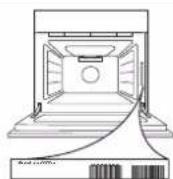
- Alternatively, contact our After-sales Service (See phone number in the warranty booklet). When contacting our After-sales Service, please state the codes provided on your product's identification plate.

MERCI D'AVOIR CHOISI UN PRODUIT PRIVILEG
natural_image
Hand holding a thin wooden panel or sheet, no text or symbols visible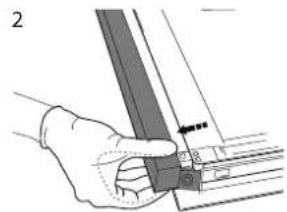
natural_image
Hand holding a mechanical component with a ruler and bracket (no visible text or symbols)natural_image
Diagram showing a person seated on a chair using a device to interact with another person, illustrating the process (no text or symbols present)132456
1. SELECTIEKNOP
natural_image
Line drawing of a hand holding a rectangular object with dashed lines indicating hidden edges (no text or symbols)
natural_image
Hand holding a ruler or scale with measurement markings (no text or symbols visible)natural_image
Diagram showing a person using a device to interact with a laptop, with motion arrows indicating movement (no text or symbols present)natural_image
Line drawing of a hand holding a rectangular object with dashed lines indicating texture or alignment (no text or symbols)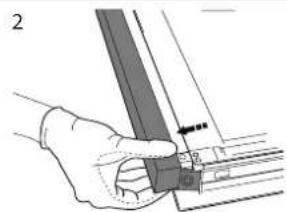
natural_image
Hand holding a mechanical component with a ruler and guide rod (no text or symbols visible)natural_image
Diagram showing a person using a device to interact with a screen, with motion arrows indicating direction (no text or symbols present)132456
1. SELECTOR
natural_image
Hand holding a metal rod with a ruler, no visible text or symbolsnatural_image
Diagram showing a person using a device to interact with another device, illustrating motion or interaction (no text or symbols present)


- DANKE, DASS SIE SICH FÜR EIN PRIVILEG-PRODUKT ENTSCHIEDEN HABEN
- THANK YOU FOR BUYING A PRIVILEG PRODUCT
- CONTROL PANEL DESCRIPTION
- SELECTION KNOB
- LIGHT
- SETTING THE TIME
- DISPLAY
- ADJUSTMENT BUTTONS
- THERMOSTAT KNOB
- FIRST TIME USE
- SETTING THE TIME
- FUNCTIONS & DAILY USE
- CONVENTIONAL
- MULTILEVEL
- XL COOKING
- PIZZA
- GRILL
- HEAT THE OVEN
- GRATIN
- KEEP WARM
- BOTTOM HEATING
- FREASY COOK
- SELECT A FUNCTION
- ACTIVATE A FUNCTION
- TURN & GO
- ECO MULTILEVEL
- PREHEATING AND RESIDUAL HEAT
- PROGRAMMING COOKING
- END OF COOKING
- SETTING THE TIMER
- CLEANING AND MAINTENANCE
- REMOVING AND REFITTING THE DOOR
- CLICK & CLEAN - CLEANING THE GLASS
- TROUBLESHOOTING
- MERCI D'AVOIR CHOISI UN PRODUIT PRIVILEG
- SELECTIEKNOP
- SELECTOR
Brand : PRIVILEG
Model : PBWK3 ON8V IN
Category : Oven