Card Reader Pro - Cash register iZettle - Free user manual and instructions
Find the device manual for free Card Reader Pro iZettle in PDF.


| Feature | Details |
|---|---|
| Product type | Payment card reader |
| Connectivity | Bluetooth and USB |
| Compatibility | iOS and Android |
| Accepted card types | Credit and debit cards (Visa, MasterCard, etc.) |
| Battery life | Up to 8 hours |
| Charging time | About 2 hours |
| Dimensions | Compact and lightweight |
| Weight | About 200 g |
| Usage | Ideal for small businesses and freelancers |
| Maintenance | Regular cleaning with a soft cloth, firmware updates |
| Security | Compliant with PCI DSS standards, data encryption |
| Warranty | 2 years |
| Additional information | iZettle app required for operation |
Frequently Asked Questions - Card Reader Pro iZettle
User questions about Card Reader Pro iZettle
0 question about this device. Answer the ones you know or ask your own.
Ask a new question about this device
Download the instructions for your Cash register in PDF format for free! Find your manual Card Reader Pro - iZettle and take your electronic device back in hand. On this page are published all the documents necessary for the use of your device. Card Reader Pro by iZettle.
USER MANUAL Card Reader Pro iZettle
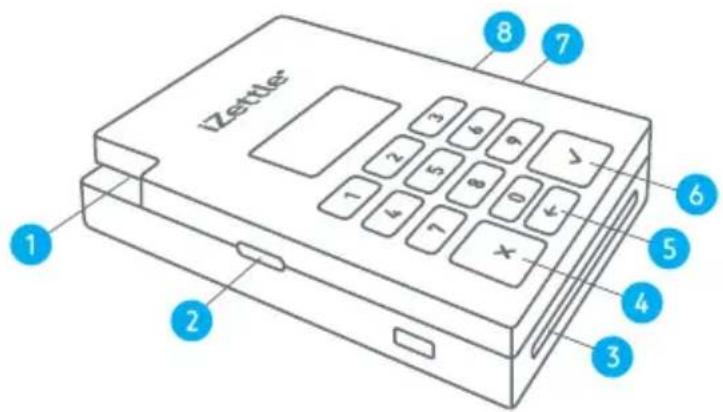
Getting started with your Card Reader Pro
Magstripe swipe slot
2 Power button
Chip-card slot
4 Cancel
5 Clear
6 Ok
7 Charging indicator
8 Charging port
Battery status
Battery charging
Battery fully charged
Battery critically low
Bluetooth active
Bluetooth pairing
≈ Restarting Card Reader Pro


Note: Charge the card reader for 3 hours before using it for the first time.
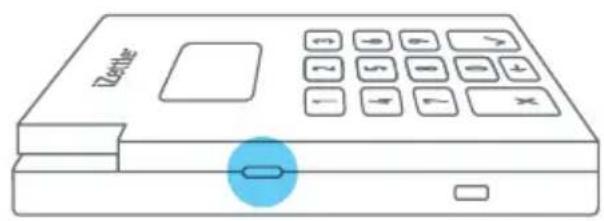
- Turn on the card reader by pressing the small, black power button on the left side of the device.
Up to 45 seconds to start up

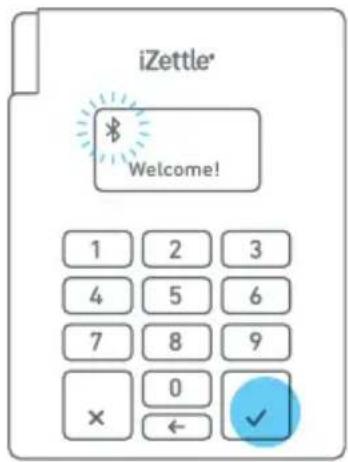
- Press and hold the OK button. Release after 5 seconds when the Bluetooth symbol starts blinking. The card reader is now in pairing mode.


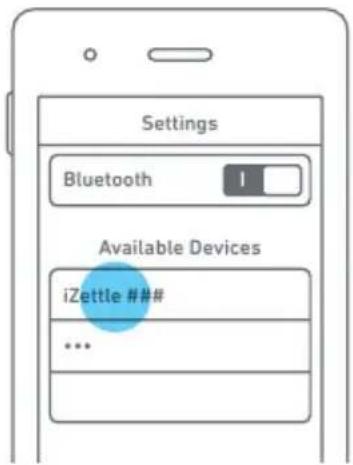
- Open "Settings" on your phone/tablet.
- Turn on Bluetooth.
- Wait for "iZettle ###" to appear and tap it to connect.
(The ### are the last 3 digits of the card reader's serial number [S/N], which you find on the back of the device.)

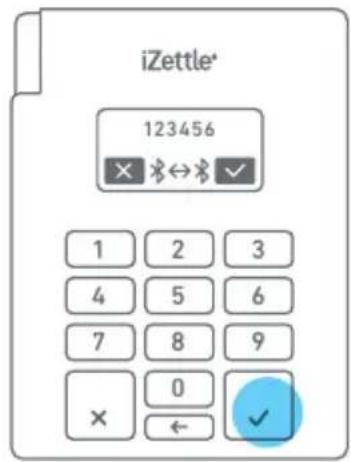
A six digit code will appear on the smartphone/tablet. The same code should appear on the card reader.
- Confirm on both devices to pair them.
- Open up the iZettle app and wait (up to 15 sec.) for the devices to connect. When the reader displays "Insert/Swipe card", you're all set.
Charging the card reader
- Charge the card reader using the enclosed micro USB cable 2.0.
- Charging time: 2.5 h (via computer), 1.5 h (via wall socket).
- You can use the card reader while it's being charged.
- Battery life: About 100 transactions (sleep mode: 5 days).
- If the battery is very low: Connect the reader to a computer/socket, turn it off by pressing the power button and let it charge for a while before turning it on again.
Bluetooth connection
- Check the connection status on your smartphone/tablet in: Settings > Bluetooth.
Sleep mode
- The card reader will go into sleep mode to save battery when not in use. Wake it up by lightly pressing any button.
For further information: izettle.com/help
iZettle AB, www.iZettle.com. Copyright © 2015 iZettle AB