Lite - Cash register iZettle - Free user manual and instructions
Find the device manual for free Lite iZettle in PDF.


User questions about Lite iZettle
0 question about this device. Answer the ones you know or ask your own.
Ask a new question about this device
Download the instructions for your Cash register in PDF format for free! Find your manual Lite - iZettle and take your electronic device back in hand. On this page are published all the documents necessary for the use of your device. Lite by iZettle.
USER MANUAL Lite iZettle
Go to App Store or Google Play and search for "iZettle".
→ Create an iZettle account
You can create an account in the app or on izettle.com.
→ Set up your store
Add your products to the library and organise them in folders. It makes sales quick and you can easily track the performance of each product.
→ Get your money
Sign into my.izettle.com and connect your bank account. The money you receive goes into this account.
You can start taking payments before you have connected your bank account. The money is then transferred as soon as you connect with your bank.
text_image
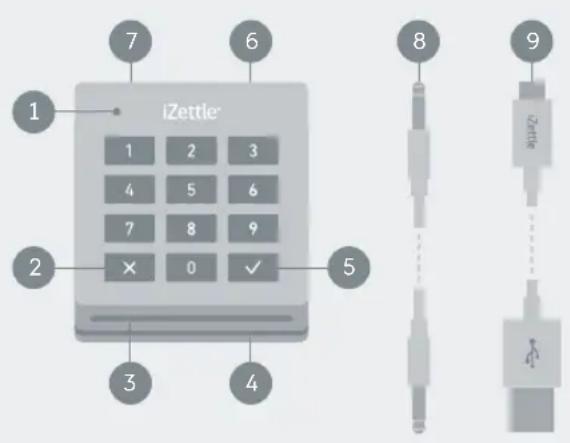
iZettle 1 2 3 4 5 6 7 8 9 10 11 12 13 14 15 16 17 18 19 20 21 22 23 24 25 26 27 28 29 30 31 32 33 34 35 36 37 38 39 40 41 42 43 44 45 46 47 48 49 501 Charging indicator
2 Cancel
3 Chip card slot
4 Magstripe slot
5 OK/Confirm
6 Connection port (audio)
7 Charging port (micro USB)
8 Connection cable
Charging cable
Connecting the card reader
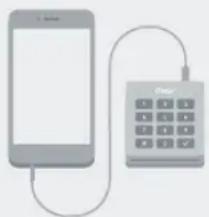
-Connect the cable ^8 to the connection port ^6 on the card reader and to the audio jack on your smartphone/tablet.
-Open the iZettle app and select the option "card reader" in the dialogue. The card reader is ready to use when the charging indicator 1 is blinking green.
natural_image
Illustration of a smartphone connected to a digital calculator (no text or symbols visible)Charging
Charge the card reader using the micro USB cable ⑨. You can use the card reader while it is being charged.
| Battery low | Red, blinking light |
| Battery charging | Orange, solid light |
| Battery fully charged | Green, solid light |
| Charging time | Approx. 30 minutes |
| Battery life | Up to 150 transactions |
Note: The card reader will automatically power off when left unused for 5 minutes.
my.izettle.com

Analyse your sales
Find graphs and sales statistics when you sign in on my.izettle.com.

Do the books
Detailed sales reports help you keep track of everything.

Manage your account
Change receipt information, bank accounts, password and more.
Printers & cash drawers

Complete your store setup with a receipt printer and a cash drawer. Find out more about supported devices on izettle.com/help.
Internet connection
Remember that you need to be connected to a 3G, 4G or WiFi network in order to accept card payments with iZettle.
Security
The iZettle card reader is just as secure as other card terminals and meets all the strict security requirements from the Payment Card Industry.
No sensitive data is ever stored on the mobile device – All data traffic is encrypted.
- Check the device for tampering when you receive it, as well as on a regular basis.
- Contact us if your device goes missing, is stolen or substituted.
- Store the device safely when it's not being used.
- When you are no longer in need of the device, please return it to us.
If you have any questions, please get in touch with us at help@izettle.com.


EMV approved, PCI DSS compliant, PCI PTS 3.X and SRED certified. EMV® APPROVED mark and logo are owned by EMVCo, LLC.
Card payment
1
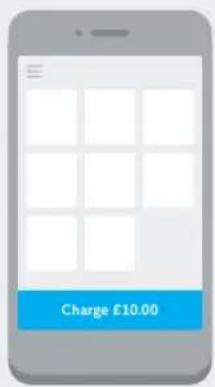
Choose a product or enter an amount and tap "Charge" in the app.
text_image
Charge £10.003
The customer enters their PIN on the card reader or signs on the screen on your smart-phone/tablet.
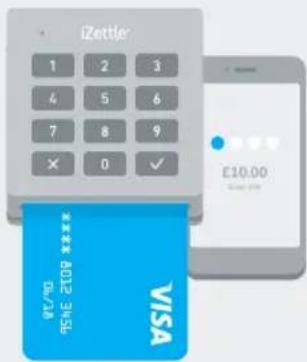
text_image
iZettle 1 2 3 4 5 6 7 8 9 × 0 ✓ E10.00 VISA **** 100% NET$4 £10.002
Ask the customer to insert or swipe their card in the card reader.
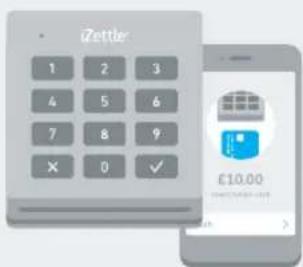
text_image
Zetter 1 2 3 4 5 6 7 8 9 × 0 ✓ £10.004
Send the receipt to the customer via email or print it if you have a printer connected.
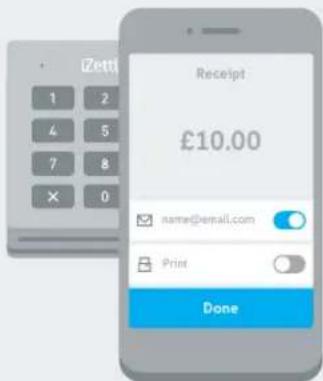
text_image
IZetti Receipt £10.00 name@email.com Print DoneCash payment
Remember to register your cash payments to get more accurate sales statistics.
1
After you've tapped "Charge", choose "Cash" in the payment method view.
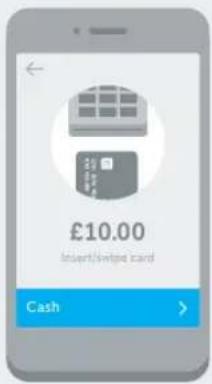
text_image
£10.00 Insert/Swipe card Cash2
Enter the amount of cash you receive. The change will be displayed in the app.
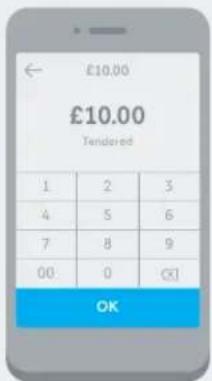
text_image
£10.00 £10.00 Tendered 1 2 3 4 5 6 7 8 9 00 0 OKLegal notice
"Made for iPod", "Made for iPhone", and "Made for iPad" mean that an electronic accessory has been designed to connect specifically to iPod, iPhone, or iPad, respectively, and has been certified by the developer to meet Apple performance standards. Apple is not responsible for the operation of this card reader device or its compliance with safety and regulatory standards. Please note that the use of this accessory with iPod, iPhone, or iPad may affect wireless performance.
Important notice regarding use
iZettle supplies the card reader device for use by you or your business, as applicable, and you agree not to use the product for any re-sale purposes. You must not use the product for any purpose other than effecting payment transactions through your installed version of the iZettle mobile software application. You may not modify the software or the hardware of the product in any way, save to the extent permitted by mandatory law.
This device complies with part 15 of the FCC Rules. Operation is subject to the following two conditions: 1) this device may not cause harmful interference, and 2) this device must accept any interference received, including interference that may cause undesired operation.
Care taking and handling
Keep the card reader in a cool, dry place (ideally, 22°C). Use a damp, soft, cloth to clean the device's exterior. Do not spray any type of liquid directly on the device and avoid getting moisture in any openings. Do not use solvents. Make sure nothing gets inside your device through an opening, such as the card slots. Do not expose to shocks or negligent handling. Changing the battery is not permitted. Risk of explosion if battery is replaced by an incorrect type. Dispose of used batteries according to the instructions.
Warranty
iZettle provides the card reader device with a 12 month warranty commencing on the delivery or collection date. During this 12-month period, iZettle warrants that the card reader device will be free of material defects that prevent its normal operation. If you have purchased the card reader device as a consumer and not for commercial use, the warranty will apply during such longer period as prescribed under applicable mandatory consumer protection laws.
iZettle will not be liable for any damages or defects to the card reader device caused by normal wear and tear, improper use or by accident, malicious damage, hazard, excess humidity, liquid ingress, electrical stress, or other environmental conditions not commonly found in a normal safe working environment. iZettle will not be liable if the defect arises because you have failed to follow iZettle's written instructions as to storage, installation, use or maintenance of the card reader device or if you alter or attempt to repair the relevant card reader device without the written consent of iZettle. iZettle's warranty does not extend to cables, accessories, plugs, or power supply units.
Returns
It is your responsibility to return the faulty card reader device to iZettle. iZettle will, in its discretion, either repair or replace faulty card reader devices within 90 days of the date of receipt of the card reader device. iZettle advises you to carefully check the card reader device before dispatch to ensure that it is defective. Any card reader device returned which is not found to be defective, or has been damaged or misused by you will be returned to you and you will be invoiced for the cost of shipping. A repaired or replaced card reader device will be warranted for the unexpired portion of the original warranty.
izettle.com/help
Copyright © 2015 iZettle AB