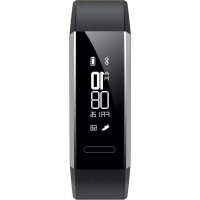
Band 2 Pro - Watch HUAWEI - Free user manual and instructions
Find the device manual for free Band 2 Pro HUAWEI in PDF.



| Product type | Smartwatch / Fitness tracker |
| Brand | Huawei |
| Model | Band 2 Pro |
| Display | Touch screen with touch button |
| Sensors | Heart rate sensor |
| Connectivity | Bluetooth (max power 6 dBm) |
| Water resistance | Tested for water and dust resistance in certain environments |
| Power supply | Built-in rechargeable battery |
| Charging | Charging dock with dedicated port (model AF33-1) |
| Operating temperature | -10°C to +45°C |
| Compatible operating systems | Android (Google Play Store), iOS (Apple App Store) via Huawei Wear app |
| Main functions | Activity tracking, pedometer, heart rate, sleep, notifications |
| Package contents | Bracelet, charging dock, charging cable, quick start guide |
| Maintenance and cleaning | Clean the charging port before charging; avoid water and dirt on metal contacts; do not expose to excessive heat |
| Safety | Keep a distance of at least 15 cm from pacemakers; turn off in blasting areas; use only approved accessories |
| Spare parts and repairability | Charging dock AF33-1; charging cable; built-in battery not user-replaceable (contact authorized service center) |
| General information | Model: ERS-B19 or ERS-B29; software version: V1.0.19; EU compliance (directive 2014/53/EU); Bluetooth® trademark |
Frequently Asked Questions - Band 2 Pro HUAWEI
User questions about Band 2 Pro HUAWEI
0 question about this device. Answer the ones you know or ask your own.
Ask a new question about this device
Download the instructions for your Watch in PDF format for free! Find your manual Band 2 Pro - HUAWEI and take your electronic device back in hand. On this page are published all the documents necessary for the use of your device. Band 2 Pro by HUAWEI.
USER MANUAL Band 2 Pro HUAWEI
Quick Start Guide....1
1. Powering on or restarting automatically after charging
Insert the protruding part of the charging cradle into the positioning hole of the band strap, then fasten the buckle. The battery level will be displayed on the screen.

text_image
Heart rate monitoring sensor Charging port Screen Touch-sensitive button
- Wipe the charging port dry before charging to avoid getting dirt and water on the metal contacts, which could result in a short circuit or other safety risks.
- If the band's screen stutters or goes black, attach the band to the charger to restart it.
2. Downloading Huawei Wear
To download and install the Huawei Wear app, scan the QR code on the right, or search for Huawei Wear in the Google Play Store or Apple App Store.
3. Pairing your band with your phone
To pair the band with your phone, follow the onscreen instructions in the Huawei Wear app and touch the touch-sensitive button on your band to pair.
4. Getting help
Scan the QR code on the right or view the user guide in the Huawei Wear app for more information about connection and functions as well as usage tips.
Copyright © Huawei Technologies Co., Ltd. 2017. All rights reserved.
THIS DOCUMENT IS FOR INFORMATION PURPOSE ONLY, AND DOES NOT CONSTITUTE ANY KIND OF WARRANTIES.
Trademarks and Permissions

Hand WEI

are trademarks or registered trademarks of Huawei
Technologies Co., Ltd.
The Bluetooth ^® word mark and logos are registered trademarks owned by Bluetooth SIG, Inc. and any use of such marks by Huawei Technologies Co., Ltd. is under license.
Other trademarks, product, service and company names mentioned may be the property of their respective owners.
Privacy Policy
To better understand how we protect your personal information, please see the privacy policy at http://consumer.huawei.com/privacy-policy, or read the privacy policy and service terms using the app after pairing it with your phone.
Blasting Caps and Areas
Turn off your mobile phone or wireless device when in a blasting area or in areas posted turn off "two-way radios" or "electronic devices" to avoid interfering with blasting operations.
Operation and safety
- Using an unapproved or incompatible power adapter, charger or battery may cause fire, explosion or other hazards.
- Ideal temperatures are -10^ to +45^ .
- Some wireless devices may affect the performance of hearing aids or pacemakers. Consult your service provider for more information.
- Pacemaker manufacturers recommend that a minimum distance of 15 cm be
maintained between a device and a pacemaker to prevent potential interference with the pacemaker. If using a pacemaker, hold the device on the side opposite the pacemaker and do not carry the device in your front pocket.
- Keep the device and the battery away from excessive heat and direct sunlight. Do not place them on or in heating devices, such as microwave ovens, stoves, or radiators.
- Observe local laws and regulations while using the device. To reduce the risk of accidents, do not use your wireless device while driving.
- To prevent damage to your device's parts or internal circuits, do not use it in dusty, smoky, damp or dirty environments or near magnetic fields.
- Do not use, store or transport the device where flammables or explosives are stored (in a gas station, oil depot, or chemical plant, for example). Using your device in these environments increases the risk of explosion or fire.
- Dispose of this device, the battery, and accessories according to local regulations. They should not be disposed of in normal household waste. Improper battery use may lead to fire, explosion, or other hazards.
- The device has undergone testing and has demonstrated water and dust resistance in certain environments.
- The device has a built-in, non-removable battery, do not attempt to remove the battery, otherwise the device may be damaged. To replace the battery, take the device to an authorized service center.
Disposal and recycling information
natural_image
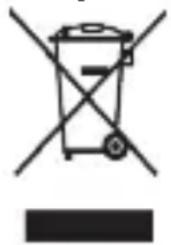
Symbol of a trash bin with crossed lines indicating no waste or restriction, and a solid black rectangle below (no text or labels)The crossed-out wheeled-bin symbol on your product, battery, literature or packaging reminds you that all electronic products and batteries must be taken to separate waste collection points at the end of their working lives; they must not be disposed of in the normal waste stream with household garbage. It is the responsibility of the user to dispose of the equipment using a designated collection point or service for
separate recycling of waste electrical and electronic equipment (WEEE) and batteries according to local laws.
Proper collection and recycling of your equipment helps ensure electrical and electronic equipment (EEE) waste is recycled in a manner that conserves valuable
materials and protects human health and the environment, improper handling, accidental breakage, damage, and/or improper recycling at the end of its life may be harmful for health and environment. For more information about where and how to drop off your EEE waste, please contact your local authorities, retailer or household waste disposal service or visit the website http://consumer.huawei.com/en/.
Reduction of hazardous substances
This device and any electrical accessories are compliant with local applicable rules on the restriction of the use of certain hazardous substances in electrical and electronic equipment, such as EU REACH, RoHS and Batteries (where included) regulations, etc. For declarations of conformity about REACH and RoHS, please visit our web site http://consumer.huawei.com/certification.
EU regulatory conformance
RF exposure requirements
Important safety information regarding radio frequency (RF) radiation exposure: RF exposure guidelines require that the device should be used for wrist worn only.
Failure to observe this guideline may result in RF exposure exceeding limits.
Statement
Hereby, Huawei Technologies Co., Ltd. declares that this device is in compliance with the essential requirements and other relevant provisions of Directive 2014/53/EU.
The most recent and valid version of the DoC (Declaration of Conformity) can be viewed at http://consumer.huawei.com/certification.
This device may be operated in all member states of the EU.
Observe national and local regulations where the device is used.
This device may be restricted for use, depending on the local network.
Frequency bands and power
(a) Frequency bands in which the radio equipment operates: Some bands may not be available in all countries or all areas. Please contact the local carrier for more details.
(b) Maximum radio-frequency power transmitted in the frequency bands in which the radio equipment operates: The maximum power for all bands is less than the highest limit value specified in the related Harmonized Standard.
The frequency bands and transmitting power (radiated and/or conducted) nominal limits applicable to this radio equipment are as follows:
ERS-B19: Bluetooth: 6 dBm
ERS-B29: Bluetooth: 6 dBm
Accessories and Software Information
It is recommended that the following accessories should be used:
Charging dock: AF33-1
Charging cable
The product software version is ERS-B19: V1.0.19
The product software version is ERS-B29: V1.0.19
Software updates will be released by the manufacturer to fix bugs or enhance functions after the product has been released. All software versions released by the manufacturer have been verified and are still compliant with the related rules.
All RF parameters (for example, frequency range and output power) are not accessible to the user, and cannot be changed by the user.
For the most recent information about accessories and software, please see the DoC (Declaration of Confirmation) at http://consumer.huawei.com/certification.
Knock the screen four times with your knuckle, and press and hold the touch-sensitive button to view the E-label screen.
Please visit http://consumer.huawei.com/en/support/hotline for recently updated hotline and email address in your country or region.
Caution: Any changes or modifications to this device not expressly approved by Huawei Technologies Co., Ltd. for compliance could void the user's authority to operate the equipment.
natural_image
Symbol of a trash bin with crossed lines indicating no waste or discharge (no text or labels)natural_image
Diagram showing a mechanical component with an arrow indicating direction, no text or symbols presentnatural_image
Symbol of a trash bin with crossed lines indicating no waste or restriction, and a solid black rectangle below (no text or labels)natural_image
Diagram showing a connector or connector being inserted into a device (no text or symbols present)natural_image
Symbol of a trash bin with crossed lines and a solid black rectangle below (no text or labels)natural_image
Diagram showing a tool interacting with a mechanical component, no text or symbols presenttext_image
QR code image containing encoded data, no visible human-readable textCopyright © Huawei Technologies Co., Ltd. 2017. Reservados todos los derechos.
natural_image
Symbol of a trash bin with crossed-out lines and a solid black rectangle below (no text or labels)natural_image
Diagram showing a connector inserted into a device component, with no visible text or symbolstext_image
QR code image containing encoded data, no visible human-readable textCopyright © Huawei Technologies Co., Ltd. 2017. Alle rechten voorbehouden.
DIT DOCUMENT IS ALLEEN BEDOELD TER INFORMATIE EN VORMT GEEN GARANTIE VAN WELKE AARD DAN OOK.