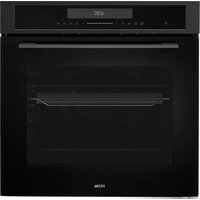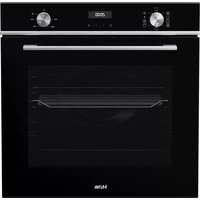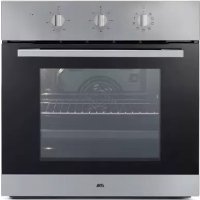
OM165RVS - Oven ETNA - Free user manual and instructions
Find the device manual for free OM165RVS ETNA in PDF.


Frequently Asked Questions - OM165RVS ETNA
User questions about OM165RVS ETNA
0 question about this device. Answer the ones you know or ask your own.
Ask a new question about this device
Download the instructions for your Oven in PDF format for free! Find your manual OM165RVS - ETNA and take your electronic device back in hand. On this page are published all the documents necessary for the use of your device. OM165RVS by ETNA.
USER MANUAL OM165RVS ETNA
The appliance identificatior card is located on the inside of the appliance.
When contacting the service department,
have the complete type number to hand

GEBRUIKSAANWIJZING
MODED'EMPLOI
You will find the addresses and phone numbers of the service organisation on the guarantee card.
OVEN
OM165RVS
FOUR
OFEN
OVEN
NL
Handleidng NL 3 - NL 20
FR
Specifications techniques 18
Technical specifications 18
Your oven and the environment
Disposal of the appliance and packaging 19
Information concerning regulation (EU) 66/2014 20
Introduction
Congratulations on the purchase of this Etna oven. This product is designed to offer optimum user-friendliness. The oven has a wide range of settings enabling you to select the correct cooking method every time.
This manual shows how you can best use this oven.
In addition to information about operating the oven, you will also find background information that may be useful when using the appliance.

Please read the separate safety instructions carefully before using the appliance!
Read this manual before using the appliance and keep it in a safe place for future use.
Installation instructions are supplied separately.
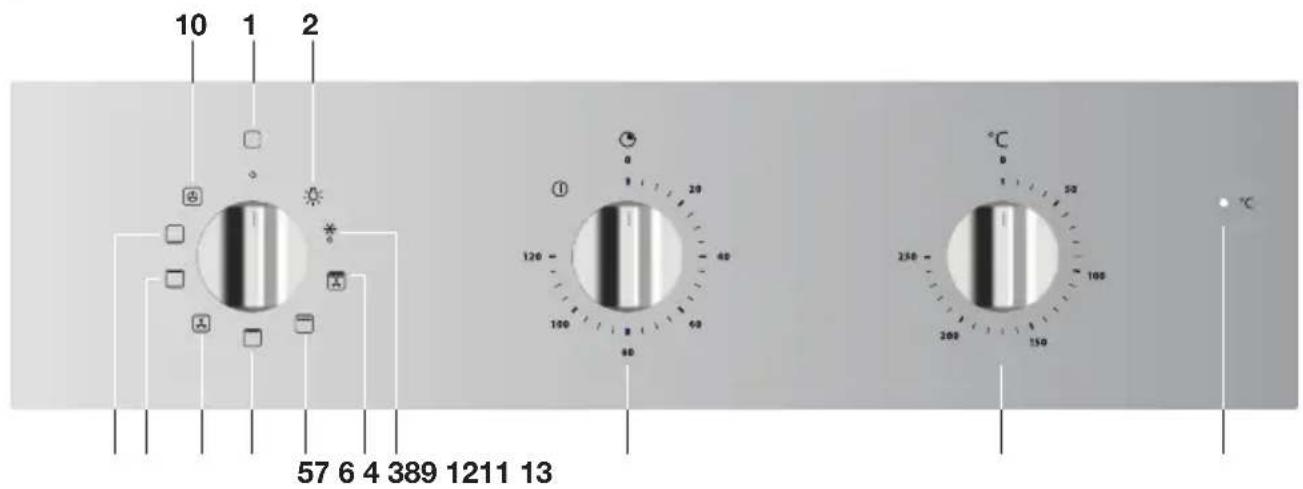
Control panel
- Oven function dial/off' position
- Oven light
- Defrost
- Grill with fan
- Large grill
- Small grill
- Top heat + bottom heat + fan
- Top heat + bottom heat
- Bottom heat
- Hot air
- Auto shut-off
- Temperature dial
- Oven thermostat indicator light
Description

- Control panel
- Back levels
- Oven door
- Handle
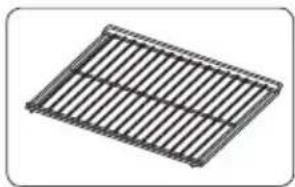
The following accessories are supplied with your oven:
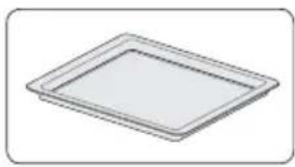

- Baking tray
Oven rack
Note
Consult the cooking guidelines in this user manual to select the correct accessory for your dishes.
Initial use
Prepare for use
- Remove all accessories from inside the oven and clean them thoroughly with warm soapy water. Close the door and switch the empty oven to maximum temperature for approximately 30 minutes. After this, switch on the grill for 15 minutes. Allow the oven to cool down before cleaning it with warm water.
No aluminium on the oven floor
- Never cover the base of the oven with aluminium foil and also never place baking trays or tins on the base of the oven. Foil actually blocks the heat, damaging the enamel and negatively influencing the cooking result.
Clean immediately
- Spilled food containing sugar or fruit juices, such as prune juice or rhubarb, can damage the colour of the enamel. We recommend you clean such spillages immediately.
Remarks
- When heating the oven for the first time, you will notice a 'new-oven smell'. This is normal.
- The temperature can be changed during cooking.
- Cooking times are rough estimates and can vary depending on a number of conditions.
- For certain dishes, the oven should be preheated.
- If you use baking paper, this should be able to withstand high temperatures.
- A lot of steam is released when cooking larger pieces of meat or dishes using dough, such as pies. This can cause condensation on the oven door. This is a normal occurrence and does not influence the functioning of the appliance. When the cooking process has ended, dry the door and the glass.
- Prevent condensation from forming and do not allow hot food to cool in a closed oven.
Operation
Using the oven
The oven has 8 oven functions. Consult the table to select the correct oven function for the dish.
- Place the dish in the oven.
- Turn the 'oven function dial' to the desired setting.
- Set the oven to the desired temperature using the 'temperature dial' (between 50-250 °C).
- Turn the shut-off timer to the '120 minutes' setting and then back to the desired shut-off time or if no shut-off time is necessary set the timer counterclockwise to manual operation.
Note: The oven will only work if there is a time set with the 'Auto shut-off' timer or if the timer is set to manual (See page 13 chapter 'Auto shut-off')!
The oven light switches on. The thermostat indicator light comes on. The indicator light will switch off as soon as the oven is at temperature and will light again as soon as the oven has heated up.
Oven settings
Use the table to select the right oven function. Also consult the cooking instructions on the food packaging.
| Function | Description Recommended | temp. °C |
| * | Defrost ·The air circulates with no heaters activated. Only the fan will be activated. ·This is used to slowly defrost frozen food. | |
| Grill + fan ·The fan distributes the heat generated from the top heating element. ·You can use this function for grilling meat and fish. | 200 | |
| Large grill ·The dish is heated by the large grill element. ·This function is used for dishes and baked food that require browning. | 210 | |
| Grill ·The dish is heated by the inner grill element. ·This function can be used for welsh rarebit, for toasting bread and frying sausages. | 210 | |
| Top heat + bottom heat + fan ·The combination of top heat, bottom heat and fan provides even heating and is ideal for baking. | 180 | |
| Top heat + bottom heat ·The dish is heated by the heating elements at the top and bottom of the oven space. ·This function is suitable for traditional baking and roasting. | 200 | |
| Bottom heat ·The dish is heated by the bottom heating element. Switch on this setting just before the end of the baking or roasting time. ·This function is used for dishes that require a bottom crust or browning. | 160 | |
| Hot air setting ·The dish is heated by the hot air that is supplied from the back of the oven. ·This setting uses even heating and is ideal for baking. | 180 |
Description of the functions
Grill + fan
The fan distributes the heat generated from the top heating element. You can use this function for grilling meat, fish, poultry and vegetables. It gives food a crispy texture without it needing to be turned over.
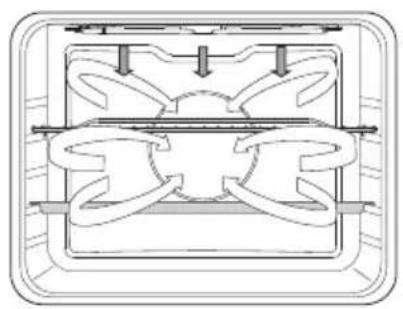


- For grilling, the grill rack is usually placed at level 4 and the baking tray at level 2.
- Temperature setting: 50 - 250 °C
- Keep an eye on the cooking process. At high temperatures, meat can burn quickly.
- Preheat the oven for 5 minutes.
Large grill
The dish is heated by the top element and the inner grill element.
This setting is used for dishes and baked foods that require browning.
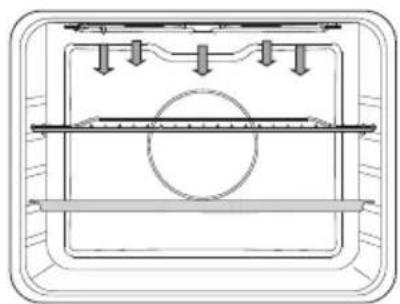

- For grilling, place the oven rack on the fourth shelf level and the baking tray on the second shelf level.
- Temperature setting: 50 - 250 °C
Grill
The dish is heated by the inner grill element.
This setting can be used for welsh rarebit, for toasting bread and frying sausages.
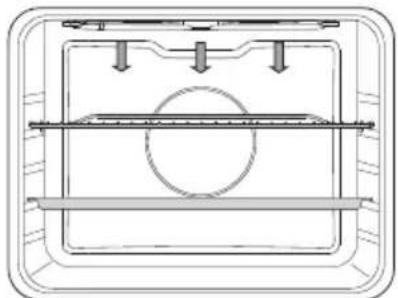

- For grilling, place the oven rack on the fourth shelf level and the baking tray on the second shelf level.
- Temperature setting: 50 - 250 °C
- Check the cooking process regularly. At high temperatures, meat can burn quickly.
- Preheating is recommended.
Food is heated by hot air originating from the top and bottom elements, which the fan distributes evenly throughout the oven. This setting uses even heating and is ideal for baking.
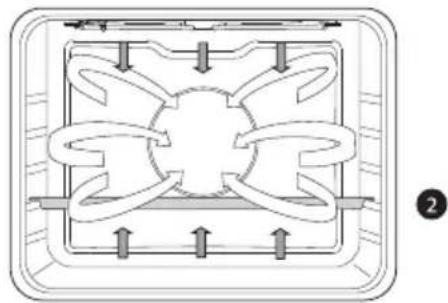
- Place the baking tray on the second shelf level.
- Temperature setting: 50 - 250 °C*
- Preheating is recommended.
Top heat + bottom heat
The dish is heated by the heating elements at the top and bottom of the oven space. This setting is suitable for traditional baking and roasting.

- Place the baking tray on the second shelf level.
- Temperature settings: 50 - 250 °C*
- Preheating is recommended.
Bottom heat
The dish is heated by the bottom heating element. Switch on this function just before the end of the baking or roasting time.
This setting is used for dishes that require a bottom crust or browning.
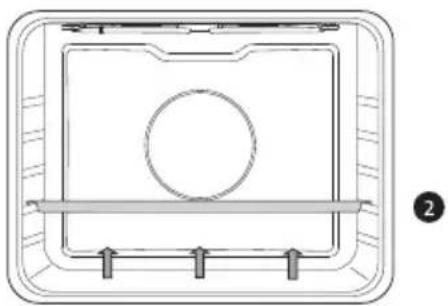
- Place the baking tray on the second shelf level.
- Temperature settings: 50 - 250 °C*
Hot air
The dish is heated by hot air originating from the fan and the heating element to the rear of the oven. This setting uses even heating and is ideal for baking.
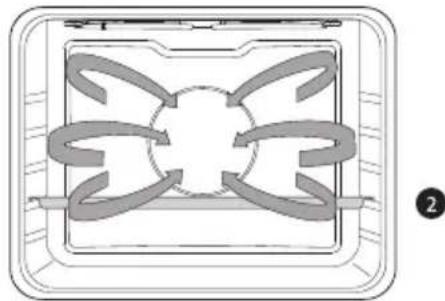
- Place the baking tray on the second shelf level.
Temperature setting: 40 - 250 °C* - Preheating is recommended.
- Any glass dishes you use must be able to withstand temperatures of 40 - 250 °C.
Auto shut-off
Use the shut-off timer to switch off the oven as soon as the set time has elapsed.
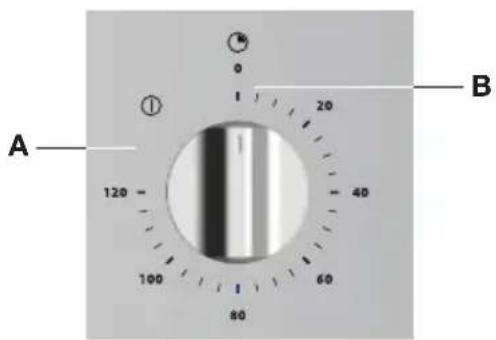
Manual operation (A)
- Turn the shut-off timer to 'Manual operation' (A)
- Set an oven temperature and an oven function.
- Switch the oven off by turning the oven knobs to the '0' setting.
Using the shut-off timer (B)
Switches the oven off at a time set previously.
- Set an oven temperature and an oven function.
- Turn the shut-off timer to the '120 minutes' setting and then back to the desired shut-off time.
- When the set cooking time has elapsed, a signal will sound and the oven will switch off automatically.
- Switch the oven off by turning the oven knobs to the '0' setting.
Cleaning the oven
Clean the oven regularly to prevent fat and leftover food from accumulating, especially on interior and exterior surfaces, the door and seal.
- Clean exterior surfaces with a soft cloth and soapy warm water. Wipe afterwards with a clean, damp cloth and dry the surfaces.
- Remove splashes and stains on the interior surfaces with a soapy cloth. Wipe afterwards with a clean, damp cloth and dry the surfaces.
- Clean the interior of the oven.

Important
- Take care that NO water enters the vents.
- NEVER use abrasive cleaning materials or chemical solvents.
- ALWAYS ensure that the door seal stays clean.
This prevents accumulation of dirt and allows you to close the door properly.
Removing the oven door

Keep your fingers away from the hinges of the oven door. The hinges are spring loaded and can cause injury if they spring back. Make sure that the hinge latches are applied correctly to lock the hinges.
- First, fully open the door (as far as it will go).
- Rotate the stoppers back by 90^ .
- Slowly close the door until the stoppers are aligned with the hinge beds. At the angle of 15^ (relative to the closed door position), slightly lift the door and pull it out from both hinge beds on the appliance.
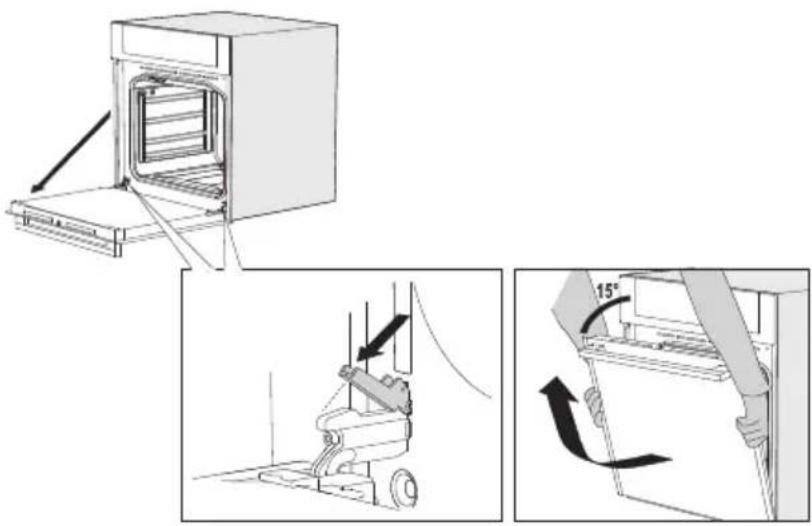
To replace the door repeat these actions in reverse. If the door does not open or close properly, make sure the hinges are positioned correctly in their slots.
Removing the oven window
The glass in the oven door can be cleaned from the inside, but you do need to remove the glass from the door to do this. First remove the oven door (see chapter 'Removing the oven door').
- Hold the glass firmly at the bottom and push the glass carefully backwards (1).
- Tilt the glass out of the clamp at the back and remove the glass (2).
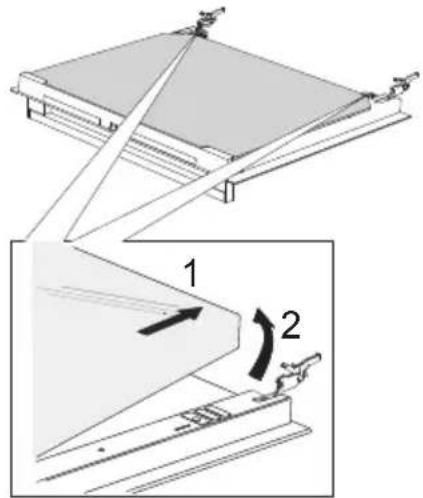
Replace the glass in the oven door in reverse order.
Replacing the oven light
The light (E14, 230-240 V, 25 W, 300^ ) is a consumer item and therefore does not fall under the guarantee.

Cut the power to the appliance by removing the plug from the socket or switching off the fuse in the fuse box!
- Turn the cover to the left to remove it.
- Unscrew the bulb from the fitting.
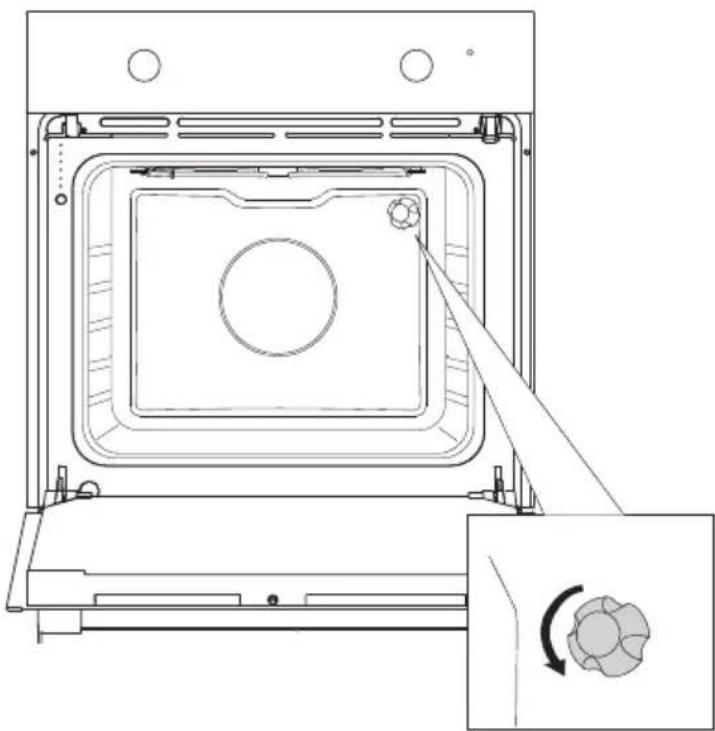

Please note: the light can be very hot! Use protection to remove the bulb.
General
Try the solutions below if you have problems with your oven.
You could save yourself the time and effort of an unnecessary phone call to customer services.
The food is not cooked
- Close the door properly.
- Check whether a fuse has blown and whether a circuit breaker has been activated.
Food is overcooked or undercooked
- Check whether the temperature has been set.
There is condensation on the interior of the oven
- This is normal. Wipe the oven clean after use.
The fan keeps working after the oven is switched off
- This is normal. Once the oven has been switched off, the cooling fan may continue to run for a little while.
Air flow can be felt at the door and the exterior of the appliance
This is normal.
Steam escapes from the door or the vents
This is normal.
Storing or repairing the oven
Repairs should only be performed by a qualified service technician. If maintenance is required, take the plug from the socket and contact the Etna customer service.
Have the following information to hand when you call:
- The model number and serial number (stated on the inside of the oven door) and guarantee details.
- A clear description of the problem.
Choose a clean, dry place if you have to store the oven temporarily, as dust and moisture can damage the appliance.
| Model OM165RVS | |
| Power source 230 V ~ 50 Hz | |
| Energy consumption Maximum power Grill function (small) Grill function (large) Top heat Bottom heat Hot air | 2950 W 2000 W 2950 W 950 W 1100 W 2000 W |
| Cooling method Motor cooling fan | |
| Dimensions Appliance dimensions: Built-in dimensions: | W 595 x H 595 x D 575 mm W 560 x H 600 x D 570 mm |
| Volume 65 L |
Disposal of the appliance and packaging
This product is made from sustainable materials. However, the appliance must be disposed of responsibly at the end of its useful life. The government can provide you with information about this.
The appliance packaging is recyclable. The following materials have been used:
cardboard
polyethylene wrapping (PE)
CFC-free polystyrene (hard PS foam)
Dispose of these materials responsibly in accordance with legal provisions.
The product has a pictogram of a rubbish bin with a cross through it. This indicates that household appliances must be disposed of separately. This means that the appliance may not be processed via the regular waste flow at the end of its useful life. You should take it to a special municipal waste depot or a sales outlet that offers to do this for you.
Collecting household equipment separately prevents harm to the environment and public health. The materials used in manufacturing this appliance can be recycled, which provides considerable savings in energy and raw materials.
Declaration of conformity
We hereby declare that our products comply with the relevant European directives, standards and regulations as well as all requirements referred to in the standards.
Information concerning regulation (EU) 66/2014
Measurements according to EN 30-2-1
| ETNA | ||
| Model | SVR561MOonitacifitnedi | |
| Energy Efficiency Index per cavity (EEI cavity) 106,0 | ||
| Energy Efficiency Class per cavity A | ||
| Energy consumption required to heat a standardised load in a cavity of an electric heated oven during a cycle in conventional mode per cavity (electric final energy) (EC electric cavity) | 98,0 | elcyd/k |
| Energy consumption required to heat a standardised load in a cavity of an electric heated oven during a cycle in fan-forced mode per cavity (electric final energy) (EC electric cavity) | 99,0 | elcyd/k |
| Number of seitivac | 1 | |
| Heat source per cavity (electricity or gas) | electricity | |
| Volume per cavity (V) | 65L | L |
| Type of oven | ||
| Mass of the appliance (M) | 31,0 | KG |
| (1) 1 kWh/cycle = 3,6 MJ/cycle. | ||
| Data determined according to standard EN 60350-1 and Commission Regulations (EU) No 65/2014 and (EU) No 66/2014. | ||
| Energy saving tips • During cooking, the oven door should remain closed except for turning food over. Do not open the door frequently during cooking to maintain the oven temperature and to save energy. • If cooking time is more than 30 minutes, the oven may be switched off 5-10 minutes before the end of the cooking time to save energy. The residual heat will complete the cooking process. • Plan oven use to avoid turning the oven off between cooking one item and the next to save energy and reduce the time for re-heating the oven. • Wherever possible cook more than one item at a time. | ||