BDC8 - Fridge BLACK & DECKER - Free user manual and instructions
Find the device manual for free BDC8 BLACK & DECKER in PDF.


| Product Type | Thermoelectric Cooler / Food Warmer |
| Brand | Black & Decker |
| Model | BDC8 |
| Capacity | 8 L |
| Supply Voltage | 12 V DC |
| Power Consumption - Cooling Mode | 43 W |
| Power Consumption - Heating Mode | 32 W |
| Cooling Capacity | 15 °C ±3 °C below ambient temperature |
| Heating Capacity | 55 °C ±10 °C |
| Climate Class | T |
| Power Cord Length | 2 m |
| Power Supply | 12 V Cigarette Lighter Socket |
| Functions | Cooling and Heating |
| Maintenance | Clean the interior with a damp cloth and mild soap; do not immerse |
| Safety | Do not expose to rain; do not cover ventilation openings; unplug before cleaning |
| Warranty | 24 months |
| Repairability | Repair only by qualified personnel |
Frequently Asked Questions - BDC8 BLACK & DECKER
User questions about BDC8 BLACK & DECKER
0 question about this device. Answer the ones you know or ask your own.
Ask a new question about this device
Download the instructions for your Fridge in PDF format for free! Find your manual BDC8 - BLACK & DECKER and take your electronic device back in hand. On this page are published all the documents necessary for the use of your device. BDC8 by BLACK & DECKER.
USER MANUAL BDC8 BLACK & DECKER
natural_image
Line drawing of a black and decker electric vacuum cleaner (no text or symbols on body)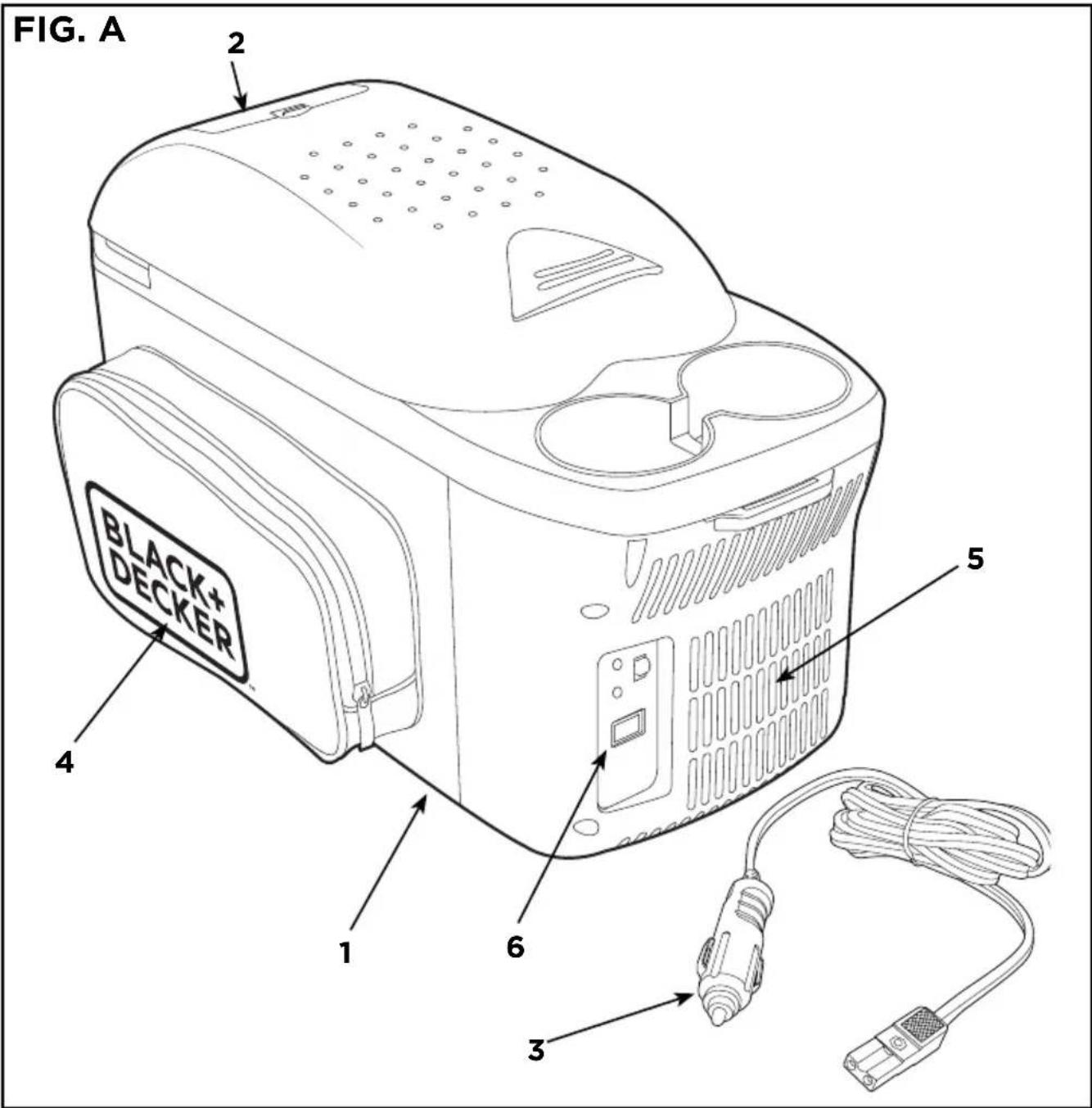
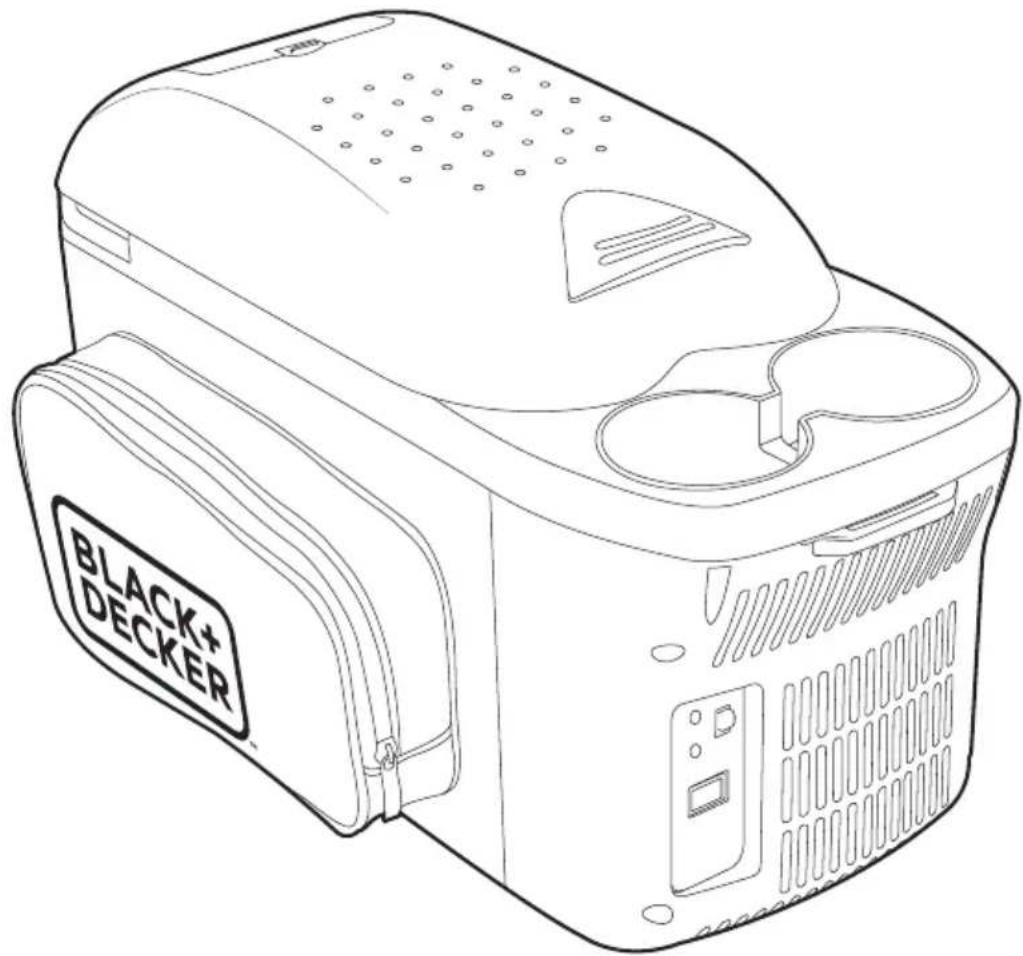
* The picture may differ slightly to actual unit.
Intended use
Your BLACK+DECKER™ BDC8 cooler is suitable for cooling and warming food stuffs. There is a switch to change between heating and cooling modes. The device has been designed for use with a 12V DC on-board power supply socket of a car (cigarette lighter), boat or RV. The appliance may also be used for camping use. The appliance shall not be exposed to rain.
General safety rules

Warning! Read and understand all instructions. Failure to follow all instructions listed below, may result in electric shock, fire and/or serious personal injury.
Save these instructions
Safety instructions
General thermoelectric cooler safety warnings.

Warning! Read all safety warnings and all instructions. Failure to follow the warnings and instructions listed below may result in electric shock, fire and/or serious injury.
Please read this operating manual carefully before starting the device. Keep it in a safe place for future reference. If the device is resold, this operating manual must be handed over to the purchaser along with it.
- Do not operate the device if it is visibly damaged.
- Ensure that the ventilation slots are not covered.
- This device may only be repaired by qualified personnel. Inadequate repairs can lead to considerable hazards.
- Persons (including children) whose physical, sensory or mental capabilities or lack of experience and knowledge prevents them from using the appliance safely should not use this appliance without initial supervision or instruction by a responsible person.
-
Electronic devices are not toys. Always keep and use the device out of the reach of children.
-
Children must be supervised to ensure that they do not play with the device.
- Food may only be stored in its original packaging or in suitable containers.
- The cooling device is not suitable for transporting caustic materials or materials containing solvents.
- Only connect the device with the 12V cable supplied to a 12V socket.
- Do not pull the plug out of the cigarette lighter or the socket by the cable.
- If the connection cable is damaged, it must be replaced with the cable of the same type and specifications.
- Pull out the connection cable:
a. Before cleaning and maintenance
b. After use
- Check that the voltage specification on the type plate corresponds to that of the energy supply.
Operating the device safely
- Before starting the device, ensure that the power supply cable and the plug are dry.
- Do not place the device near naked flames or other heat sources (heaters, direct sunlight, gas ovens etc.)

Caution! Danger of overheating:
Ensure at all times that there is sufficient ventilation so that the heat that arises during operation does not build up. Make sure that the device is sufficiently far away from walls and other objects so that the air can circulate.
- Do not fill the inner container with ice or liquid directly. It suggests to put ice or liquid in a container, and then put in the inner container.
- Never immerse the device in water.
-
Protect the device and the cable against heat and moisture.
-
The manufacturer cannot be held liable for damage resulting from improper usage or incorrect operation.

Caution! If you wish to cool medicines, please check if the cooling capacity of the device is
suitable for the medicine in question.
Features
- Cooling device
- Plastic lid
- Connection cable for 12V DC
- Bag
- Ventilation slots
- Control panel
- Shoulder strap (Not shown)
General safety rules

Warning! Do not switch from cold to hot or from hot to cold. The instant 100 degree change can damage the unit. You need to turn off the unit,
wait 10 minutes and then slide the main switch to the desired function heat or cool.

Warning! Read carefully and understand all assembly and operation instructions before
operating. Failure to follow the safety rules and other basic safety precautions may result in serious personal injury.

Caution! Do not allow persons to operate or assemble this cooler and warmer until they have read this
manual and have developed a thorough understanding of how the cooler and warmer works.

Warning! The warnings, cautions, and instructions discussed in this instruction manual cannot cover all
possible conditions or situations that could occur. It must be understood by the operator that common sense and caution are factors which cannot be built into this product, but must be supplied by the operator.
Electric safety instructions for power supply
In order to comply with the safety requirements set forth in several
international publications, the following measures must be followed when using this unit:
- The maximum room temperature around the power supply must not exceed the one indicated on its label.
- When connecting the unit to the electric supply and to the equipment, respectively, you must check if the voltage is the same indicated in the unit.
- The consumption of the equipment connected to the source output must not exceed the one indicated in the unit.
-
This product can be used for outdoor, just make sure not make it wet.
-
If the power supply cable is damaged, it must be fixed by the supplier, by its representative or by qualified personnel to avoid danger.
-
If the unit was hit and it is noticed any damage in the protection cover or failures, the unit must not be used and must be fixed exclusively by technically qualified personnel assigned by the product importer and/or legal representative.
-
The equipment must be connected to a visible and easy access socket.
-
This product is not a toy. It is not intended for use by children under 8 years.
Important safety precautions
Note: There is a replaceable 10A to 6.3A. Replace a blown fuse by gently unscrewing the tip of the lighter plug and inserting in a new one of comparable Amperes rating. Do Not replace fuse with a higher amp rated fuse.
- Do not immerse the cooler/warmer 12V plug in water.
- Do not insert foreign objects into the cooler/warmer vent openings. The ventilation openings should not be covered at any time while the cooler/warmer is operating.
-
Do not use the cooler/warmer in the open air when it is raining or snowing; it is not designed to be waterproof.
-
Do not place cooler/warmer near heat sources: heating vents, radiators, sunlight and/or any other sources of heat.
- Do not use the cooler/heater in the presence of flammable fumes or gases, such as propane.
- Do not use for cooking.
- Do not use for medical reasons or storage of medicine.
- Do not operate the cooler/warmer if it has received a sharp blow, been dropped or otherwise damaged in any way.
- Do not place liquids or foods in direct contact with this unit.
- Keep out of Reach of Children. The interior becomes very hot or cold and could cause injury.
Product characteristics
- Your thermoelectric cooler and warmer is ideal for keeping drinks cool and food warm. Whether traveling for fun or on the road for work, you can enjoy your drinks and foods at the correct temperature.
- The cooler and warmer is strong and durable, yet light enough to be carried by hand.
- It combines dual functions of cooling and heating by using a semiconductor, without a compressor.
Application
- Use for picnics and on camping trips
- Ideal for taxi drivers and couriers
Work performance
- To obtain optimum cooling, we suggest putting in pre-chilled foods and drinks.
- The cooler and warmer is not designed to heat cold food, but to preserve hot foods at a warm temperature.
Operation guide
- First make sure the switch at the side of the cooler and warmer is in the OFF position, then insert the power cord into
the socket of the unit.
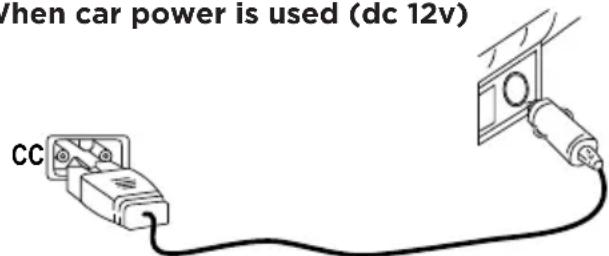
- Insert the plug of the cigarette lighter into the socket in the vehicle.
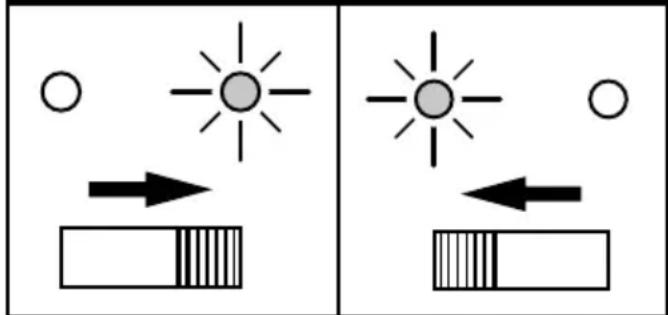
Cooling: set the switch to the COOLING position. The green indicator will be on signifying the unit is in the cooling mode.
Heating: set the switch to the HEATING position.
The red indicator will be on signifying the unit is in the heating mode.
While cooling While warming
natural_image
Two diagrams showing sunlight rays interacting with a segmented object, no text or symbols presentAttachment:
Attachments
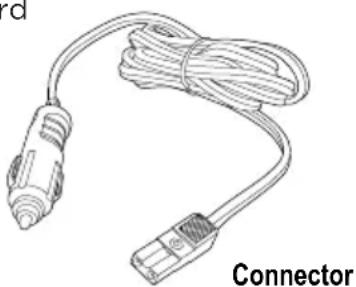
DC Power Cord (Power cord for car)
12V Power
natural_image
Line drawing of a connector with coiled cable (no text or symbols)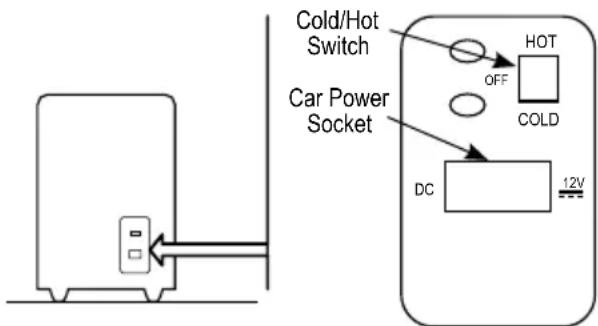
When using 12v power
When car power is used (dc 12v)
Energy saving tips
- Choose a well ventilated installation location which is protected against direct sunlight.
- Allow warm food to cool down first before placing it in the device to keep cool.
- Do not open the cooling device more often than necessary.
- Do not leave the lid open for longer than necessary.
Use and care
- Do not modify the cooler/warmer in any way. Unauthorized modification may impair the function and/or safety and could affect the life of the equipment. There are specific applications for which the cooler/warmer was designed.
- Always check for damaged or worn out parts before using the cooler/warmer. Broken parts will affect the operation. Replace or repair damaged or worn parts immediately.
- When the cooler/warmer is not in use, store it in a secure place out of the reach of children. Inspect it for good working condition prior to storage and before reuse.
Warning and notice
For correct operation, please read the instructions below carefully before using the appliance. Misuse of the appliance could cause injuries and damage to the appliance.
- Please ensure the 12V plug is disconnected from the DC socket after the engine is turned off.
- Please unplug the 12V plug from the DC socket when the cooler is not in use.
-
Prevent any obstructions to the fan. If the fan becomes blocked, it can overheat and cause fire. Avoid covering with towels or cloths.
-
Please ensure the sockets of the cords are inserted firmly. A loose fitting can result in the cord and sockets over-heating and failing.
- Keep the appliance away from flammable items and dampness to prevent any electrical failure and fire.
- Do not disassemble the appliance.
- Do not switch the setting from cool to warm immediately. Change between the settings only after the cooler has been OFF 30 minutes.
- Do not rinse your cooler in water.
- Avoid turning the cooler upside down.
- Avoid dropping your cooler.
Cleaning and maintenance
- Switch unit off, unplug power cord and allow it to cool or heat up to room temperature.
- Wipe the inside with a clean, damp cloth. Use a mild soap with water if necessary. Do not use abrasive cleaners, scrubbers or household chemicals as this may damage the finish.
- Do not immerse the unit in water.
- It is recommended that the general condition be examined before it is used. Keep your cooler and warmer in good repair by adopting a program of conscientious repair and maintenance. Have necessary repairs made by qualified service personnel.
Protecting the environment
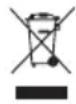
Separate collection. This product must not be disposed of with normal household waste.
Should you find one day that your BLACK+DECKER product needs replacement, or if it is of no further use to you, do not dispose of it with household waste. Make this product available for separate collection.

Separate collection of used products and packaging allows materials to be recycled and used again. Reuse of recycled materials helps prevent environmental pollution and reduces the demand for raw materials.
Local regulations may provide for separate collection of electrical products from the household, at municipal waste sites or by the retailer when you purchase a new product.
BLACK+DECKER provides a facility for the collection and recycling of BLACK+DECKER products once they have reached the end of their working life. To take advantage of this service please return your product to any authorised repair agent who will collect them on our behalf.
You can check the location of your nearest authorised repair agent by contacting your local BLACK+DECKER office at the address indicated in this manual. Alternatively, a list of authorised BLACK+DECKER repair agents and full details of our after-sales service and contacts are available on the Internet at: www.2helpU.com.
Technical data
BDC8
Voltage 12V
Volume 8L
Power consumption
DC Cold mode: 43W
Hot mode: 32W
Climate Class T
Cooling Capacity 15^+/-3
Below ambient temperature
Heating Capacity 55°C+/-10
DC Power Cord 2m (6'6")
Guarantee
BLACK+DECKER is confident of the quality of its products and offers an outstanding guarantee. This guarantee statement is in addition to and in no way prejudices your statutory rights.
If a BLACK+DECKER product becomes defective due to faulty materials, workmanship or lack of conformity, within 24 months from the date of purchase, BLACK+DECKER guarantees to replace defective parts, repair products subjected to fair wear and tear or replace such products to make sure of the minimum inconvenience to the customer unless:
- The product has been used for trade, professional or hire purposes.
- The product has been subjected to misuse or neglect.
- The product has sustained damage through foreign objects, substances or accidents.
- Repairs have been attempted by persons other than authorised repair agents or BLACK+DECKER service staff.
To claim on the guarantee, you will need to submit proof of purchase to the seller or an authorised repair agent. You can check the location of your nearest authorised repair agent by contacting your local BLACK+DECKER office at the address indicated in this manual. Alternatively, a list of authorised BLACK+DECKER repair agents and full details of our aftersales service and contacts are available on the Internet at: www.2helpU.com
| TROUBLESHOOTING | ||
| PROBLEM POSSIBLE CAUSE POSSIBLE SOLUTION | ||
| Unit does not turn on. | Make sure vehicle is running or theignition is in the “accessories” position. | |
| Ensure adapter is correctly installed. | ||
| Check fuse in the tip of the cigarette lighter adapter. Replace if needed. | ||
| Check fuse for the vehicle cigarettelighter. Replace if needed. | ||
| Your cooler does not function(plug is inserted, LED does not glowafter sliding the switch to cool or heat). | There is no voltage flowing from the 12V socket (cigarettelighter) in your vehicle. | The ignition must be switched on in most vehicles for voltageto flow at the cigarette lighter.Try using another plug socket. |
| Your cooler does not cool (plug is inserted, LED glows). | The inner fan or the coolingelement is defective. | This can only be repaired by anauthorised customer services unit. |
| Your cooler does not heat (plug is inserted, LED glows). | The inner fan or the heating element is defective. | This can only be repaired by anauthorised customer services unit. |
| Operation with a 12V socket(Cigarette Lighter): The ignitionis on and the cooler is not working.Pull the plug out of the socket and make the following checks. | The cigarette lighter socket is dirty. This results in a poor electrical contact. The fuse of the 12V plug has blown.The vehicle fuse has blown. | If the plug of your cooler becomes very warm in the cigarette lighter socket, either the socket must be cleaned or the plug has not been assembled correctly. Replace the fuse (6.3A) in the 12V plug.Replace the vehicle’s 12V socket fuse (usually 15A). (Please refer to the operating manual of your vehicle) |
Usage prévu
Accessoire :
Accessoires
natural_image
Simple line drawing of a cable being connected to a terminal block (no text or symbols)natural_image
Simple diagram showing a sun, circle, and arrow pointing to a rectangular block (no text or symbols)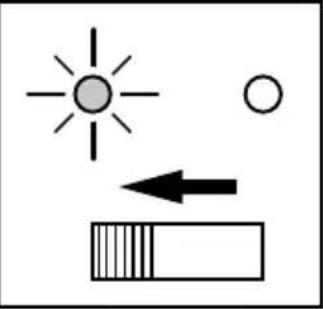
natural_image
Simple diagram showing sun, circle, and rectangular shapes with an arrow pointing left (no text or symbols)مرفق:
المرفقات
natural_image
Line drawing of a cable with two connectors, no text or symbols present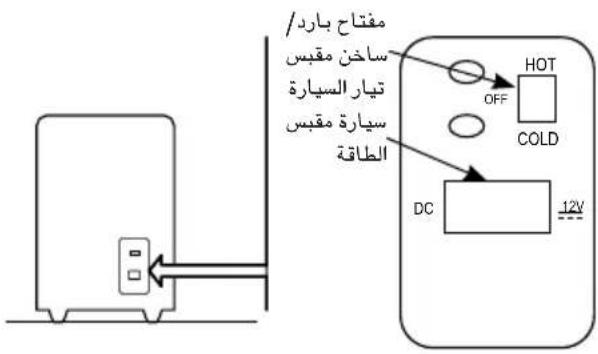
flowchart
graph TD
    A["Device"] --> B["Control Panel"]
    B --> C{OFF: HOT, Cold}
    B --> D{12V: DC}
    B --> E["PC Control"]
    B --> F["PC Control"]
    B --> G["PC Control"]
    H["User Interface"] --> I["User Interface"]
    style H fill:#f9f,stroke:#333
    style I fill:#ccf,stroke:#333
    style_J["User Interface"] --> K["User Interface"]
    style K fill:#cfc,stroke:#333
    style_L["User Interface"] --> M["User Interface"]
    style M fill:#fcc,stroke:#333
    style_N["User Interface"] --> O["User Interface"]
natural_image
Simple line drawing of a cable being inserted into a socket connected to a wall-mounted device (no text or symbols)نصائح توفير الطاقة
- Intended use
- General safety rules
- Save these instructions
- Safety instructions
- Operating the device safely
- Features
- Electric safety instructions for power supply
- Important safety precautions
- Product characteristics
- Application
- Work performance
- Operation guide
- Attachment:
- Attachments
- When using 12v power
- Energy saving tips
- Use and care
- Warning and notice
- Cleaning and maintenance
- Protecting the environment
- Technical data
- BDC8
- Guarantee
- Usage prévu
- Accessoire :
- Accessoires
Brand : BLACK & DECKER
Model : BDC8
Category : Fridge