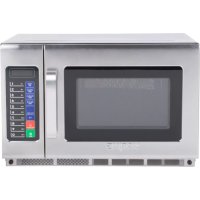
WMO120 - Microwave Oven Waring Commercial - Free user manual and instructions
Find the device manual for free WMO120 Waring Commercial in PDF.


| Product Type | Commercial Microwave Oven |
| Brand | Waring Commercial |
| Model | WMO120 |
| Capacity | 34 liters |
| Dimensions (W x D x H) | 57.6 x 52.6 x 36.8 cm |
| Net Weight | 32.3 kg |
| Power Supply | 208-230 V~ / 60 Hz |
| Input Power | 2800 W |
| Output Power | 1800 W |
| Power Levels | 5 levels: High (100%), Medium-High (70%), Medium (50%), Defrost (20%), Hold (0%) |
| Cooking Types | Manual, preprogrammed, step cooking (up to 3 steps), X2 mode (double time) |
| Key Programming | Up to 100 programs (00-99) with adjustable time and power |
| Display | VFD screen |
| Compatible Materials | Glass, ceramic, microwave-safe plastic, parchment paper, etc. |
| Prohibited Materials | Metal, aluminum, non-microwave-safe paper, expanded polystyrene, wood |
| Safety | Door safety lock, mandatory grounding, automatic shut-off |
| Maintenance and Cleaning | Clean the interior with a damp cloth and mild soap; do not use abrasive products |
| Air Filter | Removable for cleaning |
| Arch Protection Screen | Removable, washable with soapy water |
| Intended Use | Intensive commercial use (reheating, cooking, defrosting) |
| Factory Settings | Ability to reset all parameters |
Frequently Asked Questions - WMO120 Waring Commercial
User questions about WMO120 Waring Commercial
0 question about this device. Answer the ones you know or ask your own.
Ask a new question about this device
Download the instructions for your Microwave Oven in PDF format for free! Find your manual WMO120 - Waring Commercial and take your electronic device back in hand. On this page are published all the documents necessary for the use of your device. WMO120 by Waring Commercial.
USER MANUAL WMO120 Waring Commercial
natural_image
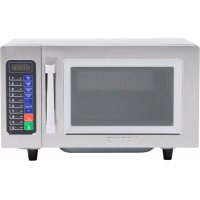
Exterior view of a Waring microwave oven with control panel and digital display (no visible text or symbols on main body)WMO120
For your safety and continued enjoyment of this product, always read the instruction book carefully before using.
IMPORTANT SAFETY INSTRUCTIONS
- READ ALL INSTRUCTIONS BEFORE USING.
- Read and follow the specific: PRECAUTIONS TO AVOID POSSIBLE EXPOSURE TO EXCESSIVE MICROWAVE ENERGY found on page 5.
- As with most cooking appliances, close supervision is necessary to reduce the risk of fire in the oven cavity.
WARNING: To reduce the risk of fire in the oven cavity:
i) Do not overcook food. Carefully attend to the appliance when paper, plastic, or other combustible materials are placed inside the oven to facilitate cooking.
ii) Remove wire twist ties and metal handles from paper or plastic containers/bags before placing them in the oven.
iii) If materials inside the oven ignite, keep the oven door closed. Turn the oven off, and unplug the appliance.
iv) Do not use the oven cavity for storage purposes. Do not leave paper products, cooking utensils, or food in the cavity when not in use.
- This oven must be grounded. Connect only to a properly grounded outlet. See GROUNDING INSTRUCTIONS found on page 4.
- Install or locate this oven only in accordance with the installation instructions provided on page 8.
- Some products, such as whole eggs and sealed containers (for example, closed glass jars), could explode and should not be heated in the oven.
WARNING: To reduce the risk of burns, electric shock, fire, injury to persons or exposure to excessive microwave oven energy when using your appliance, follow basic safety precautions, including the following:
- Use this appliance only for its intended use as described in this manual. Do not use corrosive chemicals or vapors in this appliance. This oven is specifically designed to heat, cook or dry food. It is not designed for industrial or laboratory use.
-
Do not operate this oven if it has a damaged cord or plug, if it is not working properly, or if it has been damaged or dropped.
-
This appliance should be serviced only by qualified service technicians. Contact the nearest authorized service facility for examination, repair or adjustment.
- Do not cover or block any openings on the oven.
- Do not store or use this appliance outdoors.
- Do not use this oven near water; for example, near a kitchen sink, in a wet basement, near a swimming pool, or similar locations.
- Do not immerse cord or plug in water.
- Keep cord away from heated surfaces.
- Do not let cord hang over edge of table or counter.
- When cleaning surfaces of door and oven that come into contact when closing the door, use only mild, nonabrasive soaps or detergents applied with a sponge or soft cloth.
WARNING: Liquids such as water, coffee or tea may be overheated beyond the boiling point without appearing to be boiling. Visible bubbling or boiling is not always present when the container is removed from the microwave oven. THIS COULD RESULT IN VERY HOT LIQUIDS SUDDENLY BOILING OVER WHEN THE CONTAINER IS DISTURBED, OR WHEN A SPOON OR OTHER UTENSIL IS INSERTED INTO THE LIQUID.
i) Do not overheat the liquid.
ii) Stir the liquid both before and halfway through heating it.
iii) Do not use straight-sided containers with narrow necks.
iv) After heating, allow the container to stand in the microwave oven for a short time before removing it.
v) Use extreme care when inserting a spoon or other utensil into the heated container.
- DO NOT heat baby bottles in microwave oven.
WARNING: DO NOT run this unit without food.
SAVE THESE INSTRUCTIONS APPROVED FOR COMMERCIAL USE
GROUNDING INSTRUCTIONS
DANGER: Electric Shock Hazard
Touching some of the internal components can cause serious personal injury or death. Do not disassemble this appliance.
Improper use of the grounding can result in electric shock. Do not plug into an outlet until appliance is properly installed and grounded.
This appliance must be grounded while in use to protect the operator from electric shock. Appliance is equipped with a 3-foot-long conductor cord and a 3-prong grounding plug to fit into the proper outlet. In the event of an electrical short circuit, grounding reduces the risk of electric shock by providing an escape wire for the electric current. This appliance has a cord with a grounding wire and a grounding plug, which must be plugged into a properly installed and grounded outlet.
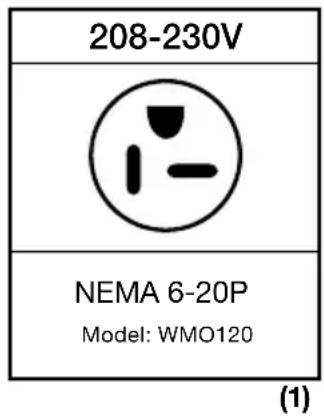
The WMO120 plug (Fig. 1) is not designed to connect to an adapter. It must only be used with a properly connected grounding-type outlet designed for a 208-230V plug.
Consult a qualified electrician or serviceman if the grounding instructions are not completely understood or if there is doubt as to whether the appliance is properly grounded.
EXTENSION CORDS & LONG CORD SETS
Use only 3-wire extension cords that have 3-prong grounding type plugs and 3-pole cord connectors that accept the plug from the appliance. Use only extension cords that are intended for indoor use. Use only extension cords having an electrical rating not less than the rating of the appliance. Do not use damaged extension cords. Examine extension cord before using and replace if damaged. Do not abuse extension cord and do not yank on any cord to disconnect. Keep cord away from heat and sharp edges.
NOTE: The WMO120 is for 208-230V\~ only. This appliance should not be used with a converter.
PRECAUTIONS TO AVOID POSSIBLE EXPOSURE TO EXCESSIVE MICROWAVE ENERGY
(a) DO NOT attempt to operate this oven with the door open since this can result in harmful exposure to microwave energy. It is important not to defeat or tamper with the safety interlocks.
(b) DO NOT place any object between the oven front face and the door, or allow soil or cleaner residue to accumulate on sealing surfaces.
(c) DO NOT operate the oven if it is damaged. It is particularly important that the oven door closes properly and that there is no damage to the:
(1) DOOR (bent)
(2) HINGES AND LATCHES (broken or loosened)
(3) DOOR SEALS AND SEALING SURFACE
(d) The oven should not be adjusted or repaired by anyone except properly qualified service personnel.
RADIO INTERFERENCE
- Operation of the microwave oven may cause interference to your radio, TV or similar equipment.
- When there is interference, it may be reduced or eliminated by taking the following measures:
a) Clean door and sealing surface of the oven.
b) Reorient the receiving antenna of the radio or television.
c) Relocate the microwave oven with respect to the receiver.
d) Move the microwave oven away from the receiver.
e) Plug the microwave oven into a different outlet so that microwave oven and receiver are on different branch circuits.
CAUTION
Personal Injury Hazard
Tightly closed containers could explode during microwaving. Closed containers should be opened and plastic pouches should be pierced before cooking.
SAFE MATERIALS FOR MICROWAVE
There may be certain non-metallic utensils and containers that are not safe to use for microwaving. Refer to the instructions on Materials You Can Use In Microwave Oven and Materials To Be Avoided In Microwave Oven on this page and page 7.
To check if a material is microwave safe, you can test it following the procedure below.
- Fill a microwave-safe container with 1 cup (250ml) of cold water along with the utensil in question.
- Cook on maximum power for 1 minute.
- Carefully feel the utensil. If the utensil is warm, do not use it for microwave cooking.
- Do not exceed 1 minute of cooking time.
| MATERIALS YOU CAN USE IN MICROWAVE OVEN | |
| Material Remarks | |
| Aluminum foil | Shielding only. Small, smooth pieces can be used to cover thin parts of meat or poultry to prevent overcooking. Sparking can occur if foil is too close to oven walls. The foil should be at least 1 inch (2.5cm) away from oven walls. |
| Dinnerware Microwave-safe only. Follow manufacturer's instructions. Do not use cracked or chipped dishes. | |
| Glass jars Always | remove lid. Use only to heat food until just warm. Most glass jars are not heat resistant and may break. |
| Glassware Heat | -resistant oven glassware only. Make sure there is no metallic trim. Do not use cracked or chipped glassware. |
| Oven cooking bags | Follow manufacturer's instructions. Do not close with metal tie. Make slits to allow steam to escape. |
| Paper plates and cups | Use for short-term cooking/warming only. Do not leave oven unattended while cooking. |
| Paper towels Use | to cover food for reheating and absorbing fat. Use with supervision for short-term cooking only. |
| MATERIALS YOU CAN USE IN MICROWAVE OVEN(CONT) | |
| Parchment paper | Use as a cover to prevent splattering or a wrap for steaming. |
| Plastic Microwave | e-safe only. Follow the manufacturer's instructions. Should be labeled as microwave safe. Some plastic containers soften, as the food inside gets hot. Boiling bags and tightly closed plastic bags should be slit, pierced or vented as directed on package. |
| Plastic wrap Microwave | rowave-safe only. Use to cover food during cooking to retain moisture. Do not allow plastic wrap to touch food. |
| Thermometers | Microwave-safe only (meat and candy thermometers). |
| Wax paper Use | as a cover to prevent splattering and retain moisture. |
| MATERIALS TO BE AVOIDED IN MICROWAVE OVEN | |
| Aluminum tray | May cause sparking. Transfer food into microwave-safe dish. |
| Food carton with metal handle | May cause sparking. Transfer food into microwave-safe dish. |
| Metal or metal-trimmed utensils | Metal shields the food from microwave energy. Metal trim may cause sparking. |
| Metal twist ties | May cause sparking and could cause a fire in the oven. |
| Paper bags May | cause a fire in the oven. |
| Styrofoam® | Styrofoam® may melt or contaminate the liquid inside when exposed to high temperature. |
| Wood Wood will | dry out when used in the microwave oven and may split or crack. |
COUNTERTOP INSTALLATION
Remove all packing material and accessories. Examine the oven for any damage such as dents or a broken door. Do not install if oven is damaged.
Cabinet: Remove any protective film found on the microwave oven cabinet surface.
INSTALLATION
Select a level surface that provides enough open space for the intake and/or outlet vents.
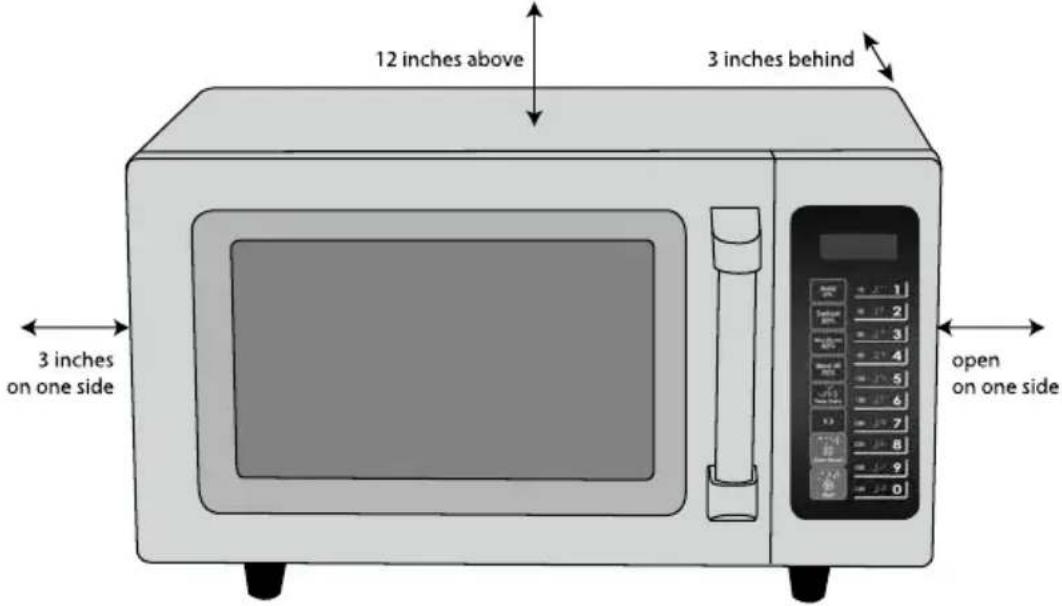
- A minimum clearance of 3.0 inches (7.5cm) is required between the oven and any adjacent walls. One side must be open.
(a) Leave a minimum clearance of 12 inches (30cm) above the oven.
(b) Do not remove the legs from the bottom of the oven.
(c) Blocking the intake and/or outlet openings can damage the oven.
(d) Place the oven as far away from radios and TV as possible. Operation of microwave oven may cause interference to your radio or TV reception.
- Plug your oven into the appropriate outlet. Be sure the voltage and the frequency is the same as the voltage and the frequency on the rating label.
WARNING: Do not install oven over a range cooktop or other heat-producing appliances. If installed near or over a heat source, the oven could be damaged and the warranty would be void.
SETTING UP YOUR OVEN
Remove the oven and all materials from the carton and inside the oven cavity. Your oven comes with an Instruction Manual. Please keep it for reference.
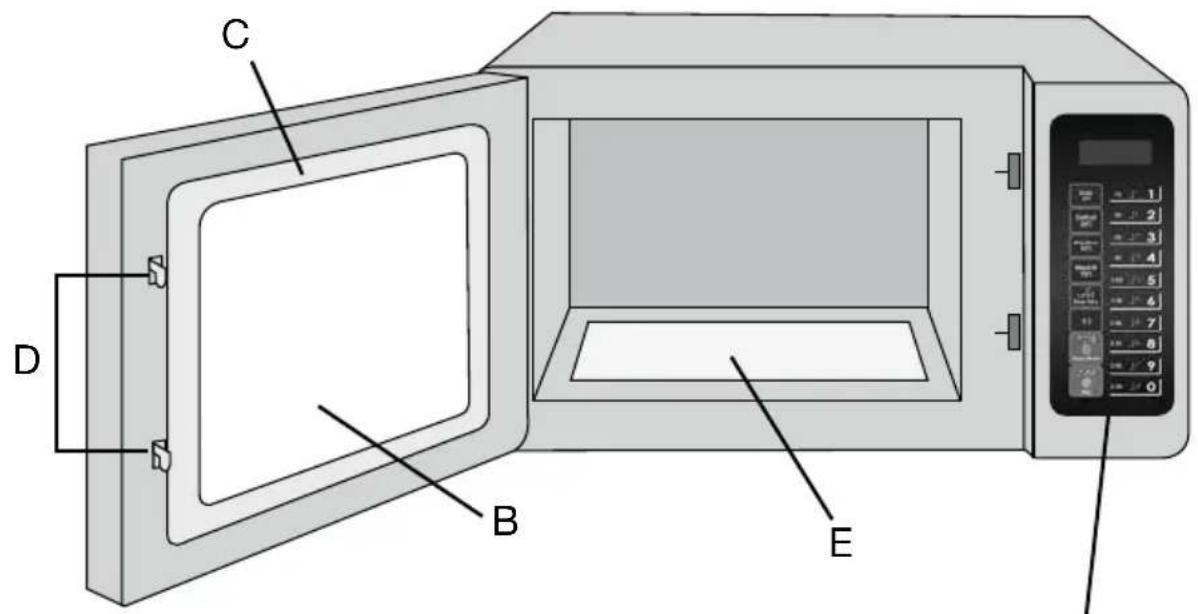
A) Control Panel
B) Observation Window
C) Door Assembly
D) Safety Interlock System
E) Ceramic Surface (non-removable)
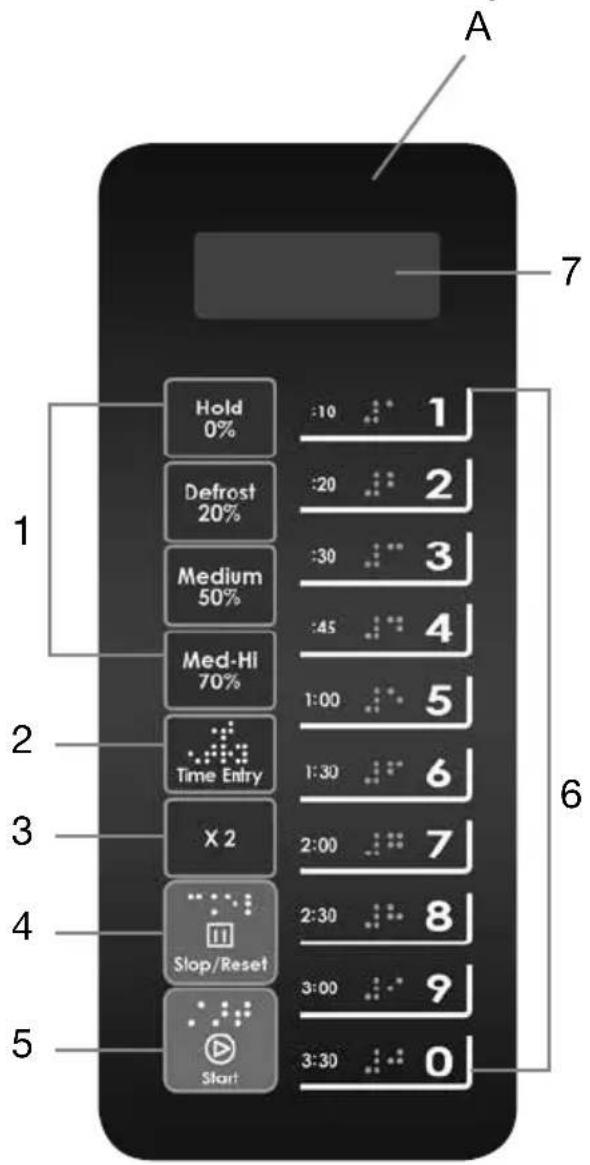
CONTROL PANEL
1) Power Keys
2) Time Entry Key
3) X2 Key
4) Stop/Reset Key
5) Start Key
6) Number Keys
7) VFD Display Screen
| SPECIFICATIONS | |
| MODEL WMO120 | |
| Rated Voltage 208-230V~ / | 60Hz |
| Rated Input Power (Microwave) | 2800W |
| Rated Output Power (Microwave) | 1800W |
| Oven Capacity 1.2 cu. ft. | |
| External Dimensions 22.7 x 20.7 x 14.5 inches | |
| Net Weight Approx. 71.1 lbs. | |
Five power levels are available.
| Level | High | Med-Hi | Medium | Defrost | Hold |
| Power | 100% | 70% | 50% | 20% | 0% |
| Display | XX:XX | XX:XX 70 | XX:XX 50 | XX:XX 20 | XX:XX 0 |
Appendix A. User Options
Items bolded below are the default values.
| Option | Setting | Description |
| 1 End of Cycle Tone | OP:10 | 3-Second Beep |
| OP:11 | Continuous Beep | |
| OP:12 | 5 Quick Beeps, Repeating | |
| 2 Beeper Volume | OP:20 | Off |
| OP:21 | Low | |
| OP:22 | Medium | |
| OP:23 | High | |
| 3 Keybeep On/Off OP:30 | Off | |
| OP:31 | On | |
| 4 Keypad Entry Window | OP:40 | 15 Seconds |
| OP:41 | 30 Seconds | |
| OP:42 | 60 Seconds | |
| OP:43 | 120 Seconds | |
| 5 On the Fly | OP:50 | On-the-Fly Disabled |
| OP:51 | On-the-Fly Enabled | |
| 6 Door Reset OP:60 Door | Reset Disabled | |
| OP:61 Door | Reset Enabled | |
| 7 Max Time OP:70 60-Min | Minute Maximum | Cook Time |
| OP:71 10-Min | Minute Maximum Cook Time | |
| 8 Manual Programming OP:80 Manual | Programming Disabled | |
| OP:81 Manual | Programming Enabled | |
| 9 Double Digit OP:90 Single-Digit Mode, 10 Programs | ||
Appendix B. Default Cook Times
The oven comes programmed with the following Preset Cook Times unless otherwise noted in the Product Specifications.
| Button Cooking Time Power Cook Factors | |||
| 1 | 0:10 | 100% | 80% |
| 2 | 0:20 | 100% | 80% |
| 3 | 0:30 | 100% | 80% |
| 4 | 0:45 | 100% | 80% |
| 5 | 1:00 | 100% | 80% |
| 6 | 1:30 | 100% | 80% |
| 7 | 2:00 | 100% | 80% |
| 8 | 2:30 | 100% | 80% |
| 9 | 3:00 | 100% | 80% |
| 0 | 3:30 | 100% | 80% |
POWER UP
Press number button 1 for 230 volts, number button 2 for 208 volts. If the START button is pressed, the oven will change to Idle Mode. The door must be opened and shut to initiate Ready Mode.
NOTE: While in Idle Mode, no button can be pressed.
IDLE MODE
1) The oven enters Idle Mode after a number of seconds have expired in Ready Mode without a keyboard button being pressed or a door being opened and closed. The number of seconds in Ready Mode is set by User Option 4 and is displayed in the window.
2) During Idle Mode, screen is blank.
3) By opening and then closing the oven door, the oven will exit Idle Mode and enter Ready Mode.
READY MODE
1) In this mode, the oven is ready to either begin a Manual or Preset Program Cook Mode.
2) Opening and closing the door while the oven is in Idle Mode will put the oven into Ready Mode.
3) During Ready Mode, READY is displayed.
4) From Ready Mode, the oven can go into almost all of the other modes.
DOOR OPEN MODE
1) While the door of the oven is open, the oven is in Door Open Mode. This also allows for entry into Programming Mode.
2) Display is blank, but the fan and oven lamp are on.
3) If User Option OP:60 is selected and the door is opened during operation, the oven will enter Pause Mode. Closing the door will allow the Manual or Preset Program currently running to continue.
4) If User Option OP:61 is selected, opening and closing the door during operation will reset the oven and clear out any information about the Manual or Preset Program currently running.
PAUSE MODE
1) This mode allows the user to temporarily stop the cooking cycle to inspect or stir food.
2) While in Manual Cook Mode, or Preset Program Cook Mode, if the door is opened then closed, or if STOP is pressed, the oven will enter Pause Mode.
3) While paused, screen will display the remaining cooking time.
4) Pause Mode reverts to Idle Mode in the same way as Ready Mode, depending on User Option 4. Additionally, if STOP is pressed, the oven will immediately enter Ready Mode. If START is pressed, the oven will go into Working Mode.
MANUAL COOK ENTRY MODE
1) The user manually enters the cooking time and power level while in this mode.
2) While the oven is in Ready Mode, press the TIME ENTRY pad on the keyboard to enter Manual Cook Entry Mode.
3) In this mode, 00:00 is displayed. Press a number key to set timer before choosing power level.
4) If you press HOLD 0%, Defrost 20%, Medium 50% or Med-Hi 70% to choose a power level, the screen will display your selection. If the same button is pressed twice, the power will change to PL10, which is 100%. If no power is chosen, PL10 is the default.
5) Press START to enter Manual Cook Mode. Press STOP to enter Ready Mode.
MANUAL COOK MODE
1) In this mode, food is cooked. While in Manual Cook Entry Mode, pressing START begins the Manual Cook Mode.
2) The screen displays the remaining cooking time and power level. The fan and oven lamp will turn on.
3) When the cooking program is finished, the oven enters End of Cook Cycle Mode. If you press STOP in this mode, the oven enters Pause Mode.
END OF COOK CYCLE MODE
1) After the time has expired in the Manual Cook Mode, or the Preset Program Cook Mode, the oven enters the End of Cook Cycle Mode.
2) During this mode, DONE is displayed.
3) If either User Option OP:11 or OP:12 is selected, the oven continues to sound until the user either opens and closes the door or presses STOP. If User Option OP:10 is selected, after the 3-second beep, the oven will go into Idle Mode.
PRESET PROGRAM COOK MODE
1) This mode cooks food using the touchpad. While in Ready Mode, pressing one of 10 digital keys on the keyboard will cause the oven to run the Preset Program associated with that key.
2) The screen displays the remaining cooking time. With multi-stage cooking, the total remaining cooking time is displayed, and not the cooking time for any particular stage.
3) If the program chosen exceeds the maximum time allowed by User Option 7, the oven will rapidly beep three times and display 0:00 to indicate that the program is unacceptable.
4) When the cooking program is finished, the oven will enter End of Cook Cycle Mode. If you press STOP in this mode, the oven will enter Pause Mode.
ON-THE-FLY COOKING MODE
Allows the user to add time while cooking.
1) Press the desired number key during cooking to add time. The longer cooking cycle will begin automatically.
2) The screen displays the new remaining cooking time. When cooking program is finished, the oven enters End of Cook Cycle Mode.
3) To stop cooking before the end of the cooking cycle, press STOP. The oven will enter Pause Mode.
PROGRAMMING MODE
This mode allows the user to assign cook times and power levels using a one-touch button.
1) Open the door and press number button 1 for five seconds. The buzzer will sound once and the oven enters Programming Mode.
2) PROGRAM is displayed.
3) Press any number button, 0 to 9, and the screen will display the saved time. You can then input the time you need.
4) Press HOLD 0%, Defrost 20%, Medium 50% or Med-Hi 70% to input the power level. The screen will display the related power. If the same button is pressed twice, the power will change to PL10, which is the 100% power level. If no power is chosen, PL10 is the default.
5) To change the cooking factor: If you press X2, the screen will display CF:XX. The default cooking factor is 80%, and CF:08 is displayed. If you need to change the cooking factor, just press one of the numbered buttons (1 for 1%, 2 for 20%, etc).
6) After setting the time and power, press START, and the cooking program will be saved. Once the program is saved, PROGRAM is displayed.
7) If total cooking time exceeds the MAX time, use User Option 7. Press START to save the program. The buzzer will sound three times to indicate the oven is not in use. Screen will display PROGRAM. The previous time set will remain in place.
8) Close the door to return oven to Ready Mode. If STOP is pressed during the programming process, the oven will enter Door Open Mode, and any program not saved will be lost. Press the related number button to start the programmed operation. If nothing has been saved, the buzzer will sound and the oven will not operate.
Example:
Program: Power level PL7, cooking time 1 minute and 25 seconds.
Step 1: In waiting stage, press number button 1 for five seconds. PROGRAM is displayed.
Step 2: Press number 3. Program will be saved in 3.
Step 3: Press numbers 1, 2 and 5 to program the cooking time.
Step 4: Press Med-Hi 70% button. 1:25 70 is displayed.
Step 5: Press START to save. When using the program next time, just press 3, and the saved program will start.
Note:
-
If the electricity is cut off, the saved program will not be lost.
-
If the program needs to be reset, repeat the above steps.
-
If STOP is pressed instead of START at the last step, the oven will go into Door Open Mode, and the program setting will not be saved.
DOUBLE QUANTITY COOKING
Allows the user to double the set cooking time of a particular food item.
1) In the Ready mode, press the X2 key before or after pressing the desired preprogrammed key. Screen displays DOUBLE.
2) If you wish to change the Cooking Factor, see Programming Mode.
3) The oven will begin to cook.
4) At the end of the cooking program, the oven will enter End of Cook Cycle Mode.
TO PROGRAM MULTI-STAGE COOKING
Users can cook food items with different combinations of time and power levels. Up to three stages can be set in Cooking Mode or Memory Mode.
1) Once power level and time are set for the first stage: Pressing TIME ENTRY (STAGE-2 is displayed) lets you program the power level and time for stage two.
2) Pressing TIME ENTRY again (STAGE-3 is displayed) lets you program a third power level and time combination.
3) Press START to start cooking.
Example:
STAGE ONE
a. Press number button 1 for five seconds. Screen displays PROGRAM.
b. Press number button 3 to save the program in 3.
c. Enter desired cook time.
d. Press Med-Hi 70%. Display shows 70.
The first stage is finished.
STAGE TWO
a. Press TIME ENTRY. Display shows STAGE-2.
b. Enter desired cook time.
c. Press Medium 50%. Display shows 50.
The second stage is finished.
d. Press START to save the two-stage program, or press TIME ENTRY once more to program a third stage.
USER OPTION MODE
This allows the user to choose between various ways for the oven to operate.
1) Open the oven door and press number button 2 for five seconds. The buzzer sounds once and this mode is entered.
2) Screen displays OP: - - .
3) Press any number button to enter related mode setting. For example: To set the buzzer to a medium level, press 2. Display shows OP:22. To change, keep pressing 2. Screen displays cycles through OP:20, OP:21, OP:22, OP:23, before cycling back to OP:20.
4) Press START to save the displayed setting. OP: -- will be displayed again.
5) During this process, press STOP to enter Door Open Mode. Closing the door will return oven to Ready Mode.
6) If START button is not pressed as the last step, the program will not be saved.
SERVICE MODE
1) Open the oven door and press and hold the number button 3 for five seconds to enter Service Mode.
2) Screen displays SERVICE.
3) To check the number of hours and number of cycles that the components have run, press the following:
- Press 1 for Tube hours
- Press 2 for Tube cycles
- Press 3 for Door cycles
- To reset: Press 4 and then START. 4-CLEAR will be displayed.
- Press 5 to check the Top Magnetrons. The Screen will display the amount of amps.
- Press 6 to check the Bottom Magnetrons. The Screen will display the amount of amps.
4) Press STOP to enter Door Open Mode. Close the door to enter Ready Mode.
FACTORY-DEFAULT SETTING
To return the oven to its factory-default setting, follow the steps below:
- With oven in Ready Mode, press START and 0 at the same time.
-
The buzzer will sound once and screen will display CHECK. NOTE: If the oven is currently in the factory-default setting, the screen will display 11, and after 3 seconds will return to the Ready Mode.
-
If the oven is not in the factory-default setting, the screen will display 00. Press START to return to the factory-default setting. The screen will display CLEAR. NOTE: If you do not press START when 00 is displayed, the oven will not return to the factory-default setting.
WARNING: Please note that changing back to the factory-default setting will erase all user-programmed information.
CLEANING INSTRUCTIONS
Always keep the oven clean.
-
Cleaning the glass viewing window, the inner door panel and oven front face: For best performance and to maintain a high degree of safety, the inner door panel and oven front face should be free of food or grease buildup. Wipe these parts with a mild detergent, rinse and wipe dry. Never use abrasive powders or pads.
-
Cleaning the control panel and plastic parts: Do not apply a detergent or an alkaline liquid spray to the control panel and plastic parts, as this may cause damage to these parts. Use a dry cloth (not a soaked cloth) to clean these parts.
- Cleaning the oven interior: After use, be sure to clean up spilled liquids, spattered oil and food debris as quickly as possible. If the oven is used when dirty, efficiency drops and the dirt gets stuck on the oven surface and may cause bad odors. Clean the interior with a cloth soaked in lukewarm water with a mild detergent dissolved in it, then rinse the soap off with a damp cloth.
CAUTION: Do not wipe plastic and painted sections of the oven with bleach, thinners or other cleaning agents, as this may cause these parts to dissolve or change shape.
MAINTENANCE
The reference chart below describes operations that are normal, and should not cause any concern.
| NORMAL | |
| Microwave oven interferes with TV reception | There may be interference to television and radio reception when the microwave is operating. It is similar to the interference of small electrical appliances such as a mixer, vacuum cleaner or electric fan. It is normal. |
| Dim oven light In low power | Power microwave cooking, the oven light may become dim. It is normal. |
| Steam accumulating on door, hot air blows out of vents | Most of the steam will be vented out, but some may accumulate on the oven door. This is normal. |
Troubleshooting
Reference the chart below for any operating issues and try the solutions provided. If the microwave oven still does not work properly, contact the nearest authorized service center.
| TROUBLE POSSIBLE | CAUSE POSSIBLE REMEDY | |
| Oven will not start a. E | electrical cord for oven is not plugged in.b. Door is open.c. Wrong operation is set. | a. Plug into the outlet.b. Close the door and try again.c. Check instructions. |
| Sparking a. Materials to | be avoided in microwave oven were used.b. The oven is operating when empty.c. Spilled food remains in the cavity. | a. Use microwave-safe cookware only.b. Do not operate with oven empty.c. Clean cavity with a wet cloth. |
| Unevenly cooked foods | a. Materials to be avoided in microwave oven were used.b. Food is not defrosted completely.c. Cooking time, power level is not suitable.d. Food is not turned or stirred. | a. Use microwave-safe cookware only.b. Completely defrost food.c. Use correct cooking time, power level.d. Turn or stir food. |
| Overcooked foods Coo | king time, power level is not suitable. | Use correct cooking time, power level. |
| Undercooked foods a. | Materials to be avoided in microwave oven were used.b. Food is not defrosted completely.c. Oven ventilation ports are restricted.d. Cooking time, power level is not suitable. | a. Use microwave-safe cookware only.b. Completely defrost food.c. Check to see that oven ventilation ports are not restricted.d. Use correct cooking time, power level. |
| Improper defrosting a. | Materials to be avoided in microwave oven were used.b. Cooking time, power level is not suitable.c. Food is not turned or stirred. | a. Use microwave-safe cookware only.b. Use correct cooking time, power level.c. Turn or stir food. |
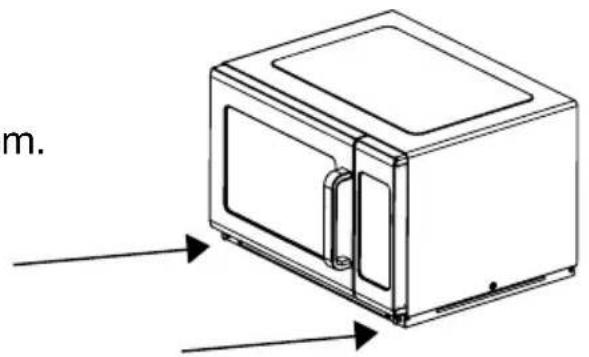
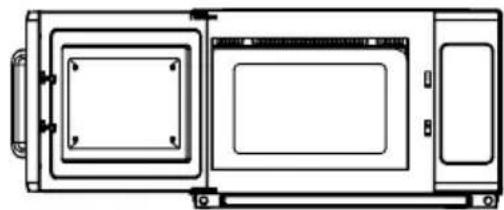
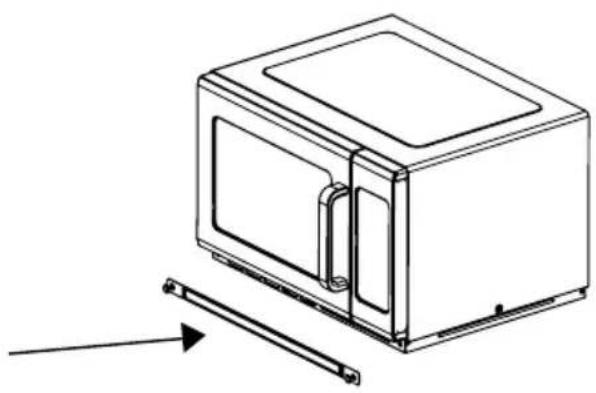
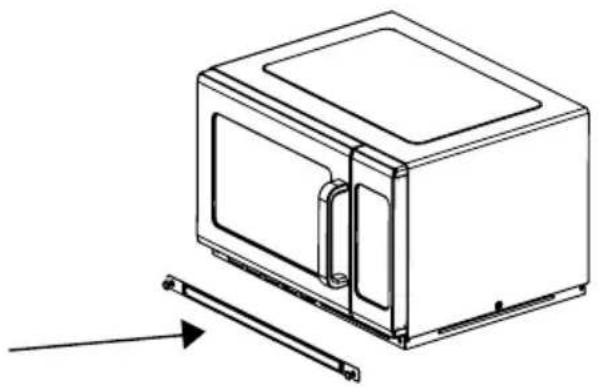
How to remove and install the filters:
Turn the metal nails counterclockwise to loosen them.
natural_image
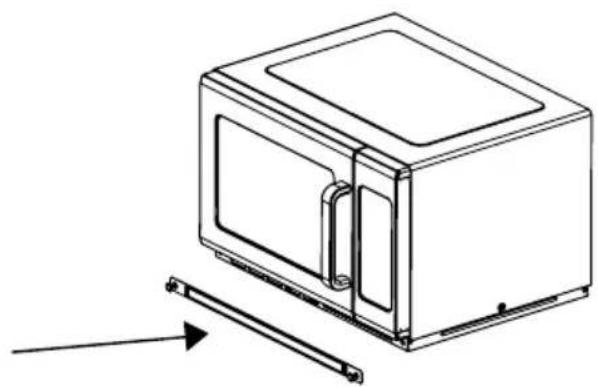
Line drawing of a microwave oven with labeled components and directional arrows (no text or symbols)Remove the filter.
natural_image
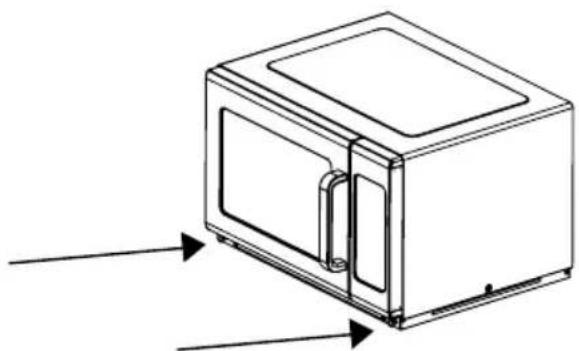
Line drawing of a microwave oven with a door and side panel, showing an arrow indicating motion (no text or symbols)To reinstall, align the base plate mounting holes, turn the nails clockwise to tighten.
natural_image
Line drawing of a microwave oven with two arrows pointing to the front panel (no text or symbols)How to remove and install the splatter guard, which protects the stirrer blade from food splatter:
Warning: Before removing or installing the splatter guard, unplug the unit from the power supply and allow it to cool.
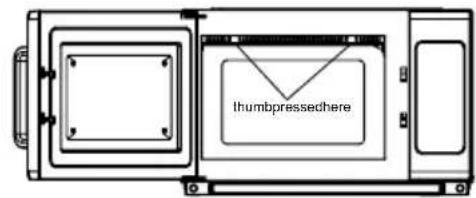
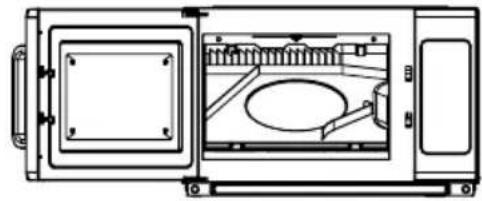
To remove splatter guard:
- Press in and pull down where shown to release and drop down front of splatter guard.
- Pull splatter guard forward to remove from oven.
- Splatter guard is removed from oven.
natural_image
Technical line drawing of a microwave oven with internal components and mounting bracket (no text or symbols)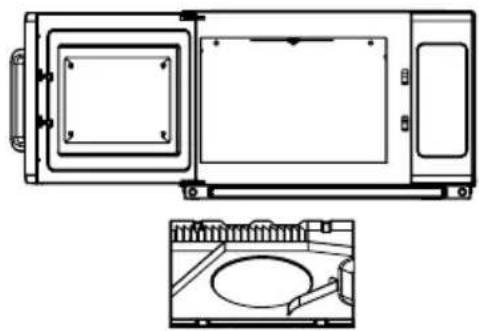
natural_image
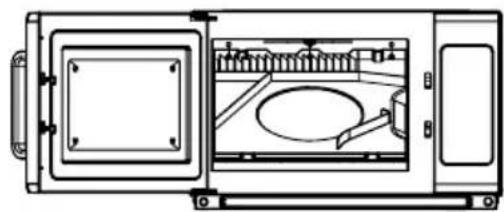
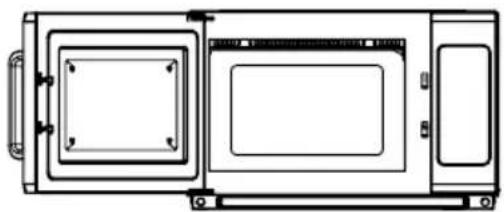
Technical line drawing of a microwave oven with front and side views (no text or symbols)To reinstall splatter guard:
- Insert rear posts of splatter guard into holes on back wall of oven.
- Secure oven with one hand, then push in and up at area shown to reinstall splatter guard.
- Ensure that the splatter guard is properly in place before use.
natural_image
Technical line drawing of a microwave oven with internal components and mounting bracket (no text or symbols)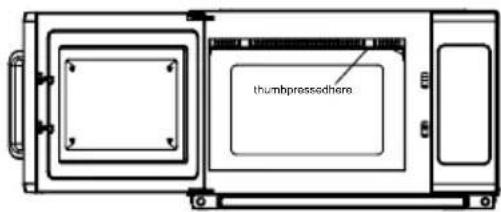
natural_image
Technical line drawing of a microwave oven with front panel and side door (no text or symbols)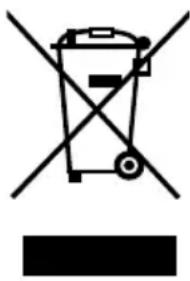
natural_image
Symbol of a trash bin crossed with a diagonal line and a horizontal bar below (no text or labels)According to Waste of Electrical and Electronic Equipment (WEEE) directive, WEEE should be separately collected and treated. If at any time you need to dispose of this product, please do NOT dispose of it with household waste. Please send this product to WEEE collection points where available.
INSTALLATION (SUPPLEMENT)
- The switching operation of this microwave oven can cause voltage fluctuations on the supply line. The operation of this oven under unfavorable voltage supply conditions can have adverse effects. This device is intended for the connection to a power supply system with a maximum permissible system impedance Zmax of 0.2 Ohms at the interface point of the user's supply. The user has to ensure that this device is connected only to a power supply system which fulfills the requirement above. If necessary, the user can ask the public power supply company for the system impedance at the interface point.
- If there is no equipotential bonding conductor in the electric supply, an external equipotential bonding conductor must be installed at the rear of the appliance (see symbol). This terminal shall be in effective electrical contact with all fixed exposed metal parts and shall allow the connection of a conductor having a nominal cross-sectional area up to 10 mm 4 .
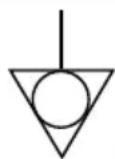
Symbol for the external connection of equipotential bonding conductors.
natural_image
Line drawing of a microwave oven with labeled door and side panel (no text or symbols)Retire el filtro.
natural_image
Line drawing of a microwave oven with a side panel and a separate metal bracket (no text or symbols)natural_image
Line drawing of a microwave oven with two arrows indicating direction (no text or symbols)natural_image
Technical line drawing of a microwave oven with internal components and mounting bracket (no text or symbols)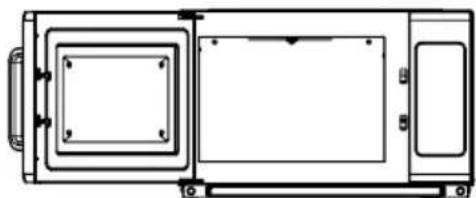
natural_image
Technical line drawing of a rectangular device with internal components and mounting brackets (no text or symbols)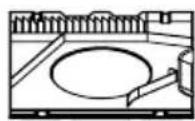
natural_image
Technical line drawing of a microwave oven with internal components and mounting bracket (no text or symbols)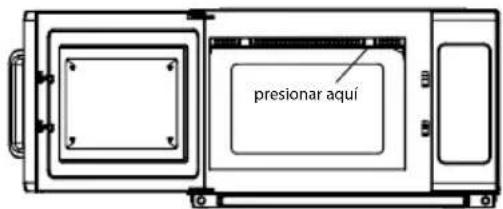
natural_image
Technical line drawing of a rectangular device with internal compartments and mounting brackets (no text or symbols)
natural_image
Symbol of a trash bin crossed with no text or labels, accompanied by a black rectangular block below (no text or symbols present)INSTALLATION DU FOUR
MODE "PROGRAMMATION MANUELLE"
natural_image
Line drawing of a microwave oven with labeled components and directional arrows indicating flow or movement (no text or symbols present)Retirer le filtre.
natural_image
Line drawing of a microwave oven with a side panel and a handle, showing no text or symbolsnatural_image
Line drawing of a microwave oven with labeled door and side panels (no text or symbols)natural_image
Technical line drawing of a microwave oven with internal components and mounting bracket (no text or symbols)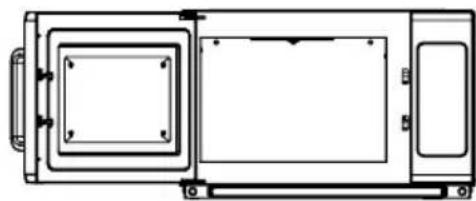
natural_image
Technical line drawing of a rectangular device with internal components and mounting brackets (no text or symbols)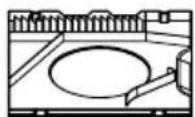
natural_image
Technical line drawing of a microwave oven with internal components and mounting bracket (no text or symbols)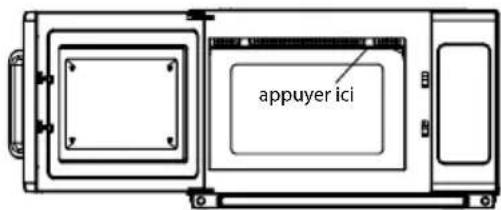
natural_image
Technical line drawing of a microwave oven or control unit (no text or symbols)
natural_image
Symbol of a trash bin crossed with a diagonal line, no text or numbers presentTrademarks or service marks of third parties used herein are the trademarks or service marks of their respective owners.
©2015 Waring Commercial
314 Ella T. Grasso Ave.
Torrington, CT 06790
www.waringcommercialproducts.com
Printed in China
Impreso en China
Imprimé en Chine
WMO120 IB
15WC009587
IB-13437
- IMPORTANT SAFETY INSTRUCTIONS
- SAVE THESE INSTRUCTIONS APPROVED FOR COMMERCIAL USE
- GROUNDING INSTRUCTIONS
- DANGER: Electric Shock Hazard
- EXTENSION CORDS & LONG CORD SETS
- PRECAUTIONS TO AVOID POSSIBLE EXPOSURE TO EXCESSIVE MICROWAVE ENERGY
- RADIO INTERFERENCE
- CAUTION
- Personal Injury Hazard
- SAFE MATERIALS FOR MICROWAVE
- COUNTERTOP INSTALLATION
- INSTALLATION
- SETTING UP YOUR OVEN
- CONTROL PANEL
- Appendix B. Default Cook Times
- POWER UP
- IDLE MODE
- READY MODE
- DOOR OPEN MODE
- PAUSE MODE
- MANUAL COOK ENTRY MODE
- MANUAL COOK MODE
- END OF COOK CYCLE MODE
- PRESET PROGRAM COOK MODE
- ON-THE-FLY COOKING MODE
- PROGRAMMING MODE
- Example:
- Note:
- DOUBLE QUANTITY COOKING
- TO PROGRAM MULTI-STAGE COOKING
- USER OPTION MODE
- SERVICE MODE
- FACTORY-DEFAULT SETTING
- CLEANING INSTRUCTIONS
- MAINTENANCE
- Troubleshooting
- How to remove and install the filters:
- How to remove and install the splatter guard, which protects the stirrer blade from food splatter:
- To remove splatter guard:
- To reinstall splatter guard:
- INSTALLATION (SUPPLEMENT)
- INSTALLATION DU FOUR
- MODE "PROGRAMMATION MANUELLE"
Brand : Waring Commercial
Model : WMO120
Category : Microwave Oven