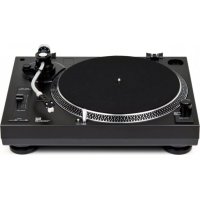
DTJ 301.1 - Turntable DUAL - Free user manual and instructions
Find the device manual for free DTJ 301.1 DUAL in PDF.



| Product type | Turntable |
| Brand | Dual |
| Model | DTJ 301.1 |
| Dimensions (W x H x D) | 450 mm x 139 mm x 350 mm |
| Weight | 5.36 kg |
| Power supply | 230 V, 50 Hz, 11 W |
| Speeds | 33 ⅓ and 45 rpm |
| Motor | DC motor, direct drive, 2-phase, 8-pole |
| Tonearm | Effective length 220 mm |
| Cartridge | Cartridge with diamond stylus |
| Recommended tracking force | >2.5 g |
| Anti-skating | Yes, adjustable |
| Pitch adjustment | PITCH ADJ. slider, ±10% range |
| Built-in preamp | Yes, PHONO/LINE selector |
| USB port | USB 1.1/2.0 for digitization |
| Audio outputs | RCA (left/right) |
| Dust cover | Yes, with hinges |
| Stylus illumination | Yes, switch |
| Adjustable feet | Yes, max height 0.5 cm |
| Frequency range | 20 Hz - 20 kHz |
| Signal-to-noise ratio | >55 dB |
| Channel separation | >15 dB |
| Included accessories | Platter, felt mat, 45 RPM adapter, software CD, RCA and USB cables, manual |
| Cleaning | Use a soft cloth; do not use solvents |
| Safety | Do not open the casing; unplug before cleaning |
Frequently Asked Questions - DTJ 301.1 DUAL
User questions about DTJ 301.1 DUAL
0 question about this device. Answer the ones you know or ask your own.
Ask a new question about this device
Download the instructions for your Turntable in PDF format for free! Find your manual DTJ 301.1 - DUAL and take your electronic device back in hand. On this page are published all the documents necessary for the use of your device. DTJ 301.1 by DUAL.
USER MANUAL DTJ 301.1 DUAL
Montage du contrepoids. 10
DTJ 301 USB DTJ 301.1 USB DJ record player with USB port
Operating manual
Preface
This operating manual outlines
proper and
- safe
Use of your record player, referred to below as "record player" or "unit".
Take note of the Audacity software on the CD and the instructions for using the USB terminal on p. 20.
Target group of this operating manual
This operating manual is intended for everyone who
- sets up,
- operates,
- cleans
- or disposes of the unit.
All brand and product names are trademarks or registered trademarks of the respective manufacturer.
Layout features of this operating manual
Various items in the operating manual are provided with set layout features. This enables you to determine easily whether the item is
normal text,
- a list or
steps to be carried out.

Install the supplied Audacity® software on a PC or MAC before connecting and operating the unit.
An alternative program, for example, is the "Free MP3 Sound Recorder" on the CD.
Please read these instructions for use carefully and keep them for later use, be sure to make them accessible to other users and observe the information they contain.
Contents
Important notes for users in the U.K. 4
Mains plug. 4
How to connect a plug. 4
Safety and setting up the record player. 5
Safety 5
Setup. 6
Description of the record player. 8
Included in delivery 8
Special characteristics 8
The front of the unit. 9
How to prepare the record player for operation.....10
Turntable 10
Turntable mat. 10
Spindle adapter 10
Installing the tone arm head 10
Tone arm 11
Attaching the counterweight. 11
Adjusting the stylus force 11
Anti-skating control. 12
The stylus illuminator 13
The dust cover 13
Adjustable feet 14
Connecting the record player 15
Connection to the amplifier 16
Connection to the computer 16
Mains connection 16
How to set the PHONO/LINE switch 16
Removing/attaching the stylus protection cap 17
Playing a record 18
Procedure 18
Interrupting playback 18
Playing back a 45 rpm record with large centre hole.... 19
Speed fine adjustment PITCH ADJ. 19
Before establishing the USB connection 20
System requirements 20
How to digitalise your music 21
Installing the software 21
Connecting the record player 21
Setting up the software 21
Recording and saving music 22
How to clean the record player 23
Cleaning the stylus and the record 23
Replacing the stylus 23
Installing another pickup system 24
Troubleshooting 25
Technical specifications 26
Disposal instructions 27
Important notes for users in the U.K.
Mains plug
This apparatus is fitted with an approved 13 Amp plug. To change a fuse in this type of plug proceed as follows:
- Remove fuse cover and fuse.
- Fix new fuse which should be a BS1362 3 Amp, A.S.T.A. or BSI approved type.
- Refit the fuse cover.
If the fitted plug is not suitable for your socket outlets, it should be cut off and an appropriate plug fitted in its place. If the mains plug contains a fuse, this should have a value of 3 Amp. If a plug without a fuse is used, the fuse at the distribution board should not be greater than 5 Amp.
Note:
The severed plug must be disposed of to avoid a possible shock hazard should it be inserted into a 13 Amp socket elsewhere.
How to connect a plug
The wires in the mains lead are coloured with the following code:
blue = neutral (N), brown = live (L).
- As these colours may not correspond with the colour markings identifying the terminals in your plug, proceed as follows:
- Connect the blue wire to the terminal marked N or coloured black.
- Connect the brown wire to the terminal marked L or coloured red.
- Do not connect either wire to the earth terminal in the plug, marked E (or e) or coloured green (or green and yellow).
Before replacing the plug cover, make certain that the cord grip is clamped over the sheath of the lead - not simply over the two wires.
Copyright in the U.K.
Recording and playback of material may require consent. See Copyright Act 1956 and The Performer's Protection Acts 1958 to 1972.
Safety and setting up the record player
Please read through all of the safety instructions carefully and keep them for questions that may arise later. Always observe all warnings and instructions in this operating manual and on the rear of the unit.

Safety
Caution!
- The unit should only be connected to a mains voltage supply of 230V 50Hz Never try to operate the unit with a different voltage.
- The mains plug should only be connected after installation has been completed according to the instructions.
- If the mains plug is defective or if the unit exhibits other signs of damage, it should not be used.
- When unplugging the plug from the socket pull on the plug itself, not on the cable.
- Prevent the unit from coming into contact with water or moisture.
-
In order to avoid fire hazards and the risk of electric shock do not expose the unit to rain or moisture.
-
Do not operate the unit in the vicinity of bathtub, swimming pools or spraying water.
- Do not place any containers which contain a liquid on the unit, such as a flower vase. These could fall over and the spilled liquid could lead to severe damage or the risk of electric shock.
- If foreign objects or liquid get into the unit, immediately pull the mains plug from the socket. Have the unit checked by qualified technicians before you operate it again. Otherwise you are at risk of receiving an electric shock!
- Do not open the housing. Otherwise you are at risk of receiving an electric shock!
- Never attempt to repair a defective unit yourself. Always contact one of our customer service locations.
- Never open the unit under any circumstances - this should only be undertaken by a specialist.
- Foreign material, e.g. needles, coins, etc., should not be allowed to enter the unit.
- Do not touch the contacts located on the rear of the unit with metal objects or your fingers. This could result in a short circuit.
-
No open flames, such as burning candles, are permitted to sit on the unit.
-
Never let children use this unit unattended.
- Always leave maintenance tasks to a qualified technician. Otherwise you put yourself and others in danger.
- The unit remains connected to the mains even when it is switched off in the standby mode. Remove the mains plug from the socket if you do not intend to use the unit for a prolonged period. Pull only on the plug itself, not on the cable.
- Do not listen to music or the radio at too high a volume. This can lead to permanent hearing damage.
- This unit is not intended for use by persons (including children) with physical, sensory or mental impairments or those who do not know how to use it due to a lack of experience or knowledge, unless they are supervised by a person responsible for their safety or have received instructions from them on how to use the unit.
Children have to be supervised to ensure that they do not play with the unit. - Modifying the unit is prohibited.
- Damaged units or accessories must no longer be used.
Setup
- The record player must be set up only on a sturdy horizontal, vibration-free surface.
- Do not set up the unit in the vicinity of heat sources, such as radiators. Avoid direct sunlight and excessively dusty places.
- Please note that the feet on the unit could possibly leave marks on certain furniture surfaces. Use a protective layer between your furniture and the unit.
- You should only operate the unit when it is positioned horizontally.
- Do not place any heavy objects on the unit.
-
Do not use the unit outdoors!
-
The unit should not be placed in an area with high humidity levels, e.g. in a kitchen or sauna, as condensation can cause damage to the unit. The unit is intended for use in a dry and temperate environment, and must be kept away from dripping or splashing water.
- Keep the unit away from devices that produce strong magnet fields.
If you move the unit from a cold environment into a warm environment, moisture may develop inside the unit. After moving the unit from a cold to a warm environment therefore, wait around an hour before starting to use it. - Lay the mains cable in such a way that no one can trip over it.
- Make sure the mains cable or plug is always easily accessible, so that the unit can be disconnected quickly from the power supply! This socket should be as close to the unit as possible.
Fully insert the mains plug into the socket. - Use a suitable, easily accessible mains connection and avoid using multiple sockets!
-
Do not touch the mains plug with wet hands—risk of electric shock!
-
In the event of malfunctions or smoke and odour coming from the housing remove the mains plug from the socket immediately!
- Before a thunderstorm breaks, pull the mains plug.
- If the unit is not going to be used for a prolonged period, e.g. in the event of a long trip, remove the mains plug from the socket.
- Listening to music at too high a volume, especially via headphones, can result in hearing damage.
- Do not use any other USB unit for connecting to the USB port. The USB port is only for connecting directly to a computer!
Intended use
The unit is designed for playing records.
Description of the record player Included in delivery
Remove the unit and all accessory parts from the packaging.
Note: The small parts are in the sides of the polystyrene packaging!
Keep the box and the packing material so that you can repack the unit securely for any later transport.
Please ensure that all of the accessory parts in the following list are present:
The record player,
- Turntable,
- Pickup system with stylus,
- Counterweight,
- Turntable mat
- Dust cover with 2 hinges
- Spindle adapter (for 7^ EPs),
- Software CD
- USB and audio connection cables,
- This operating manual.
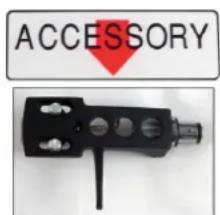
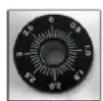
Special characteristics
- This unit allows you to: play records for 33 and 45 rpm.
- The unit is suitable for scratch playing.
- The unit has a direct-drive motor with quick start and stop function (< 1s).
- The record player has an integrated equaliser/preamplifier and can be connected to a phono input as well as an audio input (AUX-In).
- Using the USB terminal and the Audacity software, you can transfer your records to your computer and digitalise them.

Have a look at the provided CD. It has the digitalisation software from Audacity® and an extensive description of the software (getting started, use).
Install the Audacity software on a PC or MAC before connecting and operating the unit.
The front of the unit
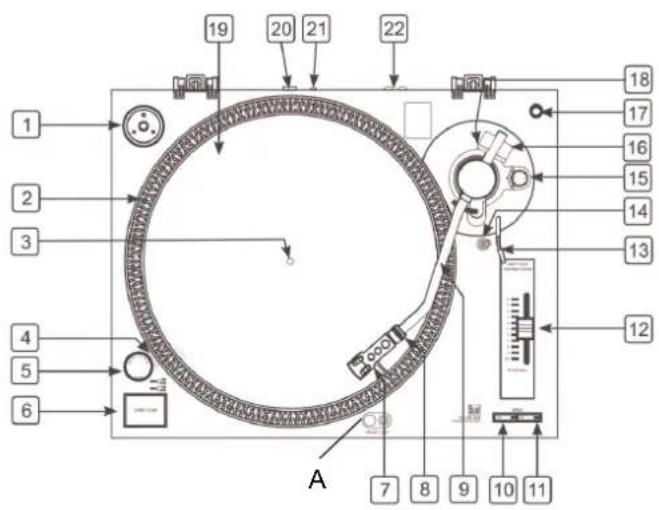
1 Holder for spindle adapter (for 7" EPs)
2 Stroboscope display, 4-row
3 Turntable spindle
4 Stroboscope lamp
5 POWER ON/OFF: On/off switch
6 START/STOP: Start/stop button
7 Headshell
8 Ring nut for headshell
9 Tone arm
10 SPEED 33: Speed button for LPs
11 SPEED 45: Speed button for singles
12 PITCH ADJ.: Slider for pitch adjustment (+10% to -10%)
13 Lift lever
14 Tone arm rest with clip
15 Anti-skating control
16 Counterweight
17 Holder for extra stylus
18 Scale for counterweight
19 Turntable with antistatic felt mat
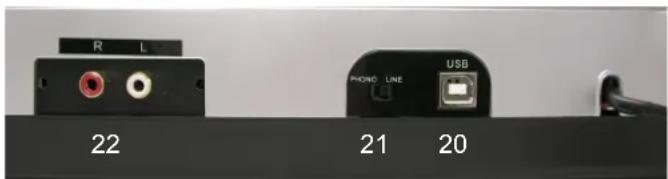
20 USB port
21 PHONO/LINE switch
22 Outputs right/left for audio connection, cinch
A Stylus Illuminator
How to prepare the record player for operation
Before assembly, make sure the accessories are complete.
Assemble the dust cover at the very end, to make it more convenient for assembling and adjusting the system!
Put the record player on a stable, vibration-free and horizontal surface.
Place the record player as far away as possible from the loudspeakers and keep it isolated from the sound they produce, to minimise vibrations.
Turntable
Carefully set the turntable onto the turntable spindle 3.
Turntable mat
Put the turntable mat (antistatic felt mat) on the turntable.
Spindle adapter
The spindle adapter is required, for example, for singles without their own plastic spindle adapter. When the spindle adapter is not in use, you can store it in the designated area 1.
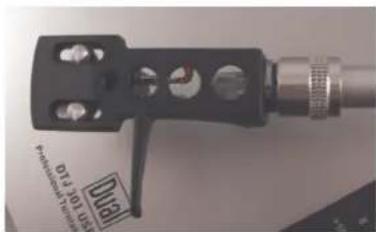
Installing the tone arm head
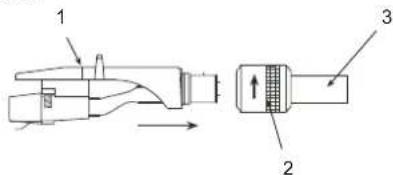
Install the tone arm head 1 on the tone arm shaft 3 as shown.
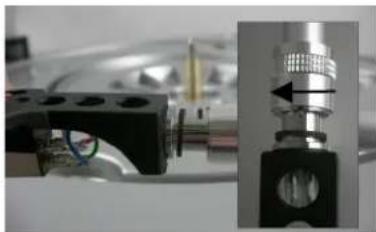
Secure the tone arm head on the tone arm by turning the ring nut 2 as shown, while holding the tone arm head horizontal.
Tone arm
The tone arm is secured for transport on the rest using the clamp. Remove this clip 14 before operating the unit for the first time. If the player will be transported later, secure the tone arm to the rest again using the clip 14 to prevent damage from vibrations.
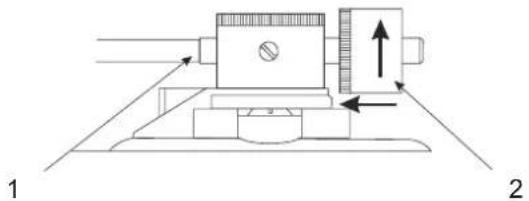
Attaching the counterweight
Screw the counterweight 2 onto the tone arm 1 as shown.
Adjusting the stylus force
Remove the cover on the stylus, if the pickup has a removable stylus cover. Make sure you do not touch the stylus tip with your fingers.
Release the tone arm 9 by removing the clip 14 and lift it from the tone arm rest.
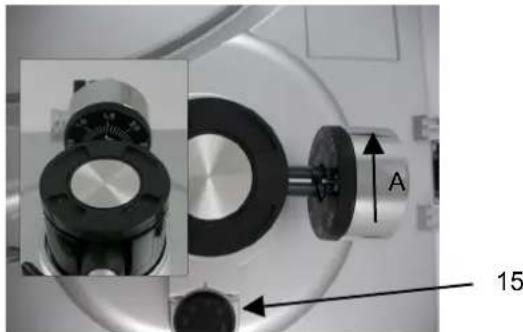
Turn the whole counterweight A clockwise (as shown above by the direction of the arrow) or anticlockwise, until the tone arm freely balances close to horizontally.
Note:
- Moving the counterweight too far forwards will result in the pickup side lowering.
- Moving the counterweight too far backwards will result in the pickup side rising.
When adjusting the horizontal "0" balance, make sure the stylus tip does not come into contact with the turntable or other objects.
After the tone arm has been balanced horizontally, fasten it to the tone arm rest temporarily using the clip 14.
Hold the counterweight in place with one hand and turn only the counterweight adjusting ring until its "0" mark matches the centre line on the rear tone arm.
This completes adjustment of the horizontal "0" balance.
After the horizontal "0" balance has been adjusted, turn the counterweight clockwise (in the direction of the arrow), and bring it in line with the correct stylus pressure.
Since the stylus pressure adjusting ring moves along with the counterweight, the stylus pressure can be read directly from the scale ring.
Note:
The recommended stylus pressure for the provided pickup system is >2.5 grams. If in doubt, follow the recommendation of the pickup manufacturer.
Anti-skating control
The skating force, which pulls the tone arm towards the centre of the record, causes the stylus force to increase at the inner groove wall of the record. To compensate for the skating force and the particularly adverse effect it produces for playing back stereo records, the unit has an anti-skating control.
Set the anti-skating control knob 15 to the same value as the stylus force.
The stylus illuminator
Press the stylus illuminator switch A. The stylus illuminator B move out and illuminates the stylus tip.
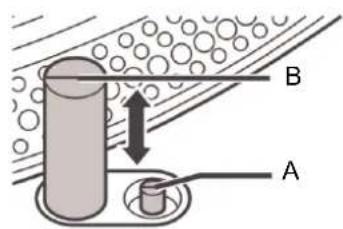
If the stylus illuminator is not needed, press it back down into the frame. The lamp goes out at the same time.
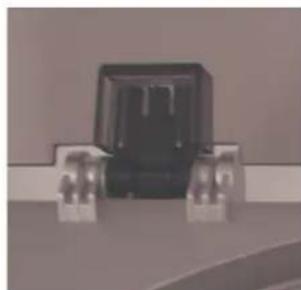
The dust cover
Flip the hinges on the housing towards the back.
Uniformly push the right and left dust cover receptacles onto the hinges.
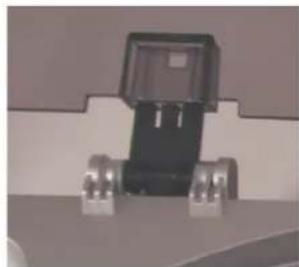
Make sure the locking spring clicks into place.
Adjustable feet
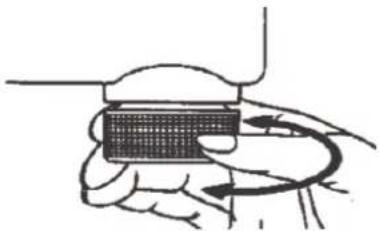
The adjustable feet are vibration damping; they are used for adjusting the record player height and levelness.
In order to screw the feet on the bottom of the unit outwards, turn them anti-clockwise.
Note:
Observe that the maximum adjustment range is 0.5 centimetres.
Put the record player on an even surface and use the adjustable feet to even out any height difference.
Connecting the record player
Connection to the amplifier
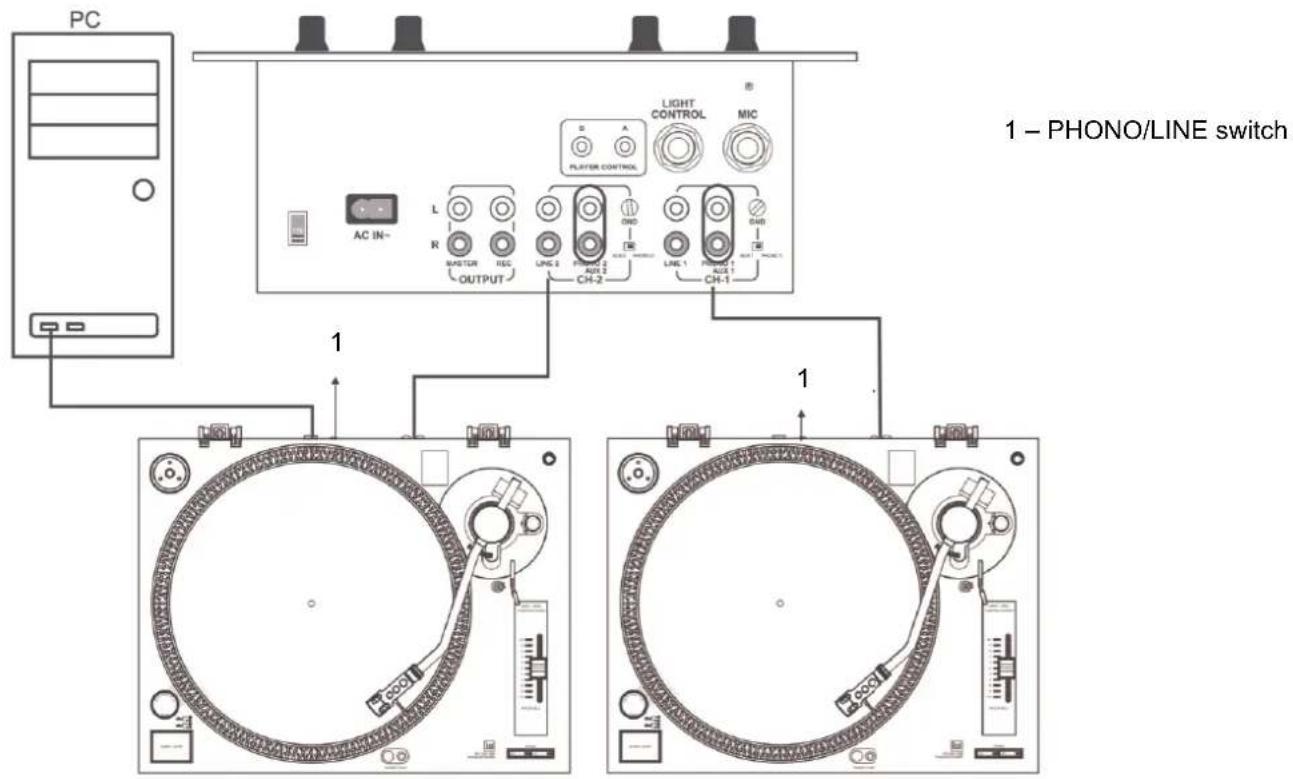
Connect the audio cable to the RCA OUTPUT jacks 22 and the LINE/AUX or phono jacks on the amplifier.
Note:
Make sure that you make the correct left and right channel connections (red = right channel, white = left channel).
Connection to the computer
Connect the USB terminal 20 with a free USB port on your computer. Follow the instructions on p. 20.
Mains connection
Push the mains plug into a socket.
How to set the PHONO/LINE switch
Move the PHONO/LINE switch 21 to PHONO if the record player is connected to the PHONO jack.
Move the PHONO/LINE switch 21 to LINE if the record player is connected to the LINE jack (or AUX or AUDIO).
Removing/attaching the stylus protection cap
Before playing a record, you must remove the stylus protection cap A from the pickup. To do so, pull the cap forwards.
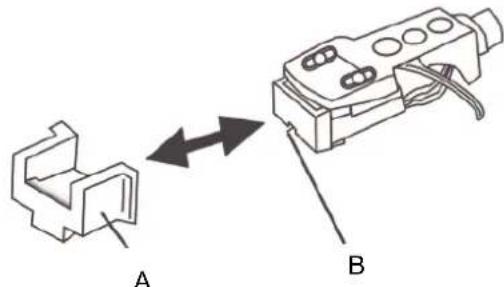
It is recommended that you put the stylus cap back on after playing a record to protect the stylus B.
Playing a record
Procedure
Put a record on the turntable.
Turn the On/Off switch 5 to the "ON" position.
The LED display for the speed selection switch 10 (33 rpm) and the stroboscope lamp 4 light up.
Note:
Using the SPEED selector switches, select the speed at which you want to play back the record.
Remove the stylus protection if the pickup is equipped with a removable one.
Remove the clip 14.
Press the start/stop button 6. The turntable 19 starts turning.
Lift the lift lever 13.
Swing the tone arm (9) over the desired groove.
Place the lift lever 13 downwards. The tone arm lowers onto the record slowly and playback begins.
After playback is finished, replace the tone arm on the tone arm rest 14 and fasten it using the clip.
Press the start/stop button 6.
Put the on/off switch 5 in the "OFF" position after the electronic brake has stopped the turntable.
Note:
The electronic brake does not work if the on/off switch is switched off before the start/stop button is pressed.
Interrupting playback
Place the lift lever 13 upwards.
This lifts the tone pick-up stylus off of the record.
Playing back a 45 rpm record with large centre hole
Fit the 45 rpm adapter 1 on the turntable spindle 3.
Press the SPEED selector switch 11.
Speed fine adjustment PITCH ADJ.
The speed can be controlled using the slide 12 over a range from -10% to +10% .
Push the slide 12 upwards to reduce the speed or downwards to increase the speed.
The numbers on the scale indicate approximate percentage figures for the speed control.
If one of the four rows of stroboscopic dots 2 on the edge of the turntable appears stationary, this indicates the correct speed (or nominal speed).
Before establishing the USB connection
System requirements
Before making the connection, please ensure that the computer system fulfils the following requirements:
Intel Pentium or AMD Athlon, 1GHz or higher
- (or corresponding MAC computer)
- USB 1.1 or USB 2.0 port (2.0 recommended)
- Operating system: Windows 2000/XP or higher; MAC OSX or higher
- Compatible sound card
Memory: >512 MB
CD or DVD burner for creating audio CDs
- Loudspeaker, mouse
10 MB of free hard drive space for the software installation
Additional free hard drive space for digitalising your music
Note:
- Install the supplied Audacity® software on a PC or MAC before connecting and operating the unit.
- Audacity® software is free open-source software distributed under the GNU General Public License (GPL). Check their website to see if an update is available. At http://audacity.sourceforge.net you can download the current version or updates.
- In principle, you can also use any other computer audio recording software.

Have a look at the provided software CD. It has the digitalisation software from Audacity® for the various Windows and MAC versions and an extensive description of the software (getting started, use).
Install the Audacity® software on a PC or MAC before connecting and operating the unit.
An alternative program, for example, is the "Free MP3 Sound Recorder" on the CD.
How to digitalise your music Installing the software
Start your computer, insert the CD and install the Audacity software depending on the operating system (PC, MAC).
Check the website to see if an update is available (http://audacity.sourceforge.net) and if there is, install the update.
Connecting the record player
Connect the record player's USB terminal 20 with a free USB port on your computer.
Setting up the software
-
Start the Audacity software.
-
In the menu, select [Edit] and [Preferences]. The software settings open.
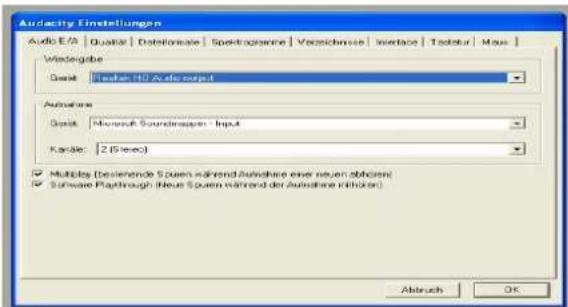
Example: Version 1.2.6 for Windows XP and older versions
For newer Windows versions, please observe the instructions on the software CD.
- Click the [Audio I/O] tab.
- Select your internal sound card from the drop-down menu [unit] as the playback device.
- Select USB Audio CODEC or "Microsoft Sound Mapper Input" from the drop-down menu [unit] as the recording device.
- For the channels, select (2 Stereo).
- Click [Software Playthrough], so that a tick appears in front of it.
- Click OK.
Recording and saving music
- Start the playback.
- Click the red record button in the software.
- Click the blue PAUSE button to interrupt the recording temporarily.
- Click the yellow STOP button to end the recording.
- Click the green PLAY button to play the completed recording.
- Click "File" and select "Export As WAV..." for saving and exporting the recording.
Note:
A detailed manual for the Audacity software is also on the software CD.
How to clean the record player

Electric shock!
To avoid the danger of electric shock, you must not clean the unit with a wet cloth or under running water.
CAUTION!
Do not use any scrubbing sponges, cleaning powder or solvents such as alcohol and petrol. Use only appropriate cleaning agents (antistatic) to clean the unit and the records. These are available in from accessories retailers.
Clean the housing with a soft cloth moistened with water.
Cleaning the stylus and the record
Always clean the stylus and record before playback to prevent premature wear.
Use a cleaning brush to brush from back to front over the stylus.
To clean a record, use a record cloth to wipe lightly and diagonally over the record.
Replacing the stylus
The stylus is naturally exposed to wear by the playback process. Therefore we recommend regular inspection, which for diamond styluses should take place after at least 1000 playing hours.
Note:
Worn or damaged (splintered) styluses ruin records.
When you need to replace a stylus, use the original type if possible.
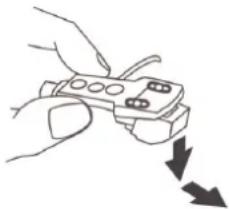
Remove the stylus by pulling diagonally downwards.
Insert the stylus by doing the reverse of this.
Installing another pickup system
Before installation, read the manual from the manufacturer of the pickup system.
For the installation, fit the stylus protection to protect the stylus tip from damage.
Connect the connection wires to the connecting pins of the pickup system.
The connections of most systems are colour-coded. Connect each connection wire to the connecting pin of the same colour.
White (L^+) left channel, positive pole
Blue (L-): left channel, negative pole
Red (R + ) : right channel, positive pole
Green (R-): right channel, negative pole
Fasten the pickup system to the tone arm head using the screws provided.
Troubleshooting
If the unit does not function as intended, perform checks using the following tables.
If the malfunction cannot be fixed even after these checks, please contact the manufacturer.
Problems with the unit
| Symptom Possible cause/remedy | |
| The tone arm skips grooves, slides over the record or does not move | The record player is not sitting horizontally. Put the record player on a horizontal base support.The record is dirty or scratched Clean the record with a record cleaner or play a different record.The stylus pressure of the tone arm may be too low. Adjust the stylus pressure.The stylus may be defective. If necessary, change the stylus Check the antiskating and readjust it if necessary. |
| Symptom Possible cause/remedy | |
| Poor tone quality, loud static noise, sound dropouts etc. | The stylus is dirty or worn. Clean the stylus with a brush or replace it. The record is dirty or dusty. Clean the record with a record cleaner. |
| The speed is incorrect. | Adjust the speed according to the specification on the record. (33 rpm or 45 rpm) |
| The sound is too quiet or loud and distorted. | The record player is not connected to the correct input. (see page 15) |
| No sound via computer speakers. | Check software settings, see p. 21 |
Technical specifications
| Dimensions (width x height x depth): | 450 mm x 139 mm x 350 mm |
| Weight: 5.36 kg | |
| Motor: 8-pole, 2-phase direct-drive DC motor | |
| Start/stop time: < 1 s | |
| Voltage: 230 V AC, 50 Hz | |
| Power consumption: 11 W | |
| Ambient conditions: +5 °C to +35 °C 45% to 85% relative humidity (non-condensing) | |
| Flutter: < ± 0.15% DIN/WTD at 3 kHz | |
| Stylus: Diamond stylus | |
| Effective tonearm length: 220 mm | |
This product conforms to the Low Voltage Directive (2006/95/EC), der ErP Directive 2009/125/EC, the EMC Directive (2004/108/EC) and the CE Marking Directive.
| Frequency range: 20 Hz – | 20 kHz; +1/-3 dB at 1 kHz |
| Channel separation > 15 dB | |
| Phono output level 1.5~3.6 mV | |
| Line output 90~216mV | |
| Wow, flutter < 0.15% WRMS (JIS WTD) at 33 1/3 rpm | |
| Signal-noise ratio (SNR) | > 55 dB |
| USB port | USB 1.1/2.0 for WINDOWS, MAC OSX |
We reserve the right to make technical modifications and correct errors.
The dimensions are approximate values.

How to contact the manufacturer
DGC GmbH
Disposal instructions
Disposing of the packaging
Your new unit was protected on its way to you by the packaging. All materials used are environmentally safe and can be recycled.
Please help and dispose of the packaging in an environmentally responsible manner.
To learn about current disposal methods, contact your dealer or your local disposal facility.

Risk of suffocation!
Keep the packaging and its parts out of the reach of children.
Risk of suffocation from foils and other packing materials.
How to dispose of the unit
Old units are not worthless garbage. Through environmentally friendly disposal, valuable raw materials can be regained. Inquire at your city or municipal administration about possibilities for disposing of the unit properly and in an environmentally sound manner.
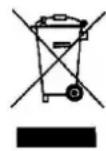
This unit is labelled according to 2002/96/EC, the Waste Electrical and Electronic Equipment Directive (WEEE).
This product must not be disposed of with normal household waste. Instead it must be deposited at a recycling station for electrical and electronic devices. The symbol on the product, the instructions for use or the packaging indicate this. The materials can be recycled in accordance with their marking. By reusing, recycling or
processing old units in another way, you make an important contribution to protecting our environment.

Danger to life!
Pull out the mains plug of worn-out units. Cut through the mains cable and remove it with the plug.