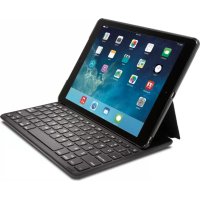
Keyfolio Thin X2 - Keyboard KENSINGTON - Free user manual and instructions
Find the device manual for free Keyfolio Thin X2 KENSINGTON in PDF.



| Brand | Kensington |
| Model | KeyFolio Thin X2 |
| Product type | Bluetooth keyboard with case for iPad |
| Compatibility | iPad Air 2 |
| Connectivity | Bluetooth |
| Charging port | Micro-USB |
| Battery type | Rechargeable lithium-polymer |
| Power supply voltage | 5 V (via USB port) |
| LED indicators | Blue (activation, pairing), red (low battery), green (charging) |
| Activation | Automatic magnetic sensor when inserting the iPad |
| Bluetooth range | Approximately 10 meters |
| Function keys | Home, Search, Siri, media control, volume, lock, copy/paste (Fn+X/C/V) |
| Operating temperature | 10 to 27 °C |
| Safety | Do not modify, disassemble, or expose to moisture. Battery is flammable. |
| Care and cleaning | Clean with a soft, dry cloth. Keep dry and away from heat. |
| Spare parts and repairability | No spare parts available. The product is not user-repairable. |
| General information | Manufactured by ACCO Brands. Compliant with FCC, CE, IC standards. |
Frequently Asked Questions - Keyfolio Thin X2 KENSINGTON
User questions about Keyfolio Thin X2 KENSINGTON
0 question about this device. Answer the ones you know or ask your own.
Ask a new question about this device
Download the instructions for your Keyboard in PDF format for free! Find your manual Keyfolio Thin X2 - KENSINGTON and take your electronic device back in hand. On this page are published all the documents necessary for the use of your device. Keyfolio Thin X2 by KENSINGTON.
USER MANUAL Keyfolio Thin X2 KENSINGTON
KeyFolio Thin X2TM for iPad AirTM 2
Thin Folio with Bluetooth® Keyboard
QUICK START GUIDE
GUIDE DE DEMARRAGE RAPIDE
KURZANLEITUNG
SNELSTARTGIDS
GUIDA RAPIDA
GUIA RAPIDA
GYORSKALAUZ
PRÍRUČKA ZACÍNÁME
SZYBKI START
KPATKOE PYKOBOIDCTBO
ПОЛьЗВATEЛЯ
MANUAL DE INICIO RAPIDO

Register Now!
Enregisterer maintainant!
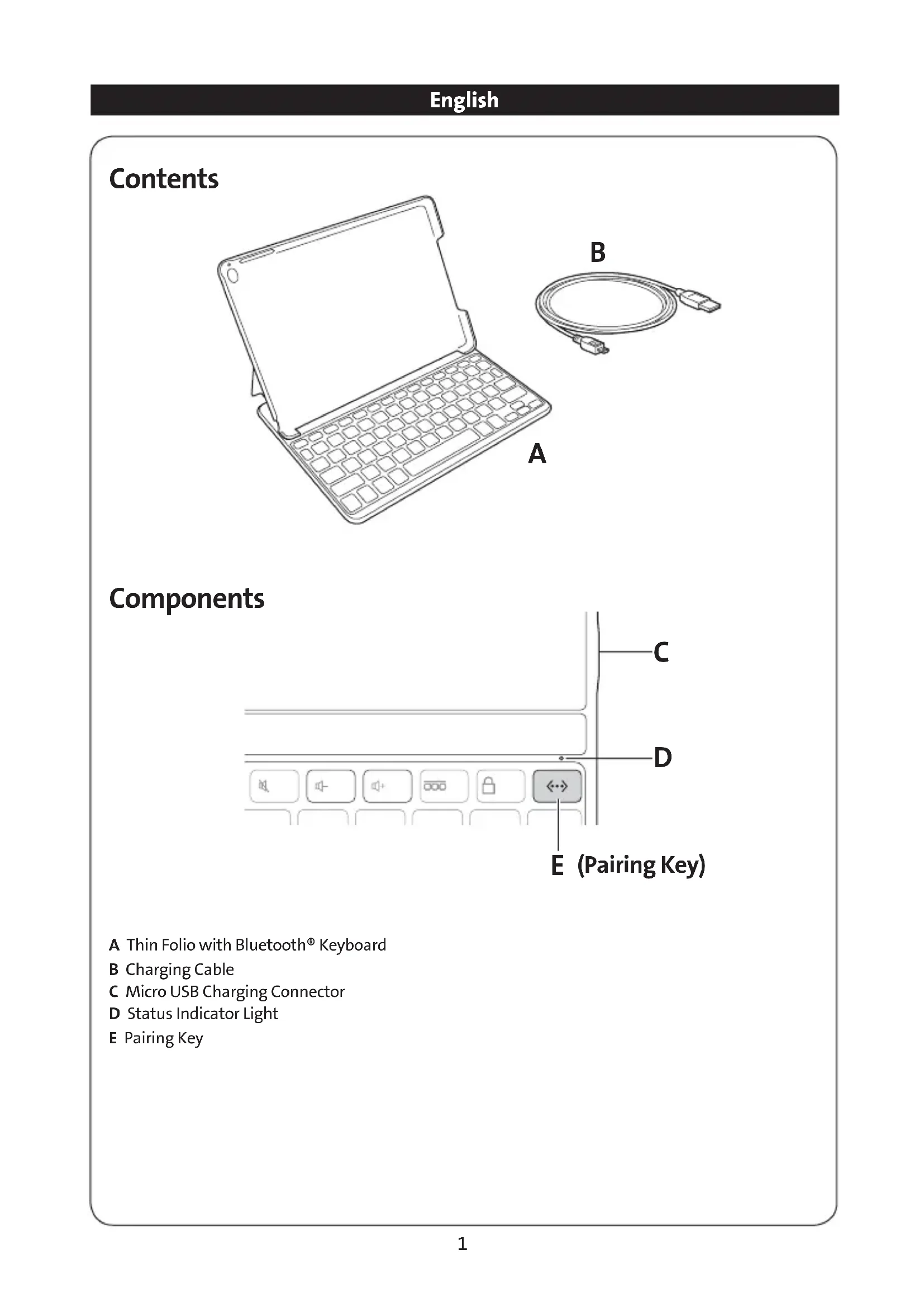
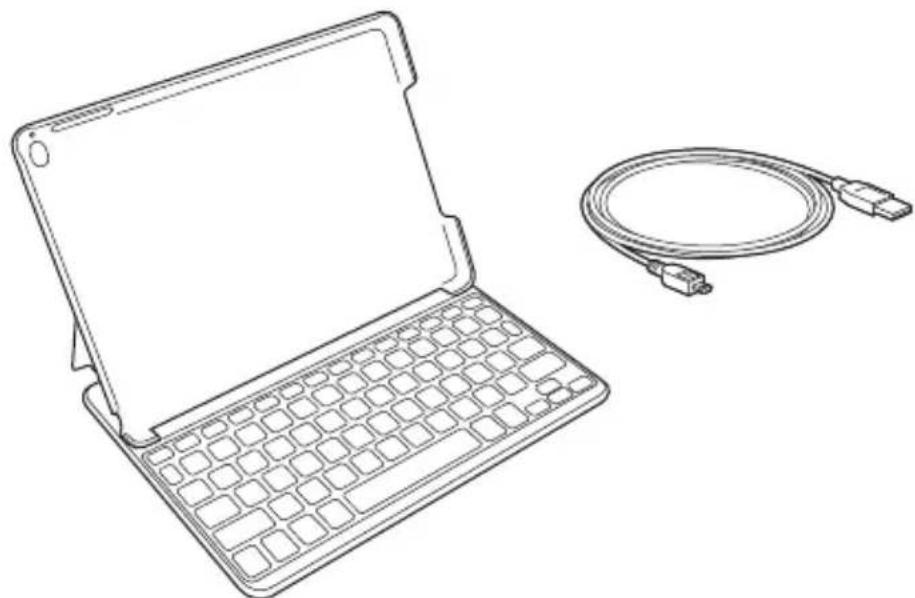
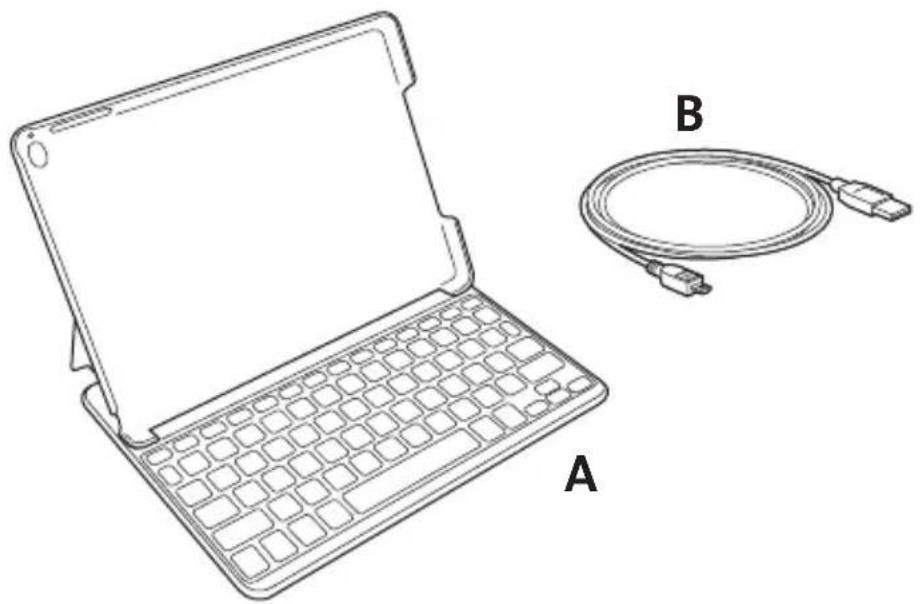
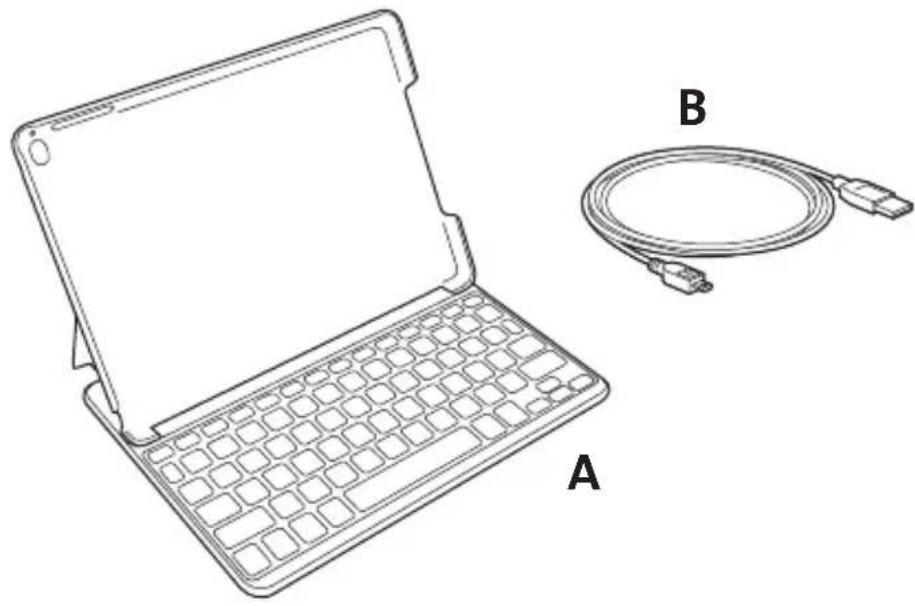
A Thin Folio with Bluetooth® Keyboard
B Charging Cable
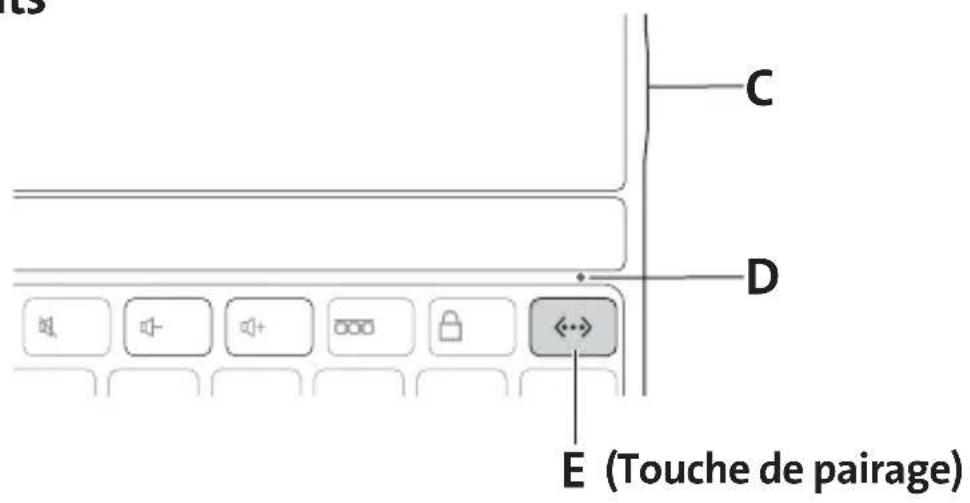
C Micro USB Charging Connector
D Status Indicator Light
E Pairing Key
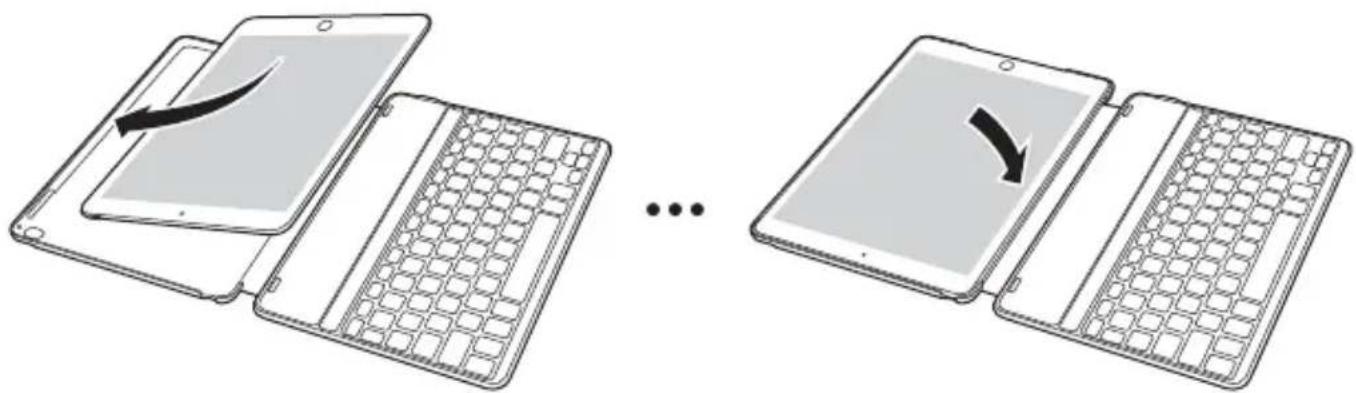
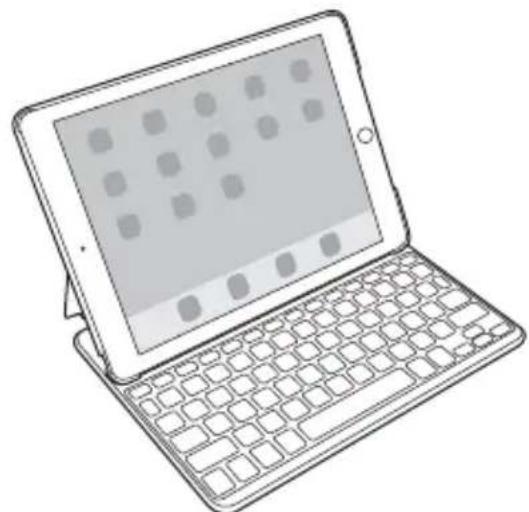
Installing Your iPad®
Turning the Keyboard On and Off
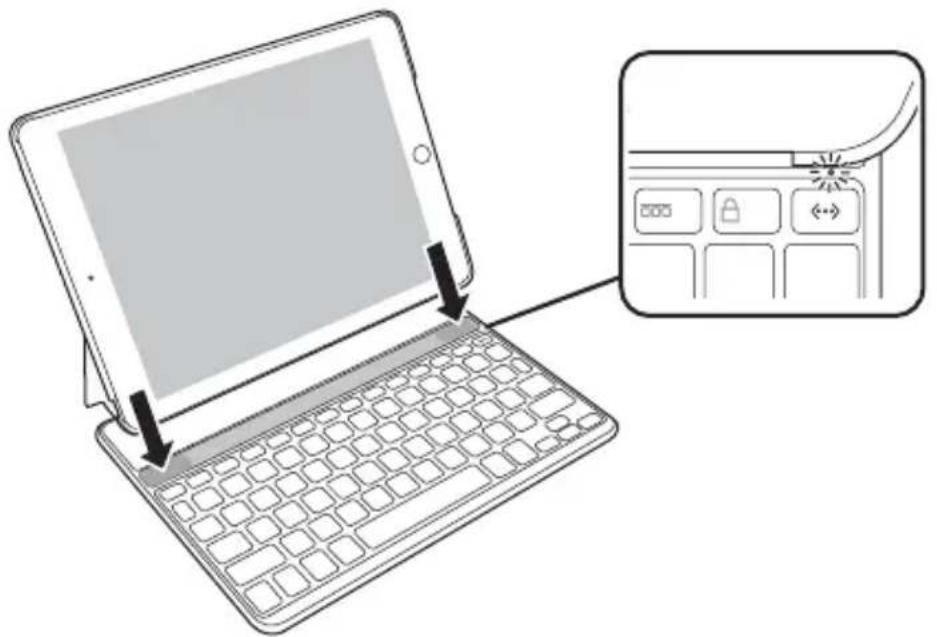
When the iPad is placed in the groove, the magnetic sensor automatically turns on the keyboard. The Status Indicator Light will glow blue for 3 seconds to indicate the power is on.
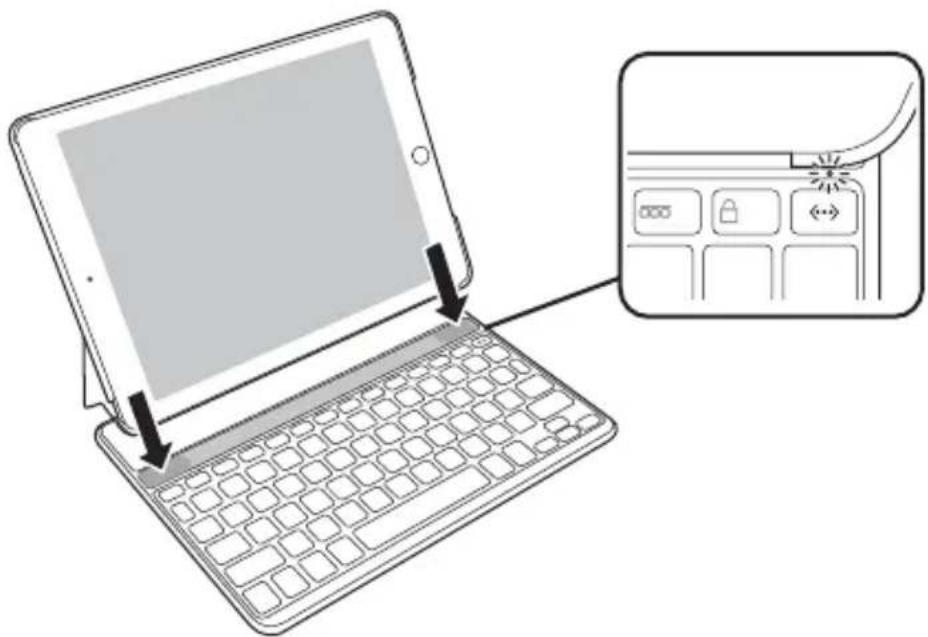
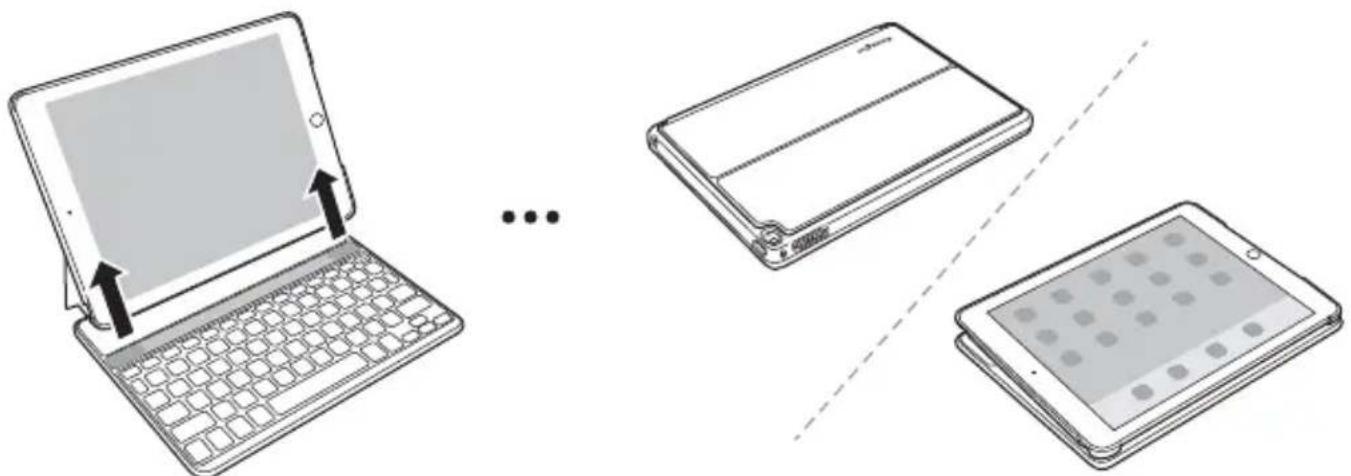
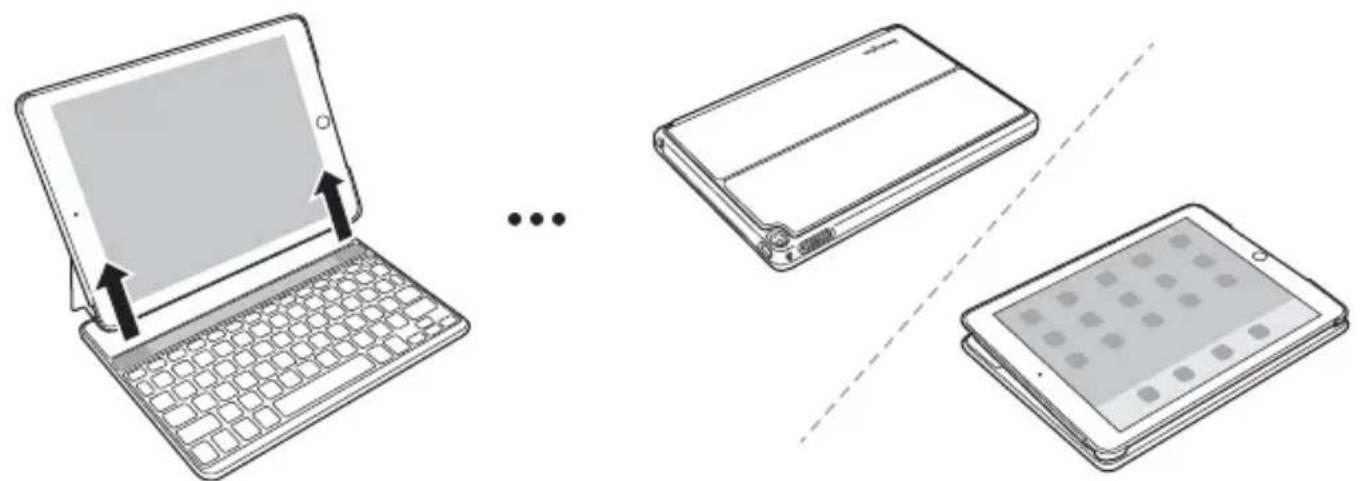
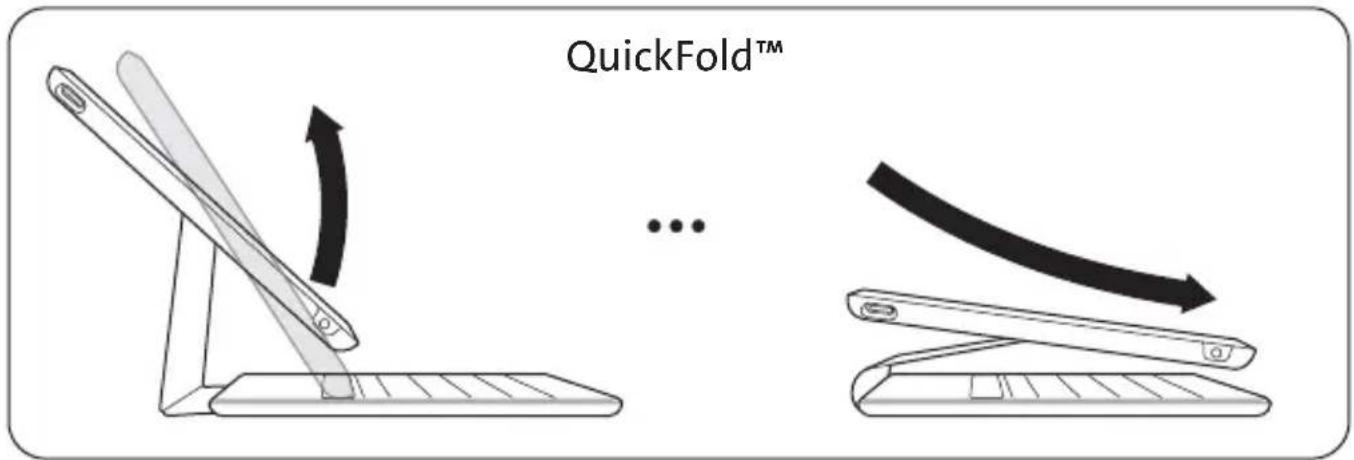
The keyboard automatically turns off when the iPad is removed from the groove, when the Folio is closed or folded in viewing mode.
Pairing
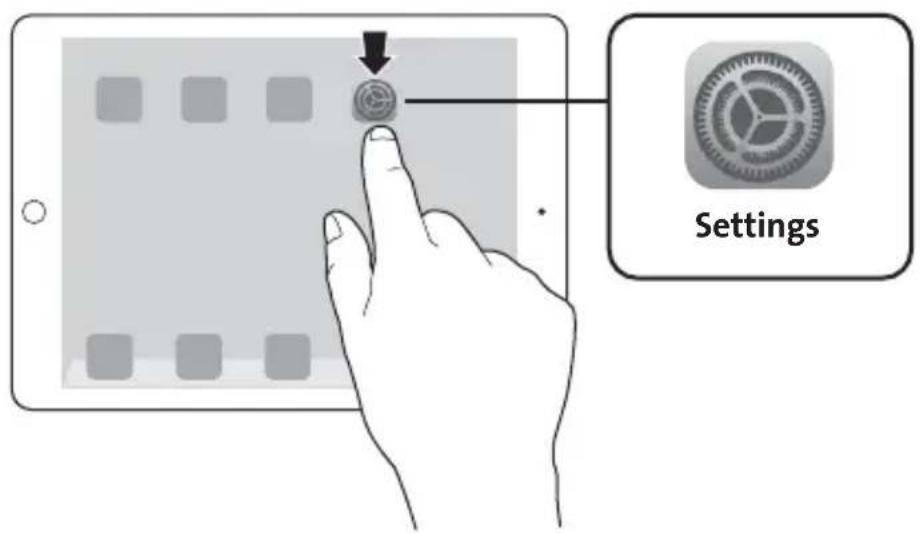
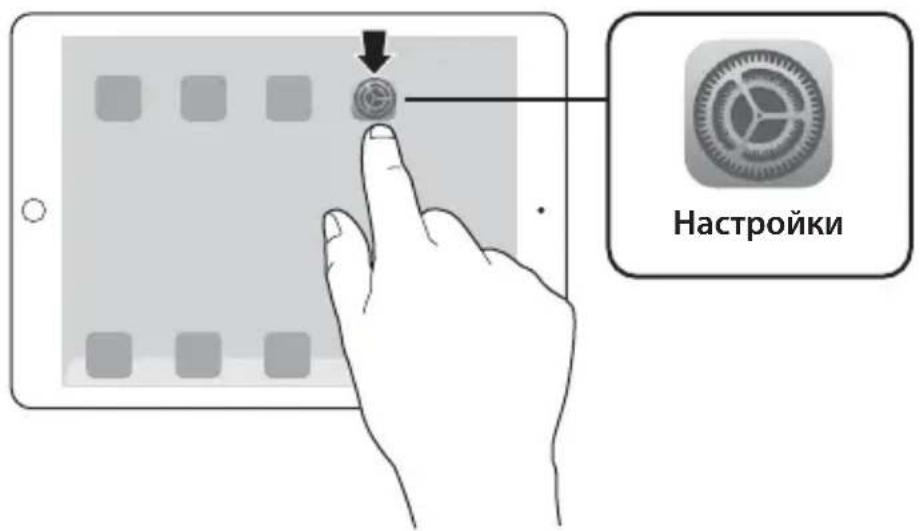
1 On your iPad, tap Settings.
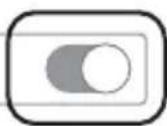
2 Open Bluetooth and make sure Bluetooth is on.
Bluetooth
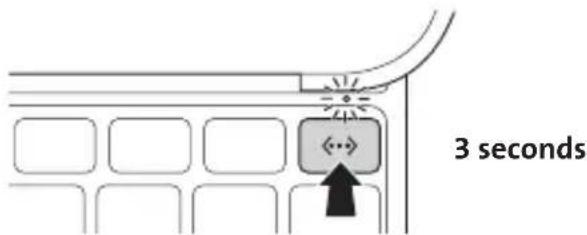
3 On the Keyboard, press the Pairing Key for 3 seconds. The Status Indicator Light starts blinking.
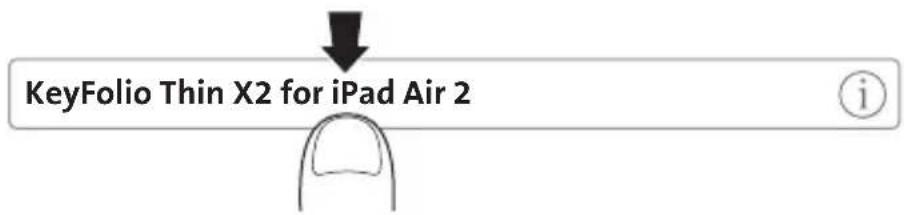
4 The Keyboard now appears on your iPad screen. Tap KeyFolio Thin X2 for iPad Air 2.
5 Your iPad screen displays a passkey. Enter the passkey on the Keyboard, and press Enter.
6 Your iPad screen shows the Keyboard as Connected. On the Keyboard, the Status Indicator Light turns off. You can now use your Keyboard to type in any app.
KeyFolio Thin X2 for iPad Air 2
Connected

NOTE: The Keyboard will go into sleep mode if left idle for 15 minutes. To wake up the Keyboard, press any key to resume the connection.
To extend battery life, turn off the keyboard when not in use.
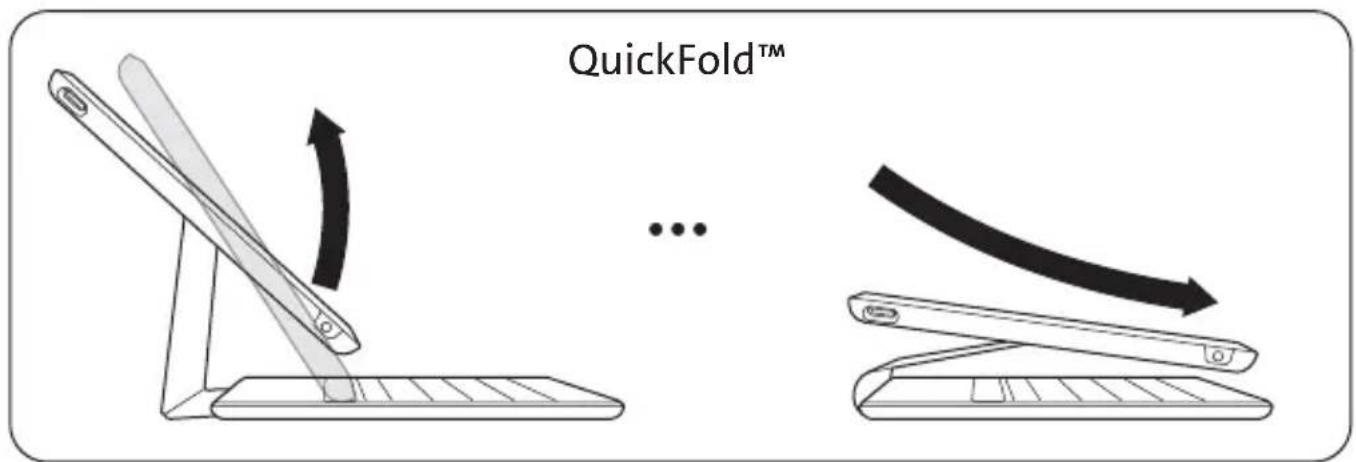
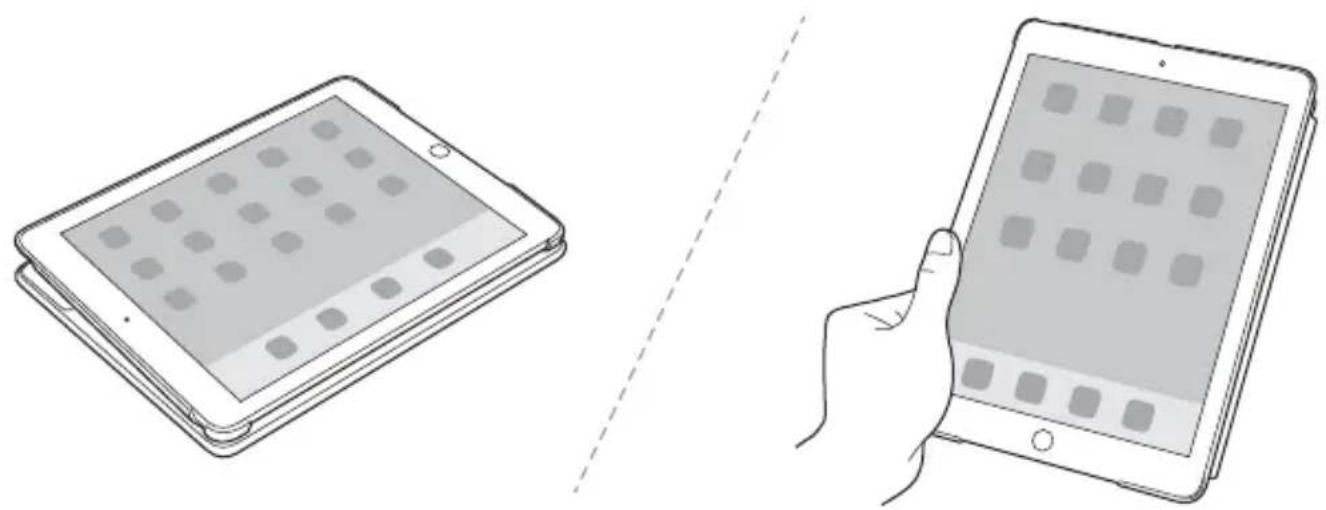
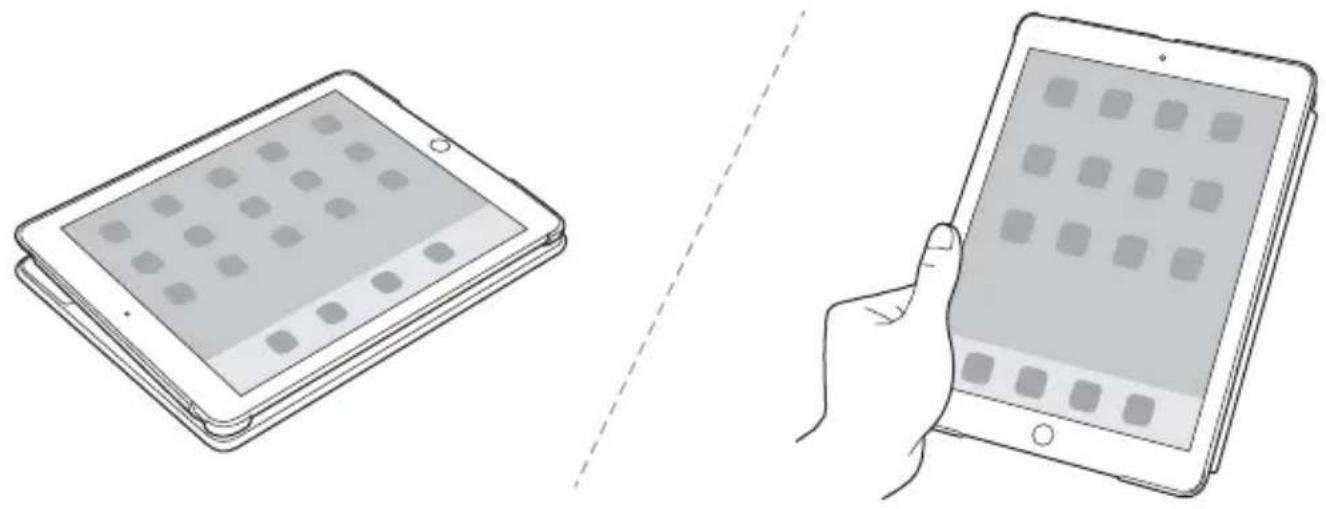
Viewing Modes
A Keyboard = On
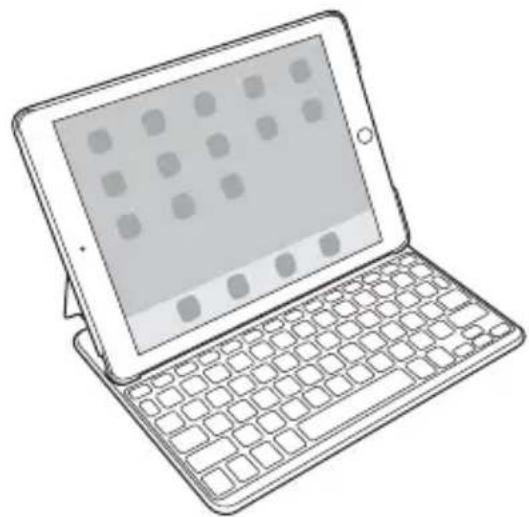
B Keyboard = Off
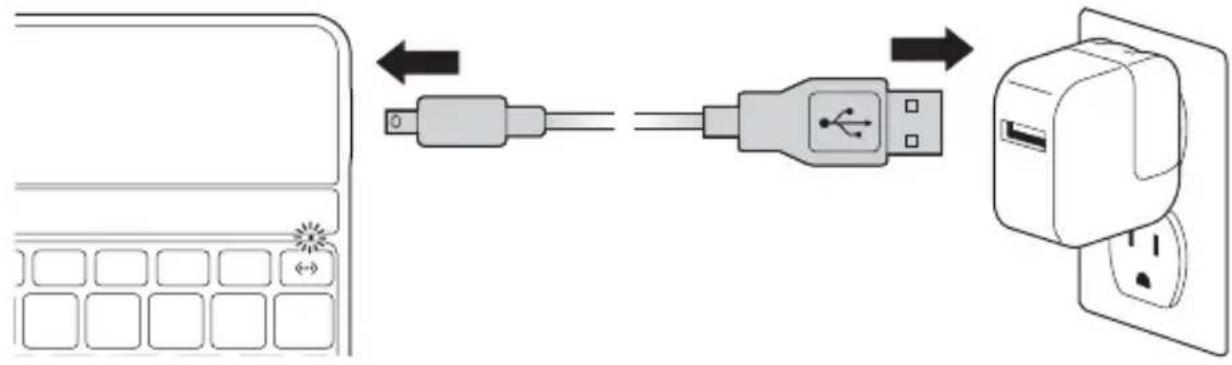
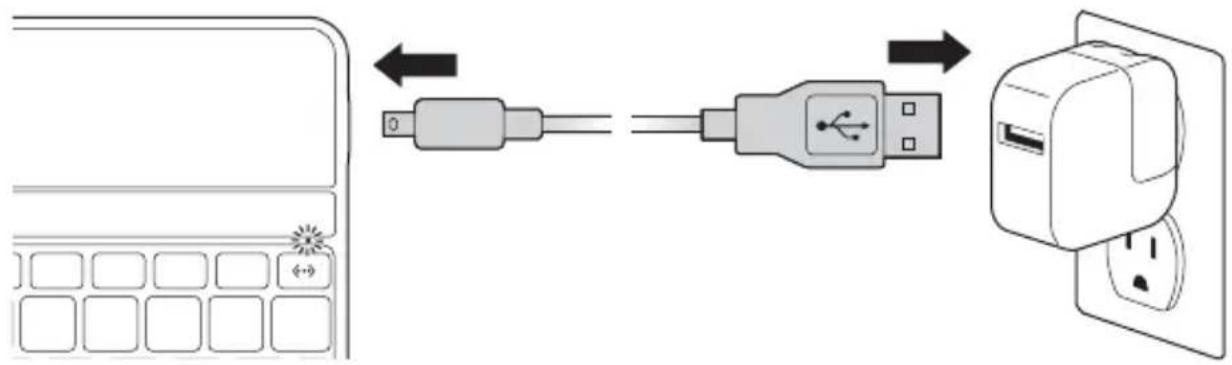
Charging
LED Functions
| Solid blue for 3 seconds Keyboard powers on |
| Blinking blue Pairing mode |
| Solid red Battery needs charging |
| Blinking green Charging in progress |
| Solid green Battery is fully charged |
| Solid amber Caps Lock on |
Key Functions
| Key | Function | Key | Function |
| Home Search | Home Search | Home Search | |
| On-screen keyboard International keyboard* | |||
| Siri® Last track | Siri® Last track | Siri® Last track | |
| Play/pause Next track | Play/pause Next track | Play/pause Next track | |
| Mute Volume down | Mute Volume down | Mute Volume down | |
| Volume up Display recently opened apps | Volume up Display recently opened apps | Volume up Display recently opened apps | |
| Lock Pair | Lock Pair | Lock Pair | |
| Fn + X = Cut Fn + C = Copy | Fn + X = Cut Fn + C = Copy | Fn + X = Cut Fn + C = Copy | |
| Fn + V = Paste Fn + = Select left word | Fn + V = Paste Fn + = Select left word | Fn + V = Paste Fn + = Select left word | |
| Fn + → = Select right word | Fn + → = Select right word | Fn + → = Select right word | |
- Toggles between available languages
Troubleshooting
I can't connect the Keyboard to my iPad.
Try the following in sequence. You can stop when the problem is fixed.
1 Make sure you have installed and set up Bluetooth correctly on your iPad. Check the documentation that came with your iPad for instructions.
2 Make sure that the Keyboard is within range of your iPad. Maximum Bluetooth range is about 10 meters/33 feet.
3 If your iPad is connected to other Bluetooth devices, you may need to disconnect some devices before you can connect to the Keyboard.
4 If you changed any Bluetooth settings on your iPad, try connecting the Keyboard to your iPad again.
5 Make sure that both your iPad battery and the Keyboard battery are sufficiently charged.
If this does not solve the problem, please contact Kensington Support at kensington.com.
Technical Support
Technical support is available to all registered users of Kensington products. Technical Support contact information can be found on the back page of this manual.
Web Support
You may find the answer to your problem in the Frequently Asked Questions (FAQ) section of the Support area on the Kensington Website: www.support.kensington.com.
Telephone Support
There is no charge for technical support except long-distance charges where applicable. Please visit www.kensington.com for telephone support hours. In Europe, technical support is available by telephone Monday to Friday 09:00 to 18:00 (Central European time).
Please note the following when calling support:
- Call from a phone where you have access to your device.
-
Be prepared to provide the following information:
-
Name, address, and telephone number
- Name of the Kensington product
- Make and model of your computer
- System software and version
- Symptoms of the problem and what led to them

WARNING! IMPORTANT SAFETY INSTRUCTIONS
Failure to read and follow these safety instructions could result in fire, explosion, electrical shock or other hazard, causing serious and/or fatal injury and/or property damage.
- Do not modify, disassemble, open, drop, crush, puncture, or shred the KeyFolio.
- The KeyFolio contains a lithium-polymer battery, which is flammable. Keep away from open flame.
- To prevent short circuit or other potential hazards, prevent metal objects such as coins or keys from coming into contact with the KeyFolio, and do not insert foreign objects into the KeyFolio or its ports.
- Keep your KeyFolio dry, and do not use with wet hands. Moisture in or on the KeyFolio may lead to electrical shock. If exposed to moisture during use, unplug the KeyFolio immediately. If your
KeyFolio gets wet, have a qualified technician evaluate the product's safety before resuming use.
- Your KeyFolio may become warm during operation. This is normal. However, to prevent overheating, keep area around KeyFolio ventilated and do not place anything on or around KeyFolio during operation. Do not operate your KeyFolio near a heat source, heat vent, or in direct sunlight. Your KeyFolio should be used in temperatures between 50 - 80^ (10-27°C).
- If the KeyFolio begins to swell or expand, emits a strong odor, or becomes hot to the touch, discontinue use of the KeyFolio, and have the product examined by a qualified electronic technician.
- Inspect your KeyFolio and cables for damage before use. Have any damaged part repaired or replaced before use.
- Your KeyFolio is not user serviceable. Do not attempt to open, modify, or repair.
- If the battery inside the KeyFolio leaks for any reason, discontinue use, and do not allow the KeyFolio's contents to contact your skin or eyes. In the event of accidental contact wash the affected area with large amounts of water and seek medical attention immediately.
- Your KeyFolio is not a toy. Keep them away from children. Insure that all persons who use this product read and follow these warnings and instructions.
- Do not leave the KeyFolio on prolonged charge when not in use.
Enhancing Performance by Proper Care and Storage of your KeyFolio
- Do not store your KeyFolio either fully charged or discharged. It is best to store your KeyFolio with at least 30% charge remaining. To check the charge level of your KeyFolio press the battery indicator button.
- Avoid frequent full discharges because this puts additional strain on the battery in the KeyFolio. Charge your KeyFolio between uses even if it is not fully discharged. The lithium-polymer battery used in this product has no "memory effect." Therefore, several partial discharges with frequent recharges are better than one full discharge, and will help prolong the life of your KeyFolio. Short battery life in laptops is mainly caused by heat, rather than charge/discharge patterns.
Do not store your KeyFolio at elevated temperatures (such as in your car) or in high humidity.
Disposing of your KeyFolio
- Do not incinerate or dispose of your KeyFolio in a fire or microwave.
- Do not dispose of your KeyFolio as ordinary refuse, as it contains a lithium-polymer battery. Consult your local municipal or civil authority for instructions on correctly disposing of a lithium-polymer battery.
- In the USA and Canada: This mark indicates your KeyFolio can be recycled by the Rechargeable Battery Recovery Corporation ("RBRC"). When you are ready to dispose of the KeyFolio, please contact the RBRC at 1-800-8-BATTERY or www.rbrc.org.
FEDERAL COMMUNICATIONS COMMISSION RADIO FREQUENCY INTERFERENCE STATEMENT
This device has been tested and found to comply with the limits for a Class B digital device, pursuant to Part 15 of the FCC Rules. These limits are designed to provide reasonable protection against harmful interference in a residential installation. This equipment generates, uses, and can radiate radio frequency energy and, if not installed and used in accordance with the instructions, may cause harmful interference to radio communications.
However, there is no guarantee that interference will not occur in a particular installation. If this equipment causes harmful interference to radio or television reception, which can be determined by turning the equipment off and on, the user is encouraged to try to correct the interference by one or more of the following measures:
- Reorient or relocate the receiving antenna.
- Increase the separation between the equipment and receiver.
- Connect the equipment into an outlet on a circuit different from that to which the receiver is connected.
- Consult the dealer or an experienced radio/TV technician for help.
MODIFICATIONS: Modifications not expressly approved by Kensington may void the user's authority to operate the device under FCC regulations and must not be made.
SHIELDED CABLES: In order to meet FCC requirements, all connections to equipment using a Kensington input device should be made using only the shielded cables.
FCC DECLARATION OF CONFORMITY COMPLIANCE STATEMENT
This product complies with Part 15 of the FCC rules. Operation is subject to the following two conditions: (1) This device may not cause harmful interference, and (2) This device must accept any interference received, including interference that may cause undesired operation. As defined in Section 2.909 of the FCC Rules, the responsible party for this device is Kensington Computer Product Group, 333 Twin Dolphin Drive, Redwood Shores, CA 94065, USA.
INDUSTRY CANADA CONFORMITY
This device has been tested and found to comply with the limits specified in RSS-210. Operation is subject to the following two conditions: (1) This device may not cause interference, and (2) This device must accept any interference, including interference that may cause undesired operation of the device.
This Class [B] digital apparatus complies with Canadian ICES-003.
CE DECLARATION OF CONFORMITY
Kensington declares that this wireless product model is in compliance with the essential requirements and other relevant provisions of R&TTE directive (1995/5/EC) and other applicable EC directives. For Europe, a copy of the Declaration of Conformity for this product may be obtained by clicking on the Compliance Documentation link at www.support.kensington.com.
INFORMATION FOR EU MEMBER-STATES ONLY
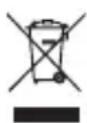
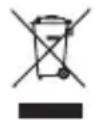
The use of the symbol indicates that this product may not be treated as household waste. By ensuring this product is disposed of correctly, you will help prevent potential negative consequences for the environment and human health, which could otherwise be caused by inappropriate waste handling of this product. For more detailed information about recycling of this product, please contact your local city office, your household waste disposal service, or the shop where you purchased the product.
Kensington and the ACCO name and design are registered trademarks of ACCO Brands. The Kensington Promise is a service mark of ACCO Brands. KeyFolio Thin X2 is a trade mark of ACCO Brands. iPad, iPad Air and Siri are registered trademarks of Apple Inc., registered in the U.S. and other countries. Bluetooth is a registered trademark owned by Bluetooth SIG. All other registered and unregistered trademarks are the property of their respective owners.
© 2014 Kensington Computer Products Group, a division of ACCO Brands USA LLC. Any unauthorized copying, duplicating, or other reproduction of the contents hereof is prohibited without written consent from Kensington Computer Products Group. All rights reserved. 11/14
Contenu
Composants
KeyFolio Thin X2 for iPad Air 2
Connecté
Assistance technique
KeyFolio Thin X2 for iPad Air 2
Verbunden

INDUSTRY CANADA-KONFORMITÄT
KeyFolio Thin X2 for iPad Air 2
Verbonden

WAARSCHUWING! BELANGRIJKE VEILIGHEIDSVOORSCHRIFTEN
CONFORMITEIT MET INDUSTRY CANADA
KeyFolio Thin X2 for iPad Air 2
Connessa

Note: Anything that appears in the text is an approximation to the actual value.
KeyFolio Thin X2 for iPad Air 2
Conectado

KeyFolio Thin X2 for iPad Air 2
Csatlakoztatva

KeyFolio Thin X2 for iPad Air 2
Pripojeno

KeyFolio Thin X2 for iPad Air 2
Połaczona

DEKLARACJAZGODNOSCI WE
Korda iPad ycaHOBneH B BbIeMKy, MaHHTbI JaTcHK aBTOMaTnueCKN BKIOuHaET KlaBNaTpy. HdNKaTOP COCTOHHa ROPNT CINHM LBeTOM B TeueHne 3 ceYnD.
KnaBnAtypa aBTOMaTnueckn BbIKNoaEcTc npn n3BLeueHn iPad n3 BbIeMKn, npn 3akpytn Folio nn cKnaDbBaHnn B pexm npocMOTpa.
Покlioарно
1 Ha yctpoiCTBe iPad KocHntecb nyHKta «HaCtpoiKn|.
2 BbI6epnte npHKT «Bluetooth» n y6eintecb TOM, qTO TexHONorn Bluteoth BKIOueHa.
Bluetooth
KeyFolio Thin X2 for iPad Air 2
IopKnIOUeHo

PIMMEAHNE. Pn 6e3deiCTBnn 6oJee 15 MInHyT KnaBnAtypa nepeIeT B cnaHn peKm. Iy BBIOda KnaBnAtypbI n3 CnIeero peKmHaXMMTe IIO6yIO KnaBnUy.
ДяэкOHOMN3apya6atapenOTKluoyaiteKnabnatpy,ecn OHa He nCNoJIb3yeTcR.
Peximbl npocmotpa
A KnaBnata =
B KnaBnAtypa = BblKn.
3apянka
Функции ИнданkaTopa
YcTpaHHe HEnCnPaBHOCTeI
He ydaemcnaodknouumkbnaubamypkyycmpoucmby iPad. Ymo de lamb?
BbINOHnTe yka3aHbIe Hxke DeiCTBn. Ecnn ydaNocb yCTpaHnTb HeNCnPabBHOCTb,TO daNbHeuWne DeiCTBn ABLIAOTc HEO6a3aTeNbHbIMN.
1 Y6eIITecb B TOM,чTo texHONrna Bluetooth IOCTyPnHa n npaBnIbHo HaCTpoEHa Ha yCTpOJCTBe iPad. CoOTBeTCTByUOJIne INHCTpyKUIM cM. B DOkUMeHTaUIM K yCTpOJCTBy iPad.
2 Y6eIITecb B TOM,чTO KJIaBnAtypa HaxoINTcB 3OHe DeiCTBnY yCTpoiCTBa iPad. MakcImaIbHbI paDnyc DeiCTBnY Bluetooth coCTaBnEe npimepHO 10 MeTPOB.
3 Ecnn yctpoiCTBO iPad noKJIoueHO K npyrm uCtpoiCTBaM Bluetooth, OTKJIouHTe HeKOToPbIe yCTPOiCTBa nepeI NOKJIoueHEm KlaBnAtypbl.
4 B cnyuae n3meHnHa cTpoek Bluetooth ha yctpoiCTBe iPad, BbIOnHnTe noBtOpe IoKJIIOUeHne KlaBnAtypb K iPad.
5 Y6eIITecb B TOM, yTo 6aTapen ycTpoiCTBa iPad n KlaBnAtypbl 3apJxehbl.
Ecn He ydaocb peuNTb npo6nemy camocToTeIbHo, o6paTntecb B cnjxby nopeKKN Kensington Ha caTe www.kensington.com.
TexHnuecka nOndepKka
TexHnuecka NOdepKka DOctynHa IINBCEx 3aperncptpOBAHbIX N0JIb3OBaTeJe N3deIi KOMnAHn Kensington. KoHTaKTTha INΦOpMaζra O TexHnuecko NODepKke IMeETcRa Ha 6paTHoI CTopoHe 6bONKn DaHHoro pyKOBODCTBa.
Be6-noDnepxka
Bbl mojkeTe haHTn OTBeT Ha BaW BOpoc Ha CTpaHnue OTBeTOB Ha YaCTO 3aDaBaemble BOpocbl (FAQ) pa3dela TexHnuecko nOndepKKn caTa: www.support.kensington.com.
TelefoHHa noDepKka
3BOHOK B clyx6y noidepKKn 6ecnlaTbI, 3a nckloueHem MejdyropoHnx IMeJyHapOndhix 3BOHkoB. YTo6bl y3HaTb yaCbI pa60tbl cnyx6bl noidepKKn no TelefoHy, nocTeTne www.kensington.com. B Ebpone clyx6a texHuecko noidepKKn no TelefoHy pa60taTc noHeelbHnka no pTnUcy, c 09:00 do 18:00.
IoxaIyIcTa, yUHTe cIeIyIOoee, KOrIa 6yIeTe 3BOHITb B ClyjKbY IOnIepKKn:
3BOHHTe c TeIefoHa, paCNOJoxKeHHOro pAOM cyCTpoiCTBOM.
- BydTe rOToBbl npedocTaBtB cneDyUcIyU nHΦOpMaIIO:
-IMMa, aDpeu Homep TeJefoHa
- Ha3BaHne n3dJIeNIA KOMNaHn INKensington
- IV3rOToBnteIb N MoDeJIb BaWero KOMTbIOTepa
- Baue cnctemHoe nporpaMMHoe oecneueHne n ero Bercnra
-Пи3нakи HeICnpaBHOCTN UTO NOCLyKINIO pniuOe BO3HnKHOBEHnA

IPEdUIPEXKDEHNE.MEPbI IPEDOCTOPOXHOCTN.
IrhopnpoBaHne noJoxeHn TexHKn 6e3OaCHOCTm MoXe npNBecTn K Noxapy, B3pbBy, NopaxeHIO 3JIeKTPnueCKnM TOKOM nIN K dpyrIM INuJeHTam, BNeKyUIm 3a CO6oI cepBe3HbIe n/nn CMeptelhBiE TpaBMbl N/nn NOpCy IMuSeCTBa.
- 3anpeaetcBnOn3MeHrTb,pa36npaTb,BCKpbBaTb,POHrTb,INMaTb,JeNaTb OTBepCTNn HapyaTb CEIOCTHOCTb npOdykTa KeyFolio.
- UcTpoIcTBo KeyFolio coepKNT IINTHeBO-NONIMepHyIO 6aTapeIO, KOtOpAra ABnAeTcR orHeonacHOJ. UcTpoIcTBo dOnkHO xpaHHTbcRA BdaII NTOKpbITOrO OrHJ.
- UTo6bI npEoTbpaTb KOpOTKoe 3aMbKaHne n npOue OAnChbIe CHTyaUIn, 3aPpe7aeTcXpaHnTb yCTpoiCTBO KeyFolio prdom cMetaJIuYeCKmMn ObBeKTAmn, HApPImep, MOHeTaMn IIN KJIouaMn. TaKke 3aPpe7aeTcBCTaBnTb NOCTOpOHHne ObBeKTb B OTBepCTna DAHHOro yCTpoiCTBa.
3anpeuetaTcnoBepraYyCTPOINCTBOKeyFolio BO3deIeTBNIO Bnarni 6paTb erO MOKpbIM npKam. Bnara chapxnn BnBHTPN yCTPOINCTBa MoKeT npNBecTN K npaJaeHIO 3JeKTPnueckm TOKOM. B cnyuae nopaHaHn BnA rN BO Bpem NcNoJIb3OBAHn, yCTPOINCTBO KeyFolio DOJNXo 6bITb He3aMeIInTeJBHO OTKnIOUeHo. IpexJe Yem BO306HOBtB NCNOJIb3OBAHne yCTPOINCTBA, NOBeprWeroCRA BO3deIeCTBNI Bnarn, peKOMeHNyEM npOKOHcyNbTIpoOBaTbCSY KBaIINFUINPOBAHHOR cneuaJIInCTa. - Uсточьо KeyFolio может HarpeBaTbca BO Bpempa60tbl.3TO HopMaIbHo.Tem He MeHee,чTo6bl -празOTbpaTb BO3MOxHbIперрев усточьо KeyFolio, peKOMeHdYeM ИСПОЛБОВТь erO B xopoшо -празETPBaEMOMnomeшени.КрмЕТOr, BO Врем pa60tbl yсточьо 3anpeuaeTcRa pa3MeaTb -кakne-ln60 прдmetы, кak Ha camOM ystpoiCTBe, tak n Okolno Hero.ЗanpeuaetcЯ ИСПОЛБОВТь -усточьо KeyFolio радOM сИсточиКamu TeIIna, oborpeBaTeJAMn IIN NOДnpЯMbIMC OJIHeUHbIMN -лучам.Усточьо KeyFolio doJxHNo ИСПОЛБОВТь срп Tempepatype 10-27 °C.
- Ecnn yctpoiCTBO KeyFolio haunHaeT yBelenuHBaTbCra, HarpeBaTbCra nn n3daBaTb CnIbHbI 3anax, peKomeHnyem He3aMeIInTeJbHO npeKpaTtB erO nCNoJIb3OBaHne n IpOKOHcyIbTnpoBaTbcRA y KBaIInΦnUPOBaHHoro cneuaJIncTa.
- UcTpoIcTBo KeyFolio n Ka6eNn DoJxHbI npOBepaTbcra Ha HAIuHne NOBpeXdeHn Npeed KaXdbIM NCNoJIb3OBAHnEM. IpexJe cHm pInCTyHnTB K NCNoJIb3OBAHnIO, peKOMeHNdyem NOUHNITb IIN 3aMeHNTb IOBpeXdeHHyU qAChb.
- UcTpoIcTBo KeyFolio He o6cnyjxNBaeTcra nOJIb3OBaTeIeM. 3aIpeucaetcra OTKpbIBaTb I pEmOHtnpOBaTb yCTpOJcTBo CaMOCTOARTEBHO.
- Ecnn 6aTapeB Bnytpn uCtpoNCTBa KeyFolio Naayala npoteKaTb, Heo6xOIMo ee 3ameHnTb. HactoTeIbHO peKOMeHdyem n36eRaTb BO3MOXHO rONaDAHn COePXMOro 6aTapeHn Ha KOny nn B rna3a. Ppi CNyauHOM KOHTaKTe Heo6xOIMo pPOMbITb NOcTpaDaBn yAcTOK 60JIbHmM KOINueCTBOM BObln HEmeDJIeHHO O6paNTbCk K BpaUy.
- IcnoIb3OBAHne yCTpoiCtBa KeyFolio npeIctabIaRrTe HekOTOpyIO onaCHOCTb. YCTpoIcTBO dONJHO XpaHITbcB HnOCTyINHom IJI DeTee MeCTe. Y6eIITecB B TOM, YTO IInCa, IcNoIb3YIOUne DaHHbI INpOdyKT, O3HaKOMUNICb I NOLHOCTbIO CO6IIoDAIOT DAHHBe MEpbI ppeIOCTOPOXHOCTN.
3anpeaaetcnoctabnHeNCnoB3yeMoE yctpoiCTBOKeyFolio Ha dInTeIbHyIO 3apAky.
IpoJleHne cPoka cnjX6bI yCTpOiCTBa KeyFolio 6laTogapra HndJeKaUeMy IcNoJIb3OBaHNIO n Co6JIIODeHNIO ycNOBn XpaHeHna
3aPepaetcXpaHbYcTpoNCTBOKeyFolio nonHOCTbIO 3apJxKeHHbIM nIpa3pJxKeHHbIM. OnTumalbHoe ycNoBne xpaHeHne -3TO 30%OTnonHoro 3apJa. TTo6bl npOBepntb yPOBeHb 3apJa yCtpoNCTBa KeyFolio, HaxMnte COOTBetCTByUOyIO KNONky.
Bo n36exaHne doonHnTeBbIX Harpy3OK, peKomeHdyem CneIITb 3a TeM, YTO6bl yCTpoiCTBO KeyFolio kak moxno pexe OKa3bIbaIOB noNHOCTbO pa3pJxKeHHbIM. UcTPOiCTBO KeyFolio dONXHO 3apJxTaBC B npomexyTKax MEXdy NCIOB3OBaHNMAu, daXe eCN OHO He 6blIO NOIHOCTbIO pa3pJxKeHO. IITNeBO-nOpImepHa8 batape, INCNOB3yeMaB B daHHOM IpOdyKTe, He IMeET 三 影 K Ta 3aONMHNAH.N. POtomy, uactuHbIe pa3pJdku N uactbIe POn3apJdku 60one 6laRTOBOPHO BnIAIOT Ha pa60Tu yCTpoiCTBa KeyFolio, yBeJIuHbA cPok erO cnjKbI, no CpabHeHIO C oDNHO nONHO pa3pJko. IpruHoi HbeOblworo cPoka cnjKbI 6batapeB HOYtbyke JABnEeTcRCKopee HaRpeBaHne, a He peryIpaHbIe pa3pJdku N 3apJdkn.
- 3anpeaetcxaHHTb yctpoiCTBO KeyFolio B Mectax,ДЯ KOTOpbIX xapaKTePHO HAnuHne BlicOKoI TemnepaTpybl (HaNPmEp, B MaunHe) nIN NOBbiueHHO BJIaXHOCTN.
Ytuln3aun yctpoiCTBa KeyFolio
3anpeaaetcyaTnunnnpoBaYcTpoNCTBOKeyFolio c nOmoaBIO OTHN NmKpOBONHOBo neu.
3a npeaetcBb6paBbTaB yctpoCtBO KeyFolio kak obuHbie 6bTOBbIe OTXObl, TaK kaK OHO coepknt IITnEBO-NoIMepHyIO 6batapeIO. YTo6bl NOpUyHTb INΦopMaUNIO npabNtBHOI yTINn3aUNI JNTnEBO-NoIMepHbIX 6batapeI, o6paTntecb B rOpOckyIO aDMHNCTpauIO nn K npedCTaBtEnlram rpaKaDaHcKO Bnactn.
- Инфорmaцядя СWA и Канады. Даннь Знak 603наует,чTo корnapaця Rechargeable Battery Recovery («RBRC») roTOBa npINHbTy cTpoiCTBO KeyFolio Ha yTuINn3aUIO. YTo6bl nepeDaTb yTPOiCTBO KeyFolio Ha yTuINn3aUIO, CBJXITecb C kOpnpaциEe RBRC no TelefoHy 1-800-8-2288379 nIn uepe3 Be6-y3en www.rbrc.org.
IIOJOXEHNE O PADIONOMEXAX ΦΕDEPAJIbHOI KOMUCCNII NO CBA3N
PpmeaHHe: daHoe yctpoCTBO 6bIIO npOBepeHO n np3HaHO COOTBeTCTBHyOUM OrpaHnueHnM dIy cHpOBBIX yctpoCTB KIacca B B COOTBeTCTBm C AcTBIO 15 npabIN DeepaJIbHOJ KomCCnn NO CB3N. DaHHbIe orpaHnueHn PA3pa60tAHbI, YTO6bI oEecneuTb pa3ymHyIO 3aunTy OT BpeHORo BnHnRn B JkNJbIX NOMEueHNx. DaHnOE o6OpydoBaHne BBipap6aTBiBAET, INcONb3yeT I MOXET I3NyUaTb paDnOuaCTOHyIO 3HeprnIO, ECNI YCTaHOBJeHO INcONb3yeTcR He B COOTBeTCTBm C INHCTpyKlunm, MoKET Co3DaBaTb NOMEX IINHnM paDnOCB3N.
OdaHKO He HnKaKoI rapaHTN, YTO nomexn He 6ydyT co3daBaTbC B OnpedeneHHo 0cbaHOBKe. Ecn daHHoe 6opuydoBaHne CO3daeT NOMEX paINO n TeJIeBUNOHOMy npmemy, HyKnO ppeIpHnRt b Cndyuoune Mepb:
- NObepHyTb uIN nepeHeCTn npneMHyIO aHTehHy.
- YBENHITb paCtOAHne MeKJy o6OpYOBaHNem I npMeMHNKOM.
- PoiKJIIOUHTb O6OpUdOBaHHe K PO3eTke, KOtOpA He IMeet O6uNX Lcene C ToT, B KOTOpYBO BKIOUeH NpIeMHNK. - PpOKOHcyIbTnPOBaTbcra Y dIIepa IIIN ONbTHORO paADNtEXHnKa dIg NOnyEHHN NOMoUN.
N3MEHEHNA: N3MeHnH, He Oo6peHHbIe KOMNaHneiKensington, MoryT JInuNTb NOB3OBaTeJI B03MOxHOCTN NcIOJb3OBAbTa DaHHoe yCTpOINCTBO B COOTBeTCTBUN C Tpe6OBaHnMn DeepaJIbHOJ KOMUCCm n CBr3n, n He DOnJXHb6blT BblONHeHbl.
3KPAHIOBAHHBIE KABELIN: Dnra COOTBECTBn Tpe6oAHnM FeepaBHO Kommccn NO CBA3N, BCE NOkIooHnK 06opuyoBaHnO C mCNoJIb3OBaHnEM BXoHOrO yCTpoiCTBa IpOn3BOJCTBa KOMNaHnKensington, DOnxHbI 6bTb BbINOHeHb TOJIbKO C mCNoJIb3OBaHnEM YKa3aHHbIX 3KpaHIOPOBAHHbIX Ka6ene.
3AABJIHNE O COBJIOEHN IN DEKJAPAUIN COOTBETCTBNA FEPALbHOI KOMCCN IIO CB8N (ΦKC)
DaHHbI npOdyKT COOTBETCTBye Pa3demy 15 PpaBnI K C .PpN 3KcNlyaataun DOJXHb6bTb co6IOJeHb IBa yCIOBnA: (1) DaHHoe yCTPOINCTBO He DoJXHO 6bTb NCTOuHNKOM BpeDHoro n3JyEHHN; (2) daHHoe yCTPOINCTBO DOJXHO pInHMMaTB BCE NOUYaEMOE u3JyEHHne, BKIOUaY a3JyEHHne, Moryuee npNBecTN K HexeNaTeHBn pa6ote. KaK onpeDeHn BO IIaparpaFe 2.909 PpaBnI K C, cToPOHO, OTBeauOSe 3a daHHoe yCTPOINCTBO, RbnaTeCn Kensington Computer Products Group, 333 Twin Dolphin Drive, Redwood Shores, CA 94065, USA (CUSA).
COOTBETCTBNE TPEBOAHNIMMHNHCTEPCTBA IPNOMBIUJIENHOCTNIKAHAIDI
JaHHoe yctpoiCTBO npoIIO nCnblTAHN I COOTBETCTByET cHaHApTy RSS-210. PpI EKnIyataun DaHHoro yctpoiCTBa DOnKHBbIbONHHTBCr CNeDyIOUne Tpe6OBAHnra: (1) yctpoiCTBO He DoJXHO Co3DaBaTb Nomex, n (2) yctpoiCTBO DoJXHO 6bITb YcToaHBO K JIO6bIM NOMExAM, B TOM UcNCE I K TEM, KOtOpbIE MOrYT BbI3BaTb c60u B erO pa6Ote. DaHHbI uHPOBo annapat KnaCa [B] coOTBeTCTByET KaHaDcKOMy cTaHApTy Ha Bbl3bIbAioOee nomexn o6OpydoBaHne ICES-O
DEKJIAPAUZRA O COOTBETCTBUN DINPEKTNUBBI COBETA EBPOPII
Kensington 3aBnAETTO 8a6cnpoBnHa moenb npOyKa COOTBeCTBye BaxHbIM Tpe6OBAHnM nHbIM NIOXeHnM dInpeKTnBbl (1995/5/EC) undpyrnx npImeHMbIX dInpeKTNB EC. Konna DeKnapaun O COOTBeCTBnI DnEbpOnbl Ha daHHbI npOyKT MoKeT 6bITb NOUyeHa No CbInke'Compliance Docu mation' (Dokymentuaon O COOTBeCTBnI) Ha caTe www/support.kensington.com.
INHOPMALI TOJbKO JIA TOCYAPCTB-JEHEOB EC
3n 3a kn yka3bIbAOT Ha To, YTO daHHe n3dEne He MoKet OTHocITbC K 6bITOBbIM OTXoam.06cneuINB npaBnIbHyIO yTnInn3aUIO n3dEINNA, Bbl NOMOKeTe B IpeDOTbPaUeHN NtEOHuaNbHbIX HerATNBbIX NOCNECTBNI DnI OKpyKaIOSe CpeBbl NcNoBceCKOrO 3dOpOBbR, KOtOpBle MOrY T 6bITb Bbl3BaHBI HEnpaBnIBHO er OyTnInn3aUne.IIra NoJIyEHHN 6Oone NOpO6HO INΦOpMaUNO bO yTnInn3aUN DaHHO rN3dEINNA, NOxAJNyCTa, CBAXTECb C BaAMM MeCTbIM RopODckm OFHUCOM, Cnyk60B BBIO3a 6bITOBbIX OTXoOB UN Mara3NHOM, B KOTOPOM
BbI Kynnnn n3dennne.
Ha3BaHne u nIz3aHnKensington u ACCO RaJIHOCTc 3apeRNCTPuPOBAHHbIMTOBAPHBIM 3HaKaMn KOMNaHn ACCO Brands. Kensington Promise RaJIeTc 3HaKOM 6cbNyKunBaHnA CCO Brands.KeyFolio Thin X2 RaJIeTc 3apeRNCTPuPOBAHHbIM TOBAPHBIM 3HaKOM KOMNaHn ACCO Brands.iPad,iPad Air u Siri RaJIHOCTc 3apeRNCTPuPOBAHHbIMTOPROBBIM MapKamn Apple Inc.BCUA nDpyrnx cTpaHax.Blueothm RaJIeTc 3apeRNCTPuPOBAHHbIM TOBAPHBIM 3HaKOM rpyPi bKoMaHn Bluteothm Sig. Bce npOHe 3apeRNCTPuPOBAHHbIe N He3apeRNCTPuPOBAHHbIE TOBAPHBIE 3HaKn RAJIHOCTc CO6CTBEHHOCtBIO COOTBeTCTBYU0xN BlaJeIbIeB.
© 2014 Kensington Computer Products Group, NOJpa3deneHne KOMnAHN ACCO Brands. 3aIpeaaetc HecanKIOHOHPoBaHHoe KOINPOBaHne, N6JIPOBaHne INI pa3MHOKeHne INbIM cNOco6OM CoepxIMORO HAcTOrIeO DOKyMeHTa 6e3 NcBMeHHoro corlacna KOMnAHN Kensington Computer Products Group. Bce npaba 3aunuHebl. 11/14
Conteudo
Components
KeyFolio Thin X2 for iPad Air 2
Ligado
i