WT440H - Weather Station UPM - Free user manual and instructions
Find the device manual for free WT440H UPM in PDF.


| Product Type | Wireless weather station with outdoor sensor |
| Model | WT440H (sensor) + WD633 (receiver) |
| Power | 2 AA 1.5V batteries for each unit (not included) |
| Display | LCD screen on receiver with backlight |
| Indoor temperature | Range: -9.9°C to 55°C; accuracy ±1°C (0-40°C) |
| Outdoor temperature (sensor) | Range: -30°C to 70°C; resolution 0.1°C above -10°C |
| Outdoor humidity | Range: 25% to 90% RH; resolution 0.5% |
| Transmission frequency | 433.92 MHz |
| Wireless range | Up to 40 meters in open field |
| Number of supported sensors | Up to 4 wireless sensors (channels 1-4) |
| Clock and alarm | Two separate clocks with two alarms + snooze |
| Calendar and moon phases | Automatic calendar and display of 8 moon phases |
| Weather forecast | Icons: sunny, cloudy, rain, snow; frost alert |
| Temperature alarm | Adjustable high and low thresholds for each channel |
| Temperature units | Select °C or °F |
| Sensor mounting | Table stand or wall mount |
| Operating temperature (receiver) | -5°C to 50°C |
| Operating temperature (sensor) | -20°C to 60°C |
| Maintenance | Clean with a soft, dry cloth; avoid moisture |
| Warranty | 2 years limited |
Frequently Asked Questions - WT440H UPM
User questions about WT440H UPM
0 question about this device. Answer the ones you know or ask your own.
Ask a new question about this device
Download the instructions for your Weather Station in PDF format for free! Find your manual WT440H - UPM and take your electronic device back in hand. On this page are published all the documents necessary for the use of your device. WT440H by UPM.
USER MANUAL WT440H UPM
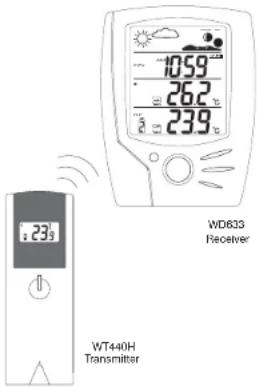
Congratulations on your purchase of this weather station set, WD639 + WT440H. Please take the time to read and understand this manual so you can begin to enjoy the convenience and features this product has to offer.
FEATURES
Main Display Unit WD633 * dust clock and dust alarm * calendar (teaching/monthly/very) * local temperature display * receives and displays temperature and humidity range from 4 to 4 remote transmitters via FI technology or 400M/M& * minimum/mathimum temperature memory * temperature and humidity trend indicator * local remote temperature slams * weather/tolerant * moon phase symbols * user-selectible °C or °F * battery type: 2 x AA Remote Transmitter W14404 * drip-proof design with LCD screen * temperature display in user-selectible * car or F * humidity display * transmission range up to 40 metres in open air * battery type or well mountable * battery type: 2 x AA
WD633 + WT440H
Wireless Weather Station
PAGE 1
CALENDAR SETTING

Date Setting:
Scroll to the Date mode using MODE.
Press HGBRhe/Math.
Press MINUTE-dMIN
NOTE: Weekday is automatically determined from the year/month/date setting.
February will have either 28 or 29 days depending on the year setting.

Year Setting:
Scroll to the Year mode using MODE.
Press + or - key to adjust the year.


TEMPERATURE & HUMIDITY DISPLAY
Local (Indoor) Temperature

The local (indoor) temperature will display instantly after
batteries are inserted into the receiver.
Remote (Outdoor) Temperature and Humidity

If the Learn Function is performed successfully (refer to the WIRELESS
TRANSMISSION section), the remote (outdoor) temperature and humidity will

display on the bottom of the LCD screen.

Press CHN to toggle between 238 | 54 %
Channels 1, 2, 3 and 4.
NOTE: The temperature and humidity data will alternate on the LCD screen.
Selecting °C or °F Temperature Display

Toggle between ^ C and ^ F by pressing ^ C/ ^ Fin either Clock 1 or Clock 2 mode.

PAGE 10
GETTING STARTED
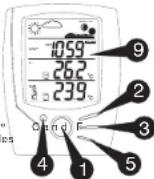
button placement
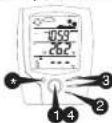
MODE/SNOOZE: scrolls through Clock 1&2, Alarm 1&2, Date & Year, and (Upper & Lower) Temperature Alarm Mode; snooze for alarm
2 HOUR/+/MAX: shows maximum temperature; adjusts clock, alarm, date & year and temperature alarm values
3 MINUTE/-/MIN: shows minimum temperature; adjusts clock, alarm, date & year and temperature alarm values
4 ALARM/(C/F): toggles between ; 12 and 24 hour format, Alarm 1 & 2 on and off; disables upper & lower temperature alarms
5 CHN: scrolls through remote channels (1 to 4); scrolls through local and remote channels (1 to 4) in (upper & lower) temperature alarm mode
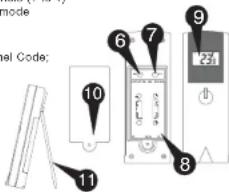
6 SET: activates SET function
7 C/F: changes House Code and Channel Code; selects °C or °F
8 Battery Compartment
9 LCD Screen
10
10 Battery Cover
11 Wall Mount Bracket & Table Stand
PAGE 2
TEMPERATURE & HUMIDITY DISPLAY
Min and Max Temperature
A Press MIN in Clock 1 mode to display minimum temperature.
The MIN symbol will appear.
To return to normal temperature and humidity display, press MIN again
B Press MAX in Clock 1 mode to display maximum temperature.
The MAX symbol will appear.
To return to normal temperature and
humidity display, press MAX again.
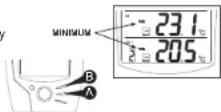
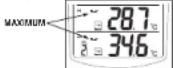
NOTE: Min/Max readings are automatically cleared daily at 00:00
Temperature and Humidity Trend
The trend indicator shows the trend of the temperature and humidity in the past half-hour interval.
Example:
The following trend
indicates that the
temperature is rising.
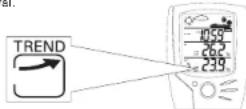
| Arrow Indicator | |||
| Trend | Rising | Steady | Falling |
PAGE 11
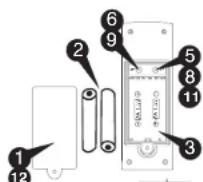
SETTING UP THE TRANSMITTER
Set up the transmitter(s) before setting up the receiver
1 Remove battery cover
2 AA size batteries (Included)
3 Insert batteries into compartment, observing proper polarity
4 House code will blink for 8 seconds
5 Select House code (1-15) by pressing C/F * If you have multiple transmitters for a single receiver, set each transmitter to the same House code
6 Press SET
7 Channel code will blink for 8 seconds
8 Select Channel code (1-4) by pressing C/F. If you have multiple transmissions for a single receiver, set each transmitter to a different Channel code
9 Press SET
10 Temperature and humidity will appear and alternates on the LCD screen
11 Select temperature display in °C or °F by pressing C/F
12 Replace battery cover


PAGE 3
WEATHER ICONS
Based on the temperature and humidity data collected from the remote transmitter (Channel 1), the receiver will display the following weather icons on the LCD screen.
| SUNNY | CLOUDY RAIN | SNOW | FREEZE WARNING | |
About Freeze Warning:
• The SNOW icon will blink to warn of 'freezing'.
- Activated when Channel 1's temperature is between -1.9°C and 2.9°C.
- The SNOW icon will appear solid if and when Channel I's temperature falls below -1.9°C.
NOTE:
- When you first set up the weather station set, the weather icon shown on the display will be CLOUDY.
- The weather icon is based solely on the temperature and humidity data collected from the remote transmitter Channel 1.
- If Channel 1's slot is empty, the weather icon shown on the display will always be CLOUDY.
PAGE 12
SETTING UP THE RECEIVER
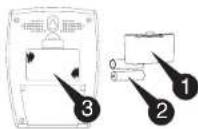
1 Remove battery cover
2 AA size batteries (included)
3 Insert batteries into compartment, observing proper polarity; then replace cover
WIRELESS TRANSMISSION
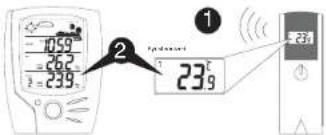
Automatic Learn Function:
1 The learn function executes automatically and runs for approximately 3 minutes when batteries are first installed in the receiver.
2 Within these 3 minutes, the receiver will pick up the temperature and humidity signals from remote transmitter and display the reading.
PAGE 4
WIRELESS TRANSMISSION
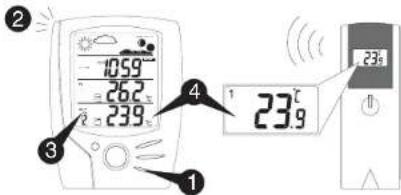
Manual Learn Function (Remote Signal Search):
If a new remote transmitter is added or if signal is lost (outdoor readout on the receiver is blinking), the learn function must be executed again.
1 Press and hold for 3 seconds to start.CHN
2 Unit will beep to indicate that the learn function has started.
③ Channel symbol will blink and unit will continue to beep as each remote transmitter is detected.
4 Within 3 minutes, the temperature and humidity reading of the remote transmitter will display on the receiver.
PAGE 5
WIRELESS TRANSMISSION
Environmental factors and signals from other household devices, such as remote entry controls, security systems, and computers, may interfere with the wireless transmission of this product and cause temporary reception loss. This is normal and does not affect the general performance of this product. Stable reception will resume once the interference ends.
For optimal performance:
- Place the receiver and remote transmitter side by side about 1 metre apart, and allow the receiver and remote transmitter to synchronize for 10 minutes before you place the remote transmitter outdoors.
The remote transmitter should be placed in a dry shaded area. NOTE: Fog and mist will not harm the remote transmitter but direct rain must be avoided.
Mount the remote transmitter upright avoiding metallic objects and frames, such as window sils. Verify that there are no obstacles like a transmission tower or steep hill that can cause interference and blockage between the remote transmitter and receiver. - Place the receiver unit at least 2 metres away from any electrical devices, such as your television set, computer, cordless phone, or an radio controlled equipment.
- You may need to reposition the remote transmitter to a different location and/or closer to the receiver for the best transmission.
- Replace unit(s) with fresh batteries when the Low Battery Indicator lights up. Refer to the LOW BATTERY INDICATION section.
TEMPERATURE ALARM TEMPERATURE ALARM—
The temperature alarmo be used for greenhouses and wine cellars, or any place that you require controlled temperature. Once activated, the temperature alarm would sound when the room gets too warm or too cold depending on your settings.
- You can set both an upper and lower temperature alarm for the local temperature (main receiver unit) and/or for each of the remote (outdoor) channels of 1 to 4.
● UPPER TEMPERATURE LIMIT: If the temperature gets too warm and reaches the upper temperature limit, the alarm would sound.
● LOWER TEMPERATURE LIMIT: If the temperature gets too cold and reaches the lower temperature limit, the alarm would sound.
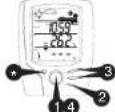
Setting the Upper Temperature Alarm
1 Scroll to the Upper Temperature Alarm Setting mode by pressing MODE. You should see the symbol and dotted lines ( ) or pre-existing setting blink.
2 Select the desired channel, local or remote channels (1 to 4) using .CHN
3 Press + or - key to set the desired value for the upper temperature limit.
To disable the particular alarm, press ALARM. The dotted lines (-)-would reappear to indicate that the alarm has been disabled.
4 Press MODE to finish: or repeat steps for all other channels if desired.
Setting the Lower Temperature Alarm
1 Scroll to the Lower Temperature Alarm Setting mode by pressingMODE. You should see the symbol and dotted lines ( ) or pre-existing setting blink.
2 Select the desired channel, local or remote channels (1 to 4) using .CHN 3 Press + or - key to set the desired value for the lower temperature limit.
To disable the particular alarm, press ALARM. The dotted lines (-) would reappear to indicate that the alarm has been disabled.
4 Press MODE to finish; or repeat steps for all other channels if desired.
NOTE: In the normal clock display, when either the upper or lower temperature alarm has been set for a particular channel, the symbol will show up solid on the LCD screen when that channel is displayed.
When the Temperature Alarm Sounds
The temperature alarm will sound when the actual temperature has reached (or exceeded) the upper or lower temperature limit.
or symbol and temperature limit will blink
The temperature alarm has a distinctive tone different to that of Alarm 1 or Alarm 2.
- Press ANY key to stop the temperature alarm. Or without interruption, the temperature alarm will automatically stop after one minute.
LOW BATTERY INDICATION
WD633 Receiver
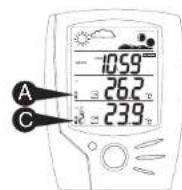
A Replace the batteries when the Low Battery Indication ☐ lights up the middle-left portion of the LCD screen on the WD633 receiver.
WT440H Remote Transmitter
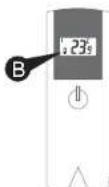
B Replace the batteries when the Low Battery Indication lights up on the bottom-left corner of the LCD screen on the WT440H transmitter.
When the batteries are low on a transmitter, a Low Battery Indication (☐) will also light up on the bottom-left corner of the LCD screen on the WD633 receiver for that particular channel.
NOTE: After replacing the batteries, you will need to perform the Setup and Learn Function procedures again. Refer to the SETTING UP THE TRANSMITTER/RECEIVER and WIRELESS TRANSMISSION sections.
CLOCK SETTING
Clock 1 Setting:
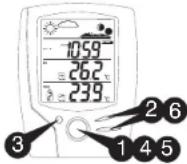
1 Press and hold MODEs to enter the clock setting mode. You will hear a beep. (The CLOCK 1 symbol will appear and the time will blink).
2 Press HOUR1MINUTE and to set the minute;
3 Press ALARM(c) Setting to change between 12 and 24 hour display. This also will end clock setting.
4 Press MOB key press for one minute will end clock setting.
Clock 2 Setting:
5 Scroll to Clock 2 mode using MODE CLOCK 2 symbol will appear).
6 Press or key to change the hour (in one hour increments/decrements relative to Clock 1)
PAGE 7
TROUBLESHOOTING
| PROBLEM | SOLUTION |
| The temperature and humidity calls on the remote transmitter does not match the cats displayed on the receiver. | This may occur when you move the remote transmitter from one environment to another. For example, when you bring the transmitter from inside the warm house out to the color detector. In such a case, there will be a big change in temperature. The transmitter will record this change in temperature much earlier than the remote transmitter. This can also be a bit of the data to the receiver (which is done once every minute). Therefore, you will temporarily go at a difference in reading between the remote transmitter and receiver. The solution is to allow the remote transmitter some time to sit in the room for a result of equilibrium. This may below receive minutes. Once the cats is able, the cats displayed on the remote transmitter should match that they displayed on the receiver. |
| The temperature and humidity calls on the remote transmitter were not match the cats displayed on the receiver. | This may also be the result of a temporary loss of reception due to interfering sources. Normal reception should resume once the interference ends. Refer to the WIRELESS TRANSMISSION section. |
| The remote (outdoor) readout on the receiver is blinking | Decipheries the remote transmitter and receiver by pressing and holding CHIN on the receiver for 3 seconds until a book is heard. The temperature and humidity data from the remote transmitter will display on the receiver with 3 minutes. Refer to the WIRELESS TRANSMISSION Manual Learn Function collection. |
| The remote (outdoor) readout on the receiver is blinking. The receiver will not detect or receive the temperature and humidity calls from the remote transmitter even after the Manual Learn Function has been executed. | Ensure the remote transmitter is away from any positive source of information and electrical disturbance. You may try to repulsion the remote transmitter in a different location and/or closer to the receiver. The remote transmitter does have a maximum range of 40 meters, but any walls or windows the signal has to pass through will receive the distance. Due to the nature of the bilatiner, current temperature may also affect the transmission range. Refer to the WIRELESS TRANSMISSION section and record the Manual Learn Function with the remote transmitter in a new location. |
PAGE 16
ALARM SETTING
Alarm 1 and Alarm 2 Setting:
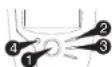
1 Scroll to Alarm 1 using MODE. The ALARM 1 symbol will appear. 2 Press HOUR to set the hour.
3 Press MINUTE to set the minute
4 Press ALARM to toggle alarm on and off. 5 When the alarm is set ON, the 1 symbol will appear and the unit will beep.
6 In the normal clock display, if the alarm is set ON, the 1 symbol will also appear on the display.
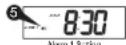
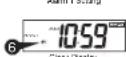
To set Alarm 2, scroll to Alarm 2 using MODE. The ALARM 2 symbol will appear. Follow the same steps as above to set. In the normal clock display, if the alarm is set ON, the ⚫2 symbol will also appear on the display.
NOTE: Both Alarm 1 and Alarm 2 are based on the time set on Clock 1.
When the Alarm Sounds:
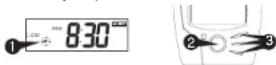
1 1 or 2 symbol will blink. 2 Press SNOOZE to snooze the alarm for 5 minutes. After that the alarm will sound again.
3 Press ANY other key to stop the alarm. Or without interruption, the alarm will automatically stop after one minute.
PAGE 8
FCC COMPLIANCE
THIS DEVICE COMPLIES WITH PART 15 OF THE FCC RULES. OPERATION IS SUBJECT TO THE FOLLOWING TWO CONDITIONS: 1. THIS DEVICE MAY NOT CAUSE HARMFUL INTERFERENCE, AND 2. THIS DEVICE MUST ACCEPT ANY INTERFERENCE RECEIVED, INCLUDING INTERFERENCE THAT MAY CAUSE UNDESIRED OPERATION
SPECIFICATIONS
WD633 - WEATHER STATION RECEIVER
- Battery Type: 2 X 1.5V AA batteries
- Operating Temperature: -5°C to 50°C
- Temperature Range: -9.9°C to 55°C
- Measurement Accuracy: Max. +/- 1°C within measuring range of 0°C to 40°C
- Resolution: 0.1°C
WT440H - WEATHER STATION TRANSMITTER
- Battery Type: 2 X 1.5V AA batteries
- Operating Temperature: -20°C to 60°C
- Temperature Range: -30°C to 70°C
- Temperature Resolution: 0.1°C for above -10°C / 1°C for below -10°C
- Measurement Accuracy: Max. +/- 1°C within measuring range of 0°C to 40°C
- Humidity Range: 25% to 90% RH (resolution 0.5%)
- Transmission Frequency: 433.92 MHz
- Transmission Range: up to 40 metres in open area.
CUSTOMER SUPPORT HOTLINE: 1-888-468-6876
PAGE 17
MOON PHASE DISPLAY
The moon phase is automatically updated according to the calendar setting.
Moon Phase Display
1 New Moon

2 Young Crescent

3 First Quarter

4 Waxing Gibbous

5 Full Moon

6 Waning Gibbous

7 Last Quarter

8 Old Crescent

9 New Moon

PAGE 9
LIMITED TWO-YEAR WARRANTY
UPM warrants this product, excluding battery, to be free from defects in the materials or workmanship, under normal use and service, for a period of two (2) years from the date of purchase by the consumer.
It, at any time during the warranty period, the product is defective or malfunctions. UPM shall repair or replace it (at UPM's discretion) within a reasonable period of time.
If the product is ineffective,
10 return it with a dated proof of purchases, to the retailer from which you purchased it, or
(1) package it carefully, along with a dated proof of purchase and a short description of the malfunction, and mail it, postage prepaid, to the following address:
UPM Marketing Inc.
Return Goods Unit (III) 350 Elvisia Court
Unit 108-250 sh Markham, Cenark
L30 6V7
This warranty does not cover removal or reinstallation costs. This warranty shall not apply if it is shown by UPM that the defect or malfunction was caused by damage which occurred while the product was in the possession of the consumer.
UPM's core responsibility shall be to repair or replace the product within the terms stated above. UPM SHALL NOT BE LIABLE FOR ANY LOSS OR DAMAGE OF ANY KIND, INCLUDING ANY INCIDENTAL OR CONSEQUENTIAL DAMAGES RESULTING DIRECTLY OR INDIRECTLY FROM ANY BREACH OF ANY WARRANTY EXPRESS OR IMPLIED, OR ANY OTHER FAILURE OF THIS PRODUCT. Some states do not allow the exclusion or limitation of incidental or consequential damages, so this limitation may not apply to you.
THIS WARRANTY IS THE ONLY EXPRESS WARRANTY UFM MAKES ON THIS PRODUCT. THE DURATION OF ANY IMPLIED WARRANTIES, INCLUDING THE WARRANTIES OF MERCHANTABILITY AND FITNESS FOR A PARTICULAR PURPOSE, IS HEREBY LIMITED TO THE TWO YEAR DURATION OF THIS WARRANTY. Some staves do not allow limitations on how long an implied warranty issue, so the above limitation may not apply to you.
This warranty gives you specific legal rights, and you may have other rights which may vary from state to state.
If you have any questions concerning this warranty, please write to
UPM Marketing Inc.
Customer Service Department
Unit 10B - 250 Shields Court
L38 SW7
Or call 1-888-GO-TO-UPM (1-888-468-9876), Monday to Friday from 9:00am to 5:00pm eastern.
PAGE 18
MANUEL UPM DU PROPRIÉTAIRE
PAGE 2
AFFICHAGE DE LA TEMPÉRATURE & DE L'HUMIDITÉ
CONFORMITÉ AUX NORMES FCC
CET APPAREIL SE CONFORME À LA PARTIE 15 DES RÈGLEMENTS DE LA FCC. SON FONCTIONNEMENT EST SUJET AUX DEUX CONDITIONS SUIVANTES:
- CET APPAREIL PEUT NE PAS CAUSER DE BROUILLAGES PRÉJUDICIABLES, ET
- CET APPAREIL DOIT ACCEPTER DES BROUILLAGES REÇUS Y COMPRIS
CEUX QUI PEUVENT CAUSER UNE OPERATION NON DESIREE.
SPÉCIFICATIONS
WD633 - LA STATION MÉTÉO
Customer Service Department U.S. 108-296 Showt Gov
Marikham, Ontario
L3H SW7

- FEATURES
- CALENDAR SETTING
- Date Setting:
- Year Setting:
- TEMPERATURE & HUMIDITY DISPLAY
- Local (Indoor) Temperature
- Selecting °C or °F Temperature Display
- GETTING STARTED
- Min and Max Temperature
- Temperature and Humidity Trend
- Example:
- SETTING UP THE TRANSMITTER
- WEATHER ICONS
- About Freeze Warning:
- NOTE:
- SETTING UP THE RECEIVER
- WIRELESS TRANSMISSION
- Automatic Learn Function:
- Manual Learn Function (Remote Signal Search):
- For optimal performance:
- TEMPERATURE ALARM TEMPERATURE ALARM—
- Setting the Upper Temperature Alarm
- Setting the Lower Temperature Alarm
- When the Temperature Alarm Sounds
- LOW BATTERY INDICATION
- WD633 Receiver
- WT440H Remote Transmitter
- CLOCK SETTING
- Clock 1 Setting:
- Clock 2 Setting:
- ALARM SETTING
- Alarm 1 and Alarm 2 Setting:
- When the Alarm Sounds:
- FCC COMPLIANCE
- SPECIFICATIONS
- WD633 - WEATHER STATION RECEIVER
- WT440H - WEATHER STATION TRANSMITTER
- MOON PHASE DISPLAY
- LIMITED TWO-YEAR WARRANTY
- MANUEL UPM DU PROPRIÉTAIRE
- AFFICHAGE DE LA TEMPÉRATURE & DE L'HUMIDITÉ
- CONFORMITÉ AUX NORMES FCC
- SPÉCIFICATIONS
- WD633 - LA STATION MÉTÉO
Brand : UPM
Model : WT440H
Category : Weather Station