 ManualGo.com
 Genesi oven - Oven Steel Cucine - Free user manual and instructions
Find the device manual for free Genesi oven Steel Cucine in PDF.



Frequently Asked Questions - Genesi oven Steel Cucine
Download the instructions for your Oven in PDF format for free! Find your manual Genesi oven - Steel Cucine and take your electronic device back in hand. On this page are published all the documents necessary for the use of your device. Genesi oven by Steel Cucine.
USER MANUAL Genesi oven Steel Cucine
Eventuali presenze di calcare possono essere rimosse utilizzando aceto; evitare l'uso di sostanze chimiche per prevenire la possibile intossicazione degli alimenti.Thank you for choosing one of our products. From now on cooking will be a creative pleasure with your new oven. We recommend carefully reading all the instructions given in this manual as it provides information on the proper and safe use of your oven. These instructions will also familiarise you with all the various parts of your oven. Tips are provided on the use of pans and utensils, the position of runners and the setting of controls. The correct cleaning operations described in this manual will enable you to keep your oven in good working order over time. The individual paragraphs are designed to give a step by step description of all of the oven's functions. The clear and easy to understand text is accompanied by detailed images and widely used symbols. Reading this manual in depth will provide you will the answers to any questions that may arise regarding the correct use of your new oven.
INSTRUCTIONS FOR THE INSTALLER: intended for the qualified technician carrying out the installation, start-up and testing of the appliance.
INSTRUCTIONS FOR THE USER: include suggestions, the description of the controls and the correct cleaning and maintenance operations for the appliance.Contents
Warnings for safety and use _______________________________ 43
This user’s manual is an integral part of the product purchased. The user must conserve the manual correctly so that it is always available for consultation during the use and maintenance of the product. Keep this user’s manual for future reference. If the product is resold, the manual must be transferred to any subsequent owner or user of the product.
The manufacturer is not liable for any inaccuracies in this booklet resulting from printing or transcription errors. The manufacturer reserves the right to modify its products as it considers necessary or in the interests of the user, without compromising their essential safety and operating characteristics.
CLASSES OF APPLIANCES
The cooking appliances described in this use manual belong to the installation class stated below:
Class 3: built-in cooking appliances.
This product was manufactured in compliance with the following directives:
- 2006/95/EC relating to electrical equipment designed for use within certain voltage limits.
- 2004/108/EC relating to electromagnetic compatibility.
- EC Regulation no. 1935 of 27/10/2004 on materials and articles intended to come into contact with food.
- 2011/65/EC (RoHS) on restricting the use of hazardous substances in manufacturing materials.
1.1 Technical service
Before leaving the factory, this appliance has been tested and set up by qualified, specialist personnel, so as to guarantee the best operating results. Each repair or adjustment that may subsequently be necessary must be carried out with the utmost care and attention. We therefore recommend always contacting the Dealer where the appliance was purchased or your nearest Service Centre, specifying the type of problem and the appliance model.Warnings
2. Warnings for safety and use
THIS PRODUCT IS DESIGNED AND MANUFACTURED TO OPERATE SAFELY AND DOES NOT POSE ANY DANGERS TO PEOPLE, ANIMALS, AND OBJECTS.
The manufacturer declines any responsibility for damage incurred by persons or objects that is caused by not following the above guidelines or by tampering with any part of the appliance or by using non-original spare parts.Instructions for the installer
The following operations must be carried out by a qualified installing technician. The installing technician is responsible for correctly installing the appliance according to current safety standards. Before using the appliance, remove the protective plastic on the control panel, stainless steel parts, etc...
The manufacturer declines any responsibility for damage incurred by persons, animals or objects that is caused by not following the above guidelines (cfr. chapter “2. Warnings for safety and use”). The technical data is indicated on the plate located on the back of the appliance. The adjustment conditions are shown on a label applied to the packing and the appliance.Instructions for the installer
3.2 Fastening the oven to the unit
Do not use the oven door handle for lifting or handling, including while unpacking the oven.
The oven must be positioned by two people. The unit must be coated with heat-resistant material (minimum 90°C). Leave the minimum clearances suggested in the following diagrams.
- lighten the oven by removing the box containing the accessories; if necessary, the door can also be removed by following the instructions in paragraph “8.1 Removing the oven door”;
- lift the oven using the handles A on the sides of the oven (see figure);
- rest the back of the oven inside the recess and after having freed the electric cable and inserted the plug into the socket, push the oven into its final position, ensuring that the electric cable is not crushed; if the oven door has been removed, refit it by following the instructions in paragraph “8.1”;
- fasten the oven to the unit using the wooden screws provided, in the 4 holes on the oven, as shown in the figures below.
mmInstructions for the installer
mmInstructions for the installer
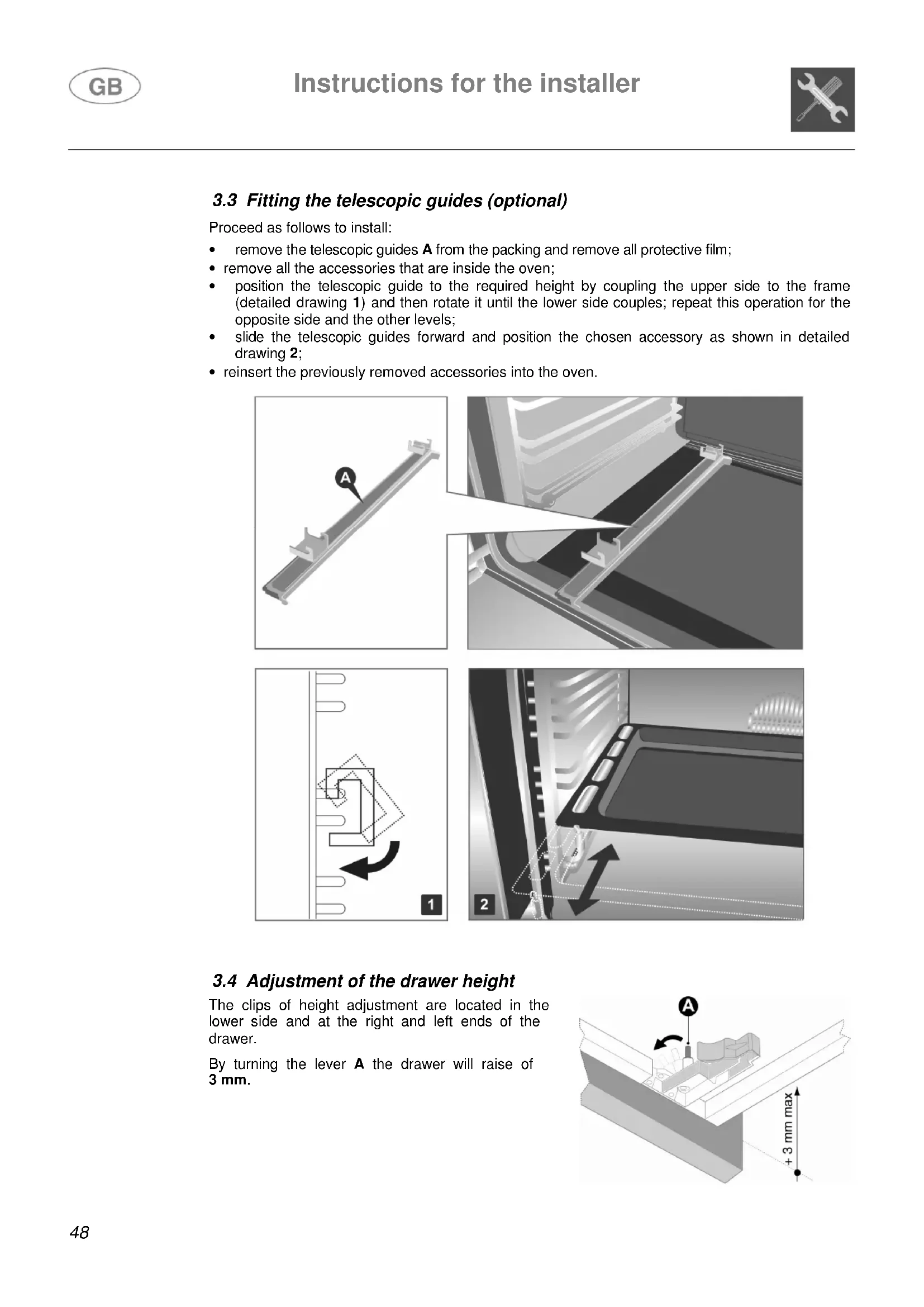
Proceed as follows to install:
- remove the telescopic guides A from the packing and remove all protective film;
- remove all the accessories that are inside the oven;
- position the telescopic guide to the required height by coupling the upper side to the frame (detailed drawing 1) and then rotate it until the lower side couples; repeat this operation for the opposite side and the other levels;
- slide the telescopic guides forward and position the chosen accessory as shown in detailed drawing 2;
- reinsert the previously removed accessories into the oven.
3.4 Adjustment of the drawer height
The clips of height adjustment are located in the lower side and at the right and left ends of the drawer. By turning the lever A the drawer will raise of
3 mm.Instructions for the installer
3.5 Electric connection
Make sure that the voltage and the size of the mains corresponds to the specifications shown on the plate located on the back of the appliance. A second plate, including detailed information about the model and serial number, is placed inside the equipment on the left side and is visible on opening the oven door. These plates must never be removed.
The plug at the end of the power supply cable and the wall socket must be the same type and must comply with current electric standards. Check that the mains is adequately earthed. Once the appliance has been installed make sure that the plug is accessible to allow the periodical check-up.
Prepare an omni-polar cutoff device on the power supply line of the appliance with a contact opening distance equal to or more than 3 mm, located in a convenient position near the appliance.
Do not use reducers, adapters or shunts.
Before making the electric connection, make sure of the efficiency of the earthing. Make sure that the relief valve and the home wiring system are able to withstand the appliance load. The yellow/green earth cable must not be subject to cutoffs. The electric cable must not come into contact with parts whose temperature is more than 50°C higher than room temperature.
All our ovens are supplied with a single-phase electrical connection. For greater practicality, we suggest fitting a plug to the oven according to the following wire colours:
- blue: neutral. For other connections follow the instructions in chapter “3.5.2 Type of power supply”.Instructions for the installer
3.5.2 Type of power supply
It is possible to obtain different connections according to the voltage, simply by moving the unconnected cable ends on the terminal board as shown in the following diagrams.
To replace the electric cable, it is necessary to access the terminal board. It is located on the back of the appliance, at the top left, as shown in the figure. To replace the cable, proceed as follows:
- open the terminal board box;
- unscrew the screw A that locks the cable;
- loosen the screw contacts and replace the cable with one of the same length and conforming to current regulations;
- the "yellow-green" earth wire must be connected to the terminal and must be approximately 20 mm longer than the line cables;
- the neutral "blue" wire must be connected to the terminal marked with the letter N;
- the line wire must be connected to the terminal marked with the letter L.
4. Description of controls
All the oven controls are grouped together on the front panel.
TOP OVEN TEMPERATURE AND COOKING FUNCTIONS SELECTORInstructions for the user
The electric oven is controlled by two knobs: function selection knob and temperature selection knob. They allow yo u to choose the most suitable type of heating for different cooking requirements, by switching on the heating elements appropriately and setting the required temperature (from 50°C to MAX). Below the oven knobs there are two warning lights: the green light signals the oven is working; the orange light indicates that the preset temperature has been reached. The orange light turns on and off to indicate automatic heating has activated or deactivated in order to maintain the set temperature inside the oven. The oven has an internal light. The light is always on while the oven is working: it can be switched on while the oven is off, for cleaning purposes, by turning the function switch knob.
GRILL ELEMENTInstructions for the user
The top oven is controlled by a single knob. By positioning the knob appropriately and by setting the required temperature, both upper and lower heating elements will switch on. It is possible to set one of the functions described in the table, but in this case the temperature of the chosen heating element will be automatically set to the MAX temperature value. Below the oven knob there is an orange light, which indicates when the oven has reached the set temperature. The orange light switches on and off to indicate when the heating automatically kicks in to maintain the temperature inside the oven at the level set. The oven has an internal light. The light is always on while the oven is working: it can be switched on while the oven is off, for cleaning purposes, by turning the knob to the symbol .
USING AND PROGRAMMING THE DIGITAL CLOCK ON GENESI OVENS The digital clock enables the oven to be set to automatically switch on and off.
This programmer works like a touch screen; rest the tip of the finger on the key for a few seconds to activate it.
When first powering on the appliance or following a power failure, and the word AUTO flash on the display. Touch the “Mode” key to stop the flashing and use the / keys to set the time (hold down the / keys to scroll rapidly). To adjust the time under normal operating conditions, i.e. when the clock is already on, touch both keys / simultaneously for at least two seconds and then set the time as described previously.
This function is for using the oven without any programming.
It is always possible to switch from a programmed function to “Manuale” (Manual) function, by touching the “Mode” key; choose “Manuale” if no cooking programmes are to be used.
This function activates an audible alarm after a preset time, without interfering with the operation of the oven.
The digital clock can also be used as a timer:
- touch the “Mode” key for at least 2 seconds to enter the programming menu; the flashing symbol will appear;
- use the / keys to set the required time and the display will show the time remaining. The timer starts automatically and the symbol will stop flashing. When the set time is reached, an audible alarm sounds for 7 minutes and the symbol will flash;
- touch any key to stop the alarm or the “Mode” key to delete the programme.Instructions for the user
This function is for programming the cooking duration after which the oven switches off automatically.
- Set the required cooking function and temperature using the control knobs;
- touch the “Mode” key to enter the programming menu, touch again and the word “Dur” appears;
- use the / keys to set the cooking duration. The word “Auto” flashes for the duration of the programming phase. After 7 seconds the cooking programme starts and the symbol appears, while the word “Auto” stops flashing. At the end of the set cooking time, an audible alarm sounds for 7 minutes, and the symbol AUTO will flash and symbol will turn off, switching the oven off automatically;
- touch any key to stop the alarm or the “Mode” key to delete the programme.
PROGRAMMING THE COOKING DURATION AND COOKING END
This function is for programming the oven to switch on at a set time and switch off automatically after cooking.
- Set the required cooking function and temperature using the control knobs;
- touch the “Mode” key to enter the programming menu, touch again and the word “Dur” appears;
- use the / keys to set the cooking duration;
- touch the “Mode” key to display “end”, use the / keys to set the cooking end time. The word “Auto” flashes for the duration of the programming phase. After 7 seconds the programme exits the menu and the word “Auto” stops flashing. When the cooking start time is reached, the symbol appears and the oven switches on automatically. At the end of the set cooking time, an audible alarm sounds for 7 minutes, and the symbol AUTO will flash and symbol will turn off, switching the oven off automatically;
- touch any key to stop the alarm or the “Mode” key to delete the programme.Instructions for the user
Only use the temperature probe recommended for this oven. This function is for automatically controlling oven operation by setting the cooking level at the core of the food. Using the core probe disables all duration, cooking end or timer settings.
Set the required cooking function and temperature using the control knobs. Insert the core probe jack into the connection (see figure) to activate cooking with the core probe. Two pairs of figures appear on the display (30:80); the first pair of figures indicates the temperature detected by the probe (minimum 30°C), the second pair indicates the temperature that the core of the food being cooked is to reach; use the / keys to set the required temperature (maximum 99°C).
Insert the probe into the centre of the food being cooked, ensuring the probe cable does not come into contact with the upper element.
The cooking programme starts automatically; on reaching the set temperature an audible alarm sounds for 7 minutes and the oven's heating elements deactivate. Turn the temperature knob to "0" if the food is cooked.
If the oven is not turned off the heating elements reactivate automatically when the temperature at the core of the food goes below the preset value. To avoid scalding the probe must be removed solely once the oven has completely cooled down.
To maintain the temperature at the core of the food constant, leave the probe and the jack inserted: the oven's heating elements will reactivate automatically when the temperature goes below the preset value.
BEEPER At the end of each preset function, an audible alarm sounds which turns off automatically after 7 minutes; touch the “Mode” key to turn the beeper off immediately. Three different types of audible alarm are available on the appliance; to choose between them touch the / keys simultaneously, then touch the “Mode” key until “Tone” appears, then choose the required tone by touching the key .Instructions for the user
USING AND PROGRAMMING THE DIGITAL ANALOGUE CLOCK ON ASCOT OVENS The digital clock enables the oven to be set to automatically switch on and off.
When first powering on the appliance or following a power failure the display flashes. Press the key to stop the flashing and use the / keys to set the time (hold down the / keys to scroll rapidly).
This function is for using the oven without any programming.
It is always possible to switch from a programmed function to “Manuale” (Manual) function, by pressing the key; choose “Manuale” if no cooking programmes are to be used.
This function activates an audible alarm after a preset time, without interfering with the operation of the oven.
The digital analogue clock can also be used as a timer:
- press the key and the display will light up as shown in Fig. 1;
- use the / keys to set the required time; the display will illuminate one segment for each minute set (Fig. 2 shows a cooking time of 10 minutes). The timer starts automatically and the symbol will stop flashing. After a few seconds the display returns to clock function;
- press to display the time remaining. When the set time is reached, an audible alarm sounds for 7 minutes and the symbol will flash;
This function is for programming the cooking duration after which the oven switches off automatically.
- Set the required cooking function and temperature using the control knobs;
- press the key to enter the programming menu; the display will light up as shown in Fig. 3;
- use the / keys to set the cooking duration; one press of key adds one minute cooking time and every twelve minutes one internal segment illuminates (Fig. 4). After 7 seconds the cooking programme starts and the symbol appears. At the end of the set cooking time, an audible alarm sounds for 7 minutes; the symbol and the numbers on the dial start to flash, switching the oven off automatically;
- press any key to stop the alarm or the key to delete the programme. Fig. 4
PROGRAMMING THE COOKING DURATION AND COOKING END
This function is for programming the oven to switch on at a set time and switch off automatically after cooking.
Set the required cooking function and temperature using the control knobs. In addition to the cooking duration, also set the time the oven is to switch on:
- press the key to enter the programming menu; the display will light up as shown in Fig. 3 and the symbol appears;
- use the / keys to set the cooking duration; one press of key adds one minute cooking time and every twelve minutes one internal segment illuminates (Fig. 4);
- press the key again and use the / keys to set the cooking end time (cooking end time minus cooking duration = cooking start time), the symbol appears. After 7 seconds the display shows the current time while the cooking start time and the cooking duration are shown with the illuminated internal segments, which remain steady until cooking starts and flash for the duration of the cooking time. At the set time, the oven switches on automatically; at the end of the set cooking time, an audible alarm sounds for 7 minutes; the symbols and the numbers on the dial start to flash, switching the oven off automatically;
- press any key to stop the alarm or the key to delete the programme.
Fig. 5 shows a programming example: the current time is 7:06 and cooking is programmed to start at 8.00 and end at 9.00. At 8:00, the internal segments between 8 and 9 will start to flash, while the hour hand will remain still. Fig. 5Instructions for the user
BEEPER At the end of each preset function, an audible alarm sounds which turns off automatically after 7 minutes; press the key to turn the beeper off immediately. Seven different types of audible alarm are available on the appliance; to choose between them press the key for at least 7 seconds; each time the key is pressed again the tone changes.
BRIGHTNESS The brightness of the clock can be changed; press the and keys simultaneously for at least 5 seconds and then use the / keys to change the brightness of the dial.
GRAPHICS The graphics of the clock can be changed; press the and keys simultaneously and use the key to display and choose the preferred graphics.Instructions for the user
When the oven or grill is operating, the outer walls and oven door can become very hot. Keep children away from the appliance. Do not allow children to sit on the oven door or play with it. Do not use the door as a stool. Never stand aluminium pots or foil on the base of the oven, as this may seriously damage the oven enamel.
Do not cook food on the bottom of the oven. When using the oven for the first time, or after a power cut, the display flashes regularly indicating . To set the display, refer to section “INITIAL POWER-ON AND SETTING THE TIME” on page 54. Do not attempt to disassemble the oven door without consulting the relative instructions carefully (refer to section “8.1 Removing the oven door”): the hinges on the oven door may injure the hands.
If during normal operation the oven interrupts heating and the programmer display begins to flash and goes to zero, check whether:
there has been a current interruption. If the block occurs again after the cooking programme has been restarted, this means that the safety device has been tripped. This device intervenes in the event of a thermostat fault and prevents oven overheating. In such case, we recommend that you not try to light the oven again and that you contact your nearest service centre.
Double oven models include a storage drawer at the bottom. To use the “push-pull” mechanism, push at the exact point indicated by the label (see 1) and then pull out the drawer (see 2). The drawer is designed for storing metal kitchen utensils only.
The drawer becomes hot while the oven is in use; avoid contact with the internal parts to prevent scalding. Do not use the drawer to store inflammable materials such as cloths, paper or the like.Instructions for the user
5.3 Using the multifunction and combination steam oven
- Some cooking with high water content combined with the use of certain functions can cause the formation of condensation on the door's inner glass. To prevent this occurring, open the oven door fo r a few seconds once or twice while cooking.
- Do not leave food to cool in the oven after cooking to prevent condensation forming on the door's inner glass,
which may drip out of the oven when the door is opened.
5.3.2 Switching on the oven for the first time
The first time it is used, the oven may smoke or give off an acrid smell caused by oily residue from manufacturing that may give unpleasant odours or flavours to food. Before putting food in the oven, heat to the maximum temperature for 30 minutes with the door closed and wait until the smoke or odour has stopped.
Turn the function selector knob to to rapidly preheat the oven; with this function the oven will rapidly reach the selected temperature. When the temperature is reached, select the required cooking function.
The rapid heating function must not be used for cooking.
5.3.4 Traditional cooking
Turn the function switch knob to position and the thermostat knob in correspondence with the required temperature value. For differentiated heating over or below the food, set the function selector switch to position (hot above) or (hot below). For more uniform heating throughout the oven, turn the function switch knob to position .
The oven is equipped with an automatic cooling system regulated by the temperature of the door. When the limit temperature is reached, the cooling fan automatically activates and then deactivates when the temperature of the door goes below the preset limit. The cooling fan may stay on after the oven has turned off. In case that does not happen, switch off the appliance and contact the Technical Service immediately.Instructions for the user
5.3.5 Convection cooking
The steam generator becomes very hot: pour mineral or decalcified water only into the tank; never use substances containing alcohol or detergents.
- Pour the required quantity of water (see tables on pages 68 and 69), into the steam generator tank, using the measuring jug as shown in the figure;
- turn the functions knob to or and set the required temperature, which must be above 100°C.
Steam cooking fills the inside of the oven with dry steam. This distributes heat more correctly and evenly, giving better results than cooking without steam and preserving more of the food's original flavour. The function enables cooking on only one level of the oven, while the function enables simultaneous cooking on more levels.
5.3.7 Cooking with the ventilated grill
5.3.8 Cooking with the grill and roasting spit
Turn the function switch knob to position ; turn the thermostat knob in correspondence with the maximum temperature value (MAX). The grill and spit operate at the same time, allowing for cooking on the spit.Instructions for the user
5.3.9 Cooking with the roasting spit
- Slide the meat to be cooked on the spit rod A and secure it with the adjustable forks.
- Hang the hook B at the top of the oven as shown in the figure.
- Place the spit rod A into the hole C in the oven casing; before closing the oven door, make sure that the rod A is correctly inserted into the hole C (insert the rod and turn it slightly back and forth).
- Hang the other end of the spit rod to the hook B (the pulley of the rod A is situated on the handle of the hook B).
- Close the oven door and activate the spit by turning the function selector knob to the position.
- When cooking is completed, open the oven door and remove the spit rod using the plastic handle D, which is screwed into the base of the rod A.
Turn the function switch knob to position , turn the thermostat knob to position "0": in this way the motor fan is activated, which moves the air inside the oven and encourages frozen food to defrost.
The oven is switched off by returning the thermostat knob to position "0".Instructions for the user
- one heating element beneath the base of the oven;
- one heating element on the roof of the oven;
- refractory stone (on the bottom) for cooking pizza and bread.
- Some cooking with high water content combined with the use of certain functions can cause the formation of condensation on the door's inner glass. To prevent this occurring, open the oven door for a few seconds once or twice while cooking.
- Do not leave food to cool in the oven after cooking to prevent condensation forming on the door's inner glass,
which may drip out of the oven when the door is opened.
5.4.2 Switching on the oven for the first time
The first time it is used, the oven may smoke or give off an acrid smell caused by oily residue from manufacturing that may give unpleasant odours or flavours to food. Before putting food in the oven, heat the oven to the maximum temperature for 30-40 minutes with the door closed and wait until the smoke or odour has stopped. It is possible to switch on the heating of the oven by turning the knob to the required temperature (from 50°C/100°C to MAX) or function.
5.4.3 Cooking with the grill
Turn the knob to and insert the food immediately. For correct operation, position the grill pan with mesh or the shelf on the second runner from the bottom. The position of the shelf can be changed according to personal preference and to different cooking requirements. A cooling system prevents the control knob from overheating.
5.4.4 Traditional cooking
Turn the knob to the required temperature and place the food to be cooked at the required level (avoid placing the food right at the bottom); in this way the food will be cooked from the top and bottom by the two heating elements. To cook the food using only one element, move the functions selector to (top element) or (bottom element).
Turn the knob to position MAX. After preheating the oven for approximately 45 minutes, place the pizza directly in contact with the refractory stone on the bottom, using the spatula provided. It is advisable to use baking parchment to prevent the pizza sticking to the stone.
5.4.6 Switching off the grill oven
The oven is switched off by returning the knob to position "0".Instructions for the user
6. Cooking suggestions
6.1 Suggestions for using the oven correctly
6.1.1 Traditional cooking
With this type of cooking, the heat comes from the top and the bottom. It is therefore preferable to use the central guides. If the cooking requires a hotter temperature from the bottom or from the top, use the lower or upper guides. Traditional cooking is recommended for all food that requires high cooking temperatures, or long brazing times. This system is also recommended when cooking with recipients made of terracotta, porcelain and similar materials.
6.1.2 Convection cooking
With this type of cooking, the food is heated by preheated air that is circulated in the oven thanks to a fan located on the rear wall of the oven. Heat rapidly and evenly reaches all parts of the oven, thus enabling different food to be cooked at the same time on different shelves. The possibility of cooking on more than one shelf allows you to cook many different dishes at the same time. Biscuits and mini pizzas can be cooked in three different baking tins. The oven, however, can also be used for cooking on a single shelf. The lower shelves can be used so that it is easier to monitor cooking. Convection cooking is particularly convenient for bringing frozen food rapidly back to room temperature, for sterilising preserves or home-made fruit in syrup and, finally, for drying mushrooms or fruit.
Cooking in a steam-filled environment has considerable advantages over traditional cooking. It preserves the flavour by drastically reducing the evaporation of liquid, thus maintaining the organoleptic and nutritional qualities. It facilitates heat distribution, resulting in more even cooking and reduces cooking times, thus saving energy. The steam cooking function can be used at low temperatures (100°C), to gently cook fish and vegetables, and at higher temperatures to cook desserts and other dishes when wishing to preserve their delicate flavour.
6.1.4 Fan assisted steam cooking
Fan assisted steam cooking has all the aforementioned advantages of traditional steam cooking, with the added advantage of perfect ventilation which ensures even heat distribution and therefore enables different foods to be cooked simultaneously at different cooking levels. Fan assisted steam cooking is particularly recommended for large or delicate cuts of meat.
6.1.5 Cooking with the grill
The heat comes from the top. Almost all meat can be grilled, with the exception of lean game and dishes such as meat-loaf. Meat and fish to be grilled should be lightly drizzled with oil and placed on the grid bars, which should be placed in the guides closest to or farthest away from the grill element, depending on the thickness of the meat, so as to avoid burning the surface and cooking too little inside.
Position the grill pan on the lowest level to collect the juices and fat; pour one glass of water into the grill pan to prevent smoke forming due to fat overheating.
6.1.6 Cooking with the ventilated grill
Using the combination of grill and fan. This type of cooking allows the heat to penetrate gradually inside the food, even though the surface is directly exposed to the grill.Instructions for the user
6.2 Examples of cooking
(*) corresponds to the position of the grill or tray from the bottom. (**) see instructions in section “5.3.6” page 62.
- Grilling can result in the inside of the oven becoming very splashed. Clean the oven after each use to prevent splashes becoming burned on.
- The indications in the table refer to the use of the enamelled grill pan with mesh. Place the mesh in the grill pan and insert them together at the indicated level. Values can vary depending on the type and quantity of food being grilled.
- Always place the food being grilled in the centre of the grill pan.
- After cooking turn the oven off and leave the food inside with the door closed for approximately 10 minutes. The indication duration does not include the recommended standing time.
- The values indicated in the table refer to the preparation of food placed in a cold oven and meat just out of the fridge.Instructions for the user
- The values indicated in the table refer to the preparation of food just out of the fridge and placed in a cold, non-preheated oven, unless indicated otherwise.Instructions for the user
(*) corresponds to the position of the grill or tray from the bottom. (**) see instructions in section “5.3.6” page 62.
- The values indicated in the table refer to the preparation of food just out of the fridge and placed in a cold, non-preheated oven, unless indicated otherwise.
- In addition to the indications provided, also remember at the end of cooking or when checking on your baking, open the oven slightly and wait until all the steam has come out. This prevents quantities of steam escaping all in one go with the risk of scalding.Instructions for the user
WHOLE CHICKEN (1 kg) 1
WHOLE DUCK (2 - 3 kg) 1
WHOLE GOOSE (3 - 4 kg) 1
(*) corresponds to the position of the grill or tray from the bottom. (**) see instructions in section “5.3.6” page 62.
- The values indicated in the table refer to the preparation of food just out of the fridge and placed in a cold, non-preheated oven, unless indicated otherwise.
- In addition to the indications provided, also remember at the end of cooking or when checking on your baking, open the oven slightly and wait until all the steam has come out. This prevents quantities of steam escaping all in one go with the risk of scalding.Instructions for the user
7. Cleaning and maintenance
Before performing any operations, switch off the power supply to the appliance.
Do not clean the surfaces of the appliance when they are still hot. Use only suitable detergents to clean the surfaces of the appliance. The manufacturer declines all responsibility and is not liable for damage arising from the use of unsuitable and/or other detergents than those indicated. Do not use pressure or steam spray guns to clean the appliance.
7.1 Cleaning the stainless steel surfaces
To clean and preserve the stainless steel surfaces, use a solution of warm water and vinegar or neutral soap. Pour the solution onto a damp cloth and wipe the steel surface, in the direction of the satin finish, rinse thoroughly and dry with a soft cloth or chamois leather. Do not under any circumstances use metallic sponges or sharp scrapers that may damage the surfaces. Only use non-scratch, non-abrasive sponges and, if necessary, wooden or plastic utensils.
7.2 Cleaning the enamelled surfaces
Clean with a non-scratch, non-abrasive sponge dampened with neutral soap and water. Grease stains can easily be eliminated with hot water or a product specifically made for cleaning enamel. Rinse carefully and dry with a soft cloth or a piece of deerskin. Do not use products containing abrasives, scouring pads, steel wool or acid, which may spoil the surfaces. Do not leave acid or alkaline substances on the enamel (lemon juice, vinegar, salt, etc.).
7.3 Cleaning the polished surfaces
Clean with a non-abrasive, scratchproof sponge dampened with warm water and neutral soap or with a standard detergent for polished surfaces. Rinse and dry carefully with a soft cloth. Abrasive pastes, coarse wire pads, steel wool or acid will damage the surfaces. Do not use alcohol.
7.4 Cleaning the knobs and the control panel
Clean the knobs and the control panel with a damp cloth.Instructions for the user
7.5 Cleaning the oven
In order to preserve the oven well, it should be cleaned regularly, each time it is used if possible, after leaving it to cool: in this way it is possible to remove any residue more easily, preventing it from burning the next time the oven is used. Clean the stainless steel parts and enamelled parts as described in the corresponding sections “7.1 Cleaning the stainless steel surfaces” and “7.2 Cleaning the enamelled surfaces”. Take out all the removable parts and wash them separately. Rinse and dry thoroughly with a clean cloth.
Never use detergent products to clean this type of oven. The walls of the oven can be cleaned using white vinegar and wiped with a cloth dampened with water. Subsequently, heat the oven for at least one hour at 150°C to facilitate cleaning. When the oven has cooled, wipe it again with a damp cloth.
We recommend always keeping the oven door clean. Use kitchen roll and on tougher dirt use a damp cloth and household detergent.
Spray products for cleaning the oven must not be used to clean the fan and the thermostat sensor inside the oven compartment.Instructions for the user
Periodically, it is necessary to maintain or replace some parts that are subject to wear and tear. Specific instructions are given below for each type of maintenance.
Before performing any operations, switch off the power supply to the appliance.
8.1 Removing the oven door
The oven door can be completely removed to enable more thorough cleaning.
Though this operation is possible, it should not be performed by everyone, as it requires the strength to hold up the door and a minimum of expertise to re-fit it. If you are not sure of being able to do this, we recommend that you clean the door without taking it off or, in special cases, that you contact the nearest authorised service centre.
To remove the door, proceed as follows:
- open the oven door and release the safety catches of the hinges by turning the respective pins A (one for each hinge) backward;
- partially close the door until there is no more load tension on the springs (the door will form an angle of about 30°);
- using both hands, accompany the movement of the door towards closure and simultaneously lift it upward;
- turn the lower part of the door towards the outside to free the hinges B from their seats.
The inner glass can be removed for more thorough cleaning.
- loosen screw C by half a turn to enable the catch to be lifted from right to left;
- lift the two catches and slide out the inner glass;
- to refit the glass, follow the above instructions in reverse order.Instructions for the user
To clean the area between the outer glass and the intermediate glass, use a soft brush in the space between the glass panels, as shown on p. 72. To refit the door, follow the instructions on p. 72 in reverse order. When the hinges B are back in their seats, open the door all the way and re-fit the safety catches of the hinges, lowering the respective pins A (one for each hinge).
CAUTION: After re-fitting the door, always be sure to re-fit the hinge safety catches.
8.2 Removing the side rack-holder frames
The rack-holder frames can be removed to clean them separately and to facilitate cleaning the oven walls. The frames are hooked to the oven wall in the three points indicated by the arrows in the figure (detail 1).
- Press downward with your fingers as shown in detail 2 of the figure to release the frame from the upper pin;
- lift the frame upward and take it out. To re-fit proceed in the inverse direction. Set the lower part of the frame on the respective pins and press the upper part against the oven wall until it hooks onto the pin.Instructions for the user
8.3 Removing and cleaning the inside oven fan
The inside fan of the ventilated oven may require periodic cleaning. To disassemble the fan proceed as follows:
- Make sure that the power supply to the appliance is switched off.
- Remove all inside components (racks and dripping pans).
- Loosen and remove the four screws A from the cover panel.
- Remove the cover panel B.
- Use a coin to loosen the fixing nut C of the fan (this threading is inverse; to loosen turn clockwise).
- Remove the fan D and wash it by immersing it in warm water and dish detergent. Never use abrasive or corrosive detergents, powdered products, or metal scrubbers. Rinse the fan and dry it thoroughly. Re-fit the fan and the cover by working in the inverse direction to the instructions for removal.
8.4 Replacing the oven light bulb
Before performing any operations, switch off the power supply to the appliance.
- unscrew the glass safety cap anticlockwise;
- unscrew the bulb and replace it with another one for high temperatures (300°C) with the following characteristics: Voltage: 230 V / 50 Hz Power: 25 W (halogen bulb) Attachment: G9
- Refit the glass cap and switch on the power. It is possible to check that the oven light is working even when the door is closed by turning the function switch knob.Instructions for the user
8.5 Cleaning the water tank
To clean the water tank, the cover must be removed. Proceed as follows:
- remove all objects and components inside the oven (racks and dripping pans);
- using a coin or a flat-head screwdriver, unscrew and remove nut A fastening the cover
- take hold of nut B and pull it towards you (arrow a) to free the slot in the cover from the rear pin (detail 2);
- still holding the nut B, push slightly back and lift (arrows b, c) and completely remove the cover C from the front guide D (detail 3). Clean the cover and the water tank following the instructions given in section “7.1 Cleaning the stainless steel surfaces”. To reposition and secure the cover, follow the above instructions in reverse order.
OBERER OFEN GENESI ASCOT
1.1 Assistance technique
DIMENSIONS (mm) FOUR 60x60
FOUR 60x90 FOUR 90x60