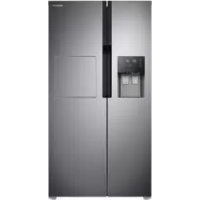
RS51K5680SL - Fridge SAMSUNG - Free user manual and instructions
Find the device manual for free RS51K5680SL SAMSUNG in PDF.


Frequently Asked Questions - RS51K5680SL SAMSUNG
User questions about RS51K5680SL SAMSUNG
0 question about this device. Answer the ones you know or ask your own.
Ask a new question about this device
Download the instructions for your Fridge in PDF format for free! Find your manual RS51K5680SL - SAMSUNG and take your electronic device back in hand. On this page are published all the documents necessary for the use of your device. RS51K5680SL by SAMSUNG.
USER MANUAL RS51K5680SL SAMSUNG
Free Standing Appliance
Contents
Safety information 3
Important safety symbols and precautions: 5
Severe warning signs for transportation and site 6
Critical installation warnings 6
Installation cautions 10
Critical usage warnings 10
Usage cautions 15
Cleaning cautions 18
Critical disposal warnings 19
Additional tips for proper usage 20
Saving Energy Tips 21
This appliance is intended to be used in household and similar applications such as 22
Instructions about the WEEE 22
Installation 23
Refrigerator at a glance 23
Step-by-step installation 25
Operations 37
Feature panel 37
Temperature settings 44
Special features 45
Maintenance 49
Handle and care 49
Cleaning 51
Replacement 52
Troubleshooting 54
General 54
Do you hear abnormal sounds from the refrigerator? 58
English2
Safety information
- Before using your new Samsung Refrigerator, please read this manual thoroughly to ensure that you know how to operate the features and functions that your new appliance offers safely and efficiently.
- This appliance is not intended for use by persons (including children) with reduced physical, sensory, or mental capabilities, or those who lack experience and knowledge, unless they have been given supervision or instruction concerning the use of the appliance by a person responsible for their safety.
- This appliance can be used by children aged from 8 years and above and persons with reduced physical, sensory or mental capabilities or lack of experience and knowledge if they have been given supervision or instruction concerning use of the appliance in a safe way and understand the hazards involved. Children shall not play with the appliance. Cleaning and user maintenance shall not be made by children without supervision.
-Warnings and Important Safety Instructions in this manual do not cover all possible conditions and situations that may occur. It is your responsibility to use common sense, caution, and care when installing, maintaining, and operating your appliance. - Because these following operating instructions cover various models, the characteristics of your refrigerator may differ slightly from those described in this manual and not all warning signs may be applicable. If you have any questions or concerns, contact your nearest service center or find help and information online at www.samsung.com.
- R-600a or R-134a is used as a refrigerant. Check the compressor label on the rear of the appliance or the rating label inside the fridge to see which refrigerant is used for your refrigerator. When this product contains flammable gas (Refrigerant R-600a), contact your local authority in regard to safe disposal of this product.
Safety information
- In order to avoid the creation of a flammable gas-air mixture if a leak in the refrigerating circuit occurs, the size of the room in which the appliance may be sited depends on the amount of refrigerant used.
- Never start up an appliance showing any signs of damage. If in doubt, consult your dealer. The room must be 1m^3 in size for every 8 g of R-600a refrigerant inside the appliance. The amount of refrigerant in your particular appliance is shown on the identification plate inside the appliance.
-
Refrigerant squirting out of the pipes could ignite or cause an eye injury. When refrigerant leaks from the pipe, avoid any naked flames and move anything flammable away from the product and ventilate the room immediately.
-
Failing to do so may result in fire or explosion.
-
Do not store explosive substances such as aerosol cans with a flammable propellant in this appliance.
English4
Important safety symbols and precautions:
Please follow all safety instructions in this manual. This manual uses the following safety symbols.
WARNING
Hazards or unsafe practices that may result in severe personal injury, property damage, and/or death.
CAUTION
Hazards or unsafe practices that may result in severe personal injury and/or property damage.
NOTE
Useful information that helps users understand or benefit from the refrigerator.
These warning signs are here to prevent injury to you and others. Please follow them carefully.
After reading this section, keep it in a safe place for future reference.
Safety information
Severe warning signs for transportation and site
WARNING
-
When transporting and installing the appliance, care should be taken to ensure that no parts of the refrigerating circuit are damaged.
-
Refrigerant leaking from the pipe work could ignite or cause an eye injury. If a leak is detected, avoid any naked flames or potential sources of ignition and air the room in which the appliance is standing for several minutes.
-
This appliance contains a small amount of isobutane refrigerant (R-600a), a natural gas with high environmental compatibility that is, however, also combustible. When transporting and installing the appliance, care should be taken to ensure that no parts of the refrigerating circuit are damaged.
-
When transporting and installing the refrigerator, do not touch the water hose on the back side of the refrigerator.
-
This may damage the refrigerator and as a result the water dispenser can not be used.
Critical installation warnings
WARNING
-
Do not install the refrigerator in a damp location or place where it may come in contact with water.
-
Deteriorated insulation on electrical parts may cause an electric shock or fire.
-
Do not place this refrigerator in direct sunlight or expose it to the heat from stoves, room heaters, or other appliances.
English6
- Do not plug several appliances into the same multiple power strip. The refrigerator should always be plugged into its own individual electrical outlet which has a voltage rating that matches the voltage listed on the refrigerator's rating plate.
- This provides the best performance and also prevents overloading of house wiring circuits, which could cause a fire hazard from overheated wires.
- If the wall socket is loose, do not insert the power plug.
- There is a risk of electric shock of fire.
- Do not use a power cord that has cracks or abrasion damage along its length or at either end.
- Do not bend the power cord excessively or place heavy objects on it.
- Do not pull or excessively bend the power cord.
- Do not twist or tie the power cord.
- Do not hook the power cord over a metal object, place a heavy object on the power cord, insert the power cord between objects, or push the power cord into the space behind the appliance.
-
When moving the refrigerator, be careful not to roll over or damage the power cord.
-
This may result in an electric shock or fire.
-
Never unplug your refrigerator by pulling on the power cord. Always grip the plug firmly and pull straight out from the outlet.
- Damage to the cord may cause a short-circuit, fire, and/or electric shock.
- Do not use aerosols near the refrigerator.
- Using aerosols near the refrigerator may cause an explosion or fire.
- Do not install this appliance near a heater or inflammable material.
Safety information
- Do not install this appliance in a location where gas may leak.
- This may result in an electric shock or fire.
- This refrigerator must be properly located and installed in accordance with the instructions in this manual before you use it.
-
Connect the power plug in the proper position with the cord hanging down.
-
If you connect the power plug upside down, the wire can get cut off and cause a fire or electric shock.
-
Make sure that the power plug is not crushed or damaged by the back of the refrigerator.
-
Keep the packing materials out of reach of children.
-
There is a risk of death from suffocation if a child puts the packing materials on his or her head.
-
The appliance must be positioned so that the plug is accessible after installation.
-
Failing to do so may result in an electric shock or fire due to electric leakage.
-
Do not install this appliance in a humid, oily or dusty location, in a location exposed to direct sunlight and water (rain drops).
-
Deteriorated insulation of electrical parts may cause an electric shock or fire.
-
If any dust or water is in the refrigerator, pull out power plug and contact your Samsung Electronics service center.
-
Otherwise there is a risk of fire.
-
Do not stand on top of the appliance or place objects (such as laundry, lighted candles, lighted cigarettes, dishes, chemicals, metal objects, etc.) on the appliance.
-
This may result in an electric shock, fire, problems with the product, or injury.
English8
- You need to remove all the protective plastic film before you initially plug the product in.
-
Children should be supervised to ensure that they do not play with the snap rings used for door adjustment or the water tube clips.
-
There is risk of death by suffocation if a child swallows a snap ring or water tube clip. Keep the snap rings and water tube clips out of children's reach.
-
The refrigerator must be safely grounded.
-
Always make sure that you have grounded the refrigerator before attempting to investigate or repair any part of the appliance. Power leakages can cause severe electric shock.
-
Never use gas pipes, telephone lines, or other potential lightning attractors as an electrical ground.
-
You must ground the refrigerator to prevent any power leakages or electric shocks caused by current leakage from the refrigerator.
-
This may result in an electric shock, fire, explosion, or problems with the product.
-
Plug the power plug into the wall socket firmly. Do not use a damaged power plug, damaged power cord, or loose wall socket.
-
This may result in an electric shock or fire.
-
If the power cord is damaged, have it replaced immediately by the manufacturer or one of its service agents.
-
The fuse on the refrigerator must be changed by a qualified technician or service company.
-
Failing to do so may result in an electric shock or personal injury.
Safety information
Installation cautions
CAUTION
-
Allow sufficient space around the refrigerator and install it on a flat surface.
-
If your refrigerator is not level, cooling efficiency and durability can be declined.
-
Keep the ventilation space in the appliance enclosure or mounting structure clear of obstructions.
-
Allow the appliance to stand for 2 hours before loading foods after installation and turning on.
-
We strongly recommend you have a qualified technician or service company install the refrigerator.
-
Failing to do so may result in an electric shock, fire, explosion, problems with the product, or injury.
Critical usage warnings
WARNING
-
Do not insert the power plug into a wall socket with wet hands.
-
This may result in an electric shock.
-
Do not store articles on the top of the appliance.
-
When you open or close the door, the articles may fall and cause personal injury and/or material damage.
-
Do not insert hands, feet or metal objects (such as chopsticks, etc.) into the bottom or the back of the refrigerator.
-
This may result in an electric shock or injury.
-
Any sharp edges may cause a personal injury.
-
Do not touch the inside walls of the freezer or products stored in the freezer with wet hands.
-
This may cause frostbite.
English10
-
Do not put a container filled with water on the refrigerator.
-
If spilled, there is a risk of fire or electric shock.
-
Do not keep volatile or flammable objects or substances (benzene, thinner, propane gas, alcohol, ether, LP gas, and other such products) in the refrigerator.
-
This refrigerator is for storing food only.
-
This may result in fire or explosion.
-
Children should be supervised to ensure that they do not play with the appliance.
- Keep fingers out of "pinch point" areas. Clearances between the doors and cabinet are necessarily small. Be careful when you open the doors if children are in the area.
- Do not let children hang on the door or door bins. A serious injury may occur.
- Do not let children go inside the refrigerator. They could become trapped.
- Do not insert your hands into the bottom area under the appliance.
- Any sharp edges may cause personal injury.
-
Do not store pharmaceutical products, scientific materials, or temperature sensitive products in the refrigerator.
-
Products that require strict temperature controls must not be stored in the refrigerator.
-
Do not place or use electrical appliance inside the refrigerator/ freezer, unless they are of a type recommended by the manufacturer.
- If you smell pharmaceutical or smoke, pull out power plug immediately and contact your Samsung Electronics service center.
-
If any dust or water is in Refrigerator, pull out power plug and contact your Samsung Electronics service center.
-
Otherwise there is a risk of fire.


Safety information
- Do not let children step on a drawer.
- The drawer may break and cause them to slip.
- Do not leave the doors of the refrigerator open while the refrigerator is unattended and do not let children enter inside the refrigerator.
-
Do not allow babies or children go inside the drawer.
-
It can cause death from suffocation by entrapment or personal injury.
-
Do not overfill the refrigerator with food.
-
When you open the door, an item may fall out and cause personal injury or material damage.
-
Do not spray volatile material such as insecticide onto the surface of the appliance.
-
As well as being harmful to humans, it may also result in an electric shock, fire, or problems with the product.
-
Never put fingers or other objects into the water dispenser hole, ice chute and ice maker bucket.
-
It may cause a personal injury or material damage.
-
Do not use or place any substances sensitive to temperature such as flammable sprays, flammable objects, dry ice, medicine, or chemicals near or inside of the refrigerator.
-
Do not use a hair dryer to dry the inside of the refrigerator. Do not place a lighted candle in the refrigerator for removing bad odours.
-
This may result in an electric shock or fire.
-
Fill the water tank, ice tray and water cubes only with potable water (mineral water or purified water).
-
Do not fill the tank with tea, juice or sports drink, this may damage the refrigerator.
English12
-
Do not stand on top of the appliance or place objects (such as laundry, lighted candles, lighted cigarettes, dishes, chemicals, metal objects, etc.) on the appliance. This may result in an electric shock, fire, problems with the product, or injury. Do not put a container filled with water on the appliance.
-
If spilled, there is a risk of fire or electric shock.
-
Do not use mechanical devices or any other means to accelerate the defrosting process, other than those recommended by the manufacturer.
- Do not damage the refrigerant circuit.
-
Never stare directly at the UV LED lamp for long periods of time.
-
This may result in eye strain due to the ultraviolet rays.
-
Do not put fridge shelf in upside down. Shelf stopper could not work.
-
It may cause a personal injury because of glass shelf drop.
-
Keep fingers out of "pinch point" areas. Clearances between the doors and cabinet are necessarily small. Be careful when you open the doors if children are in the area.
-
If a gas leak is detected, avoid any naked flames or potential sources of ignition, and air the room in which the appliance is standing for several minutes.
-
Do not touch the appliance or power cord.
- Do not use a ventilating fan.
-
A spark may result in explosion or fire.
-
Use only the LED Lamps provided by the manufacturer or its service agents.
- Bottles should be stored tightly together so that they do not fall out.
- This product is intended only for the storage of food in a domestic environment.
Safety information
- Never put fingers or other objects into the water dispenser hole, ice chute and ice maker bucket.
- It may cause a personal injury or material damage.
- Do not attempt to repair, disassemble, or modify the refrigerator yourself.
- Do not use any fuse (such as cooper, steel wire, etc.) other than a standard fuse.
-
If your refrigerator needs to be repaired or reinstalled, contact your nearest service center.
-
Failing to do so may result in an electric shock, fire, problems with the product, or injury.
-
If the interior or exterior LED lamp has gone out, contact your nearest service center.
-
If the refrigerator emits a burning smell or smoke, unplug the refrigerator immediately and contact your Samsung Electronics service center.
-
Failing to do so may result in an electric or fire hazards.
-
Pull the power plug out of the socket before changing the interior lamps of the refrigerator.
- Otherwise, there is a risk of electric shock.
- If you experience difficulty changing a non-LED light, contact a Samsung service center.
-
If the product is equipped with LED lamps, do not disassemble the Lamp Covers and LED lamps yourself.
-
Contact a Samsung service center.
-
Plug the power plug into the wall socket firmly.
-
Do not use a damaged power plug, damaged power cord or loose wall socket.
-
This may result in an electric shock or fire.
English14
Usage cautions
CAUTION
-
Do not re-freeze frozen foods that have thawed completely. Do not place carbonated or fizzy drinks in the freezer compartment. Do not put bottles or glass containers in the freezer.
-
When the contents freeze, the glass may break and cause personal injury.
-
Use only the ice maker provided with the refrigerator.
-
Have the refrigerator's water supply connected only to a potable water supply. To operate the ice maker properly, water pressure of 20 125 psi ( 138 862 kPa) is required. If you will be away from home for a long period of time (on vacation, for example) and won't be using the water or ice dispensers, close the water valve.
-
Otherwise, water leakage may occur.
-
If you won't be using the refrigerator for a very long period of time, (3 weeks or more) empty the refrigerator including the ice bucket, unplug it, close the water valve, wipe excess moisture from the inside walls, and leave the doors open to prevent odors and mold.
-
To get the best performance from the product:
-
Do not place food too close to the vents at the rear of the refrigerator as this can obstruct free air circulation in the refrigerator compartment.
- Wrap food up properly or place it in airtight containers before putting it into the refrigerator.
- Do not place glass bottles or carbonated beverages into the freezer. They can freeze and break. Broken beverage containers can cause injury.
- Please observe maximum storage times and expiration dates of frozen goods.
Safety information
-
There is no need to disconnect the refrigerator from the power supply if you will be away for less than three weeks. However, if you will be away for more than three weeks, remove all the food and ice in the ice bucket, unplug the refrigerator, close the water valve, wipe excess moisture from the inside walls, and leave the doors open to prevent odors and mold.
-
Do not place glass or bottles or carbonated beverages into the freezer.
-
The container may freeze and break, and this may result in injury.
-
Do not place carbonated or fizzy drinks in the freezer compartment. Do not put bottles or glass containers in the freezer.
-
When the contents freeze, the glass may break and cause personal injury and property damage.
Service Warranty and Modification.
-
Any changes or modifications performed by a 3rd party on this finished appliance are not covered under Samsung warranty service, nor is Samsung responsible for safety issues that result from 3rd party modifications.
-
Do not block the air vents inside the refrigerator.
-
If the air vents are blocked, especially with a plastic bag, the refrigerator can be over cooled. If a cooling period lasts too long, the water filter may break and cause water leakage.
-
Use only the ice-maker provided with the refrigerator.
-
Wipe excess moisture from the inside and leave the doors open.
-
Otherwise, odor and mold may develop.
-
If the refrigerator is disconnected from the power supply, you should wait for at least five minutes before plugging it back in.
English16
- If you have a long vacation planned or do not intend to use the refrigerator for a long period of time, (3 weeks or more) empty the refrigerator including the ice bucket, pull out the power plug, close the water valve, wipe excess moisture from the inside walls, and leave the doors open to prevent odors and mold.
- When the refrigerator got wet by water, pull out the power plug and contact your Samsung Electronics service center.
-
Do not strike or apply excessive force to any glass surface.
-
Broken glass may result in a personal injury and/or property damage.
-
Fill the water tank and ice cube trays with potable water only (tap water, mineral water, or purified water).
-
Do not fill the tank with tea or a sports drink. This may damage the refrigerator.
-
Be careful that your fingers are not caught in.
-
If the refrigerator is flooded, make sure to contact your nearest service center.
-
There is a risk of electric shock or fire.
-
Do not store explosive substances such as aerosol cans with a flammable propellant in this appliance.
-
Do not keep vegetable oil in your refrigerator's door bins. The oil can solidify, making it foul-tasting and difficult to use. In addition, the open container can leak and the leaked oil can cause the door bin to crack. After opening an oil container, it is best to keep the container in a cool and shaded place such as a cupboard or pantry.
-
Examples of vegetable oil: olive oil, corn oil, grape-seed oil, etc.
Safety information
Cleaning cautions
CAUTION
-
Do not spray water directly on the inside or outside the refrigerator.
-
There is a risk of fire or electric shock.
-
Do not use a hair dryer to dry the inside of the refrigerator.
-
Do not place a lighted candle in the refrigerator to remove bad odors.
-
This may result in an electric shock or fire.
-
Do not spray cleaning products directly on the display.
-
Printed letters on the display may come off.
-
If any foreign substance such as water has entered the appliance, unplug the power plug and contact your nearest service center.
-
Failing to do so may result in an electric shock or fire.
-
Use a clean, dry cloth to remove any foreign matter or dust from the power plug blades. Do not use a wet or damp cloth when cleaning the plug.
-
Otherwise, there is a risk of fire or electric shock.
-
Do not clean the appliance by spraying water directly onto it.
-
Do not use benzene, thinner, or Clorox, Chloride for cleaning.
-
They may damage the surface of the appliance and may cause a fire.
-
Never put fingers or other objects into the dispenser hole.
-
It may cause a personal injury or material damage.
-
Before cleaning or performing maintenance, unplug the appliance from the wall socket.
-
Failing to do so may result in an electric shock or fire.
-
Use a clean sponge or soft cloth and a mild detergent in warm water to clean the refrigerator.
English18
- Do not use abrasive or harsh cleansers such as window sprays, scouring cleansers, flammable fluids, muriatic acid, cleaning waxes, concentrated detergents, bleaches, or cleansers containing petroleum products on exterior surfaces (doors and cabinet), plastic parts, door and interior liners, and gaskets.
- These can scratch or damage the material.
- Do not clean glass shelves or covers with warm water when they are cold. Glass shelves and covers may break if exposed to sudden temperature changes or impacts such as bumping or dropping.
Critical disposal warnings
WARNING
- Please dispose of the packaging material from this product in an environmentally friendly manner.
- Ensure that none of the pipes on the back of the refrigerator are damaged prior to disposal.
- R-600a or R-134a is used as a refrigerant. Check the compressor label on the rear of the appliance or the rating label inside the fridge to see which refrigerant is used for your refrigerator. If this refrigerator contains flammable gas (Refrigerant R-600a), contact your local authority in regard to safe disposal of this product.
-
When disposing of this refrigerator, remove the door/door seals and door latch so that small children or animals cannot become trapped inside. Children should be supervised to ensure that they do not play with the appliance. If trapped inside, a child may get hurt or suffocate to death.
-
If trapped inside, the child may become injury and suffocate to death.
Safety information
- Cyclopentane is used in the insulation. The gases in the insulation material require a special disposal procedure. Please contact your local authorities in regard to the environmentally safe disposal of this product.
-
Keep all packaging materials well out of the reach of children, as packaging materials can be dangerous to children.
-
If a child places a bag over his or her head, the child could suffocate.
Additional tips for proper usage
-
In the event of a power failure, call the local office of your electric company and ask how long the failure is going to last.
-
Most power failures that are corrected in an hour or two will not affect your refrigerator temperatures. However, you should minimize the number of door openings while the power is off.
-
Should the power failure last more than 24 hours, remove and discard all frozen food.
-
The refrigerator might not operate consistently (frozen contents can thaw or temperatures can become too warm in the frozen food compartment) if sited for an extended period of time in a location where ambient air temperatures are constantly below the temperatures for which the appliance is designed.
- In case of particular foods, keeping it under refrigeration can have a bad effect on preservation due to its properties.
- Your appliance is frost free, which means there is no need to manually defrost your appliance. This will be carried out automatically.
English20
- Temperature rise during defrosting complies with ISO requirements. If you want to prevent an undue rise in the temperature of frozen food while the appliance defrosts, wrap the frozen food in several layers of newspaper.
- Do not re-freeze frozen foods that have thawed completely.
- The temperature of two star sections (sections) or compartment (compartments) which have two star symbols (串) is slightly higher than other freezer compartment (compartments).
The two star section (sections) or compartment (compartments) is (are) based on the instruction and/or the condition as delivered.
Saving Energy Tips
- Install the appliance in a cool, dry room with adequate ventilation. Ensure that it is not exposed to direct sunlight and never put it near a direct source of heat (a radiator, for example).
- Not to block any vents and grilles is recommended for energy efficiency.
- Allow warm food to cool down before placing it in the appliance.
- Put frozen food in the refrigerator to thaw. You can then use the low temperatures of the frozen products to cool food in the refrigerator.
- Do not keep the door of the refrigerator open for too long when putting food in or taking food out. The shorter the time the door is open, the less frost build-up you'll have in the freezer.
- It is recommended to install the refrigerator with clearance to the back and sides. This will help reduce power consumption and keep your energy bills lower.
- For the most efficient use of energy, please keep the all inner fittings such as baskets, drawers, shelves on the position supplied by manufacturer.
Safety information
This appliance is intended to be used in household and similar applications such as
- staff kitchen areas in shops, offices and other working environments;
- farm houses and by clients in hotels, motels and other residential type environments;
- bed and breakfast type environments;
- catering and similar non-retail applications.
Instructions about the WEEE

Correct Disposal of This Product (Waste Electrical & Electronic Equipment)
(Applicable in countries with separate collection systems)
This marking on the product, accessories or literature indicates that the product and its electronic accessories (e.g. charger, headset, USB cable) should not be disposed of with other household waste at the end of their working life. To prevent possible harm to the environment or human health from uncontrolled waste disposal, please separate these items from other types of waste and recycle them responsibly to promote the sustainable reuse of material resources.
Household users should contact either the retailer where they purchased this product, or their local government office, for details of where and how they can take these items for environmentally safe recycling.
Business users should contact their supplier and check the terms and conditions of the purchase contract. This product and its electronic accessories should not be mixed with other commercial wastes for disposal.
English22
Installation
Follow these instructions carefully to ensure a proper installation of this refrigerator and to prevent accidents before using it.
WARNING
- Use the refrigerator only for its intended purpose as described in this manual.
- Any servicing must be performed by a qualified technician.
- Dispose of the product packaging material in compliance with the local regulations.
- To prevent electric shock, unplug the power cord before servicing or replacements.
Refrigerator at a glance
The actual appearance of your refrigerator may differ, depending on the model and the country.
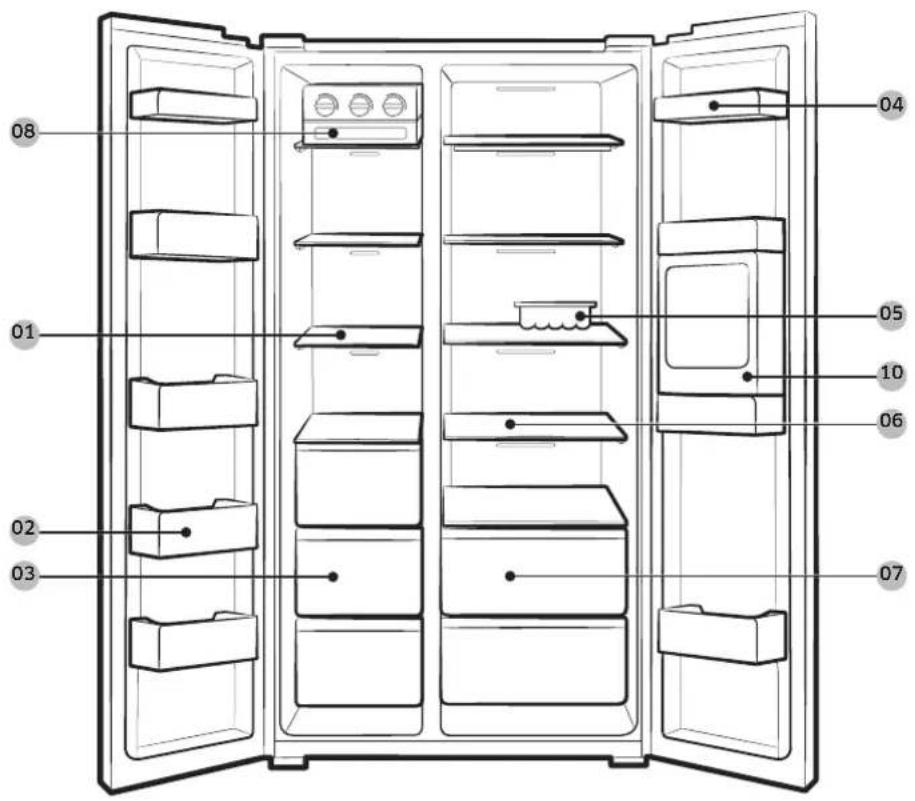
RS55K5*
Installation
RS51K56* / RS51K57*
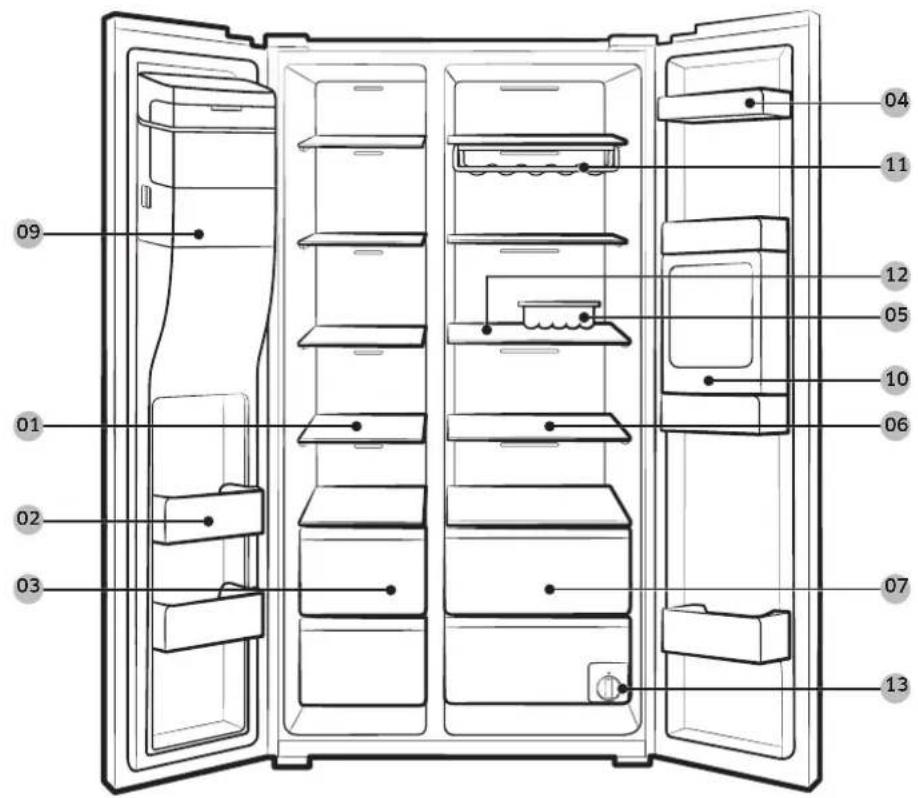
01 Freezer shelves
02 Freezer guard
03 Dried food and meat storage bin
04 Refrigerator guard
05 Egg container
06 Refrigerator shelves
07 Vegetable bin
08 Twist Ice maker *
09 Ice chute
10 Beverage station
11 Wine Rack
12 Foldable shelf *
13 Water filter
- Applicable models only ** Dispenser models only
NOTE
As the shelf parts may become loose, use caution when removing the foldable shelf.
English24
Step-by-step installation
STEP 1 Select a site
Site requirements:
- Solid, level surface without carpeting or flooring that may obstruct ventilation
- Away from direct sunlight
- Adequate room for opening and closing the door
- Away from a heat source
- Room for maintenance and servicing
- Temperature range: between 5^ C and 43^ C
Effective temperature range
The refrigerator is designed to operate normally in the temperature range specified by its class rating.
| Class Symbol | Ambient Temperature range (°C) | ||
| IEC 62552 (ISO 15502) | ISO 8561 | ||
| Extended Temperate SN | +10 to +32 | +10 to +32 | |
| Temperate N +16 | to +32 +16 to | +32 | |
| Subtropical ST +16 | to +38 +18 to | +38 | |
| Tropical T +16 to | +43 +18 to | +43 | |
NOTE
The cooling performance and power consumption of the refrigerator may be affected by the ambient temperature, the door-opening frequency, and the location of the refrigerator. We recommend adjusting the temperature settings as appropriate.
Installation
Clearance
See the figures and table below for space requirements for installation.
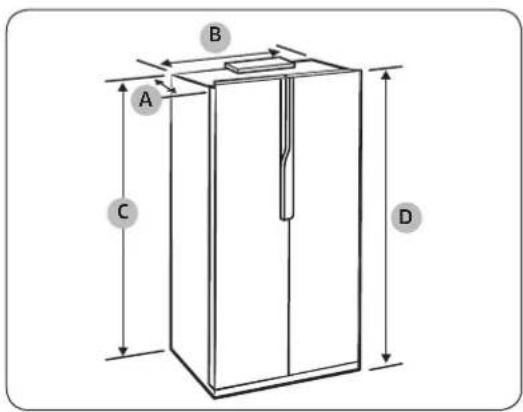
| Depth “A” 700 | |
| Width “B” 912 | |
| Height “C” 1743 | |
| Overall Height “D” 1789 |
(unit: mm)
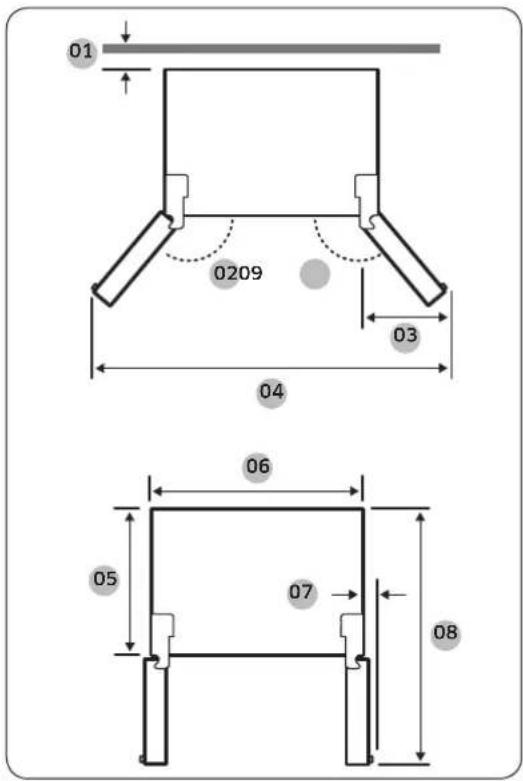
| No. RS55K* RS51K* | |
| 01 50 mm 50 mm | |
| 02 140° 165° | |
| 03 435 mm 435 mm | |
| 04 1546 mm 1625 mm | |
| 05 600 mm 600 mm | |
| 06 912 mm 912 mm | |
| 07 23 mm 23 mm | |
| 08 1163 mm 1163 mm | |
| 09 140° 140° |
NOTE
The measurements in the above table may differ, depending on the measuring method.
English26

STEP 2 Flooring
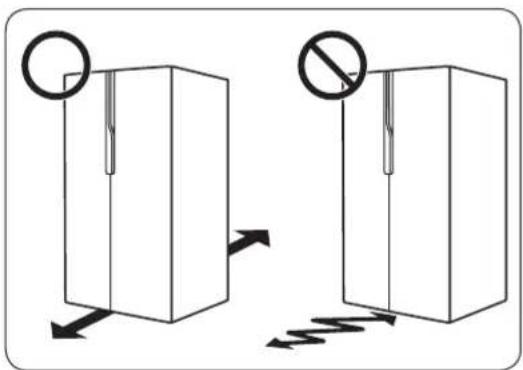
- The surface to install the refrigerator must support a fully loaded refrigerator.
- To protect the floor, put a large piece of cardboard on each leg of the refrigerator.
Once the refrigerator is in its final position, do not move it unless necessary to protect the floor. If you have to, use a thick paper or cloth such as old carpets along the movement path.
NOTE
If the refrigerator cannot pass through the entrance due to its size, see the Door removal for entrance section in the Installation chapter.
Installation
STEP 3 Adjust the levelling legs
CAUTION
- The refrigerator must be levelled on a flat, solid floor. Failing to do so can cause damage to the refrigerator or physical injury.
- Levelling must be performed with an empty refrigerator. Make sure no food items remain inside the refrigerator.
- For safety reasons, adjust the front side a little higher than the rear side.
The refrigerator can be levelled using the front legs that have a special screw (leveller) for levelling purposes. Use a flat-head screwdriver for levelling.
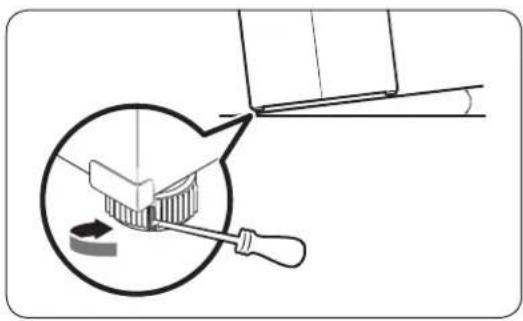
To adjust the height of the freezer side: Insert a flat-head screwdriver into the leveller of the freezer-side front leg. Turn the leveller clockwise to raise, or turn it counter clockwise to lower.
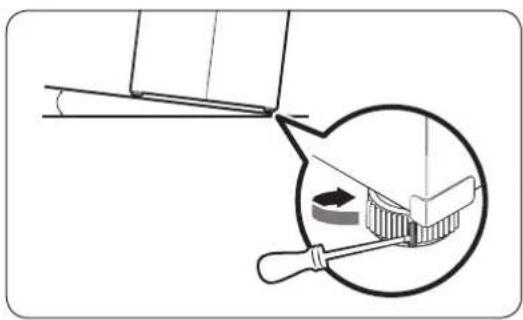
To adjust the height of the fridge side: Insert a flat-head screwdriver into the leveller of the fridge-side front leg. Turn the leveller clockwise to raise, or turn it counter clockwise to lower.
English28
STEP 4 Adjust the door height
The door height can be adjusted using the height nut on the lower hinge. For RS51K* models, only the fridge door can be adjusted.
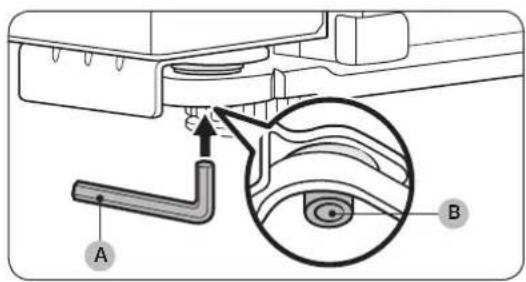
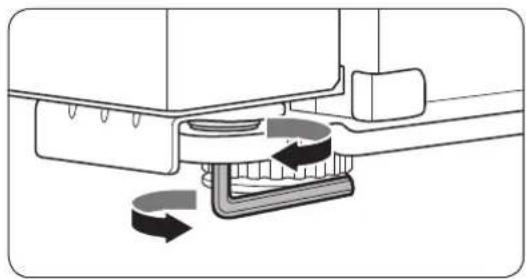
-
At the bottom of the door to adjust, locate the height nut (B) on the lower hinge. Then, insert the spanner (A) in the height nut (B).
-
Use the spanner to adjust the height of the door.
-
To raise the door, turn the height nut clockwise.
- To lower the door, turn the height nut counter clockwise.
Installation
STEP 5 Connect to a water source (applicable models only)
CAUTION
- The water line must be connected by a qualified technician.
- The warranty for your refrigerator does not cover the water line installation. The water line installation will be performed at your own costs unless the installation fee is included in the retailer's price.
Samsung takes no responsibility for the water line installation. If water leaks occur, contact the installer of the water line.
NOTE
Do not reuse the existing hose set. Water leaks may occur. Make sure to use the provided hose set that comes with your refrigerator.
To connect the cold water pipe to the water filtering hose
CAUTION
- Make sure the water filtering hose is connected to a cold, potable water source pipe. Connecting to the hot water pipe may cause the purifier to malfunction.
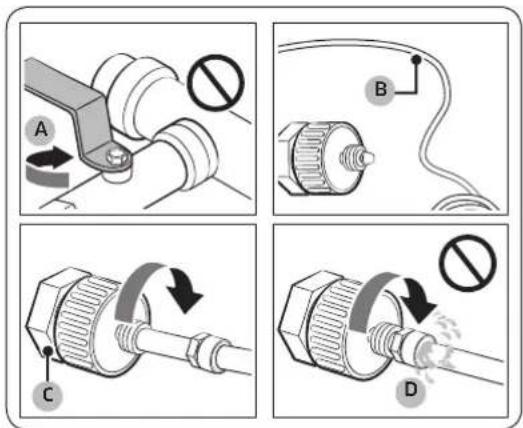
- Shut off the water supply by closing the main water valve (A).
- Locate the cold, potable water pipe (B).
- Follow the Water Line Installation to connect to the water pipe (C). This step must be performed by a qualified technician.
- When the connection is complete, open the main water valve and dispense about 3 liters of water. This is to remove impurities inside the pipe.
CAUTION
Make sure that the water pipe has no water leak (D).
English30
To connect the water filtering hose to the water line
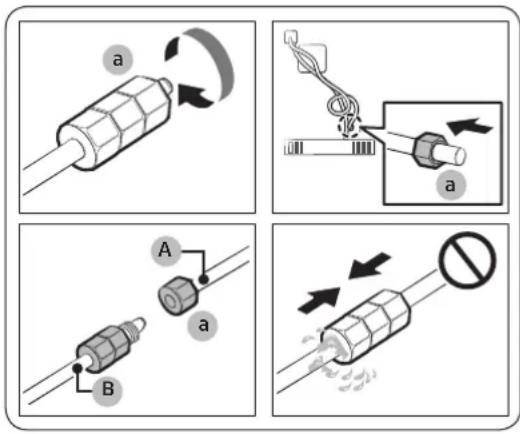
- Loosen and remove the compression nut (a) from the water line of the refrigerator, and insert it to the water filtering hose.
- Tighten up the compression nut (a) to connect the water filtering hose (B) and the water line (A).
- Open the main water valve and check for any leaks.
- If there are no leaks, dispense about a 3 liters of water before actually using the refrigerator to remove impurities inside the water filtering system.
To repair the water line
CAUTION
- The warranty for your refrigerator does not cover the water line installation. The water line installation will be performed at your own costs unless the installation fee is included in the retailer's price.
- Samsung takes no responsibility for the water line installation. If water leaks occur, contact the installer of the water line.
- The waterline must be repaired by a qualified professional. If you encounter a water leak, contact a local Samsung service centre or the installer of the waterline.
Installation
STEP 6 Door removal for entrance
If the refrigerator cannot pass through the entrance due to its size, follow these instructions:
Tools required (not provided)
These tools are used for removing the doors.
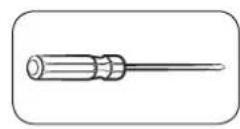
Phillips screwdriver Flat-heat
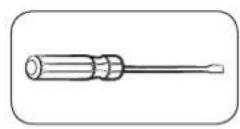
screwdriver
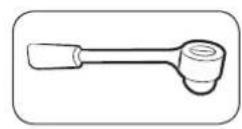
Socket spanner (10 mm, 8 mm)
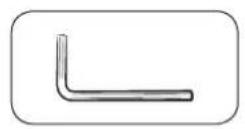
Allen spanner (10 mm)
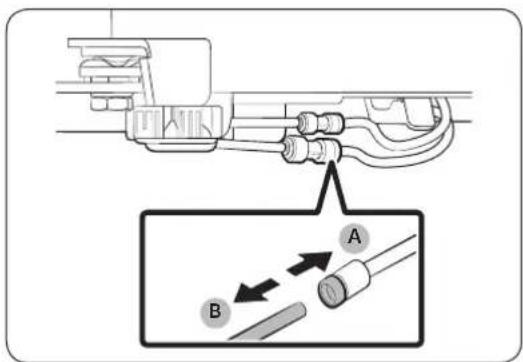
Disconnect the water line (applicable models only)
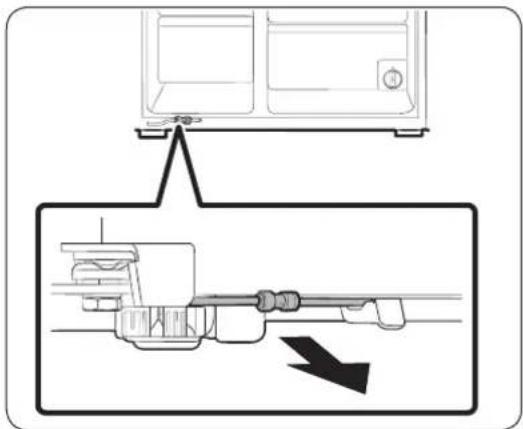
- From the bottom rear side of the refrigerator, pull out the water line to the front.

The refrigerator's water line is a water circulation line that connects between the water pipe from the water source and the hoses from the water filtering system of the refrigerator.
- To disconnect the hoses, press and hold the transparent coupler (A) and detach the water hose (B).
Do not apply excessive force to the coupler. It may break.
English32


Detach the doors

CAUTION
The door may fall off or over and damage itself during any of these steps. To prevent an accident, use extreme caution when performing these steps.
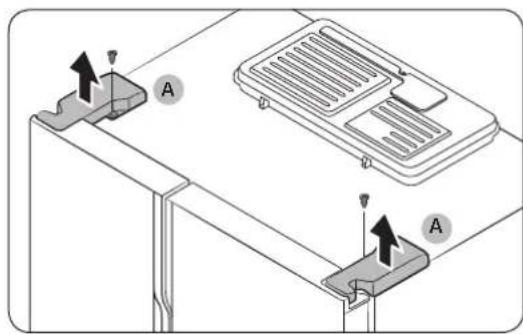
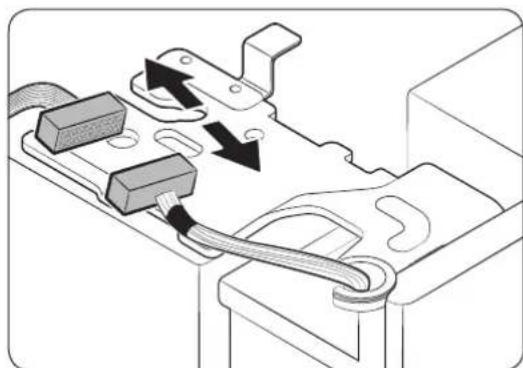
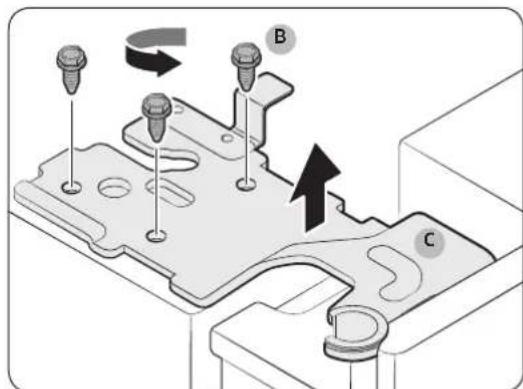
- Use a Phillips screwdriver to unscrew the hinge covers (A) on the top of each door.
- Open the doors to loosen the hinges and remove the hinge covers. Once the covers are removed, close the doors.
- Disconnect the electrical harness.
- Unscrew the hinge screws (B) counter clockwise, and remove the upper hinge (C). Be careful as the door can fall on you, causing physical injury.
Installation
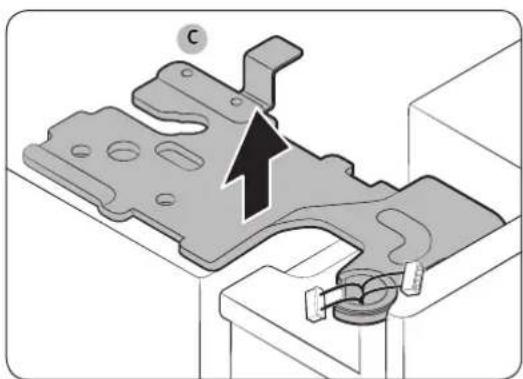
- Remove the upper hinges (C) on both sides.
- Gently lift up the doors one by one to remove. Use caution as the door may fall off or over.
Reconnect the water hoses (applicable models only)
Once the refrigerator has passed through the entrance, reconnect the water hoses and insert the provided clips (x2) to tighten the coupler.
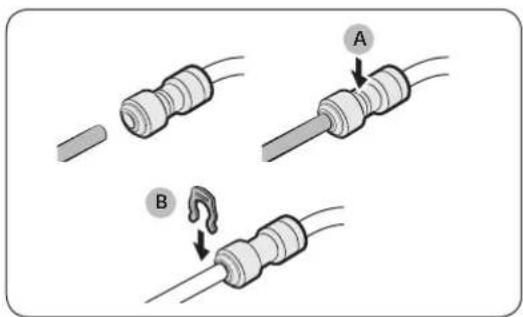
A. Center of transparent coupler
B. Clip A (1/4") (6.35 mm)
English34
Reattach the doors
CAUTION
- Before reattaching the doors, make sure all the electrical connectors are properly connected.
- The freezer door must be reattached before the fridge door.
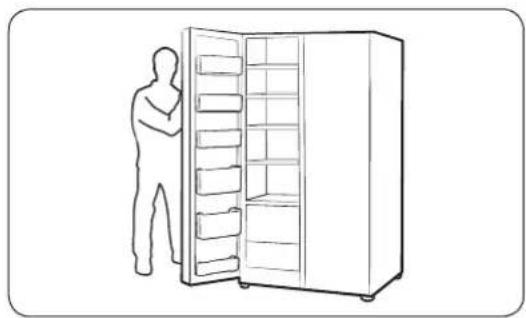
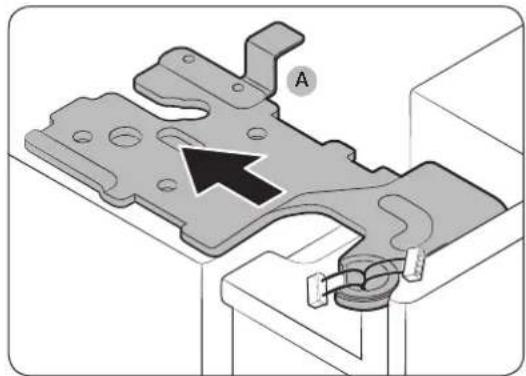
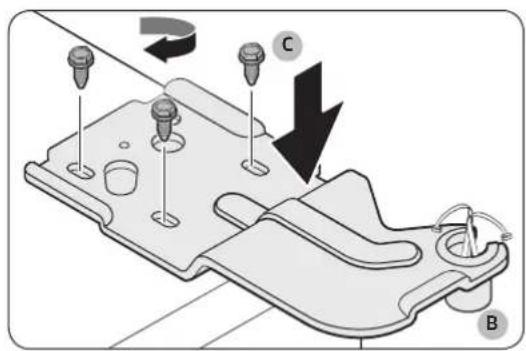
- Hold the freezer door and hook to the hinge at the bottom of the refrigerator.
- On the top side, insert the upper hinge (A) into the hinge slot.
- Insert the upper hinge shaft (B) into the hinge hole. Make sure the hinge shaft is straight so that all screw holes are fully revealed. Then, tighten the hingescrews (C) clockwise.
Installation
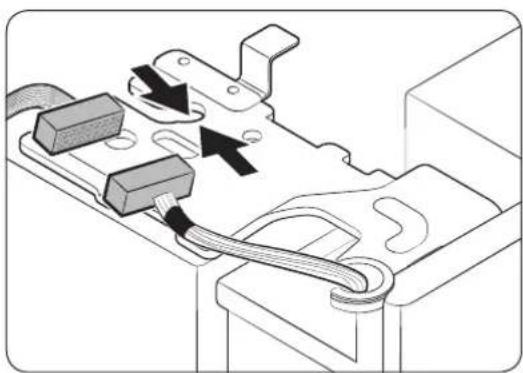
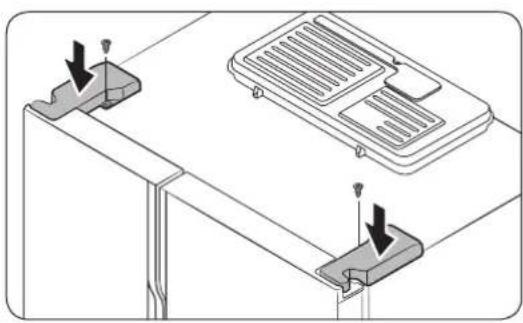
-
Connect the electrical harness.
-
Insert the hinge covers with the front sides first, and then tighten the screws. Use a Phillips screwdriver for this step.
STEP 7 Initial settings
By completing the following steps, the refrigerator should be fully functioning.
- Plug the power cord into the wall socket to turn the refrigerator on.
- Open the door, and check if the interior light lights up.
- Set the temperature to the coldest, and wait for about an hour. Then, the freezer will be slightly chilled, and the motor will run smoothly.
- Wait until the refrigerator reaches the set temperature. Now the refrigerator is ready for use.
STEP 8 Final check
When installation is complete, confirm that:
- The refrigerator is plugged into an electrical outlet and grounded properly.
- The refrigerator is installed on a flat, level surface with a reasonable clearance from the wall or the cabinet.
- The refrigerator is level and is sitting firmly on the floor.
- The door opens and closes freely, and the interior light turns on automatically when you open the door.
English36
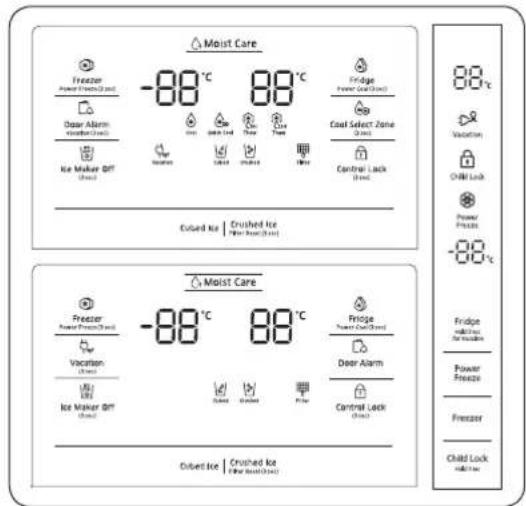
Operations
Feature panel
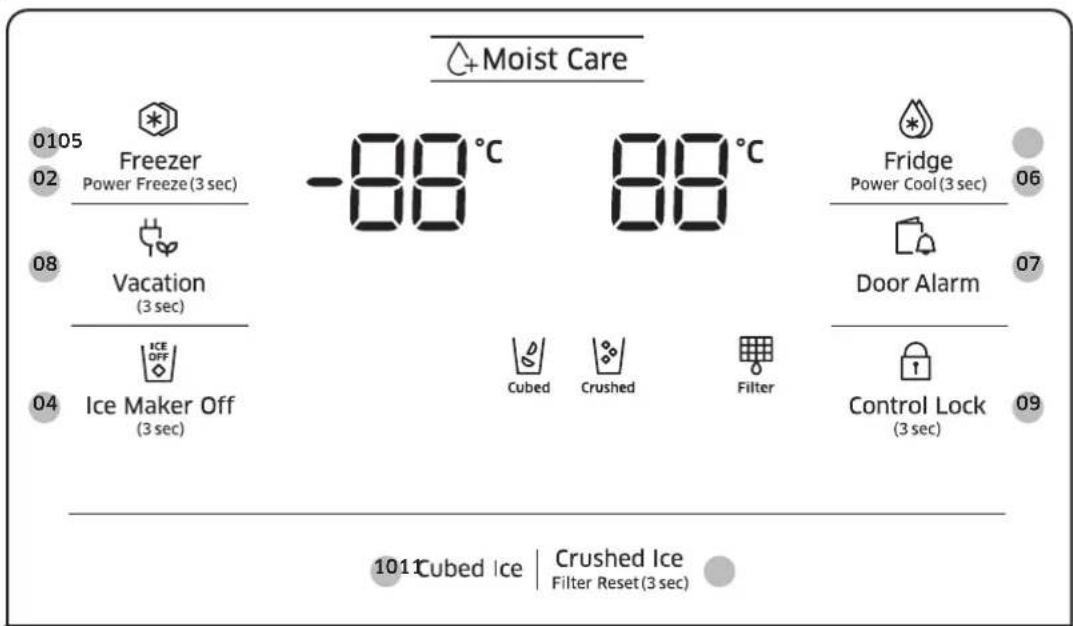
Type A
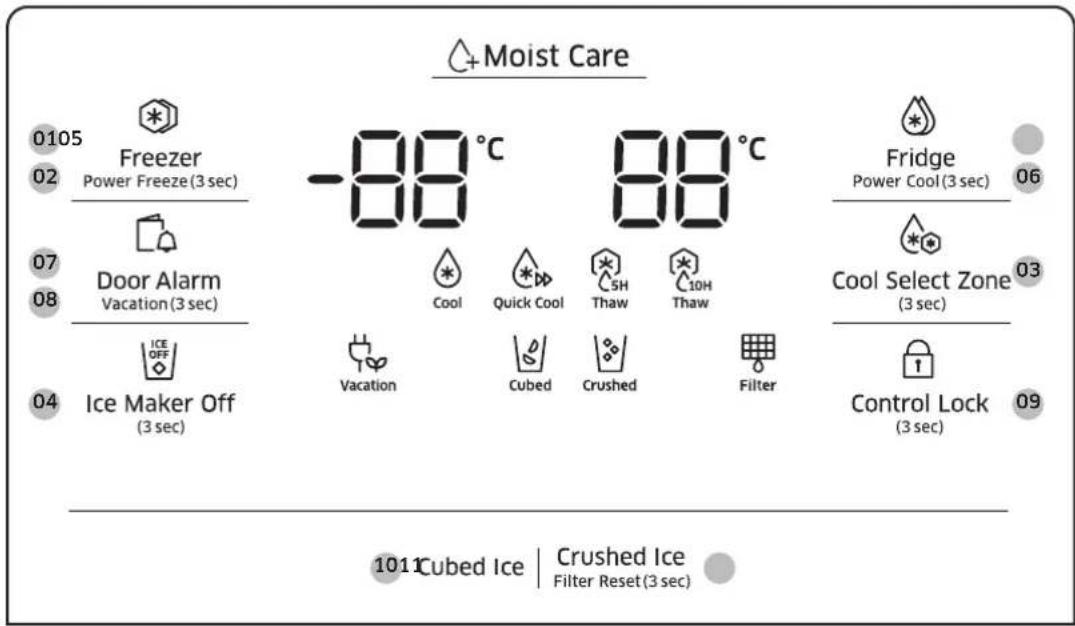
Type B
Operations
Type C
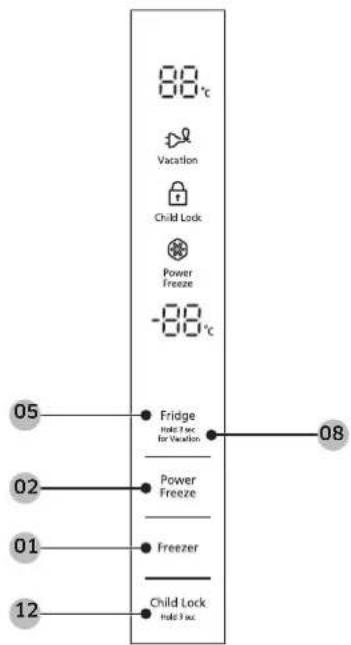
01 Freezer 02 Power Freeze
03 Cool Select Zone * 04 Ice Maker Off
05 Fridge 06 Power Cool
07 Door Alarm 08 Vacation
09 Control Lock 10 Cubed Ice
11 Crushed Ice / Filter Reset 12 Child Lock
- Type A models only ** Type C models only
English38
01 Freezer
| Freezer | You can manually adjust the freezing temperature for the freezer. Keep pressing Freezer to cycle through the temperature bar, and select a desired temperature between -23 °C and -15 °C for RS51*, or between -23 °C and -14 °C for RS55*. |
02 Power Freeze (3 sec)
| Power Freeze | Power Freeze speeds up the freezing process at maximum fan speed. The freezer keeps running at full speed for several hours and then returns to the previous temperature. ·To activate Power Freeze, press Power Freeze. For dispenser-featured models, press and hold the button for 3 seconds. The corresponding indicator (◎) lights up, and the refrigerator will speed up the freezing process for you. ·To deactivate, press Power Freeze again. For dispenser-featured models, press and hold the button for 3 seconds. The indicator turns off, and the freezer returns to the previous temperature setting. ·To freeze large amounts of food, activate Power Freeze for at least 24 hours before putting food in the freezer. NOTE Using Power Freeze increases power consumption. Make sure you turn it off and return to the previous temperature if you do not intend to use it. |
Operations
03 Cool Select Zone (3 sec)
With the Cool Select Zone function, you can arrange food items in the Cool Select Room in an organized manner, which is located on the bottom right of the refrigerator. Press and hold Cool Select Zone for 3 seconds, and then press to cycle through the modes. When a desired mode is selected, release the button. There are 3 modes available as below:
| Thaw | Select Thaw to thaw frozen food in 5- or 10-hour settings. ·The thawing time can be shortened or extended depending on the size and thickness of the food item. ·Remove any items that you don’t want affected from the Cool Select Room before starting the thawing function. |
| Quick Cool | Select Quick Cool to quickly cool 1-3 canned beverages within an hour. |
| Cool | Select Cool to set the Cool Select Room to the same temperature as the fridge. This is useful to keep food for general purposes, such as keeping water, juice, soft drinks, and beer. |

NOTE
- To cancel any selected mode, press Cool Select Zone.
- When a selected mode finishes, the Cool Select Zone returns to Cool mode.

NOTE
If the button does not activate, make sure the button is unlocked. Press and hold Control Lock for more than 3 seconds until the lock icon turns off. Then, press and hold Cool Select Zone for more than 3 seconds to change the mode.
04 Ice Maker Off (3 sec)
| Ice Maker Off | To disable ice making, press and hold for 3 seconds. In this mode, ice making is disabled even if you press the button. Note that Ice Maker Off mode will be deactivated if you press and hold the ice lever (marked “ICE” on the lever) for more than 5 seconds. |
English40
05 Fridge
The Fridge button can be used to set the fridge temperature, or to activate/deactivate Power Cool.
| Fridge | You can manually adjust the cooling temperature for the fridge. Keep pressing Fridge to cycle through the temperature bar, and select a desired temperature between 1 °C and 7 °C. |
06 Power Cool (3sec)
| Power Cool | Power Cool speeds up the cooling process at maximum fan speed. This is useful to quickly cool food that spoils quickly, or after the door is left open for some time. The fridge keeps running at full speed for several hours and then returns to the previous temperature. Press and hold Fridge for 3 seconds. |
NOTE
When you change the temperature on the panel, the panel displays the actual temperature inside the refrigerator until the temperature matches the temperature you set. Then, the panel displays the new set temperature. Note that it will take time for the refrigerator to reach the new temperature. This is normal. During this time, you need not set the temperature again.
07 Door Alarm
| Door Alarm | You can set the alarm for a reminder. If the door is left open for more than 2 minutes, the alarm will sound with the alarm indicator blinking. The alarm is enabled by factory default. To disable the alarm, press Door Alarm. To enable, press Door Alarm again. |
Operations
08 Vacation
| Vacation | If you are going on vacation or a business trip, or if you do not intend to use the refrigerator for an extended time, use the vacation mode. Press Vacation to turn off the fridge operation with the corresponding indicator (♀) on. ● NOTE • It is strongly recommended to empty the fridge compartment and make sure the door is closed. • Make sure to empty the ice bucket. |
09 Control Lock (3 sec)
| Control Lock | To prevent accidental manipulation, press and hold Control Lock for 3 seconds. All controls will be disabled with the indicator (⊗) on. To deactivate, press and hold again for 3 seconds. The controls will be enabled as normal. |
10 Cubed Ice
| Cubed Ice | You can select an ice type. Press Cubed Ice to dispense cubed ice. The corresponding indicator turns on. |
English42
11 Crushed Ice / Filter Reset (3 sec)
| Crushed Ice | You can select an ice type. Press Crushed Ice to dispense Crushed Ice. The corresponding indicator turns on. |
| Filter Reset | After about 6 months (approximately 1200 L) of using the original water filter, the Filter indicator blinks red to remind you that the filter needs to be replaced. If this happens, replace the filter, and press and hold Crushed Ice for 3 seconds. The filter lifecycle will be reset and the Filter indicator turns off. NOTE • Some regional areas have relatively large amounts of lime contained in the water. This may reduce the lifecycle of the filter. In these areas, you will have to replace the water filter more often than specified above. • If water is not dispensing properly, replace the water filter because this happens when the water filter is clogged. |
12 Child Lock (3 sec)
| Child Lock | To prevent accidental manipulation, press and hold Child Lock for 3 seconds. All controls will be disabled with the indicator (✗) on. To deactivate, press and hold again for 3 seconds. The controls will be enabled as normal. |
Display Off
To save power consumption, the display turns off automatically if no button has been pressed with the doors closed and the levers intact for a certain amount of time. If you press any of the controls or push the lever, the display turns back on immediately.
Operations
Temperature settings
To ensure optimal performance, we recommend setting the temperature to -19^ (RS51) or -20^ (RS55) for the freezer, and 3^ for the fridge.
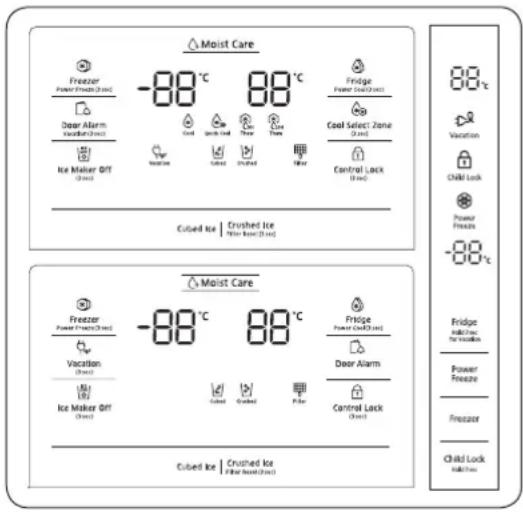
Freezer
The freezer temperature can be adjusted between -23^ and -15^ for RS51*, or -23^ and -14^ for RS55*.
To change the temperature, keep pressing
Freezer until a desired temperature is selected. The temperature changes by 1 scale unit.
- Recommended settings are -19 °C for RS51, and -20 °C for RS55.

Ice cream may melt at -15^
Fridge
The fridge temperature can be adjusted between 1^ and 7^ .
To change the temperature, keep pressing Fridge until a desired temperature is selected. The temperature changes by 1 scale unit.
Recommended: 3^
The temperature of the freezer or fridge may rise if you open the door frequently, or a large amount of food is put in the refrigerator. If this happens, the temperature display blinks until the refrigerator returns to the specified temperature settings.

NOTE
If this blinking continues, disconnect the power cord and restart the refrigerator after 10 minutes.
English44

Special features
The refrigerator features user-oriented devices that you can use to benefit from.
Water dispenser (applicable models only)
With the water dispenser, you can dispense water without opening the fridge door. The dispenser offers two levers: the left-side lever for ice, and the right-side one for water.
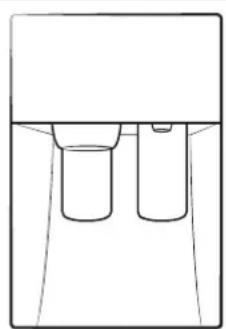
With the Ice Maker enabled,
- Put a water glass on the left lever and push it. Ice will be dispensed from the dispenser.
- Put the water glass on the right lever and push it. Water will be dispensed from the dispenser.
NOTE
- To prevent spills, wait 2 seconds before removing the glass after dispensing.
- The dispenser will stop dispensing if you keep pushing the dispenser lever for about 1 minute. To dispense more water, release and push the lever again.
- Make sure the glass is in line with the dispenser to prevent the dispensed water from spilling out.
- If you do not use the water dispenser for 2-3 days, the dispensed water may have an abnormal smell or taste. This is not a system failure. Discard the first 1-2 glasses of water.
Operations
Ice making (applicable models only)
Twist ice maker
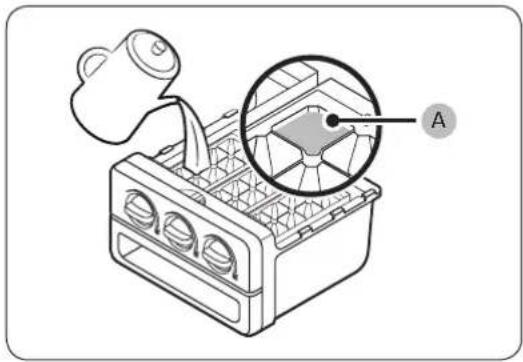
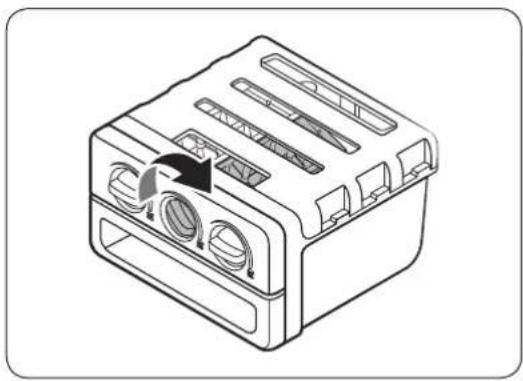
- Open the freezer door, and slide open the ice tray.
- Fill the tray with water up to the maximum level (A) marked on the inner rear of the tray.
- Slide the tray back into position.

NOTE
- The ice making time depends on your temperature settings.
- Make sure the ice cube storage bin is in place under the ice tray.
To dispense the ice cubes, turn the handle of the bin to the right to empty half of the ice cubes into the bin. Then, turn it to the left to empty the other half.
Take out the bin by slightly twisting and pulling to the front.

CAUTION
The ice maker is designed to make ice of mineral or potable water only. Do not fill any other liquids than mineral or potable water with the ice tray.
English46
Auto Ice maker
The refrigerator has a built-in ice maker that automatically dispenses ice so that you can enjoy filtered water with cubed or crushed ice to your preference.
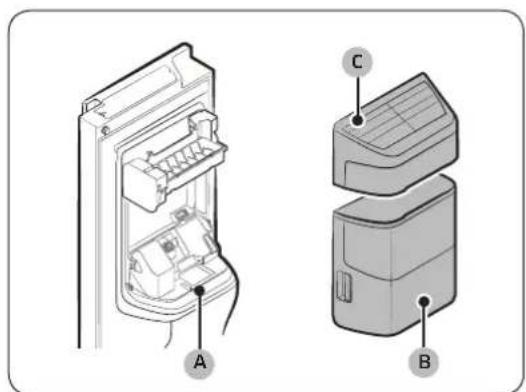
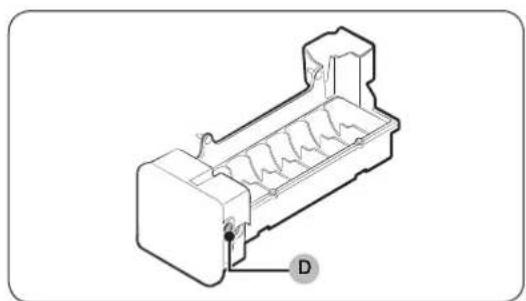
If ice does not dispense, first check the ice maker if it makes ice properly.
To check the ice maker
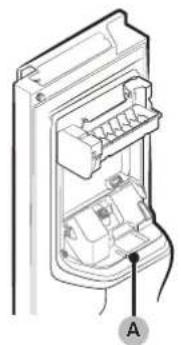
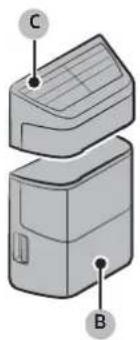
- Gently hold the ice bucket (B) with both hands and remove it from the ice chute (A).
- Check the ice bucket if it contains ice as appropriate.
- Then, hold the ice maker cover (C) and slightly lift up to remove.
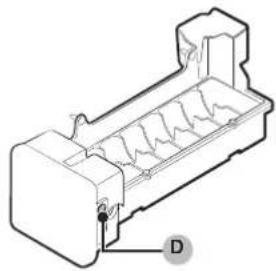
- Press Test (D) on the side of the ice maker. You will hear a chime (ding-dong) at the press of the button.
- You will hear another chime if the ice maker operates properly.

NOTE
If this symptom continues, contact the waterline installer or a local Samsung service centre.
CAUTION
- Do not press the button repeatedly after the ice tray is filled with ice or water. Water may overflow or ice may be jammed.
- When the refrigerator recovers power supply after a power failure, the ice bucket may contain a mix of melted and jammed ice cubes, resulting in a system failure. To prevent this, make sure to empty the ice bucket before using the refrigerator.
- To prevent dropping the ice bucket, make sure to use both hands when removing or reinserting the ice bucket.
- Do not let children hang on or play with the ice dispenser or the ice bucket. Children may get hurt.
- Do not put fingers or other objects into the dispenser hole or the ice chute. This may cause physical injury or property damage.
Operations

NOTE
- If you remove the ice bucket, the Ice Maker Off indicator (图) will blink.
- Removal of the ice bucket does not affect the thermal and mechanical performance of the refrigerator.
- The declared freezer volume is based on use of the freezer guide after the ice maker, snack bin, and upper drawer are removed.
To secure more storage space (applicable models only)
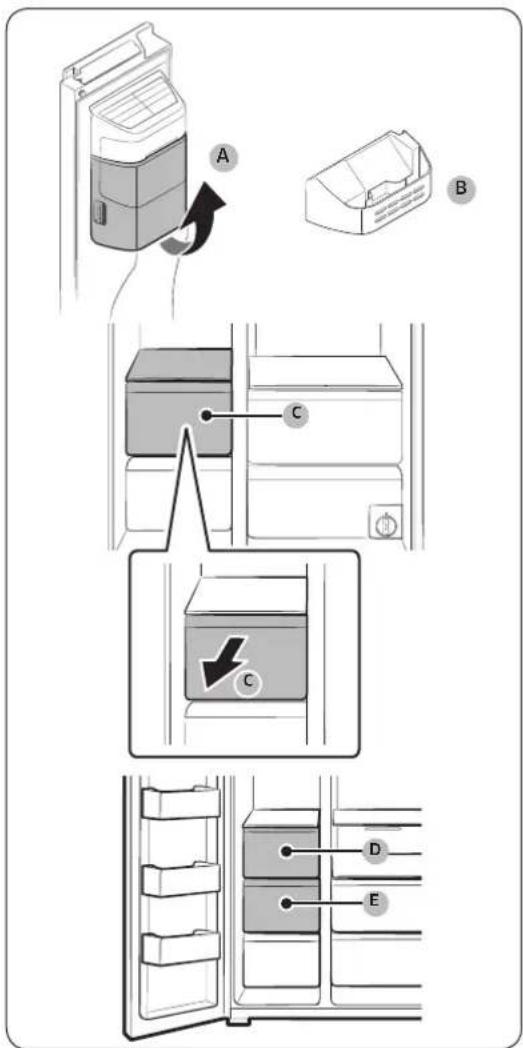
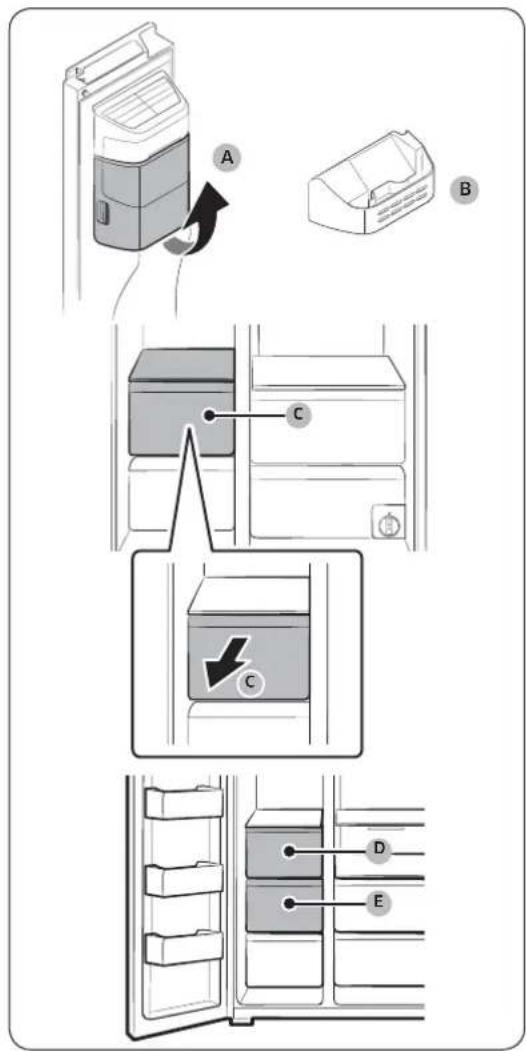
If you do not use the ice maker and need more storage space, remove the ice bucket (A). Then, insert the freezer guard (B) into the ice bucket's place. To secure more room, remove the freezer's upper drawer (C) for RS51 models, or remove both the upper drawer (D) and (E) for RS55 models.
English48
Maintenance
Handle and care
Shelves (fridge/freezer)
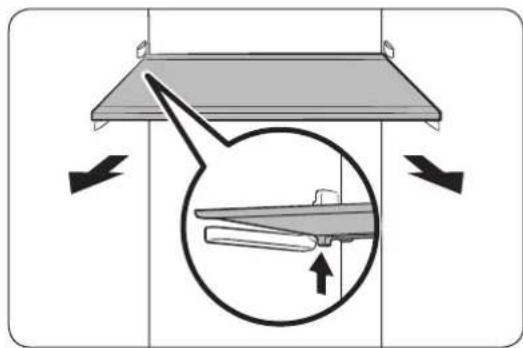
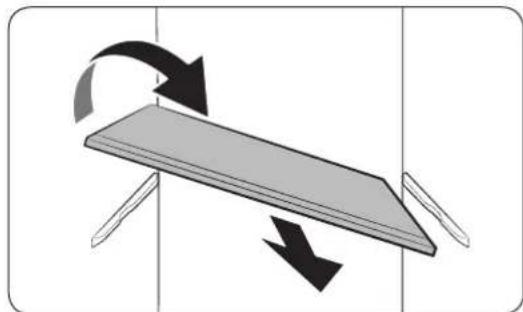
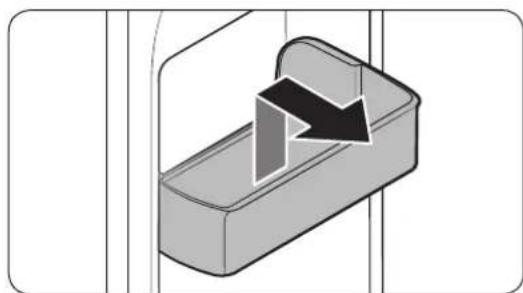
Door guard
- To remove a shelf, fully open the corresponding door.
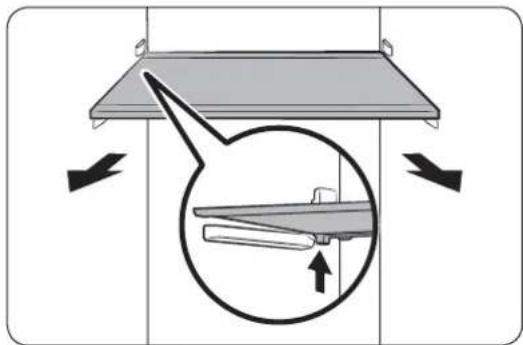
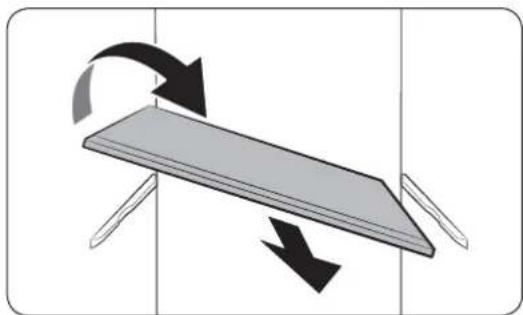
The shelf must be unlocked first. Hold the front end of the shelf and gently lift up to unlock the front half of the shelf, and then pull out with both hands.
If the door cannot fully open, slide out the shelf half way to the front and turn it over to remove.
CAUTION
- The shelf must be inserted correctly. Do not insert upside down.
Glass containers may scratch the surface of glass shelves.
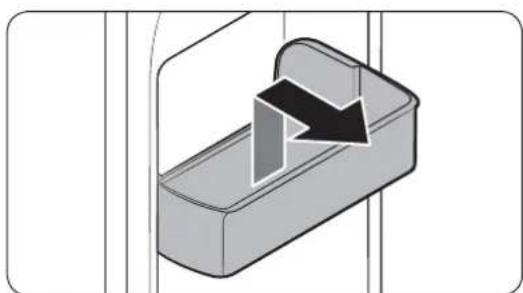
To remove a door guard, hold the front sides of the bin and gently lift up to remove.
Maintenance
Drawers
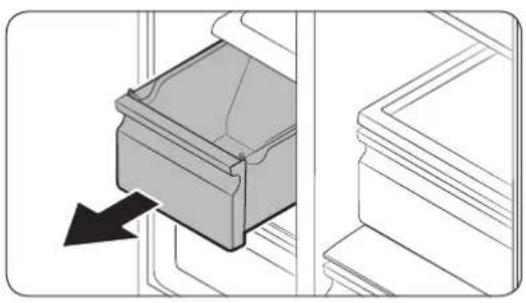
Gently lift up the front of the drawer and slide out.
Vegetable bin / Dry bins
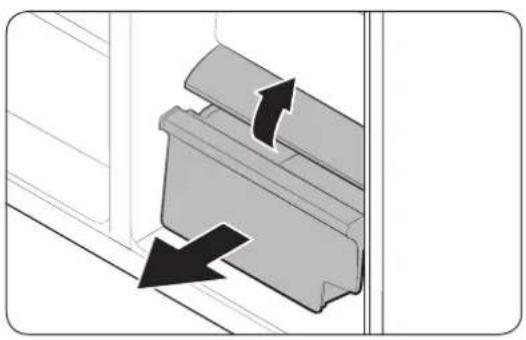
To remove the vegetable bin from the fridge or the dry bin from the freezer.
- First, remove surrounding multipurpose bins if necessary.
English50
Cleaning
Interior and exterior
WARNING
- Do not use benzene, thinner, or home/car detergent such as Clorox™ for cleaning purposes. They may damage the surface of the refrigerator and cause a fire.
- Do not spray water onto the refrigerator. This may cause electric shock.
- Do not put fingers or other objects into the dispenser hole.
Regularly use a dry cloth to remove all foreign substances such as dust or water from the power plug terminals and contact points.
- Unplug the power cord.
- Use a moistened, soft, lint-free cloth or paper towel to clean the refrigerator's interior and exterior.
- When done, use a dry cloth or paper towel to dry well.
- Plug in the power cord.
Maintenance
Replacement
Water filter (applicable models only)
WARNING
- Do not use third-party water filters. Use only Samsung-provided or -approved filters.
- Unapproved filters may leak and damage the refrigerator, causing electric shock. Samsung holds no responsibility for any damage that may occur from use of third-party water filters.
The filter indicator ( ) turns red as a reminder that lets you know it is time to replace the water filter.
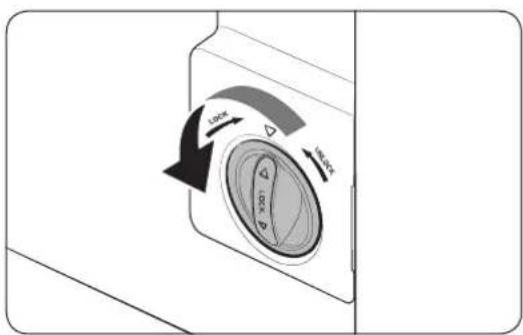
- Turn the knob of the filter cartridge counter clockwise by 90 degrees. The filter cartridge will be unlocked.
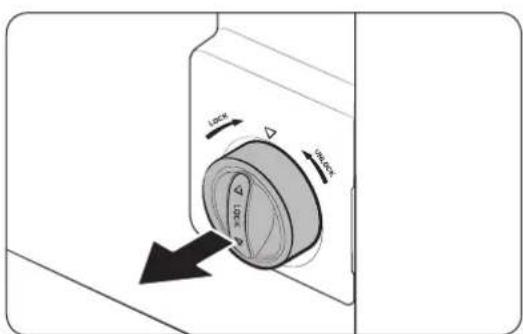
- Pull out the cartridge.
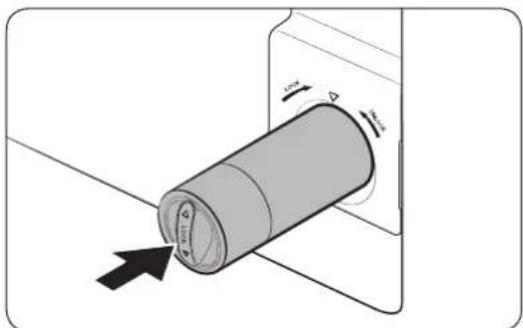
- Insert a new filter cartridge. Use only Samsung-provided or -approved filters.
English52
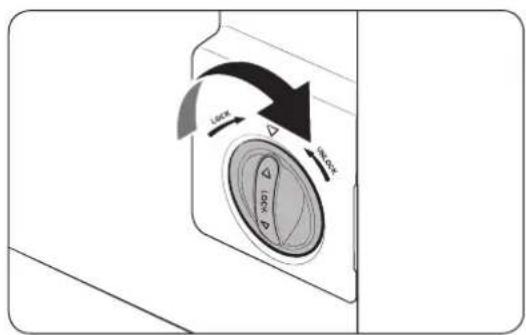
-
Turn the cartridge knob clockwise to lock into place.
-
Press and hold Filter Reset on the feature panel for 3 seconds to reset the filter lifecycle. The filter indicator ( ) turns off.
-
When replacing is complete, flush 4 liters of water to remove impurities from the water line.

NOTE
- A newly installed filter may cause the water dispenser to spurt water briefly. This is because air has entered the waterline.
- This replacement process may involve the refrigerator to drip water onto the floor. If this happens, wipe up with dry cloths.
Reverse osmosis water filtration system
The water pressure of the water supply system to a reverse osmosis water filtration system must be between 35 psi and 120 psi (241 kPa and 827 kPa).
The water pressure of the reverse osmosis water filtration system to the refrigerator's cold water line must be at least 40 psi (276 kPa). If the water pressure is below the specified:
- Check to see whether the sediment filter in the reverse osmosis system is blocked. Replace the filter if necessary.
- Refill the water tank in the reverse osmosis system with water.
- If your refrigerator has a water filter, it may further reduce the water pressure when used in conjunction with a reverse osmosis system. Remove the water filter.
For more information or servicing, contact a licensed plumbing professional.
Ordering a new filter
To purchase a new water filter, contact a local Samsung service centre.
Lamps
The lamps are not user-serviceable. To replace the lamps of the refrigerator, contact a local Samsung service centre.
Troubleshooting
Before calling for service, review the checkpoints below. Any service calls regarding normal situations (No Defect Cases) will be charged to users.
General
Temperature
| Symptom Possible | causes Solution | |
| Fridge/freeze does not operate.Fridge/freeze temperature is warm. | Power cord is not plugged in properly.Temperature control is not set correctly.Refrigerator is located near a heat source or direct sunlight.Not enough clearance between refrigerator and sides/rear.Vacation mode is activated.The refrigerator is overloaded. Food is blocking the refrigerator vents. | Properly plug in the power cord.Set the temperature lower.Keg the refrigerator away from direct sunlight or a heat source.Make sure there are at least 5 cm from the rear and sides.Deactivate vacation mode.Do not overload the refrigerator. Do not allow food to block ventilation. |
| Fridge/freeze is over-cooling. | Temperature control is not set correctly.Refrigerator has heat-proof piping in the interior wall. | Set the temperature higher.To prevent condensation from forming, the refrigerator has heat-proof piping in the front corners.If the ambient temperature rises, this equipment may not work effectively. This is not a system failure. |
| Interior wall is hot. |
English54
Odors
| Symptom Possib|e causes Solution | ||
| Refrigerator has odors. | · Spoiled food. | · Clean the refrigerator and remove any spoiled food. |
| · Food with strong odors. | · Make sure strong smelling food is wrapped airtight. |
Frost
| Symptom Possible causes Solution | ||
| Frost around the vents. | ·Food is blocking the vents. | ·Make sure no food blocks the refrigerator vents. |
| Frost on interior walls. | ·Door is not closed properly. | ·Make sure food does not block the door. Clean the door gasket. |
Condensation
| Symptom Possib|e causes Solution | |
| Condensation forms on the interior walls. | ·If door is left open, moisture enters the refrigerator. |
| ·Food with high moisture content. | |
| ·Make sure food is wrapped airtight. |
Troubleshooting
Water/ice (dispenser models only)
| Symptom Possible causes Solution | ||
| Water flow is weaker than normal. | ·Water Pressure is too low. | ·Make sure the water pressure is between 20 to 120 psi. |
| Ice maker makes a buzzing sound. | ·The ice maker function is activated, but the water supply to the refrigerator has not been connected. | ·Press the Ice Maker off button. |
| Ice maker does not make ice. | ·Ice maker has just been installed. | ·You must wait for 12 hours until the refrigerator makes ice. |
| ·Freezer temperature is too low. | ·Set the freezer temperature below -18 °C (or -20 °C in warm ambient air). | |
| ·Control Lock or Child Lock is activated. | ·Deactivate Control Lock or Child Lock. | |
| ·Ice maker is off.·Turn on the | ice maker. | |
| Ice does not dispense. | ·Ice may jam if the ice dispenser is not used for a long time (approx. 3 weeks). | ·If you won't be using the refrigerator for a long time, empty the ice bucket and turn off the ice maker. |
| ·Ice bucket is not properly inserted. | ·Make sure the ice bucket is properly inserted. | |
| ·Water line is not connected properly or water supply is not on. | ·Check the water installation conditions. | |
English56
| Symptom Possibhecauses Solution | ||
| Water does not disperse. | ·Water line is not connected properly or water supply is not on. | ·Check the water installation conditions. |
| ·Control Lock or Child Lock is activated. | ·Deactivate Control Lock or Child Lock. | |
| ·Do not use third-party water filters. | ·Use only Samsung-provided or approved filters. ·Unapproved filters may leak and damage the refrigerator. | |
| ·Water filter indicator turns on or blinks. | ·Replace the water filter. After replacing, reset the filter indicator sensor. |
Troubleshooting
Do you hear abnormal sounds from the refrigerator?
Before calling for service, review the checkpoints below. Any service calls related to normal sounds will be charged to the user.
These sounds are normal.
- When starting or ending an operation, the refrigerator may make sounds similar to a car engine igniting. As the operation stabilizes, the sounds will decrease.
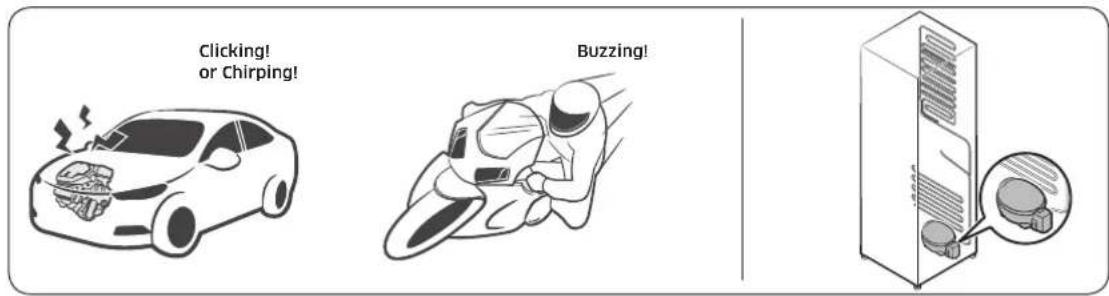
- While the fan is operating, these sounds may occur. When the refrigerator reaches the set temperature, no fan sound will occur.
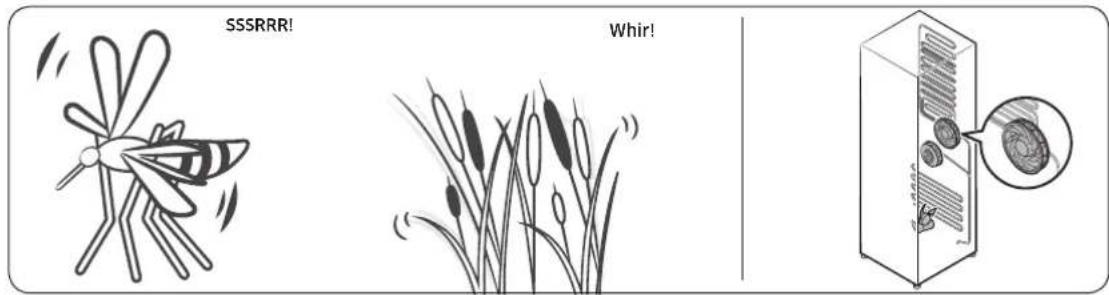
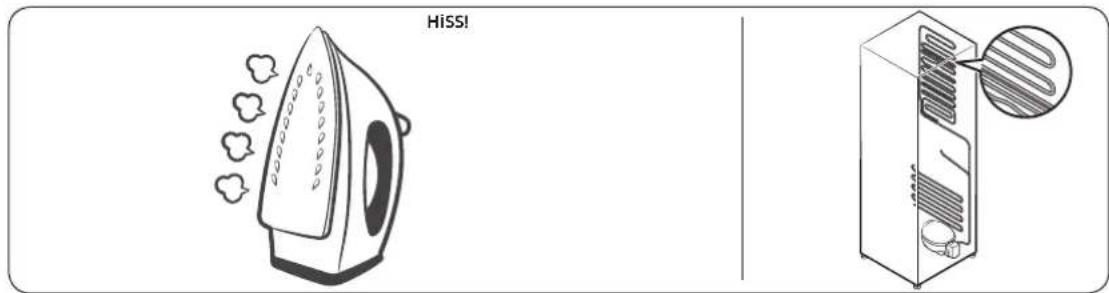
- During a defrost cycle, water may drip on the defrost heater, causing sizzling sounds.
English58
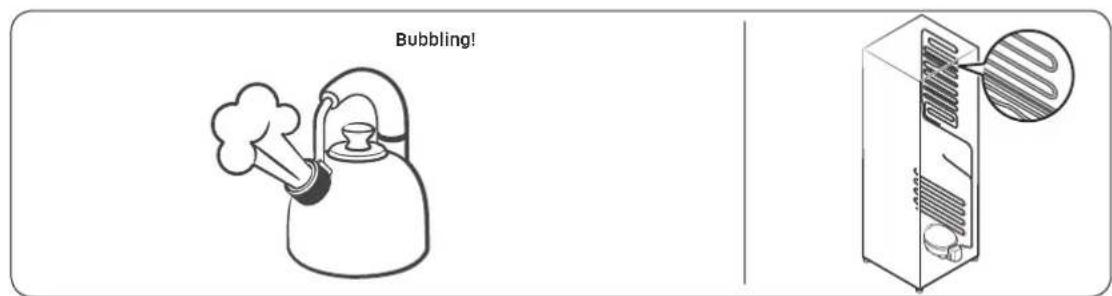
- As the refrigerator cools or freezes, refrigerant gas moves through sealed pipes, causing bubbling sounds.
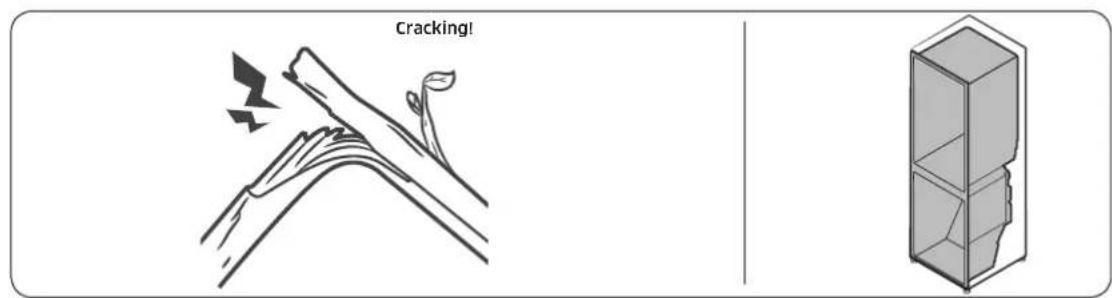
- As the refrigerator temperature increases or decreases, plastic parts contract and expand, creating knocking noises. These noises occur during the defrosting cycle or when electronic parts are working.
- For ice maker models: When the water valve opens to fill the ice maker, buzzing sounds may occur.
- Due to pressure equalizing when opening and closing the refrigerator door, whooshing sounds may occur.
Contact SAMSUNG WORLD WIDE
If you have any questions or comments relating to Samsung products, please contact the SAMSUNG customer care center.
| Country Contact Center Web Site | |
| SOUTH AFRICA 0860 SAMSUNG (726 7864) | www.samsung.com/support |
| ZAMBIA 0211 350 370 | |
| MAURITIUS 800 2550 | |
| ANGOLA 917 267 864 | |
| MOZAMBIQUE 84 7267864 | |
| NIGERIA 0800-726-7864 | www.samsung.com/africa_en/support |
| Ghana 0800-100-077 | |
| Cote D'lvoire 800 00-00-77 | www.samsung.com/africa_fr/supportSENE |
| CAMEROON 670 95-0077 | |
| KENYA 0800 545 545 | www.samsung.com/support |
| UGANDA 0800 300 300 | |
| TANZANIA 0800 780 089 | |
| RWANDA 9999 | |
| BURUNDI 200 | |
| DRC 499999 | |
| SUDAN 1969 |
Réfrigérateur
Guide d'utilisation
Appareil non encasable
Sommaire
| الله | الله\bم憑العاء | الله\bم憑العاء |
| الله\bم憑العاء\(\texttt{a}\)tg\(\texttt{b}\)tg\(\texttt{a}\)ll\(\texttt{j}\) \(\texttt{p}\) \(\texttt{a}\) \(\texttt{b}\) \(\texttt{g}\) \(\texttt{b}\) | \(^\text{們}\)\(\text{l}\)tg\(\text{i}\) \(\text{o}\) \(\text{a}\) \(\text{b}\) \(\text{c}\) \(\text{d}\) \(\text{e}\) \(\text{f}\) \(\text{g}\) \(\text{h}\) \(\text{i}\) \(\text{j}\) \(\text{k}\) \(\text{l}\) \(\text{m}\) \(\text{n}\) \(\text{o}\) \(\text{p}\) \(\text{q}\) | \(^\text{們}\)\(\text{l}\)tg\(\text{i}\) \(\text{o}\) \(\text{a}\) \(\text{b}\) \(\text{c}\) \(\text{d}\) \(\text{e}\) \(\text{f}\) \(\text{g}\) \(\text{h}\) \(\text{i}\) \(\text{m}\) \(\text{n}\) \(\text{p}\) \(\text{q}\) |
| \(^\text{們}\)\(\text{a}\) \(\text{b}\) \(\text{c}\) \(\text{d}\) \(\text{e}\) \(\text{f}\) \(\text{g}\) \(\text{h}\) \(\text{i}\) \(\text{m}\) \(\text{n}\) \(\text{p}\) \(\text{q}\) | \(^\text{們}\)\(\text{a}\) \(\text{b}\) \(\text{c}\) \(\text{d}\) \(\text{e}\) \(\text{f}\) \(\text{g}\) \(\text{h}\) \(\text{i}\) \(\text{m}\) \(\text{n}\) \(\text{p}\) \(\text{q}\) |
Lg>3LgC<5<11<1<
()
Lgai5jogoswiJos
a.
L:JcLJdWJQJQoLoZJIaJJIq
a 11 11 11 11 11 11 11 11 11 11 11
AaJj aai 100
gLae aaiy.
aLJI 1
1
LgJjxggejgagzgLoaio
L L 113 g 1111111111111111111111111111111111111111111111
(baa a bllj bll) jssu

aaii
Lai Ls 100000000000000000000000000000000000000000000000
a a1j: clllcll jocg Jocg jz. clll ggi yol
Clll Clll
100
(A)
sLJI 11111111111111111111
Cg (C) C
J
C111 C111 0000000000000000000000000000000000000000000
jll lcl kai jilie (jwsl jdo jy gaa
Jai lii Li jao L5 1y juyu gao w Lo5
山
golal IaI syj jai Jai alloia jaiwaiJy
Samsung sLac 2005
a a a a a a a a a a a a a a a a a a a a a a a a a a a a a a a a a a a a a
olil jil gai gaoa aai gai wll lglg 51
y 111111111111111111111111111
aLLI Joo gSgJgSgJoo Jau
a
gssu (RS55aJbL) aagio a g (RS51aJbL) aagio a 19- jc ojla aas
ai = 12( ai + a_i)
24
aigio a10-g aigio a2,fr- yLo afoy afoy hao 5c jIbU aigio a2,12-g aigio a2,fr- yLo g1.RS51*jIbU
.RS55*
Freezer jll lc baii yoiw ayd aoy
[{\delta \Delta } = {1g}]
gRS51jIbIaIgIOaIgO 19-aaannnnnll
RS55°j,buiaogioa
[a + b = 1]

a2gio 10-5c g
aigio a, Vg aigio a, 1 ylo afo bfo afo bfo s (z)Fridge jJI Ic hao JIyao JIyao JIyao JIyao JIyao JIyao JIyao JIyao JIyao JIyao JIyao JIyao JIyao JIyao JIyao JIyao JIyao JIyao JIyao JIyao JIyao JIyao JIyao JIyao JIyao JIyoJIO
an + 1 = 2( an + 1) - 1a_n
aigioLg:Jus
aagai 15g. aai jy 0 y 5 gai y 1 1 1 1 1 1 1 1 1 1 1 1 1 1
a
1 1 1 1 1 1 1 1 1 1 1 1 1 1 1 1 1 1 1 1
()
| Crushed Ice Crushed Ice Crushed Ice Crushed Ice Crushed Ice Crushed Ice Crushed Ice Crushed Ice Crushed Ice Crushed Ice Crushed Ice Crushed Ice Crushed Ice Crushed Ice Crushed Ice Crushed Ice Crushed Ice Crushed Ice Crushed Ice Crushed Ice Crushed Ice Crushed Ice Crushed Ice Crushed Ice Crushed Ice Crushed Ice | Crushed ice Crushed ice Crushed ice Crushed ice Crushed ice Crushed ice Crushed ice Crushed ice Crushed ice Crushed ice Crushed ice Crushed ice Crushed ice Crushed ice Crushed ice Crushed ice Crushed ice Crushed ice Crushed ice Crushed ice Crushed ice Crushed ice Crushed ice Crushed ice Crushed ice Crushed ice |
()JLab81 2011
| العاني رزد (J淋巴淋巴淋巴淋巴淋巴淋巴淋巴淋巴淋巴淋巴淋巴淋巴淋巴淋巴淋巴淋巴淋巴淋巴淋巴淋巴淋巴淋巴淋巴淋巴淋巴淋巴淋巴淋巴淋巴淋巴淋巴淋巴淋巴淋巴淋巴淋巴淋巴淋巴淋巴淋巴淋巴淋巴淋巴淋巴淋巴淋巴淋巴淋巴淋巴淋巴淋巴淋巴淋巴淋巴淋巴淋巴淋巴淋巴淋巴淋巴淋巴淋巴淋巴淋巴淋巴淋巴淋巴淋巴淋巴淋巴淋巴淋巴淋巴淋巴淋巴淋巴淋巴淋巴淋巴淋巴淋巴淋巴淋巴淋巴淋巴淋巴淋巴淋巴淋巴淋巴淋巴淋巴淋巴淋巴淋巴淋巴淋巴淋巴淋巴淋巴 | Child Lock (1) | Child Lock (2) |
Jooa aai JaoLw g jia 1g aieo 1g21 cI bgsjglc Iiaai Jai ai lalai Laiuui Jai iaiai Jai ai ai dgi
JLLI aaiil JiaaieoLc! aei jll Ic c btae g kaii Cgag lccaa
ACH = A
Vacation gagjll pssuiad, algobdai a stiipnuiipnue gii iis jac ao jaliace
(1)
四

Vacation
Lg 100
cillg 1
.
1
1
1
1
1
1
1
1
1
( 0,12,0) ,( 0,12, - 4)
aaii 15 (aaii) Cootrol Lock jll l aaiy
(1)wgljwicpssllvlicg
sLlEeS pOoJyolic Jy Siaiog yjfojoo jyoJooJooJoo
J Control Lock
1,5, - 1 , 2, - 1,4 , 3, - 1,0 , 4,0,4 , 5, - 1,0 , 6,0,4 .
1.
a^1 + 12b^2 + 13c + 1 = c
glllgl 1111111111111111111111111111111
Cubed Ice
A
JJJ JI Power Cool a,b,g h,i,j dJI/1,h,i,j,l j, j, j, j, j, j, j, j, j, j, j, j, j, j, j, j, j, j, j, j, j, j, j, j, j, j, j, j, j, j, j, j, j, j, j, j, j, j, j, j, j, j, j, j, j, j, j, j, j, j, j
| a.aj juj juj juj juj juj juj juj juj juj juj juj juj juj juj juj juj juj juj juj juj juj juj juj juj juj juj juj juj juj juj juj juj juj juj juj juj juj juj juj juj juj juj juj juj juj juj juj juj juj juj juhjuj juj juj juj juj juj juj juj juj juj juj juj juj juj juj juj juj juj juj juj juj juj juj juj juj juj juj juj juj juj juj juj juj juj juj juj juj juj juj juj juj juj juj juj juj juj juj juj juj juj a.aj juj juj juj juj juj juj juj juj juj juj juj juj juj juj juj juj juj juj juj juj juj juj juj juj juj juj juj juj juj juj juj juj juj juj juj juj juj juj juj juj juj juj juj juj juj juj juj juj a.ij ij ij ij ij ij ij ij ij ij ij ij ij ij ij ij ij ij ij ij ij ij ij ij ij ij ij ij ij ij ij ij ij ij ij ij ij ij ij ij ij ij ij ij ij ij ij ij ij ij ij ij ij ij ij ij ij ij ij ij ij ij ij ij ij ij ij ij ij ij ij ij ij ij ij ij ij ij ij ij ij ij ij ij ij ij ij ij ij ij ij ij ij ij ij ij ij ij ij ij ij a.ij ij ij ij ij ij ij ij ij ij ij ij ij ij ij ij ij ij ij ij ij ij ij ij ij ij ij ij ij ij ij ij ij ij ij ij ij ij ij ij ij ij ij ij ij ij ij ij ij ij ij ij ij ij ij ij ij ij ij ij ij ij ij ij ij ij ij ij ij ij ij ij ij ij ij ij ij ij ij ij ij ij ij ij ij ij ij ij ij ij ij ij ij ij ij ij a.ij jj jj jj jj jj jj jj jj jj jj jj jj jj jj jj jj jj jj jj jj jj jj jj jj jj jj jj jj jj jj jj jj jj jj jj jj jj jj jj jj jj jj jj jj jj jj jj jj jj jj jj jj jj jj jj jj jj jj jj jj jj jj jj jj jj jj jj jj jj jj jj jj jj jj jj jj jj jj jj jj jj jj jj jj jj jj jj jj jj jj jj jj jj jj jj jj jj jj jj jjjjjjjjjjjjjjjjjjjjjjjjjjjjjjjjjjjjjjjjjjjjjjjjjjjjjjjjjjjjjjjjjjjjjjjjjjjjjjjjjjjjjjjjjjjjjjjjjjjjjjjjjjjjjjjjjjjjjjjjjjjjjjjjjjjjjjjjjjjjjjjjjjjjjjjjjjjjjjjjjjjjjjjjjjjjjjjjjjjjjjjjjjjjjjjjjjjjjjjjjjJJJJJJJJJJJJJJJJJJJJJJJJJJJJJJJJJJJJJJJJJJJJJJJJJJJJJJJJJJJJJJJJJJJJJJJJJJJJJJJJJJJJJJJJJJJJJJJJJJJJJJJJJJJJJJJJJJJJJJJJJJJJJJJJJJJJJJJJJJJJJJJJJJJJJJJJJJJJJJJJJJJJJJJJJJJJJJJJJJJJJJJJJJJJJJJJJJJJJJJJjjJJJJJJJJJJJJJJJJJJJJJJJJJJJJJJJJJJJJJJJJJJJJJJJJJJJJJJJJJJJJJJJJJJJJJJJJJJJJJJJJJJJJJJJJJJJJJJJJJJJJJJJJJJJJJJJJJJJJJJJJJJJJJJJJJJJJJJJJJJJJJJJJJJJJJJJJJJJJJJJJJJJJJJJJJJJJJJJJJJJJJJJJJJJJJJJJJJJJjjjjjjjjjjjjjjjjjjjjjjjjjjjjjjjjjjjjjjjjjjjjjjjjjjjjjjjjjjjjjjjjjjjjjjjjjjjjjjjjjjjjjjjjjjjjjjjjjjjjjjjjjjjjjjjjjjjjjjjjjjjjjjjjjjjjjjjjjjjjjjjjjjjjjjjjjjjjjjjjjjjjjjjjjjjjjjjjjjjjjjjjjjjjjjjjjjjjjj JJJJJJJJJJJJJJJJJJJJJJJJJJJJJJJJJJJJJJJJJJJJJJJJJJJJJJJJJJJJJJJJJJJJJJJJJJJJJJJJJJJJJJJJJJJJJJJJJJJJJJJJJJJJJJJJJJJJJJJJJJJJJJJJJJJJJJJJJJJJJJJJJJJJJJJJJJJJJJJJJJJJJJJJJJJJJJJJJJJJJJJJJJJJJJJJJJJJJJJJJJJJJJJJJJJJJJJJJJJJJJJJJJJJJJJJJJJJJJJJJJJJJJJJJJJJJJJJJJJJJJJJJJJJJJJJJJJJJJJJJJJJJJJJJJJJJJJJJJJJJJJJJJJJJJJJJJJJJJJJJJJJJJJJJJJJJJJJJJJJJJJJJJJJJJJJJJJJJJJJJJJJJJJJJJJJJJJJJJJJJJJJJJJJJJJJJJJJJJJ JJJJJJJJJJJJJJJJJJJJJJJJJJJJJJJJJJJJJJJJJJJJJJJJJJJJJJJJJJJJJJJJJJJJJJJJJJJJJJJJJJJJJJJJJJJJJJJJJJJJJJJJJJJJJJJJJJJJJJJJJJJJJJJJJJJJJJJJJJJJJJJJJJJJJJJJJJJJJJJJJJJJJJJJJJJJJJJJJJJJJJJJJJJJJJJJJJJJJJjj JJJJJJJJJJJJJJJJJJJJJJJJJJJJJJJJJJJJJJJJJJJJJJJJJJJJJJJJJJJJJJJJJJJJJJJJJJJJJJJJJJJJJJJJJJJJJJJJJJJJJJJJJJJJJJJJJJJJJJJJJJJJJJJJJJJJJJJJJJJJJJJJJJJJJJJJJJJJJJJJJJJJJJJJJJJJJJJJJJJJJJJJJJJJJJJJJJJJjj JJjjjjjjjjjjjjjjjjjjjjjjjjjjjjjjjjjjjjjjjjjjjjjjjjjjjjjjjjjjjjjjjjjjjjjjjjjjjjjjjjjjjjjjjjjjjjjjjjjjjjjjjjjjjjjjjjjjjjjjjjjjjjjjjjjjjjjjjjjjjjjjjjjjjjjjjjjjjjjjjjjjjjjjjjjjjjjjjjjjjjjjjjjjjjjjjjjjjjjjll |
()
| . . . . . . . . . . . . . . . . . . . . . . . . . . . . . . . . . . . . . . . . . . . . . . . . . . . . . . . . . . . . . . . . . . . . . . . . . . . . . . . . . . . . . . . . . . . . . . . . . . . . . . . . . . . . . . . . . . . . . . . . . . . . . . . . . . . . . . . . . . . . . . . . . . . . . . . . . . . . . . . . . . . . . . . . . . . . . . . . . . . . . . . . . . . . . . . . . . . . . . . . .. . . . . . . . . . . . . . . . . . . . . . . . . . . . . . . . . . . . . . . . . . . . . . . . . . . . . . . . . . . . . . . . . . . . . . . . . . . . . . . . . . . . . . . . . . . . . . . . . . . . . . . . . . . . . . . . . . . . . . . . . . . . . . . . . . . . . . . . . . . . . . . . . . . . . . . . . . . . . . . . . . . . . . . . . . . . . . . . . . . . . . . . . . . . . . . . . . . . . . . . . . . . . . . . . . . . . . . . . . . . . . . . . . . . . . . . . . . . . . . . . . . . . . . . . . . . . . . . . . . . . . . . . . . . . . . . . . . . . . . . . . . . . . . . . . . . . . . . . . . . . . . . . . . . . . . . . . . . . . . . . . . . . . . . . . . . . . . . . . . . . . . . . . . . . . . . . . . . . . . . . . . . . . . . . . . . ? . . . . . . . . . . . . . . . . . . . . . . . . . . . . . . . . . . . . . . . . . . . . . . . . . . . . . . . . . . . . . . . . . . . . . . . . . . . . . . . . . . . . . . . . . . . . . . . . . . . - . . . . . . . . . . . . . . . . . . . . . . . . . . . . . . . . . . . . . . . . . . . . . . . . . . . . . . . . . . . . . . . . . . . . . . . . . . . . . . . . . . . . . . . . . . . . . . . . . . . - - - - - - - - - - - - - - - - - - - - - - - - - - - - - - - - - - - - - - - - - - - - - - - - - - - - - - - - - - - - - - - - - - - - - - - - - - - - - - - - - - - - - - - - - - - - - - - - - - - - - - . . . . . . . . . . . . . . . . . . . . . . . . . . . . . . . . . . . . . . . . . . . . . . . . . . . . . . . . . . . . . . . . . . . . . . . . . . . . . . . . . . . . . . . . . . . . . . . . . . . 2 3 4 5 6 7 8 9 10 11 12 13 14 15 16 17 18 19 20 21 22 23 24 25 26 27 28 29 30 31 32 33 34 35 36 37 38 39 40 41 42 43 44 45 46 47 48 49 50 51 52 53 54 55 56 57 58 59 60 61 62 63 64 65 66 67 68 69 70 71 72 73 74 75 76 77 78 79 80 81 82 83 84 85 86 87 88 89 90 91 92 93 94 95 96 97 98 99 100 101 102 103 104 105 106 107 108 109 110 111 112 113 114 115 116 117 118 119 120 121 122 123 124 125 126 127 128 129 130 131 132 133 134 135 136 137 138 139 140 141 142 143 144 145 146 147 148 149 150 151 152 153 154 155 156 157 158 159 160 161 162 163 164 165 166 167 168 169 170 171 172 173 174 175 176 177 178 179 180 181 182 183 184 185 186 187 188 189 190 191 192 193 194 195 196 197 198 199 200 201 202 203 204 205 206 207 208 209 210 211 212 213 214 215 216 217 218 219 220 221 222 223 224 225 226 227 228 229 230 231 232 233 234 235 236 237 238 239 240 241 242 243 244 245 246 247 248 249 250 251 252 253 254 255 256 257 258 259 260 261 262 263 264 265 266 267 268 269 270 271 272 273 274 275 276 277 278 279 280 281 282 283 284 285 286 287 288 289 290 291 292 293 294 295 296 297 298 299 300 301 302 303 304 305 306 307 308 309 310 311 312 313 314 315 316 317 318 319 320 321 322 323 324 325 326 327 328 329 330 331 332 333 334 335 336 337 338 339 340 341 342 343 344 345 346 347 348 349 350 351 352 353 354 355 356 357 358 359 360 361 362 363 364 365 366 367 368 369 370 371 372 373 374 375 376 377 378 379 380 381 382 383 384 385 386 387 388 389 390 391 392 393 394 395 396 397 398 399 400 401 402 403 404 405 406 407 408 409 410 411 412 413 414 415 416 417 418 419 420 421 422 423 424 425 426 427 428 429 430 431 432 433 434 435 436 437 438 439 440 441 442 443 444 445 446 447 448 449 450 451 452 453 454 455 456 457 458 459 460 461 462 463 464 465 466 467 468 469 470 471 472 473 474 475 476 477 478 479 480 481 482 483 484 485 486 487 488 489 490 491 492 493 494 495 496 497 498 499 500 501 502 503 504 505 506 507 508 509 510 511 512 513 514 515 516 517 518 519 520 521 522 523 524 525 526 527 528 529 530 531 532 533 534 535 536 537 538 539 540 541 542 543 544 545 546 547 548 549 550 551 552 553 554 555 556 557 558 559 560 561 562 563 564 565 566 567 568 569 570 571 572 573 574 575 576 577 578 579 580 581 582 583 584 585 586 587 588 589 590 591 592 593 594 595 596 597 598 599 600 601 602 603 604 605 606 607 608 609 610 611 612 613 614 615 616 617 618 619 620 621 622 623 624 625 626 627 628 629 630 631 632 633 634 635 636 637 638 639 640 641 642 643 644 645 646 647 648 649 650 651 652 653 654 655 656 657 658 659 660 661 662 663 664 665 666 667 668 669 670 671 672 673 674 675 676 677 678 679 680 681 682 683 684 685 686 687 688 689 690 691 692 693 694 695 696 697 698 699 690 691 692 693 694 695 696 697 698 699 690 691 692 693 694 695 696 697 698 699 690 691 692 693 6 |
山
g 1
1
| Lig Suh Jilin Jilin Jilin Jilin Jilin Jilin Jilin Jilin Jilin Jilin Jilin Jilin Jilin Jilin Jilin Jilin Jilin Jilin Jilin Jilin Jilin Jilin Jilin Jilin Jilin Jilin Jilin Jilin Jilin Jilin Jilin Jilin Jilin JilinJilin Jilin Jilin Jilin Jilin Jilin Jilin Jilin Jilin Jilin Jilin Jilin Jilin Jilin Jilin Jilin Jilin Jilin Jilin Jilin Jilin Jilin Jilin Jilin Jilin Jilin Jilin Jilin Jilin Jilin Jilin Jilin Jilin JILIN JILIN JILIN JILIN JILIN JILIN JILIN JILIN JILIN JILIN JILIN JILIN JILIN JILIN JILIN JILIN JILIN JILIN JILIN JILIN JILIN JILIN JILIN JILIN JILIN JILIN JILIN JILIN JILIN JILIN JILIN JILIN JILIN JILINJILIN JILIN JILIN JILIN JILIN JILIN JILIN JILIN JILIN JILIN JILIN JILIN JILIN JILIN JILIN JILIN JILIN JILIN JILIN JILIN JILIN JILIN JILIN JILIN JILIN JILIN JILIN JILIN JILIN JILIN JILIN JILIN JILIN JIDIN JILIN JILIN JILIN JILIN JILIN JILIN JILIN JILIN JILIN JILIN JILIN JILIN JILIN JILIN JILIN JILIN JILIN JILIN JILIN JILIN JILIN JILIN JILIN JILIN JILIN JILIN JILIN JILIN JILIN JILIN JILIN JILIN JILN JILIN JILIN JILIN JILIN JILIN JILIN JILIN JILIN JILIN JILIN JILIN JILIN JILIN JILIN JILIN JILIN JILIN JILIN JILIN JILIN JILIN JILIN JILIN JILIN JILIN JILIN JILIN JILIN JILIN JILIN JILIN JILIN JILIN/JILIN JILIN JILIN JILIN JILIN JILIN JILIN JILIN JILIN JILIN JILIN JILIN JILIN JILIN JILIN JILIN JILIN JILIN JILIN JILIN JILIN JILIN JILIN JILIN JILIN JILIN JILIN JILIN JILIN JILIN JILIN JILIN JILIN JILEN JILIN JILIN JILIN JILIN JILIN JILIN JILIN JILIN JILIN JILIN JILIN JILIN JILIN JILIN JILIN JILIN JILIN JILIN JILIN JILIN JILIN JILIN JILIN JILIN JILIN JILIN JILIN JILIN JILIN JILIN JILIN JILIN JILNJILIN JILIN JILIN JILIN JILIN JILIN JILIN JILIN JILIN JILIN JILIN JILIN JILIN JILIN JILIN JILIN JILIN JILIN JILIN JILIN JILIN JILIN JILIN JILIN JILIN JILIN JILIN JILIN JILIN JILIN JILIN JILIN JILINJLINJILINJILINJILINJILINJILINJILINJILINJILINJILINJILINJILINJILINJILINJILINJILINJILINJILINJILINJILINJILINJILINJILINJILINJILINJILINJILINJILINJILINJILINJILINJILINJILINJILINJILNJILINJILINJILINJILINJILINJILINJILINJILINJILINJILINJILINJILINJILINJILINJILINJILINJILINJILINJILINJILINJILINJILINJILINJILINJILINJILINJILINJILINJILINJILINJILINJILINJILIN JILINJILINJILINJILINJILINJILINJILINJILINJILINJILINJILINJILINJILINJILINJILINJILINJILINJILINJILINJILINJILINJILINJILINJILINJILINJILINJILINJILINJILINJILINJILINJILINJILINJULINJILINJILINJILINJILINJILINJILINJILINJILINJILINJILINJILINJILINJILINJILINJILINJILINJILINJILINJILINJILINJILINJILINJILINJILINJILINJILINJILINJILINJILINJILINJILINJILINJIL |
(1) = 1 奥米-1.4
g 100 Select Zone aagol plu w Lg 100 Select Zone gaaiaa 100 Select Zone aagai 100 Select Zone aagai
Cool Select Zone jllc Jia 1
Crushed Ice/Filter Reset 1
()
123 (A) 800
1111a
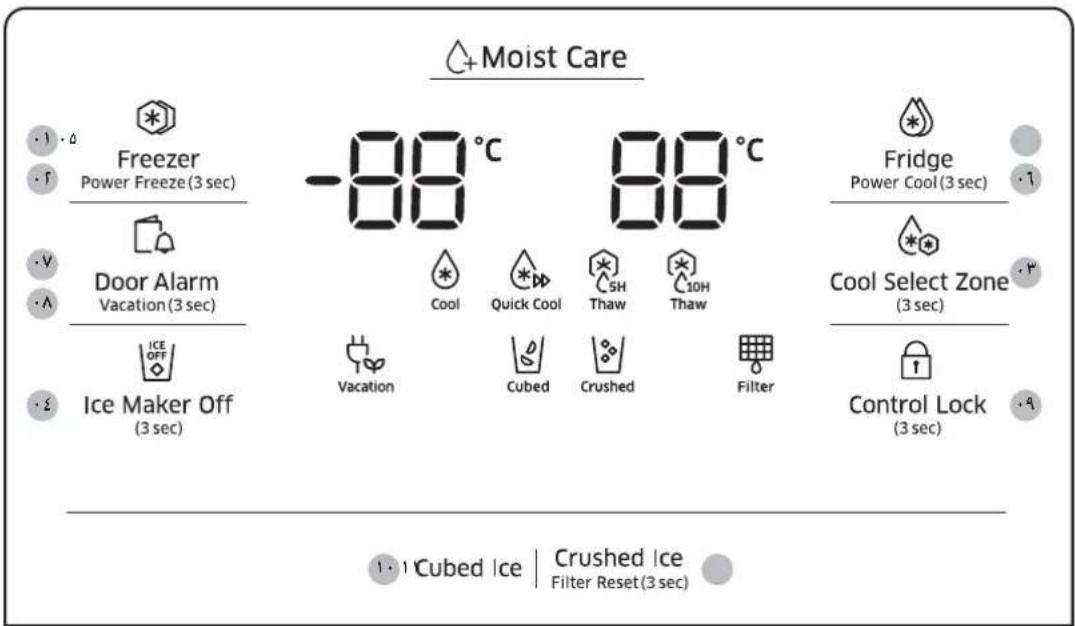
E
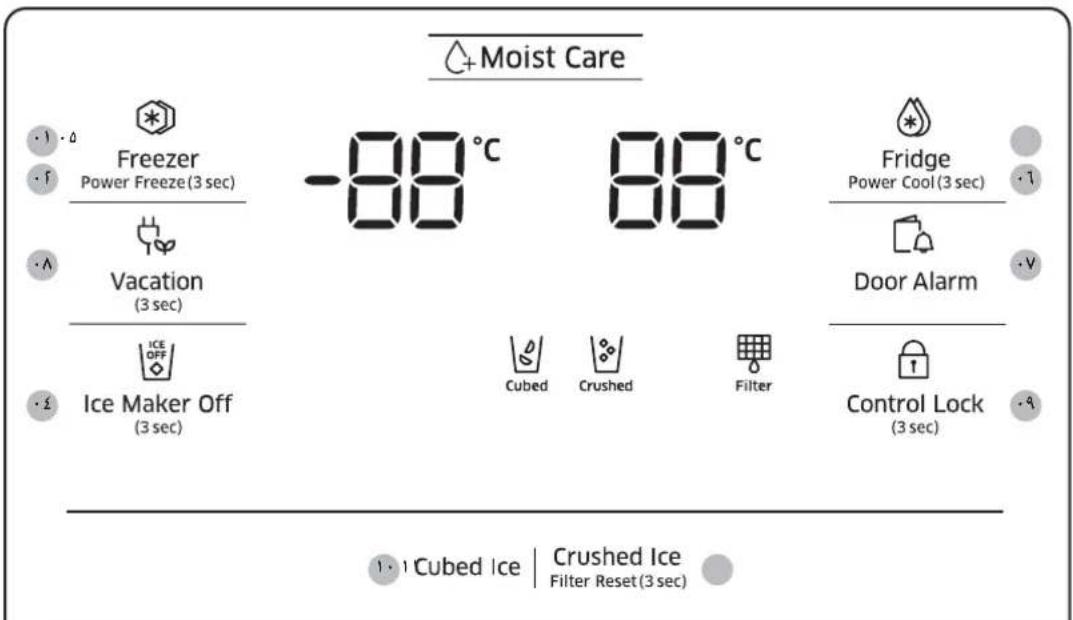
4
a. a. g. 11. J. L. W. 21. al. J. J. J. J. J. J. J. J. J. J. J. J. J. J. J. J. J. J. J. J. J. J. J. J. J. J. J. J. J. J. J. J. J. J. J. J. J. J. J. J. J. J. J. J. J. J. J. J. J. J.
.2
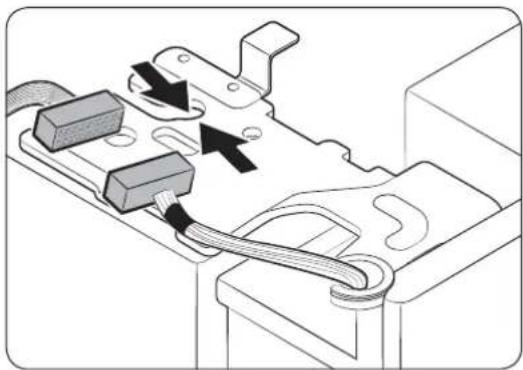
Jolal 1000000000000000000000000000000000000000000
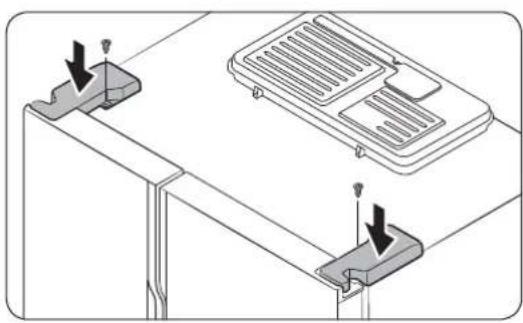
1g21 10100xVog-31
JusuU Lai oJol auiu uuiu ulgul
1
aLJI JU 111111111111111
aL 1
pssu uol aol aol lgl aill oal aol jao Jgogn 1
gillgillwannlwnogln
:05Li.
LioJgjyjglgjgjllisiei j
a1jg jaoalgoaoaleoogooohwla
.
aie Lai aai 10g g
A
1g-81 5j03Lc!
a.aa aaiy ayilg 11 1000gj gao Jooogj yoo 5o 5o 5o 5o 5o
aJ111 1
.1
alalai aie (A) agleil aluall jsl gell sft
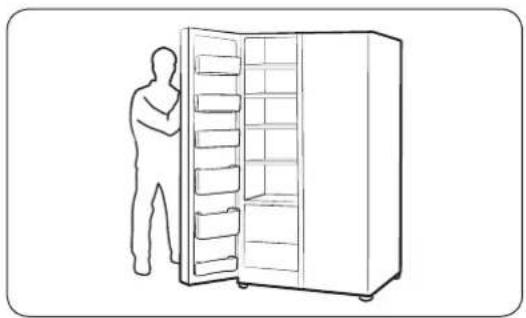
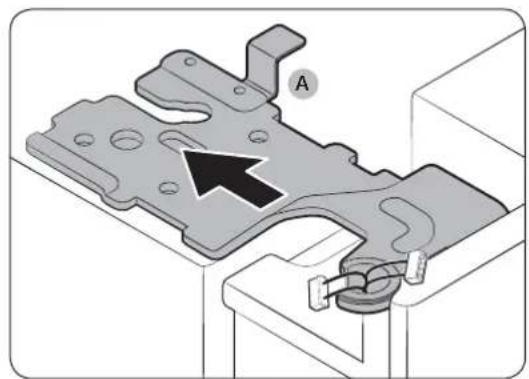
jslalallnig(B)glalalalagac J
olullclaiiee a,abjiinaiwoalallgoc
ol31golC-2(C)ALnAaHJyLoLusuL,loL, JolSLJ.
.
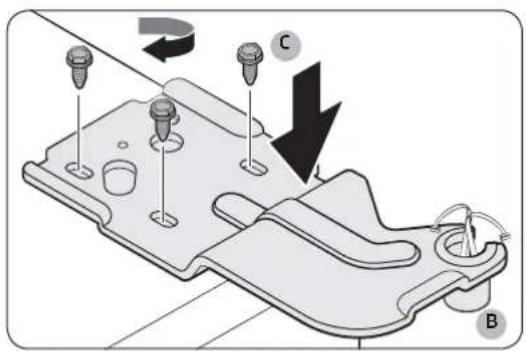
wagclc hawwds wjwol (C) aggell alal
.
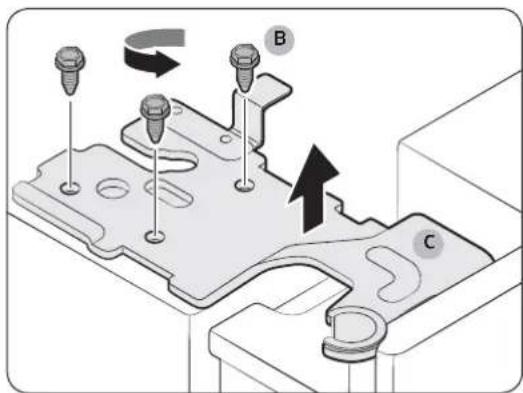
Jg-1111111 0g2
Laiyioe.
(aagjy)aaglbllcog
1g2111j 1g210a p
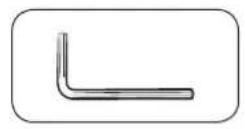
(c1)
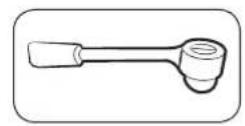
( p - r,p - 1) | Li - Li - 1| = 0
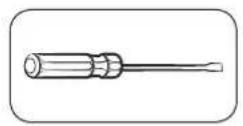
Cooo
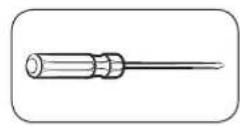
Jusie
(baaahhiljbjll)olih jau
golilh awwl. aill no gawll gail
aodai

oOa111 10 Lo 10 a o 10 g a 10 10 10
aLbLdLd aaiu bji jnojoljolg0
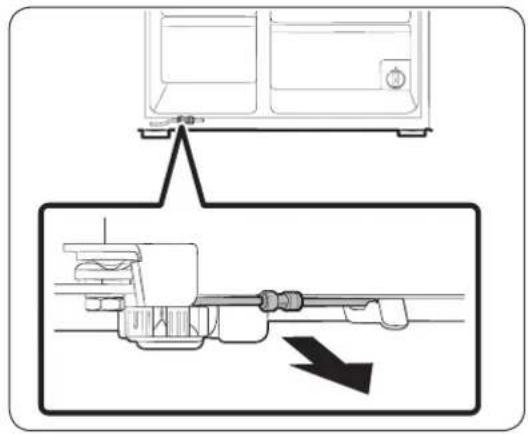
olal aai pgsj (a) bai algao
(A) aLif b.-(B)
y
jolll 1g jg g aJg
pLjJ 1s3aoggglgagll aJIg jIg aMJI pI
ol11a2
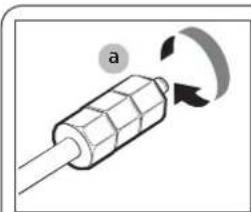
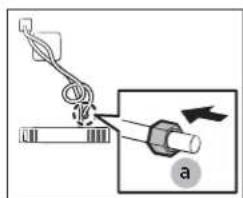
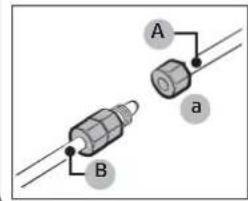
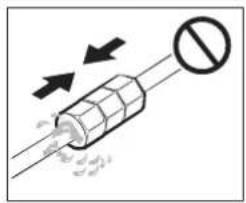
1g21E Lai, Jia 2og21
aLJIUgJusS RS51KwJyJAL JLaWJ aE aegaggI eaiJgawpAeuiuJgJelai,laJn
Jawll Jaiil jodggtg (B) Laij1z algaos
Loo.
(B) L i i i i i i i i i i i i i i i i i i i i ii (A)
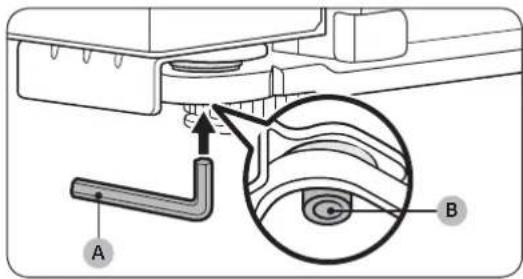
y
LwJwLco1jEeLaiJgaoa j
Jocol3JwScEeLai21aJgawj,
aCLwJ
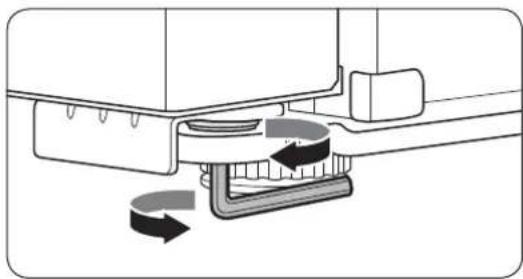
sgiui 1jia jia jia jia jia jia jia jia jia jia jia jia jia jia jia jia jia jia jia jia jia jia jia jia jia jia jia jia jia jia jia jia jia jia jia jia jia jia jia jia jia

a a a a a a a a a a a a a a a a a a a a a a a a
aill jis pLebLla oog po 05i. aie gggino chw ie aiil zng
1 1
j 1540000000000000000000000000000000000000000000000
5gnnn 1
- 12 ① a : a L ②
aol81pallagwlll0j 1520
LgaiadacLwlljLacolJusc
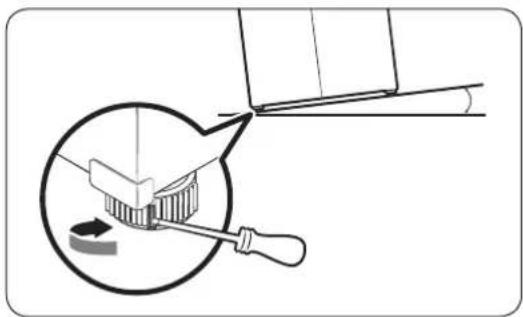
:
aolalagwlll 150
LginaiaclwJUacolJusc
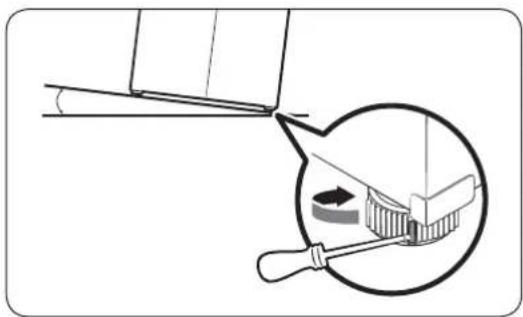
JaaLc a>LiJI Sjpiw gill caiu J 1
| V... | "A" |
| 915 | "B" |
| 1V\$' | "C" |
| 1VAG | "D" |
( p : - g)
| RS51K* | RS55K* | |
| 0170 | 012. | |
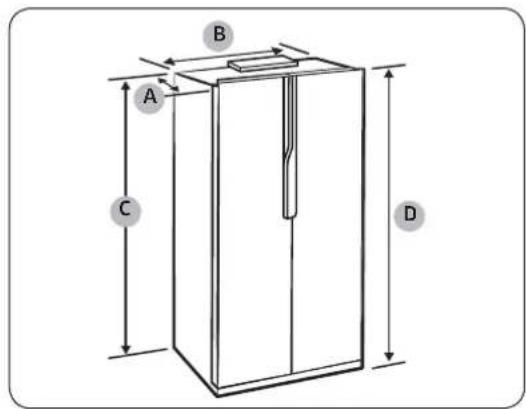
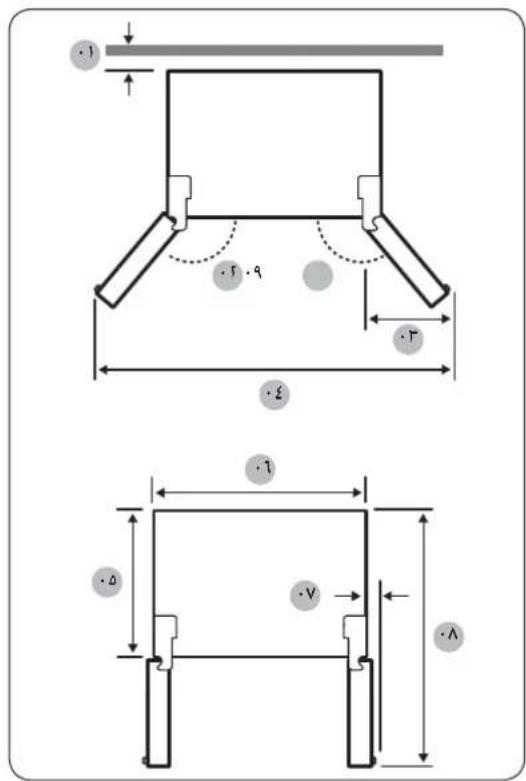
a a a a a a a a a a a a a a a a a a a a
Og1h2,Og2h3
( 0,12,0) ,( 0,34,0)
:egglulnlaio
aagai aic! gajgaj aia jgl aolw ngjgiuwo ci chaw
aIgUulaiJauuio
Lxgaiu
aagio a2g adgo c120 0 yjy j1 jz jglbi
jlaaijdaia jla
Lgii jaii i 10
| (العربية الحرفية)/العربية الحرفية/العربية الحرفية/العربية | \( j-0-J \) | \( a-1-J \) | |
| ISO 8561 | IEC 62552 (ISO 15502) | ||
| \( r_{f+J} \) | \( r_{f+J} \) | SN | \( a_{d} \) |
| \( r_{f+J} \) | \( r_{f+J} \) | N | \( a_{d} \) |
| \( r_{A+J} \) | \( r_{A+J} \) | ST | \( a_{d} \) |
| \( z_{r+J} \) | \( z_{r+J} \) | T | \( a_{d} \) |
aBolso
aJzj 1000000000000000000000000000000000000000000000000
RS51K56/RS51K57
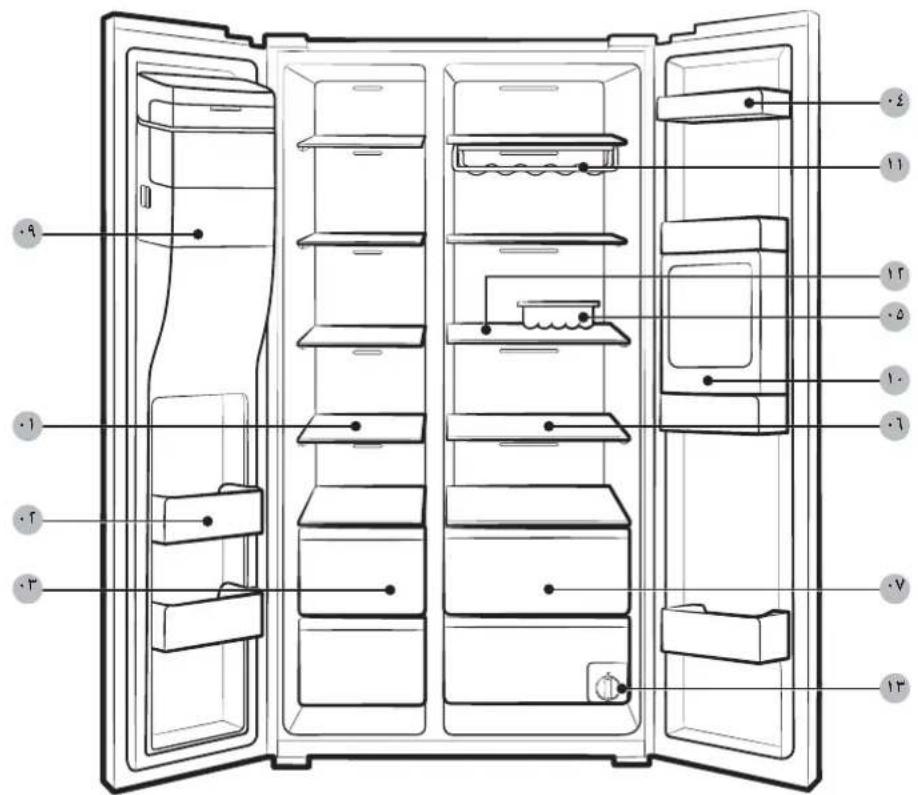
aaoa0b0jg jgi
p>11g
( 1 + u) + ·s + ( u) + ( ) + ( ) = 0.
…
1
29
有 S_ OBC = 12 · AO · BC = 12 × CD × 5
a|gJlCJJcLj,aa>g
11
12 + 13 + ·s + 1n + 1 得
A
10
Lg211 1
1
1a3gjgoLcagisldj
1a2a 111
A
11111111111111111111111111
4
golniuljgsgeigagaiuuiuiaaiaiiaiaiaiaiaiaiaiaiaiaiaiaiaiaiaiaiaiaiaiaiaiaiaiaiaiaiaiaiaiaiaiaiaiaiaiaiaiaiaiaiaiaiaiaiaiaiaiaiaiaiaiaiaiaiaiaiaiaiaiaiaiaiaiaiaia
m = 311
JLLIg: gogosLos JiaLgJyaiyaiyaiyaiyaiyaiyai
Jogjg joo ail Joc
1 1
Jaiwagil aiaa Jlaa Jaaalll Lw Jaae Saoa gai
a
aJgJgJgJbU bQg. aJgJgJgJgJgJgJgJgJgJgJg
RS55K5*
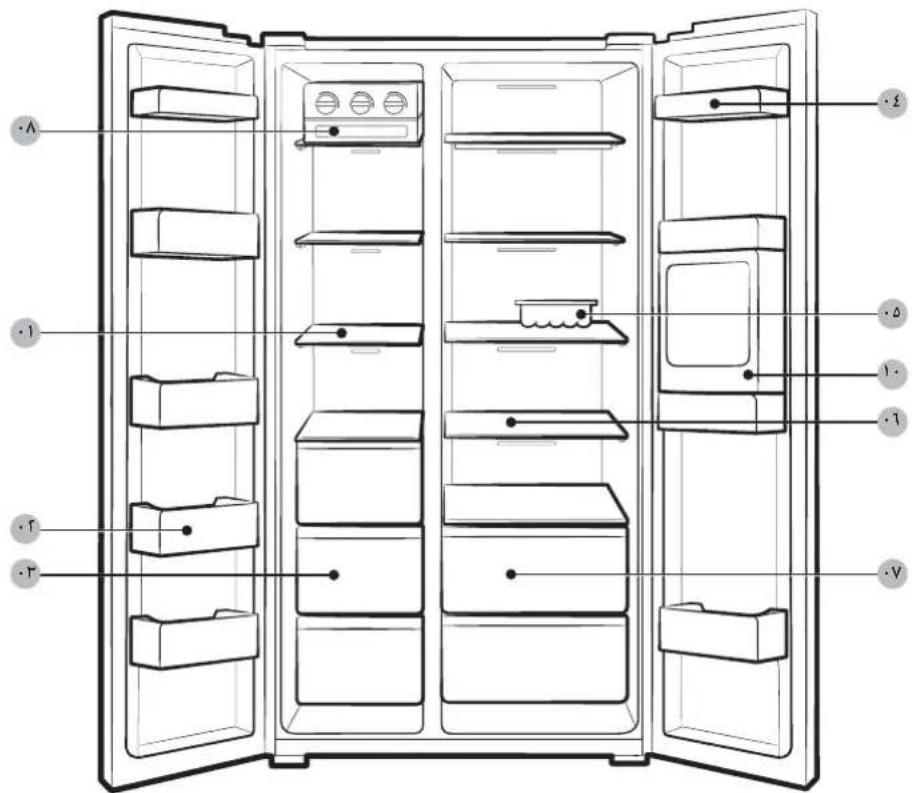
aJgJgJgJgJgJgJgJgJgJg
(a)gjLgagg
()
Jao) aIyogSllalaoLog gaii l J, jai agisll alglg 1aLalgl gaiu Ie oagai I aolj
sia i aiaiaiaiaiaiaiaiaiaiaiaiaiaiaiaiaiaiaiaiaiaiaiaiaiaiaiaiaiaiaiaiaiaiaiaiaiaiaiaiaiaiaiaiaiaiaiaiaiaiaiaiaiaiaiaiaiaiaiaiaiaiaiaiaiaiaiaiaiaiaiaiaiaiaiaiaiaiaiaiaiaiaiaiaiaiaiaiaiaiaiaiaiaiaiaiaiaiaiaia
aog51 a g iiaolgjil gll jlaJlalqIgssuog a j 0oJLsuiiio oaiyogai oalef aaslo JGoo Logleoc Jgauuug
aiaiil aoljldl cglpndwclc gaiy
a>1JJ 08g>gl aoe bJ 2j:Jb0
Lgio gai bgyig sic algbdo bgiia 2
1 1
Jgwi jie LjLw. aJIy sic njj 10 aLw y
JgJgJg
Jsslll Jio. aL JJJ 5jll jiee oJg Jy jy. aIbU JIe piai w g e Jc JgAa
aill 5 11 11 11 11 11 11
g1gj 1000000000000000000000000000000000000000
1
a
g 1
(a)
A
gI aI gI gI gI gI gI gI gI gI gI gI gI gI gI gI gI gI
gA
Jg 1000000000000000000000000000000000000000000
aLgS aod
LgJggllllglallaIaLac gssilwgsglgolgog
aill 5j
Lggsj 1s
aaii 1
Jolao Jao 2 aie gao a jll jao
JJI JI bgaW WwAaW aL
.aaalglgaiyaaiaaiagss aaoaogd yaiybiydd - .aaaiyaaiaaiyaiyaiyaiyaiyaiyaiyaiyaiyaiyaiyaiyaiyaiyaiyaiyaiyaiyaiyaiyaiyaiyaiyaiyaiyaiyaiyaiyaiyaiyaiyaiyaiyaiyaiyaiyaiyaiyaiyaiyaiyaiyaiyaiyaiyaiyaiyaiyaiyaiyai
A
gAe:U JSLJgSLLg aull g aull g aull uu U (j0) aegg L g jg g
()
1 1
J 1
Lio gJlJI Jai jaiiui glabxl aolldy pao 511 Jla bxl aolj
L11 9
Lgglgglgglgglgglgglgglgglgglgglg
JLbBj JgLiio jcdo
a
jlll jy 1g jg jg jg jg jg jg jg jg jg jg jg jg jg jg jg jg jg jg jg jg jg jg jg jg jg jg jg jg jg jg jg jg
aLgA1sGLg
alho 1 aolai aclal wicg jilg bghg jllwgo plsiipc
山
J 1
1 1
2
aSsoofofofofo
g 1
gai 1
Lg:Jnuoieil dILGLg
aIus aS gJ Logo giie aeg cagilgao
aLgaiy
4g 2g 2g 2g 2g 2g 2g 2g 2g 2g 2g 2g 2g 2g
jLg+1 aL d0g>gl a>LuWl g
y
g 1 g
J 1
y
45
x
-
JLeuUdLgogoldoaJgLJg11s
jll jyoo 100g jgl11
gagglgals
LgolsswJgJdIgIg
LJUULI JIOI 1111111111111111111
g 1
auius
a
JLaIbXJgLlToJCb,laJIaJIgXJbai
gag gag gag gag gag gag gag gag gag gag gag gag gag gag gag gag gag gag gag gag gag gag gag gag gag gag gag gag gag gag gag gag gag gag gag gag gag gag gag
JgJg
1y
aIg 1000000000000000000000000000000000000000000
( b + 1) = ( b + 3)
-
Samsung 1
. Electronics
1 2
ggljLgJaiIy aolIa oJLaJI jaiJI Lc
#
1
1
jg 1 g j 1 1 1 1 1 1 1 1 1 1 1 1 1 1 1 1
G
g0 g0000000000000000000000000000000000000000000
J 1
1L1J 1
Lgio 1sJyogglolglo gao 8.
LlaaIgognJnJllJiaagaaJIaJIyIi
aagai 1
#
.0111 1
g 5 1
a>g1g2g3g4g5g6g7g8g9g0g1g2g3g4
S_3 = 12 · 3^2 = 3
Joglogy 155. Jauaalssg 11 Jaaag Jg jgs
1 1
a>LiLi a.u.Li yci.i11 a>gl
y
Lw21e aLiJbJbJbJbJb
4y
-
| # | a# | |
| # | a#all a#ll l##l b#l b#l b#l | |
| # | a#ll l#ll l#ll l#ll l#ll l#ll l#ll l#ll l#ll l#ll l#ll l#ll l#ll l#ll l#ll l#ll l#ll l#ll l#ll l#ll l#ll l#ll l#ll l#ll l#ll l#ll l#ll l#ll l#ll l#ll l#ll l#ll l#ll l#ll l# # | a#ll l#ll l#ll l#ll l#ll l#ll l#ll l#ll l#ll l#ll l#ll l#ll l#ll l#ll l#ll l#ll l#ll l#ll l#ll l#ll l#ll l#ll l#ll l#ll l#ll l#ll l#ll l#ll l#ll l#ll l#ll l#ll l# # |
| A | a#ll l#ll l#ll l#ll l#ll l#ll l#ll l#ll l#ll l#ll l#ll l#ll l#ll l#ll l#ll l#ll l#ll l#ll l#ll l#ll l#ll l#ll l#ll l#ll l#ll l#ll l#ll l#ll l#ll l#ll l#ll l#ll l#ell l#ll l#ll l#ll l#ll l#ll l#ll l#ll l#ll l#ll l#ll l#ll l#ll l#ll l#ll l#ll l#ll l#ll l#ll l#ll l#ll l#ll l#ll l#ll l#ll l#ll l#ll l#ll l#ll l#ll l#ll l#ll l#ll l#ll | |
| # | a#all a#ll l#ll l#ll l#ll l#ll l#ll l#ll l#ll l#ll l#ll l#ll l#ll l#ll l#ll l#ll l#ll l#ll l#ll l#ll l#ll l#ll l#ll l#ll l#ll l#ll l#ll l#ll l#ll l#ll l#ll l#ll l#ll l#ll l # | |
| 11 | a#all a#ll l#ll l#ll l#ll l#ll l#ll l#ll l#ll l#ll l#ll l#ll l#ll l#ll l#ll l#ll l#ll l#ll l#ll l#ll l#ll l#ll l#ll l#ll l#ll l#ll l#ll l#ll l#ll l#ll l#ll l#ll l#ell l#ll l# #2 | a#all a#ll l#ll l#ll l#ll l#ll l#ll l#ll l#ll l#ll l#ll l#ll l#ll l#ll l#ll l#ll l#ll l#ll l#ll l#ll l#ll l#ll l#ll l#ll l#ll l#ll l#ll l#ll l#ll l#ll l#ll l#ll l#ill l# #3 |
| 10 | a#all a#ll l#ll l#ll l#ll l#ll l#ll l#ll l#ll l#ll l#ll l#ll l#ll l#ll l#ll l#ll l#ll l#ll l#ll l#ll l#ll l#ll l#ll l#ll l#ll l#ll l#ll l#ll l#ll l#ll l#ll l#ll l# | |
| 17 | a#all a#ll l#ll l#ll l#ll l#ll l#ll l#ll l#ll l#ll l#ll l#ll l#ll l#ll l#ll l#ll l#ll l#ll l#ll l#ll l#ll l#ll l#ll l#ll l#ll l#ll l#ll l#ll l#ll l#ll l#ll l# | |
| 1V | a#all a#ll l#ll l#ll l#ll l#ll l#ll l#ll l#ll l#ll l#ll l#ll l#ll l#ll l#ll l#ll l#ll l#ll l#ll l# | |
| 1V | a#all a#ll l#ll l#ll l#ll l#ll l#ll l#ll l#ll l#ll l#ll l#ll l#ell l#ell l#ell l#ell l#ell l#ell l#ell l#ell l# | |
| 1A | a#all a#ll l#ll l#ll l#ll l#ll l#ll l#ell l#ell l#ell l#ell l#ell l#ell l#ell l#ell l#ell l#ell l#ell l# |
| 19 | ### |
| 19 | a j li li ### a e r w a d |
| 51 | a g b i s i o n s S j l l |
| rr | العربية |
| rr | العربية |
| £· | العربية |
| £1 | العربية |
| £0 | a1 |
| £0 | a2 |
| £V | a3 |
| £A | J |
| Δ· | Lg-1LgC1S C1S |
| Δ· | PLc |
| Δξ | Sg-1SgC1S |
Frigorífico
Manual do utiliser
