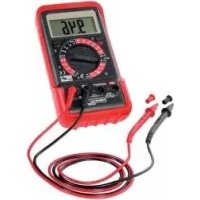
PDM 300 A1 - Multimeter POWERFIX - Free user manual and instructions
Find the device manual for free PDM 300 A1 POWERFIX in PDF.



| Product type | Digital multimeter |
| Brand | Powerfix |
| Model | PDM 300 A1 |
| Dimensions (without case) | 85 x 164 x 35 mm |
| Dimensions (with case) | 93 x 175 x 45 mm |
| Weight (without case, without battery) | 195 g |
| Weight (with case, without battery) | 345 g |
| Power supply | 9V battery (included) |
| Display | LCD 3 1/2", max. reading 1999 |
| Measurement functions | DC/AC voltage, DC/AC current, resistance, battery test, diode test, continuity check |
| Special functions | HOLD function, auto power off, polarity indication, low battery indication |
| Overvoltage category | CAT III 300 V |
| Fuse protection | F1: F 250 mA/300 V, F2: F 10 A/300 V |
| Included accessories | Test leads, case, 9V battery, manual |
| Care and cleaning | Dry cloth, do not use solvents |
| Safety | Double insulation, finger protection on test leads |
| Warranty | 3 years |
Frequently Asked Questions - PDM 300 A1 POWERFIX
User questions about PDM 300 A1 POWERFIX
0 question about this device. Answer the ones you know or ask your own.
Ask a new question about this device
Download the instructions for your Multimeter in PDF format for free! Find your manual PDM 300 A1 - POWERFIX and take your electronic device back in hand. On this page are published all the documents necessary for the use of your device. PDM 300 A1 by POWERFIX.
USER MANUAL PDM 300 A1 POWERFIX
User manual and service
information
DE AT
Last Information Update:
01/2016-Ident-No:PD300A1012016-1
IAN 273352

IAN 273352
F
Francais. 2
Deutsch 19
English. 36
Sommaire
Safety instructions 41
Copyright 43
Prior to use 43
Inserting/changing the battery. 44
First use 45
45
DC voltage measurement 45
AC voltage measurement 45
AC current measurement 46
DC current measurement 46
Battery test 46
Resistance measurement 47
Continuity test 47
Diode test 48
HOLD function 48
One-hand operation 49
Setting up/hanging up the multimeter 49
Cleaning / maintenance 49
Maintenance 49
Replacing the fuse 50
Cleaning. 51
Environmental and disposal information. 51
Conformity information 51
Warranty and servicing advice 52
Introduction
Thank you for purchasing a POWERFIX product.
The POWERFIX Digital Multimeter PDM 300 A1, referred to below as multimeter, is used to measure AC/DC voltages and AC/DC currents. The multimeter also has a battery test, a resistance measurement, a diode test and a continuity test.
Intended use
This multimeter is not designed for commercial use or installation and operation in a company. This multimeter may only be used for private purposes, and any other use is not as intended. This multimeter meets all relevant norms and standards in conjunction with CE conformity. In the event of any modification to the multimeter that was not approved by the manufacturer, compliance with these standards is no longer guaranteed. The manufacturer does not accept any liability for any resulting damage or faults in such cases.
Please observe the regulations and laws in the country of use.
Supplied items
Multimeter
- 2 test probes (including test lead)
- Holster
- 9V battery
These instructions
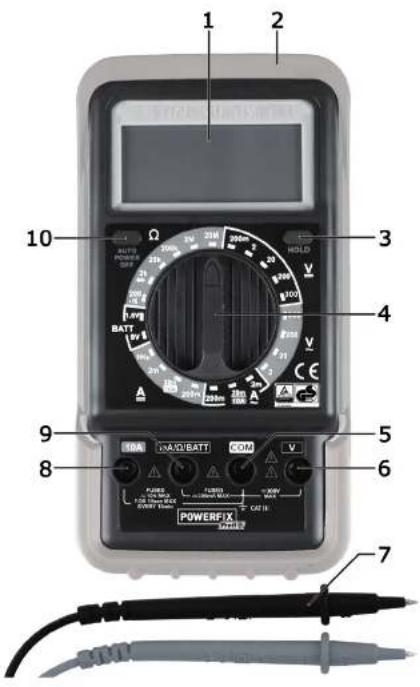
These instructions have a fold-out cover. The multimeter is illustrated with a numbering system on the inside of the cover. The numbers indicate the following:
1 Screen
2 Holster
3 HOLD button (Save button)
4 Range selector switch
5 COM jack (earth)
6 V jack
7 Test probes (including test lead)
8 10A jack
9 mA/Ω/BATT jack
10 On/off button
Technical data
| Screen 3.5 digit LCD display, max. display: 1999 | |
| Measuring rate approximately 3 measurements per second | |
| Test lead length each approximately 80 cm | |
| Battery type Standard 9V battery | |
| Overvoltage category CAT III 300V (digital multimeter and test leads) | |
| Hold function yes | |
| Automatic polarity indicator yes | |
| "Low Bat" indicator yes | |
| Auto power OFF function yes | |
| Operating temperature, air humidity 0°C to +40°C; max. 75% rel. humidity | |
| Storage temperature, air humidity | -10°C to +50°C; max. 85% rel. humidity |
| Dimensions (W x H x D) 85 x 164 x 35 mm (without holster) 93 x 175 x 45 mm (with holster) | |
| Weight 195g (without holster, without battery) 345g (with holster, without battery) | |
| Tested safety: | TÜVRheinland ZERTIFIZIERT www.tuv.com ID 1000000000 www.tuv.com ID 1000000000 |
The technical data and design may be changed without notification.
DC voltage
| Range | Resolution | Precision |
| 200mV | 0.1mV | ± (0.5%+5) |
| 2V | 1mV | ± (0.8%+5) |
| 20V | 10mV | |
| 200V | 0.1V | |
| 300V | 1V | ± (1.0%+5) |
Input impedance: 10M
Overload protection: 300V DC/AC RMS
AC voltage
| Range | Resolution | Precision |
| 2V | 1mV | ± (1.0%+5) |
| 20V | 10mV | |
| 200V | 0.1V | |
| 300V | 1V | ± |
Input impedance: 10M
Frequency range: 40Hz to 400Hz
Overload protection: 300V AC RMS
Display: average value (RMS of the sine wave)
DC current
| Range | Resolution | Precision |
| 200μA | 0.1μA | ± (1.0%+5) |
| 2mA | 1μA | |
| 20mA | 10μA | ± (1.2%+5) |
| 200mA | 0.1mA | |
| 10A | 10mA | ± |
Overload protection: F1: F 250mA / 300V fuse
F2: F 10A / 300V fuse
Maximum input current: 10A (input current >2A for continuous measurement < 15 seconds and interval >15 minutes)
AC current
| Range | Resolution | Precision |
| 2mA | 1μA | ± |
| 20mA | 10μA | ± (1.5%+5) |
| 200mA | 0.1mA | |
| 10A | 10mA | ± |
Overload protection: F1: F 250mA/300V fuse
F2:F 10A/300V fuse
Maximum input current: 10A (input current >2A for continuous measurement < 15 seconds and interval >15 minutes)
Frequency range: 40Hz to 400Hz
Display: average value (RMS of the sine wave)
Resistance
| Range | Resolution | Precision |
| 200Ω | 0.1Ω | ± (1.0%+5) |
| 2kΩ | 1Ω | ± (0.8%+3) |
| 20kΩ | 10Ω | |
| 200kΩ | 0.1kΩ | |
| 2MΩ | 1kΩ | |
| 20MΩ | 10kΩ | ± (1.2%+3) |
Overload protection: 300V
Battery test
| Range | Consumption |
| 1.5V | ±20mA |
| 9V | ±5mA |
The specified precision in ± (% of the display + number of digits) is guaranteed for a period of one year at an ambient temperature from 18^ to 28^ and maximum air humidity of 75% .
Safety instructions
Before using this multimeter for the first time, always read the following instructions and pay attention to all warnings, even if you are familiar with handling electronic devices. Store these instructions in a safe place for future reference. If you sell the multimeter or pass it on, always include these instructions.

WARNING! This symbol indicates important information for safe operation of the multimeter and the safety of the user.

This symbol indicates other important information on the topic.

DANGER! Before opening it, the multimeter must be isolated or disconnected from the dangerous active voltage. There is a risk of an electric shock!

DANGER! This symbol warns against dangerous electrical voltage!

Electrical devices do not belong in the hands of children. Persons with disabilities should also only use electrical devices within the scope of their abilities. Never allow children or persons with disabilities to use electrical devices unsupervised. They may not recognise potential risks. Batteries and small parts may cause choking resulting in death or serious injury. Store the battery in a safe place. If a battery is swallowed, seek medical help immediately. Also always keep plastic packaging out of reach as it poses a suffocation risk!

If smoke is produced, or there are any unusual sounds or smells, stop measuring immediately. In these cases, the multimeter should not be used until it has been inspected by authorised service personnel. Never inhale smoke from a potential device fire. If you have inhaled smoke, however, consult a doctor. The inhalation of smoke can be harmful.

The test probes may be handled only behind the finger protection as otherwise there is a risk of an electric shock when measuring!

If the multimeter or the test probes are damaged (including test lead), they must not be used. It poses an electric shock risk!

Pay particular attention to your safety when dealing with AC voltages over 30V or [v] voltages over 60V. It poses an electric shock risk!

Never operate the multimeter when the housing is open. It poses an electric shock risk!

Ensure that you do not touch the test probes and the jacks to be measured during a measurement in order to avoid an electric shock.

Do not use the multimeter in wet or damp environments. Also ensure that your hands and shoes are dry as there is a risk of an electric shock otherwise!

Do not use the multimeter in the vicinity of explosive gases or vapours or in a dusty environment. It poses a risk of explosion!

Ensure that no fire sources (e.g. burning candles) are placed on or near the multimeter. It poses a fire hazard!

Do not exceed the maximum specified input values for the individual measuring ranges. Otherwise, the multimeter could be damaged.

Do not exceed the specified overvoltage category CAT III. Otherwise, the multimeter could be damaged.
CAT III: Measurements within the building installation (e.g. distributors, wiring, sockets and switches). This category also includes the following two categories:
CAT II: Measurements on electrical and electronic devices that are supplied with a voltage via a mains plug.
CAT I: Measurements on circuits that have no direct connection to the mains power supply (battery operated, motor vehicle electrics, etc.).

The multimeter must be disconnected from the test object before changing the measuring range as the multimeter could be damaged otherwise.

When working with the test probes, first connect the black test lead to the COM jack before you connect the red test lead. When disconnecting the test probes, first remove the red test probe.

Never connect a voltage source to the test probes if the areas continuity test, resistance measurement, diode test and current measurement are selected. Otherwise, the multimeter could be damaged.

The multimeter may not be exposed to any direct heat sources (e.g. heating) or any direct sunlight or artificial light. Also avoid contact with dripping water and splashes and corrosive liquids. Never operate the multimeter near water. In particular, the multimeter should never be submerged in liquid (do not place any items filled with liquid, e.g. vases or drinks on the multimeter). Also ensure that the multimeter is not exposed to any excessive shocks or vibrations. Furthermore, no foreign objects may penetrate the multimeter. Otherwise, the multimeter could be damaged.
Copyright
All information contained in these instructions is subject to copyright and is provided for information purposes only. It is only permitted to copy or duplicate data and information with the express and written consent of the author. This also includes commercial use of the content and data. The text and illustrations are based on the state of the art at the time of printing.
Prior to use
Remove the multimeter and the accessories from the packaging.
Check the multimeter and the accessories for signs of damage. If damaged, the multimeter may not be used.
Inserting/changing the battery
The multimeter is powered by a 9V battery. To insert or replace the battery, proceed as follows:
Switch off the multimeter and remove all test leads before opening the multimeter!
If the battery is exhausted, the + icon appears on the display [1]. The battery should be replaced as soon as possible to ensure that the multimeter continues to work properly.
- Remove the holster [2].
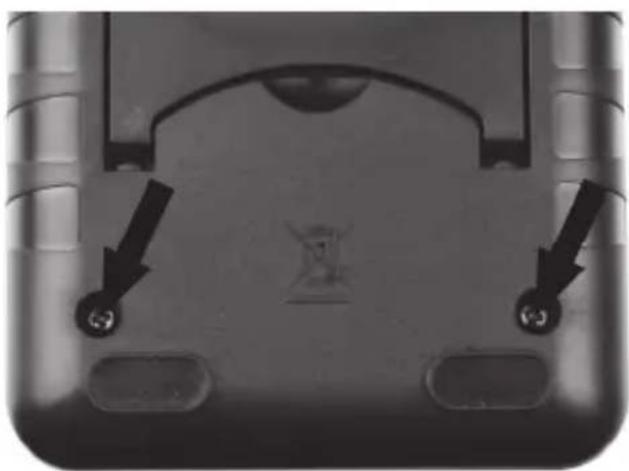
- Remove the two screws on the back of the multimeter and remove the back panel.
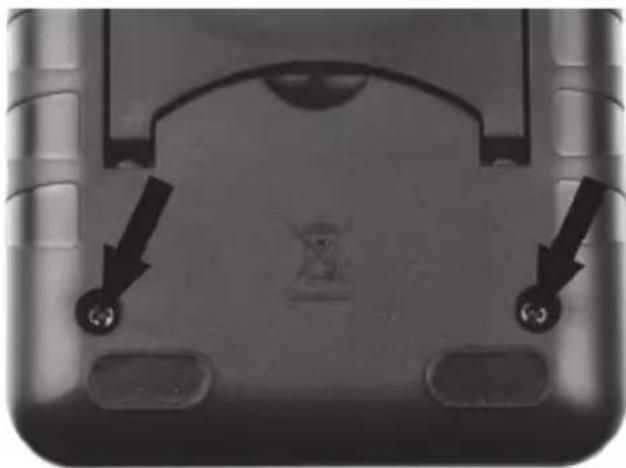
- Connect the 9V battery with the correct polarity (note + and -) to the battery clip and place the 9V battery in the battery compartment.
- Replace the back panel and screw it tight with the two screws.
- Re-insert the multimeter in the holster [2].
First use

Never exceed the maximum permissible input values.
Before measuring, remove the cover of the test lead and switch on the multimeter by pressing the on/off button [10]. The multimeter has an auto power OFF function and switches itself off automatically after longer periods of non-use. However, you can also switch off the multimeter directly with the on/off button [10].

You obtain a more accurate measurement result if you use the smallest possible measuring range.
Overflow indicator
The multimeter has an overflow indicator. If a measured value exceeds the range limit of the selected measuring range, "OL" is indicated on the display [1]. In this case, switch to a higher measuring range immediately if possible, or remove the test probes [7] from the test object.
DC voltage measurement
- Connect the black test lead to the COM jack [5] and the red test lead to the V jack [6].
- Set the range selector switch [4] to the desired range in the DC voltage measuring range V =
If you do not know the voltage, first set the highest possible measuring range and then reduce it gradually to the lower ranges until you obtain a satisfactory measurement result.
- Connect the test probes [7] to the test object.
- The measurement result is then indicated on the display [1]. A negative sign is indicated in front of the measured value for a negative measurement result.
AC voltage measurement
- Connect the black test lead to the COM jack [5] and the red test lead to the V jack [6].
- Set the range selector switch [4] to the desired range in the AC voltage measuring range V . If you do not know the voltage, first set the highest possible measuring range and then reduce it gradually to the lower ranges until you obtain a satisfactory measurement result.
- Connect the test probes [7] to the test object.
- The measurement result is then indicated on the display [1].
AC current measurement
- Connect the black test lead to the COM jack [5] and the red test lead to the 10A jack [8] (for currents >200mA ) or to the mA/Ω/BATT jack [9] (for currents <200mA ).
- Set the range selector switch [4] to the desired range in the AC current measuring range A^ . If you do not know the current, first set the highest possible measuring range and then reduce it gradually to the lower ranges until you obtain a satisfactory measurement result.
- Connect the test probes [Z] in series to the test object.
- The measurement result is then indicated on the display [1].
DC current measurement
- Connect the black test lead to the COM jack [5] and the red test lead to the 10A jack [8] (for currents >200mA ) or to the mA/Ω/BATT jack [9] (for currents <200mA ).
- Set the range selector switch [4] to the desired range in the DC current measuring range A.
If you do not know the current, first set the highest possible measuring range and then reduce it gradually to the lower ranges until you obtain a satisfactory measurement result.
- Connect the test probes [7] in series to the test object.
- The measurement result is then indicated on the display [1]. A negative sign is indicated in front of the measured value for a negative measurement result.
Battery test
- Connect the black test lead to the COM jack [5] and the red test lead to the mA/Ω/BATT jack [9].
- Set the range selector switch [4] to the corresponding battery voltage range 1.5V or 9V in the BATT range.
- Connect the red test probe [7] to the positive pole and the black test probe [7] to the negative pole of the battery.
- The measurement result is then indicated on the display [1].

In the measuring ranges BATT 1.5V and BATT 9V, the battery to be measured is charged by an internal resistance, thus you obtain practical information on the condition and functionality of the tested battery.
Resistance measurement

Ensure that all circuit elements, circuits and components to be measured and other test objects are completely switched off and discharged. Otherwise, the multimeter could be damaged.
- Connect the black test lead to the COM jack [5] and the red test lead to the mA/Ω/BATT jack [9].
- Set the range selector switch [4] to the desired range in the measuring range.
- Connect the test probes [7] to the test object.
- The measurement result is then indicated on the display [1].

For resistances >1M , the measurement may take a few seconds. In this case, wait until the measured value has stabilised.

For measurements of low resistances (200Ω range), the resistance of the test leads can lead to a distorted result. To avoid such an error, note the value of the measurement for short-circuited test probes and deduct this from the value of the actual measurement.
Continuity test

Ensure that all circuit elements, circuits and components to be measured and other test objects are completely switched off and discharged. Otherwise, the multimeter could be damaged.
- Connect the black test lead to the COM jack [5] and the red test lead to the mA/Ω/BATT jack [9].
- Set the range selector switch [4] to the 111 position in the measuring range.
- Connect the test probes [7] to the test object.
- If the resistance is less than approximately 30 , the buzzer sounds and the measurement result is indicated on the display [1].
Diode test

Ensure that all circuit elements, circuits and components to be measured and other test objects are completely switched off and discharged. Otherwise, the multimeter could be damaged.
- Connect the black test lead to the COM jack [5] and the red test lead to the mA/Ω/BATT jack [9].
- Set the range selector switch [4] to the position in the measuring range.
- Connect the red test probe [7] to the anode and the black test probe [7] to the cathode of the diode to be tested.
- The forward voltage is indicated in volts on the display [1]. If "1" is displayed on the display [1], the diode is measured in the reverse biased-direction or the diode is defective. Perform an opposite pole measurement for check purposes.
HOLD function
A measured value on the display [1] can be saved by pressing the HOLD button [3]. Press the HOLD button [3] again to return to the measuring mode.
One-hand operation
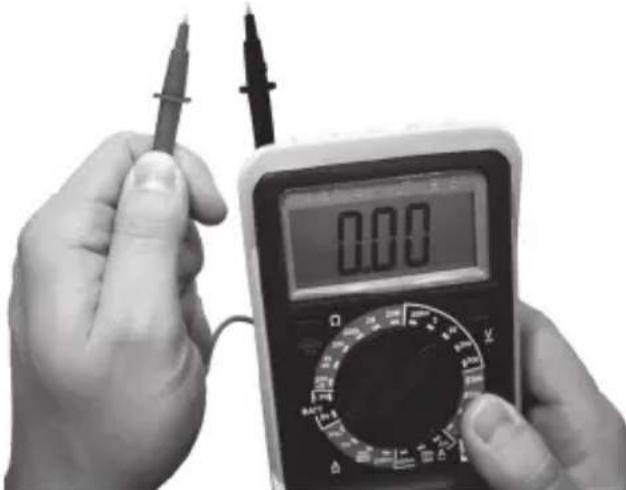
You can also use the multimeter with one hand. To do so, insert a test probe [7] in one of the slots on the back of the holster [2]. You can then perform your measurements as usual without having to put down the multimeter.
Setting up/hanging up the multimeter
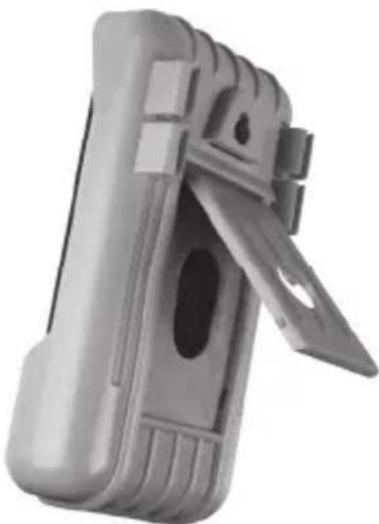
You can set up or hang up the multimeter using the holster [2]. Open out the stand at the back of the holster [2] to set up the multimeter. There is also a slot above the stand to facilitate hanging up the multimeter.
Cleaning / maintenance
Maintenance

Maintenance work is necessary if the multimeter has been damaged or if liquid or objects have penetrated inside the housing, the multimeter has been exposed to rain or moisture or if it does not work correctly or has been dropped. In these cases, the multimeter should not be used until it has been inspected by authorised service personnel. Only have qualified personnel carry out the maintenance work on the device.
Replacing the fuse
To replace the fuse, proceed as follows:

Switch off the multimeter and remove all test leads before opening the multimeter!
- Remove the holster [2].
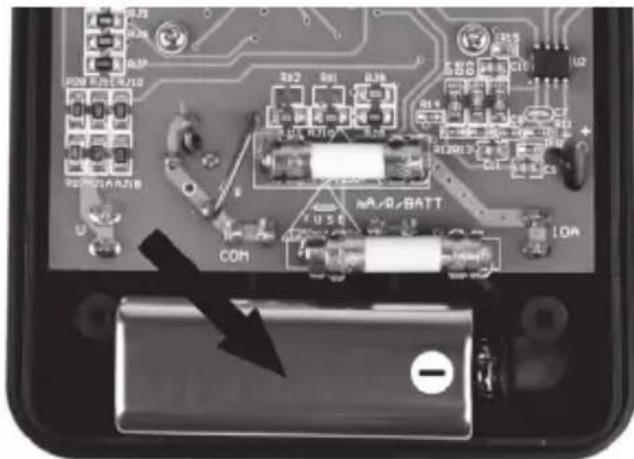
- Remove the two screws on the back of the multimeter and remove the back panel.
- Replace faulty fuse F1 (F 250mA / 300V) or F2 (F 10A / 300V) with a new one of the same type.
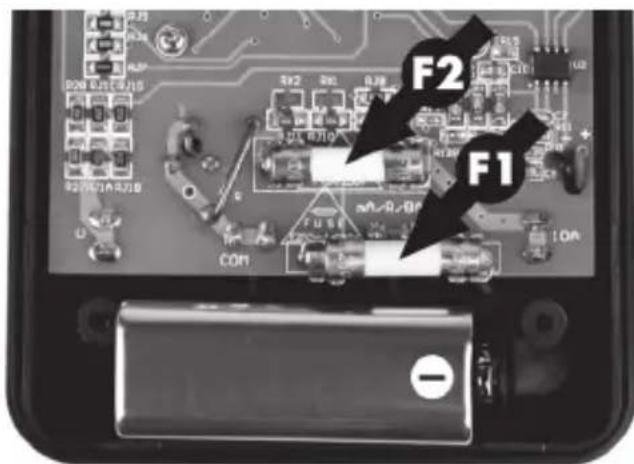
- Replace the back panel and screw it tight with the two screws.
- Re-insert the multimeter in the holster [2].
Cleaning

Switch off the multimeter and remove all test leads before cleaning the multimeter!
Use a dry cloth for cleaning and never use any solvent or cleaner that would corrode the plastic materials. Ensure that no liquid enters the housing. Use a slightly damp cloth for more stubborn dirt.
Environmental and disposal information

When this symbol appears on a product, this indicates that the product is subject to the European Directive 2012/19/EU. All old electrical and electronic devices must be separated from normal household waste and disposed of at designated state facilities. The correct disposal of old devices in this manner will prevent environmental pollution and human health hazards. For further information about proper disposal, contact your local authorities, waste disposal office or the shop where you bought the device.
Remember to protect the environment. Used batteries should not be disposed of in domestic waste. They must be taken to a collection point for old batteries. Please note that only discharged batteries may be deposited in collection bins for portable batteries. Care must be taken to ensure that batteries that are not fully discharged do not short circuit.
Dispose of the packaging in an environmentally compatible manner. Cardboard can be put out for municipal paper collections or brought to public collection points for recycling. Films and plastic used for packaging the device are collected by your local disposal services and disposed of in an environmentally compatible manner.
Conformity information

This device meets the basic requirements and other relevant regulations of the EMC Directive 2014/30/EU, the Low Voltage Directive 2014/35/EU as well as the RoHS Directive 2011/65/EU. To obtain a complete EU Declaration of Conformity, send an e-mail to the following e-mail address: ce@targa.de
Warranty and servicing advice
Warranty of TARGA GmbH
This device is sold with three years warranty from the date of purchase. Please keep the original receipt in a safe place as proof of purchase. Before using your product for the first time, please read the enclosed documentation. Should any problems arise which cannot be solved in this way, please call our hotline. Please have the article number and, if available, the serial number to hand for all enquiries. If it is not possible to solve the problem on the phone, our hotline support staff will initiate further servicing procedures depending on the fault. Within the warranty period the product will be repaired or replaced free of charge as we deem appropriate. No new warranty period commences if the product is repaired or replaced. Consumables such as batteries, rechargeable batteries and lamps are not covered by the warranty.
Your statutory rights towards the seller are not affected or restricted by this warranty.

Service

Phone: 020-70490403
E-Mail: service.GB@targa-online.com

Phone: 01-4370121
E-Mail: service.IE@targa-online.com

Phone: 027 78 11 03
E-Mail: service.MT@targa-online.com

Phone: 02-2009025
E-Mail: service.CY@targa-online.com
IAN:273352

Manufacturer
TARGA GmbH
Coesterweg 45
59494 SOEST
GERMANY


- Sommaire
- Introduction
- Intended use
- Supplied items
- Technical data
- Safety instructions
- Copyright
- Prior to use
- Inserting/changing the battery
- First use
- Overflow indicator
- DC voltage measurement
- AC voltage measurement
- AC current measurement
- DC current measurement
- Battery test
- Resistance measurement
- Continuity test
- Diode test
- HOLD function
- One-hand operation
- Setting up/hanging up the multimeter
- Cleaning / maintenance
- Maintenance
- Replacing the fuse
- Cleaning
- Environmental and disposal information
- Conformity information
- Warranty and servicing advice
- Warranty of TARGA GmbH
- Service
- IAN:273352
- Manufacturer
Brand : POWERFIX
Model : PDM 300 A1
Category : Multimeter