WUA1810E - Network card / adapter LEVELONE - Free user manual and instructions
Find the device manual for free WUA1810E LEVELONE in PDF.
Frequently Asked Questions - WUA1810E LEVELONE
User questions about WUA1810E LEVELONE
0 question about this device. Answer the ones you know or ask your own.
Ask a new question about this device
Download the instructions for your Network card / adapter in PDF format for free! Find your manual WUA1810E - LEVELONE and take your electronic device back in hand. On this page are published all the documents necessary for the use of your device. WUA1810E by LEVELONE.
USER MANUAL WUA1810E LEVELONE
text_image
level® oneQuick Installation Guide
(WUA-1810 E)
Digital Data Communications GmbH
Hohe Straße 1, 44139 Dortmund, Germany
Email : support@level1.com
English
Setup
Step1: Connect to a Computer
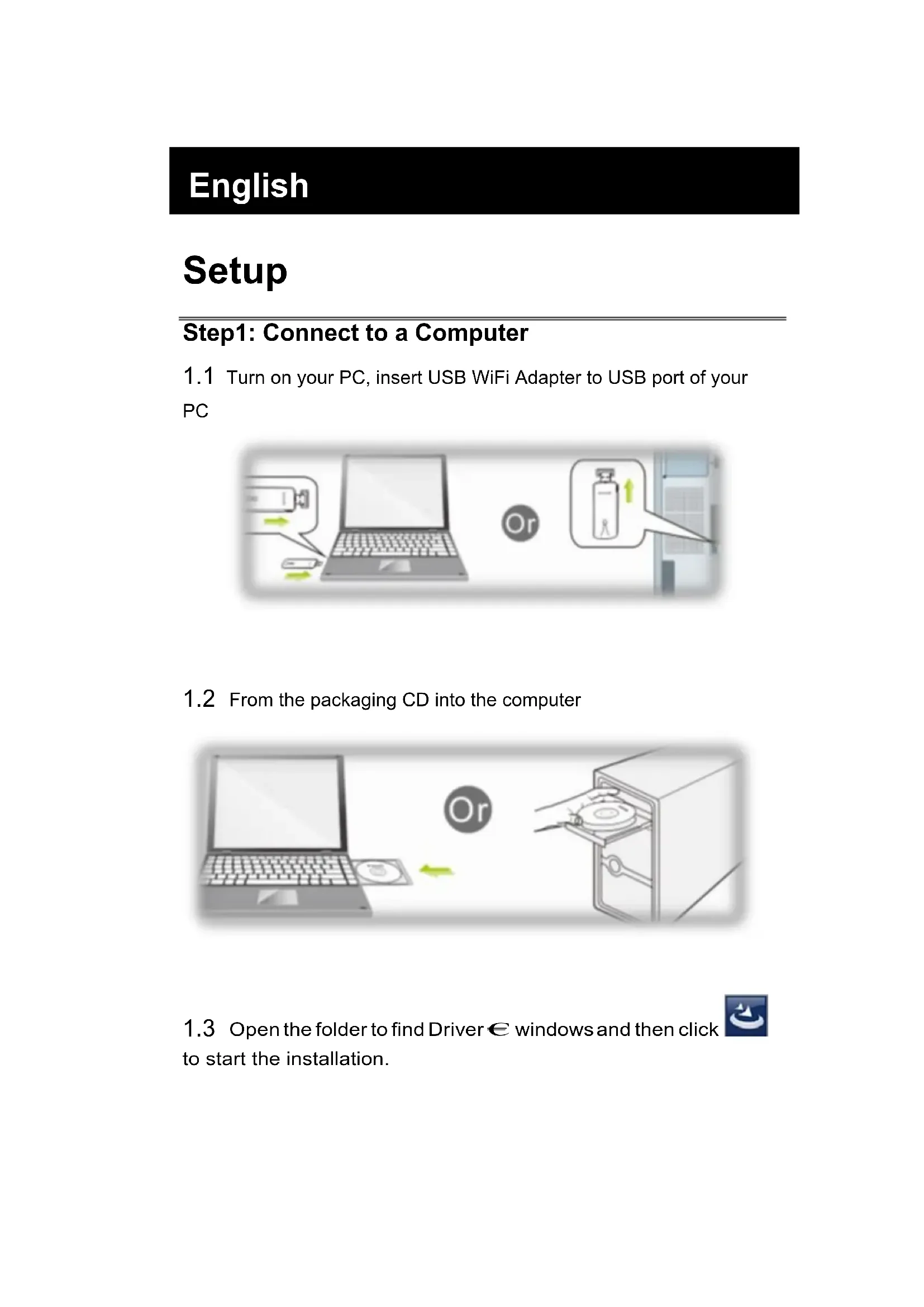
1.1 Turn on your PC, insert USB WiFi Adapter to USB port of your PC
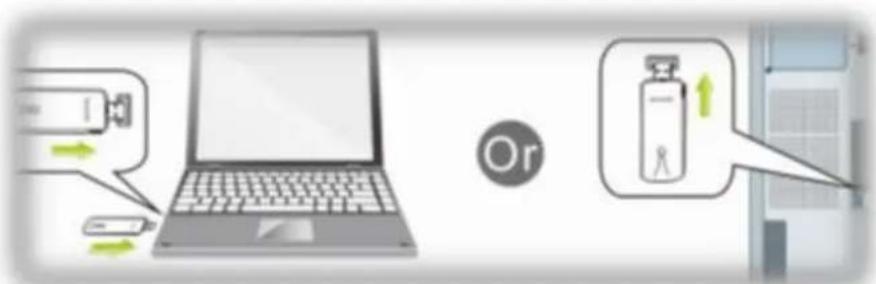
text_image
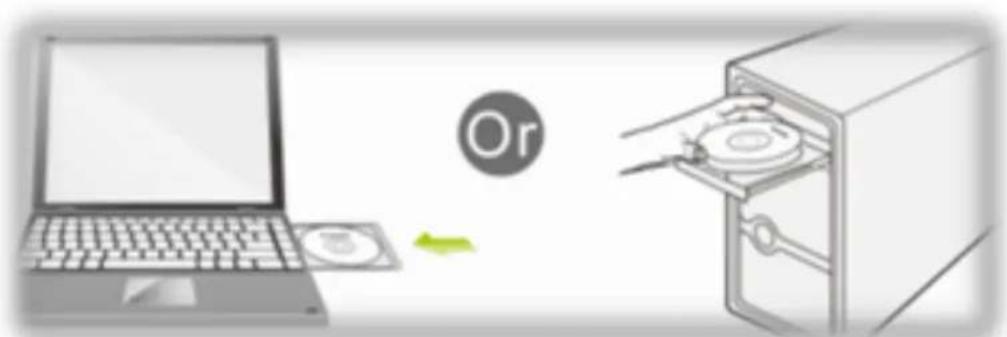
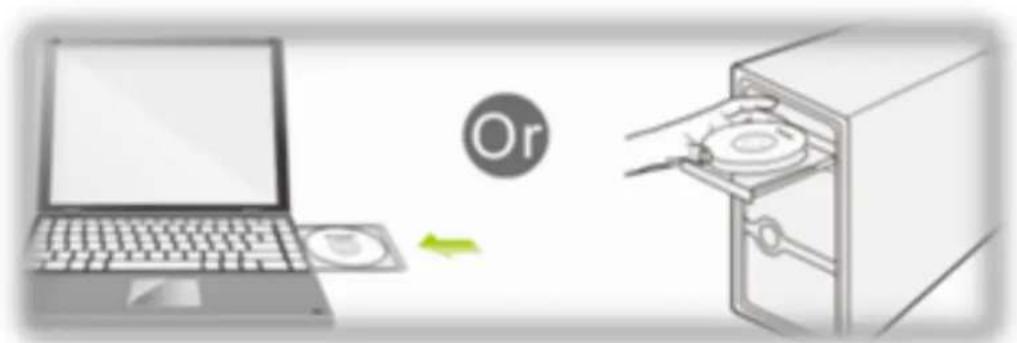
Diagram illustrating a device interaction with a laptop, showing input, processing, and output components.1.2 From the packaging CD into the computer
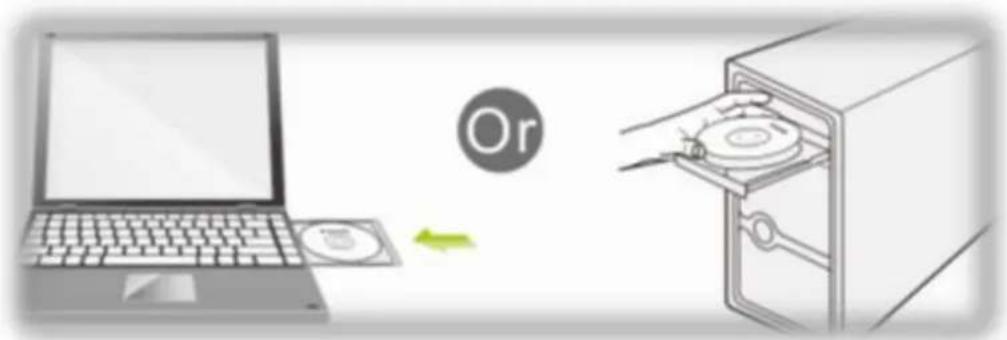
text_image
Diagram illustrating a computer setup with a laptop, CD, and a CD inside a storage cabinet, showing a file transfer or operation.1.3 Open the folder to find Driver € windows and then click to start the installation.

Step2: Driver software installation
2.1 In the below interface, please wait, please do NOT click the "Cancel" button; otherwise, installation will stop
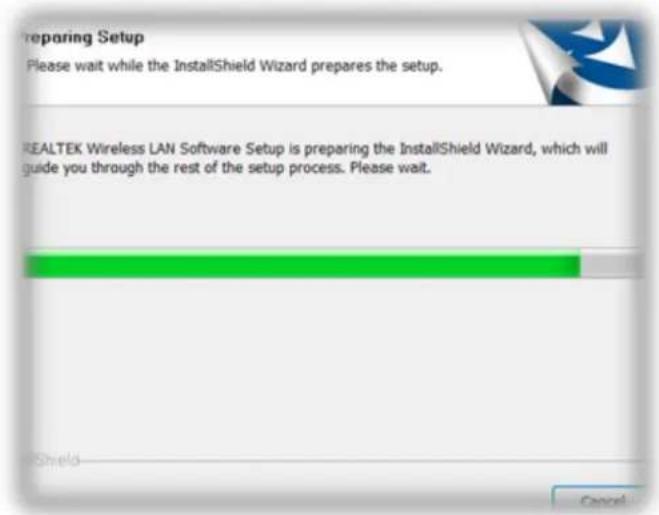
text_image
Preparing Setup Please wait while the InstallShield Wizard prepares the setup. REALTEK Wireless LAN Software Setup is preparing the InstallShield Wizard, which will guide you through the rest of the setup process. Please wait.2.2 In the below interface, please click "Next" button to continue with the installation.
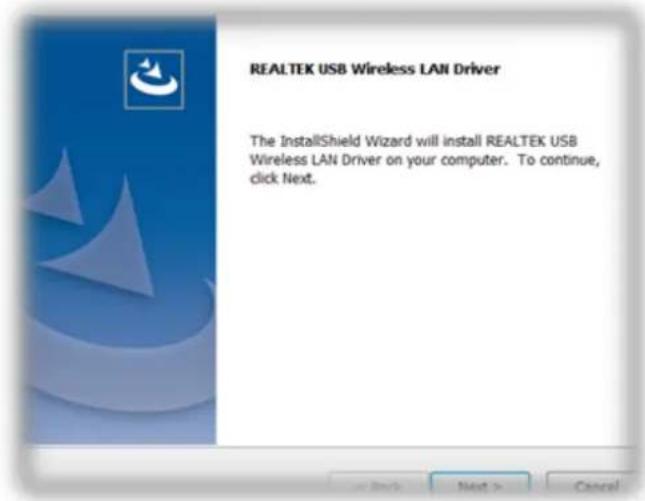
text_image
REALTEK USB Wireless LAN Driver The InstallShield Wizard will install REALTEK USB Wireless LAN Driver on your computer. To continue, click Next.2.3 In the below interface, please wait

text_image
Now installing REALTEK USB Wireless LAN Driver2.4 In the below interface, please wait
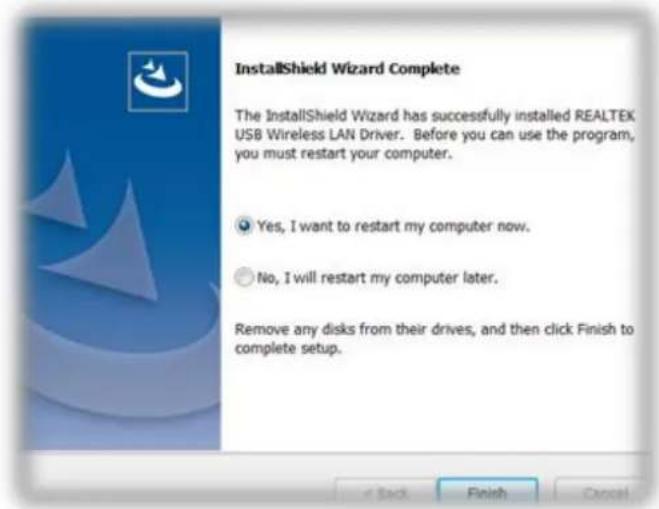
In the below interface, please select "Yes, I want to restart my computer now." and then click the "Finish" button to restart your computer.
text_image
InstallShield Wizard Complete The InstallShield Wizard has successfully installed REALTEK USB Wireless LAN Driver. Before you can use the program, you must restart your computer. Yes, I want to restart my computer now. No, I will restart my computer later. Remove any disks from their drives, and then click Finish to complete setup.2.5 Complete installation
Step3 : Wireless connection
3.1 Please open the installation application
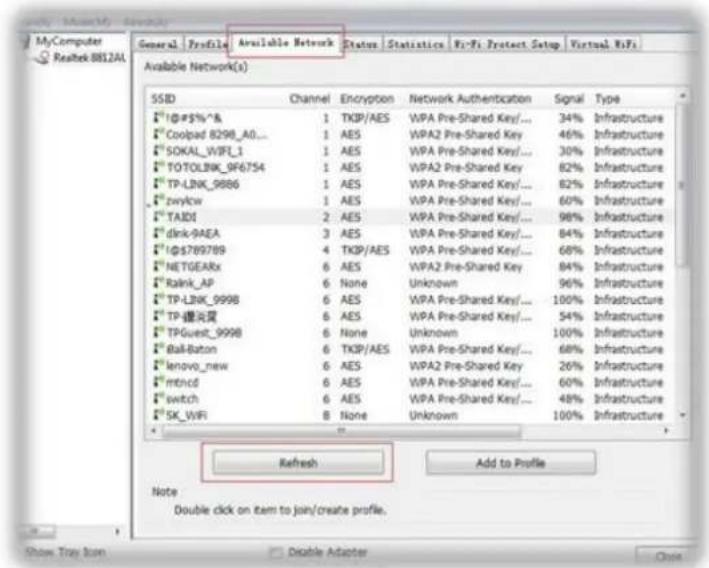
3.2 Click Available Network
text_image
MyComputer Realtek 8812AI Available Network(s) SSID Channel Encryption Network Authentication Signal Type #1@#$%*& 1 TKIP/AES WPA Pre-Shared Key/... 34% Infrastructure #Coolpad 8298_A0... 1 AES WPA2 Pre-Shared Key 46% Infrastructure #SOKAL_WIFI_1 1 AES WPA Pre-Shared Key/... 30% Infrastructure #TOTOLINK_9F6754 1 AES WPA2 Pre-Shared Key 82% Infrastructure #TP-LINK_9886 1 AES WPA Pre-Shared Key/... 82% Infrastructure #zwlycw 1 AES WPA Pre-Shared Key/... 60% Infrastructure #TAIDI 2 AES WPA Pre-Shared Key/... 98% Infrastructure #dink-9AEA 3 AES WPA Pre-Shared Key/... 84% Infrastructure #1$789789 4 TKIP/AES WPA Pre-Shared Key/... 68% Infrastructure #NETGEARx 6 AES WPA2 Pre-Shared Key 84% Infrastructure #Ralink_AP 6 None Unknown 96% Infrastructure #TP-LINK_9998 6 AES WPA Pre-Shared Key/... 100% Infrastructure #TP健康界 6 AES WPA Pre-Shared Key/... 54% Infrastructure #TPGuest_9998 6 None Unknown 100% Infrastructure #Ball-Baton 6 TKIP/AES WPA Pre-Shared Key/... 68% Infrastructure #lenovo_new 6 AES WPA2 Pre-Shared Key 26% Infrastructure #mtncd 6 AES WPA Pre-Shared Key/... 60% Infrastructure #switch 6 AES WPA Pre-Shared Key/... 48% Infrastructure #SK_WIFI 8 None Unknown 100% Infrastructure Refresh Add to Profile Note Double click on item to join/create profile. Show Tray Icon Disable Adapter3.3 Select wireless input password to connect
text_image
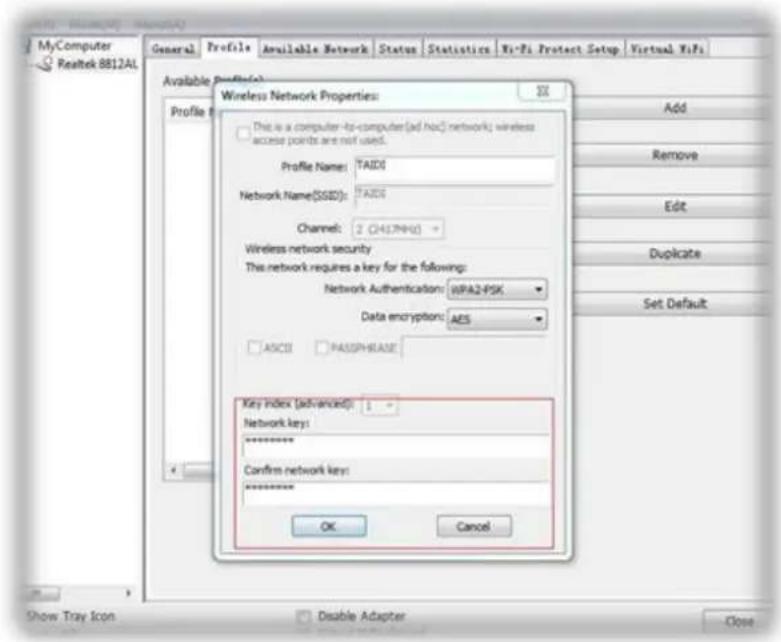
MyComputer Realtek 8812AL General Profile Available Network Status Statistics Wi-Fi Protect Setup Virtual WiFi Available Profile(s): Profile Wireless Network Properties: This is a computer-lb-computer(ad hoc) network; wireless access points are not used. Profile Name: TAID0 Network Name(SSID): TAID0 Channel: 2 (2417NKG) Wireless network security This network requires a key for the following: Network Authentication: WPA2-PSK Data encryption: AES ASCII PASSPHASE Key index (advanced): 1 - Network keys: ****** Confirm network keys: ****** OK Cancel Add Remove Edit Duplicate Set Default Show Tray Icon Disable Adapter Close3.4 View the information

text_image
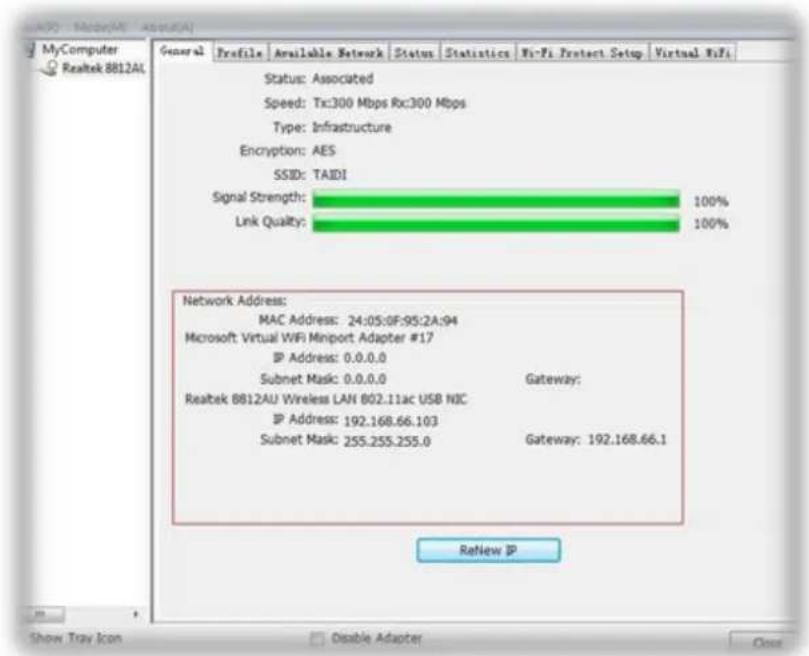
MyComputer Realtek 8812AL General Profile Available Network Status Statistics Wi-Fi Protect Setup Virtual WiFi Status: Associated Speed: Tx:300 Mbps Rx:300 Mbps Type: Infrastructure Encryption: AES SSID: TAIDI Signal Strength: 100% Link Quality: 100% Network Address: MAC Address: 24:05:0F:95:2A:94 Microsoft Virtual WiFi Minport Adapter #17 IP Address: 0.0.0.0 Subnet Mask: 0.0.0.0 Gateway: Realtek 8812AU Wireless LAN 802.11ac USB NIC IP Address: 192.168.66.103 Subnet Mask: 255.255.255.0 Gateway: 192.168.66.1 ReNew IP Show Tray Icon Disable Adapter CloseDeutsch
Konfiguration
text_image
Diagram illustrating a battery storage system with labeled components and directional arrows indicating flow or movement.text_image
Diagram illustrating a file transfer process with a laptop, CD, and file holder, showing a green arrow indicating the process.text_image
Preparing Setup Please wait while the InstallShield Wizard prepares the setup. REALTEK Wireless LAN Software Setup is preparing the InstallShield Wizard, which will guide you through the rest of the setup process. Please wait.text_image
REALTEK USB Wireless LAN Driver The InstallShield Wizard will install REALTEK USB Wireless LAN Driver on your computer. To continue, click Next.text_image
Now installing REALTEK USB Wireless LAN DriverNow installing Cisco EAP-FAST
text_image
InstallShield Wizard Complete The InstallShield Wizard has successfully installed REALTEK USB Wireless LAN Driver. Before you can use the program, you must restart your computer. Yes, I want to restart my computer now. No, I will restart my computer later. Remove any disks from their drives, and then click Finish to complete setup.text_image
MyComputer Realtek 8812A1 General | Profile | Available Network | Status | Statistics | Wi-Fi Protect Setup | Virtual WiFi | Available Network(s) SSID Channel Encryption Network Authentication Signal Type *0495%*& 1 TKPI/AES WPA Pre-Shared Key/... 34% Infrastructure *Coolpad 8298_A0... 1 AES WPA2 Pre-Shared Key 46% Infrastructure *SOKAI_WBPL_1 1 AES WPA Pre-Shared Key/... 30% Infrastructure *TOTOLBK_9F6754 1 AES WPA2 Pre-Shared Key 82% Infrastructure *TP-LINK_9886 1 AES WPA Pre-Shared Key/... 82% Infrastructure *zwlylow 1 AES WPA Pre-Shared Key/... 60% Infrastructure *TADI 2 AES WPA Pre-Shared Key/... 98% Infrastructure *dkn-AEA 3 AES WPA Pre-Shared Key/... 84% Infrastructure *08789789 4 TKPI/AES WPA Pre-Shared Key/... 68% Infrastructure *NETGEARx 6 AES WPA2 Pre-Shared Key 84% Infrastructure *Rink_AP 6 None Unknown 96% Infrastructure *TP-LINK_9998 6 AES WPA Pre-Shared Key/... 100% Infrastructure *TP健康更 6 AES WPA Pre-Shared Key/... 54% Infrastructure *TPGent_9998 6 None Unknown 100% Infrastructure *8a-Baton 6 TKPI/AES WPA Pre-Shared Key/... 68% Infrastructure *lenovo_new 6 AES WPA2 Pre-Shared Key 26% Infrastructure *mtnc0 6 AES WPA Pre-Shared Key/... 60% Infrastructure *switch 6 AES WPA Pre-Shared Key/... 48% Infrastructure *SK_WIFI 8 None Unknown 100% Infrastructure Refresh Add to Profile Note Double click on item to join/create profile. Show Tray Icon Double Adaptertext_image
MyComputer Realtek 8812A1 General Profile Available Network Status Statistics Wi-Fi Protect Setup Virtual WiFi Available Profile Wireless Network Properties: This is a computer-to-computer(ad hoc) network) wireless access points are not used. Profile Name: YADD Network Name(SDD): YADD Channel: 2 (441.9MHz) Wireless network security This network requires a key for the following: Network Authentication: WPA2-PSK Data encryption: MS ASCII MACS/PHASE Key Index (advanced): Network key: ****** Confirm network key: ****** OK Cancel Add Remove Edit Duplicate Set Default Show Tray Icon Disable Adapter Closetext_image
MyComputer Realtek BB12AU General Profile Available Network Status Statistics Xe-Fi Project Setup Virtual Rifi Status: Associated Speed: Tx:300 Mbps Rx:300 Mbps Type: Infrastructure Encryption: AES SSD: TADI Signal Strength: 100% Link Quality: 100% Network Address: MAC Address: 24:05:0F:00:2A:94 Microsoft Virtual WiFi Menport Adapter #17 IP Address: 0.0.0.0 Subnet Mask: 0.0.0.0 Gateway: Realtek BB12AU Wireless LAN 602.11ac USB NC IP Address: 192.188.66.103 Subnet Mask: 255.255.255.0 Gateway: 192.188.66.1 Refresh IP Show Tray Box Disable Adapter OpenFrançais
Installation
text_image
Diagram illustrating a device setup with a laptop, battery, and a product bottle, showing directional arrows and a 'Or' label.text_image
Diagram illustrating a file transfer process with a laptop, CD, and file holder, showing a green arrow indicating the process.text_image
Preparing Setup Please wait while the InstallShield Wizard prepares the setup. REALTEK Wireless LAN Software Setup is preparing the InstallShield Wizard, which will guide you through the rest of the setup process. Please wait.text_image
REALTEK USB Wireless LAN Driver The InstallShield Wizard will install REALTEK USB Wireless LAN Driver on your computer. To continue, click Next.text_image
Now installing REALTEK USB Wireless LAN DriverNow installing Cisco EAP-FAST
text_image
InstallShield Wizard Complete The InstallShield Wizard has successfully installed REALTEK USB Wireless LAN Driver. Before you can use the program, you must restart your computer. ● Yes, I want to restart my computer now. ○ No, I will restart my computer later. Remove any disks from their drives, and then click Finish to complete setup.2.5 Terminez l'installation

text_image
MyComputer Realtek 88124L General Profile Available Network Status Statistics Wi-Fi Protect Setup Virtual Wi-Fi Available Network(s) SSID Channel Encryption Network Authentication Signal Type 1Phi5%^& 1 TKPIAES WPA Pre-Shared Key/... 34% Infrastructure 2Coolpad 8298_A0... 1 AES WPA2 Pre-Shared Key 46% Infrastructure 3SOKAI_WIP_1 1 AES WPA Pre-Shared Key/... 30% Infrastructure 4TOTOLNK_9F6754 1 AES WPA2 Pre-Shared Key 82% Infrastructure 5TP-LINK_9886 1 AES WPA Pre-Shared Key/... 82% Infrastructure 6zwlyow 1 AES WPA Pre-Shared Key/... 60% Infrastructure 7TAIDE 2 AES WPA Pre-Shared Key/... 96% Infrastructure 8clk-DAEA 3 AES WPA Pre-Shared Key/... 84% Infrastructure 9ΦS789789 4 TKPIAES WPA Pre-Shared Key/... 68% Infrastructure 1NETGEARx 6 AES WPA2 Pre-Shared Key 84% Infrastructure 1Rink_AP 6 None Unknown 96% Infrastructure 2TP-LINK_9998 6 AES WPA Pre-Shared Key/... 100% Infrastructure 3TP-曙光奖 6 AES WPA Pre-Shared Key/... 54% Infrastructure 4TPGuent_9998 0 None Unknown 100% Infrastructure 5Bull-Baton 6 TKPIAES WPA Pre-Shared Key/... 68% Infrastructure 6lenovo_new 6 AES WPA2 Pre-Shared Key 26% Infrastructure 7mtncd 6 AES WPA Pre-Shared Key/... 60% Infrastructure 8switch 6 AES WPA Pre-Shared Key/... 48% Infrastructure 9SK_VPR 8 None Unknown 100% Infrastructure Refresh Add to Profile Note Double click on item to join/create profile. Show Tray Icon Double Adapter Closetext_image
MyComputer Realtek 881241 General Profile Available Network Status Statistics Wi-Fi Protect Setup Virtual Wi-Fi Available Profile: Wireless Network Properties Profile Name: TAIDS Network Name(SAID): TAIDS Channel: 2 (341.79%) - Wireless network security This network requires a key for the following: Network Authentication: BPA2-PSK Data encryption: AES ASCII MACOSPHASE Key index (advanced): Network key: ****** Confirm network key: ****** OK Cancel Add Remove Edit Duplicate Set Default Show Tray Icon Disable Adapter Closetext_image
Diagram illustrating a device setup with a laptop, battery, and a bottle labeled 'Or' connected to a device.text_image
Diagram illustrating a file transfer process with a laptop, CD, and CD inside a storage cabinet, featuring an 'Or' label.text_image
Preparing Setup Please wait while the InstallShield Wizard prepares the setup. REALTEK Wireless LAN Software Setup is preparing the InstallShield Wizard, which will guide you through the rest of the setup process. Please wait.text_image
REALTEK USB Wireless LAN Driver The InstallShield Wizard will install REALTEK USB Wireless LAN Driver on your computer. To continue, click Next.text_image
Now installing REALTEK USB Wireless LAN Drivertext_image
InstallShield Wizard Complete The InstallShield Wizard has successfully installed REALTEK USB Wireless LAN Driver. Before you can use the program, you must restart your computer. Yes, I want to restart my computer now. No, I will restart my computer later. Remove any disks from their drives, and then click Finish to complete setup.text_image
My Computer Realtek 881241 General | Profile | Available Network | Status | Statistician | Fly-Fit Protect Setup | Virtual Wi-Fi Available Network(S) SSID Channel Encryption Network Authentication Signal Type 1"Q:F5%^& 1 TKPIAES WPA Pre-Shared Key/... 34% Infrastructure 2"Coolpad 8298_A0... 1 AES WPA2 Pre-Shared Key 46% Infrastructure 3"SOKAL_V9FJ_1 1 AES WPA Pre-Shared Key/... 30% Infrastructure 4"TOTOLBK_996754 1 AES WPA Pre-Shared Key 82% Infrastructure 5"TP-LBK_9986 1 AES WPA Pre-Shared Key/... 82% Infrastructure 6"zwlycw 1 AES WPA Pre-Shared Key/... 60% Infrastructure 7"TAIDI 2 AES WPA Pre-Shared Key/... 96% Infrastructure 8"disk-0AEA 3 AES WPA Pre-Shared Key/... 84% Infrastructure 9"TQF769789 4 TKPIAES WPA Pre-Shared Key/... 68% Infrastructure 10"NETGEARx 6 AES WPA2 Pre-Shared Key 84% Infrastructure 11"Ratink_AP 6 None Unknown 96% Infrastructure 12"TP-LBK_9998 6 AES WPA Pre-Shared Key/... 100% Infrastructure 13"TP健康区 6 AES WPA Pre-Shared Key/... 54% Infrastructure 14"TPGuest_9998 6 None Unknown 100% Infrastructure 15"Bull-Baton 6 TKPIAES WPA Pre-Shared Key/... 68% Infrastructure 16"lenovo_new 6 AES WPA2 Pre-Shared Key 26% Infrastructure 17"mtmcd 6 AES WPA Pre-Shared Key/... 60% Infrastructure 18"switch 6 AES WPA Pre-Shared Key/... 48% Infrastructure 19"SK_WIFI 8 None Unknown 100% Infrastructure Refresh Add to Profile Note Double click on item to join/create profile. Show Tray Icon Double Adapter Closetext_image
MyComputer Realtek 88124L General Profile Available Network Status Statistics Xi-Fi Protect Setup Virtual Wi-Fi Available Profile: Profile Wireless Network Properties: This is a computer-to-computer (ad hoc) network; wireless across points are not used. Profile Name: TAIDS Network Name(SI3D): TAIDS Channel: 2 (4617MHz) Wireless network security This network requires a key for the following: Network Authentication: WPA2-PSK Data encryption: AES ASCII PASIPHRASE Key Index (Advanced): Network key: ****** Confirm network key: ****** OK Cancel Add Remove Edit Duplicate Set Default Show Tray Icon Disable Adapter Closetext_image
MyComputer Realtek B812AU General Profile Available Network Status Statistics Wi-Fi Protect Setup Virtual Wi-Fi Status: Associated Speed: Tx:300 Mbps Rx:300 Mbps Type: Infrastructure Encryption: AES SSB: TADI Signal Strength: 100% Link Quality: 100% Network Address: MAC Address: 24.05.0F-05.2A.94 Microsoft Virtual WiFi Import Adapter #17 IP Address: 0.0.0.0 Subnet Mask: 0.0.0.0 Gateway: Realtek B812AU Wireless LAN 802.11ac USB NC IP Address: 192.168.66.103 Subnet Mask: 255.255.255.0 Gateway: 192.168.66.1 Refresh IP Show Tray Icon Double Adapter OpenPortuguês
Instalação
text_image
Diagram illustrating a device setup with a laptop, battery, and a labeled 'Or' symbol indicating or without access.1.2 Insira o CD fornecido no computador
text_image
Ortext_image
Preparing Setup Please wait while the InstallShield Wizard prepares the setup. REALTEK Wireless LAN Software Setup is preparing the InstallShield Wizard, which will guide you through the rest of the setup process. Please wait.text_image
REALTEK USB Wireless LAN Driver The InstallShield Wizard will install REALTEK USB Wireless LAN Driver on your computer. To continue, click Next.Now installing Cisco EAP-FAST
text_image
InstallShield Wizard Complete The InstallShield Wizard has successfully installed REALTEK USB Wireless LAN Driver. Before you can use the program, you must restart your computer. Yes, I want to restart my computer now. No, I will restart my computer later. Remove any disks from their drives, and then click Finish to complete setup.text_image
MyComputer Realtek 882AL General | Profile | Available Network | Status | Statulation | Fi-Fi Protect Setup | Virtual WiFi Available Network(s) SSID Channel Encryption Network Authentication Signal Type #1@#$%^& 1 TKP/AES WPA Pre-Shared Key/... 34% Infrastructure #Coolpad 8298_A0... 1 AES WPA2 Pre-Shared Key 46% Infrastructure #SOKAL_WPPL_1 1 AES WPA Pre-Shared Key/... 30% Infrastructure #TOTOLNK_966754 1 AES WPA2 Pre-Shared Key 82% Infrastructure #TP-LINK_9886 1 AES WPA Pre-Shared Key/... 82% Infrastructure #zwlycw 1 AES WPA Pre-Shared Key/... 60% Infrastructure #TAIDS 2 AES WPA Pre-Shared Key/... 98% Infrastructure #dknRAEA 3 AES WPA Pre-Shared Key/... 84% Infrastructure #G$789789 4 TKP/AES WPA Pre-Shared Key/... 68% Infrastructure #NETGEARx 6 AES WPA2 Pre-Shared Key 84% Infrastructure #Ralk_AP 6 None Unknown 96% Infrastructure #TP-LINK_9998 6 AES WPA Pre-Shared Key/... 100% Infrastructure #TP健康页 6 AES WPA Pre-Shared Key/... 54% Infrastructure #TPGuest_9998 6 None Unknown 100% Infrastructure #Ball-Baton 6 TKP/AES WPA Pre-Shared Key/... 68% Infrastructure #lenovo_new 6 AES WPA2 Pre-Shared Key 26% Infrastructure #mtncd 6 AES WPA Pre-Shared Key/... 60% Infrastructure #switch 6 AES WPA Pre-Shared Key/... 48% Infrastructure #SK_WIFI 8 None Unknown 100% Infrastructure Refresh Add to Profile Note Double click on item to join/create profile. Show Tray Icon Double Adaptertext_image
MyComputer Realtek 8812AL General Profile Available Network Status Statistics Wi-Fi Protect Setup Virtual RFs Available Profile(s): Wireless Network Properties: This is a computer-to-computer (all hoc) network; wireless access points are not used. Profile Name: TAIDS Network Name(SSOS): TAIDS Channel: 2 (441.9MHz) Wireless network security This network requires a key for the following: Network Authentication: HIPA2-PSK Data encryption: AES ASC0 PASSPHRASE Key index (advanced): Network Key: ****** Confirm network Key: ****** OK Cancel Add Remove Edit Duplicate Set Default Show Tray Icon Disable Adapter Closetext_image
MyComputer Realtek B812AU General Profile Available Network Status Statistics Rs-Ps Protect Setup Virtual RFs Status: Associated Speed: Tx:300 Mbps Rx:300 Mbps Type: Infrastructure Encryption: AES SSD: TAIDI Signal Strength: 100% Link Quality: 100% Network Address: MAC Address: 24.05.0F/05.2A.94 Microsoft Virtual WiFi Passport Adapter #17 IP Address: 0.0.0.0 Subnet Mask: 0.0.0.0 Gateway: Realtek B812AU Wireless LAN 802.11ac USB NC IP Address: 192.168.66.103 Subnet Mask: 255.255.255.0 Gateway: 192.168.66.1 Refine IP Share Tray Icon Double AdapterItalian
Installazione
text_image
Diagram illustrating a device interaction with a laptop and a bottle, showing battery release and recycling process.1.2 Dal CD al computer

text_image
Diagram illustrating a file transfer process with a laptop, CD, and CD inside a server room, featuring an 'Or' label.text_image
Preparing Setup Please wait while the InstallShield Wizard prepares the setup. REALTEK Wireless LAN Software Setup is preparing the InstallShield Wizard, which will guide you through the rest of the setup process. Please wait.text_image
REALTEK USB Wireless LAN Driver The InstallShield Wizard will install REALTEK USB Wireless LAN Driver on your computer. To continue, click Next.text_image
Now installing REALTEK USB Wireless LAN DriverNow installing Cisco EAP-FAST
text_image
InstallShield Wizard Complete The InstallShield Wizard has successfully installed REALTEK USB Wireless LAN Driver. Before you can use the program, you must restart your computer. Yes, I want to restart my computer now. No, I will restart my computer later. Remove any disks from their drives, and then click Finish to complete setup.text_image
MyComputer Realtek 881241 General Profile Available Network Status Statistics Wi-Fi Protect Setup Virtual Wi-Fi Available Network(s) SSD Channel Encryption Network Authentication Signal Type #TQ-P5%^& 1 TKP/AES WPA Pre-Shared Key/... 34% Infrastructure Coolpad 8298_A0... 1 AES WPA2 Pre-Shared Key 46% Infrastructure SOKAI_W3F_1 1 AES WPA Pre-Shared Key/... 30% Infrastructure TOTOLNK_9R6754 1 AES WPA2 Pre-Shared Key 82% Infrastructure TP-LNK_9886 1 AES WPA Pre-Shared Key/... 82% Infrastructure zwlylow 1 AES WPA Pre-Shared Key/... 60% Infrastructure TAIDI 2 AES WPA Pre-Shared Key/... 98% Infrastructure clk-NAEA 3 AES WPA Pre-Shared Key/... 84% Infrastructure #FS789789 4 TKP/AES WPA Pre-Shared Key/... 68% Infrastructure NETGEARx 6 AES WPA2 Pre-Shared Key 84% Infrastructure Ralink_AP 6 None Unknown 96% Infrastructure TP-LNK_9998 6 AES WPA Pre-Shared Key/... 100% Infrastructure TP-健康局 6 AES WPA Pre-Shared Key/... 34% Infrastructure TPGuest_9998 6 None Unknown 100% Infrastructure Ball-Baton 6 TKP/AES WPA Pre-Shared Key/... 68% Infrastructure lenovo_new 6 AES WPA2 Pre-Shared Key 26% Infrastructure mtned 6 AES WPA Pre-Shared Key/... 60% Infrastructure switch 6 AES WPA Pre-Shared Key/... 48% Infrastructure SK_WIFI 8 None Unknown 100% Infrastructure Refresh Add to Profile Note Double click on item to join/create profile. Show Tree Icon Double Adapter Closetext_image
MyComputer Realtek BBI2AL General Profile Available Network Status Statistics Ry-Fi Protect Setup Virtual Rifi Available Profile Profile Wireless Network Properties: This is a computer-to-computer (ad hoc) network; wireless access points are not used. Profile Name: TAIDE Network Name(000): TAIDE Channel: 2 (46794%) Wireless network security This network requires a key for the following: Network Authentication: WFA2-PSK Data encryption: AES ASCII PASPHYASE Key Index (Advanced): Network key: ****** Confirm network key: ****** OK Cancel Add Remove Edit Duplicate Set Default Show Tray Icon Disable Adapter Closebar
| Metric | Value | | :--- | :--- | | Signal Strength: | 100% | | Link Quality: | 100% | | IP Address: | 0.0.0.0 | | Subnet Mask: | 0.0.0.0 | | Gateway: Realtek 8812AU Wireless LAN 802.11ac USB NBC | Gateway: 192.168.66.103 | | IP Address: | 192.168.66.103 | | Subnet Mask: | 255.255.255.0 | | Gateway: | 192.168.66.1 | The chart displays a single bar for the 'Signal Strength' metric, indicating that the network has an associated association between realtek 8812AU and its components in the network. The 'Link Quality' metric is also included in the table but not explicitly labeled in the image. The 'Background' label is not present in the chart.CE
Compliance Statement
CE marking is a certification mark that indicates conformity with health, safety, and environmental protection standards for products sold within the European Economic Area (EEA). The CE marking is also found on products sold outside the EEA that have been manufactured to EEA standards. This makes the CE marking recognizable worldwide even to people who are not familiar with the European Economic Area.

WEEE
WEEE is waste electrical and electronic equipment. It is end-of-life electrical and electronic equipment and covers virtually everything with a plug or battery. ... The EC introduced the WEEE Directive in 2002 to address the environmental impacts of unwanted electrical and electronic equipment at end-of-life disposal.
EasyManual