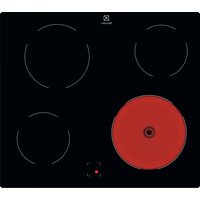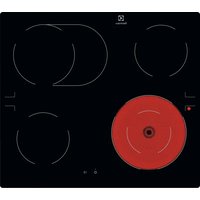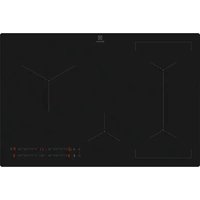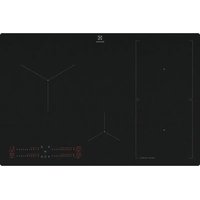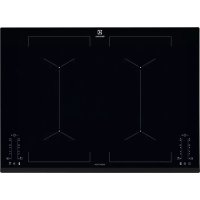
EIV744 - Cooker ELECTROLUX - Free user manual and instructions
Find the device manual for free EIV744 ELECTROLUX in PDF.


Frequently Asked Questions - EIV744 ELECTROLUX
User questions about EIV744 ELECTROLUX
0 question about this device. Answer the ones you know or ask your own.
Ask a new question about this device
Download the instructions for your Cooker in PDF format for free! Find your manual EIV744 - ELECTROLUX and take your electronic device back in hand. On this page are published all the documents necessary for the use of your device. EIV744 by ELECTROLUX.
USER MANUAL EIV744 ELECTROLUX
EN Hob User Manual 2
- SAFETY INFORMATION......2
- SAFETY INSTRUCTIONS......4
- INSTALLATION....7
- PRODUCT DESCRIPTION....8
- DAILY USE....10
- HINTS AND TIPS.... 14
- CARE AND CLEANING....17
- TROUBLESHOOTING....17
- TECHNICAL DATA....19
- ENERGY EFFICIENCY....20
WE'RE THINKING OF YOU
Thank you for purchasing an Electrolux appliance. You've chosen a product that brings with it decades of professional experience and innovation. Ingenious and stylish, it has been designed with you in mind. So whenever you use it, you can be safe in the knowledge that you'll get great results every time.
Welcome to Electrolux.
Visit our website to:

Get usage advice, brochures, trouble shooter, service and repair information: www.electrolux.com/support

Register your product for better service: www.registerelectrolux.com

Buy Accessories, Consumables and Original spare parts for your appliance: www.electrolux.com/shop
CUSTOMER CARE AND SERVICE
Always use original spare parts.
When contacting our Authorised Service Centre, ensure that you have the following data available: Model, PNC, Serial Number.
The information can be found on the rating plate.
⚠ Warning / Caution-Safety information
i General information and tips
Environmental information
Subject to change without notice.
1. ⚠ SAFETY INFORMATION
Before the installation and use of the appliance, carefully read the supplied instructions. The manufacturer is not responsible for any injuries or damages that are the result of incorrect installation or usage. Always keep the
instructions in a safe and accessible location for future reference.
1.1 Children and vulnerable people safety
- This appliance can be used by children aged from 8 years and above and persons with reduced physical, sensory or mental capabilities or lack of experience and knowledge if they have been given supervision or instruction concerning the use of the appliance in a safe way and understand the hazards involved.
• Children between 3 and 8 years of age and persons with very extensive and complex disabilities shall be kept away unless continuously supervised. - Children of less than 3 years of age should be kept away unless continuously supervised.
- Do not let children play with the appliance.
- Keep all packaging away from children and dispose of it appropriately.
- Keep children and pets away from the appliance when it operates or when it cools down. Accessible parts are hot.
- If the appliance has a child safety device, it should be activated.
- Children shall not carry out cleaning and user maintenance of the appliance without supervision.
1.2 General Safety
- WARNING: The appliance and its accessible parts become hot during use. Care should be taken to avoid touching heating elements.
- Do not operate the appliance by means of an external timer or separate remote-control system.
- WARNING: Unattended cooking on a hob with fat or oil can be dangerous and may result in fire.
- NEVER try to extinguish a fire with water, but switch off the appliance and then cover flame e.g. with a lid or a fire blanket.
- CAUTION: The cooking process has to be supervised. A short term cooking process has to be supervised continuously.
- WARNING: Danger of fire: Do not store items on the cooking surfaces.
- Metallic objects such as knives, forks, spoons and lids should not be placed on the hob surface since they can get hot.
- Do not use a steam cleaner to clean the appliance.
• After use, switch off the hob element by its control and do not rely on the pan detector.
- If the glass ceramic surface / glass surface is cracked, switch off the appliance and unplug it from the mains. In case the appliance is connected to the mains directly using junction box, remove the fuse to disconnect the appliance from power supply. In either case contact the Authorised Service Centre.
- If the supply cord is damaged, it must be replaced by the manufacturer, an authorized Service or similarly qualified persons in order to avoid a hazard.
- WARNING: Use only hob guards designed by the manufacturer of the cooking appliance or indicated by the manufacturer of the appliance in the instructions for use as suitable or hob guards incorporated in the appliance. The use of inappropriate guards can cause accidents.
2. SAFETY INSTRUCTIONS
2.1 Installation

WARNING!
Only a qualified person must install this appliance.

WARNING!
Risk of injury or damage to the appliance.
- Remove all the packaging.
- Do not install or use a damaged appliance.
- Follow the installation instructions supplied with the appliance.
- Keep the minimum distance from other appliances and units.
• Always take care when moving the appliance as it is heavy. Always use safety gloves and enclosed footwear.
- Seal the cut surfaces with a sealant to prevent moisture to cause swelling.
- Protect the bottom of the appliance from steam and moisture.
- Do not install the appliance adjacent to a door or under a window. This prevents hot cookware falling from the appliance when the door or the window is opened.
• Each appliance has cooling fans on the bottom.
- If the appliance is installed above a drawer:
- Do not store any small pieces or sheets of paper that could be pulled in, as they can damage the cooling fans or impair the cooling system.
- Keep a distance of minimum 2 cm between the bottom of the appliance and parts stored in the drawer.
- Remove any separator panels installed in the cabinet below the appliance.
2.2 Electrical Connection

WARNING!
Risk of fire and electric shock.
- All electrical connections should be made by a qualified electrician.
• The appliance must be earthed. - Before carrying out any operation make sure that the appliance is disconnected from the power supply.
- Make sure that the parameters on the rating plate are compatible with the electrical ratings of the mains power supply.
- Make sure the appliance is installed correctly. Loose and incorrect electricity mains cable or plug (if applicable) can make the terminal become too hot.
- Use the correct electricity mains cable.
- Do not let the electricity mains cable tangle.
- Make sure that a shock protection is installed.
- Use the strain relief clamp on the cable.
- Make sure the mains cable or plug (if applicable) does not touch the hot appliance or hot cookware, when you connect the appliance to the near sockets.
- Do not use multi-plug adapters and extension cables.
- Make sure not to cause damage to the mains plug (if applicable) or to the mains cable. Contact our Authorised
Service Centre or an electrician to change a damaged mains cable.
- The shock protection of live and insulated parts must be fastened in such a way that it cannot be removed without tools.
- Connect the mains plug to the mains socket only at the end of the installation. Make sure that there is access to the mains plug after the installation.
- If the mains socket is loose, do not connect the mains plug.
- Do not pull the mains cable to disconnect the appliance. Always pull the mains plug.
- Use only correct isolation devices: line protecting cut-outs, fuses (screw type fuses removed from the holder), earth leakage trips and contactors.
- The electrical installation must have an isolation device which lets you disconnect the appliance from the mains at all poles. The isolation device must have a contact opening width of minimum 3 mm.
2.3 Use

WARNING!
Risk of injury, burns and electric shock.
- Remove all the packaging, labelling and protective film (if applicable) before first use.
- This appliance is for household use only.
- Do not change the specification of this appliance.
- Make sure that the ventilation openings are not blocked.
- Do not let the appliance stay unattended during operation.
- Set the cooking zone to "off" after each use.
- Do not rely on the pan detector.
- Do not put cutlery or saucepan lids on the cooking zones. They can become hot.
- Do not operate the appliance with wet hands or when it has contact with water.
-
Do not use the appliance as a work surface or as a storage surface.
-
If the surface of the appliance is cracked, disconnect immediately the appliance from the power supply. This to prevent an electrical shock.
- Users with a pacemaker must keep a distance of minimum 30 cm from the induction cooking zones when the appliance is in operation.
- When you place food into hot oil, it may splash.

WARNING!
Risk of fire and explosion
- Fats and oil when heated can release flammable vapours. Keep flames or heated objects away from fats and oils when you cook with them.
- The vapours that very hot oil releases can cause spontaneous combustion.
• Used oil, that can contain food remnants, can cause fire at a lower temperature than oil used for the first time. - Do not put flammable products or items that are wet with flammable products in, near or on the appliance.

WARNING!
Risk of damage to the appliance.
- Do not keep hot cookware on the control panel.
- Do not put a hot pan cover on the glass surface of the hob.
- Do not let cookware to boil dry.
- Be careful not to let objects or cookware fall on the appliance. The surface can be damaged.
- Do not activate the cooking zones with empty cookware or without cookware.
- Do not put aluminium foil on the appliance.
- Cookware made of cast iron, aluminium or with a damaged bottom can cause scratches on the glass / glass ceramic. Always lift these objects up when you have to move them on the cooking surface.
- This appliance is for cooking purposes only. It must not be used for
other purposes, for example room heating.
2.4 Care and cleaning
- Clean the appliance regularly to prevent the deterioration of the surface material.
- Deactivate the appliance and let it cool down before you clean it.
- Disconnect the appliance from the electrical supply before maintenance.
- Do not use water spray and steam to clean the appliance.
- Clean the appliance with a moist soft cloth. Only use neutral detergents. Do not use any abrasive products, abrasive cleaning pads, solvents or metal objects.
2.5 Service
• To repair the appliance contact the Authorised Service Centre. Use original spare parts only.
- Concerning the lamp(s) inside this product and spare part lamps sold separately: These lamps are intended to withstand extreme physical conditions in household appliances, such as temperature, vibration, humidity, or are intended to signal information about the operational status of the appliance. They are not intended to be used in other applications and are not suitable for household room illumination.
2.6 Disposal

WARNING!
Risk of injury or suffocation.
- Contact your municipal authority for information on how to discard the appliance correctly.
- Disconnect the appliance from the mains supply.
- Cut off the mains electrical cable close to the appliance and dispose of it.
3. INSTALLATION

WARNING!
Refer to Safety chapters.
3.1 Before the installation
Before you install the hob, write down the information bellow from the rating plate. The rating plate is on the bottom of the hob.
Serial number ....
3.2 Built-in hobs
Only use the built-in hobs after you assemble the hob into correct built-in units and work surfaces that align to the standards.
3.3 Connection cable
- For a single phase or two phase connection, use the cable type: H05V2V2-F which withstands a temperature of 90^ or higher. Speak to your local Service Centre.
- To replace the damaged mains cable, use the cable type: H05V2V2-F which withstands a temperature of 90°C or higher. Speak to your local Service Centre.
3.4 Assembly
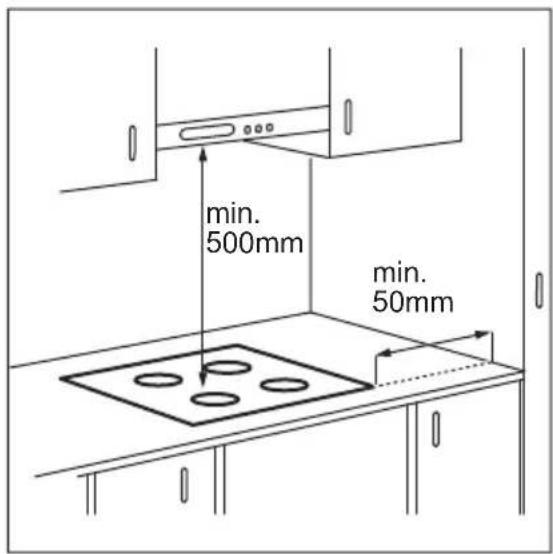
If the appliance is installed above a drawer, the hob ventilation can warm up the items stored in the drawer during the cooking process.
4. PRODUCT DESCRIPTION
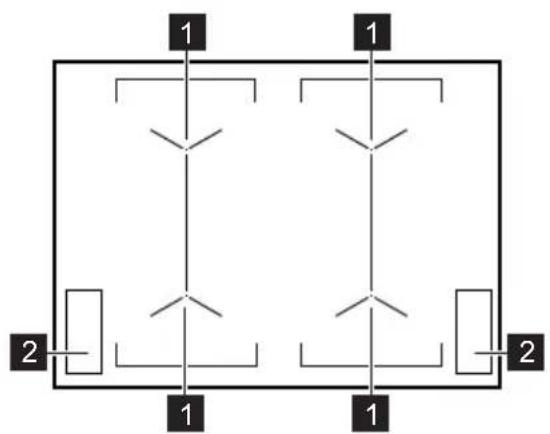
4.1 Cooking surface layout
flowchart
graph TD
    A["1"] --> B["2"]
    C["1"] --> D["2"]
    E["1"] --> F["2"]
    G["1"] --> H["2"]
    I["1"] --> J["2"]
1 Induction cooking zone
2 Control panel
4.2 Control panel layout
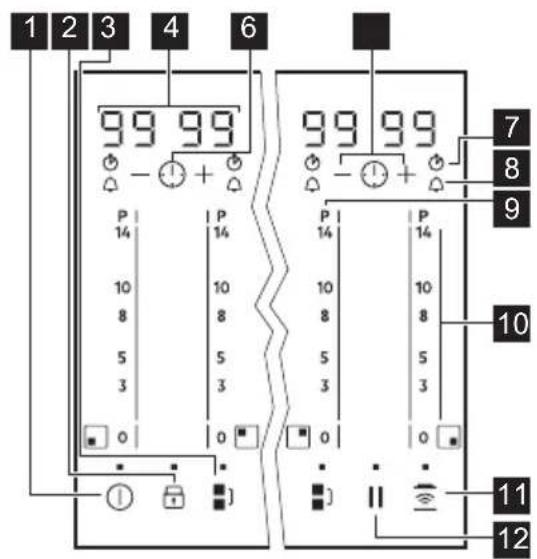
text_image
1 2 3 4 6 99 99 P 14 P 14 10 8 10 8 5 3 5 3 0 0 7 8 9 10 P 14 P 14 10 8 10 8 5 3 5 3 0 0 11 12Use the sensor fields to operate the appliance. The displays, indicators and sounds tell which functions operate.
| Sensor field | Function Comment | ||
| 1 | [2273] | ON / OFF To activate and deactivate the hob. | |
| 2 | [1840] | Lock / Child Safety Device | To lock / unlock the control panel. |
| 3 | [2KC0] | Bridge To activate and deactivate the function. | |
| 4 |  | eat setting and timer display | To show the heat setting and time in minutes. |
| Sensor field | Function Comment | |
| 5 | 💡 | - To set the timer function. |
| 6 | +/- | - To increase or decrease the time. |
| 7 | 💡 | CountUp Timer To show that the function operates. |
| 8 | 💡 | Count Down Timer / Minute Minder To show that the function operates. |
| 9 | P | PowerBoost To activate and deactivate the function. |
| 10 | - Control bar To set a heat setting. | |
| 11 | 💡 | Hob ^2 Hood To activate and deactivate the manual mode of the function. |
| 12 | || | Pause To activate and deactivate the function. |
4.3 Heat setting displays
| Display Description | |
| 0 | The cooking zone is deactivated. |
| 1 - 14 | The cooking zone operates. |
| u | Pause operates. |
| R | Automatic Heat Up operates. |
| P | PowerBoost operates. |
| E + digit | There is a malfunction. |
| = / 7 | OptiHeat Control (3 step Residual heat indicator): continue cooking / keep warm / residual heat. |
| L | Lock / Child Safety Device operates. |
| F | Incorrect or too small cookware or no cookware on the cooking zone. |
| - | Automatic Switch Off operates. |
4.4 OptiHeat Control (3 step Residual heat indicator)

WARNING!

There is a risk of burns from residual heat. The indicators show the level of the residual heat for the cooking zones you are currently using. The indicators may also come on for the neighbouring cooking zones even if you are not using them.
5. DAILY USE

WARNING!
Refer to Safety chapters.
5.1 Activating and deactivating
Touch ① for 1 second to activate or deactivate the hob.
5.2 Automatic Switch Off
The function deactivates the hob automatically if:
- all cooking zones are deactivated,
- you do not set the heat setting after you activate the hob,
- you spill something or put something on the control panel for more than 10 seconds (a pan, a cloth, etc.). An acoustic signal sounds and the hob deactivates. Remove the object or clean the control panel.
- the hob gets too hot (e.g. when a saucepan boils dry). Let the cooking zone cool down before you use the hob again.
- you use incorrect cookware. The symbol F comes on and the cooking zone deactivates automatically after 2 minutes.
- you do not deactivate a cooking zone or change the heat setting. After some time comes on and the hob deactivates.
The relation between the heat setting and the time after which the hob deactivates:
The induction cooking zones produce the heat necessary for the cooking process directly in the bottom of the cookware. The glass ceramic is heated by the heat of the cookware.
| Heat setting The hob deactivates after | |
| u, 1 - 3 | 6 hours |
| 4 - 7 5 hours | |
| 8 - 9 4 hours | |
| 10 - 14 1.5 hour | |
5.3 The heat setting
To set or change the heat setting:
Touch the control bar at the correct heat setting or move your finger along the control bar until you reach the correct heat setting.
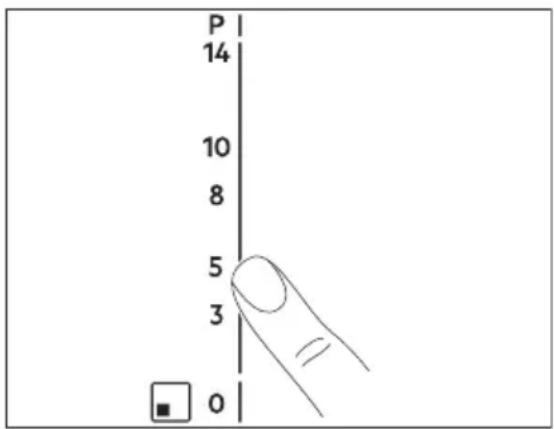
text_image
P 14 10 8 5 3 05.4 Using the cooking zones
Place the cookware in the centre of the selected zone. Induction cooking zones
adapt to the dimension of the bottom of the cookware automatically.
You can cook with large cookware placed on two cooking zones at the same time. The cookware must cover the centres of both zones but not go beyond the area marking. If the cookware is located between the two centres, Bridge function will not be activated.
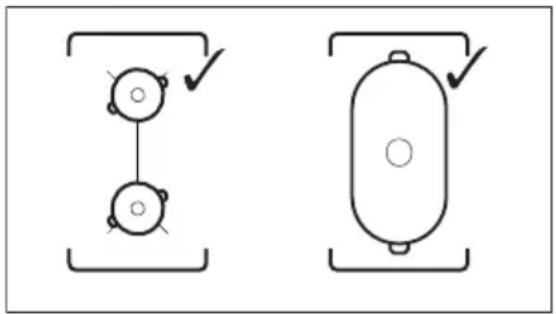
natural_image
Two schematic diagrams showing mechanical or electrical components with no text or symbols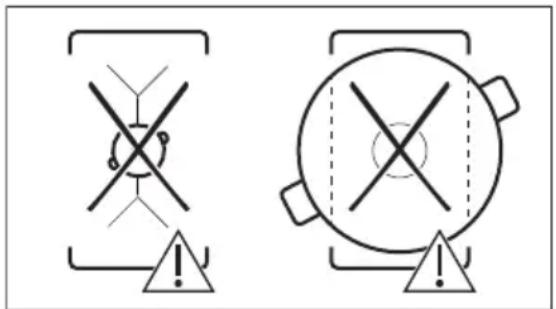
text_image
Warning symbols for safety symbols, including crossed cross and triangular warning indicators5.5 Bridge

The function operates when the pot covers the centres of the two zones.
This function connects two cooking zones and they operate as one.
First set the heat setting for one of the cooking zones.
To activate the function for left / right cooking zones: touch ■ ] / ■ ] To set or change the heat setting touch one of the left / right control sensors.
To deactivate the function: touch
■1. The cooking zones operate independently.
5.6 Automatic Heat Up
Activate this function to get a desired heat setting in a shorter time. When it is on, the zone operates on the highest setting in the beginning and then
continues to cook at the desired heating setting.

To activate the function the cooking zone must be cold.
To activate the function for a cooking zone: touch R comes on).
Immediately touch a desired heat setting. After 3 seconds comes on.
To deactivate the function: change the heat setting.
5.7 PowerBoost
This function makes more power available to the induction cooking zones. The function can be activated for the induction cooking zone only for a limited period of time. After this time the induction cooking zone automatically sets back to the highest heat setting.

Refer to "Technical data" chapter.
To activate the function for a cooking zone: touch P comes on.
To deactivate the function: change the heat setting.
5.8 Timer
You can set one timer function for each cooking zone separately. To set a timer function for the zones on the left side use the timer on the left, for the zones on the right, the timer on the right.

Count Down Timer
Use this function to specify how long a cooking zone should operate during a single cooking session.
First set the heat setting for the cooking zone and then set the function.
To activate the function or change the
time: touch quickly again and again until the indicator of a given zone lights up on the display. Then touch or to set the time (00 - 99 minutes). The function starts automatically after 4 seconds. comes on the display.
To activate the timer function for the second zone in a pair touch ③ times quickly.
When the time comes to an end, a signal sounds and 00 flashes. Touch ⓣ to stop the signal.
To see the remaining time: touch ⏻.
To deactivate the function: choose the desired zone touching ⏻ and then touch
—. The remaining time counts back to 00. The symbol goes out.
CountUp Timer (The count up timer)
You can use this function to monitor how long a cooking zone operates.
To activate the function: for the first zone in a pair touch ⏻ twice quickly.
The function starts automatically when
lights up. To activate the function for the second zone in a pair touch times quickly.
To see how long the cooking zone
operates: touch ⏻The display shows the time, at first in seconds then in minutes.
To deactivate the function: choose the desired zone touching ⏻ and then touch
一. The symbol ⏻ goes out.
Minute Minder
You can use this function as a Minute Minder when the hob is activated but the cooking zones do not operate.
To activate the function: touch ⏻ quickly again and again until the indicator ⏱ of a given zone lights up on the display.
Touch for to set the time. The function starts automatically after 4 seconds. comes on the display.
When the time comes to an end, a signal sounds and 00 flashes. Touch ⓣ to stop the signal.
The function has no effect on the operation of the cooking zones.
5.9 Pause
This function sets all cooking zones that operate to the lowest heat setting.
When the function operates, all other symbols on the control panels are locked.
The function does not stop the timer functions.
Touch || to activate the function.
u comes on. The heat setting is lowered to 1.
To deactivate the function, touch ||The previous heat setting comes on.
5.10 Lock
You can lock the control panel while cooking zones operate. It prevents an accidental change of the heat setting.
Set the heat setting first.
To activate the function: touch 🔊. 🔒 comes on for 4 seconds. The Timer stays on.
To deactivate the function: touch 🤒 The previous heat setting comes on.
When you deactivate the hob, you also deactivate this function.
5.11 Child Safety Device
This function prevents an accidental operation of the hob.
To activate the function: activate the hob with Ⓐ. Do not set the heat setting.
Touch for 4 seconds. comes on. Deactivate the hob with ①.
To deactivate the function: activate the hob with ①. Do not set the heat setting.
Touch 🔒 for 4 seconds. 🔒 comes on. Deactivate the hob with ⏻
To override the function for only one cooking time: activate the hob with ①
L comes on. Touch for 4 seconds. Set the heat setting in 10 seconds.
You can operate the hob. When you deactivate the hob with the function operates again.
5.12 OffSound Control (Deactivating and activating the sounds)
Deactivate the hob. Touch for 3 seconds. The display comes on and goes out. Touch for 3 seconds. or
b1 comes on. Touch of the timer to choose one of the following:
- the sounds are off
- b0 - the sounds are on
To confirm your selection wait until the hob deactivates automatically.
When the function is set to by you can hear the sounds only when:
- you touch ①
- Minute Minder comes down
- Count Down Timer comes down
- you put something on the control panel.
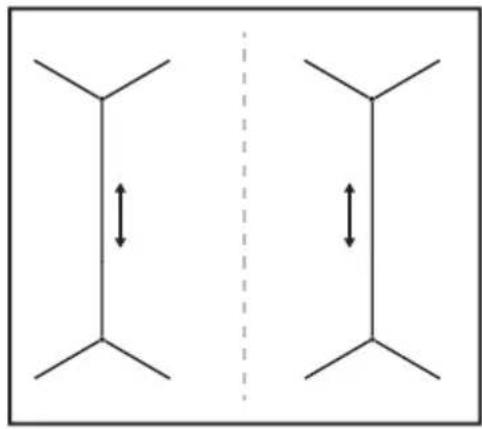
5.13 Power management
• Cooking zones are grouped according to the location and number of the phases in the hob. See the illustration.
• Each phase has a maximum electricity loading of 3700 W.
• The function divides the power between cooking zones connected to the same phase.
- The function activates when the total electricity loading of the cooking zones connected to a single phase exceeds 3700 W.
- The function decreases the power to the other cooking zones connected to the same phase.
• The heat setting display of the reduced zones changes between two levels.
natural_image
Symmetrical diagram with two vertical lines and bidirectional arrows, separated by a dashed vertical line (no text or symbols)5.14 Hob ^2 Hood
It is an advanced automatic function which connects the hob to a special hood. Both the hob and the hood have an infrared signal communicator. Speed of the fan is defined automatically on basis of mode setting and temperature of the hottest cookware on the hob. You can also operate the fan from the hob manually.

For most of the hoods the remote system is originally deactivated. Activate it before you use the function. For more information refer to hood user manual.
Operating the function automatically
To operate the function automatically set the automatic mode to H1 – H6. The hob is originally set to H5. The hood reacts whenever you operate the hob. The hob recognizes temperature of the cookware automatically and adjusts the speed of the fan.
Automatic modes
| Auto- | matic light | Boil-ing1) | Frying2) |
| Mode H0 | Off Off Off | ||
| Mode H1 | On Off Off | ||
| Mode H23) | On Fan speed 1 | Fan speed 1 | |
| Mode H3 | On Off Fan | speed 1 | |
| Mode H4 | On Fan | speed 1 | Fan speed 1 |
| Mode H5 | On Fan | speed 1 | Fan speed 2 |
| Mode H6 | On Fan | speed 2 | Fan speed 3 |
1) The hob detects the boiling process and activates fan speed in accordance with automatic mode.
2) The hob detects the frying process and activates fan speed in accordance with automatic mode.
3) This mode activates the fan and the light and does not rely on the temperature.
Changing the automatic mode
- Deactivate the appliance.
- Touch for 3 seconds. The display comes on and goes off.
- Touch for 3 seconds.
- Touch a few times until comes on.
- Touch of the Timer to select an automatic mode.

To operate the hood directly on the hood panel deactivate the automatic mode of the function.
6. HINTS AND TIPS

WARNING!
Refer to Safety chapters.
6.1 Cookware

For induction cooking zones a strong electro-magnetic field creates the heat in the cookware very quickly.

When you finish cooking and deactivate the hob, the hood fan may still operate for a certain period of time. After that time the system deactivates the fan automatically and prevents you from accidental activation of the fan for the next 30 seconds.
Operating the fan speed manually
You can also operate the function manually. To do that touch when the hob is active. This deactivates automatic operation of the function and allows you to change the fan speed manually. When you press you raise the fan speed by one. When you reach an intensive level and press again you will set fan speed to 0 which deactivates the hood fan. To start the fan again with fan speed 1 touch.

To activate automatic operation of the function, deactivate the hob and activate it again.
Activating the light
You can set the hob to activate the light automatically whenever you activate the hob. To do so set the automatic mode to H1 – H6.

The light on the hood deactivates 2 minutes after deactivating the hob.

Use the induction cooking zones with suitable cookware.
Cookware material
- correct: cast iron, steel, enamelled steel, stainless steel, multi-layer bottom (with a correct marking from a manufacturer).
• not correct: aluminium, copper, brass, glass, ceramic, porcelain.
Cookware is suitable for an induction hob if:
• water boils very quickly on a zone set to the highest heat setting.
- a magnet pulls on to the bottom of the cookware.

The bottom of the cookware must be as thick and flat as possible.
Ensure pan bases are clean and dry before placing on the hob surface.
Cookware dimensions
Induction cooking zones adapt to the dimension of the bottom of the cookware automatically.
The cooking zone efficiency is related to the diameter of the cookware. The cookware with a diameter smaller than the minimum receives only a part of the power generated by the cooking zone.

Refer to "Technical data".
6.2 The noises during operation
If you can hear:
- crack noise: cookware is made of different materials (a sandwich construction).
- whistle sound: you use a cooking zone with a high power level and the cookware is made of different materials (a sandwich construction).
- humming: you use a high power level.
- clicking: electric switching occurs.
- hissing, buzzing: the fan operates.
The noises are normal and do not indicate any malfunction.
6.3 Öko Timer (Eco Timer)
To save energy, the heater of the cooking zone deactivates before the count down timer sounds. The difference in the operation time depends on the heat setting level and the length of the cooking operation.
6.4 Examples of cooking applications
The correlation between the heat setting of a zone and its consumption of power is not linear. When you increase the heat setting, it is not proportional to the increase of the consumption of power. It means that a cooking zone with the medium heat setting uses less than a half of its power.

The data in the table is for guidance only.
| Heat setting Use to: Time | Hints (min) | |
| - 1 | Keep cooked food warm. as necessary | Put a lid on the cookware. |
| 1 - 3 Hollandaise sauce, melt: butter, chocolate, gelatine. | 5 - 25 Mix from time to time. | |
| 1 - 3 Solidify: fluffy omelettes, baked eggs. | 10 - 40 Cook with a lid on. | |
| 3 - 5 Simmer rice and milkbased dishes, heat up ready-cooked meals. | 25 - 50 Add at least twice as much liquid as rice, mix milk dishes halfway through the procedure. | |
| 5 - 7 Steam vegetables, fish, meat. | 20 - 45 Add a couple of tablespoons of liquid. | |
| Heat setting Use to: Time (min) | Hints | |
| 7 - 9 Steam potatoes. 20 - 60 Use max. 14 I of water for 750 g of potatoes. | ||
| 7 - 9 Cook larger quantities of food, stews and soups. | 60 - 150 | Up to 3 l of liquid plus ingredients. |
| 9 - 12 Gentle fry: escalope, veal cordon bleu, cutlets, rissoles, sausages, liver, roux, eggs, pancakes, doughnuts. | as necessary | Turn halfway through. |
| 12 - 13 Heavy fry, hash browns, loin steaks, steaks. | 5 - 15 | Turn halfway through. |
| 14 Boil water, cook pasta, sear meat (goulash, pot roast), deep-fry chips. | ||
| P | Boil large quantities of water. PowerBoost is activated. | |
6.5 Hints and Tips for Hob ^2 Hood
When you operate the hob with the function:
- Protect the hood panel from direct sunlight.
- Do not spot halogen light on the hood panel.
- Do not cover the hob control panel.
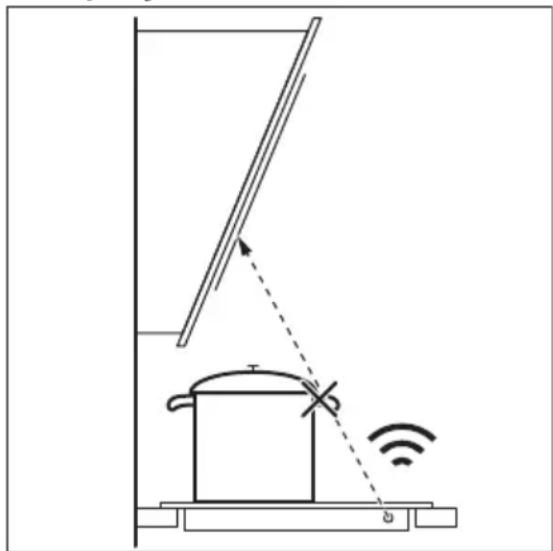
- Do not interrupt the signal between the hob and the hood (e.g. with the hand, a cookware handle or a tall pot). See the picture.
The hood in the picture is only exemplary.
natural_image
Diagram of a smart heating or monitoring system with a pot, antenna, and wireless signal icon (no text labels)
Other remotely controlled appliances may block the signal. Do not use any such appliances near to the hob while Hob ^2 Hood is on.
Cooker hoods with the Hob ^2 Hood function
To find the full range of cooker hoods which work with this function refer to our consumer website. The Electrolux cooker hoods that work with this function must have the symbol 📋.
7. CARE AND CLEANING

WARNING!
Refer to Safety chapters.
7.1 General information
- Clean the hob after each use.
• Always use cookware with a clean base. - Scratches or dark stains on the surface have no effect on how the hob operates.
- Use a special cleaner suitable for the surface of the hob.
- Use a special scraper for the glass.
7.2 Cleaning the hob
- Remove immediately: melted plastic, plastic foil, sugar and food with sugar,
otherwise, the dirt can cause damage to the hob. Take care to avoid burns. Use a special hob scraper on the glass surface at an acute angle and move the blade on the surface.
- Remove when the hob is sufficiently cool: limescale rings, water rings, fat stains, shiny metallic discoloration. Clean the hob with a moist cloth and a non-abrasive detergent. After cleaning, wipe the hob dry with a soft cloth.
- Remove shiny metallic discoloration: use a solution of water with vinegar and clean the glass surface with a cloth.
8. TROUBLESHOOTING

WARNING!
Refer to Safety chapters.
8.1 What to do if...
| Problem Possible cause Remedy | ||
| You cannot activate or operate the hob. | The hob is not connected to an electrical supply or it is connected incorrectly. | Check if the hob is correctly connected to the electrical supply. Refer to the connection diagram. |
| The fuse is blown. Make sure that the fuse is | the cause of the malfunction. If the fuse is blown again and again, contact a qualified electrician. | |
| You do not set the heat | setting for 10 seconds. | Activate the hob again and set the heat setting in less than 10 seconds. |
| You touched 2 or more | sensor fields at the same time. | Touch only one sensor field. |
| Pause operates. Refer to "Daily use". | ||
| There is water or fat stains on the control panel. | Clean the control panel. | |
| An acoustic signal sounds and the hob deactivates. An acoustic signal sounds when the hob is deactivated. | You put something on one or more sensor fields. | Remove the object from the sensor fields. |
| The hob deactivates. You put something on the sensor field ➊ | Remove the object from the sensor field. | |
| Residual heat indicator does not come on. | The zone is not hot because it operated only for a short time or the sensor is damaged. | If the zone operated sufficiently long to be hot, speak to an Authorised Service Centre. |
| Hob2Hood does not work. You covered the control panel. | Remove the object from the control panel. | |
| You use a very tall pot | which blocks the signal. | Use a smaller pot, change the cooking zone or operate the hood manually. |
| Automatic Heat Up does not operate. | The zone is hot. Let the zone become sufficiently cool. | |
| The highest heat setting is set. | The highest heat setting has the same power as the function. | |
| The heat setting changes between two levels. | Power management operates. | Refer to "Daily use". |
| The sensor fields become hot. | The cookware is too large or you put it too near to the controls. | Put large cookware on the rear zones, if possible. |
| There is no sound when you touch the panel sensor fields. | The sounds are deactivated. | Activate the sounds. Refer to "Daily use". |
| L comes on. | Child Safety Device or Lock operates. | Refer to "Daily use". |
| F comes on. | There is no cookware on the zone. | Put cookware on the zone. |
| The cookware is unsuitable. | Use suitable cookware. Refer to "Hints and tips". | |
| The diameter of the bottom of the cookware is too small for the zone. | Use cookware with correct dimensions. Refer to "Technical data". | |
| E and a number come on. | There is an error in the hob. | Deactivate the hob and activate it again after 30 seconds. If E comes on again, disconnect the hob from the electrical supply. After 30 seconds, connect the hob again. If the problem continues, speak to an Authorised Service Centre. |
| You can hear a constant beep noise. | The electrical connection is incorrect. | Disconnect the hob from the electrical supply. Ask a qualified electrician to check the installation. |
8.2 If you cannot find a solution...
If you cannot find a solution to the problem yourself, contact your dealer or an Authorised Service Centre. Give the data from the rating plate. Give also three digit letter code for the glass ceramic (it is in the corner of the glass
surface) and an error message that comes on. Make sure, you operated the hob correctly. If not the servicing by a service technician or dealer will not be free of charge, also during the warranty period. The instructions about the Service Centre and conditions of guarantee are in the guarantee booklet.
9. TECHNICAL DATA
9.1 Rating plate
Model EIV744 PNC 949 596 960 00
Typ 61 C4A 01 AA 220 - 240 V / 400 V 2N 50 - 60 Hz
Induction 7.35 kW Made in Germany
Ser.Nr. 7.35 kW
ELECTROLUX
9.2 Cooking zones specification
| Cooking zone Nominal power (maximum heat setting) [W] | PowerBoost [W] | PowerBoost maximum duration [min] | Cookware diameter [mm] |
| Left front 2300 3200 10 125 - 210 | |||
| Left rear 2300 3200 10 125 - 210 | |||
| Right front 2300 3200 10 125 - 210 | |||
| Right rear 2300 3200 10 125 - 210 | |||
The power of the cooking zones can be different in some small range from the data in the table. It changes with the material and dimensions of the cookware.
For optimal cooking results use cookware no larger than the diameter in the table.
10. ENERGY EFFICIENCY
10.1 Product information according to EU 66/2014 valid for EU market only
| Model identification EIV744 | ||
| Type of hob Built-In Hob | ||
| Number of cooking zones 4 | ||
| Heating technology Induction | ||
| Diameter of circular cook-ing zones (∅) | Left front | 21.0 cm |
| Left rear | 21.0 cm | |
| Right front | 21.0 cm | |
| Right rear | 21.0 cm | |
| Energy consumption per cooking zone (EC electric cooking) | Left front | 179.3 Wh / kg |
| Left rear | 178.4 Wh / kg | |
| Right front | 189.4 Wh / kg | |
| Right rear | 178.4 Wh / kg | |
| Energy consumption of the hob (EC electric hob) | 181.4 Wh / kg | |
EN 60350-2 - Household electric cooking appliances - Part 2: Hobs - Methods for measuring performance
The energy measurements referring to the cooking area are identified by the markings of the respective cooking zones.
10.2 Energy saving
You can save energy during everyday cooking if you follow below hints.
- When you heat up water, use only the amount you need.
- If it is possible, always put the lids on the cookware.
- Before you activate the cooking zone put the cookware on it.
- Put the smaller cookware on the smaller cooking zones.
- Put the cookware directly in the centre of the cooking zone.
- Use the residual heat to keep the food warm or to melt it.
11. ENVIRONMENTAL CONCERNS
Recycle materials with the symbol Put the packaging in relevant containers to recycle it. Help protect the environment and human health by recycling waste of electrical and electronic appliances. Do not dispose of
appliances marked with the symbol 📄 with the household waste. Return the product to your local recycling facility or contact your municipal office.
TABLE DES MATIÈRES
- INFORMATIONS DE SÉCURITÉ....21
- CONSIGNES DE SÉCURITÉ.... 24
- INSTALLATION....26
- DESCRIPTION DE L'APPAREIL....27
- UTILISATION QUOTIDIENNE....29
- CONSEILS....35
- ENTRETIEN ET NETTOYAGE....37
- DÉPANNAGE....37
- CARACTÉRISTIQUES TECHNIQUES....40
- RENDEMENT ÉNERGÉTIQUE....40
NOUS PENSONS À VOUS
natural_image
Two schematic diagrams showing circular components connected by lines, with checkmarks indicating alignment or adjustment (no text or symbols)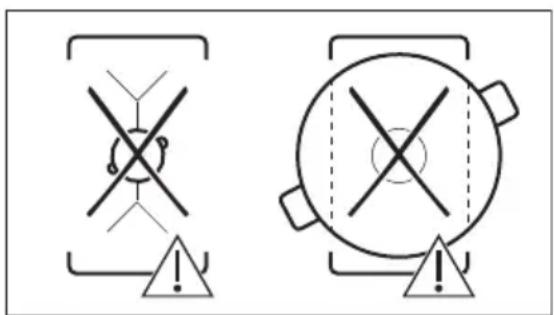
text_image
Safety warning symbols for crosshair and circular device, both marked with exclamation marks5.5 Bridge

natural_image
Symmetrical diagram with two vertical lines and bidirectional arrows, separated by a dashed vertical line (no text or symbols)5.14 Hob ^2 Hood
natural_image
Diagram of a smart heating or monitoring system with a pot, antenna, and wireless signal icon (no text labels)
natural_image
Two schematic diagrams showing mechanical or electrical components with no text or symbols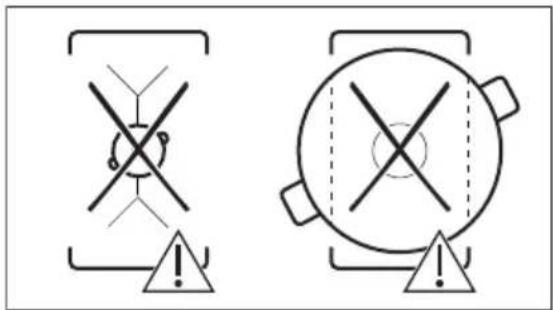
text_image
Two warning symbols with cross and triangle markings, one containing a central circle and the other a triangle with an exclamation mark.5.5 Bridge

natural_image
Symmetrical diagram with two vertical lines and bidirectional arrows, separated by a dashed vertical line (no text or symbols)5.14 Hob ^2 Hood
natural_image
Diagram of a smart room setup with a ladder, a pot, and wireless signal icon (no text or symbols)