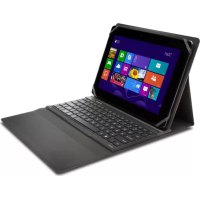
KeyFolio Fit - Keyboard KENSINGTON - Free user manual and instructions
Find the device manual for free KeyFolio Fit KENSINGTON in PDF.



| Product type | Bluetooth keyboard for tablet |
| Brand | Kensington |
| Model | KeyFolio Fit |
| Connectivity | Bluetooth |
| Charging port | Micro-USB |
| Battery type | Rechargeable lithium polymer |
| Indicator lights | Bluetooth status light, charging light, power light |
| Buttons | On/off, pairing key |
| Function keys | Shortcuts for brightness, volume, play/pause, search, share, devices, settings, home, end, page up/down, delete, menu, pairing |
| Operating temperature | 10 °C to 27 °C |
| Bluetooth range | Up to 10 meters |
| Package contents | KeyFolio Fit, charging cable |
| Compatibility | Windows tablets (and other Bluetooth devices) |
| Safety | Flammable lithium polymer battery, do not expose to moisture, do not open |
| Recycling | Do not dispose of in household waste, contact RBRC or local authorities |
Frequently Asked Questions - KeyFolio Fit KENSINGTON
User questions about KeyFolio Fit KENSINGTON
0 question about this device. Answer the ones you know or ask your own.
Ask a new question about this device
Download the instructions for your Keyboard in PDF format for free! Find your manual KeyFolio Fit - KENSINGTON and take your electronic device back in hand. On this page are published all the documents necessary for the use of your device. KeyFolio Fit by KENSINGTON.
USER MANUAL KeyFolio Fit KENSINGTON
Universal Folio with Keyboard
QUICK START GUIDE
GUIDE DE DEMARRAGE RAPIDE
KURZANLEITUNG
SNELSTARTGIDS
GUIDA RAPIDA
GUIA RAPIDA
GYORSKALAUZ
PRÍRUČKA ZACÍNÁME
SZYBKI START
KPATKOE PYKOBOIDCTBO
ПОЛьЗOBATEЛА
MANUAL DE INICIO RAPIDO

Register Now!
Enregisterer maintainant!
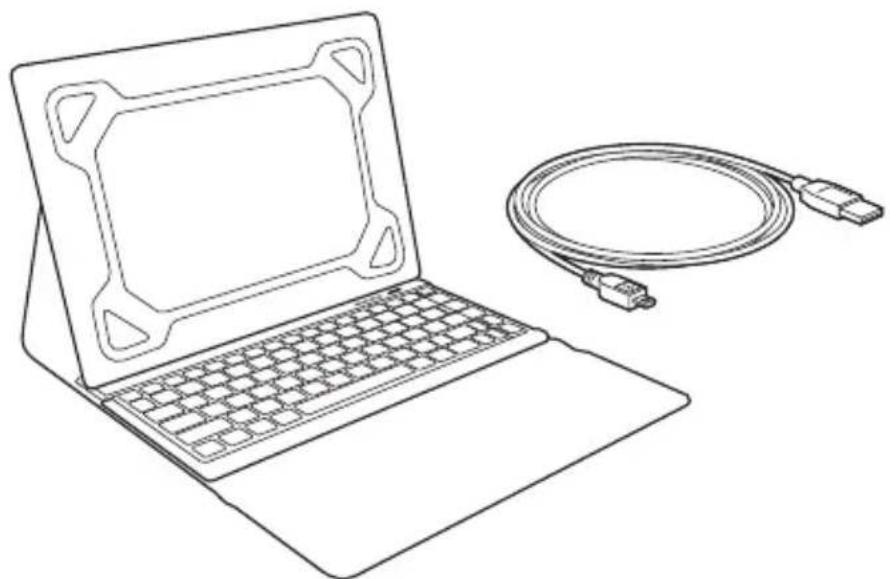
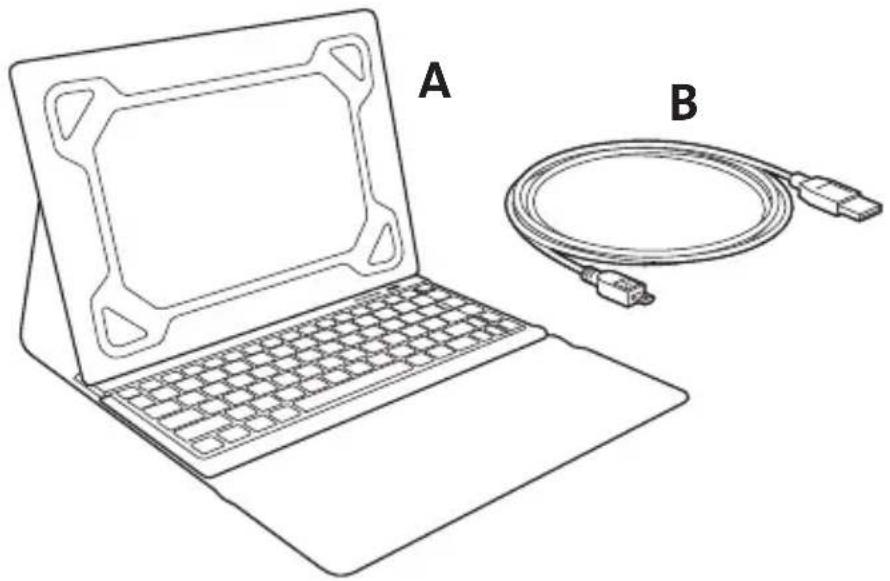
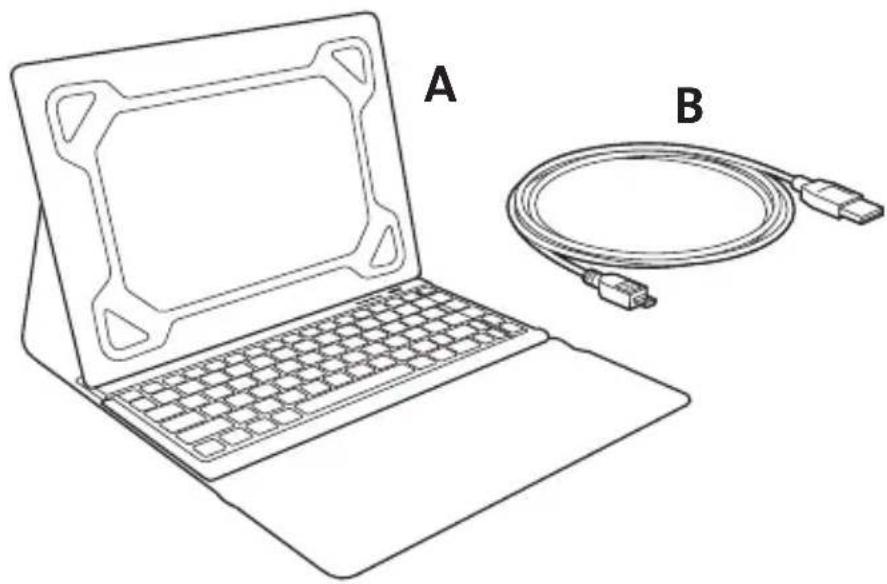
A KeyFolio FitTM
B Charging Cable
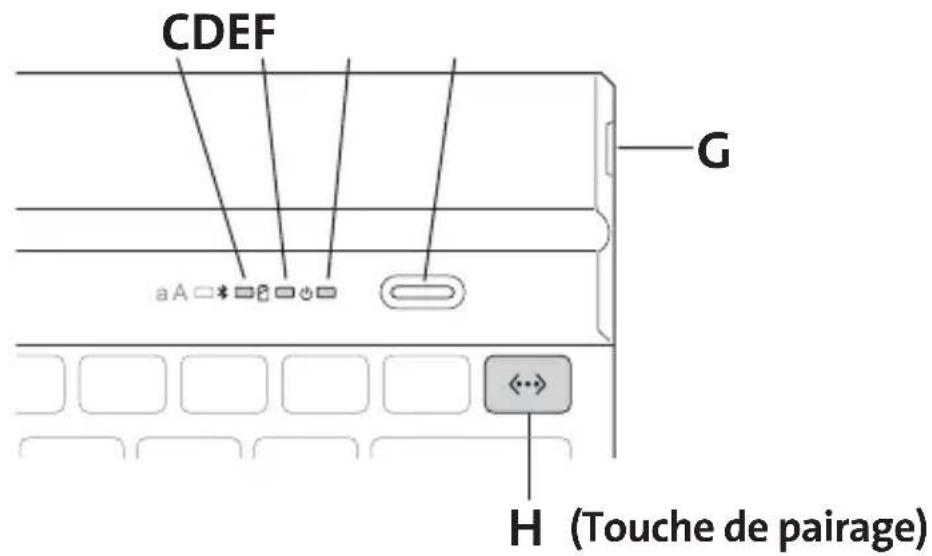
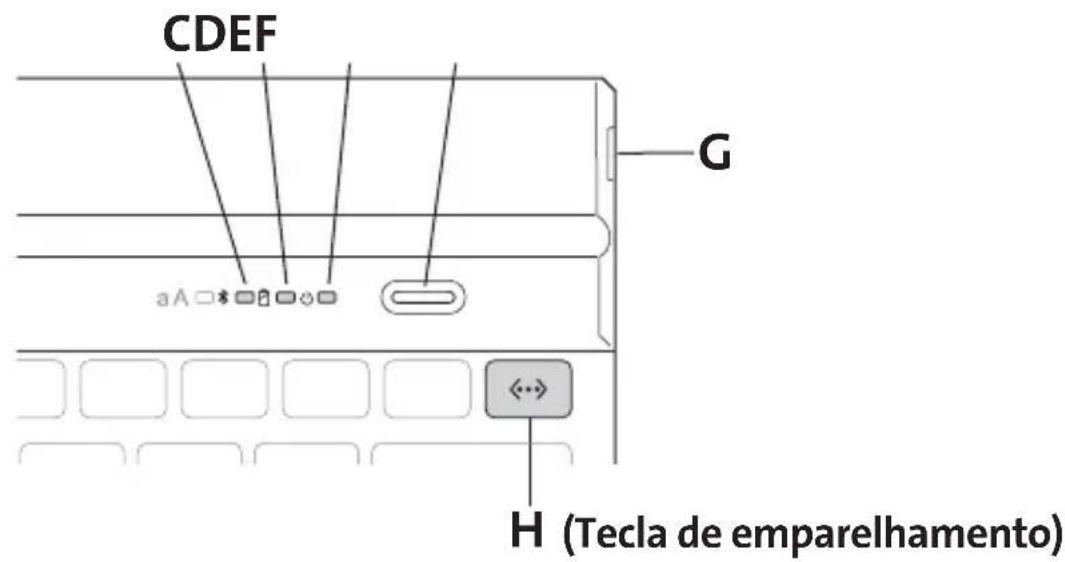
C Bluetooth Status Indicator Light
D Charging Indicator Light
E Power Indicator Light
F On/Off Button
G Micro USB Charging Connector
H Pairing Key
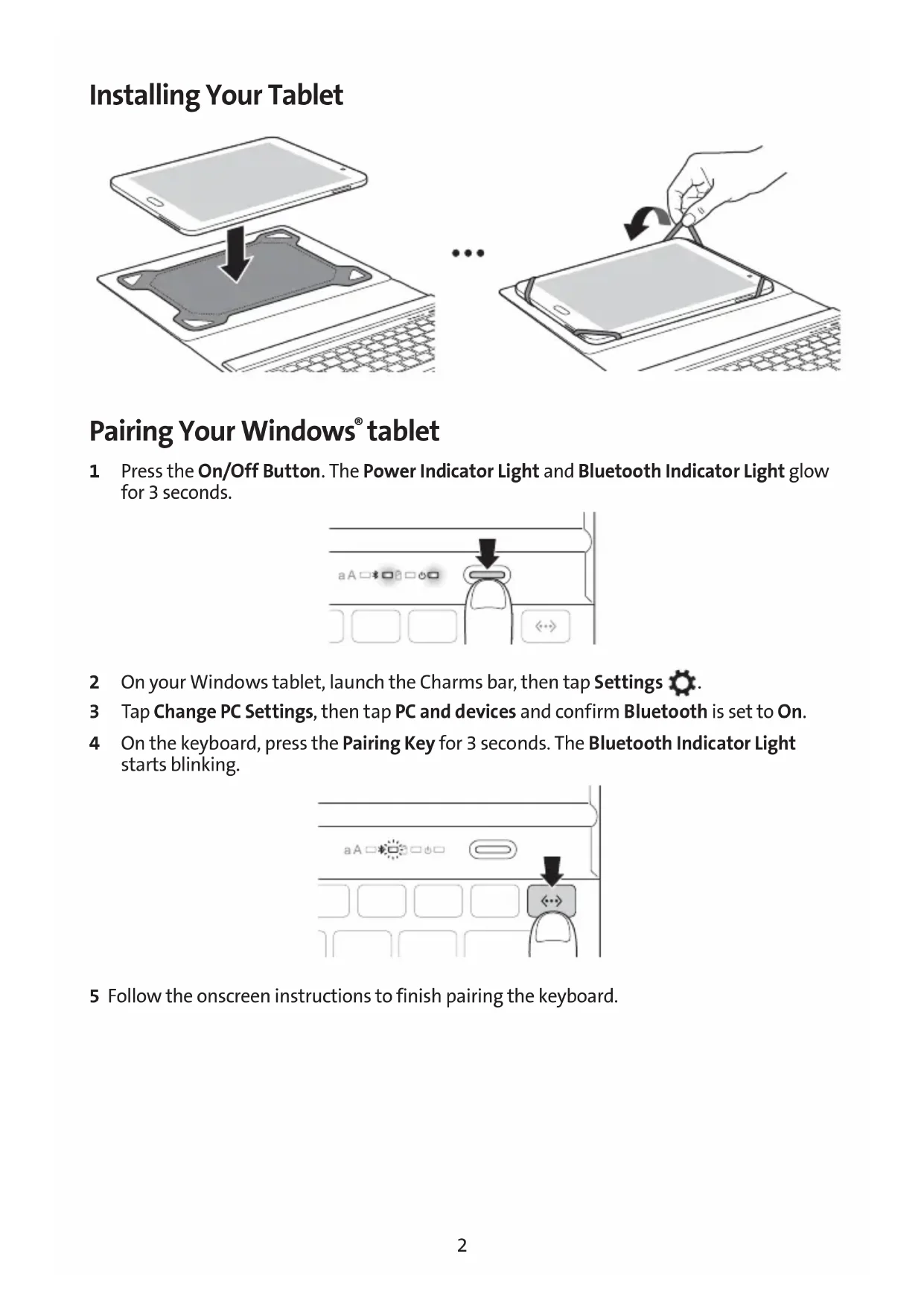
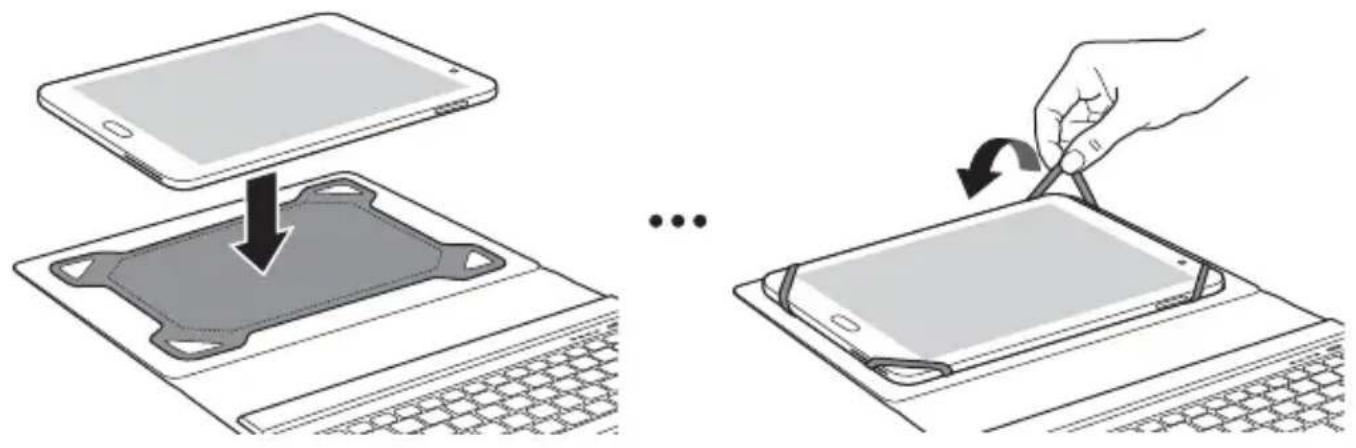
Installing Your Tablet
Pairing Your Windows® tablet
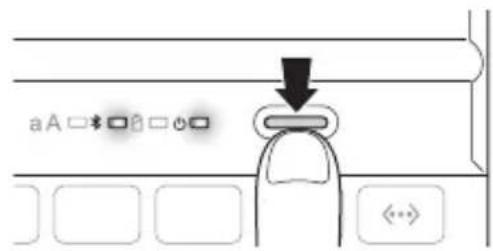
1 Press the On/Off Button. The Power Indicator Light and Bluetooth Indicator Light glow for 3 seconds.
2 On your Windows tablet, launch the Charms bar, then tap Settings
3 Tap Change PC Settings, then tap PC and devices and confirm Bluetooth is set to On.
4 On the keyboard, press the Pairing Key for 3 seconds. The Bluetooth Indicator Light starts blinking.
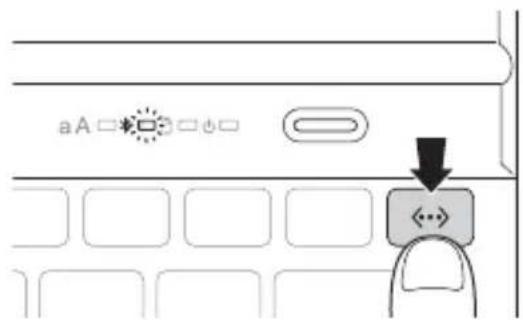
5 Follow the onscreen instructions to finish pairing the keyboard.
Charging
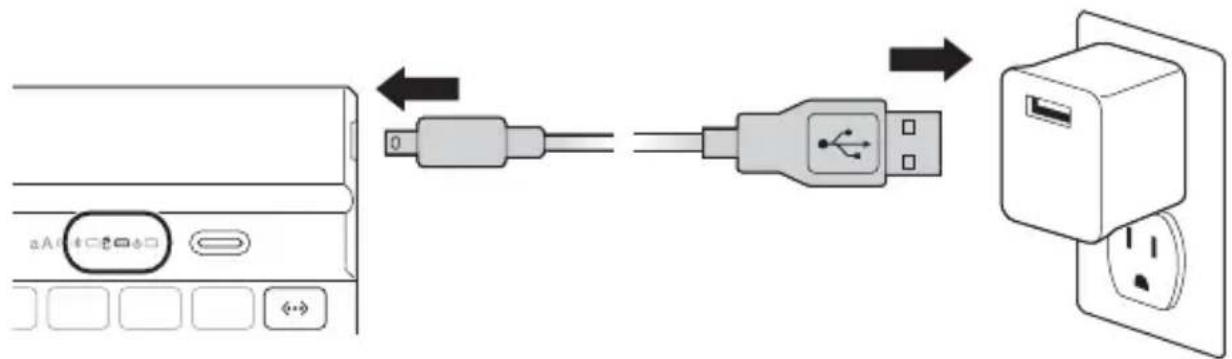
| Blinking red Battery needs | charging |
| Solid green Charging in progress | |
| Turns off Battery is fully charged |
Key Functions
| Key Function Key Function | ||
| Esc | Escape Brightness down | |
| ▲ | Brightness up Mute | |
| - | Volume down Volume up | |
| | | | Play/pause Search | |
| Share Devices | ||
| Settings Home | Home | |
| End | End Page up | PgUp |
| PgDn | Page down Delete | Delete |
| ←→ | Pair Menu |
Troubleshooting
I can't connect the Keyboard to my tablet.
Try the following in sequence. You can stop when the problem is fixed.
1 Make sure you have installed and set up Bluetooth correctly on your tablet. Check the documentation that came with your tablet for instructions.
2 Make sure that the Keyboard is within range of your tablet. Maximum Bluetooth range is about 10 meters/33 feet.
3 If your tablet is connected to other Bluetooth devices, you may need to disconnect some devices before you can connect to the Keyboard.
4 If you changed any Bluetooth settings on your tablet, try connecting the Keyboard to your tablet again.
5 Make sure that both your tablet battery and the Keyboard battery are sufficiently charged.
If this does not solve the problem, please contact Kensington Support at kensington.com.
Technical Support
Technical support is available to all registered users of Kensington products. Technical Support contact information can be found on the back page of this manual.
Web Support
You may find the answer to your problem in the Frequently Asked Questions (FAQ) section of the Support area on the Kensington Website: www.support.kensington.com.
Telephone Support
There is no charge for technical support except long-distance charges where applicable. Please visit www.kensington.com for telephone support hours. In Europe, technical support is available by telephone Monday to Friday 09:00 to 18:00 (Central European time).
Please note the following when calling support:
- Call from a phone where you have access to your device.
-
Be prepared to provide the following information:
-
Name, address, and telephone number
Name of the Kensington product - Make and model of your computer
- System software and version
- Symptoms of the problem and what led to them

WARNING! IMPORTANT SAFETY INSTRUCTIONS
Failure to read and follow these safety instructions could result in fire, explosion, electrical shock or other hazard, causing serious and/or fatal injury and/or property damage.
- Do not modify, disassemble, open, drop, crush, puncture, or shred the KeyFolio.
- The KeyFolio contains a lithium-polymer battery, which is flammable. Keep away from open flame.
-
To prevent short circuit or other potential hazards, prevent metal objects such as coins or keys from coming into contact with the KeyFolio, and do not insert foreign objects into the KeyFolio or its ports.
-
Keep your KeyFolio dry, and do not use with wet hands. Moisture in or on the KeyFolio may lead to electrical shock. If exposed to moisture during use, unplug the KeyFolio immediately. If your KeyFolio gets wet, have a qualified technician evaluate the product's safety before resuming use.
- Your KeyFolio may become warm during operation. This is normal. However, to prevent overheating, keep area around KeyFolio ventilated and do not place anything on or around KeyFolio during operation. Do not operate your KeyFolio near a heat source, heat vent, or in direct sunlight. Your KeyFolio should be used in temperatures between 50 - 80^ (10-27°C).
- If the KeyFolio begins to swell or expand, emits a strong odor, or becomes hot to the touch, discontinue use of the KeyFolio, and have the product examined by a qualified electronic technician.
- Inspect your KeyFolio and cables for damage before use. Have any damaged part repaired or replaced before use.
- Your KeyFolio is not user serviceable. Do not attempt to open, modify, or repair.
- If the battery inside the KeyFolio leaks for any reason, discontinue use, and do not allow the KeyFolio's contents to contact your skin or eyes. In the event of accidental contact wash the affected area with large amounts of water and seek medical attention immediately.
- Your KeyFolio is not a toy. Keep them away from children. Insure that all persons who use this product read and follow these warnings and instructions.
- Do not leave the KeyFolio on prolonged charge when not in use.
Enhancing Performance by Proper Care and Storage of your KeyFolio
- Do not store your KeyFolio either fully charged or discharged. It is best to store your KeyFolio with at least 30% charge remaining. To check the charge level of your KeyFolio press the battery indicator button.
- Avoid frequent full discharges because this puts additional strain on the battery in the KeyFolio. Charge your KeyFolio between uses even if it is not fully discharged. The lithium-polymer battery used in this product has no "memory effect." Therefore, several partial discharges with frequent recharges are better than one full discharge, and will help prolong the life of your KeyFolio. Short battery life in laptops is mainly caused by heat, rather than charge/discharge patterns.
- Do not store your KeyFolio at elevated temperatures (such as in your car) or in high humidity.
Disposing of your KeyFolio
- Do not incinerate or dispose of your KeyFolio in a fire or microwave.
-
Do not dispose of your KeyFolio as ordinary refuse, as it contains a lithium-polymer battery. Consult your local municipal or civil authority for instructions on correctly disposing of a lithium-polymer battery.
-
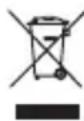
In the USA and Canada: This mark indicates your KeyFolio can be recycled by the Rechargeable Battery Recovery Corporation ("RBRC"). When you are ready to dispose of the KeyFolio, please contact the RBRC at 1-800-8-BATTERY or www.rbrc.org.
FEDERAL COMMUNICATION COMMISSION INTERFERENCE STATEMENT
This device complies with Part 15 of the FCC Rules. Operation is subject to the following two conditions: (1) This device may not cause harmful interference, and (2) This device must accept any interference received, including interference that may cause undesired operation.
FCC RF RADIATED EXPOSURE STATEMENT
This device has been evaluated to meet general RF exposure requirements. The device can be used in portable exposure conditions without RF restrictions.
Modifications: Modifications not expressly approved by Kensington may void the user's authority to operate the device under FCC regulations and must not be made.
Shielded Cables: In order to meet FCC requirements, all connections to equipment using a Kensington input device should be made using only the shielded cables.
IC STATEMENT
This device has been tested and found to comply with the limits specified in RSS-210. Operation is subject to the following two conditions: (1) This device may not cause interference, and (2) This device must accept any interference, including interference that may cause undesired operation of the device.
IC RF EXPOSURE STATEMENT
This equipment complies with IC radiation exposure limits set forth for an uncontrolled environment. The device can be used in portable exposure conditions without RF restrictions.
CE DECLARATION OF CONFORMITY
Kensington declares that this wireless product model is in compliance with the essential requirements and other relevant provisions of R&TTE directive (1995/5/EC) and other applicable EC directives.
For Europe, a copy of the Declaration of Conformity for this product may be obtained by clicking on the Compliance Documentation' link at www.support.kensington.com
INFORMATION FOR EU MEMBER-STATES ONLY
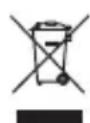
The use of the symbol indicates that this product may not be treated as household waste. By ensuring this product is disposed of correctly, you will help prevent potential negative consequences for the environment and human health, which could otherwise be caused by inappropriate waste handling of this product. For more detailed information about recycling of this product, please contact your local city office, your household waste disposal service, or the shop where you purchased the product.
Kensington and the ACCO name and design are registered trademarks of ACCO Brands. The Kensington Promise is a service mark of ACCO Brands. KeyFolio Fit is a trade mark of ACCO Brands. Windows is a registered trademark of Microsoft Corporation in the U.S. and/or other countries. Android is a trademark of Google Inc. Bluetooth is a registered trademark owned by Bluetooth SIG. All other registered and unregistered trademarks are the property of their respective owners.
© 2014 Kensington Computer Products Group, a division of ACCO Brands USA LLC. Any unauthorized copying, duplicating, or other reproduction of the contents hereof is prohibited without written consent from Kensington Computer Products Group. All rights reserved. 07/14
Contenu
Composants
Assistance technique
www.support.kensington.com.
www.support.kensington.com.
Telefonische ondersteuning
WAARSCHUWING! BELANGRIJKE VEILIGHEIDSVOORSCHRIFTEN
603haeT, TTo KopnpaRe Rechargeable Battery
Recovery («RBRC») rotoBa npinHb yctpoiCTBO KeyFolio Ha ytInn3aun. YTo6bl npepaTb
yctpoiCTBO KeyFolio Ha ytInn3aun, CBxKITcB c Kopnpaunei RBC no TelefoHy 1-800-8-2288379
nnu cheE3 Be6-y3en www.rbrc.org.
IIOJIOXHEHNE FEDEPALbHOIN KOMNCCnCB3N (FEDERAL COMMUNICATION COMMISSION - FCC) CUSA O IOMEXAX
DaHHoe yctpoiCTBO COOTBETCTByet Yactn 15 npabun FCC. Pa60Ta yctpoiCTBa CB3aHa Co CNeyIOUMM NBymraCyOBNAIM: (1) DaHHoe yctpoiCTBO MoKeT He Bb3bBaTb He6IarOpiarTHoe Bo3deIcTBne; n (2) daHHoe yctpoiCTBO DoJNKHO DOnyCKaTb IIO6oe NOnyuHHe BO3deIcTBne, BKIOUaYBaO3deIcTBne, KOToPOe MoKeT cTaTb PnPNUHO HHexeNaTeNbHO pa60Tb O6OpyDobAHN.
3AABJIHNE O BO3DEJCTBUN PAJNON3JIYUEHENFCC
JaHHoe yCTPOIcTB OIOBepeHO Ha COOTBeTCTBnE O6UIM Tpe6OBAHnM Tpe6OBAHnM K BO3JeCTBnIO paJINOn3JIyueHnA.
YcTPOICTBO MOKET INCIOJIb3OBAtbcra B yCIOBnIX NOPaTHBHO TOB3eICTBna 6e0rpaHueHn paDIOIN3JyueHn.
I3MeHn. I3MeHn, npraMo He pa3peuHhble KOMnaHnei Kensington, moryt liuatab noB3ObaTeJ npaba Ha
NcnoIb3OBaHHe yCtpoiCTBa B COOTBeTCTBn C nIOJoxEnem FCC n He doJIKhbl OcyuIeTbIyTBca.
3KpaHnPoBaHHbIe Ka6eH.N B cIeJx co6JIIOHeH N Tpe6oHaH N FCC Bce nOKnIOueH N O6OpyIOBaH H DoJXHb I BblONHATbc C NCNOJB3OBaHHeM TOJIbKO 3KpaHnPoBaHHbIX Ka6eJeN.
3AABJIENHE IC
3TO yCTPOINCTBO npoTecnpoBaHO n np3HaHO COOTBcTCTByOuM yCNOBm, yKa3aHHbIM B RSS-210. 3KcNpyataqna DOJHKHA OcyueCTBnTBCA C co6IIOJeHMe M DByX CneDyIOUx YCNOBn. (1) 3TO yCTPOINCTBO He MoKeT Bb3BaTb NOMExn, n (2) 3TO yCTPOINCTBO DOJKNHO npHUMaTB IIO6Be NOMexn, BKIOUcH a NOMexn, KOtOpbIE MOrY T Bbl3BaTb HApyuHeHne pa6oTbY cTPOINCTBa.
3AABLEHNE O BO3ENCTBUN PAJNOIN3JUeyHNAIC
JaHHoe 6OpOyOBaHHe COOTBeTCTByeI npEeJAM Bo3JeIcTBnI N3JIyUeHnI C, yCTaHOBJIeHbIX IJIr HEKOHTpOJIpyEm cpebl.
YCTPOINCTBO MOKET NCSNOLB3OBaTbCBy CNOBnX NOPATNBHO BO3dEChTBn6e3 OpaHneHH paHnoacToTHOro n3JIyHeHn.
DEKJIAPAUHCOOTBETCTBNA CE
Kensington 3aBnAET, tO 3a 6eCnpoBOnHaa MoEJIb npOdyKTa COOTBeCTBye BaXHbIM Tpe6ObaHnM n HbIM NIOJOKeHnM dIpeKTnBbl (1995/5/EC) n dpyrnx npImeHmblx dIpeKTNB EC.
ДлЕ Брпь кОнгд eknapaци COOTBETCTBnДлэЗТOrO pOdyKТа DoCTynHа no CсblIke "Compliance Documentation"
(DOKYMENTALI NO COOTBETCTBNUO) Ha Be6-caiTe www.support.kensington.com
MHΦOPMALIY TOJIbKO JIIA TOCYAPCTB-UYIEHOB EC
3Tn 3HaQyKa3bIBAIOH To,TO DaHHoe 3dEJIne He MoKet OTHOCTBC K 6bITOBbIM OTXoAM.06cneuB npaBnIbHyIO yTuIN3aUIO 3dEINB, BBI NOMOKeTe B npeIOTBpaUeHN NOTEHUNAIBHbIX HerATNBbIX NOCNECTBNI DnI OKpykaIOSe CpeBn I cHeIOBEueCKoro 3DOpOBBa, KOtOpble MOrY T 6bITb BB3BaHbI HENpABINbHO erO yTuIN3aUne.II NaIOnyUEHNOI NOpO6HO INHOFopMaUIN O6 yTuIN3aUIN DAHHORIO3dEINN, NOXAnYiCTA, CBAAITcB C BaIIM MeCTHbIM rOpOckm Oficom, Clyk60B BBIO3a 6bITOBbIX OTXODOB INI MaRa3IHOM, B KOTOPOM
Bbl Kynnnnn n3dene.
Ha3BaHne u nIz3aHnKensington n ACCO RaJIIOCTc 3apeNCTpnpoBAHHbIM TOBapHBIM 3HaKaMn KOMpaHm ACCO Brands. Kensington Promise TaJIeTc 3aKOM o6CnykuaHnA ACCO Brands.KeyFolio Fit TaJIeTc 3apeNCTpnpoBAHHbIM TOBapHBIM 3aKaMn KOMpaHm ACCO Brands. Windows TaJIeTc 3apeNCTpnpoBAHHbIM TOBapHBIM 3HaKaMn KOPnpaUuM Microsoft B CUSA u/nn npynx cTpaHax. Android TaJIeTc TOBapHBIM 3HaKOM KOMpaHm Google Inc. Bluetooth TaJIeTc 3apeNCTpnpoBAHHbIM TOBapHBIM 3HaKaMn rpyPbI KOMpaHm Bluetooth SIG. Bce npOue 3apeNCTpnpoBAHHbIe n He3apeNCTpnpoBAHHbIE TOBapHBie 3HaKa N BJIaIOTc Co6CTBeHHOCtBu COOTBeTCTByIOxv BJaJeNbCeB.
© 2014 Kensington Computer Products Group, NOJpa3dJeHne KOMnAHN ACCO Brands. 3aIpeaaetc HecaHKUHOHPOBaHHoe KOINPOBAHHe, dy6InPOBAAHne INIpa3MHOxKeHne INbIM CNOco6OM COePJKMOr HOCToAeTO DOKyMeHTa 6e3 NcBMeHHOr corlaCn KOMnAHN Kensington Computer Products Group. Bce npaba 3aunuHb. 07/14
Conteudo
Components
Kensington Computer Products Group
A Division of ACCO Brands
333 Twin Dolphin Drive, Sixth floor Redwood Shores, CA 94065
ACCO Brands Europe
A Division of ACCO Brands
Europe
Oxford House, Oxford Road
Aylesbury, Buckinghamshire,
HP21 8SZ
United Kingdom
ACCO Brands Canada Inc
7381 Brama Mississauga ON L5S 1C4
ACCO Australia
Level 2,8 Lord St Botany NSW 2019 Australia
Importado por ACCO Mexicana
S.A. de C.V.
Circuito de la Industria Norte # 6, Corredor Industrial Toluca Lerma, Lerma Mexico Cp. 52004
R.F.C. AME640229-1W3
Acco Brands Chile S.A., Avda. San Josemaria Escrivá de Balaguer N°5773 Vitacura, C.P. 7640870 Santiago, Chile
Importado e Distribuido por:
TILIBRA PRODutos DE PAPELARIA LTDA.
CNPJ: 44.990.901/0001-43
Rua Aimores, 6-9 - Bauru/SP - Brasil
CEP 17013-900
www.kensington.com.br
Designed in California, U.S.A. by Kensington Made in China
Patents Pending
www.kensington.com