
MDSS38 - Dictaphone SONY - Free user manual and instructions
Find the device manual for free MDSS38 SONY in PDF.


| Product type | MiniDisc Deck |
| Brand | Sony |
| Model | MDSS38 |
| Dimensions (W x H x D) | 280 x 90 x 282.5 mm |
| Weight | 2.8 kg |
| Power supply | Mains 220-240 V, 50/60 Hz, 20 W |
| Power consumption | 20 W |
| Sampling frequency | 44.1 kHz |
| Frequency response | 5 - 20,000 Hz ± 0.3 dB |
| Signal-to-noise ratio | > 96 dB |
| Inputs | LINE (ANALOG) IN (phono jacks), DIGITAL IN (optical) |
| Outputs | LINE (ANALOG) OUT (phono jacks), DIGITAL OUT (optical), PHONES (stereo mini jack) |
| Recording functions | Normal, synchronized, programmed, with pre-storage (6 seconds) |
| Playback functions | Normal, random, programmed, repeat (single track, A-B) |
| Editing functions | Divide, combine, move, erase (track, all, A-B), titling, undo |
| Copy protection | SCMS (Serial Copy Management System) |
| Laser | Class 1, λ = 780 nm |
| Supplied accessories | Audio connecting cords (2), optical cable (except US model), remote control RM-D7M, batteries |
| Cleaning | Soft cloth lightly dampened with mild soap solution; avoid solvents and abrasives |
| Safety | Do not expose to moisture, do not open the casing, servicing by qualified technician |
Frequently Asked Questions - MDSS38 SONY
User questions about MDSS38 SONY
0 question about this device. Answer the ones you know or ask your own.
Ask a new question about this device
Download the instructions for your Dictaphone in PDF format for free! Find your manual MDSS38 - SONY and take your electronic device back in hand. On this page are published all the documents necessary for the use of your device. MDSS38 by SONY.
USER MANUAL MDSS38 SONY
Operating Instructions EN
Mode d'emploi F
To prevent fire or shock hazard, do not expose the unit to rain or moisture. To avoid electrical shock, do not open the cabinet. Refer servicing to qualified personnel only.
The laser component in this product is capable of emitting radiation exceeding the limit for Class 1.
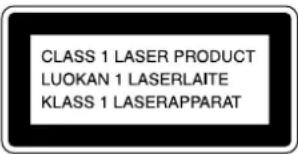
This appliance is classified as a CLASS 1 LASER product. The CLASS 1 LASER PRODUCT MARKING is located on the rear exterior.
The following caution label is located inside the unit.
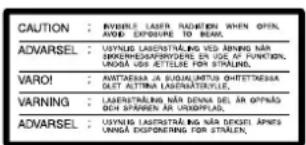

For the customers in US
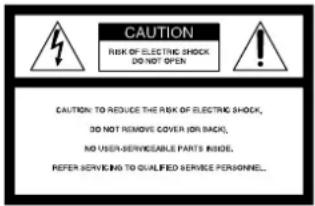

This symbol is intended to alert the user to the presence of uninsulated “dangerous voltage” within the product’s enclosure that may be of sufficient magnitude to constitute a risk of electric shock to persons.

This symbol is intended to alert the user to the presence of important operating and maintenance (servicing) instructions in the literature accompanying the appliance.
INFORMATION
This equipment has been tested and found to comply with the limits for a Class B digital device, pursuant to Part 15 of the FCC Rules. These limits are designed to provide reasonable protection against harmful interference in a residential installation. This equipment generates, uses, and can radiate radio frequency energy and, if not installed and used in accordance with the instructions, may cause harmful interference to radio communications.
However, there is no guarantee that interference will not occur in a particular installation. If this equipment does cause harmful interference to radio or television reception, which can be determined by turning the equipment off and on, the user is encouraged to try to correct the interference by one or more of the following measures:
– Reorient or relocate the receiving antenna. – Increase the separation between the equipment and receiver. – Connect the equipment into an outlet on a circuit different from that to which the receiver is connected. – Consult the dealer or an experienced radio/TV technician for help.
CAUTION
You are cautioned that any changes or modification not expressly approved in this manual could void your authority to operate this equipment.
Owner's Record
The model and serial numbers are located on the rear of the unit. Record the serial number in the space provided below. Refer to them whenever you call upon your Sony dealer regarding this product.
Model No. MDS-S38
Serial No.
For the customers in Canada
CAUTION
TO PREVENT ELECTRIC SHOCK, DO NOT USE THIS POLARIZED AC PLUG WITH AN EXTENSION CORD, RECEPTACLE OR OTHER OUTLET UNLESS THE BLADES CAN BE FULLY INSERTED TO PREVENT BLADE EXPOSURE.
IN NO EVENT SHALL SELLER BE LIABLE FOR ANY DIRECT, INCIDENTAL OR CONSEQUENTIAL DAMAGES OF ANY NATURE, OR LOSSES OR EXPENSES RESULTING FROM ANY DEFECTIVE PRODUCT OR THE USE OF ANY PRODUCT.
Precautions
On safety
- The use of optical instruments with this product will increase eye hazard.
- Should any solid object or liquid fall into the cabinet, unplug the deck and have it checked by qualified personnel before operating it any further.
On power sources
- Before operating the deck, check that the operating voltage of the deck is identical with your local power supply. The operating voltage is indicated on the nameplate at the rear of the deck.
- If you are not going to use the deck for a long time, be sure to disconnect the deck from the wall outlet. To disconnect the AC power cord, grasp the plug itself; never pull the cord.
- The mains switch is located on the rear exterior.
- AC power cord must be changed only at the qualified service shop.
On placement (only on models supplied with a MAIN POWER switch)
Do not install the appliance in a confined space, such as a bookcase or built-in cabinet because the mains power switch (MAIN POWER) is located on the rear exterior.
On operation
If the deck is brought directly from a cold to a warm location, or is placed in a very damp room, moisture may condense on the lenses inside the deck. Should this occur, the deck may not operate properly. In this case, remove the MD and leave the deck turned on for about an hour until the moisture evaporates.
On the MiniDisc cartridge
- Do not open the shutter to expose the MD.
- Do not place the cartridge where it will be subject to extremes of sunlight, temperature, moisture or dust.
On cleaning
Clean the cabinet, panel and controls with a soft cloth slightly moistened with a mild detergent solution. Do not use any type of abrasive pad, scouring powder or solvent such as alcohol or benzine.
If you have any questions or problems concerning your deck, please consult your nearest Sony dealer.
Welcome!
Thank you for purchasing the Sony MiniDisc Deck. Before operating the deck, please read this manual thoroughly and retain it for future reference.
About This Manual
Conventions
- Controls in the instructions are those on the deck; these may, however, be substituted by controls on the remote that are similarly named or, when different, appear in the instructions within brackets. • The following icons are used in this manual:

Indicates a procedure that requires use of the remote.

Indicates tips for making the task easier and hints.
TABLE OF CONTENTS
Getting Started
Unpacking 4 Hooking Up the System 4
Recording on an MD 6
Playing an MD 8
Recording on MDs
Notes on Recording 9 Useful Tips for Recording 9 Recording Over Existing Tracks 11 Adjusting the Recording Level 11 Marking Track Numbers while Recording (Track Marking) ..... 12 Starting Recording with 6 Seconds of Prestored Audio Data (Time Machine Recording)....13 Synchro-Recording with Audio Equipment of Your Choice ..... 14 Synchro-Recording with a Sony CD Player 14 Recording on an MD Using a Timer 16
Playing MDs
Using the Display 17 Locating a Specific Track 18 Locating a Particular Point in a Track 19 Playing Tracks Repeatedly 20 Playing in Random Order (Shuffle Play)....21 Creating Your Own Program (Program Play) 21 Useful Tips when Recording from MDs to Tape 22 Playing an MD Using a Timer 23
Editing Recorded MDs
Notes on Editing 24 Erasing Recordings (Erase Function) 24 Erasing a Portion of a Track (A-B Erase Function) 25 Dividing Recorded Tracks (Divide Function) 26 Combining Recorded Tracks (Combine Function) 27 Moving Recorded Tracks (Move Function) 28 Labeling Recordings (Title Function) 29 Undoing the Last Edit (Undo Function) 31
Additional Information
Display Messages 32, System Limitations 32, Troubleshooting 33, Specifications 34, Guide to the Serial Copy Management System 35
Index 36
Unpacking
Check that you received the following items:
• Audio connecting cords (2) • Optical cable (1) (except for US model) • Remote commander (remote) RM-D7M (1) • Sony SUM-3 (NS) batteries (2)
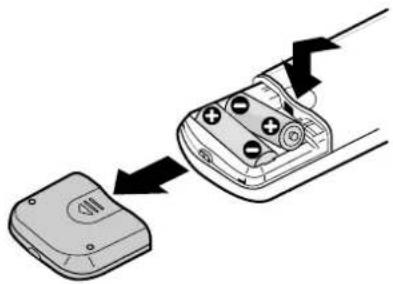
Inserting batteries into the remote
You can control the deck using the supplied remote. Insert two R6 (size-AA) batteries by matching the + and - on the batteries. When using the remote, point it at the remote sensor on the deck.

When to replace batteries
With normal use, the batteries should last for about six months. When the remote no longer operates the deck, replace all the batteries with new ones.
Notes
- Do not leave the remote near an extremely hot or humid place.
- Do not drop any foreign object into the remote casing, particularly when replacing the batteries.
- Do not expose the remote sensor to direct sunlight or lighting apparatuses. Doing so may cause a malfunction.
- If you don't use the remote for an extended period of time, remove the batteries to avoid possible damage from battery leakage and corrosion.
Hooking Up the System
Overview
This section describes how to hook up the MD deck to an amplifier or other components such as a CD player or DAT deck. Be sure to turn off the power of each component before connection.
![graph TD A["Line OUT"] --> B["Amplifier"] C["Digital IN"] --> B D["TO Box"] --> B B --> E["CD player"] E --> F["Digital OUT"] E --> G["Digital IN"] F --> H["DAT deck or MD deck, etc."] G --> H I["REC OUT"] --> B J["TAPE IN"] --> B K["to a wall outlet (or to a timer during timer recording or playback…](/content/2026/02/425419/images/4aba2655699ca245316e79dd881e23ca0b93219407ba607881cb89bdb1872725.jpg)
What cords will I need?
• Audio connecting cords (supplied) (2)
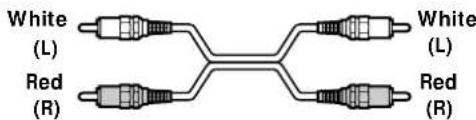
• Optical cables (only one supplied*) (2) * The optical cable is not supplied on US model.

Hookups
Connecting the deck to an amplifier
Connect the amplifier to the LINE (ANALOG) IN/OUT jacks using the audio connecting cords (supplied), making sure to match the color-coded cords to the appropriate jacks on the components: red (right) to red and white (left) to white. Be sure to make connections firmly to prevent hum and noise.
![graph LR subgraph MD Deck A["LINE IN"] --> B["Analog"] B --> C["IN"] B --> D["OUT"] B --> E["L"] B --> F["R"] end subgraph Amplifier G["TAPE/MD IN"] --> H["Inout"] H --> I["L"] H --> J["R"] end A --> G G --> H H --> I I --> J J --> G style MD Deck fill:#f9f,stroke:#333 style Amplifier fill:#ccf,stro…](/content/2026/02/425419/images/1a93593399f7f4f2efed5aeabf87e038cb97ef268bdd0b20bc44c52bc6018a07.jpg)
Connecting the deck to a digital component such as a CD player, DAT deck, digital amplifier, or another MD deck
Connect the component through the DIGITAL IN/OUT connectors with two optical cables (only one supplied*). Take the caps off the connectors before plugging in the cables.
* The optical cable is not supplied on US model.
MD deck Digital component![graph LR A["OUTIN"] --> B["Signal Flow"] B --> C["Digital DIGITAL OPTICAL OUTIN"] C --> D["Signal Flow"] D --> A](/content/2026/02/425419/images/e834347d43adf6df28a1fd9df0845afa37104b944cba87aef86697da0fc93945.jpg)

Automatic conversion of digital sampling rates during recording
A built-in sampling rate converter automatically converts the sampling frequency of various digital sources to the 44.1 kHz sampling rate of your MD deck. This allows you to record sources such as 32- and 48-kHz DAT or satellite broadcasts, as well as compact discs and other MDs.
Notes
- If "Din Unlock" or "Cannot Copy" appears in the display, recording through the digital connector is not possible. In this case, record the program source through the LINE (ANALOG) IN jacks with INPUT set to ANALOG.
- When recording through the DIGITAL IN connector, you cannot adjust the recording level.
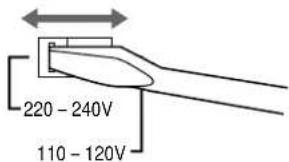
Setting the voltage selector (only on models supplied with a voltage selector)
Check that the voltage selector on the rear panel of the deck is set to the local power line voltage. If not, set the selector to the correct position using a screwdriver before connecting the AC power cord to an AC outlet.
Connecting the AC power cord
Connect the AC power cord to a wall outlet or to the outlet of a timer.
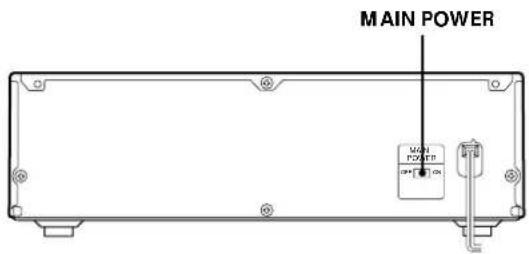
Turning on the unit (only on models supplied with a MAIN POWER switch)
Set MAIN POWER on the rear of the unit to ON. The unit is turned on in standby mode.
Recording on an MD
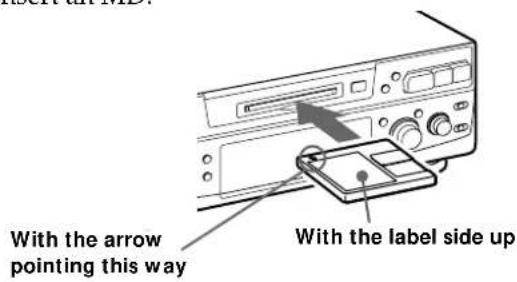
1 Turn on the amplifier and play the program source you want to record. 2 Press POWER. The POWER indicator turns off. 3 Insert a recordable MD.
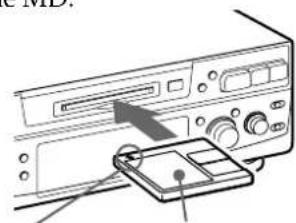
With the arrow pointing this way With the label side up
If the MD has a recorded material on it, the deck will automatically start recording from the end of the last recorded track.
4 Set INPUT to the corresponding input connector.
To record through Set INPUT to
| DIGITAL IN | DIGITAL |
| LINE (ANALOG) IN | ANALOG |
5 Set REC MODE to the mode you want to record in.
| To record in Set REC MODE* | 1 to |
| STEREOStereo sound | |
| Monaural sound *2 | MONO |
* If you switch REC MODE during recording or recording pause, recording stops.
e In the monaural recording, you can record about two times longer than in the stereo recording.
When "TOC" flashes in the display
The deck is currently updating the Table Of Contents (TOC). Do not move the deck or pull out the AC power cord. Changes to an MD made through recording are saved only when you update the TOC by ejecting the MD or changing the deck to standby by pressing POWER.
6 Press ●. The deck becomes ready to record. 7 When recording the analog input signal, adjust the recording level with REC LEVEL. The fourth dot is satisfactory for most purposes. For details, refer to "Adjusting the Recording Level" on page 11. 8 Press ▷ (or ▷). Recording starts. 9 Start playing the program source.
Do not disconnect the deck from the power source immediately after recording
If you do, recorded material may not be saved to the MD. To save the material, after recording, press ≅ to take out the MD or change the deck to standby by pressing POWER. "TOC" will flash in the display at this time.
After "TOC" stops flashing and goes out, you can pull out the AC power cord.
| To | Press |
| Stop recording | ■ |
| Pause recording* | ▷□ (or □). Press the button again to resume recording. |
Take out the MD after stopping recording * Whenever you pause recording, the track number increases by one. For example, if you paused recording while recording on track 4, the track number increases by one and recording continues on the new track when restarted.
To protect an MD against accidental erasure
To make it impossible to record on an MD, slide the tab in the direction of arrow, opening the slot. To allow recording, close the slot.
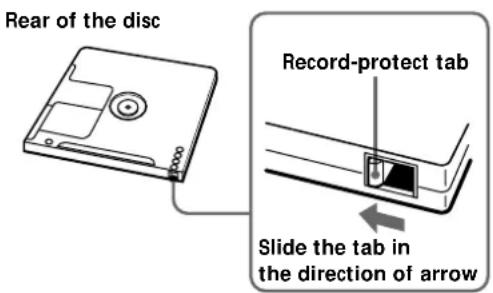
Basic Operations
Playing an MD
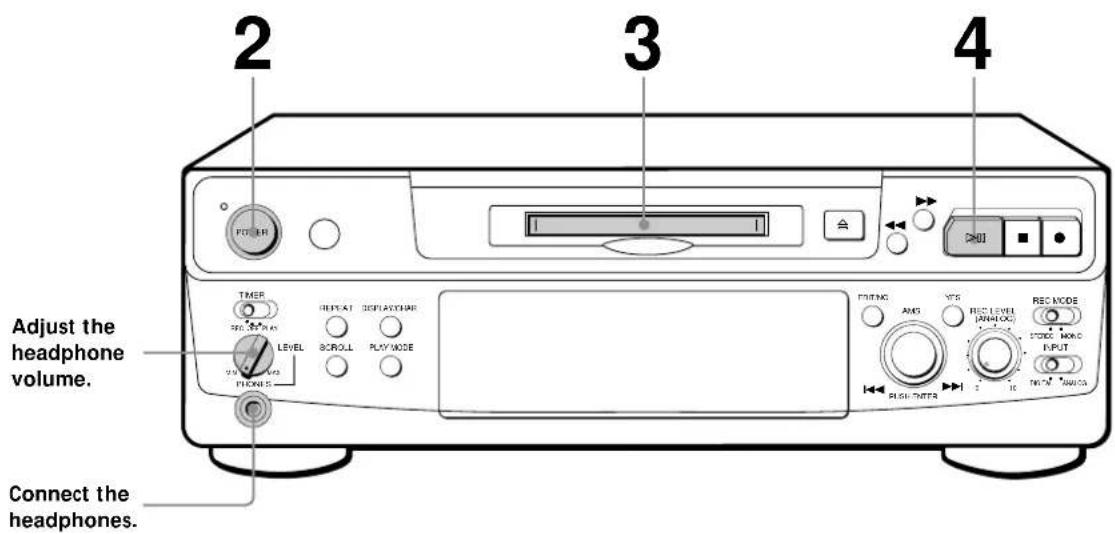
1 Turn on the amplifier and set the source selector to the position for MD deck. 2 Press POWER. The POWER indicator turns off. 3 Insert an MD.

You can locate and play back a track while the deck is stopped.
1 Turn AMS (or press ◀◀◀ or ▶▶◀) until the number of the track you want to play appears. 2 Press AMS or ▷□ (or ▷).

To use headphones
Connect them to the PHONES jack. Use PHONES LEVEL to adjust the volume.
4 Press ▷ (or ▷). The deck starts playing. Adjust the volume on the amplifier.
| To | Do the following: |
| Stop playing | Press ■. |
| Pause playing | Press ▷■ (or ■). Press the button again to resume playing. |
| Go to the next track | Turn AMS clockwise (or press ▷▶1 on the remote). |
| Go to the preceding track | Turn AMS counterclockwise (or press ◀◀ on the remote). |
| Take out the MD | Press ≜ after stopping playing. |
Notes on Recording
If "Protected" appears in the display
The MD is record-protected. Close the slot to record on the disc (see "To protect an MD against accidental erasure" on page 7).
If "Din Unlock" flashes in the display
- The digital program source is not connected as you set with INPUT in Step 4 on page 6. To continue, connect the program source properly. • The program source is not on. Turn on the program source.
Depending on the source being recorded, track numbers are marked in the following ways:
- When recording from a CD or MD with INPUT at DIGITAL and the source connected through DIGITAL IN: The deck automatically marks track numbers in the same sequence as the original. If, however, a track is repeated two or more times (e.g., by single-track repeat play) or two or more tracks with the same track number (e.g., from different MDs or CDs) are played, the track or tracks are recorded as part of a single, continuous track with a single track number. If the source is an MD, track numbers may not be marked for tracks of less than 4 seconds.
- When recording from a source connected through LINE (ANALOG) IN with INPUT at ANALOG, and "LEVEL-SYNC" does not light up (see "Marking Track Numbers while Recording" on page 12) or when recording from DAT or satellite broadcasts connected through DIGITAL IN with INPUT at DIGITAL:
The source will be recorded as a single track. You can divide the track afterwards using the Divide Function (see "Dividing Recorded Tracks" on page 26) or mark track numbers during recording by using the Track Marking Function on page 12.
If "LEVEL-SYNC" appears in the display, the deck automatically marks track numbers when recording analog source or digital recording of DAT or satellite broadcasts (see "Marking track numbers automatically" on page 12).
- When recording from DAT or satellite broadcasts with INPUT at DIGITAL, the deck automatically marks a track number whenever the sampling frequency of the input signal changes.
When "TOC" flashes in the display
The deck is currently updating the Table Of Contents (TOC). Do not move the deck or pull out the AC power cord. Changes to an MD made through recording are saved only when you update the TOC by ejecting the MD or changing the deck to standby by pressing POWER.
The MD deck uses the SCMS (Serial Copy Management System on page 35)
MDs recorded through digital input connector cannot be copied onto other MDs or DAT tapes through the digital output connector.
When recording digital signals that have been emphasized (in the higher frequencies)
The signal is automatically de-emphasized (with attenuation proportional to the degree of emphasis) and the level of the de-emphasized signal is indicated on the peak level meters.
When the deck is recording or in recording pause, digital signals input through DIGITAL IN are output to DIGITAL OUT with the same sampling rate.
To change the digital input signal to another sampling rate for output (without recording it to an MD), use Input Monitor Function (see page 10).
Useful Tips for Recording
Checking the remaining recordable time on the MD
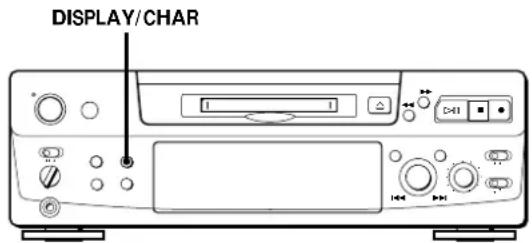
- When you press DISPLAY/CHAR while recording, the remaining recordable time on the MD appears.
- When you press DISPLAY/CHAR repeatedly while the deck is stopped, the display changes as follows: total recorded time, remaining recordable time on the MD, disc name (see page 17).
(Continued)
Monitoring the input signal (Input Monitor)
Before starting recording, you can monitor the selected input signal through the deck's output connectors.
1 Press △ to remove the MD.
2 Set INPUT according to the input signal you want to monitor.
When INPUT is at ANALOG
The analog signal input through LINE (ANALOG) IN is output to DIGITAL OUT after A/D conversion, and then to the LINE (ANALOG) OUT connectors and PHONES jack after D/A conversion.
When INPUT is at DIGITAL
The digital signal input through DIGITAL IN is output to DIGITAL OUT after passing through the sampling rate converter, and then to the LINE (ANALOG) OUT connectors and PHONES jack after D/A conversion.
Note
Even if you set REC MODE to MONO, the monitor signal does not become monaural.
3 Press ●.
If INPUT is at ANALOG, "AD-DA" appears in the display.
If INPUT is at DIGITAL, "-DA" appears in the display.
If "Auto Cut" appears in the display (Auto Cut)
There has been no sound input for 30 seconds while INPUT is set to DIGITAL and the source is connected through DIGITAL IN. The 30 seconds of silence are replaced by a blank of about 3 seconds and the deck changes to recording pause.

You can turn off the Auto Cut Function
For details, see "If "Smart Space" appears in the display".
If "Smart Space" appears in the display (Smart Space)
There has been an extended silence of 4 to 30 seconds in length when INPUT is set to DIGITAL and the source is connected through DIGITAL IN.
The silence is replaced with a blank of about 3 seconds and the deck continues recording. Note that the tracks before and after this three-second space may be recorded as a single track with a single track number.
To turn off the Smart Space Function and Auto Cut Function
1 During recording pause, press EDIT/NO repeatedly until "S. Space?" appears in the display. 2 Press YES. 3 Press EDIT/NO to display "S. Space OFF."
To turn on the Smart Space Function and Auto Cut Function again
1 During recording pause, press EDIT/NO repeatedly until "S. Space?" appears in the display. 2 Press YES twice to display "S. Space ON".
Notes
- When you turn off the Smart Space Function, the Auto Cut Function is also turned off automatically.
- The Smart Space Function and Auto Cut Function are factory set to on.
- The Smart Space Function does not affect the order of the track numbers being recorded, even if the blank space occurs in the middle of a track.
- If you turn off the deck or disconnect the AC power cord, the deck will recall the last setting (on or off) of the Smart Space and Auto Cut Functions the next time you turn on the deck.
Playing back tracks just recorded
Do this procedure to immediately play back tracks that have just been recorded.
Press ▷□ (or ▷) immediately after stopping recording.
Playback starts from the first track of the material just recorded.
To play from the first track of the MD after recording
1 Press ■ again after stopping recording. 2 Press ▷□ (or ▷). Playback starts from the first track of the MD.
Recording Over Existing Tracks
Follow the procedure below to record over existing material just as you would on an analog cassette tape.
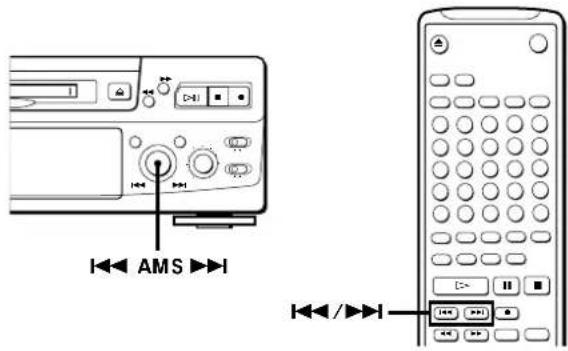
1 Do Steps 1 to 5 in "Recording on an MD" on page 6. 2 Turn AMS (or press ◀◀◀ or ▶▶◀) until the number of the track to be recorded over appears. 3 To record from the start of the track, continue from Step 6 in "Recording on an MD" on page 7.

While "TRACK" flashes in the display
The deck is recording over an existing track, and stops flashing when it reaches the end of the recorded portion.

To record from the middle of the track
1 After Step 2 above, press ▷(or ▷) to start playback. 2 Press ▷Ⅱ (or Ⅲ) where you want to start recording. 3 Continue from Step 6 in "Recording on an MD" on page 7.
Note
You cannot record from the middle of an existing track when the "PROGRAM" or "SHUFFLE" is on.
Adjusting the Recording Level
When recording with INPUT set to ANALOG and the signal input through the LINE (ANALOG) IN jacks, use REC LEVEL to adjust the recording level before starting recording.
You cannot adjust the recording level during digital recording.
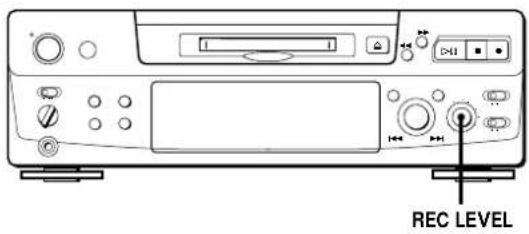
1 Do Steps 1 to 6 in "Recording on an MD" on pages 6 and 7. 2 Play the portion of the program source with the strongest signal level. 3 While monitoring the sound, turn REC LEVEL to adjust the recording level so that the peak level meters reach their highest point without turning on the OVER indication. Occasional lighting of "OVER" is acceptable.
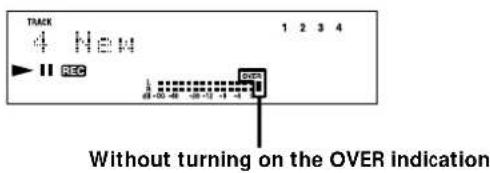
4 Stop playing the program source.
5 To start recording, do the procedure starting from Step 8 in "Recording on an MD" on page 7.
Marking Track Numbers while Recording (Track Marking)
You can mark track numbers either manually or automatically. By marking track numbers at specific points, you can quickly locate the points later using the AMS Function or Editing Functions.
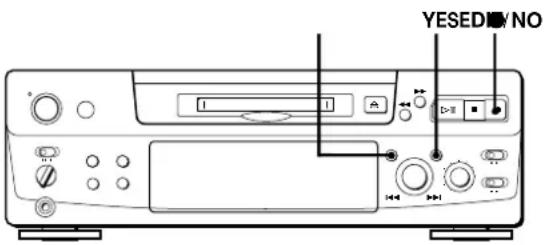
Marking track numbers manually (Manual Track Marking)
You can mark track numbers at any time while recording on an MD.
Press ● at the place you want to add a track mark while recording.
Marking track numbers automatically (Automatic Track Marking)
The deck adds track marks differently in the following cases:
- When recording from CDs or MDs with INPUT set to DIGITAL and the source connected through DIGITAL IN: The deck marks track numbers automatically. When you record from a CD or MD, the track numbers are marked as they are found on the original.
- When recording with INPUT set to ANALOG and the source connected through LINE (ANALOG) IN, or when recording from DAT or satellite broadcasts with INPUT set to DIGITAL and the DAT or satellite broadcasts connected through DIGITAL IN: The deck marks a new track number whenever the signal level drops and rises to a certain point* (Automatic Track Marking). If "LEVEL-SYNC" does not light up, set the LevelSync to ON as follows:
1 Press EDIT/NO to display "LevelSync?" during recording or recording pause. 2 Press YES twice to display "LevelSync ON." "LEVEL-SYNC" appears in the display.
To cancel Automatic Track Marking
1 Press EDIT/NO during recording or recording pause. "LevelSync?" appears in the display. 2 Press YES. 3 Press EDIT/NO. "LevelSyncOFF" appears in the display.
* The signal level must remain low for 2 or more seconds before a new track number is marked.

When you want to mark track numbers after you've finished recording
Use the Divide Function (see "Dividing Recorded Tracks" on page 26).
Note
If you turn off the deck or disconnect the AC power cord, the deck will recall the last setting (LevelSync on or off) of the Automatic Track Marking Function the next time you turn on the deck.
Starting Recording with 6 Seconds of Prestored Audio Data (Time Machine Recording)
When recording from an FM or satellite broadcast, the first few seconds of material are often lost due to the time it takes you to ascertain the contents and press the record button. To prevent the loss of this material, the Time Machine Recording Function constantly stores 6 seconds of the most recent audio data in a buffer memory so that when you begin recording the program source, the recording actually begins with the 6 seconds of audio data stored in the buffer memory in advance, as shown in the illustration below:
![graph LR A["Beginning of the program source to be recorded"] --> B["Audio data in 6-second buffer memory"] B --> C["Recorded portion"] C --> D["End of the program source to be recorded"] D --> E["Time"] style A fill:#f9f,stroke:#333 style B fill:#ccc,stroke:#333 style C fill:#ddd,stroke:#333 style D…](/content/2026/02/425419/images/645fdc9b4e13b4b18eca520bd977a97e65b4ae501db249cc1dca429d9e11813a.jpg)
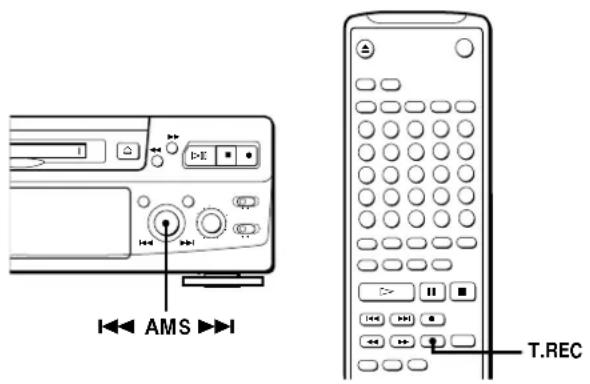
1 Do Steps 1 to 6 in "Recording on an MD" on pages 6 and 7. The deck changes to recording pause.
2 Start playing the program source you want to record.
The most recent 6 seconds of audio data is stored in the buffer memory.
3 Press AMS (or T.REC) to start Time Machine Recording.
Recording of the program source starts with the 6 seconds of audio data stored in the buffer memory.

To stop Time Machine Recording
Press ■
Note
The deck starts storing audio data when the deck is in recording pause and you start playing the program source. With less than 6 seconds of playing of the program source and audio data stored in the buffer memory, Time Machine Recording starts with less than 6 seconds of audio data.
Synchro-Recording with Audio Equipment of Your Choice
By using the MUSIC SYNC button on the remote, you can automatically start recording in sync with the signal input from the program source through the LINE (ANALOG) IN jacks or the respective digital input connector (Music Synchro-Recording). The method of marking track numbers differs, depending on the program source being recorded and how the deck is connected to the program source. (See "Notes on Recording" on page 9.)
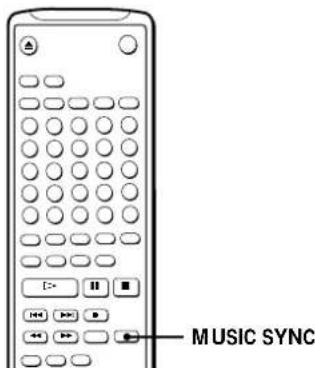
1 Do Steps 1 to 5 in "Recording on an MD" on page 6.
2 Press MUSIC SYNC. The deck changes to recording pause.
3 Start playing the program source you want to record. The deck starts recording automatically.

To stop Music Synchro-Recording Press ■.
Note
When Music Synchro-Recording, the Smart Space Function and the Auto Cut Function turn on automatically regardless of their setting (on or off) and type of input (digital or analog).
Synchro-Recording with a Sony CD Player
By connecting your deck to a Sony CD player or Hi-Fi Component System, you can easily dub CDs onto MDs using the CD synchro buttons on the remote. If your deck is connected to a Sony CD player by a digital input cable, track numbers are automatically marked as appear on the original regardless of whether "LevelSync ON" or "LevelSyncOFF" is selected. If your deck is connected to a Sony CD player by audio connecting cords through LINE (ANALOG) IN, track numbers are automatically marked when you select "LevelSync ON" (see "Marking Track Numbers while Recording" on page 12).
As the same remote controls both the CD player and the deck, you may have trouble operating both units if they are far from each other. If you do, place the CD player close to this deck.
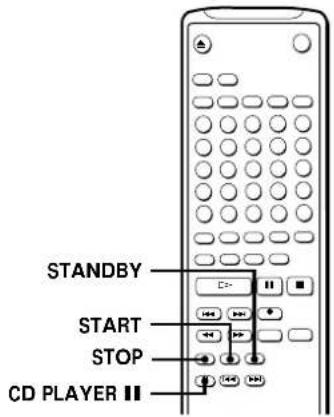
1 Set the source selector on the amplifier to CD.
2 Do Steps 2 to 5 in "Recording on an MD" on page 6 to prepare the deck for recording.
3 Insert a CD into the CD player.
4 Select the playback mode (Shuffle Play, Program Play, etc.) on the CD player.
5 Press STANDBY.
The CD player pauses for playing and the deck pauses for recording.
6 Press START.
The deck starts recording and the CD player starts playback.
The track number and elapsed recording time of the track appear in the display.
If the CD player does not start playing
Some CD player models may not respond when you press START on the remote of the deck. Press II on the remote of the CD player instead.
7 Press STOP to stop synchro-recording.
To pause recording
Press STANDBY or CD PLAYER II.
To restart recording, press START or CD PLAYER II.
A new track number is marked each time you pause recording.
Note
When using the supplied remote for synchro-recording, set the mode selector on the CD player to CD1.

You can use the remote of the CD player during synchro-recording.
When you press ■, the CD player stops and the deck pauses for recording.
When you press Ⅲ, the CD player pauses and the deck pauses for recording.
To restart synchro-recording, press ▷.

You can change CDs during synchro-recording.
Do the following steps instead of Step 7 above.
1 Press ■ on the remote of the CD player. The deck pauses for recording.
2 Change the CD.
3 Press ▷ on the remote of the CD player. Synchro-recording restarts.

You can also do synchro-recording with a Sony video CD player.
Using the procedure for synchro-recording with a Sony CD player, you can do synchro-recording with a Sony video CD player also.
To select the video CD player, press button number 2 while pressing down the POWER button before starting the procedure.
To select the CD player again, press button number 1 while pressing down the POWER button.
The deck is factory set to a CD player for synchro-recording.

You can check the remaining recordable time on the MD.
Press DISPLAY (see page 17).
Recording on an MD Using a Timer
By connecting a timer (not supplied) to the deck, you can start and stop recording operations at specified times. For further information on connecting the timer and setting the starting and ending times, refer to the instructions that came with the timer.
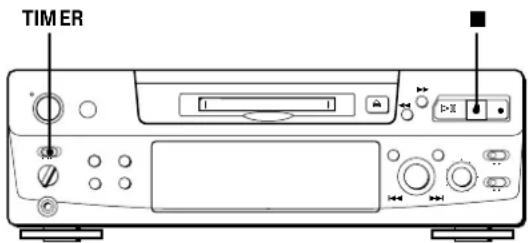
1 Do Steps 1 to 7 in "Recording on an MD" on pages 6 and 7. 2 • If you want to specify the time for the start of recording, press ■.
- If you want to specify the time for the end of recording, do Steps 8 and 9 of "Recording on an MD" on page 7.
- If you want to specify the time for both start and end of recording, press ■.
3 Set TIMER on the deck to REC. 4 Set the timer as required.
- When you have set the time for the start of recording, the deck turns off. When the specified time arrives, the deck turns on and starts recording.
- When you have set the time for the end of recording, recording continues. When the specified time arrives, the deck stops recording and turns off.
- When you have set the time for both the start and end of recording, the deck turns off. When the starting time arrives, the deck turns on and starts recording. When the ending time arrives, the deck stops recording and turns off.
5 After you have finished using the timer, set TIMER on the deck to OFF. Then place the deck in standby status by plugging the AC power cord of the deck into a wall outlet or set the timer to continuous operation.
- If TIMER is left at REC, the deck will automatically start recording the next time you turn the deck on.
- If you do not change the deck to standby status for more than a month after timer recording has finished, the recorded contents may disappear.
Make sure to change the deck to standby status within a month after timer recording is completed.
The TOC on the MD is updated and recorded contents are written to the MD when you turn the deck on. If the recorded contents have disappeared, "STANDBY" flashes when you turn the deck on.
Notes
- During timer recording, new material is recorded from the end of the recorded portion on the MD.
- Material recorded during timer recording will be saved to the disc the next time you turn the deck on. "TOC" will flash in the display at that time. Do not move the deck or pull out the AC power cord while "TOC" is flashing.
- Timer recording will stop if the disc becomes full.
Using the Display
You can use the display to check disc and track information such as the total track number, total playing time of the tracks, remaining recordable time of the disc, and disc name.
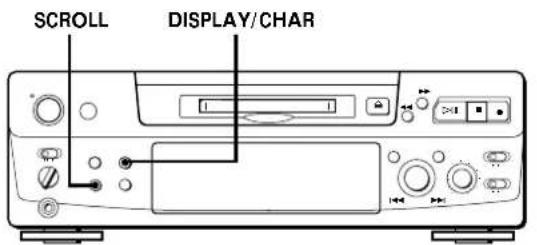
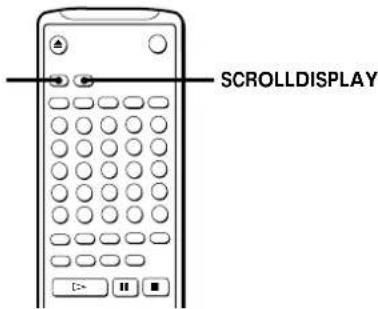
Checking the total track number, total disc playing time, remaining recordable time of the disc, and the title of the disc
Each time you press DISPLAY/CHAR (or DISPLAY) while the deck is stopped, you can change the display as follows:
Total track number and total playing time of all recorded tracks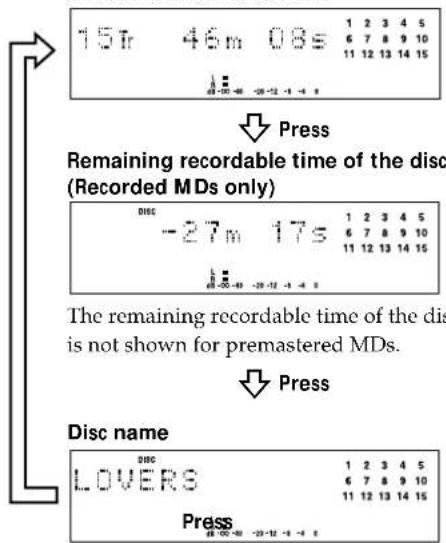
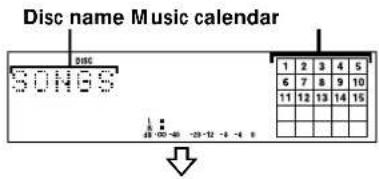
When you insert an MD, the disc name, total number of tracks, and total disc playing time appear in the display as follows:
Total number of tracks Total disc playing time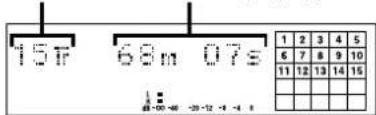
The disc name appears, followed by the total number of tracks (Tr) and total disc playing time.
A music calendar showing all the track numbers appears within a grid if the MD is a premastered disc, or without a grid if the MD is a recordable disc.
If the total track number exceeds 25, ▶ appears to the right of number 25 in the music calendar.
To label a recordable disc and its tracks, see "Labeling Recordings" on page 29.
Note
When you insert a new MD or turn off the deck and turn it on again, the last item displayed will reappear.
If, however, you disconnect the AC power cord, the display will show the total track number and total playing time of all recorded tracks the next time you turn on the deck, no matter what the last display was.
(Continued)
Checking remaining time and the title of a track
Each time you press DISPLAY/CHAR (or DISPLAY) while playing an MD, you can change the display as shown below. The track numbers in the music calendar disappear after they are played.
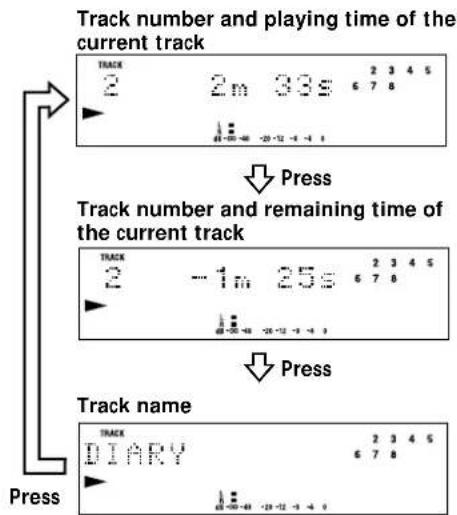
If no title is recorded, "No Name" appears, followed by the elapsed playing time.

You can check the track name at any time while playing an MD
Press SCROLL.
Since the display shows up to 12 characters at a time, press SCROLL again to see the rest of the track title if the title has 13 characters or more.
Press SCROLL again to pause scrolling, and again to continue scrolling.
Locating a Specific Track
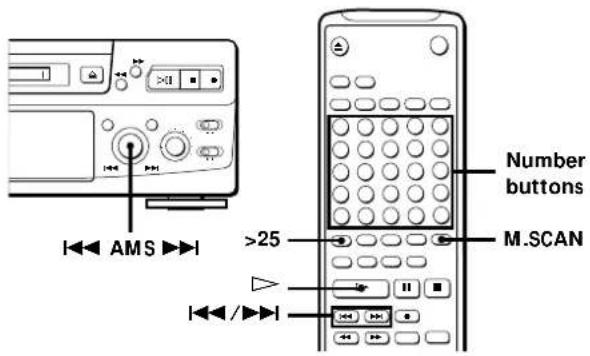
You can quickly locate any track while playing a disc by using AMS (Automatic Music Sensor), ◀◀ and ▶▶, number buttons or M.SCAN on the remote.
| To locate | Do the following: |
| The next or succeeding tracks | During playback, turn AMS clockwise (or press ▶▶1 repeatedly) until you find the track. |
| The current or preceding tracks | During playback, turn AMS counterclockwise (or press ◀◀repeatedly) until you find the track. |
| A specific track directly [IMAGE] | Press number buttons to enter the track number. |
| A specific track by using AMS | 1 Turn AMS until the track number you want to locate appears while the deck is stopped. (The track number is flashing.)2 Press AMS or ▷▶. |
| By scanning each track for 6 seconds (music scan) [IMAGE] | 1 Press M.SCAN before you start playing.2 When you find the track you want, press ▷ to start playing. |

When you directly locate a track with a number over 25
You must press >25 first, before entering the corresponding digits.
Press >25 once if it is a 2-digit track number, and twice if it is a 3-digit track number.
To enter "0," press button 10.
Examples: • To play track number 30
Press >25 once, then 3 and 10.
• To play track number 100
Press >25 twice, then 1, 10 and 10.

You can extend the playing time during music scan
While the deck is stopped, press M.SCAN repeatedly until the playing time you want (6, 10 or 20 seconds) appears in the display. Each press changes the time in order of 6 to 20, then from 6 again.

To pause playing at the beginning of a track
Turn AMS (or press ◀◀◀ or ▶▶◀) after pausing playback.

To go quickly to the beginning of the last track
Turn AMS counterclockwise (or press ◀◀◀) while the display shows the total track number and total disc playing time, remaining recordable time of the disc, or disc name (see page 17).
Locating a Particular Point in a Track
You can also use ◀◀ and ▶▶ to locate a particular point in a track during playback or playback pause.
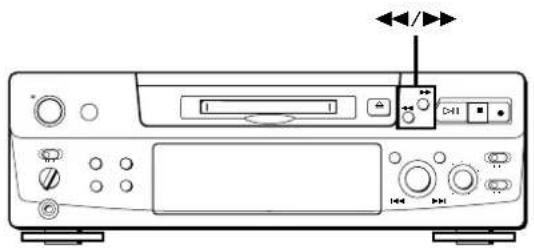
To locate a point, press
| While monitoring the sound | ▶▶ (forward) or ◀◀ (backward) and keep pressing until you find the point. |
| Quickly by observing the display during playback pause | ▶▶ or ◀◀ and keep pressing until you find the point. There is no sound output during this operation. |
Notes
- If the disc reaches the end while you are pressing ▶ during playback pause, "OVER" appears in the display. Press ◀◀ (or ◀◀◀) or turn the AMS counterclockwise to go back.
- If the disc reaches the end while you are pressing ▶ during sound monitoring, the deck stops. • Tracks that are only a few seconds long may be too short to scan using the search function. For such tracks, it is better to play the MD at normal speed.
Playing Tracks Repeatedly
You can play tracks repeatedly in any play mode.
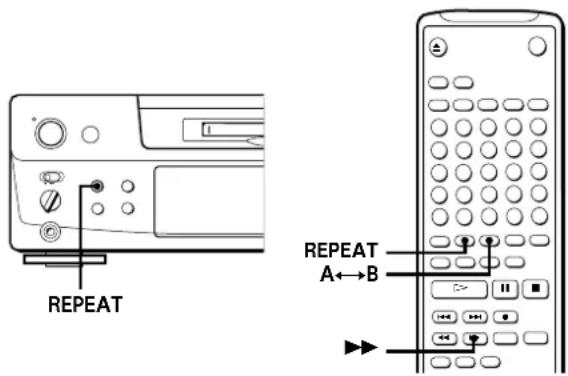
Press REPEAT.
"REPEAT" appears in the display.
The deck repeats the tracks as follows:
| When the MD is played in | The deck repeats |
| Normal play (page 8) | All the tracks |
| Shuffle Play (page 21) | All the tracks in random order |
| Program Play (page 21) | The same program |
To cancel repeat play
Press REPEAT several times until "REPEAT" disappears.
The deck returns to the original playing mode.
Repeating the current track
While the track you want to repeat is playing in normal play, press REPEAT several times until "REPEAT 1" appears in the display.
Repeating a specific portion (A-B Repeat)

You can play a specific portion of a track repeatedly.
This might be useful when you want to memorize lyrics.
Note that you can only repeat a portion within the boundaries of a single track.
1 While playing a disc, press A↔B at the starting point (point A) of the portion to be played repeatedly. "REPEAT A-" flashes in the display. 2 Continue playing the track or press ▶▶ until you reach the ending point (point B), then press A↔B again. "REPEAT A-B" lights continuously. The deck starts to play the specified portion repeatedly.
To cancel A-B Repeat
Press REPEAT or ■.
Setting new starting and ending points
You can repeat the portion immediately after the currently specified portion by changing the starting and ending points.
1 Press A↔B while "REPEAT A-B" appears. The current ending point B becomes the new starting point A and "REPEAT A-" flashes in the display.
2 Continue playing the track or press ▶▶ until you reach the new ending point (point B), then press A↔B again. "REPEAT A-B" lights continuously and the deck starts playing repeatedly the newly specified portion.
Note
If you turn off the deck or disconnect the AC power cord, the deck will recall the last setting of the Repeat Function the next time you turn on the deck.
The A-B Repeat settings, however, are lost.
Playing in Random Order (Shuffle Play)
You can have the deck "shuffle" tracks and play them in random order.
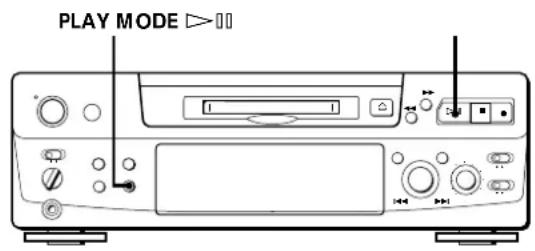
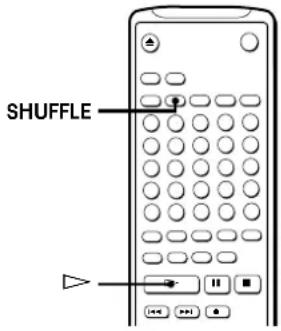
1 Press PLAY MODE repeatedly (or SHUFFLE once) until "SHUFFLE" appears in the display when the deck is stopped. 2 Press ▷ (or ▷) to start Shuffle Play. "īy" appears in the display while the deck is "shuffling" the tracks.
To cancel Shuffle Play
Press PLAY MODE repeatedly (or CONTINUE once) until "SHUFFLE" disappears when the deck is stopped.

You can specify tracks during Shuffle Play
- To play the next track, turn AMS clockwise (or press ▶▶▶).
- To play from the beginning of the current track again, turn AMS counterclockwise (or press ◀◀◀). You cannot use AMS (or ◀◀◀) to go to tracks that have already been played.
Creating Your Own Program (Program Play)
You can specify the playback order of the tracks on an MD and create your own programs containing up to 25 tracks.
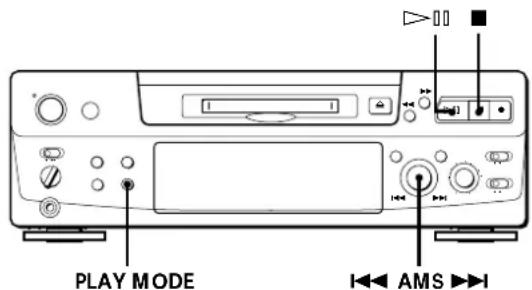
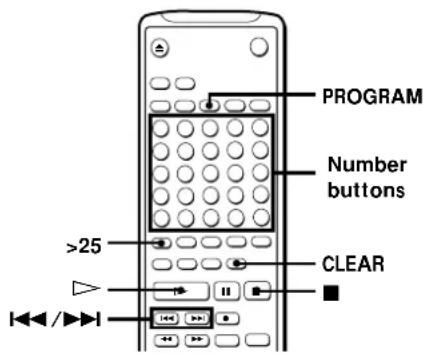
1 Press PLAY MODE repeatedly (or PROGRAM once) until "PROGRAM" appears in the display when the deck is stopped. 2 Do either a) or b):
a) When using the remote
Press the number buttons to enter the tracks you want to program in the order you want. To program a track with a number over 25, use the >25 button (see page 19).
If you've made a mistake
Press CLEAR, then program the right track.
b) When using the controls on the deck
1 Turn AMS until the track number you want appears in the display. 2 Press AMS or PLAY MODE.
3 Repeat Step 2 to enter other tracks. Each time you enter a track, the total program time is added up and appears in the display. 4 Press ▷ (or ▷) to start Program Play.
(Continued)
To cancel Program Play
Press PLAY MODE repeatedly (or CONTINUE once) until "PROGRAM" disappears when the deck is stopped.

You can program the same track repeatedly
While the track number appears in the display, press AMS as many times as you want.

The program remains even after Program Play ends
When you press ▷□ (or ▷), you can play the same program again.
Notes
- The program created by the Program Play Function is lost when you turn off the deck or disconnect the AC power cord. The program is, however, recalled during timer playback.
- The display shows “- -m - -s” instead of the total playing time when the total playing time of the program exceeds 160 minutes.
Checking the track order
You can check the order of tracks in your program during playback or playback pause.
Turn AMS (or press ◀◀◀ or ▶▶◀) during playback or playback pause. The track numbers appear in the order they were programmed.
Changing the track order
You can change the order of the tracks in your program before you start playing.
| To | Do the following: |
| Erase the last track in the program | Press CLEAR. Each time you press the button, the last track will be cleared. |
| Add tracks to the end of the program | Do Steps 2 and 3 in “Creating Your Own Program.” |
| Change the whole program completely | 1 Press ■ while the deck is stopped.2 Do Steps 2 and 3 in “Creating Your Own Program.” |
Useful Tips when Recording from MDs to Tape
The Auto Space and Auto Pause Functions described in this section make recording from MDs to tape more easy.
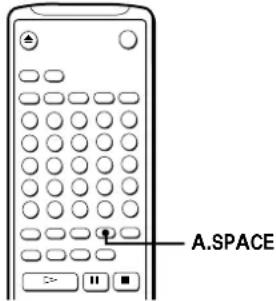
Inserting blank spaces while recording to tape (Auto Space)
The Auto Space Function inserts a 3-second blank space between each track while recording from MDs to tapes, allowing you to use the AMS function during later playback.
Press A.SPACE repeatedly until "A.SPACE" appears in the display.
To cancel Auto Space
Press A.SPACE repeatedly until "A.SPACE" disappears.
Note
If the Auto Space Function is on while recording a selection containing multiple track numbers, (for example, a medley or symphony), blank spaces will be inserted within the selection whenever the track number changes.
Pausing after each track (Auto Pause)
When the Auto Pause Function is on, the deck pauses after playing each track. Auto Pause is convenient when recording single tracks or multiple, non-consecutive tracks.
Press A.SPACE repeatedly until "A.PAUSE" appears in the display.
To restart playback
Press ▷□ (▷ or ▶).
To cancel Auto Pause
Press A.SPACE repeatedly until "A.PAUSE" disappears.
Note
If you turn off the deck or disconnect the AC power cord, the deck will recall the last setting of the Auto Space and Auto Pause Functions the next time you turn on the deck.
Playing an MD Using a Timer
By connecting a timer (not supplied) to the deck, you can start and stop playback operations at specified times. For further information on connecting the timer or setting the starting and ending times, refer to the instructions that came with the timer.
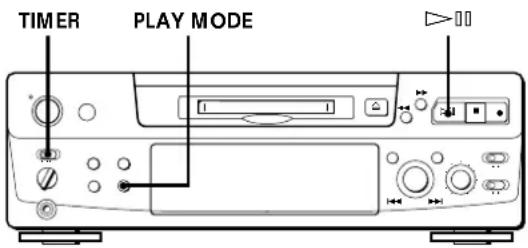
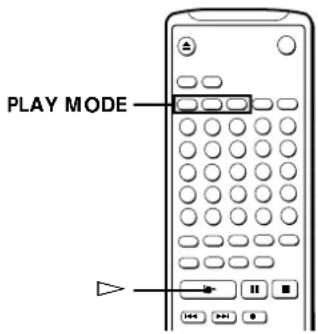
1 Do Steps 1 to 3 in "Playing an MD" on page 8.
2 Press PLAY MODE repeatedly (or one of the PLAY MODE buttons once) to select the play mode you want. To play only specific tracks, create a program (see page 21).
3 • If you want to specify the time for the start of playback, go to Step 4.
- If you want to specify the time for the end of playback, press ▷ (or ▶) to start playback, then go to Step 4.
- If you want to specify the time for both start and end of playback, go to Step 4.
4 Set TIMER on the deck to PLAY.
5 Set the timer as required.
- When you have set the time for the start of playback, the deck turns off. When the specified time arrives, the deck turns on and starts playing.
- When you have set the time for the end of playback, playback continues. When the specified time arrives, the deck stops playing and turns off.
- When you have set the time for both the start and end of playback, the deck turns off. When the starting time arrives, the deck turns on and starts playing. When the ending time arrives, the deck stops playing and turns off.
6 After you have finished using the timer, set TIMER on the deck to OFF.
Note
You can select Program Play in Step 2. Note, however, that programs eventually fade away when the standby status is off, and therefore if you set the time too far in the future, the program may be gone when the specified time arrives. If this has occurred, the deck enters normal play mode at the specified time and the tracks play in consecutive order.
Notes on Editing
You can edit the recorded tracks after recording, using the following functions:
- Erase Function allows you to erase recorded tracks simply by specifying the corresponding track number.
- Divide Function allows you to divide tracks at specified points so that you can quickly locate those points afterwards, using the AMS function.
- Combine Function allows you to combine two consecutive tracks into one.
- Move Function allows you to change the order of tracks by moving a specific track to a track position you want.
- Title Function allows you to create titles for your recorded MDs and tracks.
If "Protected" appears in the display
The deck could not edit because the record-protect slot on the MD is open. Edit after closing the slot.
When "TOC" flashes in the display
Do not move the deck or pull out the AC power cord. After editing, "TOC" lights continuously until you eject the MD or turn off the power. "TOC" flashes while the deck is updating the TOC. When the deck finishes updating the TOC, "TOC" goes off.
Erasing Recordings (Erase Function)
Do the procedures below to erase the following:
- A single track
- All tracks
- Portions of a track (A-B Erase)
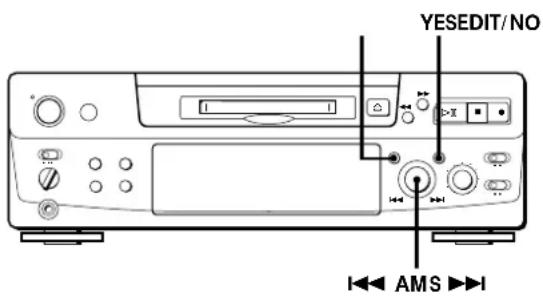
Erasing a single track
You can erase a track simply by specifying the respective track number. When you erase a track, the total number of tracks on the MD decreases by one and all tracks following the erased one are renumbered. Since erasing merely updates the TOC, there is no need to record over material.

To avoid confusion when erasing multiple tracks, you should proceed in order of high to low track number to prevent the renumbering of tracks that have not been erased yet.
Example: Erasing B![graph TD A["Track number 1"] --> B["A"] B --> C["B"] C --> D["C"] D --> E["D"] F["Erasing"] --> G["1"] G --> H["2"] H --> I["B is erased"] I --> J["3"] J --> K["D"] style A fill:#f9f,stroke:#333 style B fill:#ccf,stroke:#333 style C fill:#cfc,stroke:#333 style D fill:#fcc,stroke:#333 style E fill:#c…](/content/2026/02/425419/images/7c92eea635afc558a2333a49dd7d1260be6a21764fd7329c7cf8eb1e53255b9f.jpg)
1 Turn AMS until the track number you want to erase appears in the display. 2 Press EDIT/NO repeatedly until "Erase?" appears in the display. The track number you selected starts flashing in the music calendar. 3 Press YES.
When the track selected in Step 1 has been erased, "Complete" appears for a few seconds and the total number of tracks in the music calendar decreases by one.
If you erase a track during playback, the track following the deleted track begins playing afterwards.
4 Repeat Steps 1 to 3 to erase more tracks.
To cancel the Erase Function
Press EDIT/NO, ■, or turn AMS to change the track number.
Note
If "Erase!!?" appears in the display, the track was recorded or edited on another MD deck and is record-protected. If this indication appears, press YES to erase the track.
Erasing all tracks on an MD
Erasing a recordable MD deletes the disc name, all recorded tracks, and titles.
1 While the deck is stopped, press EDIT/NO repeatedly until "All Erase?" appears in the display. 2 Press YES. All tracks in the music calendar start flashing. 3 Press YES again. When the disc name, all recorded tracks, and titles on the MD have been erased, "Complete" appears for a few seconds and the music calendar disappears.
To cancel the Erase Function
Press EDIT/NO or ■.

You can undo a track erasion
See "Undoing the Last Edit" on page 31.
Erasing a Portion of a Track (A-B Erase Function)
You can easily erase a portion of a track by specifying the starting and ending points of the portion. This function is useful for erasing unnecessary portions on an MD that you recorded from satellite or FM broadcasts.
Example: Erasing a portion of track A
![graph TD A["Track number"] --> B["Point A"] B --> C["Point B"] C --> D["1"] D --> E["A"] E --> F["#1"] F --> G["Point A"] G --> H["Point B"] H --> I["2"] I --> J["B"] J --> K["3"] K --> L["C"] M["A-B Erasing"] --> N["1"] N --> O["Point A"] O --> P["#2"] P --> Q["Point B"] Q --> R["#3"] R --> S["B"]…](/content/2026/02/425419/images/8fd0e969169451541c7f4054deffdd0496a006eda6ff710bafa4fa2f48f4712c.jpg)
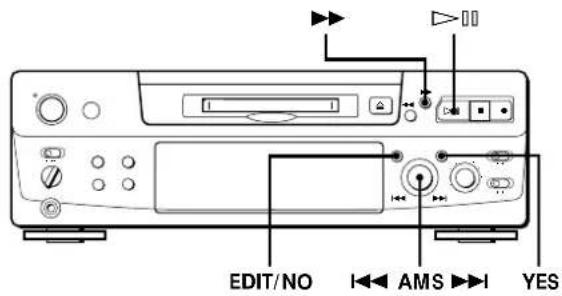
1 While playing a disc, press ▷(or ▶) at the starting point (point A) of the portion to be erased. 2 Press EDIT/NO repeatedly until "A-B Erase?" appears in the display. 3 Press YES. "Rehearsal" alternates with "Point A ok?" in the display and the starting point A of the portion to be erased plays back repeatedly. 4 If point A is incorrect, press EDIT/NO. (If it is correct, go to Step 7.) 5 While monitoring the sound, turn AMS to find point A. "Rehearsal" alternates with "Point A ok?" in the display and point A is played back repeatedly. Point A can be moved within a maximum range of -128 to +127 steps of about 0.06 second each within a track. 6 If point A is still incorrect, repeat Step 5 until it is correct.
(Continued)
7 Press YES or AMS when point A is correct.
After "Point B Set" appears for a few seconds, "▶" and "A-B" start flashing, and playback begins so that you can set point B.
8 Continue playing the track or press ▶▶ until you reach the ending point (point B) of the portion to be erased, then press YES.
"Rehearsal" alternates with "Point B ok?" in the display, and the "spliced" portion of the track (after the portion from point A to B has been erased) plays back repeatedly, starting a few seconds before point A and ending a few seconds after point B.
9 If point B is incorrect, press EDIT/NO. (If it is correct go to Step 12.)
10 While monitoring the sound, turn AMS to find point B.
"Rehearsal" alternates with "Point B ok?" in the display, and the "spliced" portion of the track (after the portion from point A to B has been erased) plays back repeatedly. Point B can be moved within a maximum range of -128 to +127 steps of about 0.06 second each within a track.
11 If point B is still incorrect, repeat Step 10 until it is correct.
12 Press YES or AMS when point B is correct. When the portion from point A to B has been erased, "Complete" appears for a few seconds.
To cancel the A-B Erase Function
Press ■.
Notes
- If "Impossible" appears in the display, point B was specified before point A. Specify point B so that it comes after point A.
- If "Sorry" appears in the display, a portion of the track cannot be erased. This sometimes happens when you've edited the same track many times, and is due to a technical limitation of the MD system, not a mechanical error.
Dividing Recorded Tracks (Divide Function)
With the Divide Function you can assign a track number at places that you want to randomly access afterwards. Use this function to add tracks to MDs recorded from an analog source (and therefore contain no track numbers), or to divide an existing track into multiple portions. When you divide a track, the total number of tracks on the MD increases by one and all tracks following the divided track are renumbered.
Example: Dividing track 2 to create a new track for C![graph TD A["Track number"] --> B["1"] B --> C["A"] B --> D["B"] C --> E["2"] D --> F["C"] E --> G["3"] F --> H["D"] I["Dividing"] --> J["1"] J --> K["2"] K --> L["3"] L --> M["4"] M --> N["Track 2 is divided and a new track is created for C"]](/content/2026/02/425419/images/b4116e4bddd8fb02c64f982fad3484ae9395a498b28f3cfc1513ae9d80c83cf9.jpg)
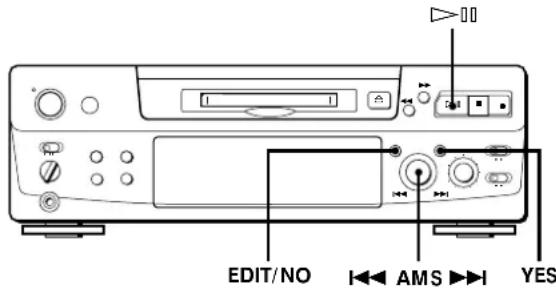
1 While playing the MD, press ▷ (or ▪) at the point where you want to create a new track. The deck pauses playing. 2 Press EDIT/NO repeatedly until "Divide?" appears in the display. 3 Press YES to divide the track. "Rehearsal" alternates with "Position ok?" in the display, the track to be divided starts flashing in the music calendar, and the starting portion of the new track begins playing repeatedly. 4 If the starting position is incorrect, press EDIT/NO. (If it is correct, go to Step 7.)
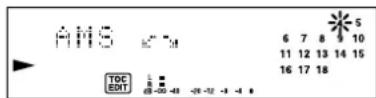
5 While monitoring the sound, turn AMS to find the starting position of the new track.
The starting portion of the new track is played back repeatedly.
"Rehearsal" alternates with "Position ok?" in the display.
The starting position can be moved within a maximum range of -128 to +127 steps of about 0.06 second each within a track.
6 If the starting position is still incorrect, repeat Step 5 until it is correct.
7 Press YES or AMS when the position is correct. When the track has been divided, "Complete" appears for a few seconds and the newly created track begins playing. The new track will have no track title even if the original track was labeled.
To cancel the Divide Function
Press ■

You can undo a track division
Combine the tracks again (see "Combining Recorded Tracks" on this page) then redivide the tracks if necessary.

You can divide a track while recording
Use the Track Marking Function (see page 12).
Combining Recorded Tracks (Combine Function)
Use the Combine Function while the deck is stopped, playing or in pause to combine consecutive tracks on a recorded MD. This function is useful for combining several songs into a single medley, or several independently recorded portions into a single track. When you combine two tracks, the total number of tracks decreases by one and all tracks following the combined tracks are renumbered.
Example: Combining B and C![graph TD A["Track number 1"] --> B["A"] B --> C["B"] C --> D["C"] D --> E["D"] F["Combining 1"] --> G["A"] G --> H["B"] H --> I["C"] I --> J["D"] K["B and C are combined into one track 2"] K --> L["3"]](/content/2026/02/425419/images/e0c79647c7ef39e75cf07ae380e7e54d71ebf2fa37bce7761bbf16d9eab27a91.jpg)
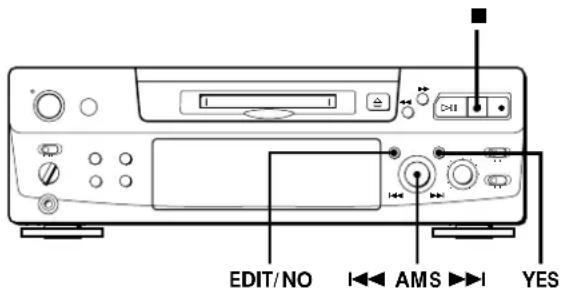
1 Turn AMS until the second track of the two to be combined appears. For example, when combining tracks 3 and 4, turn AMS until 4 appears.
2 Press EDIT/NO repeatedly until "Combine?" appears in the display.
3 Press YES.
"Rehearsal" alternates with "Track ok?" in the display. The place where the two tracks will join (i.e., the end of the first track and the beginning of the second track) repeatedly plays back and the respective track number flashes in the music calendar.
4 If the track is the wrong one, press EDIT/NO or
■, then start from Step 1 again.
(Continued)
5 If the place is correct, press YES.
When the tracks have been combined,
"Complete" appears for a few seconds and the total number of tracks in the music calendar decreases by one.
If both of the combined tracks have track titles, the title of the second track is erased.
To cancel the Combine Function
Press EDIT/NO or ■.

You can undo a track combination.
Divide the tracks again (see "Dividing Recorded Tracks" on page 26), then repeat the combine function with the correct tracks if necessary.
Note:
If "Sorry" appears in the display, the tracks cannot be combined. This sometimes happens when you've edited the same track many times, and is due to a technical limitation of the MD system, not a mechanical error.
Moving Recorded Tracks (Move Function)
Use the Move Function to change the order of any track. After you move a track, the track numbers between the new and old track positions are automatically renumbered.
Example: Moving track C to track position 2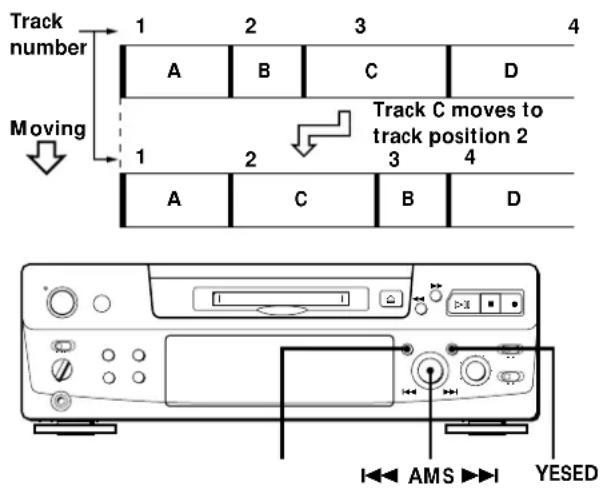
1 Turn AMS until the track number you want to move appears in the display. 2 Press EDIT/NO repeatedly until "Move?" appears in the display.
3 Press YES.
The track number to be moved and the new track position appears.
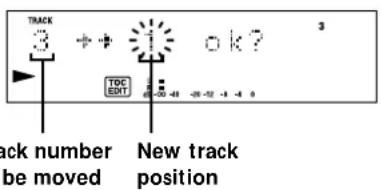
4 Turn AMS until the new track position appears.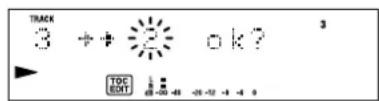
5 Press YES or AMS.
After you have moved the track, "Complete" appears for a few seconds and the moved track begins playing back if the deck is in playback mode.
To cancel the Move Function
Press EDIT/NO or ■.
Labeling Recordings (Title Function)
You can create titles for your recorded MDs and tracks. Titles — which may consist of uppercase and lowercase letters, numbers and symbols for a maximum of about 1,700 characters per disc — appear in the display during MD operation.
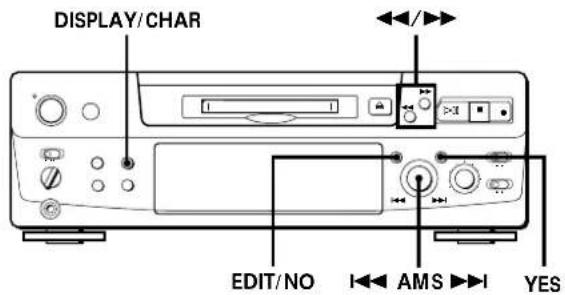
Use the following procedure to label a track or an MD. You can label a track while it is playing, pausing or recording. If the track is playing or recording, be sure to finish labeling before the track ends. If the track ends before you've completed the labeling procedure, the characters already entered are not recorded and the track will remain unlabeled.
1 Press EDIT/NO repeatedly until "Name in ?" appears in the display, then do the following:
| To label Make sure that the deck is | |
| A track | Playing, pausing, recording the track to be labeled, or stopped after locating the track to be labeled |
| An MD | Stopped with no track number appearing in the display |
2 Press YES.
A flashing cursor appears in the display.
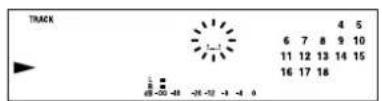
3 Press DISPLAY/CHAR to select the character type as follows:
| To select | Press DISPLAY/CHAR repeatedly until |
| Uppercase letters | “A” appears in the display |
| Lowercase letters | “a” appears in the display |
| Numbers | “0” appears in the display |
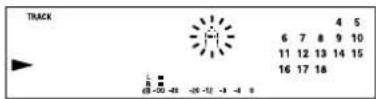
4 Turn AMS to select the character.
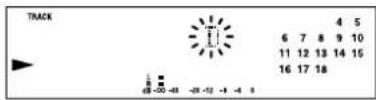
The selected character flashes.
Letters, numbers, and symbols appear in sequential order as you turn AMS.
You can use the following symbols in titles:
!" # % \ amp; ^ ()* +, -. /:; lt; = gt;? @ _
You can press DISPLAY/CHAR to change the character type at any time during Step 4 (see Step 3).
5 Press AMS to enter the selected character.
The cursor shifts rightward and waits for the input of the next character.
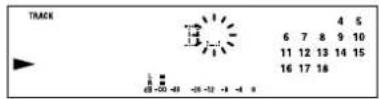
6 Repeat Steps 3 to 5 until you have entered the entire title.
If you entered the wrong character
Press ◀◀ or ▶▶ until the character to be corrected starts flashing, and repeat Steps 3 to 5 to enter the correct character.
To erase a character
Press ◀◀ or ▶▶ until the character to be erased starts flashing, then press EDIT/NO.
To enter a space
Press AMS or ▶▶ while the cursor is flashing.
(Continued)
7 Press YES.
This completes the labeling procedure and the title appears on the left side of the display.
To cancel labeling
Press ■.
Note
You cannot label a track or an MD while you are recording over an existing track.
Labeling tracks and MDs with the remote
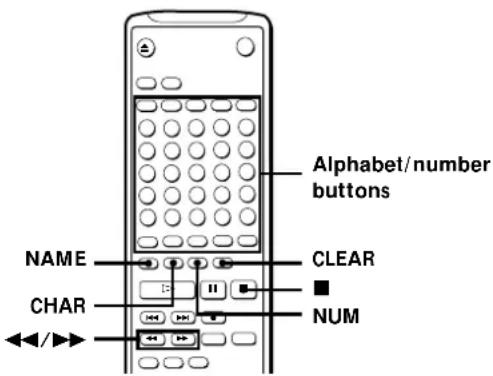
1 Press NAME repeatedly until a flashing cursor appears in the display, then do the following:
| To label | Make sure that the deck is |
| A track | Playing, pausing, recording the track to be labeled, or stopped after locating the track to be labeled |
| An MD | Stopped with no track number appearing in the display |
2 Select the character type as follows:
| To select Press | |
| Uppercase letters | CHAR repeatedly until “Selected ABC” appears in the display |
| Lowercase letters | CHAR repeatedly until “Selected abc” appears in the display |
| Numbers | NUM repeatedly until “Selected 123” appears in the display |
3 Enter one character at a time.
After you enter a character, the cursor shifts rightward and waits for the input of the next character.
4 Repeat Steps 2 and 3 until you have entered the entire title.
If you entered the wrong character
Press ◀◀ or ▶▶ until the character to be corrected starts flashing.
Press CLEAR to erase the incorrect character, then enter the correct one.
5 Press NAME again.
The entered title appears on the left side of the display window after the label has been recorded.
To cancel labeling
Press ■.
Changing an existing title
1 Press NAME, then do the following:
To change, make sure that the deck is
| A track title Playing, pausing the track whose title is to be changed, or stopped after locating the track whose title is to be changed | |
| A disc name | Stopped with no track number appearing in the display |
2 Keep pressing CLEAR (or EDIT/NO on the deck) until the current title is erased.
3 Enter the new title.
Do Steps 3 to 6 of "Labeling Recordings" on page 29, or Steps 2 to 4 of "Labeling tracks and MDs with the remote" on this page.
4 Press NAME.
Erasing all titles on a disc (Name Erase Function)
Use this function to erase all titles on an MD simultaneously.
1 Press EDIT/NO repeatedly while the deck is stopped until "All Erase?" appears in the display. 2 Press EDIT/NO again. "Name Erase?" appears in the display. 3 Press YES. All titles are erased.
To cancel the Name Erase Function
Press ■.

You can undo a name erasion
See "Undoing the Last Edit" on this page.

You can erase all recorded tracks and titles
See "Erasing all tracks on an MD" on page 25.
Undoing the Last Edit (Undo Function)
You can use the Undo Function to cancel the last edit and restore the contents of the MD to the condition that existed before editing was done. Note, however, that you cannot undo an edit if you do any of the following after the edit:
- Press the ● button on the front panel.
- Press the ● button, the MUSIC SYNC button, or the CD-SYNC STANDBY button on the remote.
- Update the TOC by turning off the power or ejecting the MD.
- Disconnect the AC power cord.
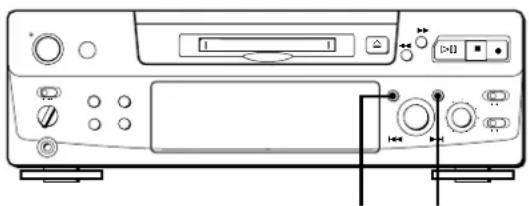
YESEDIT/NO
1 With the deck stopped and no track number appearing in the display, press EDIT/NO repeatedly until "Undo?" appears in the display. "Undo?" does not appear if no editing has been done.
2 Press YES.
One of the following messages appears in the display, depending on the type of editing to be undone:
| Editing done: | Message: |
| Erasing a single track | “Erase Undo ?” |
| Erasing all tracks on an MD | |
| Erasing a portion of a track | |
| Dividing a track | “Divide Undo ?” |
| Combining tracks | “Combine Undo ?” |
| Moving a track | “Move Undo ?” |
| Labeling a track or an MD | “Name Undo ?” |
| Changing an existing title | |
| Erasing all titles on an MD |
3 Press YES again.
"Complete" appears for a few seconds and the contents of the MD are restored to the condition that existed before the edit.
To cancel the Undo Function
Press EDIT/NO or ■.
Display Messages
The following table explains the various messages that appear in the display.
| Message | Meaning |
| Blank Disc | A new (blank) or erased MD has been inserted. |
| Cannot Copy | An attempt was made to make a second copy from a digitally dubbed MD (see page 35). |
| Cannot EDIT | An attempt was made to edit the MD during Program or Shuffle Play. |
| Disc Error | The MD is scratched or missing a TOC. Erase all tracks on a new recordable MD before use (see “Erasing all tracks on an MD” on page 25). |
| Disc Full | The MD is full (see “System Limitations” on this page). |
| Impossible | An attempt was made to combine tracks while playing back the first track. An attempt was made to specify point B before point A for the “A-B Erase”. Point B can only be specified so that it comes after point A. |
| Name Full | The titling capacity of the MD has reached its limit (about 1,700 characters). |
| NO DISC | There is no MD in the deck. |
| No Track | The inserted MD has a disc title but no tracks. |
| Protected | The inserted MD is record-protected. |
| Retry | The first recording attempt failed due to a disturbance or scratch on the MD, and a second attempt is being made. |
| Retry Error | Due to vibrations to the deck or scratches on the MD, several recording attempts were made but with no success. |
| Sorry | An attempt was made to combine tracks that cannot be combined. An attempt was made to erase a portion of a track that cannot be erased. |
| STANDBY (flashing) | The contents recorded by timer have disappeared over time and are not be available for saving to disc, or Program Play could not be activated since the program has disappeared over time. |
System Limitations
The recording system in your MiniDisc deck is radically different from those used in cassette and DAT decks and is characterized by the limitations described below. Note, however, that these limitations are due to the inherent nature of the MD recording system itself and not to mechanical causes.
"Disc Full" lights up even before the MD has reached the maximum recording time (60 or 74 minutes)
When 255 tracks have been recorded on the MD, "Disc Full" lights up regardless of the total recorded time. More than 255 tracks cannot be recorded on the MD. To continue recording, erase unnecessary tracks or use another recordable MD.
"Disc Full" lights up before the maximum number of tracks is reached
Fluctuations in emphasis within tracks are sometimes interpreted as track intervals, incrementing the track count and causing "Disc Full" to light up.
The remaining recording time does not increase even after erasing numerous short tracks
Tracks under 12 seconds in length are not counted and so erasing them may not lead to an increase in the recording time.
Some tracks cannot be combined with others
Track combination may become impossible when tracks are edited.
The total recorded time and the remaining time on the MD may not total the maximum recording time (60 or 74 minutes)
Recording is done in minimum units of 2 seconds each, no matter how short the material. The contents recorded may thus be shorter than the maximum recording capacity. Disc space may also be further reduced by scratches.
Tracks created through editing may exhibit sound dropout during search operations.
Track numbers are not recorded correctly
Incorrect assignment or recording of track numbers may result (1) when CD tracks are divided into several smaller tracks during digital recording, or (2) while recording certain CDs with the "LEVEL-SYNC" indication on (i.e., the automatic track marking function on).
"TOC Reading" appears for a long time
If the inserted recordable MD is brand new, "TOC Reading" appears in the display longer than for MDs that have been used.
Limitations when recording over an existing track
- The correct remaining recording time may not be displayed.
- You may find it impossible to record over a track if that track has been recorded over several times already. If this happens, erase the track using the Erase Function (see page 24).
- The remaining recording time may be shortened out of proportion to the total recorded time.
- Recording over a track to eliminate noise is not recommended since this may shorten the duration of the track.
- You may find it impossible to label a track while recording over it.
The correct recorded/playing time may not be displayed during playback of monaural-format MDs.
Troubleshooting
If you experience any of the following difficulties while using the deck, use this troubleshooting guide to help you remedy the problem. Should any problem persist, consult your nearest Sony dealer.
The deck does not operate or operates poorly.
→The MD may be damaged ("Disc Error" appears). Take the MD out and insert it again. If "Disc Error" remains, replace the MD.
The deck does not play back.
→Moisture has formed inside the deck. Take the MD out and leave the deck in a warm place for several hours until the moisture evaporates. →The deck is not on. Press POWER to turn the deck on. →The MD is inserted in the wrong direction. Slide the MD into the disc compartment with the label side up and the arrow pointing towards the opening until the deck grips it. →The MD may not be recorded (the music calendar does not appear). Replace the disc with one that has been recorded.
The deck does not record.
→The MD is record-protected ("Protected" appears). Close the record-protect slot (see page 7). →The deck is not connected properly to the program source. Make connections properly to the program source. The recording level is not adjusted properly (in case of input through LINE (ANALOG) IN). Turn REC LEVEL to adjust the recording level properly (see page 11). →A premastered MD is inserted. Replace it with a recordable MD. →There is not enough time left on the MD. Replace it with another recordable MD with fewer recorded tracks, or erase unnecessary tracks. →There has been a power failure or the AC power cord has been disconnected during recording. Data recorded to that point may be lost. Repeat the recording procedure.
The deck does not work during synchro-recording using the supplied remote.
→The currently selected CD player type (CD player or video CD player) does not match the CD player being used. Reset the CD player type (see page 15). If you use a CD player with a mode selector, set the mode selector to CD1.
The sound has a lot of static.
→Strong magnetism from a television or a similar device is interfering with operations. Move the deck away from the source of strong magnetism.
Note
If the deck does not operate properly even after you've attempted the prescribed remedies, turn off the power, then reinsert the plug into the power outlet.
Specifications
System MiniDisc digital audio system
Disc MiniDisc
Laser Semiconductor laser (λ = 780 nm)
Emission duration: continuous
Laser output Less than 44.6 μW*
* This output is the value measured at a distance of 200 mm from the objective lens surface on the Optical Pick-up Block with 7 mm aperture.
Laser diode properties Material: GaAlAs
Revolutions (CLV) 400 rpm to 900 rpm
Error correction Advanced Cross Interleave Reed Solomon Code (ACIRO)
Sampling frequency 44.1 kHz
Coding Adaptive Transform Acoustic Coding (ATRAC)
Modulation system EFM (Eight-to-Fourteen Modulation)
Number of channels 2 stereo channels
Frequency response 5 to 20,000 Hz ±0.3 dB
Signal-to-noise ratio Over 96 dB during playback
Wow and flutter Below measurable limit
Inputs
| Jack type | Input impedance | Rated input | Minimum input | |
| LINE (ANALOG) IN | Phono jacks | 47 kilohms | 500 mVrms | 125 mVrms |
| DIGITAL IN | Square optical connector jack | Optical wave length: 660 nm | — | — |
Outputs
| Jack type | Rated output | Load impedance | |
| PHONES | Stereo minijack | 10 mW | 32 ohms |
| LINE (ANALOG) OUT | Phono jacks | 2 Vrms (at 50 kilohms) | Over 10 kilohms |
| DIGITAL OUT | Square optical connector jack | -18 dBm | Optical wave length: 660 nm |
General
Power requirements
| Where purchased | Power requirements |
| Continental Europe | 220 – 230 V AC, 50/60 Hz |
| UK and Hong Kong | 220 – 240 V AC, 50/60 Hz |
| US and Canada | 120 V AC, 60 Hz |
| Other countries | 110 – 120, 220 – 240 V AC, 50/60 Hz |
Power consumption
| Where purchased | Power consumption |
| Continental Europe | 20 W |
| UK and Hong Kong | 20 W |
| US and Canada | 19 W |
| Other countries | 20 W |
Dimensions (approx.) (w/h/d) incl. projecting parts
280 · 90 · 282.5 mm
(11 1/8 · 3 5/8 · 11 1/8 in.)
Mass (approx.) 2.8 kg (6 lbs 3 oz)
Supplied accessories: See page 4.
Optional accessories:
Optical cable: POC-15A
Recordable MDs: MDW-60 (60 min), MDW-74 (74 min)
U.S. and foreign patents licensed from Dolby Laboratories Licensing Corporation.
Design and specifications are subject to change without notice.
Guide to the Serial Copy Management System
This MD deck uses the Serial Copy Management System, which allows only first-generation digital copies to be made of premastered software via the deck's digital input jack. An outline of this system appears below:
1. You can record from digital program sources (CDs, DATs, or premastered MDs) onto a DAT tape or recordable MD via the digital input jack on the DAT or MD deck. You cannot, however, record from this recorded DAT tape or MD onto another DAT tape or recordable MD via the digital input jack on the DAT or MD deck.
![graph TD A["MD deck"] --> B["DTAT deckCD player"] B --> C["Recording"] C --> D["DTAT or MD"] D --> E["DTAT deck or MD deck"] E --> F["First-generation DAT tape or MD recorded via digital-to-digital connection"] F --> G["DTAT deck or MD deck"] G --> H["Digital output jack Line (analog) output jacks"]…](/content/2026/02/425419/images/87db32dc3887f2f1dfb237989b87cd8207cf9775206d826dd71ec7384a143675.jpg)
2. You can record the digital input signal of a digital satellite broadcast onto a DAT tape or recordable MD via the digital input jack on the DAT or MD deck which is capable of handling a sampling frequency of 32 kHz or 48 kHz. You can then record the contents of this recorded DAT tape or MD (first-generation) onto another DAT tape or recordable MD via the digital input jack on the DAT or MD deck to create a second-generation digital copy. Subsequent recording from the second-generation copy onto another recordable DAT tape or MD is possible only through the analog input jack on the DAT or MD deck. Note, however, that on some BS tuners, second-generation digital copying may not be possible.
![graph TD A["BS tuner"] --> B["Optical cable or coaxial digital connecting cable"] B --> C["Recording"] C --> D["DAT deck or MD deck"] D --> E["First-generation DAT tape or MD recorded via digital-to-digital connection"] E --> F["DT or MD"] F --> G["Recording"] G --> H["DT deck or MD deck"] H --> I["…](/content/2026/02/425419/images/eeef3f0522d9c6eb124474c9dfabe7c1d3d33783fffe6c19a25d1406165727e3.jpg)
Additional Information
You can record a DAT tape or MD recorded via the DAT or MD deck's analog input jack onto another DAT tape or MD via the DAT or MD deck's digital output jack. You cannot, however, make a second-generation DAT tape or MD copy via the DAT or MD deck's digital output jack.
![graph TD A["MD deck"] --> B["CD player"] A --> C["TunerTurntable"] A --> D["Cassette deck"] A --> E["DAT deck"] E --> F["Audio connecting cord"] F --> G["Line (analog) output jacks"] F --> H["Line (analog) input jacks"] G --> I["Recording"] H --> J["Recording"] I --> K["DAT deck or MD deck"] K --> L…](/content/2026/02/425419/images/15e59b6a5d8860f464bcabf07fd6758218b47febb0c96d50b18202b54df482c0.jpg)
Index
Index
A, B
A-B erase 25
A-B repeat 20
AMS (Automatic Music Sensor) 18
Audio connecting cord 4, 5, 35
Auto cut 10
Auto pause 22
Auto space 22
C
CD synchro-recording 14
Changing
an existing title 30
order of programmed tracks 22
Checking
order of programmed tracks 22
remaining recordable time on the MD 9,17
Cleaning 2
Combining 27
D
Display messages 32
Dividing 26
E, F, G
Erasing
all titles 31
all tracks 25
a portion of a track 25
a single track 24
H
Hooking up
a digital component 5
an analog component 5
I, J, K
Input monitor 10
L
Labeling
an MD 29
a track 29
LEVEL-SYNC 9,12
Locating
a particular point in a track 19
a specific track 18
M, N
MD
inserting 6,8
premastered 17
recordable 6,17
taking out 7,8
Moving 28
Music
scan 18
synchro-recording 14
0
Optical cable 4, 5, 35
Optional accessories 34
P, Q
Pausing
playback 8
recording 7
Playing
normal play 8
program play 21
repeat play 20
shuffle play 21
Precautions 2
R
Recording
normal recording 6,7
over existing tracks 11
time machine recording 13
Recording level 11
Record-protect tab 7
Remote commander (remote) 4
S
Sampling frequency 5, 35
Sampling rate converter 5
SCMS (Serial Copy Management System) 9, 35
Smart space 10
Specifications 34
Supplied accessories 4
System limitations 32
T
Timer
playing 23
recording 16
TOC (Table Of Contents) 7, 9, 16, 24
Table of Contents
7,9,16,24
Track marking
Automatic track marking 12
Manual track marking 12
Troubleshooting 33
U, V, W, X, Y, Z
Undoing the last edit 31
Names of controls
Buttons
A↔B 20
Alphabet/Number 18, 21, 30
A.SPACE 22
CD PLAYER 14
CHAR 30
CLEAR 21,30
CONTINUE 21
DISPLAY 15, 17
DISPLAY/CHAR 9,17,29
EDIT/NO/YES 10, 12,
24 to 31
M.SCAN 18
MUSIC SYNC 14, 31
NAME 30
NUM 30
PLAY MODE 21, 23
PROGRAM 21
REPEAT 20
SCROLL 17, 18
SHUFFLE 21
STANDBY 14, 31
START 14
STOP 14
T.REC 13
◀ (eject) 7, 8, 10
▷III (play/pause) 7, 8, 18, 21, 23
▷ (play) 7, 8, 18, 21, 23
II (pause) 7, 8, 25
■ (stop) 7, 8, 16, 21
● (recording) 7, 10, 12, 31
◀◀/▶▶ (manual search)
19, 29, 30
|◀◀ /▶▶I (AMS: Automatic
Music Sensor) 8, 11, 18, 19,
22
25 19,21
Switches
INPUT 6,10
POWER 6,8
REC MODE 6
TIMER 16,23
Connectors
DIGITAL IN /OUT 5,9,10
Controls
AMS 8,11,13,18,21,
24 to 29
PHONES LEVEL 8
REC LEVEL 7,11
Indicator
POWER 6,8
Jacks
LINE (ANALOG) IN/OUT
5,9,10
PHONES 8,10
Others
Display 17
Music calendar 17
R 4
WARNING

Press REPEAT.
▷ (play) 7,8,18,21,23
II (pause) 7, 8, 25
|◀◀/▶▶(AMS) 8,11,18,19,
22
25 19,21
Switches
INPUT 6,10
POWER 6,8
REC MODE 6
TIMER 16,23
Connector
DIGITAL IN/OUT 5,9,10
Controls
AMS 8,11,13,18,21,
24 to 29
PHONES LEVEL 8
REC LEVEL 7,11
Indicator
POWER 6,8
Jacks
LINE (ANALOG) IN/OUT
5,9,10
PHONES 8,10
Miscellaneous
Display 17
Directory 17
R 4
WARNING
![graph LR A["Line (ANALOG) IN OUT"] --> B["TAPE:MD"] B --> C["INOUT L R"] D["Line (ANALOG) IN OUT"] --> E["TAPE:MD"] E --> F["INOUT L R"] G["TAPE:MD"] --> H["InOUT L R"] I["Line (ANALOG) IN OUT"] --> J["TAPE:MD"] K["TAPE:MD"] --> L["INOUT L R"] M["TAPE:MD"] --> N["InOUT L R"] O["TAPE:MD"] --> P["InOU…](/content/2026/02/425419/images/5a364e55cf3808eed3cdd0d0fc4d1ec9d2b1334c348439ac93d8a69cdbd2e49b.jpg)
Press REPEAT.
The deck does not play.
Dolby Laboratories Licensing Corporation.
TOC (Table of Contents)
EDIT/NO/YES 10, 12, 24 to 31
M.SCAN 18
MUSIC SYNC 14,31
NAME 30
NUM 30
PLAY MODE 21, 23
PROGRAM 21
REPEAT 20
SCROLL 17, 18
SHUFFLE 21
STANDBY 14,31
START 14
STOP 14
Alphanumeric keys 18, 21, 30
T.REC 13
|◀◀/▶▶| (AMS) 8, 11, 18, 19,
22
25 19,21
Selectors and switch
INPUT 6,10
POWER 6,8
REC MODE 6
TIMER 16, 23
Connector
DIGITAL IN/OUT
5,9,10
Controls
AMS 8,11,13,18,
21, 24 to 29
PHONES LEVEL 8
REC LEVEL 7,11
Indicator
POWER 6,8
Jacks
LINE (ANALOG) IN/OUT
5,9,10
PHONES 8,10
Others
- FOR THE CUSTOMERS IN US
- INFORMATION
- CAUTION
- OWNER'S RECORD
- FOR THE CUSTOMERS IN CANADA
- PRECAUTIONS
- ON SAFETY
- ON POWER SOURCES
- ON PLACEMENT (ONLY ON MODELS SUPPLIED WITH A MAIN POWER SWITCH)
- ON OPERATION
- ON THE MINIDISC CARTRIDGE
- ON CLEANING
- WELCOME
- ABOUT THIS MANUAL
- CONVENTIONS
- TABLE OF CONTENTS
- GETTING STARTED
- RECORDING ON AN MD
- PLAYING AN MD
- RECORDING ON MDS
- PLAYING MDS
- EDITING RECORDED MDS
- ADDITIONAL INFORMATION
- INDEX
- UNPACKING
- INSERTING BATTERIES INTO THE REMOTE
- WHEN TO REPLACE BATTERIES
- NOTES
- HOOKING UP THE SYSTEM
- OVERVIEW
- WHAT CORDS WILL I NEED
- HOOKUPS
- CONNECTING THE DECK TO AN AMPLIFIER
- CONNECTING THE DECK TO A DIGITAL COMPONENT SUCH AS A CD PLAYER, DAT DECK, DIGITAL AMPLIFIER, OR ANOTHER MD DECK
- AUTOMATIC CONVERSION OF DIGITAL SAMPLING RATES DURING RECORDING
- SETTING THE VOLTAGE SELECTOR (ONLY ON MODELS SUPPLIED WITH A VOLTAGE SELECTOR)
- CONNECTING THE AC POWER CORD
- TURNING ON THE UNIT (ONLY ON MODELS SUPPLIED WITH A MAIN POWER SWITCH)
- WHEN "TOC" FLASHES IN THE DISPLAY
- DO NOT DISCONNECT THE DECK FROM THE POWER SOURCE IMMEDIATELY AFTER RECORDING
- TO PROTECT AN MD AGAINST ACCIDENTAL ERASURE
- BASIC OPERATIONS
- YOU CAN LOCATE AND PLAY BACK A TRACK WHILE THE DECK IS STOPPED
- TO USE HEADPHONES
- NOTES ON RECORDING
- IF "PROTECTED" APPEARS IN THE DISPLAY
- IF "DIN UNLOCK" FLASHES IN THE DISPLAY
- DEPENDING ON THE SOURCE BEING RECORDED, TRACK NUMBERS ARE MARKED IN THE FOLLOWING WAYS
- THE MD DECK USES THE SCMS (SERIAL COPY MANAGEMENT SYSTEM ON PAGE 35)
- WHEN RECORDING DIGITAL SIGNALS THAT HAVE BEEN EMPHASIZED (IN THE HIGHER FREQUENCIES)
- WHEN THE DECK IS RECORDING OR IN RECORDING PAUSE, DIGITAL SIGNALS INPUT THROUGH DIGITAL IN ARE OUTPUT TO DIGITAL OUT WITH THE SAME SAMPLING RATE
- USEFUL TIPS FOR RECORDING
- CHECKING THE REMAINING RECORDABLE TIME ON THE MD
- MONITORING THE INPUT SIGNAL (INPUT MONITOR)
- WHEN INPUT IS AT ANALOG
- WHEN INPUT IS AT DIGITAL
- NOTE
- IF "AUTO CUT" APPEARS IN THE DISPLAY (AUTO CUT)
- YOU CAN TURN OFF THE AUTO CUT FUNCTION
- IF "SMART SPACE" APPEARS IN THE DISPLAY (SMART SPACE)
- TO TURN OFF THE SMART SPACE FUNCTION AND AUTO CUT FUNCTION
- TO TURN ON THE SMART SPACE FUNCTION AND AUTO CUT FUNCTION AGAIN
- PLAYING BACK TRACKS JUST RECORDED
- TO PLAY FROM THE FIRST TRACK OF THE MD AFTER RECORDING
- RECORDING OVER EXISTING TRACKS
- WHILE "TRACK" FLASHES IN THE DISPLAY
- TO RECORD FROM THE MIDDLE OF THE TRACK
- ADJUSTING THE RECORDING LEVEL
- MARKING TRACK NUMBERS WHILE RECORDING (TRACK MARKING)
- MARKING TRACK NUMBERS MANUALLY (MANUAL TRACK MARKING)
- MARKING TRACK NUMBERS AUTOMATICALLY (AUTOMATIC TRACK MARKING)
- TO CANCEL AUTOMATIC TRACK MARKING
- WHEN YOU WANT TO MARK TRACK NUMBERS AFTER YOU'VE FINISHED RECORDING
- STARTING RECORDING WITH 6 SECONDS OF PRESTORED AUDIO DATA (TIME MACHINE RECORDING)
- TO STOP TIME MACHINE RECORDING
- SYNCHRO-RECORDING WITH AUDIO EQUIPMENT OF YOUR CHOICE
- SYNCHRO-RECORDING WITH A SONY CD PLAYER
- IF THE CD PLAYER DOES NOT START PLAYING
- TO PAUSE RECORDING
- YOU CAN USE THE REMOTE OF THE CD PLAYER DURING SYNCHRO-RECORDING
- YOU CAN CHANGE CDS DURING SYNCHRO-RECORDING
- YOU CAN ALSO DO SYNCHRO-RECORDING WITH A SONY VIDEO CD PLAYER
- YOU CAN CHECK THE REMAINING RECORDABLE TIME ON THE MD
- RECORDING ON AN MD USING A TIMER
- MAKE SURE TO CHANGE THE DECK TO STANDBY STATUS WITHIN A MONTH AFTER TIMER RECORDING IS COMPLETED
- USING THE DISPLAY
- CHECKING THE TOTAL TRACK NUMBER, TOTAL DISC PLAYING TIME, REMAINING RECORDABLE TIME OF THE DISC, AND THE TITLE OF THE DISC
- CHECKING REMAINING TIME AND THE TITLE OF A TRACK
- YOU CAN CHECK THE TRACK NAME AT ANY TIME WHILE PLAYING AN MD
- LOCATING A SPECIFIC TRACK
- WHEN YOU DIRECTLY LOCATE A TRACK WITH A NUMBER OVER
- YOU CAN EXTEND THE PLAYING TIME DURING MUSIC SCAN
- TO PAUSE PLAYING AT THE BEGINNING OF A TRACK
- TO GO QUICKLY TO THE BEGINNING OF THE LAST TRACK
- LOCATING A PARTICULAR POINT IN A TRACK
- PLAYING TRACKS REPEATEDLY
- TO CANCEL REPEAT PLAY
- REPEATING THE CURRENT TRACK
- REPEATING A SPECIFIC PORTION (A-B REPEAT)
- TO CANCEL A-B REPEAT
- SETTING NEW STARTING AND ENDING POINTS
- PLAYING IN RANDOM ORDER (SHUFFLE PLAY)
- TO CANCEL SHUFFLE PLAY
- YOU CAN SPECIFY TRACKS DURING SHUFFLE PLAY
- CREATING YOUR OWN PROGRAM (PROGRAM PLAY)
- WHEN USING THE REMOTE
- IF YOU'VE MADE A MISTAKE
- WHEN USING THE CONTROLS ON THE DECK
- TO CANCEL PROGRAM PLAY
- YOU CAN PROGRAM THE SAME TRACK REPEATEDLY
- THE PROGRAM REMAINS EVEN AFTER PROGRAM PLAY ENDS
- CHECKING THE TRACK ORDER
- CHANGING THE TRACK ORDER
- USEFUL TIPS WHEN RECORDING FROM MDS TO TAPE
- INSERTING BLANK SPACES WHILE RECORDING TO TAPE (AUTO SPACE)
- TO CANCEL AUTO SPACE
- PAUSING AFTER EACH TRACK (AUTO PAUSE)
- TO RESTART PLAYBACK
- TO CANCEL AUTO PAUSE
- PLAYING AN MD USING A TIMER
- NOTES ON EDITING
- ERASING RECORDINGS (ERASE FUNCTION)
- ERASING A SINGLE TRACK
- TO CANCEL THE ERASE FUNCTION
- ERASING ALL TRACKS ON AN MD
- ERASING A PORTION OF A TRACK (A-B ERASE FUNCTION)
- TO CANCEL THE A-B ERASE FUNCTION
- DIVIDING RECORDED TRACKS (DIVIDE FUNCTION)
- TO CANCEL THE DIVIDE FUNCTION
- YOU CAN UNDO A TRACK DIVISION
- YOU CAN DIVIDE A TRACK WHILE RECORDING
- COMBINING RECORDED TRACKS (COMBINE FUNCTION)
- IF THE PLACE IS CORRECT, PRESS YES
- TO CANCEL THE COMBINE FUNCTION
- YOU CAN UNDO A TRACK COMBINATION
- MOVING RECORDED TRACKS (MOVE FUNCTION)
- LABELING RECORDINGS (TITLE FUNCTION)
- PRESS YES
- TO CANCEL LABELING
- LABELING TRACKS AND MDS WITH THE REMOTE
- IF YOU ENTERED THE WRONG CHARACTER
- CHANGING AN EXISTING TITLE
- ERASING ALL TITLES ON A DISC (NAME ERASE FUNCTION)
- UNDOING THE LAST EDIT (UNDO FUNCTION)
- PRESS YES AGAIN
- DISPLAY MESSAGES
- SYSTEM LIMITATIONS
- DISC FULL" LIGHTS UP EVEN BEFORE THE MD HAS REACHED THE MAXIMUM RECORDING TIME (60 OR 74 MINUTES)
- DISC FULL" LIGHTS UP BEFORE THE MAXIMUM NUMBER OF TRACKS IS REACHED
- THE REMAINING RECORDING TIME DOES NOT INCREASE EVEN AFTER ERASING NUMEROUS SHORT TRACKS
- SOME TRACKS CANNOT BE COMBINED WITH OTHERS
- THE TOTAL RECORDED TIME AND THE REMAINING TIME ON THE MD MAY NOT TOTAL THE MAXIMUM RECORDING TIME (60 OR 74 MINUTES)
- TRACKS CREATED THROUGH EDITING MAY EXHIBIT SOUND DROPOUT DURING SEARCH OPERATIONS
- TRACK NUMBERS ARE NOT RECORDED CORRECTLY
- TOC READING" APPEARS FOR A LONG TIME
- LIMITATIONS WHEN RECORDING OVER AN EXISTING TRACK
- TROUBLESHOOTING
- THE DECK DOES NOT OPERATE OR OPERATES POORLY
- THE DECK DOES NOT PLAY BACK
- THE DECK DOES NOT RECORD
- THE DECK DOES NOT WORK DURING SYNCHRO-RECORDING USING THE SUPPLIED REMOTE
- THE SOUND HAS A LOT OF STATIC
- SPECIFICATIONS
- GENERAL
- OPTIONAL ACCESSORIES
- GUIDE TO THE SERIAL COPY MANAGEMENT SYSTEM
- A, B
- C
- D
- E, F, G
- H
- I, J, K
- L
- M, N
- P, Q
- R
- S
- TIMER
- U, V, W, X, Y, Z
- NAMES OF CONTROLS
- BUTTONS
- SWITCHES
- CONNECTORS
- CONTROLS
- INDICATOR
- JACKS
- OTHERS
- WARNING
- CONNECTOR
- MISCELLANEOUS
- THE DECK DOES NOT PLAY
- SELECTORS AND SWITCH
Brand : SONY
Model : MDSS38
Category : Dictaphone