
ICD-SX2000B - Dictaphone SONY - Free user manual and instructions
Find the device manual for free ICD-SX2000B SONY in PDF.
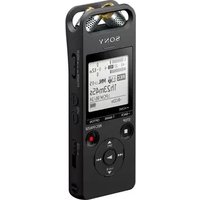


| Product Type | Digital Voice Recorder |
| Brand | Sony |
| Model | ICD-SX2000B |
| Recording Technology | Linear PCM / MP3 |
| Internal Memory | 16 GB |
| Expandable Memory | microSD / microSDHC / microSDXC |
| Microphone System | Triple-Mic System with S-Mic |
| Built-in Speaker | 20 mm diameter |
| Display | LCD with backlight |
| Recording Formats | LPCM (WAV) / MP3 |
| Frequency Response | 20 Hz – 40 kHz |
| Voice Operated Recording | Yes (VOR) |
| Digital Pitch Control | Yes (8 steps) |
| Noise Reduction | Advanced noise cut and filter settings |
| USB Direct Connection | Yes, built-in USB connector |
| Power Source | Built-in rechargeable lithium-ion battery |
| Battery Life | Up to 48 hours (MP3) / 30 hours (LPCM) |
| Dimensions (W×H×D) | Approx. 55.2 × 132.4 × 13.2 mm |
| Weight | Approx. 92 g |
| Maintenance & Cleaning | Use a soft, dry cloth to clean the casing; do not use alcohol or thinners |
| Safety Precautions | Do not expose to water, high humidity, or direct sunlight; use only recommended chargers and cables |
| Spare Parts & Repairability | Battery replacement service available; technical support from Sony |
| General Information | Compatible with Windows and macOS; can be used as a USB mass-storage device |
Frequently Asked Questions - ICD-SX2000B SONY
User questions about ICD-SX2000B SONY
0 question about this device. Answer the ones you know or ask your own.
Ask a new question about this device
Download the instructions for your Dictaphone in PDF format for free! Find your manual ICD-SX2000B - SONY and take your electronic device back in hand. On this page are published all the documents necessary for the use of your device. ICD-SX2000B by SONY.
USER MANUAL ICD-SX2000B SONY
Operating Instructions
ICD-5x2000
0-5/9-202-1211

Refer to the Help Guide
This is the Operating Instructions, which provides you with instructions on
the basic operations of the 12-score The basic functions are online man-ai.
Refer to the Help Guide when you would like to know further details,
operations and possible solutions when a problem occurs.
http://id1.sony.net/help/icd/s20/h ce/


Check the supplied items
• IC Rec. and a [1]
- Carry Q Case II - Wind Screen II
• USE connection support cable (1)
- Operating Instructions (this sheet) - Management
The following table provides the original data:
Optional accessories
• Electrod condenser microphone EOM-CSL EOM-135 • 185.45 ohms: V-15X
-
-
-
-
-
-
-
-
-
-
-
-
-
-
-
-
-
-
- 20.
-
-
-
-
-
-
-
-
-
-
-
-
-
-
-
-
-
M ROS Estratica
Parts and controls

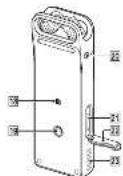

① Hal-umoguebenes
2 Peak indicator
Display window
4 OPTION button
15 1-94/2 [black marks] billion
- 57
S ● DLC/PM24 (norm expensed) trailer, according with slu
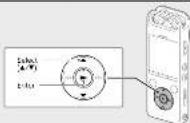
[ ] [play/enter] button
10 Control human ▲ DPC (Digital Pho Control),
-
-
-
-
-
-
-
-
-
-
-
-
-
-
-
-
-
-
-
-
-
-
-
-
-
-
-
-
-
-
-
-
-
-
-
-
-
-
-
-
-
-
-
-
-
-
-
-
-
-
-
-
-
-
-
-
-
-
-
-
-
-
-
-
-
-
-
-
-
-
-
-
-
-
-
-
-
-
-
-
-
-
-
-
-
-
-
-
-
-
-
-
-
-
-
-
- 100
-
-
-
-
-
-
-
-
-
-
-
-
-
-
-
-
-
-
-
-
-
-
-
-
-
-
-
-
-
-
-
-
-
-
-
-
-
-
-
-
-
-
-
-
-
-
-
-
-
-
-
-
-
-
-
-
-
-
-
-
-
-
-
-
-
-
-
-
-
-
-
-
-
-
-
-
-
-
-
-
-
-
-
-
-
-
-
-
-
-
-
-
-
-
-
-
C. thacopores, ack
EML connection request (Yan can and the EML connection rellected center
1.2015.01
- VCL - 200000
区 VCL - volume - button
图 EMI slide
- Strap hole (the strap is supplied with your E recorder)
注释(1):Puloy XRL-enabled smartphone details must be established as XRL pairing.
TV. How for attack
20 [moproc]
[1] m: 260 and shot. The shot shot is installed under the crown.
25 SICLO
Buck-in speaker
1) Using the FOVADR+DLD switch to "FOVADR" and holding it for 6 account or long transactions via F-000048. For further information, F-000048 is a Calendar
Let's try out your new IC recorder
Charge

① Charge the IC recorder
Slice the USB slide lever in the direction of the arrow, and insert the USB containerize the USB part of a printer computer.
When the battery is fully charged, the battery indicator will indicate
·证照·
② Disconnect the IC recorder
Kase say the image "On cassette" to arrange on the display window. They want to include a role in writing itself presents
s/ev.
Power on
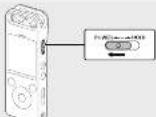
Side and hold the POWER-HOLD switch in the direction of "POWER"
under the window display appears. To 3 am the power off, slide the POWER-HOLD switch to "POWER" and
hold it until "Power Off" appears on the display window.
To prevent unintentional operations (HOLD)
Side the POWER-HOLD switch in the direction of HOLD.
NICO --- 106
[NO TEXT]
法定代表人:
- To make the record from the HELD algebra, and the POMINHOLD
2019年1月1日
Initial settings
When you turn up your ID number for the first time, the Configure
raise allinety screen appears on the display window. You can then select the display item, are the clock and turn overnight the crew.
10.00
① Select "Yes" to start the initial settings.
(No text)


(2) Select the display brightness.
You can select from the following languages:
Deutsch Nement English, Español Spanish Français (French), Italiana (Italy), European Portuguese, Intra-Ludien
10.25%
① Get the current year month, day hours and minutes
(2) Severe content year, month, day, week, and minute.


- In conclusion the consensus with collaboration are: 105,987-
① Select/Next
④ Select Next.


⑥ Select "ON" or "OFF" to turn on or off the beep sound.
When the initial settings finish, the completion message and then
The EMA-1000000000


Note
You can change any of the initial values at any time in the. For data based on the subject, salary by law: McGund.
Record

C
- Before you want using the IC recording, make sure that the "CATH-HOLD"
• You can select a rating where for each situation by clicking None.
Select in the 30/28 menu
① Adjust the angle of the IC recorder's built-in microphones
will your fingertips on that may point in the direction of the recording source.
(2) 100%
(2) MHI ■ RED MEES Recording sheet and
RECOATING SEA IS NOT THE
- 2000
图2-5
1+23m45r
MF100
(1)
During recording, the best level meters appear to help you adjust
Please adjust the aperture of the built-in microphones, the
distance from the sound source, or the sensitivity setting of the
in machines on that the recording event steps around 12 cfs, which
[Unreadable]
③ Press ■ STOP to stop recording.
Please call up an extra first, and then the second standless on
- 2017年
Also you copy or renewing, you can press. ▶ In play back to you have been created.
Listen

① Select "Recorded Files" from the HOME menu.
⑧ Select Latest Recording Search by BEE Date Search by
BLC Scene, or "Folther"
(6) Select your desired life.
(2) 100% of the
5.3.10.12
10-0158 4.5 pm
16/2-13m
(20) 1/ce
□
④ Press VCI + or VCI - to adjust the volume
④ PRESS VOL + of VOL = 10-adjusted volume.
(2) First ■ STOP in stop playground.
To add a track mark
You can add a back made at a paint at which you want to divide a tie laser or in-sle chung to track. You can add a maximum of 80 feet
and in some time the proposal for the case of the problem of which moves in each file
You can also add track marks during recording
Delete

7 Note
Class a: The brand, you create value L
① Select the file you want to delete from the list of counted files
or play back the file you want to delete.
② Select "Delete a File" from the OPTION menu.


Estee's acquies and the order her she she is playing in your
confirmation
③ Select "Yes."
2023年1月
- 3.4
(See it)
The Ground Truth image displays a single, solid horizontal line. According to Rule 2 (UNDERSCORE & LINE RULES), if the GT contains lines used for stylistic emphasis or as background elements (like ruled paper), the OCR result must ignore them. The provided OCR content is "____", which consists of four underscores. This is incorrect because underscores are not equivalent to a solid line and are not permitted under the “Stylistic/Background Lines (Ignore)” rule. Outputting underscores for a stylistic line violates the rule and constitutes an error. Therefore, the OCR result is inconsistent with the Ground Truth.
Name
Please wait, appears and stays until the selected file is deleted.
Operations with the smartphone (REC Remote)

With the Bluebott function of your IE revenue, you can operate your K-erector (reverting, charging the recording settings, e.g. using a smartphone.
To operate your IC recorder using a smartphone.
You need to install BEC Remote on the wireless and social media
Buchschipening with your E. napiere

① Search Google Play™ or App Store for REC Remote and install it on the smartphones.
⑤ On the Exampsys select IRE's Remote, Add Devices
(3) On the 1st October, Select REC Remote - Add Disney (Raidon) from the HOME menu and follow the on-screen
(1) Using the Home Miller and Optical Instruction to turn on the Bluetooth function.
③ On the smartphone, start REC Remote and select
"ICD-SX2000" (your IC recorder) from the available device list.
For detailed instructions, refer to the help of REC Remote and
the manual supplied with the smartphone.
Also, the following is:
To turn on or off the Bluetooth function of your IC
recorder
① Select "REC Remere" - "Bluetooth ON/OFF" from the HOME
(3) Server bus numbers - 8600.000.000.000.000.000.000.000.000.000.000.
② To turn on the Bluetooth function, select "OK." To turn it off
select "OFF."
Using the HOME menu
You can use the HOME menu for a variety of operations, including driving and playing a mounted file are changing the sellings of your Creenders.

① Press and hold BACK/HOME.
The LOMA

The HOME menu items are aligned in the following sequence.
□ □ □ □ □ □ □ □ □
[Non-Text]
VHMC: 10000000000000000000000000000000000000000000000000
In the case of the case is 25
② Select your desired function from the following:
□This You can select and play one of the ties you have
Imported from a computer
To make a music file, select "N1 songs," "N2 some,"
(1) 2017年1月1日
Incarried Res. The car sales and play here for the new plan to make recorded with useful revenue.
to make a corrected the color
"Search by: 10 C. Table," "Search by: 10 C. Science."
"I do not."
θ heard You can display the normal stretching screen, and then
1
REC Automotive You can display the menu screen for her. We miss what was the Restaurant function.
that uses the ETCO301 function
lettrags the S.A. (1942) 5-30 years old, 18-19 years old, 19-20 years old, 20-21 years old, 21-22 years old, 22-23 years old, 23-24 years old, 24-25 years old, 25-26 years old, 26-27 years old, 27-28 years old, 28-29 years old, 29-30 years old, 30-31 years old, 32-33 years old, 34-35 years old, 36-37 years old, 38-39 years old, 40-41 years old, 42-43 years old, 44-45 years old, 46-47 years old, 48-49 years old, 50-51 years old, 52-53 years old, 54-55 years old, 56-57 years old, 58-59 years old, 60-61 years old, 62-63 years old, 64-65 years old, 66-67 years old, 68-69 years old, 70-71 years old, 72-73 years old, 74-75 years old, 76-77 years old, 78-79 years old, 80-81 years old, 82-83 years old, 84-85 years old, 86-87 years old, 88-89 years old, 90-91 years old,
□ Yes, you can go back to the screen
before the HOME menu screen.
* The function you are currently using is displayed
in -6x
- Yes ■: 50 to return to the screen displayed before you entered into a line
[Unreadable]
Using the OPTION menu
You can use the OPTION menu to perform a variety of functions, including
changing the settings of your 12 members.

① Select your desired function from the HOME menu and then press

② Select the menu item for which you want to change the setting.
③ Select your desired setting option.
Copying files from your IC recorder to a computer
You can copy the files and folders from your IC recorder to a computer to
2018年1-6月
(1) Follow the instructions in "Change" to connect your IC recorder to a computer.
② Drop and drop the files as follows you want to earn from 75
"ORI" (3) "DRAG AND DROP ITEMS OF TOBOLS YOU WANT TO COPY FROM THE RECORDER" or "MEMORY CARD" to the local disk on the com
⑧ Disconnect your IC recorder from the computer.
Installing Sound Organizer 2
Sumps irrigated from in-sk. CDs and other media. MP3 and other data
The mechanism in A tris-phase can be applied and mechanical to the record.
Frisa
- Several companies is compatible with almost as companies only. It is not
portible with Star.
The following table is presented in the English.
to organize software will also be deleted.
to install a local service, but is to an account with administration
faleg25
(i) Follow the instructions in "Change" to connect your K recorder to
a computer.
(2) Mean mean the K. retainer is successfully detected by the
computer.
"Connecting" appears and stays on the IC recorder's display window
while the customer is interested to be on campus
③ Go to the [Start] menu, click [Computer], and then double-click [IC
REORDER [FOR WINDOWS].
(4) Double dich (SoundOrganize_92001) (or [Schoolorganizer_92001] excellent.
Follow the company's business divisions
(6) Make sure that you accept the terms of the license agreement.
select [I accept the terms in the license agreement], and then click
next.
When the [Setup Type] window appears, select [Standard] or
[Custom], and then click [Next].
the A# is the most significant, but it is the most important of the
When you set the clinic
When the [Ready to install the Program] window appears, click
[Institute]
the 4500000 shares
After the Scund Organizer has been installed successfully,
William Apparle, Thix [Ludley Smith's Creamover Show], and Trish Dick [Fresh].
□ Nona
you need to understand how to consider the actual social perspective
Precautions
On course
Once the unit only on 3.75.0°C with the lead-in or quinolite (1-12m-1m
belley.
afety
Do not operate the unit while driving, cycling or operating any localized
31.
on handling • Do not leave the unit in a location near heat sources, or in a piece subject.
direct sunlight, excessive dust or mechanical shock.
- Should any solid object or liquid fall into the unit, have the unit checked by qualified purposes before operating is not further.
a. 100% of the population in the United States is a member of the United States, and
In order to avoid warping the calories or turning the E. stances to
fu cien
Do not sit down with the 1C recorder in your back pocket.
To not put your face to me into a bag with the head, it's not so much. It is a good and useful and sure that he has in strong respect.
reduled not in allergy water to solution on the end. The result is not
heptol, in performance, re-stand, the following insights.
We are your best men in past Pakistan and the first Sambeth, who has been above the other than this in what one may act.
- In line with the direct, to provide all other options, but
When you use the un
in, snow, or humidity
- 1. Will him, and a lot of your job overnight. A year since the unit will be hands on if you put the next to the pocket at weekly rates, the next may
at wet.
SONY.
Gracadora IC
The image is too blurry to recognize any text content.
[Unreadable]
• no deacce d state • 10.25g ode a k, dislice leiptor
10.24.2015年6月29日
Ajustes iniciales

Deutschland, English University, Spain (Pty)
[Unreadable due to severe distortion and noise]
∴ m = 3/11
(1)
H
• The following table provides the original text:
in the case of the time of the time, the time of the time of the time
[Unreadable]
① Dako BILI Sero dehensia ambretiva
① Selective " recorded files on el menú HOME.
(6) Selences "Liatek Recording" Search by BIC Rail Search
by BIC Scopus, a "Folders"
(1) 1/2 (2) 1/2 (3)
Se inidari la reconstitui
- Bute ■1780) was distributed to record data
(2) Price ■ 10.00 per share price is \$4.50 per share.
② Selective Price & Price to al-mo's OPTION
SALADISCH
Dary Jansini
Pin Hovir
2017年
Proximal
Online Track Merit
Figure 2.1.1.1
① Mortgage subsidy BACK/HOME
4.10.19.15
[EMPTY]
□
口
1
- 2017
D
The following table is provided in the image.
- Aftering the end of the year,
mechina en uny de "X"
Favacoid and alveol OBT O3 mutation, menopainable by primary
In this case, the American and European
Seoul Organique la parmline insen anche sechées entre la liquidation.
you may
La Cenlos, la liquidation de CaO₃ industrial y industrial materials, los artigos de
- Found Summary: sole as compatible and any per or Window. Use at
composite on My
- Incentive and non-identical information, the information
de administración
The following table is provided in the image.
johama: 2018.
selective [I accept the terms in the license agreement].
(3) Quando apureca la venlava [Sound Character] has been installed.
successfully. I marque [Launch Sound Organization Note], y después
1436 5x
■Note
Urine is a total salary of 20 €, de 3,75 cents per person in the province.
Incorporates.
S###
The source image is illegible due to extreme pixelation and distortion. No characters can be confidently identified. Therefore, no valid OCR text can be generated that matches the visual content of the source image.
Marcio
In the case of the same way, we can be seen as a whole
In six adiress cards rule barriers, E. 2015 is mixed on its men's
the 10-4000000000000000000000000000000000000
Immacn. Panch-salari le crennted stel vaca a havamla; capa de bajans, ta
The following table is provided in the image.
The following table is presented in the following table:
Mantenimiento
3.62. Largo office of the company, 2015 (P.O.) Sector of China. 47 companies
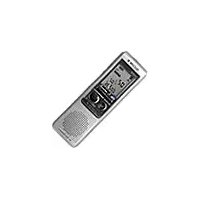
Brand : SONY
Model : ICD-SX2000B
Category : Dictaphone