
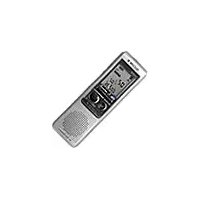
ICD-SX712D - Dictaphone SONY - Free user manual and instructions
Find the device manual for free ICD-SX712D SONY in PDF.


Pick your language and provide your email: we'll send you a specifically translated version.
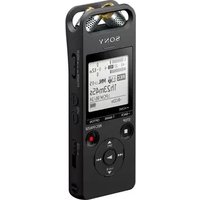
| Product type | Digital voice recorder (dictaphone) |
| Brand | Sony |
| Model | ICD-SX712D |
| Recording medium | 2 GB built-in flash memory |
| Expansion slot | microSD / microSDHC card slot |
| Recording format | MP3 |
| Maximum recording time | Up to 178 hours (depending on selected bitrate) |
| Microphone | Built-in stereo microphone |
| Speaker | Built-in 20 mm mono speaker |
| Frequency range | 60 Hz – 20 kHz (varies by recording mode) |
| Noise reduction | Noise Cut function and low-cut filter |
| Playback modes | Normal, folder repeat, single file repeat, A-B repeat |
| Search functions | Key file search, calendar search, index marks |
| Voice activated recording | Yes (VOR) with adjustable sensitivity |
| Interface | USB 2.0 direct connection |
| Power source | 2 × AAA alkaline batteries |
| Battery life | Up to 60 hours of recording (approx.) |
| Dimensions (approx.) | 37.9 × 116.3 × 21.1 mm (W × H × D) |
| Weight (approx.) | 84 g (including batteries) |
| Maintenance and cleaning | Clean the exterior with a dry soft cloth |
| Safety instructions | Do not expose the device to water or extreme heat |
| Spare parts and repairability | Use only authorized Sony service centers for repairs |
| General information | User manual available in PDF format on this notice page |
Frequently Asked Questions - ICD-SX712D SONY
How do I record a new message on my Sony ICD-SX712D?
Press the REC button to start recording immediately. The red indicator lights up while recording. To stop, press the STOP button. The file is automatically saved in the current folder.
What is the maximum recording time of the ICD-SX712D?
The ICD-SX712D offers up to 178 hours of recording time depending on the selected bitrate. Lower bitrate modes allow longer recordings, while higher bitrate modes provide better audio quality.
Can I transfer recordings to a computer?
Yes, connect the built-in USB connector directly to a USB port on your computer. The recorder appears as an external drive allowing you to copy MP3 files over.
Why is my recording very quiet?
Place the recorder closer to the sound source and check the microphone sensitivity settings. Use the HIGH sensitivity mode for distant voices or enable the low-cut filter to reduce background noise.
How do I delete a file?
Select the file you want to delete, then press the OPTION button and choose Delete. Confirm the deletion by selecting Yes. Deleted files cannot be recovered.
Does the ICD-SX712D support external memory?
Yes, it has a microSD/microSDHC card slot so you can expand the storage capacity. Set the card as recording media in the settings menu before recording.
How can I improve battery life?
To maximize battery life, use alkaline batteries of good quality, reduce the backlight timeout, and use the VOR (voice operated recording) function in mono mode.
What headphones can I use?
You can use standard 3.5 mm headphones with the headphone jack. To protect the sound quality, select Headphone mode in the sound output settings if available.
How do I find a recording by date?
Press SEARCH and choose Calendar search. Then select the date in the calendar and the recorder will display the files recorded on that day.
Is the device covered by warranty?
The warranty depends on your place of purchase; consult your local Sony support for terms. Always keep your purchase receipt for warranty service.
User questions about ICD-SX712D SONY
0 question about this device. Answer the ones you know or ask your own.
Ask a new question about this device
No questions yet. Be the first to ask one.
Download the instructions for your Dictaphone in PDF format for free! Find your manual ICD-SX712D - SONY and take your electronic device back in hand. On this page are published all the documents necessary for the use of your device. ICD-SX712D by SONY.
USER MANUAL ICD-SX712D SONY
Manual assistant
Powered by Anthropic
Waiting for your message
Product information
Brand : SONY
Model : ICD-SX712D
Category : Dictaphone