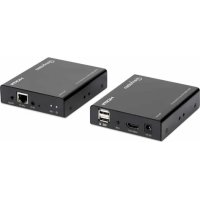
207683 - Audio/video extension MANHATTAN - Free user manual and instructions
Find the device manual for free 207683 MANHATTAN in PDF.


| Product Type | KVM over IP audio/video extension kit |
| Brand | Manhattan |
| Model | 207683 |
| Maximum Resolution | 1080p |
| Maximum Distance | 120 m (with Cat6 cable) |
| Interfaces | 1 HDMI input, 2 HDMI outputs, 1 USB/PC port, 1 USB keyboard/mouse port, 2 LAN RJ45 ports, IR input, IR output |
| Power Supply | 5 V DC (power adapters included) |
| Operating Modes | Simple mode (direct connection), Allocation mode (via network switch) |
| Mounting | Wall/ceiling mounting brackets included |
| Approximate Dimensions (each unit) | 10 x 8 x 2.5 cm |
| Approximate Weight (each unit) | 200 g |
| Operating Temperature | 0 to 50 °C |
| Operating Humidity | 20 to 80% RH (non-condensing) |
| Care and Cleaning | Clean with a soft, dry cloth. Do not use abrasive products or solvents. |
| Safety | Do not expose to moisture, extreme temperatures, or shocks. Unplug before cleaning. |
| Spare Parts and Repairability | The device contains no user-serviceable parts. Contact a professional in case of malfunction. |
| General Information | Compliant with CE directives 2014/30/EU and 2014/35/EU. Recycling according to WEEE. |
Frequently Asked Questions - 207683 MANHATTAN
User questions about 207683 MANHATTAN
0 question about this device. Answer the ones you know or ask your own.
Ask a new question about this device
Download the instructions for your Audio/video extension in PDF format for free! Find your manual 207683 - MANHATTAN and take your electronic device back in hand. On this page are published all the documents necessary for the use of your device. 207683 by MANHATTAN.
USER MANUAL 207683 MANHATTAN
1080p HDMI KVM Over IP Extender Instructions
Model 207683

Important: Read before use. • Importante: Leer antes de usar.

For additional benefits:
Scan to register your product warranty
or go to: register.manhattanproducts.com/r/207683
The Manhattan 1080p HDMI KVM over IP Extender Kit lets you access any computer (or other HDMI source) from a keyboard, mouse and display up to 120m (394 ft.) away. You can either make a direct connection through a single RJ45 Ethernet cable (Cat6 or higher recommended for maximum range and performance) or you connect it to a switch in your existing network to overcome distance limitations (see Mode diagrams for sample setups).
The kit includes mounting brackets and screws to install the units on a wall or ceiling. First, use the screws to fasten the brackets to the units; then use the screws to fasten the units to the wall or ceiling.
For specifications, visit manhattanproducts.com. Register this product at register. manhattanproducts.com/r/207683 or scan the QR code on the cover.
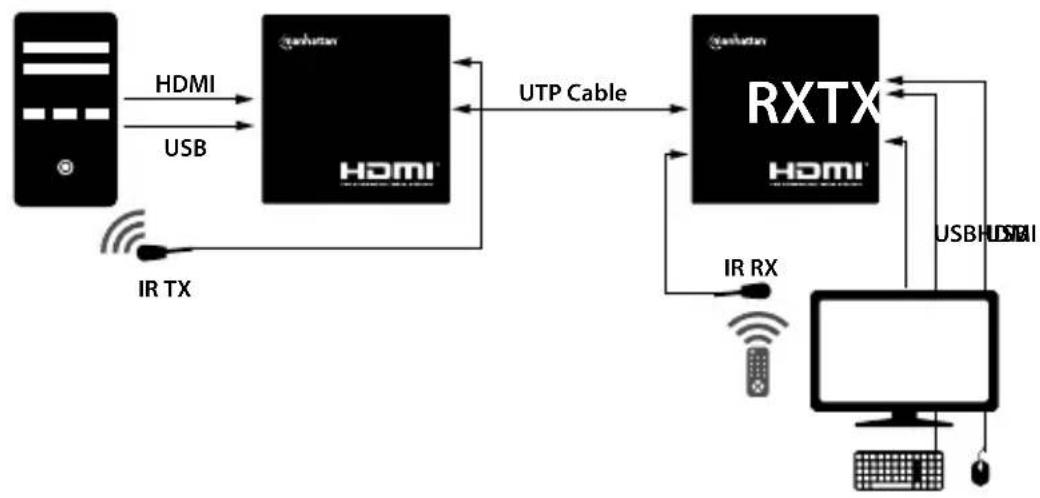
Simple Mode
Allocation Mode


1 HDMI IN: Connect input source.
2 HDMI OUT (both units): Connect output display/projector at sender side for loop out and at receiver side for remote out.
3 USB/PC: Connect to computer source to control it through Receiver's USB ports.
4 Power LED: lights when power is connected;
USB: lights when connected
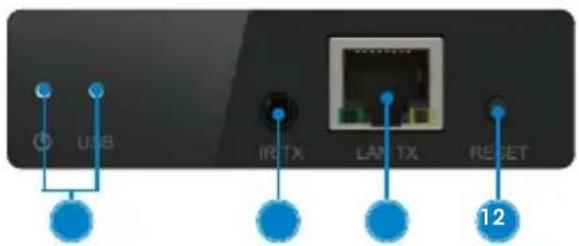
to a computer.
5 IR TX: Connect IR Transmitter (TX) to send IR remote signal to source; place it in line of sight to source sensor.
6 LAN TX / LAN RX: Use Cat6 cable to connect to units to each other or to a switch, depending on desired setup (green LED: lit = power, off = no power; yellow LED: slow flashing = no video signal; fast flashing = video signal).
RECEIVER

7 USB: In Allocation Mode, press to control source at selected receiver.
8 Connect USB keyboard and mouse.
9 POWER LED: lights when power is connected; Keyboard LED: lights when connected to keyboard; Mouse LED: lights when connected to mouse.

10 IR RX: Connect IR Receiver (RX) to receive IR remote signal at display location; place it in line of sight to remote.
11 DC 5V (both units): Connect included power adapters.
12 RESET (both units): Press to perform a restart.
Disposal of Electric Equipment (applicable in the E.U. and other countries with separate collection systems)
ENGLISH: This symbol on the product or its packaging

means that this product must not be treated as unsorted household waste. In accordance with EU Directive 2012/19/EU on Waste Electrical
and Electronic Equipment (WEEE), this electrical product must be disposed of in accordance with the user's local regulations for electrical or electronic waste. Please dispose of this product by returning it to your local point of sale or recycling pickup point in your municipality.
manhattanproducts.com
This equipment has been tested and found to comply with the limits for a Class B digital device, pursuant to Part 15 of Federal Communications Commission (FCC) Rules. These limits are designed to provide reasonable protection against harmful interference in a residential installation. This equipment generates, uses and can radiate radio frequency energy, and if not installed and used in accordance with the instructions may cause harmful interference to radio communications. However, there is no guarantee that interference will not occur in a particular installation. If this equipment does cause harmful interference to radio or television reception, which can be determined by turning the equipment off and on, the user is encouraged to try to correct the interference by one or more of the following measures: reorient or relocate the receiving antenna; increase the separation between the equipment and the receiver; connect the equipment to an outlet on a circuit different from the receiver; or consult the dealer or an experienced radio/TV technician for help.
CE
ENGLISH : This device complies with the requirements of CE 2014/30/EU and / or 2014/35/EU. The Declaration of Conformity for is available at:
support.manhattanproducts.com/barcode/207683

North & South America
IC Intracom Americas 550 Commerce Blvd. Oldsmar, FL 34677, USA
Asia & Africa
IC Intracom Asia 4-F, No.77, Sec.1, Xintai 5th Rd. Xizhi Dist., New Taipei City 221, Taiwan
Europe IC Intracom Europe Lohbacher Str.7 D-58553 Halver, Germany
All trademarks and trade names are the property of their respective owners.
manhattan Life just got easier.
manhattanproducts.com
All trademarks and trade names are the property of their respective owners. © IC Intracom. All rights reserved. Manhattan is a trademark of IC Intracom, registered in the U.S. and other countries.
Brand : MANHATTAN
Model : 207683
Category : Audio/video extension