VL26 - Lamp Dörr - Free user manual and instructions
Find the device manual for free VL26 Dörr in PDF.


Frequently Asked Questions - VL26 Dörr
User questions about VL26 Dörr
0 question about this device. Answer the ones you know or ask your own.
Ask a new question about this device
Download the instructions for your Lamp in PDF format for free! Find your manual VL26 - Dörr and take your electronic device back in hand. On this page are published all the documents necessary for the use of your device. VL26 by Dörr.
USER MANUAL VL26 Dörr
natural_image
Rit ring setup with a handheld device mounted on a tripod, featuring a rainbow-colored ring and black tripod handle (no text or symbols visible)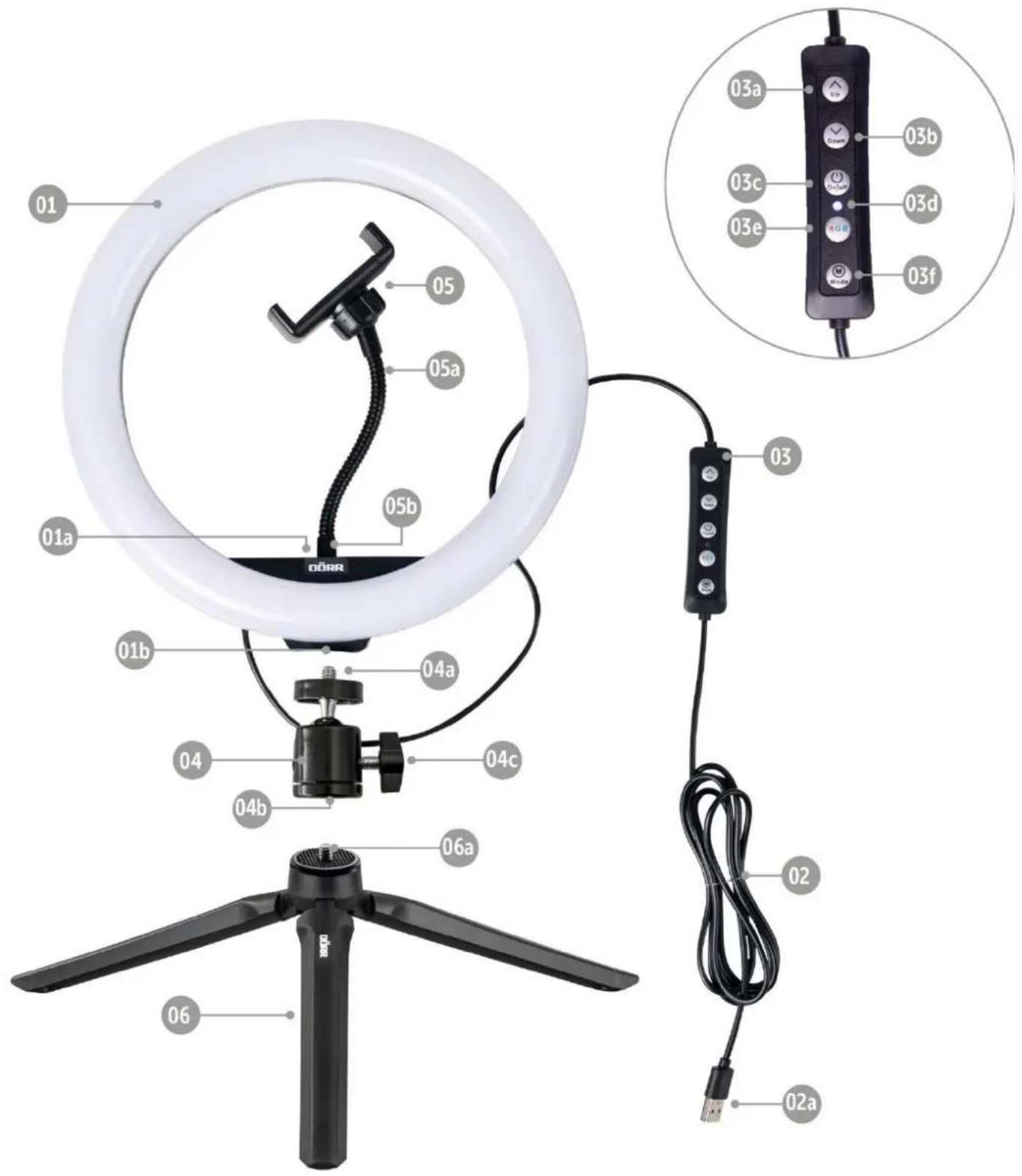
text_image
01 05 05a 05b 01a 04a 04b 04c 06a 06 02 02a 03a 03b 03c 03d 03e 03f 03R09.3 ROHS KONFORMITÄT
THANK YOU for choosing this DÖRR quality product.
Please read the instruction manual and safety hints carefully before first use.
Keep this instruction manual together with the device for future use. If other people use this device, make this instruction manual available. This instruction manual is part of the device and must be supplied with the device in case of sale.
DÖRR is not liable for damages caused by improper use or the failure to observe the instruction manual and safety hints.
01 | SAFETY HINTS
- Do not look directly into the LED and do not direct the light beam into the eyes of humans or animals. CAUTION: Looking into the light for an extended period of time may cause an irreversible damage to the retina.
- Only for the illumination for photographic purposes. Not suited for permanent room lightning.
- Protect the device from rain, moisture, direct sunlight and extreme temperatures.
- Turn off the light after use and disconnect from power source.
- Do not operate or touch the device with wet hands.
- Protect the device against impacts. Do not use the device if it has been dropped. In this case a qualified electrician should inspect the device before you use it again.
- Do not attempt to repair the device by yourself. Risk of electric shock! When service or repair is required, contact qualified service personnel.
- People with physical or cognitive disabilities should use the device with supervision.
- People with cardiac pacemakers, defibrillators or any other electrical implants should maintain a minimum distance of 30 cm, as the device generates magnetic fields.
- This device is not a toy. To prevent accidents and suffocation keep the device, the accessories and the packing materials away from children and pets.
- Protect the device against dirt. Never use aggressive cleansing agents or benzine to clean the device. We recommend a soft, slightly damp microfiber cloth to clean the outer parts of the device. Before cleaning make sure to switch off the device and take off from power supply!
- Store the device in a dust-free, dry and cool place.
- If the device is defective or without any further use, dispose of the device according to the Waste Electrical and Electronic Equipment Directive WEEE. For further information, please contact your local authorities.
02 | PRODUCT DESCRIPTION
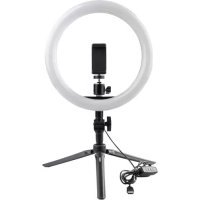
- Versatile RGB LED selfie ring light
- 4 light modes: cold light, mixed light, warm light and RGB mode
• Large selection of colour and flashing effects with adjustable playback speed - Brightness can be dimmed in 12 steps
- With variable smartphone holder, flexible gooseneck, table tripod and ball head
03 | NOMENCLATURE
01 LED ring light
01a) 14 " connection for smartphone holder
01b) 14 " tripod mount
02 USB cable
02a) USB-A plug
03 Control unit
03a) Button ∧ „Up“
03b) Button v "Down"
03c) On/Off button
03d) LED indicator
03e) Button RGB (RGB mode)
03f) Button Ⓜ (White light mode)
04 Ball head
04a) 14 " screw
04b) 14 " tripod mount
04c) Locking screw
05 Smartphone holder
05a) Goose neck
05b) 1/4" screw
06 Table tripod
06a) 1/4" screw
04 | MOUNTING
- Mount the ball head (04) on the table tripod (06) by screwing the 14 " screw (06a) into the 14 " tripod mount (04b) of the ball head.
- Mount the LED ring light (01) on the ball head (04) by screwing the 14 " screw (04a) into the 14 " tripod mount (01b) of the LED ring light.
- Loosen/fix the locking screw (04c) on the ball head to tilt or turn the LED ring light (01).
- Mount the smartphone holder (05) on the LED ring light (01) by screwing the 14 " screw (05b) at the bottom of the gooseneck (05a) into the 14 " connection (01a) of the LED ring light.
- Spread the clamps of the smartphone holder (05) apart, insert your smartphone and carefully release the clamps to hold the smartphone in place.
- Bring your smartphone into the desired position by bending the gooseneck (05a).
05 | OPERATION
- Connect the USB-A plug (02a) to the USB socket of a PC/Notebook. If the connection is correct, the LED indicator (03d) lights up blue.
- To switch on the ring light, press the On/Off button (03c) at the control unit (03).
05.1 White light mode
Press the button Ⓜ (03f) to enter the white light mode. Press the button Ⓜ (03f) repeatedly to select one of the following light modes:
- Warm light with a colour temperature of approx. 3000 K
• Mixed light with a colour temperature of approx. 4500 K
• Cold light with a colour temperature of approx. 6000 K
Press the button v "Down" (03b) to reduce the brightness in 12 steps.
Press the button "Up" (03a) to increase the brightness in 12 steps.
05.2 RGB colour and effect mode
Press the button RGB (03e) to enter the RGB colour and effect mode. Press the button RGB (03e) repeatedly to browse through the various colour, fade, and flashing effects. In all effect modes the buttons V "Down" (03b) and ∧ „Up" (03a) can be pressed to adjust either the playback speed or the brightness (see table on next page).
| Light and flashing effects | Colour selection | Additional setting | |||||||
| Rainbow cycle | adjustable playback speed | ||||||||
| Constant colour | red | green | blue | yellow | purple | turquoise | adjustable brightness | ||
| Automatic colour change | adjustable playback speed | ||||||||
| Automatic colour fading | x | ||||||||
| Rainbow cycle | adjustable playback speed | ||||||||
| Rotating colour change | adjustable playback speed | ||||||||
| Rotating rainbow | adjustable playback speed | ||||||||
| Rotating colour left side | red | green | blue | yellow | purple | turquoise | x | ||
| Rotating colour right side | red | green | blue | yellow | purple | turquoise | x | ||
| Slow colour fading | red | green | blue | yellow | purple | turquoise | white | x | |
| Two-tone ring | adjustable brightness | ||||||||
| Rotating two-tone ring | adjustable playback speed | ||||||||
| Rotating tri-colour ring | adjustable playback speed | ||||||||
| Rotating four-coloured ring | adjustable playback speed | ||||||||
| Rotating five-coloured ring | adjustable playback speed | ||||||||
| Rotating six-coloured ring | adjustable playback speed | ||||||||
| Six-Coloured wheel | adjustable playback speed | ||||||||
| Two-tone ring rotating with colour change | adjustable playback speed | ||||||||
| red flashing, blue flashing, both flashing | adjustable brightness | ||||||||
| Strobe | warm white | mixed white | cold white | red | green | blue | yellow purple | turquoise | adjustable brightness |
After use turn the LED ring light off with the On/Off button (03c) and disconnect from USB power source.
06 | CLEANING AND STORAGE
Never use aggressive cleansing agents or benzine to clean the device. We recommend a soft, slightly damp microfiber cloth to clean the outer parts of the device. Before cleaning make sure to switch off the device and take off from power supply! Store the device in a dust-free, dry and cool place. This device is not a toy - keep it out of reach of children. Keep away from pets.
07 | TECHNICAL SPECIFICATIONS
| Number of LEDs | 130 (50x cold white, 50x warm white, 30x RGB) | |
| Colour temperature | Cold light: 6000 K | |
| Mixed light: 4500 K | (±200 K) | |
| Warm light: 3000 K | ||
| Illumination power max. at 1m approx. | 330 Lux | |
| Colour Rendering Index (CRI) | 85 Ra | |
| LED power | 10 W | |
| Power supply 5V 2A | ||
| Outer diameter approx. | 26 cm | |
| Inner diameter approx. | 20 cm | |
| For smartphone width approx. | 60 - 85 mm | |
| Hight with table tripod approx. | 39 cm | |
| Length USB cable approx. | 190 cm | |
| Weight approx. | 464 g | |
Dörr GmbH reserves the right to make technical changes without notice.
08 | SCOPE OF DELIVERY
1x LED ring light with USB cable with control unit
1x Smartphone holder with gooseneck
1x Ball head
1x Table tripod
1x Safety hints
09 | DISPOSAL, CE MARKING

09.1 DISPOSAL OF BATTERIES/ACCUMULATORS
Batteries are marked with the symbol of a crossed-out bin. This symbol indicates that empty batteries or accumulators which can no longer be charged should not be disposed of with household waste. Waste batteries may contain harmful substances that can cause damage to health and to the environment. Please use the return and collection systems available in your country for the disposal of the waste batteries.

09.2 WEEE INFORMATION
The Waste Electrical and Electronic Equipment Directive (WEEE Directive) is the European community directive on waste electrical and electronic equipment, which became European law in February 2003. The main purpose of this directive is to prevent electronic waste. Recycling and other forms of waste recovery should be encouraged to reduce waste. The symbol (trash can) on the product and on the packing means that used electrical and electronic products should not be disposed of with general household waste. It is your responsibility to dispose of all your electronic or electrical waste at designated collection points. Disposing of this product correctly will help to save valuable resources and it is a significant contribution to protect our environment as well as human health. For more information about the correct disposal of electrical and electronic equipment, recycling and collection points please contact your local authorities, waste management companies, your retailer or the manufacturer of this device.

09.3 ROHS CONFORMITY
This product is compliant with the European RoHS directive for the restriction of use of certain hazardous substances in electrical and electronic equipment and its amendments.

09.4 CE MARKING
The CE marking complies with the European standards and indicates that the product meets the requirements of the applicable EU directives.