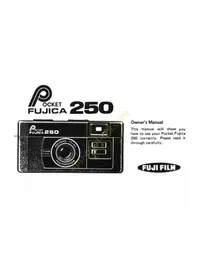
Pocket 250 - Camera FUJI - Free user manual and instructions
Find the device manual for free Pocket 250 FUJI in PDF.



| Product type | Compact camera |
| Brand | Fuji |
| Model | Pocket 250 |
| Film format | 110 film in cartridge (13 x 17 mm) |
| Lens | Fujinon 1:9.5 f=25.6 mm (3 lenses in 3 groups) |
| Focus | Preset (1.5 m to infinity) |
| Shutter | Mechanical, speeds 1/80 and 1/320 sec |
| Exposure adjustment | Weather symbols set by the cartridge |
| Viewfinder | Direct vision |
| Flash | X contact for electronic flash |
| Film advance | Rear wheel with anti-double exposure device |
| Dimensions (W x D x H) | 103 x 40 x 51.1 mm |
| Weight | 120 g (without accessories) |
| Power supply | Battery for flash (not included) |
| Included accessories | Strap and case |
| Maintenance | Use a soft brush, a rubber blower, and a soft cloth |
| Safety | Avoid heat, humidity, and direct sunlight |
| Spare parts | Strap and case (provided) |
| General information | Designed for simple use: no focus or sensitivity adjustment |
Frequently Asked Questions - Pocket 250 FUJI
User questions about Pocket 250 FUJI
0 question about this device. Answer the ones you know or ask your own.
Ask a new question about this device
Download the instructions for your Camera in PDF format for free! Find your manual Pocket 250 - FUJI and take your electronic device back in hand. On this page are published all the documents necessary for the use of your device. Pocket 250 by FUJI.
USER MANUAL Pocket 250 FUJI
This manual will show you how to use your Pocket Fujica 250 correctly. Please read it through carefully.
FUJI FILM
CONTENTS
Special features 3
Names of parts 4
-
Attaching the handstrap 6
-
Choosing the right film 6
-
Loading the film 6
-
Taking outdoor pictures 8
-
Aiming the camera 9
-
Taking flash pictures 10
-
Unloading the film 12
Camera care 13
Specifications 14
■ SPECIAL FEATURES
- Besides being compact and light, your Pocket Fujica 250 is uniquely designed to make picture taking extremely easy and more enjoyable.
- Operation is simplicity itself: focusing is unnecessary because the lens is pre-focused for you, and there is no film speed setting or film rewinding to do. You just drop in a cartridge, shoot, and drop out the cartridge.
- An X-contact hotshoe lets you take indoor pictures with an electronic flash.
- Its picture-taking scope can be vastly expanded by using Fujicolor F-II400 Pocket Film.
■ NAMES OF PARTS
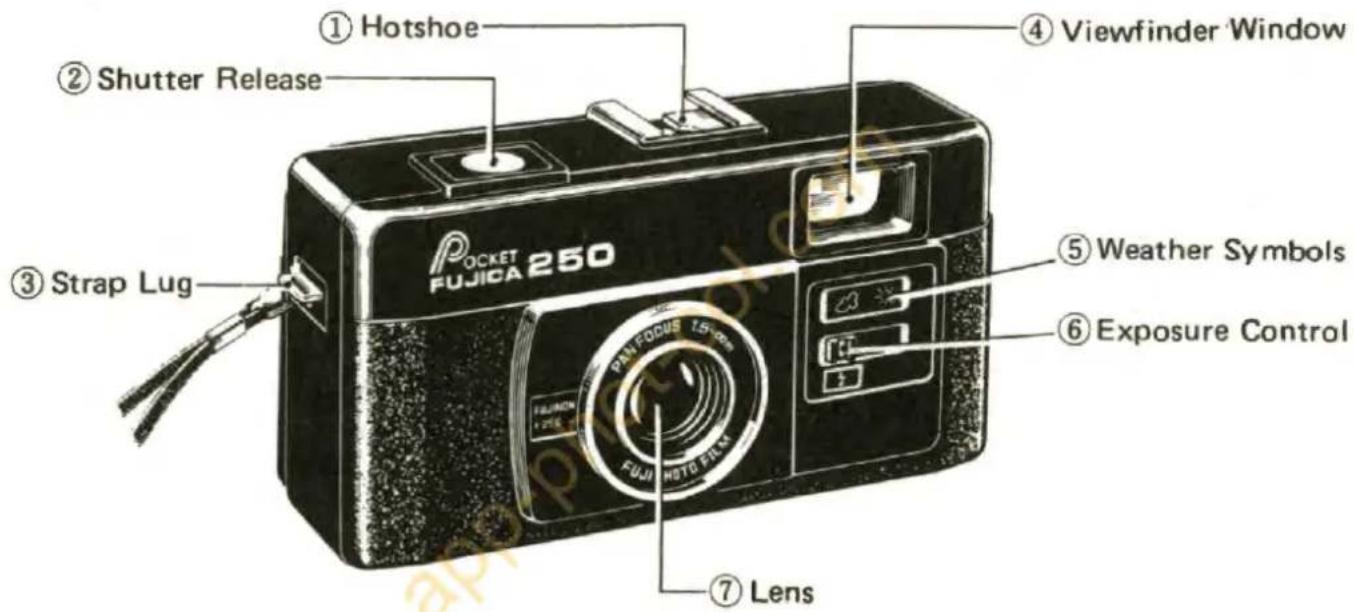
text_image
① Hotshoe ② Shutter Release ③ Strap Lug ④ Viewfinder Window ⑤ Weather Symbols ⑥ Exposure Control ⑦ Lens POCKET FUJICA 250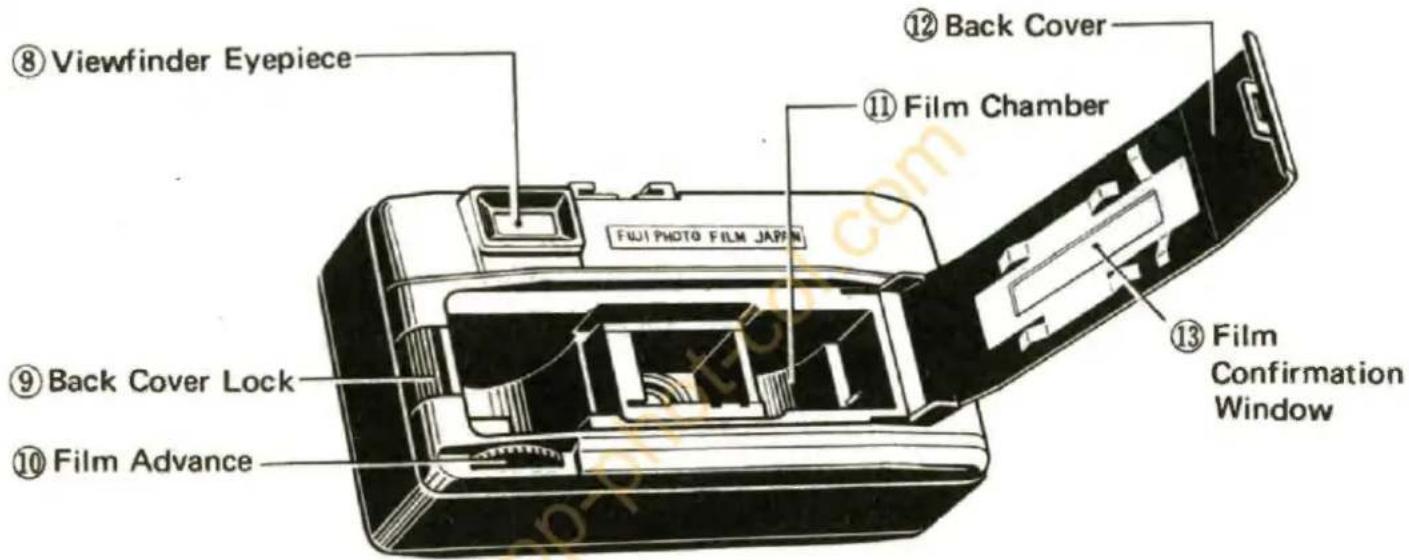
text_image
⑧ Viewfinder Eyepiece ⑨ Back Cover Lock ⑩ Film Advance ⑪ Film Chamber ⑫ Back Cover Fiji PHOTO FILM JAPAN ⑬ Film Confirmation Window1 ATTACHING THE HANDSTRAP
natural_image
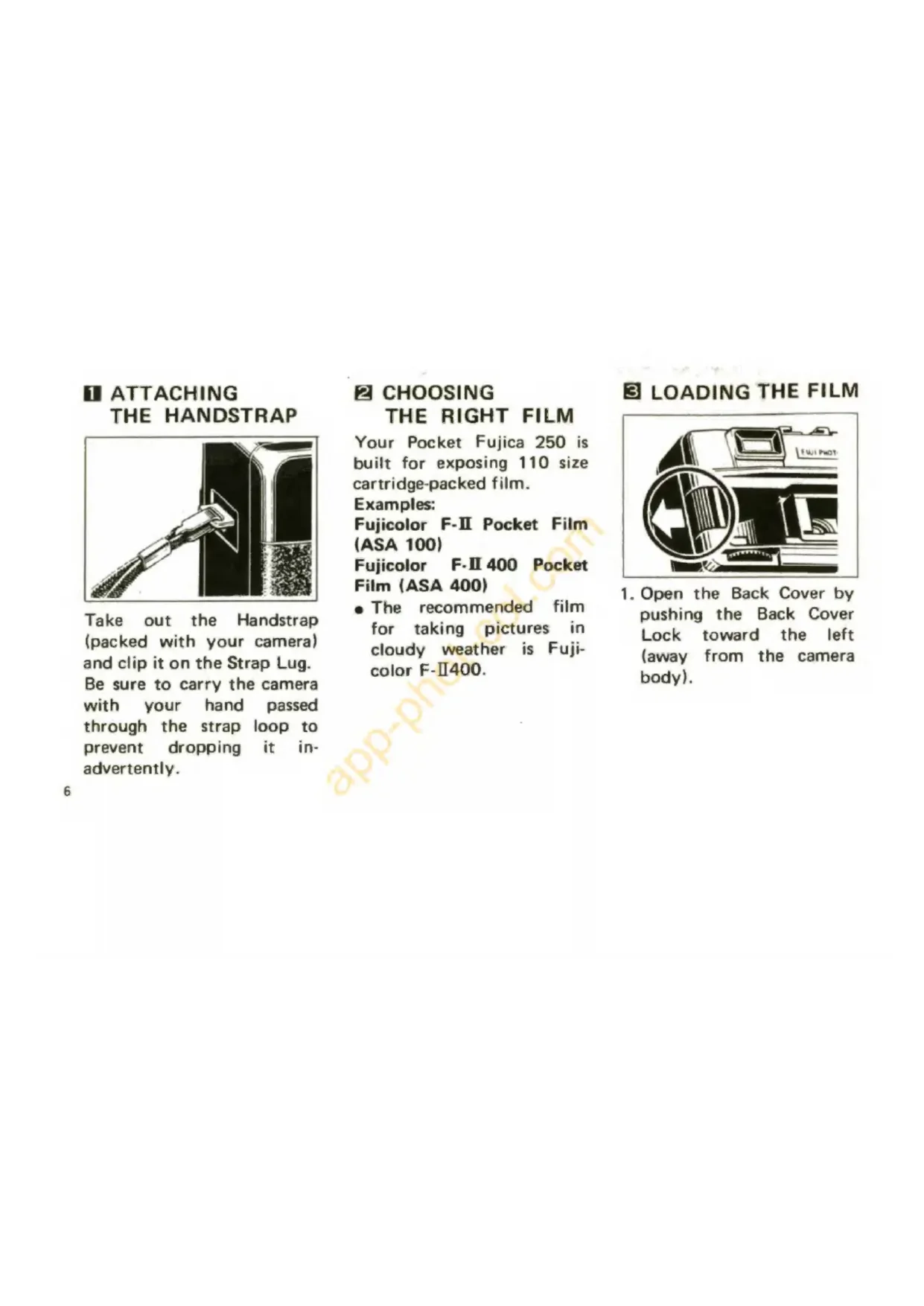
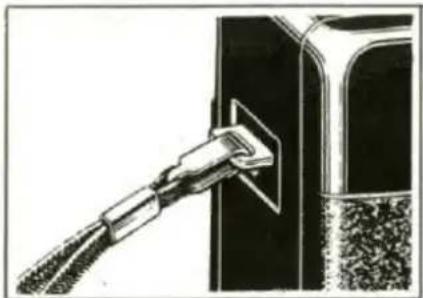
Close-up of a mechanical component with a metallic tool inserted, showing a rectangular opening and textured surface (no text or symbols visible)Take out the Handstrap (packed with your camera) and clip it on the Strap Lug. Be sure to carry the camera with your hand passed through the strap loop to prevent dropping it inadvertently.
2 CHOOSING THE RIGHT FILM
Your Pocket Fujica 250 is built for exposing 110 size cartridge-packed film.
Examples: Fujicolor F-II Pocket Film (ASA 100)
Fujicolor F-Ⅱ 400 Pocket Film (ASA 400)
- The recommended film for taking pictures in cloudy weather is Fuji-color F-II400.
3 LOADING THE FILM
natural_image
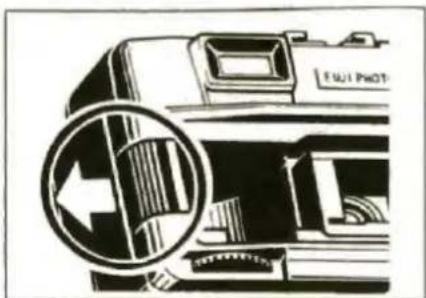
Black and white illustration of a camera with an arrow pointing left, no visible text or symbols- Open the Back Cover by pushing the Back Cover Lock toward the left (away from the camera body).
natural_image
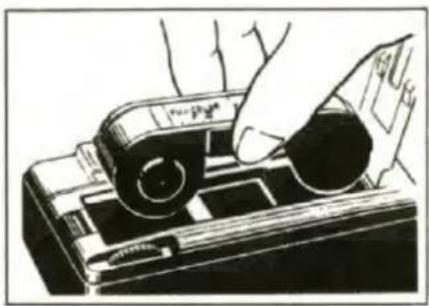
Illustration of a hand using a camera lens to press or install a device (no text or symbols visible)- Drop the film cartridge in the Film Chamber as shown, then close the Back Cover.
• Make sure the Back Cover locks into place with a click.
- If you are using Fujicolor film, the Film Confirmation Window will show
you which film is loaded in the camera, the number of exposures it will yield, and the number of the frame that is in position for exposure.
text_image
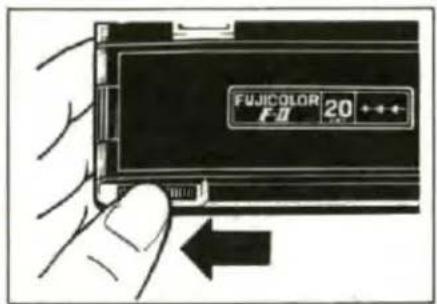
FUJICOLOR F/U 20- While looking through the Film Confirmation Window, turn the Film Advance to the left with your thumb.
- If it is locked, press down the Shutter Release to unlock it.
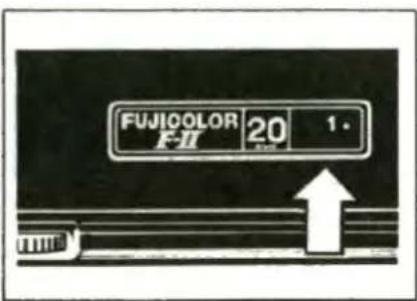
text_image
FUJICOLOR F-II 20 1. ↑- Keep turning the Film Advance until it locks and the number "1" (first frame) appears in the Window.
You are now ready to take pictures.
- Keep your finger off the Shutter Release while you are turning the Film Advance.
4 TAKING OUTDOOR PICTURES
The Fujicolor F-II and F-II 400 Pocket Film Cartridges are built to interlock with the exposure system of your Pocket Fujica 250. The Weather Symbols will automatically switch to the correct set when they are dropped into the camera.
① When using Fujicolor F-II Pocket Film (ASA 100)
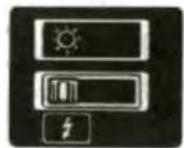
Set the Exposure Control to
You are now set to take pictures both in bright and hazy sunlight.
Focusing is unnecessary because the lens is pre-focused for taking sharp pictures from 1.5 meters (5 feet) to infinity.
② When using Fujicolor F-II400 Pocket Film (ASA 400)
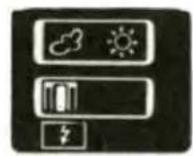
To shoot in bright or hazy sunlight, set the Exposure Control to 📄.
If you are shooting in cloudy-bright weather or under an open shade, set it to
Make sure the Exposure Control is set at the click stops directly opposite the Weather Symbols. You cannot take pictures if it is set anywhere in between.
AIMING THE CAMERA
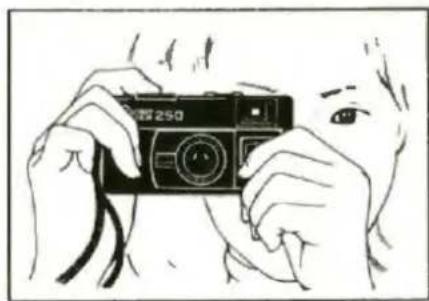
natural_image
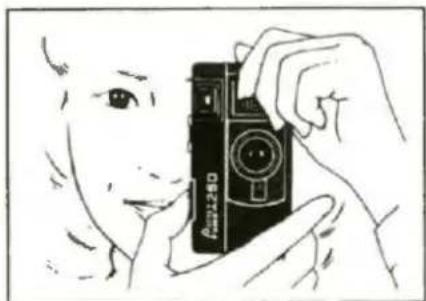
Line drawing of hands holding a camera with visible lens and screen (no text or symbols)- To prevent camera shake, hold the camera firmly with both hands and press its back against your face.
- Keep your fingers away from the lens.
natural_image
Line drawing of a person holding a camera, no text or symbols present- To take your picture, look through the Viewfinder and "squeeze" the Shutter Release gently down. You'll get in your picture exactly what you see through the Viewfinder.
- The camera can be held steadier by pressing your
upper arms tightly against the sides of the chest just before you squeeze the Shutter Release.
- To get ready for the next shot, just turn the Film Advance with your left thumb until it locks.
Be sure to take your finger off the Shutter Release before you start turning the Film Advance.
TAKING FLASH PICTURES
Use flash for taking indoor, dawn, evening, dull weather, and in-the-shade pictures.
- Your Pocket Fujica 250 is designed for using cordless type flash.
- The recommended flash is Fujicolor Strobo PII which has a guide number of 16 (ASA 100/meters.)
text_image
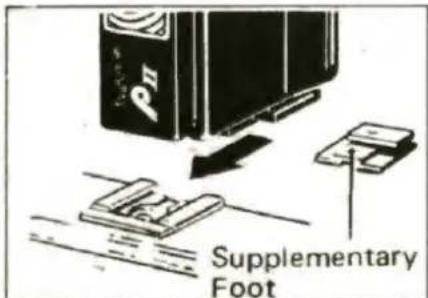
PE Supplementary Foot- Just clip the flash into the camera's Hotshoe.
- If you are using a Fujicolor Strobo PII, remove the supplementary foot before clipping it into the Hotshoe. (Detailed instructions are packed with the flash.)
natural_image
Simple icon set showing weather symbols (cloud, sun, battery, lightning bolt) without any text or labels-
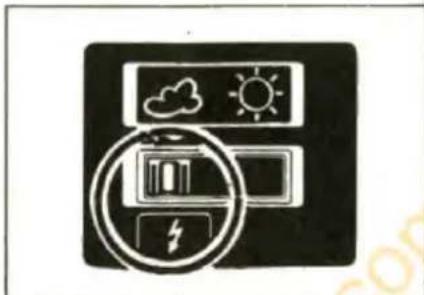
Set the Exposure Control to 🎋.
-
The rest of the procedure is the same as that for taking outdoor daylight pictures. You just look through the Viewfinder and press the Shutter Release gently down.
- With a Fujicolor Strobo PII, you can shoot from a distance of 1.5\~2.5 meters (5\~8 feet) with Fujicolor F-II Pocket Film, and from 1.5\~4 meters (5\~13 feet) with Fujicolor F-II 400 Pocket Film.
- If you want to take flash pictures from a farther distance, use a cordless type flash which has a larger guide number.
7 UNLOADING THE FILM
text_image
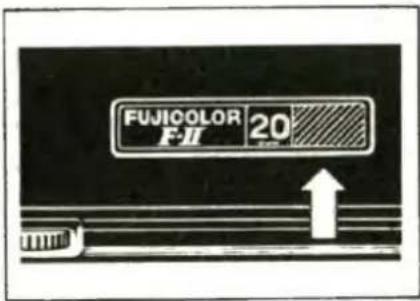
FUJICOLOR F-II 20- After exposing the entire roll of film, wind it with the Film Advance until you see oblique stripes in the Film Confirmation Window and the Film Advance locks by itself.
- Stop winding as soon as the Film Advance locks. Do not force it because the film might break.
natural_image
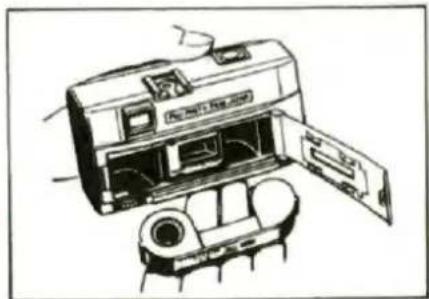
Line drawing of a printer with open lid and base case (no text or symbols)- Open the Back Cover and unload the film by dropping it out into your palm.
text_image
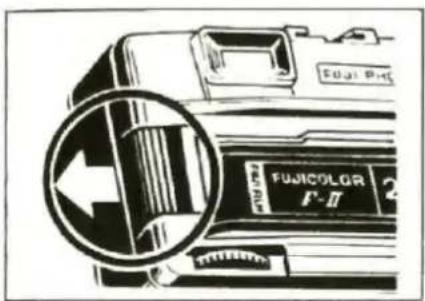
FUIJICOLOR F-II- If the film does not drop out easily, push the Back Cover Lock to the left as far as it will go.
• Take your exposed film to your photofinisher as soon as possible.
CAMERA CARE
- Keep your camera and film away from heat, moisture, and direct sunlight. In hot weather, do not leave them in your car or in any other confined place where heat can accumulate.
- Use a soft brush or an air blower to dust your camera. To remove soil and fingermarks from the lens glass and viewfinder window, breathe a mist on the contaminated parts and wipe off lightly with a piece of soft, lintless cloth or paper.
For best results, use Fuji Lens Cleaning Fluid or Fuji Lens Cleaning Paper.
- If you are not using your camera for a long interval, put it in a container together with some desiccant and keep it where it is cool and dry. Do not leave it in your wardrobe drawer or any other place containing moth repellants.
SPECIFICATIONS
| Film | 110 size cartridge-packed film; 13 x 17mm picture size. |
| Lens | Fujinon 1:9.5 f=25.6mm, 3 components, 3 elements. |
| Focusing | Prefocused for 1.5m ~∞ (5 ft. ~∞). |
| Shutter | Mechanical; 1/80 and 1/320 sec. shutter speeds. |
| Exposure Control | Weather symbols for switching shutter speeds;Weather symbols interlock with Fujicolor F-II and F-II 400 cartridges. |
| Viewfinder | Direct viewing. |
| Flash Photography | X-contact hotshoe for electronic flash. |
| Film Advance | Thumb wheel in camera back; provision for double exposure prevention. |
| Others | Provided with lug for attaching handstrap. |
| Dimensions & Weight | 103mm W x 40mm D x 51.1mm H (4-1/16 x 1-9/16 x 2 in.);120 g (4-1/4 oz.) |
| Accessories (included) | Handstrap and soft case. |
Notice: Specifications are subject to change without notice.
26 30, Nishiazabu 2 chome, Minato-ku, Tokyo 106, Japan.
In North America
350 Fifth Ave., New York, N.Y. 10001, U.S.A.
FUJI PHOTO FILM HAWAII, INC.
Pacific International Bldg., Suite 217
677 Ala Moana Blvd., Honolulu, Hawaii 96813, U.S.A.
In Europe
FUJI PHOTO FILM (EUROPE) G.m.b.H.
Berliner Atles B. West Germany
99 Baker Street, London, W1M 1FB, England
In South America
FUJI PHOTO FILM DO BRASIL LTDA.
Caisa Postal 9959. Rus Major Diogo. 128, CEP 01. 324,
São Paulo, Brazil
In Asia
24th Floor, Melbourne Plaza
No. 33, Queen's Road, Central, Hong Kong
Unit 537, 5th Floor, Plaza Singapura, 68, Orchard Road, Singapore, 9
FUJI PHOTO FILM CO., LTD., BANGKOK OFFICE
K & Y Bldg., 2nd Floor, 16 Suresak Road, Bangkok, Thailand
Rm. 501 Hung Chong Bldg., No. 20, Chiling Road, Taipei, Taiwan
FUJI PHOTO FILM CO., LTD., SEOUL OFFICE
Mee Wha Building, 30 1, Mukjong-dong, Chung-ku, Seoul, Korea
Printed in Japan
宣バ-772511-FS・10-3①

text_image
POCKET FUJICA250
FUJI FILM
Bedienungsanleitung
⑩ PHOTOGRAPHIER AU FLASH
26-30, Nishiazabu 2-chome, Minato-ku, Tokyo 106, Japan
In North America FUJI PHOTO FILM U.S.A., INC.
350 Fifth Ave., New York, N.Y. 10001, U.S.A.
FUJI PHOTO FILM HAWAII, INC.
Pacific International Bldg., Suite 217
677 Ala Moana Blvd., Honolulu, Hawaii 96813, U.S.A.
In Europe FUJI PHOTO FILM (EUROPE) G.m.b.H.
Berliner Allee B. West Germany
99 Baker Street, London, W1M 1FB, England
In South America FUJI PHOTO FILM DO BRASIL LTDA
24th Floor, Melbourne Plaza
No. 33, Queen's Road, Central, Hong Kong
Unit 537, 5th Floor, Plaza Singapura, 68, Orchard Road, Singapore, 9
FUJI PHOTO FILM CO., LTD., BANGKOK OFFICE
K & Y Bldg., 2nd Floor, 16 Surasak Road, Bangkok, Thailand
Rm. 501 Hung Chong Bldg., No. 20, Chiling Road, Taipei, Taiwan
FUJI PHOTO FILM CO., LTD., SEOUL OFFICE
Mee Wha Building, 30-1, Mukjong-dong, Chung-ku, Seoul, Korea
Printed in Japan
18-772511-FS·10-3①