14PT1521 - TV PHILIPS - Free user manual and instructions
Find the device manual for free 14PT1521 PHILIPS in PDF.


User questions about 14PT1521 PHILIPS
0 question about this device. Answer the ones you know or ask your own.
Ask a new question about this device
Download the instructions for your TV in PDF format for free! Find your manual 14PT1521 - PHILIPS and take your electronic device back in hand. On this page are published all the documents necessary for the use of your device. 14PT1521 by PHILIPS.
USER MANUAL 14PT1521 PHILIPS
Thank you for purchasing this television set.
This handbook has been designed to help you install and operate your TV set.
We would strongly recommend that you read it thoroughly.
We hope our technology meets entirely with your satisfaction.
Note: Specification and information subject to change without notice.
Table of Contents
Installation
Installing your television set 2
The keys on the TV set 2
Safety Information. 3
The remote control keys 4
Quick installation 5
Programme sort 5
Other settings in the Install menu 5
Manual store 6
Operation
Picture settings 7
Timer function 8
TV lock 8
Teletext 9
Peripherals
Connecting peripheral equipment 10
Video recorder 10
Other equipment 10
Side connections 10
To select connected equipment 10
Practical information
Glossary 11
Safety Information: Electric, Magnetic and Electromagnetic Fields .
Tips 12
Recycling


Recycling
This packaging of this set can be recovered or recycled. Apply to the local authorities in order to minimise environmental waste.
Disposal of your old product.
Your product is designed and manufactured with high quality materials and components, which can be recycled and reused.
When this crossed-out wheeled bin symbol is attached to a product it means the product is covered by the European Directive 2002/96/EC. Please inform yourself about the local separate collection system for electrical and electronic products.
Please act according to your local rules and do not dispose of your old products with your normal household waste. The correct disposal of your old product will help prevent potential negative consequences for the environment and human health.
Installing your television set
Positioning the television set
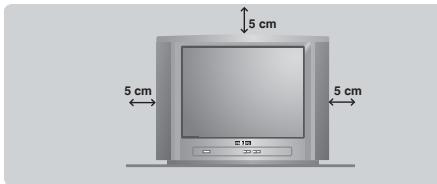
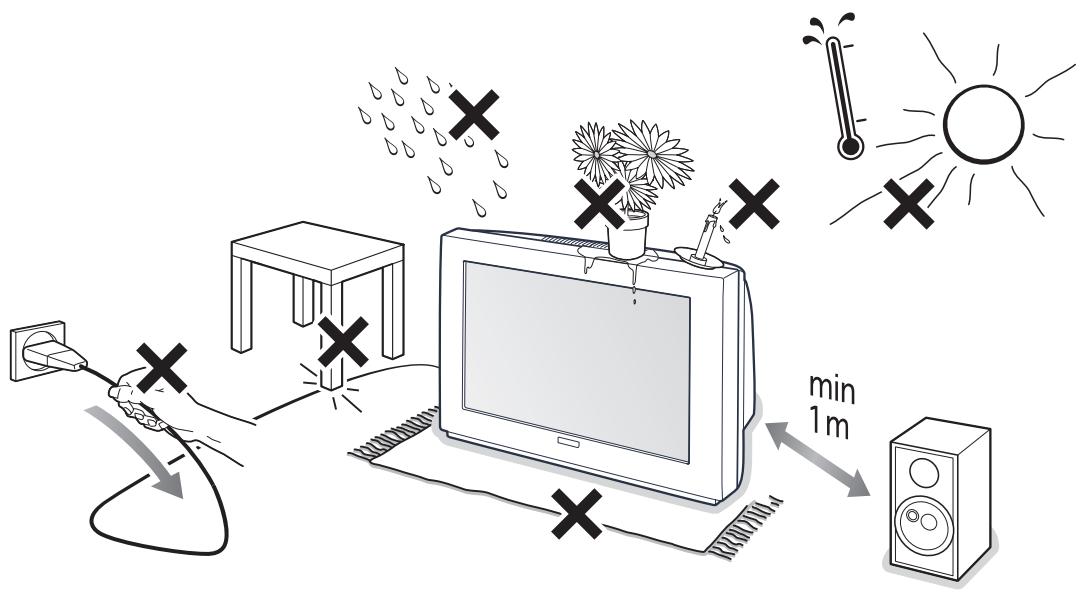
Place your TV on a solid, stable surface, leaving a space of at least 5cm around the appliance. To avoid accidents, do not put anything on the set such as a cloth or cover, a container full of liquid (vase) or a heat source (lamp). The set must not be exposed to water.
Connections
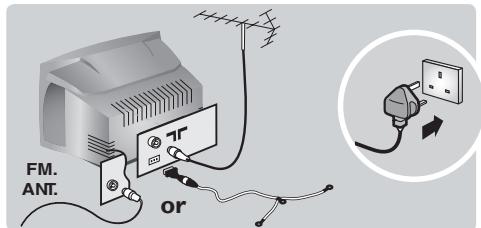
- Insert the aerial plug into the socket at the rear of the set.
- For the versions equipped with a radio: insert the radio aerial socket into the FM ANT socket using the adapter supplied.
If you are using an indoor aerial, reception may be difficult in certain conditions. You can improve reception by rotating the aerial. If the reception remains poor, you will need to use an external aerial.
- Insert the mains plug into a wall socket (220-240 V / 50 Hz).
The keys on the TV set
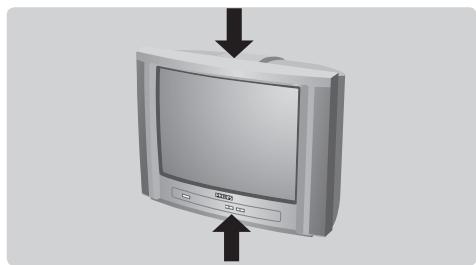
The television set has 5 keys which are located on the front or the top of the set depending on the model. The on/off key switches the TV set on/off.
Remote control
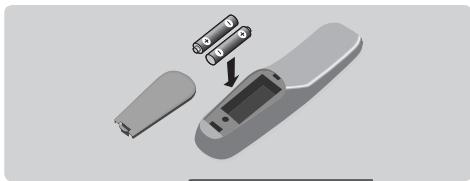
Insert the two R6-type batteries (supplied) making sure that they are the right way round.
Check that the mode selector is set to TV.
The batteries supplied with this appliance do not contain mercury or nickel cadmium. If you have access to a recycling facility, please do not discard your used batteries (if in doubt, consult your dealer). When the batteries are replaced, use the same type.
Switching on
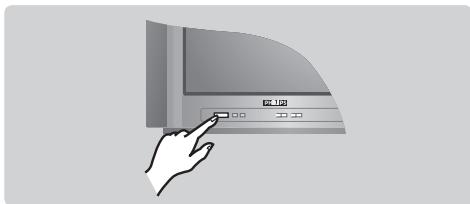
To switch on the set, press the on/off key. A red indicator comes on and the screen lights up. Go straight to the chapter Quick installation on page 5.
If the television remains in standby mode, press P^ on the remote control.
The indicator will flash when you use the remote control.
The VOLUME - + (- +) keys are used to adjust sound levels. The PROGRAM - + (- P + or - +) keys are used to select the required programmes. To access the menus, simultaneously hold down the and + keys. The PROGRAM - + keys may then be used to select an adjustment and the - + keys to make that adjustment.
To exit from the menus, hold down the 2 - and + keys.
Note: when the Child Lock function is activated, these keys are unavailable (refer to Features menu on page 8).
Safety Information
Plug the TV into a 220V - 240V AC, 50 Hz supply.
- Disconnect mains plug when :
- the red light below the TV screen is flashing continuously.
- a bright white line is displayed across the screen.
- there is a lightning storm.
- the set is left unattended for a prolonged period of time.
- Cleaning the TV screen. Never use abrasive cleaning agents. Use a slight damp chamois leather or soft cloth.
- No naked flame sources, such as lighted candles, should be placed on top of the TV or in the vicinity.
- Do not place your TV set under direct sunlight or heat.
- Do not cover or block the TV as it could lead to overheating.
- Leave at least 5cm around each side of TV set to allow for proper ventilation.
- Avoid placing your set (e.g. near the window) where it is likely to be exposed to rain or water.
- Battery Usage CAUTION - To prevent battery leakage that may result in bodily injury, property damage, or damage to the unit:
- Install all batteries correctly, with + and - aligned as marked on the unit.
- Do not mix batteries (old and new or carbon and alkaline, etc.).
- Remove batteries when the unit is not used for a long time.
- The apparatus must not be exposed to dripping or splashing and no objects filled with liquids, such as vases, shall be placed on the apparatus.
Useful Tips
- Do not leave your set on standby mode for a prolonged period of time. Switch off set to allow it to be demagnetised. A demagnetised set supports good picture quality.
- Do not shift or move the set around when it is switched on. Unevenness in colour in some parts of the screen may occur.
- Never attempt to repair a defective TV yourself. Always consult a skilled service personnel.
Remote control keys
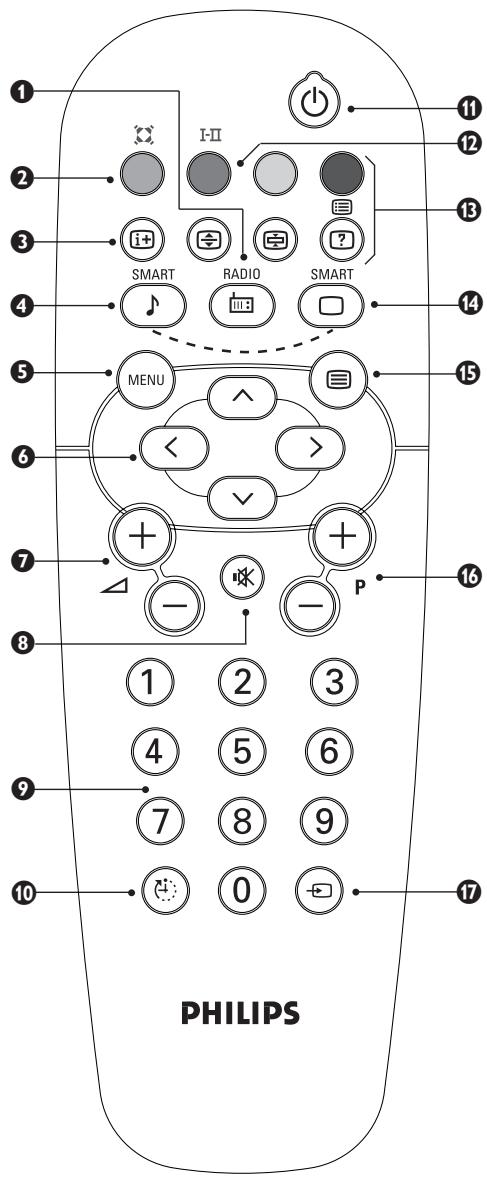
Radio / TV mode
To switch the TV set to radio or TV mode (for versions equipped with radio).
2 Surround Sound (only available on certain versions). To activate / deactivate the surround sound effect. In stereo, this gives the impression that the speakers are further apart. For models equipped with Virtual Dolby Surround*, you can experience Dolby Surround Pro Logic sound effects. In mono, a stereo spatial effect is simulated.
3 Screen information / permanent no. To display / clear the program number, name (if it exists), time, audio mode and time remaining for the sleep feature. Press the key for 5 seconds to activate permanent display of the number.
4 Pre-set sound
Used to access a series of stored settings: Voice, Music, Theatre and return to Personal.
5 Menu
To call up or exit the menus.
Cursor / Format
These 4 keys are used to navigate through the menus. The keys are used to enlarge or compress the picture vertically.
Volume
To adjust the sound level.
Mute
To mute or restore the sound.
Number keys
Direct access to the programmes. For a 2 digit program, enter the 2nd digit before the dash disappears.
Sleep
To select an automatic standby after a preset time (from 0 to 180 minutes).
1 Standby
Lets you place the TV set on standby. To turn on the TV, press P- ① ⑤ to ⑨ (or
Sound mode (only available on stereo versi
Used to force programmes in Stereo to Mono or, for bilingual programs, to choose between Dual I or Dual-II. For TV sets equipped for Nicam reception, depending on the programmes, you can force the Stereo Nicam sound to Mono or select between Nicam Dual I, Nicam Dual-II and Mono.
The Mono indication is red when in forced position.
Teletext keys (p. 9)
Pre-set image
Used to access a series of stored settings: Rich, Natural, Soft, Multimedia and return to Personal.
Teletext (p. 9)
16 Program selection
To access the next or previous programme. The number, (name) and sound mode are displayed for a few moments.
For some programs, the title of the program will be displayed at the bottom of the screen.
Selection of EXT socket
Press several times to select EXT and AV.
Quick installation
When you turn on the TV set for the first time, a menu is displayed on screen. This menu prompts you to select the country and language for the menus:
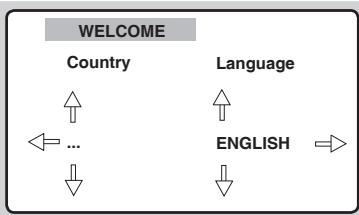
If the menu is not displayed, press and hold down the and + keys on the TV set for 5 seconds to display the menu.
Use the keys on the remote control to select your country and validate with . If your country does not appear in the list, select choice "...
Next select your language using the keys and validate with .
The search starts automatically. Finally the INSTALLATION menu appears automatically. If the programmes found have not been correctly numbered, use the Sort menu to renumber them. If no picture is found see Tips (p. 12).
4 If you want to exit the menus, press (MENU) several times.
Programme sort
This menu lets you to change the numbering of programmes.
Press the (MENU) key. The MAIN MENU is displayed on the screen.
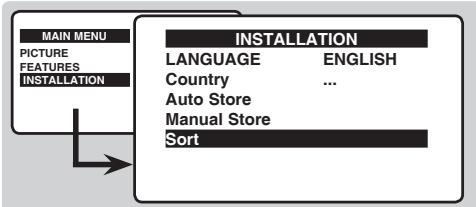
Highlight INSTALLATION and press the cursor right key.
3 Highlight SORT and press the cursor right key.
4 Select the programme you want to move with the keys and press .
Then use the keys to choose the new number and confirm with .
6 Repeat steps 3 and 4 as many times as required to move the programmes.
To exit the menus, press (MEN) several times.
Other settings in the Install menu
1 Highlight INSTALLATION and press the cursor right key. The following items will be displayed:
Language: to change the display language for the menus.
Country: to select your country (GB for Great Britain).
This setting is used for the search, automatic programme sort and teletext display. If your country does not appear in the list, select "...
- Auto Store : to start automatic search for all programmes available in your region.
Finally the INSTALLATION menu appears automatically.
If the programmes found have not been correctly numbered, use the Sort menu to renumber them.
If no picture is found see Tips (p. 12).
If you want to exit the menus, press (MEN) several times.
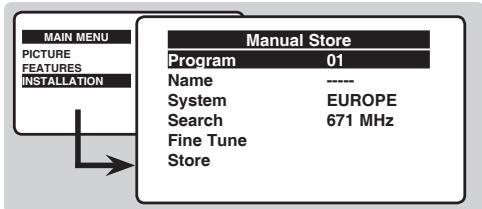
Manual store
This menu is used to store the programmes one at a time or to add a programme to the existing list.
Press the MENU key to display the Main Menu.
2 Highlight INSTALLATION and press the cursor right key.
3 Highlight MANUAL STORE and press the cursor right key.
-
System: select Europe (automatic detection*) or according to the versions Western Europe (BG standard), Eastern Europe (DK standard), United Kingdom (I standard) or France (LL' standard).
-
Except for France (LL' standard), you must select the choice France.
-
Search: press . The search starts. Once a programme is found, the scanning stops. Go to the next step. If you know the frequency of the required programme, enter its number directly with the 0 to 9 keys.
If no picture is found, consult the possible solutions (p. 12).
- Fine tuning: if the reception is not satisfactory, adjust using the keys.
Programme: enter the desired number with the keys or 0 to 9. - Name: use the keys to move around the name display area (5 characters) and the keys to select the characters. When the name has been entered press the key to exit.
- Store: press > . The programme is stored.
- Repeat steps ② to ⑦ for each programme to be stored.
To exit the menus press (MEN) several times.
Picture settings
From the MAIN MENU, Highlight PICTURE and press the cursor right key.
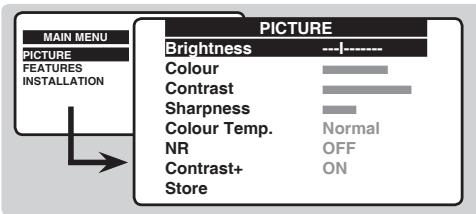
Use the keys to select a setting and keys to adjust.
3 Once the adjustments have been made select Store and press > to store them.
4 Press (MEN) several times to exit the menus.
Description of the adjustments :
- Brightness : this changes the picture brilliance.
Colour : this changes the intensity of the colour. - Contrast : this changes the difference between the light and dark tones.
- Sharpness : this changes the picture definition.
- Colour Temp.: this changes the colour rendering: Cold (bluer), Normal (balanced) or Warm (redder).
- NR (Noise Reduction): reduces picture noise (snow), in the case of difficult reception.
- Contrast+: automatically adjusts contrast of the picture by making the darkest part of the picture permanently black.
- Store : to store the picture adjustments.
Timer function
This menu lets you use the TV set as an alarm clock.
From the MAIN MENU, Highlight FEATURES and press the cursor right key.
2 Highlight TIMER and press the cursor right key.
The following items will be displayed:
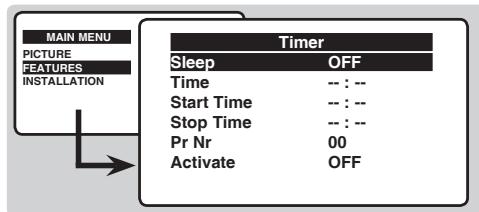
3 Sleep : to select an automatic standby period.
Time: enter the current time.
5 Start Time: enter the start time.
Stop Time: enter the stop time.
Program No.: enter the number of the desired programme for the wake-up alarm.
Activate : you can set :
- Once for a single alarm,
- Daily for each day,
- Off to cancel.
Press to put the TV set in standby. It will automatically come on at the time programmed. If you leave the TV set on, it will just change programmes at the time entered (and go into standby mode at the Stop Time).
TV lock
This menu lets you block use of the TV set.
From the MAIN MENU, Highlight FEATURES and press the cursor right key.
2 Highlight CHILDLOCK and press the cursor right key.
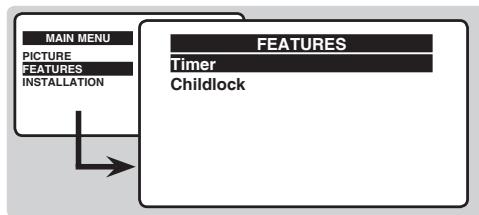
3 You must enter your secret access code. The first time, key the code 0711. The menu is displayed.
The next time you switch on the TV set, you must enter your secret access code to access the programmes.
To cancel switch Child Lock to OFF.
To change the code select New Code and enter a new 4 figure code. Confirm by entering a second time. If you have forgotten your secret code, enter the universal code 0711.
7 Press (MEN) several times to exit the menus.
Teletext
Teletext is an information system broadcast by certain channels which can be consulted like a newspaper. It also offers access to subtitles for viewers with hearing problems or who are not familiar with the transmission language (cable networks, satellite channels, etc.).
| Press: | You will obtain: | ||
| Teletext call | This is used to call teletext, change to transparent mode and then exit. The summary appears with a list of items that can be accessed. Each item has a corresponding 3 digit page number. If the channel selected does not broadcast teletext, the indication 100 will be displayed and the screen will remain blank (in this case, exit teletext and select another channel). | ||
| 0/9 | Selecting a page | Enter the number of the page required using the ① to ⑨ or -P + keys. Example: page 120, enter ① ② ⑩. The number is displayed top left, the counter turns and then the page is displayed. Repeat this operation to view another page. If the counter continues to search, this means that the page is not transmitted. Select another number. | |
| Direct access to the items | Coloured areas are displayed at the bottom of the screen. The 4 coloured keys are used to access the items or corresponding pages. The coloured areas flash when the item or the page is not yet available. | ||
| Contents | This returns you to the contents page (usually page 100). | ||
| Enlarge a page | This allows you to display the top or bottom part of the page and then return to normal size. | ||
| Stop sub-page acquisition | Certain pages contain sub-pages which are automatically displayed successively. This key is used to stop or resume sub-page acquisition. The indication ③ appears top left. | ||
| Hidden information | To display or hide the concealed information (games solutions). | ||
Connecting peripheral equipment
Video recorder
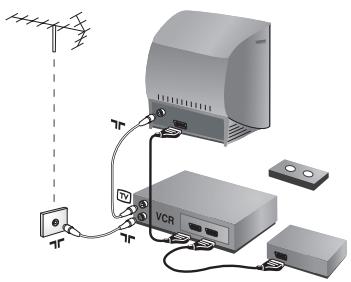
Carry out the connections shown opposite, using a good quality euroconnector cable.
If your video recorder does not have a euroconnector socket, the only connection possible is via the aerial cable. You will therefore need to tune in your video recorder's test signal and assign it programme number 0 (refer to manual store, p. 6). To reproduce the video recorder picture, press ①
Video recorder with decoder
Connect the decoder to the second euroconnector socket of the video recorder. You will then be able to record scrambled transmissions.
Other equipment
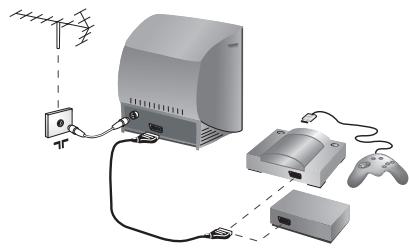
Satellite receiver, decoder, games, etc.
Make the connections as shown opposite.
Front panel connectors (only available on certain versions)
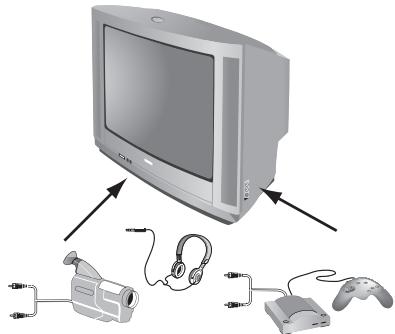
Depending on the versions, the connectors are located on the front (sometimes under a flap) or on the right-hand side of the TV set. Make the connections as shown opposite.With the key, select EXT (and AV).
Headphones
When headphones are connected, the sound on the TV set will be cut. The keys are used to adjust the volume level.
The headphone impedance must be between 32 and 600 Ohms.
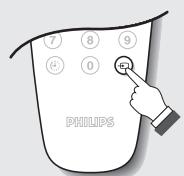
To select connected equipment
Press the key to select EXT (and AV) for the side connections.
Most equipment (decoder, video recorder) carries out the switching itself
Glossary
RGB Signals :
These are 3 Red, Green and Blue video signals which directly drive the red, green and blue emitters in the cathode ray tube.
Using these signals provides better picture quality.
NICAM sound :
Process by which digital sound can be transmitted.
System :
Television pictures are not broadcast in the same way in all countries. There are different standards: BG, DK, I, and L L'. The SYSTEM setting (p. 6) is used to select these different standards. This is not to be confused with PAL or SECAM colour coding. Pal is used in most countries in Europe, Secam in France, Russia and most African countries. The United States and Japan use a different system called NTSC.
Safety Information: Electric, Magnetic and Electromagnetic Fields ("EMF")
I. Philips Royal Electronics manufactures and sells many products targeted at consumers, which, like any electronic apparatus, in general have the ability to emit and receive electro magnetic signals.
2. One of Philips' leading Business Principles is to take all necessary health and safety measures for our products, to comply with all applicable legal requirements and to stay well within the EMF standards applicable at the time of producing the products.
3. Philips is committed to develop, produce and market products that cause no adverse health effects.
4. Philips confirms that if its products are handled properly for their intended use, they are safe to use according to scientific evidence available today.
5. Philips plays an active role in the development of international EMF and safety standards, enabling Philips to anticipate further developments in standardization for early integration in its products.
Tips
| Poor reception | The proximity of mountains or high buildings may be responsible for ghost pictures, echoing or shadows. In this case, try manually adjusting your picture : see Fine Tuning (p.6) or modify the orientation of the outside aerial. Does your antenna enable you to receive broadcasts in this frequency range (UHF or VHF band)? In the event of difficult reception (snowy picture) switch the NR on the Picture menu to ON (p.7). |
| No picture | Have you connected the aerial socket properly? Have you chosen the right system? (p.6). Poorly connected euroconnector cables or aerial sockets are often the cause of picture or sound problems (sometimes the connectors can become half disconnected if the TV set is moved or turned). Check all connections. |
| Peripheral equipment gives a black and white picture | To play a video cassette, check that it has been recorded under the same standard (PAL, SECAM, NTSC) which can be replayed by the video recorder. |
| Remote control | The TV set does not react to the remote control; the indicator on the set no longer flashes when you use the remote control? Replace the batteries. |
| No sound | If on certain channels you receive a picture but no sound, this means that you do not have the correct TV system. Modify the System setting (p.6). |
| Teletext | Are certain characters not displayed correctly? Check that the Country setting has been positioned correctly (p.5). |
| Standby | When you switch the TV set on it remains in standby mode and the indication Locked is displayed when you use the keys on the TV set? The Child Lock function is switched On (p.8). If the set receives no signal for 10 mins, it automatically goes into standby mode. In standby mode, your TV consumes less than 5W depending on model. In order to be more environmentally friendly, please use the on/off (power) switch to turn the set off completely. |
| Still no results? | If your TV set breaks down, never attempt to repair it yourself: contact your dealer's after-sales service. |
| Cleaning the set | Only use a clean, soft and lint-free cloth to clean the screen and the casing of your set. Do not use alcohol-based or solvent-based products. |
Introduction
Used to access a series of stored settings: Rich, Natural, Soft, Multimedia and return to Personal.
Snellet installation. 5
Zenders sorteren 5

m = 311 ;

m = 311

m = 311

m = 311
Osbnyia yia thv avakukawon
H ouakeuaia autou tou pioiovtoTPOOpiEaia avakukawon.
ETIKOIVWvnoTe ME TIG totIKEs apxEs yia tn owoTn diaoen.
Aiaeon Twv Taaiwv Oac oukeuwv
H ouokun oac eivai kataokuaoéevn aTou lika avakukwoiipa.
Otav auto to o nua o eva npoiov onuaive ot auto kaunite TE ATO tv
EupwnaiKn obnyia 2002/96/EC. IaInpoopnpOeIe OXETIKa To TOTTIKO
Information for users in the UK (not applicable outside the UK)
Positioning the TV
For the best results, choose a position where light does not fall directly on the screen, and at some distance away from radiators or other sources of heat. Leave a space of at least 5cm all around the TV for ventilation, making sure that curtains, cupboards etc. cannot obstruct the air flow through the ventilation apertures. The TV is intended for use in a domestic environment only and should never be operated or stored in excessively hot or humid atmospheres.
General Points
Please take note of the section entitled 'Tips' at the end of this booklet.
Interference
The Department of Trade and Industry operates a Radio Interference Investigation Service to help TV licence holders improve reception of BBC and IBA programmes where they are being spoilt by interference.
If your dealer cannot help, ask at a main Post Office for the booklet "How to Improve Television and Radio Reception".
Mains connection
Before connecting the TV to the mains, check that the mains supply voltage corresponds to the voltage printed on the type plate on the rear panel of the TV. If the mains voltage is different, consult your dealer.
Important
Should it become necessary to replace the mains fuse, this must be replaced with a fuse of the same value as indicated on the plug.
- Remove fuse cover and fuse.
- The replacement fuse must comply with BS1362 and have the ASTA approval mark. If the fuse is lost, make contact with your retailer in order to verify the correct type.
- Refit the fuse cover.
In order to maintain conformity to the EMC directive, the mains plug on this product must not be removed.
Connecting the aerial
The aerial should be connected to the socket marked at the back of the set. An inferior aerial is likely to result in a poor, perhaps unstable picture with ghost images and lack of contrast. Make-shift loft or set-top aerials are often inadequate. Your dealer will know from experience the most suitable type for your locality.
Should you wish to use the set in conjunction with other equipment, which connects to the aerial socket such as TV games, or a video camera it is recommended that these be connected via a combiner unit to avoid repeated connection and disconnection of the aerial plug.
Fitting the stand (if provided)
Use only the stand provided with the set, making sure that the fixings are properly tightened. A diagram showing how to assemble the stand is packed with the stand. Never use a make-shift stand, or legs fixed with woodscrews.

Be responsible Respect copyrights
Specifications are subject to change without notice. Trademarks are the property of Koninklijke Philips Electronics N.V. or their respective owners. 2005 © Koninklijke Philips Electronics N.V. All rights reserved.
www.philips.com
Telra PT19 mono chassis-3139 125 36951