CDCX136 - Car radio AIWA - Free user manual and instructions
Find the device manual for free CDCX136 AIWA in PDF.


| Product Type | CD Car Stereo with FM/AM Receiver |
| Brand | Aiwa |
| Model | CDC-X136 |
| Power Supply | 12 V DC, negative ground |
| Fuse | Use a fuse of the same rating (do not exceed recommended amperage) |
| Radio Bands | FM1, FM2, FM3 (same range), AM1, AM2 |
| Number of Presets | Up to 30 stations (6 per band) in automatic memory |
| CD Player | Standard audio CDs (8 cm discs not compatible) |
| Front Panel | Detachable, with carrying case included |
| Clock | Adjustable display with 12h/24h mode |
| Sound Settings | Bass (BASS), Treble (TREBLE), Balance (BAL), Fader (FAD), H-BASS |
| Auxiliary Input | 3.5 mm jack (TAPE/MD IN) |
| Mute | MUTE button |
| Indicators | ST (stereo), LO (local), RANDOM, REPEAT, etc. |
| Security Light | Flashing LED when front panel is removed |
| Included Accessories | Carrying case for front panel |
| Maintenance | Clean CDs with a soft cloth from center to edge; do not use solvents |
| Safety Precautions | Disconnect battery before installation; do not disassemble (laser radiation); avoid foreign objects |
| Compliance | FCC Part 15, Class B |
Frequently Asked Questions - CDCX136 AIWA
User questions about CDCX136 AIWA
0 question about this device. Answer the ones you know or ask your own.
Ask a new question about this device
Download the instructions for your Car radio in PDF format for free! Find your manual CDCX136 - AIWA and take your electronic device back in hand. On this page are published all the documents necessary for the use of your device. CDCX136 by AIWA.
USER MANUAL CDCX136 AIWA
For your convenience, record the model number and serial number (you will find them on the right side of your set) in the space provided below. Please refer to them when you contact your AlWA dealer in case of difficulty.
Model No. CDC-X136
Serial No.
Welcome
Thank you for your purchasing this AlWA product. To optimize the performance of this unit, please read through this manual carefully.
In addition to this operating instructions manual, be sure to refer to the separate installation and connections manuals as well.
PRECAUTIONS
This unit is designed to be operated on a 12-volt DC negative-ground electrical system only.
- To prevent short-circuiting, disconnect the negative car battery terminal until the unit has been mounted and connected completely.
- When replacing the fuse, be sure to use one whose amperage rating is identical. Use of a fuse of higher amperage may cause serious damage to the unit.
- Do NOT attempt to disassemble this unit. Laser rays from the optical pickup are dangerous to the eyes.
Make sure that pins or other foreign objects do not get inside the unit; they may cause malfunctioning, or a safety hazard such as electrical shock or exposure of laser rays.
- When your car was parked in direct sunlight resulting in a considerable rise in temperature inside the car, allow the unit to cool off before operating it.
- Keep the volume at such a level that you can hear outside warning sounds (horns, sirens, etc.).
NOTE
This equipment has been tested and found to comply with the limits for a Class B digital device, pursuant to Part 15 of the FCC Rules. These limits are designed to provide reasonable protection against harmful interference in a residential installation.
This equipment generates, uses, and can radiate radio frequency energy and, if not installed and used in accordance with the instructions, may cause harmful interference to radio communications. However, there is no guarantee that interference will not occur in a particular installation. If this equipment does cause harmful interference to radio or television reception, which can be determined by turning the equipment off and on, the user is encouraged to try to correct the interference by one or more of the following measures:
Reorient or relocate the receiving antenna.
Increase the separation between the equipment and receiver.
- Connect the equipment into an outlet on circuit different from that to which the receiver is connected.
Consult the dealer or an experienced radio/ TV technician for help.
CAUTION
Modifications or adjustments to this product, which are not expressly approved by the manufacturer, may void the user's right or authority to operate this product.
TABLE OF CONTENTS
FRONT PANEL 3
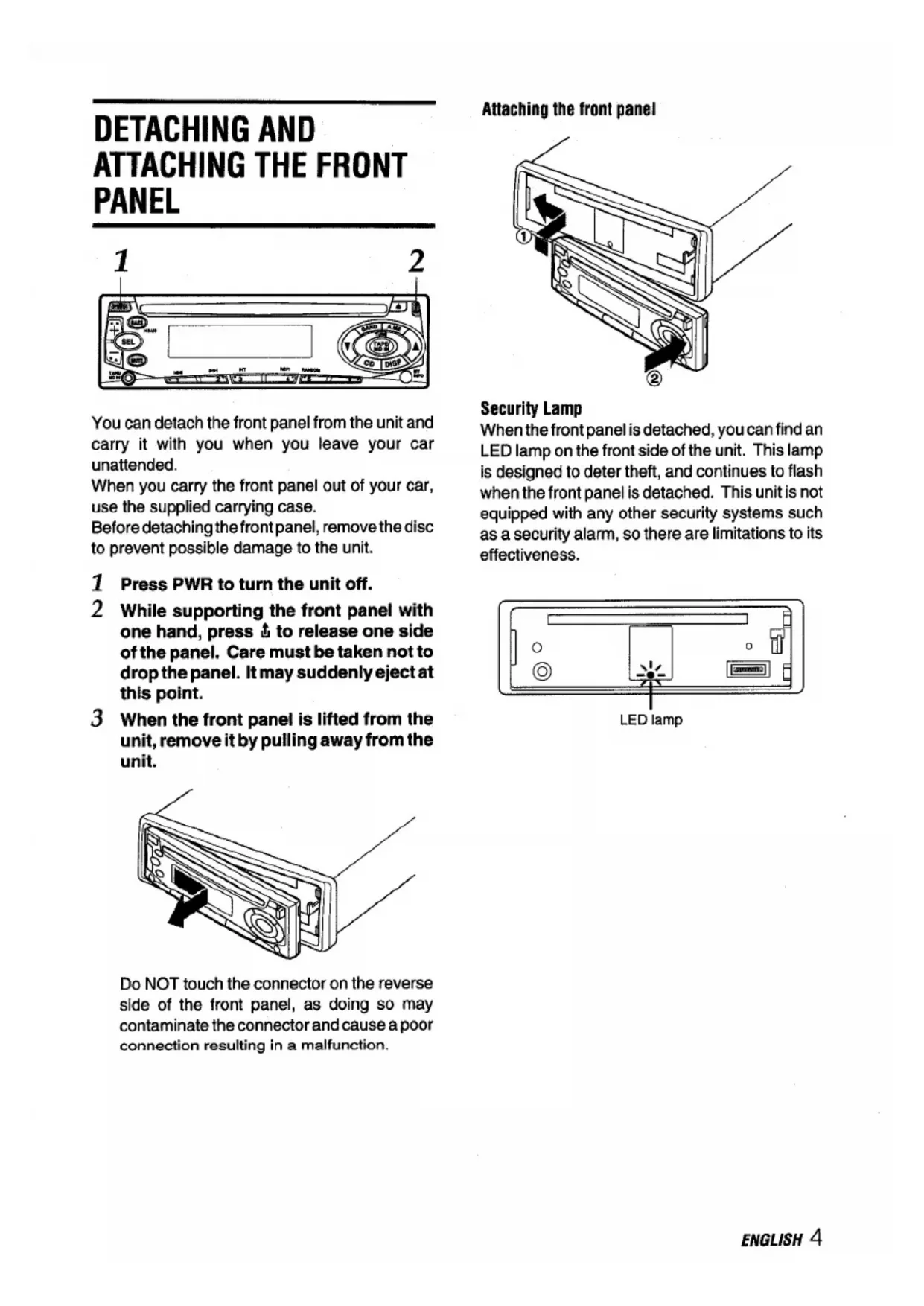
DETACHING AND ATTACHING THE FRONT PANEL 4
SETTING THE CLOCK 5
RADIO OPERATION 5
PRESETTING STATIONS 6
MY INFORMATION SWITCH 8
CD PLAY 9
SOUND ADJUSTMENTS 11
CONNECTING A PORTABLE CASSETTE/MD PLAYER OR OTHER EQUIPMENT 12
TROUBLESHOOTING 12
MAINTENANCE 13
SPECIFICATIONS 13
Notes on CDs
- A defective or soiled disc inserted into the unit can cause sound to drop out during playback.
- Handle the disc by holding its inner and outer edges.
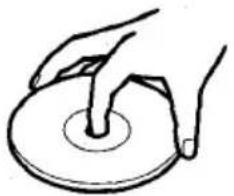
- Do NOT touch the surface of the unlabeled side of the disc.
- Do NOT stick paper or tape etc. on the surface.
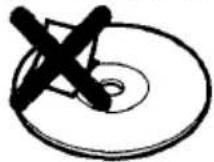
- Do NOT expose the disc to direct sunlight or excessive heat.
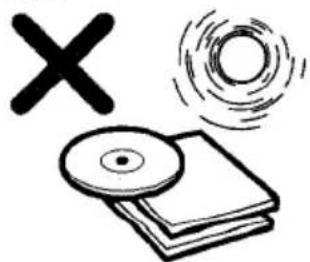
Clean the disc before playback. Wipe the disc from the center outward with a cleaning cloth.
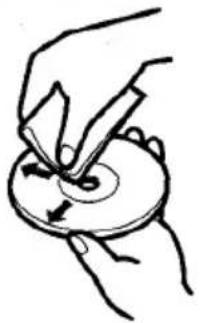
NEVER use solvents such as benzine or alcohol to clean the disc.
- Smaller 3-inch (8cm) CDs cannot be played on this unit. And do not use an adaptor as it may cause malfunctioning.
- Do NOT use irregular shape CDs (example: heart-shaped, octagonal ones). It may result in malfunction.
FRONT PANEL
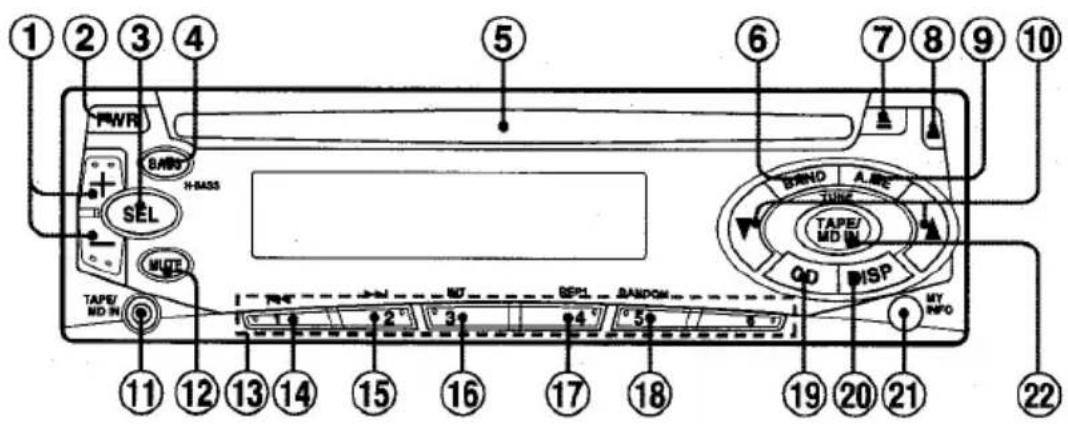
Display window
①+/- (audio control) button
② PWR (power on/off) button
③ SEL (select) button
H-BASS button
⑤ Disc compartment
⑥ BAND button
⑦ (eject)button
(8) (release) button
9 A.ME (auto memory/preset scan) button
10 TUNE V/▲ buttons
11 TAPE/MD IN jack (3.5-mm dia.)
12 MUTE button
13 Preset station buttons 1-6
(14) (back skip) button
15 forward skip) button
INT (intro) button
⑦ REP1 (repeat 1) button
18 RANDOM button
CD (CD play/pause) button
DISP (display) button
MY INFO (my information) button
2 TAPE/MD IN button
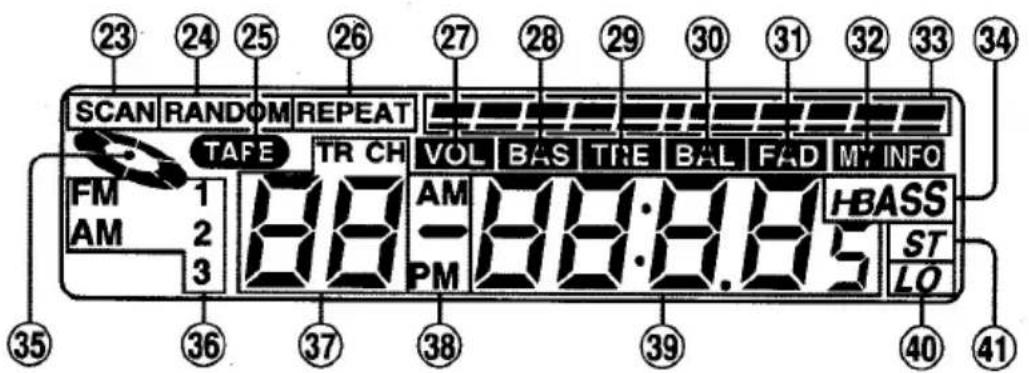
23 SCAN indicator
24 RANDOM indicator
25 TAPE indicator
26 REPEAT indicator
VOL (volume) indicator
28 BAS (bass) indicator
29 TRE (treble) indicator
BAL (balance) indicator
FAD (fader) indicator
MY INFO (my information) indicator
33 Audio control indications
34 H BASS indicator
CD indicator
36 Band indicator
37 Track/Preset number indication
38 AM/PM indicator
39 Main display section
40 LO (local) indicator
④ ST(stereo)indicator
DETACHING AND ATTACHING THE FRONT PANEL
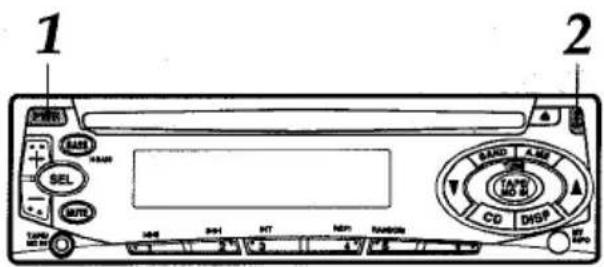
You can detach the front panel from the unit and carry it with you when you leave your car unattended.
When you carry the front panel out of your car, use the supplied carrying case.
Before detaching the front panel, remove the disc to prevent possible damage to the unit.
1 Press PWR to turn the unit off.
2 While supporting the front panel with one hand, press to release one side of the panel. Care must be taken not to drop the panel. It may suddenly eject at this point.
3 When the front panel is lifted from the unit, remove it by pulling away from the unit.
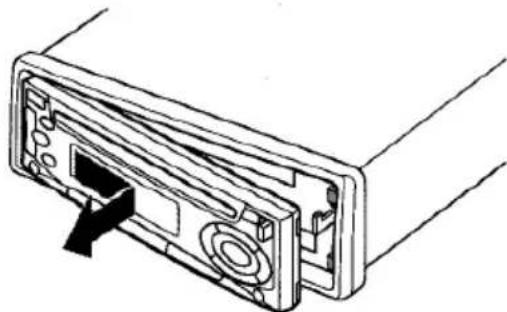
Do NOT touch the connector on the reverse side of the front panel, as doing so may contaminate the connector and cause a poor connection resulting in a malfunction.
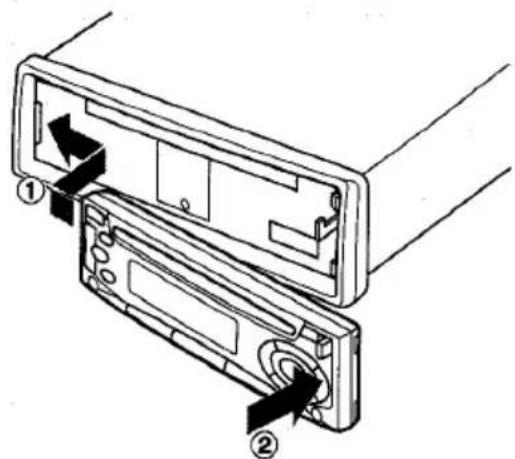
Attaching the front panel
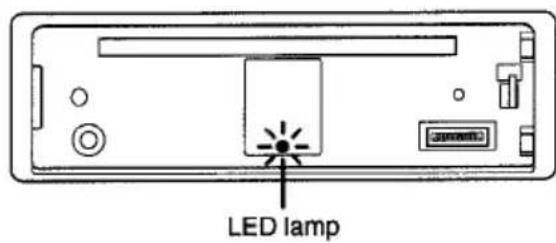
Security Lamp
When the front panel is detached, you can find an LED lamp on the front side of the unit. This lamp is designed to deter theft, and continues to flash when the front panel is detached. This unit is not equipped with any other security systems such as a security alarm, so there are limitations to its effectiveness.
SETTING THE CLOCK
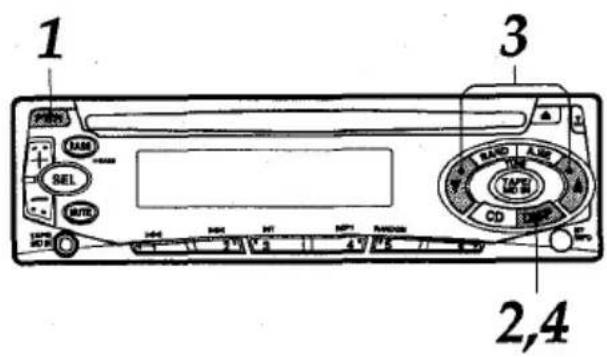
1 Press PWR to turn the unit on.
2 Press and hold DISP for more than 2 seconds.
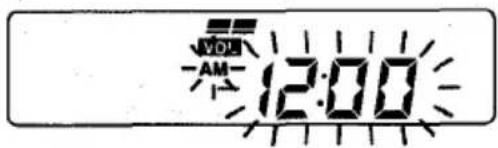
3 Press TUNE to set the hour. Press TUNE to set the minute.
4 Press DISP. The clock starts working from 0 second.
Having the clock displayed while the unit is turned on
Press DISP. To return the unit to its former display, press DISP again.
RADIO OPERATION
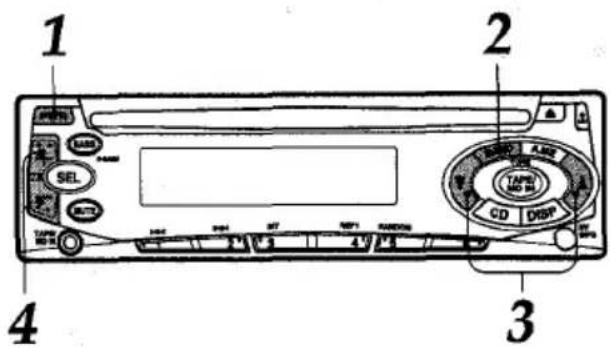
1 Press PWR to turn the unit on.
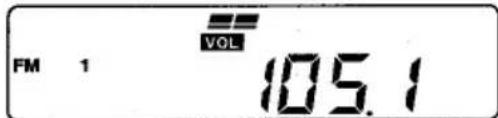
2 Press BAND to select the band from among FM1, FM2, FM3, AM1, and AM2. The band indicators appear cyclically in order.
FM1, FM2 and FM3 share the same frequency range.
- AM1 and AM2 share the same frequency range.
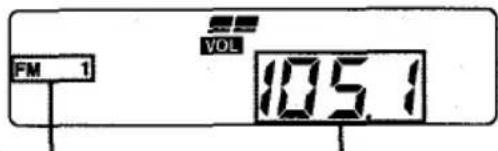
Band indicator Frequency indication
3 Press (more than 2 seconds) either TUNE or TUNE to tune in the desired station.
The unit starts scanning and tunes in a stationary automatically (seek tuning).
Press TUNE to decrease and TUNE to increase the frequency.
Press the button again to cancel the function. Repeat the procedure until the desired station is tuned in.
Note
If you press (less than 0.5 second at a time) either TUNE or TUNE, the frequency decreases or increases step by step.
4 Adjust the volume with + / -
To turn the unit off
Press PwR.
Note
The "ST" indicator lights up when the tuned-in station is broadcasting in stereo and the reception is good.
PRESETTING STATIONS
To preset stations automatically (auto memory)
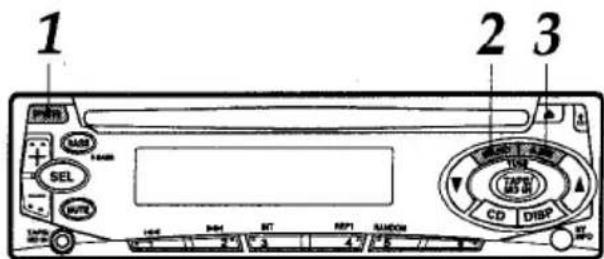
1 Press PWR to turn the unit on.
2 Press BAND to select a desired band from among FM1, FM2, FM3, AM1, and AM2.
3 Press and hold A.ME for more than 2 seconds to activate the automatic presetting function.
This unit can store up to 6 stations in memory for the preset station buttons 1 to 6 with "LO" (local) indicator lighting up.
If the unit could not search for all of 6 stations, "LO" (local) indicator goes off and starts searching for weaker stations again.
Use this function to automatically preset up to 6 stations each for FM1, FM2, FM3, AM1, and AM2 (up to a total of 30 stations).
- When auto memory is completed, the station stored in the preset station button 1 is tuned in.
- To stop auto memory, press A.ME again.
To check the preset stations (preset scan)
If you wish to check the preset stations, press A.ME for less than 2 seconds. The preset stations stored in memory will be tuned in for 5 seconds each in order.
- To stop this function, press A.ME again or press any of the preset station buttons 1 to 6.
continued

Brand : AIWA
Model : CDCX136
Category : Car radio